
Michael Branson
Your CMMC plan relies on Purview DLP to keep Controlled Unclassified Information inside its boundary, and the list of sensitive information types you just opened covers Social Security and card numbers but nothing that says CUI, ITAR or export-controlled. A boundary is only as good as the detector behind it. The scope and evidence side of that plan is covered in Microsoft 365 CMMC Compliance Consulting: Product Scope and Audit Evidence; this page covers the detectors a Purview DLP policy needs before it can recognize CUI.
Microsoft support will not build custom patterns for you or vouch that they meet your obligations, so your own test results are the evidence that they work. Microsoft keeps DLP alert records for a limited time, which decides what you export. Which information is CUI is set by your contracts and the CUI Registry, and whether your controls are enough for a CMMC assessment is your assessor’s determination, not a Purview setting.
When you search Microsoft’s list for a CUI detector, you find the gap before you find a setting. As of October 2026, the Sensitive information type entity definitions page, which Microsoft describes as “a list of all sensitive information type (SIT) entity definitions”, has no entry for Controlled Unclassified Information, ITAR, export-controlled data or DoD categories. Its entries include “U.S. social security number (SSN)”, “Credit card number”, “ABA Routing Number”, “Drug Enforcement Agency (DEA) number” and “Medicare Beneficiary Identifier (MBI) card”.
The pretrained classifiers do not fill the gap. The Trainable classifiers definitions page says “Microsoft Purview comes with multiple pretrained classifiers.”, and none of them is built for CUI. Its one export line belongs to the “Freight documents” classifier, which “Detects documents that authorize the export or import of a good in a specific quantity from source to destination.” That is customs and shipping paperwork, not export-controlled technical data.
If a summary tells you Purview detects CUI out of the box, those two lists say otherwise. Microsoft’s documented route is the custom one, set out in Learn about sensitive information types: “If the preconfigured sensitive information types don’t meet your needs, you can create your own custom sensitive information types that you fully define or you can copy one of the built-in ones and modify it.”
You cannot choose a detector until you know what your CUI looks like, and the categories are not Purview’s to define. According to 32 CFR 2002.4(h), in the eCFR current as of October 15, 2026, “Controlled Unclassified Information (CUI) is information the Government creates or possesses, or that an entity creates or possesses for or on behalf of the Government, that a law, regulation, or Government-wide policy requires or permits an agency to handle using safeguarding or dissemination controls.” According to 32 CFR 2002.4(p), “Among other information, the CUI Registry identifies all approved CUI categories and subcategories, provides general descriptions for each, identifies the basis for controls, establishes markings, and includes guidance on handling procedures.”
So the category list comes from the CUI Registry and your contracts, and which of your information is CUI is determined by your contracting officer and the contract clause, not by a detector. Where that scoping sits in the tenant decision is covered in Does CMMC Require GCC High? What the Rule Actually Requires for Defense Contractors. Export-controlled technical data is one shape a detector must recognize; the program around it is covered in Redesigning an ITAR Export-Control Compliance Program to Be Efficient, Not Just Compliant.
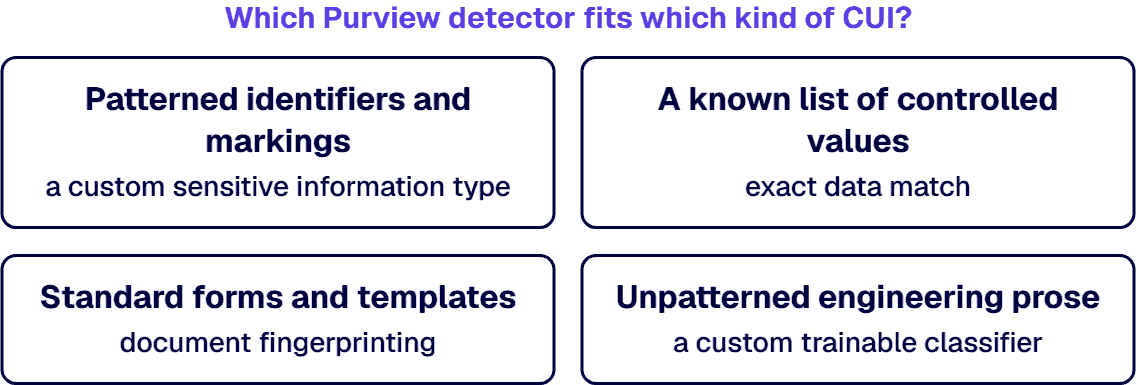
Once you know what you hold, sort it by shape, because the shape decides the detector:
If your CUI carries a recognizable pattern, such as a contract number format or a control marking, a custom sensitive information type is the first detector to build. Microsoft defines its primary element this way: “It can be a regular expression with or without a checksum validation, a keyword list, a keyword dictionary, or a function.” Microsoft adds that “The confidence level reflects how much supporting evidence is detected along with the primary element”, so nearby keywords such as a marking string or a program name are part of how the type is built.
Microsoft’s Sensitive information type limits table sets the ceilings for that build: 500 custom types created through the Microsoft Purview portal, a regular expression of up to 1024 characters, 20 distinct regexes per type and 2048 terms in a keyword list.
Plan for two consequences Microsoft states in Create custom sensitive information types. First, existing content is not found until it is recrawled: “To identify your new custom sensitive information type in existing content, the content must be recrawled.” Second, the pattern is yours to prove: “Microsoft Customer Service & Support can’t assist with creating custom classifications or regular expression patterns.” Microsoft says its support engineers can give limited assistance, such as sample patterns for simulation or troubleshooting a pattern that is not triggering, “However, they can’t provide assurances that any custom content-matching development fulfills your requirements or obligations.” Build a test set of real marked and unmarked documents, record what each type matches and misses, and keep that test report as the detector’s evidence.
When you already hold the list, such as controlled part numbers in an engineering or ERP system, exact data match checks content against those exact values rather than a pattern. According to Microsoft’s Learn about exact data match based sensitive information types, “EDM-based classification enables you to create custom SITs that refer to exact values in a database of sensitive information.” Microsoft adds that “The database can be refreshed daily and can contain up to 100 million rows of data.” and that “Only the hashed values are uploaded to the service, so your sensitive data is never in the open.”
The limit that decides whether your list works is the primary element. Microsoft states: “So that EDM can detect them, primary elements must be discoverable through an existing SIT.” and “Primary elements must follow a defined pattern in order to be detected.” So a controlled part number can anchor an exact data match type only if a sensitive information type, built in or custom, can find its pattern first. A free-text drawing title cannot.
Size the design before you build it. According to Microsoft’s Get started with exact data match sensitive information types in Microsoft Purview, “In EDM, you can create a maximum of 10 schemas.”, and “Because the new experience doesn’t support mapping multiple SITs to the same schema, you’re limited to creating and managing 10 EDM SITs.” The same page says “The system warns you if it finds a primary field mapped to a SIT that detects a broad range of values, called a loosely defined SIT.” Microsoft’s government availability for exact data match is covered in the section on what Microsoft lists for Purview DLP detectors in GCC, GCC High and DoD.
If your CUI arrives on the same forms, or lives in engineering prose no pattern describes, the detector changes. For forms, Microsoft’s Document fingerprinting page says “Document fingerprinting is a Microsoft Purview feature that takes a standard form that you provide and creates a sensitive information type (SIT) based on that form.” and “SITs created from document fingerprinting can be used as a detection method in DLP policies scoped to Exchange, SharePoint, OneDrive, Teams, and Devices.” Its examples of forms you can upload include “Government forms”.
Fingerprints have limits you must plan around. Microsoft says “Documents to be scanned can’t be password protected and must contain all the text from the original form.”, and its list of cases where fingerprinting does not detect sensitive information names “Password protected files”, “Files that contain images only”, “Documents that don’t contain all the text from the original form used to create the document fingerprint” and “Files larger than 4 MB”. The cap on fingerprints, as stated by Microsoft, is “approximately 100 fingerprints per tenant.” For devices, “To use document fingerprinting with devices, Advanced classification scanning and protection must be turned on.” And “When you set the high confidence level to Exact, only files that have exactly the same text as the fingerprint are detected.”
Fingerprinting also carries Microsoft’s one dated license note, quoted as Microsoft wrote it: “If you are an E3 customer, we recommend upgrading to an E5 license. If you choose not to, you won’t be able to modify existing fingerprints or create new ones after April, 2023.” The license decision itself belongs to Microsoft 365 E3 vs E5 Cost: What E5 Really Costs and When to Upgrade.
For prose, a custom trainable classifier is the method Microsoft describes as “well suited to content that can’t be easily identified using either the manual or automated pattern-matching methods.” in Learn about trainable classifiers. The same page sets its limits: “Language limitation: Support for custom classifiers is limited to English.” and “Retraining published custom classifiers isn’t supported.” Its note on data loss prevention is short. “Classifiers only work with items that aren’t encrypted.”
Seeding is the work. Microsoft’s Get started with trainable classifiers says “You need at least 50 positive samples (up to 500) and at least 150 negative samples (up to 1,500) to train a classifier.” and “When seeding content for training or testing custom trainable classifiers, only text-based files are supported.” A process Microsoft marks as in preview “shortens the creation workflow from 12 days to two days.”
Fingerprint the forms, classify the prose, and plan for the files Microsoft says fingerprinting misses: image-only scans and password-protected files.
If your tenant is in GCC, GCC High or DoD, read Microsoft’s government planning tables before you design around a detector. In Plan for Microsoft Purview compliance and risk management solutions: GCC High deployments, Plan for Microsoft Purview compliance and risk management solutions: GCC deployments and Plan for Microsoft Purview compliance and risk management solutions – DoD deployments, Microsoft lists “Exact data match” as “Available” in all three. Named entity sensitive information types are not yet listed as available: “On engineering backlog” in GCC High and “In development” in GCC and DoD.
For Purview DLP itself, all three tables list “Alerts dashboard and alerting experience”, “Endpoint data loss prevention”, “Files (SPO/ODB) and email” and “Teams chat and channel conversations” as “Available”. Each table carries Microsoft’s footnote: “Identified status is subject to change as project plans and priorities are reevaluated.”
The tables carry no row for custom sensitive information types, document fingerprinting or custom trainable classifiers used in Purview DLP. Microsoft’s government tables do not list them, so confirm each one in your own tenant before a design depends on it.
When the first policy that uses a new detector goes live, what you can show about that detector is only what you recorded while testing it. Test each detector against your own marked and unmarked documents before the policy that uses it is enforced; the readiness sequence around that step is set out in Microsoft Purview Deployment Guide: A Readiness Playbook for Regulated Enterprises. Tuning a policy’s thresholds once its detectors exist is a separate step, and this page does not cover it.
The alert record does not wait for you. Microsoft’s Learn about data loss prevention page says: “DLP alerts are available in the Microsoft Defender portal for six months. They’re only available in the Microsoft Purview DLP alerts dashboard for 30 days.” The same page says “You can view the last 30 days of DLP information in Activity Explorer using these preconfigured filters:” and it sets a scope limit for mail: “DLP does not scan or match previously existing email items that are stored in a mailbox or archive.”
Export what an assessor may ask for before it ages out: each detector’s test set and results, the policy configuration that uses it, and the alert records your own retention decision requires.
If one of these conditions describes your estate, settle it before you invest in detectors.
When the plan says Purview DLP holds the line and no one has yet shown what the detectors are, the work is a project with a defined end. i3solutions plans, builds and tests the Purview DLP policies that detect CUI, as project work. Ongoing DLP alert handling after the handover is a separate managed-services engagement with its own scope. This work sits within Embedding Governance into How the Enterprise Operates and Scales.
As of October 2026, Microsoft’s built-in sensitive information types and pretrained classifiers include none built for CUI, so Purview DLP needs detectors you build.
Match the detector to the data: custom types for patterns, exact data match for known values, fingerprints for forms, classifiers for prose.
Microsoft support will not build custom patterns for you or vouch that they meet your obligations, so your own test results are the evidence that they work.
Export what an assessor may ask for before it ages out: each detector’s test set and results, the policy configuration that uses it, and the alert records your own retention decision requires.

US-Based Microsoft System Integrator | Est. 1997
© i3solutions. All rights reserved.
US-Based Microsoft System Integrator | Est. 1997
© i3solutions. All rights reserved.


