

An unsupported on-premises SharePoint environment had to be retired without breaking continuity of operations.
The client is a federal international development agency committed to delivering sustainable economic growth and poverty reduction to the world’s poorest countries that are committed to just and democratic governance, economic freedom and investing in their populations. They provide time-limited grants to these countries to promote economic growth, reduce poverty, and strengthen institutions and have helped improve the lives of nearly 270 million people across 46 countries and five continents. Continuity of operations is of utmost importance to the agency and the countries they assist, and it was threatened by an outdated legacy system that was no longer supported by Microsoft: the legacy on-premises SharePoint environment the agency’s programs ran on.
The agency faced the challenge of planning and executing a migration strategy to a modern, cloud-based SharePoint environment. The risk was not the destination but the crossing. Its data structure and the customizations in its existing environment were complex enough that the agency was concerned they might not transfer cleanly to the new system. Ensuring data integrity and user adoption were issues that needed to be addressed prior to the migration, not discovered during it.
A federal development agency had to retire an unsupported on-premises SharePoint environment without interrupting its international development work. i3solutions carried out the migration through careful content discovery and data mapping, saving more than 20,000 staff hours a year.
The migration is estimated to save 15 minutes per user per day, more than 20,000 productive hours and over $200,000 in efficiency gains annually, plus roughly $500,000 a year in eliminated on-premises hosting and licensing costs.
Support Ended, but the Programs Did Not
The trigger was not a performance complaint or a feature request. It was that the platform underneath the agency’s operations had left support. An outdated legacy system no longer supported by Microsoft threatened continuity of operations, and for this agency continuity is not an internal IT concern: it is of utmost importance to the agency and to the countries they assist, whose time-limited grants run on schedules that do not pause for a platform decision.
An unsupported environment also stops being merely old and starts being exposed. The agency’s sensitive data was vulnerable to unsupported security threats, and running an unsupported system carried compliance risk exposure in the form of potential audit findings or remediation costs. Both the exposure and the operational risk pointed at the same answer: move to a supported SharePoint platform and Office 365, and do it without interrupting the work.
This agency’s customizations, forms, and workflows all survived the move off an unsupported SharePoint environment. If platform end-of-life is on your roadmap and you’re worried about losing custom work, that’s a solvable migration problem.
An Unsupported Environment Bills You Every Year
The compliance side of the ledger was the sharpest. A platform Microsoft no longer supports leaves sensitive data vulnerable to unsupported security threats, and the agency could not treat that as deferred maintenance when continuity of operations is what the countries it assists depend on. Staying put meant carrying open compliance risk exposure, in the form of potential audit findings or remediation costs, with no path on the existing platform that would close it. The destination environment carried security features the legacy system did not: data encryption, access controls, and data loss prevention policies.
The operating costs recurred on a fixed schedule too. On-premises hosting, licensing, and maintenance billed every year, and IT teams kept spending hundreds of hours patching and maintaining legacy servers. Those were annual line items paid to keep an unsupported platform alive, and the staff hours spent maintaining it were hours not spent on the agency’s programs. Measurable Outcomes below puts a figure on each of them.
Move Everything, Break Nothing, Finish Quickly
The migration approach had to satisfy several requirements at once: transition to a supported environment while protecting data and content, maintaining security and compliance, minimizing usability impacts on users, preserving functionality and features, and ensuring the migration was completed as quickly as possible. Maximizing server uptime during the move was part of the same constraint. A migration that met four of those five and dropped the fifth would not have been an acceptable outcome for an agency whose continuity of operations was the reason for the project.
The complexity was in the inventory. The existing environment held native SharePoint components, workflows, forms, third-party tools, content, and permission structures, plus customized forms created in InfoPath and a SQL Server backend holding the data. The agency’s data structure and customizations were the specific thing it feared would not transfer. Interactions from many supporting departments had to be considered, and the impact of the transition projected throughout the organization, because user adoption was a stated requirement rather than a hoped-for side effect. The destination was in scope as well as the move: the agency sought to optimize its cloud infrastructure to enhance performance and cost-efficiency throughout the migration process and beyond.
Senior Microsoft Specialists with Proven Delivery Depth
The agency needed an expert IT consultant who could perform discovery and analysis on the current on-premises SharePoint system to determine the best approach for continuity of operations and maximizing server uptime during the migration to Office 365 and a supported SharePoint platform. That is a specific profile: a team fluent in data mapping, custom integration, and user training, able to review every technical asset in a legacy environment and say with confidence what would move cleanly and what needed to be rebuilt around.
The agency engaged i3solutions, a Microsoft Partner with 30 years of delivery experience and 1,500+ Microsoft engagements, delivered by an all-senior, all US-based delivery team. On SharePoint migration specifically, i3solutions brought over 20 years of migration experience and the ability to draw on numerous lessons learned, which is what a detailed migration plan is actually built from. Those lessons showed up at the plan’s edges: the agency’s customized InfoPath forms were treated as a continuity requirement to be integrated, not a legacy artifact to be rebuilt after the cutover.
i3solutions ran the SharePoint migration to a supported SharePoint platform and Office 365: Content Discovery to identify and analyze the existing on-premises environment, data mapping of the agency’s data structure and customizations to the corresponding elements in the destination environment, and ShareGate to move large volumes of content and data.
PHASE 01
Content Discovery and Technical Asset Review
i3solutions performed discovery and analysis on the current on-premises SharePoint system to determine the best approach for continuity of operations and maximum server uptime. Content Discovery identified and analyzed the existing environment, including content, document libraries, lists, and permissions. The team reviewed all technical assets, native SharePoint components, workflows, forms, third-party tools, content, and permission structures, and considered interactions from many supporting departments.
PHASE 02
Migration Strategy and Data Mapping
i3solutions recommended a migration approach built to the constraints above, then made it concrete element by element. Data Mapping mapped the agency’s existing data structure and customizations to the corresponding elements in the destination environment, so data integrity was maintained during the migration.
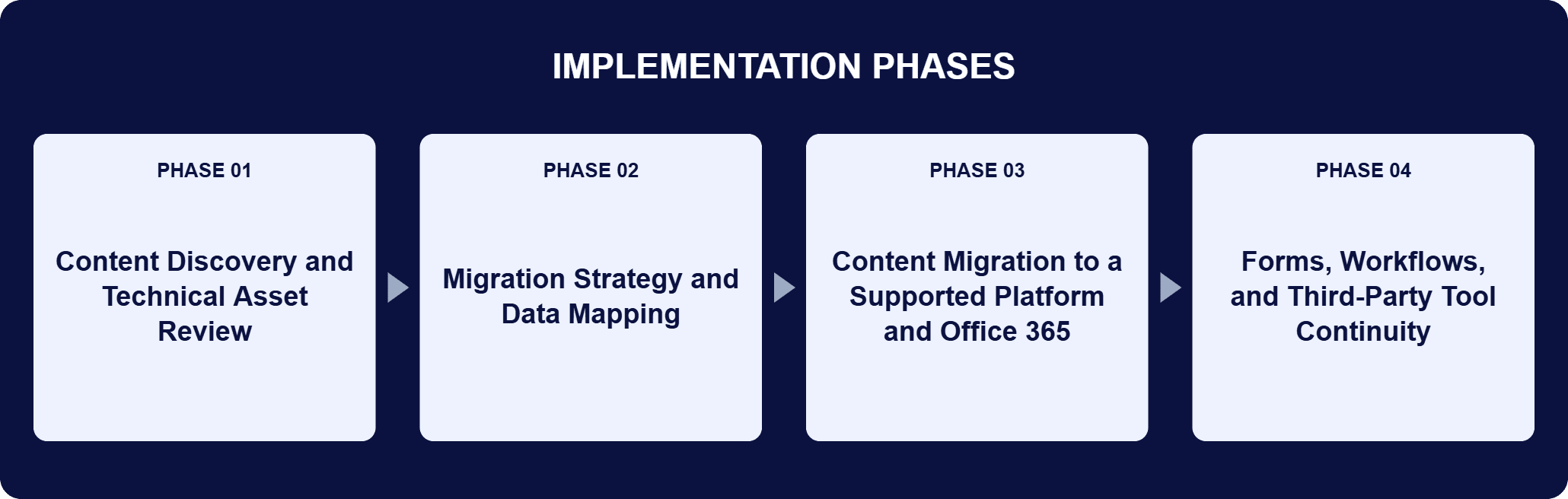
PHASE 03
Content Migration to a Supported Platform and Office 365
ShareGate moved large volumes of content and data from the old SharePoint environment to the supported platform, transferring content securely and efficiently and minimizing downtime. The agency migrated its content, sites, and data to SharePoint Online for its scalability and reliability as a cloud platform, with Office 365 providing the cloud-powered productivity layer alongside it.
PHASE 04
Forms, Workflows, and Third-Party Tool Continuity
The agency had existing customized forms created in InfoPath, and i3solutions developed an integration between SharePoint and those InfoPath forms to ensure continuity of operations after the migration. i3solutions also migrated the third-party tools used in the legacy environment and confirmed that all existing workflows continued to function as designed. Projected impact of the transition, and user training, carried adoption through the cutover.
The toolkit was small and each piece had one job. Content Discovery identified and analyzed the existing on-premises SharePoint environment, including content, document libraries, lists, and permissions, which is what made the complexity of the migration knowable before anything moved. Data Mapping then mapped the agency’s existing data structure and customizations to the corresponding elements in the destination environment, so data integrity was maintained. ShareGate, a third-party migration tool built for SharePoint migrations, moved large volumes of content and data from the old environment, transferring it securely and efficiently with minimal downtime. On the destination side, SharePoint Online provides a modern version of SharePoint with collaboration and document management capabilities, and the agency’s content, sites, and data moved there for its scalability, reliability, and cloud-based features; Office 365 supplies the cloud-powered productivity layer that works alongside SharePoint for day-to-day collaboration. SQL Server remains the backend data storage for the SharePoint environment, essential to data integrity and database connections through the transition. Customized InfoPath forms were not rebuilt: an integration between SharePoint and those forms carried them across intact.
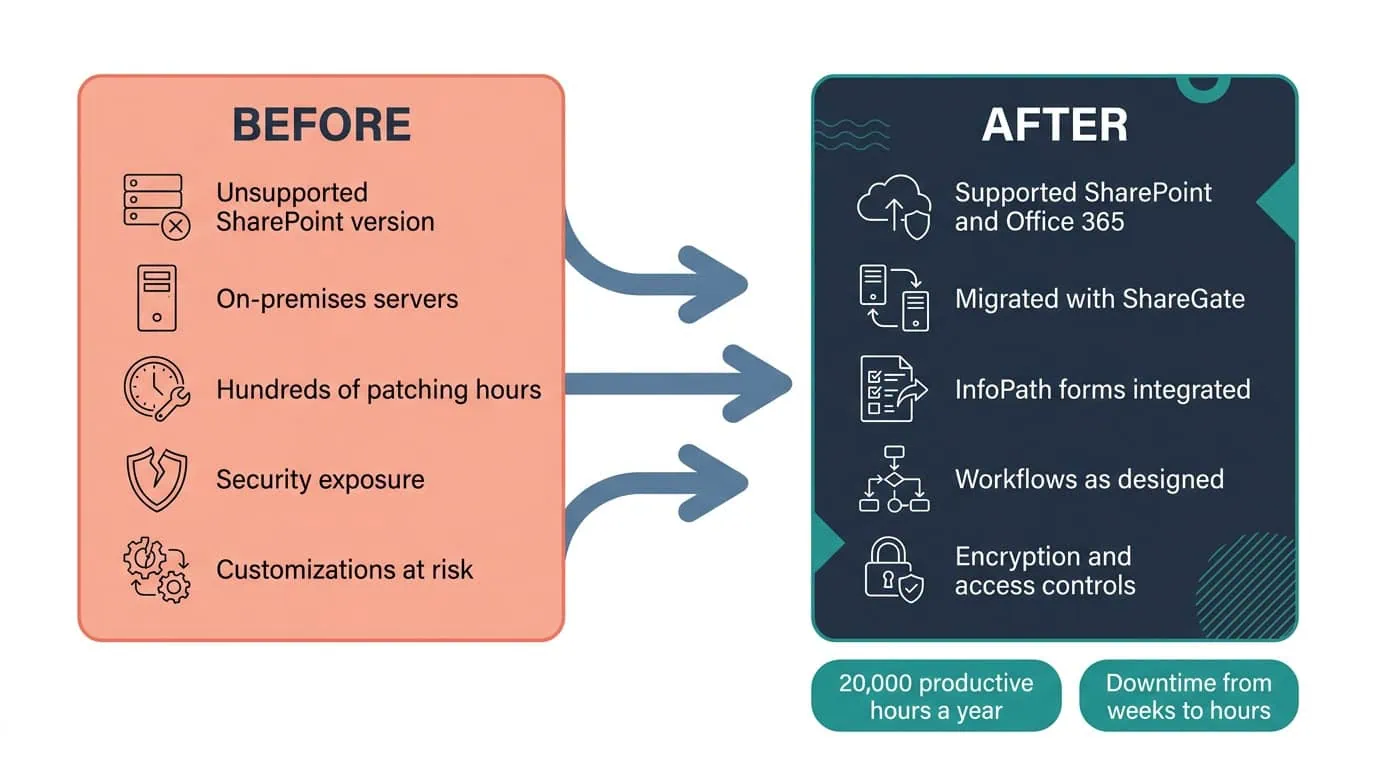
20,000+ Hours Reclaimed Annually
Moving to a supported SharePoint platform and Office 365 saved an estimated 15 minutes per user per day and roughly $500,000 a year in infrastructure cost.
| Outcome | Before | After |
|---|---|---|
| Staff productivity | Legacy on-premises SharePoint collaboration | An estimated 15 minutes saved per user per day, more than 20,000 productive hours annually, valued at over $200,000 in efficiency gains |
| Infrastructure cost | On-premises hosting, licensing, and maintenance | Approximately $500,000 per year eliminated, with cloud scalability at no additional capital expense |
| Compliance exposure | Running an unsupported system | Exposure that could have exceeded $500,000 in potential audit findings or remediation costs eliminated |
| IT labor | Hundreds of hours patching and maintaining legacy servers | $100,000 annually in reduced IT labor and support overhead |
| Migration downtime | Weeks | Just hours, using ShareGate automation |
| Platform support | An on-premises SharePoint version no longer supported by Microsoft | SharePoint and Office 365, supported and regularly updated by Microsoft |
The productivity result is the one that compounds. SharePoint’s modern collaboration features, such as real-time co-authoring and easy sharing of documents, improved collaboration among the agency’s teams, increasing productivity and shortening the path from question to decision. Agency staff save an estimated 15 minutes per user per day. Across hundreds of employees, this equates to more than 20,000 productive hours annually, valued at over $200,000 in efficiency gains. That figure recurs every year the agency stays on the modern platform, and it is paid in the currency the agency actually spends: staff time on international development programs.
Retiring on-premises infrastructure eliminated ~$500,000 per year in hosting, licensing, and maintenance costs, while enabling cloud scalability at no additional capital expense. That is recurring operating cost, not a one-time saving, and it sits alongside a separate and differently shaped item: the compliance exposure of running an unsupported system, which closed with the move rather than continuing to accrue. IT teams reclaimed hundreds of hours previously spent patching and maintaining legacy servers, equivalent to $100,000 annually in reduced IT labor and support overhead. The move itself was not paid for in downtime either: the use of ShareGate automation reduced migration downtime from weeks to just hours, avoiding tens of thousands of dollars in lost staff productivity and maintaining continuity for critical international programs.

PENDING-CLIENT-QUOTE
This engagement is relevant for
Less relevant for
Off an Unsupported Platform, onto a Supported One, with the Customizations Intact
The engagement established that leaving an unsupported SharePoint environment does not require accepting the loss of what was built on it. Content Discovery made the legacy environment knowable, data mapping carried the agency’s data structure and customizations element by element into the supported platform, and ShareGate moved large volumes of content and data securely with minimal downtime.
Customized InfoPath forms, existing workflows, and third-party tools kept working after the move. The return landed on both sides of the ledger: staff hours recovered across the agency every year, and on-premises hosting, licensing, maintenance, and patching cost retired along with the servers. Continuity of operations, the thing the agency and the countries it assists depend on, held throughout.
It is the move of an organization’s content, sites, customizations, and permissions off a SharePoint version Microsoft no longer supports and onto a supported one, in this engagement a supported SharePoint platform together with Office 365. The work is not a file copy. A legacy environment holds native SharePoint components, workflows, forms, third-party tools, content, and permission structures, and each of those has a corresponding element in the destination that has to be identified before anything moves. In this engagement that meant three defined stages: Content Discovery to identify and analyze the existing on-premises environment, data mapping of the agency’s data structure and customizations to the corresponding elements in the destination environment, and ShareGate to move large volumes of content and data. Getting to a supported version is the point, because an unsupported environment leaves sensitive data vulnerable to unsupported security threats.
With discovery and analysis of the existing on-premises SharePoint system. i3solutions reviewed all technical assets including native SharePoint components, workflows, forms, third-party tools, content, and permission structures, and Content Discovery identified and analyzed the agency’s existing content, document libraries, lists, and permissions. Data Mapping then mapped the agency’s existing data structure and customizations to the corresponding elements in the destination environment, so data integrity was maintained during the migration. Scoping also reached outside the platform: i3solutions considered interactions from many supporting departments and projected the impact of the transition throughout the organization, because user adoption was one of the issues the agency needed addressed before the migration rather than after it. That analysis is what the recommended migration approach and the detailed migration plan were built on.
They kept working. The agency had existing customized forms created in InfoPath, and i3solutions built an integration between SharePoint and those InfoPath forms to ensure continuity of operations after the migration. i3solutions also migrated the third-party tools used in the legacy environment and confirmed that all existing workflows continued to function as designed. This is where the agency’s original concern sat: it was not confident the complexity of its data structure and customizations would transfer cleanly to the new system. The answer was to establish the mapping before the move rather than discover the gaps after it, so each customization had a known destination. SQL Server remains the backend data storage for the SharePoint environment, which is what keeps data integrity and database connections sound through a transition of this kind.
ShareGate, a third-party migration tool designed to simplify SharePoint migrations. i3solutions used ShareGate to facilitate the migration of large volumes of content and data from the old SharePoint environment to the supported platform, so content was transferred securely and efficiently with minimal downtime. The tool did more than move bytes: ShareGate automation reduced migration downtime from weeks to just hours, which is what maintained continuity for critical international programs through the cutover. Two other tools framed the work around it. Content Discovery identified and analyzed the existing on-premises environment, including content, document libraries, lists, and permissions, and Data Mapping aligned the agency’s existing data structure and customizations with the corresponding elements in the destination environment so that data integrity held through the move.
The legacy system was no longer supported by Microsoft, which left the agency’s sensitive data vulnerable to unsupported security threats. Migrating off unsupported systems eliminated compliance risk exposure that could have exceeded $500,000 in potential audit findings or remediation costs. The environment the agency moved onto carried data encryption, access controls, and data loss prevention policies, and moving to a supported version protects the agency from security risks and lets the team take advantage of the latest features and improvements. It also changes the maintenance economics: keeping an unsupported environment defensible costs staff time in patching and monitoring that a supported platform does not demand, which is why IT hours reclaimed show up in the outcomes above.
The migration itself included building that inventory, cataloging which customizations, forms, workflows, third-party tools, and permission structures existed and which of them had to survive the move, rather than requiring the agency to already have a complete picture before starting. That groundwork is what let this federal development agency retire its unsupported on-premises SharePoint environment and save an estimated 15 minutes per user per day and roughly $500,000 a year in infrastructure cost.
i3solutions is a Microsoft Partner with 30 years of delivery experience and 1,500+ Microsoft engagements, with every engagement staffed by an all-senior, all US-based delivery team. On migration specifically, i3solutions brings over 20 years of SharePoint migration experience and the ability to draw on numerous lessons learned, which is what a detailed migration plan is built from rather than a template. This engagement shows the profile at work: discovery and analysis across every technical asset in a legacy environment, data mapping of a complex data structure and its customizations, an InfoPath integration that preserved continuity of operations, and third-party tools and workflows that kept functioning as designed. For organizations weighing a migration off an unsupported version, a short scoping conversation establishes what discovery would find in your environment.
Both sides of the ledger moved in this agency’s favor: recovered staff time and eliminated hosting and licensing costs. We’re glad to discuss what a comparable migration would return for your organization.

US-Based Microsoft System Integrator | Est. 1997
© i3solutions. All rights reserved.
US-Based Microsoft System Integrator | Est. 1997
© i3solutions. All rights reserved.


