

IT resources gated every workflow change, and contracts, forms, and talent processes ran on manual, error-prone steps.
The client is a national business advocacy organization representing over 3 million businesses across various sectors and regions. While striving to advance business interests and policy at all government levels, the organization encountered significant hurdles with its legacy Business Process Management (BPM) systems. Those systems struggled with integration into modern enterprise applications, lacked the scalability to support increasing demands, and relied heavily on manual, time-consuming processes.
The result showed up everywhere the work touched: siloed data, inefficient workflows, inconsistent user experiences, and high maintenance burdens, all of which hampered productivity and innovation. Contracts review, green forms, new staffing requests, new employee requests, and separation requests each ran on manual, error-prone forms, spreadsheets, and workflows. To meet the needs of a rapidly growing, technology-driven environment, the organization turned to i3solutions for help modernizing its BPM infrastructure.
A national business advocacy group’s contract and talent workflows ran on manual, error-prone steps that only IT could change. i3solutions modernized the environment onto a fault-tolerant platform and gave business users the ability to build and adjust their own workflows.
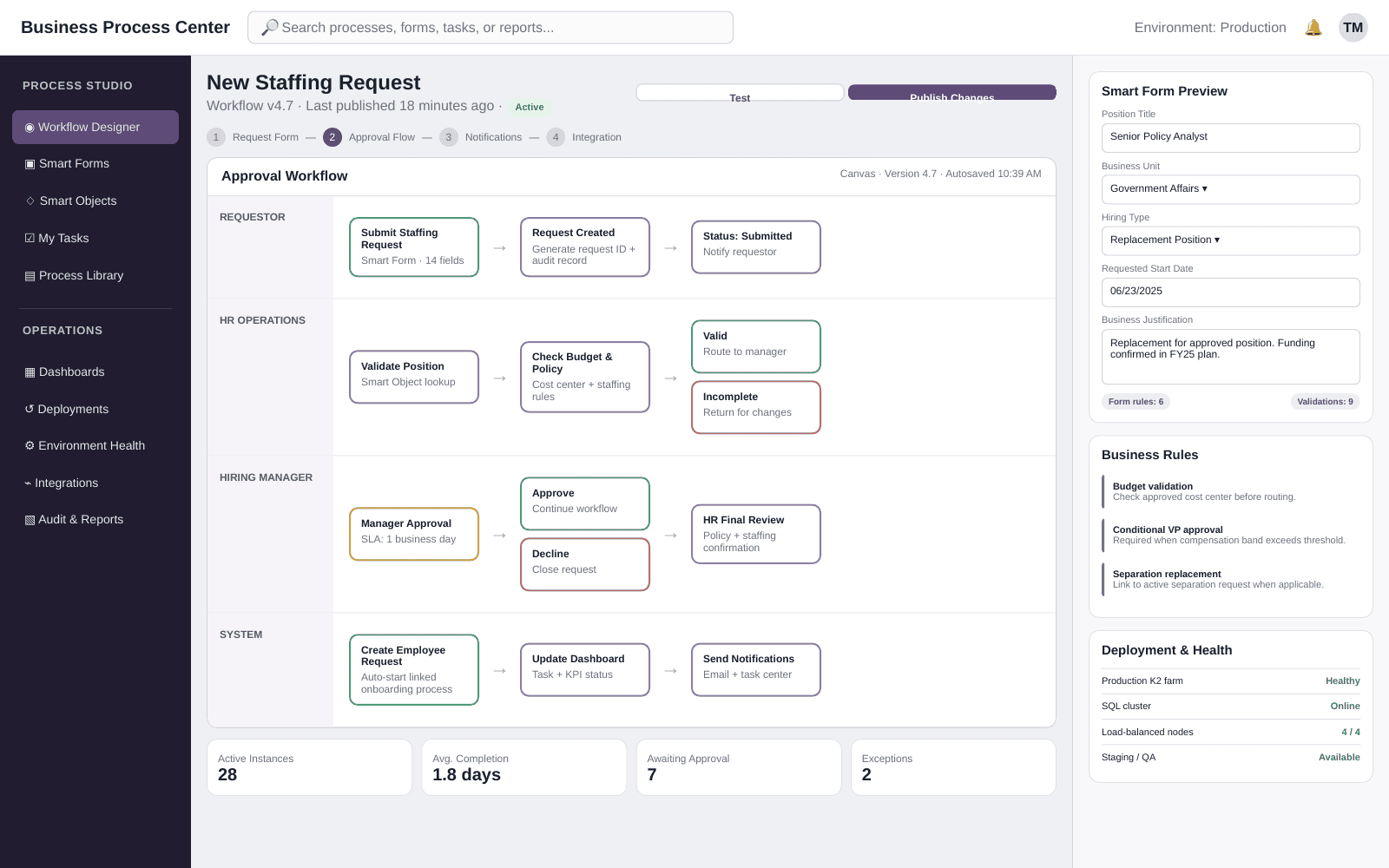
Business users now create and manage their own workflows using K2’s Smart Objects and Smart Forms, a no-code capability that ends the organization’s dependence on IT resources for routine change requests across processes like contracts review, staffing, and separation.
Every Process Change Had to Wait on IT
An advocacy organization that represents over 3 million businesses runs its own internal machinery at the same scale as its external work: contracts to review, forms to route, staff to hire, onboard, and offboard. On the legacy BPM systems, each of those ran on manual, error-prone forms, spreadsheets, and workflows, and each change to how one of them worked was an IT request. The organization was paying for expensive IT resources on every change request rather than on new capability.
That dependency was the trigger. The organization set out to reduce the dependency on manual intervention and minimize technical debt, standardize processes, and improve overall user satisfaction, so it could better serve an expanding membership base and diverse service offerings. What it needed was a BPM environment where the people who own a process can change it, and where the platform underneath does not have to be rebuilt to accept the next integration.
This engagement sequenced architecture first, dashboards second, and workflow automation last, and that order is what made the migration low-risk. If you’re weighing a BPM modernization of your own, the sequencing question is worth discussing before the platform question.
A Membership Base Growing Faster Than the Systems Behind It
The organization described its own environment as rapidly growing, and its legacy BPM systems lacked the scalability to support increasing demands. Left in place, the gap widens on its own: an expanding membership base and diverse service offerings put more contracts, more staffing requests, and more forms through the same manual handling every year, while the maintenance burden of the legacy environment keeps climbing.
The cost of standing still was not a single event but a permanent tax. Siloed data and inconsistent user experiences were already slowing the work, and the technical debt in the legacy systems made each new integration with a modern enterprise application harder than the last. Every change request continued to consume IT resources that the organization would rather have spent on the members it represents.
Modernize the Platform Without Stopping the Processes It Runs
The environment being replaced was the environment the organization was running on, so availability was a hard constraint rather than a goal. The target architecture had to be fault-tolerant at the layer that fails hardest: a SQL Server cluster so the system stays operational through a database server failure, load-balanced K2 farms, and SharePoint/web servers behind hardware load balancers, with staging/QA and production separated into their own DNS realms so changes could be proven before they reached the people using them.
The second constraint was breadth. The work spanned infrastructure upgrades, process automation, and user interface design at the same time, and it covered five distinct business processes, each with its own forms, spreadsheets, and workflow, plus a dashboard layer that had to move off SharePoint-based components. Order was the other half of the problem. The platform and the dashboards had to be right before any business process moved onto K2, because every later stage landed on them.
Senior Microsoft Specialists with Proven Delivery Depth
The requirement list defined the vendor profile precisely. The engagement needed a team that could stand up fault-tolerant SQL clustering and load-balanced K2 farms, host the result on IIS behind hardware load balancers in separate DNS realms, build ASP.NET and C# dashboards to replace SharePoint-based components, and design K2 Smart Objects and Smart Forms so that business users could take over process design afterward. That is infrastructure work and application work in the same engagement, on a system the organization could not take offline.
The organization engaged i3solutions, a Microsoft Partner with 30 years of delivery experience and 1,500+ Microsoft engagements, delivered by an all-senior, all US-based delivery team. That profile matched the work: senior engineers who have built on Windows Server, SQL Server, SharePoint Server, and IIS repeatedly, and who could sequence a seven-stage modernization so that each stage delivered something usable rather than waiting for a single cutover.
i3solutions modernized the organization’s BPM environment in a seven-stage program. Each stage addressed a specific area, from infrastructure upgrades through process automation to user interface design, and the four phases below group those seven stages in the order they were delivered.
PHASE 01
BPM System Architecture Refresh
i3solutions upgraded the existing BPM infrastructure by implementing fault-tolerant SQL clusters, load-balanced K2 farms, and SharePoint/web servers, with new DNS realms established for the staging/QA and production environments and hardware load balancers distributing traffic across the servers. This is the stage that gave the environment high availability, scalability, and interoperability, and every later stage depends on it.
PHASE 02
Dashboard Migration
The organization’s dashboards moved from SharePoint-based components to an ASP.NET web application, giving stakeholders a customizable interface for monitoring task details. The migration to standalone ASP.NET dashboards gave the organization increased control and flexibility, improving transparency and the overall user experience before any business process was touched.
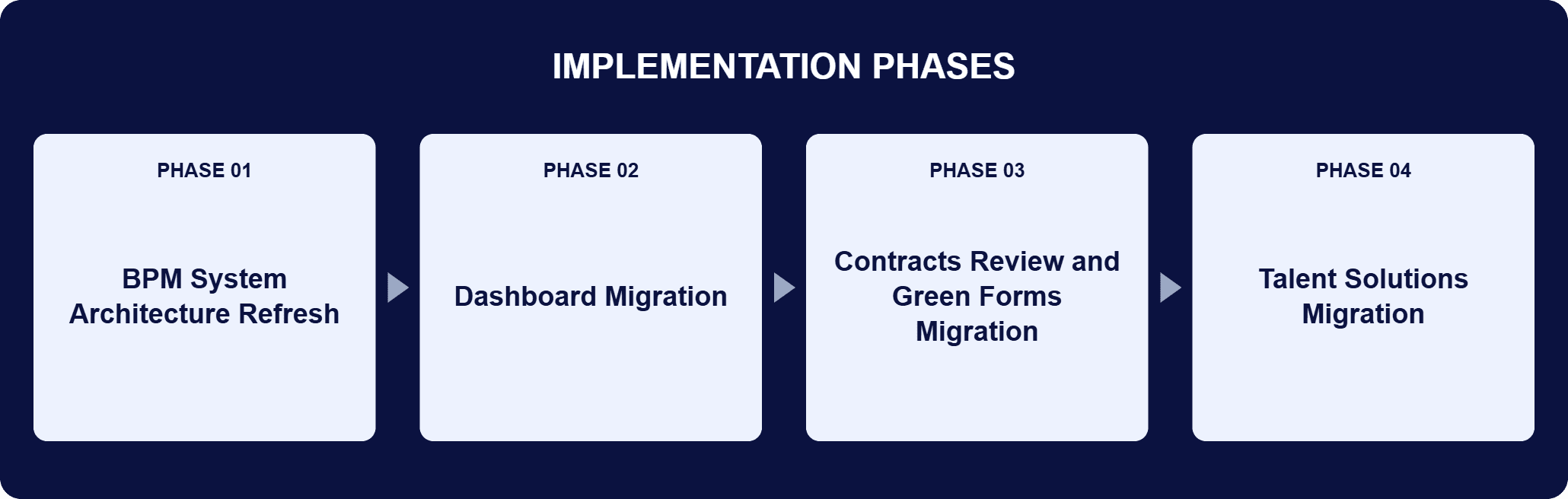
PHASE 03
Contracts Review and Green Forms Migration
The contracts review and green forms processes were rebuilt on the Nintex K2 platform, replacing manual, error-prone forms, spreadsheets, and workflows with automated, integrated ones. These two migrations covered contract management and data handling, the two areas where a mishandled form has a downstream cost.
PHASE 04
Talent Solutions Migration
New staffing requests, new employee requests, and separation requests moved onto K2, covering staffing, onboarding, and offboarding. Together with the contract and forms work, these migrations reduced manual interventions, increased transparency, and made processing of the organization’s business functions faster.
The BPM environment is a Microsoft server stack with Nintex K2 at its center. Windows Server provides the operating environment for the entire system, and Windows Cluster Manager builds the fault-tolerant architecture underneath it. SQL Server manages the data for the whole BPM environment, deployed as a fault-tolerant cluster so the system stays operational through a database server failure and access to critical data stays consistent. SharePoint Server is the collaboration hub where users interact with BPM data and forms, and Microsoft Office is integrated into that environment through Office Online, so documents are viewed, edited, and approved without leaving the BPM system. Nintex K2 runs the business process workflows, integrates the data objects, and designs the forms; its Smart Objects and Smart Forms are what make process design no-code, so business users create and manage workflows themselves. IIS 10.0 hosts the system and its components, including the K2 workflows and dashboards. ASP.NET and C# carry the backend logic behind the dashboards and process forms, with HTML, JavaScript, and jQuery on the front end. Staging/QA and production sit in separate DNS realms behind hardware load balancers.
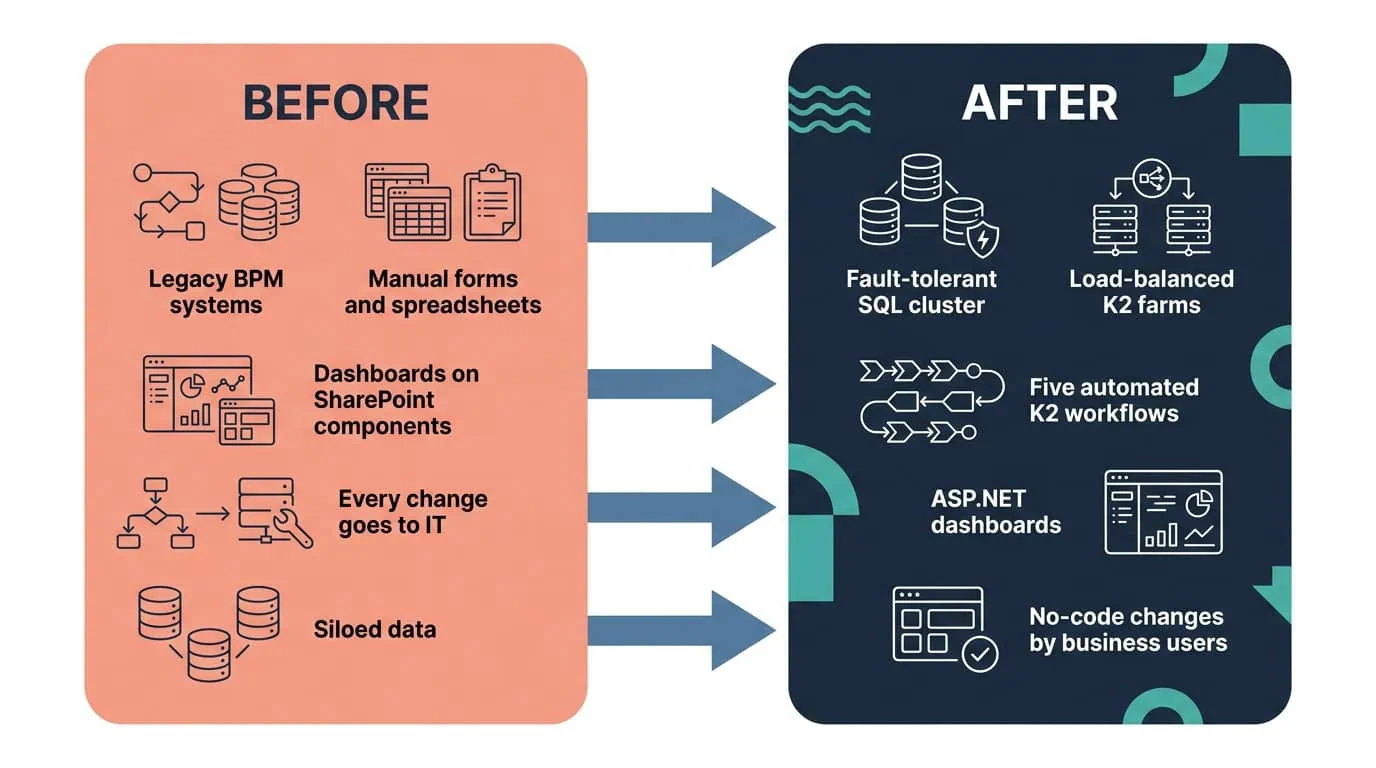
Workflows Business Users Can Build Themselves
K2 Smart Forms put workflow creation in business users’ hands and replaced siloed, manual processes with automated ones on a fault-tolerant platform.
| Outcome | Before | After |
|---|---|---|
| Workflow changes | Every change request depended on IT resources | Business users create and modify workflows themselves through K2 Smart Forms |
| Contracts review, green forms, staffing, new employee, and separation requests | Manual, error-prone forms, spreadsheets, and workflows | Automated, integrated processes on the Nintex K2 platform |
| Task visibility | Siloed data, inefficient workflows, and inconsistent user experiences | ASP.NET dashboards giving stakeholders real-time visibility into every active, completed, and pending task |
| Dashboards | SharePoint-based components | A standalone ASP.NET web application with a customizable interface for monitoring task details |
| Platform availability | Legacy BPM systems that struggled to integrate and lacked scalability | Fault-tolerant SQL cluster, load-balanced K2 farms, and SharePoint/web servers behind hardware load balancers |
The change with the widest reach is who can now alter a process. K2’s Smart Objects and Smart Forms support a no-code process design approach, so business users create and manage workflows themselves and the organization no longer needs to rely on expensive IT resources for every change request. The same capability shortens the path from a decision to a working process: new and modified workflows can be built and deployed as priorities change, rather than queued behind development capacity.
The second result is that stakeholders can see the work. The ASP.NET dashboards give real-time visibility into all active, completed, and pending tasks across contract reviews, green forms, and staffing requests, and the reporting and monitoring behind them let managers make decisions from current data while tasks and actions are logged, tracked, and traced. The organization states the business effect as direct cost savings, reduced administrative time, and reallocation of resources to more strategic initiatives; it does not put a figure on any of them, and no figure is claimed here.
This engagement is relevant for
Less relevant for
A Modern BPM Platform First, Then the Processes That Run on It
The engagement established that a legacy BPM environment can be modernized in stages without a single cutover, and that the order of those stages is the decision that matters most. The architecture refresh came first, putting fault-tolerant SQL clusters, load-balanced K2 farms, and SharePoint/web servers behind hardware load balancers in separate DNS realms. The dashboard migration came second, moving monitoring off SharePoint-based components onto an ASP.NET web application.
Only then did contracts review, green forms, new staffing requests, new employee requests, and separation requests move onto Nintex K2, each one replacing manual, error-prone forms and spreadsheets with an automated, integrated process. The lasting change is ownership: with K2 Smart Objects and Smart Forms, the people who run a process can change it, and the organization’s IT resources are no longer consumed by every change request.
K2 Smart Forms puts workflow creation directly in the hands of the people who own the process, not IT, so a contracts, forms, or talent workflow can be built or changed without filing a ticket and waiting in a queue. That shift is what let this national business advocacy organization move five manual processes onto a fault-tolerant BPM platform without creating a new bottleneck at IT in the process.
Contracts review, green forms, new staffing requests, new employee requests, and separation requests. The contracts review and green forms migrations covered contract management and data handling, and the talent solutions migrations covered staffing, onboarding, and offboarding, so the same platform now carries an employee’s entire lifecycle at the organization from the request to hire through separation. Each migration replaced manual, error-prone forms, spreadsheets, and workflows with automated, integrated ones. The effect of doing all five rather than one is that the manual handling did not simply move somewhere else: these targeted improvements reduced manual interventions, increased transparency, and made processing of the organization’s business functions faster across contract management, data handling, and talent operations alike.
Yes. K2 supports Smart Objects and Smart Forms, a no-code process design approach, so business users create and manage workflows themselves. The organization no longer relies on IT resources for every change request, and new or modified processes can be deployed as priorities change. That matters for two reasons. First, cost: the transition from custom forms to Smart Forms produced direct cost savings, because expensive IT resources are no longer consumed by routine process edits. Second, speed: a workflow can be modified and deployed when the need appears rather than when development capacity frees up. The IT team is still responsible for the platform underneath; what changed is who owns the process on top of it.
Windows Server with Windows Cluster Manager provides the fault-tolerant foundation, a fault-tolerant SQL Server cluster holds the data so the system stays operational through a database server failure, SharePoint Server is the collaboration hub for BPM data and forms, Nintex K2 runs the workflows and forms, IIS 10.0 hosts the web components, and ASP.NET with C# plus HTML, JavaScript, and jQuery build the dashboards and process forms. Staging/QA and production sit in separate DNS realms behind hardware load balancers. Availability therefore has two layers: clustering keeps the data tier alive through a server failure, and load balancing distributes traffic across the K2 farms and web servers so no single node carries the volume on its own. Microsoft Office is integrated through Office Online, so documents are handled inside the BPM system.
Order is the design decision. On this engagement the seven stages ran platform first, then monitoring, then processes: the architecture refresh established fault-tolerant SQL clusters, load-balanced K2 farms, and SharePoint/web servers; the dashboard migration moved monitoring off SharePoint-based components onto an ASP.NET web application; and only then did contracts review, green forms, new staffing requests, new employee requests, and separation requests move onto Nintex K2. The reason is dependency. Every migrated process runs on the K2 farms and reports through the dashboards, so a shortcut at either of the first two stages would have been paid for five times over. Staging each area separately also meant the organization received working capability throughout the program rather than at one cutover at the end.
Control and flexibility. The dashboards had been assembled from SharePoint-based components, which tied the monitoring layer to what those components could express. Rebuilding them as a standalone ASP.NET web application gave the organization a customizable interface for monitoring task details and improved accessibility, transparency, and efficiency for the people using it. The rebuilt dashboards give stakeholders real-time visibility into all active, completed, and pending tasks across contract reviews, green forms, and staffing requests, and the reporting and monitoring capabilities behind them let managers work from current data while tasks and actions are logged, tracked, and traced. ASP.NET and C# carry the backend logic, integrated with the K2 workflows, and HTML, JavaScript, and jQuery provide the interactive front end.
i3solutions is a Microsoft Partner with 30 years of delivery experience and 1,500+ Microsoft engagements, with every engagement staffed by an all-senior, all US-based delivery team. A BPM modernization is exactly the kind of work where that profile decides the outcome, because it is three disciplines at once: infrastructure (fault-tolerant SQL clustering, load-balanced K2 farms, IIS, DNS realms, hardware load balancers), application development (ASP.NET and C# dashboards replacing SharePoint-based components), and process design (K2 Smart Objects and Smart Forms built so business users can take them over). This engagement is representative: seven stages, five business processes migrated off manual forms and spreadsheets, and a platform the organization’s own people now change without filing an IT request. A short scoping conversation establishes what the equivalent program would take in your environment.
The lasting change here was giving business users the ability to modify their own workflows instead of waiting on IT for every change. If your team is still bottlenecked on IT for routine process changes, we can walk through how that transferred here.

US-Based Microsoft System Integrator | Est. 1997
© i3solutions. All rights reserved.
US-Based Microsoft System Integrator | Est. 1997
© i3solutions. All rights reserved.


