

Program status across a large, concurrent portfolio lived on paper wall charts and scattered Excel spreadsheets.
The client is a federal research agency responsible for developing new technologies and capabilities for national security. Its portfolio spans a large number of concurrent programs, each of which must be tracked from initiation through delivery, with status visible to program managers, group leadership, and the teams doing the work. The agency’s effectiveness depends on that visibility: decisions about funding, staffing, and direction are made against the current state of each program, so the tracking record has to be accurate, current, and available to everyone who needs it.
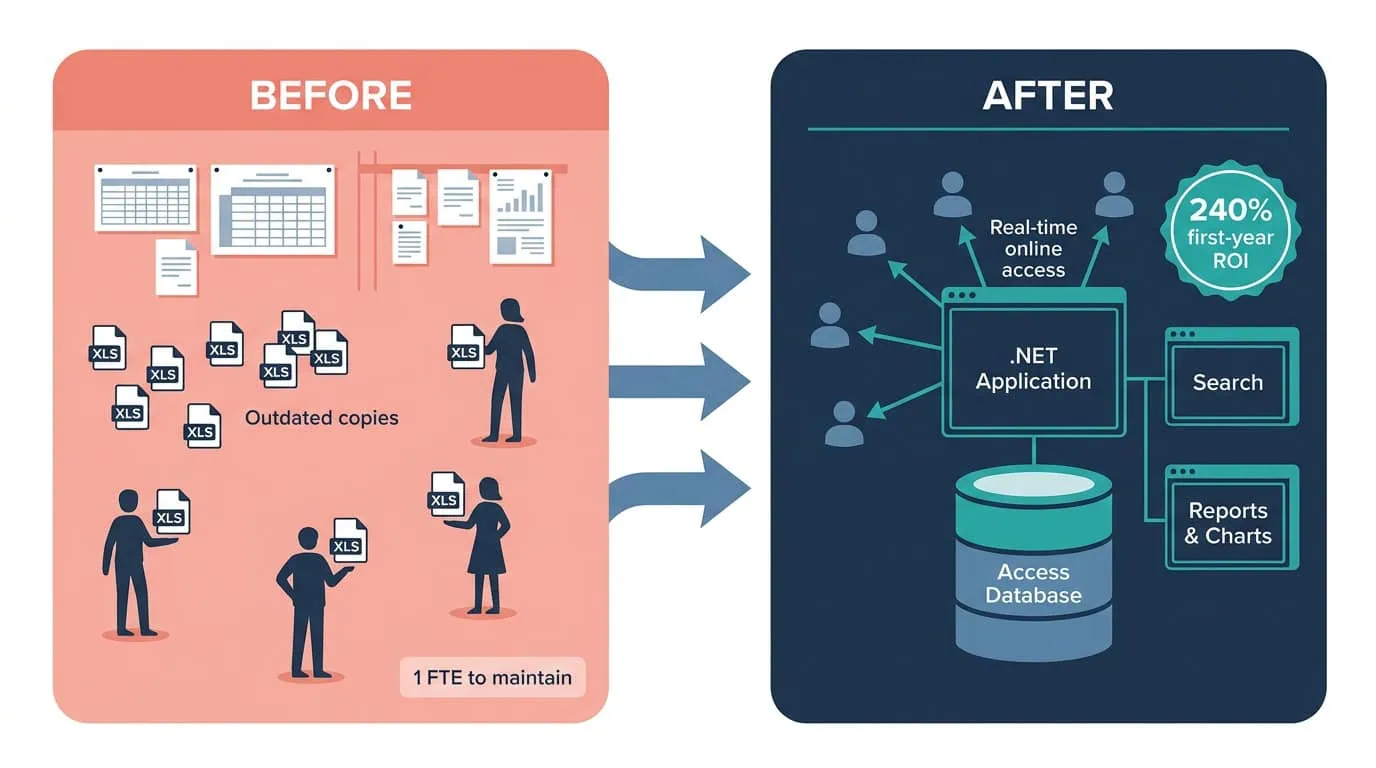
Program status was tracked on large sheets of paper displayed on office walls and in multiple Excel spreadsheets maintained by hand. Every update meant editing a chart or a spreadsheet copy, and every reader worked from whichever version they had. The system frequently produced outdated information that was not easily distributed among group members, and keeping it current consumed a combined manual effort of approximately one full-time employee. The agency needed a way to automate its tracking system to reduce manual effort and give the group more consistent information.
A federal research agency tracked dozens of concurrent programs on paper wall charts and disconnected records, leaving leadership without a common view of status. i3solutions automated program tracking into a shared database, improving tracking accuracy 240%.
The equivalent of a full-time employee’s manual tracking effort was eliminated, paper wall charts and scattered spreadsheets became one real-time online database, and program information is now consistently up to date with full-text, multi-term search and saved history.
Tracking Effort Had Become a Full-Time Job
The tracking system’s costs accumulated in two currencies. The first was labor: maintaining the wall charts and spreadsheets consumed a combined manual effort of approximately one full-time employee, spent copying, correcting, and re-posting status rather than doing program work. The second was information decay: because updates were manual and distribution was ad hoc, the information on the wall and in the spreadsheets was frequently out of date by the time anyone read it.
The problem was structural, not disciplinary. No amount of diligence makes hand-maintained duplicate artifacts stay consistent; the fix is a system where status is entered one time and every reader sees the same record. Leadership committed to automating the tracking system, with the explicit goals of reducing manual effort and giving the group more consistent information.
This agency’s program tracking lived in hand-maintained artifacts that aged faster than they could be shared; the fix was one database, entered once, read by everyone. If your organization’s tracking has the same shape, the fix is usually simpler than the problem feels.
Decisions Made Against Stale Program Data
Approximately one full-time employee of combined manual effort went into maintaining tracking artifacts, every year, for as long as the system stayed manual. That recurring labor is the cost the 240% first-year return was ultimately measured against.
The larger risk was informational. An agency whose mission is directing research programs depends on knowing the current state of those programs. When the tracking record is frequently outdated, status discussions start with reconciliation instead of decisions, and the group cannot rely on the one thing a tracking system exists to provide: a single, current, shared account of where every program stands.
Several Office Versions, One Shared System
The technical environment imposed a real compatibility constraint: several versions of Microsoft Office were in use throughout the organization. A system that worked only for users on one version would have recreated the original problem of parallel artifacts for different audiences, so cross-version compatibility had to be engineered in, not assumed.
The migration challenge was consolidating tracking that lived in disconnected wall charts and multiple spreadsheets into one shared system without discarding the outputs people relied on. The reports and charts leadership expected had to keep flowing, which is why Excel was retained for what it is good at: reporting, integrated with the new database, instead of serving as the database.
Senior Microsoft Specialists with Proven Delivery Depth
The engagement’s requirements defined the vendor profile: deep Microsoft-stack expertise across .NET, Access, Excel, and Office; the ability to refine an existing system rather than impose a rip-and-replace; and the delivery discipline to resolve cross-version compatibility issues that a less experienced team would have deferred. This was not greenfield work. It demanded a partner comfortable improving a system in production use.
The agency engaged i3solutions, a Microsoft Partner with 30 years of delivery experience and 1,500+ Microsoft engagements, delivered by an all-senior, all US-based delivery team. That profile matched the work: senior engineers who have modernized legacy tracking systems repeatedly, on exactly the Microsoft technologies the agency already ran.
i3solutions was contracted to refine the Program Database Management Solution for the agency, an engagement structured to move tracking into a single current database while keeping the outputs the group relied on.
PHASE 01
Tracking Workflow Assessment
i3solutions assessed how program status actually moved through the group: what the wall charts and spreadsheets recorded, who updated them, who read them, and where the information went stale. The assessment also cataloged the Office versions in use across the organization, defining the compatibility envelope the system had to serve.
PHASE 02
Database and Application Architecture
The solution was architected on Microsoft’s .NET framework with a Microsoft Access database holding the authoritative program record. The design goal was a deliberately compact stack: application logic in .NET, program data in Access, and reporting integrated with Microsoft Excel.
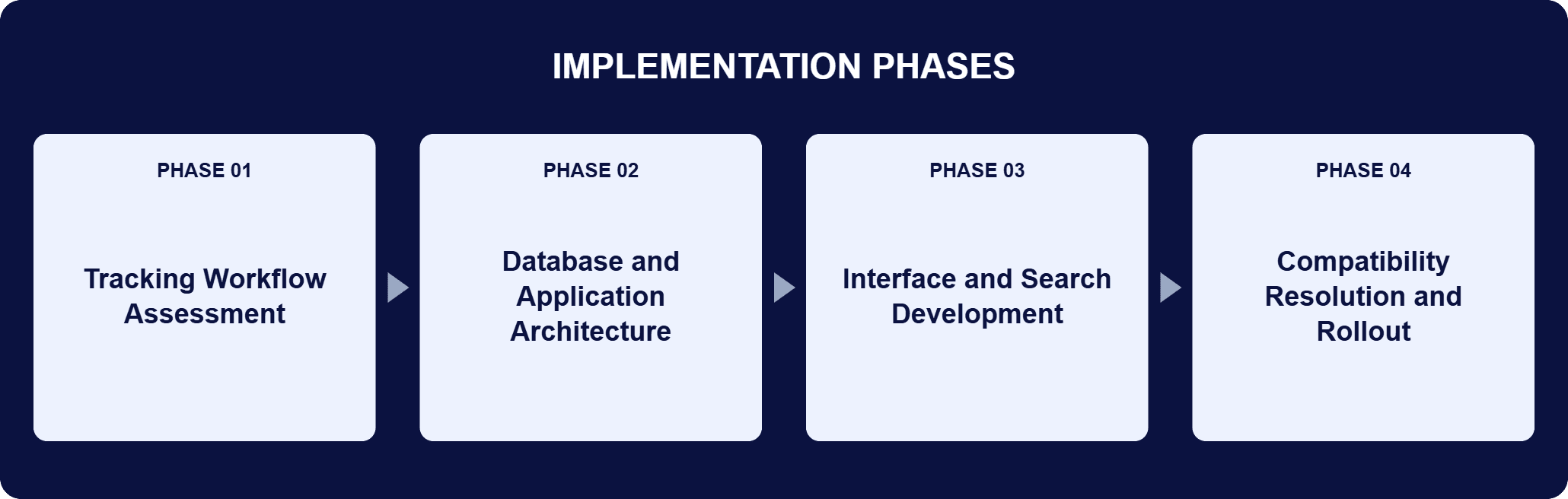
PHASE 03
Interface and Search Development
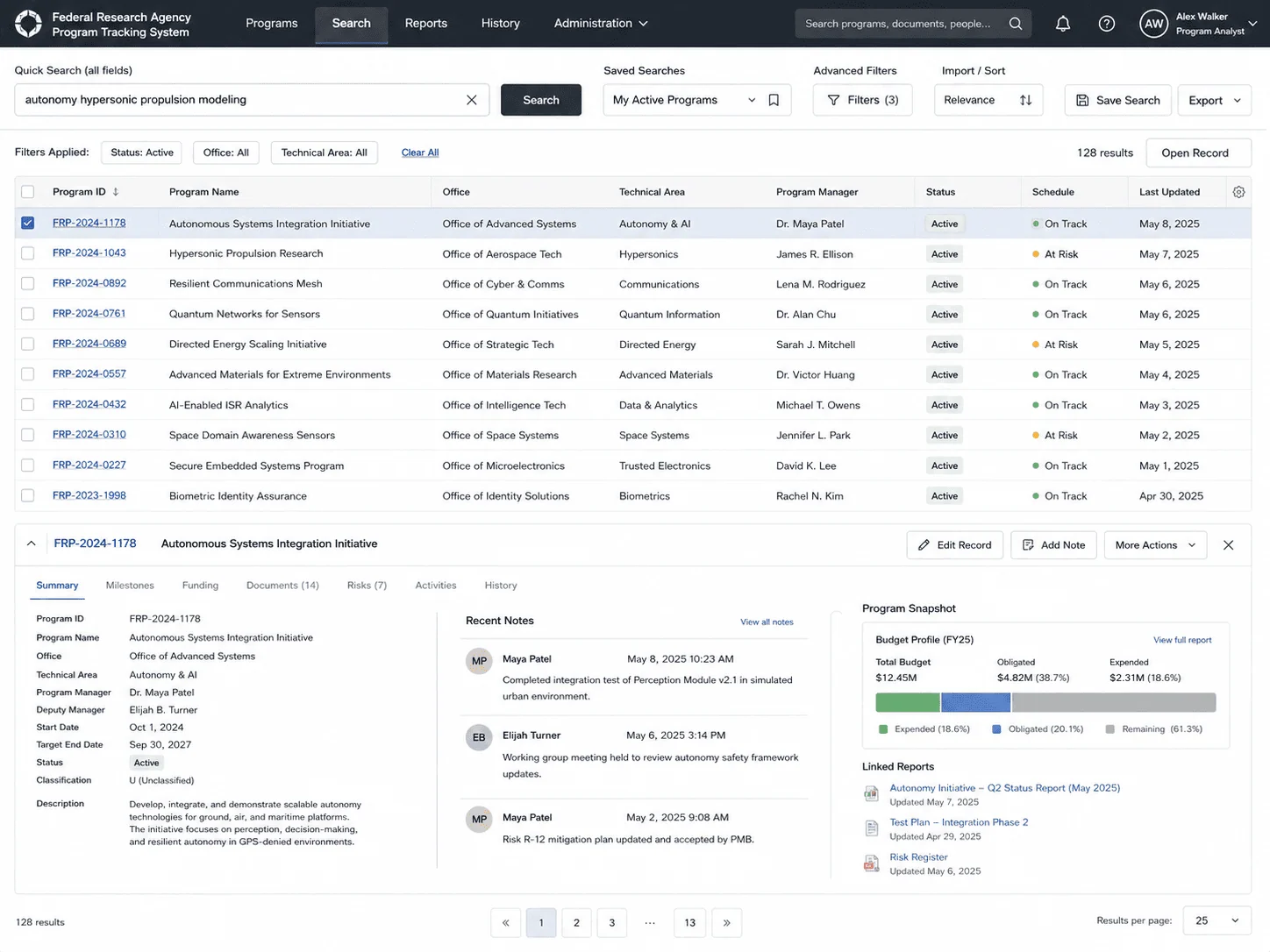
i3solutions improved the user interface design of the system and developed extensive search features: full-text search, an advanced search combining multiple terms to refine results, a component for importing and sorting search criteria, and a maintained history of previous searches.
PHASE 04
Compatibility Resolution and Rollout
i3solutions resolved the compatibility issues that existed because several versions of Microsoft Office were used throughout the organization, so every user works from the same system. Reports and charts display directly in the application, replacing the wall charts and spreadsheet copies.
The system runs on Microsoft’s .NET framework with a Microsoft Access database, and its reporting is integrated with Microsoft Excel. That compactness is deliberate: application logic in .NET, program data in one Access database entered once and read by everyone, and Excel returned to reporting duty instead of database duty. i3solutions improved the user interface design of the existing Program Database Management Solution and resolved the cross-version compatibility issues created by the several versions of Microsoft Office in use across the organization. The search layer was built out substantially: full-text search across program information, an advanced search that combines multiple terms to refine results, a component for importing and sorting search criteria, and a saved history of previous searches maintained for future use. Reports and charts display directly in the application, and advanced graphing and charting capabilities produce the status reports decision makers act on. The result is real-time online access to program information and status updates for anyone in the group, at any time.
A Full-Time Role’s Worth of Tracking, Eliminated
One real-time online database replaced manual tracking entirely, with full-text search and reporting built in.
| Outcome | Before | After |
|---|---|---|
| Manual tracking effort | Approximately one full-time employee (combined) | Eliminated |
| Program status record | Paper wall charts + multiple Excel spreadsheets | One real-time online database |
| Information currency | Frequently outdated when read | Consistent, reliable, up to date |
| Finding program information | Manual scan of charts and spreadsheets | Full-text and multi-term search with saved history |
| Status reporting | Hand-maintained charts | Reports and charts in-app, Excel-integrated |
The operational change is larger than the headline number. Program status that once lived on wall charts and in disconnected spreadsheets is entered once and read by everyone, so the group works from a single current record instead of reconciling copies. Enhanced search shortens the path to relevant information, and the graphing and charting capabilities turn the same data into status reports decision makers can act on.
The 240% first-year return was realized by eliminating the combined manual effort of approximately one full-time employee that the paper wall charts and Excel spreadsheets consumed. This is the pattern i3solutions applies in legacy modernization work: move tracking into one shared database, keep the outputs people rely on, and let Excel return to reporting duty instead of database duty.

[PENDING-CLIENT-QUOTE: Replace with approved direct or paraphrased statement from [role] at [organization type] before final publication. A missing client quote does not block publication but must be resolved within 30 days of go-live.]
[PENDING ATTRIBUTION]
[role], [organization type]
This engagement is relevant for
Less relevant for
One System of Record, Entered Once, Read by Everyone
The engagement established that neither the agency’s tracking problem nor its solution was exotic. Program status lived in artifacts that had to be maintained by hand, so information aged faster than it could be shared; the fix was one online database, entered once, read by everyone, with search and reporting built in. It also established a modernization pattern that transfers: keep the compact Microsoft stack the organization already runs, keep the outputs people rely on, resolve the compatibility issues that fragment the user base, and measure the result against the manual effort eliminated. For this agency that measurement was a 240% return on investment in the first year.
Program tracking database automation replaces hand-maintained tracking artifacts such as wall charts, status spreadsheets, and slide decks with a single online database where status is entered one time and every reader sees the same current record. The database becomes the single authoritative record: it holds current program information, makes it searchable, and produces the reports and charts that leadership reads, so the tracking record no longer depends on someone manually updating copies. For federal agencies, the value concentrates where portfolios are large and status must be shared across teams: information stays current instead of aging on paper, and the manual effort of maintaining duplicate artifacts is eliminated. In this engagement, that manual effort amounted to approximately one full-time employee, and eliminating it produced a 240% return on investment in the first year.
In this engagement, i3solutions improved the system the agency already ran rather than imposing a rip-and-replace. That meant refining the existing Program Database Management Solution: assessing how status actually moved through the group, keeping the deliberately compact stack the agency already used (.NET application logic, a Microsoft Access database, Excel-integrated reporting) and concentrating new engineering where it changed outcomes: user interface design, search, and cross-version Office compatibility. The approach keeps the outputs people rely on, so reports and charts kept flowing while the artifacts that produced stale information were retired. The measure of success is operational: one shared current record, manual tracking effort eliminated, and information that is consistent, reliable, and up to date.
The search layer was engineered to shorten the path from question to program information. It supports full-text searches across program data; an advanced search that combines multiple terms to progressively refine results; a component for importing and sorting search criteria; and a maintained history of previous searches, saved for future use. Search results connect to the same single record that everyone reads, so what you find is current, not a copy. Alongside search, reports and charts display directly in the application, and integration with Microsoft Excel plus advanced graphing and charting capabilities turns program data into polished status reports that are easy to update and distribute among team members.
In this engagement, maintaining paper wall charts and multiple Excel spreadsheets consumed a combined manual effort of approximately one full-time employee; removing that work produced a 240% return on investment in the first year. That is the right template: measure the return against the manual effort the system eliminates. The recurring nature of the saving matters: hand-maintained tracking is a cost paid every year, so the return compounds after the first. There are also returns that are real but harder to price: decisions made against current information rather than stale copies, time not spent reconciling versions, and faster access to relevant information through search. An honest ROI case starts with the measurable labor number and treats the informational gains as the reason the labor number understates the value.
i3solutions is a Microsoft Partner with 30 years of delivery experience and 1,500+ Microsoft engagements, with every engagement staffed by an all-senior, all US-based delivery team. That profile matches tracking modernization work, which is rarely greenfield: it requires refining systems in production use, on the Microsoft technologies agencies already run, and resolving the unglamorous obstacles, like cross-version Office compatibility, that determine whether every user can actually work from the same system. This engagement is representative: a compact .NET and Access solution, substantially improved search and interface, and a 240% first-year return measured against eliminated manual effort. For organizations that want to scope this class of work before committing, a short scoping conversation establishes what an automated tracking system would take in your environment.
Reports and charts display directly in the application, and integration with Microsoft Excel plus advanced graphing and charting capabilities produces polished status reports that are easy to update and distribute among team members.
Anyone in the group, at any time. The application is online and real time, so program information stays consistent, reliable, and up to date instead of aging on paper.
That return came from keeping the compact Microsoft stack this agency already ran and measuring against the manual effort it eliminated. We can talk through what a comparable return would look like for your environment.

US-Based Microsoft System Integrator | Est. 1997
© i3solutions. All rights reserved.
US-Based Microsoft System Integrator | Est. 1997
© i3solutions. All rights reserved.


