

Announcements, documents, and event updates were scattered across a national network of mentoring partners.
The client is a national faith-based nonprofit network dedicated to addressing addiction and homelessness across the United States through mentoring partnerships. Working closely with faith-based and community organizations, the network provides structured programs that help individuals rebuild their lives. Its operating model depends on communication: partners and mentors spread throughout the country must share best practices, organize resources, and manage day-to-day operations together, which means every partner needs current announcements, documents, events, and critical updates in front of them when decisions get made.
There was no central place for any of it. Without a centralized communication platform, information moved partner by partner, and dissemination was often delayed or inefficient. The consequences were concrete: missed deadlines, duplicated efforts, and partners working in isolation from one another across a network whose whole design assumes coordination. The organization needed one place to publish, a document library partners could rely on, and a way for partners to manage their own tasks and events without routing everything through the central office.
A national mentoring network’s partner organizations were missing announcements and updates scattered across disconnected channels. i3solutions built a SharePoint portal network so every partner keeps its own site while the network publishes once, centrally, to reach them all.
Partners now self-manage content in their own portals rather than routing routine updates through the organization’s staff, and events, announcements, and deadlines are tracked from a single interface across the whole network.
Information Moved Slower Than the Network Needed It
The cost of the missing platform showed up in two forms. The first was wasted motion: with no shared record of what was current, partners duplicated work that another part of the network had already done, and effort went into chasing documents instead of running programs. The second was missed timing: announcements, events, and due dates reached partners late or unevenly, so deadlines were missed not for lack of diligence but for lack of a channel that reached everyone at once.
The problem was structural. A nationwide network of independent partner organizations cannot coordinate through ad hoc distribution; it needs one place where the organization publishes and every partner reads. Leadership committed to a solution with three explicit goals: communication that reaches every partner at once, documents available on demand, and partners able to manage their own tasks and events.
A national mentoring network’s communication problem was structural: no central home for content across partners. If your organization coordinates a similar network of independent locations or partners, the same structural fix likely applies.
A Mentoring Network Losing Time to Coordination
Every hour a partner organization spent locating a current document or reconstructing an announcement was an hour not spent on mentoring. Duplicated effort and missed deadlines were recurring costs, paid across the whole network, for as long as information had no central home.
The larger risk was to the mission itself. The network exists to deliver structured programs to people rebuilding their lives after addiction and homelessness, and those programs run on coordination between community organizations. When collaboration is fragmented, the people who feel it are not the administrators; they are the individuals the programs serve. A network built on partnership cannot afford a communication system that treats each partner as an island.
Independent Partners, One Shared Platform
The network’s structure imposed the central design constraint: partners are independent community organizations spread throughout the country, each with its own events, assignments, due dates, and fundraising activity. A single undifferentiated site would have buried every partner in every other partner’s information; a fully decentralized approach would have recreated the fragmentation the engagement existed to fix.
The platform therefore had to serve two audiences at once. The organization needed one administrative site from which to publish network-wide updates, and each partner needed a dedicated environment scoped to its own responsibilities. It also had to hold up as the network grew: the design puts each new partner in its own workspace on the shared SharePoint foundation, so adding partners does not pile coordination work onto the organization’s staff.
Senior Microsoft Specialists with Proven Delivery Depth
The engagement’s requirements defined the vendor profile: deep Microsoft SharePoint expertise; the ability to design, implement, and deploy a platform shaped to how a mentoring network actually operates rather than a generic intranet; and the judgment to balance central administration against partner self-management so the platform reduces bottlenecks instead of relocating them.
The network engaged i3solutions, a Microsoft Partner with 30 years of delivery experience and 1,500+ Microsoft engagements, delivered by an all-senior, all US-based delivery team. That profile matched the work: senior Microsoft SharePoint engineers who have built collaboration platforms repeatedly, for organizations whose users are distributed, independent, and not full-time technologists.
i3solutions designed, implemented, and deployed a collaboration platform on Microsoft SharePoint, structured to give the network one place to publish and every mentoring partner a portal of its own.
PHASE 01
Network Communication Assessment
i3solutions worked from how information actually needed to move through the network: what partners and mentors had to reach (announcements, documents, events, critical updates), who published it, and where dissemination was breaking down into delay, duplication, and missed deadlines.
PHASE 02
Platform Design on SharePoint
The solution was designed on Microsoft SharePoint: a main workspace for network-wide content and a dedicated workspace for each mentoring partner, with SharePoint providing centralized storage, team-specific portals, version control, and tools for sharing documents, calendars, and tasks.
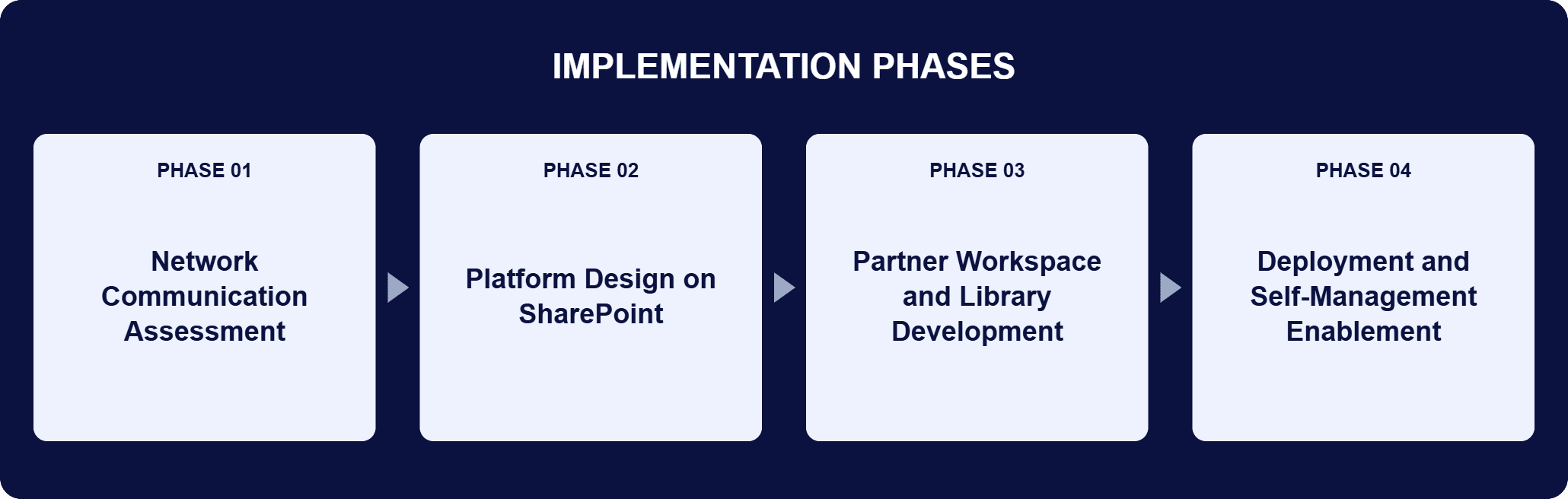
PHASE 03
Partner Workspace and Library Development
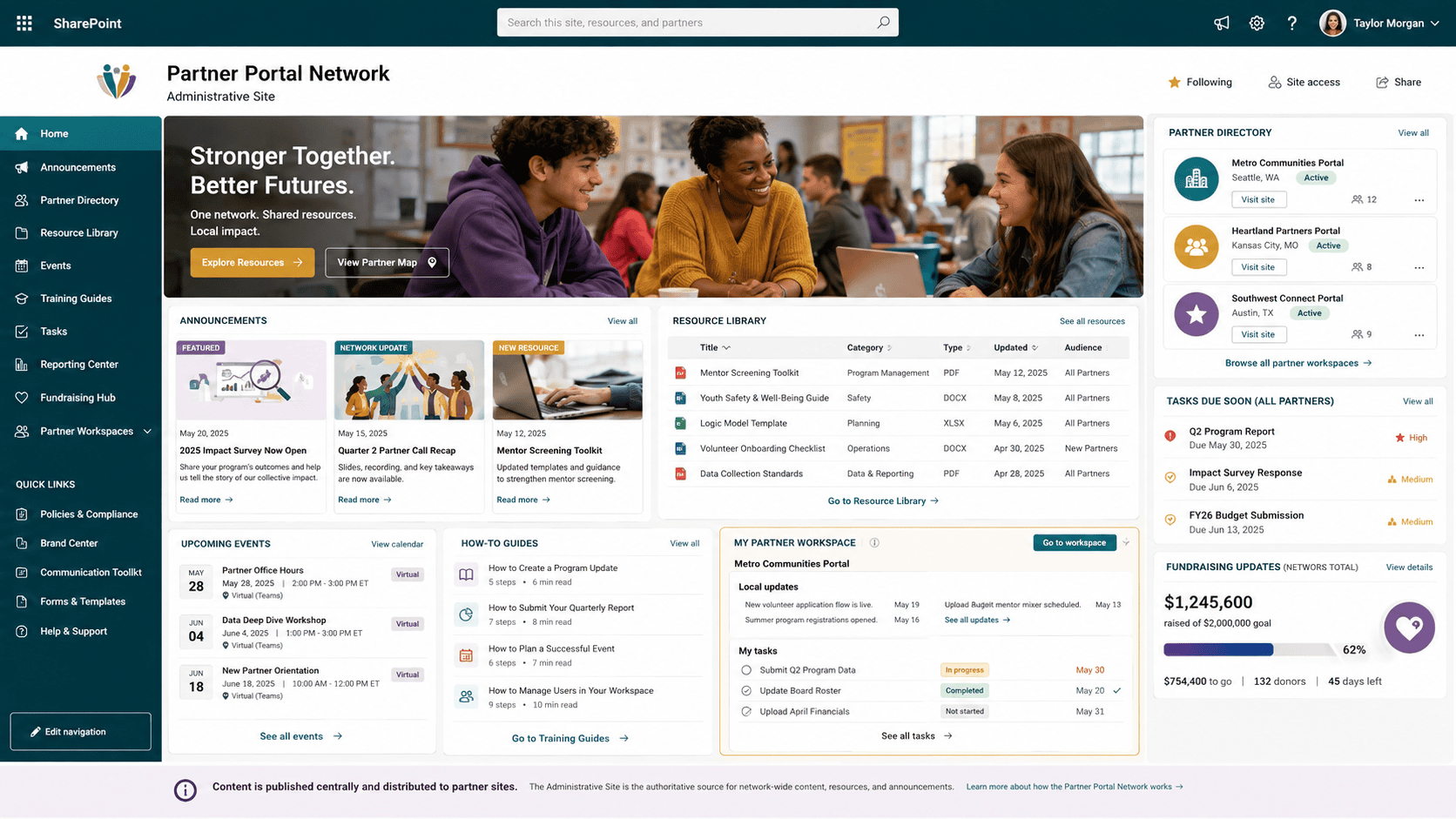
i3solutions built the partner portals, where users access and manage announcements, events, assignments, due dates, and fundraising updates, along with the centralized document library that gives partners and mentors on-demand access to critical documents.
PHASE 04
Deployment and Self-Management Enablement
The platform was deployed with administration consolidated onto a single site, routine collaboration tasks automated, and how-to guides published in the main workspace so partners can navigate the platform and self-manage the content in their own portals.
Microsoft SharePoint serves as the core platform, providing centralized storage, team-specific portals, version control, and tools for sharing documents, calendars, and tasks across the network. The architecture mirrors the organization: one main workspace holds network-wide announcements, events, resources, and how-to guides, and each mentoring partner has a customized portal scoped to its own announcements, events, assignments, due dates, and fundraising updates. The centralized document library is the single source for critical documents, so every partner reaches the latest materials from one place instead of working from outdated or misplaced copies, with version control keeping the record straight. Administration is consolidated onto a single site, and routine collaboration tasks are automated, so publishing a network-wide update is one action rather than a distribution campaign. Because partners self-manage the content in their own portals, coordination work stays distributed as the network grows: a new partner means a new workspace on the shared foundation, not a new burden on the organization’s staff.
One Administrative Site, Faster Access
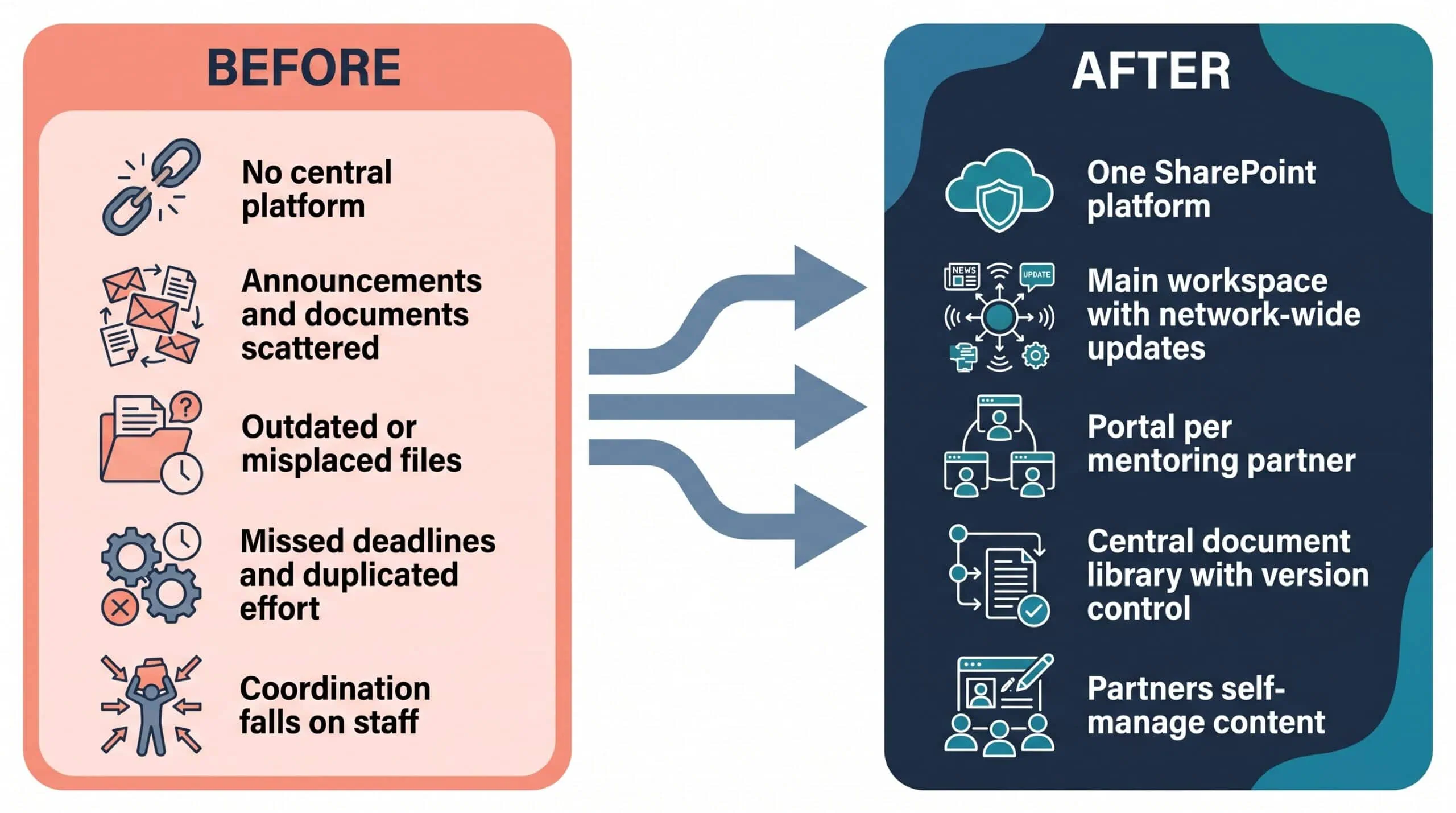
A shared document library and single administrative site replaced delayed, inconsistent dissemination across the network.
| Outcome | Before | After |
|---|---|---|
| Network-wide updates | Dissemination often delayed or inefficient | Published once from a single administrative site |
| Document access | Delays from outdated or misplaced files | On-demand access to current materials in a centralized library |
| Events, announcements, deadlines | Missed deadlines and miscommunication risk | Tracked from a single interface, per partner and network-wide |
| Partner content management | Routine updates concentrated on the organization’s staff | Partners self-manage the content in their own portals |
| Collaboration workload | Duplicated effort across partners | Routine collaboration tasks organized and automated on one platform |
The operational change is a change of shape. Information that once moved partner by partner is published once and read everywhere: the organization posts network-wide updates from a single administrative site, and each partner works inside a portal scoped to its own responsibilities. The document library removes the delays caused by outdated or misplaced files, and a single interface for events, announcements, and deadlines reduces the risk of missed opportunities or miscommunication.
The engagement’s record is qualitative; it documents what changed operationally rather than a headline number. What it does establish is where the savings come from: organizing and automating routine collaboration tasks reduces coordination time for partners and staff, and partners maintaining their own content reduces administrative bottlenecks instead of relocating them to a central team. That division of labor, one place to publish, one library for documents, and autonomy for the people closest to the content, is how the platform reduces coordination work instead of moving it.

PENDING-CLIENT-QUOTE
This engagement is relevant for
Less relevant for
Published Once, Read Everywhere, Managed by the People Closest to the Content
The engagement established that a nationwide mentoring network’s communication problem was structural, and so was its fix. Network content had no central home, so information aged and effort duplicated; the answer was one SharePoint platform with a main workspace for the network, a portal for each partner, and a shared document library everyone reads.
It also established a division of labor that scales: the organization publishes network-wide from a single administrative site, while partners maintain the content in their own portals, so growth adds workspaces rather than administrative burden. The measure here is operational rather than numeric: centralized administration, current documents on demand, and coordination time recovered for mission work.
It is a centralized communication and collaboration environment built on Microsoft SharePoint, structured around the network it serves. In this engagement, the platform consists of a main workspace holding network-wide announcements, events, resources, and how-to guides; a dedicated workspace for each mentoring partner, where users access and manage announcements, events, assignments, due dates, and fundraising updates; and a centralized document library giving partners and mentors on-demand access to critical documents. SharePoint supplies the underlying capabilities: centralized storage, team-specific portals, version control, and tools for sharing documents, calendars, and tasks. The platform replaces ad hoc distribution, where information reaches partners late or unevenly, with a single place where the organization publishes once and every partner reads a current record scoped to its own responsibilities.
In this engagement, i3solutions started from the network’s operating structure rather than a generic intranet template. The design question was who needs to see what: network-wide updates had to reach everyone at once, while each partner needed its own events, assignments, due dates, and fundraising updates without wading through every other partner’s. The answer was one main workspace plus a customized portal per mentoring partner, on a shared SharePoint foundation. i3solutions designed, implemented, and deployed the platform, consolidated administration onto a single site, automated routine collaboration tasks, and published how-to guides so partners could run their own portals. The test of the approach is where the work lands: partners maintain their own content, which reduces administrative bottlenecks instead of concentrating them on one team.
Each partner portal is a dedicated environment where users access and manage the information tied to their own role: announcements, events, assignments, due dates, and fundraising updates. Partners self-manage the content in their own portal and track individual and network-wide events, announcements, and deadlines from a single interface. The central side is deliberately thin: the organization publishes network-wide updates from a single administrative site, and the main workspace holds shared resources, including how-to guides for navigating the platform. Both roles exist by design. Dividing the work this way keeps each partner’s view scoped to its responsibilities, keeps network-wide information consistent because it is published once, and reduces the risk of missed opportunities or miscommunication that came with ad hoc distribution.
Through the centralized document library, which gives partners and mentors on-demand access to critical documents. Every partner reaches the latest materials from one place, which removes the delays that came from outdated or misplaced files. SharePoint’s version control underpins this: documents live in centralized storage with a maintained version record, so what a partner opens is the current material rather than a copy that stopped being true weeks ago. Before the platform, document availability depended on dissemination, and dissemination was often delayed or inefficient; a partner’s confidence in a file depended on when it had last been sent. After it, availability is a property of the platform: the organization maintains the library once, and access is on demand for the whole network.
The platform is built as one workspace per mentoring partner on a shared SharePoint foundation, which is what makes it customizable and scalable in practice: each new partner gets a portal configured for its own responsibilities, while network-wide announcements, events, and resources stay in the main workspace. Because partners maintain the content in their own portals, coordination work does not collect on the organization’s staff as the network grows; a new partner means a new workspace, not a new administrative burden. The how-to guides in the main workspace carry part of the onboarding load, giving new partners a documented way to navigate the platform and manage their responsibilities. Growth changes the number of portals, not the shape of the system.
i3solutions is a Microsoft Partner with 30 years of delivery experience and 1,500+ Microsoft engagements, with every engagement staffed by an all-senior, all US-based delivery team. That profile matches this class of work, where the hard part is not the technology but the fit: a collaboration platform for a distributed network succeeds only if it mirrors how the organization actually operates, balances central publishing against partner autonomy, and stays manageable by people who are not full-time technologists. This engagement is representative: a SharePoint platform with a portal per mentoring partner, a centralized document library, consolidated administration, and automated routine tasks, designed, implemented, and deployed by i3solutions. For organizations weighing similar work, a short scoping conversation establishes what a collaboration platform would take in your environment.
Yes, this is the exact structure the platform was built for. Each mentoring partner works from its own SharePoint portal and shared document library, while the network publishes announcements and updates once from a single administrative site instead of repeating the same message through every partner’s own channel. Partners keep control of their own content; the network keeps one place to manage what has to reach everyone. The platform was also built to add mentoring partners without re-architecting it, so growth is a configuration step, not a redevelopment project.
The division of labor that made this scale, central publishing paired with local portal maintenance, is what let growth add workspaces instead of administrative burden. We’re glad to talk through whether that same split would work for your network.

US-Based | Est. 1997
© i3solutions. All rights reserved.
US-Based | Est. 1997
© i3solutions. All rights reserved.


