
A single outdated file server had grown unchecked for years across a firm with multiple divisions.
A global analytical research provider, serving over 900 clients across many different industries, experienced rapid growth and international expansion. With multiple divisions and more than 150 employees across various locations, the organization faced challenges managing its critical internal documents and ensuring that teams could collaborate effectively. Its data sat on a single, outdated file server that had grown unchecked for years. As the company scaled, that centralized system became inefficient, making it difficult for employees to locate and share important files. For a firm whose product is analysis, those documents are the work itself, and a store that outgrows its own structure quietly taxes every project that depends on reaching prior work.
The organization also recognized the need for enhanced search functionality to quickly retrieve documents of various types, as well as an updated platform that could support team collaboration and project management. Its existing intranet was part of the same problem: it housed forms, links, and reports, and the organization wanted to upgrade it to provide employees with new services and a user-friendly interface that aligned with corporate branding. Three requirements, one underlying condition: everything the company knew was on a file server nobody could search, reachable through an intranet that only pointed at things.
A research provider’s 150+ employees across multiple offices depended on a single aging file server that had grown unmanageable over the years. i3solutions replaced it with a SharePoint document management platform with centralized storage and version control, improving communication 30%.
Consolidating documents into one SQL Server database integrated with SharePoint improved communication across teams and departments by 30%, and check-in/check-out approval workflows now reduce the errors and inconsistencies that came from managing files directly on the old shared server.
Growth Outpaced the File Server
The file server was not a bad decision when it was made. It became one through growth: rapid expansion, international reach, multiple divisions, and more than 150 employees across various locations, all filing into a store that had grown unchecked for years and had no structure imposed on it along the way. What changes at that scale is not the volume of documents so much as the distance between the person who wrote one and the person who needs it next.
That distance is what made the system inefficient as the company scaled, and it is what made finding and sharing important files difficult for employees. The organization concluded the answer was a platform rather than more discipline on the file server: somewhere documents could be consolidated and indexed, retrieved by search across document types, tracked as they changed, and shared inside each division without a request going to IT first.
This firm’s real issue was searchability and version control, not just where files lived. If your organization’s file server complaints sound similar, the fix usually isn’t more storage.
A Research Firm That Cannot Reach Its Own Research
Left as it was, the cost stayed proportional to growth. Every new division, location, and employee added documents to a server that had already grown unchecked for years, and every one of them widened the gap between what the organization had produced and what any individual could find. Difficulty locating and sharing important files is not a single event with a fixed price; it recurs on every project that needs prior work, and it recurs more often the larger the firm gets.
The intranet limited the alternatives. It housed forms, links, and reports, which is a directory rather than a workplace, so there was no second system that team collaboration and project management could fall back to. Serving over 900 clients across many different industries means the volume of documents is not going to fall, and neither is the number of people who need to reach them.
One Platform for the Documents, the Departments, and the Intranet
The scope had to close three gaps at once rather than one at a time. The documents needed consolidating out of the file server into a store that could be indexed and searched by document type. The organization needed a platform that supported team collaboration and project management, which the file server had never pretended to do. And the existing intranet of forms, links, and reports needed upgrading into something that offered employees new services behind a user-friendly interface aligned with corporate branding. A document repository alone would have solved a third of the problem.
The second constraint was distribution. With multiple divisions and more than 150 employees across various locations, no single shared space would fit how the organization actually worked, so each division needed its own. That in turn set a self-sufficiency requirement: employees had to be able to manage their own areas and share information with selected teams or the entire organization without relying on IT support, because routing every departmental change through a central queue reintroduces the delay the platform exists to remove.
Senior Microsoft Specialists with Proven Delivery Depth
The requirements defined the vendor profile: a team that could implement Microsoft SharePoint as a document management and collaboration platform, consolidate years of accumulated documents into a single SQL Server database integrated with it, build version control and search over that store, and stand up department portals and an upgraded intranet on the same foundation. That is platform implementation plus systems integration and data management in one engagement, not a product install, and the data layer decision had to be right the first time because the documents being moved were the organization’s working record.
The organization engaged i3solutions, a Microsoft Partner with 30 years of delivery experience and 1,500+ Microsoft engagements, delivered by an all-senior, all US-based delivery team. That profile matched the work: senior engineers who have built SharePoint document platforms and their SQL Server back ends repeatedly, and who could consolidate a file server that had grown unchecked for years without the organization losing access to what was on it.
i3solutions implemented Microsoft SharePoint as a scalable document management and collaboration platform, consolidating the organization’s critical documents into a single SQL Server database integrated with SharePoint and giving each division its own portal on top of it.
PHASE 01
Document and Intranet Assessment
i3solutions worked through what the organization actually held and where: the critical internal documents accumulated on the single file server, the document types that employees needed to retrieve by search, the forms, links, and reports the existing intranet housed, and what each of the divisions needed from a space of its own. The assessment set the consolidation scope and the portal structure.
PHASE 02
Platform and Data Layer Design
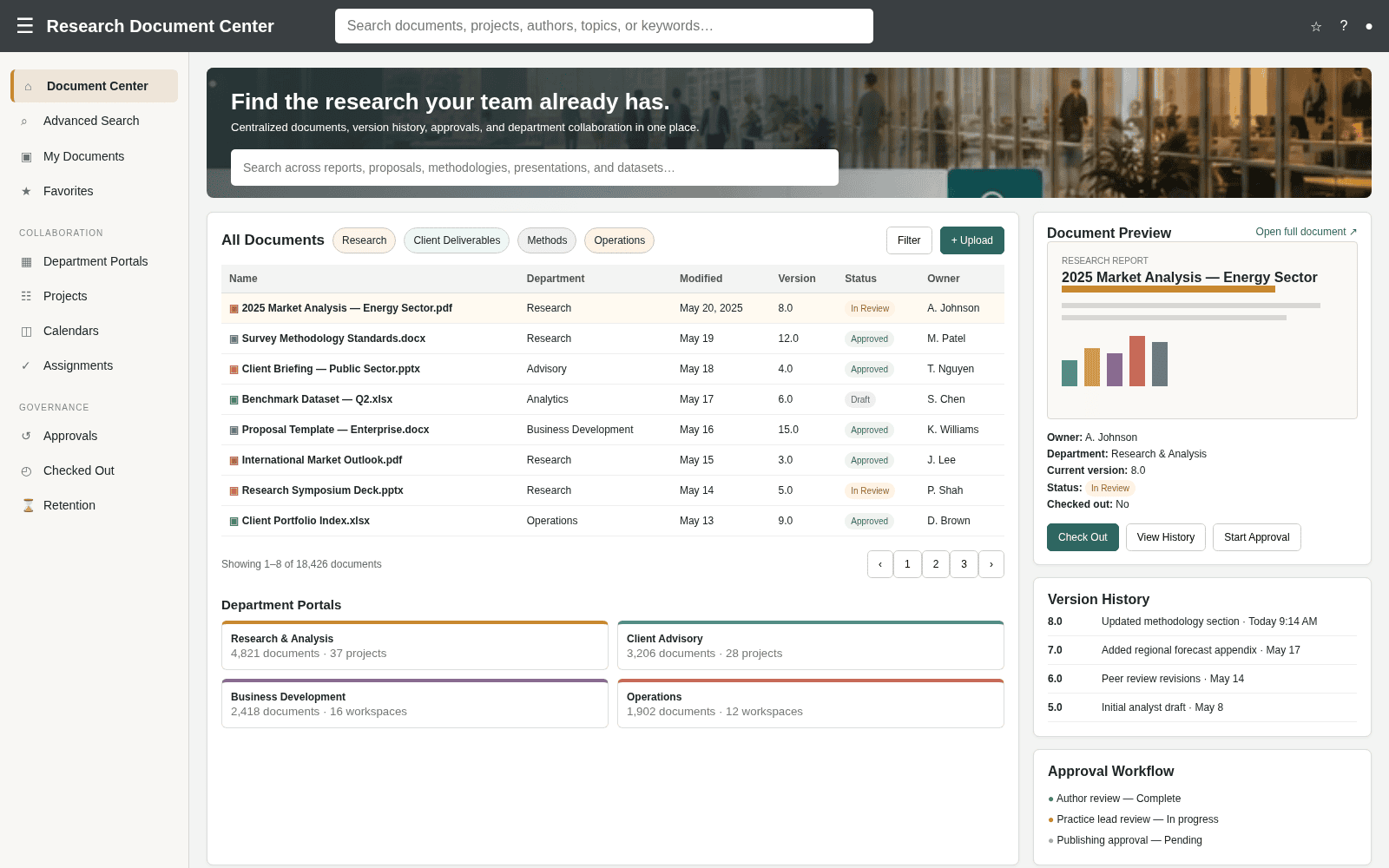
SharePoint was designed as the core of the document management and collaboration solution, with SQL Server as the primary database for storing and indexing the critical documents, which is what gives fast retrieval, secure data management, and integration between the document store and the platform rather than two systems sitting side by side.
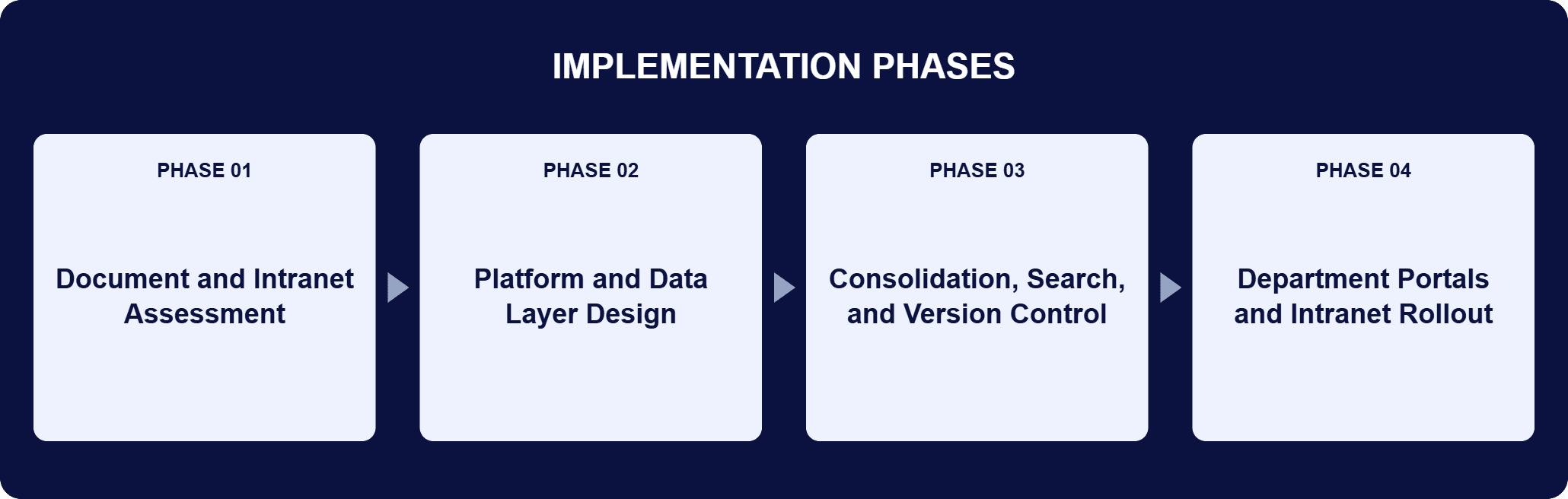
PHASE 03
Consolidation, Search, and Version Control
The documents were consolidated into the single SQL Server database integrated with SharePoint, providing centralized storage and search across document types. Version control mechanisms went in over that store as check-in, check-out, and document approval workflows, so employees could manage and track updates to files with consistency and accuracy across departments.
PHASE 04
Department Portals and Intranet Rollout
Department-specific portals gave each division a customizable space to share files, images, calendars, assignments, and news. i3solutions enabled employees to manage personalized areas and share information with selected teams or the entire organization without relying on IT support, and the upgraded intranet delivered new services behind a user-friendly interface aligned with corporate branding.
The platform has two layers and one job. SharePoint serves as the core of the document management and collaboration solution, providing centralized storage, team-specific portals, version control, and tools for sharing documents, calendars, and tasks across departments. SQL Server acts as the primary database for storing and indexing the critical internal documents, which is what makes retrieval fast, keeps data management secure, and lets the document store integrate with SharePoint rather than sit beside it. The consolidation is the substance: documents that had accumulated on a single file server for years now live in one SQL Server database integrated with SharePoint, so there is one place a document sits and one index that finds it, across document types. Version control sits on top of that store as check-in, check-out, and document approval workflows, so a file’s history is a property of the platform rather than a manual habit. The collaboration layer is divisional: each department has its own portal for files, images, calendars, assignments, and news, and employees manage those personalized areas themselves, sharing with selected teams or the entire organization without relying on IT support.
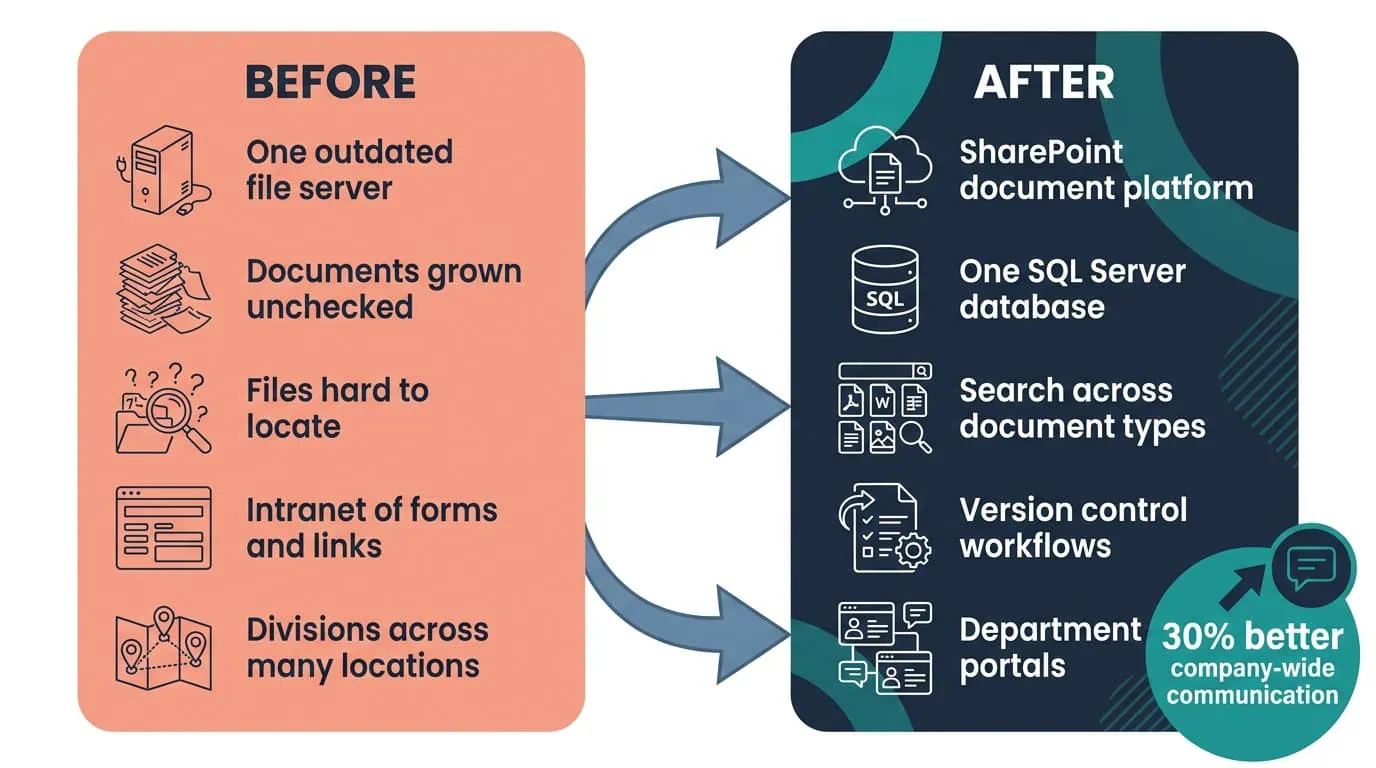
Communication Up 30%
Documents consolidated into a SQL Server database integrated with SharePoint gave every team and department one place to search and store files.
| Outcome | Before | After |
|---|---|---|
| Company-wide communication | Information moving through a file server and an intranet of forms, links, and reports | Improved overall communication across teams and departments by 30% |
| Document storage | A single, outdated file server that had grown unchecked for years | Documents consolidated into one SQL Server database integrated with SharePoint |
| Finding documents | Employees found it difficult to locate and share important files | Search that quickly locates specific documents across document types |
| Document tracking and accuracy | File updates managed directly on the shared file server | Check-in, check-out, and document approval workflows, reducing errors and inconsistencies |
| Department collaboration | Divisions working without a shared space for their own files and schedules | Department-specific portals for files, images, calendars, assignments, news, discussions, and task assignments |
| Dependence on IT | Sharing information beyond a team required IT support | Employees manage personalized areas and share with selected teams or the entire organization themselves |
One number carries the engagement. Improved overall communication across teams and departments by 30%, ensuring that employees can share information and updates more effectively. That figure is what the platform was built to move, and the mechanism behind it is visible in the rest of the results: documents that had accumulated on a single file server now sit in one SQL Server database integrated with SharePoint, employees locate specific documents through search instead of asking whoever might know, and each division works from its own portal rather than a common pile.
The qualitative results are specific enough to check. Document tracking and accuracy improved through check-in, check-out, and version control features, which reduces errors and inconsistencies in files several departments touch. Teams collaborate on projects and manage departmental tasks through shared calendars, discussions, and task assignments. Search reduces the time employees spend looking for information and improves productivity. And because employees share with selected teams or the entire organization without relying on IT support, the platform stopped generating the request queue that a centrally administered system creates.

PENDING-CLIENT-QUOTE
This engagement is relevant for
Less relevant for
One Platform for the Documents, the Departments, and the Intranet
The engagement established that a file server problem is rarely only a storage problem. Consolidating the organization’s critical documents into a single SQL Server database integrated with SharePoint gave the firm centralized storage and search across document types, and version control through check-in, check-out, and document approval workflows made changes to those documents traceable.
On the same platform, department-specific portals gave each division a space for its files, images, calendars, assignments, and news, and employees share with selected teams or the entire organization without relying on IT support. The measured result was communication: improved overall communication across teams and departments by 30%, in an organization serving over 900 clients across many different industries with more than 150 employees across various locations.
A SharePoint document management and collaboration platform consolidates the documents an organization has accumulated across file servers into one governed store, then puts the tools people work with on top of it. In this engagement, i3solutions implemented Microsoft SharePoint as that platform and consolidated the critical internal documents into a single SQL Server database integrated with SharePoint, which provides centralized storage and search across document types. Three capabilities define the category. Version control through check-in, check-out, and document approval workflows tracks how a file changes and keeps departments consistent. Department-specific portals give each division a customizable space for its files, images, calendars, assignments, and news. And self-service means employees manage their own areas and share with selected teams or the entire organization without relying on IT support.
As the organization grew and expanded internationally, its critical internal documents were stored on a single, outdated file server that had grown unchecked for years. That centralized system became inefficient as the company scaled, making it difficult for employees to locate and share important files. The organization also needed enhanced search functionality to quickly retrieve documents of various types, a platform that could support team collaboration and project management, and an upgrade to its existing intranet, which housed forms, links, and reports. The intranet upgrade carried its own requirement: new services for employees behind a user-friendly interface aligned with corporate branding. With multiple divisions and more than 150 employees across various locations, the file server had become the constraint on both finding prior work and sharing it.
Improved overall communication across teams and departments by 30%, ensuring that employees can share information and updates more effectively. Document tracking and accuracy improved through check-in, check-out, and version control features, and the integrated search functionality allows employees to quickly locate specific documents. That 30% is the engagement’s one quantified outcome; the results around it are specific but not numeric. Teams collaborate on projects and manage departmental tasks through shared calendars, discussions, and task assignments. Department portals let each division exchange information and ideas directly. Search reduces the time employees spend looking for information and improves productivity across the organization.
SharePoint serves as the core platform for the document management and collaboration solution, providing centralized storage, team-specific portals, version control, and tools for sharing documents, calendars, and tasks across departments. SQL Server acts as the primary database for storing and indexing the critical internal documents, ensuring fast retrieval, secure data management, and integration with the SharePoint platform. The two are not alternatives. The documents live in one SQL Server database that SharePoint reads and writes, which is what allows a single index to cover document types previously scattered across a file server. The same platform supplies the department portals and the personalized areas employees manage themselves, so the collaboration tools and the document store share one back end rather than each keeping their own.
The engagement covered a firm serving over 900 clients across many different industries, with multiple divisions and more than 150 employees across various locations. The client is identified on this page by description rather than by name. Shape matters more than headcount here. The pattern fits an organization whose document volume has outgrown a single file server, whose divisions each need a space of their own, and whose people are spread across enough locations that walking down the hall is not how a file gets found. A smaller organization on one site with one shared drive would get less from department portals. An organization with more divisions would get more, because the portal model grows by adding spaces rather than by rebuilding the document store underneath.
i3solutions is a Microsoft Partner with 30 years of delivery experience and 1,500+ Microsoft engagements, with every engagement staffed by an all-senior, all US-based delivery team. Document consolidation is where that profile earns its keep, because the files being moved are the organization’s working record and there is no acceptable version of losing access to them mid-migration. This engagement is representative: years of documents off a single outdated file server and into one SQL Server database integrated with SharePoint, search across document types over the top, check-in, check-out, and document approval workflows for tracking, department portals for multiple divisions across various locations, and a 30% improvement in company-wide communication. For firms weighing similar work, a short scoping conversation establishes what the equivalent consolidation would take in your environment.
Yes. The SharePoint platform gives each division its own space for files, calendars, assignments, and news, while documents consolidate into a SQL Server database so search and storage work the same way company-wide. Divisions manage their own day-to-day content without filing an IT ticket for routine changes, which is what raised cross-department communication 30% for this research provider without adding IT headcount.
Centralized storage paired with department-specific portals is what drove this measured improvement. We can talk through what a comparable consolidation would look like for your organization.

US-Based Microsoft System Integrator | Est. 1997
© i3solutions. All rights reserved.
US-Based Microsoft System Integrator | Est. 1997
© i3solutions. All rights reserved.


