

An outdated intranet and a PDF-based employee directory saw low usage and little engagement.
The client is a geotechnical engineering products company and a leading provider of retaining walls and other geotechnical structures for heavy civil engineering projects across the United States. Since 1971, the company has completed more than 45,000 Mechanically Stabilized Earth (MSE) walls using their proprietary retaining wall systems. A business built on that volume of delivered structures runs on details that product and assembly teams work out between them every day, and on the internal processes that carry those details, which is precisely the work an intranet exists to hold.
The company faced challenges with their existing intranet portal. The portal suffered from low usage and irrelevance, limiting its effectiveness as a communication and collaboration tool. Employees struggled to find the information and processes they needed for daily operations, and the portal’s outdated design and functionality discouraged engagement. Seeking a modern intranet solution, the company turned to i3solutions for our expertise in Portals and Collaboration. The goal was a platform that gave employees easy access to the critical information and the workflows their operations depended on, and the brief went past repair: the replacement had to give departments one place for sharing updates, accessing critical resources, and collaborating on projects.
A geotechnical manufacturer’s intranet and PDF-based employee directory had fallen into disuse, leaving HR to rebuild the directory by hand every month. i3solutions replaced both with a SharePoint portal and an interactive product catalog that update themselves.
The custom SharePoint employee directory took a recurring monthly task off HR, an interactive online product catalog gave both teams a shared place to coordinate assembly details, and portal usage and engagement increased with a JavaScript/jQuery micro-application pattern in place to support future needs.
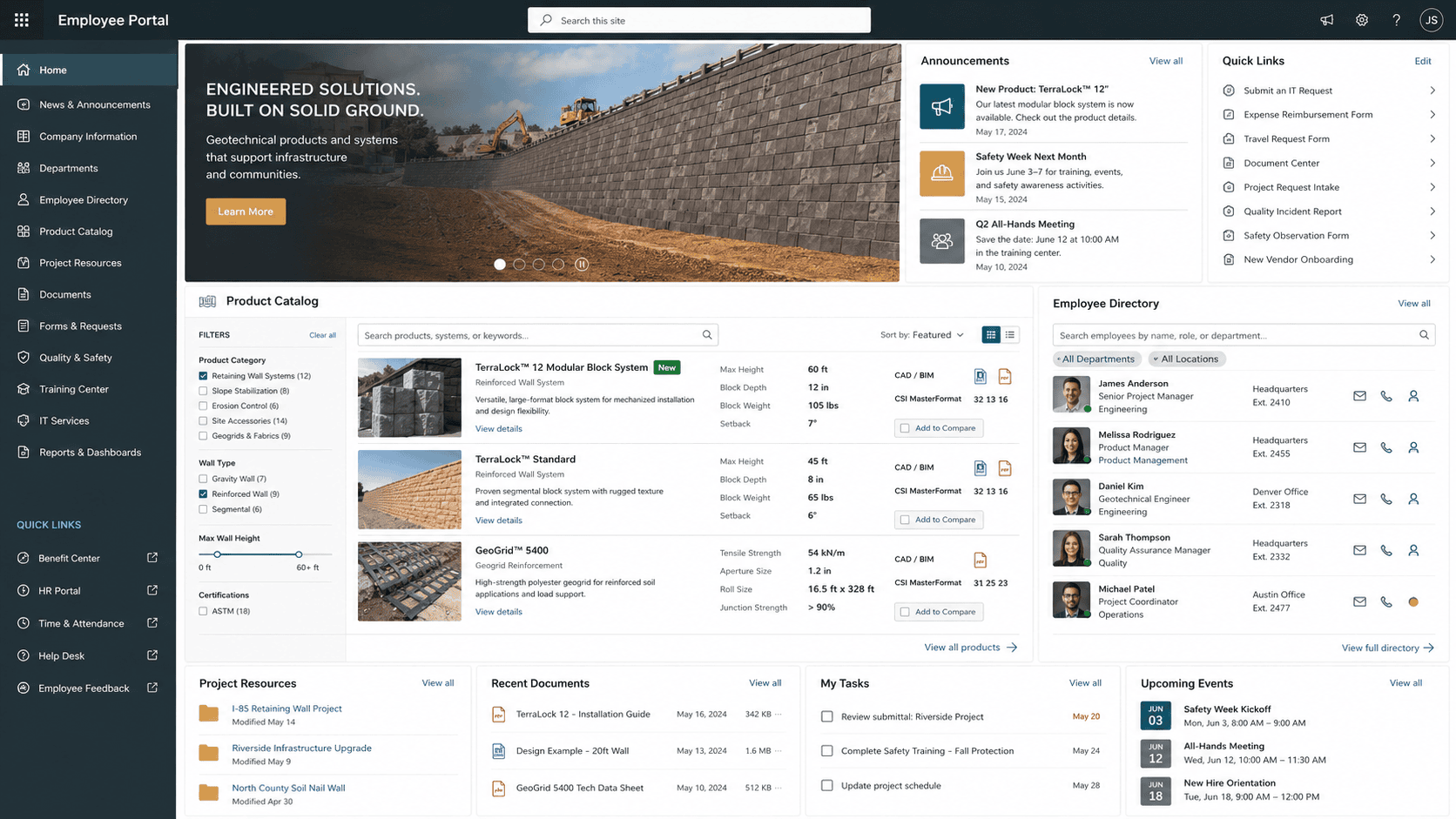
An Intranet Employees Route Around Is Not a Communication Channel
The portal was still there. What it had lost was relevance to the work: usage was low, the design and functionality were outdated, and employees could not reliably find the information and processes their daily operations depended on. A communication and collaboration tool that employees skip does not fail loudly. It simply stops being where the organization’s information lives, and the daily coordination it was built for goes somewhere else.
Somewhere else, in this case, meant documents and manual effort. The employee directory was a PDF the company maintained and distributed. Product and assembly teams worked out project details without a shared place to do it. Leadership decided the answer was a replacement rather than a refresh: a portal organized around the information employees look for and the daily processes they run, instead of a redesign of the one they had stopped opening.
This company’s intranet had low engagement because of navigation and content structure, not because SharePoint was the wrong tool. If a similar platform is underused in your organization, the fix is often architecture before features.
An Unused Portal Keeps Charging Rent
The cost of an ignored intranet is continuous rather than dramatic. Every day employees struggled to find the information and processes they needed for daily operations, that search cost time in a company delivering geotechnical structures for heavy civil engineering projects nationwide. And because the outdated design and functionality actively discouraged engagement, each attempt made the next one less likely, which is how a portal moves from underused to irrelevant.
The requirement the company set made the risk of a half-measure explicit. The solution had to repair what was broken and change how departments worked together, and a visual refresh would have met the first half and missed the second. Without the day-to-day applications employees needed inside the portal, the PDF directory would still be maintained and distributed by hand and product and assembly teams would still be coordinating project details outside the system meant to carry them.
A Portal Employees Would Choose, With Real Applications Inside It
Adoption had to be designed in, not requested afterward. In practice that meant a well organized site taxonomy and navigation employees could follow, so the information and the day-to-day processes they looked for sat where they expected them. A portal loses relevance once and does not get an unlimited number of chances to win it back.
The portal also had to carry applications, not only pages. An interactive online product catalog had to serve the coordination between product and assembly teams, and a custom employee directory had to be good enough to retire a PDF the company was already maintaining and distributing. That meant custom development inside the portal, which in turn meant the components and micro-applications had to be documented before they were built rather than discovered during configuration.
Senior Microsoft Specialists with Proven Delivery Depth
The requirements defined the vendor profile. The company needed a team that could design and implement the portal on SharePoint with SQL Server behind it, build interactive micro-applications in JavaScript and jQuery inside it, and run the full project lifecycle alongside the company’s IT leadership: requirements gathering, process mapping and wireframe documentation, product installation, portal configuration, custom development, deployment, and ongoing support after launch. That is one engagement spanning platform work and custom application development, not a product installation with a design pass on top.
i3solutions is a Microsoft Partner with 30 years of delivery experience and 1,500+ Microsoft engagements, delivered by an all-senior, all US-based delivery team. That profile matched what the work required: senior engineers who have built portals on SharePoint and SQL Server repeatedly, who could develop the micro-applications the company’s daily operations depended on, and who would stay through deployment and ongoing support.
i3solutions designed and implemented a replacement intranet portal on SharePoint and SQL Server, with JavaScript and jQuery powering the interactive micro-applications inside it, and worked with the company’s IT leadership across the full project lifecycle.
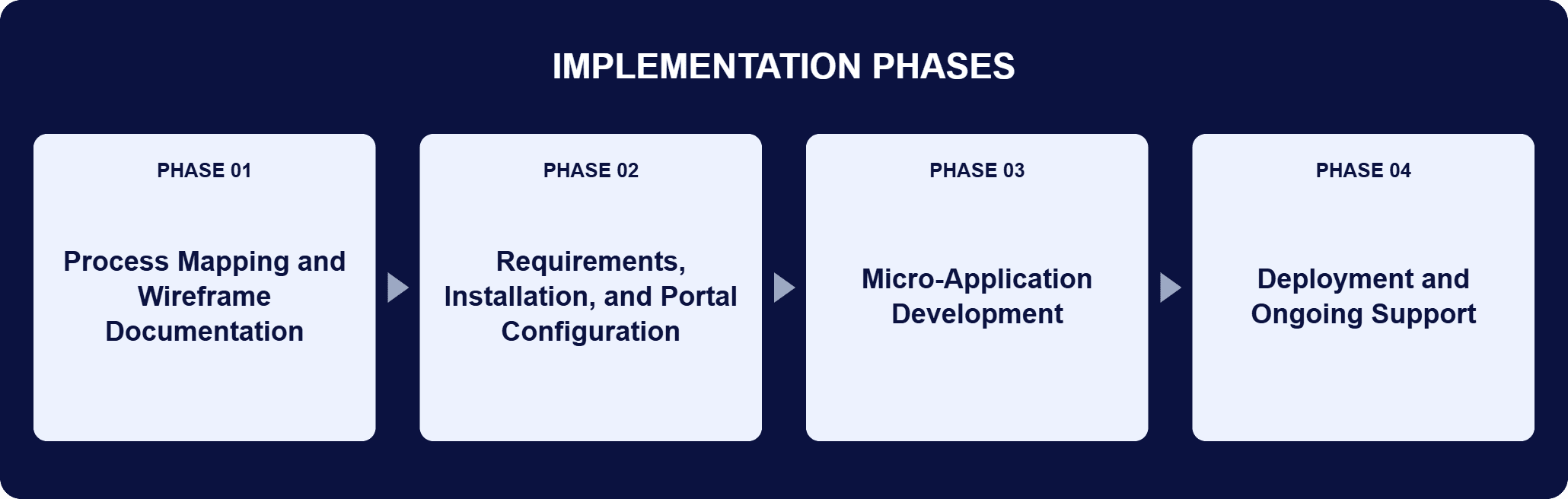
PHASE 01
Process Mapping and Wireframe Documentation
The project began with in-depth process mapping and detailed wireframe diagrams documenting the portal’s components and micro-applications. The design was structured against the company’s specific operational needs before anything was installed or configured, which is what let the custom development start from a settled scope.
PHASE 02
Requirements, Installation, and Portal Configuration
With the company’s IT leadership alongside, i3solutions ran requirements gathering, product installation, and portal configuration, standing the portal up on SharePoint with SQL Server managing the structured data behind it. The site taxonomy and navigation were organized around the information and the processes employees use every day.
PHASE 03
Micro-Application Development
Custom development delivered the two applications that changed daily work: an interactive online product catalog for coordination between product and assembly teams, and a custom SharePoint employee directory to replace the company’s PDF-based version. Both were built as interactive micro-applications in JavaScript and jQuery.
PHASE 04
Deployment and Ongoing Support
i3solutions deployed the portal and stayed on for ongoing support after launch. The PDF-based directory was retired, and product and assembly teams gained a shared place to work out project details.
The portal is a practical Microsoft stack with the custom work concentrated where the company’s daily operations live. SharePoint is used as the core technology for its collaboration features, document management capabilities, and customization options, which is what makes it a fit for a centralized intranet. SQL Server provides a reliable and high-performance database for managing large volumes of structured data, integrating with the portal’s functionality. JavaScript and jQuery were employed to develop the interactive micro-applications and enhance the user experience, and those micro-applications are where the change to daily work sits. The first is an interactive online product catalog that product and assembly teams use to coordinate project details. The second is a custom SharePoint employee directory that replaced the company’s PDF-based version, ending the maintain-and-distribute cycle behind it. Around both sits a well organized site taxonomy and navigation, so the information and the day-to-day processes employees look for sit where they expect them. The same pattern is what the company builds on next: because the micro-applications are JavaScript and jQuery inside the portal, a further document-bound process can become another one of them without a new platform underneath it.
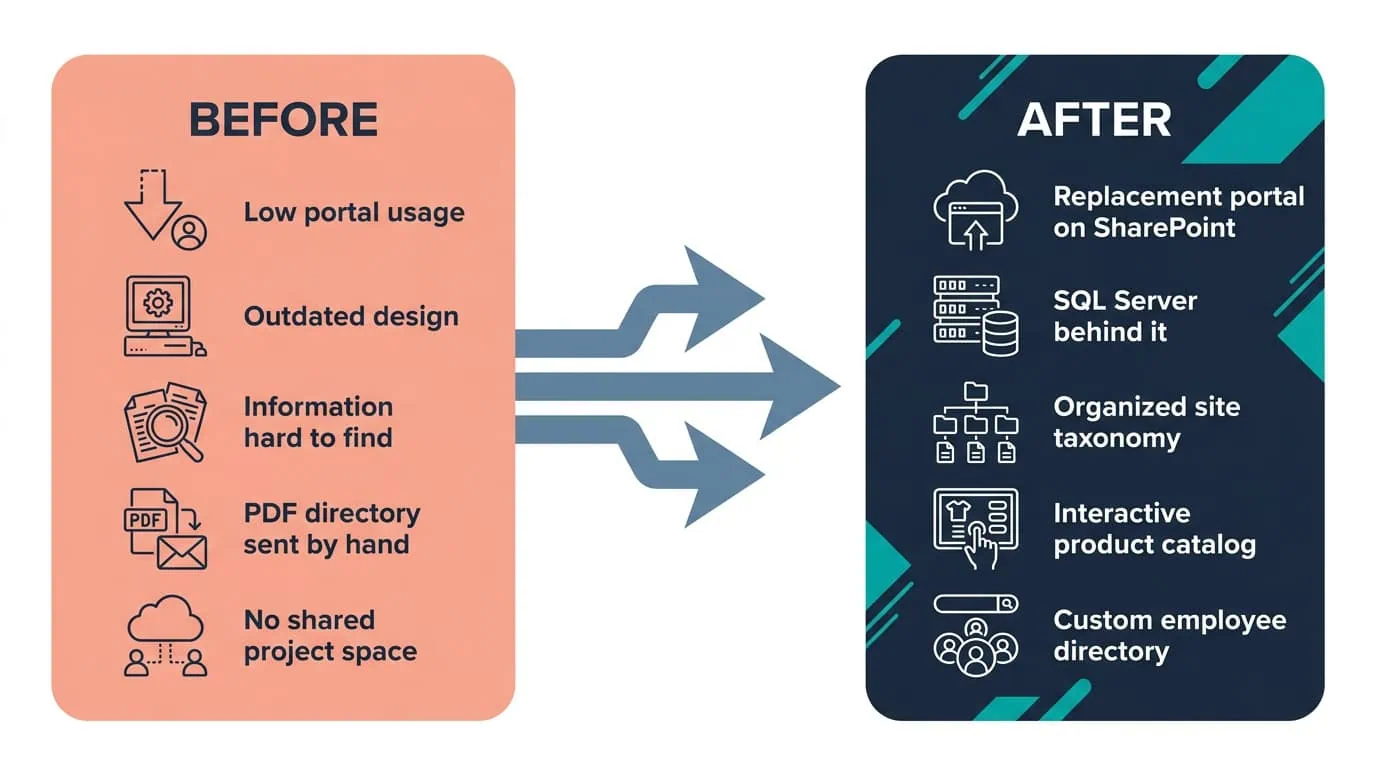
Portal Usage, Up
A SharePoint portal with an interactive product catalog and a live employee directory gave teams a shared place to work, and usage followed.
| Outcome | Before | After |
|---|---|---|
| Employee directory | PDF-based directory the company maintained and distributed | Custom SharePoint employee directory, with that recurring task off the HR department each month |
| Product and assembly coordination | No shared place to work out project details | Interactive online product catalog both teams work from |
| Portal usage | Low usage and irrelevance | Portal usage and engagement increased |
| Finding information and processes | Employees struggled to find what daily operations needed | Well organized site taxonomy and navigation employees can follow |
| Adding functionality | Outdated portal design and functionality | JavaScript and jQuery micro-application pattern as a foundation for future needs |
The clearest change is the employee directory. A custom SharePoint employee directory replaced the PDF-based directory the company had been maintaining and distributing, which took that recurring administrative task off the HR department each month. The interactive online product catalog did the same thing for a different function, giving product and assembly teams a shared place to work out project details. Both live inside the portal as micro-applications rather than as separate systems, so the work happens where employees already are.
The portal-level result is engagement: portal usage and engagement increased. The mechanism behind that is structural rather than cosmetic. A site taxonomy organized around the way employees search puts the information and the day-to-day processes they look for where they expect them, and departments finally had that one shared place rather than the routes they had built around the old portal. That is what moved the intranet from something employees worked around to something they open.

PENDING-CLIENT-QUOTE
This engagement is relevant for
Less relevant for
A Portal Employees Use, Because the Work They Need Is Inside It
The engagement established that an intranet with low usage and irrelevance is usually a structure and applications problem rather than a platform problem. A replacement portal on SharePoint, with SQL Server managing the structured data behind it, gave the company a well organized site taxonomy and a navigation built to how its people search.
Two interactive micro-applications built in JavaScript and jQuery carried the work that had been running outside the system: an online product catalog product and assembly teams use to coordinate project details, and a custom employee directory that replaced the PDF version the company had been maintaining and distributing. Portal usage and engagement increased, and the micro-application pattern gives the company a foundation for adding functionality as future needs arise.
It is an intranet built on SharePoint where the day-to-day processes employees run are delivered as small interactive applications inside the portal, rather than as pages of links to other systems. For this geotechnical engineering products company, i3solutions built the portal on SharePoint with SQL Server managing the structured data behind it, then developed two micro-applications in JavaScript and jQuery: an interactive online product catalog that product and assembly teams use to coordinate project details, and a custom employee directory that replaced the company’s PDF-based version. The distinction matters because it decides whether employees have a reason to open the portal. A portal that only publishes content competes with every other place information could live. A portal that holds the applications the work depends on becomes the place the work happens.
Low usage is treated as evidence about structure and missing applications, not as a communications problem. On this engagement the project began with in-depth process mapping and detailed wireframe diagrams documenting the portal’s components and micro-applications, so the design was settled against the company’s specific operational needs before installation and configuration started. From there i3solutions worked closely with the company’s IT leadership across requirements gathering, product installation, portal configuration, custom development, deployment, and ongoing support. Two things came out of that sequence. The site taxonomy and navigation were built to the way employees look for the information and processes they use, and the routine work that had been running on documents and manual coordination was built into the portal as interactive micro-applications.
SharePoint is the core platform, chosen for its collaboration features, document management capabilities, and customization options. SQL Server holds the structured data behind the portal and keeps performance steady as volumes grow. JavaScript and jQuery power the interactive micro-applications inside the portal. That split is deliberate. SharePoint supplies the collaboration and document management the company would otherwise have had to build, SQL Server handles large volumes of structured data reliably, and the custom development goes only where the company’s own operations needed something that does not come out of the box, which on this engagement meant the interactive online product catalog and the custom employee directory. The same JavaScript and jQuery pattern is reusable, which is why it also serves as the foundation for functionality added later.
A custom SharePoint employee directory replaced the PDF-based directory the company had been maintaining and distributing, which took that recurring administrative task off the HR department each month. The interactive online product catalog does the same for coordination between product and assembly teams, giving both a shared place to work out project details. The pattern generalizes to any process that currently runs on a document someone maintains and circulates: the document exists because a system did not, and once the portal holds the same information as an application, the maintain-and-distribute cycle has nothing left to do. Both applications were built in JavaScript and jQuery inside the portal, so employees reach them where they already work rather than in a separate tool.
The company’s portal had low usage and had stopped being relevant to daily work, and its outdated design and functionality discouraged engagement. The replacement portal is built on a well organized site taxonomy and navigation employees can follow, so the information and the day-to-day processes they look for sit where they expect them. Alongside that, the two micro-applications gave employees work they can only do in the portal: the online product catalog for coordinating project details between product and assembly teams, and the employee directory that replaced the PDF version. Employees now view the intranet as a valuable tool rather than an outdated resource, and portal usage and engagement increased.
Every phase. Working closely with the company’s IT leadership, i3solutions ran requirements gathering, process mapping and wireframe documentation of the portal’s components and micro-applications, product installation, portal configuration, custom development, deployment, and ongoing support after launch. That span matters on an intranet replacement because the decisions are not separable. The process maps determine what the micro-applications have to do, the micro-applications determine what the portal has to be configured to hold, and the taxonomy that makes the portal findable comes from the same understanding of how employees actually look for information. Keeping the whole lifecycle in one team meant the company’s IT leadership had one counterpart across the design, the build, and the support that followed.
i3solutions is a Microsoft Partner with 30 years of delivery experience and 1,500+ Microsoft engagements, with every engagement staffed by an all-senior, all US-based delivery team. This engagement shows what that profile covers: a portal on SharePoint with SQL Server behind it, custom micro-applications built in JavaScript and jQuery for the work employees do daily, and the full lifecycle from process mapping through deployment and ongoing support. An intranet that has already lost its audience is a harder brief than a first portal, because the structure and the applications have to earn attention back. For organizations weighing that work, a short scoping conversation establishes what the equivalent replacement would take in your environment.
Two interactive micro-applications carried the actual work employees needed, which is what changed engagement here. We’re glad to discuss what a comparable structure and application redesign would look like for your intranet.

US-Based | Est. 1997
© i3solutions. All rights reserved.
US-Based | Est. 1997
© i3solutions. All rights reserved.


