

An approaching SharePoint end-of-life date threatened to disrupt a live homeschooling operation with no room to renegotiate the deadline.
An end-of-life date is the one platform deadline nobody gets to renegotiate, and the client, a national online education provider known for its online schooling and curricula, was running its intranet on a SharePoint system approaching one. In an operation like this one that is not an IT scheduling question. The intranet portal is where the provider’s audience goes for resources and for homeschooling activities, so an unsupported platform underneath it is a date on the calendar after which the thing everyone depends on stops getting fixed. The provider had to land on a supported platform and keep operations running while it did.
The provider brought in i3solutions with clear primary objectives: conduct a thorough assessment of the existing SharePoint environment, manage the migration to a modern SharePoint version, and develop a new Intranet portal. That work carried its own complexity, including configuring Entra ID (formerly Active Directory) for the user transition, working through migration challenges from the legacy SharePoint environment to Office 365, and designing a taxonomy and architecture for the new solution. A second requirement sat alongside the platform move: the provider sought to improve accessibility for homeschooling, particularly on tablets, which required a mobile-friendly solution rather than a desktop portal that merely loaded on a smaller screen.
An online education provider’s intranet ran on a SharePoint environment approaching an end-of-life date with no flexibility to push back. i3solutions carried every account through an Entra ID migration and rebuilt the front end to work on tablets as well as desktops.
Migration ran against a written plan and timeline with day-to-day operations undisrupted, user accounts and data moved through Entra ID with security and integrity intact, and a joint data clean-up with the provider’s IT team minimized the risk of orphaned accounts after the move.
End of Life Sets the Date, and Nothing Else Moves It
Once the provider’s SharePoint system reached the end of its supported life, the choice was no longer whether to modernize but what to land on and how fast, because everything the portal carried would sit on an unsupported foundation until the move was finished. The provider recognized the critical need to transition off it to keep operations running, and that recognition set the engagement in motion rather than a feature request.
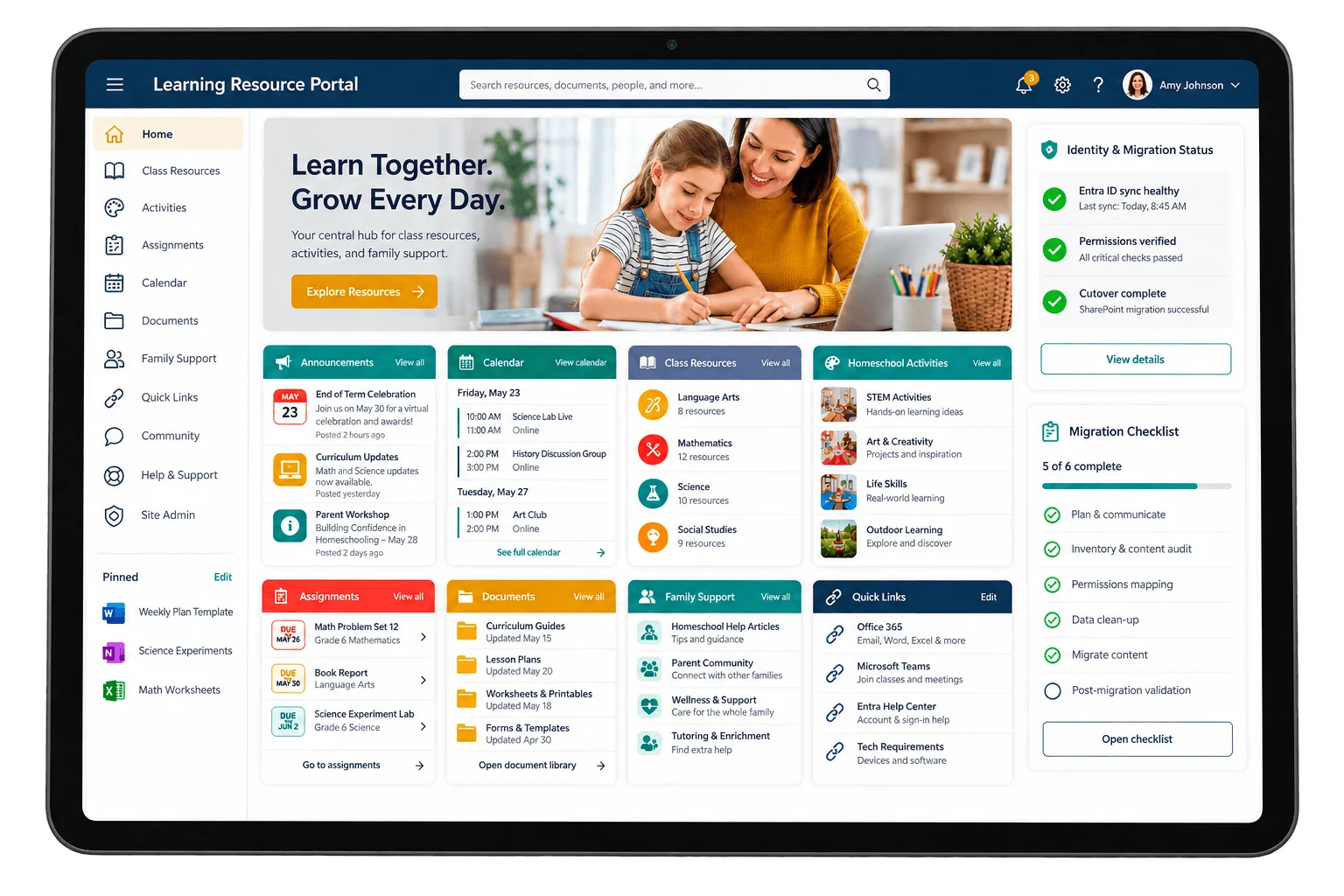
A second problem got fixed on the same schedule. Its audience includes homeschooling users, and it sought to improve accessibility for that audience, particularly on tablets. A platform migration is the one moment when the front end is already being rebuilt, so the tablet requirement entered the project as a design input rather than a later retrofit. The objectives were set together: assess the existing environment, migrate to a modern SharePoint version, and develop a new Intranet portal that worked on the devices its users actually pick up.
This provider’s migration plan was written against its actual data structures and permissions before anything moved, which is what kept the platform running throughout. If a platform deadline is approaching in your organization, an assessment-first approach is what keeps the service uninterrupted.
An Unsupported Platform Under a Live School Operation
The first risk was continuity. Educators and students reach resources and homeschooling activities through the portal, so a migration that stumbled would not have been an internal inconvenience; it would have interrupted the delivery of the provider’s core service. The engagement’s success condition was therefore not arriving on the new platform but arriving on it while the provider’s operations continued without disruption.
The second risk was quieter and outlasts the project. A migration moves user accounts, permissions, and content, and anything mishandled in that transfer becomes a permanent property of the new environment. Orphan users are the standard example: accounts that survive the move but no longer map to a person, a common but often overlooked security concern that widens the attack surface of the new platform on day one. A migration can look successful and still hand the provider a weaker security posture than the environment it left.
Three Workstreams, One Cutover, No Downtime
The engagement was not one project but three that had to land together. The platform move went from the legacy SharePoint environment to a modern SharePoint version and Office 365. The identity layer required configuring Microsoft Entra ID (formerly Active Directory). Accounts, permissions, and other critical data had to transfer from the on-premise environment with user access, data integrity, and security intact. And the portal itself was a rebuild, not a lift: a new taxonomy and data architecture, a reworked information organization, and a front end optimized for tablet use.
None of the three could take the operation offline, and that constraint shaped all of them. Layered on top was the state of the environment being left behind. The provider’s existing data structures, user permissions, and content organization had to be understood before anything moved, which is why the work opened with discovery and assessment rather than with a migration tool, and why the data clean-up was run jointly with the provider’s own IT team rather than by an outside team guessing at which accounts still mattered.
Senior Microsoft Specialists with Proven Delivery Depth
The requirements defined the vendor profile. The provider needed a team that could assess an aging SharePoint environment and say what was actually in it, run a version migration and an Office 365 move without interrupting a live education operation, configure Entra ID so identity and permissions survived the crossing, and then rebuild an intranet portal front end for tablets. Those are four different skills, and splitting them across vendors would have put the seams exactly where the risk was.
The provider engaged i3solutions, a Microsoft Partner with 30 years of delivery experience and 1,500+ Microsoft engagements, delivered by an all-senior, all US-based delivery team. That profile matched the work: engineers who have run SharePoint migrations and directory configurations repeatedly, working in close collaboration with the provider’s IT team rather than around it, on an engagement where the platform underneath a national education service was being replaced while it was in use.
i3solutions assessed the existing SharePoint environment, managed the migration to a modern SharePoint version and Office 365, and rebuilt the provider’s Intranet portal, working in close collaboration with the provider’s IT team throughout.
PHASE 01
Discovery and Assessment of the Existing Environment
Before the migration, i3solutions performed an in-depth discovery and assessment of the provider’s existing SharePoint environment, identifying potential challenges and key areas for improvement. That meant a thorough analysis of the current data structures, user permissions, and content organization, so the migration plan was written against what was actually in the environment rather than against an assumption about it.
PHASE 02
Migration Planning with the Provider’s IT Team
i3solutions then collaborated closely with the provider’s IT team to establish a migration plan covering the necessary technical configurations, data clean-up processes, and security protocols. The team also developed a detailed timeline incorporating key milestones, so progress could be monitored and issues addressed promptly instead of surfacing at cutover.
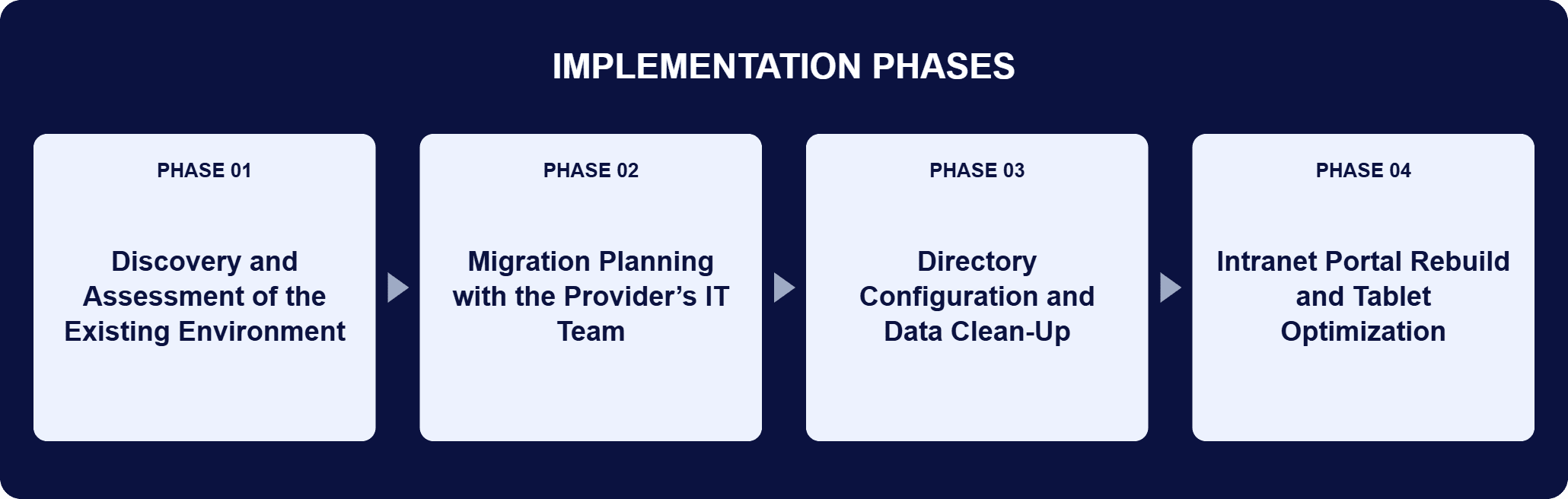
PHASE 03
Directory Configuration and Data Clean-Up
i3solutions configured Microsoft Entra ID (formerly Active Directory), the directory service that manages and authenticates network resources, so user accounts, permissions, and other critical data transferred from the on-premise SharePoint environment to the new SharePoint version with user access, data integrity, and security intact. The data clean-up, executed with the provider’s internal IT team, minimized the risk of orphan users after the migration.
PHASE 04
Intranet Portal Rebuild and Tablet Optimization
i3solutions ran detailed discovery sessions with end users, and those sessions produced the portal’s refined data structures and improved information organization along with the specific accessibility need for homeschooling. The front end was rebuilt with custom Bootstrap, jQuery, and JavaScript and optimized for tablet use, and the portal’s branding was updated with a modern design.
The destination platform is a modern SharePoint version and Office 365, and the choice reaches past the migration itself: Office 365 gives the provider a cloud-based platform whose scalable and flexible infrastructure suits a growing operation, with a suite of tools that improves collaboration and communication across the organization, and it positions the provider to adopt future innovations in the Office 365 ecosystem without another platform decision. Microsoft Entra ID (formerly Active Directory) is the mechanism underneath the user transition. It is the service that manages and authenticates network resources, and configuring it is what carried user accounts, permissions, and other critical data from the on-premise SharePoint environment to the new SharePoint version with user access, data integrity, and security intact. The portal front end is separate work with its own stack. Custom Bootstrap supplies the responsive grid and pre-designed components that keep the layout consistent across devices, tailored by i3solutions for tablet use. JavaScript adds the interactive elements and real-time updates identified during the discovery phase. jQuery keeps the interface responsive for users arriving on different devices. Behind the interface sits a reworked taxonomy and data architecture.
Migrated on Schedule, Zero Disruption
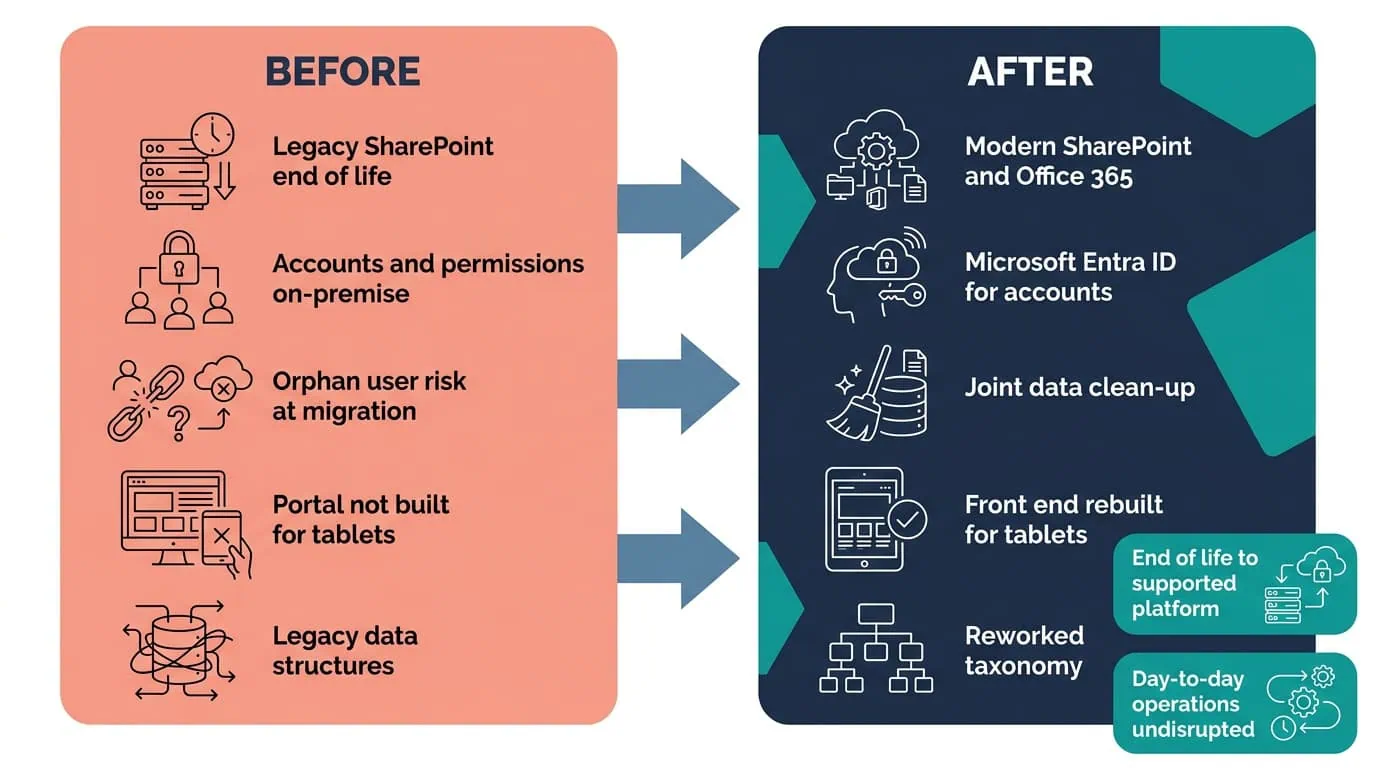
A phased migration to SharePoint Online and Entra ID kept accounts, permissions, and day-to-day operations intact throughout.
| Outcome | Before | After |
|---|---|---|
| Platform support status | SharePoint system approaching end of life | A modern SharePoint version and Office 365, inside a supported lifecycle |
| Operational continuity | A platform replacement due under a live education operation | Migration run against a written plan and a timeline with key milestones, with day-to-day operations undisrupted |
| Accounts and permissions | User accounts, permissions, and critical data held in the on-premise environment | Transferred through Microsoft Entra ID configuration with user access, data integrity, and security intact |
| Orphan users after migration | A post-migration exposure that survives an otherwise successful move | Risk minimized by a data clean-up run jointly with the provider’s IT team |
| Portal access on tablets | Tablet access for homeschooling users an open requirement | Front end rebuilt on custom Bootstrap, jQuery, and JavaScript and optimized for tablet use |
| Information organization | Data structures and content organization inherited from the legacy environment | Refined data structures and improved information organization, informed by end-user discovery sessions |
The platform outcome is the one the end-of-life date forced, and it landed the way it had to: the provider is on a modern SharePoint version and Office 365, inside a supported lifecycle again, and it got there without disrupting day-to-day operations. The migration ran against a written plan covering the technical configurations, the data clean-up, and the security protocols, and against a detailed timeline with key milestones that made progress visible and problems addressable while they were still small. Office 365 also changes what comes next: the provider now runs on cloud infrastructure it can scale, so later additions to the ecosystem are an adoption decision inside a platform it already has rather than another migration off one.
The other two outcomes are the ones nobody would have noticed if they had gone wrong. Accounts, permissions, and critical data crossed through Entra ID configuration with user access, data integrity, and security intact, and the data clean-up run with the provider’s internal IT team minimized the risk of orphan users after the migration, closing that exposure rather than carrying it into the new environment. On the portal side, the discovery sessions with end users produced refined data structures and improved information organization, and the front-end rebuild made the portal work on the tablets homeschooling users bring to it. All three describe the same result from different angles: the people who depend on the portal kept working while the platform underneath them was replaced.

PENDING-CLIENT-QUOTE
This engagement is relevant for
Less relevant for
A Supported Platform Underneath, and a Portal Built for the Device Its Users Pick Up
The engagement established that an end-of-life platform deadline can be met without either interrupting the service running on top of it or shipping the old environment’s problems into the new one. Assessment came before migration, so the plan was written against the provider’s actual data structures, user permissions, and content organization.
Microsoft Entra ID configuration carried accounts, permissions, and critical data to the new SharePoint environment with access, integrity, and security intact, and a data clean-up run jointly with the provider’s IT team kept orphan users out of the result. The Intranet portal was rebuilt rather than relocated, with a reworked taxonomy and data architecture underneath and a custom Bootstrap, jQuery, and JavaScript front end optimized for the tablets homeschooling users work on. Office 365 leaves the provider on a cloud-based platform it can keep building on.
That risk is exactly what this migration was built to avoid. For this online education provider, user accounts, permissions, and content organization were carried across intact, with zero disruption and no orphaned accounts left behind, on a scheduled timeline rather than an emergency one forced by end of life. If avoiding exactly that kind of quiet permissions gap is your concern, that’s the outcome this kind of migration is built to guarantee.
By deciding what is in the environment before deciding how to move it. i3solutions opened this engagement with an in-depth discovery and assessment of the provider’s existing SharePoint environment, identifying potential challenges and key areas for improvement through a thorough analysis of the current data structures, user permissions, and content organization. Only then did the team collaborate with the provider’s IT team on a migration plan covering the necessary technical configurations, data clean-up processes, and security protocols, plus a detailed timeline with key milestones so progress was monitored and issues addressed promptly rather than discovered at cutover. The provider’s own IT team was inside that work, not briefed on it afterward, which is what made the data clean-up accurate. The provider’s operations continued without disruption through the move.
Its SharePoint system was approaching end of life, so the provider needed a modern, supported platform to keep operations running. An unsupported platform under a national online education service is a fixed liability rather than a deferrable upgrade, because the portal that staff, educators, and homeschooling users depend on sits directly on it. i3solutions assessed the existing environment and managed the migration to a modern SharePoint version and Office 365, which also gave the provider a cloud platform it can keep building on: scalable, flexible infrastructure, with later additions to the Office 365 ecosystem arriving as an adoption decision rather than another platform migration.
A discovery and assessment pass over the current environment first. On this project that meant analyzing the provider’s existing data structures, user permissions, and content organization, and identifying the challenges and the areas worth improving. i3solutions then worked with the provider’s IT team on a migration plan covering the technical configurations, data clean-up, and security protocols, plus a timeline with milestones to track progress and catch issues early. The order matters. A plan written before the assessment is a plan written against assumptions about permissions and content ownership, and those assumptions are exactly where migrations fail, because the environment being left behind is usually older than anyone’s memory of how it was configured.
Through directory configuration and a data clean-up. i3solutions configured Microsoft Entra ID (formerly Active Directory) so user accounts, permissions, and other critical data transferred from the on-premise SharePoint environment to the new SharePoint version with user access, data integrity, and security intact. Entra ID is the directory service that manages and authenticates network resources, which is why it is the mechanism rather than a side task. The clean-up done with the provider’s IT team reduced the risk of orphan users after the migration, a common but often overlooked security concern. Doing it jointly is the point: an outside team can list the accounts, but only the provider’s own IT staff can say which of them still map to a person.
Tablet access was one of the provider’s stated requirements, so it shaped the front-end work rather than being retrofitted. i3solutions ran discovery sessions with end users, then rebuilt the portal front end with custom Bootstrap, jQuery, and JavaScript. Bootstrap supplies the responsive grid and components that keep the layout consistent across devices, and the customization was tuned for tablets so homeschooling users could navigate and retrieve content on the devices they actually use. JavaScript added the interactive elements and real-time updates that the discovery sessions identified. The same sessions informed a reworked data structure and information organization behind the portal, so what users find on a tablet is organized as well as it is displayed.
i3solutions is a Microsoft Partner with 30 years of delivery experience and 1,500+ Microsoft engagements, with every engagement staffed by an all-senior, all US-based delivery team. This engagement shows why that profile matters for end-of-life work: the platform move, the Entra ID configuration, and the portal rebuild are three different disciplines that had to land together under a date nobody could negotiate, with a live education service running throughout. Senior engineers who have run those migrations before can assess an aging environment accurately, write a plan and a milestone timeline against what they find, and work inside the client’s IT team on the data clean-up rather than around it. For organizations facing a similar deadline, a short scoping conversation establishes what the equivalent move would take in your environment.
This provider’s portal was rebuilt, not just relocated, with a front end optimized for the tablets its users work on. We’re glad to discuss what a comparable rebuild would look like for your platform and its users.

US-Based Microsoft System Integrator | Est. 1997
© i3solutions. All rights reserved.
US-Based Microsoft System Integrator | Est. 1997
© i3solutions. All rights reserved.


