

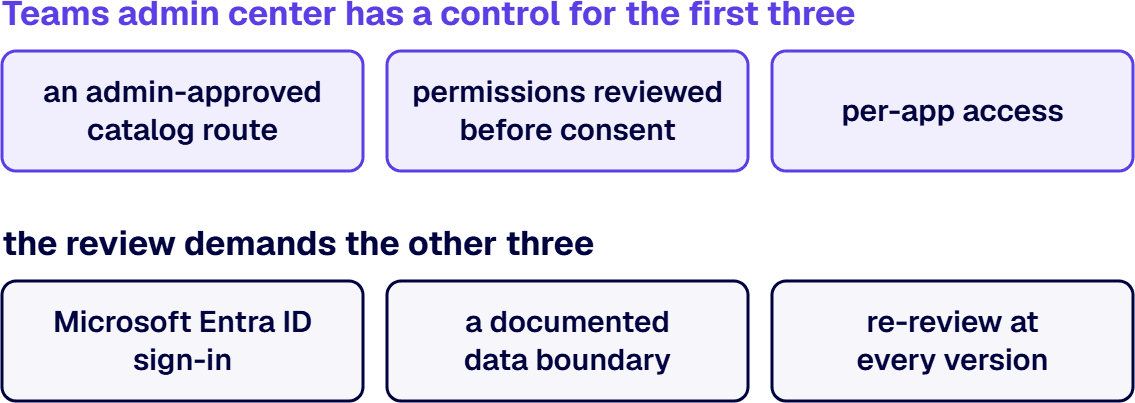
Custom Teams app governance requires six things: an admin-approved catalog route, permissions reviewed before consent, per-app access, Microsoft Entra ID sign-in, a documented data boundary, and re-review at every version. Teams admin center has a control for the first three; your review demands the rest.
A custom app built for one department reaches your security review carrying Microsoft Graph permissions nobody scoped, and the review has no written bar to hold it to. The six requirements here are that bar, for apps your organization builds or commissions to run inside its own tenant. They cover the app, not the Teams environment it runs in. Apps built in Power Apps follow a Power Platform governance framework of their own, and agents built in Copilot Studio are governed separately.
When your organization commissions an app for its own people, Microsoft treats it as a custom app that reaches users through your organization’s catalog, not the public Teams Store. The catalog has two doors that the approval record has to cover.
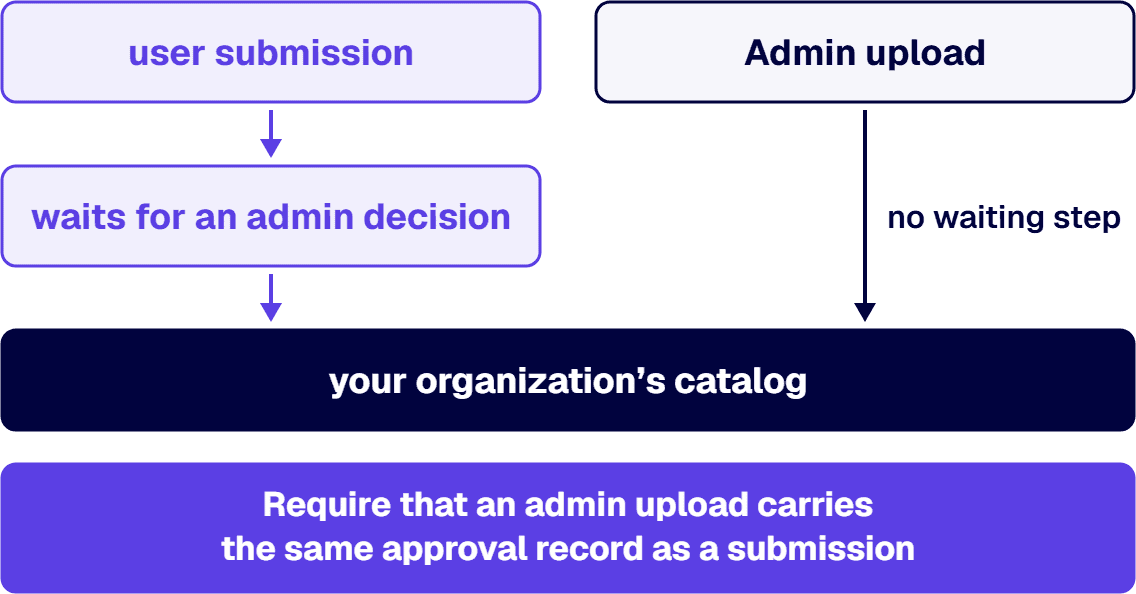
The first door is user submission. Microsoft states that the submit option is available to all users and cannot be turned off, and that admins can disapprove any submission. A submitted app waits for an admin decision, so that decision is where your review sits.
Admin upload is the second door, and it has no waiting step. If an admin uploads a custom app, it is available in the organization’s catalog in the store without requiring any approval. Require that an admin upload carries the same approval record as a submission, because Teams will not ask for one.
Restrict who can upload custom apps at all. Microsoft’s control is the app setup policy, which you apply to specific users to allow or disallow them from uploading custom apps in personal context or in a team. Grant upload rights to named developers only.
Microsoft’s own instruction to admins is direct: evaluate the compliance, security, and data handling information of an app and understand the permissions requested by the app before allowing it to be used. Read the app’s Permissions tab in Teams admin center before anyone grants consent, and keep the export in the approval record. Microsoft’s guide notes that all permissions can be downloaded in a .csv file.
Two facts decide how hard that read has to be. Application permissions mean an application acts on its own with no user signed in, and admin consent widens the blast radius: granting admin consent to a permission in a Teams app lets all allowed users of the org use the app and lets the app access org information. Record the privilege level Teams reports for the app; the high rating reads “The app has at least one high-privileged permission.”
When an app works inside one team, chat, or meeting, resource-specific consent (RSC) lets it limit its access to that resource. RSC is declared in the app manifest, not in Microsoft Entra ID, and only resource owners can grant application RSC permissions.
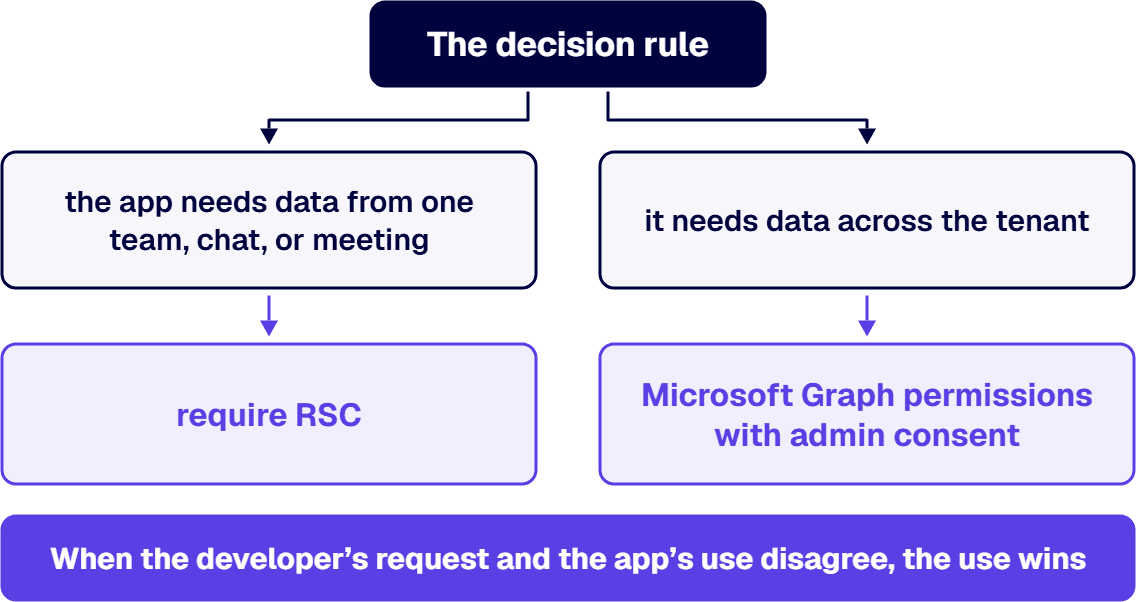
The decision rule: if the app needs data from one team, chat, or meeting, require RSC. If it needs data across the tenant, or runs with no signed-in user across many resources, accept Microsoft Graph application permissions with admin consent and a written justification for each permission. When the developer’s request and the app’s use disagree, the use wins: an app that works inside one team and asks for tenant-wide Graph access goes back for RSC.
If your tenant manages Teams apps today, access is now set app by app. Starting from April 2025, tenants are automatically migrated to app centric management. Under that model, each app contains its access definition using a list of users and groups assigned to it.
Require every custom app to start available to specific users and groups, the ones named in its approval record, and to widen only by a recorded decision. One limit belongs in that record too: if an app is restricted to specific users or groups, guests cannot use it, even when guests are assigned to the app.
The gap between a governance document and a governed estate is implementation. i3solutions closes it with platform-enforced controls, defined ownership, and records your compliance team can produce on request.
Users of a custom app should sign in through the identity your tenant already governs. Microsoft describes single sign-on for a tab app: the app is available to app users on any device with access granted through Microsoft Entra ID.
The architecture requirement is that the app’s consent path matches your tenant’s consent policy, confirmed before the build starts. The reason is Microsoft’s own warning: Microsoft Entra tenant consent policies can block user consent and require administrator approval, even for permissions that do not generally require administrator consent. An app designed around user consent, in a tenant whose policy blocks it, waits on administrator approval instead.
Messages and files sent to a bot leave your corporate network. Microsoft’s permissions guide says it twice: bots only receive messages in chats where users explicitly mention a bot by its name, and this data leaves the corporate network. When a file is sent to a bot, the file leaves the corporate network.
Require a data-flow record for each app that names every endpoint the app calls, where each endpoint is hosted, and which classes of data it receives. The review compares that record with the app package and the Permissions tab export; an endpoint in the package that the record does not name sends the app back.
In GCC, Microsoft adds two conditions for apps published to your organization: make sure that all the app’s endpoints comply with your GCC organization’s requirements, and if your app includes a bot or message extension, select the Microsoft Teams for Government option when setting up a channel between your bot and Teams in Azure.
When a developer publishes a new package, nothing resets. Microsoft states that when a new version of an app is published, the existing policies that applied to the previous version continue to be in effect for the updated version. Consent also carries over the app centric migration: after migration, any admin consent to app permissions that was previously granted is retained.
Because access and consent carry forward on their own, i3solutions recommends treating each new version as a new review of permissions and endpoints. That is our recommendation, drawn from Microsoft’s behavior, not a Microsoft rule. Retirement is the last version decision, and it is final for users: the deleted app is not available in your org and existing app users cannot use it anymore.
| Requirement | Where it is set or recorded | Evidence the review keeps |
|---|---|---|
| An admin-approved catalog route | Teams admin center, Manage apps (approve or disapprove a submission); app setup policy for upload rights | Approval record per app and version; setup policy assignment list |
| Permissions reviewed before consent | Teams admin center, the app’s Permissions tab | Permissions .csv export from Teams admin center; privilege level recorded |
| Per-app access | Teams admin center, app availability under app centric management | Assigned users and groups list per app |
| Microsoft Entra ID sign-in | Microsoft Entra admin center, the app registration and tenant consent settings | App registration record and consent grant record from the Microsoft Entra admin center |
| A documented data boundary | The review’s own data-flow record, read against the app package | Endpoint inventory with hosting and data classes, checked against the Permissions tab export |
| Re-review at every version | Teams admin center, Manage apps, each new version | Version review log kept with the approval record |
When two requirements point different ways for one app, the narrower setting wins until the approval record says otherwise: an app whose data boundary is not yet documented stays assigned to its named users and groups, whatever its access request asks for.
Before the first custom app is approved, the six requirements lean on tenant controls that carry their own licensing. Read at Microsoft’s current pages on 2026-09-18:
Access reviews, the Microsoft Entra control that recertifies who holds access to groups and enterprise applications, require a Microsoft Entra ID Governance subscription for the organization’s member users, including for all employees who are reviewing access or having their access reviewed. Microsoft’s access reviews overview adds that some capabilities operate with Microsoft Entra ID P2.
Group expiration still requires Microsoft Entra ID P1 or P2, per Microsoft’s page on the expiration policy for Microsoft 365 groups: the organization must possess but not necessarily assign Microsoft Entra ID P1 or P2 licenses for the members of all groups to which the expiration policy is applied.
Retention for Teams chats and channels is licensed across Microsoft 365 E3, E5, F3, and F1, Office 365 E1, E3, E5, and F3, and Business Basic, Business Standard, and Business Premium, plus the education and government versions Microsoft names beside them; for some of those plans the retention or deletion period must be more than 30 days.
Two lines belong in the approval record before the first app is approved. Every custom app has one named owner who signs its approval and answers for each re-review. Each app also carries a review cadence set in that record: a review at every new version, plus a recurring access review of the groups assigned to it.
When an app needs building as well as reviewing, i3solutions designs and builds custom Microsoft Teams apps and reviews them against these six requirements inside the customer’s own tenant. i3solutions operates within established enterprise risk management frameworks from day one: pre-built RACI matrices, documented access control procedures, and compliance reporting frameworks designed for regulated Microsoft environments. i3solutions is entirely U.S.-based. Every i3solutions employee is U.S.-based, every i3solutions project is U.S.-based, and every technology i3solutions delivers is U.S.-based. i3solutions is a Microsoft Partner with 30 years of delivery experience.

Michael Branson co-founded i3solutions 30 years ago and brings executive, operational, and technical perspective to organizations working in complex, secure, and mission-critical environments. His insights focus on business process consulting, automation, data analytics, collaboration, secure operating models, and the operational discipline required to turn technology investments into practical business systems with measurable value.
Connect on LinkedInRequire six things before approving a custom Teams app: an admin-approved catalog route, permissions reviewed before consent, per-app access, Microsoft Entra ID sign-in, a documented data boundary, and re-review at every version. Teams admin center has a control for the first three; the approval review demands and records the other three.
No: when a user submits a custom Teams app, it waits for an admin to approve it, and Microsoft states that admins can disapprove any submission and that the submit option cannot be turned off. An app uploaded by an admin goes into the org catalog without an approval step, so your own process has to require an approval record for admin uploads.
Use resource-specific consent when a custom Teams app needs data from one team, chat, or meeting, because resource-specific consent lets the app limit its access to that resource and only the resource's owners can grant its application permissions. Use Microsoft Graph application permissions, with admin consent and a written, recorded justification for each permission, only when the app needs data across the tenant or runs with no signed-in user.
When a developer publishes an updated version of a custom Teams app, Microsoft keeps the previous version's policies in effect for it, and admin consent survives the move to app centric management. i3solutions recommends a new review of permissions and endpoints for each version, logged in the version review log, for that reason; the recommendation is ours, not a Microsoft rule.
No: if a custom Teams app is restricted to specific users or groups, Microsoft states that guests cannot use it, even when a guest is assigned to the app.
Microsoft's government cloud table shows that custom apps built for your organization can be distributed and used in GCC High, while uploading a custom app is not available in GCC High or DoD. Microsoft states that third-party apps are turned off by default for GCC and are not available for GCC High and DoD, and that Developer Portal is not available for GCC High, DoD, and Teams operated by 21Vianet tenants.
A policy no platform control enforces is a finding waiting for its audit. i3solutions' senior governance advisors work with IT leaders ready to move governance from documents into enforced platform controls with named owners.
Talk to a Senior Governance Advisor
US-Based Microsoft System Integrator | Est. 1997
© i3solutions. All rights reserved.
US-Based Microsoft System Integrator | Est. 1997
© i3solutions. All rights reserved.


