
By Matt Lawson, Senior Consultant, i3solutions
No. As of August 2026, Copilot Cowork is an additional cost. Microsoft’s Copilot Credits licensing guidance states that Cowork “requires the Microsoft 365 Copilot license as a prerequisite” and that “No Cowork entitlements are included with the Microsoft 365 Copilot subscription.” The seat unlocks Cowork; every task it runs is billed separately in Copilot Credits.
The Copilot seats were budgeted a year ago and approved as a clean per-user line item. Then somebody in finance opens Cowork, asks it to turn a folder of invoices into a reconciled spreadsheet, and the tenant starts drawing down credits against an Azure subscription that no one on the budget committee has seen. Two weeks later the IT director gets one question in the steering meeting: we already pay for Copilot, so why is there a second bill? The answer is unambiguous, it is published by Microsoft, and it sits in a different document from the one everyone read when they bought the seats.
That is the whole answer, and the rest of this page is about what it costs you to act on it: how the credits are actually billed, the admin step without which Cowork does not run at all, the numbers Microsoft deliberately does not let you know in advance, and the one question about regulated tenants that Microsoft has not published an answer to yet.
Licensing claims age badly, and a page about a product Microsoft is still shipping into ages worse than most. Every statement below was checked against Microsoft’s own published documentation on 22 August 2026. The dates in brackets are the last-updated dates Microsoft states on each page, not our reading of them.
Two of those sources give the same per-credit figure, which is why we are willing to print it. Read them yourself before you build a budget on this page: if Microsoft has changed the terms since our check date, Microsoft’s page is right and this one is stale.
The Microsoft 365 Copilot seat is an entry ticket. It grants the right to open Cowork. It does not carry any quantity of Cowork work with it, and Microsoft’s own framing is that “licenses act as an entry point enabling access to AI services billed on a pay-as-you-go basis.”
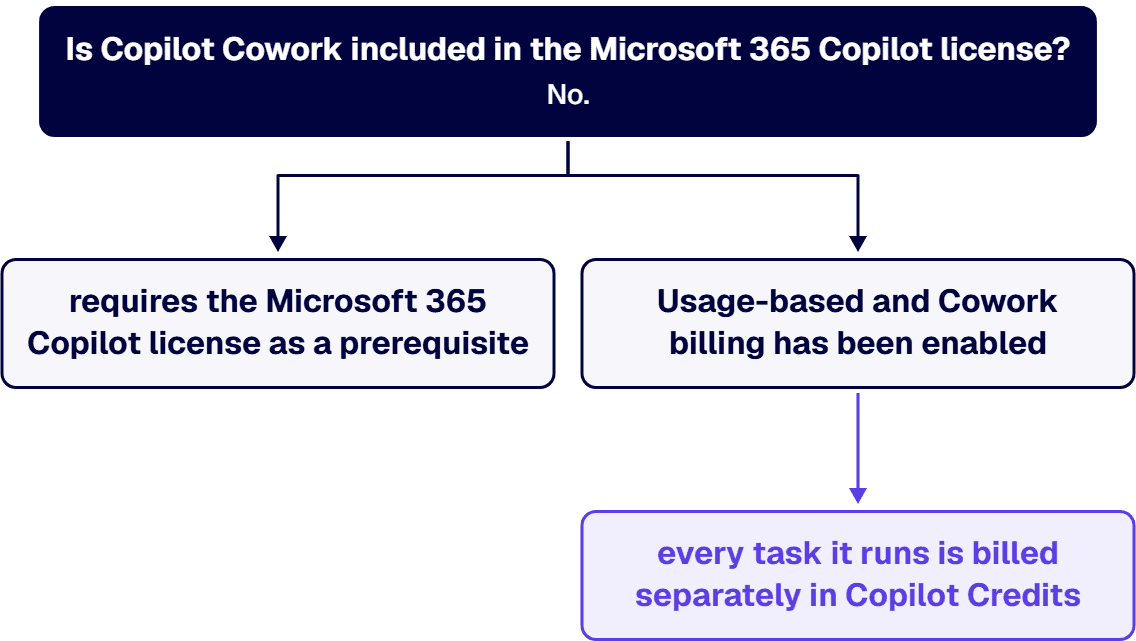
This is not a novelty in the Microsoft stack, which is the useful part for anyone building a forecast. The same service description that lists Copilot feature availability carries the footnote that “Power Platform licenses aren’t included with Microsoft 365 Copilot.” The pattern is consistent: a Microsoft 365 Copilot seat buys the assistant that answers, and any capability that goes off and does something on its own meter is licensed and metered separately. Cowork is the current, largest instance of that pattern, because the whole point of Cowork is that it acts.
The correct mental model for a budget is two lines, not one:
Finance teams are used to the first line. The second line behaves like an Azure resource, not like a Microsoft 365 SKU, and it lands in the middle of a Microsoft 365 budget conversation where nobody is expecting it.
Microsoft’s documentation is specific about the mechanics, and the details change what a sensible commitment looks like.
That last point is the one worth reading twice. It is a configuration decision made once, in an admin panel, that determines whether a year of AI consumption counts against a commitment you have already made. Microsoft also notes that “After you set a billing method for a spending policy and create the policy, you can’t change it. To update it, you must delete the policy and create a new one.”
This is the operational fact most cost conversations miss, and it is a separate question from the money.
Cowork is not a feature that appears when the seat is assigned. Microsoft’s setup documentation describes the first-run flow as the step that “activates the AI experiences, like Cowork, that are gated by usage-based billing”, and the Cowork prerequisites list an active Microsoft 365 Copilot license and that “Usage-based and Cowork billing has been enabled.” Enabling it requires a Global administrator or Billing administrator, because those are the only roles that can “add, select, and change billing methods.” An AI administrator or License administrator can create spending policies and read the dashboards but, in Microsoft’s words, “can’t set or modify the billing method.”
Two consequences follow for a regulated enterprise, and both are governance questions rather than technical ones. First, the person who unlocks the spend is a highly privileged billing role, and the setup is a one-time act with a durable financial consequence. Second, the controls you set at that moment are the controls you get: a tenant-level spending limit, optional per-user limits, alert recipients and thresholds, and a policy scoped to groups. Microsoft’s guidance is to set the per-user limit deliberately “to prevent runaway spending of Copilot Credits by one individual user”, and describes what happens when the limit binds: “When users hit the limit, they lose access to agents and services for the rest of the month until credits reset on the first of the month.”
A spending cap that silently removes a tool from a department in the third week of every month is not a cost control. It is an adoption failure with a budget line attached. Set the limits with the business owners in the room, and instrument the alerts before the first business unit gets excited about Cowork rather than after.
A cost model needs a unit cost and a unit volume. Microsoft publishes the unit cost. It does not publish the volume, and it says so in its own documentation rather than leaving you to discover it.
Microsoft does offer a Customer Cowork Estimator for modeling expected credit usage, and it is a reasonable place to start. Treat its output the way you would treat any vendor sizing tool at the beginning of an adoption curve: as an input to a pilot, not as a budget. The defensible way to size this line is to run a bounded, instrumented pilot with a named group, a per-user limit and alerting on, read the Consumption tab by user and by service, and extrapolate from your own tenant’s numbers rather than from anyone’s model.
Most of our clients run under CMMC, ITAR, DFARS, HIPAA or SOC 2 obligations, and for them the first question is not what Cowork costs but whether it exists in their environment at all. Here we have to report a gap rather than an answer, and the gap is more useful than a guess.
As of 22 August 2026, Microsoft has not published Cowork availability for GCC, GCC High or DoD in either of the two places it publishes that kind of statement. We checked both. Microsoft’s overview of U.S. government cloud environments for Microsoft 365 and Copilot [16 March 2026, refreshed 18 August 2026] does not mention Cowork. Neither does the feature-availability table in the Microsoft Copilot service description [5 August 2026, refreshed 21 August 2026], which is the table Microsoft itself points to for this question and which does carry rows for Chat, Researcher, Analyst, SharePoint agents, declarative agents and more, each marked per environment.
Unknown is not unavailable, and it is not availability either. Three things the same published sources do support:
The practical instruction for a regulated tenant: do not put Cowork in a fiscal-year plan on the strength of a commercial announcement, and do not tell a compliance officer it is unavailable either. Ask Microsoft or your licensing partner for a written statement on your specific environment, get it dated, and re-ask on the roadmap cadence. If you are still choosing an environment, the trade-offs are laid out in our comparison of GCC High and GCC Moderate, and feature timeline lag is one of the costs that belongs in that decision.
Cowork acts. It sends mail, posts in Teams, creates and reorganizes files in SharePoint and OneDrive, and searches across the organization. That changes the risk profile of your existing permission model, because an agent operating with a user’s access will find and act on everything that user can reach, at machine speed, whether or not anyone intended them to reach it.
This is where the real money usually is, and it is the pattern we see most consistently. i3solutions AI readiness assessments scope from a shallow tenant readiness scan at the low end to deep unstructured data discovery at the high end. The order-of-magnitude difference between AI readiness assessment quotes is data governance cleanup: when Dataverse and SharePoint access-control alignment has to precede a Copilot or OpenAI API integration, that remediation dominates the engagement.
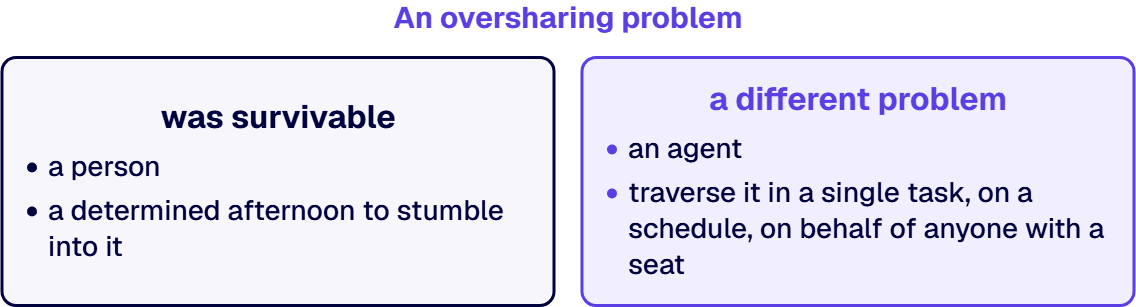
The underlying condition is usually older than the AI project, and the figure below is i3solutions delivery data rather than a vendor statistic or an industry survey. Across our Microsoft 365 migration and modernization work: Lift-and-shift migrations typically carry over 60 to 80% of existing permission inconsistencies, creating immediate audit exposure in Microsoft 365 environments rather than resolving the underlying governance debt. An oversharing problem that was survivable when it took a person a determined afternoon to stumble into it is a different problem when an agent can traverse it in a single task, on a schedule, on behalf of anyone with a seat.
So the honest total for a Cowork rollout in a regulated enterprise has more than the two lines above. It has:
The offset is real too, and it usually shows up in the same review. ROI analysis consistently shows potential savings of $50K-200K annually from optimized licensing and governance improvements alone. Behind that number is who does the work and under what accountability: i3solutions plans and runs governed Azure and Microsoft 365 migrations with senior, U.S.-based engineers. i3solutions delivers under a partner-led engagement model with named accountability and governance that holds up under a client audit, as distinct from contractor-only staff augmentation. For a spend line with no natural ceiling, the concrete step is narrower than any of that: name one accountable owner for the credit pool before the first spending policy is created, and put the monthly Consumption read on that person’s calendar.
Four answers and thirty minutes are enough to size this honestly: how many Microsoft 365 Copilot seats you hold today and on which base plan, which cloud environment your tenant runs in, whether anyone has already enabled usage-based billing and under which Azure subscription, and whether you have ever run a permission audit across the SharePoint and OneDrive content a Cowork user could reach. If the last answer is no, that is the finding, and it is usually where the work starts.
You do not need a proposal to leave that conversation with something useful. What you should get out of thirty minutes is a written separation between the seat cost, the consumption cost, and the readiness cost, so your finance and security people can each argue with the line that belongs to them. A single blended number is the version that does not survive the steering meeting. If you are building the internal case rather than buying this quarter, that separation is the part that outlasts the meeting, because it is the artifact your committee will actually review.
Bring the four answers above and we will work the numbers with you against your own tenant rather than against a model.
If the harder question on your side is architectural rather than financial, which cloud environment you belong in, how the permission model has to change before an agent operates inside it, or how a shared Power Platform and Cowork credit pool should be governed, that is a different conversation and it should be with someone who has built it. Ask for the architecture track when you book.
No. Microsoft’s Copilot Credits licensing guidance states that Cowork “requires the Microsoft 365 Copilot license as a prerequisite” and that “No Cowork entitlements are included with the Microsoft 365 Copilot subscription.” The seat unlocks Cowork; it does not include Cowork usage. Budget the two lines separately: a fixed, forecastable seat cost, and a variable, consumption-driven Cowork cost billed in Copilot Credits.
Microsoft publishes the unit price and not the volume. The stated rate is “$0.01/Copilot Credit,” and the number of credits a task consumes depends on the complexity of the work performed. Microsoft’s own FAQ answers “Can I check the cost before running a task?” with “No. Currently, you can only use /cost to check how many credits a task has already used.” The defensible approach is a bounded pilot with per-user limits and alerting on, then extrapolation from your own tenant’s Consumption data.
Yes. Until usage-based billing is enabled, Cowork does not run at all. Only a Global administrator or Billing administrator can “add, select, and change billing methods”; an AI administrator or License administrator can create spending policies but, in Microsoft’s words, “can’t set or modify the billing method.” Set the tenant limit, the per-user limit, and the alert thresholds with business owners in the room, because Microsoft states plainly that “When users hit the limit, they lose access to agents and services for the rest of the month until credits reset on the first of the month.”
As of 22 August 2026, Microsoft has not published an answer, and we report that as unknown rather than guessing. Cowork does not appear in Microsoft’s overview of U.S. government cloud environments, and it is absent from the feature-availability table in the Microsoft Copilot service description, the table Microsoft itself points to for this question. Microsoft’s general guidance for government clouds is that “Feature availability may differ” and “Release timing typically lags behind commercial environments.” Scheduled Prompts, a capability the Cowork overview lists alongside Cowork, is already marked “Not currently available” in GCC, GCC High and DoD.
No. Microsoft states: “Credits reset monthly and do not carry over. Any unused credits from the previous month are not added to your credit limit for the new month.” Prepayment is a separate commitment: a Copilot Credit Pre-Purchase Plan runs a one-year term that renews automatically by default, and “Cancel and exchange operations aren’t supported for Copilot Credit Pre-Purchase Plans. All purchases are final.” Prepay against measured consumption from a pilot, not against a forecast adoption curve.

US-Based | Est. 1997
© i3solutions. All rights reserved.
US-Based | Est. 1997
© i3solutions. All rights reserved.


