

Microsoft Integration Services ROI: A Buying Guide for IT Leaders

January 19, 2026

i3solutions connects Power Platform, Azure, and Dynamics 365 to the line-of-business systems around them for mid-to-large enterprises, which is where the ROI of Microsoft integration services actually lands: data entered once instead of twice, reporting that does not wait on a nightly export, and one audit trail across the estate instead of one per system. Integration stopped being a backend task once the Microsoft estate grew past two or three platforms. It is now the layer that decides whether the rest of the investment pays.

Why Integration Is the Hidden ROI Driver in Microsoft Ecosystems

Many organizations invest in Microsoft tools, such as Power Platform, Azure, and Dynamics 365, without fully connecting them. This results in siloed processes, duplicated data, and missed insights. Microsoft integration services are the connective tissue that turns isolated applications into a unified digital nervous system. For IT decision-makers, understanding how these services work (and when to use them) is critical for achieving full platform value.

What Are Microsoft Integration Services?

Microsoft integration services refer to the ecosystem of tools, connectors, and architectures that allow Microsoft applications and third-party systems to exchange data, trigger workflows, and automate actions in real time.

Key Components Include:

  • Azure Logic Apps: Low-code workflows to connect cloud and on-prem apps
  • Power Automate: Automates repetitive tasks across Microsoft and third-party tools
  • Dataverse: A centralized data service for modeling and managing business data
  • API Management: Securely exposes, manages, and monitors APIs across services
  • Power Platform Connectors: 1,000+ prebuilt connectors for Microsoft and external tools

Together, these services unify Microsoft’s vast tech stack into a single operating environment. This consolidation reduces complexity, minimizes licensing bloat, and enables rapid innovation when deployed with the right architecture.

What You Are Actually Buying, and How Each Piece Is Billed

You have a quote for Logic Apps, API Management and a set of connectors, and the line items do not say which billing model you are signing for. That choice comes first, and it is where the return starts. The Microsoft integration layer is bought in three parts, and each part is billed in its own way.

Workflows: Consumption or Standard Logic Apps

Azure Logic Apps is sold on two hosting options. Microsoft’s comparison puts it plainly: “A Consumption logic app can have only one workflow that runs in multitenant Azure Logic Apps. A Standard logic app can have one or multiple workflows that run in single-tenant Azure Logic Apps or an App Service Environment v3 (ASE v3).” (Differences between Standard single-tenant logic apps versus Consumption multitenant logic apps, Microsoft Learn, updated May 7, 2026.)

The billing follows the hosting. On Consumption, after an initial number of free built-in operations, “metering applies to each execution”. On Standard, “you’re billed for reserved capacity and dedicated resources whether or not you use them.” (Usage metering, billing, and pricing for Azure Logic Apps, Microsoft Learn, updated July 10, 2026.) Microsoft’s own comparison lists “Pay for what you use” against Consumption and “higher throughput and lower costs at scale” against Standard.

So the first return decision is made before any workflow runs. Irregular or low-volume work is what per-execution metering is priced for; steady, high-volume work across many workflows is what reserved capacity is priced for. Buying the plan that does not match the work is paying for capacity that sits idle, or for executions that would have been cheaper on reserved capacity.

Connectors: Managed and Custom

Logic Apps offers “1,400+ prebuilt Microsoft-managed connectors for Azure services, Microsoft services, external apps, databases, and on-premises systems,” and you can “create custom connectors when prebuilt operations don’t meet your requirements.” (What is Azure Logic Apps?, Microsoft Learn, updated September 11, 2026.) On Consumption, managed connectors carry their own line: “billing follows the Standard or Enterprise connector pricing for the Consumption plan.” Each managed connector a workflow calls is a billed item, and each custom connector is something you build once and then own for as long as the integration runs.

API Management: Paying Now So a Back End Can Change Later

API Management is the piece a first quote can leave off. Microsoft describes its gateway this way: “The API gateway acts as a facade to the backend services, allowing API providers to abstract API implementations and evolve backend architecture without impacting API consumers.” (What is Azure API Management?, Microsoft Learn, updated October 13, 2025.) What you buy with it is the ability to replace a back-end system later without rebuilding every integration that calls it. That return arrives at the next back-end migration.

The rule for the whole layer: match the plan to the volume and shape of the work, not the other way round, and count the connectors and custom APIs you own as things that will be run and paid for after go-live.

The ROI Case: Why Integration Pays Off

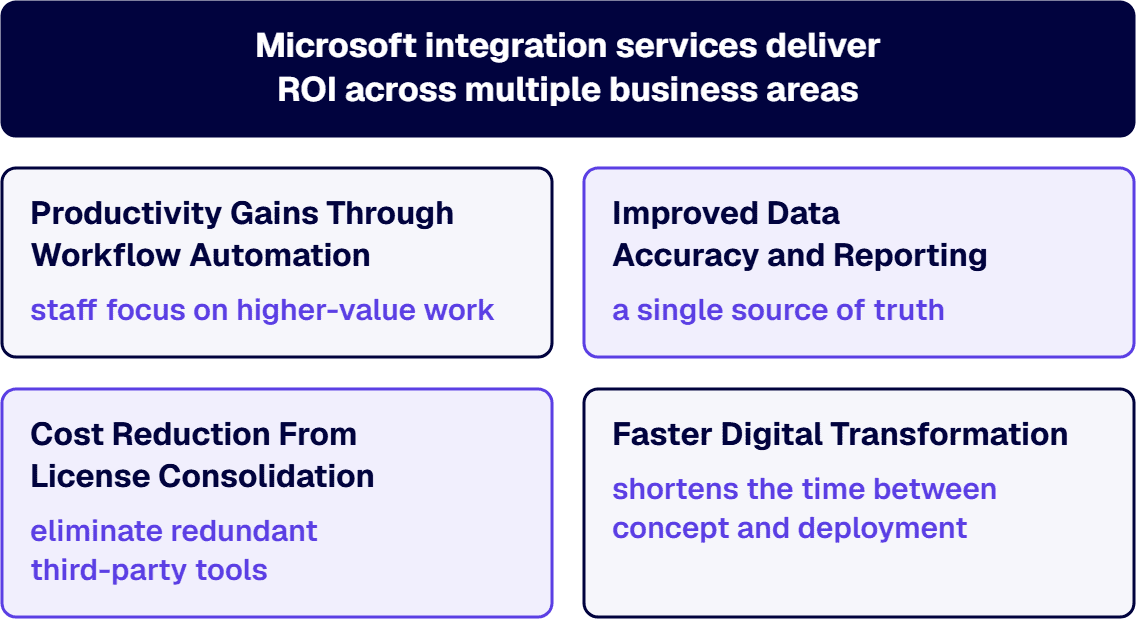
IT investments are only as good as the outcomes they produce. Microsoft integration services deliver ROI across multiple business areas, and here’s how:
Productivity Gains Through Workflow Automation

Automating manual tasks, like invoice approvals or onboarding workflows, saves hours of labor each week. Power Automate and Logic Apps enable these automations to run behind the scenes, letting staff focus on higher-value work.

Improved Data Accuracy and Reporting

Disconnected systems create duplicated, inconsistent data. By integrating Microsoft apps like Dynamics 365, SharePoint, and Power BI through Dataverse, enterprises gain a single source of truth for better reporting and faster decisions.

Cost Reduction From License Consolidation

Integration allows organizations to eliminate redundant third-party tools. For example, combining Power BI dashboards with Azure data sources may eliminate the need for additional analytics software, reducing your total cost of ownership (TCO).

Faster Digital Transformation

Integrated Microsoft environments enable rapid development of new capabilities. A connected ecosystem shortens the time between concept and deployment-whether you’re building a customer portal, automating compliance checks, or launching a Power App.

Build, Buy, or Buy the Running of It: Where the Return Is Decided

Your team can build a Logic Apps workflow. The question the budget has to answer is who runs it a year from now, when a connector changes, a back-end system moves, or a run starts failing. The return on an integration is decided by who operates it after go-live, as well as by who builds it.

There are three ways to buy: your team builds it and runs it; a firm builds it and hands it to your team; or a firm builds it and keeps running it. The third is the option a build quote does not price.

i3solutions designs Azure integration architecture and builds and operates Azure Logic Apps workflows for enterprise clients, including running them on an ongoing basis rather than only building them.

What gets built decides what it costs to run. i3solutions workflow automation builds use standard and premium Power Platform connectors, custom API connectors published through Azure API Management, and hub-and-spoke approval patterns built on Dataverse tables or SharePoint lists. i3solutions builds Dynamics 365 integrations using named Microsoft mechanisms including Dataverse, dual write, virtual tables, Azure Logic Apps, Azure Service Bus, and Power Automate connectors.

i3solutions has completed more than 20 Dynamics 365 integration engagements. i3solutions has delivered Dynamics 365 integration engagements for regulated enterprises across healthcare, defense and aerospace manufacturing, and financial services.

The test for any quote, including one from your own team, is a line item: who owns the workflows, the custom connectors and the API Management configuration after go-live, and what that ownership costs each year.

When Buying the Build Is the Wrong Call

Not every integration needs an outside build. A single-system, low-volume flow on standard connectors, owned by a team that can run it, is cheaper to build and keep in-house. The Power Automate flow between Teams and Outlook named under When to Outsource vs. Keep In-House, below, is that case: paying a firm to build it buys little, and paying a firm to run it buys less.


Explore how i3solutions’ integration solutions can help your enterprise unify Microsoft platforms and maximize ROI through strategic automation.


Lessons Learned From Real-World Microsoft Integration Projects

i3solutions has worked with numerous mid- and large-sized enterprises on Microsoft integration efforts. These are the consistent success factors and common traps.

What Successful Projects Do Differently

Successful Microsoft integration projects share a common thread: they treat integration as a strategic initiative that aligns technology decisions with measurable business outcomes, not just a technical task to be completed.

  • Start with a Strategy: Integration is not just technical. It must align with business goals.
  • Prioritize High-Impact Workflows: Start with automation that delivers quick wins and scales.
  • Invest in Training and Change Management: Even perfect integrations fail if users don’t adopt them.
  • Build Governance Early: Ensure security, naming conventions, and data ownership are defined before launch.

Common Failure Points and How to Avoid Them

Even the most well-intentioned Microsoft integration initiatives can stumble without a clear understanding of common pitfalls that disrupt ROI and scalability.

  • Underestimating Complexity: Integrating Power Platform solutions, Azure, and third-party apps is not plug-and-play.
  • Overcustomization: Avoid building fragile, bespoke solutions when native connectors or standard APIs will work.
  • Lack of Monitoring: Without logging and alerts, failures can go unnoticed, especially in high-volume environments.

Critical Evaluation Criteria for IT Leaders

Before initiating a Microsoft integration initiative, here are key questions to guide your internal assessments.

When to Outsource vs. Keep In-House

Not all integration projects carry the same level of complexity or risk, so determining whether to outsource depends heavily on your team’s capabilities and the project’s scope.
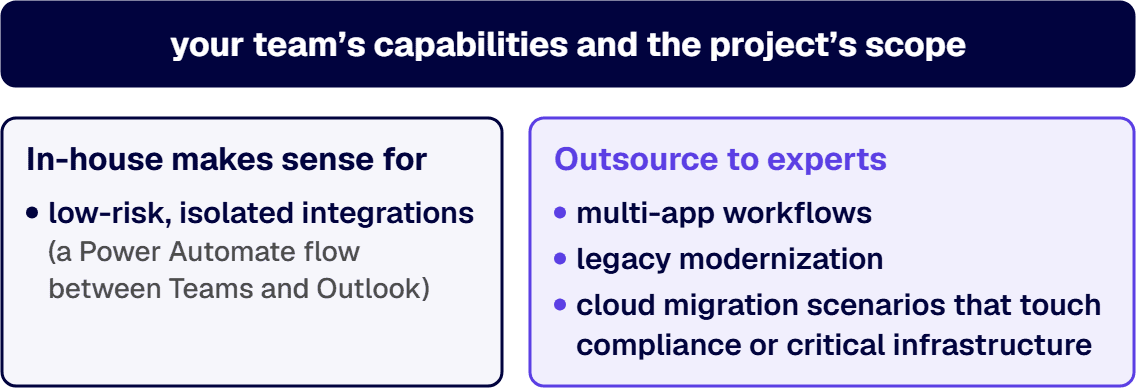
  • In-house makes sense for low-risk, isolated integrations (e.g., a Power Automate flow between Teams and Outlook).
  • Outsource to experts like i3solutions for multi-app workflows, legacy modernization, or cloud migration scenarios that touch compliance or critical infrastructure.

Who runs these integrations after go-live decides as much of the return as who builds them; Build, Buy, or Buy the Running of It, above, sets out that choice.

How to Assess Integration Complexity

Understanding the full scope of your systems, data sensitivity, and customization needs is essential before committing to a project timeline or resource allocation.

  • How many systems are involved?
  • Are the systems cloud-native, hybrid, or on-premises?
  • Do you require custom APIs or use existing connectors?
  • How sensitive is the data? (PII, financial, etc.)

If the answer includes multiple systems, compliance mandates, or custom workflows, then bring in an experienced Microsoft integration partner.

Governance, Security, and User Adoption

Integration isn’t just about “connecting tools”. You must plan for:

  • Access controls (Azure AD, Conditional Access)
  • Data classification policies
  • Audit trails and logging
  • User onboarding and support

Enterprises in regulated industries especially benefit from an upfront security review to prevent post-launch risks.

What a Regulated Buyer Adds to the Bill: Guardrails and Monitoring

Your security review has asked two questions the integration quote does not answer: what stops a maker from wiring a regulated system to an unapproved connector, and who finds out when a production flow fails. Both answers are things you buy, and both protect the return.

Guardrails: Power Platform Data Policies

Microsoft’s guidance is to “Create data policies that act as guardrails to help reduce the risk of users unintentionally exposing organizational data.” The policy reaches work that is already running: “Any resources that are running and attempting to use an inactive connection, action, trigger, or MCP server that is blocked, fail at runtime.” (Data policies, Microsoft Learn, updated April 8, 2026.) For a buyer, that means the data policy is designed alongside the integrations, not after them. A policy change made without that design can stop a production flow.

Monitoring: Knowing When a Flow Stops

Microsoft’s monitoring guidance for Logic Apps opens with the requirement: “When you have critical applications and business processes that rely on Azure resources, you need to monitor and get alerts for your system.” It names the tool: “Azure Monitor provides you with a view of availability, performance, and resilience, and notifies you of issues.” (Monitor workflows in Azure Logic Apps, Microsoft Learn, updated July 10, 2026.) The Lack of Monitoring trap listed above is how an integration loses its return quietly: data stops moving, and what the integration was bought to do stops with it.

i3solutions implements monitoring and observability for Microsoft integration landscapes: Azure Monitor, Application Insights, intelligent alerting, and standardized runbooks that reduce mean time to resolution from hours to minutes.

A financial services organization decreased repeat integration failures by 73% within 6 months through proactive monitoring of Power Platform and Dynamics 365 data flows, coming from identifying patterns in error conditions and implementing preventive measures.

What an Integration Project Typically Costs to Build and Run

The quote in front of you prices the build. The lifecycle carries a second number, and it is paid every year.

A typical mid-enterprise integration project costs $150K-$400K to build, with $25K-$80K in annual operational costs over a 5-year lifecycle.

The annual running cost belongs in the buying decision because it runs for as long as the integration is in service, and it is set by the choices above: the hosting plan, the connectors and custom APIs you own, and whether guardrails and monitoring are bought or left out.

How to Choose the Right Microsoft Integration Partner

Mid-sized and enterprise organizations need more than just technical resources. They need an IT strategy consulting partner.

Here’s what to look for:

  • Microsoft-certified expertise across Power Platform, Azure, and Dynamics
  • Experience in regulated industries (healthcare, finance, government)
  • Proven frameworks for architecture, governance, and change management
  • Scalable support models for future maintenance and optimization
  • Cross-functional fluency between business analysts and technical architects

Before signing a statement of work, ask:

  • “Can you show examples of similar integration projects?”
  • “What’s your approach to compliance and security?”
  • “How do you support long-term scalability and governance?”
  • “Do you offer post-deployment support and performance monitoring?”

i3solutions excels in delivering secure, future-ready Microsoft integration services that drive both technical and business ROI.

Drive Measurable Impact With i3solutions’ Microsoft Integration Services

Microsoft’s tech stack is powerful, but only if it works together. Integration is the key to turning software investments into business outcomes. Whether you’re streamlining financial operations, connecting CRMs and ERPs, or powering real-time analytics, i3solutions helps large organizations unify their Microsoft ecosystem, including Azure integration, with confidence.

Looking to evaluate your current environment or plan your next integration project? i3solutions brings decades of enterprise expertise, deep Microsoft platform knowledge, and a strategy-first approach that drives measurable returns.

CONTACT US
