

Enterprise organizations looking to modernize legacy SharePoint workflows face more than a simple upgrade-they face a transformation in how work is executed across departments, systems, and compliance frameworks. Microsoft’s current ecosystem, particularly Power Automate and Azure Logic Apps, unlocks opportunities that legacy tools simply couldn’t offer. i3solutions helps mid-to-large enterprises successfully bridge this automation gap using strategic combinations of Microsoft tools.
Below, we’ll guide you through the risks of staying on outdated systems, where Power Automate and Azure shine, and how to integrate these tools for a secure, scalable automation framework.
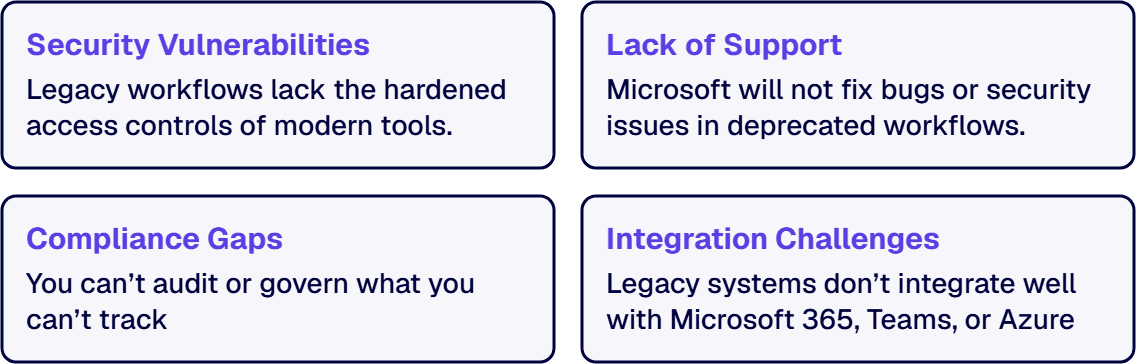
Many enterprises still rely on SharePoint Designer workflows: a toolset that, while once powerful, is now outdated, unsupported, and unfit for modern, cloud-centric environments. Microsoft has deprecated SharePoint 2010 workflows, and SharePoint Designer 2013 reached end of support on July 14, 2026, leaving organizations scrambling to find modern alternatives. Continuing to rely on legacy workflows introduces significant risks, including technical debt, security vulnerabilities, and compliance challenges.
Without modernization, IT teams find it harder to integrate with Microsoft 365, govern processes across departments, or scale workflows to meet enterprise needs. This makes migration not just an IT improvement, but a business imperative.
Microsoft turned off SharePoint 2010 workflows for new Microsoft 365 tenants on August 1, 2020 and removed them from existing tenants on November 1, 2020. While on-prem environments may still run legacy workflows, Microsoft says the Workflow Manager behind SharePoint 2013 workflows follows the support timeline of its parent SharePoint Server product, and such environments are increasingly brittle and non-compliant with modern cloud-first mandates. According to Microsoft, SharePoint 2013 workflows were turned off for new Microsoft 365 tenants on April 2, 2024 and fully retired for existing tenants on April 2, 2026, with Power Automate or another supported solution as the replacement; SharePoint Server farms still run them.
Remaining on outdated SharePoint workflow solutions introduces real risks:
To modernize effectively, enterprise IT teams need to understand when and how to use Microsoft’s modern automation stack.
Power Automate is Microsoft’s cloud-first workflow engine for automating personal, departmental, or enterprise processes, without writing code. It’s ideal for:
For business users and IT teams alike, Power Automate offers a friendly interface with built-in compliance, version control, and monitoring capabilities. It’s the recommended replacement for most SharePoint Designer workflows.
Azure Logic Apps offer similar workflow functionality, but with enterprise-grade scalability and flexibility. Ideal for IT-led integrations, Logic Apps:
If Power Automate is your business team’s automation tool, Azure Logic Apps are your backend IT engine.
While Power Automate and Azure Logic Apps both offer robust automation capabilities, understanding when to use one, or both, is essential for enterprise scalability. Many mid-to-large businesses find that the most effective approach is a hybrid solution that capitalizes on the strengths of each tool.
i3solutions has delivered Power Platform development, governance, automation, and modernization services for enterprise organizations in regulated environments since 1997. Every engagement is staffed with senior, 100% US-based specialists who operate under the compliance and security standards these environments require.
Evaluate i3solutions' Power Platform Development Services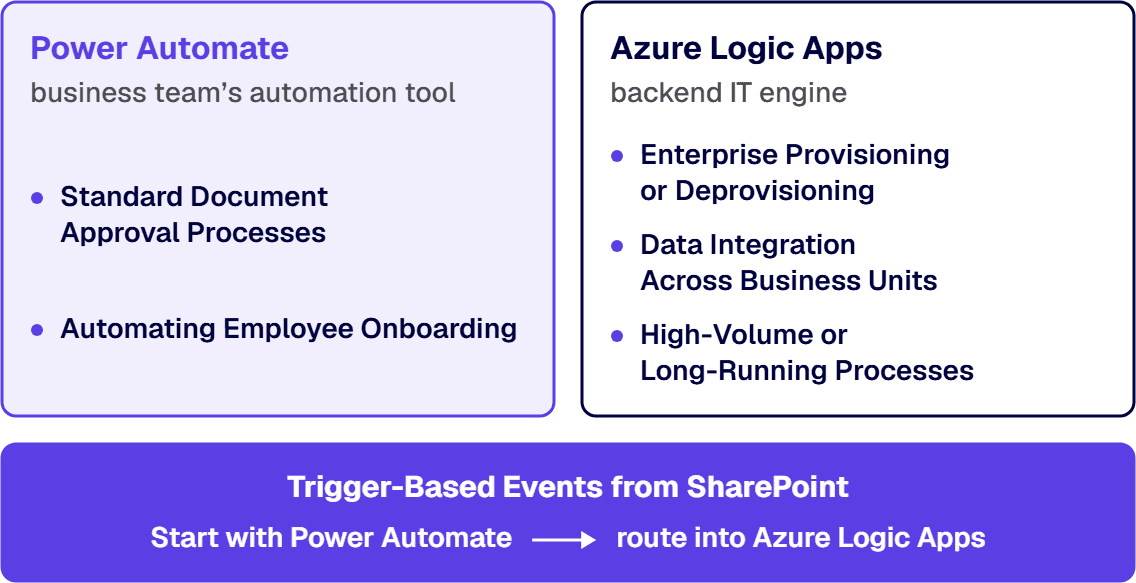
Before choosing an automation approach, it’s important to understand which tool or combination of tools best fits the complexity, scale, and governance requirements of each workflow scenario.
By combining both tools strategically, enterprise IT leaders can offer low-code simplicity to business users while still meeting the scale and complexity needs of backend operations. i3solutions helps clients architect hybrid workflows that deliver agility without sacrificing governance.
Successfully combining automation layers requires a clear architectural vision. Here’s a high-level integration path.
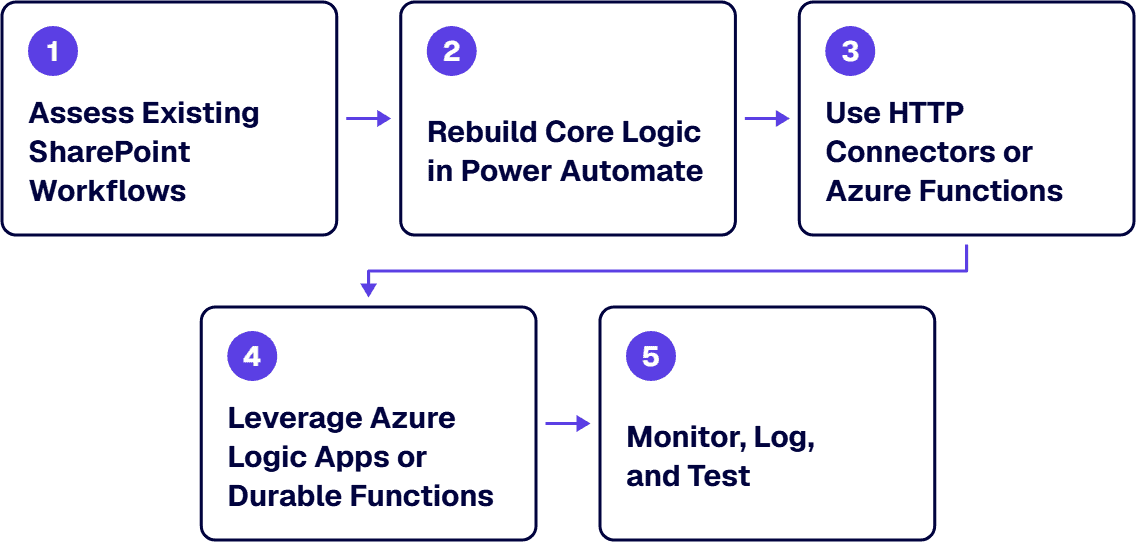
Before launching any modern SharePoint workflow replacement project, enterprise IT teams should keep the following in mind:
Both Power Automate and Azure support enterprise security requirements, including multi-factor authentication, encryption, tenant-level policies, and Microsoft Purview integration. But security must be baked into each automation process, not retrofitted.
Use Microsoft Entra ID (formerly Azure AD) to manage user roles and access. Ensure only the right users can trigger, edit, or monitor flows, especially when dealing with financial or HR data.
Set up robust retry logic, timeouts, and alerting systems. Azure Logic Apps and Power Automate both support failure paths and webhook alerts, ensure your IT team reviews these regularly.
i3solutions' Power Platform specialists bring three decades of delivery experience in regulated environments where audit exposure, compliance requirements, and executive accountability define how platform work gets staffed and governed. Every specialist is senior-level and 100% US-based.
Hire US-Based Power Platform SpecialistsEven with powerful tools, many automation initiatives fail due to missteps.
Connecting SharePoint, Power Platform, and Azure requires thoughtful architecture-especially when working across tenants, custom APIs, or legacy systems. i3solutions helps enterprise teams scope and structure these integrations for long-term success.
Automations without naming conventions, approval gates, or lifecycle policies quickly become unmanageable. Adopt governance templates early to prevent sprawl.
Most workflows are built for the “happy path.” But what happens when a record is missing? An API times out? A user lacks permission? Build and test for every edge case, especially in regulated industries.
Modernizing your SharePoint workflow architecture using Power Automate and Azure Logic Apps is not just a technical upgrade: it’s a strategic shift toward scalable, governed, cloud-first operations. By combining the intuitive user experience of Power Automate with the robust integration engine of Azure, enterprises can replace brittle legacy automations with dynamic, future-ready solutions.
Whether you’re migrating off SharePoint Designer, scaling into Microsoft 365, or building cross-system automations, i3solutions has the enterprise experience to help you succeed. Our team specializes in Microsoft workflow automation, architecture design, and secure Power Platform implementations that align with your IT and business goals.
Ready to modernize your SharePoint workflows? Contact i3solutions for a consultation and discover how we bring together SharePoint, Power Automate, and Azure to drive transformation.

Scott Singleton has spent more than 19 years at i3solutions and more than 30 years designing, developing, migrating, and implementing enterprise technology solutions. His expertise is grounded in SharePoint architecture, large-scale migration, custom application development, workflow modernization, technical training, and hands-on delivery across Microsoft platforms, including SharePoint, SPFx, Power Apps, Power Automate, Power BI, and enterprise database systems.
View LinkedIn Profile


Every quarter an ungoverned Power Platform environment stays in production, remediation becomes more expensive, more disruptive, and harder to fund internally. i3solutions' Power Platform advisors work with enterprise IT leaders who have already identified the problem and need a structured path from diagnosis to scoped delivery.
Pressure-Test Your Power Platform Plan
US-Based Microsoft System Integrator | Est. 1997
© i3solutions. All rights reserved.
US-Based Microsoft System Integrator | Est. 1997
© i3solutions. All rights reserved.


