
By Matt Lawson, Senior Consultant, i3solutions. Matt Lawson has spent more than 14 years at i3solutions guiding complex enterprise technology work from scope and system design through development, acceptance, and long-term support, with expertise spanning technical oversight, solution architecture, SharePoint and Microsoft 365 delivery, Power Platform implementation, business intelligence, enterprise search, and the practical application of AI to real business and operational challenges.
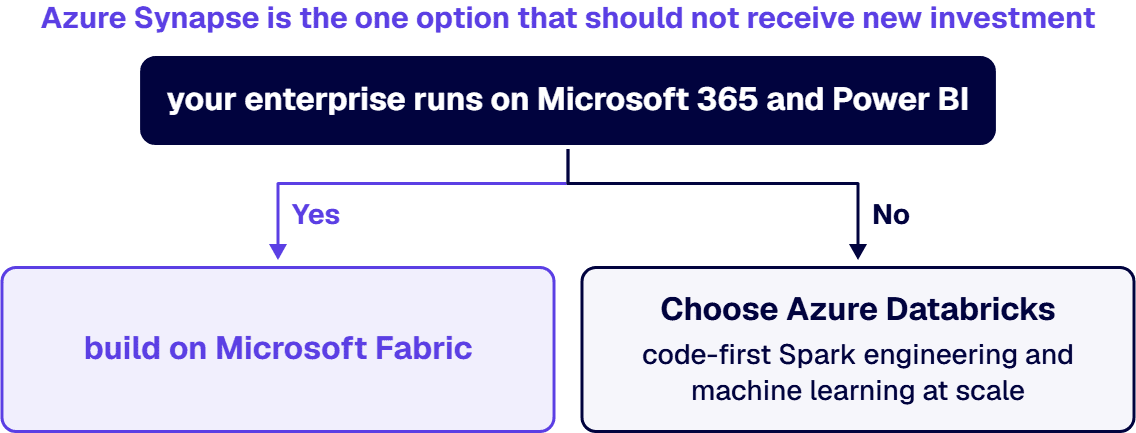
If your enterprise runs on Microsoft 365 and Power BI, build on Microsoft Fabric: one pooled capacity, from $262.80 per month for an F2 on pay-as-you-go rates to roughly $8,410 per month for an F64, covers ingestion, warehousing, Spark engineering, and BI in a single SaaS platform, and at F64 and above your report viewers no longer need paid per-user Power BI licenses. Choose Azure Databricks instead when your center of gravity is code-first Spark engineering and machine learning at scale, multi-cloud portability, or a data science team that already lives in notebooks; its Premium tier all-purpose compute lists at about $0.55 per DBU plus the underlying VM cost.
Azure Synapse is the one option that should not receive new investment. Microsoft has made Fabric the successor to the Synapse workloads, publishes migration guidance from Synapse to Fabric, and ships new capability in Fabric first. An existing Synapse estate can keep running while you plan, but a greenfield analytics platform started on Synapse in 2026 begins life needing a migration. The practical decision is therefore Fabric versus Databricks, and for many enterprises the honest answer is a deliberate combination of both: Databricks where the machine learning pipeline already lives, Fabric and Power BI where the reports get read. This page walks the costs, the fit conditions, and the integration mechanics we use when we scope this decision in Microsoft Fabric development engagements for regulated, Microsoft-centric organizations.
The sections below walk each factor in full; this table is the scannable summary of where the two platforms diverge, drawn from the same pricing pages and product behavior covered on the rest of this page.
The two platforms price on different units, which is why sticker comparisons mislead. Fabric sells provisioned capacity; Databricks meters consumption per second of compute.
Fabric is bought as an F-SKU capacity, a pool of Capacity Units (CUs) shared by every workload in the tenant that is assigned to it. On Microsoft’s published Fabric pricing for US regions, pay-as-you-go compute runs about $0.18 per CU per hour, and a capacity can be paused when idle. OneLake storage is billed separately at about $0.023 per GB per month.
Two mechanics matter more than the table. First, a one-year reservation cuts the compute price by roughly 41 percent, so a production capacity should almost always be reserved while dev and test capacities stay pay-as-you-go and pause overnight. Second, F64 is the license threshold: below it, everyone who views a Power BI report needs a Pro license at $14.00 per user per month on Microsoft’s Power BI pricing; at F64 and above, viewing is covered by the capacity itself. For an organization with thousands of report consumers, that threshold, not the compute price, usually decides the SKU.
Azure Databricks meters Databricks Units (DBUs) per second, at a rate that varies by workload, plus the cost of the underlying Azure VMs for classic compute. On Azure’s published Databricks pricing, Premium tier all-purpose compute lists at about $0.55 per DBU, automated jobs run materially cheaper, and serverless SQL lists at about $0.70 per DBU with the compute cost bundled in. The model rewards engineering discipline: well-tuned job clusters that spin up, run, and terminate are inexpensive, while an interactive cluster someone forgot overnight is the classic Databricks bill shock. Budgeting Databricks is a FinOps practice, not a line item.
Fabric fits when the consumption layer of your analytics estate is already Microsoft. If Power BI is the reporting standard, users authenticate with Entra ID, governance runs through Purview, and your engineers are stronger in SQL and low-code pipelines than in Spark, Fabric gives you the whole chain, ingestion with Data Factory pipelines, warehousing, Spark notebooks, real-time intelligence, and BI, on one capacity with one security model. Direct Lake mode lets Power BI query Delta tables in OneLake directly, without import refreshes and without a per-query compute bill from a separate warehouse vendor, a governance-and-cost combination that underpins business intelligence executives can trust.
It also fits organizations that cannot staff a platform team. Fabric is SaaS: there are no clusters to size, no VNets to design for each workspace, and capacity administration is a settings page, not an infrastructure project. That trade cuts both ways, the platform makes fewer things tunable, but for a lean IT organization the operational surface is a fraction of what a self-managed lakehouse demands. The typical entry pattern we see work is an F2 or F4 for a proof of concept, a reserved F16 for the first production workloads, and a move to F64 when the viewer population makes the license math flip, a progression we map out in our business intelligence and reporting engagements.
Databricks is the better platform when the hard problems are upstream of the dashboard. Large-scale machine learning with experiment tracking and model serving, streaming pipelines with strict latency budgets, petabyte-scale Spark transformation, and software-engineering-grade data pipelines with unit tests and CI/CD are what it was built for, and its notebook culture, MLflow tooling, and Unity Catalog governance are more mature for those workloads than Fabric’s equivalents. If your organization employs data engineers who think in Python and Scala and ships models to production, Databricks will not be the bottleneck.
It is also the answer when multi-cloud is a genuine requirement rather than a slide. Databricks runs the same platform on Azure, AWS, and Google Cloud, so a merger, a sovereignty constraint, or a strategic second-cloud policy does not strand the analytics estate. A Microsoft-centric enterprise should be honest about this condition: if everything else you run is Azure, paying the operational overhead of a portability you will never exercise is a real cost. But where the condition holds, Fabric cannot meet it and Databricks can.
Whichever platform carries the workload, forecasts depend on reconciled, governed data, which is what our predictive analytics and data fusion work covers.
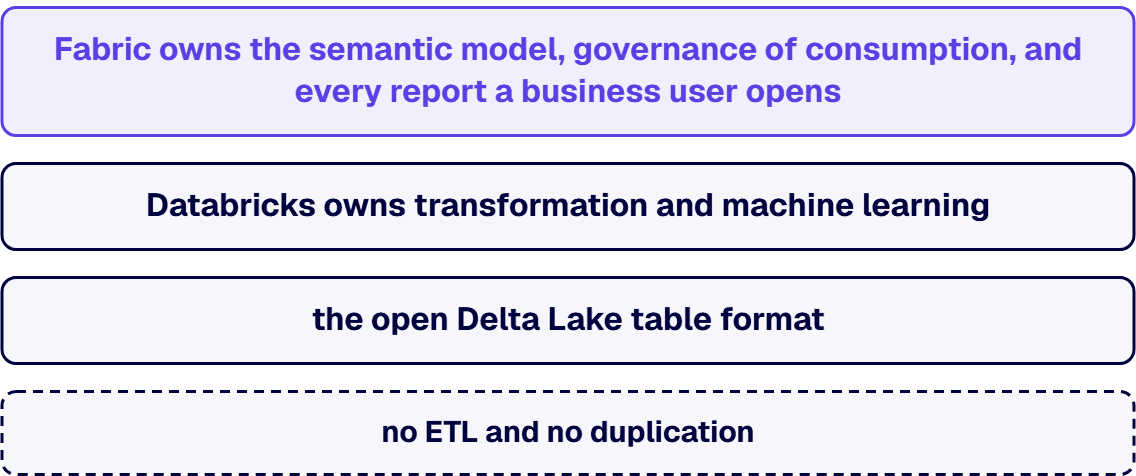
Yes, and this is the architecture many enterprises actually land on. Both platforms standardize on the open Delta Lake table format over Parquet files, which means a table written by Databricks is natively readable by Fabric. Microsoft’s Fabric mirroring documentation describes the supported path: an Azure Databricks Unity Catalog can be mirrored into Fabric as metadata, with OneLake shortcuts referencing the data in place, no ETL and no duplication, so Databricks remains the engineering platform while Power BI reads the same tables through Direct Lake. The division of labor is clean: Databricks owns transformation and machine learning, Fabric owns the semantic model, governance of consumption, and every report a business user opens. Tools like dbt run against either engine, and the pipeline layer itself has options we compare in our data integration tooling analysis, so the transformation codebase does not have to take sides.
The combination has a cost discipline of its own, two platforms means two meters, and it needs a deliberate boundary so teams do not rebuild the same pipeline on both sides. That boundary decision is exactly the kind of question a structured technology stack evaluation should settle before either invoice starts running.
Keep serving production from Synapse while you plan, and put new work in Fabric. Dedicated SQL pools, Synapse Spark jobs, and pipelines continue to run, but the platform is no longer where Microsoft ships its analytics roadmap, and every new artifact you build on it adds to the eventual migration. The pragmatic sequence we recommend: stand up a Fabric capacity, point new reporting and new pipelines at OneLake, and migrate the existing Synapse estate workload by workload against Microsoft’s published guidance, warehouse first or Spark first depending on where your change risk is lower. Treat it as a planned replatform with a deadline you choose, rather than an emergency you inherit.
We treat it as a data estate decision, not a product preference. The scoping questions are the ones this page walks: where your engineering skills actually sit, what the viewer population does to license math, whether multi-cloud is a binding constraint or an aspiration, and what your regulatory environment requires of governance and auditability. i3solutions has completed 1,500+ Microsoft platform implementations. Data integration tool evaluation engagements at i3solutions typically range from $40,000 to $120,000 depending on the scope and complexity of the enterprise’s data estate. The deliverable is a defensible platform decision with the cost model, the integration boundary, and the migration sequence written down. If the shortlist pairs Fabric against a cloud warehouse rather than a Spark platform, our Fabric vs Snowflake comparison covers that decision. Organizations that already know the direction and need senior build capacity can hire Microsoft Fabric developers from us directly, and teams whose real problem is the analytics roadmap itself can start with our analytics and insights solutions practice. When the data platform is decided, see who leads analytics and reporting for regulated enterprises and how to judge that claim.
Functionally, yes. Synapse still runs and Microsoft still supports it, but Fabric is where the Synapse workloads, warehousing, Spark, pipelines, and real-time analytics, now evolve, and Microsoft publishes migration guidance from Synapse to Fabric. Existing Synapse estates should keep serving production while new investment goes to Fabric; a greenfield analytics platform should not be started on Synapse in 2026.
They price on different units. Fabric is provisioned capacity: an F2 is $262.80 per month pay-as-you-go and an F64 is roughly $8,410 per month, about 41 percent less on a one-year reservation, with OneLake storage at about $0.023 per GB per month. Azure Databricks meters consumption: about $0.55 per DBU for Premium all-purpose compute plus VM cost, billed per second. Fabric is easier to predict; Databricks can be cheaper for bursty, well-engineered jobs and more expensive for idle interactive clusters.
Yes. Both write the open Delta Lake format, and Fabric can mirror an Azure Databricks Unity Catalog as metadata, using OneLake shortcuts to reference the data in place with no ETL and no duplication. Databricks keeps doing the engineering and machine learning; Power BI reads the same tables through Direct Lake mode. This is the pattern most large enterprises settle into rather than a winner-take-all choice.
Below F64, yes: authors and viewers alike need Power BI Pro at $14.00 per user per month, or Premium Per User at $24.00. At F64 and above, report viewing is covered by the capacity, and only content creators still need a Pro license. That threshold is frequently the deciding line in enterprise cost models, because a few thousand viewers at $14.00 per month costs more than the F64 capacity that makes those licenses unnecessary. The same arithmetic, run against Tableau viewer pricing, is walked in our Power BI vs Tableau comparison.
When the workload is code-first and the team is engineering-led: large-scale machine learning with MLflow, streaming with tight latency budgets, petabyte Spark transformation, pipelines managed like software with tests and CI/CD, or a genuine multi-cloud mandate that a Microsoft-only platform cannot satisfy. In those conditions Databricks is the stronger platform, and the right architecture is usually Databricks for engineering with Fabric and Power BI as the consumption layer.
As a scoped data integration tool evaluation: we inventory the estate, model both cost structures against your actual workloads and viewer population, test the governance and compliance requirements that regulated organizations carry, and hand back a written platform decision with the integration boundary and migration sequence. The engagement typically runs $40,000 to $120,000 depending on estate complexity, and it exists so the platform bet is made on evidence rather than vendor slides.
Choose Microsoft Fabric when the enterprise already runs on Microsoft 365 and Power BI and the analytics work is SQL, low-code pipelines, and reporting: one provisioned capacity covers ingestion, warehousing, Spark, and BI in a single SaaS platform with no clusters to size. Choose Azure Databricks when the center of gravity is code-first Spark engineering, large-scale machine learning, tight latency budgets, or a genuine multi-cloud mandate. Most large enterprises settle on both, with Databricks doing the engineering and Fabric and Power BI reading the same Delta tables in place rather than a copy. New work should not start on Azure Synapse.

US-Based | Est. 1997
© i3solutions. All rights reserved.
US-Based | Est. 1997
© i3solutions. All rights reserved.


