

Many businesses rely on Excel to manage processes that were never meant to live inside spreadsheets. What begins as a simple tracking tool often evolves into a mission-critical system with complex formulas, macros, and manual workflows. Understanding how to convert Excel to web application solutions helps organizations reduce risk, modernize operations, and support long-term business process modernization.
Many organizations do not initially intend to build operational systems inside spreadsheets. However, over time, Excel files evolve into unofficial applications that support daily operations. When this happens, the limitations of spreadsheets begin to surface and create operational risk.
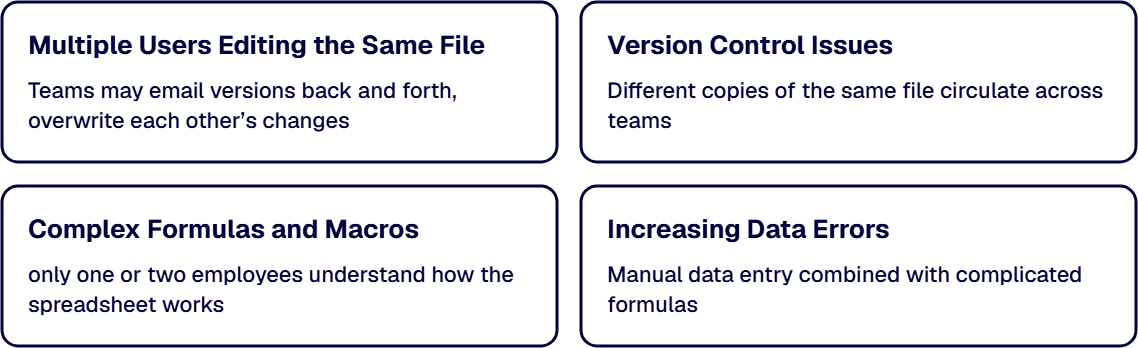
If your organization is considering how to convert Excel to web application solutions, it usually starts with recognizing these warning signs.
When several employees rely on the same spreadsheet to complete tasks, problems quickly arise. Teams may email versions back and forth, overwrite each other’s changes, or struggle to determine which version contains the correct data. This lack of coordination can cause delays and confusion across departments.
Version control chaos is one of the most common indicators that an Excel spreadsheet has become a system. Different copies of the same file circulate across teams, each containing slightly different information. Over time, it becomes nearly impossible to identify the most accurate dataset.
Spreadsheets often accumulate layers of formulas, macros, and conditional logic as they evolve. While these elements may work initially, they become difficult to maintain as complexity grows. Eventually, only one or two employees understand how the spreadsheet works, creating operational risk if those individuals leave.
Manual data entry combined with complicated formulas frequently results in errors. These mistakes may not be discovered until they affect financial reporting, forecasting, or operational decisions. Many organizations decide to convert Excel to web application platforms after realizing the true cost of spreadsheet inaccuracies.
As spreadsheets evolve into business systems, organizations begin searching for better alternatives. A web-based application offers structure, governance, and scalability that spreadsheets cannot provide.
Moving to a modern platform is often a key step in business process modernization, especially for companies that rely on manual workflows or disconnected tools.
Web-based applications store data in centralized databases instead of scattered spreadsheets. This ensures everyone accesses the same information in real time, eliminating duplicate files and inconsistent records.
Unlike spreadsheets, web applications allow multiple users to work simultaneously without creating conflicts. Teams can access the same system through secure portals, improving coordination and visibility across departments.
Modern applications can enforce data validation rules, automate approvals, and eliminate repetitive tasks. This type of excel workflow automation significantly reduces human error while improving operational efficiency.
As data volumes grow, spreadsheets often become slow or unstable. Web applications, on the other hand, are designed to handle large datasets, complex workflows, and growing user bases without performance issues.
For many organizations, the decision to convert Excel to web application platforms ultimately comes down to scalability and reliability.
Replacing spreadsheets with web-based systems requires a structured process. Organizations that attempt to rebuild spreadsheets without careful planning often recreate the same problems in a new format.
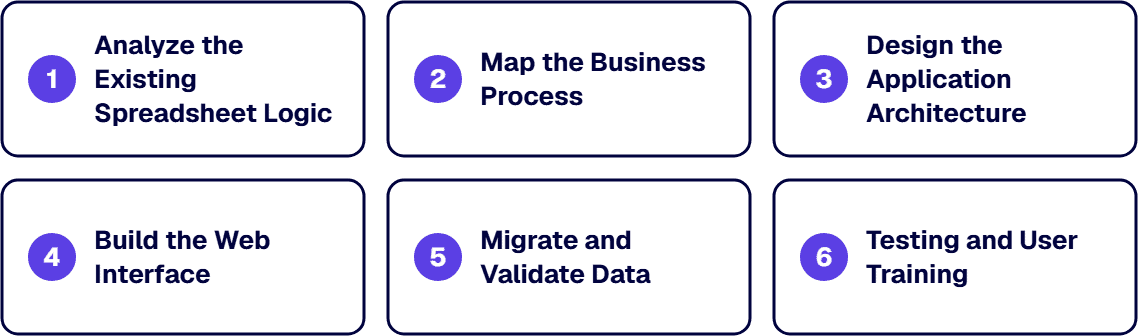
Below is a simplified roadmap used in many custom web application development projects.
The first step is understanding how the spreadsheet currently works. This includes identifying formulas, macros, workflows, and dependencies.
Teams must determine:
This analysis helps ensure the new application replicates necessary functionality while improving reliability.
Next, teams must evaluate how users interact with the spreadsheet in real-world scenarios. This step focuses on the human workflow behind the data.
For example:
Understanding these workflows ensures the new system supports real operational needs rather than simply recreating a spreadsheet interface.
Once the process is understood, developers design the underlying architecture of the web application.
The hardest part of Excel-to-web modernization isn't the application development. It's accurately capturing the business logic, exceptions, and institutional knowledge embedded in the spreadsheet before building anything. i3solutions' Excel-to-web services start with that logic capture to ensure the web application actually replaces the spreadsheet instead of running alongside it.
Evaluate i3solutions' Excel-to-Web ApproachThis stage includes planning:
A well-designed architecture ensures the new system supports both current operations and future growth.
The user interface is where employees interact with the system. Instead of navigating spreadsheets, users work with structured forms, dashboards, and workflows.
Common interface components include:
This is where excel workflow automation begins to replace manual spreadsheet tasks.
Existing spreadsheet data must then be transferred into the new application. Data migration involves cleaning, validating, and importing historical information.
This step ensures the new system starts with accurate records and prevents legacy errors from contaminating the new platform.
Organizations looking to convert Excel to web application solutions often discover that data cleanup is one of the most valuable parts of the modernization process.
Before the system goes live, teams perform extensive testing to ensure workflows function correctly.
Testing typically includes:
Once validated, employees receive training to ensure they understand how to use the new system effectively.
Organizations can use several technologies to support the transition from spreadsheets to web applications.
Some common platforms include:
These tools help organizations modernize spreadsheet systems while supporting broader business process modernization initiatives.
i3solutions converts macro-heavy Excel workbooks either to Power Apps canvas or model-driven applications on Dataverse, or to a custom web application on Azure App Service backed by Azure SQL.
When a team’s requirements exceed what low code can carry and it has chosen full custom development, the security controls in enterprise custom application builds are set during solution architecture, before the first sprint begins.
Organizations that successfully convert Excel to web application platforms often see significant operational improvements.
Built-in validation rules prevent incorrect data entry and eliminate many of the manual errors common in spreadsheets.
Teams can access and update information simultaneously without worrying about conflicting versions.
Web applications allow organizations to generate dashboards, automated reports, and performance insights in real time.
Unlike spreadsheets, web applications are designed to grow with the business. New users, workflows, and datasets can be added without disrupting operations.
These advantages make web-based applications an important part of long-term digital transformation strategies.
While simple spreadsheets may be replaced with internal tools, many organizations require external expertise when converting complex systems.
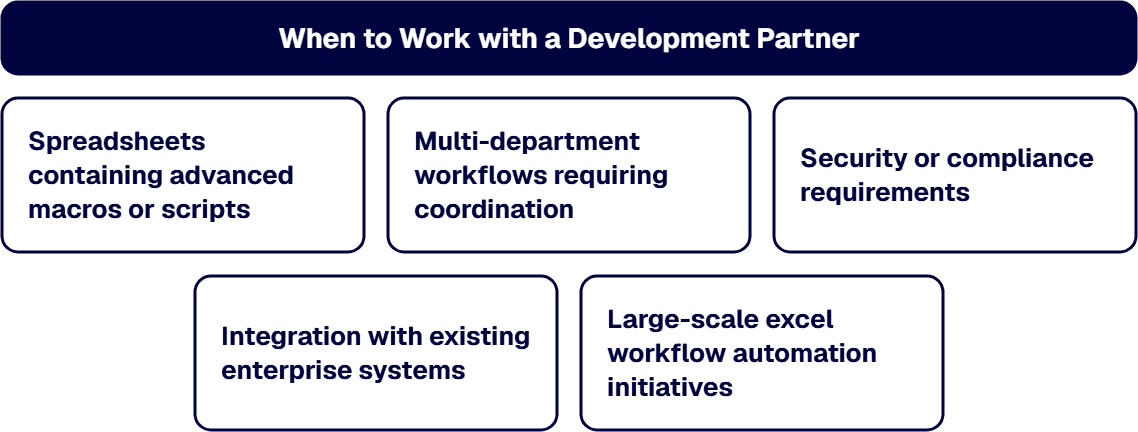
Situations where a development partner is especially valuable include:
In these cases, professional custom web application development ensures the new system is stable, secure, and scalable.
Many organizations eventually reach a point where spreadsheets can no longer support their operational needs. Learning how to convert Excel to web application platforms is a critical step toward improving efficiency, reducing risk, and enabling long-term growth.
By replacing spreadsheet-based processes with structured applications, businesses gain better visibility, automation, and scalability across their operations. This shift is a key part of broader business process modernization, allowing teams to move beyond manual work and focus on strategic outcomes.
i3solutions works with enterprises to transform spreadsheet-heavy processes into modern, scalable systems through expert custom web application development. Whether organizations need excel workflow automation, improved data governance, or full operational modernization, the right development partner can help turn spreadsheet chaos into structured, reliable business applications.

Scott Singleton has spent more than 19 years at i3solutions and more than 30 years designing, developing, migrating, and implementing enterprise technology solutions. His expertise is grounded in SharePoint architecture, large-scale migration, custom application development, workflow modernization, technical training, and hands-on delivery across Microsoft platforms, including SharePoint, SPFx, Power Apps, Power Automate, Power BI, and enterprise database systems.
View LinkedIn Profile


Key-person dependency on spreadsheet-based workflows is an operational risk that most organizations don't quantify until it materializes. i3solutions' senior application development consultants work with enterprise IT leaders to assess which spreadsheet workflows carry the highest exposure and whether a scoped modernization engagement can eliminate that risk.
Request an Excel-to-Web Advisory Discussion
US-Based Microsoft System Integrator | Est. 1997
© i3solutions. All rights reserved.
US-Based Microsoft System Integrator | Est. 1997
© i3solutions. All rights reserved.


