

Travel compensation requests were tracked on paper, with no visibility into where a request stood.
The client is a federal executive-branch agency. The agency negotiates international agreements, resolves disputes, and coordinates policy to promote economic growth and create new opportunities for American businesses and workers. That mandate is carried out by people who travel, and every trip produces a travel compensation request that has to be reviewed, approved, and paid. The agency tracked all of it by hand. It faced significant inefficiencies in managing travel compensation for its personnel because of an outdated, manual, paper-based travel tracking system.
Given the extensive travel demands of their roles, employees often experienced delays and challenges in processing compensation requests, which slowed approvals and created unnecessary frustration. Behind the delay sat a second problem that made the first one hard to fix. The lack of transparency in the system further complicated matters, making it difficult for management to track requests, identify bottlenecks, and ensure timely processing. The agency needed an automated solution that would improve visibility and make the process workable for the employees filing requests and the decision-makers approving them.
A federal agency tracked every travel compensation request on paper, with no visibility into where a request stood in the approval chain. i3solutions built an automated SharePoint application that captures each request once and routes it through review automatically.
Employees and managers now get real-time visibility into every request’s status, leadership can monitor and resolve approval bottlenecks, and staff time once spent reviewing, routing, and filing paperwork by hand is freed for higher-value work.
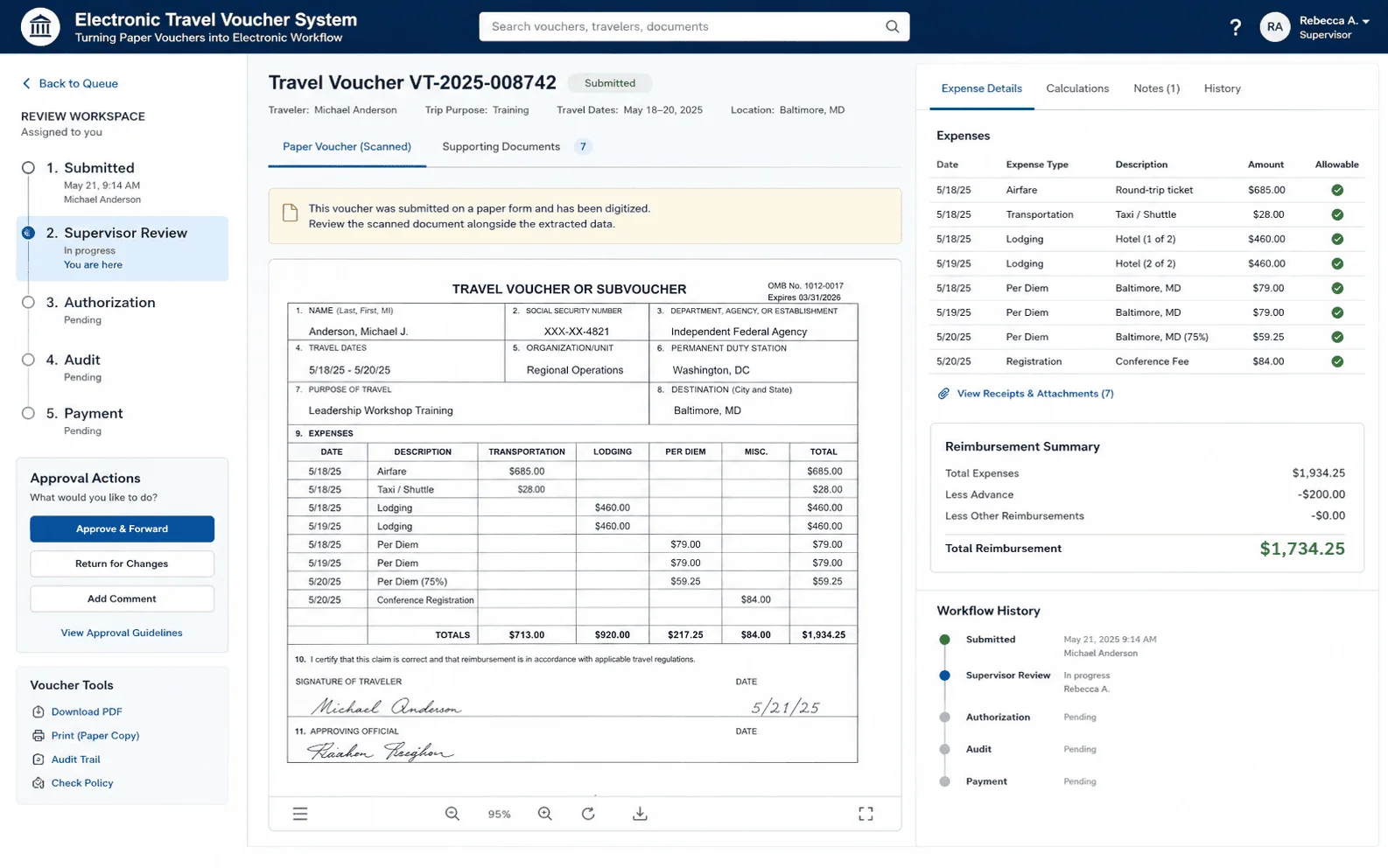
Every Trip Produced Paperwork the Agency Could Not Track
The compensation request is not an occasional artifact at this agency. Its people negotiate agreements and resolve disputes in person, so the extensive travel demands of their roles generate a steady flow of requests, and each one entered a paper process that had to be reviewed, routed, and filed by administrative staff before anyone was reimbursed. Volume is what turned an ordinary manual process into significant inefficiencies in managing travel compensation.
The visibility gap is what made the backlog self-sustaining. Management could not track requests, identify bottlenecks, or ensure timely processing, so there was no way to tell a slow step from a lost one, and no way to prove that a fix had worked. The agency concluded that more diligence inside the paper process was not the answer and specified a different one: an automated system that would improve visibility and give both employees and decision-makers a workable experience.
This agency automated travel compensation tracking on infrastructure it already owned, without a new platform purchase. If budget is the obstacle to automating a similar process, that’s often not the actual constraint.
Reimbursement Paid Back at the Speed of Paper
Left manual, the cost recurred on every trip. Employees who traveled because the work demanded it waited on compensation requests that moved through a paper chain, and the delays and challenges in processing them created unnecessary frustration in the population the agency most depends on. Money owed for work already performed is a poor place for an organization to accumulate friction with its own staff.
The administrative side carried the other half. Reviewing, routing, and managing compensation requests by hand consumed staff capacity continuously, not in bursts, and none of those hours went to work that needed a person’s judgment. Neither cost could be measured while it was happening, which is the point of the transparency problem: an organization cannot budget against a bottleneck it cannot see.
Automate the Approval Chain Without Buying a New Platform
The system had two audiences with different jobs. Employees needed to file a compensation request and know it had gone somewhere; managers and decision-makers needed to review, approve, and see the state of what was in front of them. Neither group is a trained systems operator, so the application had to be usable without a training session and make data entry simple enough that it did not become the new bottleneck.
The second constraint was cost. SharePoint was already present in the agency’s infrastructure, and the engagement was expected to use that existing investment rather than add a platform to procure and stand up, which is what minimized additional costs. The architecture had to hold up past the initial build as well: it needed to be scalable enough to accommodate future growth or additional features without requiring significant redevelopment.
Senior Microsoft Specialists with Proven Delivery Depth
The requirements defined the profile. The agency needed a team that could architect a workflow application on SharePoint lists, build a responsive front end and the business logic behind it, work through requirements and design with the agency’s own decision-makers, and hand over documentation that would let agency personnel use the result without a support call. This was full-lifecycle application work on a government platform already in production, not a product configuration exercise.
The agency engaged i3solutions, a Microsoft Partner with 30 years of delivery experience and 1,500+ Microsoft engagements, delivered by an all-senior, all US-based delivery team. That profile matched the work: senior engineers who have built approval workflows on the Microsoft platform repeatedly, and who could take a paper process apart and put it back together on software the agency already owned.
i3solutions designed and implemented a Travel Compensation system that used the agency’s existing investment in SharePoint, replacing the manual, paper-based process with a web-based application that handles data entry and automated approval workflows behind one interface, built for the agency’s own personnel rather than for trained administrators.
PHASE 01
Process Mapping and Requirements
i3solutions worked with the agency’s decision-makers from initial requirements gathering and design, and produced detailed process maps and wireframe diagrams that gave every stakeholder a clear view of the system’s functionality and workflows before any of it was built. Alignment on how a request should move came first, so the automation encoded an agreed process rather than the paper one.
PHASE 02
SharePoint Data and Workflow Architecture
The application was architected using SharePoint lists to manage form data, process configurations, and approvals, giving the system a scalable backend on a platform the agency already ran. The approval path itself lives in that configuration, which is what allows a request to be routed for review automatically instead of carried between desks.
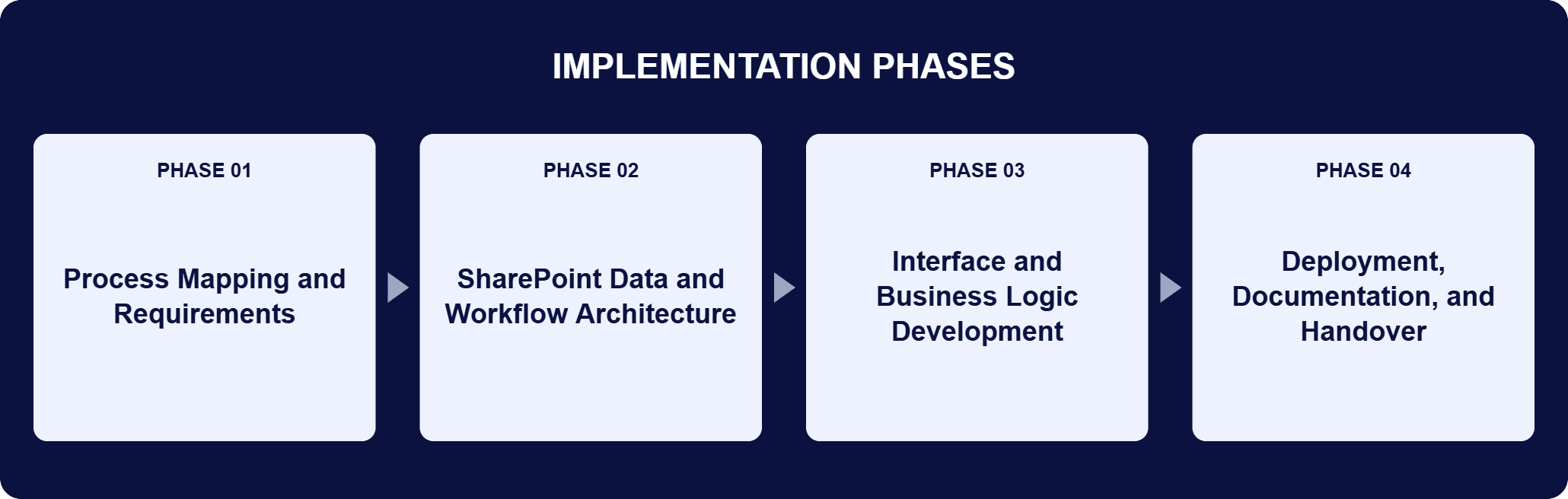
PHASE 03
Interface and Business Logic Development
AngularJS was used to build the interface, with data binding tying the screens to the underlying lists and the framework handling the business logic that decides what a request needs next. JavaScript complemented AngularJS to add the interactivity around those screens, for the employees filing requests and the managers approving them alike.
PHASE 04
Deployment, Documentation, and Handover
i3solutions worked with the agency’s decision-makers through design to final deployment, and delivered a user guide for training and support so agency personnel could navigate the new system without a support call behind them.
The application is a two-layer build on a platform the agency already ran. SharePoint lists hold three things: the form data a travel compensation request carries, the process configurations that define how it moves, and the approvals recorded against it. That is the backend, and it is architected to scale, accommodating future growth or additional features without requiring significant redevelopment. AngularJS supplies the front end, with data binding connecting the interface to those lists and the framework carrying the complex business logic that decides what a given request needs next, while JavaScript fills in the interactivity around it. What the two layers produce together is the operational change: a travel compensation request is entered once and then routed for review automatically, and its status is readable at every stage instead of reconstructed from paperwork. Employees and managers can see where a request stands, leadership can watch trends in travel and compensation and find the bottlenecks in the approval path, and administrative staff no longer review, route, and file the paperwork by hand. Because SharePoint was already present in the agency’s infrastructure, none of that arrived behind a platform purchase.
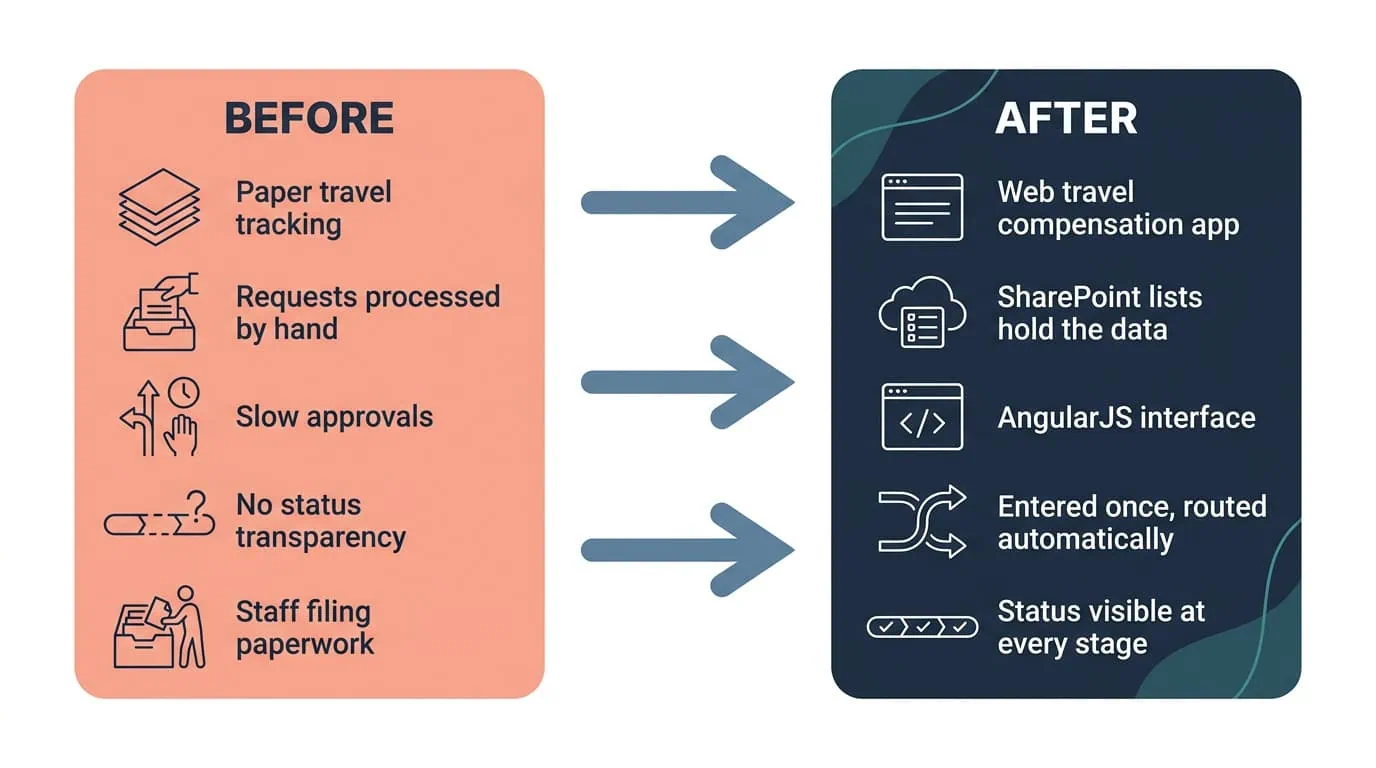
Real-Time Status, Every Stage
A SharePoint-based application automated data entry and approval routing, giving employees and managers real-time visibility into every request.
| Outcome | Before | After |
|---|---|---|
| Request processing | Data entry and approvals handled manually on paper | Data entry and approval workflows automated; the time required to process a request drastically reduced |
| Request status visibility | No transparency; management could not track a request | Real-time visibility into the status of every request for employees and managers at each stage |
| Management insight | Bottlenecks in the approval path invisible | Leadership monitors and analyzes trends in travel and compensation, and identifies and resolves bottlenecks |
| Administrative workload | Staff reviewing, routing, and filing compensation paperwork by hand | Those tasks automated, freeing staff resources for higher-value activities |
| Platform basis | A modernization to fund | The agency’s existing SharePoint investment as the backbone, which minimized additional costs |
| Interface and adoption | A paper form and a manual routing chain | An AngularJS interface that led to widespread adoption among agency personnel |
What employees got back is speed. Automating data entry and the approval workflow drastically reduced the time required to process a travel compensation request, so reimbursements arrive faster and the delays that came with the paper chain no longer sit between a trip and its repayment. Managers got something else. The application gives real-time visibility into the status of requests, letting employees and managers track approvals and payments at every stage. That removes the step where somebody had to ask an administrator where a request was sitting, and with it the risk of errors or miscommunication the paper process carried.
Above the individual request, the same data supports a view the agency did not previously have: leadership can monitor and analyze trends in travel and compensation, which is how bottlenecks in the approval process now get identified and resolved rather than merely endured. The cost side held as well. Using the agency’s existing investment in SharePoint kept the project cost-effective, and the scalable architecture means future growth or additional features do not require significant redevelopment. Administrative staff, meanwhile, no longer carry the manual paper process at all, and the interface they and their colleagues work in has seen widespread adoption across agency personnel.
This engagement is relevant for
Less relevant for
A Paper Approval Chain Moved onto a Platform the Agency Already Owned
The engagement established that a manual, paper-based approval process can be automated without a platform purchase behind it. SharePoint lists took the form data, the process configurations, and the approvals; AngularJS and JavaScript carried the interface and the front-end business logic; and a travel compensation request became something entered once and then routed for review automatically.
Employees and managers can see where a request stands at every stage, leadership can watch trends in travel and compensation and find the bottlenecks in the approval path, and administrative staff no longer review, route, and file the paperwork by hand. Built on the SharePoint the agency already ran, the system minimized additional costs and left behind an architecture that accommodates future growth or additional features without significant redevelopment.
Yes. That visibility gap was the actual problem this system solved. For this federal agency, the Travel Compensation system didn’t just digitize the paper form, it gave employees and managers a real-time status view of exactly where a request sits and which step in the approval chain is holding it, built on SharePoint the agency already owned rather than a new procurement. If the bottleneck you’re describing is that same lack of visibility rather than the approvals themselves, that’s the same fix.
The design question is not how to reproduce the paper form on a screen. It is which parts of the process the paper was hiding: who reviews what, in what order, and where a request stalls when nobody is watching it. On this engagement, i3solutions worked closely with the agency’s decision-makers across the project lifecycle, from initial requirements gathering and design to final deployment, and produced detailed process maps and wireframe diagrams so every stakeholder could see how the system and its workflows would behave before they existed. The build then followed the platform the agency already owned rather than a new one, and delivery included a user guide for training and support, because a workflow application only removes administrative work if the people filing requests can use it unaided.
It replaced an outdated, manual, paper-based travel tracking system. Requests took a long time to process, approvals were slow, and the process gave management no visibility, so it was hard to track a request, identify bottlenecks, or make sure anything was processed on time. The automated system addressed all three. Those delays were not occasional. The agency’s people travel because the work requires it, so the same processing friction met them on every trip, on money owed for work already done. Automating data entry and the approval workflow drastically reduced the time a request takes to process, and employees now receive their reimbursements faster. The visibility problem was solved in the same build rather than in a later phase, because the tracking and the routing live in the same SharePoint lists.
Yes. SharePoint was already present in the agency’s infrastructure and became the backbone of the application, which minimized additional costs. SharePoint lists manage the form data, process configurations, and approvals; AngularJS and JavaScript build the interface and handle the business logic on top of that. That choice shaped the economics of the project twice. Once at the start, because the data, workflow, and approval capabilities came from a platform the agency already ran rather than from a procurement. And once afterward, because the same architecture is scalable: it can accommodate future growth or additional features without requiring significant redevelopment, so the next change to the travel compensation process is a change to a running system rather than a second project.
The application gives real-time visibility into the status of every request, so employees and managers can track approvals and payments at each stage instead of asking where the paperwork is. That visibility is also what reduces errors and miscommunication. It has a second audience above the individual request: because the data sits in one system, leadership can monitor and analyze trends in travel and compensation across the agency, which is how bottlenecks in the approval process get identified and resolved rather than merely tolerated. The practical difference is in who does the chasing. Under the paper process, finding out where a request was sitting meant asking someone. Under the current one, the answer is on the screen for the employee and the approver alike.
Process maps and wireframe diagrams that show how the system and its workflows behave, plus a user guide for training and support. i3solutions worked with the agency’s decision-makers through the whole project, from requirements gathering and design to final deployment. The maps and wireframes did their work before the build started, giving every stakeholder the same picture of the intended process and a chance to correct it while correcting it was still cheap. The user guide did its work afterward: the system’s users are agency personnel filing their own travel compensation requests, not trained administrators, so adoption depended on the application being usable without a support call. It went on to see widespread adoption among agency personnel.
i3solutions is a Microsoft Partner with 30 years of delivery experience and 1,500+ Microsoft engagements, with every engagement staffed by an all-senior, all US-based delivery team. That profile fits this class of work, where the platform is usually already in the building and the risk sits in the process rather than the technology: get the approval chain wrong and you have automated the wrong workflow at speed. This engagement shows the shape of it. A federal executive-branch agency’s paper travel tracking became a web-based application on SharePoint lists with an AngularJS interface, mapped with the agency’s own decision-makers first, documented for the people who would use it, and built on software the agency already owned. For organizations weighing similar work, a short scoping conversation establishes what the equivalent build would take in your environment.
Because this system was built on the agency’s existing SharePoint investment, it can absorb future growth without starting over. We can talk through what a comparable build would look like on your existing platform.

US-Based | Est. 1997
© i3solutions. All rights reserved.
US-Based | Est. 1997
© i3solutions. All rights reserved.


