

Check requests moved as physical forms carried and walked between approvers by hand.
The client is a national labor union uniting workers across hospital systems, long-term care, property services, and public services. As part of its mission, the union supports allied political organizations through grassroots campaigns and targeted donations. To manage those efforts, the union relies on a streamlined financial process to issue and track check requests and donations efficiently, which makes the mechanics of a single check request an operational matter rather than back-office detail.
The union’s Political Check Request process was highly manual and inefficient. It involved multiple stages where accounting staff physically walked checks to various approvers, causing delays and increasing the likelihood of human errors. Compounding the issue, all supporting documents, invoices, and approvals were stored in large physical cabinets, making it difficult and time-consuming for staff to search for backup documentation. The union recognized the need for a paperless solution that could automate approvals, eliminate errors, and provide centralized digital storage for all documents.
A national labor union processed every check request as a paper form carried by hand between approvers before it landed in a filing cabinet. i3solutions digitized the approval chain end to end, giving the organization a searchable, auditable record instead of a physical trail.
The system routes each request automatically through every approval stage and alerts accounting on final approval, while invoices and backup documents now live in searchable SharePoint document libraries with a full digital audit trail in place of paper filing cabinets.
A Payment Chain That Moved at Walking Speed
The bottleneck was literal. Approval did not travel over a network; it traveled with a person carrying paper from one desk to the next, through multiple stages, and every stage was somewhere a request could sit. Delays were the visible cost. The less visible cost was error: manual approvals and manual document handling put the accuracy of financial transactions in the hands of whoever held the paperwork at the time.
The archive compounded it. Invoices, approvals, and supporting documents lived in large physical cabinets, so answering a question about a past request meant searching those cabinets by hand. The union concluded that neither problem was a diligence problem. What it needed was a paperless solution that could automate approvals, eliminate errors, and provide centralized digital storage for all documents.
This union’s check requests moved through every approval stage automatically instead of being carried person to person. If a similar approval chain in your organization is still physically routed, that’s a workflow automation problem with a known shape.
Payments the Union Cannot Move Quickly or Account For Later
Every check request the union issues supports mission work, including the grassroots campaigns and targeted donations it directs to allied political organizations. A process carried on walked paper puts two things at risk at once: when the payment goes out, and what remains of the reasoning behind it. Requests waiting on a desk for a signature delay the work the money is meant to fund, and each additional manual stage adds another opportunity for a human error to reach a financial transaction.
The record side is the harder problem to unwind afterward. With approvals collected on paper and backup documentation filed in cabinets, establishing who approved a given payment and on what documentation is a physical search rather than a query. Left unchanged, the union would keep paying twice: slower approvals now, and a slower answer every time someone needed to trace one later.
Multiple Approval Stages, and an Archive That Had to Come With Them
The approval chain was not a single sign-off. The Political Check Request process ran through multiple stages, each gathering an approval or a rejection, so the replacement had to reproduce that sequence faithfully rather than flatten it, then hand off to the accounting department at the end so the check could be generated. Routing was only half the requirement. The people submitting requests are accounting staff doing their own jobs, so the entry point had to be a form they could complete in the portal they already used, not a new system to learn.
The second constraint was the archive. Check requests, transmittal letters, and backup documentation all had to move off physical cabinets into storage that accounting personnel could actually search. Storage by itself was not enough, because an unindexed digital repository is still a cabinet. And because the union wanted accountability out of the same change, the system that routed a request also had to retain the record of the approvals it collected.
Senior Microsoft Specialists with Proven Delivery Depth
The requirements defined the vendor profile: a team that could design an electronic form and the multi-stage routing behind it, build the document libraries and indexing that make an archive searchable, and connect the two so a request and its supporting documentation stay together from submission through approval to check generation. This was workflow automation on the Microsoft platform rather than a product installation, and it had to land inside the union’s existing SharePoint portal instead of introducing a second place to work.
The union engaged i3solutions, a Microsoft Partner with 30 years of delivery experience and 1,500+ Microsoft engagements, delivered by an all-senior, all US-based delivery team. That profile matched the work: senior engineers who have built approval workflows and document repositories on SharePoint repeatedly, and who could deliver a paperless approval and archival system into a portal the organization already ran.
i3solutions developed an automated workflow and archival system tailored to the union’s needs using SharePoint and Microsoft InfoPath, replacing the paper Political Check Request process with a paperless approval and archival system.
PHASE 01
Approval Chain and Records Assessment
i3solutions worked through how the Political Check Request process actually ran: the multiple stages a request passed through, the approvers each stage required, where checks were physically walked, and which invoices, approvals, and backup documentation were being filed in the union’s physical cabinets. That mapping defined both the routing the system had to reproduce and the records the archive had to hold.
PHASE 02
Check Request Form Design
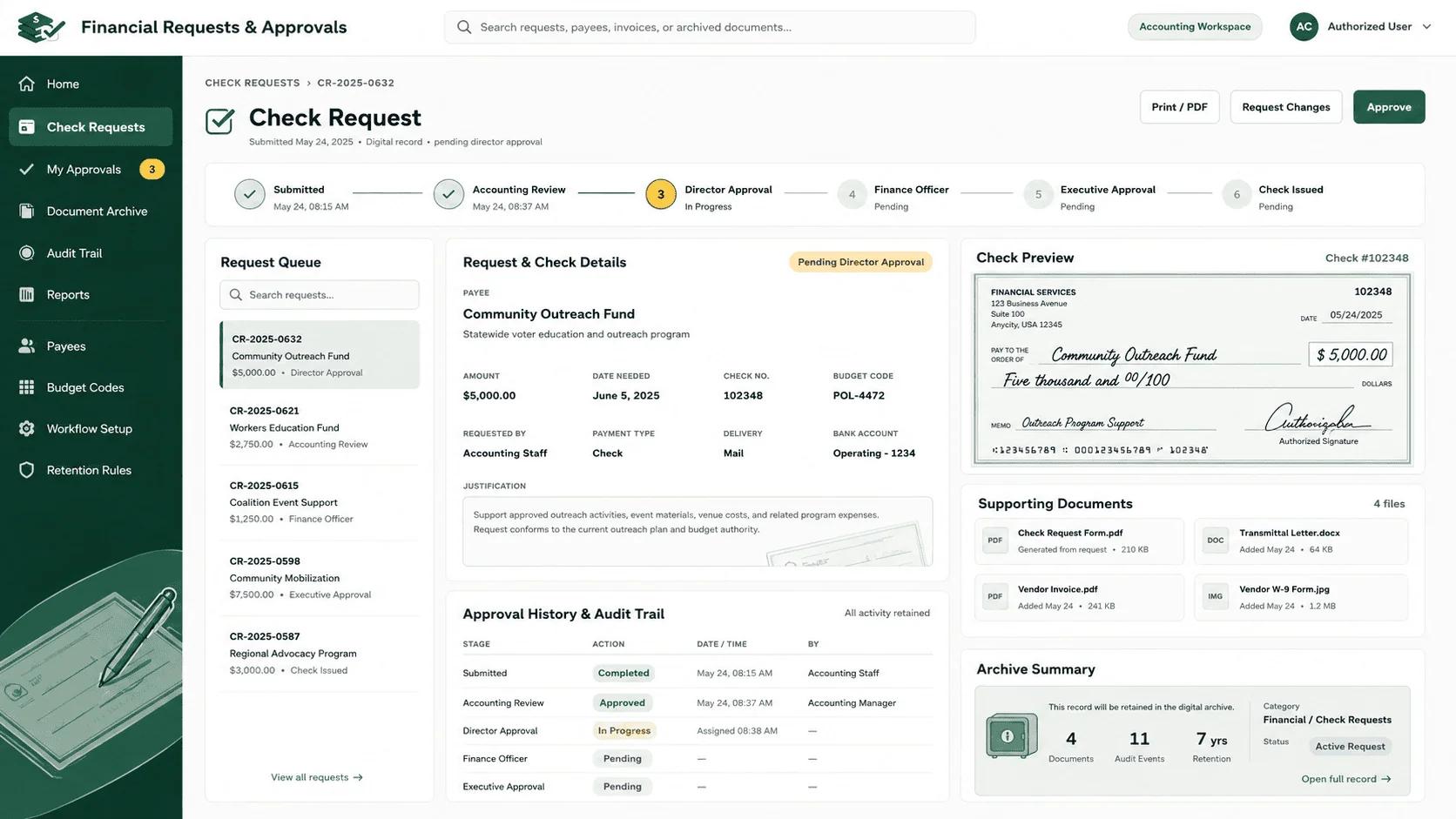
The web-based Check Request Form was designed using InfoPath and made accessible through the union’s SharePoint portal, so users submit check requests electronically and the need for physical forms is eliminated.
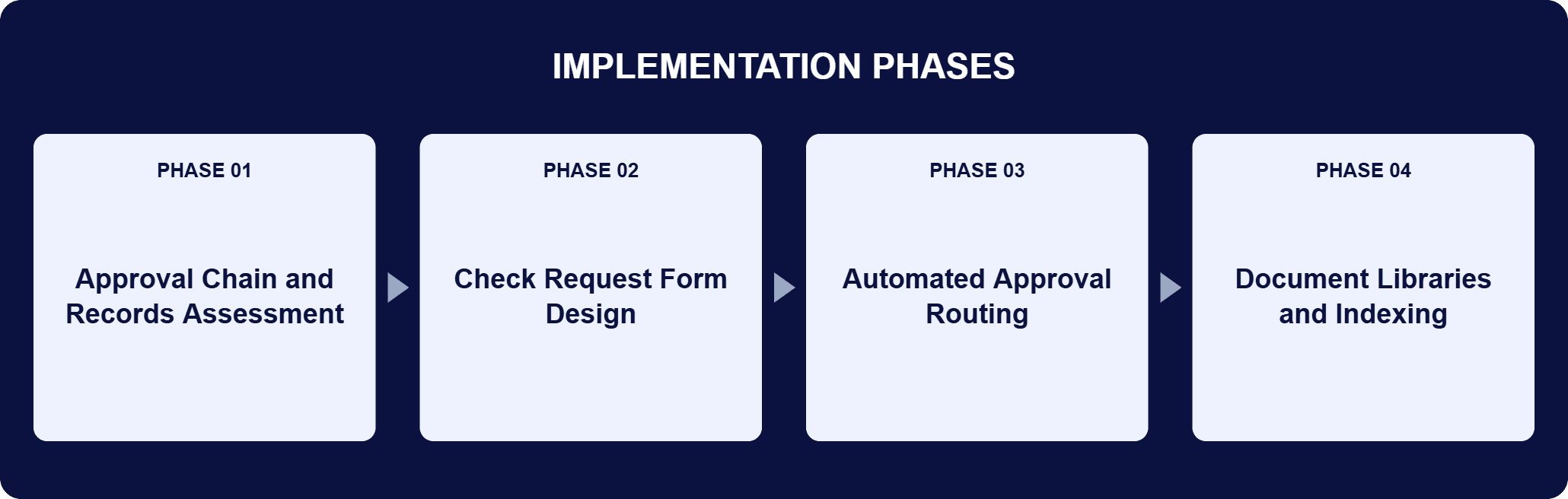
PHASE 03
Automated Approval Routing
Once a request is submitted, the system automatically routes it through each stage of the approval process, gathering the necessary approvals or rejections along the way. Upon final approval, the system alerts the accounting department to generate the check, which removes the manual handoff that previously depended on someone carrying the paperwork over.
PHASE 04
Document Libraries and Indexing
i3solutions created a series of document libraries within SharePoint to serve as a centralized digital repository for electronic copies of check requests, transmittal letters, and backup documentation. The indexing functionality within SharePoint makes those records searchable and retrievable, so accounting personnel access what they need instead of walking to a filing cabinet.
The system is a two-part build on the union’s existing Microsoft platform. InfoPath powers the web-based Check Request Form, which is reached through the union’s SharePoint portal and lets users submit, route, and track approvals electronically; it integrates with the SharePoint-based workflow, so submission and routing are one motion rather than two systems stitched together. SharePoint is the central platform underneath: it carries the automated workflow and serves as the repository for storing, indexing, and retrieving check requests, transmittal letters, and supporting documentation. The routing mirrors the approval chain the union already had. A submitted request moves through each stage of the approval process, the system gathers the approvals or rejections at each one, and on final approval it alerts the accounting department to generate the check. The archival side runs on a series of document libraries acting as one digital repository, with SharePoint indexing making the contents searchable, so the record of a request and the record of its approval sit in the same place. Every request leaves a digital audit trail as a by-product of how it was routed, not as a separate logging step.
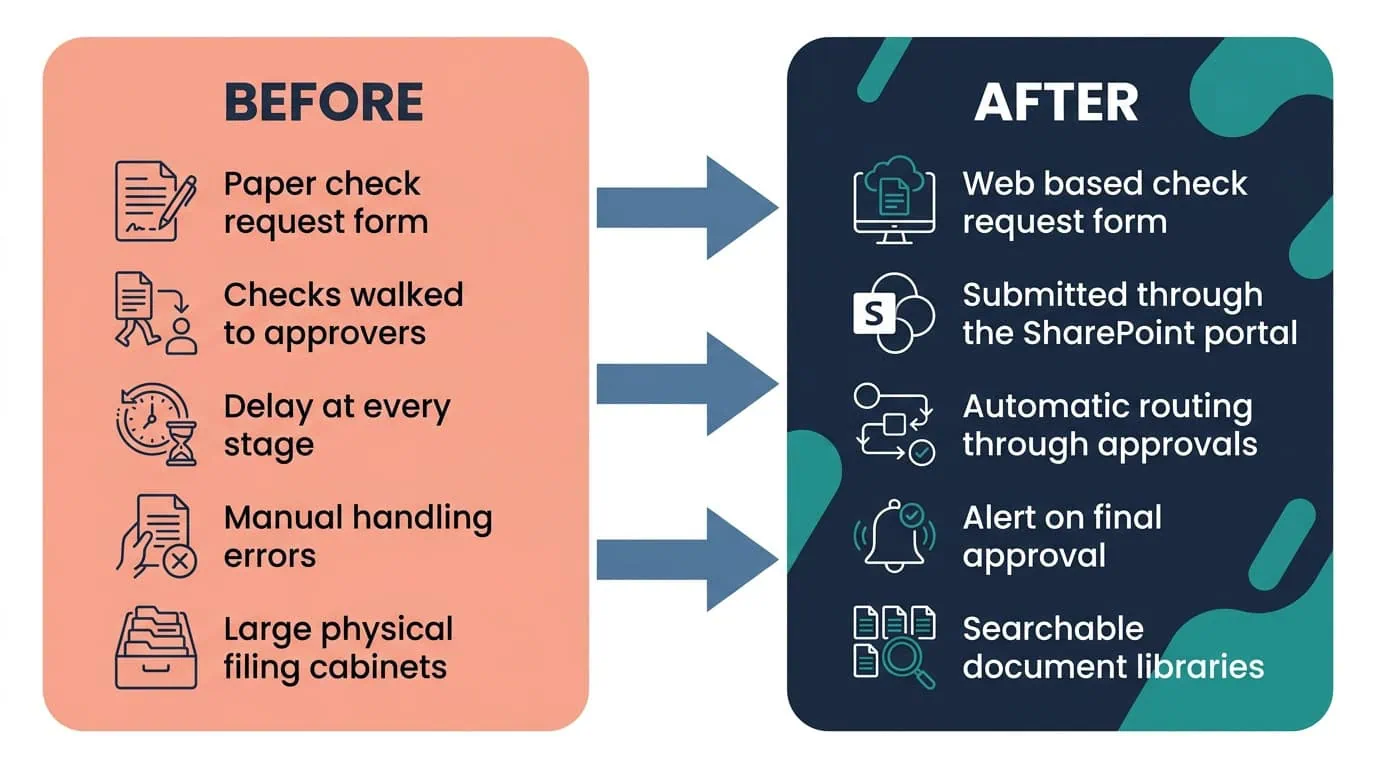
Paper Forms to Automatic Routing
A web-based request form and SharePoint workflow now route every check request through approval and alert accounting once it’s ready.
| Outcome | Before | After |
|---|---|---|
| Check request submission | A physical form carried between approvers | A web-based Check Request Form in the union’s SharePoint portal |
| Approval routing | Accounting staff physically walking checks stage by stage | The system routes each request through every approval stage, gathering approvals or rejections |
| Check generation | A manual handoff once the last signature was collected | The system alerts the accounting department on final approval |
| Supporting documentation | Invoices, approvals, and backup documents in large physical cabinets | SharePoint document libraries acting as one centralized digital repository, indexed and searchable |
| Accountability | An approval history reconstructed from paper | A digital audit trail covering all check requests |
| Accuracy | Human errors in manual approvals and document handling | Those errors eliminated by automating the approval and handling steps |
What the accounting department feels first is that nothing walks anymore. A check request is submitted on a web-based form in the union’s SharePoint portal, the system routes it through each stage of the approval process and gathers the approvals or rejections along the way, and on final approval it alerts the accounting department to generate the check. That replaced the manual, paper-based check request system with a fully automated electronic process, which is where the faster approvals and faster check generation come from. Automating the workflow also eliminated the human errors associated with manual approvals and document handling, improving the accuracy of financial transactions.
The archive changed as much as the routing did. Physical filing cabinets were replaced by a consolidated digital library, so accounting personnel search for a record instead of walking to a cabinet, and SharePoint indexing makes check requests, transmittal letters, and backup documentation retrievable rather than merely stored. Across both halves of the change, the time required to process check requests was dramatically reduced by automating the workflows and centralizing document access. The accountability came with it: the system provides a paper trail for all check requests, making it easier to trace and monitor account activities and approvals.

PENDING-CLIENT-QUOTE
This engagement is relevant for
Less relevant for
Approvals Routed, Documents Indexed, the Cabinets Retired
The engagement established that a multi-stage payment approval chain does not have to be carried by hand to be trusted. A paperless approval and archival system on Microsoft SharePoint and InfoPath put the Political Check Request on a web-based form in the union’s own portal, routed it automatically through every stage of the approval process, and alerted the accounting department to generate the check on final approval.
Check requests, transmittal letters, and backup documentation moved from large physical cabinets into indexed SharePoint document libraries, so accounting personnel search for a record instead of walking to a filing cabinet. The accountability arrived with the automation rather than on top of it: every request leaves a digital audit trail, which makes account activities and approvals easier to trace and monitor.
An automated check request approval system replaces a paper payment approval chain with an electronic one. A request is submitted on a web-based form, the system routes it through each stage of the approval process instead of a person carrying it from desk to desk, and the request reaches accounting only when the final approval is in. For this national labor union, i3solutions built that system on Microsoft SharePoint and InfoPath: InfoPath powers the web-based Check Request Form, reached through the union’s SharePoint portal, and SharePoint carries both the workflow and the archive. The archival half is what makes it more than a form. Check requests, transmittal letters, and backup documentation are stored and indexed in SharePoint document libraries, so the record of a payment and the record of its approval live in the same searchable place.
The starting point is the approval chain that already exists. This union’s Political Check Request process ran through multiple stages, each one gathering an approval or a rejection, so the system had to reproduce that sequence rather than simplify it out of existence, then hand off to the accounting department at the end. i3solutions built the routing to match: a request submitted on the InfoPath form moves automatically through each stage of the approval process, gathering the necessary approvals or rejections along the way, and on final approval the system alerts the accounting department to generate the check. The second half of the approach is the paperwork the process produces. i3solutions created a series of SharePoint document libraries as one centralized digital repository, so the invoices and backup documentation that used to sit in physical cabinets are stored, indexed, and retrievable alongside the request itself.
It was highly manual and ran through multiple stages. Accounting staff physically walked each check to the various approvers, which caused delays and increased the likelihood of human errors, and all supporting documents, invoices, and approvals were stored in large physical cabinets, so staff searched those cabinets by hand whenever backup documentation was needed. This was also the process the union used to issue and track the check requests and donations behind its mission work, including grassroots campaigns and targeted donations to allied political organizations, so the delays did not stay inside the accounting department. The union recognized the need for a paperless solution that could automate approvals, eliminate errors, and provide centralized digital storage for all documents.
Staff submit a web-based Check Request Form, designed in InfoPath and reached through the union’s SharePoint portal, instead of a physical form. The system then routes the request through each stage of the approval process, gathering the approvals or rejections along the way, and on final approval it alerts the accounting department to generate the check. Nothing in that sequence depends on someone carrying paper to the next desk, which is where the delays and the errors in the old process came from. Because InfoPath integrates with the SharePoint-based workflow, submitting a request, routing it, and tracking its approvals happen in one system, and each stage’s outcome is recorded as the request moves rather than reconstructed afterward.
In a series of SharePoint document libraries that act as one centralized digital repository, holding electronic copies of check requests, transmittal letters, and backup documentation. SharePoint indexing makes those records searchable and retrievable, so accounting personnel find what they need quickly rather than searching physical files. That is the direct replacement for the large physical cabinets the union used before, and it is why a question about a past request is now a search rather than a walk to a filing cabinet. Because the libraries hold the request, the transmittal letter, and the supporting documentation together, the documents that justify a payment stay with the payment instead of being filed apart from it.
Yes. Each request is submitted electronically and routed through every stage of the approval process, and the system records the approvals or rejections it collects, alongside the check request, transmittal letter, and backup documentation held in SharePoint. That paper trail covers all check requests, which makes account activities and approvals easier to trace and monitor. The traceability is a by-product of the routing rather than a separate logging step: because the approval happens in the system, the record of it exists without anyone being asked to keep one. For an organization that funds allied political organizations through grassroots campaigns and targeted donations, being able to show the approval path behind a disbursement matters as much as issuing it on time.
i3solutions is a Microsoft Partner with 30 years of delivery experience and 1,500+ Microsoft engagements, with every engagement staffed by an all-senior, all US-based delivery team. Approval automation rewards that profile, because the difficult part is not the form. It is reproducing a multi-stage approval chain faithfully and putting the resulting records somewhere they can still be found years later. This engagement is representative of the pattern: a web-based Check Request Form in the client’s own SharePoint portal, automatic routing through every approval stage, an alert to the accounting department on final approval, and check requests, transmittal letters, and backup documentation indexed in SharePoint document libraries. For organizations weighing this class of work, a short scoping conversation establishes what the equivalent build would take in your environment.
Accountability arrived with the automation itself here, not as a separate reporting layer added on top. We’re glad to discuss what a comparable audit trail would look like for your approval process.

US-Based | Est. 1997
© i3solutions. All rights reserved.
US-Based | Est. 1997
© i3solutions. All rights reserved.


