
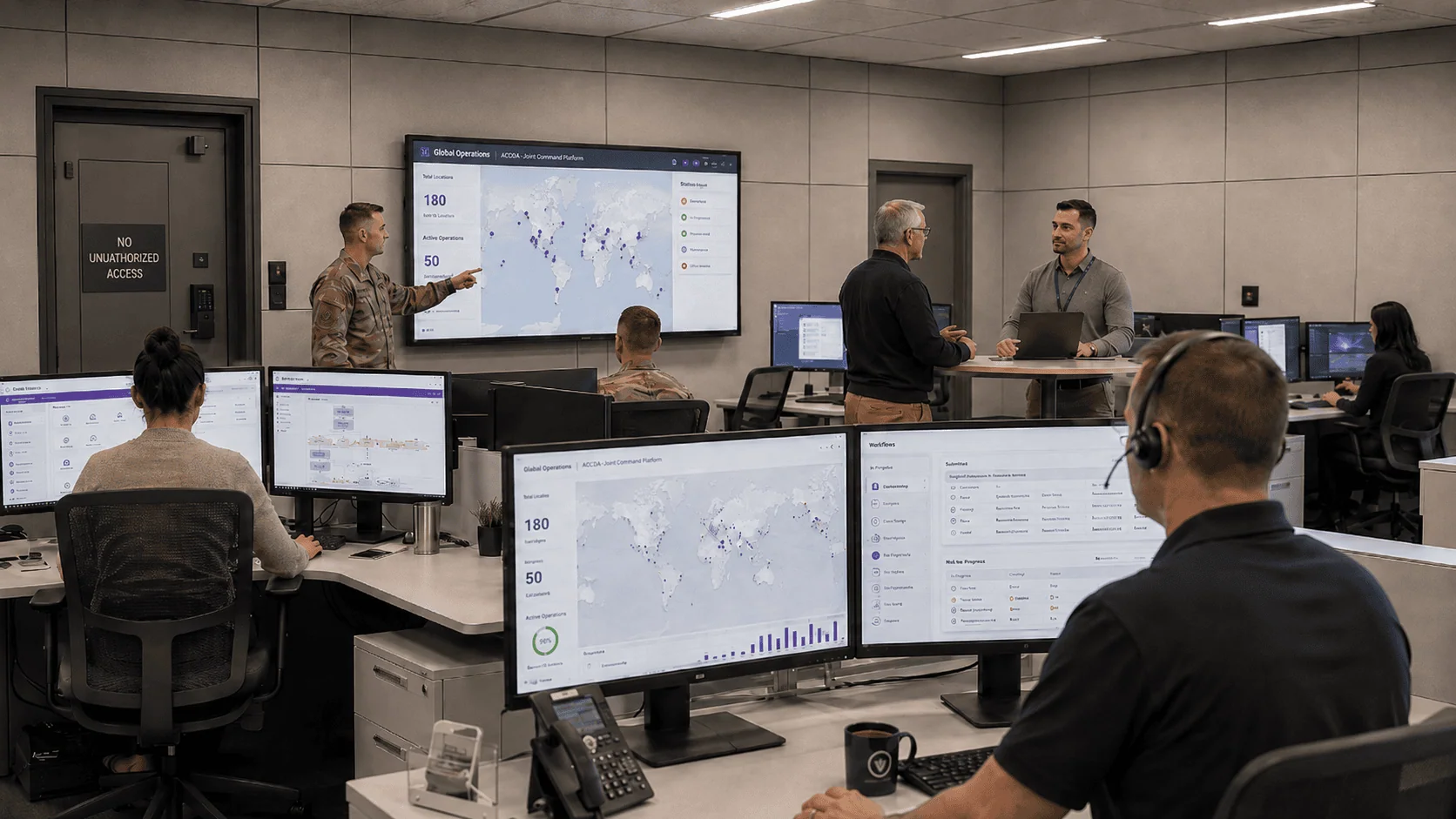
An outdated, manual system couldn’t scale to the size and diversity of operations across 50 major subordinate commands.
The client is a US military command and a vital partner in critical operations. Life or death decisions are, quite literally, what the command must make every day, and that is why it is essential that the command maintain leading-edge technology on which to perform its internal functions. Doing so is harder than it sounds at this footprint. The command oversees many major subordinate commands as well as a range of smaller units, with over 10,000 personnel dispersed over 180 locations worldwide, and developing and maintaining such a system across all of it can be daunting.
Its internal functions did not run on that kind of technology. Internal operations ran on an outdated, largely manual system that was extremely inadequate for the sheer size and diversity of the command’s operations, alongside outdated MS Access databases, Excel Spreadsheets, custom applications, and manual procedures. Stuck with muddled internal processes, outmoded technology, and no formal Software Development methodology, the command needed consulting help from a senior Microsoft platform team. It chose i3solutions, charged with creating a permanent solution that would be powerful, scalable, and integrated to ensure its mission would be carried out successfully.
Fifty subordinate commands across 180 locations ran on aging Access databases and standalone spreadsheets with no shared visibility. i3solutions replaced them with SharePoint and Power Platform workflows, giving every command a common, governed system.
An outdated, largely manual system that couldn’t keep pace with the size and diversity of operations gave way to custom SharePoint Online, Power Apps, and Power Automate workflows in IL4 and IL6 government-hosted environments, replacing scattered Access databases, Excel spreadsheets, and manual procedures with centralized Nintex and SharePoint workflow solutions, all built under a formal software development lifecycle now used across the command’s SharePoint and custom application projects.
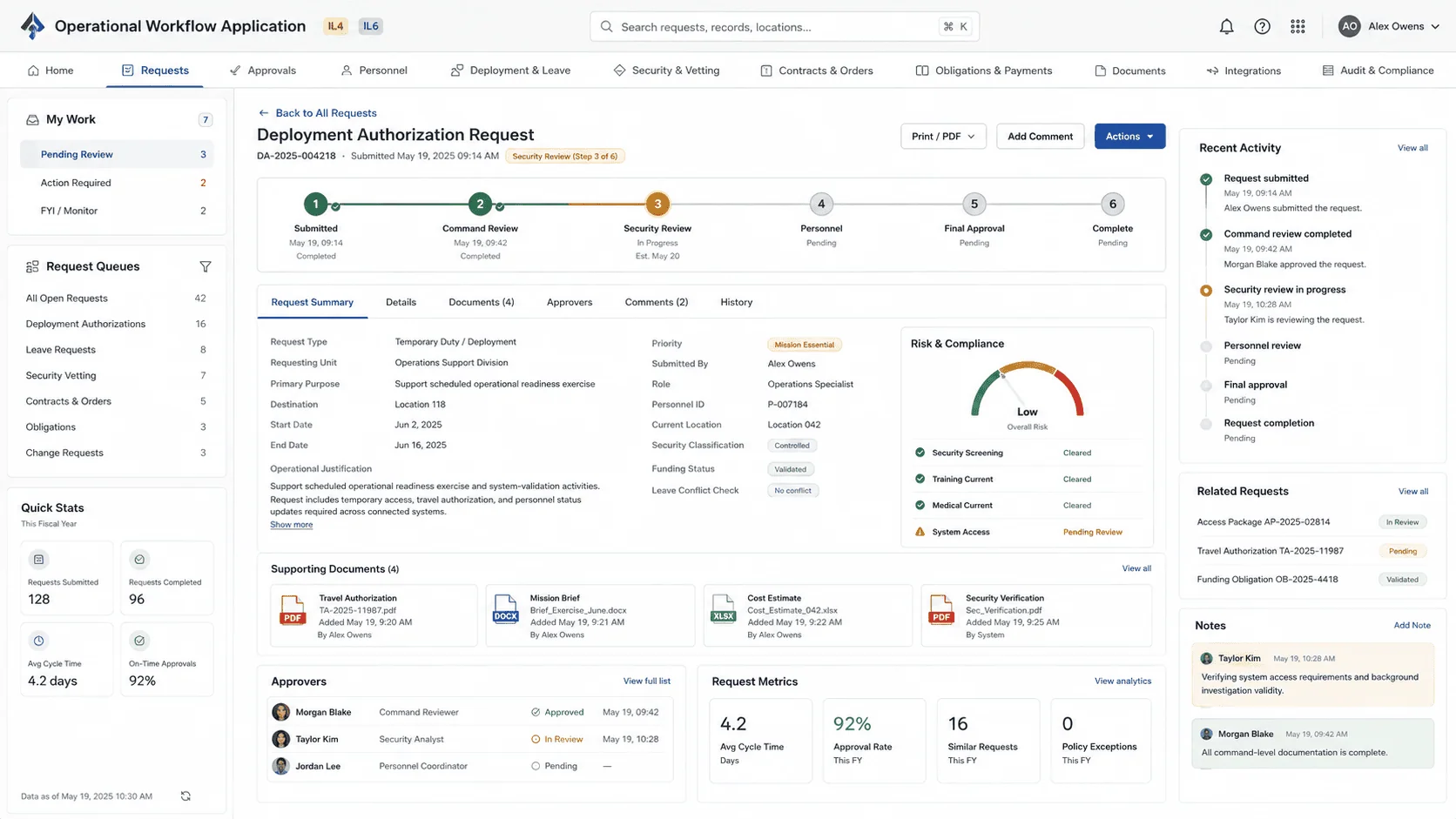
Scale and Diversity Were What the Manual System Could Not Absorb
The inadequacy was a matter of arithmetic before it was a matter of technology. Over 10,000 personnel, 180 locations worldwide, many major subordinate commands, and a range of smaller units all ran internal functions through a largely manual system, and it was the sheer size and diversity of those operations that made the system extremely inadequate. A process description that fits one office does not survive being asked to carry a global footprint.
The second trigger was the absence of method. The command had no formal Software Development methodology, so its SharePoint and custom application development work had no standard way to capture and track requirements or requested changes. That gap is what made modernization a consulting engagement rather than a build order: before workflows could be automated, the requirements had to be determined, with the input of numerous stakeholders and users within 50 different Major Subordinate Commands (MSCs), and enhancements to existing solutions had to be identified at the same time.
Requirements gathered across 50 different subordinate commands became a documented methodology before any development started. If your organization is planning a modernization across many semi-independent groups, that documentation step is what determines whether it scales.
Decisions That Cannot Wait on a Records Search
The command is a vital partner in critical operations, and the internal functions supporting that work were the ones running on the outdated, largely manual system. Security and vetting, deployment and leave tracking, auditing, personnel hiring, authorizations, contracts management, task orders, obligations and payment data are all internal processes the new workflow methodology would eventually strengthen; until it did, they carried the same manual overhead as everything else. Personnel needed critical data quickly, and getting it meant time-consuming manual searches across systems that did not talk to each other.
Standing still carried a compounding cost of its own. Without formal documentation protocols, missing or inadequate requirements documentation produced change orders and project delays, so every new application effort was exposed to the rework the last one had already paid for. The technology itself was the other half of the exposure: MS Access databases, Excel Spreadsheets, and custom applications holding the work of many major subordinate commands, with no formal lifecycle governing what replaced them.
Fifty Commands, One Set of Requirements, Two Certified Enclaves
The requirements problem came first and it was a people problem. Determining what to build meant working with numerous stakeholders and users within 50 different Major Subordinate Commands, each with its own view of the process being automated, and it meant identifying enhancements to existing solutions in the same pass as requirements for new ones. Capturing that reliably was itself a constraint, because without formal documentation standards the input would not survive the trip from discussion to build, which is the failure mode that produces change orders later.
The hosting constraint was fixed and not negotiable. The solutions had to be built on the IL4 and IL6 certified enclaves hosted in the Microsoft Cloud environment, which set what the workflows could be built with and where the data could live. The work also had to reach across disparate systems rather than replace all of them at once, so data exchange between those systems was inside the scope, as was ensuring compliance with the regulations governing the processes being automated.
Senior Microsoft Specialists with Proven Delivery Depth
The requirements defined the vendor profile: a team that could run requirements gathering across 50 different Major Subordinate Commands, bring formal documentation standards to capture and track what came out of it, and then build custom SharePoint Online Power Apps and Power Flows inside the IL4 and IL6 Government hosted environments. It also had to leave behind a Software Development Lifecycle and a Software Development Methodology the command would keep using on later projects, which is a consulting deliverable as much as an engineering one.
The command chose i3solutions to lead the modernization, drawing from 30 years of expertise and its proven collaborative approach. i3solutions is a Microsoft Partner with 30 years of delivery experience and 1,500+ Microsoft engagements, delivered by an all-senior, all US-based delivery team. That profile matched a mandate for a permanent solution in an environment where the hosting is certified, the requirements arrive from fifty directions at once, and the method has to outlast the first release.
i3solutions gathered requirements with the input of numerous stakeholders and users within 50 different Major Subordinate Commands, paired the results with its formal documentation standards, and modernized the command’s internal processes through custom application development on SharePoint Online, Power Apps, and Power Flows inside the IL4 and IL6 Government hosted environments.
PHASE 01
Requirements Gathering Across the Major Subordinate Commands
i3solutions used its proven collaborative approach to identify the issues and understand specifically what the command needed in order to perform its critical mission. With the input of numerous stakeholders and users within 50 different Major Subordinate Commands (MSCs), requirements for the new system were determined and enhancements to existing solutions were identified.
PHASE 02
Documentation Standards and a Formal Methodology
Data gleaned from comprehensive discussions was paired with i3solutions’ formal documentation standards, to capture and track requirements and requested changes. The result was a more formal Software Development Lifecycle and a Software Development Methodology that is now used across all of the command’s SharePoint and custom application development projects.
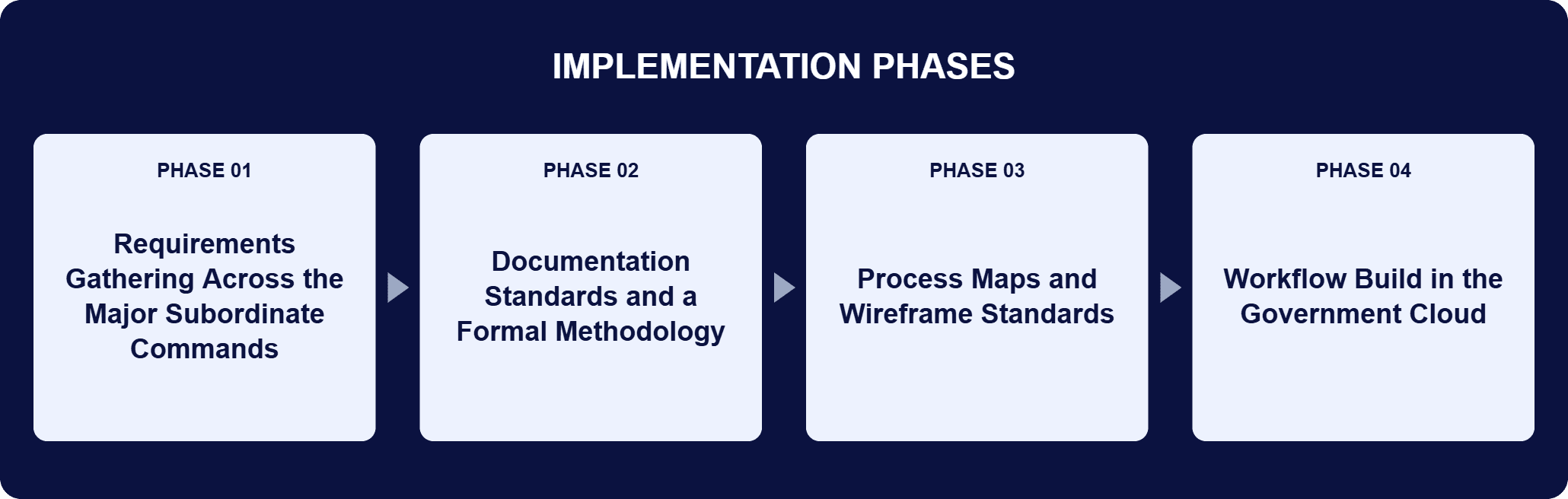
PHASE 03
Process Maps and Wireframe Standards
i3solutions developed process maps and wireframe diagram standards to document the systems and processes to be automated and modernized. i3solutions’ senior engineers then designed and built multiple workflow solutions to centralize the command’s internal processes.
PHASE 04
Workflow Build in the Government Cloud
i3solutions developed custom SharePoint Online Power Apps and Power Flows within the IL4 and IL6 Government hosted environments to modernize the command’s outdated MS Access databases, Excel Spreadsheets, custom applications, and manual procedures. The workflow systems were designed to enhance HR and Personnel protocols, improve awards processes, and ensure compliance with regulations, and the new workflow methodology also strengthened security and vetting, deployment and leave tracking, auditing, personnel hiring, authorizations, contracts management, task orders, obligations and payment data.
SharePoint Online carries collaboration and information management for the command’s internal operations, providing document management, team collaboration, and workflow automation, and the solutions built on it run on the IL4 and IL6 certified enclaves hosted in the Microsoft Cloud environment. Microsoft Power Platform carries the application layer: Power Apps for rapid development of custom applications tailored to the command’s specific needs, PowerAutomate for automating repetitive tasks and business processes, and PowerBI for data visualization and analytics. Nintex Forms handles data collection, with a drag-and-drop interface for building custom forms tailored to the command’s requirements. JavaScript supplies dynamic and interactive functionality inside the command’s SharePoint environments, creating dynamic web elements and validating user input. JSON and REST APIs carry integration and data exchange between disparate systems, JSON as a lightweight, easy-to-parse interchange format and REST APIs as how the command interacts with external systems and services. Geographic Information System (GIS) technology covers creating, managing, analyzing, mapping, and sharing all types of data, so complex datasets can be visualized and interpreted with greater efficiency and precision. A centralized Dynamic Query Tool lets all MSCs search and query the information those systems capture.
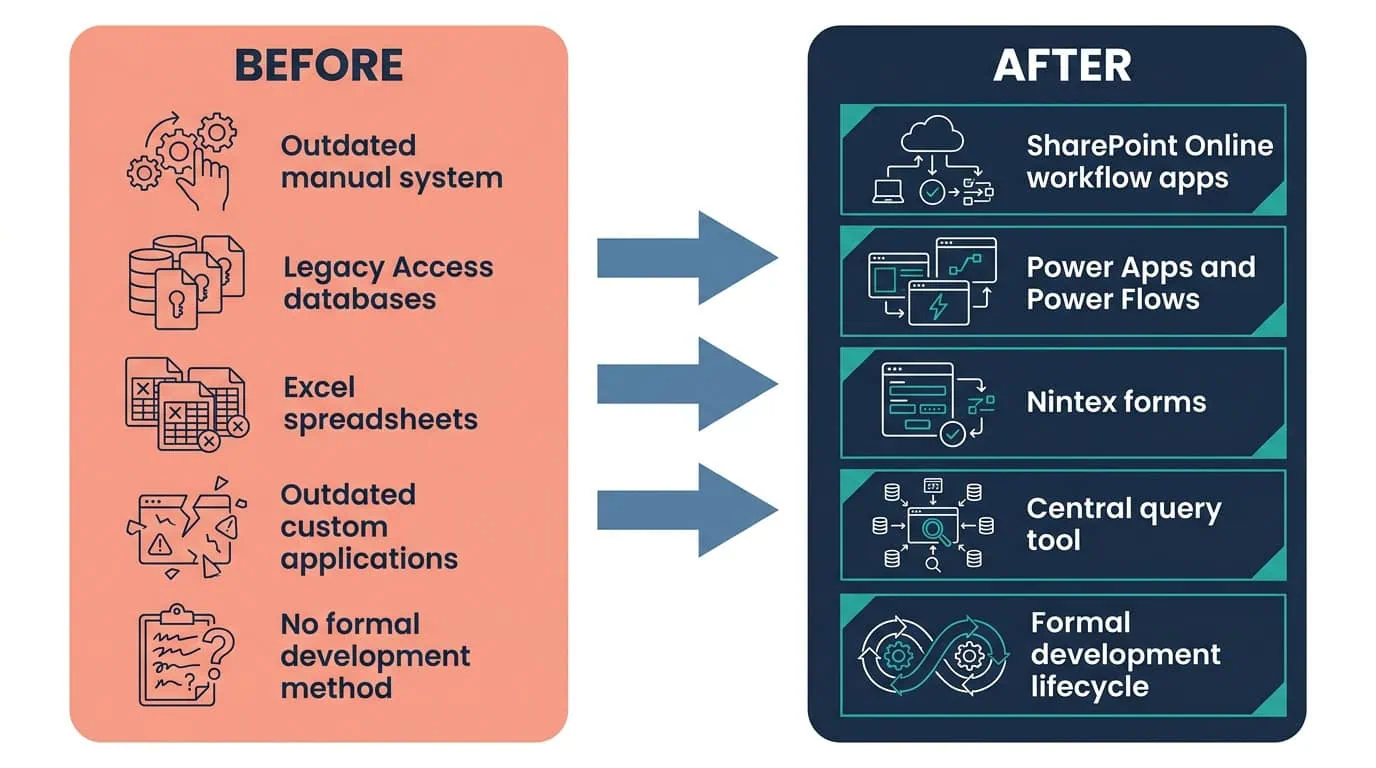
Custom Workflows Built for IL4/IL6
SharePoint Online Power Apps and Power Flows replaced outdated MS Access databases and manual procedures in a government-hosted environment.
| Outcome | Before | After |
|---|---|---|
| Internal operations platform | An outdated, largely manual system, extremely inadequate for the sheer size and diversity of operations | Custom SharePoint Online Power Apps and Power Flows in the IL4 and IL6 Government hosted environments |
| Systems of record | Outdated MS Access databases, Excel Spreadsheets, custom applications, and manual procedures | Centralized workflow solutions built with Nintex and SharePoint |
| Development method | No formal Software Development methodology | A formal Software Development Lifecycle and Methodology now used across all of the command’s SharePoint and custom application development projects |
| Information retrieval | Time-consuming manual searches across separate systems | A centralized Dynamic Query Tool all MSCs use to search and query information captured and consolidated by various systems |
| Hosting | Purchasing and maintaining large data centers | Microsoft’s IL4 and IL6 Certified Government Cloud environments, with significant cost savings recognized by the Government |
The outcomes here are structural rather than numeric, and they compound across every project the command runs after this one. Automating manual and repetitive tasks through the custom workflow solutions built with Nintex and SharePoint saves hundreds of hours previously spent by personnel, and cut the manual workload those tasks carried. The documentation standards produced a second effect that is easy to under-read: by establishing clear and comprehensive documentation protocols, they removed the missing or inadequate requirements documentation that had been generating change orders and project delays, which is a cost that lands on every project rather than only on this one.
The centralized Dynamic Query Tool changed how information is reached. All MSCs can search and query information captured and consolidated by various systems, which removed the need for time-consuming manual searches and lets personnel access critical data quickly and make informed decisions in real time. The SDLC methodology did the same thing for building software: a standardized approach that ensures consistency, repeatability, and quality across all projects, with faster implementation timelines and significantly fewer issues and changes from users. On the hosting side, the Government recognized significant cost savings by not purchasing and maintaining large data centers, using Microsoft’s IL4 and IL6 Certified Government Cloud environments instead for better performance, up time, and redundancy for all online applications.

PENDING-CLIENT-QUOTE
This engagement is relevant for
Less relevant for
One Modernization Method, Applied Across a Global Command Footprint
The engagement established that modernization at this scale is a documentation problem before it is a development problem. Requirements determined with numerous stakeholders and users within 50 different Major Subordinate Commands, paired with formal documentation standards, produced a Software Development Lifecycle and Software Development Methodology that is now used across all of the command’s SharePoint and custom application development projects.
On that foundation, custom SharePoint Online Power Apps and Power Flows in the IL4 and IL6 Government hosted environments replaced outdated MS Access databases, Excel Spreadsheets, custom applications, and manual procedures, with Nintex Forms collecting data, JSON and REST APIs exchanging it between disparate systems, and a centralized Dynamic Query Tool putting it in front of every MSC. The permanent solution the command asked for turned out to be the method as much as the software, and the method is what the next project starts from.
It means moving the processes an organization runs for itself, rather than the ones it runs for the public, off manual procedures and desktop tools and onto a governed platform. For this US military command, i3solutions modernized internal operations through custom application development: SharePoint Online Power Apps and Power Flows built inside the IL4 and IL6 Government hosted environments, replacing outdated MS Access databases, Excel Spreadsheets, custom applications, and manual procedures. The engagement also covered the systems integration and data management work behind those workflows, including JSON and REST API data exchange between disparate systems, Nintex Forms for data collection, and a centralized Dynamic Query Tool for all Major Subordinate Commands. The change is not only technical. It also produced a formal Software Development Lifecycle and Software Development Methodology now used across all of the command’s SharePoint and custom application development projects.
With the input of numerous stakeholders and users within 50 different Major Subordinate Commands (MSCs). Those discussions determined requirements for the new system and identified enhancements to existing solutions, and the data was paired with i3solutions’ formal documentation standards to capture and track requirements and requested changes. i3solutions used its proven collaborative approach to identify the issues and understand specifically what the command needed in order to perform its critical mission, then developed process maps and wireframe diagram standards to document the systems and processes to be automated and modernized. That is the part of the work that outlived the individual workflows: establishing clear and comprehensive documentation protocols significantly reduced the incidence of change orders and project delays due to missing or inadequate requirements documentation on later projects.
No. SharePoint Online, Power Apps, and Power Automate were deployed inside the required IL4/IL6 government-hosted environment rather than a commercial tenant, replacing outdated MS Access databases and manual procedures across 180 command locations on infrastructure that met the command’s hosting requirement from the start, not as a workaround added afterward.
An outdated, largely manual system that was extremely inadequate for the sheer size and diversity of the command’s operations, together with outdated MS Access databases, Excel Spreadsheets, custom applications, and manual procedures. i3solutions replaced them with custom SharePoint Online Power Apps and Power Flows in the IL4 and IL6 Government hosted environments. The replacement was not one for one. The workflow solutions centralize processes that had been running separately, and the new workflow methodology reached beyond the first set of automations into security and vetting, deployment and leave tracking, auditing, personnel hiring, authorizations, contracts management, task orders, obligations and payment data. The command also replaced something it did not have before: a formal Software Development methodology governing how the next application gets built.
Yes. The solutions are built on the IL4 and IL6 certified enclaves hosted in the Microsoft Cloud environment. The Government recognized significant cost savings by not purchasing and maintaining large data centers, and the certified Government Cloud environments provide better performance, up time, and redundancy for all online applications. The impact level requirement is a design constraint, not a deployment detail: it determines which services the workflows can use, where the data can live, and how integrations with other systems are built. The custom SharePoint Online Power Apps and Power Flows in this engagement were developed inside those IL4 and IL6 Government hosted environments from the start, rather than built commercially and migrated into them afterward.
SharePoint Online holds document management, team collaboration, and workflow automation for the command’s internal operations. Microsoft Power Platform supplies the application and analytics layer: Power Apps for rapid development of custom applications tailored to the command’s specific needs, PowerAutomate for automating repetitive tasks and business processes, and PowerBI for data visualization and analytics. Nintex Forms provides intuitive, user-friendly forms for data collection and process automation through a drag-and-drop interface. JavaScript enhances the user experience inside the SharePoint environments, creating dynamic web elements and validating user input. Data movement between disparate systems runs on JSON and REST APIs, JSON as a lightweight, easy-to-parse interchange format and REST APIs as how the command interacts with external systems and services. Geographic Information System (GIS) technology covers creating, managing, analyzing, mapping, and sharing all types of data.
i3solutions is a Microsoft Partner with 30 years of delivery experience and 1,500+ Microsoft engagements, with every engagement staffed by an all-senior, all US-based delivery team. This engagement shows the kind of work that profile is for: requirements determined with numerous stakeholders and users inside 50 different Major Subordinate Commands, custom SharePoint Online Power Apps and Power Flows built inside IL4 and IL6 Government hosted environments, JSON and REST API integration across disparate systems, and a centralized Dynamic Query Tool serving every MSC. The command chose i3solutions to lead the modernization, drawing from 30 years of expertise and its proven collaborative approach, and charged it with delivering a permanent solution rather than another point fix. For organizations weighing this class of work, a short scoping conversation establishes what the equivalent modernization would take in your environment.
The permanent solution this command asked for turned out to be the reusable methodology as much as the software itself. We’re glad to discuss what a comparable methodology-first approach would look like for your organization.

US-Based | Est. 1997
© i3solutions. All rights reserved.
US-Based | Est. 1997
© i3solutions. All rights reserved.


