

A six-phase migration checklist for moving 1,200 Windows devices off Group Policy to Intune, in order: baseline the estate, let Group Policy analytics define scope, settle the conflict rule before anything enrolls, pilot on a ring that can tell you something, enroll in waves sized to help desk capacity, and retire the GPOs only after validation. Two hard limits apply: individual GPOs cannot exceed 4 MB for import, and a tenant can submit up to 500 wipe actions per day.
Three load-bearing assumptions underpin this guidance. First, you are moving from Group Policy, not Configuration Manager. Those are different projects with distinct mechanics; SCCM migrations follow separate evaluation criteria. Second, devices can reach cloud services. Air-gapped or offline populations cannot be managed remotely and should stay on-premises. Third, identity is already settled. Most enrollment methods require Microsoft Entra hybrid join (registered in both Active Directory and Microsoft Entra ID). Unverified identity status extends Phase 0 significantly.
Count devices three ways: Active Directory objects, endpoint management console, and Microsoft Entra ID records, and reconcile differences. Verify hybrid join state per individual device, not per policy assumption. Document OS build distribution and plan accordingly (Windows 10 reached end-of-support October 14, 2025). Verify licensing coverage against user lists using Microsoft’s Intune licensing documentation. Map each configuration setting to its audit or control obligation, because Phase 5’s retirement decision runs off this list.
Export all GPOs as XML and import into Group Policy analytics via Intune admin center. Check the 4 MB import limit before bulk export; oversized GPOs indicate policies needing separation. Review Microsoft’s per-setting verdicts, which resolve to one of three: ready for migration, not supported, or deprecated. Access the readiness report at Reports > Device management > Group Policy analytics for MDM support figures.
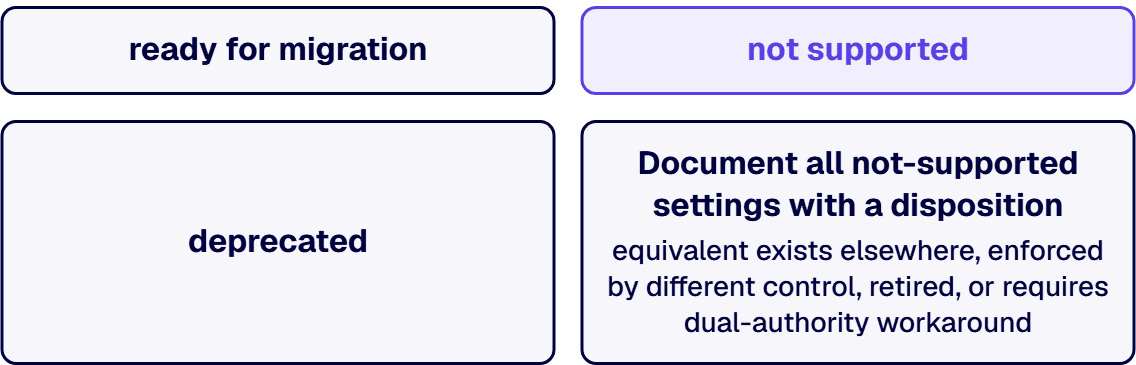
Document all not-supported settings with a disposition: equivalent exists elsewhere, enforced by different control, retired, or requires dual-authority workaround. Run the migrate-to-settings-catalog flow, noting Microsoft’s caveat that migrate is best effort and there can be some differences. Handle AppLocker and Firewall separately through the Endpoint Security workload; the migrate function is disabled for those.
Decide in writing whether MDM or Group Policy wins on contested settings. Configure MDMWinsOverGP deliberately at ./Device/Vendor/MSFT/Policy/Config/ControlPolicyConflict/MDMWinsOverGP. Understand the scope limitation: this setting does not apply to other MDM settings with equivalent GP settings defined in other CSPs such as the Defender CSP.
i3solutions has governed Microsoft estates for enterprises that answer to auditors, regulators, and boards across 1,500+ engagements, with senior, 100% US-based teams.
Start with IT personnel as the pilot group (around 50 users per Microsoft’s example). Include at least one device from each problematic class identified in Phase 0. Define pilot exit criteria and rollback triggers before launch. Measure help desk contact rate per 100 devices; this metric, not calendar targets, determines wave sizing in Phase 4.
Select the enrollment method per population: GPO-triggered automatic enrollment, co-management, Windows Configuration Designer provisioning, or Windows Autopilot. Understand the Autopilot limitation: Windows Autopilot Reset does not support Microsoft Entra hybrid join devices. Verify enrollment restrictions before the first wave launches.
Size waves based on the pilot help desk contact rate multiplied by the proposed wave size. Avoid enrollment waves crossing weekends or period-end closing. Hold a named go/no-go decision between every wave against the Phase 3 criteria. Track unenrolled devices as a named machine list with owner assignment, not residual percentages, because the percentage is where the last 3 percent of the estate quietly becomes permanent.
Unlink GPOs before deletion; unlinked policies are reversible, deleted ones require restoration. Re-run Group Policy analytics against remaining GPOs to confirm settings are no longer doubly enforced. Reconcile compliance evidence so audit controls are evidenced from Intune rather than legacy GPO reports. Document the end-state authority: one setting, one authority, documented.
Co-management is only available to Configuration Manager environments. Microsoft names seven workloads that can transition: compliance policies, Windows Update policies, resource access policies, Endpoint Protection, device configuration, Office Click-to-Run apps, and client apps.
Important caveat: if you switch a workload to Intune but later change your mind, you can switch it back to Configuration Manager, although there might be an impact. For example, Windows and Office versions will remain at a later version if installed by Intune. State changes are irreversible even when management authority reverses. Plan workload sequence with least reversible impacts first.
| Class | Cause | Disposition |
|---|---|---|
| Not hybrid joined | Device exists in Active Directory but lacks Microsoft Entra ID record | Identity remediation before enrollment |
| Network-disconnected | Field devices, long-term leave, or stored equipment; hybrid join never completed | Named list, owner assigned per device |
| No Intune entitlement | Licensing gap | License reconciliation |
| Enrollment restriction blocking | Usually device-limit policy | Check Phase 4 restrictions |
| Unsupported OS build | Device enrolls but becomes permanent compliance exception | Refresh candidate |
| Shared, kiosk, or instrumented | Each carries its own management model | Individual project with named owner and tested fallback |
Microsoft documents no bulk unenrollment capability. Per-device options are Retire (removes company data while preserving personal data and unenrolls the device) or Wipe (factory reset).
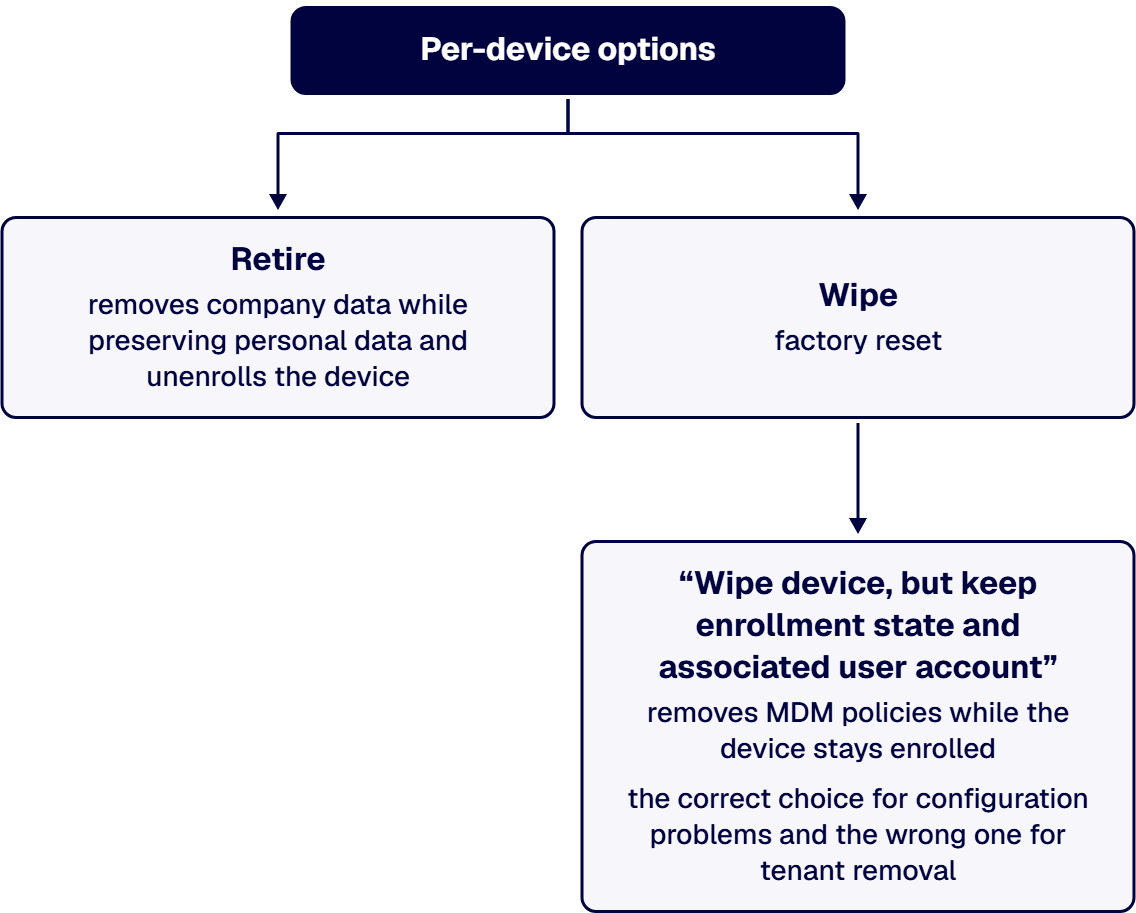
The hard limit worth budgeting against: a tenant can submit up to 500 Wipe actions per day. An estate of 1,200 devices cannot be reset within one business day at Microsoft’s documented ceiling. Plan the rollback path assuming that limit binds.
Know the Windows wipe option that is not destructive: “Wipe device, but keep enrollment state and associated user account” removes MDM policies while the device stays enrolled. That is the correct choice for configuration problems and the wrong one for tenant removal.
Define rollback triggers in advance: control enforcement weakness, help desk contact rate exceeding capacity threshold by a specified margin, or settings resolving to weaker enforcement post-enrollment.
Windows Autopilot is not available in GCC High or DoD. Microsoft states: there is not a built-in way to migrate from the commercial service to the government cloud, and vice versa. Settle tenant designation before device enrollment to avoid duplicate work.
Hybrid join is not verified per device. GCC High or DoD migration is roadmapped but unscheduled. Nobody owns the not-supported settings (this creates a permanent dual-managed estate). Or the driver is a calendar date rather than a named control obligation.
i3solutions has managed regulated Microsoft estates since 1997, with senior, 100 percent US-based teams working under the compliance standards regulated environments require. The Intune migration discipline is the same one every governance-first program runs: classify the workloads against the controls that apply to them, size the plan against measured help desk load, and move only when the evidence chain moves with the devices.

Justin has spent more than 15 years at i3solutions and more than 25 years leading project, program, and product delivery across complex technology environments. His work centers on turning strategy into governed execution, aligning technical teams and stakeholders, managing delivery risk, and guiding Microsoft 365, SharePoint, Power Platform, cloud, data, automation, and custom application programs through measurable production outcomes.
Connect on LinkedInSchedule is set by the Group Policy analytics output (ready, unsupported, and deprecated counts) and the measured pilot help desk contact rate. Any quoted duration without those two inputs is speculation. For a 1,200-device estate, an eighteen-week timeline with the six phases sized against pilot data is a defensible starting frame.
Yes. During transition, devices carry both authorities. The ControlPolicyConflict policy CSP controls the outcome. Microsoft states the default value is 0 and without configuration there will be a race condition and no guarantee which one wins. The MDMWinsOverGP setting applies only to Policy CSP, not to Defender CSP or other CSPs with equivalent settings, so those need separate resolution.
For co-managed devices, yes, but there might be an impact. Microsoft notes that Windows and Office versions will remain at a later version if installed by Intune. For enrollment itself, only per-device Retire or Wipe actions exist, and Microsoft allows a maximum of 500 wipes per day per tenant.
No. For existing hybrid-joined estates, Autopilot often creates unnecessary reimaging. Microsoft documents these paths for existing devices: GPO-triggered automatic enrollment, co-management enrollment, or provisioning packages. Autopilot is designed for newly purchased devices, and Windows Autopilot Reset does not support Microsoft Entra hybrid join devices.
Group Policy analytics classifies your settings specifically. AppLocker and Firewall settings cannot use the migrate function and must be configured through the Endpoint Security workload instead. In regulated environments, those settings often receive assessor scrutiny, so the migration plan should include their new configuration path from the start.
No. Windows Autopilot, Windows Autopatch, and certain Windows update policy types are unavailable. Remote Help is supported in GCC High but not DoD. Microsoft documents no built-in migration path between commercial and government clouds, so settle the tenant designation before device enrollment.
Evidence requirements, control ownership, and access records follow patterns i3solutions has seen across regulated Microsoft estates since 1997. Our senior governance advisors work with enterprise IT leaders who want the gaps closed under a scoped program, not discovered in a finding.
Request a Governance Scoping Discussion
US-Based | Est. 1997
© i3solutions. All rights reserved.
US-Based | Est. 1997
© i3solutions. All rights reserved.


