

Power Automate API integration turns on five decisions the platform leaves to you: the connector, the authorization, the connection, the request budget, and the change owner. Each is a named answer with a named person against it, settled before the first action is built. Each is cheap to make before the first action exists and expensive to retrofit once other flows depend on the answer.
The request that starts this work is a plain one. Two systems hold the same information, somebody is rekeying it between them, and Power Automate is already licensed. A maker builds a flow, it works, and the rekeying stops. The trouble arrives later, and it lands somewhere other than the logic: the flow runs under one person’s credentials, calls an endpoint nobody documented, and shares a request pool with everything else the tenant automates. When the vendor changes the API, the flow stops, and the question of who fixes it has no answer written down.
That is not a Power Automate defect. The platform turns an API into a working integration quickly, which is why it gets chosen, and the five decisions below are the ones that speed skips past. Each is cheap to make before the first action exists and expensive to retrofit once other flows depend on the answer.
Clear these platform prerequisites before the five decisions.
Licensing. Premium and custom connectors need an entitlement. A Power Automate Process license lets one flow use them whatever its owner holds.
Data policy. Confirm the environment’s data policy allows each connector, since a flow using a blocked connector cannot be saved.
Secrets. Reference Azure Key Vault secrets through environment variables, and turn on Secure Inputs and Secure Outputs to keep values out of run logs.
API description. A custom connector needs the API described first. An OpenAPI 2.0 definition under 1 MB is one documented route.
Request limits. Retries and pagination count as actions, and a Power Automate connector past its own limit returns HTTP 429. Batch calls and spread them out.
Network reach. An API on your own network needs the on-premises data gateway, which caps write payloads at 2 MB.
Trigger shape. Decide whether the source can call a webhook trigger or the flow must poll on a schedule.
Environments. Build in a solution with connection references, and promote through separate Dev, Test, UAT, and Production environments.
| Decision | What it settles | Where the answer is visible | Who answers for it |
|---|---|---|---|
| The connector | Whether the call goes through a prebuilt connector, a custom connector, or the HTTP action | The flow’s action list, and the environment’s custom connector inventory in the Power Platform admin center | The platform owner, with the developer who knows the target API |
| The authorization | Whose permissions the call carries: the signed-in user, a named person, or an application identity | The connection’s owner and authentication type, and the Application users page in the Power Platform admin center for application identities | The identity lead, with the owner of the system being called |
| The connection | Who owns the stored credential, and what happens to the flows bound to it when that person leaves | The connection’s details page, in its Apps using this connection and Flows using this connection tabs | The platform owner |
| The request budget | What the integration is allowed to consume against the tenant’s request allocation | Analytics on the flow details page, Actions tab, read per flow | The platform owner, with whoever pays for capacity |
| The change owner | Who is accountable when the API on the far side changes shape | The record kept per integration, which names the person accountable, and the solution the flow ships in | The business owner of the process, with a named technical fixer |
Two things about this table are load-bearing. The rightmost column names a role, and the copy you keep replaces each role with the name of the person who holds it, because a decision owned by a committee is unmade on the day it is tested. The third column names something somebody can open and read, so a claim about the integration can be checked rather than believed. Where the two owners in a row disagree, the one who carries the consequence decides: on authorization, the owner of the system being called, because that team carries the damage from a wrong write.
“Connect our systems” is one sentence in a request and three different builds in Power Automate, and the difference shows up in who maintains the result. A prebuilt connector for a system Microsoft already covers is the cheap answer and the right one when it exposes the operations you need.
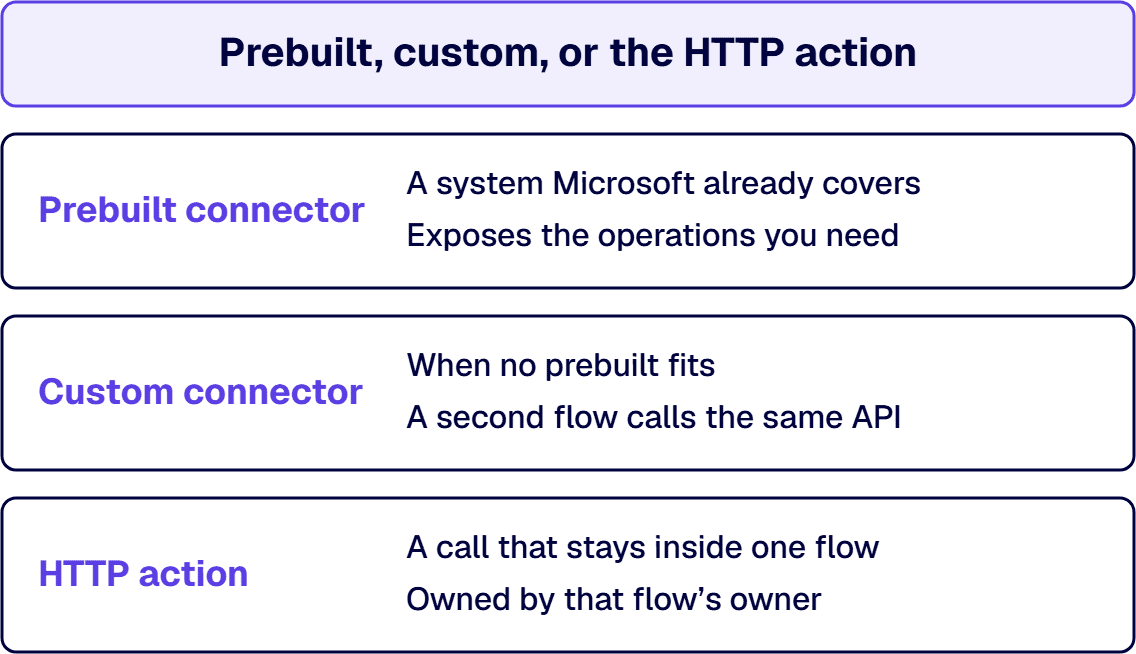
A custom connector is the durable answer when no prebuilt fits. Microsoft describes it as a wrapper around a REST API that lets Logic Apps, Power Automate, Power Apps, or Copilot Studio communicate with that REST or SOAP API, and sets out a six-step lifecycle: build the API, secure it, describe it and define the connector, use it, share it, and certify it. Two of those steps carry the decisions people skip. Securing names the standard authentication methods a connector may use, including generic OAuth 2.0, OAuth 2.0 for specific services including Microsoft Entra ID, basic authentication, and API key, with Microsoft Entra ID recommended among them. Sharing decides whether the connector stops being one maker’s asset, and certification submits it to Microsoft for availability to all Power Platform users rather than just your organization.
Calling the API directly with the HTTP action is the third case. Microsoft’s HTTP with Microsoft Entra ID (preauthorized) connector fetches resources from web services authenticated by Microsoft Entra ID, or from an on-premises web service, and is a premium connector. It encodes the request body into base64, so it suits backend services expecting that form and cannot call services that expect raw binary. Its published throttling limit is 100 API calls per connection in 60 seconds, which is a design input the moment an integration processes items in bulk.
One rule settles the choice: use the HTTP action for a call that stays inside one flow and is owned by that flow’s owner. When a second flow calls the same API, or when the endpoint, authentication, or payload shape will outlive the flow that first needed it, wrap it in a custom connector so there is one place to change it.
i3solutions designs and delivers enterprise workflow automation with error handling, monitoring, and ownership defined before go-live, for processes the business runs on.
Every call a flow makes runs under some identity, and the identity is chosen when somebody creates a connection rather than when somebody designs the integration. That ordering is how service account sprawl begins: a maker needs a flow to read a system ordinary users cannot reach, an administrator creates an account for it, the flow works, and the account outlives everyone who knew why it existed.
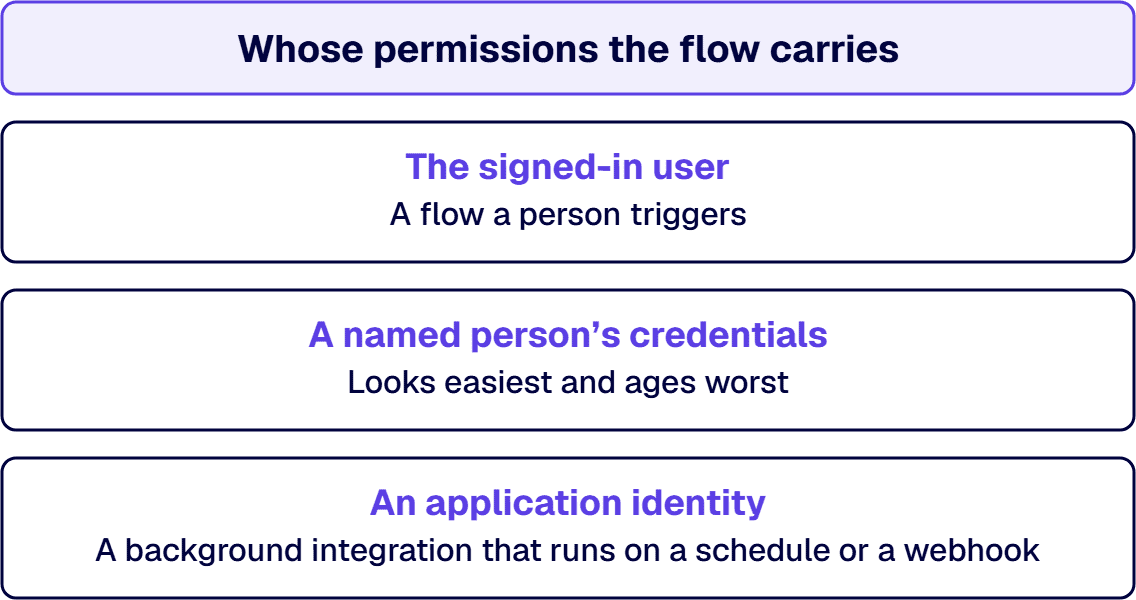
Three answers are defensible inside Power Automate, and they suit different jobs. The signed-in user is the answer for a flow a person triggers, and it holds only where that person provides the connection rather than running on one somebody else stored, because then the flow reaches what that person reaches. A named person’s credentials is the answer that looks easiest and ages worst: the flow carries that individual’s reach to everyone who can trigger it, and it stops when their account is disabled. An application identity is the answer for a background integration that runs on a schedule or a webhook. In Dataverse that identity is an application user, created from an app registration in Microsoft Entra ID and assigned security roles, and it is visible on the Application users page in the Power Platform admin center.
The point buyers miss is that this decision has a metered consequence as well as a security one. Microsoft’s requests limits documentation sets a separate, tenant-pooled limit for activities that do not require user interaction, and names the identities that draw on it: application users, non-interactive users, administrative users, and the SYSTEM user. All of them within a tenant share tenant-level limits. Adding a service account does not add capacity; it adds a claimant on a pool other automation is already drawing down.
The exit is named too. A Power Automate cloud flow owned by a service principal does not draw on the non-licensed user pool if it has a Process or per-flow license, belongs to a flow group with a Process license assigned, or has a designated licensed user. So the authorization decision and the licensing decision are one decision, taken together at design time or discovered together in production.
Connections behave less like code and more like people, which is why they cause the outages nobody predicted. Microsoft defines a connection as a stored authentication credential for a connector, and a connection reference as a solution component containing a reference to a connection about a specific connector. Solution-aware canvas apps and the operations inside a solution-aware flow bind to that connection reference instead of directly to a connection. That indirection is what makes an integration movable between environments, and it is worth building in from the start for anything that will exist in more than one.
Indirection does not, on its own, answer the ownership question. Microsoft records two constraints that decide how much of a problem ownership becomes: when a flow is turned on by the owner of the connections it uses, the flow gets explicit permission to use those connections, and ownership of a connection reference cannot be transferred to another user from the Solutions area in Power Apps. A departure is also a question about which flows were enabled under whose credentials and what has to be re-established by somebody else.
This is inspectable before it becomes an incident. Permissions granted to apps and flows using a connection appear on the details page for that connection, in its Apps using this connection and Flows using this connection tabs. That page is the surface to read when somebody asks what a service account is holding up, and it is worth reading during design instead of during an outage.
Three rules turn this from mechanics into an operating position. Connections that back an integration are owned by a role, not by whoever happened to build the flow. A connection whose owner leaves triggers a review of the flows bound to it before the account is disabled. And a connection created for one integration is not silently reused by a second one without the first integration’s owner agreeing.
Request limits are the design input teams meet last, and the one to settle first when an integration calls an API once per item in a list. Microsoft’s requests limits documentation states that you can make only a limited number of requests each day across Power Apps, Power Automate, Microsoft Copilot Studio, and Dynamics 365 applications, based on a user’s assigned license. The allocation is counted over a 24-hour period, and 40,000 requests per paid license per 24 hours is the documented figure for paid Power Platform and Dynamics 365 licenses. Background identities draw on a separate pool defined at the tenant level and shared.
Two questions belong in design instead of a post-incident review. The first is volume: how many calls does this integration make on an ordinary day, and on the worst day the source system can produce. An integration that walks a list and calls an API per item has a request profile shaped like the list, so the useful question is what bounds the list. The second is where the budget is charged: to a licensed user, to the tenant’s background pool, or to a flow with capacity reserved for it. The flow details page’s Analytics view is where the action count is read once running, so a design that predicts a number is a design somebody can check later.
Retry behavior sits in the same category. A retried call is another call, so retry settings and request budgets are one conversation. A retry against a system that is not safe to receive the same request twice converts a transient failure into a duplicate record.
The API on the other side of an integration changes without asking. A field is renamed, an authentication method is deprecated, a version is retired, a rate limit is tightened. The flow does not adapt, and the interesting question is not technical: it is who notices, who is allowed to change the flow, and who decides whether the change is urgent.
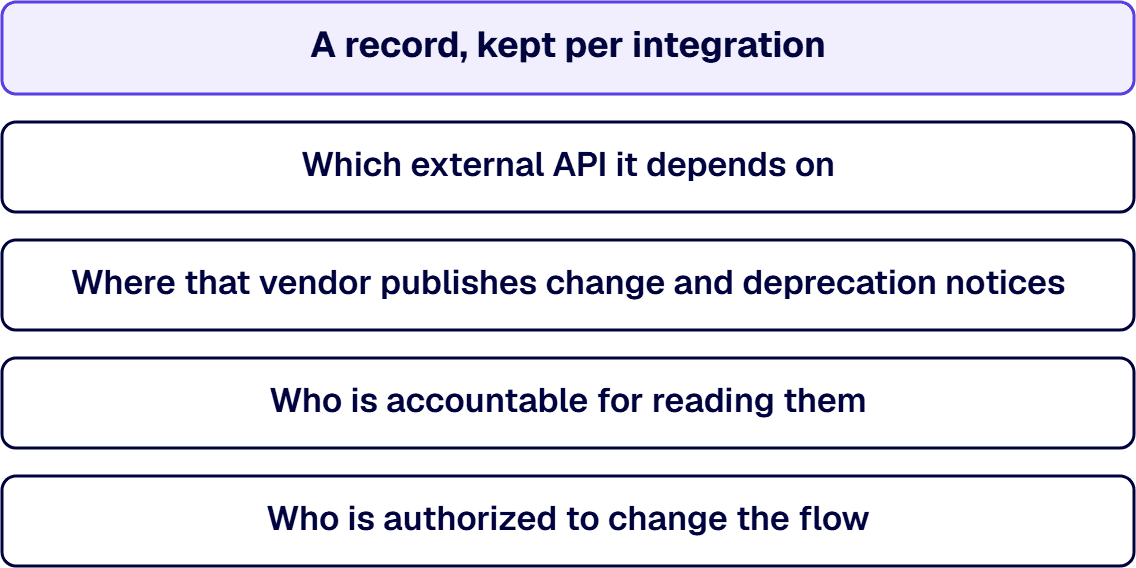
Where nobody is named, the first part gets answered by accident and the rest not at all. The flow fails, somebody in the business notices that records stopped arriving, and a search begins for whoever built it. That search is the cost. The fix is a record, kept per integration, answering four questions: which external API it depends on, where that vendor publishes change and deprecation notices, who is accountable for reading them, and who is authorized to change the flow. A custom connector helps in a specific way, because it puts the endpoint, the authentication method, and the payload shape in one artifact somebody can version.
Two operating rules make the record useful. An integration with no named change owner is treated as a risk item at review, because a working integration with nobody accountable for it is a future outage with an unknown response time. And the change owner is named at the point the integration is approved, not at the point it breaks, because the negotiation about who does this work is much easier before anybody is under pressure.
If the open question is which systems are in scope, which system is of record, how fields map and validate, or how retry and dead-lettering should work across an estate, those are estate questions with their own reference architecture. The five decisions above assume those answers exist and sit one layer below them.
Power Automate is the wrong integration layer where the volume is high and continuous, where the transformation needs real code and real tests, where the receiving system requires transactional guarantees across several calls, or where the job is a scheduled data pipeline moving large volumes. Those shapes belong to Azure Logic Apps, Azure Functions, Azure Data Factory, or a purpose-built service.
i3solutions has delivered on the Microsoft stack since 1997, with senior, 100 percent US-based teams. Power Automate integration runs the same discipline every governance-first program does: name the five decisions, name the people who answer for them, and settle them before the first action exists rather than after other flows depend on the answers.

Michael Branson co-founded i3solutions 30 years ago and brings executive, operational, and technical perspective to organizations working in complex, secure, and mission-critical environments. His insights focus on business process consulting, automation, data analytics, collaboration, secure operating models, and the operational discipline required to turn technology investments into practical business systems with measurable value.
Connect on LinkedInInside Power Automate, resolve five things and name a person against each. Which connector carries the call: a prebuilt connector, a custom connector, or the HTTP action. Whose permissions the call runs under: the signed-in user, a named person, or an application identity. Who owns the stored connection and what happens to the flows bound to it when that person leaves. What the integration is allowed to consume against the tenant's request allocation. And who is accountable when the API on the far side changes.
Choose the identity deliberately from three options. A flow a person triggers should run as the signed-in user where that person provides the connection. A background integration on a schedule or webhook has no signed-in user to borrow from and should use an application identity (in Dataverse, an application user created from an app registration in Microsoft Entra ID, assigned security roles, and visible on the Application users page). Running on a named individual's credentials is the option that ages worst, because the flow carries that person's reach and stops when their account is disabled. Adding a service account does not add tenant capacity: application users, non-interactive users, administrative users, and system users share tenant-level limits.
Use the HTTP action when the call lives inside one flow and is owned by that flow's owner. Build a custom connector when a second flow needs the same API, or when the endpoint, the authentication method, or the payload shape will outlive the flow that first needed it, because the connector puts those three things in one artifact somebody can version. The HTTP with Microsoft Entra ID (preauthorized) connector also has documented boundaries that push toward a custom connector for anything demanding: it encodes the request body into base64 and cannot call services that expect raw binary, and it is throttled at 100 API calls per connection in 60 seconds.
A role, named in writing, and not whoever built the flow. A connection is a stored credential; a connection reference is the solution component that binds a flow to it. Ownership of a connection reference cannot be transferred from the Solutions area in Power Apps, so a departing owner is a review of the flows bound to that connection before their account is disabled. Read the connection's details page, in its Apps using this connection and Flows using this connection tabs, during design rather than during an outage.
Treat error behavior as an input to three other decisions rather than as a setting to configure later. A retried call is another call against the request budget. A retry against a system that is not safe to receive the same request twice creates duplicate records. Where a failed item waits for a human decides who is on the hook for clearing it. The architecture that answers those questions (retry policy, idempotency, compensation, and dead-lettering) is separate operate-phase work; this page treats them as inputs to the connector, authorization, and budget decisions.
It is the wrong layer when the volume is high and continuous, when the transformation needs real code and real tests, when the receiving system requires transactional guarantees across several calls, or when the job is a scheduled data pipeline moving large volumes. Work of that shape sits better on Azure Logic Apps, Azure Functions, Azure Data Factory, or a service built for it. Power Automate fits event-driven work with moderate volumes and modest transformation, where the value is in removing rekeying between systems people do by hand.
Approvals, escalations, and integrations added one at a time become an orchestration layer with no owner and no test plan. i3solutions' senior workflow advisors work with enterprise IT leaders who need that layer redesigned as deliberate architecture.
Schedule a Workflow Automation Scoping Discussion
US-Based | Est. 1997
© i3solutions. All rights reserved.
US-Based | Est. 1997
© i3solutions. All rights reserved.


