
Michael Branson
If your legacy BI contract has an end date and a conversion estimate is already on the table, the count that matters is still open: which reports anyone still runs, and which ones a regulator, an auditor or the board reads. Move reports in the order the legacy platform’s own usage record gives you, rebuild each one against the business question it answers, prove its numbers and its access rules against the legacy report before anyone relies on it, and switch the legacy report off only when the parallel run has ended, every user can reach the new one, the old one has stopped being used, and no issue that could affect users has occurred with the new one.
Plan the effort around validation, not conversion. Microsoft’s Prepare to migrate to Power BI page says: “It isn’t possible to completely automate a Power BI conversion process end-to-end.” Microsoft’s Power BI migration overview, which like the rest of its migration series was last updated December 30, 2024, states the premise this page shares: “There are two assumptions: Your organization has a legacy BI platform currently in place and the decision has been made to formally migrate content and users to Power BI.”
This page sets out Microsoft’s migration method and the i3solutions recommendation for a regulated enterprise. What your regulatory obligations require of the migration is for your control owners, auditors and counsel to decide.
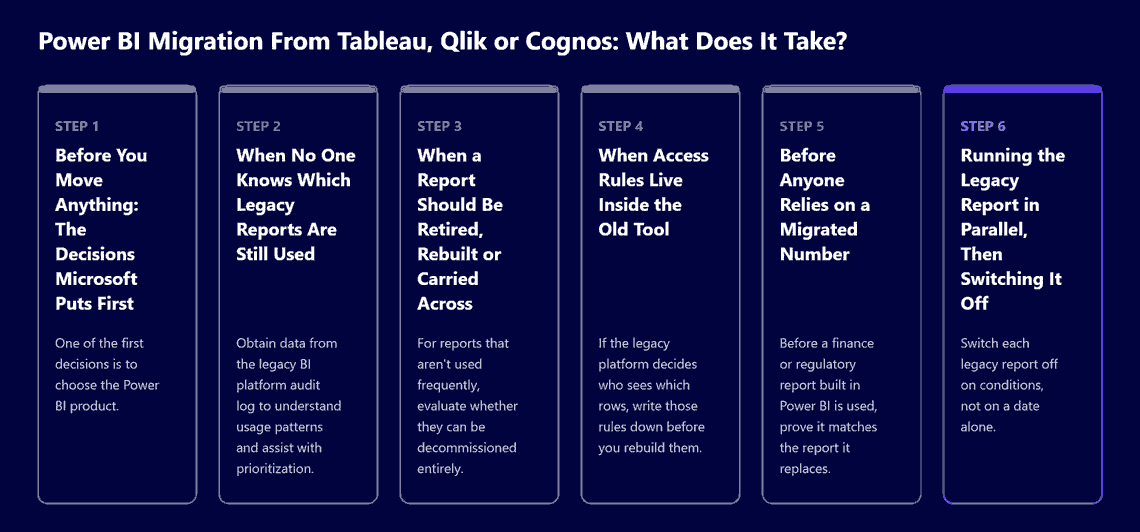
Before the first report moves, two things need a written answer. Start with the product. Microsoft’s Plan deployment to migrate to Power BI page says: “One of the first decisions is to choose the Power BI product. It’s a decision between the Power BI service or Power BI Report Server.” This page does not compare the two.
Then set the constraints. Microsoft’s Power BI migration overview says: “Be realistic with migration plans, including funding, time estimates, as well as roles and responsibilities for everyone involved.” Cost is covered in Power BI licensing costs.
If your tenant sits in a national or government cloud, the same overview says: “Additional considerations could apply for national/regional cloud customers beyond what is discussed in this series of articles.” Microsoft does not list them there, and this page does not cover them.
If the inventory is only a list of report names, it cannot tell you what to move first; the legacy platform’s own usage record can. Microsoft’s Prepare to migrate to Power BI page says: “The output from the pre-migration steps includes an initial governance model, initial high-level deployment planning, in addition to an inventory of the reports and data to be migrated.” For the usage record it says: “Obtain data from the legacy BI platform audit log to understand usage patterns and assist with prioritization.” What it lists from that log includes “The consumers for each report, particularly reports used by executives.” and “Most recent date each report was executed.”
Inventory the data sources as well. The same page says compiling them “could unearth data sources not previously known to the IT department, often referred to as shadow IT”. Among the items its governance model section lists: “How internal and external compliance, regulatory, and audit requirements will be met.”
The audit log shows who ran a report and when; it does not show which reports feed a regulatory submission, an audit request or a board pack. The i3solutions recommendation: before ranking, ask each report’s owner to flag those reports in writing, and rank them alongside Microsoft’s own priority test in Gather requirements to migrate to Power BI, where the high-priority reports it lists include those that “Are required by senior leadership or executives.”
If a legacy report is rebuilt exactly as it looks today, its old problems move with it. Microsoft’s Power BI migration overview says: “Rather than strictly attempting to always migrate reports precisely as they appear in the legacy BI platform, focus on the business question the report is trying to answer”. Its Gather requirements to migrate to Power BI page adds: “It’s rare that a direct one-to-one migration occurs without any refactoring or enhancement.”
Retire first. Microsoft’s Learn from customer Power BI migrations article says: “It’s very easy to overestimate how critical a report actually is. For reports that aren’t used frequently, evaluate whether they can be decommissioned entirely. Sometimes, the cheapest and easiest thing to do is nothing.” Under the i3solutions recommendation, a report its owner has flagged as regulatory is not retired on usage alone.
Microsoft’s Conduct proof of concept to migrate to Power BI page describes two data-model situations. It says: “If you’re migrating from a legacy BI platform that has its own semantic layer, then the creation of an Import semantic model is likely to be a good option.” It adds that if the legacy semantic layer is not a star schema, “it’s possible that some redesign might be required to fully benefit from Power BI.” Where reports use SQL queries or stored procedures and you plan to use DirectQuery mode, it says “you might be able to achieve close to a one-to-one migration of the data model.” It also cautions: “Every BI tool has its strengths and focus areas. For this reason, the exact report visuals you depended on in a legacy BI platform might not have a close equivalent in Power BI.”
Rebuild everything else for its purpose. Microsoft’s customer migrations article records the guidance one organization gave its content authors: “focus on creating fit-for-purpose reports in Power BI, rather than attempt an exact replica of the legacy report.”
If your legacy platform is Tableau, Qlik or Cognos, the migration method does not change. Microsoft wrote its series for “a migration from a third-party BI tool to Power BI”, as its Power BI migration overview puts it, and its migration pages name no source product. Which of Microsoft’s two data-model situations your estate matches, a legacy semantic layer or reports built on SQL queries and stored procedures, is for your own team to establish from the estate itself; this page states nothing about any source product’s features.
If the legacy platform decides who sees which rows, write those rules down before you rebuild them. Microsoft’s Gather requirements to migrate to Power BI page says, for each report: “Clarify security requirements (such as allowed viewers, allowed editors, and any row-level security needs), including any exceptions to normal organizational security. Document any data sensitivity level, data privacy, or regulatory/compliance needs.”
Test the rules early. Microsoft’s Conduct proof of concept to migrate to Power BI page lists “Verify security configurations, including row-level security when applicable.” Its Create content to migrate to Power BI page names two routes: “In an Import semantic model, data permissions are applied by defining row-level security (RLS). It’s also possible that data permissions are enforced by the source system when using DirectQuery storage mode”.
Control what leaves the service. Microsoft’s Plan deployment to migrate to Power BI page says: “Specify an approved location for content exported from the Power BI service.” Where row-level security stops protecting data is covered in business intelligence executives can trust.
Before a finance or regulatory report built in Power BI is used, prove it matches the report it replaces. Microsoft’s Create content to migrate to Power BI page says “There are four main aspects to validation of a Power BI solution:” and lists Data accuracy, Security, Functionality and Performance. On accuracy it says: “As a one-time effort during the migration, you’ll need to ensure the data in the new report matches what’s displayed in the legacy report.” Where the two differ, Microsoft says you should be able to explain why, and it adds: “It’s more common than you might think to find an error in the legacy solution that gets resolved in the new solution.”
Start from the calculations. Microsoft’s Gather requirements to migrate to Power BI page says: “Identify and document all calculations, KPIs, and business rules that are currently defined within the existing report so they can be aligned with the data requirements.” After the one-time check, Microsoft’s Create content page says: “As part of ongoing data validation efforts, the new report will typically need to be cross-checked with the original source system.”
A reconciliation that is written down records what was compared, when, which figures differed and why. Filed with the report’s inventory record, it is evidence of the migration step. What your control owners, auditors and counsel require of it is theirs to decide.
When users can open both versions, the parallel run is where differences surface. Microsoft’s Deploy to Power BI page says: “In many situations, the new solution will run in parallel to the legacy solution for a predetermined time.” One advantage it lists: “Allows for the information presented in Power BI to be cross-referenced to the legacy reports.”
Decide how formal sign-off is before rollout starts. The same page says “The extent to which this UAT process is formal, including written sign-offs, will depend on your change management practices.” and “If you’re trying to minimize risk and user disruption, or if there are other concerns, you might opt to perform a staged deployment.” For a report a regulator or the board reads, the i3solutions recommendation is a written sign-off by its owner.
Switch each legacy report off on conditions, not on a date alone. Microsoft’s Deploy to Power BI page says decommissioning can occur when the predetermined parallel period has expired, adding “It’s commonly 30-90 days.”; when “All users of the legacy system have access to the new Power BI solution.”; when “Significant activity is no longer occurring on the legacy report.”; and when “No issues have occurred with the new Power BI solution that could impact user productivity.” That range is Microsoft’s common case, not a requirement.
The i3solutions recommendation is to file, for each report switched off, the record behind each of those conditions: the date the parallel period ended, the access check, the usage showing activity stopped, and the issues log. Who owns the reports after cutover is covered in enterprise analytics operating model.
If your reports are .rdl files on Power BI Report Server or SQL Server Reporting Services, Microsoft documents a Microsoft-to-Microsoft path. Its Plan to migrate .rdl reports to Power BI page says “In Power BI, .rdl reports are called paginated reports” and “If you’re using Power BI Report Server or SQL Server Reporting Services after SQL Server 2016, there’s a built-in tool to publish its reports to Power BI.” It adds: “Having discovered your report server instances, the goal of the Assess phase is to understand any .rdl reports, or server items, that can’t be migrated.” For reports that rely on features paginated reports do not yet support, Microsoft says “you can plan to redevelop them as Power BI reports, when it makes sense.” The same page says: “You can achieve migration without downtime to your report servers, or disruption to your report users.”
If one of these situations applies, stop before you follow the migration method:
If no one owns the inventory and the sign-offs, the migration defaults to whatever converts fastest. The i3solutions recommendation: your platform team owns the inventory and the triage, and each report’s business owner signs off its reconciliation and its switch-off.
An outside architect is useful in two places: re-expressing the legacy security model in Power BI and designing the reconciliation against the legacy reports. That is project and advisory work scoped to your estate. The service is described in business intelligence and reporting services.
The wider practice is enterprise Power BI development services. i3solutions has deployed Power BI inside a GCC High tenant and inside Azure Government for a federal customer. Power BI and analytics work at i3solutions is delivered by senior, US-based people. Delivery is senior and US-based.
If the inventory is only a list of report names, it cannot tell you what to move first; the legacy platform’s own usage record can. The audit log shows who ran a report and when; it does not show which reports feed a regulatory submission, an audit request or a board pack.
If a legacy report is rebuilt exactly as it looks today, its old problems move with it. Retire what is not used, and rebuild the rest around the business question each report answers.
Before a finance or regulatory report built in Power BI is used, prove it matches the report it replaces. A reconciliation that is written down records what was compared, when, which figures differed and why. Filed with the report’s inventory record, it is evidence of the migration step.
Switch each legacy report off on conditions, not on a date alone. The i3solutions recommendation is to file, for each report switched off, the record behind each of those conditions: the date the parallel period ended, the access check, the usage showing activity stopped, and the issues log.
The i3solutions recommendation: your platform team owns the inventory and the triage, and each report’s business owner signs off its reconciliation and its switch-off.

US-Based Microsoft System Integrator | Est. 1997
© i3solutions. All rights reserved.
US-Based Microsoft System Integrator | Est. 1997
© i3solutions. All rights reserved.


