
At 1,000 users the Power BI bill is decided by one threshold, not by headcount. License every person individually and 1,000 Power BI Pro seats list at $14.00 per user per month, which is $168,000 a year. Move report consumption onto a Microsoft Fabric F64 capacity and viewers need only a free license, which puts the same 1,000 people closer to $68,000 a year once you add fifty paid authors. Comparing that against other BI platforms is harder than it should be, because Microsoft publishes its list prices and most of its rivals no longer do: Qlik publishes prices but meters data volume rather than users above its small-business tier, Domo publishes a consumption-credit model with unlimited users and no dollar figure, and Looker and Sisense publish no figure at all.
Microsoft’s licensing rules put the interesting boundary in an unexpected place. Per Microsoft’s Fabric licensing documentation, on Fabric F SKUs smaller than F64, every user who views Power BI content must hold a Pro license, a Premium Per User license, or an individual trial. On F64 or larger, a user with only the free Microsoft Fabric license and a viewer role on the workspace can view that content. F64 is 64 capacity units, and Microsoft’s own SKU table lines it up with the Power BI Premium P1 capacity, with the caution that the table compares compute capacity rather than asserting functional or licensing equivalence.
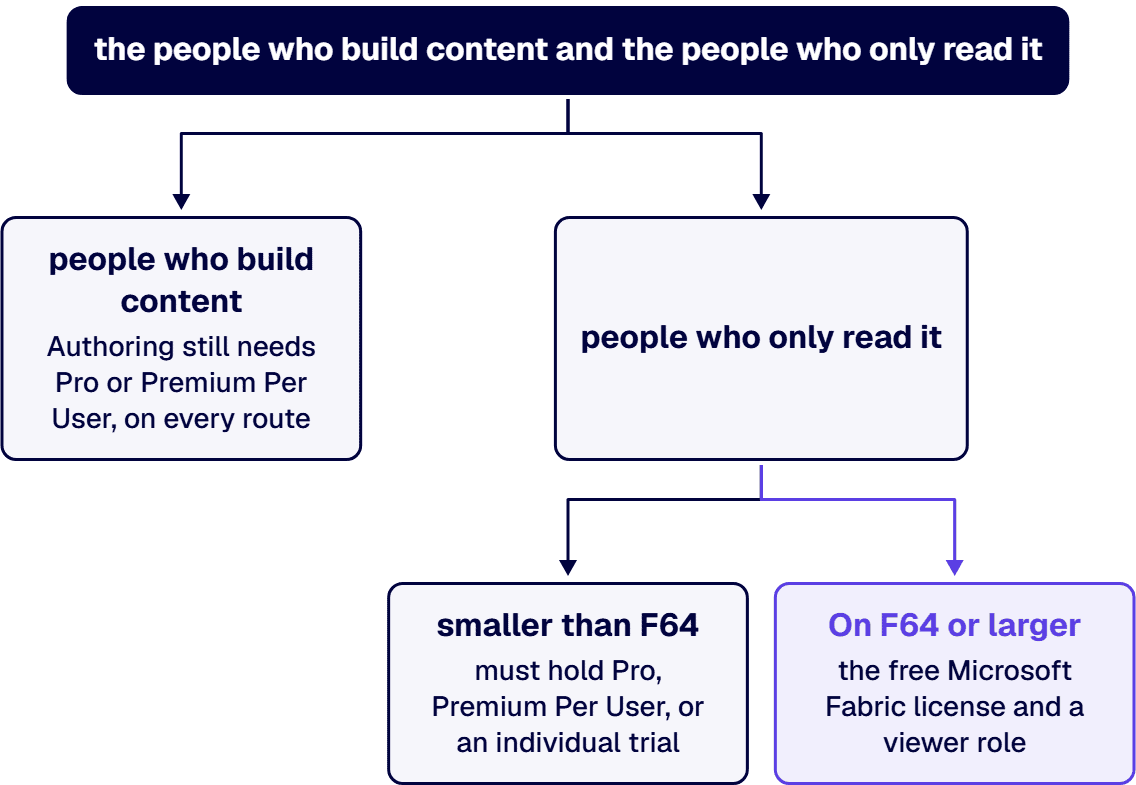
So the number that matters is not 1,000. It is the split between the people who build content and the people who only read it, and whether the capacity you put underneath them clears F64. The free license is granted automatically the first time a user signs in to Fabric, and it does not let that user create or share Power BI items in any workspace other than their own. Authoring still needs Pro or Premium Per User, on every route.
Two more rules from the same Microsoft documentation shape a 1,000-seat plan. Premium Per User does not provision a Fabric capacity, so it cannot be used to run lakehouses, warehouses or notebooks; Microsoft’s own guidance is that Premium Per User is the cost-effective choice when Premium features are needed for fewer than 250 users. In Microsoft’s standard commercial cloud, Microsoft is consolidating purchase options and retiring the Power BI Premium per-capacity P SKUs, telling new and existing customers to consider Fabric F capacity subscriptions instead. A 1,000-user plan built on a P1 renewal is planning against a retiring SKU.
Three routes, priced from Microsoft’s published rates. Power BI Pro is $14.00 per user per month paid yearly and Premium Per User is $24.00 per user per month paid yearly, both from Microsoft’s Power BI pricing page. Fabric capacity is sold by the capacity unit: $0.18 per capacity unit hour pay-as-you-go in Central US, or $938 per capacity unit for a one-year reservation, both from Microsoft’s Azure retail price list. Azure bills F capacity per second with a one-minute minimum and no commitment. The annual figures below are arithmetic on those published rates, in Central US, at list, with no discount or agreement pricing applied. Once the license cost is known, the next question is who implements it, covered in fixed-fee Power BI implementation firms for large enterprises.
The break-even follows directly. A reserved F64 costs $60,032 a year, and a Pro seat costs $168 a year, so the capacity pays for itself at 358 viewers. On pay-as-you-go the same crossover arrives at 601 viewers. Both numbers sit far below 1,000, which is why the capacity route is the default at this size rather than the aggressive option. What varies between organizations is not whether to model it but how many of the 1,000 are authors: 50 authors and 950 viewers is a governed reporting estate, and 400 authors is a self-service estate wearing a governed estate’s budget.
The honest finding on the other half of the question is that most BI vendors have stopped publishing enterprise prices, so a like-for-like table at 1,000 users cannot be built from public sources. What can be built is a comparison of the pricing meter each vendor uses, which is the part that actually changes the answer at scale. Every figure below was read from the vendor’s own pricing page in August 2026.
Two consequences for a procurement file. First, any comparison table that shows confident per-user numbers for Looker, Domo or Sisense at 1,000 users is quoting a rumor, a resale listing or a stale contract, and it will not survive the vendor’s own quote. Second, the Qlik and Domo rows are not rounding differences, they are different meters, and each meter rewards a different shape of organization: Qlik bills gigabytes of data for analysis, Domo bills consumption credits and advertises unlimited users, and Power BI bills either seats or capacity units depending on the route you pick. An organization whose user count is growing faster than its data volume reads the Qlik meter as an advantage, and an organization with 1,000 light readers and a large lakehouse reads it as the opposite. Ask each vendor which of your numbers drives their invoice, users, gigabytes, or units of consumption, and you will have compared the platforms more usefully than any list price does. For the Power BI and Tableau head-to-head specifically, including Tableau’s own published per-role list prices, we keep that comparison current on our Power BI vs Tableau page rather than restating it here.
Counting 1,000 users as 1,000 authors. This is the single most expensive error, and it is usually an artifact of the licensing spreadsheet rather than a decision anyone made. The Pro or Premium Per User line should cover people who build and publish content. Everyone else is a viewer, and above F64 a viewer costs nothing per seat.
Treating the F64 fee as the whole Fabric bill. A capacity is a shared pool of compute, and every Fabric workload draws on it, not just Power BI report rendering. Data pipelines, warehouse queries, notebooks and eventstreams all consume capacity units from the same F64. Sizing a capacity from a viewer count alone, with a data engineering roadmap arriving next quarter, produces a capacity that throttles in month four.
Buying Premium Per User for the whole organization. At 1,000 users, Premium Per User is the most expensive published route, it exceeds the threshold Microsoft itself names for the license, and it provisions no capacity for non-Power BI Fabric items. It is a reasonable license for a 100-person analytics group that needs Premium features. It is not an enterprise plan.
Paying twice for Pro. Microsoft’s pricing page states that Power BI Pro is included in Microsoft 365 E5 and Office 365 E5. An enterprise already standardized on E5 may find that a meaningful share of the Pro line in its own model is already paid for. That reconciliation belongs in the license inventory before any purchase, and it is the fastest saving on this list that you can document, because it requires no architectural change at all.
Getting from $288,000 to $68,000 is arithmetic, and arithmetic is the easy half. The reason a 1,000-user reporting estate succeeds or fails is whether the numbers on the reports reconcile, whether refreshes are monitored, whether access is reviewed, and whether a change to a measure passes review before it reaches a board pack. None of that is included in any license on this page.
That is design work: a certified semantic model, a workspace and deployment pipeline structure, row-level security that mirrors the org chart, and a named owner for every governed dataset. It also carries the compliance surface. In a regulated environment, the question an assessor asks about a 1,000-person reporting estate is not what it cost, it is who could see what, when, and who approved it. Our enterprise reporting system design practice exists for that half of the problem, and if the capacity route is the one you take, the Fabric estate underneath it becomes its own engineering program, which is what our Microsoft Fabric development services team builds.
Bring in a partner when the licensing decision has become a proxy for an architecture decision nobody has made yet: an unknown author-to-viewer split, a capacity sized by guess, a P SKU renewal on a retiring product line, and an E5 entitlement nobody has reconciled. i3solutions is a Microsoft Solutions Partner, and i3solutions has completed more than 1,500 Microsoft platform implementations. On a nuclear power operator, i3solutions replaced a manual reporting process with an automated dashboard that saved over $293,000 a year and, more importantly for the control environment, removed the manual reconciliation that had been the audit exposure. The teams that do this work are US-based and senior, which matters when the reporting estate sits inside a compliance boundary and the access model has to be explained to an assessor rather than to a project manager.
When your own team keeps ownership of that access model, Power BI developers for hire can join it and build inside the certified datasets rather than around them.
The scale of the work follows the scale of the estate rather than the license total. Custom Power BI dashboard development engagements at regulated enterprises typically range from $80,000 to $150,000 for a bounded project covering a single business area with a stable data source register, and from $300,000 to $750,000 for a multi-wave program covering enterprise-scale analytics capability with full governance, compliance evidence chains, and adoption work across multiple business units. Enterprise reporting system design consulting engagements at i3solutions typically range from approximately $180,000 to $750,000 for the full three-phase engagement, with the range driven by five factors. The licensing model falls out of that work as a byproduct: an author and viewer inventory, a capacity sized against measured consumption, and the Pro, Premium Per User and Fabric mix priced against Microsoft’s published rates in a form you can hand to a steering committee. If that is the artifact you need, start with our Power BI development services team.
No, and this is where most of the money is. Per Microsoft’s Fabric licensing documentation, on a Fabric capacity of F64 or larger, a user with only the free Fabric license and a viewer role on the workspace can view Power BI content. Below F64, every viewer needs Pro, Premium Per User, or an individual trial. Users who create and publish content need Pro or Premium Per User on every route, because the free license cannot create Power BI items outside its own workspace.
Microsoft publishes Fabric capacity by the capacity unit rather than by SKU price. In Central US the rate is $0.18 per capacity unit hour pay-as-you-go, or $938 per capacity unit for a one-year reservation. F64 is 64 capacity units, so the arithmetic gives $100,915 a year pay-as-you-go and $60,032 a year reserved, which is about 41 percent less and matches the saving Microsoft’s Fabric pricing page cites for a reservation. Pricing is regional, and Azure bills per second with a one-minute minimum, so verify your own region and consumption profile before committing.
At list prices, a reserved F64 costs the same as 358 Power BI Pro seats and a pay-as-you-go F64 costs the same as 601. Both crossovers arrive well before 1,000 viewers, so at this size the capacity route is the one to model first. The caveat is that a capacity is shared compute: Power BI rendering, pipelines, warehouse queries and notebooks all draw capacity units from the same pool, so a capacity sized purely on a viewer count will be undersized once data engineering work lands on it. The artifact worth insisting on before committing to a capacity size is an author and viewer inventory with measured capacity-unit consumption per workspace, which is what i3solutions produces during an enterprise reporting system design engagement.
No. At $24.00 per user per month it is the most expensive published route at this size, $288,000 a year for 1,000 seats. Microsoft’s own documentation states Premium Per User is the more cost-effective option when Premium features are needed for fewer than 250 users, and it explicitly does not provision a Fabric capacity, so it cannot run lakehouses, warehouses or notebooks. It is a good license for a small analytics group and a poor one for an enterprise rollout.
Because those vendors do not publish a figure. As of August 2026, Google Cloud’s Looker pricing page lists no price for its Standard, Enterprise or Embed editions or for any of its user types and directs buyers to sales. Sisense publishes three plans, including one it describes as an enterprise plan built to your specifications, and prices none of them. Domo publishes its meter but not its rate: unlimited users, a 30-day free trial, and a paid plan listed as custom pricing on a credit-based, pay-for-what-you-use model. Qlik does publish rates, but above its small-business Starter tier it meters data volume rather than users, from $825 per month for 25 GB on Standard, and states there is no cost for additional users at that tier and above. Any comparison table that shows confident per-user numbers for the non-publishing vendors at 1,000 users is not quoting those vendors.
Microsoft’s Power BI pricing page states that Power BI Pro is included in Microsoft 365 E5 and Office 365 E5. If a meaningful share of your 1,000 users already holds E5, part of the Pro line in your licensing model may already be paid for, which makes reconciling the existing entitlement the first step of the exercise rather than the last. It is also the only saving on this page that needs no architectural change, and it is the first line item i3solutions reconciles when a 1,000-seat reporting estate comes up for a licensing review.
Microsoft gives a 30-day grace period after the subscription term ends. Starting on day 31, access is throttled and interactive operations are delayed. On day 91 and beyond, all operations are rejected. Microsoft’s own guidance is to purchase the new F SKU capacity first, move and confirm workspaces on it, and then cancel the old P SKU plan, so there is no gap in service. Timing and availability differ in Microsoft’s government clouds; a buyer running Power BI in a government cloud should confirm the current rules for that environment before planning a move.

US-Based | Est. 1997
© i3solutions. All rights reserved.
US-Based | Est. 1997
© i3solutions. All rights reserved.


