
Power Platform decisions come up faster than roadmaps account for, usually once a citizen-developer app has outgrown its original scope or an executive asks why governance didn’t catch what shipped. These answers address the specific calls IT Directors and Power Platform owners face, from licensing and environments to where custom development has to take over.
By Matt Lawson, Senior Consultant, i3solutions. Matt Lawson has spent more than 14 years at i3solutions guiding complex enterprise technology work from scope and system design through development, acceptance, and long-term support, with expertise spanning technical oversight, solution architecture, SharePoint and Microsoft 365 delivery, Power Platform implementation, business intelligence, enterprise search, and the practical application of AI to real business and operational challenges.
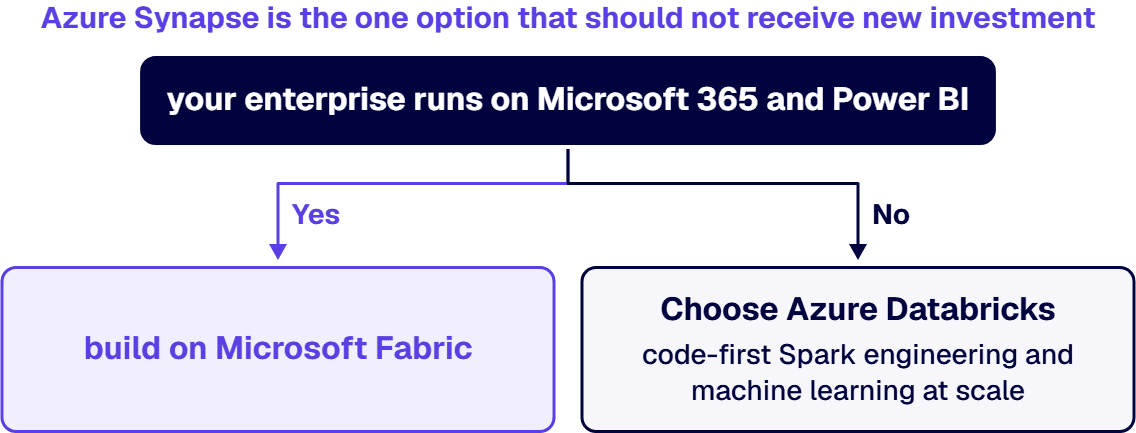
If your enterprise runs on Microsoft 365 and Power BI, build on Microsoft Fabric: one pooled capacity, from $262.80 per month for an F2 on pay-as-you-go rates to roughly $8,410 per month for an F64, covers ingestion, warehousing, Spark engineering, and BI in a single SaaS platform, and at F64 and above your report viewers no longer need paid per-user Power BI licenses. Choose Azure Databricks instead when your center of gravity is code-first Spark engineering and machine learning at scale, multi-cloud portability, or a data science team that already lives in notebooks; its Premium tier all-purpose compute lists at about $0.55 per DBU plus the underlying VM cost.
Azure Synapse is the one option that should not receive new investment. Microsoft has made Fabric the successor to the Synapse workloads, publishes migration guidance from Synapse to Fabric, and ships new capability in Fabric first. An existing Synapse estate can keep running while you plan, but a greenfield analytics platform started on Synapse in 2026 begins life needing a migration. The practical decision is therefore Fabric versus Databricks, and for many enterprises the honest answer is a deliberate combination of both: Databricks where the machine learning pipeline already lives, Fabric and Power BI where the reports get read. This page walks the costs, the fit conditions, and the integration mechanics we use when we scope this decision in Microsoft Fabric development engagements for regulated, Microsoft-centric organizations.
The sections below walk each factor in full; this table is the scannable summary of where the two platforms diverge, drawn from the same pricing pages and product behavior covered on the rest of this page.
The two platforms price on different units, which is why sticker comparisons mislead. Fabric sells provisioned capacity; Databricks meters consumption per second of compute.
Fabric is bought as an F-SKU capacity, a pool of Capacity Units (CUs) shared by every workload in the tenant that is assigned to it. On Microsoft’s published Fabric pricing for US regions, pay-as-you-go compute runs about $0.18 per CU per hour, and a capacity can be paused when idle. OneLake storage is billed separately at about $0.023 per GB per month.
Two mechanics matter more than the table. First, a one-year reservation cuts the compute price by roughly 41 percent, so a production capacity should almost always be reserved while dev and test capacities stay pay-as-you-go and pause overnight. Second, F64 is the license threshold: below it, everyone who views a Power BI report needs a Pro license at $14.00 per user per month on Microsoft’s Power BI pricing; at F64 and above, viewing is covered by the capacity itself. For an organization with thousands of report consumers, that threshold, not the compute price, usually decides the SKU.
Azure Databricks meters Databricks Units (DBUs) per second, at a rate that varies by workload, plus the cost of the underlying Azure VMs for classic compute. On Azure’s published Databricks pricing, Premium tier all-purpose compute lists at about $0.55 per DBU, automated jobs run materially cheaper, and serverless SQL lists at about $0.70 per DBU with the compute cost bundled in. The model rewards engineering discipline: well-tuned job clusters that spin up, run, and terminate are inexpensive, while an interactive cluster someone forgot overnight is the classic Databricks bill shock. Budgeting Databricks is a FinOps practice, not a line item.
Fabric fits when the consumption layer of your analytics estate is already Microsoft. If Power BI is the reporting standard, users authenticate with Entra ID, governance runs through Purview, and your engineers are stronger in SQL and low-code pipelines than in Spark, Fabric gives you the whole chain, ingestion with Data Factory pipelines, warehousing, Spark notebooks, real-time intelligence, and BI, on one capacity with one security model. Direct Lake mode lets Power BI query Delta tables in OneLake directly, without import refreshes and without a per-query compute bill from a separate warehouse vendor, a governance-and-cost combination that underpins business intelligence executives can trust.
It also fits organizations that cannot staff a platform team. Fabric is SaaS: there are no clusters to size, no VNets to design for each workspace, and capacity administration is a settings page, not an infrastructure project. That trade cuts both ways, the platform makes fewer things tunable, but for a lean IT organization the operational surface is a fraction of what a self-managed lakehouse demands. The typical entry pattern we see work is an F2 or F4 for a proof of concept, a reserved F16 for the first production workloads, and a move to F64 when the viewer population makes the license math flip, a progression we map out in our business intelligence and reporting engagements.
Databricks is the better platform when the hard problems are upstream of the dashboard. Large-scale machine learning with experiment tracking and model serving, streaming pipelines with strict latency budgets, petabyte-scale Spark transformation, and software-engineering-grade data pipelines with unit tests and CI/CD are what it was built for, and its notebook culture, MLflow tooling, and Unity Catalog governance are more mature for those workloads than Fabric’s equivalents. If your organization employs data engineers who think in Python and Scala and ships models to production, Databricks will not be the bottleneck.
It is also the answer when multi-cloud is a genuine requirement rather than a slide. Databricks runs the same platform on Azure, AWS, and Google Cloud, so a merger, a sovereignty constraint, or a strategic second-cloud policy does not strand the analytics estate. A Microsoft-centric enterprise should be honest about this condition: if everything else you run is Azure, paying the operational overhead of a portability you will never exercise is a real cost. But where the condition holds, Fabric cannot meet it and Databricks can.
Whichever platform carries the workload, forecasts depend on reconciled, governed data, which is what our predictive analytics and data fusion work covers.
Yes, and this is the architecture many enterprises actually land on. Both platforms standardize on the open Delta Lake table format over Parquet files, which means a table written by Databricks is natively readable by Fabric. Microsoft’s Fabric mirroring documentation describes the supported path: an Azure Databricks Unity Catalog can be mirrored into Fabric as metadata, with OneLake shortcuts referencing the data in place, no ETL and no duplication, so Databricks remains the engineering platform while Power BI reads the same tables through Direct Lake. The division of labor is clean: Databricks owns transformation and machine learning, Fabric owns the semantic model, governance of consumption, and every report a business user opens. Tools like dbt run against either engine, and the pipeline layer itself has options we compare in our data integration tooling analysis, so the transformation codebase does not have to take sides.
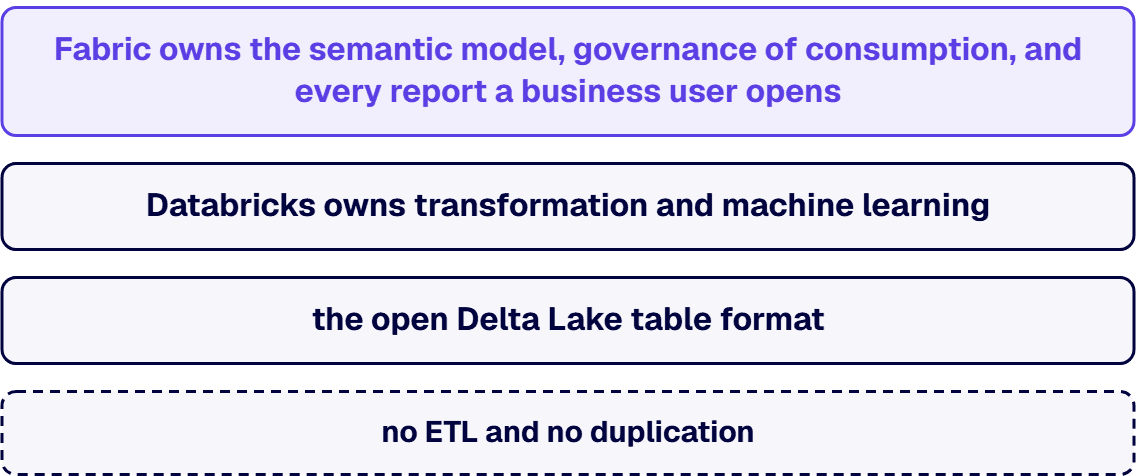
The combination has a cost discipline of its own, two platforms means two meters, and it needs a deliberate boundary so teams do not rebuild the same pipeline on both sides. That boundary decision is exactly the kind of question a structured technology stack evaluation should settle before either invoice starts running.
Keep serving production from Synapse while you plan, and put new work in Fabric. Dedicated SQL pools, Synapse Spark jobs, and pipelines continue to run, but the platform is no longer where Microsoft ships its analytics roadmap, and every new artifact you build on it adds to the eventual migration. The pragmatic sequence we recommend: stand up a Fabric capacity, point new reporting and new pipelines at OneLake, and migrate the existing Synapse estate workload by workload against Microsoft’s published guidance, warehouse first or Spark first depending on where your change risk is lower. Treat it as a planned replatform with a deadline you choose, rather than an emergency you inherit.
We treat it as a data estate decision, not a product preference. The scoping questions are the ones this page walks: where your engineering skills actually sit, what the viewer population does to license math, whether multi-cloud is a binding constraint or an aspiration, and what your regulatory environment requires of governance and auditability. i3solutions has completed 1,500+ Microsoft platform implementations. Data integration tool evaluation engagements at i3solutions typically range from $40,000 to $120,000 depending on the scope and complexity of the enterprise’s data estate. The deliverable is a defensible platform decision with the cost model, the integration boundary, and the migration sequence written down. If the shortlist pairs Fabric against a cloud warehouse rather than a Spark platform, our Fabric vs Snowflake comparison covers that decision. Organizations that already know the direction and need senior build capacity can hire Microsoft Fabric developers from us directly, and teams whose real problem is the analytics roadmap itself can start with our analytics and insights solutions practice. When the data platform is decided, see who leads analytics and reporting for regulated enterprises and how to judge that claim.
Functionally, yes. Synapse still runs and Microsoft still supports it, but Fabric is where the Synapse workloads, warehousing, Spark, pipelines, and real-time analytics, now evolve, and Microsoft publishes migration guidance from Synapse to Fabric. Existing Synapse estates should keep serving production while new investment goes to Fabric; a greenfield analytics platform should not be started on Synapse in 2026.
They price on different units. Fabric is provisioned capacity: an F2 is $262.80 per month pay-as-you-go and an F64 is roughly $8,410 per month, about 41 percent less on a one-year reservation, with OneLake storage at about $0.023 per GB per month. Azure Databricks meters consumption: about $0.55 per DBU for Premium all-purpose compute plus VM cost, billed per second. Fabric is easier to predict; Databricks can be cheaper for bursty, well-engineered jobs and more expensive for idle interactive clusters.
Yes. Both write the open Delta Lake format, and Fabric can mirror an Azure Databricks Unity Catalog as metadata, using OneLake shortcuts to reference the data in place with no ETL and no duplication. Databricks keeps doing the engineering and machine learning; Power BI reads the same tables through Direct Lake mode. This is the pattern most large enterprises settle into rather than a winner-take-all choice.
Below F64, yes: authors and viewers alike need Power BI Pro at $14.00 per user per month, or Premium Per User at $24.00. At F64 and above, report viewing is covered by the capacity, and only content creators still need a Pro license. That threshold is frequently the deciding line in enterprise cost models, because a few thousand viewers at $14.00 per month costs more than the F64 capacity that makes those licenses unnecessary. The same arithmetic, run against Tableau viewer pricing, is walked in our Power BI vs Tableau comparison.
When the workload is code-first and the team is engineering-led: large-scale machine learning with MLflow, streaming with tight latency budgets, petabyte Spark transformation, pipelines managed like software with tests and CI/CD, or a genuine multi-cloud mandate that a Microsoft-only platform cannot satisfy. In those conditions Databricks is the stronger platform, and the right architecture is usually Databricks for engineering with Fabric and Power BI as the consumption layer.
As a scoped data integration tool evaluation: we inventory the estate, model both cost structures against your actual workloads and viewer population, test the governance and compliance requirements that regulated organizations carry, and hand back a written platform decision with the integration boundary and migration sequence. The engagement typically runs $40,000 to $120,000 depending on estate complexity, and it exists so the platform bet is made on evidence rather than vendor slides.
Choose Microsoft Fabric when the enterprise already runs on Microsoft 365 and Power BI and the analytics work is SQL, low-code pipelines, and reporting: one provisioned capacity covers ingestion, warehousing, Spark, and BI in a single SaaS platform with no clusters to size. Choose Azure Databricks when the center of gravity is code-first Spark engineering, large-scale machine learning, tight latency budgets, or a genuine multi-cloud mandate. Most large enterprises settle on both, with Databricks doing the engineering and Fabric and Power BI reading the same Delta tables in place rather than a copy. New work should not start on Azure Synapse.
By Scot Johnson, Founder / CEO, i3solutions. Scot Johnson co-founded i3solutions 30 years ago with a focus on expert-led delivery, strategic advisory, and complex Microsoft-centered solutions for organizations where technology decisions carry operational, financial, and mission risk.
For an enterprise already standardized on Microsoft 365 and Azure, Power Automate is the default choice, and the burden of proof sits with the alternatives. The licensing math alone is hard to argue with: Microsoft’s published pricing runs $15 per user per month for attended automation and $150 per bot per month for unattended RPA, on identity, data loss prevention, and audit controls the estate already operates. UiPath earns its premium when the processes you are automating live mostly outside Microsoft: legacy ERPs, mainframe screens, Citrix sessions, document-heavy workflows needing industrial-grade orchestration. Blue Prism is justified in one situation: a regulated, high-volume unattended back office where its operating model is already embedded and the cost of moving exceeds the cost of staying.
That is the verdict in three sentences. The rest of this page shows the published numbers behind it, the honest case for each platform, and the governance question that actually decides the outcome in a regulated Microsoft estate.
Two of the three vendors publish list prices; one does not. That asymmetry is itself useful in a procurement conversation.
Confirm the Microsoft and UiPath figures on the vendors’ pricing pages before you build the business case; both adjust plans periodically. But the structural point survives any price refresh: for a Microsoft enterprise, Power Automate’s marginal cost is a line item, UiPath’s is a program budget, and Blue Prism’s is a negotiation. If you hold Microsoft 365 E3 or E5 licensing, a meaningful share of attended automation capability is already paid for. The comparison is never between three platforms at list price; it is between one platform you have partially bought and two you have not.
The case for Power Automate is not that it is cheaper, although it is. It is that in a Microsoft-centric enterprise the platform sits inside the security and identity perimeter you already govern. Flows authenticate through Entra ID, data movement is constrained by the tenant’s data loss prevention policies, and run history lands where your audit tooling already looks. Connectors to SharePoint, Teams, Outlook, Dynamics 365, and Dataverse are native, and the on-premises data gateway reaches back to SQL Server and SAP GUI sessions without a separate integration layer.
There is also a workforce argument that rarely makes the vendor comparison decks. Power Automate skills exist inside your business units today, because the attended tier ships with licenses your users already hold. That is a real advantage and a real risk at once: the accessibility that makes departmental automation fast also produces ungoverned sprawl when nobody owns the guardrails. We build for both sides of that trade in our Power Automate development services practice: production-grade automations engineered by senior developers, inside a governance structure that lets citizen-built flows exist without becoming an audit finding.
If your underlying question is the broader one, whether Power Automate genuinely counts as RPA at all, we answer that separately in our comparison of Power Automate and traditional RPA.
UiPath is the strongest pure-play RPA platform in the market, and pretending otherwise would make this page less useful to you. It earns its cost in recognizable situations. If your target processes are dominated by non-Microsoft systems, an Oracle ERP, mainframe green screens, thick-client applications in Citrix or VDI, UiPath’s computer-vision-driven UI automation is more mature there than Power Automate’s desktop flows. If your portfolio is document-heavy, its Document Understanding tooling for classification and extraction at volume is a genuine differentiator. And if you are orchestrating hundreds of unattended robots with complex queueing and retry logic, UiPath Orchestrator was built for exactly that job.
The honest test: mark which of your automation candidates touch a Microsoft surface. If most of the value sits outside the Microsoft estate, UiPath’s premium buys you something. If most sits inside, you are paying an enterprise platform price to reach systems your licensing already reaches.
Blue Prism built its reputation in regulated back offices, banking, insurance, healthcare administration, on a controlled, centralized operating model: no citizen developers, tightly managed release paths, audit trails designed for regulators. If you already run a Blue Prism estate at volume with an embedded delivery team, the switching cost is real and staying can be the defensible choice.
For a Microsoft enterprise making a fresh decision in 2026, the case is harder to make. The governance capabilities that once separated Blue Prism, role-based access, audit logging, controlled promotion between environments, now have direct equivalents in the Power Platform’s managed environments, DLP policy tiers, and pipeline-based ALM. Notably, Blue Prism’s own published comparison concedes Power Automate’s integration and cost advantages for Microsoft-centric organizations and rests its argument on governance. That argument deserves a serious answer, which brings us to the part of this decision vendor comparisons skip.
The pattern we see across regulated Microsoft estates: the platform decision gets weeks of evaluation, the governance design gets a paragraph. Eighteen months later, the audit does not ask which vendor you chose. It asks who can create automations that move regulated data, which environments they run in, how credentials are stored, what the promotion path to production is, and where the run history lives.
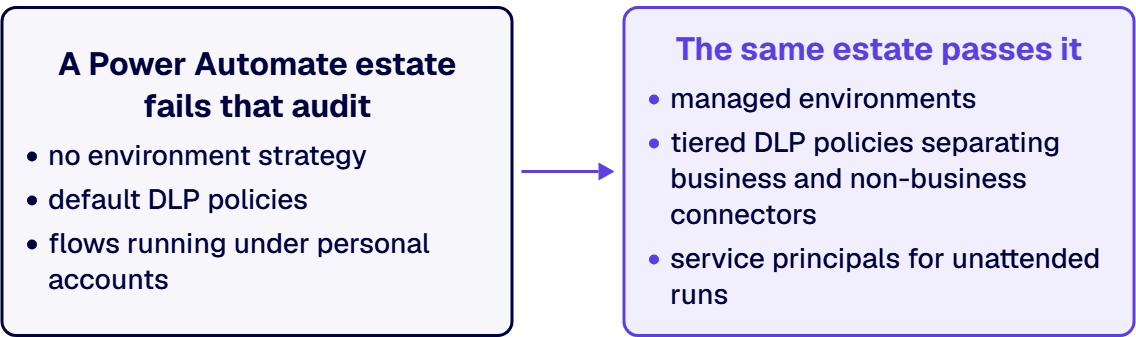
A Power Automate estate with no environment strategy, default DLP policies, and flows running under personal accounts fails that audit regardless of how good the platform is. The same estate with managed environments, tiered DLP policies separating business and non-business connectors, service principals for unattended runs, solution-based ALM with a real promotion pipeline, and Dataverse audit logging feeding your compliance tooling passes it, on licensing you largely already own. That configuration work is the true price of choosing Power Automate in a regulated industry, and it is a fraction of a multi-year Blue Prism commitment. It is the core of what our Power Platform development services team builds for enterprises in aerospace and defense manufacturing, financial services, and healthcare: environments where the automation platform has to survive an audit, not just a demo.
That is the fair reading of the whole comparison: Blue Prism sells governance as a product. In a Microsoft estate, governance is a discipline you configure into a platform you already license. Fund the discipline and you get Blue Prism-grade control at Power Automate prices. Skip it and you get sprawl, then a remediation project.
Designing, engineering and integrating the workflows themselves on Microsoft platforms is the scope of enterprise workflow automation services.
Both, by design. Cloud flows are API-based workflow automation. Desktop flows on the Process plan are genuine unattended RPA: screen-level automation of applications with no API, on your machines or Microsoft-hosted VMs, managed through the Power Platform admin center. The workflow label understates the unattended tier.
Yes, when the estate is configured for it. Managed environments, DLP policy tiers, service principal identity for unattended runs, solution-based ALM, and Dataverse audit logging are the load-bearing controls. The platform provides them; they are not on by default. Budget the governance work as part of the platform decision.
Microsoft’s published price is $150 per bot per month on the Process plan, or $215 for Hosted Process if Microsoft provides the virtual machine. Each plan covers one concurrent unattended run, so five simultaneous bots is five Process licenses. Attended automation is $15 per user per month on Premium.
When a defined slice of the portfolio genuinely needs UiPath’s strengths, typically Citrix or VDI automation, mainframe surfaces, or high-volume document extraction, and the rest is Microsoft-facing. Coexistence works when the boundary is written down: which platform owns which surfaces, one intake process, one governance standard spanning both. It fails when it is two shadow programs discovering each other at budget time.
Michael Branson, Founder and COO, i3solutions. LinkedIn
Ungoverned citizen development costs you control: regulated data lands in unreviewed apps, critical processes depend on one maker who has since left, and nothing passes a security review. A governed Power Platform contains that exposure with managed environments, DLP policies, and a center of excellence. i3solutions has run this at a federal defense agency supporting roughly 10,000 personnel.
If your organization has the Power Platform, you already have makers, whether you have decided to or not. People build apps and flows because the tools are in their Microsoft 365 license and the work in front of them is painful. The question is not whether citizen development happens; it is whether it happens with guardrails or in the dark. That reframes the comparison, because the honest alternatives are not freedom versus control, they are ungoverned shadow IT versus governed enablement.
Shadow IT carries specific, nameable risks, not vague ones.
Regulated data in unreviewed apps. A maker builds a useful app and, without meaning to, puts controlled data in a place that was never security-reviewed and may not meet your compliance obligations. In an aerospace, financial services, or healthcare environment, that is not a hypothetical, it is a finding waiting to happen, because the data went somewhere no control was applied.
No security or lifecycle review. Shadow apps are not patched, not access-reviewed, and not documented. Permissions drift, secrets get hardcoded, and nobody is accountable for the app’s security posture because officially the app does not exist.
Key-person fragility. The most dangerous shadow app is the one a department now depends on that was built by someone who has left. No documentation, no owner, no way to change it safely, and a business process quietly resting on it.
The wrong response to those risks is to lock everything down, because that just pushes the same work back into spreadsheets and email, or into a backlog IT will never clear, and you lose the productivity that justified the platform. Over-governance fails quietly: it looks like safety and it is actually just shadow IT in a different tool.
Governed enablement is the answer, and it is concrete. Managed environments separate where people can experiment from where production apps live. Data-loss-prevention policies stop the specific bad outcome, regulated data leaving into unsanctioned connectors, without blocking legitimate building. A center of excellence provides templates, standards, and a path to promote a good maker app into a supported one. The point of all of this is not to stop people building; it is to let them build without creating the risks above. Governance, done right, is what makes citizen development safe enough to encourage rather than something to fear.
A federal defense program coordinating 41 subcontracting agencies replaced weeks of manual consolidation with real-time automated compliance and audit reporting, the level of control an ungoverned shadow-IT sprawl cannot match.
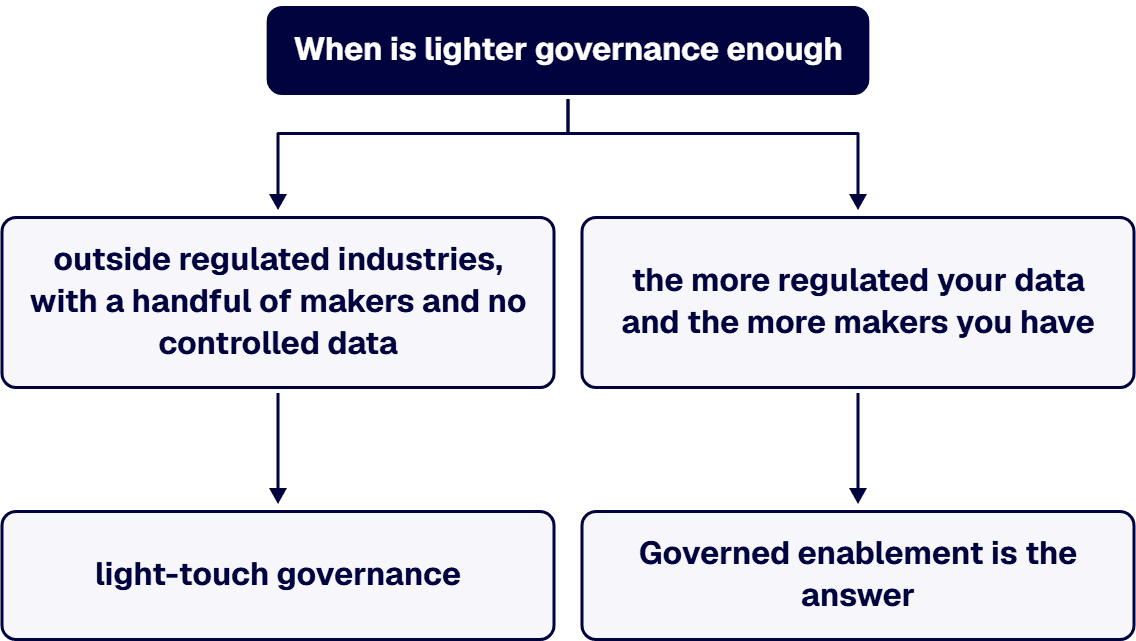
When is lighter governance enough. A small organization, outside regulated industries, with a handful of makers and no controlled data, can run with light-touch governance and not pay for a full center of excellence. The calculus changes with regulation and scale: the more regulated your data and the more makers you have, the more the governance investment pays for itself by preventing the findings and the fragility that ungoverned sprawl guarantees.
What governed scale looks like is the proof that this is not theoretical. For a federal defense agency, i3solutions ran a governed Power Platform supporting roughly 10,000 personnel across about 180 locations, which is citizen development operating at serious scale precisely because it is governed, not despite it. For a state National Guard, the same approach moved dead-end InfoPath forms onto governed Power Apps and Power Automate, turning shadow-prone form-building into a supported, owned capability. In both cases the platform delivered because governance turned maker energy into a managed asset instead of an unmanaged liability. Once that data is governed and trustworthy, it also becomes a foundation for data fusion predictive analytics services that turn managed platform data into decision-ready insight.
If you suspect you have shadow IT on the Power Platform, you almost certainly do, and the useful first step is to see where it is and what data it touches. Standing up the governance model, and building governed applications inside it, is the core of the Power Platform development services i3solutions delivers.
Yes. Working shadow apps still carry regulated data into unreviewed places, are not security-reviewed or patched, and create key-person fragility when the builder leaves. The risk is in the lack of oversight, not in whether the app runs.
No. Heavy lockdown pushes the same work back into spreadsheets and email or into an IT backlog, and wastes the platform you are paying for. It is shadow IT in a different tool.
Managed environments that separate experimentation from production, data-loss-prevention policies that stop regulated data leaving through unsanctioned connectors, and a center of excellence that provides standards and a path to promote good maker apps into supported ones.
For a small, non-regulated organization with few makers and no controlled data. The need for fuller governance rises with regulation and the number of makers.
Yes. i3solutions runs a governed Power Platform for a federal defense agency supporting roughly 10,000 personnel across about 180 locations, which works because it is governed, not despite it.

US-Based Microsoft System Integrator | Est. 1997
© i3solutions. All rights reserved.
US-Based Microsoft System Integrator | Est. 1997
© i3solutions. All rights reserved.


