
Power Platform decisions come up faster than roadmaps account for, usually once a citizen-developer app has outgrown its original scope or an executive asks why governance didn’t catch what shipped. These answers address the specific calls IT Directors and Power Platform owners face, from licensing and environments to where custom development has to take over.
Workato is the broader multi-vendor integration platform and Power Automate is the deeper Microsoft-native one, but in a regulated Microsoft estate the decision usually turns on two published facts rather than a feature list: Power Automate is deployable in the US government clouds under FedRAMP High and DISA provisional authorities to operate, and Workato publishes no list pricing at all. Both platforms scale. They scale on different meters, and only one of them will tell you what the meter costs before you are inside a sales cycle.
Workato’s own documentation and product navigation describe a broad enterprise automation platform: iPaaS and embedded iPaaS, API management, data orchestration, a data hub and master data management, B2B and EDI, low-code apps, intelligent document processing, and robotic process automation. Its unit of work is the recipe, which Workato defines as “an automated workflow that executes a series of steps to integrate and process data across multiple applications,” in five documented types: workflow, API, data pipeline, app event, and knowledge base recipes. Its concept documentation defines the execution unit just as plainly: “A job represents the flow of a trigger event through the recipe.”
Power Automate’s unit of work is the flow. Cloud flows run over standard, premium, and custom connectors; desktop flows automate applications that have no usable API by driving the interface directly. It is not a standalone integration product, and treating it as one is the most common analysis error. It is one surface of the Power Platform, sharing Microsoft Dataverse, managed environments, data loss prevention policies, and the Power Platform admin center with Power Apps and Microsoft Copilot Studio.
So the honest comparison is not feature parity. If the integration estate’s center of gravity is dozens of non-Microsoft SaaS systems with no Microsoft anchor, Workato is purpose-built for that shape of problem. If the center of gravity is Microsoft 365, Dataverse, Dynamics 365, and SharePoint with a perimeter of other systems around it, Power Automate is already inside the tenant, the identity model, and the governance boundary you have to defend anyway. Adding a second orchestration platform there is a governance decision before it is a technology one, the same test we apply when the question is custom development versus system integration.
The two vendors publish connector reach differently, and the asymmetry is worth knowing before someone hands you a comparison chart. Workato states a total: its documentation says Workato “provides over 1,000 connectors in three categories,” and it separately documents universal connectors for HTTP, OpenAPI, GraphQL, and SOAP services plus an SDK for creating “customized connectors” against “applications not directly supported by Workato’s pre-built connectors.” Microsoft publishes no total at all. Its connector reference is an alphabetical index filterable by tier, by product, and by publisher, with no count stated on it. A side-by-side chart carrying a precise connector number for both platforms therefore got the Microsoft number from somewhere other than Microsoft. The count that decides your evaluation is narrower and checkable either way: your systems, named, looked up on both reference lists, with the gaps marked for a custom connector or SDK build.
Hybrid connectivity is documented on both sides, and the difference is architectural rather than functional. Microsoft’s license comparison table lists on-premises gateways as included in Premium, Process, and Hosted Process alike, so gateway access to on-premises SQL Server or file shares is not a paid upgrade. Workato’s on-prem agent, in its own documentation, “runs within the user’s server, typically behind a firewall, and establishes a TLS WebSocket tunnel to connect out to Workato,” and “only makes outbound connections to Workato. It doesn’t require you to open any inbound ports in your firewall.” It reaches Workato’s gateways over TCP port 443 with mutual TLS, groups for high availability and load balancing, and needs at least 8 GB of RAM and 768 MB of disk per agent. Both designs pass a competent security review. They do not produce the same review, because one tunnel terminates inside your Microsoft tenant boundary and the other terminates in a third-party cloud.
Both platforms answer the no-API problem. The difference is who owns the bot. Power Automate carries robotic process automation inside the same license family as its cloud flows: the Premium user license bears one attended bot, a Process license allocated to a machine becomes one unattended bot, and a Hosted Process license carries one hosted bot on Microsoft-managed infrastructure. Workato documents RPA as a partnership. In its own words, “RPA by Workato is a complete RPA solution in partnership with Robotiq.ai, an industry-agnostic, enterprise-ready RPA client,” reached through a connector and aimed at “applications that don’t have APIs, including legacy systems such as older SAP platforms, desktop applications, and browser apps without API support.” Functionally that covers similar ground. Contractually it does not: one is a bot entitlement inside a license you already hold, the other introduces a third-party RPA client into the data path with its own vendor, its own agreement, and its own security review. If desktop automation is the main event rather than a side condition, the comparison you want is not this one; it is Power Automate against the dedicated RPA platforms.
Power Automate meters Power Platform requests, and Microsoft publishes the numbers. The official limits are 40,000 requests per user per 24 hours on Power Automate Premium, and 250,000 requests per license per 24 hours for a Power Automate Process license allocated to a cloud flow, with Hosted Process the same. Up to 10 Process licenses stack on a single cloud flow, each adding 250,000 actions per day, and the flow must live in a solution. Alternatively, one Process license on a flow group shares 250,000 actions per day across up to 25 cloud flows. Above all of that sits a five-minute ceiling of 100,000 requests that is independent of license. Desktop flow executions do not consume Power Platform requests at all.
Two footnotes matter for planning. Every organization is currently in a documented transition period with higher enforced limits, 200,000 per cloud flow for Premium and 500,000 per license for Process, and Microsoft’s instruction is to “Build your cloud flows based on official limits.” The admin center’s Power Platform request reports also give measured daily action counts per flow, so year-two capacity is an observation rather than an estimate. Which license carries that capacity is a separate decision, covered on our Power Automate Premium vs Process page.
Workato’s published meter is a unit without a rate. Its usage documentation counts tasks: the billable tasks view “visualizes the number of tasks consumed by recipes and API proxy requests across all environments, excluding high-volume recipes (HVRs),” and a high-volume recipe is defined precisely, as one that “consumes more than four million tasks in a billing cycle and resets in the following cycle.” Workato also documents that “All successfully executed operations contribute to overall usage and failed operations are excluded.” Those are real published mechanics, and they are the closest thing to a published number on the Workato side. What is not published is the rate. Its pricing page names no plans and shows no dollar figures, only “Pricing designed to support organizations of all sizes and needs” and a route to sales. That has a hard consequence: a like-for-like cost-per-volume model between these two platforms cannot be built from published sources. It is not a defect in the product, it is a procurement fact, and it belongs in the risk column of a decision that has to survive a budget review, because the Microsoft side of the model is checkable by anyone in the room and the Workato side is a quote.
For isolation at volume, Workato documents Virtual Private Workato, in which “Each organization gets a dedicated Workato environment hosted in its own AWS Virtual Private Cloud (VPC), ensuring complete isolation from other customers,” positioned for “highly regulated industries like financial services, insurance, and healthcare.” If your control environment requires dedicated infrastructure, that is the edition to price, not the commercial cloud.
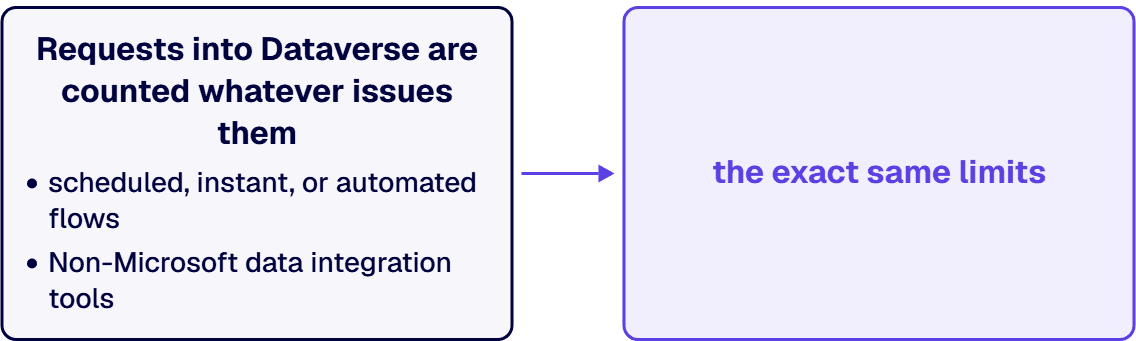
The most expensive misconception in this comparison is that moving orchestration to a third-party platform escapes Microsoft’s request limits. Microsoft answers this directly in its own licensing documentation, under the question of whether to use a non-Microsoft data integration tool to avoid hitting limits: “No. Non-Microsoft data integration tools are subject to the exact same limits as scheduled, instant, or automated flows.” Requests into Dataverse are counted whatever issues them. A recipe writing to Dataverse consumes tenant capacity the same way a flow does, which means an iPaaS purchase justified as throttling relief is a business case built on a premise Microsoft has published a contradiction to.
For public sector and defense supply chain buyers this is usually the whole decision, so it is worth stating from the primary sources rather than from reputation. Microsoft documents that the Power Automate GCC environment “is compliant with the Federal requirements for cloud services, including FedRAMP High, and DoD DISA IL2,” and is also compliant with criminal justice information requirements; that GCC High is designed to meet DISA SRG IL4 with “A Provisional Authority to Operate has been granted by DISA,” operated so that defense contractors can meet ITAR commitments and DFARS acquisition regulations; and that the DoD environment is built to DISA SRG IL5 with its own provisional authority. Customer content is stored in the United States and administrator access is restricted to screened US citizens.
Workato’s own security compliance documentation lists PCI DSS v4.0.1 Level 1, ISO 27001, ISO 27701, ISO 42001, SOC 1 Type II, SOC 2 Type II, SOC 3, HIPAA, IRAP, and NIST 800-171A Revision 2. That list covers the control families most commercial regulated buyers ask for, and the NIST 800-171A attestation is directly relevant to contractors handling controlled unclassified information. FedRAMP does not appear on that list. If your contract requires a FedRAMP-authorized service, confirm current status with Workato and in the FedRAMP Marketplace before the platform reaches a shortlist, because an unauthorized service in the data path is a finding, not a preference.
Both platforms give you environment separation and a deployment path, and both are commonly run without either. Workato documents Development, Test, and Production environments, with deployment privileges required in both source and target and platform APIs available “to integrate Workato into any existing CI/CD process.” Power Automate has solutions, managed environments, and pipelines. The failure mode is identical on both sides: production automations built directly in production, owned by an individual rather than the organization, with no inventory anyone can produce for an auditor.
That is the part worth spending on, and it is what a governance framework build and an ALM implementation actually deliver. i3solutions has implemented governance frameworks for organizations managing 200+ integrations across Microsoft ecosystems. i3solutions delivery includes ALM practices with Power Platform pipelines or Azure DevOps integration, environment separation strategies, and change control processes. i3solutions runs migrations against named control families across CMMC, HIPAA, SOC 2, and NIST 800-171, producing artifacts auditors can review. That governance and ALM work is delivered through our Power Platform development services.
For teams building automation with their own staff, senior workflow automation specialists embed alongside the people who own the processes and take on process design, low-code and pro-code workflow engineering and Azure-based orchestration within the existing backlog.
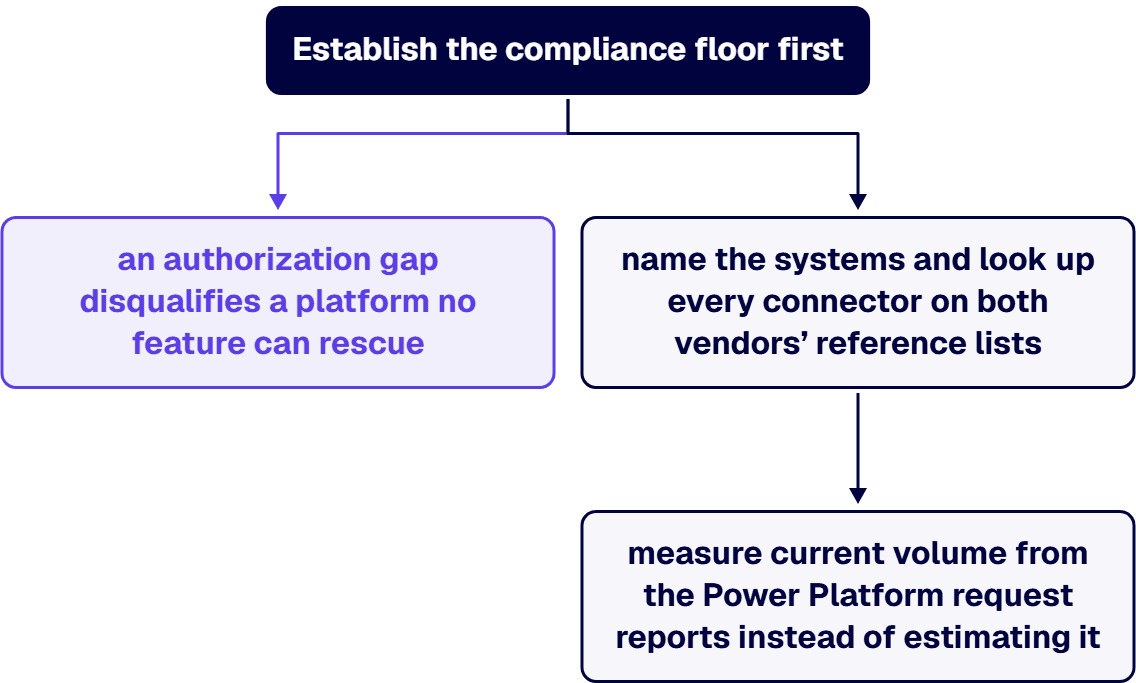
Establish the compliance floor first, because an authorization gap disqualifies a platform no feature can rescue. Then name the systems and look up every connector on both vendors’ reference lists. Then measure current volume from the Power Platform request reports instead of estimating it. Price only what is published, and mark the Workato line as a quote to be obtained rather than a number you already have. i3solutions has been a Microsoft Partner with 30 years of enterprise technology delivery experience and has delivered 1,500+ Microsoft engagements across aerospace and defense, financial services, and health sciences. The pattern that repeats is that the platform choice is rarely the expensive mistake. Running two orchestration platforms with one governance model, or none, is.
Data integration tool evaluation engagements at i3solutions typically range from $40,000 to $120,000 depending on the scope and complexity of the enterprise’s data estate. The output is a connector-level fit assessment, measured volumes against published limits, a compliance mapping for the frameworks in your contracts, and a recommendation you can defend in a budget review. That last artifact is the point: something a procurement review or an architecture committee can read without taking either vendor’s word for anything. i3solutions routes a senior U.S.-based engineer to a client call usually within one to two weeks, which is normally the fastest way to find out whether this decision is as close as it looks. If you want the decision package built and then delivered, that is the work our Power Automate development services team does, and the next step is a conversation about your connector inventory and your compliance floor.
For a Microsoft-centric estate, yes, and the qualifier is the whole answer. Power Automate covers standard, premium, and custom connectors, on-premises data gateway access included with Premium, Process, and Hosted Process alike, and first-party robotic process automation for systems with no API. Where it is not the equivalent product is a large orchestration estate between third-party systems that never touches Microsoft, which is what a dedicated iPaaS is built for.
Microsoft publishes list prices: Power Automate Premium at $15.00 per user per month, Process at $150.00 per bot per month, and Hosted Process at $215.00 per bot per month, paid yearly. Workato publishes no prices. Its pricing page carries no plan names and no figures. Its documentation describes the meter in tasks consumed by recipes and API proxy requests across all environments, with any recipe above four million tasks in a billing cycle treated as a high-volume recipe. That is a unit without a rate. Any side-by-side cost table you have been shown with Workato dollar figures in it did not get them from Workato.
No, and Microsoft says so in its own documentation: non-Microsoft data integration tools are subject to the exact same limits as scheduled, instant, or automated flows. Requests into Dataverse count against tenant capacity regardless of what issues them. If throttling is the problem, the documented remedies are Process capacity on the affected flows, stacking up to 10 Process licenses on a single flow, request capacity add-ons, or pay-as-you-go.
Power Automate has a documented US Government path: GCC compliant with FedRAMP High and DoD DISA IL2, GCC High designed to DISA SRG IL4 with a DISA provisional authority to operate and operated to support ITAR and DFARS obligations, and a DoD environment built to IL5. Workato’s published compliance list covers SOC 1, 2, and 3, ISO 27001, ISO 27701, ISO 42001, PCI DSS Level 1, HIPAA, IRAP, and NIST 800-171A Revision 2, and does not name FedRAMP. Verify current status with the vendor and in the FedRAMP Marketplace before shortlisting.
Microsoft publishes hard throughput numbers, listed in the table above, including a 100,000 request ceiling per five minutes that applies regardless of license. Workato publishes billing thresholds rather than throughput ceilings. Its documented four-million-task figure marks where a recipe becomes a high-volume recipe for billing purposes, not where the platform stops accepting work. So Microsoft’s ceiling is something you can design against before you build, and Workato’s is something you have to get in writing from the vendor before you commit.
You can, if one team owns the boundary between them and every automation on both sides lives in a versioned environment with a named organizational owner. The problem is never the second platform. It is the second unmanaged inventory: two sets of credentials, two audit trails, two answers to who owns a broken production process. Decide before purchase which platform is authoritative for which class of integration, and write it down.
By Michael Branson, Founder and COO, i3solutions
Power Automate Premium licenses a person: $15.00 per user per month, paid yearly, covering cloud flows with premium connectors, attended desktop automation, and process mining. Power Automate Process licenses the automation itself: $150.00 per bot per month for 250,000 actions per day, unattended RPA, and no dependency on who owns or triggers the flow. Most enterprises need a deliberate mix, not a choice.
Premium and Process are not a small plan and a big plan. They are two different licensing models. Premium is a user license: it is assigned to a named person and entitles that person to build and run automations. Process is a capacity license: it is allocated to a specific automation, a cloud flow or a machine, and gives that automation its own entitlements regardless of which humans touch it.
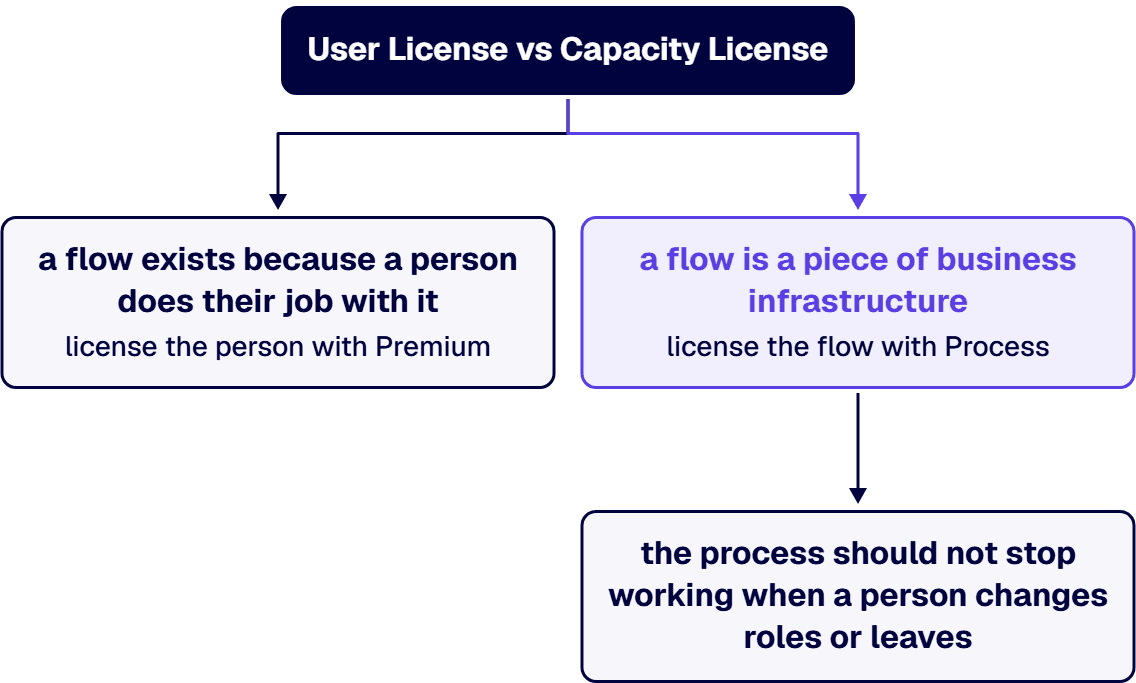
That one distinction settles most of the comparison. If a flow exists because a person does their job with it, license the person with Premium. If a flow is a piece of business infrastructure, an invoice intake process, a nightly reconciliation, an unattended bot working a queue, license the flow with Process, because the process should not stop working when a person changes roles or leaves. Everything else, price, action limits, RPA modes, follows from that split.
The Premium license gives a named user the full authoring and execution surface: unlimited cloud flows using standard, premium, and custom connectors, desktop flows in attended mode through one attended bot on the user’s registered workstation, full access to process and task mining with 50 MB of process mining data storage per license (up to 100 GB per tenant), 5,000 AI Builder credits per month, and Dataverse capacity of 250 MB database plus 2 GB file per license. This 5,000-credit allowance applies through October 31, 2026: Microsoft’s AI Builder licensing overview states that a Power Automate license bought or renewed from November 1, 2026 no longer receives seeded AI Builder credits, while credits already seeded on a license before that date continue through the end of that license’s contract term. Each Premium user carries a daily action limit of 40,000 actions.
Premium is the license Microsoft recommends for every maker, and for good reason: machine registration for desktop automation is performed by Premium users, several RPA management pages in the portal are visible only to Premium users, and attended automation exists only under a user license. A tenant with zero Premium licenses cannot operate an RPA estate at all.
The Process license attaches to an automation. Allocated to a cloud flow, it raises that flow’s entitlement to 250,000 actions per day and lets the flow use premium and custom connectors no matter what license the owning or triggering users hold. Allocated to a machine, it becomes an unattended bot that runs one desktop flow at a time. Each license includes 5,000 AI Builder credits per month and Dataverse capacity of 50 MB database plus 200 MB file. This 5,000-credit allowance applies through October 31, 2026: Microsoft’s AI Builder licensing overview states that a Power Automate license bought or renewed from November 1, 2026 no longer receives seeded AI Builder credits, while credits already seeded on a license before that date continue through the end of that license’s contract term. Process mining is not included.
Two scaling mechanics matter at enterprise volume. First, stacking: up to 10 Process licenses can be stacked on a single cloud flow, each adding 250,000 actions per day. Second, flow groups: one Process license assigned to a flow group shares its 250,000 daily actions across up to 25 cloud flows, with child flows added to the group explicitly. Stacking is not available on flow groups, so high-volume single flows and broad portfolios of small flows are provisioned differently.
For completeness: Hosted Process at $215.00 per bot per month adds a Microsoft hosted virtual machine, which removes the physical machine management from unattended RPA, and the Process Mining add-on runs $5,000.00 per tenant per month with 100 GB of data storage, available only with the Premium plan.
These are the findings we see when an enterprise licensing review meets a real tenant, and every one of them is in Microsoft’s own licensing documentation.
Unattended still needs a Premium human. The Process license bears the unattended bot, but the machine it runs on must be registered by a Power Automate Premium user. Budgeting Process licenses for an unattended estate with no Premium seats in the plan is a provisioning dead end.
The desktop flow connection user needs Premium too. When a Process-licensed cloud flow triggers a desktop flow, the user whose connection runs that desktop flow must hold a Premium license or another license with desktop flow entitlement. The Process license covers the flow, not the human connection behind the RPA step.
No solution, no Process license. A Process license can only be assigned to a flow that lives in a solution. Tenants with years of non-solution flows have a migration chore before the capacity model helps them, and that chore belongs in the plan, not in the discovery phase after purchase.
Stacking and flow groups are not interchangeable. Stacking raises one flow’s ceiling; a flow group spreads one license across up to 25 flows. Estimate demand as actions per run times runs per day, per flow, before choosing, and use the Power Platform admin center’s request reports to check each flow’s actual daily action count against the estimate.
In a regulated environment, the strongest argument for Process licensing is not connectors or action limits. It is that a production process should not be licensed through an employee. When a flow’s owner leaves and their user license is reclaimed, a personally licensed flow is exposed; a Process-licensed flow in a solution keeps its own entitlement. License hygiene is part of the audit surface: an assessor tracing a payment approval flow to a departed employee’s personal license is recording a finding, not asking a clarifying question.
The same logic applies to co-ownership. A flow that several people maintain under one person’s Premium entitlement works until the wrong person is on leave. Moving flows that the business depends on into solutions with Process capacity converts a people dependency into an infrastructure line item at a known price.
When a payment approval flow the business depends on starts failing quietly and nobody can say whose job it is to fix it, the flow has no owner, and whether to name one internally or add senior developers for Power Automate to take it over is a governance decision as much as a staffing one.
Start from the flow inventory, not the price list. Classify every production flow by owner type (person or process), RPA mode (none, attended, unattended), connector tier, and measured or estimated daily actions. Premium seats go to makers and to whoever operates the RPA estate. Process licenses go to business-critical flows, unattended machines, and anything whose action volume or co-owner list makes user licensing fragile. The break-even arithmetic is straightforward: one Process license costs the same as ten Premium seats per month, so a flow shared by a handful of licensed makers rarely justifies it, while a flow with dozens of unlicensed beneficiaries or any unattended bot almost always does.
If the question you actually came with is what Premium costs at your headcount, we keep that math current on our Power Automate Premium cost page. And if the licensing review keeps expanding, that is usually a sign the estate needs an owner, which is a role our Power Automate licensing consultants take on directly.
Bring in a partner when the licensing decision is entangled with governance debt: non-solution flows, orphaned owners, premium connectors adopted ad hoc, and no measured action volumes to size against. That debt is rarely confined to Power Automate, which is why our Power Platform development services set the environment and Center of Excellence model a licensing plan has to live inside. i3solutions has completed more than 1,500 Microsoft platform implementations. i3solutions Power Automate developers follow a three-phase delivery model designed to minimize risk while building internal capability. By year-end, i3solutions client teams typically manage 15 to 25 production flows independently while maintaining the architectural patterns i3solutions established.
Enterprise workflow automation consulting engagements typically range from $75,000 to $350,000 for Phase 1 assessment and pilot delivery, depending on process complexity, integration surface area, and compliance framework requirements. The licensing model falls out of that assessment as a byproduct: a flow inventory with owner classes, action volumes, and the Premium and Process mix priced against Microsoft’s list rates, in a form you can defend in a budget review. If that is the artifact you need, start with our Power Automate development services team.
No. Unattended RPA requires a Process license allocated to the machine, which provides one unattended bot. Premium covers attended mode only. Note the dependency runs both ways: the machine hosting the unattended bot must be registered by a Premium user, so an unattended estate needs both license types.
Not when the flow carries a Process license. A Process license assigned to a cloud flow allows premium and custom connectors regardless of the owning or triggering user’s license, which is exactly what it is for: business processes maintained by a team rather than owned by one licensed person. The flow must be in a solution for the license to attach.
Yes, up to 10 Process licenses on one cloud flow, each adding 250,000 actions per day. The alternative for many smaller flows is a flow group: one Process license shares 250,000 daily actions across up to 25 cloud flows, with child flows added explicitly. Stacking is not available on flow groups.
Hosted Process, at $215.00 per bot per month, includes a Microsoft hosted virtual machine, so unattended automation runs with no physical machine to build or manage. Process, at $150.00 per bot per month, brings your own machine. Hosted Process is a superset of Process entitlements.
A flow licensed through its owner’s Premium seat loses its premium entitlements when that seat is reclaimed. A flow in a solution with a Process license keeps its own entitlement independent of any person. For production processes in a regulated environment, that independence is the point: the license, like the process, should belong to the organization.
Estimate actions per run times runs per day, then compare against 250,000 actions per license per day and stack accordingly. After go-live, use the Power Platform request reports in the admin center to see each flow’s actual daily action count and correct the estimate with measured data.
By Michael Branson, Founder and COO, i3solutions
Yes, in one specific pattern: move external and occasional users out of the ERP entirely. A Power Pages portal running against Dataverse replaces both the ERP licenses those users would consume and the custom ERP modules you would otherwise build for them. Core transaction processing stays in the ERP, and any claim of savings there should be treated separately.
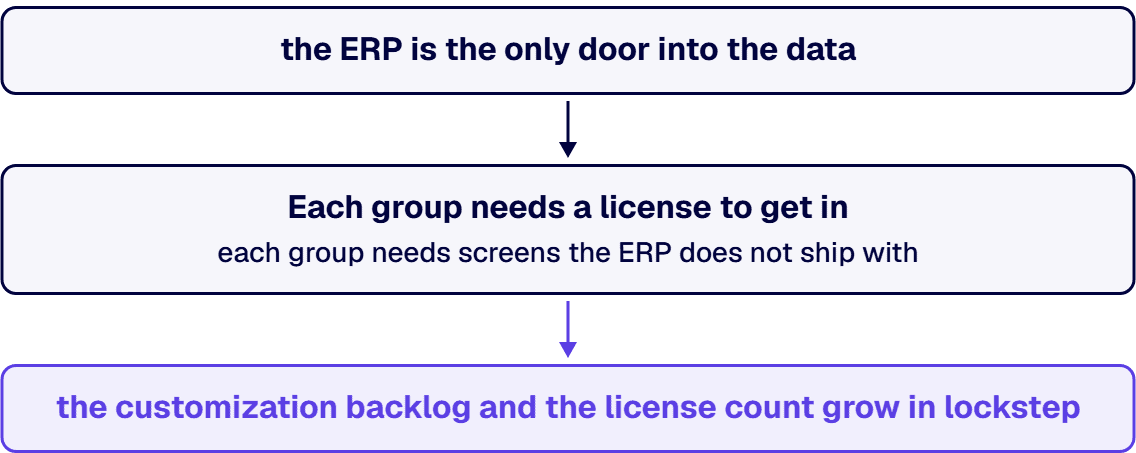
ERP customization spend and ERP licensing spend look like separate line items, but in most estates they have a single root cause: the ERP is the only door into the data, so every population that needs to touch a record gets pushed inside the system. Vendors confirming purchase orders, field crews logging service activity, applicants checking a status, auditors pulling evidence, occasional approvers who sign off twice a quarter. Each group needs a license to get in, and each group needs screens the ERP does not ship with, so the customization backlog and the license count grow in lockstep.
That is why the question is asked the way buyers ask it. You are not choosing between a customization initiative and a licensing initiative. You are asking whether one architectural move can take pressure off both. It can, if the move is to stop treating external and occasional users as ERP users at all.
Customizing the ERP core is the most expensive way to build a screen that exists. Core modifications are written against the vendor’s extension model, tested against the vendor’s release cadence, and re-validated at every upgrade. In a regulated environment each modification also carries its own validation and audit burden. The practical consequence is familiar to anyone running a mature ERP: a backlog of portal-shaped requests, self-service lookups, status views, simple submissions, that wait behind finance-critical work because everything competes for the same ERP development capacity.
A Power Pages portal moves that class of work out of the ERP core and into a portal layer. The screens are built in Power Pages against Dataverse tables, integration to the ERP happens through controlled interfaces, and the ERP itself stays closer to standard. The savings are not hypothetical efficiency gains; they are the difference between an ERP core modification with upgrade and validation drag, and a portal page that can change without touching the system of record. The requests that clog an ERP backlog are usually exactly the requests a portal absorbs.
Two boundaries keep that honest. First, the portal layer does not eliminate integration work: data still has to move between Dataverse and the ERP under proper controls, and that interface is real engineering. Second, if a process genuinely belongs in the ERP core, posting logic, costing, MRP behavior, a portal does not remove the need to build it there. The savings come from the work that never belonged in the core to begin with.
ERP vendors license people who log in. The license models differ by vendor and tier, and the specific numbers belong in your own agreement, so we will keep them qualitative here: a full ERP user license for someone who touches the system a few times a month is one of the most expensive per-use seats in enterprise software.
Power Pages prices the other way around: it licenses website capacity, not named ERP seats. On Microsoft’s published pricing, an authenticated-user capacity pack lists at $200.00 per website per month for 100 users per site per month, paid yearly, and an anonymous-user pack lists at $75.00 per website per month for 500 users per site per month, paid yearly. The arithmetic that matters is the shape, not just the totals: portal capacity is bought in pools sized to actual monthly activity, so occasional users cost a fraction of a dedicated seat, and users who only read public content can ride anonymous capacity.
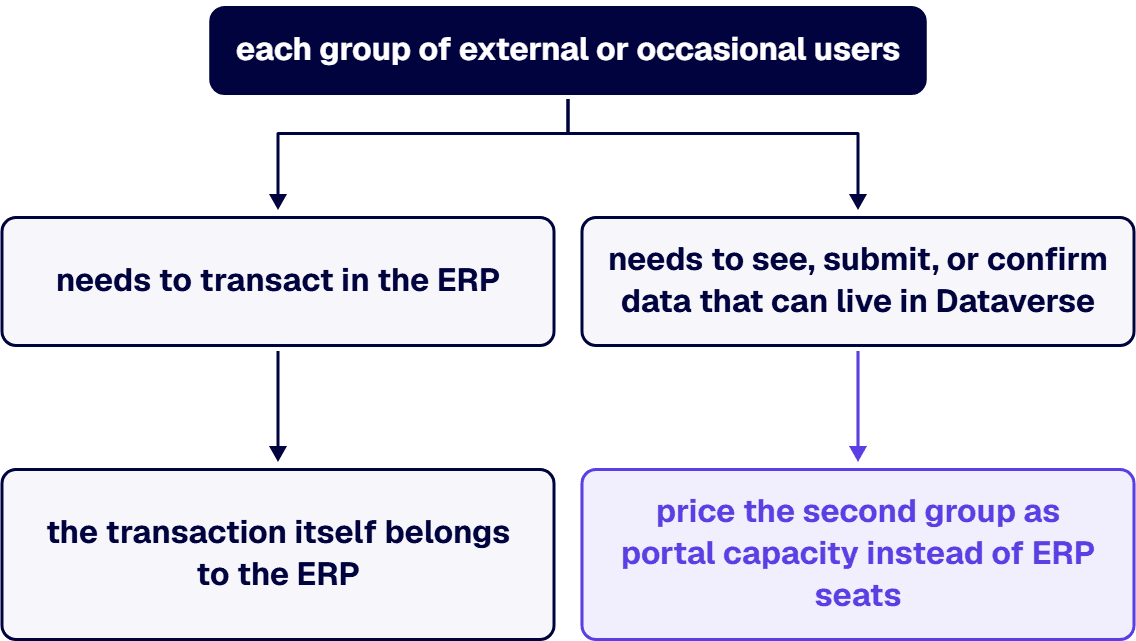
Run the comparison on your own numbers, per population: take each group of external or occasional users currently holding ERP licenses (or on the request list for them), count who actually needs to transact in the ERP versus who needs to see, submit, or confirm data that can live in Dataverse, and price the second group as portal capacity instead of ERP seats. In our experience the second group is usually larger than the ERP license register admits, because license sprawl accumulates one reasonable-sounding exception at a time.
Treat any pitch that positions a portal as ERP cost elimination with suspicion. The following stays in the ERP, and its costs stay with it:
There is also a licensing boundary to respect in the other direction: if a portal user’s activity reaches back into the ERP to execute transactions under their identity, vendor license terms on indirect access can apply. This is exactly the area where an experienced licensing reviewer earns their fee, and why we recommend the portal design and the license position be worked as one exercise, not two.
i3solutions is the partner that builds and secures external Power Pages portals end to end, from Microsoft Entra ID sign-in through Dataverse encryption to Microsoft Purview audit logging. That is what i3solutions delivered for a building-products manufacturer: a scalable partner portal where single sign-on and role-based access let partners collaborate while enterprise security held.
An external portal in a regulated enterprise is an external attack surface wired to your system of record, and it should be designed as one. That means external identity done deliberately (Microsoft Entra External ID or equivalent, not shared accounts), Dataverse security roles and table permissions scoped so a portal user can reach exactly the rows the design intends, web roles mapped to real populations, and the data flowing between Dataverse and the ERP classified before it moves. None of this is exotic; all of it has to be decided before go-live, because retrofitting row-level security onto a live external portal is remediation, not governance.
This is the standard we hold in our own delivery. i3solutions runs a governed Power Platform for a federal defense agency supporting roughly 10,000 personnel across about 180 locations, which works because it is governed, not despite it. The same discipline, environment strategy, security-role design, controlled interfaces, audit-ready configuration, is what makes an ERP-adjacent portal defensible to the people who will eventually review it.
Build the case in three columns, and let each stand on its own evidence:
When the first two columns clear the third with room to spare, the pattern pays for itself, and it typically does when the external population is real and the backlog is portal-shaped. When they do not, you have learned that cheaply, which is the point of doing the arithmetic before the build.
Bring in a partner when the decision has to survive a license negotiation and an audit, not just a demo. i3solutions has completed more than 1,500 Microsoft platform implementations. i3solutions has delivered this pattern on Microsoft Dynamics 365 CRM integrations in a regulated healthcare environment and on enterprise application integration for a global professional services firm serving 125,000 users. The engagement shape for this decision is deliberately bounded: scope the candidate populations, price both columns against your real agreements, and design the portal and governance architecture as one artifact. Fixed-fee project consulting for modernization initiatives ranges $55K-$450K depending on scope. i3solutions routes a senior U.S.-based engineer to a client call usually within one to two weeks.
If the portal-versus-ERP-seat arithmetic is the open question in your environment, start with the Power Pages development services team, review the broader Power Platform development services practice, or have the license position reviewed by Power Apps licensing consultants before you commit either budget line.
No, and it should not try. Power Pages replaces the portal-shaped work around the ERP: external self-service, intake, status, and evidence access. Core transaction processing, MRP, and financial posting stay in the ERP. The savings come from moving external and occasional users out of ERP licenses and ERP customization queues, not from replacing the system of record.
By website capacity rather than named seats. On Microsoft’s published pricing, authenticated-user capacity lists at $200.00 per website per month for 100 users per site per month, and anonymous-user capacity at $75.00 per website per month for 500 users per site per month, both paid yearly. Capacity packs stack, so a site is sized to actual monthly activity.
It can if done carelessly. Most ERP vendors have indirect-access provisions covering users who execute ERP transactions through another front end. The clean pattern keeps portal activity in Dataverse and posts to the ERP through controlled, licensed interfaces. Review your specific agreement before assuming savings; this is a design decision and a licensing decision at once.
Four honest line items: portal design and build, Dataverse database and file capacity, integration between Dataverse and the ERP, and governance work including external identity and security-role design. A credible business case counts all four against the license and customization avoidance, and still clears the bar in most real external-user scenarios.
Yes, when it is governed as an external attack surface from day one: deliberate external identity, Dataverse security roles and table permissions scoped to the design, web roles mapped to real populations, and classified data flows to the ERP. i3solutions runs a governed Power Platform for a federal defense agency supporting roughly 10,000 personnel across about 180 locations, which works because it is governed, not despite it.
Bound it: list candidate external and occasional user populations, split them into must-transact-in-ERP versus can-work-in-portal, price both columns from your real agreements and Microsoft’s published portal pricing, and design governance alongside. Fixed-fee project consulting for modernization initiatives ranges $55K-$450K depending on scope, and i3solutions routes a senior U.S.-based engineer to a client call usually within one to two weeks.
By Matt Lawson, Senior Consultant, i3solutions. Matt has spent more than 14 years at i3solutions guiding complex enterprise technology work from scope and system design through development, acceptance, and long-term support, including Power Platform implementation across regulated and federal environments.
Hire a firm that evaluates Power Apps licensing from your application portfolio, not your headcount, because the license question is really a portfolio question in disguise. Microsoft’s published options run from $0 to $20.00 per user per month: seeded Power Apps rights already inside Microsoft 365 licenses for apps on standard connectors, Power Apps Premium at $20.00 per user per month paid yearly, a volume tier at $12.00 per user per month at a 2,000-seat minimum, pay-as-you-go metered through an Azure subscription, and a free Developer Plan for isolated build environments (microsoft.com Power Apps pricing, accessed August 2026). Which mix is right depends on which of your apps genuinely need premium connectors and Dataverse, which can live happily on SharePoint lists under the licenses you already own, and how many users each app actually reaches. A reseller answers that question with a quote. An advisor answers it with an app inventory, and the inventory usually cuts the quote.
Below: the license mechanics an evaluation must cover, the vetting questions that separate an advisor from a reseller, and what the engagement should hand you.
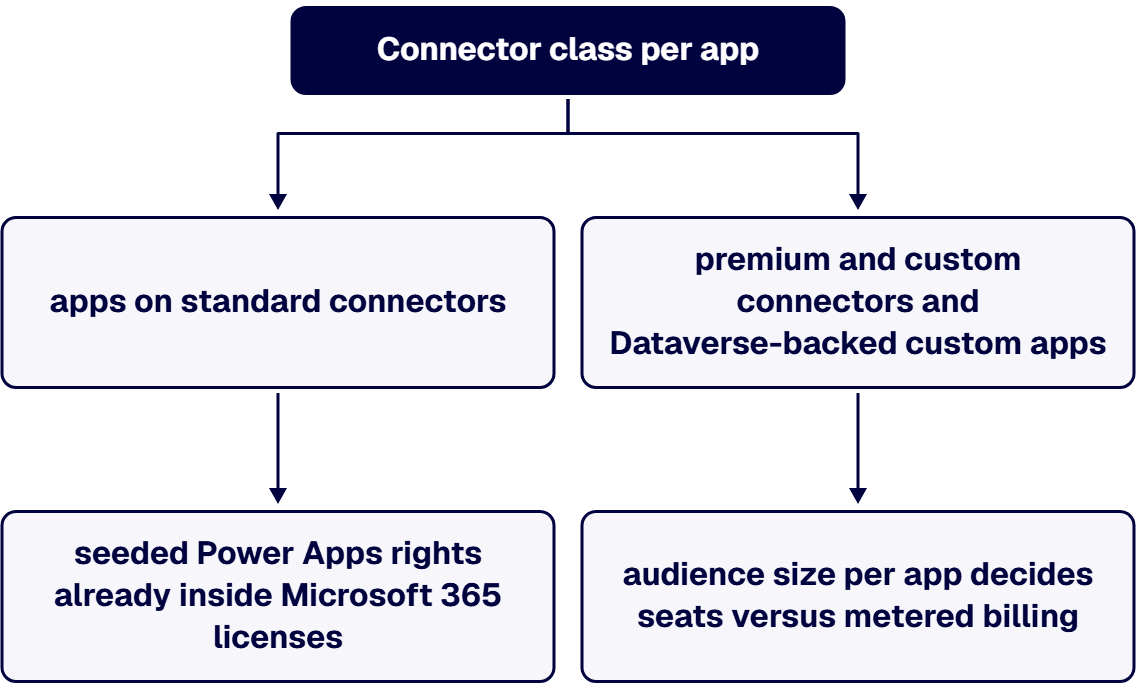
What you already own. Microsoft 365 licenses include seeded Power Apps rights: users can create and run canvas apps against Microsoft 365 data using standard connectors. They exclude premium and custom connectors and Dataverse-backed custom apps (Microsoft Learn, Power Platform licensing overview, accessed August 2026). A meaningful share of enterprise app demand, forms over SharePoint lists, approvals, team trackers, fits inside those seeded rights. Every app that can live there is license spend avoided, and an honest evaluation starts by finding them.
Premium, and the tier break that changes the math. Power Apps Premium at $20.00 per user per month gives a user unlimited apps and Power Pages sites with premium connectors and Dataverse. At 2,000 or more seats, the published price drops to $12.00 per user per month, a 40 percent reduction that turns some phased rollouts inside out: an organization creeping toward 2,000 Premium users one department at a time pays the higher rate the entire way, while a planned enterprise agreement crossing the threshold at once does not. Sequencing the rollout against the tier break is exactly the kind of modeling you are hiring for.
Pay-as-you-go and the per-app path. For apps with narrow or unpredictable audiences, metered billing through an Azure subscription avoids committing seats to occasional users, and government per-app plans exist for the same portfolio shape in sovereign clouds. The crossover between metered use and a committed seat is a run-rate calculation, not a guess, and it should appear in the evaluation with your actual usage numbers in it.
Dataverse capacity, the second bill. Premium licensing includes pooled Dataverse entitlements, and growing portfolios outgrow them: additional database capacity lists at $40.00 per GB per month (microsoft.com Power Apps pricing, accessed August 2026). An advisor who models license seats but not storage trajectory has priced year one and ignored year three.
Government clouds are their own path. Power Apps US Government is sold as per-user and per-app plans for Government through Volume Licensing and Cloud Solution Provider channels, and CSP is not available for GCC High. Feature and connector parity with commercial has documented exceptions. If your organization operates in GCC or GCC High, an evaluation priced from the commercial page is wrong before it starts; our comparison of GCC High versus GCC covers the environment decision itself.
1. An app inventory before a seat count. Which apps exist (including the shadow ones), what each connects to, and how many people actually open each one. Connector class per app decides seeded versus Premium; audience size per app decides seats versus metered billing. A proposal without the inventory is a quote wearing a consulting engagement’s clothes.
2. The seeded-rights map. Require an explicit list of which current and planned apps can run on the Power Apps rights inside your existing Microsoft 365 licenses. Advisors who resell licenses have a structural incentive to skip this step. i3solutions is a Microsoft Partner with 30 years of delivery experience and does not price its advisory on your license volume, which is the incentive alignment to look for anywhere you shop.
3. Cost modeled under at least two schemes, with the tier break shown. Premium seats, the mixed model with metered billing for narrow apps, and the 2,000-seat tier if your trajectory approaches it, each priced with your real numbers over a multi-year window that includes Dataverse storage growth.
4. Governance attached to the recommendation. License sprawl and app sprawl are the same problem wearing different badges. The evaluation should land alongside environment strategy and DLP policy, the machinery covered in our treatment of citizen developer governance, because ungoverned app creation quietly converts seeded-rights users into Premium requirements.
5. Delivery capability behind the advice. Licensing recommendations create build work: consolidating duplicate apps, moving a SharePoint-list app to Dataverse when it earns it, or the reverse. A firm that also builds can execute what it recommends and stays accountable for the projected savings. One i3solutions program replaced 32 outdated InfoPath forms with Power Apps and reduced maintenance demands by 40 percent, saving an estimated $150K to $200K annually in IT labor and support; portfolio rationalization and license rationalization were the same project. That capability lives in our Power Apps development practice and its hiring guide, both part of our broader Power Platform development services.
Four artifacts, in writing: the app inventory with connector class and audience per app, the seeded-rights map naming the apps your Microsoft 365 licenses already cover, the license model comparison across schemes and years with the tier break and storage trajectory shown, and a target assignment naming who gets Premium, which apps go metered, and what governance keeps the model true as new apps appear. If the advisor’s deliverable is a SKU list, you bought a quote. If your evaluation also covers Power Automate, the flow-side licensing mechanics are their own discipline; see our guide to hiring a Power Automate licensing advisor.
Hire a licensing advisor who starts from an app inventory rather than your headcount, maps which of your apps already run on the seeded Power Apps rights inside your Microsoft 365 licenses, models cost across schemes and years, and ends in a target assignment that names who gets Premium and which apps go metered. The alignment to look for is a firm whose advice is not priced on your license volume, because an advisor who resells licenses has a structural incentive to skip the seeded-rights step.
On an estate that is already licensed, the same work runs backwards from what you hold today: an inventory of the apps in use with the connector class and audience of each, a map of what your current Microsoft 365 rights already cover, a cost comparison you can re-run as apps change, and a target assignment you can hold the advisor to. Overspend surfaces where those artifacts disagree with the assignment list you are paying for: apps on standalone seats that seeded rights would carry, seats held for users whose app is narrow or seasonal, and storage growth priced for the first year and not the third.
Ask for the arithmetic per app instead of a rule of thumb, and ask for governance attached to the recommendation, because app creation that nobody governs turns seeded-rights users into Premium ones over time. A deliverable that is only a list of SKUs is a quote, not an audit, and an audit that reports a blended saving without naming the assignments behind it is the same thing wearing a percentage. Flow-side assignments run on a separate licensing model and are scoped separately.
Yes, for a defined class of apps: canvas apps on standard connectors against Microsoft 365 data. Premium connectors, custom connectors, and Dataverse-backed custom apps require standalone licensing. Mapping your portfolio against that line is the first artifact of a real evaluation, because every app that fits under seeded rights costs nothing incremental to license.
$20.00 per user per month paid yearly at Microsoft’s published list price, with unlimited apps for the licensed user. At a 2,000-seat minimum the published price is $12.00 per user per month. Organizations between roughly 1,500 and 2,000 planned seats should model reaching the tier deliberately, because the 40 percent delta compounds across every seat, every month.
When an app’s audience is small, seasonal, or unpredictable. Metered billing through an Azure subscription charges for actual use without seat commitments, which beats a committed seat for occasional users and loses to one for daily users. The crossover comes out of your usage data, and a competent evaluation shows the arithmetic per app rather than asserting a rule of thumb.
Nothing per connector. Microsoft’s Power Apps pricing page lists no separate connector price: premium connectors come with the license, and Microsoft describes the Power Apps Premium plan as letting each licensed user run unlimited apps that connect to varying data sources, including premium connectors. The real cost of a premium connector is therefore the license for every user who runs an app that uses it, whether that is a Premium seat or metered pay-as-you-go use through an Azure subscription.
Every Premium seat adds to a pooled Dataverse entitlement, and portfolios with audit trails, attachments, and model-driven apps grow past the pool. Additional database capacity lists at $40.00 per GB per month, which is real money at enterprise scale. Storage trajectory belongs in the license model, not in next year’s surprise.
Yes. Power Apps US Government plans (per-user and per-app) are purchased through government channels, Volume Licensing or CSP, and CSP is not available for GCC High. Connector availability and feature parity also differ from commercial. Sovereign-cloud licensing is a distinct path with its own eligibility validation, so model it with a partner who has delivered there rather than from the public pricing page.
There is a strong case for it. License evaluations recommend portfolio changes, and portfolio changes are build work. A firm that does both prices the recommendation with execution attached and is still in the room when the projected savings are audited. It also removes the reseller incentive: advice priced on outcomes rather than on license volume.
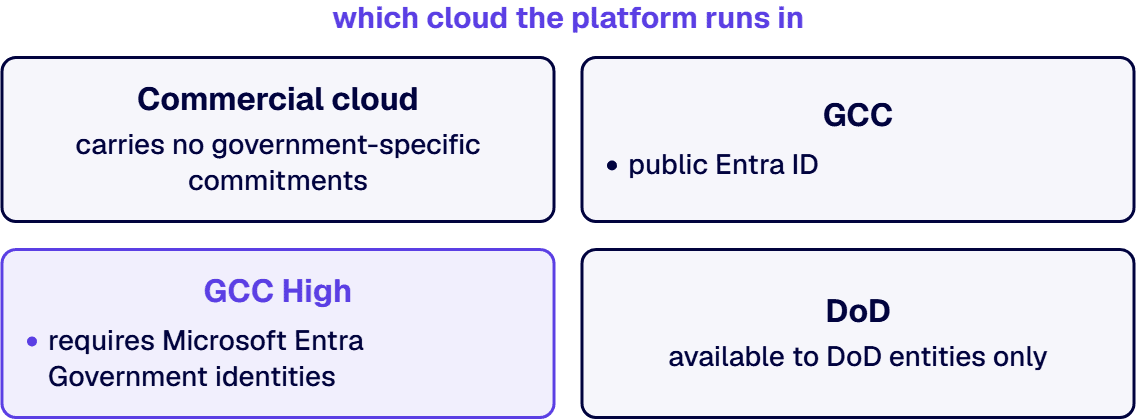
Hire a firm that has delivered Power Apps inside a government cloud boundary, because the first decision on a federally regulated Power Apps program is not an app decision at all: it is which cloud the platform runs in. Microsoft operates Power Apps in four distinct environments, and the compliance ceiling is set before the first screen is built. Commercial cloud carries no government-specific commitments. Power Apps US Government GCC is built to FedRAMP High and DoD DISA IL2 with support for CJIS requirements. GCC High aligns to DISA SRG IL4, requires Microsoft Entra Government identities, and is the environment Microsoft operates so defense contractors can meet ITAR commitments and DFARS acquisition regulations. The DoD environment aligns to IL5 and is available to DoD entities only (Microsoft Learn, Power Apps US Government service description, accessed August 2026). A consultant who cannot walk you through that decision with your data types on the table is not a federal compliance consultant, whatever the proposal says.
Most organizations arrive at this hire in one of two postures: an authorization deadline with apps already built in the wrong cloud, or a program not yet started that nobody wants to build twice. The vetting checklist below works for both, because the discipline being vetted is the same.
The environment decision. Everything inherits from it: identity (public Entra ID in GCC versus Entra Government in GCC High), data residency (US Government customer content is stored in US datacenters with access restricted to screened US-citizen personnel), available connectors, and which authorizations your assessor can inherit. Choosing wrong is expensive in both directions: commercial for CUI is a finding, and GCC High for a workload that never touches controlled data buys cost and feature lag for nothing. Our comparison of GCC High versus GCC and the GCC High migration checklist cover the decision in depth.
The boundary discipline. Power Apps can reach almost anything through connectors, and that reach is the compliance risk. Third-party connectors move data to systems outside the accreditation boundary, where the platform’s compliance commitments do not follow. Federal-grade Power Apps work therefore starts with DLP policies that partition connectors into business and non-business groups per environment, an environment strategy that keeps regulated workloads out of the default environment, and a review gate before any new connector reaches a production app.
The evidence layer. An Authority to Operate is granted on evidence, not intent. The platform side (FedRAMP artifacts, DISA provisional authorizations) is Microsoft’s to provide and your agency reviews it; the application side is yours: who can run the app, where its data lives, which flows touch it, and how changes move to production through application lifecycle management. i3solutions delivery includes ALM practices with Power Platform pipelines or Azure DevOps integration, environment separation strategies, and change control processes, because those are precisely the artifacts an assessor asks to see.
1. The environment recommendation in writing, with reasoning. Which of commercial, GCC, GCC High, or DoD, and why, mapped to your actual data types: CUI, ITAR-controlled technical data, CJIS, or none of the above. If the firm’s answer does not change when your data types change, it is a template.
2. Named federal delivery at scale. Ask what they have run inside a government boundary, at what scale, and what governed it. i3solutions deployed Power Platform across a federal defense intelligence command spanning 10,000 personnel and 180 locations, and runs a governed Power Platform for a federal defense agency at that same scale, which works because it is governed, not despite it. That delivery depth comes from the broader i3solutions Power Platform development services practice, which spans app development, automation, and governance.
3. A DLP and environment design, not just app screens. The proposal should name the environment strategy and the connector policy that will hold your apps, before it names features. Compliance lives in that machinery; the app merely inherits it. This is the same discipline that separates governed platforms from shadow IT, covered in our treatment of citizen developer governance.
4. Framework fluency in your language. NIST 800-171 for CUI in nonfederal systems, the FedRAMP baseline your agency inherits, CMMC if you sit in the defense supply chain. i3solutions runs delivery against named control families across CMMC, HIPAA, SOC 2, and NIST 800-171, producing artifacts auditors can review, and our teams maintain dedicated compliance specialists whose audit trails and controls map be written in your assessor’s framework, not its own methodology’s vocabulary.
5. US-based delivery. For ITAR-scoped work this is not a preference, it is a requirement: access by foreign persons is itself a controlled event. Ask where every person on the delivery team sits and what the firm’s screening practice is. i3solutions was co-founded 30 years ago around US-based expert teams delivering across the Microsoft stack, and is a Microsoft Partner.
6. Licensing path fluency for government clouds. Power Apps US Government plans are sold as per-user and per-app government plans through government channels, and the Cloud Solution Provider channel is not available for GCC High. Feature parity with commercial also has documented exceptions. A consultant who prices your program from the commercial pricing page has not done this before.
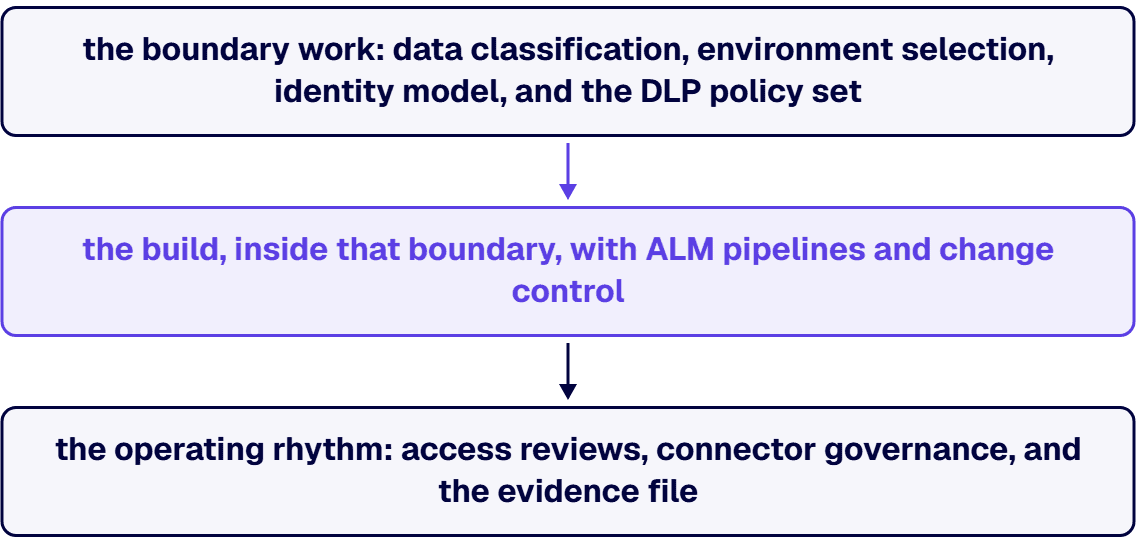
A defensible federal Power Apps engagement runs in three phases. First, the boundary work: data classification, environment selection, identity model, and the DLP policy set, produced as written artifacts your authorizing official can review. Second, the build, inside that boundary from day one, with ALM pipelines and change control rather than a compliance pass at the end; retrofitting compliance onto a finished app is where federal Power Apps programs go to die. Third, the operating rhythm: access reviews, connector governance, and the evidence file that keeps the next assessment an update rather than an excavation. If you are also weighing platform choices upstream of this work, our Power Apps development practice and CMMC technology readiness services are the two doors into it.
Power Apps US Government is designed to support FedRAMP accreditation at the High impact level, and Power Apps has been authorized as a service within the Azure Government FedRAMP ATO; agencies can review the artifacts through the FedRAMP Marketplace in support of their own ATO decisions. Commercial Power Apps does not carry the US Government environment’s commitments, which is why the environment decision comes first.
The decision turns on your data classification. GCC is built to FedRAMP High and DISA IL2 and supports CJIS requirements. GCC High aligns to DISA SRG IL4, uses Entra Government identities, and is the environment Microsoft operates for ITAR commitments and DFARS requirements, which is why defense contractors handling controlled technical data land there. Making this call against your actual data inventory is the first deliverable of a competent engagement.
For workloads with no government-regulated data, yes, with ordinary governance. For CUI, ITAR, or CJIS data, the US Government environments exist precisely because the commercial platform does not carry those commitments. The expensive failure mode is discovering this after the app is built, when migration means rebuilding connections, identities, and any connector the sovereign cloud does not offer.
No. Third-party connectors move your data to systems outside the Power Apps US Government infrastructure, and Microsoft’s compliance and data protection commitments do not extend to them. This is why DLP policy design, not app review, is the load-bearing compliance control in Power Apps: it decides which connectors can ever appear in a regulated environment.
US federal, state, local, tribal, and territorial government entities, plus organizations that handle government-regulated data such as ITAR technical data or CJIS law enforcement data, subject to Microsoft’s validation of eligibility, which can require sponsorship by a government entity. The DoD environment is available to DoD entities only. Eligibility is revalidated at contract renewal.
A written boundary design: your data classified, the environment named with reasoning, the identity model, the DLP policy set, and the licensing path through government channels. It is short, it is reviewable by your authorizing official, and everything built afterward inherits its accuracy. A firm that wants to start building screens first is optimizing for its burn rate, not your authorization.
By Matt Lawson, Senior Consultant, i3solutions. Matt has spent more than 14 years at i3solutions guiding complex enterprise technology work from scope and system design through development, acceptance, and long-term support, including Power Platform implementation across regulated and federal environments.
Power Automate Premium for 100 users costs $18,000 per year in license fees: $15.00 per user per month, paid yearly, at Microsoft’s published list price (microsoft.com Power Automate pricing, accessed August 2026). That number is the floor, and for most 100-user deployments it is also the wrong number, in both directions. It overstates the license cost when only a fraction of those 100 people build automations, because shared flows can carry their own capacity licenses instead. It understates the total cost when the deployment is real, because unattended automation, Dataverse storage, and the implementation work that makes flows production-grade all sit outside the per-user fee. This page prices each layer with Microsoft’s published figures, then shows the arithmetic for the license mixes that usually beat 100 flat Premium seats.
The flat model: 100 Premium seats, $18,000 per year. Every user can build and run unlimited cloud flows with standard, premium, and custom connectors, run attended desktop flows (RPA), and use process mining. Each seat also carries 5,000 AI Builder credits per month, 250 MB of Dataverse database capacity, 2 GB of file capacity, and a 40,000 action-per-day limit (Microsoft Learn, Types of Power Automate licenses, accessed August 2026). This 5,000-credit allowance applied through October 31, 2026: Microsoft’s AI Builder licensing overview states that a Power Automate license bought or renewed from November 1, 2026 no longer receives seeded AI Builder credits, while credits already seeded on a license before that date continue through the end of that license’s contract term. Buy this model when most of the 100 genuinely author automations or run attended RPA at their desks.
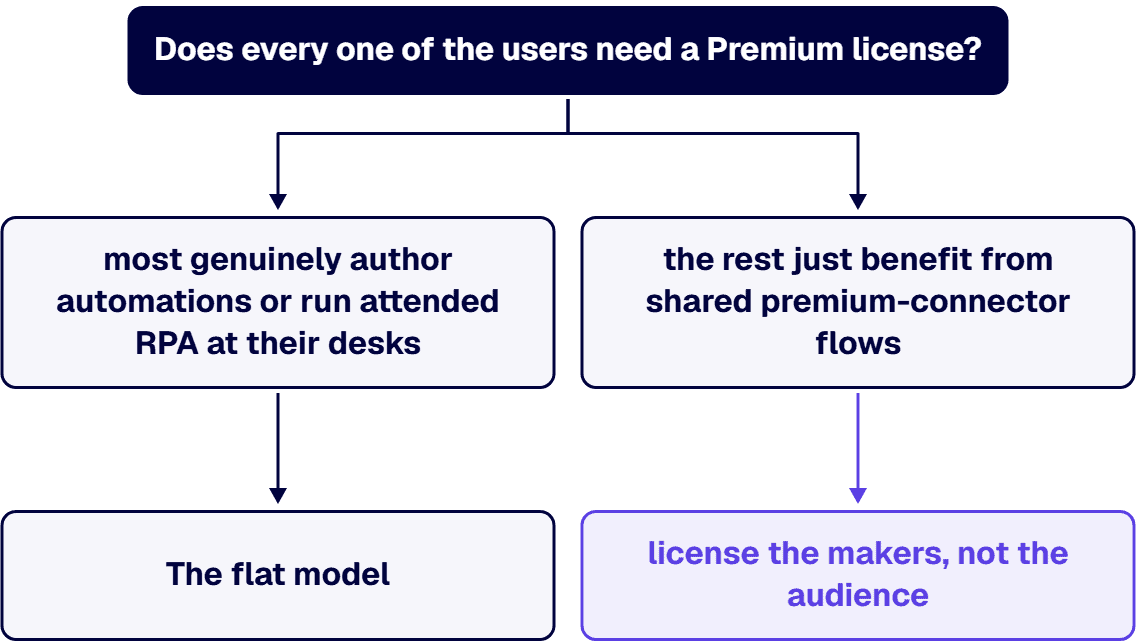
The mixed model: license the makers, not the audience. A Power Automate Process license at $150.00 per bot per month attaches to a cloud flow itself and grants premium-connector use to everyone who triggers it, with 250,000 actions per day. So if 20 of your 100 users actually build flows and the rest just benefit from six shared premium-connector flows, the arithmetic is 20 seats at $15.00 ($3,600 per year) plus six Process licenses at $150.00 ($10,800 per year): $14,400 per year, or 20 percent under the flat model, with far higher action headroom on the shared flows. The split between makers and consumers in your actual population, not the headcount, is what sets the price.
Unattended RPA is a separate line. A Premium seat includes attended desktop flows only. Running desktop flows unattended requires a Process license allocated to the machine ($1,800 per bot per year), or a Hosted Process license at $215.00 per bot per month ($2,580 per year) if Microsoft hosts the machine. A 100-user estimate that includes legacy-application automation and omits this line is understated.
Dataverse storage beyond the pooled entitlement. License-included Dataverse capacity accrues per seat, but flow-heavy estates with approvals, audit trails, and AI Builder outputs grow past it. Additional Dataverse database capacity is $40.00 per GB per month at list (microsoft.com Power Apps pricing, accessed August 2026). Storage is the quiet second bill in year two.
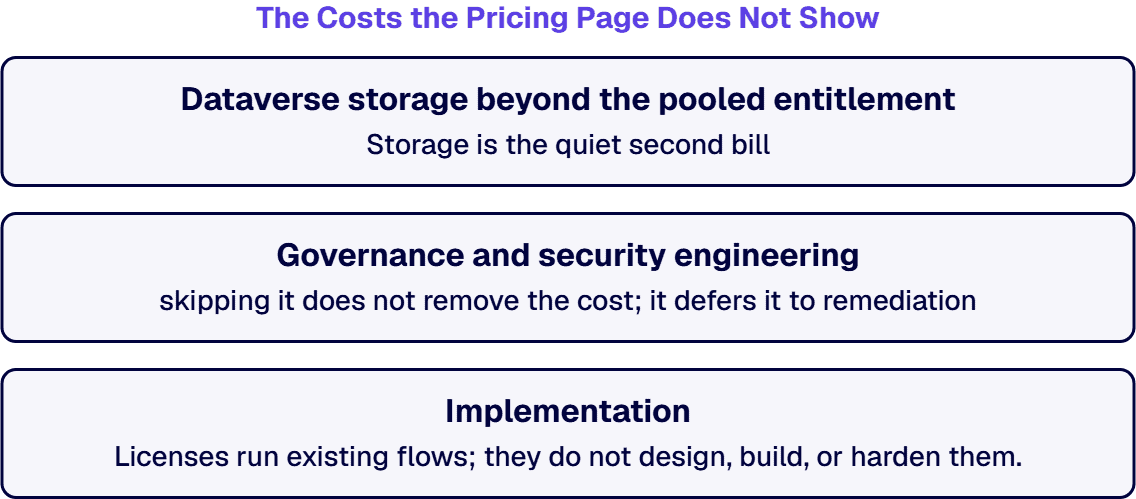
Governance and security engineering. One hundred licensed users means one hundred people who can move enterprise data between systems. Environment strategy, DLP policies, and connector governance are what keep that from becoming an audit finding. For scale, a typical regulated-enterprise Power Automate security consulting engagement at i3solutions runs in the $60,000 to $180,000 range, depending on environment scope and framework complexity. That work is not a Microsoft fee, but at 100 users in a regulated organization it belongs in the total cost of ownership, and skipping it does not remove the cost; it defers it to remediation.
Implementation. Licenses run existing flows; they do not design, build, or harden them. Build cost depends entirely on scope, which is why credible firms price it from a flow inventory rather than a seat count. The delivery model matters more than the day rate: i3solutions Power Automate developers follow a three-phase delivery model designed to minimize risk while building internal capability, so the 100-user organization ends up able to maintain its own automations rather than renting that ability indefinitely.
Put the layers together and the honest annual range for a 100-user Power Automate Premium deployment is $14,400 to $18,000 in Microsoft license fees depending on the maker-to-consumer split, plus per-bot capacity for any unattended RPA, plus Dataverse storage growth, plus one-time implementation and governance engineering scaled to your compliance posture. Organizations in GCC or GCC High should also note that US Government plans are purchased through government channels with their own pricing, and the Cloud Solution Provider channel is not available for GCC High, so commercial list prices are a modeling reference, not a quote. The same modeling discipline applies to adjacent Microsoft stacks; our breakdown of Dynamics 365 licensing cost and Microsoft 365 Copilot licensing follows the same method.
i3solutions is a Microsoft Partner with 30 years of delivery experience and runs a governed Power Platform for a federal defense agency supporting roughly 10,000 personnel across about 180 locations, which works because it is governed, not despite it. Licensing models and the governance engineering behind them are part of the same Power Platform practice.
$18,000 per year at Microsoft’s published price of $15.00 per user per month, paid yearly. Most 100-user organizations can license below that by giving Premium seats to the people who build automations and attaching Power Automate Process licenses ($150.00 per bot per month) to shared flows, which premium-enables those flows for every user who triggers them.
No. A flow in a solution with a Process license assigned can use premium and custom connectors regardless of who triggers it. Premium seats are for the people who author flows and for anyone running attended desktop automation. Counting the makers is the first step of any honest cost model.
Per Microsoft’s licensing documentation: attended RPA on a registered workstation, process mining access with 50 MB of process mining storage, 5,000 AI Builder credits per month, 250 MB of Dataverse database and 2 GB of file capacity, and a 40,000 action-per-day request limit per user. This 5,000-credit allowance applied through October 31, 2026: according to Microsoft Learn, a Power Automate license bought or renewed from November 1, 2026 no longer receives seeded AI Builder credits, while credits already seeded on a license before that date continue through the end of that license’s contract term.
$1,800 per year per unattended bot (a $150.00 per month Process license allocated to your machine), or $2,580 per year per hosted bot (a $215.00 per month Hosted Process license on a Microsoft-hosted machine). Parallel unattended runs need one license each, so the count follows your peak concurrency, not your total flow count.
Government cloud licensing is purchased through Volume Licensing or Cloud Solution Provider channels, and CSP is not available for GCC High. Pricing and connector availability differ from the commercial list, so model sovereign-cloud deployments with your licensing partner rather than the public pricing page. If you are still choosing an environment, start with GCC High versus GCC.
Two recur: Dataverse storage growth once approvals and audit histories accumulate ($40.00 per GB per month for database capacity beyond entitlements), and governance engineering. At 100 licensed users, DLP policy design and environment strategy stop being optional; in regulated organizations that engineering typically lands in the $60,000 to $180,000 range as a one-time engagement, which is small against the cost of the audit finding it prevents.
By Matt Lawson, Senior Consultant, i3solutions. Matt has spent more than 14 years at i3solutions guiding complex enterprise technology work from scope and system design through development, acceptance, and long-term support, including Power Platform implementation across regulated and federal environments.
Hire a firm that treats Power Automate licensing as an architecture decision, not a procurement line item. The right license mix is determined by how your flows are built and who owns them: a per-user Power Automate Premium license at $15.00 per user per month paid yearly, a Power Automate Process capacity license at $150.00 per bot per month attached to the flow itself, or the seeded Power Automate rights already inside your Microsoft 365 licenses (Microsoft’s published pricing at microsoft.com, accessed August 2026). A firm that starts by counting heads will quote you the most expensive answer. A firm that starts by inventorying flows, connectors, and run patterns will usually find that a fraction of your users need Premium and a handful of shared flows should carry their own Process licenses instead.
This page gives you the licensing mechanics an advisor should be fluent in, the vetting questions that separate a licensing engineer from a license reseller, and what the engagement should hand you at the end.
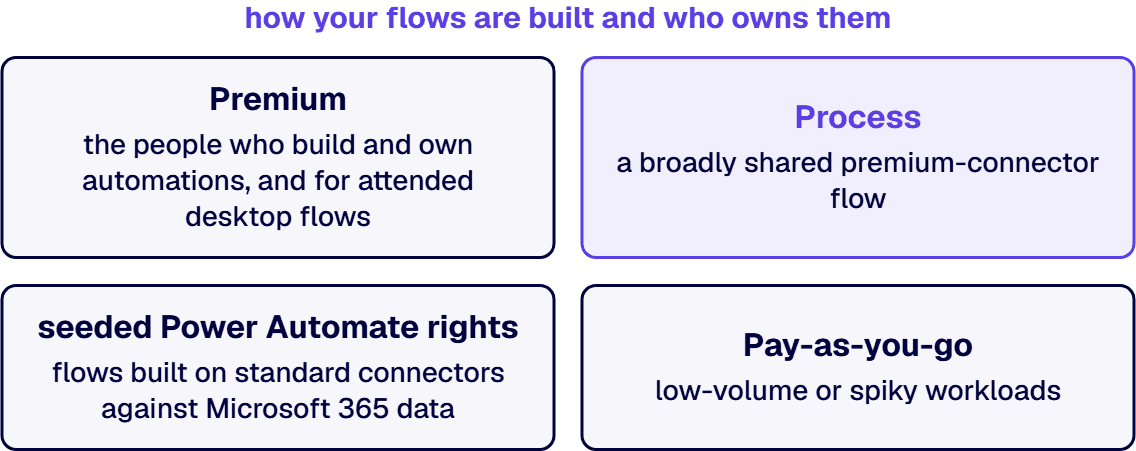
Premium is a user license. At $15.00 per user per month it entitles that person to build and run unlimited cloud flows with standard, premium, and custom connectors, register a workstation and run attended desktop flows (RPA), and use process mining. Each license carries 5,000 AI Builder credits per month, 250 MB of Dataverse database and 2 GB of file storage, and a 40,000 action-per-day limit per user (Microsoft Learn, Types of Power Automate licenses, accessed August 2026). This 5,000-credit allowance applies through October 31, 2026: Microsoft’s AI Builder licensing overview states that a Power Automate license bought or renewed from November 1, 2026 no longer receives seeded AI Builder credits, while credits already seeded on a license before that date continue through the end of that license’s contract term.
Process is a capacity license. At $150.00 per bot per month it attaches to a specific cloud flow or machine rather than a person. Assigned to a solution cloud flow, it grants premium and custom connector use regardless of who triggers the flow, with 250,000 actions per day; up to 10 Process licenses stack on one flow, or one license can be shared across a flow group of up to 25 flows. Allocated to a machine, it becomes an unattended RPA bot. This is the lever that keeps a broadly shared premium-connector flow from forcing Premium onto every person who touches it.
Hosted Process adds the machine. At $215.00 per bot per month, Microsoft hosts the RPA machine, which removes the physical-infrastructure management from unattended automation.
Your Microsoft 365 licenses already include something. The seeded Power Automate rights cover flows built on standard connectors against Microsoft 365 data. They exclude premium connectors, custom connectors, and RPA. A real advisor maps which of your existing flows are legitimately covered by seeded rights before recommending you buy anything.
Pay-as-you-go exists. Power Automate can be metered through an Azure subscription with no upfront license commitment, which suits low-volume or spiky workloads. The break-even against per-user and per-flow licensing depends on run volume, and modeling that break-even is exactly the kind of work you are hiring for.
1. A flow inventory before a license count. The advisor’s first artifact should be an inventory of your flows: which connectors each uses, who triggers it, how often it runs, and whether it is attended or unattended. A proposal priced from your headcount alone was written before anyone looked at your tenant.
2. Cost modeled under at least two licensing schemes. Require a side-by-side of the per-user path, the capacity path, and the mix, using your actual flows. The arithmetic is not subtle. One hundred Premium users cost $18,000 per year; twenty makers plus six Process-licensed shared flows cost $14,400. The judgment is in knowing which flows can carry the capacity license and which action limits will bite.
3. Fluency in the limits, not just the prices. Action limits per license, Process stacking, flow-group sharing, and the rule that a machine must be registered by a Premium user before a Process license can make it an unattended bot. Advisors who cannot answer these from memory will discover them in your production environment.
4. A position on government clouds if you operate in one. Power Automate US Government plans run in GCC, GCC High, and DoD environments with their own purchasing channels, and the Cloud Solution Provider channel is not available for GCC High. If your organization handles regulated federal data, licensing advice that ignores the sovereign-cloud path is incomplete.
5. Delivery capability behind the advice. Licensing recommendations change how flows are built: moving a flow into a solution so it can carry a Process license, restructuring a desktop flow for unattended mode, consolidating connectors. An advisor who also builds can execute the recommendation; one who only advises hands you a memo and leaves the rework to you. This is why licensing advisory pairs naturally with Power Automate development capability and with Power Automate security consulting when compliance frameworks are in scope.
A useful licensing engagement is short and ends in artifacts, not opinions: the flow inventory with connector classes and run patterns, the license model comparison with annual cost under each scheme, a target license assignment naming which users get Premium and which flows get Process, and the governance rules that keep the model true as new flows appear. The last item matters most. License sprawl is not a one-time purchase mistake; it is a governance gap, and the fix lives in the same environment and DLP policy machinery covered by a Power Platform governance practice. If the evaluation also needs to cover Power Apps, the app-side mechanics are a different discipline, and we treat them separately in our guide to hiring a Power Apps licensing advisor.
i3solutions has been a Microsoft Partner with 30 years of enterprise technology delivery experience and has delivered Power Platform programs at federal enterprise scale, including a deployment across a federal defense intelligence command spanning 10,000 personnel and 180 locations. Licensing advisory at i3solutions sits inside the Power Platform development practice, so the people modeling your license mix are the same discipline that builds and governs the flows the model describes.
No. If the flow is in a solution and carries a Power Automate Process license, it can use premium and custom connectors regardless of the license held by the person who triggers it. Premium at $15.00 per user per month is for the people who build and own automations, and for attended desktop flows, which run under the user’s own license.
Premium licenses a person; Process licenses an automation. Premium ($15.00 per user per month) covers unlimited flows for that user, attended RPA, process mining, and AI Builder credits. Process ($150.00 per bot per month) attaches to one cloud flow or machine, carries 250,000 actions per day, and provides an unattended RPA bot when allocated to a machine. Most enterprises need a mix, and the ratio is exactly what a licensing engagement determines.
Yes, with limits. Microsoft 365 plans include seeded Power Automate rights for cloud flows that use standard connectors against Microsoft 365 data. Premium connectors, custom connectors, and desktop-flow automation require Premium, Process, or pay-as-you-go licensing. An advisor should tell you which of your current flows are already covered before proposing new spend.
When run volume is low, spiky, or unproven. Pay-as-you-go bills through an Azure subscription with no license commitment, which makes it a fit for pilots and occasional-use flows. Once a flow runs steadily, a Process license or Premium seats usually cost less; the crossover point comes out of the run-volume model your advisor builds from your actual usage.
Through Power Automate US Government plans that run in the GCC, GCC High, and DoD environments, purchased through government licensing channels; the Cloud Solution Provider channel is not available for GCC High. Connector availability and feature parity also differ from commercial cloud, so a flow inventory built for a commercial tenant cannot simply be priced into a sovereign one. If you are weighing the environments themselves, start with our comparison of GCC High versus GCC.
There is a real advantage when it is. Licensing recommendations frequently require build work to realize: moving flows into solutions, restructuring for unattended RPA, retiring duplicate automations. A firm that does both prices the recommendation with its execution cost attached, and it stays accountable for whether the projected savings actually land.
By Scot Johnson, Founder / CEO, i3solutions. Scot Johnson co-founded i3solutions 30 years ago with a focus on expert-led delivery, strategic advisory, and complex Microsoft-centered solutions for organizations where technology decisions carry operational, financial, and mission risk.
To govern citizen-developer Power Apps that IT has inherited, run the takeover in three moves: inventory every app and flow with its real business criticality, triage which apps IT formally adopts versus retires versus leaves in a bounded personal-productivity tier, and then put the adopted apps under the same governance a regulated enterprise applies to anything in production: environment strategy, data loss prevention policies, application lifecycle management, named decision rights, monitoring, license alignment, and compliance mapping. The mistake is treating this as a one-time cleanup. Citizen development does not stop when IT takes ownership; governance has to be the standing structure that decides where the next app lands.
That is the answer in three moves and a warning. The rest of this page is the takeover sequence in order, the triage rule that keeps it honest, and what changes for the citizen developers themselves, because a governance program that reads as confiscation loses the builders who were solving real problems.
The pattern is consistent: a business user builds an app in the default environment to fix a real process gap, the process comes to depend on it, and the author changes roles or leaves. At that moment the app is production software with no owner, no source control, no test path, and connections that run on a personal account. Multiply by a few years of enthusiastic building and IT inherits an estate it cannot see, cannot maintain, and is nonetheless accountable for. The instinct to shut it all down is wrong twice: it destroys working business processes, and it pushes the next generation of apps further into the shadows.
A Power Platform governance framework is the policy structure governing how Power Apps, Power Automate, and Dataverse are used across an enterprise. It is not a Center of Excellence toolkit installation and not a list of admin-center settings. It defines who can build what, under which controls, and with what audit evidence, with each component owned by a named role. The framework design itself is covered in depth on our Power Platform governance page, and if this takeover is happening because an audit already flagged the estate, the audit-flagged remediation path sequences the findings first.
Governed does not mean closed. The personal-productivity tier stays open for genuinely personal tools, with DLP boundaries that keep business data out of ungoverned connectors. What changes is the promotion path: an app that a team starts depending on has a named route into a managed environment, an owner, and a maintenance plan, instead of a quiet slide into being critical and unsupported. i3solutions runs a governed Power Platform for a federal defense agency supporting roughly 10,000 personnel across about 180 locations, which works because it is governed, not despite it.
When a form the business runs on was built by one person who still fixes it by editing the live app, and some submissions lose data, the process and its records depend on that person’s next edit. If they leave, or an edit goes wrong while people are submitting, the process stops, and IT is accountable for an app it does not yet control. If the app is genuinely personal and no team depends on it, it stays in the personal-productivity tier this page describes, and none of this applies.
Stop live edits first: until the app has a second owner and a copy outside production, every fix is also a new risk to the data people are submitting. The first three moves run in this order:
Then decide rescue or rebuild, before building any path. On most inherited apps that decision can wait until after stabilization. Here it cannot: if the data loss comes from the app’s own design, putting the same app on a pipeline only promotes the defect into test and production. The owner IT named makes that call with the business process owner, because one knows the app and the other knows what the records have to hold.
Once the app is rescued or rebuilt, it goes on the development, test and production route described in the takeover sequence above. i3solutions runs client Power Platform work on a multi-tenant Center of Excellence model with separate Dev, Test, UAT, and Production environments promoted through managed solutions.
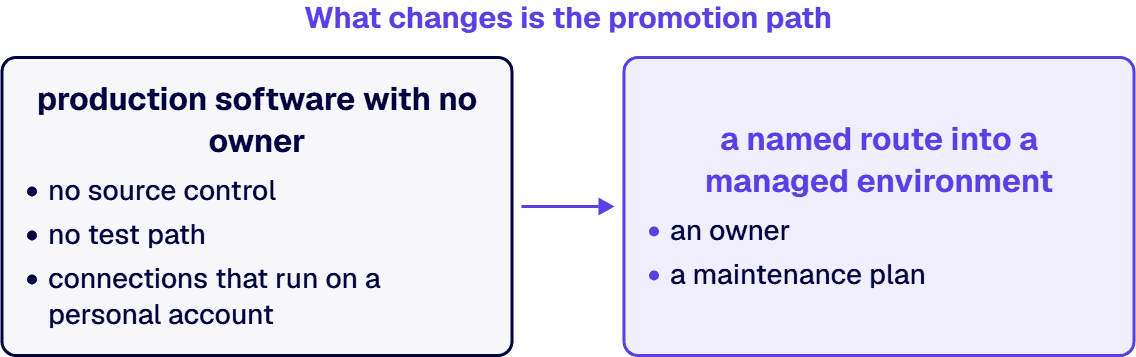
No. Closing the default environment outright destroys working business processes and drives building underground. Bound it instead: DLP policies that keep business-critical connectors out, a size and dependency threshold that triggers review, and a named promotion path for apps that graduate. Our page on Power Apps for a Business-Critical Enterprise Application walks through the four conditions that decision needs: Dataverse as the data platform, solution-based release control, named support ownership, and licensing sized to the user population.
Inventory first, then ask the process owners, not the app authors. Usage telemetry identifies candidates, but the deciding question is whether a business process stalls when the app breaks. Those apps are production software regardless of who built them.
Usually not immediately. The first pass is stabilization: move the app to a managed environment, replace personal-account connections with service principals, and put it in a solution under source control. Rebuild decisions come later, per app, based on criticality and maintainability rather than on principle.
Standing structure rather than cleanup: environment strategy that decides where new apps land, DLP that travels with data sensitivity, monitoring that surfaces new apps weekly, and named decision rights for exceptions. Governance that runs as a program absorbs new citizen development instead of being surprised by it.
The bounded personal tier keeps low-stakes building fast, and the promotion path is what keeps high-stakes apps alive. What actually slows a business down is the ungoverned alternative: an unowned app failing mid-process, or a connector policy change taking out a workflow nobody knew existed.
Yes, if it runs as a governed program with named ownership. i3solutions runs a governed Power Platform for a federal defense agency supporting roughly 10,000 personnel across about 180 locations. Scale is an argument for the framework, not against it.
By Matt Lawson, Senior Consultant, i3solutions. Matt Lawson has spent more than 14 years at i3solutions guiding complex enterprise technology work from scope and system design through development, acceptance, and long-term support, with expertise spanning technical oversight, solution architecture, SharePoint and Microsoft 365 delivery, Power Platform implementation, business intelligence, enterprise search, and the practical application of AI to real business and operational challenges.
For a Microsoft-centric enterprise, Microsoft Fabric is usually the right center of gravity: one capacity, from $262.80 per month for an F2 on pay-as-you-go rates to roughly $8,410 per month for an F64, covers warehousing, pipelines, Spark, and Power BI, with OneLake storage at about $0.023 per GB per month. Choose Snowflake when cross-cloud neutrality, its data sharing ecosystem, or an established Snowflake estate is the binding condition; it prices per compute credit, about $2.00 on Standard, $3.00 on Enterprise, and $4.00 on Business Critical for on-demand use in its US baseline regions, plus $23.00 per TB per month for storage.
And the choice is less binary than the title suggests: Fabric can mirror a Snowflake database into OneLake with free replication compute and free mirrored storage up to the capacity size, so a Microsoft-centric enterprise with Snowflake already in place has a documented coexistence path rather than a forced migration. This page lays out both cost models, the conditions that decide the platform, and the mirroring mechanics, the same framework we apply in Microsoft Fabric development engagements for regulated organizations.
This table summarizes the cost models, best-fit conditions, and coexistence path detailed in the sections below. Every figure reflects the vendors’ published pricing referenced on this page.
Fabric sells a provisioned pool; Snowflake meters consumption. Understanding that difference matters more than any single number, because it determines who in your organization controls the bill.
Fabric is bought as an F-SKU capacity, a pool of Capacity Units shared by every Fabric workload, warehouse queries, Spark jobs, pipelines, and Power BI alike. On Microsoft’s published Fabric pricing for US regions, an F2 runs $262.80 per month pay-as-you-go and an F64 roughly $8,410, with a one-year reservation cutting compute about 41 percent, and OneLake storage billed at about $0.023 per GB per month, roughly the same $23 per TB that Snowflake charges. Two Fabric-specific mechanics shape the bill: capacities can be paused when idle, and at F64 and above, Power BI report viewers no longer need paid per-user licenses, which folds much of the BI licensing line into the platform fee. That viewer-license arithmetic is walked in full in our Power BI vs Tableau comparison.
Snowflake bills compute in credits consumed per second while a virtual warehouse runs, with the per-credit price set by edition: on Snowflake’s published pricing, on-demand list rates in its US baseline regions are about $2.00 per credit on Standard, $3.00 on Enterprise, the tier most regulated enterprises need for features like extended time travel, and $4.00 on Business Critical, which adds HIPAA and PCI-oriented protections. A warehouse’s size sets its burn rate, each size up doubles credits per hour, and storage is billed separately at $23.00 per TB per month on demand. Pre-purchased capacity earns discounts off those list rates. The model is elastic and precise, and it makes cost governance a daily discipline: a mis-sized warehouse or an always-on schedule quietly compounds, which is why mature Snowflake shops run FinOps reviews as a standing practice.
When the consumption layer is Power BI and the operational estate is Azure and Microsoft 365, Fabric collapses several vendor seams into one platform. Power BI reads Delta tables in OneLake directly through Direct Lake mode, so there is no per-query warehouse bill behind every dashboard refresh and no extract schedule to babysit. Security and governance run through the same Entra ID identities and Purview labels as the rest of the tenant, which regulated organizations can present to an auditor as one control plane instead of two. And the capacity model makes the analytics bill a predictable line item a CFO can reserve, rather than a consumption curve to forecast.
The honest trade is maturity for integration. Snowflake’s warehouse has more years in production at extreme concurrency, its workload isolation is more granular, and its cross-cloud replication has no Fabric equivalent. A Microsoft-centric enterprise whose scale is in reporting, governed data marts, and departmental analytics will rarely feel those edges; one running a thousand-warehouse data business might. If your platform question is really Fabric versus a code-first lakehouse rather than a warehouse, our Fabric vs Databricks vs Synapse comparison covers that fork.
Snowflake earns the decision under three conditions. First, genuine multi-cloud: it runs the same platform on AWS, Azure, and Google Cloud with cross-cloud replication, so an enterprise with a sovereignty constraint, a merger on the horizon, or a deliberate second-cloud policy keeps its data platform portable in a way Fabric, an Azure-anchored SaaS, cannot match. Second, data sharing as a business model: Snowflake’s secure shares and marketplace let you serve live data to customers and partners on any cloud without building an API layer, and organizations whose product is data often choose it for that alone. Third, an established estate that works: a tuned Snowflake deployment with years of pipelines, role hierarchies, and FinOps discipline is an asset, and replatforming it to save a marginal license delta is usually a bad trade. If the estate is working, the better question is integration, not migration.
Microsoft’s Fabric mirroring documentation lists Snowflake as a supported database mirroring source: Fabric continuously replicates Snowflake tables into OneLake in Delta format, near real time. The economics are deliberately favorable, the background replication compute is free and does not consume your capacity, and mirrored storage is free up to one terabyte per capacity unit, so an F64 carries 64 free terabytes of mirrored data. Once mirrored, the data behaves like any OneLake table: Power BI queries it through Direct Lake without extracts, Spark and SQL reach it without draining Snowflake credits, and Purview governs it alongside everything else.
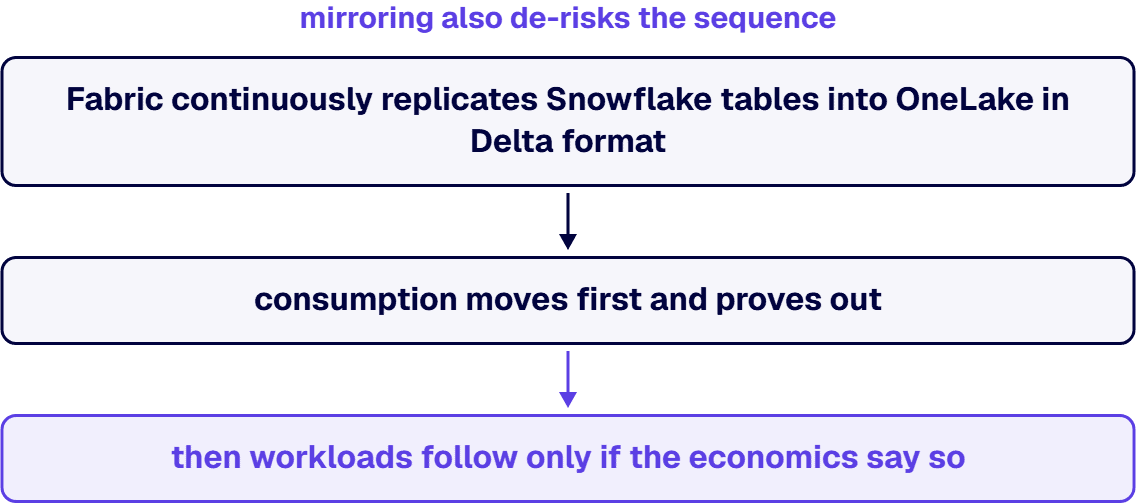
The pattern this enables is pragmatic: Snowflake keeps the workloads it is good at, and the Microsoft estate reads a continuously synchronized copy without per-query Snowflake compute or a hand-built pipeline. For enterprises weighing a migration, mirroring also de-risks the sequence, consumption moves first and proves out, then workloads follow only if the economics say so. Designing that boundary, what mirrors, what migrates, what stays, is integration architecture of the kind we compare across platforms in our data integration tooling analysis.
As a bounded evaluation with a written verdict, not an opinion. We inventory the estate and its workloads, model both platforms’ costs against your actual query patterns, storage, and viewer population, test the compliance requirements your regulators impose against each platform’s controls, and design the mirroring or migration boundary if the answer is both. i3solutions has completed 1,500+ Microsoft platform implementations. Data integration tool evaluation engagements at i3solutions typically range from $40,000 to $120,000 depending on the scope and complexity of the enterprise’s data estate. The deliverable is a platform decision your steering committee can defend, with the cost model attached. Organizations that already know the direction can hire Microsoft Fabric developers from us to build it, or start from the broader analytics roadmap through our analytics and insights solutions practice.
For a Microsoft-centric enterprise with a wide Power BI audience, usually yes, because the capacity fee absorbs costs Snowflake bills separately: an F64 at roughly $8,410 per month pay-as-you-go covers warehouse compute, pipelines, Spark, and unlimited report viewing, while a Snowflake estate pays per credit, about $2.00 to $4.00 each by edition, for every query including the ones behind dashboards. For narrow, bursty analytical workloads with few consumers, Snowflake’s per-second metering can come out ahead. The decision needs your workload profile, not a generic benchmark.
Yes. Snowflake is a supported database mirroring source in Fabric: tables replicate continuously into OneLake in Delta format, the background replication compute is free, and mirrored storage is free up to one terabyte per capacity unit, 64 free terabytes on an F64. Power BI then reads the mirrored data through Direct Lake mode without consuming Snowflake credits, which is the standard coexistence pattern for Microsoft-centric enterprises with an established Snowflake estate.
When multi-cloud portability is a binding requirement, when secure data sharing with customers and partners across clouds is part of the business model, or when a tuned Snowflake estate with years of accumulated pipelines and governance is already delivering, and the cost of replatforming would exceed any license savings. In those conditions Snowflake is the stronger answer, and the Microsoft question becomes how to integrate it, typically via mirroring, rather than how to replace it.
A credit is consumed by a running virtual warehouse: the smallest size burns one credit per hour, and each size up doubles the rate, billed per second while the warehouse runs. On-demand list pricing in Snowflake’s US baseline regions is about $2.00 per credit on Standard, $3.00 on Enterprise, and $4.00 on Business Critical, with storage at $23.00 per TB per month; pre-purchased capacity earns discounts. A warehouse left running on an idle schedule is the classic source of Snowflake bill surprise.
Fabric inherits the Microsoft 365 control plane: Entra ID identity and conditional access, Purview sensitivity labels and audit, and capacity-level tenancy controls, which lets a regulated organization present one governance story for collaboration and analytics alike. Snowflake’s Enterprise and Business Critical editions carry strong controls as well, including features aimed at HIPAA and PCI workloads. The governance question is rarely which platform can comply; it is which lets your team run one control plane instead of two.
As a data integration tool evaluation with a fixed scope: estate inventory, cost modeling on both vendors’ published prices against your real workloads, a compliance-control comparison for your regulatory regime, and a written integration or migration boundary. Engagements typically run $40,000 to $120,000 depending on estate complexity, and the outcome is a decision with evidence attached, including, where the evidence says so, the recommendation to keep Snowflake and mirror it.
By Matt Lawson, Senior Consultant, i3solutions. Matt Lawson has spent more than 14 years at i3solutions guiding complex enterprise technology work from scope and system design through development, acceptance, and long-term support, with expertise spanning technical oversight, solution architecture, SharePoint and Microsoft 365 delivery, Power Platform implementation, business intelligence, enterprise search, and the practical application of AI to real business and operational challenges.
For an enterprise already standardized on Microsoft 365, Power BI wins on distribution economics: Power BI Pro is $14.00 per user per month against $42.00 for a Tableau Explorer and $15.00 for a Tableau Viewer, and once report consumption moves onto a Microsoft Fabric F64 capacity, roughly $8,410 per month pay-as-you-go, viewers stop needing paid per-user licenses at all. Choose Tableau when its conditions hold: analyst teams whose craft is the product itself, a Salesforce-centric application estate, or a mature multi-platform BI practice already built around Tableau Creator at $75.00 per user per month.
That is the verdict in two sentences. The rest of this page shows the license math at enterprise headcounts, the governance and integration differences that matter to regulated organizations, and the specific situations where Tableau remains the right call, because a comparison you can defend to a CFO has to be honest about both columns. It reflects what we see running business intelligence and reporting engagements inside Microsoft-centric enterprises.
Both vendors publish per-user list prices, so the comparison is checkable. On Microsoft’s Power BI pricing page, Pro is $14.00 per user per month and Premium Per User is $24.00, both paid yearly. On Tableau’s pricing page, the Cloud Standard edition lists Creator at $75.00, Explorer at $42.00, and Viewer at $15.00 per user per month billed annually, and the Enterprise edition, which most large regulated deployments end up needing for its management and security features, lists at $115.00, $70.00, and $35.00.
The line that decides enterprise deals is the last one. At 3,000 viewers, Tableau Cloud Enterprise viewer licensing alone is $105,000 per month. Power BI Pro for the same population is $42,000 per month, and a Fabric F64 capacity at roughly $8,410 per month pay-as-you-go, less on a one-year reservation, per Microsoft’s Fabric pricing, removes the viewer licenses entirely: only the authors still pay per user. No plausible Tableau configuration reaches that consumption price at Microsoft-enterprise headcounts, which is why the wider the audience, the harder the economics tilt toward Power BI. The same threshold decides a smaller estate: Power BI licensing at 1,000 users works through where F64 capacity overtakes per user Pro seats at that headcount.
Distribution and identity. Power BI reports live where your users already work: embedded in Teams channels, pinned in SharePoint pages, exported through Excel with live connections, and secured by the same Entra ID accounts, conditional access policies, and Purview sensitivity labels that govern the rest of the tenant. There is no second identity system to audit and no separate sharing model to explain to a regulator. For organizations that report to examiners, the fact that a confidential dashboard inherits the same label and the same access review as the SharePoint site next to it is a control argument, not just a convenience.
The platform argument has also changed shape since the classic Power BI versus Tableau debates: Power BI is now the consumption layer of Microsoft Fabric, reading Delta tables in OneLake directly through Direct Lake mode without import refreshes. The reporting tool decision is increasingly a data platform decision, which is why we treat it alongside the warehouse and lakehouse choice in our Fabric vs Databricks vs Synapse analysis and our Fabric vs Snowflake comparison.
Three conditions, any one of which can be decisive. First, analyst craft: organizations with dedicated visualization teams who have spent years in Tableau produce their best work there, and the switching cost of retraining that team and rebuilding hundreds of curated workbooks is real money that a license delta may never repay. Second, a Salesforce-centric estate: Tableau is a Salesforce company, and shops whose operational core is Salesforce rather than Dynamics or Microsoft 365 will find the native integration pull runs the other way. Third, deliberate multi-platform independence: an enterprise that keeps its BI layer vendor-neutral across clouds may accept Tableau’s premium as the price of that neutrality.
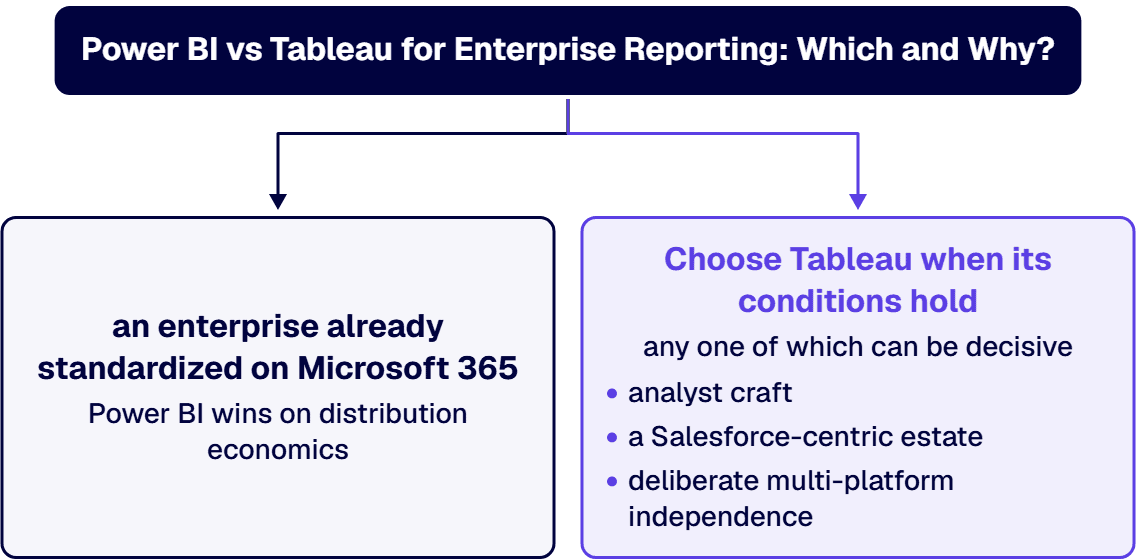
What we counsel against is running both indefinitely without a boundary. Two BI platforms means two semantic models for the same numbers, and sooner or later two versions of the truth in front of two executives. If both exist, one platform should own governed enterprise reporting and the other should have a named, bounded constituency and a review date.
Whichever product wins, the tool is the smaller half of the decision. Executives trust a report because the numbers reconcile, the refresh is monitored, access is reviewed, and a change to a measure goes through review before it reaches a board pack, none of which a license buys. That is design work: a certified semantic model, a workspace and deployment pipeline structure, row-level security that mirrors the org chart, and an ownership model for every governed dataset. Enterprise reporting system design consulting engagements at i3solutions typically range from approximately $180,000 to $750,000 for the full three-phase engagement, with the range driven by five factors. The license line is usually the smallest number on that page, and the one that gets all the attention.
Before Power BI or Tableau draws a single chart, an enterprise usually has to settle where its numbers come from, because Azure SQL tables, Dynamics extracts and departmental spreadsheets often hold three different counts of the same customer, and choosing that shared source layer is the starting decision for an enterprise analytics foundation.
The value of the decision shows up operationally, not in the tool demo. On a nuclear power operator, i3solutions replaced a manual reporting process with an automated dashboard that saved over $293,000 a year and, more importantly for the control environment, removed the manual reconciliation that had been the audit exposure. Custom Power BI dashboard development engagements at regulated enterprises typically range from $80,000 to $150,000 for a bounded project covering a single business area with a stable data source register, and from $300,000 to $750,000 for a multi-wave program covering enterprise-scale analytics capability with full governance, compliance evidence chains, and adoption work across multiple business units. Those numbers, from our custom Power BI dashboard development practice, are what the reporting decision actually costs and returns when it is treated as an operating capability rather than a software purchase. After the tool choice, the next question is which firms lead analytics and reporting for regulated enterprises.
We start from the audience, because that is where the money and the risk both live: who consumes reports, how many of them there are, what they consume on, and what a regulator will one day ask about access. Then we model three-year license cost under your real headcounts, the governance requirements your compliance regime imposes, and the migration effort if an incumbent estate has to move. i3solutions is a Microsoft Solutions Partner, and we will still tell you when Tableau is the right answer, because a recommendation you can trust on the day it favors the rival is the only kind worth paying for. Teams that already know the direction and need delivery capacity can hire Power BI developers from us directly, or start with the executive-trust problem itself through our business intelligence executives can trust engagement.
At wide audiences, yes, and it is checkable arithmetic. Tableau Cloud viewers list at $15.00 per user per month on Standard and $35.00 on Enterprise; Power BI Pro is $14.00, and a Fabric F64 capacity at roughly $8,410 per month replaces viewer licensing entirely. At 3,000 viewers that is $105,000 per month on Tableau Enterprise against a flat capacity fee plus author licenses on Power BI. For small analyst-only deployments the gap narrows, and Tableau’s Creator tier can be competitive with Premium Per User workflows.
At F64 and above. Below that threshold, every viewer needs a Pro license at $14.00 per user per month. At F64, report consumption is covered by the capacity, and only content authors still need per-user licenses. The crossover point arrives around 600 always-on viewers at list prices, and far earlier once a reserved capacity discount of roughly 41 percent is applied, so any organization with over a thousand report consumers should model the capacity route first.
When a seasoned Tableau analyst team and a large curated workbook estate already exist, when the operational core of the business is Salesforce rather than Microsoft, or when the enterprise deliberately keeps its BI layer neutral across clouds and vendors. In those situations the license premium buys real value, and a forced migration to Power BI can cost more in rebuilt content and lost analyst productivity than it saves in subscriptions.
You can, and many enterprises do during a transition, but an indefinite dual estate needs a boundary. Give one platform ownership of governed enterprise reporting and the other a named constituency, a bounded scope, and a review date. Otherwise you pay twice for licenses, twice for semantic modeling, and eventually once more for the meeting where two executives bring two different versions of the same number.
Custom Power BI dashboard development at regulated enterprises typically runs $80,000 to $150,000 for a bounded, single-business-area project with a stable data source register, and $300,000 to $750,000 for a multi-wave enterprise program with full governance and compliance evidence chains. Full enterprise reporting system design engagements range from approximately $180,000 to $750,000. Licensing is additional and comparatively small: the platform work, not the subscription, is where reporting programs succeed or fail.
As an audience-first cost and governance model, not a feature bake-off: your real viewer and author counts priced on both vendors’ published lists over three years, your compliance regime’s access and audit requirements tested against each platform’s controls, and the migration effort priced honestly if an incumbent estate must move. The deliverable is a written recommendation you can hand to a steering committee, including when the answer is Tableau.

US-Based Microsoft System Integrator | Est. 1997
© i3solutions. All rights reserved.
US-Based Microsoft System Integrator | Est. 1997
© i3solutions. All rights reserved.


