
Power Platform decisions come up faster than roadmaps account for, usually once a citizen-developer app has outgrown its original scope or an executive asks why governance didn’t catch what shipped. These answers address the specific calls IT Directors and Power Platform owners face, from licensing and environments to where custom development has to take over.
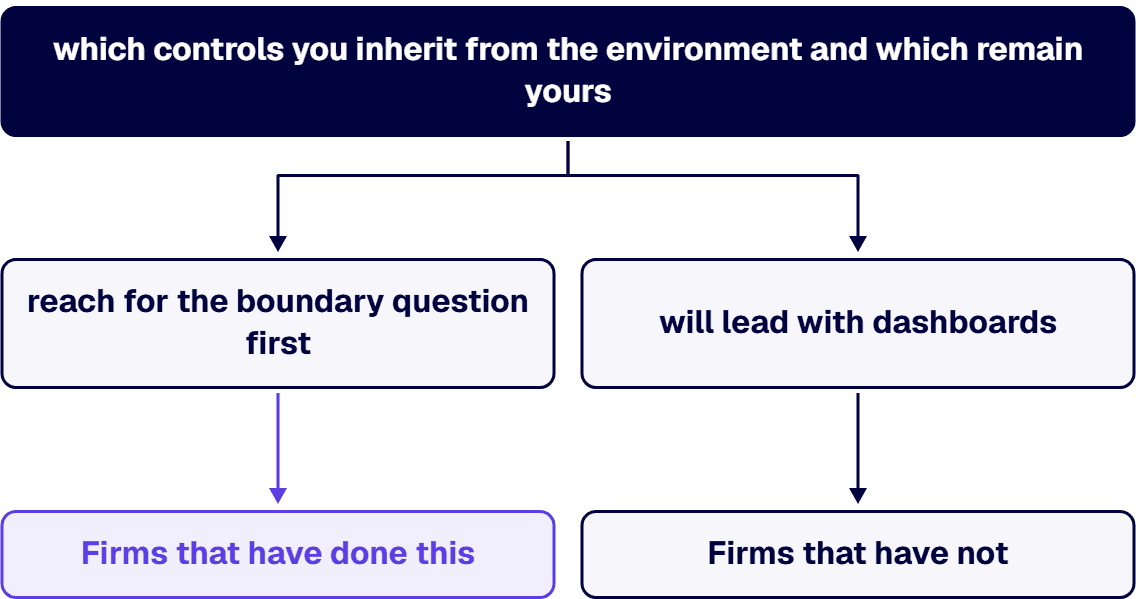
Answer the platform question before the firm question, because the platform question decides which firms are even eligible. Compliance here is a property of the environment your data sits in and the controls you implement, not a badge a reporting vendor carries. Hire a firm that will write down the boundary determination before anyone buys a license, implement analytics inside that boundary against named control families, produce the evidence artifacts your package needs, and staff the work with US-based engineers. Firms that have done this reach for the boundary question first. Firms that have not will lead with dashboards.
This selection goes wrong in a specific and expensive way. A team asks for an analytics platform that is compliant with government regulations, several vendors answer with a product demonstration, and the boundary decision that actually governs the program gets made late, by whoever notices it first. By then the semantic models are built, the licenses are bought, and the finding is that the data was never in the right environment.
Both need answering, and they need answering in that order.
The environment is what carries the authorization. Under FedRAMP, authorizations are issued to cloud service offerings and published on the FedRAMP Marketplace. Department of Defense provisional authorizations are issued under the DoD Cloud Computing Security Requirements Guide, which defines the impact levels and the protections required at each. Whether a given analytics service is available and authorized in a given government environment at a given impact level is a matter of published record that changes over time. Read it at the FedRAMP Marketplace, the Security Requirements Guide, and Microsoft’s own service availability documentation for its government clouds, rather than in any vendor’s summary of them, including this one.
Your reporting system is not compliant because the platform is. Building inside an authorized environment lets you inherit a defined set of controls. The rest are yours: how the data was classified before it reached the model, who can see which rows and on what basis, how long the audit trail is retained, where the data gateway sits, which connectors are permitted, and what happens when a user exports a visual to a spreadsheet. Those are implementation decisions, and they are where analytics programs actually fail an assessment.
The firm you hire does implementation and evidence. Configuring the tenant and the workspaces correctly inside the boundary, implementing the controls that are yours rather than inherited, and producing the artifacts your package needs. That is a large and skilled job. It is not an authorization, and no analytics integrator can hand you one.
Which gives you the fastest disqualifier available. Ask a candidate firm which controls you inherit from the environment and which remain yours, before you look at a single dashboard. A firm that has delivered government analytics answers that unprompted, because it is the first thing that shapes a real scope. A firm that redirects to visualization features has told you what you needed to know.
The reporting layer looks the same. Almost nothing underneath it does.
Watch for the firm that answers the fifth question with a longer capability list. The programs that go badly here are rarely the ones executed poorly. They are the ones where nobody wrote down which party owned the compliance work until the package was due.
The relevant record is analytics and reporting built for government and defense organizations, described here without naming them.
For a federal policy office, real-time dashboards and full audit trails now provide 100% visibility into the status of every correspondence package. That combination is the point: the dashboard is the visible half, and the audit trail is the half an assessor asks about. The account is in the correspondence management case study for a federal policy office.
For a US military command, i3solutions built a modular, highly customizable data fusion platform that brings together information from over 250 global sources into a single pane of glass, with visualization tools including geo-spatial mapping, heat maps, and dashboards that empower analysts and decision-makers to quickly identify and understand connections across multi-dimensional datasets. The full account is in the data fusion case study for a US military command.
For a state National Guard organization, mission teams can generate daily and cumulative attendance reports in minutes instead of hours, achieving an estimated 40 to 50 percent improvement in operational throughput across missions. On the same program, error rates that once averaged around 1% per payroll cycle were nearly eliminated, closing prior audit findings and ensuring compliance with federal reporting standards. Closing an audit finding is the sentence that matters to a compliance reader, and it is in the reporting modernization case study for a state National Guard organization.
For a national security technology contractor, automated workflows replaced weeks of manual reporting, cutting average turnaround time from three weeks to three days and speeding promotion reviews by 85%, and managers gained real-time visibility into promotion readiness, reducing HR reporting effort by 20% and saving roughly $150K each year in administrative time. That record is in the reporting automation case study for a national security technology contractor.
Outside government, on a nuclear power operator, i3 replaced a manual reporting process with an automated dashboard that saved over $293,000 a year and, more importantly for the control environment, removed the manual reconciliation that had been the audit exposure. Regulated is not the same as government, and it is named here as the adjacent case rather than as evidence of the government one.
The surrounding capability is the part that makes analytics inside a boundary possible, and the most directly relevant fact on this page is a Power BI one. i3solutions has deployed Power BI inside a GCC High tenant and inside Azure Government for a federal customer. That sentence is about those two environments and nothing beyond them. The rest of the boundary record sits alongside it rather than inside it. i3 installs and helps configure applications inside IL4 and IL6 government cloud environments and other government networks. i3solutions runs migrations against named control families across CMMC, HIPAA, SOC 2, and NIST 800-171, producing artifacts auditors can review. i3solutions advises clients on federal compliance posture as its own assessment rather than as a restatement of Microsoft’s documentation, including whether SharePoint Online meets NIST 800-53, whether Azure Government is required under the DoD Cloud Computing SRG, and whether a CMMC gap assessment is needed to bid. And i3solutions runs a governed Power Platform for a federal defense agency supporting roughly 10,000 personnel across about 180 locations, which works because it is governed, not despite it.
Now the boundaries, stated plainly rather than left to inference. i3solutions does not hold a FedRAMP authorization at any impact level and does not hold a Department of Defense authorization of its own. It does not authorize, accredit, or issue an authority to operate for any system, because those determinations sit with the government. It does not perform the independent assessment. Each of those would be a stronger sentence to write and none of them would be true, which is the reason this section exists on a page whose readers are buying assurance.
The firm-level facts are straightforward. i3solutions is a Microsoft Solutions Partner. i3solutions is an SBA certified small business providing technical and professional services to US Federal Agencies, the DoD and the private sector. i3solutions has completed more than 600 Microsoft platform implementations. All i3solutions Power BI and analytics developers, architects, and consultants are 100% U.S.-based. i3solutions routes a senior U.S.-based engineer to a client call usually within one to two weeks.
Published bands, so you can size the program before a call rather than after one. These are i3solutions engagement ranges for regulated enterprises. Analytics engagements delivered inside a government cloud boundary are the same type of services work as commercial engagements; the difference is additional compliance steps, not a pricing premium. Those steps are real work and they take real hours, so a government program tends to land toward the firmer end of a band rather than under it.
Custom Power BI dashboard development engagements at regulated enterprises typically range from $80,000 to $150,000 for a bounded project covering a single business area with a stable data source register, and from $300,000 to $750,000 for a multi-wave program covering enterprise-scale analytics capability with full governance, compliance evidence chains, and adoption work across multiple business units. Enterprise reporting system design consulting engagements at i3solutions typically range from approximately $180,000 to $750,000 for the full three-phase engagement.
Treat these as bands for sizing a decision, not as a quotation. The variables that move a government analytics program inside them are the number of regulatory frameworks in scope, the number of environments, the state of the data source inventory, and how much evidence work the package needs.
Honest disqualification is cheaper than a bad engagement. i3solutions is not the right vehicle when you need an independent assessment performed, when you need a party to own and sign your authorization package, when the program needs a prime contractor fronting a large multi-vendor structure, when the requirement is lowest-price-technically-acceptable staffing, when your platform direction is away from Microsoft, or when you want a fixed price quoted on a data estate nobody has inventoried, because a number produced that way is one we would not stand behind.
The fit is a government, defense or regulated organization that has the environment decision made or nearly made, and needs analytics and reporting designed and delivered correctly inside it, controls implemented and evidenced against named families, and the Power BI, data platform and governance work under it done by senior US-based engineers.
Shortlist two or three firms and ask each for the same four artifacts: the written boundary and classification finding they would produce, the customer responsibility split they expect on your architecture, an evidence artifact from a comparable engagement, and their change-order trigger language. Verify every authorization claim at its primary source rather than in a capability deck, and weight the answers by which firm was most precise about what it does not do. In this market that precision is the strongest available signal that a firm has been through an assessment cycle on someone’s program.
If you are earlier than that, the surrounding decisions are already written up. Read the Azure Government migration guide for the environment decision itself, the GCC High and GCC comparison if a Microsoft 365 tenant rather than Azure workloads is what is in question, GCC High and sensitive data protection if the driver is controlled unclassified information, and CMMC technology consultants if an assessment date rather than an environment is driving your calendar. On the analytics side, the enterprise reporting system design and enterprise analytics operating model pages describe the delivery method, hiring senior Power BI developers covers the staffing route, and US-based teams versus global delivery centers covers the staffing question this work forces.
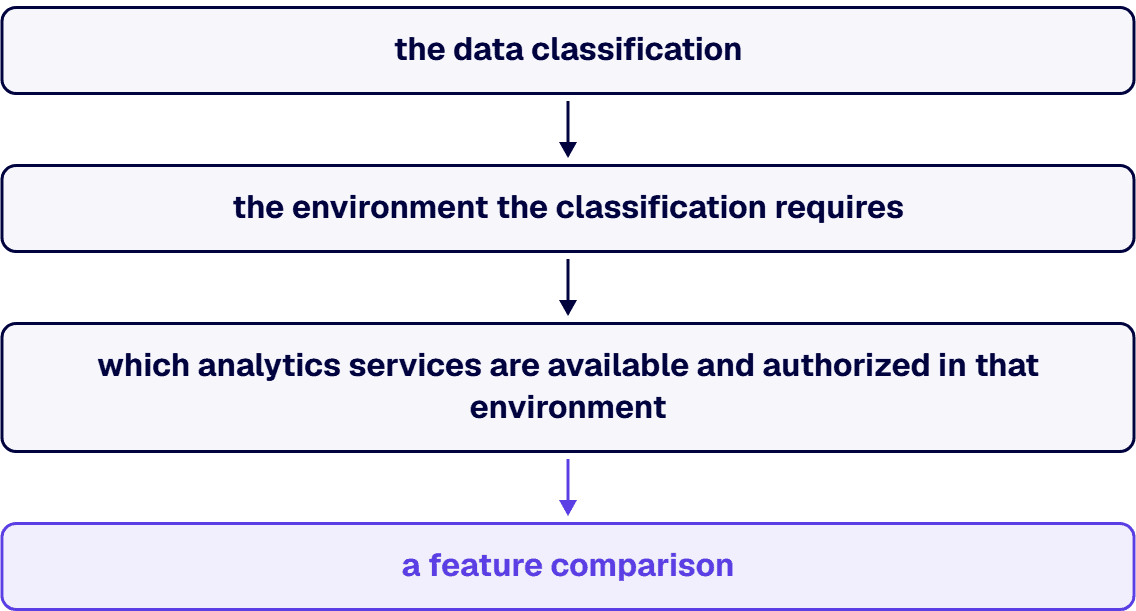
The question is better asked as which environment, because the environment sets the ceiling and the platform inherits it. A reporting tool running against data in a commercial tenant does not become suitable for controlled unclassified information because it has strong feature names. Determine the data classification first, then the environment the classification requires, then which analytics services are available and authorized in that environment at your impact level, checking service availability documentation and the FedRAMP Marketplace directly. Only then does a feature comparison mean anything. Firms that answer this with a product name have skipped the two steps that decide the outcome.
Rather than take a list on trust, test each candidate on three checkable things: named delivery inside a government cloud boundary at a stated impact level, the ability to map inherited against customer-responsibility controls on your architecture before quoting, and an evidence artifact from a comparable engagement. On the first of those, i3solutions has deployed Power BI inside a GCC High tenant and inside Azure Government for a federal customer. Separately, i3solutions installs and helps configure applications inside IL4 and IL6 government cloud environments and other government networks, runs migrations against named control families across CMMC, HIPAA, SOC 2, and NIST 800-171 producing artifacts auditors can review, and runs a governed Power Platform for a federal defense agency supporting roughly 10,000 personnel across about 180 locations. It does not hold a FedRAMP or Department of Defense authorization of its own, and any firm telling you it holds one on your behalf is describing something that is not theirs to give.
Custom Power BI dashboard development engagements at regulated enterprises typically range from $80,000 to $150,000 for a bounded project covering a single business area with a stable data source register, and from $300,000 to $750,000 for a multi-wave program covering enterprise-scale analytics capability with full governance, compliance evidence chains, and adoption work across multiple business units. Enterprise reporting system design consulting engagements at i3solutions typically range from approximately $180,000 to $750,000 for the full three-phase engagement. Analytics engagements delivered inside a government cloud boundary are the same type of services work as commercial engagements; the difference is additional compliance steps, not a pricing premium. Those steps take real hours, so a government contractor tends to land toward the firmer end of a band. The factors that move a program within the band are the number of regulatory frameworks, the number of environments, the state of the data source inventory, and the depth of the evidence package.
A dedicated team is one way to get the outcome, and it is not the requirement. What is required is that named things have named owners: who classifies a source, who certifies a dataset, who approves a workspace, who reviews access, and how long the audit trail is kept. In a smaller organization those can sit with two or three people who already have other jobs, provided the assignments are written down and the review cadence actually runs. What fails an assessment is not the absence of a team, it is the absence of an owner. Self-service analytics without that ownership model is how a regulated estate ends up with hundreds of reports nobody can attest to.
Not on its own, and the phrasing hides the split that matters. Under FedRAMP, authorizations are issued to cloud service offerings and published on the FedRAMP Marketplace, and Department of Defense provisional authorizations are issued under the DoD Cloud Computing Security Requirements Guide. Your own reporting system carries its own boundary, and your authority to operate is issued by your authorizing official on the strength of a package your organization owns. What an implementation firm can do is configure the analytics estate correctly inside the boundary, implement the controls that are yours rather than inherited, and produce the artifacts your package needs. That is most of the work, and it is not an authorization.
Administrative access to government environments carries personnel constraints, so in practice the answer is yes for anyone touching the environment, and it should be established in writing during scoping rather than at onboarding. Ask specifically where the people administering the tenant, the workspaces and the data gateway sit, because that is the access that matters and it is frequently the access nobody asked about. All i3solutions Power BI and analytics developers, architects, and consultants are 100% U.S.-based. i3solutions routes a senior U.S.-based engineer to a client call usually within one to two weeks.
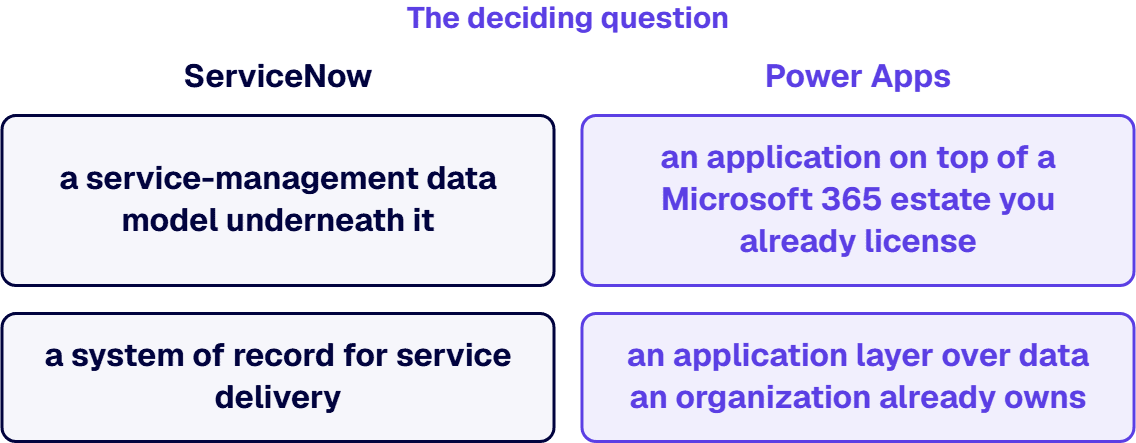
Power Apps and ServiceNow are not competing for the same job, and an evaluation run as a feature bake-off usually picks the wrong one. ServiceNow is a system of record for service delivery: its own product page describes ITSM as a way to “Unify incident, change, problem, and service request management on one platform” and to “Consolidate incidents, changes, problems, and requests on one CMDB” (servicenow.com). Power Apps is an application layer over data an organization already owns, which Microsoft documents as giving licensed users the ability to “create and run apps, bots, flows, and custom websites across multiple data sources that extend beyond Microsoft 365” (Microsoft Learn). The deciding question is therefore not which product automates a workflow better. It is whether the process needs a service-management data model underneath it, or needs an application on top of a Microsoft 365 estate you already license. One disclosure before any of the detail: i3solutions is a Microsoft firm with no ServiceNow delivery record, so every ServiceNow statement below is a quotation from ServiceNow’s own published pages rather than a report of our experience.
We build on the Microsoft stack. i3solutions has built and supports hundreds of production Power Automate flows across its client base. We have no ServiceNow implementations, no ServiceNow migration record, and no benchmark comparing the two in production. Pretending otherwise would be the easiest way to make this page useless to the person reading it.
So the page is built asymmetrically on purpose. Anything asserted about ServiceNow is quoted from ServiceNow’s published product documentation and linked at the point of use, so you can check it against the vendor rather than against us. Anything asserted about Power Apps is either quoted from Microsoft Learn or drawn from delivery work we can stand behind. Where we have no evidence, the page says so and stops.
Every row above resolves to the same underlying split. ServiceNow arrives with a service-management data model and the processes that run on it, and the automation tooling is how you extend what is already there. Power Apps arrives with no process content at all, and the automation tooling is how you build what does not exist yet. That is why the comparison feels slippery when it is run feature by feature: one product is selling you a finished domain model, the other is selling you the means to express your own.
The practical consequence lands on the estate you already run. Microsoft’s position is that Power Apps and Power Automate for Microsoft 365 “enable users to extend and customize the Office experience: with these productivity apps, users can create applications and flows based on Microsoft 365 data” (Microsoft Learn). An organization whose approvals, documents, forms and identity already live in Microsoft 365 has a shorter distance to travel with Power Apps than the raw feature comparison suggests. An organization running a service desk against a CMDB has a much shorter distance with ServiceNow, for the same reason pointed the other way.
On the Microsoft side the primary control is the connector. Policy is written against what a maker is allowed to connect to, and Microsoft documents connectors as “strongly typed representations of RESTful application programming interfaces” that administrators then permit or block (Microsoft Learn). Managed environments layer tenant-scale administration on top of that, and neither control configures itself.
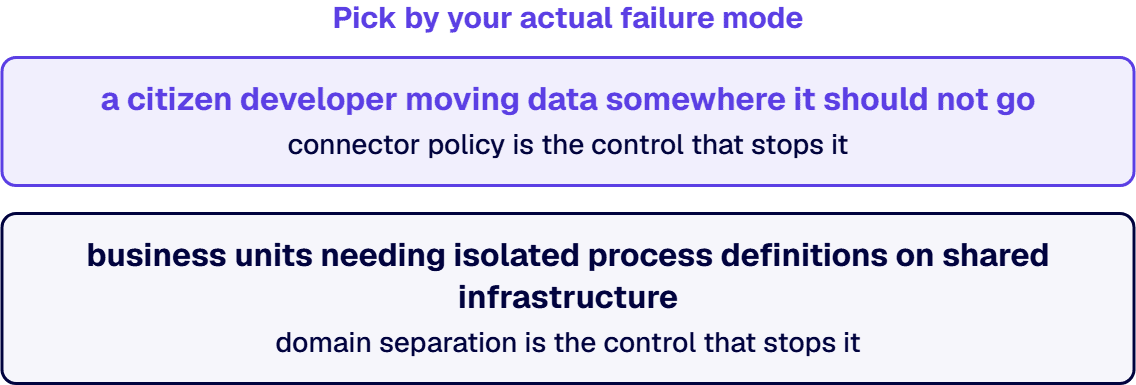
ServiceNow’s published control in the same space is structural rather than connector-based, separating flows and actions by domain for multitenant operation (servicenow.com). Pick by your actual failure mode rather than by the product. If the thing that worries you is a citizen developer moving data somewhere it should not go, connector policy is the control that stops it. If it is two business units needing isolated process definitions on shared infrastructure, domain separation is the control that stops it, and connector policy will not substitute.
Governance features and licence tier are not independent choices on the Microsoft side. The licensing-tier consequences are worked through in our comparison of Power Apps Premium and per-app licensing.
Power Apps development work ranges from $50,000 to $350,000 per project, depending on size, complexity and length. That band is our own attested figure and it is deliberately wide, because those three variables move it. We publish no midpoint and no typical figure, since a single number would mislead anyone whose project sits at either end.
i3solutions implements Power Platform licensing across Power Apps per-app and per-user plans, Power Automate per-flow and per-user plans, and the Microsoft 365 default entitlements where app complexity is low. What we will not do on this page is attach a dollar figure to any of those tiers. Microsoft owns those prices, they change, and a licensing number copied into a comparison page is stale the week after it is published. Read them from Microsoft, or ask Power Apps licensing consultants to model your specific user mix.
We quote no ServiceNow price at all. ServiceNow does not publish per-seat pricing on the product pages cited above, and inventing a figure to fill the other column of a comparison table is exactly the failure this page exists to avoid. Get that number from ServiceNow or from a ServiceNow partner.
One engagement is worth naming because it is the shape of problem this comparison usually starts from: an organization sitting on aging Microsoft forms infrastructure, deciding whether to modernize in place or move the whole process onto a different platform. Replacing 32 outdated InfoPath forms with Power Apps reduced maintenance demands by 40%, saving an estimated $150K-$200K annually in IT labor and support. The full engagement is written up in our Wisconsin National Guard InfoPath modernization case study.
Note what that outcome is and is not. It is evidence that a forms-and-approvals estate can be rebuilt on Power Apps with a measurable drop in maintenance load. It is not a comparison against ServiceNow, because no ServiceNow alternative was evaluated in that engagement and we would have no standing to score it if it had been.
Teams that reach question five and find both answers plausible usually have two separate problems wearing one name. The related decision between workflow-automation tooling specifically, rather than platforms, is worked through in our comparison of Power Automate and Workato, and the wider set of product-versus-product decisions sits in our service comparisons library.
The build side of that decision is what we do. Our Power Platform development services cover architecture, environment strategy, Dataverse design and the governance configuration that keeps a citizen-developer programme from turning into an unmanaged sprawl of apps. For staffing an existing programme rather than starting one, see hire Power Apps developers.
For a line-of-business workflow, frequently. For IT service management, you would be rebuilding process content that ServiceNow ships, since ServiceNow states that its ITSM product “aligns with ITIL standards to manage access and availability of services, fulfill service requests, and streamline services” (servicenow.com). Power Apps has no equivalent out of the box. Where the work is forms, approvals and departmental process rather than service management, replacement is realistic. Replacing 32 outdated InfoPath forms with Power Apps reduced maintenance demands by 40%, saving an estimated $150K-$200K annually in IT labor and support.
The platform that already holds the records your process runs on. ServiceNow positions Flow Designer to “Automate any process, from simple productivity to complex transformation, in a no-code environment” (servicenow.com), and Microsoft documents Power Apps and Power Automate as letting licensed users “create and run apps, bots, flows, and custom websites across multiple data sources that extend beyond Microsoft 365” (Microsoft Learn). Both statements are true and neither settles anything. What settles it is whether your process needs a service-management data model underneath it or an application on top of an estate you already license.
No. i3solutions is a Microsoft firm with no ServiceNow delivery record, no ServiceNow migration experience and no production benchmark comparing the two platforms. Every ServiceNow statement on this page is quoted from ServiceNow’s own published product pages and linked at the point of use so you can verify it against the vendor. If ServiceNow is the right answer for your process, go to a ServiceNow partner.
Power Apps development work ranges from $50,000 to $350,000 per project, depending on size, complexity and length. We publish no typical or midpoint figure, because the three variables in that sentence move a project from one end of the band to the other. Licensing is a separate line: i3solutions implements Power Platform licensing across Power Apps per-app and per-user plans, Power Automate per-flow and per-user plans, and the Microsoft 365 default entitlements where app complexity is low. Current per-seat prices should be read from Microsoft rather than from a comparison page.
They solve different risks. Microsoft’s primary control is the connector, and Microsoft states that “Power Platform admin center data policies allow administrators to control access to these connectors in various ways to help reduce risk in your organization” (Microsoft Learn), with managed environments described as “a suite of premium capabilities that allow admins to manage Power Platform at scale” (Microsoft Learn). ServiceNow’s published control in this area is structural, offering domain-separated flows that “Create flows and actions in multitenant environments, a feature ideal for MSPs and large enterprises” (servicenow.com). Connector policy addresses data leaving where it should not; domain separation addresses business units needing isolated process definitions.
The metering model is the same in GCC, GCC High, and DoD as it is commercially: three meters for database, file, and log, entitlements that accrue at the tenant level, and add-on capacity sold in one gigabyte increments. What changes is how you buy it and which overage routes exist. Microsoft sells government subscriptions and add-ons through Volume Licensing for GCC High and DoD, and the pay-as-you-go plan that a commercial tenant uses to absorb Dataverse overage is listed as not available in both. The per gigabyte figures Microsoft publishes are commercial ones, described in its own licensing guide as USD ERP and subject to change, so the number a government program actually pays comes off a channel price sheet rather than a public page. Size the capacity first, then price it through the channel that serves your cloud.
The question usually arrives with a spreadsheet attached. A program office models three years of Dataverse growth for a GCC High tenant using the per gigabyte rates on Microsoft’s public pages, finance signs off, and the reseller quote comes back on a different basis. Or the tenant crosses its entitlement, an administrator goes looking for the pay-as-you-go switch the commercial documentation describes, and the option is not there. Or auditing was turned on across every environment for compliance reasons, log storage started accruing on day one, and nobody modeled it. Or someone assumes the capacity bought under the commercial tenant covers the government one. None of these are billing errors. They are what happens when a metering model that really is identical across clouds gets bought through a channel that is not.
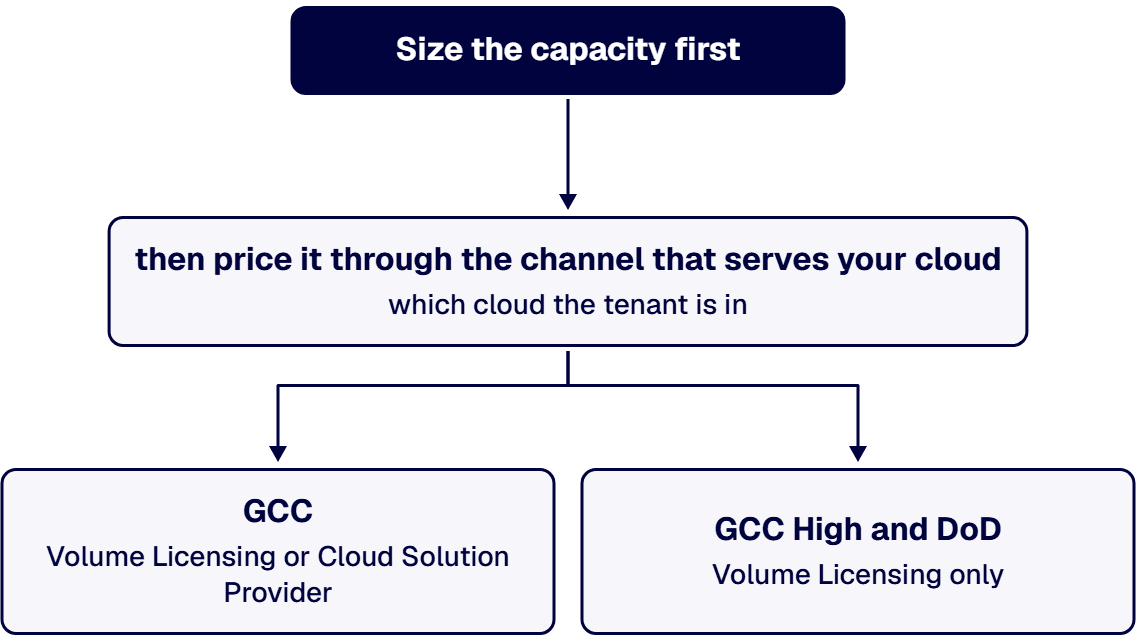
That order matters, because the two halves fail differently. A sizing error compounds quietly for a year. A channel error surfaces at purchase, when the quote you budgeted against turns out not to be the quote you can buy.
Dataverse capacity is measured in three separate buckets, and they are not interchangeable. Microsoft’s Dataverse capacity documentation splits usage into database, file, and log, with file storage holding attachments and image columns, log storage holding the audit and plug-in trace tables, and the database holding everything else. Entitlement is a licensing construct rather than a technical ceiling. Microsoft states it directly: “There’s no technical limit on the size of a Dataverse environment. The limits mentioned on this page are entitlement limits based on product licenses you purchase.”
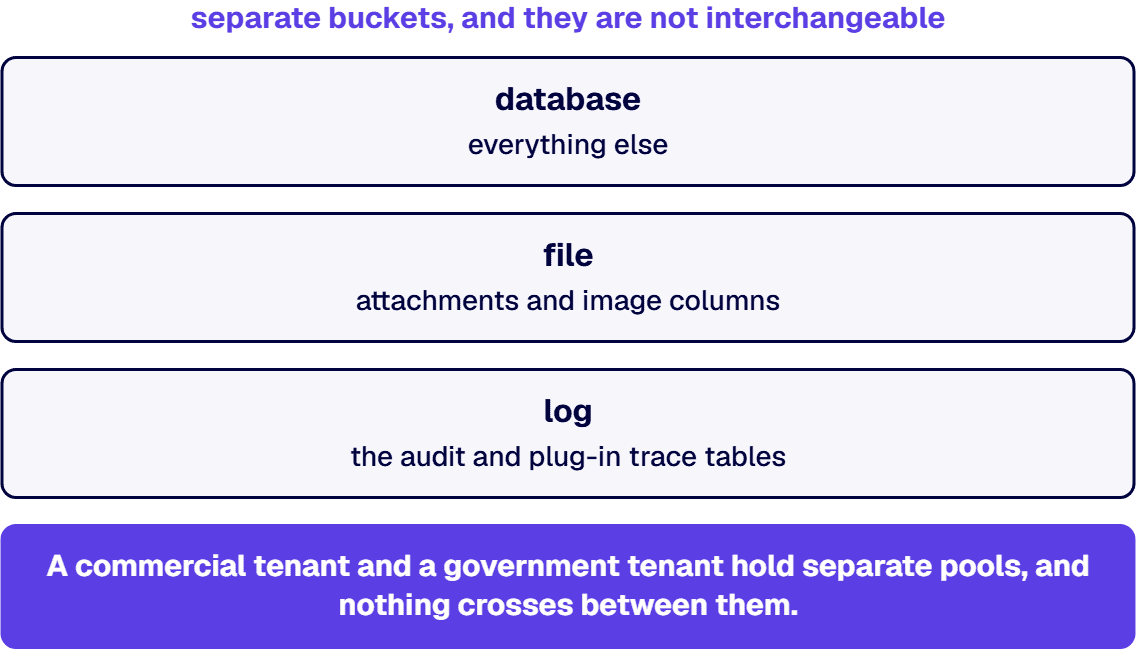
Capacity arrives in three ways before a single add-on is purchased.
All of it pools at the tenant. The licensing guide is explicit that “Dataverse Database and Dataverse File capacity entitlements accrue at the tenant level,” and Microsoft’s capacity add-on documentation says the same thing about purchased capacity: “Microsoft Dataverse storage capacity add-ons don’t require allocation at an environment level because all storage capacity add-ons accrue to tenant-level storage entitlements.” A tenant is the unit of account. A commercial tenant and a government tenant hold separate pools, and nothing crosses between them.
There are two published paths to buy storage beyond entitlement, and they are priced differently from each other before any cloud is considered.
Prepaid add-ons, sold by subscription. The Power Platform Licensing Guide of August 2026 prices the three meters in one gigabyte increments: the database add-on at “$40/month” per gigabyte, a database tier 2 add-on at “$30/month” with a minimum quantity of 1,000, the file add-on at “$2/month”, and the log add-on at “$10/month”, all marked billed annually. Microsoft’s published database rate is twenty times its published file rate, which is why a document heavy solution that stores attachments as database rows rather than file columns costs far more than the same data held in file columns.
Consumption, through pay-as-you-go. Microsoft’s pay-as-you-go meter documentation publishes the consumption rates for environments linked to an Azure subscription: “For usage above 1 GB for database: $48 per GB/month”, $2.40 per gigabyte per month for file, and $12 per gigabyte per month for log. Those environments get a one gigabyte database and one gigabyte file allowance each and no log allowance at all, so as Microsoft puts it, “Log storage is utilized only if auditing is enabled for the environment.”
Both sets of numbers are commercial list figures, and Microsoft labels them as such. The licensing guide states that “All pricing is USD ERP and subject to change.” The meter page attaches the same caveat to its own worked example: the prices shown “are illustrative only. Your organization’s pricing may vary based on your contract with Microsoft.” That sentence is the honest answer to half of the pricing question, in Microsoft’s own words, and it applies to commercial buyers too.
The documented differences are about who you buy from and which routes exist, not about a different rate.
Two caveats belong with that list, because both surfaces move. Microsoft states that it “strives to maintain functional parity between our commercially available service and those enabled through our US Government clouds,” while also stating plainly that “There are exceptions to the principle of maintaining product functional parity within the US Government clouds.” The availability summary that enumerates those exceptions says of itself that “This information is updated and published every 4-6 weeks and represents our projections at that time.” Cite it with its date, and re-read it before a renewal rather than trusting a copy in a slide deck. Read the current edition rather than a remembered one: the May 2026 edition lists “Capacity management for Dataverse environment” as available in IL2 US GCC, IL4 US GCC High and IL5 US DoD, so per environment capacity allocation is not ruled out by the parity list even though it is often assumed to be.
We looked for a published government cloud rate per gigabyte of Dataverse capacity and did not find one. Because “we could not find it” and “it does not exist” are different sentences, here is the search space and what each source returned.
So the accurate answer to the pricing half of the question is: government pricing exists, it is set in the government program channels, and it is not published on the public surfaces where the commercial rates are. Anyone quoting you a specific government per gigabyte figure sourced from a public Microsoft page is quoting a commercial rate. Ask which price sheet it came from and what date it carries.
The surprises in a federal tenant are usually not the database meter. They are the two nobody modeled.
Log storage, because auditing is not optional for you. Log capacity accrues from no license, is entitled at 2 GB for the tenant in the Power Platform Licensing Guide, and is consumed only when auditing is on. In a regulated tenant, auditing is on everywhere by policy, so a meter that many commercial customers never touch becomes a standing line item on day one. Under consumption billing there is no per environment log allowance at all.
File storage that landed in the database. Microsoft’s capacity documentation is specific about which tables bill to file and which to database: attachments, annotations and file or image columns bill to file storage, and everything else counts against the database. At the published add-on rates of $40 per gigabyte per month for database against $2 per gigabyte per month for file, a design decision made by a maker two years ago can be the largest single input to a capacity forecast.
Microsoft warns before the ceiling rather than at it. Its capacity documentation states that notifications fire when any of the three capacities has “less than 15% remaining capacity or exceed capacity after cross capacity-type borrowing is applied,” a second warning at less than 5%, and environment lifecycle operations such as creating, copying, and restoring are affected once the tenant is over. And the levers that reclaim space, long term retention policies and bulk deletion, are governance decisions with a records retention dimension in a federal context, not a cleanup task to be handed to an administrator on a Friday.
The work this question implies is a scoped capacity and licensing review, sized in weeks, ahead of a renewal or a program milestone. It produces three artifacts: a per meter forecast for each environment with the auditing assumption stated, a purchasing path that matches your cloud and its channel, and a written list of the parity exceptions that apply to your allocation model. It is not a migration, and it is not a managed service.
It also needs someone who has worked inside the accredited boundaries rather than reading about them. i3 installs and helps configure applications inside IL4 and IL6 government cloud environments and other government networks. i3 deployed Power Platform across a federal defense intelligence command spanning 10,000 personnel and 180 locations, which is enterprise scale by any measure. i3solutions is a Microsoft Partner with 30 years of delivery experience.
No. The three meters, the tenant level pooling, the per license accruals, and the one gigabyte add-on increments are the same constructs Microsoft documents for commercial tenants. What differs is the purchasing channel and the availability of the consumption billing route.
Microsoft’s Business Applications US Government feature availability summary of May 2026 lists the pay as you go licensing model as not available under IL4 US GCC High and IL5 US DoD, and available under IL2 US GCC. A separate Power Apps row in the same document is marked available in GCC High, so the document does not agree with itself and the answer for your tenant belongs in writing from your account team. In GCC High and DoD, plan the overage as a prepaid purchase through Volume Licensing instead of assuming a consumption meter will absorb it.
Through the channel Microsoft lists for your cloud: Volume Licensing or Cloud Solution Provider for GCC, and Volume Licensing only for GCC High and DoD, because the Cloud Solution Provider program is not currently available for GCC High customers. Add-ons accrue to the tenant level entitlement, so they do not need to be allocated to a specific environment to take effect.
No. Entitlements accrue at the tenant level, and a government cloud environment can only be created by a US Government associated organization, so a government tenant carries its own pool. Model the two separately, including the one time default entitlement each one received.
Usually one of three things: auditing turned on estate wide, which starts the log meter that no license accrues capacity for; attachments stored as database rows rather than file columns, which bills at the database rate; and an environment count that grew faster than the entitlement, since each production environment draws on the same tenant pool.
They are not alternatives to each other. One question settles it: does every person who will use this thing sign in to your organization and hold a license. If yes, build a Power App. If the users are customers, suppliers, applicants, citizens, or anonymous visitors, build a Power Pages site. Microsoft draws the line itself in its own documentation: “Power Pages is ideal for websites focused on external audiences that require more secure access to your business information.” Both products sit on Microsoft Dataverse, so they share data rather than duplicating it, and a Power Apps Premium license entitles its assigned user to “unlimited Power Apps and Power Pages.” The licensing shape is where the practical difference bites: Power Apps is priced per user per month, Power Pages is priced per site in user capacity packs, and the two units are an order of magnitude apart once an external audience passes ten people. Every price and entitlement quoted on this page links to the Microsoft page it was read from, Power Apps pricing or Power Pages pricing, both read on 20 August 2026.
Power Apps is “a suite of apps, services, and connectors, as well as a data platform, that provides a rapid development environment to build custom apps for your business needs.” It builds two application types, canvas and model-driven, and connects to data “stored either in the underlying data platform (Microsoft Dataverse) or in many online and on-premises data sources (such as SharePoint, Microsoft 365, Dynamics 365, SQL Server, and so on).” Apps run in a browser and on phone and tablet. Microsoft is explicit about the entry requirement: “You need a license to play the apps you make with Power Apps.”
Power Pages is “a secure, enterprise-grade, low-code software as a service (SaaS) platform for creating, hosting, and administering modern external-facing business websites.” It is the newest member of the Power Platform family, and Microsoft frames the shared-data point directly: with Power Pages “you can build sites by using the same shared business data stored in Microsoft Dataverse that you use for building apps, workflows, intelligent virtual agents, reports, and analytics with other Microsoft Power Platform components in your organization.”
Both products read and write the same Dataverse tables, so this is not a data-architecture decision. The two can also run together on a single solution with no integration work between them, which is the shape most enterprise deployments settle into once the external and internal halves of a process are both in scope.
Power Pages sites default to internal. Microsoft documents that “by default, all Power Pages sites are available to users who are internal to your organization,” with Microsoft Entra authentication as an extra layer that “helps to prevent accidental leaks of partially developed website data and designs.” Going live is a deliberate act: “When your website is ready to go live, change the site visibility to public. The public setting makes the site accessible to everyone over the Internet anonymously or to users authenticated through identity providers.”
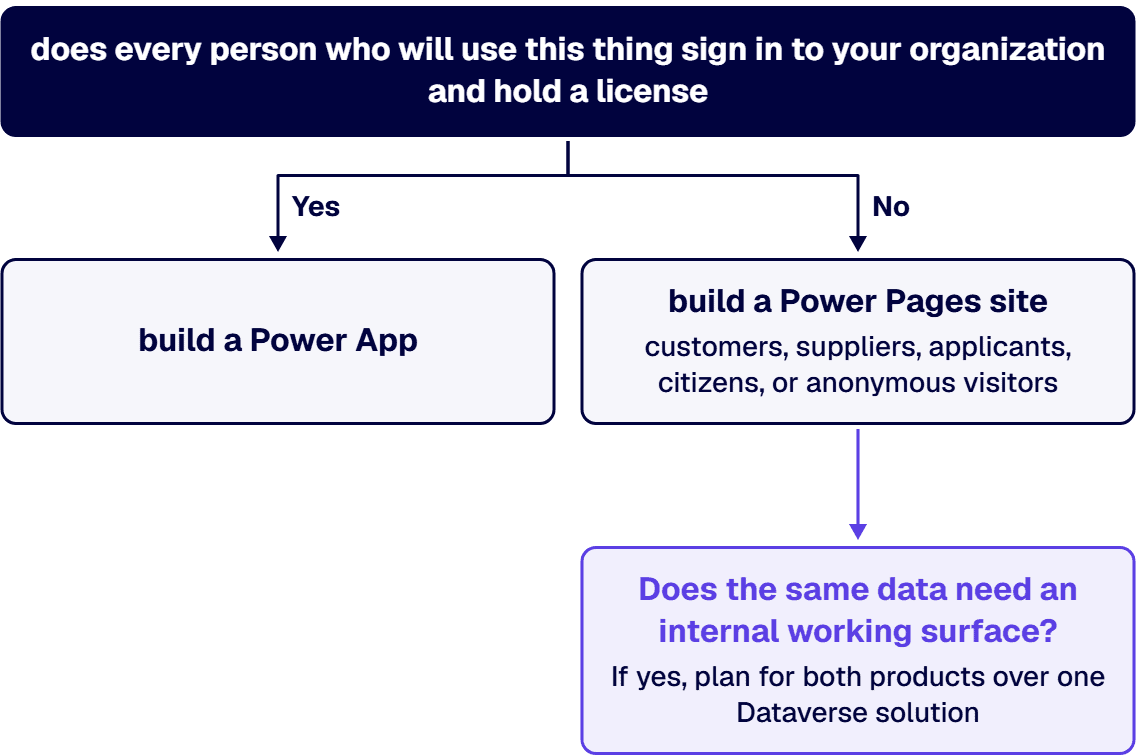
External users on a Power Pages site are represented differently than internal users are in Power Apps. “Microsoft Dataverse contact records represent Power Pages users,” and those users authenticate through providers including Microsoft Entra External ID, Microsoft, and LinkedIn. Nobody in that audience needs a Power Apps license, and nobody in that audience appears in your Entra ID as an employee-shaped identity. That is the whole reason the product exists. When the external audience is why an ERP license seems necessary, read how Power Pages can reduce ERP customization and licensing costs.
Building an external portal as a shared Power App is the specific mistake this dividing line exists to prevent. It requires licensing every external user, exposes an interface designed for authenticated organizational users, and puts the site outside the security model Microsoft built for public traffic.
Every figure in this table was read on Microsoft’s own published pricing pages on 20 August 2026: Power Apps pricing and Power Pages pricing. Microsoft changes prices and entitlements; re-read those two pages before a number reaches a budget.
Dataverse database and file capacity entitlements for subscription plans are pooled at the tenant level, so the storage lines above accumulate across the estate rather than being trapped per site or per seat. One operational note on trials that catches teams out: when a Power Pages trial expires “the site is suspended but not deleted immediately,” and you have seven days to convert the trial site to production.
The two published numbers give you a crossover you can carry into a meeting, so use it rather than reaching for a spreadsheet. One authenticated capacity pack covers 100 people at $200.00 per website paid yearly on the Microsoft Power Pages pricing page read 20 August 2026, and ten Premium seats cost the same $200.00 at $20.00 user/month on the Microsoft Power Apps pricing page read the same day. Ten users is the crossover. Below ten, money is not what decides it and you should choose on identity and security instead. Above ten, the per-site unit is cheaper and the gap widens with every person added: a supplier portal expecting 2,000 authenticated users a month is 20 capacity packs, against 2,000 Premium seats for the same headcount under the per-user model. A 40-person internal process runs the other way and stays a Power App, because those 40 people already hold Entra identities and most of them already hold a license.
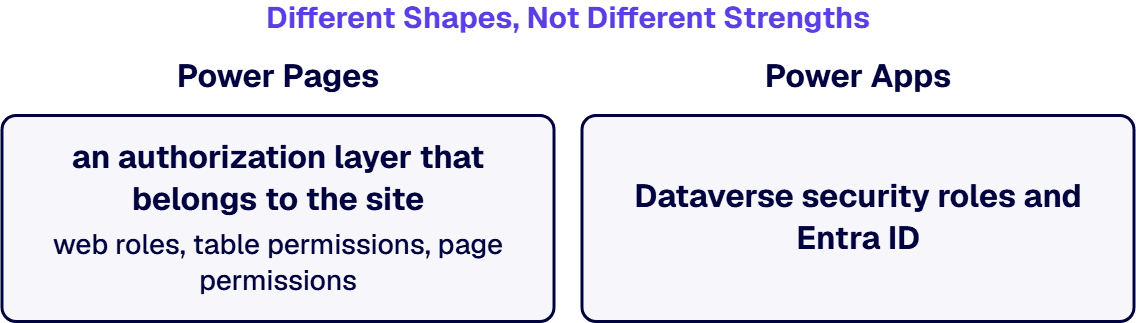
Power Pages carries an authorization layer that belongs to the site rather than to Dataverse. Microsoft lists its components as site visibility, authenticated users, web roles, table permissions, page permissions, HTTPS headers, and security scan. Web roles “link to users, table permissions, and page permissions,” and because a user can hold several, “they can get cumulative access to site resources.” Every authenticated contact is automatically assigned to the Authenticated Users web role, and unauthenticated visitors “can visit a site and get access to assets through the Anonymous Users web role.” Access to Dataverse data through lists, forms, Liquid, and the Web API is governed by table permissions, and page permissions protect content and components on individual pages.
The hosting posture is documented rather than implied. “Power Pages is hosted as Azure App Service, which has International Organization for Standardization (ISO), System and Organization Controls (SOC), and Payment Card Industry Data Security Standards (PCI DSS) compliance.” It supports TLS 1.2 with built-in Azure DDoS protection, dynamic IP restriction to limit traffic from bad actors, and “secure, configuration-driven mechanisms for admins to address top web security vulnerabilities such as injection attacks, cross-site request forgery, and server-side request forgery.” Sites can be fronted with Azure Front Door for edge caching and web application firewall capabilities, and a built-in security scan detects common threats such as cross-site scripting and insecure libraries.
Power Apps security runs through Dataverse security roles and Entra ID instead, with the platform controls arriving through Managed Environments: data policies, sharing limits, IP firewall, IP cookie binding, customer managed key, lockbox, masking rules, and conditional access on individual apps.
A Power Pages web role is not a Dataverse security role, and table permissions are a separate authorization layer specific to the site. Design a portal on the assumption that internal Dataverse roles will govern external access and nothing breaks in development, nothing breaks in user acceptance testing, and the gap surfaces in a penetration test or in live traffic instead.
Power Pages authoring runs through a design studio with five workspaces: Pages for creating and arranging webpages, Styling for themes, Data for creating and modifying the Dataverse tables behind the site, Set up for administration and site management, and Security for identifying and addressing vulnerabilities. Rendering is built on Bootstrap, which “natively provides support for building websites that are responsive, mobile-friendly, and available in various form factors.” Professional developers extend the same site using Visual Studio Code and the Microsoft Power Platform CLI, the in-product code editor, and code components.
Power Apps authoring splits by app type. Power Apps Studio builds canvas apps, described by Microsoft as making “creating apps feel more like building a slide deck in Microsoft PowerPoint,” while the app designer defines the sitemap and components for model-driven apps. Extension for professional developers covers server-side logic with Azure functions, plug-ins, and workflow extensions, client-side logic with JavaScript, integration with external data through virtual tables and webhooks, custom connectors, and embedding apps into website experiences.
Visual Studio Code with the Microsoft Power Platform CLI on the Power Pages side, and plug-ins, Azure functions and custom connectors on the Power Apps side, are both documented professional-developer paths. Enterprise deployments end up on those paths, which is worth knowing before either product is budgeted as a citizen-developer exercise.
The common enterprise shape uses both products against one Dataverse solution. An external audience submits through a Power Pages site. The records land in Dataverse. Internal staff work them in a model-driven Power App with Dataverse security roles governing who sees what. Power Automate moves the record through approvals and notifications. Power BI reports on the whole thing, and Microsoft documents the embed capability that surfaces those reports inside the Power Pages site, along with the ability to add Microsoft Copilot Studio chatbots to external-facing sites.
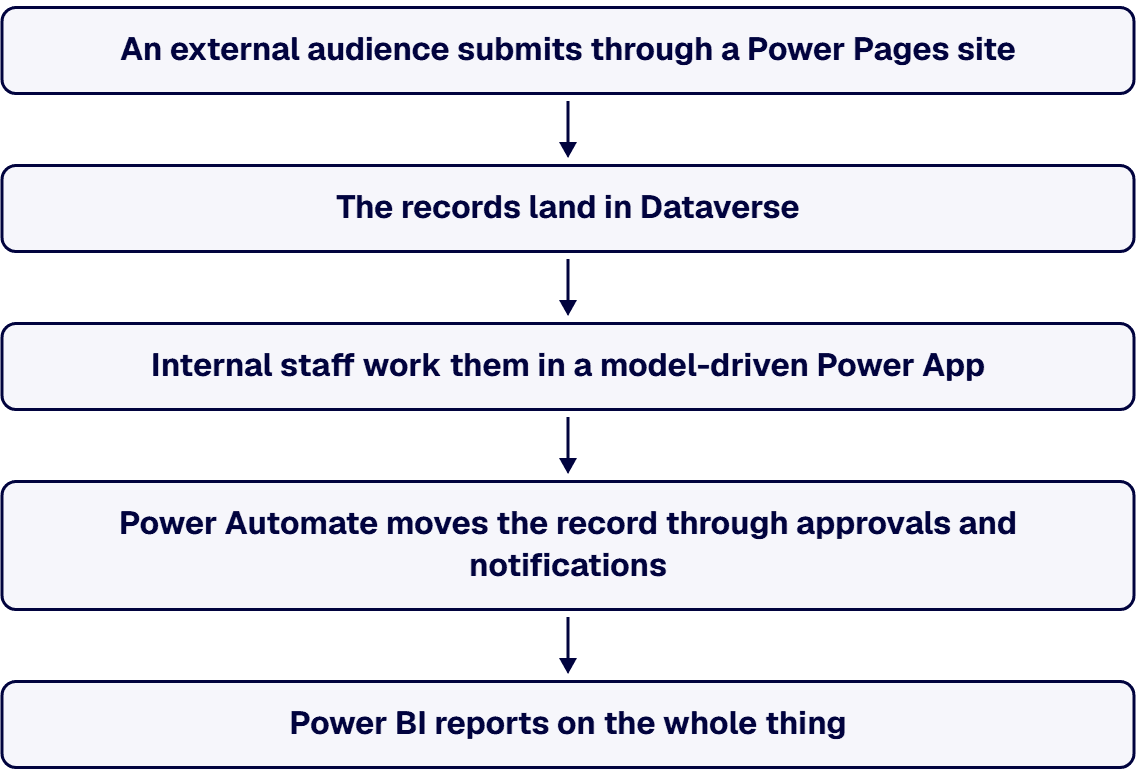
Designed that way, there is no integration layer between the portal and the back office, because there is only one data store. The alternative is where the cost shows up: a portal product in front of a separately purchased case-management tool buys a scheduled reconciliation job, a duplicate identity record per applicant, and a status field that answers differently depending on which screen it is read from. Inside the Power Platform that applicant is one Dataverse contact record, authenticated by the site and read by the internal handler under a Dataverse security role, and the Data workspace in the Power Pages design studio edits the same tables the model-driven app runs on. Nothing has to be reconciled because nothing has to be kept in sync.
1. Will every user sign in to our tenant? If yes, Power Apps. If no, Power Pages. This question alone resolves most cases.
2. How many external users per month, and are they authenticated or anonymous? This converts directly into Power Pages capacity packs, sold in 100s for authenticated users and 500s for anonymous ones, and gives you a real number rather than an estimate.
3. Does the same data need an internal working surface? If yes, plan for both products over one Dataverse solution rather than building the portal first and bolting on the back office.
4. What is the authentication provider for the external audience? Microsoft Entra External ID, Microsoft, and LinkedIn are documented Power Pages providers. Confirm this before design, because it shapes the contact record model.
5. Is the environment governed yet? Managed Environments are included as an entitlement with standalone Power Apps, Power Automate, Microsoft Copilot Studio, Power Pages, and Dynamics 365 licenses, and explicitly not included in the Developer Plan when users run their assets. A pilot built on developer environments has not been governed, whatever it demonstrated.
i3solutions is a Microsoft Partner with 30 years of delivery experience. i3solutions is a Microsoft Solutions Partner. i3solutions has completed more than 600 Microsoft platform implementations. i3solutions has used Power Pages for several of its applications. The deeper record is on the governance side of the Power Platform: i3solutions runs a governed Power Platform for a federal defense agency supporting roughly 10,000 personnel across about 180 locations, which works because it is governed, not despite it.
The delivery practices that apply on either side of this choice are the same ones. i3solutions governs client Power Platform tenants with the Center of Excellence Starter Kit, tenant-level and environment-level DLP policies, and managed environment controls. i3solutions runs client Power Platform work on a multi-tenant Center of Excellence model with separate Dev, Test, UAT, and Production environments promoted through managed solutions. i3solutions delivery includes ALM practices with Power Platform pipelines or Azure DevOps integration, environment separation strategies, and change control processes.
Three neighbouring questions have their own pages, and they answer different things than this one does. Microsoft Power Pages pros and cons evaluates Power Pages on its own terms once you have decided it is the product. How canvas and model-driven apps work together covers the choice inside Power Apps, which is the next decision after this one. Power Pages external portal security goes further into the web role and table permission model. For delivery, see Power Pages development services and Power Apps development services, both of which sit within the wider Power Platform development services that govern the tenant they run in.
If you are the person writing this up for a steering group rather than the person building it, the shortest route to a defensible recommendation is a working session on your own audience and data: the authenticated and anonymous counts, the Dataverse tables both halves would share, and the authorization design an external audience forces. That is a one-meeting artifact, and it is what a budget approval actually turns on. If you want the reasoning rather than a quote, start here.
Power Apps is a development environment for building custom business applications, in canvas or model-driven form, for users who sign in to your organization and hold a license. Power Pages is a low-code SaaS platform for creating, hosting, and administering external-facing business websites. Both are built on Microsoft Dataverse and share the same business data. The practical difference is the audience and the licensing model that follows from it: Power Apps is priced per user, Power Pages per site in user capacity packs.
No. Power Pages users are represented as Dataverse contact records and authenticate through providers such as Microsoft Entra External ID, Microsoft, and LinkedIn. Capacity is bought per site. The Microsoft Power Pages pricing page, read 20 August 2026, lists $200.00 per website paid yearly for 100 authenticated users per site per month in packs of 100, and $75.00 per website paid yearly for 500 anonymous users per site per month in packs of 500.
A Power Apps Premium license entitles the assigned user to unlimited Power Apps and Power Pages. The Microsoft Power Apps pricing page, read 20 August 2026, lists Premium at $20.00 user/month paid yearly, with a $12.00 user/month tier at a 2,000-seat minimum. That entitlement covers the assigned internal user. It does not cover the external audience visiting a public site, which is what the per-site capacity packs are for.
You can, and it is usually the wrong build. It requires a license for every external user, exposes an interface designed for authenticated organizational users, and leaves you outside the security model built for public traffic, which includes site visibility controls, web roles, page permissions, dynamic IP restriction, and a built-in security scan.
The platform posture is documented: Power Pages is hosted as Azure App Service, which carries ISO, SOC, and PCI DSS compliance, supports TLS 1.2 with built-in Azure DDoS protection and dynamic IP restriction, and can be fronted with Azure Front Door for web application firewall capabilities. What determines your actual exposure is the layer above that: web roles, table permissions, and page permissions. A site is exactly as open as the Anonymous Users web role leaves it. Review the authorization design the way you would review a firewall rule, not the way you would review a form layout.
Yes, and it is a common enterprise pattern. External users submit through a Power Pages site, the records land in Dataverse, internal staff work them in a model-driven Power App, Power Automate handles approvals and notifications, and Power BI reports are embedded back into the site. Because both products read the same Dataverse tables, there is no integration layer between the portal and the back office.
Microsoft Learn documents the lifecycle in What is Power Pages?: a trial gives access to a full-featured Power Pages environment for 30 days at no cost, and when it expires the site is suspended but not deleted immediately, leaving seven days to convert the trial site to production. Put day 30 and day 37 in the project plan on the day the trial starts, and name the production environment the site will convert into before anyone demonstrates it to a sponsor. A proof of concept the business has started relying on is the one that runs out of days.
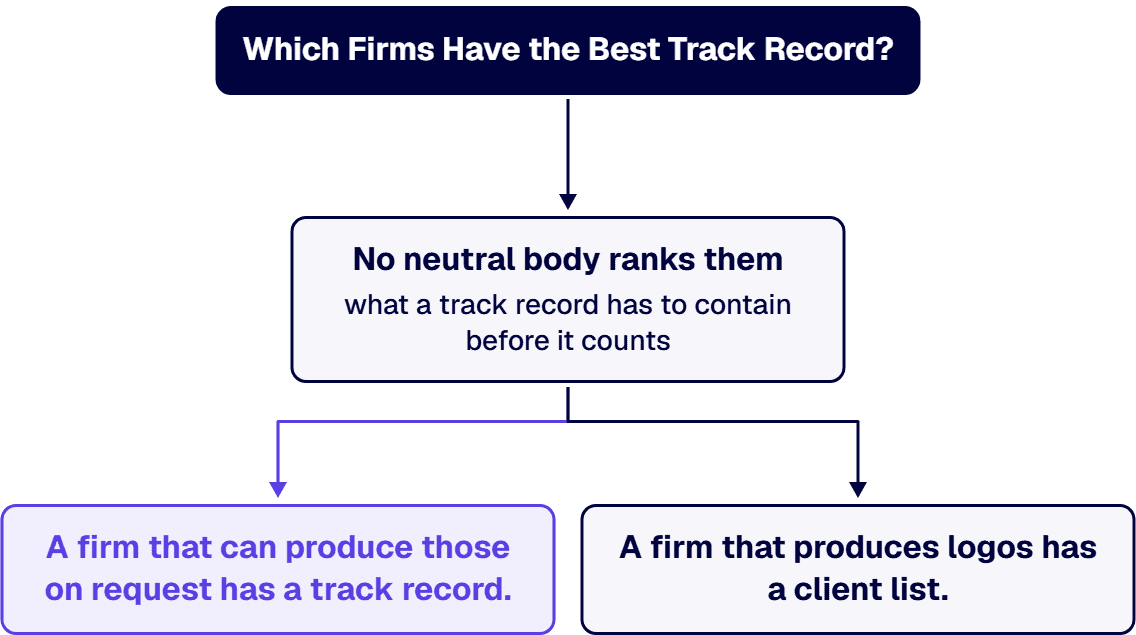
No neutral body ranks them, so the useful question is not who is best but what a track record has to contain before it counts. Require a named production flow estate the firm still supports, application lifecycle management with real pipelines rather than flows built in production, a data loss prevention and connector position written before design, premium connector and capacity licensing modeled before the build estimate, US-based administrators stated in the statement of work, and a written account of what the firm does not do. A firm that can produce those six on request has a track record. A firm that produces logos has a client list.
There is no independent, published ranking of Power Automate development companies. What circulates is vendor-written lists, paid directory placements, and marketplace profiles ordered by transaction volume rather than by what survived in production. Any page handing you ten names in ranked order, this one included, is giving you an opinion. So this page publishes the rubric instead, describes the shapes of firm you will actually meet, and states plainly where i3solutions fits and where it does not.
Power Automate has an unusual failure profile. The build is rarely the hard part. A competent developer can produce a working flow in an afternoon, which is why the category attracts firms with very different commercial structures and why price dispersion across a shortlist is often four to one for what looks like the same scope.
The expensive failures arrive in year two. Flows built directly in production with no environment separation. Connections owned by an individual who has since left. A connector reachable from an environment holding regulated data because nobody wrote a policy with an exception path. A premium connector consumption profile nobody modeled, discovered at renewal. An estate of two hundred flows where no one can say which ones matter, which is a problem we have written about at length in finding the flows that fail silently and assigning ownership.
So a track record is not a count of flows delivered. It is evidence that a firm has been present for the second year of an estate it built. That distinction changes what you ask for, and it eliminates candidates faster than any demo.
A working shortlist for enterprise Power Automate spans about five shapes of firm plus i3solutions. The shape predicts the failure mode more reliably than the logo does, and none of these is disqualifying by itself. The point is to know which risk you are buying and to test for it during evaluation rather than in month four.
Every criterion here is verifiable from a first scoping conversation or from a public source. None requires taking a vendor’s word.
A practical scoring note. Score each candidate zero to three per criterion, weight criteria one, two, and three at double, and apply one evidence rule: a claim with no artifact behind it scores zero, not one. Firms are rarely dishonest in these conversations. They are optimistic, and the artifact is what separates the two. Applied honestly, this usually removes two of five candidates on criterion one alone, which is the reason to run it before the demos rather than after.
Buyers asking which vendor offers the most comprehensive Power Automate implementation services are usually asking a narrower question than the words suggest: which firm can carry the whole arc without a handoff gap. That arc has five parts, and most shortlists contain firms that cover three of them well and quietly subcontract or skip the rest.
The broader enterprise workflow automation practice covers connecting workflows, systems and controls across Microsoft environments with visibility and traceability.
Discovery and process selection. Deciding what should not be automated is the highest-value output of a good scoping conversation, and a candidate that has never recommended against automating something has not been in the room long enough. The reasoning is set out in our guide to the enterprise processes worth automating first.
Environment, governance, and connector architecture. Environment separation, DLP design, connector policy, and the exception path. This is the part that decides whether year two is expensive.
Build and integration. The flows themselves, plus the integration surface underneath them. In practice this is where a Microsoft-centric estate meets everything else, and a firm should be able to say when Power Automate is the wrong tool for a given interface. i3solutions designs Azure integration architecture and builds and operates Azure Logic Apps workflows for enterprise clients, including running them on an ongoing basis rather than only building them, which is the honest version of that answer.
Licensing and capacity. Modelled before design, revisited at renewal. If this is the acute question for you, it has a dedicated page: hiring a firm for Power Automate licensing decisions.
Operate, or hand over. Somebody runs the estate after go-live. The firm should be able to describe both options, and the handover version should come with a named capability target rather than a documentation package. i3solutions Power Automate developers follow a three-phase delivery model designed to minimize risk while building internal capability.
Applying our own rubric to ourselves, with the gap named rather than smoothed over.
The flow estate, and the shape of it. i3solutions has built and supports hundreds of production Power Automate flows across its client base. A single i3solutions customer environment commonly runs 15 to 20 Power Automate flows. So the shape is a supported base of flows across client environments rather than one very large single-tenant flow farm, and a page about track record should say which of the two it is describing. The published engagement where Power Automate is the named technology was delivered for a state National Guard organization serving both state and federal missions: ahead of a compliance inspection, i3solutions replaced 32 InfoPath forms with Power Apps and Power Automate, and thirty-four workflows essential for automating key processes were migrated seamlessly, along with over 336,000 custom list items. The upgraded SharePoint environment ensured the organization passed their inspection, meeting all compliance requirements and avoiding costly penalties or mission delays valued at over $250K. Inspected delivery under a compliance deadline is a real reference, and it is one engagement rather than the whole estate. The account is in the InfoPath replacement case study.
Where the scale evidence does sit is the platform rather than the product. i3solutions runs a governed Power Platform for a federal defense agency supporting roughly 10,000 personnel across about 180 locations, which works because it is governed, not despite it. That is enterprise scale and it is governance evidence, and it is the strongest thing on this page for criterion one. It is a Power Platform reference rather than a Power Automate flow-count reference. Score it in that column.
The automation outcomes are on the record across sectors. For a defense technology contractor, automated workflows replaced weeks of manual reporting, cutting average turnaround time from three weeks to three days and speeding promotion reviews by 85%, and its automated HRIS integration eliminated manual spreadsheet tracking, reclaiming over 1,000 staff hours annually; the account is in the HR process automation case study. For a federal executive office, centralizing package tracking with unique IDs and automating routing reduced average processing time by 45%, and automated workflows and unique package IDs cut errors in routing and tracking by more than 60%, documented in the correspondence management case study. On a separate program, for a defense technology contractor, i3 automation reached full ROI inside the first fiscal year and removed about $1.15 million a year from the operation. Across engagements, ROI is measured against three benchmarks: cycle-time reduction (typically 30 to 60 percent), error rate reduction (typically 25 to 40 percent), and labor reallocation (capacity freed for higher-value work).
On the lifecycle and governance criteria the position is specific. i3solutions delivery includes ALM practices with Power Platform pipelines or Azure DevOps integration, environment separation strategies, and change control processes. i3solutions delivery pods use standardized environments, connection references, and solution packaging from day one. i3solutions can state, from delivery experience, what staffing a client actually needs to run Power Automate day to day, including whether a dedicated IT team is required and what the alternative looks like. And on tool choice, i3solutions runs comparative platform-selection evaluations for clients, recommending among IAM platforms for hybrid estates and among workflow automation platforms against SOC 2 and HIPAA, rather than only implementing the Microsoft option.
The firm-level facts. i3solutions has been a Microsoft Partner with 30 years of enterprise technology delivery experience and has delivered 1,500+ Microsoft engagements across aerospace and defense, financial services, and health sciences. i3solutions is a Microsoft Solutions Partner. i3solutions is a Microsoft Partner with 30 years of delivery experience. i3solutions is an SBA certified small business providing technical and professional services to US Federal Agencies, the DoD and the private sector. Delivery is led by senior US-based engineers, and i3solutions routes a senior U.S.-based engineer to a client call usually within one to two weeks.
Honest disqualification is cheaper than a bad engagement. i3solutions is not the right vehicle when you need a licensed automation product rather than a built and governed estate, when the requirement is lowest-price-technically-acceptable staffing, when the program needs a prime contractor fronting a large multi-vendor structure, when your platform direction is away from Microsoft, when you want a large offshore build team at an offshore rate, or when you want a fixed price quoted on an estate nobody has inventoried, because a number produced that way is one we would not stand behind.
The fit is a Microsoft-centric organization of roughly 1,500 to 25,000 people, usually with one prior modernization attempt behind it, that needs an automation estate designed to survive an audit and a staff change: environments and pipelines set up properly, connector governance written down, licensing modeled before the build, and the SharePoint, Power Platform, and Azure work under it done by senior US-based engineers.
Three shapes of engagement answer three different questions, and conflating them is how shortlists end up comparing numbers that are not comparable.
Governance and security work on an estate you already have. A typical regulated-enterprise Power Automate security consulting engagement at i3 runs in the $60,000 to $180,000 range, depending on environment scope and framework complexity. Broken into phases: Phase 1 (Risk and Roadmap Assessment) typically runs $20,000 to $40,000 over two to three weeks; Phase 2 (Implementation) runs $30,000 to $110,000 over four to eight weeks, scaled to connector-inventory size, the count of production flows requiring service-identity migration, and environments in scope; Phase 3 (Audit-readiness validation) runs $10,000 to $30,000 over two to five weeks. The method behind those phases is described on the Power Automate security consulting page.
Net-new automation delivery. Enterprise workflow automation consulting engagements typically range from $75,000 to $350,000 for Phase 1 assessment and pilot delivery, depending on process complexity, integration surface area, and compliance framework requirements.
Migrating a legacy workflow estate. Phase 3 (sequenced migration to Power Automate with governance handoff) ranges from $100,000 to $400,000 depending on the number of keep-and-migrate and rebuild workflows.
Which end of any band applies is decided by the inventory rather than by a rate card, which is the practical reason a scoping conversation precedes a committed number. Licensing is a separate question again and should be modeled rather than estimated. If your requirement is a longer-running delivery team rather than a bounded engagement, that is a dedicated Power Automate delivery team instead, and it is a different commercial shape. For the wider platform view, the Power Platform development services hub and the Power Automate development services overview cover the surrounding decisions. You can also reach the team by phone at 703.652.8966.
No independent body ranks them, so treat “best track record” as a set of artifacts rather than a reputation. The firms that hold up under scrutiny can name a production flow estate they still support, describe environment separation and deployment pipelines without prompting, show a data loss prevention policy design and its exception process from a prior engagement, produce a premium connector and capacity licensing model behind their build estimate, put US-based administrative access in the statement of work, and hand you a written list of what they do not do. Score a shortlist against those six, weight the first three at double, and score any claim without an artifact behind it as zero rather than one. That eliminates candidates faster than any demo, because the second year of an estate is where the expensive failures live.
Comprehensive means carrying five parts without a handoff gap: discovery and process selection, environment and connector governance architecture, build and integration, licensing and capacity modeling, and either ongoing operation or a real capability handover. Most shortlists contain firms strong on three of the five. Ask each candidate to walk the whole arc and say which parts it subcontracts. At i3solutions the handover version is explicit: i3solutions Power Automate developers follow a three-phase delivery model designed to minimize risk while building internal capability.
No. Microsoft does not require a customer to engage a partner to implement Power Automate, and no partner status confers a compliance authorization. Note also that “Microsoft Certified Partner” is a retired program name; the current program issues Solutions Partner designations, and the definitions and current status of any firm are published by Microsoft rather than by the firm. Verify a claimed designation at Microsoft’s own partner directory rather than in a capability deck. Where a requirement does exist it comes from your contract or your agency, not from Microsoft, so read the clause before you use it to filter a shortlist. Partner standing is a real but weak signal: it says a firm meets a revenue and skilling threshold, not that it has governed a flow estate through an audit. i3solutions is a Microsoft Solutions Partner. i3solutions is a Microsoft Partner with 30 years of delivery experience. i3solutions is an SBA certified small business providing technical and professional services to US Federal Agencies, the DoD and the private sector.
External consultants can carry the entire implementation, and on a first enterprise estate that is usually the faster route. The part that cannot be outsourced permanently is ownership: somebody inside your organization has to own environments, connections, and the exception path for connector policy, or the estate degrades quietly after the engagement ends. The practical arrangement is external delivery with a named internal owner from day one and a capability target for handover. i3solutions can state, from delivery experience, what staffing a client actually needs to run Power Automate day to day, including whether a dedicated IT team is required and what the alternative looks like.
Three shapes of engagement answer three different questions. For governance and security work on an estate you already have, a typical regulated-enterprise Power Automate security consulting engagement at i3 runs in the $60,000 to $180,000 range, depending on environment scope and framework complexity, with Phase 1 (Risk and Roadmap Assessment) typically running $20,000 to $40,000 over two to three weeks. For net-new delivery, enterprise workflow automation consulting engagements typically range from $75,000 to $350,000 for Phase 1 assessment and pilot delivery, depending on process complexity, integration surface area, and compliance framework requirements. For a legacy estate, Phase 3 (sequenced migration to Power Automate with governance handoff) ranges from $100,000 to $400,000 depending on the number of keep-and-migrate and rebuild workflows. Which end of any band applies is decided by the inventory rather than by a rate card, and licensing is a separate question again.
They change the arithmetic, which changes the ranking. Enterprise Power Automate cost is driven by the connector and capacity choices made during architecture rather than by seat count, so a firm that quotes build effort without modeling premium connector consumption has quoted part of the number, and the gap surfaces at renewal rather than at go-live. Ask each candidate to show the licensing model behind its estimate during evaluation. The firms that can produce it are the ones that produced it on their last program.
No public ranking of Power BI firms by government contracting experience is worth trusting, because the directories that publish one rank by who paid to be listed. Shortlist on evidence you can verify instead. Four tests separate the firms that have done this work from the firms that say they have. First, can they name which government cloud your tenant runs in and say what changes in their design because of it. Second, can they hand you a redacted row level security model, workspace and access model, data lineage record and report change log from a comparable engagement, rather than a compliance logo. Third, is the programme priced in phases with a decision point you can genuinely stop at. Fourth, will they name reporting requests they have declined, and why. Ask for the artifacts, not the logos, and weight the answers by specificity rather than by confidence.
On a commercial engagement, the first question is what the business wants to measure. On a defense or civilian contract, the first question is what the data is, where it is allowed to live, and who is allowed to see it. Controlled unclassified information carries handling obligations that follow it into the semantic model, into the report, into the export, and into the email that ships a PDF to a stakeholder. A firm that starts with the visuals will discover the boundary halfway through delivery, and the rework is expensive because it is structural rather than cosmetic.
Power BI is not one environment. Microsoft states plainly that the Power BI service designed for US government customers differs from the commercial version of the Power BI service, and the sign in URLs are not the same: the commercial service is at app.powerbi.com, while GCC is at app.powerbigov.us, GCC High is at app.high.powerbigov.us and DoD is at app.mil.powerbigov.us. Those are separate clouds, not skins on one cloud. Underneath, Azure Government uses physically isolated datacenters and networks located in the US only, and limits potential access to systems processing customer data to screened US persons, across the regions US Gov Arizona, US Gov Texas and US Gov Virginia. If the reporting estate must also meet government compliance, see who to hire for government-compliant analytics and reporting.
The differences are not only branding. Microsoft’s own Power BI for US government customers guidance sets the goal of making all features available in government clouds within 30 days of general availability, and then lists where that has not happened. Azure Embedded F SKU capacities are not supported in the GCC environment, where only EM and P SKUs are available, though F SKUs are supported in GCC High and DoD. Bring your own storage on Azure Data Lake Gen 2 and Autoscale are not available in GCC. Azure Maps is not available in GCC, GCC High or DoD. A design that assumes a commercial feature is a design that will be rebuilt.
Most government contractor reporting still reaches back to something on premises: a contracts system, a labor system, a project accounting database. Those connections run through a data gateway, and the gateway has a rule that changes solution design more often than people expect. Microsoft’s data refresh documentation states that a semantic model can only use a single gateway connection, so every on premises source a model touches has to be defined on the same gateway. Refresh frequency is capped too. Power BI limits semantic models on shared capacity to eight scheduled daily refreshes, while a model on Premium capacity, Premium Per User or Fabric capacity can be scheduled for up to 48 per day. Refreshes must complete in under two hours on shared capacity and under five hours on Premium.
Those three numbers decide things. If a programme office has asked for hourly refreshed executive reporting off an on premises source, the capacity question and the gateway topology are settled before anyone opens Power BI Desktop, and a firm that has not raised them has not sized the work.
Reporting rarely gets its own authority to operate. It inherits the boundary of the system it draws from and the tenant it publishes into, which means the artifacts an assessor wants from your reporting layer are access control evidence, audit logging, data flow documentation and change control. Two consequences follow. Your firm needs to produce evidence in the shape your assessor already accepts. And no consulting firm holds an authorization on your behalf. Authorizations belong to cloud service providers and to your own system, and a vendor that implies otherwise about itself is describing something that does not work the way it sounds.
Write down which tenant the reporting will live in, which cloud that tenant is in, what the most sensitive data class in scope is, and which contract clause drives that classification. Then list every source system and mark whether it is cloud, on premises or in a partner tenant. This single page is the artifact that makes every later estimate meaningful, and it is the one most vendors skip because it does not demonstrate anything.
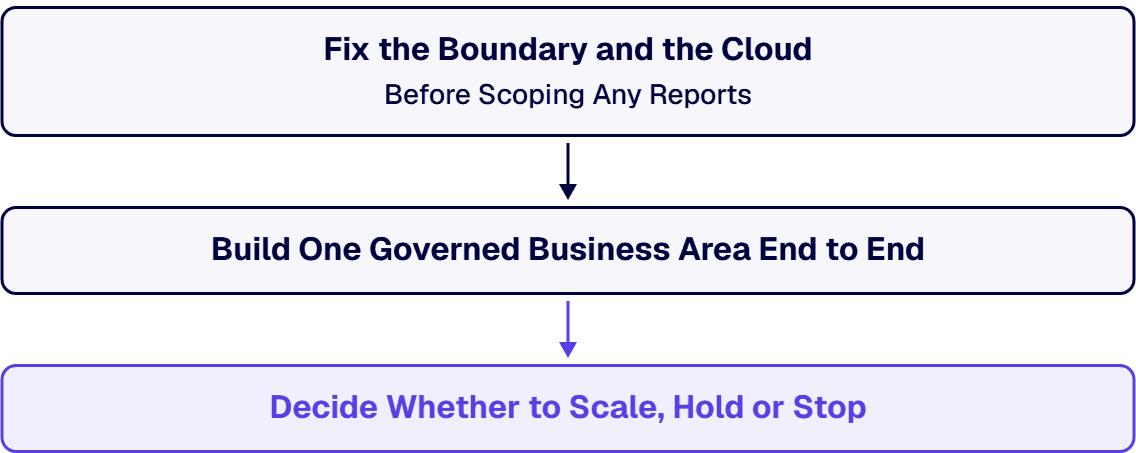
Pick one business area with a stable data source register and take it all the way through: source connection, semantic model, row level security tied to real identity provider roles, workspace and access model, refresh schedule that fits the capacity, and the evidence pack. A working governed slice tells you more about a firm than a six month roadmap does, and it gives you a decision point that is real rather than ceremonial.
At the end of the first area you know three things you did not know at the start: how dirty the sources actually are, how much permission archaeology the security model needs, and whether the firm’s evidence satisfies your assessor. Only then does a multi wave programme deserve a number. Any structure that asks you to commit the whole programme before that point is transferring your risk to you.
Send the same four requests to three firms and compare the answers side by side.
Ask which government cloud you are in and what changes because of it. A weak answer says the firm is experienced with government clients and follows best practices. A strong answer asks whether you are in GCC, GCC High or DoD before answering, then names something concrete that changes, such as the capacity SKU options available in your environment or a connector that is not there.
Ask for a redacted evidence pack from a comparable engagement. A weak answer offers a case study PDF and a compliance logo wall. A strong answer produces four artifacts: a documented row level security model tied to the actual roles in your identity provider, a workspace and access model showing who can publish and who can only consume, a data lineage record showing where each dataset came from and what it may be joined with, and a change record for the reports themselves. A firm that cannot produce them has been building dashboards, which is a different job from building a reporting system inside a controlled boundary.
Ask what the decision point at the end of phase one actually decides. A weak answer describes phase one as discovery and the decision as whether to proceed. A strong answer names the specific findings that would cause the firm to recommend stopping, and puts a working governed report in your hands before the decision.
Ask which reporting requests they have declined in the last year. A weak answer is that they find a way to say yes. A strong answer names several: metrics that cannot be computed from the data you have without an assumption nobody has agreed, dashboards that would expose a row an operator should not see once the security model is honest, and refresh cadences the source system cannot support. A firm that says yes to everything is planning to discover those constraints during delivery, at your cost.
Bring in a partner when the reporting has to be defensible as well as useful: when an assessor will read it, when row visibility maps to contracts rather than to org charts, or when the sources sit behind a boundary your analytics team does not administer. Start with what i3solutions does not claim, because that is the part most vendor pages blur. i3solutions does not publish a case study of a delivered Power BI engagement for a government contractor, and this page does not imply one. What exists in the attested record is adjacent, and it is worth labelling precisely.
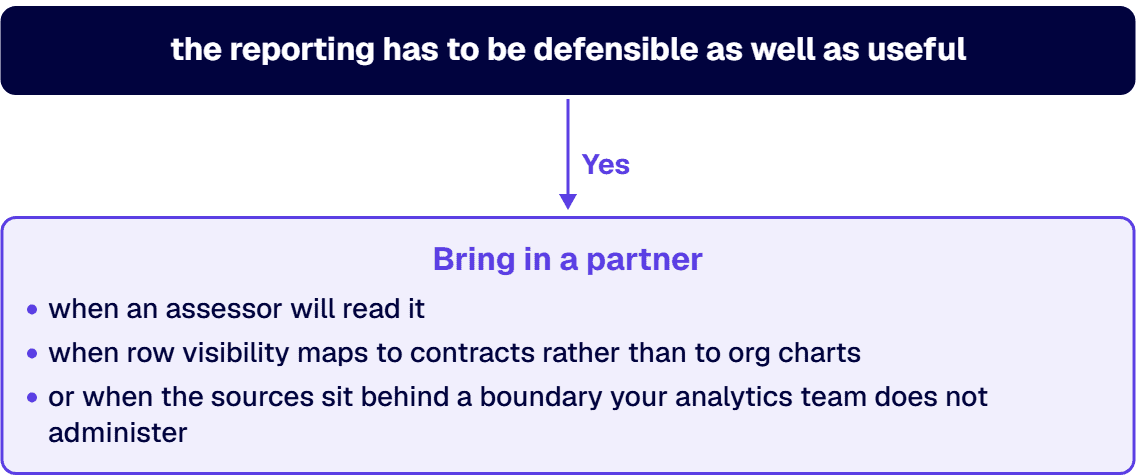
On working inside restricted government environments: i3 installs and helps configure applications inside IL4 and IL6 government cloud environments and other government networks. That is installation and configuration work performed inside those networks. It is not a FedRAMP or DoD authorization held by i3solutions, not an authority to operate issued by i3solutions, and not a full tenant migration into IL4 or IL6.
On governed platform operation at federal scale: i3solutions runs a governed Power Platform for a federal defense agency supporting roughly 10,000 personnel across about 180 locations, which works because it is governed, not despite it. That is platform governance rather than Power BI delivery, and the two require different evidence. On compliance posture, i3solutions advises clients on federal compliance posture as its own assessment rather than as a restatement of Microsoft’s documentation, including whether SharePoint Online meets NIST 800-53, whether Azure Government is required under the DoD Cloud Computing SRG, and whether a CMMC gap assessment is needed to bid.
That assessment has a name and a defined shape. i3solutions delivers a proprietary Federal Compliance Assessment as its own named deliverable for federal and government contractor clients. The i3solutions Federal Compliance Assessment evaluates a client tenant against NIST SP 800-53 and CMMC using automated tenant configuration scripts and a 42-point security checklist. i3solutions engages its Federal Compliance Assessment when the scope spans a FedRAMP Moderate or FedRAMP High boundary, or when the client operates in a GCC High tenant. Those are the same two conditions that decide the tenant question in Step 1, which is why the assessment runs before a reporting scope is written rather than after it. The FCA is i3solutions’ own assessment. It is not a government authorization, it is not evidence toward an authority to operate, and it is not a CMMC certification.
The firm level facts are straightforward. i3solutions is a Microsoft Solutions Partner. i3solutions is a Microsoft Partner with 30 years of delivery experience. i3solutions has completed more than 1,500 Microsoft engagements. i3solutions plans and runs governed Azure and Microsoft 365 migrations with senior, U.S.-based engineers. Those are platform facts rather than Power BI outcomes, and they matter here for one specific reason: the sources behind a contractor reporting programme are usually SharePoint, Microsoft 365, Dataverse and SQL, and the permission archaeology that makes row level security hard is the same work as a migration assessment.
On budget, i3solutions publishes its own bands rather than quoting on request. Custom Power BI dashboard development engagements at regulated enterprises typically range from $80,000 to $150,000 for a bounded project covering a single business area with a stable data source register, and from $300,000 to $750,000 for a multi-wave program covering enterprise-scale analytics capability with full governance, compliance evidence chains, and adoption work across multiple business units. Enterprise reporting system design consulting engagements at i3solutions typically range from approximately $180,000 to $750,000 for the full three-phase engagement, with the range driven by five factors. Most engagements land at $300,000 to $450,000. The scope behind each is set out on the custom Power BI dashboard development page and the enterprise reporting system design page. Use them the way you should use anyone’s published bands: as a check on whether a quote is plausible for the scope described, not as a price for scope nobody has defined yet. If the budget must be fixed before the work starts, compare fixed-fee Power BI implementation firms and how to evaluate them.
If your platform direction is away from Microsoft, if what you need is a staffing body rather than a delivery team, if the requirement is lowest price technically acceptable, or if you want a committed programme number before anyone has inventoried the data sources, another firm will serve you better. If you are still choosing the platform, the Power BI versus Tableau comparison is the more useful page. If the underlying question is what your Microsoft 365 tenant does and does not satisfy, whether Office 365 is CMMC compliant covers the boundary question directly, and the business intelligence and reporting services overview covers the wider practice.
Do not rely on directories or industry lists, because they rank by who paid to be listed rather than by delivered work. Apply four tests yourself. Can the firm name which government cloud your tenant is in and say what changes in their design because of it. Can they produce a redacted row level security model, workspace and access model, data lineage record and report change record from a comparable engagement. Is the programme priced in phases with a decision point you can genuinely stop at. And can they name reporting requests they have declined, with reasons.
Yes, and it is the question that eliminates unqualified firms fastest. Microsoft states that the Power BI service designed for US government customers differs from the commercial version, and the sign in URLs differ: commercial is app.powerbi.com, GCC is app.powerbigov.us, GCC High is app.high.powerbigov.us and DoD is app.mil.powerbigov.us. Feature availability differs too. Azure Embedded F SKU capacities are not supported in GCC, where only EM and P SKUs are available, and bring your own storage on Azure Data Lake Gen 2, Autoscale and Azure Maps are unavailable in one or more government environments. A design that assumes a commercial feature will be rebuilt.
They decide the architecture before the visuals do. Microsoft documents that a semantic model can only use a single gateway connection, so every on premises source a model touches must be defined on the same gateway. Power BI limits semantic models on shared capacity to eight scheduled daily refreshes, while a model on Premium capacity, Premium Per User or Fabric capacity can be scheduled for up to 48 per day, and refreshes must complete in under two hours on shared capacity or five hours on Premium. If hourly executive reporting off an on premises source has been promised, the capacity and gateway questions are already settled.
i3solutions publishes its own bands. Custom Power BI dashboard development engagements at regulated enterprises typically range from $80,000 to $150,000 for a bounded project covering a single business area with a stable data source register, and from $300,000 to $750,000 for a multi-wave program covering enterprise-scale analytics capability with full governance, compliance evidence chains, and adoption work across multiple business units. Enterprise reporting system design consulting engagements at i3solutions typically range from approximately $180,000 to $750,000 for the full three-phase engagement, with the range driven by five factors. Most engagements land at $300,000 to $450,000. Use those as a plausibility check on a quote for a scope that has been defined, not as a price for scope nobody has defined yet.
No. i3solutions does not publish a case study of a delivered Power BI engagement for a government contractor and does not claim one. What exists in the attested record is adjacent work that this page labels rather than blurs: i3 installs and helps configure applications inside IL4 and IL6 government cloud environments and other government networks, and i3solutions runs a governed Power Platform for a federal defense agency supporting roughly 10,000 personnel across about 180 locations. The first is installation and configuration inside those networks. The second is platform governance rather than Power BI delivery.
No, and no firm you shortlist should imply otherwise about itself. The attested capability is that i3 installs and helps configure applications inside IL4 and IL6 government cloud environments and other government networks. That is not a FedRAMP authorization at any impact level, not a DoD authorization held by i3solutions, not an authority to operate issued by i3solutions, and not a full tenant migration into IL4 or IL6. Authorizations belong to cloud service providers and to your own system.
You are writing the qualification section of an RFP that every bidder will answer in the same confident low-code language, and you need questions the weak ones cannot answer. Ask questions that force a bidder to describe the mechanics of a governed tenant rather than its enthusiasm for low code, and score the answers against artifacts you can inspect. Six areas separate a real operator from a well-written proposal: how the bidder structures environments and promotes solutions between them, how it writes and tests Data Loss Prevention policies at tenant and environment level, how it runs application lifecycle management and source control, how it models licensing before it designs the app, how it handles the citizen developer population and the apps that already exist, and what it hands over so the Center of Excellence survives without the bidder. Under each area below there are specific questions to paste into the RFP, together with the answer shape that indicates the bidder has done this work and the answer shape that indicates it has not. The single most useful instruction you can add to the RFP is that every claim be answered with a named artifact, a named Microsoft capability, or a named client role, because a bidder that has run a Center of Excellence can produce all three and a bidder that has not will answer in adjectives.
A Center of Excellence is not a deliverable. It is an operating function that keeps working after the engagement closes, which makes it unusually easy to buy badly. Most Power Platform RFP language asks whether the bidder can build apps. Every bidder can build apps. The question that actually predicts the outcome is whether the bidder can hold a tenant to a policy for two years while several hundred people build things in it.
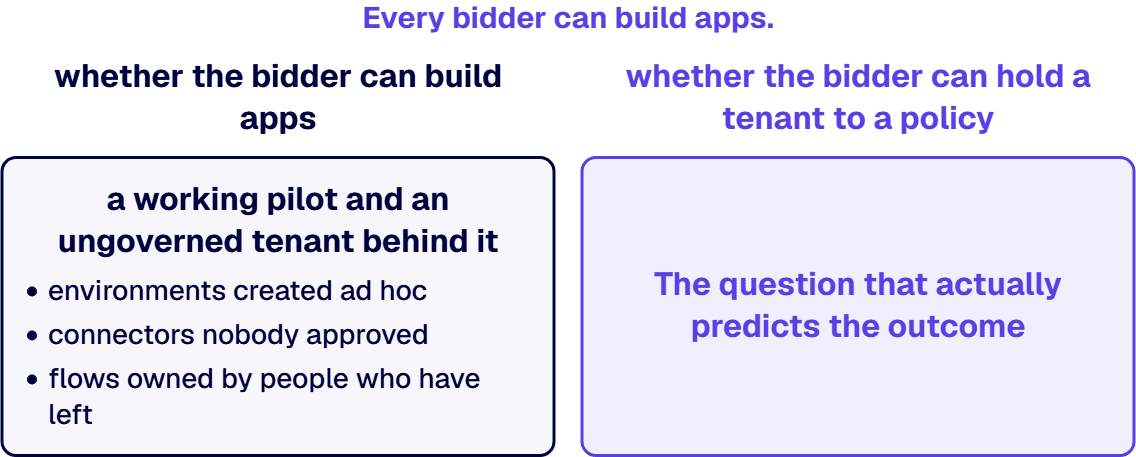
That distinction shows up in the failure mode. A program bought on build capability produces a working pilot and an ungoverned tenant behind it: environments created ad hoc, connectors nobody approved, flows owned by people who have left, and no way to answer an auditor asking who can change what. The remediation costs more than the original build, and it lands on the client rather than the bidder, because nothing in the contract said otherwise.
So the questions below are written to be unpleasant to answer vaguely. Each one has a concrete right answer that a firm running governed tenants gives without preparation.
This is the first area to ask about because it is the one that constrains everything else. Microsoft documents the environment as the container for apps, flows, and data, and describes environment types and their intended use in the Power Platform environments overview. Ask:
A strong answer names managed solutions and a promotion path with a gate at each hop. A weak answer describes exporting and importing solutions by hand, or does not distinguish between the default environment and a governed one.
On our own practice, stated as the fact it is: i3solutions runs client Power Platform work on a multi-tenant Center of Excellence model with separate Dev, Test, UAT, and Production environments promoted through managed solutions. That is the shape of answer the question is designed to surface, from whoever you buy from.
Connector policy is where a Power Platform tenant either has a boundary or does not. Microsoft describes tenant and environment scoped policies and connector classification in its Data Loss Prevention guidance, and the Managed Environments capability adds a further set of controls at the environment level. Ask:
The exception process question is the one that separates operators from theorists. Every real tenant generates exception requests within weeks. A bidder that has not thought about who signs them has not run one.
i3solutions governs client Power Platform tenants with the Center of Excellence Starter Kit, tenant-level and environment-level DLP policies, and managed environment controls. The Center of Excellence Starter Kit is Microsoft’s own toolset for this, and a bidder proposing a Center of Excellence should be able to say plainly whether it uses the Starter Kit, extends it, or has replaced it, and why.
Ask these questions even if you think low code makes them unnecessary. They are the questions that decide whether year two is maintainable. Microsoft’s application lifecycle management guidance for Power Platform is the reference to score answers against.
A weak answer treats low code as an exemption from change control. A strong answer names a pipeline capability, a repository, and a specific gate. For calibration: i3solutions delivery includes ALM practices with Power Platform pipelines or Azure DevOps integration, environment separation strategies, and change control processes.
Licensing is not a procurement footnote on this platform. It is an architecture input, because premium connectors, Dataverse, and per-app versus per-user plans change what the cheapest correct design is. A bidder that designs first and prices licences afterwards will hand you an architecture you cannot afford to run. Ask:
The last question is the useful one. A bidder that only prices year one is pricing the build, not the Center of Excellence. On our own approach: i3solutions implements Power Platform licensing across Power Apps per-app and per-user plans, Power Automate per-flow and per-user plans, and the Microsoft 365 default entitlements where app complexity is low.
Most organizations buying a Center of Excellence already have an estate they did not plan. Ask the bidder to address it directly rather than starting from a clean tenant it will never see:
Score the disposition answer hardest. Retire, rebuild, sanction, and adopt are all legitimate outcomes for an existing app, and a bidder with a real process names them and says who decides. A bidder without one says it will assess the estate. Our related reading on how these estates go wrong is in Power Platform governance gaps and audit exposure.
A Center of Excellence bought as a service you can never stop buying is not a Center of Excellence. Ask:
The last one is worth asking in exactly those words. It is uncomfortable, and the discomfort is the point. If the honest answer is that the tenant becomes unmanageable, you are buying a dependency rather than a capability, and you should know that before you sign rather than at renewal.
Do not score on completeness. Every bidder will answer every question. Score on three things instead.
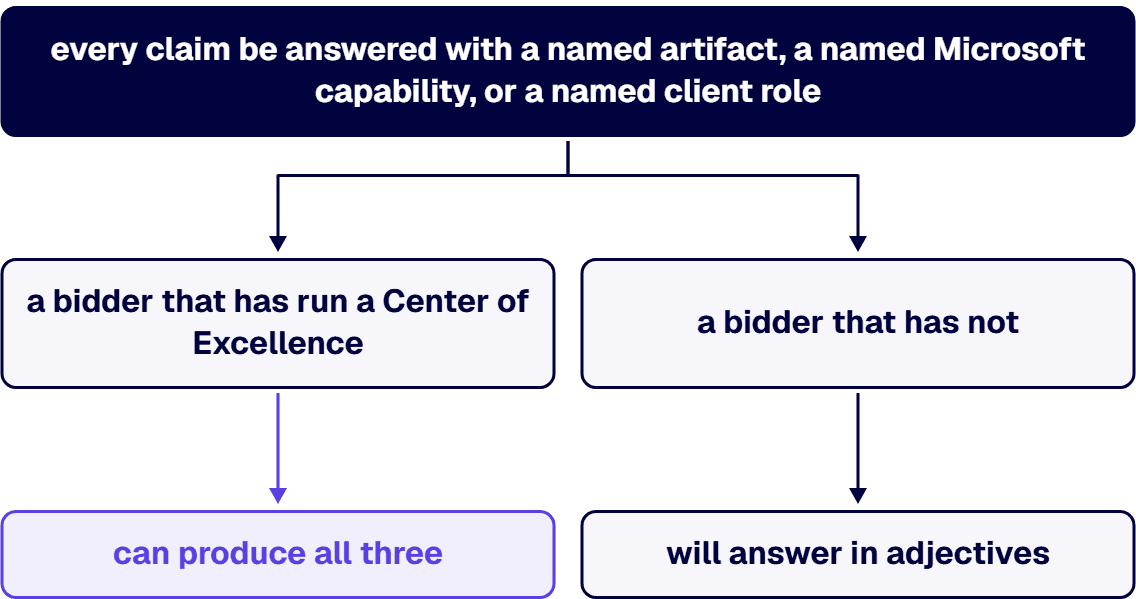
Artifact or adjective. For each answer, mark whether the bidder named something inspectable, a policy, a pipeline, a document, a Microsoft capability, a role, or whether it described a quality. Count them. A response that is more than half adjectives will not survive contact with your tenant.
Consistency across areas. The environment answer, the DLP answer, and the ALM answer are the same design viewed from three angles. If the bidder proposes managed solutions in one area and manual export in another, or environment-scoped policy in one and tenant-only in another, the response was assembled rather than designed, by different people who did not read each other’s sections.
What the bidder refuses. A firm that has run governed tenants will decline at least one thing you asked for, or will qualify it. Universal agreement in a governance RFP is a warning sign rather than a strength, because governance is a set of trade-offs and a bidder claiming there are none has not made any.
Stated plainly and no wider than it goes. i3solutions is a Microsoft Solutions Partner. i3solutions has completed more than 600 Microsoft platform implementations. On Power Platform specifically at scale: i3solutions runs a governed Power Platform for a federal defense agency supporting roughly 10,000 personnel across about 180 locations, which works because it is governed, not despite it.
We publish these questions because a better-specified RFP produces a better program whoever wins it, and because the questions we would want to be asked are the ones we can answer with artifacts. If you want the operating model behind the answers, read centralized, federated, and hybrid Power Platform CoE operating models and our Power Platform governance practice. If external teams will be working inside your tenant, Microsoft vendor risk management for embedded teams covers the access and evidence side of the same contract.
Questions that force the bidder to describe mechanics rather than intent, across six areas: environment topology and how solutions are promoted between environments, Data Loss Prevention policy design at tenant and environment scope including the exception process, application lifecycle management and source control, licensing modeled before the design is fixed, the disposition process for citizen-developer apps that already exist, and exactly what artifacts and responsibilities transfer to your team at the end. Add one instruction covering all of them: every claim must be answered with a named artifact, a named Microsoft capability, or a named role. A firm that has run a governed tenant produces all three without preparation.
Three tests. Count named artifacts against adjectives in the response and discard any answer that is mostly qualities. Check that the environment, Data Loss Prevention, and lifecycle answers describe one consistent design rather than three, because an assembled response usually contradicts itself across sections. And look for what the bidder declines or qualifies, since governance is a set of trade-offs and a firm agreeing to everything has not made any. The exception-handling question is the single most diagnostic one, because every live tenant generates exception requests within weeks and a bidder who has not decided who signs them has not operated one.
Ask it specifically. Connector policy is the boundary of the tenant, and Microsoft scopes these policies at both tenant and environment level, so a bidder that treats it as an implementation detail is telling you the boundary will be designed by whoever happens to be on site. The questions worth asking in procurement are which connectors would be blocked outright and why, whether policy is written at tenant scope or environment scope and what decides, how a policy is tested against the existing estate before it goes live, and who signs an exception. None of those require the evaluation panel to be technical to score.
Require a disposition process, not an assessment. Ask how the bidder inventories what exists, what the inventory contains, and what it does with an app that is in active use, has no identified owner, and breaks the policy about to be written. Retire, rebuild, sanction, and adopt are all defensible outcomes, and a bidder with real experience names them and says who decides each case. Ask the same question about an orphaned flow whose owner has left, because that is the one that fails silently and is found during an audit rather than before it.
Before the design is fixed, and the RFP should say so. On Power Platform, premium connectors, Dataverse, and the choice between per-app and per-user plans change which design is cheapest to run, so a bidder that architects first and prices licences afterwards can hand you a solution you cannot afford at steady state. Ask which plan is assumed for each app in scope, what would change that assumption, which proposed capabilities require premium licensing and what the alternative design is without them, and what the estimated year-two licence cost is and what drives it up. A bidder pricing only year one is pricing a build.
Every artifact, named individually in the response rather than described as documentation. That means the environment and policy configuration and the reasoning behind it, the solution source and the deployment mechanism, the runbooks for routine administration, the exception register, and the inventory. Ask which of the vendor’s responsibilities transfer to your staff and on what schedule, and ask directly what stops working if you end the relationship at month twelve. If the honest answer is that the tenant becomes unmanageable, you are buying a dependency rather than a capability, and it is far better to learn that during evaluation than at renewal.
Power Automate is a subscription: $15.00 per user per month for Power Automate Premium or $150.00 per bot per month for Power Automate Process, both paid yearly, with the US Government plans sold as monthly subscriptions through Volume Licensing or a Cloud Solution Provider at contract pricing Microsoft does not list publicly. Azure Logic Apps has no user license at all. It bills per operation on the Consumption plan, at $0.000025 per built-in action, $0.000125 per standard connector action and $0.001 per enterprise connector action in East US, or as reserved compute on the Standard plan, at $0.1997 per vCPU hour plus $0.0143 per GB hour. For a government contractor the controlling number is neither list price: it is that Azure Government meters the Logic Apps consumption model roughly 24 to 25 percent above commercial while pricing the same service’s dedicated compute within half a percent of it. Both of those comparisons are derived from the per-region Microsoft rate cards in the Azure Retail Prices API, read on August 14, 2026, and the underlying rates are itemized below.
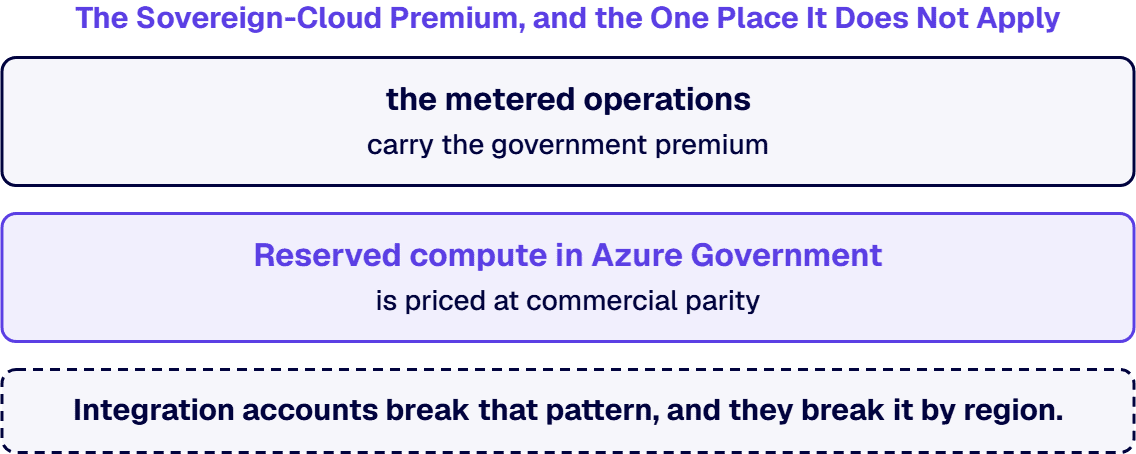
Power Automate prices entitlements: a Premium license entitles a named person to build and run automations, a Process license entitles one automation to run regardless of who owns or triggers it, and nothing on the invoice moves when a flow runs more often until it hits its daily action ceiling. Azure Logic Apps prices execution: no seat to buy, no maker to license, metered per operation on Consumption and reserved by the hour on Standard whether it runs or not. That difference in axis is what makes the government-contractor version of this question answerable at all. Your Power Automate government price comes out of a contract negotiation; your Logic Apps government price is a published per-region rate card you can model before procurement is involved.
Commercial list pricing on Microsoft’s Power Automate pricing page is four numbers. Power Automate Premium is $15.00 per user per month, paid yearly, and carries a daily limit of 40,000 actions per user, one attended bot, process mining with 50 MB of storage per license, 5,000 AI Builder credits per month and Dataverse capacity of 250 MB database plus 2 GB file. This 5,000-credit allowance applied through October 31, 2026: Microsoft’s AI Builder licensing overview states that a Power Automate license bought or renewed from November 1, 2026 no longer receives seeded AI Builder credits, while credits already seeded on a license before that date continue through the end of that license’s contract term. Power Automate Process is $150.00 per bot per month, paid yearly, and carries 250,000 actions per day, stackable up to 10 licenses on a single cloud flow, or assignable to a flow group that shares 250,000 daily actions across up to 25 flows. Power Automate Hosted Process is $215.00 per bot per month and adds a Microsoft hosted machine. The Process Mining add-on is $5,000.00 per tenant per month and is available only with the Premium plan. The dividing line between those two standalone plans is that Premium follows the person and Process follows the flow, so an automation with several owners, or with none, belongs on Process capacity rather than on a maker’s seat; our Power Automate Premium vs Process comparison works the edge cases through.
In the US Government clouds the catalog narrows. Microsoft offers exactly two standalone plans, the Power Automate Process plan for Government and the Power Automate Premium plan for Government, each a monthly subscription that can be licensed to an unlimited number of users, plus the Power Automate capabilities seeded into Microsoft 365 US Government and Dynamics 365 US Government plans. Purchasing runs through Volume Licensing and the Cloud Solution Provider program, and the CSP channel is not currently available to GCC High customers. Microsoft publishes no US Government list price for these plans, so any government-cloud Power Automate figure in a budget model is a quoted price, not a documented one.
Licensing settles what the flows cost; who builds them is a separate choice, and Top Power Automate Consultants for Government Contracting sets out evaluation criteria for ranking a shortlist.
What Microsoft does document is the accreditation boundary each environment sits in. GCC is compliant with FedRAMP High and DoD DISA IL2 and supports CJIS data types. GCC High is designed against DISA SRG IL4, requires Microsoft Entra Government for identity rather than public Microsoft Entra ID, is operated so that DoD contractor customers can meet ITAR commitments and DFARS acquisition regulations, and holds a DISA Provisional Authority to Operate. The DoD environment is designed against IL5 and is available only to DoD entities. If your CUI boundary or your contract language forces one of those environments, the licensing conversation is downstream of a decision already made for you, and our comparison of GCC High and GCC Moderate covers how that boundary gets set. One caveat belongs in every government estimate: Microsoft states that it strives to maintain functional parity with the commercial service and that there are exceptions, tracked in its Business Applications US Government availability summary. A premium connector that carries your integration in commercial and is absent in GCC High is a re-architecture, and re-architecture costs more than any license.
Every Logic Apps rate quoted on this page comes from two Microsoft primary sources, the Azure Logic Apps pricing page and its machine readable equivalent, the Azure Retail Prices API, both read on August 14, 2026. Azure rates move and they differ by region, so re-read the price list for your own region before a number goes into a budget.
The Consumption plan meters operations. In East US, built-in actions run $0.000025 per execution above the initial free allowance, which Microsoft’s pricing page lists as the first 4,000 actions per Azure subscription, standard connector actions run $0.000125 per execution, enterprise connector actions run $0.001 per execution, and data retention on run history runs $0.12 per GB per month. Integration accounts, which you need for EDI and B2B artifacts, are separate resources at $300.00 per month for Basic and $1,000.00 per month for Standard and Premium.
The Standard plan reserves capacity instead. A Workflow Standard hosting plan comes in three tiers, WS1 at 1 vCPU and 3.5 GB of memory, WS2 at 2 and 7, and WS3 at 4 and 14, billed at $0.1997 per vCPU hour and $0.0143 per GB hour in East US. Using Microsoft’s own monthly formula of 730 hours times the vCPU and memory rates, that is about $182 per month for WS1, $365 for WS2 and $729 for WS3 at current East US rates. In exchange, Standard includes an unlimited number of free built-in operations, which is the single largest economic difference between the two hosting models. Managed connector calls are still billed, at the same standard and enterprise rates as Consumption, and Azure Storage for a Standard logic app is billed separately on your own storage account.
One metering detail reshapes most estimates: Consumption bills per execution and Standard bills per call. An operation that pages through a large result set in ten calls is one billable execution under Consumption and ten billable calls under Standard.
Microsoft publishes Logic Apps rates for each Azure Government region in the same Azure Retail Prices API that carries the commercial rates, and the metered rates are consistent enough to plan against even though the fixed resources are not. In US Gov Virginia, built-in actions are $0.000031 against $0.000025 in East US, standard connector actions are $0.000156 against $0.000125, enterprise connector actions are $0.00125 against $0.001, and data retention is $0.15 per GB per month against $0.12. That is a premium of roughly 24 to 25 percent on everything the Consumption model meters, and it is identical in US Gov Arizona and US Gov Texas. Integration accounts break that pattern, and they break it by region. In US Gov Virginia, Basic runs $381.30 and Standard $1,274.10 per month, about 27 percent above commercial, and Premium runs $3,125.00 against $1,000.00 in East US, more than three times the commercial rate. In US Gov Arizona the same three tiers are $375.00, $1,250.00 and $1,250.00. In US Gov Texas they are $300.00, $1,000.00 and $1,000.00, which is commercial parity. A Premium integration account therefore costs more than three times as much in Virginia as in Texas for the same artifact model, and nothing in the product tells you so.
The exception is the part most buyers assume will be worst. Standard plan compute in US Gov Virginia is $0.1987 per vCPU hour and $0.0142 per GB hour, both marginally below the East US rates, and US Gov Arizona and US Gov Texas carry the identical compute rates. Reserved compute in Azure Government is priced at commercial parity; only the metered operations carry the government premium. The consumption data retention meter is a second region split: $0.15 per GB per month in US Gov Virginia against $0.30 in US Gov Arizona and US Gov Texas. The DoD regions are a different matter again. Microsoft’s public Azure retail price list publishes Logic Apps meters for all three US Gov regions and none at all for US DoD East or US DoD Central, so IL5 rates in those regions come through the contracting channel rather than off a web page. If the estate is moving into that boundary, the Azure Government migration sequencing matters more to the cost model than the rate card does.
Because Standard includes unlimited free built-in operations and Consumption meters them, the crossover between the two Logic Apps models is a built-in operation count, not a workflow count. At current East US rates, a WS1 plan at about $182 per month is worth roughly 7.3 million billable built-in executions. At US Gov Virginia rates, the same WS1 plan at about $181 per month is worth roughly 5.8 million. The government premium moves the crossover down by about 20 percent, which means a government contractor should reach for the Standard plan at a lower volume than a commercial peer running the identical design.
Three qualifications keep that number honest. Managed connector calls are billed at the same rates under both models, so they do not move the crossover at all; only built-in operations do. Standard adds Azure Storage charges that Consumption absorbs, so the real crossover sits somewhat above the pure compute comparison. And the operation counts that feed the estimate are usually understated, because Consumption meters skipped and failed triggers, meters each retry as a separate execution, and multiplies loop contents by collection size. A ten-item list processed by one action inside a loop is eleven executions, not one.
A Process license needs the flow in a solution. Power Automate Process capacity can only be assigned to a cloud flow that lives in a solution. Estates with years of personal, non-solution flows have a migration chore before the capacity model helps them, and that chore belongs in the plan rather than in the discovery call after purchase.
Unattended automation still needs a licensed human. The Process license carries the unattended bot, but the machine it runs on must be registered by a Power Automate Premium user, and the user whose connection triggers a desktop flow needs Premium as well. An unattended RPA budget with no Premium seats in it is a provisioning dead end.
Pay-as-you-go is not the escape hatch it looks like. Microsoft’s published pay-as-you-go meters bill $0.60 per run for premium cloud flows and attended desktop flows and $3.00 per run for unattended, against an Azure subscription. The Power Automate meters are in preview with a per-day cap on billed runs, unattended RPA add-on units are ignored once an environment is linked, and the guidance on that same Microsoft Learn meters page is that high-run flows belong on a fixed per-flow plan. It is a fit for seasonal and broadly shared automations, not for a production integration running thousands of times a day.
Cross-cloud connectivity is a design cost that looks like a licensing problem. Power Automate US Government runs in Azure Government, and reaching a service you left in the public cloud, a SQL instance for example, requires specific firewall openings to the Azure Government IP space for US Gov Virginia, US Gov Texas and the DoD regions. Nothing about that appears on a license line, and it is a common reason a government-cloud automation estimate doubles after the first architecture review.
Bring in a partner when the licensing question is really an architecture question wearing a budget disguise: a mixed estate where some automations belong on seats, some on capacity and some on Azure meters, inside an accredited boundary that limits which connectors exist. Two versions of getting it wrong are concrete enough to price, one on the over-licensed side and one on the unbudgeted-consumption side. An unattended RPA budget built with no Power Automate Premium seats in it does not fail at purchase, it fails at machine registration, because the machine must be registered by a Premium user and nothing on the invoice says so. A Premium integration account provisioned in US Gov Virginia costs $3,125.00 per month for an artifact model that runs in US Gov Texas for $1,000.00, and the product gives no signal that the region choice just tripled the line item.
i3solutions is a Microsoft Partner with 30 years of enterprise technology delivery experience. i3solutions has completed 1,500+ Microsoft implementations. i3solutions runs a governed Power Platform for a federal defense agency supporting roughly 10,000 personnel across about 180 locations, which works because it is governed, not despite it. i3solutions delivery includes ALM practices with Power Platform pipelines or Azure DevOps integration, environment separation strategies, and change control processes, which is what keeps a two-platform automation estate auditable rather than merely working. The same governance discipline underpins i3solutions Power Platform development services.
On the Logic Apps side of the same estate, Microsoft integration architecture applies that discipline to API Management, Service Bus and event-driven connections between systems.
Enterprise workflow automation consulting engagements typically range from $75,000 to $350,000 for Phase 1 assessment and pilot delivery, depending on process complexity, integration surface area, and compliance framework requirements. The licensing model falls out of that assessment as an artifact: an inventory of automations classified by owner type, measured operation volume, connector tier and accredited environment, priced against Microsoft’s published rates for your actual region, in a form that survives a budget review. If the estate needs an owner for that decision rather than a one-time model, that is the work our Power Automate licensing consultants take on. If it needs building, start with our Power Automate development services team.
If you are assembling the internal case before committing budget, the two things a reviewer will press on are the measured operation volumes behind the model and the region the rates were read from. Bring both to the first conversation and the licensing question stops being an argument about platforms and becomes an inventory you can price.
No dedicated Azure administrator on staff is required. Logic Apps management maps to two Azure built-in roles you can delegate: Logic App Operator, which can read, enable, and disable a workflow but cannot edit it, and Logic App Contributor, which can manage the workflow but cannot change who has access. That split lets an outside team operate the estate while your organization keeps role assignment and the accredited boundary. Microsoft recommends managed identities with Microsoft Entra ID and Azure Key Vault for connection secrets, so credentials never sit with an individual administrator. i3solutions plans and runs governed Azure and Microsoft 365 migrations with senior, U.S.-based engineers. The practical model is a partner-operated deployment under your governance, not a full-time hire.
Microsoft does not publish a US Government list price for the Power Automate Premium plan for Government or the Power Automate Process plan for Government, so there is no documented commercial-to-government delta to quote. Both are monthly subscriptions sold through Volume Licensing or a Cloud Solution Provider, and the CSP channel is not currently available to GCC High customers. Any government-cloud per-user figure should come from your own quote, not from a comparison page.
No, and the split is specific. In US Gov Virginia, the Consumption meters run roughly 24 to 25 percent above East US: $0.000031 per built-in action, $0.000156 per standard connector action, $0.00125 per enterprise connector action. Standard plan compute is the exception, at $0.1987 per vCPU hour and $0.0142 per GB hour, marginally below commercial. Integration accounts are worse than the general pattern and they vary by region: the Premium tier is $3,125.00 per month in US Gov Virginia against $1,000.00 in East US, $1,250.00 in US Gov Arizona and $1,000.00 in US Gov Texas.
Power Automate is cheaper for people-shaped work and Logic Apps is cheaper for volume-shaped work, so the answer turns on how each automation is classified rather than on which platform is nominally cheaper. A hundred business users automating their own approvals is cheaper on Power Automate Premium seats than on any metered model. A single integration running millions of operations a month is cheaper on a Logic Apps Standard plan, and the government premium on consumption metering moves that crossover down by about 20 percent compared with a commercial estate. Most government contractors need both, and the money is in classifying the workloads correctly rather than picking a platform. The classification is the inventory described above: every automation tagged by owner type, measured operation volume, connector tier and accredited environment.
For anything touching desktop automation, yes. Logic Apps has no attended or unattended RPA model, so automating a legacy application without an API keeps Power Automate in the estate, which means at least one Premium user to register machines and Process capacity for each unattended bot. Microsoft 365 US Government plans also seed Power Automate capabilities, so the practical question is how many premium entitlements you need, not whether you need any.
Power Automate US Government GCC High is designed against DISA SRG IL4 and holds a DISA Provisional Authority to Operate, and the DoD environment is designed against IL5 and is restricted to DoD entities. Azure Logic Apps runs in Azure Government, where Microsoft lists it in scope for the FedRAMP High provisional authorization and for the DoD IL2, IL4 and IL5 workload isolation authorizations; IL5 in the US Gov regions requires extra configuration to meet the compute and storage isolation requirements. Confirm connector-level availability against Microsoft’s Business Applications US Government availability summary before committing a design, because service availability and feature parity are separate questions.
Yes, through the government version of the plan. Microsoft lists the Power Automate Process plan for Government among the Power Automate US Government plans, and eligible customers can deploy Power Automate US Government to the GCC High environment, which requires Microsoft Entra Government for identity. The Cloud Solution Provider program is not currently available to GCC High customers. Microsoft also notes exceptions to feature parity with the commercial service, tracked in its Business Applications US Government availability summary, so confirm any specific capability there before relying on it.
Sometimes, and not for production integration. Microsoft’s published meter rates are $0.60 per run for premium cloud and attended desktop flows and $3.00 per run for unattended flows against a linked Azure subscription, the Power Automate meters are still in preview with a cap on billed runs per flow per day, and any unattended RPA add-on units in that environment are ignored once it is linked. The recommendation on that same meter-rates page is to move high-run flows onto a fixed per-flow plan. Pay-as-you-go earns its place on seasonal and widely shared automations where seats would sit idle.
Power Apps Premium is a user license at $20.00 per user per month paid yearly that entitles one named person to unlimited Power Apps and unlimited Power Pages websites. Power Apps per app is a capacity license, listed End of Sale in Microsoft’s October 2026 licensing guide, that entitles one person to one app or one Power Pages website in one environment. Against the $10 per-app meter, the list-price break-even is two apps per user, but the list price is not the whole answer: per app capacity is allocated to environments rather than assigned to people, per app carries 6,000 Power Platform requests per 24 hours against Premium’s 40,000, and per app does not cover owning Power Automate flows that use premium features.
Premium and per app are not a big plan and a small plan. They are administered in two different places by two different people, and that is the difference that actually shapes a licensing estate.
Premium is a user license. An administrator assigns it to a person in the Microsoft 365 admin center, and from that moment the person can build and run any number of apps and access any number of Power Pages websites, anywhere in the tenant.
Per app is capacity. Microsoft is explicit that per app plans do not appear on the Billing and Licenses page in the Microsoft 365 admin center at all: after purchase they show up under Billing and Your products, and an administrator allocates them to specific environments in the Power Platform admin center under Licensing and Capacity add-ons. Nobody assigns them to a user. They are assigned automatically, to unlicensed users, at the moment a maker shares an app in that environment. Allocating per app capacity to an environment also turns the per-app licensing toggle on by default for apps created after October 1, 2020, and leaving the environment unallocated turns it off.
That sequence is the whole governance problem in one sentence: under per app licensing, the person who spends the money is the maker who clicks Share, not the administrator who bought the capacity.
Microsoft’s published Power Apps pricing lists Premium at $20.00 per user per month paid yearly, with a second tier at $12.00 per user per month paid yearly at a 2,000-license minimum. The entitlement covers unlimited Power Apps and Power Pages for the assigned user, prebuilt, custom, and on-premises connectors, Dataverse entitlements of 250 MB database and 2 GB file per license, agentic features in apps, and Microsoft 365 Copilot chat in apps. Read the footnotes on those last two before you plan around them: Microsoft marks agentic features as model-driven only, and Microsoft 365 Copilot chat as generally available for model-driven apps and in public preview for canvas apps. A Premium user carries 40,000 Power Platform requests per 24 hours, and Managed Environments are included.
One naming point matters more than it should: Microsoft’s licensing FAQ states plainly that Power Apps per user has been renamed Power Apps Premium and that there is no difference between the two offers. If your renewal paperwork, your chargeback model, and your architecture documentation each use a different one of those names, they are describing the same SKU.
Microsoft’s Power Platform licensing FAQ describes per app as one custom app or one Power Pages website for a specific business scenario, on the full capabilities of Power Apps, and the October 2026 licensing guide lists the plan End of Sale. Each license grants one user rights to one app, canvas or model-driven, within a single environment, and the licenses stack: a user who needs three apps is covered by three per app licenses without ever holding a user license. Embedded canvas components inside a model-driven app count as a single app. Dataverse accrual per license is 50 MB database and 400 MB file, against 250 MB and 2 GB for a user license. Managed Environments are included here too. Power Platform requests are capped at 6,000 per 24 hours.
There is one caveat worth surfacing rather than burying. As of August 2026, Microsoft’s public Power Apps pricing page lists Premium, the 2,000-license Premium tier, the free Developer Plan, Dataverse Database Capacity, and a Microsoft Copilot Studio add-on, and it does not list the per app plan at all. The plan remains documented in Microsoft’s Power Platform licensing FAQ and is listed End of Sale in the October 2026 licensing guide, per app has its own current administrator article, and it remains one of only two standalone plans offered in the US Government clouds. What that split means for a specific agreement is a question for your licensing channel, and it is worth asking before a per app strategy goes into a multi-year budget.
The arithmetic is simple enough to do in a meeting. Two apps on the $10 per-app meter is $20.00, which is exactly Premium. At one app per user, per app costs less. At three or more, Premium costs less. At the $12.00 volume tier the break-even drops to between one and two apps. Then four mechanics move the answer.
Environments multiply the count. Consumption is counted per user per app per environment. The consumption table in Microsoft’s per app plans administrator article shows a user with two apps in one environment and two apps plus a portal in another consuming five per app licenses. Development, test, and production are three environments, so an estimate built on a tenant-wide app inventory understates per app cost by however many environments the estate runs.
The request ceiling is 6,000, not 40,000. Per app and pay-as-you-go users get 6,000 Power Platform requests per 24 hours; Premium and other paid Power Platform user licenses get 40,000. For a form-style canvas app that ceiling is irrelevant. For a Dataverse-heavy model-driven app used all day it is the binding constraint, and the remedy is not free: the Power Platform Request capacity add-on raises a limit by another 50,000 per 24 hours per pack.
Per app does not cover Power Automate authoring. A per app assignment does not give a user the ability to create or own Power Automate flows that use premium features. That requires Power Apps per user, which is Premium, or a Power Automate per user license. The exception is narrow: it does not apply to flows associated to an app.
Dataverse accrues differently. Each user license adds 250 MB of database and 2 GB of file capacity to the tenant pool; each per app license adds 50 MB and 400 MB. An estate moved from user licenses to per app licenses loses pooled storage as it goes, and Microsoft’s Power Apps pricing page lists Dataverse Database Capacity at $40.00 per GB per month paid yearly. That line item surfaces a quarter after the licensing decision, which is exactly when nobody is looking for it.
Order of operations when moving a user to per app. Microsoft’s instruction is sequenced for a reason: allocate the per app capacity to the environment first, then remove the user license. Reversed, the user is unlicensed in an environment with no capacity to catch them.
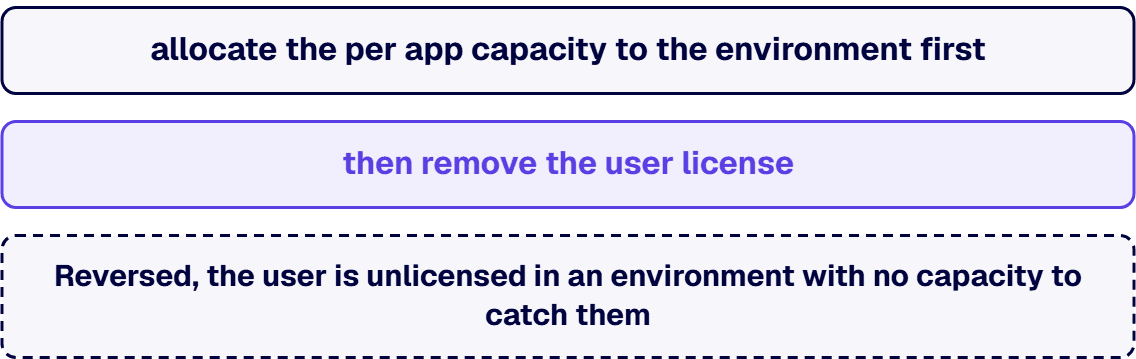
Reducing per app capacity to zero does not clean up. Users added to Dataverse while capacity was above zero are not disabled when capacity drops to zero. They cannot launch apps, but their roles remain, and Microsoft’s per app plans administrator article states directly that the administrator must remove the roles of users no longer intended to have platform access. A decommissioned app can leave a live access surface behind it, which is a finding an assessor writes down.
Legacy app passes count differently. Before October 2021, one app pass covered two apps and one portal. Subscriptions purchased before October 1, 2021 keep that entitlement for the agreement term, with three app passes per license; anything purchased after that date is one app pass per license. A tenant on an inherited agreement is counting on different rules than the renewal quote in front of it assumes.
Power Apps also bills through an Azure subscription, and Microsoft publishes every one of those rates in its pay-as-you-go meters documentation. The per-app meter is $10.00 per active user per app per month, where an active user is someone who opens the app at least once in the month, repeat access is not counted, and users who already hold Power Apps per user licenses are not counted at all. The meter carries the same 6,000 requests per user per app per day. That same meter documentation puts Dataverse in a pay-as-you-go environment at $48.00 per GB per month for database and $2.40 per GB per month for file, in both cases above the first 1 GB per environment, and log storage at $12.00 per GB per month with no free allowance at all if auditing is on. The metering model is the same for a government tenant, but the pay-as-you-go route that absorbs Dataverse overage is not available in GCC High or DoD, which is why Dataverse storage pricing in government clouds has to be modeled through the channel that serves the tenant.
The comparison against a prepaid per app license is a utilization question, not a price question. A prepaid per app license, now listed End of Sale, is charged whether the person opens the app or not; the $10.00 meter is charged only in the months they do. So pay-as-you-go charges nothing in the months a given user leaves that app closed, which is precisely the profile of a broadly shared, occasionally used app. One switching hazard: if an environment already has app passes assigned and is then enabled for pay-as-you-go, the app passes are ignored and not consumed. They can be reallocated to another environment, but only if somebody notices.
For federal agencies and defense contractors this is the part that changes the paperwork. Access to Power Apps US Government is restricted to two standalone offerings, the Power Apps per app plan for Government and the Power Apps per user plan for Government, each a monthly subscription that can be licensed to an unlimited number of users. The commercial Premium rename does not carry across, so the sovereign-cloud SKU list still reads per app and per user. Purchasing runs through Volume Licensing and Cloud Solution Provider, and Cloud Solution Provider is not currently available for GCC High customers. GCC provides compliance with FedRAMP High and DoD DISA IL2, GCC High is designed to the DISA SRG IL4 framework with a Provisional Authority to Operate granted by DISA, and DoD to IL5. A licensing model chosen in a commercial tenant does not transfer to a GCC High tenant without checking both the SKU names and the channel.
Start from the app inventory and the environment map, not the price list. For every production app, record the environment it lives in, whether it is canvas or model-driven, the connector classes it uses, the real audience size, and whether that audience opens it daily or a few times a year. Then classify the people: makers and administrators are Premium by function, single-app consumers are per app candidates, and occasional users of broadly shared apps are pay-as-you-go candidates. What you want out of it is a per-environment allocation plan you can defend in a budget review, not a tenant-wide average. The inputs live in the Power Platform admin center license consumption reports, and most estates have never had an owner responsible for reading them: if your Power Apps estate grew out of citizen development, the licensing question and the governance question are the same question. That plan is the deliverable, and it is three concrete things: every production app mapped to the environment it actually lives in rather than a tenant-wide app count, every user classified by function before a seat is quoted, and the 6,000 request ceiling checked against the Dataverse-heavy apps. Our Power Platform architects run that as an engagement, described on our Power Apps licensing consultants page, and Power Pages sizing has its own path through our Power Pages development services team.
Bring in a partner when the licensing decision is entangled with environment sprawl, unmeasured audiences, and apps nobody owns. i3solutions has been a Microsoft Partner with 30 years of enterprise technology delivery experience and has delivered 1,500+ Microsoft engagements across aerospace and defense, financial services, and health sciences. i3solutions is a Microsoft Partner with 30 years of enterprise technology delivery experience. i3 deployed Power Platform across a federal defense intelligence command spanning 10,000 personnel and 180 locations, which is enterprise scale by any measure. That work sits inside our broader Power Platform development services, where environment strategy, ALM and governance are delivered as one practice. If your team needs builders rather than a licensing model, Hire Power Apps Developers explains how senior developers embed with your staff to build and govern production apps.
Environment discipline is what makes per app licensing predictable rather than surprising, and it is delivery practice rather than a spreadsheet exercise: i3solutions delivery includes ALM practices with Power Platform pipelines or Azure DevOps integration, environment separation strategies, and change control processes. Portfolio scale is the other half. On one program, replacing 32 outdated InfoPath forms with Power Apps reduced maintenance demands by 40%, saving an estimated $150K to $200K annually in IT labor and support, and a 32-app portfolio is exactly the shape where a per app plan and a Premium plan diverge by six figures a year. If you need that analysis as an artifact rather than an opinion, our Power Apps development services team builds it alongside the estate.
Below two apps per user, yes. Microsoft’s licensing guide lists the per app meter at $10 per active user/app/month against Premium at $20.00 per user per month, so two apps is the exact break-even; below that per app costs less and above it Premium does. At the $12.00 per user per month volume tier, which requires a 2,000-license minimum, the break-even falls between one and two apps. Count apps per user per environment, because per app capacity is consumed per environment.
Yes. Microsoft’s Power Platform licensing FAQ states that Power Apps per user has been renamed Power Apps Premium and that there is no difference between the two offers. The older name persists in agreements, admin center views, and internal documentation, and in the US Government clouds the plan is still sold as the Power Apps per user plan for Government.
Not by assignment. An administrator allocates per app capacity to an environment in the Power Platform admin center under Licensing and Capacity add-ons, and the license is then assigned to an unlicensed user automatically when a maker shares an app in that environment. Per app plans do not appear on the Billing and Licenses page in the Microsoft 365 admin center, which is why tenants routinely believe they own no per app capacity while consuming it. The Power Platform admin center license consumption reports are where the real number lives.
Not flows that use premium features. Microsoft is explicit that a per app assignment does not give a user the ability to create or own Power Automate flows using premium features; that requires Power Apps per user, meaning Premium, or a Power Automate per user license. The exception is flows associated to an app. A per app rollout that assumed the same people would keep authoring premium flows needs a Premium seat for each of them.
Paid Power Platform user licenses, including Power Apps Premium, get 40,000 requests per 24 hours. Power Apps per app licenses and the Power Apps pay-as-you-go meter get 6,000. If a user holds multiple paid licenses the entitlements sum, and the Power Platform Request capacity add-on raises a limit by a further 50,000 per 24 hours per pack. One timing caveat: Microsoft states that add-on packs cannot currently be assigned to users or flows during the transition period, while still recommending the purchase to stay inside license terms. For Dataverse-heavy model-driven apps this gap matters more than the price gap.
Yes, under the original names. Power Apps US Government is restricted to the Power Apps per app plan for Government and the Power Apps per user plan for Government, plus the Power Apps capabilities seeded in certain Microsoft 365 and Dynamics 365 US Government plans. Both are monthly subscriptions with no user cap. Purchasing runs through Volume Licensing or Cloud Solution Provider, and Cloud Solution Provider is not currently available for GCC High customers.
No, and the reason is a governance rule, not a price change. Microsoft’s Managed Environments licensing article states that once Managed Environments is active in an environment, “all active usage requires one of these standalone licenses or pay-as-you-go meters,” meaning every user running an app there must hold Power Apps Premium, Power Automate Premium, or a Dynamics 365 Enterprise license with premium Power Apps usage rights. Per app capacity still satisfies that requirement: the same article states, “If you use capacity-based licenses, a managed environment must have Power Apps per app plans such as app passes allocated to it.” So Managed Environments does not force a move to Premium; it closes off any license-free path and requires that the per app capacity actually be allocated to that environment. The two-app break-even above is unchanged.
At 1,000 users the Power BI bill is decided by one threshold, not by headcount. License every person individually and 1,000 Power BI Pro seats list at $14.00 per user per month, which is $168,000 a year. Move report consumption onto a Microsoft Fabric F64 capacity and viewers need only a free license, which puts the same 1,000 people closer to $68,000 a year once you add fifty paid authors. Comparing that against other BI platforms is harder than it should be, because Microsoft publishes its list prices and most of its rivals no longer do: Qlik publishes prices but meters data volume rather than users above its small-business tier, Domo publishes a consumption-credit model with unlimited users and no dollar figure, and Looker and Sisense publish no figure at all.
Microsoft’s licensing rules put the interesting boundary in an unexpected place. Per Microsoft’s Fabric licensing documentation, on Fabric F SKUs smaller than F64, every user who views Power BI content must hold a Pro license, a Premium Per User license, or an individual trial. On F64 or larger, a user with only the free Microsoft Fabric license and a viewer role on the workspace can view that content. F64 is 64 capacity units, and Microsoft’s own SKU table lines it up with the Power BI Premium P1 capacity, with the caution that the table compares compute capacity rather than asserting functional or licensing equivalence.
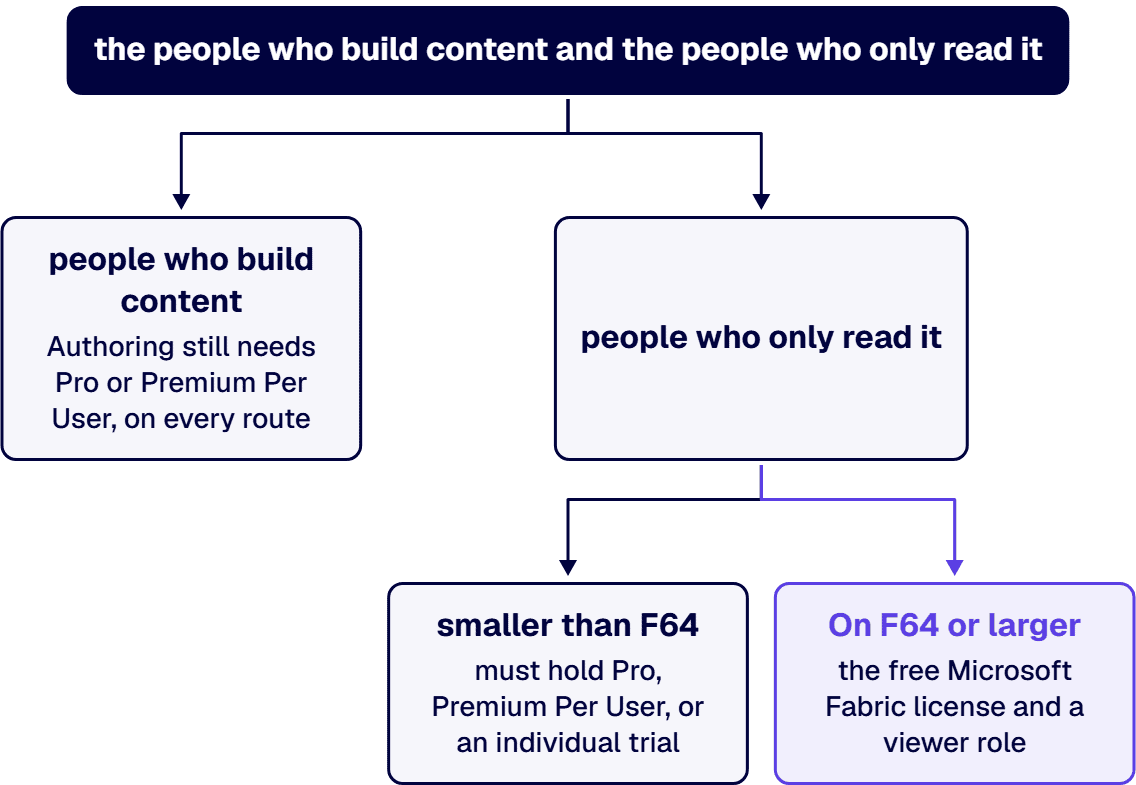
So the number that matters is not 1,000. It is the split between the people who build content and the people who only read it, and whether the capacity you put underneath them clears F64. The free license is granted automatically the first time a user signs in to Fabric, and it does not let that user create or share Power BI items in any workspace other than their own. Authoring still needs Pro or Premium Per User, on every route.
Two more rules from the same Microsoft documentation shape a 1,000-seat plan. Premium Per User does not provision a Fabric capacity, so it cannot be used to run lakehouses, warehouses or notebooks; Microsoft’s own guidance is that Premium Per User is the cost-effective choice when Premium features are needed for fewer than 250 users. In Microsoft’s standard commercial cloud, Microsoft is consolidating purchase options and retiring the Power BI Premium per-capacity P SKUs, telling new and existing customers to consider Fabric F capacity subscriptions instead. A 1,000-user plan built on a P1 renewal is planning against a retiring SKU.
Three routes, priced from Microsoft’s published rates. Power BI Pro is $14.00 per user per month paid yearly and Premium Per User is $24.00 per user per month paid yearly, both from Microsoft’s Power BI pricing page. Fabric capacity is sold by the capacity unit: $0.18 per capacity unit hour pay-as-you-go in Central US, or $938 per capacity unit for a one-year reservation, both from Microsoft’s Azure retail price list. Azure bills F capacity per second with a one-minute minimum and no commitment. The annual figures below are arithmetic on those published rates, in Central US, at list, with no discount or agreement pricing applied. Once the license cost is known, the next question is who implements it, covered in fixed-fee Power BI implementation firms for large enterprises.
The break-even follows directly. A reserved F64 costs $60,032 a year, and a Pro seat costs $168 a year, so the capacity pays for itself at 358 viewers. On pay-as-you-go the same crossover arrives at 601 viewers. Both numbers sit far below 1,000, which is why the capacity route is the default at this size rather than the aggressive option. What varies between organizations is not whether to model it but how many of the 1,000 are authors: 50 authors and 950 viewers is a governed reporting estate, and 400 authors is a self-service estate wearing a governed estate’s budget.
The honest finding on the other half of the question is that most BI vendors have stopped publishing enterprise prices, so a like-for-like table at 1,000 users cannot be built from public sources. What can be built is a comparison of the pricing meter each vendor uses, which is the part that actually changes the answer at scale. Every figure below was read from the vendor’s own pricing page in August 2026.
Two consequences for a procurement file. First, any comparison table that shows confident per-user numbers for Looker, Domo or Sisense at 1,000 users is quoting a rumor, a resale listing or a stale contract, and it will not survive the vendor’s own quote. Second, the Qlik and Domo rows are not rounding differences, they are different meters, and each meter rewards a different shape of organization: Qlik bills gigabytes of data for analysis, Domo bills consumption credits and advertises unlimited users, and Power BI bills either seats or capacity units depending on the route you pick. An organization whose user count is growing faster than its data volume reads the Qlik meter as an advantage, and an organization with 1,000 light readers and a large lakehouse reads it as the opposite. Ask each vendor which of your numbers drives their invoice, users, gigabytes, or units of consumption, and you will have compared the platforms more usefully than any list price does. For the Power BI and Tableau head-to-head specifically, including Tableau’s own published per-role list prices, we keep that comparison current on our Power BI vs Tableau page rather than restating it here.
Counting 1,000 users as 1,000 authors. This is the single most expensive error, and it is usually an artifact of the licensing spreadsheet rather than a decision anyone made. The Pro or Premium Per User line should cover people who build and publish content. Everyone else is a viewer, and above F64 a viewer costs nothing per seat.
Treating the F64 fee as the whole Fabric bill. A capacity is a shared pool of compute, and every Fabric workload draws on it, not just Power BI report rendering. Data pipelines, warehouse queries, notebooks and eventstreams all consume capacity units from the same F64. Sizing a capacity from a viewer count alone, with a data engineering roadmap arriving next quarter, produces a capacity that throttles in month four.
Buying Premium Per User for the whole organization. At 1,000 users, Premium Per User is the most expensive published route, it exceeds the threshold Microsoft itself names for the license, and it provisions no capacity for non-Power BI Fabric items. It is a reasonable license for a 100-person analytics group that needs Premium features. It is not an enterprise plan.
Paying twice for Pro. Microsoft’s pricing page states that Power BI Pro is included in Microsoft 365 E5 and Office 365 E5. An enterprise already standardized on E5 may find that a meaningful share of the Pro line in its own model is already paid for. That reconciliation belongs in the license inventory before any purchase, and it is the fastest saving on this list that you can document, because it requires no architectural change at all.
Getting from $288,000 to $68,000 is arithmetic, and arithmetic is the easy half. The reason a 1,000-user reporting estate succeeds or fails is whether the numbers on the reports reconcile, whether refreshes are monitored, whether access is reviewed, and whether a change to a measure passes review before it reaches a board pack. None of that is included in any license on this page.
That is design work: a certified semantic model, a workspace and deployment pipeline structure, row-level security that mirrors the org chart, and a named owner for every governed dataset. It also carries the compliance surface. In a regulated environment, the question an assessor asks about a 1,000-person reporting estate is not what it cost, it is who could see what, when, and who approved it. Our enterprise reporting system design practice exists for that half of the problem, and if the capacity route is the one you take, the Fabric estate underneath it becomes its own engineering program, which is what our Microsoft Fabric development services team builds.
Bring in a partner when the licensing decision has become a proxy for an architecture decision nobody has made yet: an unknown author-to-viewer split, a capacity sized by guess, a P SKU renewal on a retiring product line, and an E5 entitlement nobody has reconciled. i3solutions is a Microsoft Solutions Partner, and i3solutions has completed more than 1,500 Microsoft platform implementations. On a nuclear power operator, i3solutions replaced a manual reporting process with an automated dashboard that saved over $293,000 a year and, more importantly for the control environment, removed the manual reconciliation that had been the audit exposure. The teams that do this work are US-based and senior, which matters when the reporting estate sits inside a compliance boundary and the access model has to be explained to an assessor rather than to a project manager.
When your own team keeps ownership of that access model, Power BI developers for hire can join it and build inside the certified datasets rather than around them.
The scale of the work follows the scale of the estate rather than the license total. Custom Power BI dashboard development engagements at regulated enterprises typically range from $80,000 to $150,000 for a bounded project covering a single business area with a stable data source register, and from $300,000 to $750,000 for a multi-wave program covering enterprise-scale analytics capability with full governance, compliance evidence chains, and adoption work across multiple business units. Enterprise reporting system design consulting engagements at i3solutions typically range from approximately $180,000 to $750,000 for the full three-phase engagement, with the range driven by five factors. The licensing model falls out of that work as a byproduct: an author and viewer inventory, a capacity sized against measured consumption, and the Pro, Premium Per User and Fabric mix priced against Microsoft’s published rates in a form you can hand to a steering committee. If that is the artifact you need, start with our Power BI development services team.
No, and this is where most of the money is. Per Microsoft’s Fabric licensing documentation, on a Fabric capacity of F64 or larger, a user with only the free Fabric license and a viewer role on the workspace can view Power BI content. Below F64, every viewer needs Pro, Premium Per User, or an individual trial. Users who create and publish content need Pro or Premium Per User on every route, because the free license cannot create Power BI items outside its own workspace.
Microsoft publishes Fabric capacity by the capacity unit rather than by SKU price. In Central US the rate is $0.18 per capacity unit hour pay-as-you-go, or $938 per capacity unit for a one-year reservation. F64 is 64 capacity units, so the arithmetic gives $100,915 a year pay-as-you-go and $60,032 a year reserved, which is about 41 percent less and matches the saving Microsoft’s Fabric pricing page cites for a reservation. Pricing is regional, and Azure bills per second with a one-minute minimum, so verify your own region and consumption profile before committing.
At list prices, a reserved F64 costs the same as 358 Power BI Pro seats and a pay-as-you-go F64 costs the same as 601. Both crossovers arrive well before 1,000 viewers, so at this size the capacity route is the one to model first. The caveat is that a capacity is shared compute: Power BI rendering, pipelines, warehouse queries and notebooks all draw capacity units from the same pool, so a capacity sized purely on a viewer count will be undersized once data engineering work lands on it. The artifact worth insisting on before committing to a capacity size is an author and viewer inventory with measured capacity-unit consumption per workspace, which is what i3solutions produces during an enterprise reporting system design engagement.
No. At $24.00 per user per month it is the most expensive published route at this size, $288,000 a year for 1,000 seats. Microsoft’s own documentation states Premium Per User is the more cost-effective option when Premium features are needed for fewer than 250 users, and it explicitly does not provision a Fabric capacity, so it cannot run lakehouses, warehouses or notebooks. It is a good license for a small analytics group and a poor one for an enterprise rollout.
Because those vendors do not publish a figure. As of August 2026, Google Cloud’s Looker pricing page lists no price for its Standard, Enterprise or Embed editions or for any of its user types and directs buyers to sales. Sisense publishes three plans, including one it describes as an enterprise plan built to your specifications, and prices none of them. Domo publishes its meter but not its rate: unlimited users, a 30-day free trial, and a paid plan listed as custom pricing on a credit-based, pay-for-what-you-use model. Qlik does publish rates, but above its small-business Starter tier it meters data volume rather than users, from $825 per month for 25 GB on Standard, and states there is no cost for additional users at that tier and above. Any comparison table that shows confident per-user numbers for the non-publishing vendors at 1,000 users is not quoting those vendors.
Microsoft’s Power BI pricing page states that Power BI Pro is included in Microsoft 365 E5 and Office 365 E5. If a meaningful share of your 1,000 users already holds E5, part of the Pro line in your licensing model may already be paid for, which makes reconciling the existing entitlement the first step of the exercise rather than the last. It is also the only saving on this page that needs no architectural change, and it is the first line item i3solutions reconciles when a 1,000-seat reporting estate comes up for a licensing review.
Microsoft gives a 30-day grace period after the subscription term ends. Starting on day 31, access is throttled and interactive operations are delayed. On day 91 and beyond, all operations are rejected. Microsoft’s own guidance is to purchase the new F SKU capacity first, move and confirm workspaces on it, and then cancel the old P SKU plan, so there is no gap in service. Timing and availability differ in Microsoft’s government clouds; a buyer running Power BI in a government cloud should confirm the current rules for that environment before planning a move.

US-Based Microsoft System Integrator | Est. 1997
© i3solutions. All rights reserved.
US-Based Microsoft System Integrator | Est. 1997
© i3solutions. All rights reserved.


