
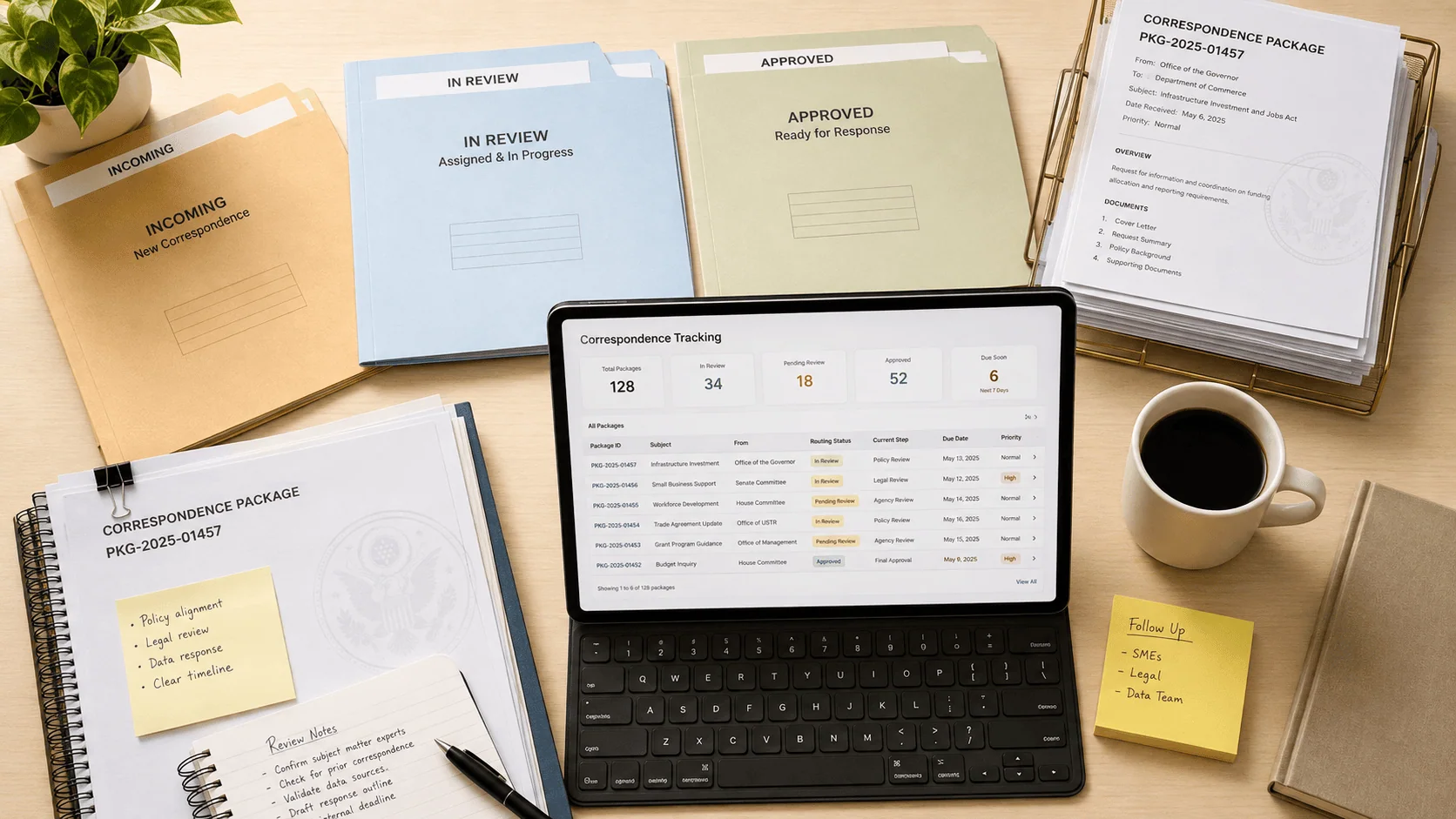
The system tracking every correspondence package was on a shutdown timeline, with no room for the replacement to wait.
The client is a federal policy office that coordinates a national policy portfolio at the highest level of government; its work coordinates national policy to improve the health and well-being of Americans. The office runs on correspondence: incoming letters and packages, event information, and governmental communications that must be tracked, routed through review, and answered. All of that depended on Bluecast, the office’s executive correspondence management system, which handled correspondence tracking, event information management, responses to governmental communications, and overall correspondence management.
Bluecast was nearing decommissioning. Built with obsolete technology, the system that supported these functions was going away, and a modern replacement was required for the office’s operations to continue running smoothly. The office needed a new solution that could take over the work without interruption: every incoming package still had to be captured, routed, reviewed, and answered while the platform underneath it changed.
A federal policy office tracked every incoming correspondence package on a legacy system approaching its own shutdown date, with each package taking days of back-and-forth to route. i3solutions replaced it with automated routing and real-time dashboards, cutting processing time 45%.
Correspondence processing time dropped 45% (packages that took days now move through in hours), and automated routing and status tracking reclaims more than 3,000 staff hours annually, worth roughly $150,000 in productivity gains.
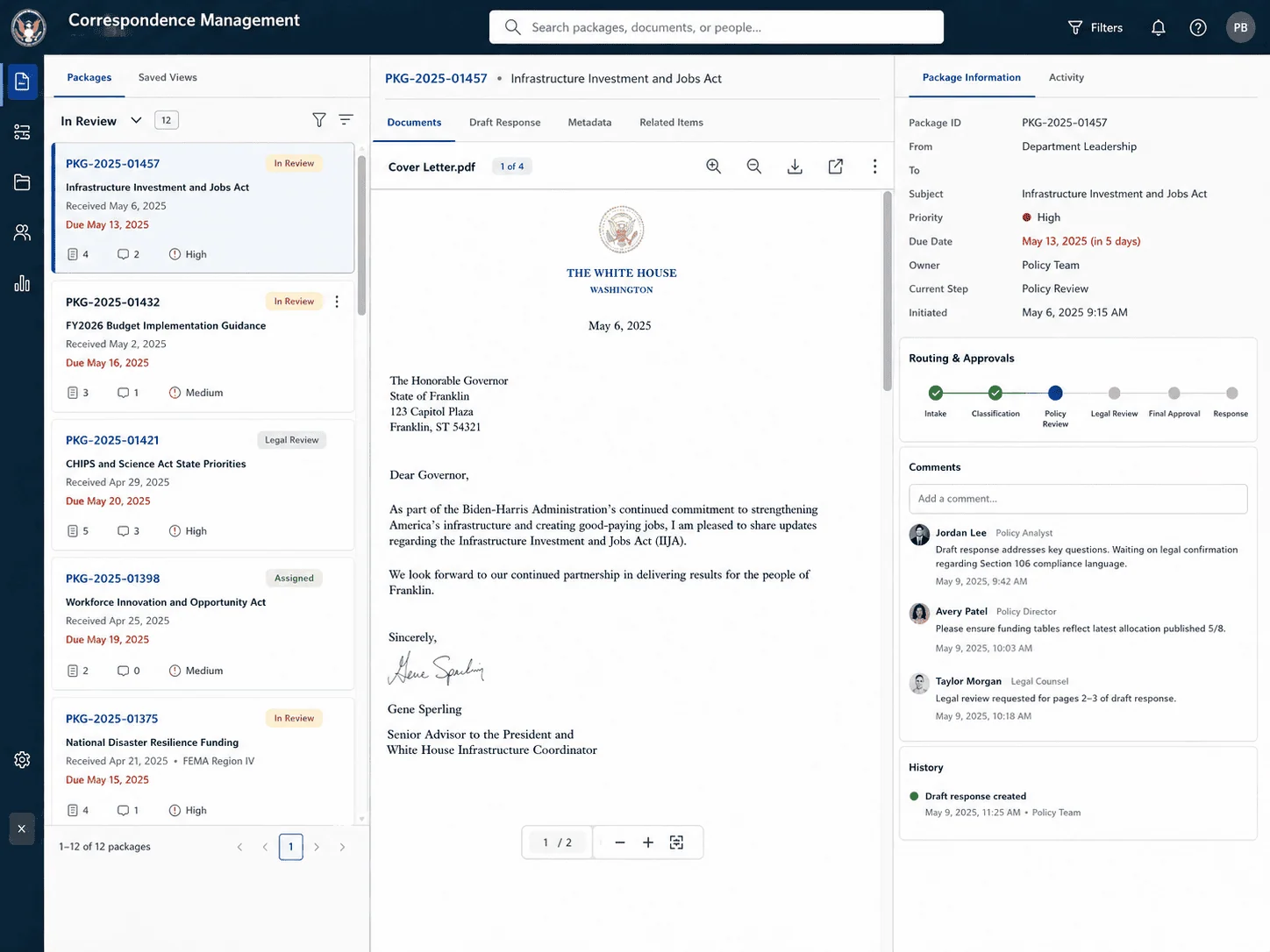
The Correspondence System Reaching Its Shutdown Date
The trigger was a deadline, not a preference. Bluecast was not merely aging; it was nearing decommissioning, and it was built with technology too obsolete to extend. An office that handles hundreds of correspondence packages each year, many of them time-sensitive event correspondence, faced the retirement of the one system that tracked all of it.
The office found itself in a difficult position: continue depending on a system with a shutdown date, or replace it with something modern before that date arrived. Leadership committed to the replacement, an executive correspondence tool that would support the office’s overarching mission rather than simply reproduce the old system’s mechanics.
This office didn’t just replace what was ending, it added unique IDs, automatic routing, and status visibility that the old system never had. If a legacy retirement is on your roadmap, it’s worth treating as a workflow redesign, not a straight swap.
Correspondence an Office Cannot Afford to Lose
The legacy way of working already carried a measurable error cost: over 200 correspondence items were misrouted or lost annually, each requiring hours of manual recovery or rework. Manual routing and status checks consumed more than 3,000 staff hours each year, and email threads with disparate document versions absorbed an estimated 1,500 hours more in inefficient communication loops.
There was also a compliance dimension. The legacy system carried flagged audit findings, with potential corrective action costs estimated at $50K to $75K per year if the gaps stayed open. For an office whose correspondence includes governmental communications at the highest level of government, a failed transition would have meant losing the tracking record for exactly the items that can least afford to go missing.
Replacing the System While the Work Keeps Flowing
The replacement had to take over every function Bluecast performed, without a pause in operations: tracking incoming correspondence, managing event information, responding to governmental communications, and overseeing correspondence management from a package’s initiation to its completion. Hundreds of packages move through the office each year, and time-sensitive event correspondence in particular demands fast turnaround; a transition that slowed responses was not acceptable.
The workflow itself imposed complexity. Correspondence at this office is not a single approval: each package can require multiple rounds of review, comment, and update so that responses and data align with the agency’s objectives. The new system had to support that collaborative review process natively, not flatten it into a one-step signoff, while giving staff a clear view of each package’s progress at every stage.
Senior Microsoft Specialists with Proven Delivery Depth
The engagement’s requirements defined the vendor profile: deep expertise in SharePoint and the Nintex platform, the ability to design workflows that mirror how a federal office actually reviews correspondence, and the delivery discipline to stand up a replacement before a legacy system’s decommissioning date. This was urgent work on a function the office depends on daily, not a discretionary modernization.
The office engaged i3solutions, a Microsoft Partner with 30 years of delivery experience and 1,500+ Microsoft engagements, delivered by an all-senior, all US-based delivery team. That profile matched the work: senior engineers who build workflow automation on SharePoint and Nintex, on exactly the collaboration platform the replacement would run on.
i3solutions developed a customized workflow automation solution focused on the Executive Correspondence Management System (ECMS), an engagement structured to replace Bluecast with a modern tool that supports the office’s overarching mission.
PHASE 01
ECMS Solution Design
i3solutions designed the new executive correspondence tool around the office’s actual challenges: what Bluecast tracked, how packages move from initiation to completion, and what a modern, efficient system needed to provide. The design settled on SharePoint as the platform, with Nintex Forms and Workflow and jQuery as the toolset.
PHASE 02
Forms and Workflow Development
i3solutions used Nintex Forms to design user-friendly interfaces for capturing information about incoming correspondence packages, streamlining data entry for office staff. Nintex Workflow automates the entire package tracking process, with each package receiving a unique ID number and workflows guiding it through its stages from initiation to completion.
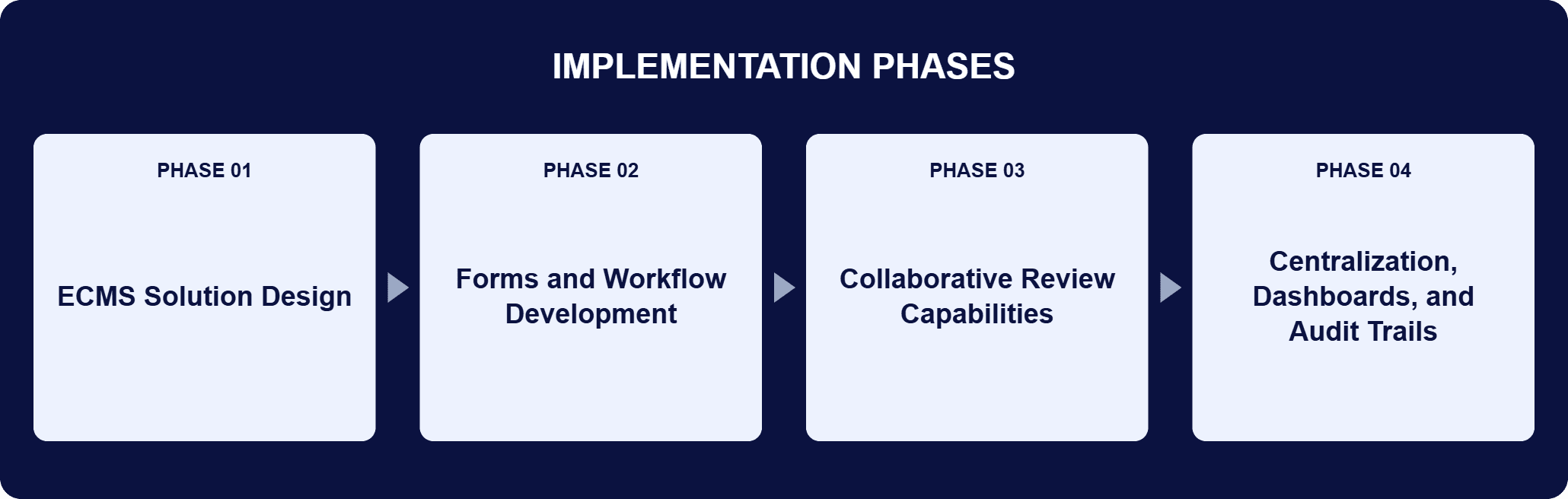
PHASE 03
Collaborative Review Capabilities
The workflows were crafted so staff can review, comment on, and update documents directly in the system, and each package can go through multiple reviews so responses and data align with the agency’s objectives. This capability proved particularly valuable for handling time-sensitive event correspondence.
PHASE 04
Centralization, Dashboards, and Audit Trails
All packages were centralized in one location with key metadata attached for easier tracking, and jQuery was used to enhance the user interface within the tool. Real-time dashboards and full audit trails give managers visibility into the status of every package and a consistent record of decisions.
SharePoint serves as the backbone of the solution, providing a secure and scalable environment for storing, organizing, and accessing correspondence information. Its document management capabilities keep every package organized with key metadata attached, so tracking is a property of the system rather than a task for staff. Nintex extends SharePoint with form creation and workflow automation that require minimal coding: Nintex Forms captures information about incoming correspondence packages at the point of entry, and Nintex Workflow automates the entire tracking process, assigning each package a unique ID number and guiding it through review, comment, and update stages from initiation to completion. jQuery enhances the user interface, keeping navigation fast and intuitive. The automation reduces manual effort, minimizes errors, and enforces a consistent process from start to finish.
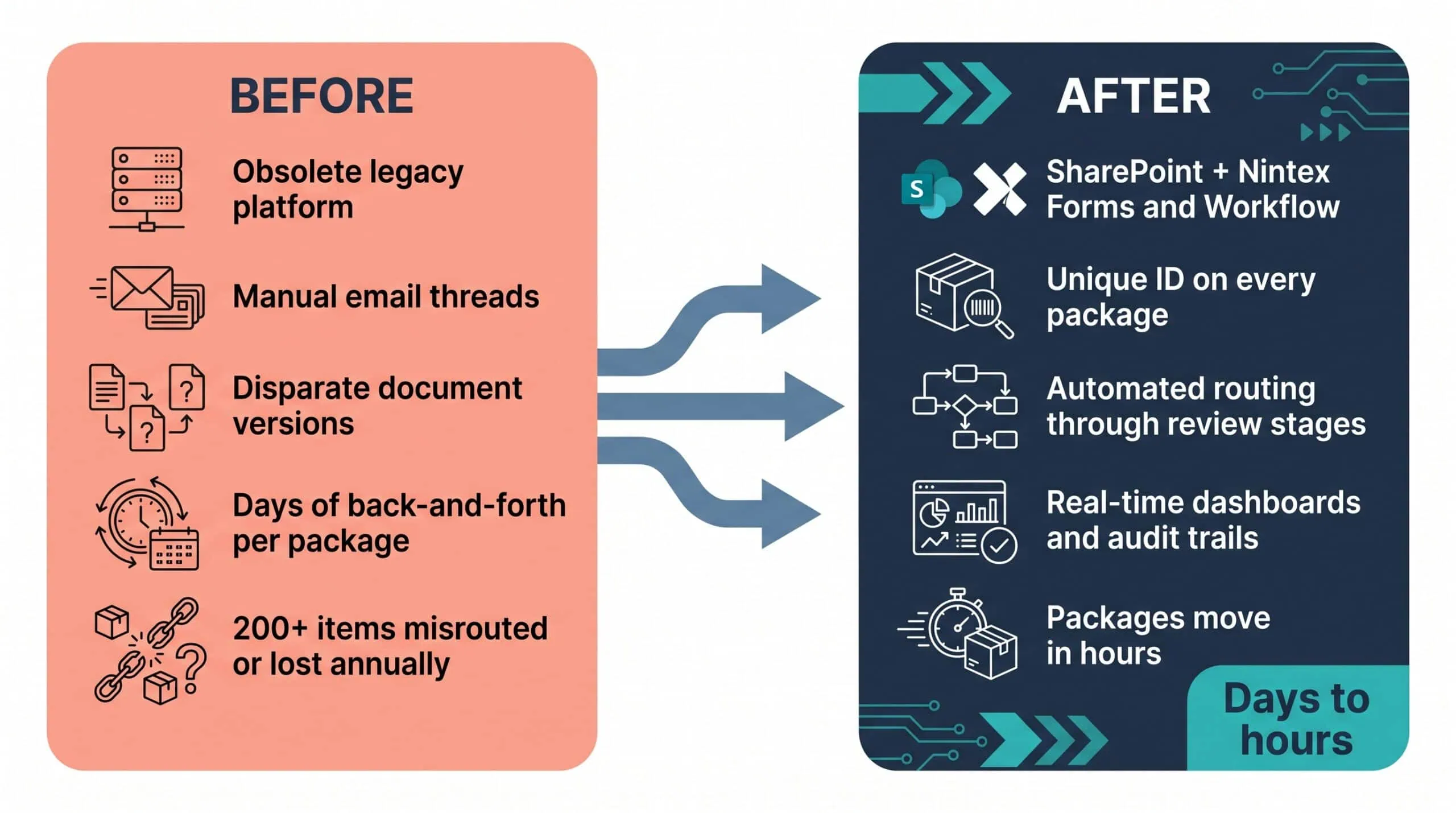
Days of Back-and-Forth to Hours
Automated routing and real-time dashboards cut processing time by 45% and reclaimed more than 3,000 staff hours a year.
| Outcome | Before | After |
|---|---|---|
| Average processing time | Multiple days of back-and-forth per package | Reduced by 45%; packages move through the workflow in hours |
| Manual routing and status checks | Hundreds of packages tracked by hand each year | More than 3,000 staff hours annually reclaimed, approximately $150K in annual productivity gains |
| Collaboration overhead | Manual email threads and disparate document versions | An estimated 1,500 hours per year reclaimed, an additional $100K in value |
| Routing and tracking errors | Over 200 misrouted or lost items annually, each requiring hours of recovery or rework | Cut by more than 60%, more than $100K in annual cost avoidance |
| Status visibility | Chasing items by email | 100% visibility via real-time dashboards and full audit trails |
| Compliance posture | Flagged audit findings from the legacy system | Gaps closed, avoiding potential corrective action costs estimated at $50K to $75K per year |
The headline number is the 45% reduction in average processing time from centralizing package tracking with unique IDs and automating routing. With hundreds of correspondence packages handled each year, this time savings equates to more than 3,000 staff hours annually reclaimed from manual routing and status checks. Based on fully loaded staff costs, this translates into approximately $150K in annual productivity gains.
The accuracy and visibility gains compound the labor number. Automated workflows and unique package IDs cut errors in routing and tracking by more than 60%, eliminating over 200 misrouted or lost correspondence items annually. Real-time dashboards and full audit trails now provide 100% visibility into the status of every correspondence package, letting managers spot bottlenecks instantly and maintain accountability across the entire workflow, while the audit trails directly addressed audit findings from the legacy system.

PENDING-CLIENT-QUOTE
This engagement is relevant for
Less relevant for
Every Package Tracked, from Initiation to Completion
The engagement established that a decommissioning legacy system is an opportunity, not just a risk. The office did not merely re-platform Bluecast’s functions; it replaced them with a system that assigns every package a unique ID, routes it automatically through review, and shows its status at every stage.
The measured result: average processing time down 45%, more than 3,000 staff hours reclaimed annually, errors cut by more than 60%, and 100% visibility through real-time dashboards and full audit trails. For a reader with a system in the same position, the decision this engagement argues for is to treat the replacement as a workflow design problem, not a data migration: the office’s gains came from the unique IDs, routing, and audit trails the new system added, not from moving the old records somewhere newer.
Executive correspondence management workflow automation replaces manual routing of letters, packages, and governmental communications with a system that captures each item through structured forms, assigns it a unique ID number, and routes it automatically through its stages of review, comment, and update. All packages are centralized in one location with key metadata attached, so staff can see where any item stands without chasing it by email, and real-time dashboards and audit trails show the status of every package. The value concentrates where volume and sensitivity are high: this federal policy office handles hundreds of correspondence packages each year, many time-sensitive, and automating their tracking reduced average processing time by 45% while cutting routing and tracking errors by more than 60%.
In this engagement, the constraint was a hard one: Bluecast, the legacy executive correspondence management system, was nearing decommissioning, and every function it performed had to carry over. i3solutions developed a customized workflow automation solution focused on the Executive Correspondence Management System, built on the SharePoint platform with Nintex Forms and Workflow and jQuery. The approach starts from the functions the old system actually served: tracking incoming correspondence, managing event information, and responding to governmental communications, then rebuilds them as designed workflows rather than copied screens. Each package receives a unique ID and moves through defined review stages, staff review and comment directly in the system, and dashboards and audit trails provide the oversight the legacy system lacked.
Nintex Forms captures information about each incoming correspondence package through user-friendly interfaces, streamlining data entry at the point of arrival. The package receives a unique ID number, and Nintex Workflow guides it through each stage of review, comment, and update from initiation to completion. All packages live in one central location on SharePoint with key metadata attached, so tracking does not depend on anyone forwarding an email. Staff review, comment on, and update documents directly in the system, and each package can go through multiple reviews so responses and data align with the agency’s objectives. Real-time dashboards and full audit trails provide 100% visibility into the status of every correspondence package, and managers can spot bottlenecks as they happen.
The audit trails and real-time status data directly addressed audit findings from the legacy system, closing compliance gaps that had been flagged and avoiding potential corrective action costs estimated at $50K to $75K per year. Every package’s history of routing, review, comments, and updates is captured as it happens, so accountability is maintained across the entire workflow rather than reconstructed after the fact. The same transparency that serves compliance also serves operations: real-time dashboards let managers spot bottlenecks instantly and resolve issues proactively, and leadership has confidence in the accuracy of the data and decisions captured in the system, because the record is the workflow itself rather than a separate log someone maintains.
Centralizing package tracking with unique IDs and automating routing reduced average processing time by 45%. With hundreds of correspondence packages handled each year, this time savings equates to more than 3,000 staff hours annually reclaimed from manual routing and status checks; based on fully loaded staff costs, this translates into approximately $150K in annual productivity gains. Replacing email threads and disparate document versions with structured workflows reclaims an estimated 1,500 hours per year, delivering an additional $100K in value through increased staff availability for higher-priority work. Cutting routing and tracking errors by more than 60% eliminated over 200 misrouted or lost items annually, worth more than $100K in annual cost avoidance, and closing flagged compliance gaps avoided corrective action costs estimated at $50K to $75K per year.
i3solutions is a Microsoft Partner with 30 years of delivery experience and 1,500+ Microsoft engagements, with every engagement staffed by an all-senior, all US-based delivery team. Correspondence system replacement is exacting work: the legacy system usually supports work the organization cannot pause and often, as here, is nearing decommissioning, so the replacement has to absorb every function on a deadline. This engagement is representative of how i3solutions delivers that: a SharePoint and Nintex solution that assigns every package a unique ID, automates routing through multiple review cycles, and adds the dashboards and audit trails that closed the office’s flagged compliance gaps. The measured outcome, a 45% reduction in processing time and more than 3,000 staff hours reclaimed annually, is the standard the work is held to.
Yes. This federal policy office replaced a system on a shutdown timeline with automated correspondence routing and tracking, built on SharePoint so the platform stays inside the tools the office already runs. The transition was sequenced so operations continued while the new system came online, and the automated routing and real-time dashboards also addressed the audit and compliance findings the legacy process had accumulated, cutting processing time 45% and reclaiming more than 3,000 staff hours a year.
The gains here came from the routing and audit trail the new system added, not from moving old records to a newer platform. We can walk through what a comparable redesign would look like for your legacy retirement.

US-Based Microsoft System Integrator | Est. 1997
© i3solutions. All rights reserved.
US-Based Microsoft System Integrator | Est. 1997
© i3solutions. All rights reserved.


