
Power Platform decisions come up faster than roadmaps account for, usually once a citizen-developer app has outgrown its original scope or an executive asks why governance didn’t catch what shipped. These answers address the specific calls IT Directors and Power Platform owners face, from licensing and environments to where custom development has to take over.
You hire a senior Microsoft implementation team to run this as a technology assessment, not an audit firm to run it as an attestation. The qualification that decides the outcome is build experience: whoever runs it has to have split an app and moved a connector before, because that is where the tier is actually set. The work is a license assignment review: an inventory of who holds which Power Apps and Power Automate licenses, matched against what those people actually run, so seats that no longer earn their cost can be reassigned or released at renewal. It produces no opinion, no certification, and no compliance finding, and it is not a financial or contractual audit of your Microsoft agreement. The overspend sits one level below the license list, in the design decision that forced the license: a premium connector, a Dataverse table, or an app boundary drawn one plan tier too wide. Reading the license list will not find it.
You have a renewal date and a number attached to it, and nobody in the building can tell you which of those seats is still doing work. That is the decision this page is about, and it is not a licensing decision. An app was pointed at a premium connector during a short pilot, and every user of that app now needs a premium license nobody put in a budget. Your next renewal number was set by decisions nobody filed as licensing decisions. Premium seats sit with a population that opens a single app and never a second. A department bought seats through its own cost center and never told IT. Dataverse tables that stopped being written to long ago still draw storage in environments nobody closed. No rule was broken anywhere in that sequence. Four mechanisms did the work: a plan tier chosen for administrative convenience, a connector that raised the license floor for every user of its app, a purchase made outside IT, and storage capacity that accrues from the licenses themselves. None of the four is visible in a license report. They are visible in the app, flow and connector inventory in the Power Platform admin center, and in the Center of Excellence Starter Kit inventory if you run one.
That distinction matters before you write a statement of work. If you ask for an audit and the firm hears attestation, you will get a document that tells you what you already have. If you ask for an assessment, you get the inventory plus the remediation path: which seats to reassign, which app boundary to split, which storage to scope before renewal.
The engagement is an evidence exercise, not an interview. Ask any candidate firm which of these artifacts they will pull themselves, and which they expect you to produce:
The deliverable you want out of this section is unglamorous: one row per assigned license, with the app or flow it exists to support, the last time that app or flow ran, and the cheapest entitlement that would still support it. Everything else in the engagement is argument about that table.
That table decides nothing until you know which of three purchasing shapes each row belongs in. Most overspend is a mismatch between the shape you bought and the way people actually use the apps. The mechanics below are Microsoft’s, published in the Power Apps and Power Automate licensing FAQ and the pay as you go plan overview. Check them against your own agreement, because Microsoft owns these terms and revises them.
No credible firm will tell you a tier is correct in the abstract. The output is a decision per population, with the usage evidence attached, so that your licensing team can defend it to procurement without re running the analysis.
Seat count is the visible half of the bill. Storage is the other half. It grows without a decision behind it, and it is the finding that most often surprises a team looking at this for the first time.
Microsoft documents the sources of capacity in the storage report. The “Org (tenant) default” is “The default capacity given at the time of sign up.” For “User licenses” it says “More capacity added for every user license purchased.” So capacity accrues from the licenses you buy. A seat decision is therefore a storage decision, and the two get reviewed separately, because the seat list and the capacity report are read in different admin centers. The Dataverse capacity documentation describes a per license breakdown showing “how your entitlement was calculated, including base capacity and per-user license accruals,” and states the operating rule plainly: “Stay within the limits for your entitled capacity for database, log, and file storage.”
Five findings turn up here, roughly in this order, and the capacity report sizes each one in gigabytes before anybody has to argue about it:
Pay as you go complicates this in a useful way, because overage can be billed to an associated Azure subscription rather than blocking work. That is operationally kinder and financially quieter, which is exactly why it belongs in a review rather than in a monthly report nobody opens.
A review that ends in a reassignment spreadsheet buys you one renewal cycle. The same drift reappears within a year unless something structural changes. The behaviors that produced it are normal and rational at the level of an individual team.
We have written up how these gaps actually present in a tenant, in 7 Power Platform governance gaps that create audit exposure and in Power Platform app sprawl governance risk explained. Microsoft’s Power Platform Center of Excellence adoption guidance treats a Center of Excellence as the answer to this. Microsoft’s wording on that page frames it as a strategic move for an organization investing in Power Platform, one that can “ensure its sustainable, scalable, and secure use across the enterprise,” and it names executive sponsorship as a component rather than an afterthought. In practice, the controls that hold license cost flat are these:
Those four surfaces, plus the guardrails, are what a scope of work has to cover. An assessment has a defined end, a fixed deliverable set, and no obligation on either side to continue, which is the right shape for a question whose answer might be that your licensing is already tight.
The capability behind it is implementation experience. i3solutions implements Power Platform licensing across Power Apps per-app and per-user plans, Power Automate per-flow and per-user plans, and the Microsoft 365 default entitlements where app complexity is low. That matters for a review because the recommendations have to survive contact with the platform. Recommending that an app be split so that only ten people need a premium plan is only useful if the person recommending it has split an app before.
On cost, the published band that fits this work is the scoped assessment. Phase 1 (Risk and Roadmap Assessment) typically runs $20,000 to $40,000 over two to three weeks. That is the shape of a bounded licensing and capacity review in a single tenant: inventory, findings, a reassignment plan, and a quarterly reassignment routine with a named owner.
An estate wide review spanning several tenants, or one that has to produce compliance evidence alongside the cost work, is a larger engagement priced against a different band, and a licensing review is normally one workstream inside it rather than the whole of it. Ask for that number against your own inventory rather than against a published range, because what moves it is inventory size and framework count, and neither of those is a licensing input.
The inputs that move the number are countable, and you can estimate your own position before you call anyone: how many tenants and environments, how many apps and flows in the inventory, whether the Center of Excellence Starter Kit is already running, and whether a compliance framework has to be evidenced alongside the cost work.
Ask for the reassignment table as a named deliverable, in a format your license administrator can act on directly. A findings deck that requires a follow on engagement to implement is a proposal, not an assessment.
A reseller reading a price list will do none of the following. A delivery firm will:
Three inputs and thirty minutes are enough to size this honestly: your current assigned seat counts by plan, a rough app and flow count, and whether anyone owns the quarterly reassignment today. From those three, the shape of the engagement is clear inside the conversation, including the case where the answer is a governance routine rather than a consulting engagement.
If you are building the internal case before anyone commits budget, that scoping conversation gives you a scoped price and a named deliverable to put in front of whoever signs it.
No, and the difference is worth stating in the contract. A license assignment review is a technology assessment: it looks at who holds what, what they use, and where the entitlement is wider than the need. A compliance audit is an attestation exercise about your agreement with Microsoft, and it belongs with your licensing counsel or your reseller of record. This engagement produces cost findings, not an opinion.
The bounded version runs in weeks rather than months, and the constraint is almost never analysis time. It is access: getting a reader role in the Power Platform and Microsoft 365 admin centers, and getting a current export of app and flow run activity. Organizations that have the Center of Excellence Starter Kit running finish materially faster, because the inventory already exists.
Try it first, before you spend anything on anyone. The admin centers will show you assignment counts and capacity consumption, which is enough to size whether a problem exists. What they will not do is connect a premium connector inside a single app to the license floor it sets for everybody who opens that app, or surface an entitlement a person already holds that makes their other license redundant. That mapping is the work, and it is where an implementation background earns its fee.
Some of them will propose changes to app boundaries or connector choices, because that is where a license tier is actually set. A good review ranks findings by effort as well as by saving, so that the reassignment and deactivation work, which needs no development at all, is separated from the app changes that do. You should be able to take the top of that list to a renewal conversation without opening a development ticket.
Then you have a defensible position for the renewal negotiation and a documented baseline for next year, which is worth having. An assessment that can only conclude that you are overspending is not an assessment. Ask any candidate firm to write that into the statement of work: an efficient-licensing conclusion is an acceptable outcome, and the fee does not change if it is the one they reach.
By Michael Branson
As of September 2026, Microsoft Learn says Power BI Q&A experiences are going away in February 2027 and recommends Copilot for Power BI. According to Microsoft Learn, Copilot needs paid Fabric capacity at F2 or higher or Power BI Premium at P1 or higher.
Trial capacities and free SKUs are not supported, according to Microsoft’s Copilot for Power BI overview page, and a Fabric Copilot capacity on at least an F2 or P1 SKU is the route for Pro and Premium Per User workspaces. Copilot is already enabled by default for tenants with paid Fabric capacity, and for a capacity in the US, data processed by Copilot in Fabric stays in the capacity’s geographic region unless an admin allows otherwise, but the separate setting that lets Copilot use OpenAI as a Microsoft subprocessor, off by default, is one that Microsoft’s OpenAI as a subprocessor in Microsoft Fabric page says allows data to leave Fabric’s compliance boundary for infrastructure that may have lower compliance controls and may not comply with FedRAMP. Microsoft’s What is Copilot in Fabric? page states that Copilot “isn’t yet supported for sovereign clouds due to GPU availability”, and Microsoft Learn as read in September 2026 does not name Copilot for Power BI’s status in GCC, GCC High or DoD, so a government-cloud tenant confirms its status with Microsoft and plans a report-level fallback before February 2027.
Every morning a finance operations team opens the same dashboard and types a question into the box at the top: overdue receivables by region, this week against last. Clinical operations does the same with bed occupancy. Neither team knows the box has a name. Then the notice appears at the top of Microsoft’s Q&A pages, and the date in the IT Director’s inbox depends on which post he read. When he looks at the recommended replacement, he finds that Copilot is already on for the tenant’s paid capacity, that a capacity administrator could have switched it on anyway, and that one of its settings carries a warning his privacy office will want to read. If he waits, the question boxes disappear on a Microsoft date and the workspaces users rely on turn out not to qualify for Copilot. If he lets the defaults stand, Copilot answers from models no one certified while its capacity use competes with production reports. This guide sets out what goes away, what Copilot needs and already switches on, which settings decide where report data is processed, and what a government-cloud tenant does now.
The first failure is a short inventory: teams count the dashboards with a question box and miss the other places report users type questions. Microsoft’s Introduction: Use natural language to explore data with Power BI Q&A page states: “Q&A experiences are going away in February 2027.” The same page states: “We recommend using Copilot for Power BI, which offers a more advanced and integrated way to query your data using natural language.”
That notice is not confined to one page. As read in September 2026, the same February 2027 notice and the same recommendation sit on Microsoft’s Create a Q&A visual in a report in Power BI page, its Q&A for Power BI business users page and its Intro to Q&A tooling to train Power BI Q&A (preview) page. Some earlier posts gave December 2026 as the date; Microsoft’s Learn pages as read in September 2026 say February 2027, and that is the date to plan against.
Microsoft’s Q&A for Power BI business users page adds: “Q&A is available in Power BI iOS apps and in Power BI embedded analytics as well.” Microsoft’s Embed a standalone Q&A visual page, which covers Q&A in embedded analytics, carries no retirement notice as read in September 2026 and does not describe a replacement, so the owner of any application that embeds Q&A confirms its path with Microsoft directly.
This guide recommends building the inventory before choosing what replaces anything. For each place Q&A appears, record its owner, who uses it and the questions they actually ask:
The last field recorded, the questions users actually ask, is what the replacement is tested against.
The second failure arrives after the question boxes are gone: the workspaces users rely on cannot run Copilot at all. Microsoft’s Copilot for Power BI overview page sets out the requirements in a table, as of September 2026:
The same Copilot for Power BI overview page states: “Trial capacities and free SKUs aren’t supported.” Microsoft’s What is Copilot in Fabric? page states: “The Azure OpenAI Service isn’t available on trial SKUs.”
Where report users are licensed on Pro or Premium Per User, the plan stalls here unless it names a capacity. Microsoft’s Fabric Copilot capacity page describes the route: “A Fabric Copilot capacity is a Fabric capacity that you designate to collect and bill the Copilot usage of a specific group of users.” The same page states: “The Fabric Copilot capacity must reside on at least an F2 or P1 SKU.” It also states: “Fabric Copilot capacity is supported only in the Fabric tenant’s home region.”
According to Microsoft’s Fabric Copilot capacity page, users assigned to a Fabric Copilot capacity can use Copilot in Power BI on workspaces in these license modes, and in Power BI Desktop:
The same page states: “Capacities with the Embedded license mode aren’t supported.”
Timing and load matter once capacity is chosen. The Copilot for Power BI overview page states: “When you purchase new capacity or scale up capacity, it can take up to 24 hours for Copilot to recognize the change and become available for use.” Microsoft’s What is Copilot in Fabric? page states: “Furthermore, Copilot in Power BI consumes your available Fabric capacity, so you should manage its usage to avoid overconsumption that can lead to throttling and disruption of your other Fabric operations.” Microsoft’s Consumption rates and billing for Copilot in Fabric page states: “Requests to Copilot in Fabric consume Fabric capacity units (CUs).” It adds: “Copilot operations in Fabric are classified as background jobs, which allows Fabric to handle a higher volume of Copilot requests during peak hours.”
Our recommendation: decide which capacity bills Copilot before the first user arrives, and watch the capacity it shares with production reports from the first week.
The third failure is assuming Copilot is off because no one in IT turned it on. Microsoft’s What is Copilot in Fabric? page states: “Copilot is enabled by default for tenants with paid Fabric capacities (F2 or higher).” The Copilot for Power BI overview page states: “Copilot is enabled by default, but your admin might turn it off.”
A second default followed. Microsoft’s Enable Fabric Copilot for Power BI page states: “As of September 2025, this setting (and therefore the Standalone Copilot experience) is enabled by default for all tenants where Copilot is already turned on.”
Tenant administrators are not the only people who can switch it on. The same Enable Fabric Copilot for Power BI page states: “This AI and Copilot setting is automatically delegated to capacity administrators; tenant administrators can’t turn off the delegation.” It continues: “This means that even if Copilot isn’t enabled on a tenant level, a capacity administrator can choose to enable Copilot for their capacity.” And the scope is wider than reports: “If you enable Copilot in Fabric, users can access Copilot across workloads.” The page adds: “Copilot access isn’t limited to a specific workload, like Power BI.”
Microsoft’s Copilot and Agent tenant settings page lists these tenant settings among those enabled by default:
Microsoft 365 Copilot is a different product with its own controls outside the Fabric admin portal; this guide covers only the Fabric settings.
What we recommend: read the current tenant and capacity settings before planning anything else, and write down which capacity administrators hold the delegation.
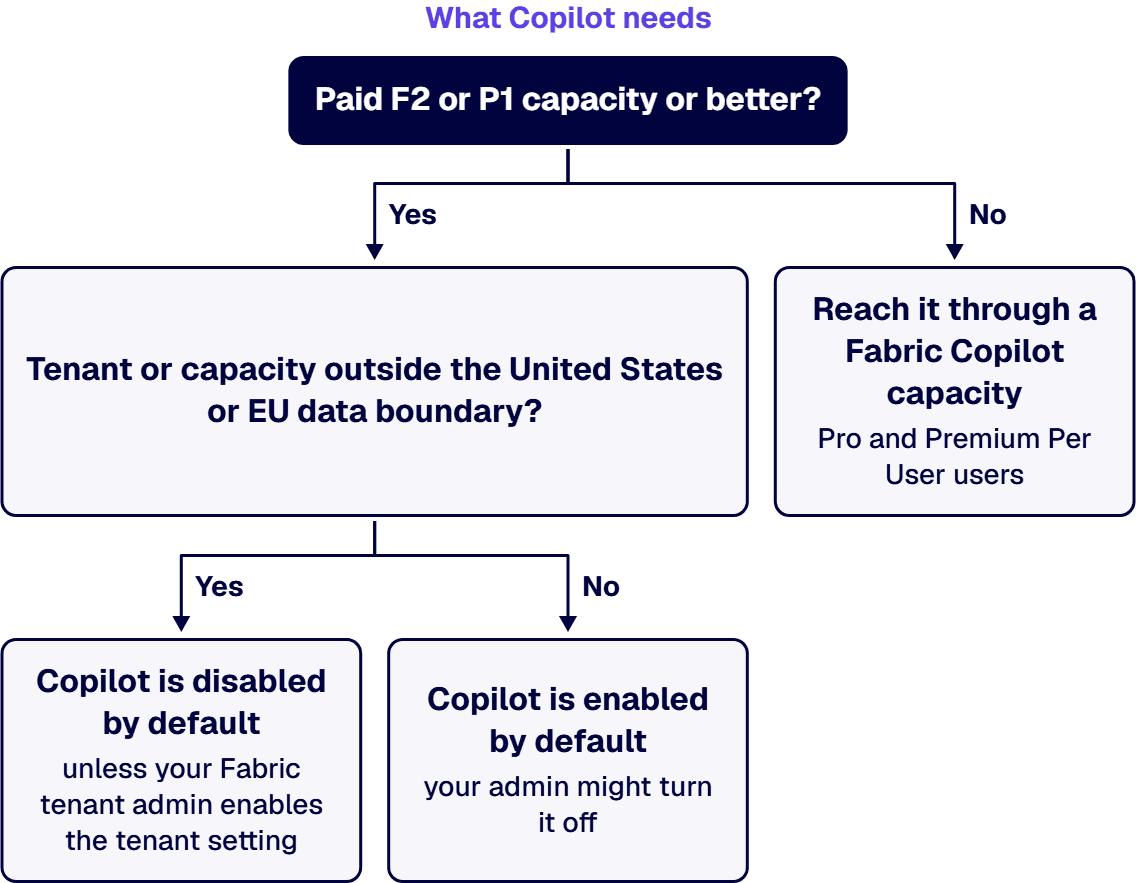
The privacy office’s first question is where report data goes when a user asks Copilot about it, and the answer depends on the capacity’s region and on settings, not on Copilot alone. Microsoft’s What is Copilot in Fabric? page states: “The Azure OpenAI Service that powers Fabric Copilot is currently deployed in US datacenters (East US, East US2, South Central US, and West US) and in the EU data boundary.” Microsoft’s Privacy, security, and responsible AI use of Copilot in Fabric page states: “Data processed by Copilot in Fabric stays within your capacity’s geographic region, unless you explicitly allow data to be processed outside your region”. The same page states: “Your data isn’t used to train models and isn’t available to other customers.” It also states: “Copilot doesn’t store your data for abuse monitoring.”
Settings that allow data out of the region are off by default. Microsoft’s Copilot and Agent tenant settings page lists these as disabled by default, and describes each as applying only to customers whose capacity’s geographic region is outside of the EU data boundary and the US:
Microsoft’s Copilot for Power BI overview page states: “If your tenant or capacity is outside the United States or EU data boundary, Copilot is disabled by default unless your Fabric tenant admin enables the tenant setting called Data sent to Azure OpenAI can be processed outside your tenant’s geographic region, compliance boundary, or national cloud instance in the Fabric admin portal.” Microsoft’s Enable Fabric Copilot for Power BI page states: “The cross-geo setting stays disabled and doesn’t autodelegate to capacity administrators.”
For a US tenant, the setting that changes where data can go is a different one. The same Copilot and Agent tenant settings page lists “Users can use Copilot, AI Agents and other AI experiences powered by OpenAI as a Microsoft Subprocessor” as disabled by default. Microsoft’s OpenAI as a subprocessor in Microsoft Fabric page states: “Enabling this feature will allow data to egress outside of Fabric’s compliance boundary to a third-party system or infrastructure that may have lower compliance controls (for example, may not comply with FedRAMP or Supply Chain Risk Management).”
The same OpenAI as a subprocessor in Microsoft Fabric page states: “OpenAI models delivered through OpenAI as a subprocessor in Copilot experiences are currently excluded from country/region-specific processing commitments when applicable.” And it states where the decision sits: “The tenant administrator is responsible for ensuring features meet their organization’s security requirements and compliance obligations.”
Whether a given configuration is acceptable under FedRAMP, HIPAA, GLBA or a contract clause is a determination for the organization’s privacy, compliance and contracting owners; this guide describes Microsoft’s settings and caveats and makes no such determination. Where the question is evidence of who used Copilot on which items, that belongs to Microsoft Purview for Microsoft Fabric: The Audit Evidence Checklist.
Our recommendation for a US tenant: leave the cross-region settings off unless a capacity sits outside the US and the EU data boundary, and treat the OpenAI-subprocessor setting as a privacy-office decision, taken in writing with Microsoft’s caveat on the record.
The fourth failure is a correct setting and a wrong answer: Copilot turned on over models no one prepared. Microsoft’s Copilot for Power BI overview page states: “When a question is related to data in the semantic model, Copilot uses the semantic model to answer the question.” It continues: “Otherwise, it answers from the large language model’s (LLM) general knowledge.” And it warns: “Without preparation, Copilot can misinterpret the data and return generic or inaccurate results.”
That same Copilot for Power BI overview page states: “Right now, three chat-with-your-data experiences exist for business users: the standalone Copilot experience, the Copilot pane for reports, and Copilot in apps (scoped to curated app content and supports verified answers by app authors).” Microsoft’s Copilot and Agent tenant settings page states: “Tenant admins can default Copilot search to be limited to items that are marked as approved for Copilot.” Microsoft’s Privacy, security, and responsible AI use of Copilot in Fabric page states: “Copilot responses can include inaccurate or low-quality content, so make sure to review outputs before you use them in your work.”
Model work does not have to wait for the capacity decision. A GCC High estate whose move from Premium P1 to Fabric is still open can certify and approve models now; the move itself is covered in Power BI Premium P1 to Microsoft Fabric in GCC High: A Readiness Guide.
We recommend approving for Copilot only the semantic models you would certify for reporting, testing each against the questions from the Q&A inventory, and starting users in Copilot in apps, where app authors can supply verified answers.
The government-cloud reader faces a different failure: waiting for February 2027 to learn whether Copilot is offered at all. Microsoft’s What is Copilot in Fabric? page states: “Copilot isn’t yet supported for sovereign clouds due to GPU availability.” Microsoft’s Copilot for Power BI overview page lists sovereign clouds as not supported in its requirements table.
Microsoft’s OpenAI as a subprocessor in Microsoft Fabric page states: “Access to OpenAI-operated models isn’t currently available for use in government clouds (GCC, GCC High, DoD) or sovereign clouds.” That sentence names government clouds and sovereign clouds as two sets, while the Copilot requirement says only “sovereign clouds”. As read in September 2026, no Microsoft Learn page we read names the status of Copilot for Power BI in GCC, GCC High or DoD, and Microsoft’s Power BI for US government customers page does not mention Copilot. Microsoft 365 Copilot is a different product, and its position in a government cloud says nothing about Power BI.
A GCC, GCC High or DoD tenant therefore asks Microsoft for Copilot for Power BI’s status in its cloud, in writing, and plans as if the answer could be no. The fallback below is this guide’s planning, not Microsoft’s recommendation:
Where Power BI itself should run, in the service or on a report server, is a separate hosting decision this guide does not cover.
Build the fallback now, for the questions users actually ask, so the retirement date changes nothing they depend on, whatever Microsoft says about your cloud.
Some estates reach the retirement with a different decision in front of them, and this guide should not be forced onto it:
Whoever does the work, internal team or outside help, hold the plan to evidence rather than assurances:
A plan that cannot show these is not ready, whoever wrote it. An i3solutions engagement does not produce managed-service ownership, a replacement for the internal team, open-ended scope expansion, or vendor lock-in.
According to Microsoft Learn, Power BI Q&A experiences are going away in February 2027. Other dates circulated in earlier posts, but the Microsoft Learn Q&A pages as read in September 2026 give February 2027, and that is the date to plan against.
Microsoft recommends Copilot for Power BI. According to Microsoft Learn, Copilot needs paid Fabric capacity at F2 or higher or Power BI Premium at P1 or higher, and trial capacities and free SKUs are not supported. Where the inventory finds little Q&A use, retiring the question boxes and visuals may be enough.
Yes, through a Fabric Copilot capacity. According to Microsoft Learn, a Fabric Copilot capacity on at least an F2 or P1 SKU, in the tenant’s home region, collects and bills the Copilot usage of the users assigned to it, and they can then use Copilot in Power BI on Pro and Premium Per User workspaces and in Power BI Desktop. Without paid capacity somewhere in the tenant, those users have no route to Copilot.
Where capacity is paid, yes, unless an admin has turned it off. According to Microsoft Learn, Copilot is enabled by default for tenants with paid Fabric capacities at F2 or higher, and as of September 2025 the standalone Copilot experience is enabled by default where Copilot is already turned on. Microsoft Learn also states that a capacity administrator can enable Copilot for a capacity even if it is not enabled at the tenant level.
For a capacity in the US, not by default. According to Microsoft Learn, the Azure OpenAI Service behind Fabric Copilot is deployed in US datacenters and in the EU data boundary, and data processed by Copilot stays within the capacity’s geographic region unless you explicitly allow otherwise. According to Microsoft Learn, the separate setting that lets Copilot use OpenAI as a Microsoft subprocessor is disabled by default, and enabling it allows data to leave Fabric’s compliance boundary for infrastructure that may have lower compliance controls and may not comply with FedRAMP.
Microsoft Learn does not say by name. According to Microsoft Learn, Copilot isn’t yet supported for sovereign clouds due to GPU availability, and OpenAI-operated models are not currently available in government clouds (GCC, GCC High, DoD). As read in September 2026, no Microsoft Learn page we read names Copilot for Power BI’s status in GCC or GCC High, so a government tenant confirms its status with Microsoft in writing and builds a report-level fallback before February 2027.
i3solutions implements Power BI as enterprise analytics infrastructure. That practice is described on the Enterprise Power BI Development & Integration Services for Defensible Analytics page. i3solutions has deployed Power BI inside a GCC High tenant and inside Azure Government for a federal customer. i3solutions has delivered Microsoft Fabric work for clients.
For the Q&A retirement, the work is delivered as a project, with specialists embedded in your team where it needs them: inventorying Q&A use, readying and approving the semantic models Copilot may answer from, configuring the Copilot tenant and capacity settings and the capacity that bills Copilot, and building the report-level fallback for the questions users depend on. All i3solutions Power BI and analytics developers, architects, and consultants are 100% U.S.-based. i3solutions has been a Microsoft Partner with 30 years of enterprise technology delivery experience and has delivered 1,500+ Microsoft engagements across aerospace and defense, financial services, and health sciences.
If a model-driven app is proposed over Dynamics 365 seats: as of September 2026, Microsoft’s licensing guide lets Power Apps users access “any Dynamics 365 non-restricted table in the Dataverse”, but writing to Case and other restricted tables needs Dynamics 365 licensing. Check each role’s tables.
The Power Platform team has proposed building the service-case app as a model-driven app on Dataverse, licensed for Power Apps, instead of buying Dynamics 365 Customer Service seats. The proposal says the app uses the same tables. The list no one has written down is which of those tables each role writes to, and that list is what Microsoft’s Restricted tables requiring Dynamics 365 licenses page is read against. This guide sets out Microsoft’s rule, the tables it names for Sales and Customer Service, the exception for cases, and how to decide per app.
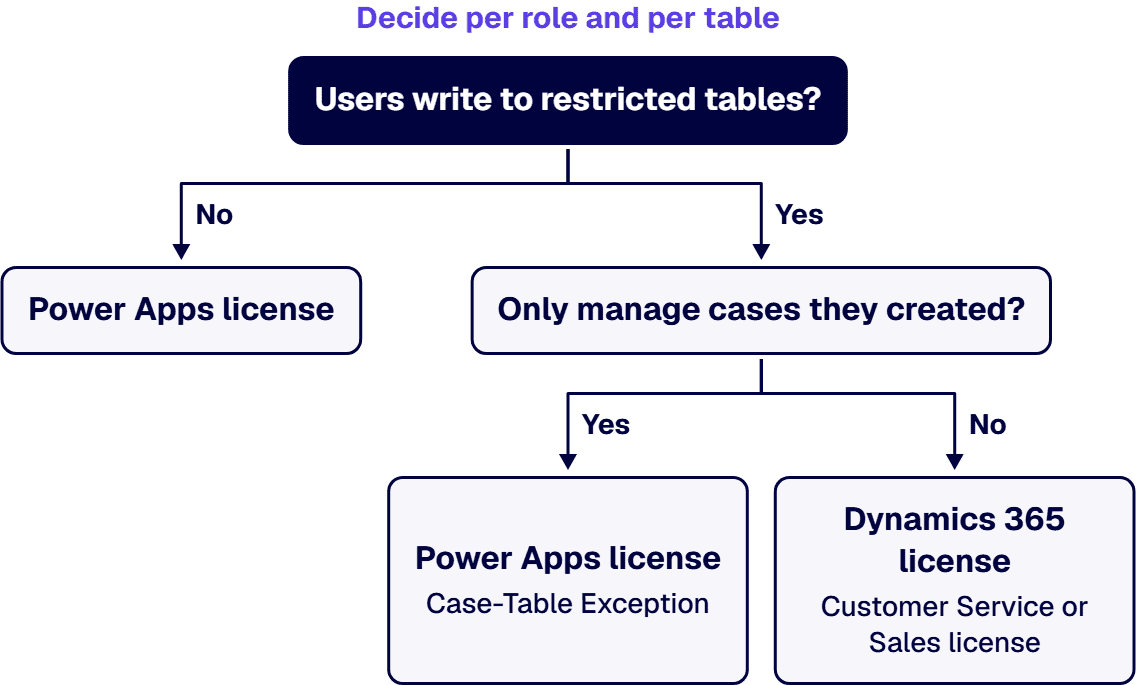
When procurement asks why a Power Apps license is enough, the answer starts with Microsoft’s own sentence. The restricted tables page states that app makers “can use all of the Microsoft Dataverse tables available within Common Data Model to create apps and flows for users who have any version of Power Apps and Power Automate license.” It then narrows that: “a smaller set of tables tied to Dynamics 365 apps (Dynamics 365 Sales, Customer Service, Field Service, Marketing, or Project Service Automation) require canvas and model-driven app users to have a license for the corresponding Dynamics 365 app if they need to create, update, or delete rows within the tables. These are referred to as restricted tables.”
The Dynamics 365 Licensing Guide (September 2026) states the same line from the other side: “Power Apps users who have a Power Apps license may use custom applications to access (that is, create, read, update or delete) any Dynamics 365 non-restricted table in the Dataverse. However, Power Apps users and devices that need to create, update, or delete data in Dynamics 365 restricted tables must be properly licensed for Dynamics 365.”
Microsoft gives two reasons a table is restricted on the same page: “The table is used to store and maintain product-specific configuration data that should typically be not used outside of the application.” and “The table is accompanied by advanced logic that creates and maintains data in a specific way when used within a Dynamics 365 product.” Reading is treated differently: “If an app or flow only reads information from a table, a Dynamics 365 app license isn’t required and an appropriate Power Apps or Power Automate license is all that’s needed.”
If the app is meant to replace a service desk or a sales tracker, check its tables against Microsoft’s list before anything else. The restricted tables page lists, among others, these rows that name a Customer Service or Sales license, quoted by the page’s display name, logical name and license column:
The legacy plans are the Customer Engagement plan and the Dynamics 365 plan, and the page notes: “Dynamics 365 Customer Engagement Plan and Dynamics 365 Plan licenses are no longer available for purchase”. On the Sales side, Goal is the one row in this list whose license column names a Sales license. For any other table the app writes, apply the non-restricted rule in the Dynamics 365 Licensing Guide to what the restricted list says today, and re-read the list before the design is signed off rather than assuming a table is outside it.
If the app lets employees or front-line staff log cases for themselves or for customers, Microsoft carves out room for that. Note 1 on the restricted tables page says Power Apps, Power Automate or Copilot Studio licensed users “can ‘create’ cases; can ‘read’, ‘update’ and ‘delete’ self-created cases to enable scenarios including employee self-service and case creation on behalf of customers.”
The same note sets the limit. Those users “can only perform ‘read’ operation on cases created by other users.” It continues: “They can’t ‘update’, ‘resolve’, ‘route’, ‘close’”, and ends: “Users can’t act as a customer service agent, can’t manage cases.” The decision point follows from Microsoft’s words: a user who works other people’s cases is on the Dynamics 365 side of the line, and a user who raises and follows their own cases is not.
If the build option wins on the tables, the next question is what the Power Apps license itself gives. A model-driven app is a Dataverse app by definition: Microsoft’s model-driven app overview says to think of them as “data model driven apps”, because without a data model in Dataverse “you can’t create a model-driven app”. How that choice compares with a canvas app is covered in Canvas vs Model Driven Apps in Regulated Microsoft Environments: How to Make the Architectural Decision That Determines Long-Term Maintainability.
The license is counted per user and, on the per app plan, per app. Microsoft’s Power Platform licensing FAQs state: “Each per app license provides an individual user with rights to one app (canvas and/or model-driven) within a single environment.” Which Power Apps plan fits a given user population is covered in Power Apps Premium vs Per App: What Actually Differs, and Where the Break-Even Sits.
Building the app is project work. From what we can document, quoted at the size we can document it: “Power Apps development work ranges from $50,000 to $350,000 per project, depending on size, complexity and length.”
When the app has to work other people’s cases, SLAs, entitlements, knowledge articles, routing rule sets or goals, the restricted tables page puts those users on the Dynamics 365 license its table names. Appendix E of the Dynamics 365 Licensing Guide opens: “Dynamics 365 licenses provide the right to use custom tables.” It gives Enterprise Applications full users “No limit on number of custom tables”, and gives Sales Professional and Customer Service Professional users the right to “Create and modify up to 15 custom tables (per application) in addition to the included standard tables”.
Power Apps rights inside a Dynamics 365 license depend on the license. The Power Platform Licensing Guide (September 2026) lists those rights in its Power Apps table. For running custom apps, its column for select Dynamics 365 licenses reads “Within same environment as licensed Dynamics 365 application(s)”, and the notes under the table read “Within app context.” and “Dynamics 365 Pro does not have use rights for Power Apps or Power Pages.” Read the table’s column for your license before assuming a Dynamics 365 seat also covers a separate Power App. What Customer Service case management does is described on DYNAMICS 365 CASE MANAGEMENT FOR YOUR COMPANY, and Sales on DYNAMICS 365 SALES MODULE CONSULTING; per-user prices are on How Much Does Dynamics 365 Licensing Cost Per User?
Team Members is a narrower license. The Dynamics 365 Licensing Guide states: “A Dynamics 365 Team Members license holder may customize a maximum of 15 additional tables (custom tables or standard Dataverse tables) that are available to licensed users per the pre-approved scenarios in Appendix E.” What a Team Member can do against a full license is the subject of a separate i3solutions guide, Dynamics 365 Team Member vs Full License: What a Team Member Can Actually Do.
If the proposal puts a Power App, a portal or an integration in front of Dynamics 365 to avoid seats, the Dynamics 365 Licensing Guide answers it in one line: “The number of tiers of hardware or software between Dynamics 365 and the ultimate user or devices does not affect the number of licenses required.” The cost side of that rule is covered in The Hidden Costs of a Dynamics 365 Implementation, Beyond Base Licensing.
Design choices after go-live can move the line too. Microsoft’s License requirements for tables page states: “App makers can add code plug-ins and real-time workflows to tables within Dataverse, but doing so could change the license requirements for users of apps already deployed.”
When you have to defend the choice at a true-up, a table with one row per write pattern holds up better than one answer for the whole app. Every Microsoft statement in the table below is quoted from the restricted tables page or the Dynamics 365 Licensing Guide, as named in each row.
Where roles fall in different rows, license each role by its own row. The case note on the restricted tables page is written that way: it names “employee self-service and case creation on behalf of customers” as scenarios for Power Apps licensed users, and keeps work on cases created by others for the Dynamics 365 license. Confirm the result with your Microsoft licensing contact before signing.
If the requirement does not fit either option, choosing a license first solves the wrong problem. In four situations the decision changes shape.
When a proposal reaches the approval stage, the useful output is a table list per role that procurement and a Microsoft true-up can both read. i3solutions implements the Microsoft technology a customer needs, Dynamics 365 and other ERP and CRM work included, so either answer, the model-driven app or the Dynamics 365 configuration, is work i3solutions carries. These are the statements we can document that bear on it, quoted at the size we can document them:
Both options on this page sit on Dataverse: the Dynamics 365 Licensing Guide states that “Dynamics 365 applications use Dataverse capacity and features to store and secure data.” Power Apps come in two kinds, canvas and model-driven, and on the Power Apps side the register attests: “i3solutions builds both kinds through its power platform development services in regulated environments, and the choice always starts with the same question: what is the data and what governance does this app need to inherit.” The sequence is to list the tables each role writes, test the design against Microsoft’s restricted list, and then build either the model-driven app or the Dynamics 365 configuration. Dynamics 365 work is described on Enterprise Dynamics 365 Development Services That Align CRM and ERP to How You Operate. If the users are service agents, also see what IT decides about Copilot in Dynamics 365 Customer Service.
If users create, update or delete rows in a restricted table, they need the Dynamics 365 license Microsoft names for it. The restricted tables page lists them; for Customer Service they include Case, SLA, Entitlement, Knowledge article and Routing rule set, and for Sales the list names Goal. The page says a Dynamics 365 license is required “if they need to create, update, or delete rows within the tables.”
If users log and follow their own cases, yes; for cases someone else created, no. The case note on Microsoft’s restricted tables page says these users “can ‘create’ cases; can ‘read’, ‘update’ and ‘delete’ self-created cases”, and that they “can only perform ‘read’ operation on cases created by other users.”
If the users only write to custom and non-restricted tables and only manage cases they created, the Dynamics 365 Licensing Guide and the restricted tables page allow it on Power Apps licenses. If they work cases, SLAs, entitlements, knowledge articles or routing rule sets created by others, the restricted tables page requires the Customer Service license it names; the page’s case note says Power Apps users “can’t act as a customer service agent, can’t manage cases.”
If you are counting on a Dynamics 365 seat to cover a Power App, check the license first. Microsoft’s Power Platform Licensing Guide lists the Power Apps rights of select Dynamics 365 licenses in its Power Apps table, where the entry for running custom apps reads “Within same environment as licensed Dynamics 365 application(s)”, and notes: “Dynamics 365 Pro does not have use rights for Power Apps or Power Pages.” Read that table for your license before assuming a Dynamics 365 seat covers a separate Power App.
If the app only reads, no. Microsoft’s restricted tables page states: “If an app or flow only reads information from a table, a Dynamics 365 app license isn’t required and an appropriate Power Apps or Power Automate license is all that’s needed.”
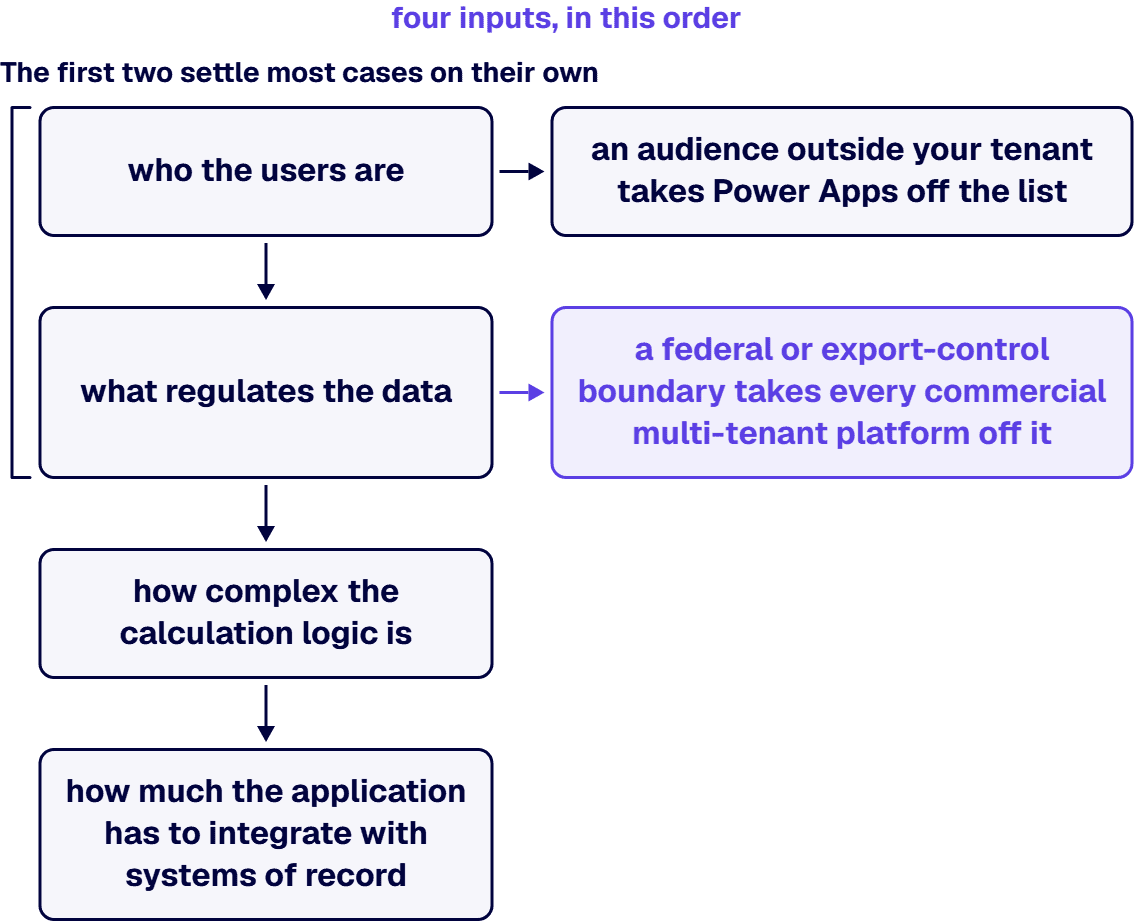
You have approved the rebuild, and the first decision that is expensive to reverse is where the application runs. Hosting sets the ceiling on how far the converted application scales and the floor on how secure it can be made, unlike the conversion technique, which can be changed later. Four destinations are realistic: a Power Apps application on Microsoft Dataverse, a Power Pages site when the audience is outside your organization, a custom web application on Azure App Service backed by Azure SQL, or a third-party Excel-to-web platform such as Caspio or SpreadsheetWeb. The choice is decided by four inputs, in this order: who the users are, what regulates the data, how complex the calculation logic is, and how much the application has to integrate with systems of record. The first two settle most cases on their own: an audience outside your tenant takes Power Apps off the list, and a federal or export-control boundary takes every commercial multi-tenant platform off it before cost is discussed. i3solutions converts macro-heavy Excel workbooks either to Power Apps canvas or model-driven applications on Dataverse, or to a custom web application on Azure App Service backed by Azure SQL.
This page covers the hosting decision specifically. If you are earlier in the process and still deciding whether the spreadsheet should become an application at all, start with Excel to web application development.
The published limits are rarely what forces the move. Microsoft documents a worksheet size of “1,048,576 rows by 16,384 columns” and a cell capacity of “32,767 characters,” and most business workbooks are nowhere near either. The concurrency limit is closer to the real problem: under the legacy shared workbook feature, 256 users can open the file at the same time, and long before that number the file has become a queue.
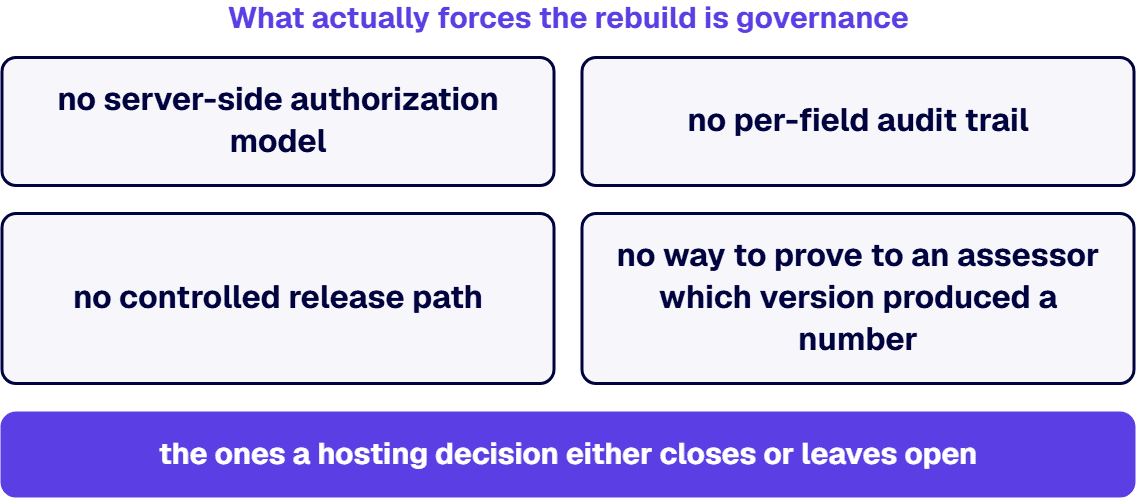
What actually forces the rebuild is governance. A spreadsheet has no server-side authorization model, no per-field audit trail, no controlled release path, and no way to prove to an assessor which version produced a number that appeared in a report. Those four gaps are the ones a hosting decision either closes or leaves open, which is why the hosting question deserves more attention than the conversion technique.
When every user is inside your tenant and already licensed, this is the destination the other three have to beat. Microsoft hosts the application and its data. The security model is table and column level rather than file level, and the governance controls are the same ones your Power Platform administrators already operate.
The economics are per seat. Power Apps Premium lists at $20.00 user/month, paid yearly, and entitles the assigned user to unlimited Power Apps and Power Pages, with a $12.00 user/month tier at a 2,000-seat minimum. Storage accrues per license at 250 MB database and 2 GB file, and the Dataverse Database Capacity add-on lists at $40.00 GB/month, paid yearly. All four figures were read on that page on 2026-09-11. Microsoft Learn’s Power Apps overview, read the same day, is direct about the requirement: “You need a license to play the apps you make with Power Apps.” That single sentence is what rules this option out for wide external audiences and rules it in for a bounded internal team.
i3solutions selects Dataverse over SharePoint as the primary relational store when a client needs scalable high-volume transactional data, and holds application secrets in Azure Key Vault. A SharePoint list is a tempting destination for a converted workbook because it looks like a table, and it is the wrong destination for anything with real transaction volume or relational depth. The failure pattern is consistent enough to plan around: the pilot behaves, and then the joins the workbook used to do in its formulas have to be done in the application instead of in the store, so each additional related list adds another round trip and the slowdown lands in year two rather than in the pilot. The choice of store is part of the hosting decision, not a detail underneath it.
Microsoft describes Power Pages as “a secure, enterprise-grade, low-code software as a service (SaaS) platform for creating, hosting, and administering modern external-facing business websites,” built on the same Dataverse data your internal apps use. If the converted spreadsheet is a submission form for suppliers, a rate calculator for customers, or an intake process for people who do not have accounts in your tenant, this is the destination that fits.
The pricing model changes shape, which is the point. Power Pages authenticated users are sold at $200.00 per website for 100 users/site/month, paid yearly, in capacity packs of 100. Anonymous users are $75.00 per website for 500 users/site/month, paid yearly, in capacity packs of 500. The authenticated plan carries 2 GB database capacity and 16 GB file capacity, the anonymous plan 0.5 GB database capacity and 4 GB file capacity, and Dataverse database and file capacity entitlements for subscription plans are pooled at the tenant level, all of it read on Microsoft’s Power Pages pricing page on 2026-09-11. In Microsoft’s own words, users “needing access to multiple Power Pages sites will require additional authenticated user capacity.”
The security posture is documented rather than inferred. Power Pages is hosted as Azure App Service, which carries ISO, SOC, and PCI DSS compliance; it supports TLS 1.2 with built-in Azure DDoS protection and dynamic IP restriction, and it can be fronted with Azure Front Door for edge caching and web application firewall capabilities. Authorization runs through web roles, table permissions, and page permissions, with authentication providers including Microsoft Entra External ID.
When the calculation logic is the product, this is the right answer. Some workbooks encode two decades of engineering judgment in formulas, iterative solvers, and macros that no low-code surface will reproduce faithfully. Rebuilding that as code and hosting it on Azure App Service keeps the logic exact and removes the formula-and-flow calculation ceiling that the low-code surfaces impose.
Azure App Service runs .NET, Java, Node.js, Python, and PHP on both Windows and Linux, or a custom container. For a regulated estate the relevant features are the enterprise ones: virtual network integration for secure ingress and egress, App Service environments for fully isolated applications on dedicated networking and VMs, deployment slots for predictable staged releases, autoscale against demand, and ISO, SOC, and PCI compliance. There is also a Managed Instance option that Microsoft positions for “legacy or infrastructure-bound web apps requiring Component Object Model (COM), registry access, Windows/Microsoft Installers (MSI), drive mapping, or stricter network boundaries,” which is worth knowing about when the old tool depends on a COM add-in that has to come along.
This is the path i3solutions took for a global aerospace and defense manufacturer whose cost estimating ran on spreadsheets. The rebuild used ASP.NET with a Razor MVC structure, Entity Framework, SQL Server, jQuery, and Power BI. The web-enabled estimating tool reduced rework by 30%, eliminating version mismatches and manual reconciliation across teams. Engineers now generate accurate cost estimates in a fraction of the time, saving approximately $250k annually in rework-related labor. When i3 rebuilt a spreadsheet-bound estimating process into a web application, it removed version-control errors across hundreds of estimates and cut approval cycles from five days to one. The full write-up is in the modernizing a legacy Excel tool into a web application case study.
These platforms, Caspio and SpreadsheetWeb among them, take the workbook itself as the input and publish it as a web application, keeping the formulas as the calculation engine. For a wide audience on lower-sensitivity data they are genuinely fast, and the pricing model is the reason to look at them. The constraint that rules them out is the compliance boundary: if the data is export controlled or sits inside a federal boundary, a commercial multi-tenant platform is not a candidate, and that is settled before speed enters the argument.
SpreadsheetWeb’s deployment models matter more than its price bands for a regulated buyer. Its pricing page, read 2026-09-11, offers a public cloud in which “We host your application and data on multi-tenant cloud infrastructure,” a Private Cloud that is “A dedicated SpreadsheetWeb instance on Microsoft Azure, managed by us,” with “no shared infrastructure,” and Server Licensing: “Install on your own servers, or on a dedicated EC2 or Azure instance you control. Workbooks, submitted data, and calculation all stay inside your perimeter.”
The evaluation question is not the price, it is where the compliance boundary lands. Under the Microsoft options the boundary is your tenant and your Azure subscription, and the attestations you already rely on carry over. Under a third-party platform the calculation engine and the data both sit in the vendor’s environment, so your compliance evidence becomes the vendor’s compliance evidence. Ask for current third-party attestations directly rather than inferring them: SpreadsheetWeb’s published pricing page, read 2026-09-11, states deployment options and names no security certification anywhere on it, which is a gap in that source rather than a finding about the product. That question is answerable in one email, and it should be answered before a shortlist becomes a decision.
Identity. Internal users belong in Entra ID. External users need an external identity provider, which is the line between a Power Apps app and a Power Pages site. A platform that manages its own separate user list is a second identity estate to review.
Data residency and sovereign clouds. If the data is export controlled or covered by a federal boundary, this decides the option list before anything else does. i3solutions installs and helps configure applications inside IL4 and IL6 government cloud environments and other government networks, and no commercial multi-tenant SaaS platform is a candidate in that conversation.
Network isolation. Virtual network integration or a dedicated App Service environment for a custom application, virtual network support and IP firewall through Managed Environments on the Power Platform side, Azure Front Door in front of a Power Pages site.
Secrets and keys. Connection strings and API keys leave the workbook and belong in a managed store. i3solutions holds application secrets in Azure Key Vault as a matter of course.
Audit and evidence. The reason the rebuild is defensible at all is that the new host produces a record: who changed which value, when, and under which approval. Whether the destination you pick emits that record in a form your assessor accepts has a yes-or-no answer, and it costs far less to establish before the build than after it.
i3solutions has replaced Excel-based workflows in aerospace manufacturing, financial services, and healthcare environments, including organizations operating under CMMC obligations and ITAR export control requirements. i3solutions establishes Power Platform governance frameworks as part of every Excel modernization engagement.
Concurrency. How many people use it at once, and does that number grow with the business or with the customer base. Seat-priced hosting fails at the second pattern. The 256-user shared-workbook ceiling you are leaving (Microsoft’s published limit) is the floor to design against, not the target.
Calculation weight. If a single submission triggers a long iterative computation, the host has to be able to scale compute independently of the interface, which favors the custom application.
Integration surface. Every system of record the application must read or write is a constraint on where it can live. Integration is also where the effort actually goes: a strong 70 percent of i3solutions engagements include some type of ETL process, behind the scenes and baked into almost everything i3solutions does.
Release cadence. How often the logic changes, and whether you can promote a change without downtime. Deployment slots on App Service and managed-solution pipelines on the Power Platform are the two mature answers.
Hosting decisions get the attention because they are architectural. The engagements that go wrong go wrong on the extraction. The business logic in a mature workbook is undocumented, and it includes hidden circular dependencies, brittle macros, and rules that only survive because one person remembers them. The failure mode is specific: the new application returns a number the old workbook did not, nobody can say which of the two is right, and the release stalls in parallel running while the difference is traced back through the formulas one at a time. The acceptance test that prevents it is agreed before the build rather than after it: the workbook and the application are run against the same inputs, and every difference is traced to a named formula before the release proceeds.
i3solutions applies its proprietary Data-Lift Framework to Excel modernization: extracting the business logic embedded in the workbook, eliminating hidden circular dependencies, and refactoring brittle macros. i3solutions Excel modernization work uses custom data-parsing scripts, Power Query ETL, and internally built schema-mapping tools. Whichever host you choose, budget the extraction honestly, because it is the phase that determines whether the new application produces the same numbers as the old one.
The payoff shows up in more than accuracy. A federal research agency replaced paper wall charts and Excel spreadsheets with an automated program tracking database: the agency no longer needs their paper wall charts or excel spreadsheets and realized a 240% return on investment in the first year by eliminating this combined manual effort of approximately one full time employee. The program tracking case study covers how that was measured. In a separate modernization, retiring on-premises infrastructure eliminated approximately $500,000 per year in hosting, licensing, and maintenance costs, while enabling cloud scalability at no additional capital expense.
i3solutions has been a Microsoft partner since 1997, is a Microsoft Solutions Partner, and has completed more than 1,500 Microsoft platform implementations. On this class of work specifically, the relevant experience is that the hosting decision has been made in both directions: to Power Apps and Dataverse where the process is internal and governed, and to a custom application on Azure App Service backed by Azure SQL where the logic will not fit a low-code surface.
Related reading for the pieces of this decision that have their own page: Dataverse vs SQL Server covers the data store choice in depth, Excel vs SharePoint for data management covers the case where the answer is not an application at all, and Power Apps development services covers delivery on the Power Platform side.
If you are weighing two of these destinations against each other, settle the four inputs first: who the users are, what regulates the data, how complex the calculation logic is, and how much the application has to integrate with systems of record. A scoping conversation puts those four on the table, and the regulatory boundary alone decides the option list before anything else does.
If the four inputs point in two directions, the quickest way through is a conversation with someone who has made this call in both of them. Bring the workbook and the audience it serves, and ask which host they would pick and what would change that answer. If you are building the internal case rather than the architecture, ask for comparable engagements where the hosting decision went each way, and for a direct read on the extraction phase, which is the part that sets the schedule.
Choose by audience and regulation first. Internal, licensed users on governed data belong on Power Apps with Dataverse. External or anonymous audiences belong on Power Pages, which is priced per website in user capacity packs rather than per seat. Applications whose calculation logic is the product, or that need strict network isolation, belong in a custom web application on Azure App Service backed by Azure SQL. Third-party Excel-to-web platforms suit wide audiences on lower-sensitivity data where speed to live outweighs owning the compliance boundary.
No. It makes security possible, which the spreadsheet did not. The gain comes from what the host provides: server-side authorization at the row and column level, an identity provider you already govern, an audit record of who changed what, and a controlled release path. A converted application on a host with none of those is a spreadsheet with a login page.
Sometimes, for small and non-transactional cases. i3solutions selects Dataverse over SharePoint as the primary relational store when a client needs scalable high-volume transactional data, and holds application secrets in Azure Key Vault. A SharePoint list resembles a table closely enough to be tempting and behaves nothing like one under transaction volume or relational depth, which is a problem that appears in year two rather than in the pilot.
The pricing model changes shape by option. Power Apps is priced per user per month, so cost scales with seats and a bounded internal team is the case it fits. Power Pages is priced per website in user capacity packs, so cost scales with audience volume per website rather than with headcount. A custom application on Azure App Service costs Azure consumption plus the build. Third-party platforms bill a flat tier with unlimited application users. Model the three-year curve for your actual audience shape rather than comparing headline prices. The heuristic that settles it: if the user count grows with your headcount, seat pricing stays the cheaper shape; if it grows with your customer or supplier base, per-website or flat-tier pricing is the one to model first.
Azure App Service publishes a Managed Instance option that Microsoft documents for “legacy or infrastructure-bound web apps requiring Component Object Model (COM), registry access, Windows/Microsoft Installers (MSI), drive mapping, or stricter network boundaries.” It is the documented path when a dependency has to survive the move rather than be rewritten. The same App Service overview calls for validating telemetry, certificate automation, and operational processes before production adoption.
Yes, and the boundary should be the first input rather than a late constraint. i3solutions installs and helps configure applications inside IL4 and IL6 government cloud environments and other government networks. Confirm the option list against your boundary before evaluating anything else, because it removes most commercial multi-tenant platforms from consideration outright.
The schedule is set by how much undocumented logic the workbook carries, which is why it is assessed rather than estimated from file size. i3solutions applies its Data-Lift Framework to extract the business logic embedded in the workbook, eliminate hidden circular dependencies, and refactor brittle macros, using custom data-parsing scripts, Power Query ETL, and internally built schema-mapping tools. Plan for the extraction to be the phase that sets the schedule.
By Michael Branson
As of September 2026, the build belongs in your tenant. A partner works in a Power Platform Developer environment inside your own tenant, and the finished agent reaches production as a managed solution through Power Platform pipelines. Microsoft’s own pipelines documentation states plainly: “Can pipelines deploy to a different tenant? No. We recommend using Azure DevOps or GitHub for this scenario.” An agent built in the partner’s own tenant instead arrives as a manual import, with every connection, connection reference and environment variable rebuilt on your side. Keep a partner-owned tenant only for pre-contract demos with no customer data in scope. If your policy keeps every external identity out of the production tenant, a separate development tenant your organization owns works too, and promotion then runs through Azure DevOps or GitHub instead of pipelines, matching what your own vendor-governance page already recommends.
A business unit has picked a partner to build a Copilot Studio agent, and the first real question is not the agent’s design. It is where the partner sits while they build it. The partner’s own tenant is the fastest way to start: no new accounts to provision, no access request to route through security. But the security team has already said no guests in production, and this reader owns the answer either way. Get it wrong toward speed, and controlled data sits in a tenant nobody here can audit or revoke. Get it wrong toward caution with no plan for handoff, and go-live turns into a rebuild, by hand, of everything the partner already built somewhere else. The question this page answers: can a partner build a Copilot agent in a workspace inside your own tenant, and then move it into production?
There are three places this workspace can sit, and only two of them are workable for anything beyond a demo.
The partner’s own tenant is the fastest to stand up and the one a partner will usually ask for first, because it costs them nothing to configure. It is also the option that puts your data somewhere your own security team cannot see, log, or revoke on your own schedule. This is the right choice for exactly one situation: a pre-contract or early-stage demo that uses no real customer data. The moment real data or a production-bound artifact is in scope, this option is closed.
A Power Platform Developer environment inside your own tenant is the default answer for everything else. It is a single-user environment, licensed under the Power Apps Developer Plan, that lives inside your tenant’s own boundary from the first day of work. The partner’s engineers reach it as guests in your directory, not as employees of a tenant you cannot see into, and it is created and destroyed on your own schedule, not theirs.
The third option is a separate development tenant your organization owns, promoted through Azure DevOps or GitHub instead of Power Platform pipelines, for one specific policy position: an organization whose security posture keeps every external identity, full stop, out of anything that touches production. This is not a workaround this page invented. It is the same shape your own Microsoft Vendor Risk Management for Embedded Teams page already recommends for embedded external teams generally: “dedicated development tenants” with “network-level isolation” so external teams “work productively without touching production systems.” The cost of this option is that it gives up Power Platform pipelines entirely for this agent, because pipelines cannot cross a tenant boundary, and the promotion work moves onto a general-purpose CI/CD tool instead of a native one.
Which of the two workable options fits is a policy call this page does not make for you: it is a question about how your organization treats external identity, not a question about Copilot Studio.
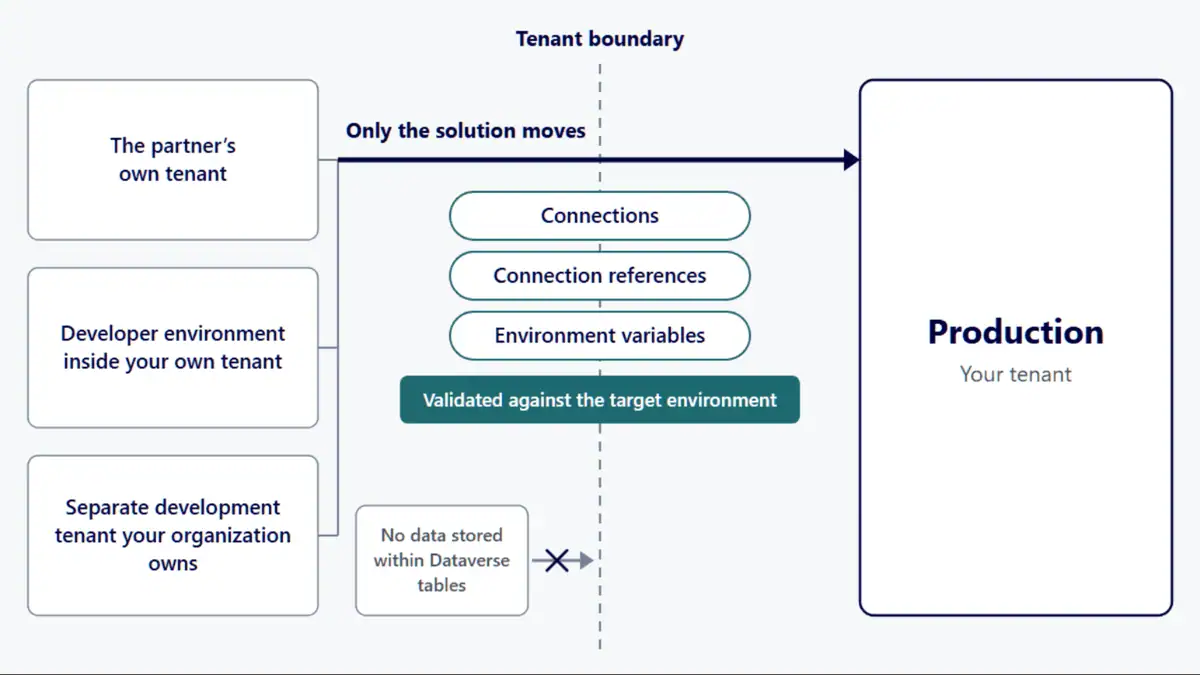
Whichever tenant the build happens in, promotion to production is a solution moving between environments, and only the solution moves. Microsoft’s pipelines FAQ is specific about the payload: “Pipelines deploy solutions as well as configuration for the target environment such as connections, connection references, and environment variables… Pipelines, or solutions in general, don’t contain data stored within Dataverse tables.” Read that twice if the plan on the table assumes test conversations, transcripts or any Dataverse-held content travels with the agent. It does not. Every connection, connection reference and environment variable is validated against the target environment before the deployment runs, which is what catches a missing dependency before it becomes a production incident rather than after.
The practical consequence for a first agent: build inside a solution from the start, not inside whatever the environment hands you by default. The Power Platform ALM basics documentation is explicit that “a single default environment is automatically created for each tenant and shared by all users in that tenant,” and that solutions, not the environment itself, are “used to transport apps and components from one environment to another.” A shared default environment is not where a production-bound Copilot agent belongs even during the build; the agent’s solution is created before the agent is, so the first version already has a home a pipeline can move.
What this section does not cover, because it belongs to a sibling page, is how solution versioning, rollback, and the upgrade-without-overwrite behavior actually work once an agent has shipped more than once, which Power Platform ALM: Maker Solution to Managed Production owns in full; this page assumes the general mechanics and states only what is specific to a Copilot Studio agent’s first promotion.
Inside the workable options, a partner’s engineers typically work in your tenant as B2B guests, and are switched off at handoff. That access is scoped, not blanket. Microsoft Entra’s cross-tenant access settings let you configure organization-specific settings that “take precedence over default settings,” and within those settings you can “scope access to specific users, groups, and applications” rather than trusting an entire partner organization by default. Scoping this way to named users and named applications requires a Microsoft Entra ID P1 license, which the same documentation states directly: “you need a Microsoft Entra ID P1 license. The license is required on the tenant that you configure.”
Revocation is a directory action, not a Copilot Studio setting: remove the guest accounts, or narrow the organizational settings for that partner, and the access that settings scoping granted is gone. Inside the Developer environment itself, a Dataverse security role scoped to that one environment is what actually lets a partner’s engineer build anything at all; that role is assigned when the engagement starts and removed when it ends, independent of whatever the directory-level guest status is doing.
This is an access decision, not a governance program. What auditors expect to see, how approval workflows are tiered, and what a vendor contract has to specify are covered in full on Microsoft Vendor Risk Management for Embedded Teams, and are not repeated here. Guest access for people who will use a finished app, as opposed to engineers building one, is a different question with its own answer on Power Apps for External Users: Architecture and Governance.
A handful of tenant-level conditions have to be set before the first Copilot Studio agent is worth building, and missing one of them is what turns a planned promotion into a support ticket.
Pipeline target environments have to be managed environments. Microsoft’s pipelines documentation states that “all other environments used in pipelines must be enabled as managed environments” beyond the development and pipelines-host environments, and that “licenses granting premium use rights are required for all managed environments,” which is a licensing consequence worth budgeting for before the first agent, not after. The same page carries a dated change worth planning around now: “Starting in October 2026, the admin deployment page notifies admins when pipelines deploy to unmanaged target environments.” Review and enable managed environments for your pipeline targets before that notice appears.
Whoever manages the promotion path needs the right role. The pipelines documentation names it directly: “If the user has the ‘Deployment Pipeline Administrator’ security role the ‘Manage pipelines’ button will be enabled.” Assign this role deliberately, to a named admin, rather than discovering after the fact that nobody on the team can open the pipeline configuration app.
What this page does not cover, rollback behavior, solution versioning, and the general managed-environment premium licensing model beyond this one pipeline-target consequence, lives on Power Platform ALM: Maker Solution to Managed Production and Power Platform Environment Strategy: The Four Decisions, linked here rather than restated.
Getting an agent into a production environment is not the same as getting it in front of the people who are supposed to use it, and Copilot Studio treats those as separate steps. Microsoft’s own publishing documentation describes publishing an agent to channels such as Teams, Microsoft 365 Copilot, a custom website, or SharePoint, and notes that “the latest published content only becomes available after a new session starts,” or after up to an hour otherwise.
For an agent meant to reach the whole organization rather than a small shared group, the documented path is to submit it “for admin approval to be featured in the Built for your org section of the Teams app store,” which also reaches the Microsoft 365 Agent Store’s equivalent section. This is an admin approval workflow, not an automatic rollout: Microsoft’s documentation does not publish a fixed timeline for how long that approval or the resulting org-wide propagation takes, so this is a step to plan into a go-live date with your own admin, not a number this page will invent for you. A smaller, informally shared agent (the “Built with Power Platform” section, available only to explicitly shared users) is a different, narrower distribution path and is not the same as an enterprise-wide release.
The tenant rule above does not change in a sovereign cloud: the build still belongs in your own tenant, or in a separate development tenant you own, for the same reasons. What changes is the cross-tenant mechanics if a partner’s identities sit in a commercial tenant while yours sits in a government cloud. Microsoft’s own documentation states that “Microsoft cloud settings let you collaborate with organizations from different Microsoft Azure clouds,” naming “Microsoft Azure commercial cloud and Microsoft Azure Government, which includes the Office GCC-High and DoD clouds” as one supported pairing, while also noting plainly that “B2B direct connect isn’t supported for collaboration with Microsoft Entra tenants in a different Microsoft cloud.” Cross-cloud B2B collaboration has to be enabled on both sides before a commercial-tenant partner can be invited into a GCC High or DoD tenant at all, and Copilot Studio agent availability in a given sovereign cloud is its own separate question, confirmed with your Microsoft account team before scoping any of this work.
Whether a given CUI, ITAR, or export-controlled data set may sit in this Developer environment at all is a determination your own contracting officer and your contract’s own clauses make, not a determination this page or Microsoft’s product documentation makes for you.
A partner-owned tenant is the right call, not a compromise, in one situation: a pre-contract or early-stage demo with no customer data in scope. Loading controlled data into a partner’s tenant to save a week of setup time is the trade this page warns against directly, and it is never worth making.
If your organization’s policy keeps every external identity out of anything that touches production, full stop, that is a legitimate position, and the answer is the separate development tenant your organization owns, promoted through Azure DevOps or GitHub, not a forced exception to let a partner into your production tenant’s directory. Accept that trade with its eyes open: you give up the native Power Platform pipelines path for this agent, and someone on your side owns a CI/CD pipeline instead of a built-in one.
Yes. The workplace is a Power Platform Developer environment created inside your own tenant, where the partner’s engineers work as scoped Microsoft Entra B2B guests. Deployment back into your primary tenant runs through Power Platform pipelines as a managed solution, because that promotion never has to cross a tenant boundary in the first place; the build and the production environment share the same tenant from day one.
Not as a route to production. The Microsoft 365 Developer Program gives eligible members a sandbox that Microsoft Learn’s page Microsoft 365 Developer Program FAQ calls “a fully pre-configured tenant,” and the same FAQ says “A Microsoft 365 enterprise or production subscription and a Microsoft 365 Developer Program sandbox are separate subscriptions and environments.” So the sandbox is a separate tenant from your production one. Microsoft Learn’s page Set up a Microsoft 365 developer sandbox subscription says the subscription “includes 25 user licenses and lasts for up to 90 days, depending on your activity,” and the FAQ adds: “Developer tenants are intended for development and testing purposes only and are short-lived by design. Microsoft may require tenants to be recreated every 90 days. Do not use a developer tenant for production workloads or long-term data storage.”
Anything built in a sandbox has to cross a tenant boundary to reach yours, and Microsoft Learn’s page Overview of pipelines in Power Platform says Power Platform pipelines do not deploy to a different tenant and recommends Azure DevOps or GitHub for that scenario. If a partner prototypes in a sandbox, plan the move to your tenant as an Azure DevOps or GitHub promotion, and keep the agent you intend to run in production in a Developer environment inside your own tenant, as described earlier on this page.
By Michael Branson
Your Dataverse migration path should route each Access database, Excel workbook and SharePoint list by what its data does, not by where it lives today. Shared, relational data moves to Dataverse or Azure SQL, a one-team list stays put, and a move to either changes licensing and access.
If a security review or an audit finding has just surfaced a dozen Access databases, a shelf of business-critical workbooks and a set of SharePoint lists at once, the question on your desk is which of them goes where, and in what order. Microsoft documents how to move each kind of source. For Access, its Access migration page, linked in the table below, says “Migration is handled in Access using the export feature,” with a migration tool for the rest. That answers how one file moves. It does not say which files should move, which destination each belongs in, or what your licensing and access model look like on the other side.
This page assumes you have already decided that Dataverse belongs in your estate. Whether to choose Dataverse at all is covered in Enterprise Dataverse Development & Integration Services for a Governed Data Foundation, and whether outside help fits that choice in Dataverse Consulting. Is it Right for Your Enterprise?. What follows is the route for data that already exists.
When the three kinds of source sit in one inventory, each one reaches Dataverse by a different Microsoft route, and each route leaves something behind that your team has to rebuild on purpose. Every quoted statement in the table comes from the Microsoft Learn page named in its row, as read on September 18, 2026.
Two route details matter in a regulated tenant. In a government cloud, Microsoft states that “Import from Excel or CSV file using the Import > Import data from Excel command isn’t available in GCC, GCC High, and DoD environments,” and gives the workaround of choosing Import, then Import data, from the Tables area in Power Apps. And if your data loss prevention policies block one connector, the dataflow route can fail: “If you use data loss prevention (DLP) policies to block the HTTP with Microsoft Entra (preauthorized) connector then SharePoint and OData connectors will fail.”
A workbook whose macros carry business logic is a different job from a data load, and its conversion is covered in Excel Formulas and VBA in a Web Application Conversion: What Is Preserved and What Must Be Rebuilt. A workbook that runs a process, not just holds data, is a workflow migration, covered in Excel to Power Platform: Replace Legacy Workflows in 90 Days. If the workbook must become a governed web application rather than a data load, see Excel to web application consulting.
Before any source moves, run it through five questions in this order and stop at the first one that places it. The limits named here are Microsoft’s, from Dataverse for Teams vs. Dataverse and About the Microsoft Dataverse for Teams environment.
A source that clears all five, contained team data under the Teams limits with no audit need, can live in Dataverse for Teams. When two answers pull in different directions, question 3 outranks size and cost: data an auditor needs traced goes to full Dataverse or Azure SQL even when it would fit in a team environment.
If you have to defend the order to a budget or governance review, sequence by exposure first and by dependency inside each wave.
Inside each wave, a table that other tables look up moves before the tables that look it up, so each relationship has a target on arrival. If the exposure order and the dependency order disagree, dependency wins inside the wave: a regulated table that references a shared customer or product list waits for that list, because moving it first strands its relationships.
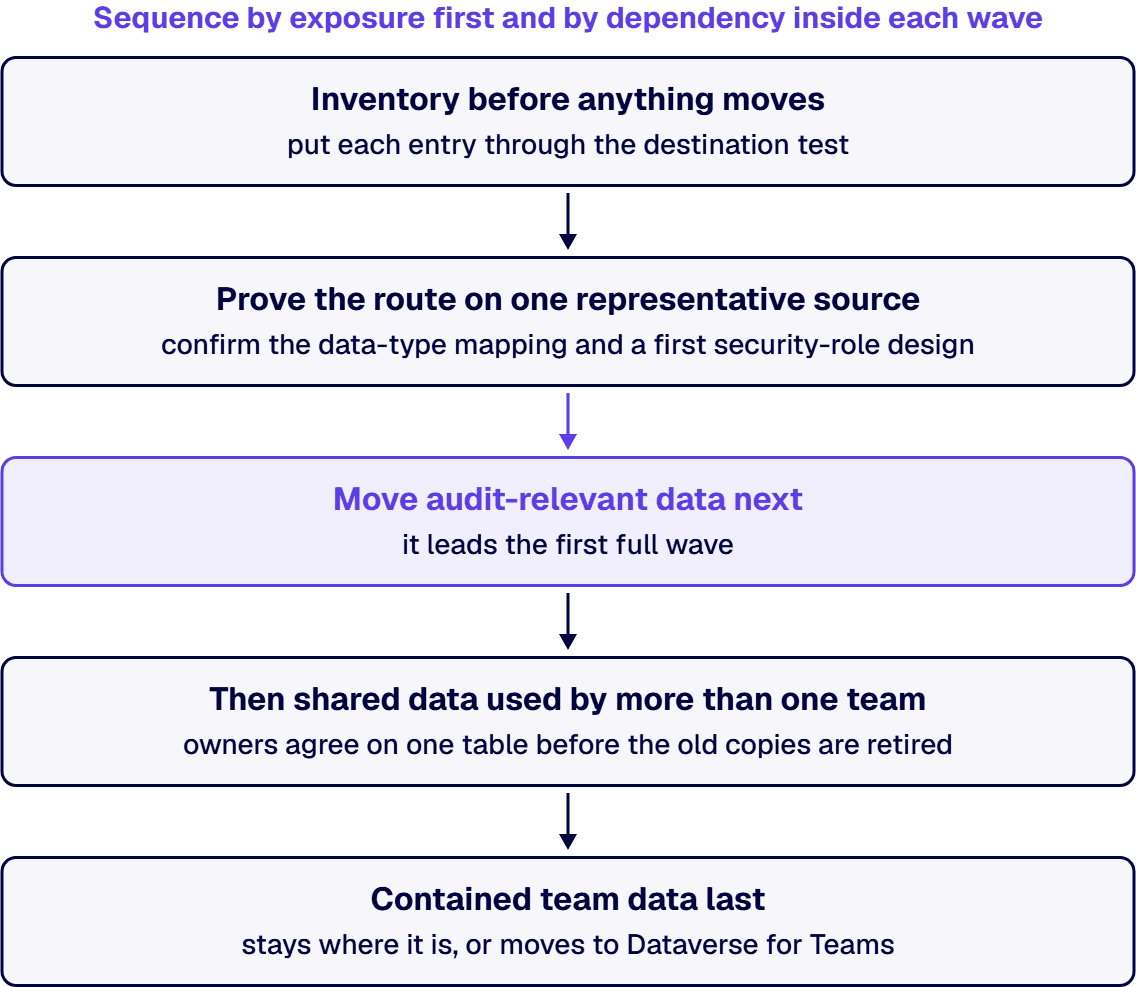
Plan one capacity step into the same sequence. Upgrading a team environment is gated by the tenant: Microsoft states that “the tenant must have at least as much available capacity as the size of the Dataverse for Teams environment that’s being upgraded,” and that when capacity falls short, “the upgrade operation is blocked and an error message is displayed.”
When a list or a workbook becomes a Dataverse table, the users who read it move onto a different license footing, and your budget review needs to see that change before the first wave moves. Microsoft’s Licensing overview for Microsoft Power Platform sets out the terms read here, and states that “Licensing programs and product terms can change.”
Azure SQL is licensed and billed on a different model, compared in the Dataverse vs SQL Server page linked above. How Dataverse storage is priced in GCC, GCC High and DoD is covered in Is Dataverse Storage Priced Differently in Government Clouds? What GCC, GCC High and DoD Buyers Pay.
If an Access file’s only control is the file share’s permissions, anyone who can open the file can reach its tables. A SharePoint list that inherits its site’s permissions is readable by everyone the site is shared with. A workbook sent as an attachment is controlled by whoever holds a copy. None of those models arrives in Dataverse on its own.
Dataverse starts from the opposite default. Microsoft’s What is Microsoft Dataverse? page says “Data is securely stored so that users can see it only if you grant them access,” and that “You can combine business units, role-based security, row-based security, and column-based security to define the overall access to information that users have in a Power Platform environment.” The licensing overview adds: “A user’s presence in an environment doesn’t grant access to Dataverse data. The user must still have an appropriate security role and any required product license.”
So the migration moves tables and rows, and who may read them becomes a role design your team makes and can show an auditor. Dataverse for Teams is simpler by design: Microsoft’s comparison says “access is preconfigured with a security role based on membership type such as owners, members, or guests,” and that “when a team is deleted, the associated environment is also deleted.” A source bound for a team environment inherits both of those facts. How Dataverse security roles should be designed is covered on the Dataverse pillar page linked in the first section.
When the reason for moving is ownership and access control and the Access forms still do their job, Microsoft’s default Access path can be enough: the tables move, and users stay in the Access desktop client against Dataverse data. When the table design itself is the problem, a lift carries the problem across. Three signs point that way: a Unique Index that enforces a business rule, which Microsoft lists as not supported for migration; data types Dataverse does not support; and workbook tabs or yearly copies of one table that stand in for a single table with a date column. Each of those is redesigned before the move, in the proving step of the sequence above.
When an IT team brings i3solutions an estate of legacy data sources, the work happens inside the customer’s own Microsoft tenant, and the destination for each source follows the test above. Between the two Microsoft data stores, the deciding factor is scale: a primary relational store built for scalable, high-volume transactional data points to Dataverse, with application secrets kept in Azure Key Vault rather than in the data store itself. For workbooks whose macros carry the logic, the conversion generally has two targets: Power Apps canvas or model-driven applications on Dataverse, or a custom web application on Azure App Service backed by Azure SQL.
For regulated estates, migrations are typically run against named control families such as CMMC, HIPAA, SOC 2, and NIST 800-171, with artifacts produced for auditor review. Whether a design meets a regime is the customer’s determination, made with its auditor. When you are ready to staff the work itself, the team is described in Hire US-Based Dataverse Developers and Microsoft 365 Experts, and the shape of a consulting engagement in Dataverse Consulting for Regulated Microsoft Enterprises: What the Engagement Actually Looks Like.
If your estate is one failing Access application rather than a portfolio, this sequence is more process than the problem needs. Stabilizing that one app and deciding whether to patch or rebuild it is covered in Replace Microsoft Access: Stabilize the Failing App, Then Decide, and who rebuilds it in Who Rebuilds a Failing Microsoft Access Application Into a Secure Web App?. A single business-critical spreadsheet moving to a governed database is covered in Excel to Database Migration Consulting for Regulated Enterprises: What to Know Before Moving Business-Critical Data. The triage earns its cost when several sources share data, owners or an audit scope, because that is where order and licensing decisions interact.
If you hold an inventory like the one in step 1 of the sequence and need to place each source, the first conversation walks your own list through the destination test and the sequence above, source by source.
If you have several Access databases, move one representative database first to prove the data-type mapping and a security-role design, then the databases holding audit-relevant data, then data shared across teams. Inside each wave, move the tables other tables look up before the tables that look them up.
When Microsoft’s Access migration tool moves the data, Microsoft states that Access users can keep working in the Access desktop client afterwards. The tables move to Dataverse and people keep their Access forms, which suits a move made for ownership and access control but carries any table-design problem across unchanged.
If a SharePoint list moves through a dataflow, the rows arrive in a Dataverse table and the list’s permissions and sharing do not come with them. Microsoft states that a user’s presence in an environment does not grant access to Dataverse data and that each user still needs a suitable security role, so access to the new table is designed as roles.
If your data is contained team data with no audit need, it can be. According to Microsoft Learn, Microsoft sets a Dataverse for Teams environment at 1 million rows or 2 GB, says the 2 GB limit cannot be extended, and lists auditing and field-level security as not available there, so data that must be audited belongs in full Dataverse.
If the app on that data ran under Microsoft 365 use rights, yes. Microsoft describes those rights as intended for Microsoft 365 data and standard connectors and says the limited Dataverse rights in Microsoft 365 do not cover standalone custom apps, so plan standalone licensing and check it with the Power Platform Licensing Guide.
When your tenant is in GCC, GCC High or DoD, Microsoft states that the Import data from Excel command is not available there. Its documented workaround starts in the Tables area in Power Apps, where you select Import, then Import data, and pick the Excel workbook or Text/CSV source.
By Michael Branson
Treat Microsoft Fabric in GCC High as a service that, according to Microsoft’s announcement, you can use on the Power BI Premium capacity you already hold, not yet as a reason to renew or cancel that capacity: Microsoft Learn’s GCC High page, updated October 1, 2026 and read on 2026-10-08, no longer marks Fabric in GCC High as preview anywhere in its title or text, lists customer-managed keys, outbound access protection, workspace identity, workspace monitoring, Fabric IQ items, mirroring sources other than mirrored Azure SQL Database, workspace Private Link and Copilot Power BI as not supported, lists shortcuts as having partial support, and places the service only in US Gov Virginia and US Gov Texas. Microsoft’s announcement of September 2, 2026 described public preview “with general availability starting October 1, 2026,” said feature availability “will vary by workload and expand over time,” and said that “For organizations already using Power BI Premium, Microsoft Fabric is available as part of their existing capacity.” On the P SKU retirement, Microsoft’s migration guidance, last updated on 2026-07-22, says sovereign clouds are not affected because Fabric was not available there and that separate guidance will follow; that guidance was not on the Microsoft pages read for this guide, so re-check Microsoft Learn before you renew or cancel P capacity.
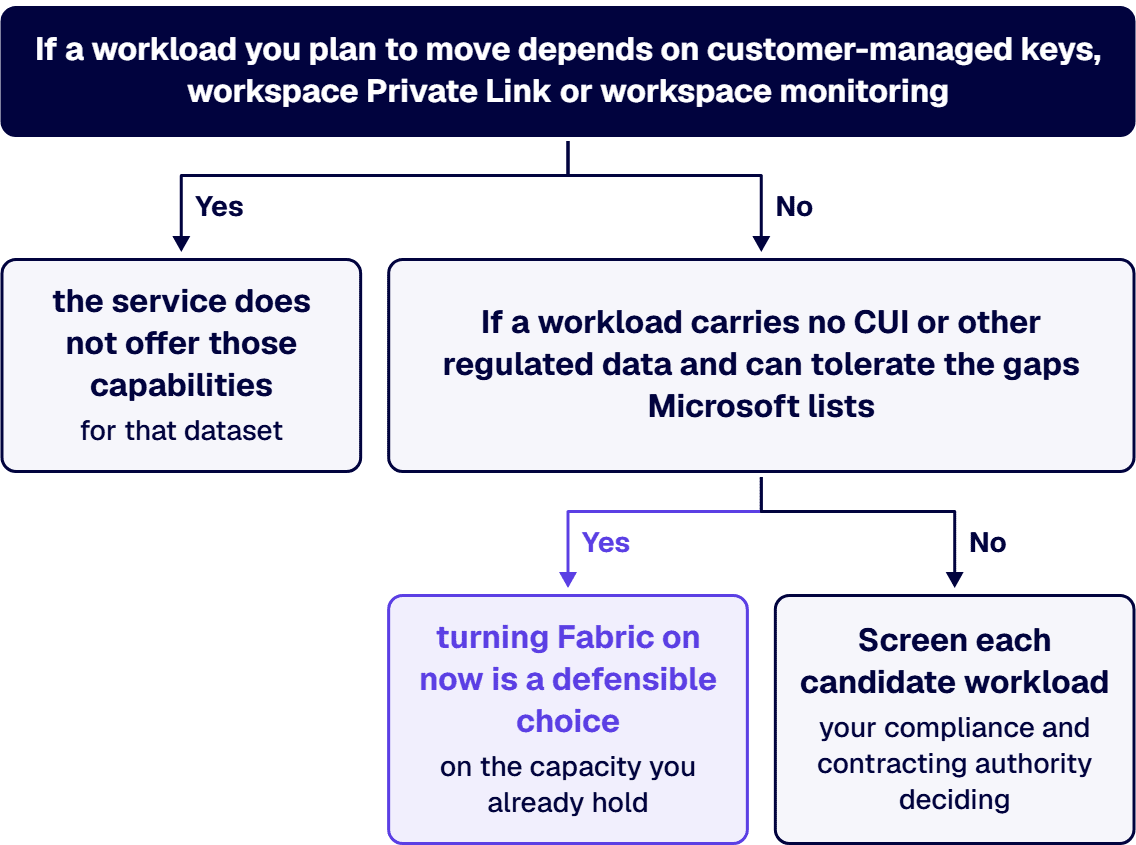
If you run a GCC High tenant, already hold Power BI Premium P capacity and have just read Microsoft’s announcement about Fabric, you are working from Microsoft pages written about six weeks apart. The retirement guidance, last updated on 2026-07-22, left sovereign clouds out because Fabric was not there; the GCC High page, last updated on 2026-09-02, described Fabric in GCC High in public preview, and its October 1, 2026 update no longer marks it as preview. The decision in front of you is narrower than either moving off P capacity now or treating the tenant as exempt: it is which workloads can live with the gaps Microsoft still lists, and when to re-check the licensing question.
If you are deciding from the announcement alone, read it beside the Learn page it points to. Microsoft’s announcement of September 2, 2026 stated: “Beginning September 2, 2026, Microsoft Fabric will be available in public preview for GCC High customers, with general availability starting October 1, 2026.” The same post said “Feature availability at public preview and general availability will vary by workload and expand over time,” and “Not all Microsoft Fabric capabilities will be available at launch.”
On capacity, the same announcement says “Organizations can begin exploring and adopting Fabric capabilities using their existing Power BI Premium capacities,” that “Both Power BI and Fabric workloads will consume from the same capacity,” and that “For organizations already using Power BI Premium, Microsoft Fabric is available as part of their existing capacity.” For tenants without Premium, it says “For GCC High organizations that do not currently have Power BI Premium, Microsoft Fabric capacity is available for purchase starting today,” where “today” is the post’s date, September 2, 2026.
The status of record is the Learn page. Microsoft’s Microsoft Fabric for US Government GCC High customers page, updated October 1, 2026 and read on 2026-10-08, no longer carries the notice “This feature is in preview.” that its 2026-09-02 version carried, and no longer marks Fabric in GCC High as preview anywhere in its title or text. It still says your organization must meet the eligibility requirements for the US Government GCC High environment, that “Free licenses and trials aren’t available in government clouds. You need a Power BI Pro license,” and “Contact your Microsoft account team for GCC High purchasing requirements that apply to your organization.” That page does not discuss Power BI Premium, so the existing-capacity statements above are the announcement’s, not the Learn page’s.
If your organization has not yet settled whether it belongs in GCC High at all, that question comes first and is covered in Microsoft 365 GCC vs GCC High: Which Government Cloud Does Your Organization Need?
If a workload you plan to move depends on customer-managed keys, workspace Private Link or workspace monitoring, check it against Microsoft’s list before anything else. Microsoft’s GCC High page, as updated October 1, 2026, lists nine entries under “Current limitations”, eight not supported and one with partial support:
The same page, as updated October 1, 2026, states that “Items other than those listed in these tables aren’t currently available in GCC High.” Its workload table has rows for Data Engineering, Data Factory, Data Science, Data Warehouse, Developer experience, Governance and security, Mirroring, Fabric databases, Power BI and Real-Time Intelligence, and a second table covers OneLake, Private link, Real-Time Hub, OneLake security and OneLake disaster recovery, where Microsoft says “Tenant-level private link is supported.” Microsoft adds that “Feature availability can differ from the public/commercial Fabric service because of government cloud requirements and service dependencies.” Microsoft Fabric for GCC High “is available only in the following regions”: US Gov Virginia and US Gov Texas.
Whether a given dataset needs workspace Private Link, customer-managed keys, outbound access protection or workspace monitoring is a question for your own compliance and contracting authority. If the answer is yes, the service as Microsoft describes it, as updated October 1, 2026 and read on 2026-10-08, does not offer those capabilities for that dataset.
If a renewal date is on your calendar, separate what Microsoft has said about the retirement from where it has said it applies. Microsoft’s Power BI Premium to Microsoft Fabric migration overview, last updated on 2026-07-22, states: “Microsoft is retiring Power BI Premium per-capacity SKUs (P SKUs). Each P SKU subscription ends at the end of its current agreement term, and Microsoft no longer sells new P SKUs.” The same July page lists scope limits on the retirement, and one of them reads “Sovereign clouds aren’t affected yet. Microsoft Fabric isn’t available in sovereign clouds, so P SKUs remain supported there.” The section after next sets that reason beside Microsoft’s September GCC High page.
Where the retirement applies, Microsoft’s Power BI Premium to Microsoft Fabric migration FAQ describes what happens when a P SKU subscription ends: “After your subscription ends, content stays accessible for a 30-day grace period. Starting on day 31, access is throttled (interactive operations are delayed). On day 91 and beyond, all operations are rejected.” The FAQ also says “Migration isn’t automatic,” and gives the order “purchase the F SKU first, reassign and validate workspaces, and then cancel the P SKU.” In its note for Enterprise Agreement customers, Microsoft’s overview adds: “Confirm your specific contract terms with your Microsoft account representative before deciding when to migrate.”
On sizing, Microsoft’s Understand Microsoft Fabric licenses and capacity page, read on 2026-09-22, states that “Power BI Premium P SKUs support Microsoft Fabric,” and its SKU table lists F64 at 64 capacity units in the same row as P1 and A4, with the instruction to “Use this table as a reference for comparing compute capacity, not as a statement of functional or licensing equivalence.”
Commercial cost planning at scale is covered in Power BI Licensing at 1,000 Users: What It Costs, and How That Compares to Other BI Platforms; according to Microsoft’s migration guidance, last updated on 2026-07-22, the P SKU retirement that page plans against does not yet affect sovereign clouds, a July statement that the next section sets beside Microsoft’s GCC High page of 2026-09-02.
If you have heard that GCC High is exempt from the retirement, look at the date and the reason Microsoft gave. Microsoft’s migration FAQ, last updated on 2026-07-22, asks “Does the P SKU retirement affect sovereign cloud customers?” and answers: “No. Microsoft Fabric isn’t available in sovereign clouds yet, so P SKUs remain supported in those environments. Microsoft provides separate guidance when Fabric becomes available there.” Microsoft’s Power BI Premium P SKU to Fabric F SKU migration decision guide, with the same date, says “Sovereign cloud customers aren’t affected by this retirement because Microsoft Fabric isn’t yet available in sovereign clouds,” and “Microsoft will provide additional guidance when Fabric becomes available in those environments.”
Set beside those pages, Microsoft’s GCC High page, last updated on 2026-09-02, described Fabric in GCC High in public preview, and its October 1, 2026 update no longer marks it as preview, so the reason the July text gives, that Fabric is not available, no longer describes GCC High. None of the three July pages defines “sovereign clouds” or names GCC High, so this guide does not assert that GCC High is inside that term. On the Microsoft pages read for this guide on 2026-09-22, the separate guidance Microsoft promised had not appeared, and Microsoft has not said on those pages whether P capacity in GCC High stays outside the retirement now that Fabric is there.
If you have to act before Microsoft settles both open questions, sequence the decision around the two things that can change. Two failure modes are worth naming. The first is moving a regulated workload onto Fabric in GCC High when it depends on something Microsoft lists as unsupported, such as customer-managed keys or workspace Private Link. The second is renewing or cancelling P capacity on the strength of the July sentence alone, in either direction.
Microsoft’s announcement said “general availability starting October 1, 2026”; that date is the announcement’s statement, and the Learn page is the one to re-read from that date on. As updated October 1, 2026, that page uses neither the word “preview” nor the words “general availability” anywhere in its title or text.
If a workload carries no CUI or other regulated data and can tolerate the gaps Microsoft lists, turning Fabric on now is a defensible choice. A reporting or engineering workload whose data your compliance authority has cleared for the tenant without customer-managed keys, workspace Private Link or workspace monitoring can use the service to build experience on the capacity you already hold, as Microsoft’s announcement describes, and it gives your team first-hand evidence for the larger decision when Microsoft publishes its guidance.
If the Fabric decision, the capacity question and the re-check dates sit across IT, security, finance and contracts with nobody owning the whole picture, an outside architect can map each workload to what Microsoft lists as supported today and write the plan your team runs.
i3solutions has delivered Microsoft Fabric work for clients, and Fabric is part of the Microsoft platform work i3solutions delivers. Delivery is senior and US-based. The Fabric services offer is described in Enterprise Microsoft Fabric Development & Integration Services for Unified, AI-Ready Analytics, and the wider integration and data practice in Unifying Enterprise Operations Through Microsoft System Integration & Data Management.
Teams that would rather add capacity to their own staff can bring in senior Fabric data engineers based in the United States, who embed with an in-house team to build lakehouses, pipelines and semantic models.
Power BI is the part of this decision that already runs in your tenant. i3solutions has deployed Power BI inside a GCC High tenant and inside Azure Government for a federal customer.
By Michael Branson
The Power Automate approver license rule, in Microsoft’s licensing FAQ, reads “Users who respond to approval requests don’t need a Premium license” for a premium flow awaiting their decision. They still need a license granting Power Automate access; invoking or owning a premium flow is licensed separately.
Finance has flagged the Power Automate line on the invoice, and the question on the table is why the managers who sign off on an expense, an access request or a vendor onboarding are now sitting in the license count. The approval workflow left the pilot team months ago. It now reaches an entire division’s management chain, and the person being asked to defend the count is you, not the business unit that asked for the workflow. Microsoft’s licensing language talks about makers, owners, flow runs and connectors, and the word you need it to use, approver, is not the word it leads with.
This page answers the one question in that conversation, from Microsoft’s own Power Automate licensing FAQ and its companion pages, with the date each was read: whether a user whose only role is to approve or reject a request needs a Power Automate Premium license. It does not restate what Premium costs, which the What Is the Total Cost of Power Automate Premium for 100 Users Annually? page owns, and it does not re-explain the per-user versus per-flow choice, which the Power Automate Premium vs Process page owns and which is linked below where the per-flow license comes up. It summarizes only enough of the licensing model to place the approver inside it.
If you have been told the answer is “it depends” and nobody has produced the sentence it depends on, here it is. Microsoft’s Power Automate licensing FAQ, dated 2026-08-14 and read on September 12, 2026, poses this exact question: “There’s a premium flow that sends approval requests to a set of users and then waits for the users to approve or reject the request before it continues running. Do the approvers need a Premium license?” Its answer is one sentence: “Users who respond to approval requests don’t need a Premium license.”
That is the rule for the user whose only interaction is the response. It is not a rule that approvers need no license of any kind, and the same documentation names the license they do need. Microsoft’s Get started with approvals page, dated 2026-04-29 and read on September 12, 2026, states the condition on the responder’s side, responder being the word used here for the user who answers the request: “After you assign an approval request to a user, they can respond directly from an Outlook email, a Microsoft Teams adaptive card, or the Power Automate action center if they have a Power Automate license or an Office 365 or a Dynamics 365 license with built-in Power Automate capabilities.” So the approver needs one of those licenses, and for a manager already carrying a Microsoft 365 license with Power Automate capabilities, that condition is met by the license they hold today. The same page adds a Dataverse condition rather than a licensing one: when you assign an approval to users who are not in your environment, “they’re automatically given the Approvals User Dataverse security role”, and “Users need this role for their responses to be processed and persisted in their approvals history.”
When the license count is being challenged, the question to ask about a flow is not who approves it but whose context it runs in, because that is the axis Microsoft’s terms are written on. The same Power Automate licensing FAQ states: “Automated and scheduled flows always run in the context of the flow owner regardless of who starts the flow or what accounts are used for connections inside of the flow. Instant flows (button, hybrid triggers) run in the context of the user who invokes them, regardless of the connections used in the flow. If an automated or scheduled flow uses a premium connector, only the owner needs to have a Premium license.”
Read that against a typical approval workflow. An expense report lands in a list or a form, an automated flow picks it up and routes an approval to the manager, waits for the response, and writes the result somewhere. The flow runs in the owner’s context. The manager responds from Outlook, Teams or the action center. Under the FAQ’s own words, the owner carries the Premium requirement if the flow uses a premium connector, and the manager, as a responder, does not.
Two more sentences from the same FAQ bound the rule from the other side. First, the connector test: “If the flow doesn’t use a premium connector, you don’t need a Premium license. You can use a Microsoft 365 license.” The Get started with approvals page states that “the approvals connector is a standard connector”, so an approval flow built on standard connectors alone raises no Premium requirement for anyone in it. Second, the priority rule for a flow licensed on its own: “The Process license has the highest priority among all licenses. This priority means if a Process license is assigned to a flow, the flow always uses the Process license limits and doesn’t need an owner or running user to have a Premium license.” Which flows the per-flow Process license fits, and where the money moves when you choose it, is the question the Power Automate Premium vs Process: Which License Fits Which Flow, and Where the Money Actually Goes page answers; it is linked here rather than repeated.
The license names above are Microsoft’s, from its Types of Power Automate licenses page, dated 2026-07-20 and read on September 12, 2026: Power Automate Premium, Power Automate Process, Power Automate Hosted Process and Power Automate Free. That page also states that “Other licenses across Microsoft 365, Dynamics 365, and the Power Platform include a limited set of Power Automate capabilities”, which is the entitlement an approver holding a Microsoft 365 license is standing on.
If the invoice jumped when the workflow reached the management chain, the arithmetic behind it is simple and the rule above says it was avoidable. An approval hierarchy touches one manager per level per request, and a division’s expense, access and onboarding workflows share the same managers. Licensing each of those managers at Premium “to be safe” prices a responder as if they were a maker, on every workflow they appear in, and hands Finance a recurring line with no seat-level justification behind it. The FAQ’s responder sentence is the justification for taking them off it.
The reverse error is cheaper on the invoice and worse in a review. If the approval step is not a response to an automated flow but a button the manager presses, the flow is an instant flow and the FAQ is equally plain: “If an instant flow has premium connectors, every user who runs the flow needs a Power Automate Premium license. In such cases, instead of licensing every user, you can license the flow with a Process license.” A manager who invokes a premium instant flow is a running user, not a responder, and the FAQ’s answer to a shared instant flow with run-only users is “Everyone who invokes the flow needs a Premium license because it’s an instant flow.” Treating those managers as free approvers is the finding a procurement review lands on IT.
What separates the two cases is on the flow itself, not on the person. The FAQ says where to look: “To find out what type (automated/manual/scheduled) of flow you have, select a flow to see its ‘type’ in the details.” A flow inventory with the type and the connector list beside each flow, read from the Power Automate portal, is the artifact that settles the count in a budget review. Where a manager sits on both kinds of flow, the instant premium flow decides the license, and the approval responses ride on it.
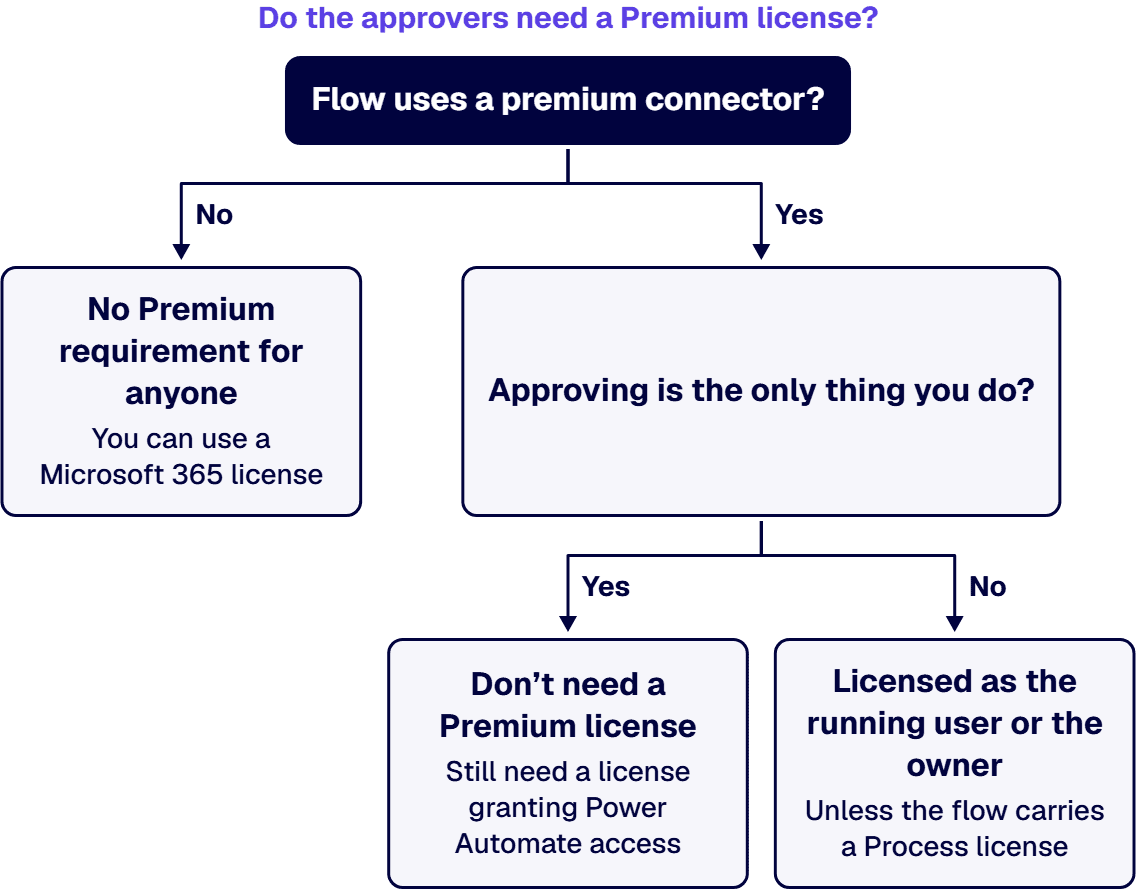
If any of the following is true of your managers, the cheap answer above is the wrong one, and the reason is a condition in Microsoft’s terms rather than caution. The first is the one just described: the same manager invokes an instant flow that uses premium connectors, anywhere in the tenant, and is licensed as a running user. The second is ownership: a manager who owns an automated or scheduled flow that uses a premium connector needs Premium as its owner, whatever else they do in it. Where two of these conditions point different ways for one manager, the condition that carries a license wins: a responder who is also a running user or an owner is licensed as the running user or the owner. The third is Microsoft’s multiplexing boundary. The FAQ’s own example is a premium flow that triggers when an item is added to a SharePoint list. If the flow only emails the owner, then in the FAQ’s words “only the owner needs a license because they’re the only person who gets value from the flow”. If instead the flow “sends an email to the user who uploads the item, both the owner and the user need a Premium license”, because, as the FAQ continues, “the user indirectly triggers the flow (by uploading an item into SharePoint) and gets value from the flow in the form of an email. Failure to license all the users falls under multiplexing.” The FAQ states that “Using multiplexing as a mechanism to reduce the number of licenses to purchase is a license violation.”
That third condition is where the honest edge of this page sits. Microsoft’s responder sentence and Microsoft’s multiplexing example are two different fact patterns, a user who responds to an approval request and a user who indirectly triggers a premium flow and receives its output, and the FAQ does not draw the line between them for you. A manager whose approval response is the only thing they do in a flow is a responder. A manager whose own submission starts a premium flow that then routes back to them is closer to the multiplexing example. Which side of that line a given workflow falls on is a read of that workflow’s trigger and its outputs, flow by flow, and not something to settle from a headcount.
The fourth condition is a posture rather than a rule. The same FAQ opens with Microsoft’s recommendation that “most organizations buy the Power Automate Premium license for every user in their organization.” An estate that follows that recommendation across its users, so that an audit does not have to trace which managers are responders and which are makers, is choosing audit simplicity over the responder exemption, and can defend that choice on the record. What it cannot defend is arriving there by accident, one workflow rollout at a time, with no inventory to show why.
A first conversation starts from artifacts your tenant can produce today rather than from a quote. The flow inventory with type and connector list per flow, the owner of each flow, the list of users who hold run-only access to each instant flow, and the license assignment report from the Microsoft 365 admin center. Read together, those show which of your approvers are responders under Microsoft’s rule and which are running users or owners, and they give Finance the seat-level justification the invoice line currently lacks. If you want a firm to run that read on your specific tenant, the How Do I Hire a Firm to Assist with Power Automate Licensing Decisions? page describes what that engagement looks like.
i3solutions implements Power Platform licensing across Power Apps per-app and per-user plans, Power Automate per-flow and per-user plans, and the Microsoft 365 default entitlements where app complexity is low. i3solutions has built and supports hundreds of production Power Automate flows across its client base. All i3solutions Power Automate developers and consultants are U.S.-based. The governance model that keeps a flow inventory current after the first read is set out on the Designing a Power Platform Governance Framework That Holds Up in a Regulated Enterprise page, and the wider practice sits under Enterprise Power Platform Development & Implementation Services for Governed Operations. To put your own inventory in front of someone who has read these terms against a live tenant before, Contact Us.
If the approver’s only role in the flow is to approve or reject the request, Microsoft’s Power Automate licensing FAQ answers no: users who respond to approval requests do not need a Premium license. The approver does need a license that grants access to Power Automate, and Microsoft’s Get started with approvals page names a Power Automate license, or an Office 365 or Dynamics 365 license carrying Power Automate capabilities, as what lets a user respond from Outlook, a Teams adaptive card or the Power Automate action center. The answer changes when the same person is more than a responder: a user who invokes an instant flow that uses premium connectors needs a Premium license as a running user, and the owner of a premium automated or scheduled flow carries the Premium requirement for that flow, in each case unless the flow itself carries a Process license.
If approving is the only thing you do in the flow, no. Microsoft’s Power Automate licensing FAQ states that users who respond to approval requests do not need a Premium license, and its Get started with approvals page states that the approvals connector is a standard connector, so an approval flow built on standard connectors raises no Premium requirement for anyone in it. What you need in order to respond is a license carrying Power Automate access, and a Microsoft 365 license with built-in Power Automate capabilities provides that. Check one thing before relying on that: whether the approval reaches you from an automated flow that runs in its owner’s context, or from an instant flow you trigger yourself, because Microsoft’s FAQ licenses every user who invokes a premium instant flow, and a responder and a running user are two different roles in its terms.
By Scott Singleton, Managing Consultant, i3solutions
Yes. As of August 2026, Copilot in Power Apps generates a working app from a plain-English description, and Plans, which Microsoft lists as generally available, produces Dataverse tables, canvas and model-driven apps, Power Pages sites, flows and agents. What it hands you is a real first draft, not a governed production system. The distance between the two is environment strategy, DLP, ALM, security review, integration depth and licensing, and that is where the cost has always been.
Somebody on your team watched a demo. A person typed two sentences about tracking equipment checkouts, and ninety seconds later there was a working app with tables, screens and a form. It looked like the end of a category of work your organization has been paying for. The reasonable question that follows is not a rhetorical one, and it deserves a straight answer rather than a defensive one: if the AI can do that, what exactly are we still buying?
The rest of this page is the honest version of both halves. First what the AI genuinely does well, quoted from Microsoft’s own documentation with the dates on it, because this surface changes faster than any page about it. Then the specific places a generated app meets an enterprise and stops, which is not a marketing list but a description of the work that is left over.
Everything in this section was read directly from Microsoft’s published Power Apps documentation on 22 August 2026. The dates in brackets are the last-updated dates Microsoft states on each article, not our reading of them. This is a fast-moving product surface and two of the facts below were different a year ago, so if Microsoft’s page and this one disagree, Microsoft’s page is right and this one is stale.
Read them yourself before you make a staffing decision on the strength of this page. The one that surprises people most is the fourth: a Copilot capability that shipped, was widely demonstrated, and was then retired into a different tool inside about two years.
Answering this by listing everything the AI cannot do would be easy, and dishonest. The capability is real. It is better than the first release was, and it improved again this year. Dismissing it costs you credibility with the person who watched the demo, and they are usually right about what they saw.
Here is what it does well, on the evidence of Microsoft’s documentation and our own use of it:
If your need is a departmental tracker over one Dataverse table, used by twelve people, holding nothing an auditor cares about, then the honest advice is to let a trained maker build it with Copilot and spend your implementation budget somewhere else. We say that in scoping calls, and we have.
The demo ends when the app runs. The enterprise question begins about ninety seconds later, and it is not a question about screens. Microsoft is direct about the boundary in its own responsible-AI FAQ: “AI-generated content may have mistakes. Make sure it’s accurate and appropriate before using it.” The sample rows the generator populates are, in Microsoft’s words, “for illustration only and is fictitious.”
The harder boundary is structural, and it shows up in six places: what the app may connect to, where it lives, how it changes, who may see what, what it integrates with, and what it costs to license. All six are routine in a regulated Microsoft estate. None of the six is expressible in a prompt.
A generated app connects to what the maker can reach. It does not know that your organization forbids a connector that bridges an internal SharePoint list to a personal cloud storage account, or that a specific dataset may not leave a compliance boundary. Those rules live in tenant-level and environment-level data loss prevention policy, and they are enforced by the platform rather than by the app. i3solutions governs client Power Platform tenants with the Center of Excellence Starter Kit, tenant-level and environment-level DLP policies, and managed environment controls. Those are the controls that decide what the app your maker generated on a Tuesday is permitted to connect to, which is a different question from whether it works, and it is the question an audit asks.
The effect compounds in year two rather than week one. When generation is easy, generation happens more, and the population of apps grows faster than anyone’s ability to inventory it. That is the app sprawl problem, and AI generation is the strongest accelerant it has ever had. The countermeasure is not a rule telling people to stop; it is a DLP policy and a Center of Excellence that make the safe path the easy one.
Watch closely during a Copilot demo and you will see the app land in whatever environment the maker happened to be in, or in a personal developer environment the platform created for them. Microsoft’s own prerequisites for Plans describe exactly this fallback: makers without permission to create tables are routed to their own developer environment.
That is fine for a prototype and wrong for anything a business depends on. i3solutions runs client Power Platform work on a multi-tenant Center of Excellence model with separate Dev, Test, UAT, and Production environments promoted through managed solutions. The generated app has to be moved into that structure, which is not a copy and paste: it is a solution boundary, a publisher prefix, connection references, environment variables and a promotion path. Deciding that structure is a design decision about your organization, and no prompt describes it.
Every generated app is built on the assumption that it is the first version. Production apps are defined by their fifth. i3solutions delivery includes ALM practices with Power Platform pipelines or Azure DevOps integration, environment separation strategies, and change control processes. Without that discipline the cost does not disappear, it defers: Power Platform environments without ALM discipline accumulate technical debt requiring 40-60% more maintenance effort within 18 months, making governance frameworks essential from implementation start rather than as an afterthought.
This is the single most predictable failure mode of AI-generated apps, and it is quiet. Nothing breaks on day one. The app works, the department is happy, and eighteen months later nobody can change it safely because there is no test environment, no solution layering and no record of why anything is the way it is.
Who may see which rows? What happens when a user changes role or leaves? Where do the secrets live for the API this app calls? Which actions have to be recorded for an audit, and where is that record kept? Does this app touch controlled data, and if it does, does its environment meet the obligation attached to that data?
Generated apps answer none of these, because they were not asked. i3solutions selects Dataverse over SharePoint as the primary relational store when a client needs scalable high-volume transactional data, and holds application secrets in Azure Key Vault. The data-store choice in particular is one the generator makes for you by default rather than by analysis, and it is difficult to reverse once real data is in it. If that decision is live for you, our comparison of Dataverse and SQL Server is the longer version of that argument.
Generated apps are strongest when the app is the system. They get thin fast when the app is a face on something else: an ERP, a claims platform, a scheduling system, a line-of-business database with thirty years of rules in it. That work is connector architecture and error handling, not screen layout. i3solutions workflow automation builds use standard and premium Power Platform connectors, custom API connectors published through Azure API Management, and hub-and-spoke approval patterns built on Dataverse tables or SharePoint lists.
The tell is what happens when the other system is down or slow. A generated app usually does the naive thing, which in a business process means a silent failure somebody discovers a week later in a reconciliation.
The connector your generated app chose may be a premium connector, and premium connectors carry a license. This is the most common unpleasant surprise in low-code programs, and it arrives after the app is popular. i3solutions implements Power Platform licensing across Power Apps per-app and per-user plans, Power Automate per-flow and per-user plans, and the Microsoft 365 default entitlements where app complexity is low. Sorting that out before rollout rather than after is a genuinely cheap piece of work, and the premium versus per-app comparison covers the decision in detail.
Most of our clients operate under CMMC, ITAR, DFARS, HIPAA or SOC 2 obligations, and for them the availability question comes before the capability question. Here the published answer is specific rather than vague, and it is the fact most articles on this topic leave out.
Microsoft’s feature table marks “Build apps through conversation” for Power Apps as not available in GCC. That table is in Move data across regions for Copilots, AI agents, and generative AI features [Microsoft date 21 May 2026], and it marks “Describe a new table” the same way. In the same table, Power Automate designer Copilot and AI Builder prompts are marked available in GCC. The newer vibe experience is narrower still: Microsoft states it “is currently available only in the US, Australia, Asia, and India regions, and only in English,” and that it “is in preview.”
Three practical consequences, in the order they usually matter:
None of that is an argument against using it. It is an argument for knowing which of the three answers applies to you before anyone builds a plan on top of the wrong one.
The useful way to think about generated apps is that AI has moved the expensive part, not removed it. The screens were never the expensive part. What costs money is deciding what the app is allowed to do, where it lives, how it changes, what it connects to and who is accountable when it is wrong.
Two things follow. The first is that the choice of app type still has to be made by someone who knows the consequences. Canvas apps and model-driven apps solve different problems and inherit different governance. i3solutions builds both kinds through its power platform development services in regulated environments, and the choice always starts with the same question: what is the data and what governance does this app need to inherit. Our full treatment of that decision is in canvas versus model-driven apps for regulated enterprises.
The second is that governed generation at scale is a solved problem, but it is solved by structure rather than by tooling. i3solutions runs a governed Power Platform for a federal defense agency supporting roughly 10,000 personnel across about 180 locations, which works because it is governed, not despite it. Thousands of users and a genuine maker community coexist with a compliance obligation because the environment strategy, the DLP posture and the promotion path were designed before the app count grew, not after.
“Hire a firm” is not an answer by itself, so here is the number that matters. Microsoft specialists reduce environment management overhead by 40-60% because they understand ALM pipelines, solution layering, and security boundary management from day one. That overhead is the recurring cost AI generation does not touch, and it is the line where specialist delivery pays for itself rather than in the app build.
For the class of project where a firm is worth engaging, the outcomes are ordinary and measurable rather than transformational. Replacing 32 outdated InfoPath forms with Power Apps reduced maintenance demands by 40%, saving an estimated $150K-$200K annually in IT labor and support. That was not a hard app to build. It was a hard app to build correctly, migrate onto, govern and support, which is a different sentence.
The band is wide because the drivers are. Power Apps development work ranges from $50,000 to $350,000 per project, depending on size, complexity and length. An app that a maker could have generated in an afternoon belongs at the very bottom of that band or outside it entirely. What pushes a project up the band is integration surface, data volume, compliance obligation and the number of systems that have to keep agreeing with each other.
You do not need a framework. You need three questions, and they sort most requests correctly.
Used honestly, that rule sends more work to the AI than most delivery firms would like to admit, and it protects the work that genuinely should not go there. If you want it as a standing operating model rather than a judgment call each time, our Power Platform CoE operating model and citizen developer pages describe how that is usually set up.
Four answers make thirty minutes productive: which cloud environment your tenant runs in, whether a Center of Excellence and DLP policy already exist, roughly how many Power Apps are live today and who can name their owners, and what the app in front of you has to integrate with. If you cannot answer the third one, that is not an embarrassment; it is the most common finding we have, and it is usually where the work starts.
What you should get out of that half hour is a straight sort: which of your candidate apps a trained maker should generate this month, which need design before anyone builds, and which are not app problems at all. That sort is useful whether or not you engage anyone, and it is the part your steering committee can actually act on. If you are building the internal case rather than buying this quarter, ask for how comparable engagements were scoped and where they landed in the band, so you have something to put in front of a committee before committing to anything. Nobody needs a proposal to make that half hour worth having.
Schedule a 30-minute scoping call
If the open question on your side is architectural rather than commercial, which environment structure you should be promoting through, how a maker community and a compliance obligation coexist, or whether a specific app belongs on Dataverse at all, that is a different conversation. It should be with someone who has built it inside a regulated tenant rather than with someone reading a feature table back to you. Ask for the architecture track when you book, and bring the app that is causing the argument.
Yes. As of August 2026, Copilot in Power Apps generates a working app from a plain-English description. Microsoft’s documentation describes entering the type of information you want to collect, track, or show, after which “Copilot generates one or more Microsoft Dataverse tables that you use to build your canvas app.” The broader Plans experience, which Microsoft lists as generally available, goes further: it “generates a complete Power Platform solution tailored to your needs” including Dataverse tables, canvas apps, model-driven apps, Power Pages sites, Power Automate flows, and Copilot Studio agents. What it produces is a genuine first draft rather than a governed production system. The remaining work is environment strategy, data loss prevention policy, application lifecycle management, security review, integration depth and licensing, and that is where the cost in an enterprise has always been.
It generates a data model and an app from a description: tables, columns, relationships, data types, and the screens over them. Two changes matter for anyone comparing notes with a demo they saw earlier. First, Microsoft retired in-Studio Copilot editing: “Starting January 6, 2026, this feature will be removed. To continue creating apps with Copilot, use Plans.” Second, a newer vibe experience is in preview and is narrower in reach, with Microsoft stating it “is currently available only in the US, Australia, Asia, and India regions, and only in English.” Microsoft is also explicit about review: “AI-generated content may have mistakes. Make sure it’s accurate and appropriate before using it,” and the sample rows the generator populates are “for illustration only and is fictitious.”
Not for the app-generation feature. Microsoft’s feature table in “Move data across regions for Copilots, AI agents, and generative AI features” marks “Build apps through conversation” for Power Apps as not available in GCC, and marks “Describe a new table” the same way. The answer is per feature rather than blanket: in that same table, Power Automate designer Copilot and AI Builder prompts are marked available in GCC. The preview vibe experience is narrower still, limited by Microsoft to the US, Australia, Asia and India regions and to English. Before an internal debate about whether AI replaces a build, confirm which environment your tenant runs in and get a dated written statement from Microsoft or your licensing partner about your specific environment.
Because the review asks questions the prompt never contained. Who may see which rows, what happens when a user changes role, where the secrets live for any API the app calls, which actions must be recorded for an audit, and whether the app touches controlled data whose obligation the environment has to meet. A generated app connects to whatever the maker can reach, which is why data loss prevention policy is enforced at tenant and environment level rather than inside the app. i3solutions governs client Power Platform tenants with the Center of Excellence Starter Kit, tenant-level and environment-level DLP policies, and managed environment controls. The related structural gap is lifecycle: Power Platform environments without ALM discipline accumulate technical debt requiring 40-60% more maintenance effort within 18 months, making governance frameworks essential from implementation start rather than as an afterthought.
For a departmental tracker over one data source that holds nothing an auditor cares about, often you should not, and that is the honest answer. Pay for delivery when the app has to survive its fifth change, integrate with a second system, or satisfy a compliance obligation. i3solutions runs client Power Platform work on a multi-tenant Center of Excellence model with separate Dev, Test, UAT, and Production environments promoted through managed solutions, and i3solutions delivery includes ALM practices with Power Platform pipelines or Azure DevOps integration, environment separation strategies, and change control processes. The economics sit in that overhead rather than in the build: Microsoft specialists reduce environment management overhead by 40-60% because they understand ALM pipelines, solution layering, and security boundary management from day one. For scale, Power Apps development work ranges from $50,000 to $350,000 per project, depending on size, complexity and length, and an app a maker could generate in an afternoon belongs at the bottom of that band or outside it.
No neutral body ranks them, so rank the shortlist yourself against evidence. The consultants who rate highest for government contracting can show environment and DLP strategy for the cloud you actually run in, connector governance around controlled data, application lifecycle management with real pipelines, named delivery inside a government boundary, US-based administrators, and premium connector licensing math done before design.
There is no published, independent ranking of Power Automate consultants for the government contracting market. What circulates instead is a rotating set of vendor-written lists, directory placements bought by the seat, and marketplace profiles ordered by transaction volume rather than by delivery quality in a controlled environment. Any page that hands you ten names in ranked order, this one included, is giving you an opinion. The useful thing to publish is the rubric, so that you can rank a shortlist yourself and defend the result to a contracting officer.
Every candidate on your shortlist will fall into one of these categories, and the category predicts the failure mode more reliably than the logo does.
None of these categories is disqualifying by itself. The point is to know which risk you are buying, and to test for it in the evaluation rather than discovering it in month four.
Every criterion here is checkable from public sources or from a first scoping conversation. None of them requires taking a vendor’s word.
Score each shortlisted firm from zero to three on the nine criteria, then weight the four that carry the compliance risk at double. In practice a defensible weighting looks like this:
Applied honestly, this rubric usually eliminates two of five candidates on criterion four alone, which is the point of running it before the demos rather than after.
If you want to pressure-test the rubric against a practitioner before you shortlist, a senior i3solutions architect will walk your existing flow estate with you: what is running in production without a pipeline behind it, which connectors are reachable from environments holding controlled data, and where the premium licensing exposure sits. You leave the call with the reasoning whether or not you engage us, which is usually what a buyer needs to build the internal case.
Applying our own rubric to ourselves, with the gaps named rather than smoothed over.
Criterion four is where the honest answer needs a boundary. No single i3solutions case study combines Power Automate with a federal contractor. The engagement where Power Automate is the named technology was delivered for a state National Guard organization that serves both state and federal missions: ahead of a compliance inspection, i3solutions migrated an aging SharePoint estate and replaced 32 InfoPath forms with Power Apps and Power Automate. Thirty-four workflows essential for automating key processes were migrated seamlessly, along with over 336,000 custom list items. The upgraded SharePoint environment ensured the organization passed their inspection, meeting all compliance requirements and avoiding costly penalties or mission delays valued at over $250K. That is government delivery, and it is state and federal mission work, but it is not a federal contractor and we are not going to describe it as one. The account is in the InfoPath replacement case study.
Separately, and on the Power Platform rather than Power Automate specifically, i3solutions runs a governed Power Platform for a federal defense agency supporting roughly 10,000 personnel across about 180 locations, which works because it is governed, not despite it. And the federal contractor experience that does exist sits in a different technology: for a global engineering and government services contractor, i3solutions built an enterprise proposal management system shaped around the specifics of government procurement, which is documented in the proposal management case study. That programme is real GovCon delivery and it is not a Power Automate engagement, so it belongs in a different column of your scorecard than the one this page is about.
On the remaining criteria the record is more direct. i3solutions has completed more than 600 Microsoft platform implementations. i3solutions is a Microsoft Solutions Partner. i3solutions is an SBA certified small business providing technical and professional services to US Federal Agencies, the DoD and the private sector. i3solutions runs migrations against named control families across CMMC, HIPAA, SOC 2, and NIST 800-171, producing artifacts auditors can review. On lifecycle discipline the position is specific: i3solutions delivery includes ALM practices with Power Platform pipelines or Azure DevOps integration, environment separation strategies, and change control processes. i3solutions delivery pods use standardized environments, connection references, and solution packaging from day one. On the connector and boundary side, the detailed position is written up in our analysis of securing Power Automate in regulated enterprises, and the governance argument sits in shadow IT versus a governed Power Platform.
What i3solutions does not hold is a FedRAMP or DoD authorization of its own, and it does not accredit a system or issue an authority to operate; those determinations sit with the government. i3 installs and helps configure applications inside IL4 and IL6 government cloud environments and other government networks, which is the accurate description of the boundary work and is deliberately narrower than the claims you will see elsewhere on this shortlist.
Four answers should end an evaluation regardless of how the rest of the scorecard reads. A delivery model that requires non-US administrative access to your tenant, because your own security review will stop it later at greater cost. A proposal that quotes build effort with no premium connector or capacity modelling, because the number is structurally incomplete rather than merely optimistic. A firm that cannot produce a DLP policy design from any prior engagement, because connector governance is the control that matters most in this category. And a firm that describes flows built directly in production as normal practice, because that is the finding that turns a routine assessment into a remediation programme.
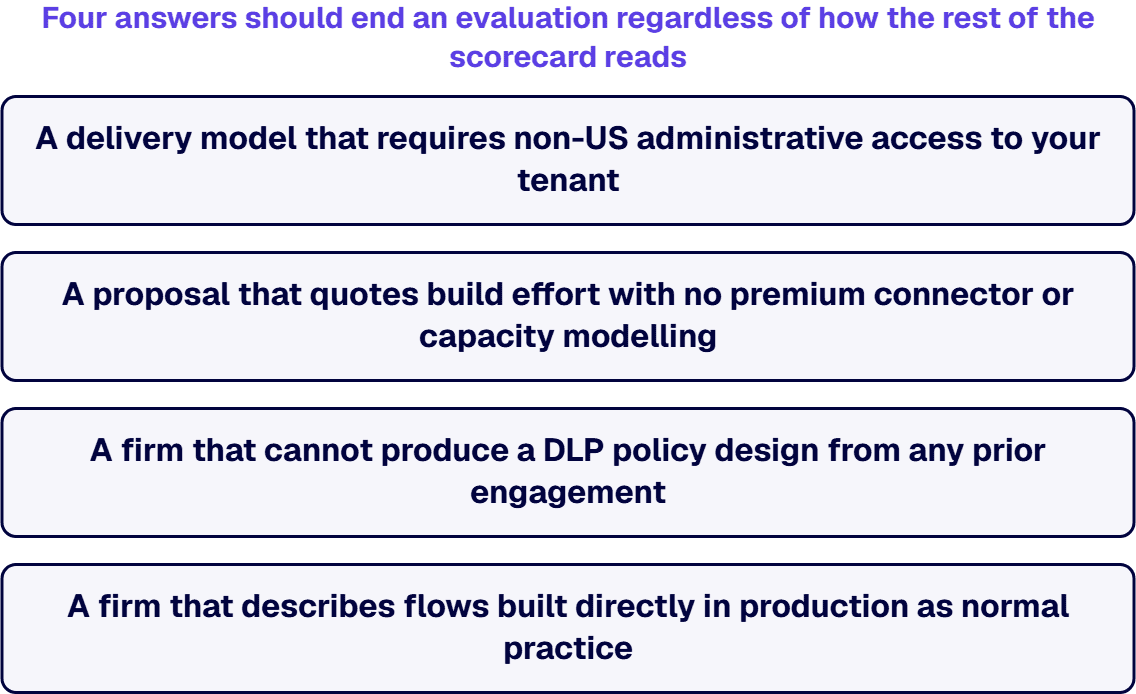
One softer signal is worth weighting too. A candidate that has never recommended against automating something has not been in the room long enough. The most valuable output of a good scoping conversation is usually a shorter list of processes than you brought to it, which is the argument made at length in our guide to the Power Automate processes worth automating first.
Two bands are worth separating, because they answer different questions. A typical regulated-enterprise Power Automate security consulting engagement at i3 runs in the $60,000 to $180,000 range, depending on environment scope and framework complexity. That is governance and boundary work on an estate you already have. Migration of a legacy workflow estate is the other shape: Phase 3 (sequenced migration to Power Automate with governance handoff) ranges from $100,000 to $400,000 depending on the number of keep-and-migrate and rebuild workflows, and the sequencing method behind that band is set out in the guide to migrating SharePoint 2013 workflows to Power Automate. Licensing is a third and separate question, and the Power Automate premium cost analysis shows where the per-user and capacity figures come from rather than restating them here.
Which end of either band applies is decided by the inventory, not by a rate card, which is the practical reason a scoping conversation precedes a committed number. If your requirement is a longer-running delivery team rather than a bounded engagement, that is a dedicated Power Automate delivery team instead, and it is a different conversation with a different commercial shape. For broader platform scope, the Power Platform development services overview is the wider view. When you are ready to test fit, i3solutions routes a senior U.S.-based engineer to a client call usually within one to two weeks. You can also reach the team by phone at 703.652.8966.
No. There is no published, independent ranking for this category. What circulates is vendor-written lists, paid directory placements, and marketplace profiles ordered by transaction volume rather than by delivery quality in a controlled environment. The practical substitute is to score a shortlist yourself against a written rubric, weight the criteria that carry compliance risk at double, and require an artifact behind every claim so that a plausible answer without evidence scores zero rather than one.
Four things, and none of them is build skill. Environment strategy for the government cloud the tenant actually runs in, because connector availability and feature parity differ and change. Data loss prevention and connector governance around controlled data, with a real exception process. Control mapping to named families under CMMC, NIST SP 800-171, and DFARS with artifacts an assessor can review. And US-based administrative access, because the personnel constraints on a government cloud environment will decide the delivery model whether or not the vendor raises them.
One engagement names Power Automate as the technology: for a state National Guard organization serving both state and federal missions, i3solutions replaced 32 InfoPath forms with Power Apps and Power Automate ahead of a compliance inspection. Thirty-four workflows essential for automating key processes were migrated seamlessly, along with over 336,000 custom list items, and the environment passed inspection. No single i3solutions case study combines Power Automate with a federal contractor, and we would rather state that than blur a defense-sector logo into a Power Automate reference.
A typical regulated-enterprise Power Automate security consulting engagement at i3 runs in the $60,000 to $180,000 range, depending on environment scope and framework complexity. Migrating a legacy workflow estate is a different shape: Phase 3 (sequenced migration to Power Automate with governance handoff) ranges from $100,000 to $400,000 depending on the number of keep-and-migrate and rebuild workflows. Licensing is a separate question again. Which end of either band applies is decided by the inventory rather than by a rate card.
They change the arithmetic, which changes the ranking. Power Automate cost in an enterprise estate is decided by the connector and capacity choices made during architecture, not by the seat count, so a firm that quotes build effort without modelling premium connector consumption has quoted half the number. Ask each candidate to show the licensing model behind its estimate. The ones that can produce it during evaluation are the ones that produced it on their last programme.
Ask for a data loss prevention policy design from a prior engagement and the exception process behind it. Connector governance is the control that matters most in this category, and a firm that has genuinely delivered in a controlled environment can produce a redacted example in a day. A firm that offers a policy template instead, or that describes flows built directly in production as normal practice, has told you what its last engagement looked like.

US-Based Microsoft System Integrator | Est. 1997
© i3solutions. All rights reserved.
US-Based Microsoft System Integrator | Est. 1997
© i3solutions. All rights reserved.


