
Power Platform decisions come up faster than roadmaps account for, usually once a citizen-developer app has outgrown its original scope or an executive asks why governance didn’t catch what shipped. These answers address the specific calls IT Directors and Power Platform owners face, from licensing and environments to where custom development has to take over.
By Michael Branson
The request arrives from the safety manager: a confidential reporting intake by spring, a hazard log, investigation and corrective-action tracking, and a summary the FAA receives twice a year. A standalone product has already been demonstrated. The IT Director suspects the company already owns what is needed in Dataverse, Power Apps and SharePoint, but has to defend three decisions before anyone builds: who can read a report and its reporter’s name, including the administrators; which record keeps which period, and where that period is enforced; and which cloud the reports live in. This guide walks those decisions against the text of the rule and Microsoft’s own documentation.
Dataverse is not the only place these records could live, and our comparison of Dataverse and SQL Server sets the two side by side. An anonymous intake would run on Power Pages, and our overview of what Microsoft Power Pages is describes that product.
The first failure is building for a date that is not yours. According to 14 CFR part 5, the rule reaches “Any person that holds both a type certificate and a production certificate issued under part 21 of this chapter for the same product,” any holder of a production certificate “for a product for which the person is a licensee of the type certificate for the same product,” and a type certificate holder “that allows another person to use the type certificate to manufacture the same product under a production certificate.”
For holders already in place, part 5 set two dates. The implementation plan went to the FAA “for FAA approval in a form and manner acceptable to the Administrator no later than November 28, 2024.” The system itself follows: “Implement the SMS in accordance with this part no later than May 28, 2027.” An applicant that came later runs on its own clock instead: “Implement the SMS in accordance with this part no later than 36 months after submission of the implementation plan.”
Not every aviation manufacturer is in that population. In the final rule’s preamble, published April 26, 2024, the FAA wrote: “At this time the FAA does not have sufficient information to support a safety justification for expanding this rule to STC, TSOA, and PMA holders.” Part 5 also says the system “must be appropriate to the size, scope, and complexity of the person’s organization,” and the holder makes its information available to the Administrator on request. Whether a given company is a covered holder is its own determination with its FAA certification office, not this page’s.
For an existing holder, the plan is already written and approved, and it names means of compliance that someone now has to turn into systems. Start the build from that approved plan’s means of compliance, not from a product demonstration.
The reporting intake is where a quick build fails first: a form that feeds a list the whole site can read breaks the promise on the first report. According to 14 CFR 5.71(a)(7), the safety management system includes “A confidential employee reporting system in which employees can report hazards, issues, concerns, occurrences, incidents, as well as propose solutions and safety improvements, without concern of reprisal for reporting.” The same subpart lists “Investigations of reports regarding potential non-compliance with regulatory standards or other safety risk controls” among the processes the holder maintains, so the intake feeds an investigation, not only a log.
Part 5 puts the policy before the system. The rule requires “A safety reporting policy that defines requirements for employee reporting of safety hazards or issues” and “A code of ethics that is applicable to all employees, including management personnel and officers, which clarifies that safety is the organization’s highest priority.” In the final rule’s preamble, the FAA adds that “the Agency’s intent has always been that the confidential reporting system be non-punitive in nature.” Those documents belong to the safety function and the accountable executive; the system IT builds enforces them.
Confidential and anonymous are different designs. According to the FAA’s preamble, “the requirement does not prohibit an aviation organization from accepting anonymous reports,” and in the same discussion, “anonymous reporting is not necessarily the better or preferred system for employee reporting.” Existing programs count only where they reach: “An ASAP would satisfy the confidential reporting program requirement for those aviation organizations that have a memorandum of understanding with the FAA for the specific employee groups,” and “For employee groups that are not covered by an existing ASAP, the aviation organization must have an alternate means of compliance for confidential employee reporting.”
On the Microsoft estate, two intake shapes fit, and both can feed the same Dataverse tables:
Decide confidential or also anonymous for each employee group, and write down which groups an ASAP already covers, before the first screen is designed.
The design question the product demonstration rarely raises is who can read the reporter’s name. Dataverse gives several layers: according to Microsoft’s Dataverse overview, “You can combine business units, role-based security, row-based security, and column-based security to define the overall access to information that users have in a Power Platform environment.” Microsoft’s security roles documentation adds that “Access levels determine how deep in the business unit hierarchy the user can perform the privilege,” and its column-level security documentation says to “Use column-level security to manage access to data in specific columns.”
There is one population that none of those layers restricts. Microsoft’s column-level security documentation states: “Column-level security doesn’t apply for users who have the system administrator role.” It continues: “Data is never hidden from system administrators.” Every holder of that role can read every secured column, including the reporter’s identity, so the size and membership of the system administrator group is part of the confidentiality design, not an IT housekeeping detail.
Microsoft’s auditing documentation notes that “Audit logs are created when you change the record on a table where auditing is turned on,” so auditing is switched on for the report tables deliberately rather than assumed. Investigation files kept in SharePoint get their own boundary: Microsoft’s restricted access control documentation says the feature “helps prevent oversharing by designating access of SharePoint sites and its content to users in the specific control group,” and also that “Adding people to the restricted access control group (Microsoft Entra security group or Microsoft 365 group) doesn’t automatically give the users access permission to the site or the content.”
The design reading that follows is this guide’s, not the FAA’s words or Microsoft’s: secure the reporter-identity columns; let investigators work the report without the identity unless the safety manager releases it; hold the system administrator role in a small named group whose access is itself audited; and scope the build team’s own access for the length of the build. List every role that can see a reporter’s identity, administrators included, and make that list part of the safety reporting policy.
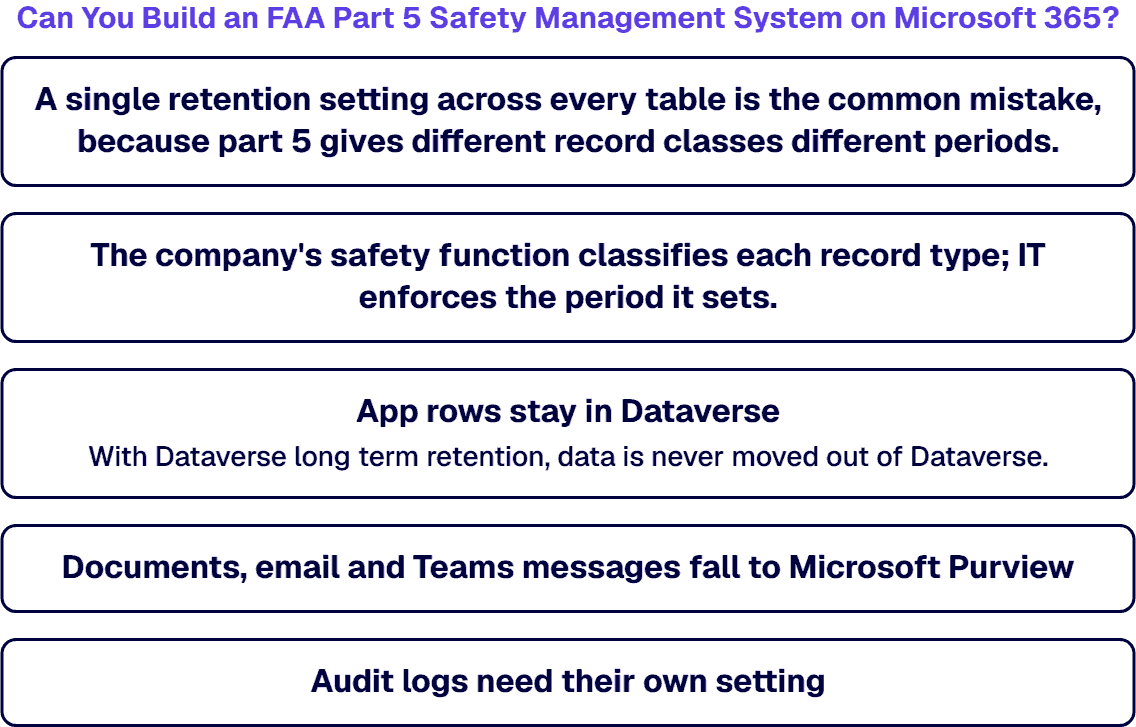
A single retention setting across every table is the common mistake, because part 5 gives different record classes different periods. The medium is the holder’s call: in the final rule’s preamble, the FAA wrote, “As stated in the NPRM, the operator chooses how it maintains the required SMS records, which can be electronically or in paper format.” The rule also requires the holder to “develop and maintain processes and systems to acquire data with respect to its operations, products, and services to monitor the safety performance of the organization.”
The periods are these:
Whether an individual confidential report is itself a safety assurance output, or only the analysis and corrective action that follow it, is a classification this page does not make. The company’s safety function classifies each record type; IT enforces the period it sets.
On the Microsoft estate, the enforcement splits by where the record lives. App rows such as reports, hazards, risk assessments and corrective actions stay in Dataverse: Microsoft’s long term retention overview states, “With Dataverse long term retention, data is never moved out of Dataverse.” Documents, email and Teams messages that carry safety communications fall to Microsoft Purview, where Microsoft’s retention documentation states that if users “edit or delete content that’s included in the retention policy, a copy of the content is automatically retained.” Audit logs need their own setting, because Microsoft’s auditing documentation states: “When you set the audit retention period to any other value, the system continuously deletes logs starting at the time an audit record exceeds the time defined in the retention policy.”
Maintenance and repair-station records fall under a different part of the FAA’s rules with their own periods; they are not safety management system records and are not covered on this page.
Build a record-class table before the first Dataverse table is created: the class, its part 5 section, its period, its system of record and its retention mechanism.
The summary is the most concrete IT deliverable in the rule, and the easiest to get wrong by exporting too much. According to 14 CFR 5.71(c), a person that holds both a type certificate and a production certificate for the same product “must submit a summary of the confidential employee reports received under paragraph (a)(7) of this section to the Administrator once every 6 months.” A holder of only one of the two certificates does not carry this duty under that paragraph.
In the final rule’s preamble, the FAA addressed confidentiality: “Summaries of confidential employee reports submitted by certificate holders with both a TC and a PC are protected from public disclosure by 49 U.S.C. 44735(a)(2) if the summaries are requested under the Freedom of Information Act.” It also wrote: “The reports submitted to the FAA should not contain any confidential or proprietary information.”
Build the summary as a report over the Dataverse tables that counts and categorizes, with no reporter identity and no free text that could identify one, and keep each submitted summary under the retention period the safety function assigns it. Have the safety manager approve the report design before the first submission, because a summary that lets anyone identify a reporter breaks the promise the whole reporting system rests on.
A hazard found in the operating environment can oblige a notice outside the company. According to 14 CFR 5.57, “the person must provide notice of the hazard to any interfacing person that, to the best of the person’s knowledge, could address the hazard or mitigate the risk,” and section 5.97(d) keeps records of communications provided under 5.57 for a minimum of 24 consecutive calendar months.
In a Power Automate build, an approval step can send the notice from the hazard record, strip reporter identity and proprietary detail before it leaves. The decision to notify stays with the safety function; the workflow makes the notice traceable.
A manufacturer whose defense programs already run in a government cloud has to decide whether safety reports that may carry program data belong there. Microsoft’s Power Apps US Government documentation states Microsoft’s own expectation: “We anticipate our US Department of Defense contractor customer base and other Federal agencies currently using Microsoft 365 GCC High to use the Power Apps US Government GCC High deployment option, which enables and requires the customer to use Microsoft Entra Government for customer identities, in contrast to GCC which uses Public Microsoft Entra ID.”
This page states no feature’s availability in GCC High. Pick the cloud by where the report content is allowed to live, then confirm each feature the design depends on, such as long term retention, restricted site access control and anonymous Power Pages access, against Microsoft’s government documentation before design starts.
A build is not the right answer for every holder, and it is worth checking before the project starts:
Whoever builds the system, inside the company or outside it, hold the work to these criteria, stated as what they should be able to show you:
No product, provider or consultancy is named or compared on this page.
i3solutions has delivered enterprise SharePoint and Power Platform programs for aerospace and defense manufacturers, major defense organizations, a financial-services firm, a national healthcare system, and military organizations. For a part 5 reporting system, that means a project, with embedded specialists where your team needs them, that builds the reporting intake, the Dataverse tables and security model, the retention configuration and the summary report on the Microsoft estate you already run, to the means of compliance your safety function wrote. i3solutions workflow automation builds use standard and premium Power Platform connectors, custom API connectors published through Azure API Management, and hub-and-spoke approval patterns built on Dataverse tables or SharePoint lists. i3solutions engineers work inside the client’s own tenant as Microsoft Entra B2B guest accounts with scoped Dataverse security roles, not from an i3solutions-owned tenant.
An i3solutions project engagement does not produce a replacement for the internal team, open-ended scope expansion, or vendor lock-in, and ongoing run support is scoped separately as Application Managed Services. The safety policy, the hazard identification, the risk assessment and the reports themselves stay with your safety function and its accountable executive; i3solutions designs, builds, secures, documents and supports the system they run on.
This reporting system joins the wider Power Platform estate, and i3solutions delivers it under its Power Platform service line.
i3solutions has been a Microsoft Partner with 30 years of enterprise technology delivery experience and has delivered 1,500+ Microsoft engagements across aerospace and defense, financial services, and health sciences. i3solutions delivery on regulated work is US-based and senior.
The page cites these Microsoft pages:
By the deadline the rule sets for holders already in place when it took effect. A holder of both certificates for the same product, or a type certificate holder that licenses another person to produce under it, implements its safety management system by that deadline, after submitting its implementation plan to the FAA. The section above on who the rule binds among manufacturers, and which date applies, quotes the rule’s dates with the source.
No. According to the FAA’s final rule, the requirement does not prohibit accepting anonymous reports, but anonymous reporting is not necessarily the better or preferred system for employee reporting. The system must let employees report without concern of reprisal.
Yes. According to the FAA’s final rule, the operator chooses how it maintains the required records, which can be electronic or on paper.
Each record class keeps its own period under the rule: safety risk management outputs are kept as long as the control remains relevant to the operation, training records for as long as the individual is employed, and safety assurance outputs and safety communications each for a set minimum period. The section above on the safety management system records and how long each is kept quotes each period from the rule with the source. Which class an individual report falls into is the company’s safety function’s classification.
A holder of both a type certificate and a production certificate for the same product submits a summary of the confidential employee reports it received, on the schedule the rule sets. According to the FAA’s final rule, those reports should not contain any confidential or proprietary information. The section above on the summary to the FAA, without the confidential content, quotes the rule’s schedule with the source.
Yes. According to Microsoft, column-level security does not apply to users with the system administrator role, and data is never hidden from system administrators, so every administrator can read a secured reporter column in a safety report table. Keeping that group small, named and audited is part of the confidentiality design.
Michael Branson
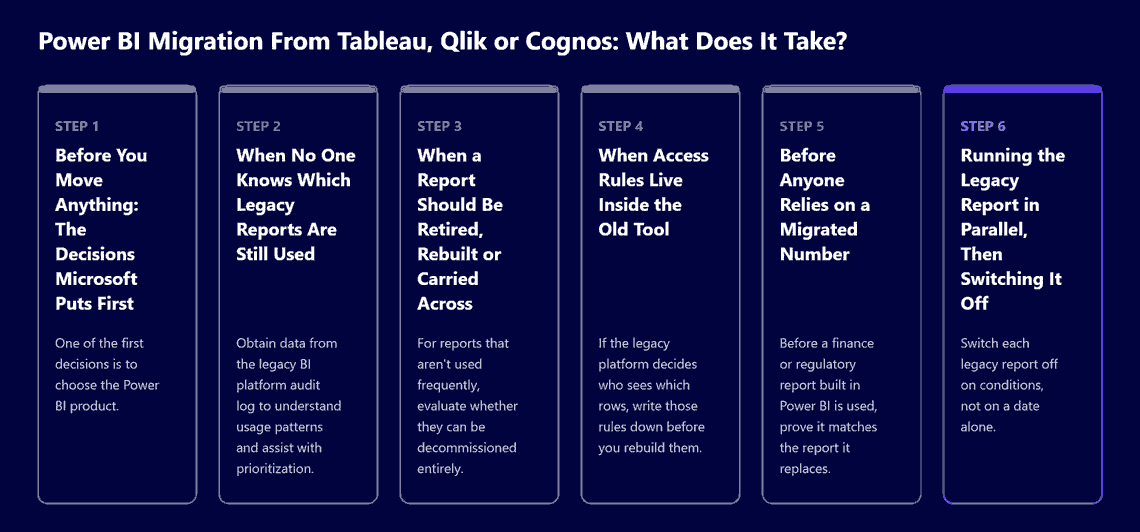
If your legacy BI contract has an end date and a conversion estimate is already on the table, the count that matters is still open: which reports anyone still runs, and which ones a regulator, an auditor or the board reads. Move reports in the order the legacy platform’s own usage record gives you, rebuild each one against the business question it answers, prove its numbers and its access rules against the legacy report before anyone relies on it, and switch the legacy report off only when the parallel run has ended, every user can reach the new one, the old one has stopped being used, and no issue that could affect users has occurred with the new one.
Plan the effort around validation, not conversion. Microsoft’s Prepare to migrate to Power BI page says: “It isn’t possible to completely automate a Power BI conversion process end-to-end.” Microsoft’s Power BI migration overview, which like the rest of its migration series was last updated December 30, 2024, states the premise this page shares: “There are two assumptions: Your organization has a legacy BI platform currently in place and the decision has been made to formally migrate content and users to Power BI.”
This page sets out Microsoft’s migration method and the i3solutions recommendation for a regulated enterprise. What your regulatory obligations require of the migration is for your control owners, auditors and counsel to decide.
Before the first report moves, two things need a written answer. Start with the product. Microsoft’s Plan deployment to migrate to Power BI page says: “One of the first decisions is to choose the Power BI product. It’s a decision between the Power BI service or Power BI Report Server.” This page does not compare the two.
Then set the constraints. Microsoft’s Power BI migration overview says: “Be realistic with migration plans, including funding, time estimates, as well as roles and responsibilities for everyone involved.” Cost is covered in Power BI licensing costs.
If your tenant sits in a national or government cloud, the same overview says: “Additional considerations could apply for national/regional cloud customers beyond what is discussed in this series of articles.” Microsoft does not list them there, and this page does not cover them.
If the inventory is only a list of report names, it cannot tell you what to move first; the legacy platform’s own usage record can. Microsoft’s Prepare to migrate to Power BI page says: “The output from the pre-migration steps includes an initial governance model, initial high-level deployment planning, in addition to an inventory of the reports and data to be migrated.” For the usage record it says: “Obtain data from the legacy BI platform audit log to understand usage patterns and assist with prioritization.” What it lists from that log includes “The consumers for each report, particularly reports used by executives.” and “Most recent date each report was executed.”
Inventory the data sources as well. The same page says compiling them “could unearth data sources not previously known to the IT department, often referred to as shadow IT”. Among the items its governance model section lists: “How internal and external compliance, regulatory, and audit requirements will be met.”
The audit log shows who ran a report and when; it does not show which reports feed a regulatory submission, an audit request or a board pack. The i3solutions recommendation: before ranking, ask each report’s owner to flag those reports in writing, and rank them alongside Microsoft’s own priority test in Gather requirements to migrate to Power BI, where the high-priority reports it lists include those that “Are required by senior leadership or executives.”
If a legacy report is rebuilt exactly as it looks today, its old problems move with it. Microsoft’s Power BI migration overview says: “Rather than strictly attempting to always migrate reports precisely as they appear in the legacy BI platform, focus on the business question the report is trying to answer”. Its Gather requirements to migrate to Power BI page adds: “It’s rare that a direct one-to-one migration occurs without any refactoring or enhancement.”
Retire first. Microsoft’s Learn from customer Power BI migrations article says: “It’s very easy to overestimate how critical a report actually is. For reports that aren’t used frequently, evaluate whether they can be decommissioned entirely. Sometimes, the cheapest and easiest thing to do is nothing.” Under the i3solutions recommendation, a report its owner has flagged as regulatory is not retired on usage alone.
Microsoft’s Conduct proof of concept to migrate to Power BI page describes two data-model situations. It says: “If you’re migrating from a legacy BI platform that has its own semantic layer, then the creation of an Import semantic model is likely to be a good option.” It adds that if the legacy semantic layer is not a star schema, “it’s possible that some redesign might be required to fully benefit from Power BI.” Where reports use SQL queries or stored procedures and you plan to use DirectQuery mode, it says “you might be able to achieve close to a one-to-one migration of the data model.” It also cautions: “Every BI tool has its strengths and focus areas. For this reason, the exact report visuals you depended on in a legacy BI platform might not have a close equivalent in Power BI.”
Rebuild everything else for its purpose. Microsoft’s customer migrations article records the guidance one organization gave its content authors: “focus on creating fit-for-purpose reports in Power BI, rather than attempt an exact replica of the legacy report.”
If your legacy platform is Tableau, Qlik or Cognos, the migration method does not change. Microsoft wrote its series for “a migration from a third-party BI tool to Power BI”, as its Power BI migration overview puts it, and its migration pages name no source product. Which of Microsoft’s two data-model situations your estate matches, a legacy semantic layer or reports built on SQL queries and stored procedures, is for your own team to establish from the estate itself; this page states nothing about any source product’s features.
If the legacy platform decides who sees which rows, write those rules down before you rebuild them. Microsoft’s Gather requirements to migrate to Power BI page says, for each report: “Clarify security requirements (such as allowed viewers, allowed editors, and any row-level security needs), including any exceptions to normal organizational security. Document any data sensitivity level, data privacy, or regulatory/compliance needs.”
Test the rules early. Microsoft’s Conduct proof of concept to migrate to Power BI page lists “Verify security configurations, including row-level security when applicable.” Its Create content to migrate to Power BI page names two routes: “In an Import semantic model, data permissions are applied by defining row-level security (RLS). It’s also possible that data permissions are enforced by the source system when using DirectQuery storage mode”.
Control what leaves the service. Microsoft’s Plan deployment to migrate to Power BI page says: “Specify an approved location for content exported from the Power BI service.” Where row-level security stops protecting data is covered in business intelligence executives can trust.
Before a finance or regulatory report built in Power BI is used, prove it matches the report it replaces. Microsoft’s Create content to migrate to Power BI page says “There are four main aspects to validation of a Power BI solution:” and lists Data accuracy, Security, Functionality and Performance. On accuracy it says: “As a one-time effort during the migration, you’ll need to ensure the data in the new report matches what’s displayed in the legacy report.” Where the two differ, Microsoft says you should be able to explain why, and it adds: “It’s more common than you might think to find an error in the legacy solution that gets resolved in the new solution.”
Start from the calculations. Microsoft’s Gather requirements to migrate to Power BI page says: “Identify and document all calculations, KPIs, and business rules that are currently defined within the existing report so they can be aligned with the data requirements.” After the one-time check, Microsoft’s Create content page says: “As part of ongoing data validation efforts, the new report will typically need to be cross-checked with the original source system.”
A reconciliation that is written down records what was compared, when, which figures differed and why. Filed with the report’s inventory record, it is evidence of the migration step. What your control owners, auditors and counsel require of it is theirs to decide.
When users can open both versions, the parallel run is where differences surface. Microsoft’s Deploy to Power BI page says: “In many situations, the new solution will run in parallel to the legacy solution for a predetermined time.” One advantage it lists: “Allows for the information presented in Power BI to be cross-referenced to the legacy reports.”
Decide how formal sign-off is before rollout starts. The same page says “The extent to which this UAT process is formal, including written sign-offs, will depend on your change management practices.” and “If you’re trying to minimize risk and user disruption, or if there are other concerns, you might opt to perform a staged deployment.” For a report a regulator or the board reads, the i3solutions recommendation is a written sign-off by its owner.
Switch each legacy report off on conditions, not on a date alone. Microsoft’s Deploy to Power BI page says decommissioning can occur when the predetermined parallel period has expired, adding “It’s commonly 30-90 days.”; when “All users of the legacy system have access to the new Power BI solution.”; when “Significant activity is no longer occurring on the legacy report.”; and when “No issues have occurred with the new Power BI solution that could impact user productivity.” That range is Microsoft’s common case, not a requirement.
The i3solutions recommendation is to file, for each report switched off, the record behind each of those conditions: the date the parallel period ended, the access check, the usage showing activity stopped, and the issues log. Who owns the reports after cutover is covered in enterprise analytics operating model.
If your reports are .rdl files on Power BI Report Server or SQL Server Reporting Services, Microsoft documents a Microsoft-to-Microsoft path. Its Plan to migrate .rdl reports to Power BI page says “In Power BI, .rdl reports are called paginated reports” and “If you’re using Power BI Report Server or SQL Server Reporting Services after SQL Server 2016, there’s a built-in tool to publish its reports to Power BI.” It adds: “Having discovered your report server instances, the goal of the Assess phase is to understand any .rdl reports, or server items, that can’t be migrated.” For reports that rely on features paginated reports do not yet support, Microsoft says “you can plan to redevelop them as Power BI reports, when it makes sense.” The same page says: “You can achieve migration without downtime to your report servers, or disruption to your report users.”
If one of these situations applies, stop before you follow the migration method:
If no one owns the inventory and the sign-offs, the migration defaults to whatever converts fastest. The i3solutions recommendation: your platform team owns the inventory and the triage, and each report’s business owner signs off its reconciliation and its switch-off.
An outside architect is useful in two places: re-expressing the legacy security model in Power BI and designing the reconciliation against the legacy reports. That is project and advisory work scoped to your estate. The service is described in business intelligence and reporting services.
The wider practice is enterprise Power BI development services. i3solutions has deployed Power BI inside a GCC High tenant and inside Azure Government for a federal customer. Power BI and analytics work at i3solutions is delivered by senior, US-based people. Delivery is senior and US-based.
If the inventory is only a list of report names, it cannot tell you what to move first; the legacy platform’s own usage record can. The audit log shows who ran a report and when; it does not show which reports feed a regulatory submission, an audit request or a board pack.
If a legacy report is rebuilt exactly as it looks today, its old problems move with it. Retire what is not used, and rebuild the rest around the business question each report answers.
Before a finance or regulatory report built in Power BI is used, prove it matches the report it replaces. A reconciliation that is written down records what was compared, when, which figures differed and why. Filed with the report’s inventory record, it is evidence of the migration step.
Switch each legacy report off on conditions, not on a date alone. The i3solutions recommendation is to file, for each report switched off, the record behind each of those conditions: the date the parallel period ended, the access check, the usage showing activity stopped, and the issues log.
The i3solutions recommendation: your platform team owns the inventory and the triage, and each report’s business owner signs off its reconciliation and its switch-off.
Michael Branson
Quick answer. Choose Power BI Report Server when your rule is that reports and their data models must stay on servers your organization controls, and accept what Microsoft lists as missing there, including dashboards, apps and sensitivity labels; choose the Power BI service in GCC or GCC High when the rule is a US government cloud boundary rather than your own network, where Microsoft runs the service and, according to Microsoft, Data Loss Prevention policies and sensitivity labels are available. The question to settle first is which of those two rules your contract or regulator sets.
If a compliance officer has told you that report data cannot leave, two different requirements may be hiding in that sentence, and they point at different Microsoft products. Naming the one that applies to you decides the platform.
If the requirement is that the data stays inside your own network, Power BI Report Server is the product built for it. Microsoft’s What is Power BI Report Server? page, read on 2026-10-19, states that “Power BI Report Server is an on-premises report server with a web portal where you display and manage reports and KPIs,” and that you publish Power BI reports and “view them in the web portal in your own environment.” Microsoft’s Compare Power BI Report Server and the Power BI service page lists Report Server’s deployment as “On-premises or hosted cloud” and notes that “Power BI Report Server can be deployed in Azure VMs (hosted cloud).”
A requirement that the data stays inside a US government cloud points instead to the Power BI service in GCC or GCC High, which is a different kind of product. Microsoft’s Power BI for US government customers page, read on 2026-10-19, states that “The Power BI service that’s designed for US government customers differs from the commercial version of the Power BI service,” and that “Microsoft 365 Government Community Cloud High (GCC High) is designed for federal agencies, defense industry, aerospace industry, and other organizations that hold controlled unclassified information.”
That service is not on your premises. The same Microsoft page states that “To use the Power BI service, you must allow connections to required endpoints on the internet,” and that “Authentication, identity, and administration for Power BI depend on connectivity to Microsoft 365 services.” A team that reads GCC High as a way to keep reports inside its own walls is solving the wrong requirement.
If your organization has not yet settled which government cloud the tenant belongs in, that decision comes first and is covered in Microsoft 365 GCC versus GCC High and CMMC and GCC High.
If your report consumers are used to the Power BI service, the gaps show up in how reports reach people. Microsoft’s comparison table, read on 2026-10-19, marks each of the following “No” for Power BI Report Server and “Yes” for the Power BI service; the list groups some of them for this decision and is not the whole table:
The same Microsoft table marks “Paginated reports”, “Email subscriptions for paginated reports”, “Row-level security (RLS)” and “Power BI mobile apps” as available in both products. On cadence, it lists Report Server’s release cycle as “Three times a year (January, May, September)” against “Once a month” for the service, and Power BI Desktop for Report Server as the “Version optimized for Report Server, available for download with Report Server”.
What you gain is the other side of the same table. Microsoft lists “Gateway required” as “No” for Report Server and “Yes for on-premises data sources” for the service, and Microsoft’s get-started page states that “A Power BI Pro license is not required to view and interact with paginated and Power BI reports on Power BI Report Server.”
For what row-level security and sensitivity labels do and do not protect in practice, see business intelligence executives can trust; for which report workloads belong in a paginated tool versus an interactive one, see enterprise reporting system design.
If your obligation is the government boundary, the service keeps sensitivity labels, which Microsoft’s comparison lists as unavailable on Report Server. Microsoft’s US government page, read on 2026-10-19, marks “Data Loss Prevention policies” and “Data Protection (MIP labels)” as available in both GCC and GCC High, and Microsoft’s Sensitivity labels in Power BI page lists GCC and GCC High among the US Government clouds where sensitivity labels are supported.
Getting there has its own prerequisites. The same Microsoft page states that “Before you can get a Power BI US government subscription and assign licenses to users, you must enroll in a Microsoft 365 Government plan,” and that “Power BI US Government isn’t available as a Free license.” On feature timing, Microsoft states a goal rather than a commitment: “Our goal is to make all features available in government clouds within 30 days of general availability. In a few cases, underlying dependencies prevent us from making a feature available.”
i3solutions has deployed Power BI inside a GCC High tenant and inside Azure Government for a federal customer.
How Power BI differs once you are inside a government cloud, including its feature gaps and gateway limits, is covered in Power BI consulting for government contractors.
If you are weighing Report Server, the licensing question can come down to which license you already own. Microsoft’s What is Power BI Report Server? page, read on 2026-10-19 and showing “Last updated on” 2025-11-18, states that “Power BI Report Server operates on a core-based licensing model and is currently available through Fabric F64+ reserved instances and various SQL licensing options depending on which version of SQL Server the customer is running.” The routes, in Microsoft’s words on that page:
Microsoft’s July sentence on sovereign clouds describes Fabric’s availability as of that page’s July 22, 2026 update, not its status today: Microsoft’s GCC High page, updated October 1, 2026, no longer marks Fabric in GCC High as preview anywhere in its title or text. What that page lists as supported and not supported, and when to re-check the licensing question, is covered in i3solutions’ Power BI Premium P1 to Microsoft Fabric in GCC High readiness guide.
Microsoft’s How to find your Power BI Report Server product key page, read on 2026-10-19 and showing “Last updated on” 2026-05-26, adds: “Starting with SQL Server 2025, Power BI Report Server is the default reporting solution and is bundled with all paid SQL Server licenses. There’s no separate Power BI Report Server product key.”
Publishing needs more than viewing. The get-started page states: “If a customer purchases Fabric F64+ reserved instances, a Power BI Pro license is required to publish both paginated and Power BI reports in PBIRS. However, for SQL Server editions, a Power BI Pro license is only required for publishing Power BI reports in PBIRS.”
If some report populations must stay on your servers and others can use the service, Microsoft names one route that spans both. Its get-started page states: “With an F64 reserved instance, you can create a hybrid deployment mixing cloud and on-premises.” Licensing economics at enterprise scale are covered in Power BI licensing costs.
If your estate has more than one kind of report, the decision is made per report population, not once for the whole estate. These questions sort each population:
If your report estate sits across more than one of these requirements, an outside architect can sort each report population to its platform, map the license route that fits what you already own, design the label and access model on the service side, and write the plan your team runs. All i3solutions Power BI and analytics developers, architects, and consultants are 100% U.S.-based. The broader practice is described in enterprise Power BI development services.
If reports and models must stay on servers your organization controls, use Power BI Report Server and accept that it lacks features such as dashboards, apps and sensitivity labels; if the rule is a US government cloud boundary, use the Power BI service in GCC or GCC High, where according to Microsoft Data Loss Prevention policies and sensitivity labels are available. Settle which rule your contract or regulator imposes before choosing.
If your users rely on the Power BI service today, expect gaps: according to Microsoft’s comparison, Report Server does not have dashboards, apps for distributing groups of reports, email subscriptions for Power BI reports, data alerts, sensitivity labels, composite models, shared semantic models, report creation in the browser, Q&A, real-time streaming or preview features, among others. According to Microsoft, paginated reports, row-level security and the Power BI mobile apps are available in both products.
No, if the reports live on Report Server: according to Microsoft’s comparison, sensitivity labels are available in the Power BI service and not in Power BI Report Server. According to Microsoft, sensitivity labels in the Power BI service are supported in GCC and GCC High.
Through the license route your organization already owns: according to Microsoft, Report Server uses a core-based licensing model and is currently available through Fabric F64+ reserved instances, SQL Server Enterprise Edition core licenses with active SA for versions before 2025, and all paid SQL Server 2025 licenses, and it is included with Power BI Premium P SKUs you already hold. According to Microsoft, it is not included with EM SKUs or with F SKUs under F64 reserved instance. Microsoft is retiring the P SKU route itself: it “no longer sells new P SKUs,” and each existing P SKU subscription ends at its current agreement term. Microsoft also states, as of that page’s July 22, 2026 update, “Sovereign clouds aren’t affected yet. Microsoft Fabric isn’t available in sovereign clouds, so P SKUs remain supported there.” See i3solutions’ Power BI Premium P1 to Microsoft Fabric in GCC High readiness guide for the migration timeline and for Fabric’s current status in GCC High.
Yes, if you hold a paid SQL Server 2025 license: according to Microsoft, starting with SQL Server 2025, Power BI Report Server is the default reporting solution and is bundled with all paid SQL Server licenses, with no separate Report Server product key.
Not if your users only view reports: according to Microsoft, a Power BI Pro license is not required to view and interact with paginated and Power BI reports on Power BI Report Server. According to Microsoft, publishing Power BI reports to Report Server requires a Pro license, and under Fabric F64+ reserved instances publishing paginated reports does as well.
No, even if your tenant is in GCC High: according to Microsoft, using the Power BI service requires connections to required endpoints on the internet, and authentication, identity and administration depend on connectivity to Microsoft 365 services. It is a Microsoft-run government cloud, which answers a different requirement from keeping reports on your own servers.
Michael Branson
As of October 2026, Microsoft says that starting February 2027 a Power Apps app will not open for a user who lacks an appropriate license, and according to Microsoft Learn’s Power Apps licensing FAQs the rule reaches apps used in managed environments, model-driven apps and custom apps used outside a Dynamics 365 environment context, not managed environments alone. Citizen developers have built Power Apps across the tenant that IT now has to license, and Microsoft’s enforcement date turns that cleanup into a deadline. According to Microsoft Learn, the licenses that satisfy it include Power Apps Premium, Power Apps per app plans and the Power Apps per app pay-as-you-go meter, and in a managed environment a Power Automate Premium license or a Dynamics 365 Enterprise license that gives premium Power Apps usage rights also qualifies. According to Microsoft’s New pricing for Power Apps Premium announcement, Power Apps Premium moves from $20 to $22 a user a month, and the 2,000-seat minimum plan from $12 to $14, for new purchases, renewals and co-terminations with a term beginning on or after January 1, 2027, a month before enforcement, while existing subscriptions keep their current price through the end of their subscription term.
[DIAGRAM: SIGNED-DIAGRAM-73199-R2-C121-R87]
The first administrator notice about Power Apps licensing arrived in the Microsoft 365 Message center months ago, and it is easy to file as next year’s problem. According to Microsoft Learn’s Licensing requirements for managed environments, “Administrator notifications began in March 2026, ahead of the June 2026 end user notifications, and continue ahead of the February 2027 change.” What moves it onto this quarter’s plan is the order of two dates: the Premium list price changes on January 1, 2027, per Microsoft’s pricing announcement, and enforcement follows in February 2027, so a license whose term begins on or after January 1, 2027 is bought at the new list price. This guide sets out what changes, which users the rule reaches, which licenses satisfy it, how to find the users who are short, what the price change does to the decision, and what to do with an app that cannot justify a license.
If a user without a qualifying license opens an app in a managed environment after the date, the failure is not a warning banner; the app does not open. Microsoft Learn’s Licensing requirements for managed environments states: “Starting February 2027, an appropriate license is strictly required for a user to open an app in a managed environment.” The same page adds: “If an appropriate license isn’t assigned to the user, the app doesn’t open” and says users are “blocked from opening apps in the managed environment after receiving the final notification stage.”
Licensing an app estate is one decision inside Power Apps development work, and the data platform under each app is weighed in the Dataverse versus SQL Server comparison.
The notices escalate before that point. According to Microsoft Learn, the last in-app state reads: “Action required: This app requires a valid Power Apps license. Request a license from your admin for continued access.” Nothing is deleted when access stops. Microsoft Learn states: “Apps aren’t removed from the environment, and access resumes after an appropriate license is detected.”
Microsoft does not present this as a new rule. Its Power Apps licensing FAQs say: “This requirement isn’t new.” What changes in February 2027 is that the requirement is enforced where it was previously applied leniently, and Microsoft’s own advice on the managed environments licensing page is direct: “Reviewing your users and assigning licenses ahead of February 2027 is the most reliable way to keep your users from losing access to their apps.”
An inventory that starts and stops at the list of managed environments will miss users, because Microsoft’s own FAQ names more than one trigger. According to Microsoft Learn’s Power Apps licensing FAQs: “Starting February 2027, areas where the licensing requirement was applied leniently, including but not limited to scenarios such as apps used in managed environments, use of model-driven apps, and use of custom apps used outside a Dynamics 365 environment context, require users to have an appropriate premium license.” The same FAQ adds: “Users who don’t have one can’t open and use the app until an appropriate license is assigned.”
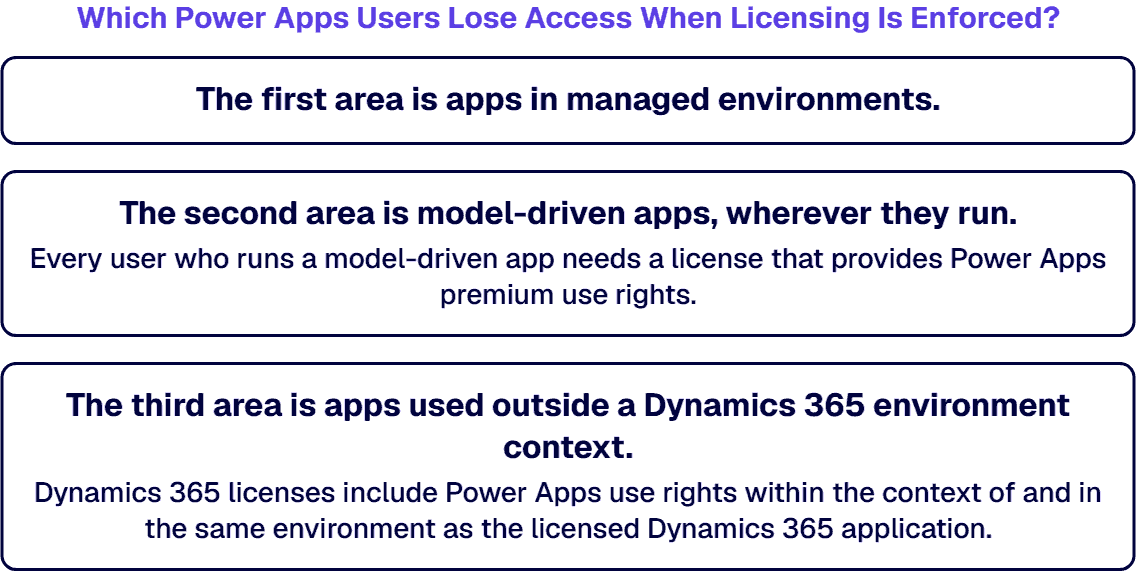
The Power Apps licensing FAQs describe each of the three areas separately:
The planning rule this guide adds, which is its own and not Microsoft’s, is to inventory all three areas as separate lists and to treat a user who appears on more than one as one licensing decision, not two. The FAQ’s own words, “including but not limited to”, mean the three areas are the ones Microsoft names, not a promise that nothing else is covered.
If a user already holds the right license, they need nothing new, and the avoidable cost is buying a second license for someone the first one already covered. For a managed environment, Microsoft Learn’s Licensing requirements for managed environments states: “Every user running an app in a managed environment must have one of the following licenses: a Power Apps Premium, a Power Automate Premium license, or a Dynamics 365 Enterprise license that gives premium Power Apps usage rights” and “Either a Power Apps Premium or a Power Automate Premium license satisfies the premium licensing requirement for that user.” The same page lists which Dynamics 365 licenses carry those rights.
Across all three areas, Microsoft’s Power Apps licensing FAQs state: “While Power Apps Premium, Power Apps per app plans, and the Power Apps per app pay-as-you-go meter that give premium Power Apps usage rights satisfy the requirement generally, use rights differ by license and by the context the app runs in.” A Microsoft 365 license is not among the licenses Microsoft Learn lists for a managed environment, so a user whose only Power Apps rights came with Microsoft 365 is the user this rule catches. For edge cases, Microsoft Learn’s own instruction is: “For the complete and current list of qualifying licenses, refer to the Microsoft Power Platform Licensing Guide.”
The guesswork ends when an administrator downloads the report Microsoft built for this. According to Microsoft Learn’s Power Apps licensing FAQs: “As an administrator, you can identify users who require a license by downloading the Power Apps licensing reports in the Power Platform admin center.” For managed environments, Microsoft Learn’s Licensing requirements for managed environments names the report Users requiring licenses in Managed Environments and states: “The report lists users who accessed at least one app in any managed environment without an appropriate license.”
Two details on that page decide how the report should be read. Microsoft Learn states: “The report excludes users who didn’t launch an app in the selected month.” It also states: “If a user was assigned an appropriate license but didn’t launch any app since then, they continue to show in the report until they launch an app.” This guide’s own rule, which Microsoft does not state, is to pull the report across several lookback months before deciding, so a user who runs an app only at quarter end is not missed, and not to read a name on the report as proof that a license is still missing.
The same managed environments licensing page describes automatic assignment: “To benefit from automatic license assignment for active users, enable the auto-claim policy in the Microsoft 365 admin center.” Microsoft Learn states a condition beside it: “Ensure you have sufficient license capacity in the tenant.” Turning it on is a spending decision as much as a technical one, so it belongs after the inventory, not before it.
A license whose term begins on or after January 1, 2027 is bought at the new list price, so the math for the February 2027 date has to use the new figures. According to Microsoft’s New pricing for Power Apps Premium announcement: “Effective January 1, 2027, both Premium plans will increase by $2 USD per user, per month”. Its price table lists Power Apps Premium at $20 before January 1, 2027 and $22 as of that date, and the 2,000-seat minimum plan at $12 and then $14, per user per month on annual billing. The same announcement states: “Only the two plans listed above are affected.”
The change does not reach every contract on the same day. Microsoft’s pricing announcement states: “Existing subscriptions will retain their current price through the end of their subscription term.” It also states: “The new list price applies to new purchases, renewals, and co-terminations with a term beginning on or after January 1, 2027.” On Microsoft 365 and Dynamics 365, it says that entitlement in Dynamics 365 plans and the Microsoft 365 entitlement are “not affected by this change”, which is a statement about price, not about whether those entitlements satisfy the February 2027 requirement.
For government buyers, the same announcement answers a price question only: “In accordance with applicable regulations, U.S. Government list price increases are capped at 10% annually. Where the full increase exceeds that cap, it will be phased over two years.”
The planning rule this guide adds, which is its own and not Microsoft’s, is to price any licensing decision whose term begins on or after January 1, 2027 at the new list prices, and to price a decision that lands on an existing term at that term’s price until it renews. The break-even between Power Apps Premium and per app licensing at today’s prices is set out in the Power Apps Premium versus per app comparison; this guide does not re-derive it.
Whether the per app plan is still open to you depends on how your organization buys the license, and Microsoft treats each channel differently. According to Microsoft’s Power Apps per app license sales end notice: “Effective January 2, 2026, the Power Apps per app SKU is no longer available for purchase by new customers.” The same notice states: “Existing Enterprise customers using this license will see no disruption and can continue to use and renew this SKU after their current agreement ends.” It adds that during the term of an Enterprise Agreement, customers may add or adjust users, with the changes reconciled through the standard annual true-up rather than individual purchase orders.
For other agreement types, the per app sales end notice is specific. “For existing MPSA customers, the SKU will no longer be offered. Their agreements will remain active, and they can continue using the Power Apps per app license until the agreement ends. After that, they will have a 60-day window to migrate to an alternative solution.” And: “Existing and new CSP customers will not be impacted. They can continue to purchase, use, and renew their Power Apps per app subscription.” The notice also says “the SKU will be available for purchase again starting in early April”; it does not say whether that happened, and this guide does not assume it did.
The planning rule this guide adds, which is its own and not Microsoft’s, is that an Enterprise Agreement customer settles the per app users at the next annual true-up, an MPSA customer needs a replacement plan before the agreement ends, and a CSP customer’s per app path is unchanged by the notice. Confirm which of the three your own agreement is before modeling anything.
When an app is not worth a license for every user who opens it, the decision for each one is license it, move it, or retire it. For the managed-environment area alone, Microsoft Learn’s Licensing requirements for managed environments states: “Only environments that you enable as managed environments are in scope.” Moving a canvas app to an environment that is not managed takes it out of that area; it does nothing for a model-driven app, which according to Microsoft Learn’s Power Apps licensing FAQs needs a premium license wherever it runs.
Moving is not free. A managed environment carries governance controls, and an app that leaves it leaves those controls behind; whether to keep a managed environment at all is a governance decision, not a licensing one. The planning rule this guide adds, which is its own and not Microsoft’s, is to record for each app the users it serves, the license it would need, and who signed off on moving or retiring it, so the choice can be defended later.
If your tenant is federal or defense, you need a date to plan against, and Microsoft’s own pages do not give one for government clouds. Microsoft Learn’s Licensing requirements for managed environments and its Power Apps licensing FAQs name no cloud: neither page mentions GCC, GCC High, DoD or Azure Government. Microsoft’s New pricing for Power Apps Premium announcement answers a government question about price only. Microsoft Learn’s Power Platform licensing FAQs mention GCC, GCC High and DoD only in a note about Customer Lockbox, a different feature.
Whether the February 2027 enforcement applies on the same date to a GCC, GCC High or DoD tenant is therefore unconfirmed by Microsoft Learn and Microsoft’s licensing pages as read in October 2026. The planning rule this guide adds, which is its own and not Microsoft’s, is not to assume the date matches or differs, to watch the Microsoft 365 Message center and the Power Platform admin center notices for your own tenant, and to ask your Microsoft account team for the date in writing.
A licensing review is wasted effort in a tenant the rule does not touch, and there are four cases where this guide is the wrong place to start. Each is read against the three areas in Microsoft Learn’s Power Apps licensing FAQs:
Whoever does this work with you should be able to show the following, measured against Microsoft Learn’s Power Apps licensing FAQs and Microsoft’s pricing announcement:
No firm or product is named or compared in that list.
When your team needs support with this deadline, i3solutions works as a project, with embedded specialists where your team needs them, that inventories the three areas, runs the licensing reports, decides license, move or retire for each app with its owners, and implements and documents the change. Delivery is senior and US-based. i3solutions implements Power Platform licensing across Power Apps per-app and per-user plans, Power Automate per-flow and per-user plans, and the Microsoft 365 default entitlements where app complexity is low. i3solutions governs client Power Platform tenants with the Center of Excellence Starter Kit, tenant-level and environment-level DLP policies, and managed environment controls. i3solutions has been a Microsoft Partner with 30 years of enterprise technology delivery experience and has delivered 1,500+ Microsoft engagements across aerospace and defense, financial services, and health sciences. i3solutions runs a governed Power Platform for a federal defense agency supporting roughly 10,000 personnel across about 180 locations, which works because it is governed, not despite it.
This guide is one part of the wider Power Platform development services practice.
i3solutions is a Microsoft Partner with 30 years of enterprise technology delivery experience and 1,500+ Microsoft engagements across aerospace and defense, financial services, and health sciences. Delivery on regulated work is US-based and senior.
According to Microsoft Learn, starting February 2027 an appropriate license is strictly required for a user to open an app in a managed environment, and a user without one is blocked from opening the app after the final notification stage. According to Microsoft Learn, apps aren’t removed from the environment, and access resumes after an appropriate license is detected.
No. According to Microsoft Learn, starting February 2027 the requirement also covers model-driven apps and custom apps used outside a Dynamics 365 environment context. According to Microsoft Learn, every user who runs a model-driven app needs a license that provides Power Apps premium use rights.
According to Microsoft Learn, Power Apps Premium, Power Apps per app plans and the Power Apps per app pay-as-you-go meter can satisfy the requirement, and in a managed environment a Power Automate Premium license or a Dynamics 365 Enterprise license that gives premium Power Apps usage rights also qualifies. Microsoft Learn notes that use rights differ by license and by the context the app runs in.
According to Microsoft Learn, an administrator can identify users who require a license by downloading the Power Apps licensing reports in the Power Platform admin center. For managed environments, Microsoft Learn names the report Users requiring licenses in Managed Environments, and the report excludes users who didn’t launch an app in the selected month.
According to Microsoft’s pricing announcement, new purchases, renewals and co-terminations with a term beginning on or after January 1, 2027 take the new Power Apps Premium list price, while existing subscriptions keep their current price through the end of their subscription term. According to Microsoft Learn, enforcement starts in February 2027, so a license whose term begins on or after January 1, 2027 to meet that date is priced at the new list price.
According to Microsoft Learn, Power Apps per app plans satisfy the February 2027 requirement, but Microsoft’s per app notice says the SKU has been unavailable to new customers outside CSP since January 2, 2026 and its October 2026 licensing guide lists the plan as End of Sale. The plan and break-even detail are covered in a separate Power Apps Premium versus per app comparison.
The date is unconfirmed. Microsoft Learn’s managed environments licensing page and its Power Apps licensing FAQs name no government cloud, and Microsoft’s pricing announcement addresses government customers only on price. Confirm the date for your tenant with your Microsoft account team rather than assuming it matches or differs.
Michael Branson
Quick answer. As of October 2026, the before-and-after value of a changed Dataverse field lives only in Dataverse’s own audit table, because Microsoft’s Important changes (deprecations) coming in Power Platform page says that starting in May 2026 Dataverse no longer includes those values in the audit events it sends to Microsoft Purview, which still receives who made the change, when, and which tables were affected. According to Microsoft Learn, Dataverse keeps each audit record for the retention period stamped on it when it was written, deletes continuously under any setting other than Forever, and currently does not support audit tables in Dataverse long term data retention. Microsoft’s instruction is to retrieve field-level audit detail directly from Dataverse through the Web API or the SDK for .NET, and Manage Dataverse auditing says user access and activity logging reaches Purview from production environments only.
A security analyst reports that the alert which fired when someone changed a bank account field on a supplier record has gone quiet, and internal audit’s Purview search for field changes now returns who, when and which table, but no old or new value. The rule is not broken; the data it read is gone from Purview, by Microsoft’s design. This guide sets out where the field-level record lives now, how long Dataverse keeps it, what each store can give an auditor, and which checks to re-point, with each Microsoft fact cited to its own Microsoft Learn page. It describes how Dataverse and Purview store and keep audit data; whether a given store or retention period is enough for a regulator or examiner is a decision for your compliance function, not for this guide.
If a rule, report or pipeline stopped seeing old and new values some time after May 2026, this is the change behind it. Microsoft’s Important changes (deprecations) coming in Power Platform page, updated October 6, 2026, states: “Starting in May 2026, Dataverse will no longer include before-and-after field change values in the audit events that are sent to Microsoft Purview.” The same page states: “Audit events will continue to flow to Purview; however, the detailed field-level value changes will be excluded.”
What Purview keeps is the metadata. Microsoft’s Important changes (deprecations) coming in Power Platform page states: “Purview continues receiving audit event metadata (such as who made changes, the date of the changes, and the tables affected), but field-level value changes will no longer be included.” The same page states Microsoft’s reason: “Removing detailed field-level values from Purview-bound audit events reduces the risk of exposing sensitive business or personal information through downstream monitoring or analytics systems.”
Purview activity logging is a separate path from those audit events, and Microsoft describes it the same way. Microsoft’s View Microsoft Dataverse and model-driven app activity logs in Microsoft Purview page, updated July 14, 2026, states: “The details of each column’s before-and-after values for CRUD activites are not sent to Purview activity logging to prevent data leaks.” The same page states that “Column-level secured fields are sent to Purview activity logging with an asterisk”.
Microsoft’s Important changes (deprecations) coming in Power Platform page states: “If you have existing monitoring, alerting, or reporting solutions that depend on before-and-after field change values within Purview audit events, those solutions will stop working once this deprecation takes effect.” The examples that page gives are these:
Not every estate is touched. Microsoft’s Important changes (deprecations) coming in Power Platform page states: “No changes are required if your solution uses Dataverse audit logs as the source of truth.”
This guide recommends one step before any fix: list every rule, report, pipeline and check that read old or new values from Purview, with its owner and what it was meant to catch. That list is the scope of the work, and it is the document internal audit will ask for first.
When an examiner asks for the prior value of a changed field, the answer now comes from one store and not the other. Microsoft’s Important changes (deprecations) coming in Power Platform page states: “Dataverse continues to store and expose before-and-after field changes through its native audit APIs and tables.” Microsoft’s Retrieve the history of audited data changes page states: “Auditing events are stored in the Auditing (Audit) table.” The same page states: “The audit table is read-only.”
Not every edit leaves a value behind. Microsoft’s Manage Dataverse auditing page states: “Audit logs for updates are created when a new value is different from the old value of a column.”
For code, the Retrieve the history of audited data changes page on Microsoft Learn documents the RetrieveRecordChangeHistory message, which retrieves all audited data changes for a specific record, and the AttributeAuditDetail type, which gives access to the old and new values; RetrieveAuditDetails returns the detail of a single audit record.
Who can read the history is set by privilege. Microsoft’s Manage Dataverse auditing page states: “Users need the View Audit History privilege to see the Audit History of a record.” The same page states: “Users need the View Audit Summary privilege to see the Audit Summary view.” It also states: “Audit logs might show up with a delay in the Audit History tab of a record and in the Audit Summary view.”
Purview keeps its metadata on its own clock, and as read in October 2026 Microsoft Learn sets it out this way. Microsoft’s Learn about auditing solutions in Microsoft Purview page states that “In Audit (Standard), the system retains records for 180 days”. For activities with no specific policy, Microsoft’s Manage audit log retention policies page states: “Audit records for all other activities are retained for 180 days by default or you can change the retention to a different duration using a custom retention policy.” That page ties retention longer than 180 days, up to 1 year, and retention for 10 years to the licenses held by the user who generates the audit record. Microsoft’s Learn about auditing solutions in Microsoft Purview page also states: “Audit records generated by non-user entities (such as service principal actions, system events, and application activities) are retained for a fixed period of one year.”
This guide’s planning view of the two stores follows. It is drawn from Microsoft’s Important changes (deprecations) coming in Power Platform, Retrieve the history of audited data changes, Manage Dataverse auditing and View Microsoft Dataverse and model-driven app activity logs in Microsoft Purview pages, and it is a summary for planning, not a Microsoft table:
This guide recommends writing down, for each regulated app, which store answers the prior-value question, and who holds the privilege to read it.
An examiner asks for the prior value of a field changed some time ago, and whether it still exists depends on a setting that can be chosen once and never read again. Microsoft’s Manage Dataverse auditing page states: “When you set the audit retention period to Forever, the system doesn’t delete logs.” The same page states: “When you set the audit retention period to any other value, the system continuously deletes logs starting at the time an audit record exceeds the time defined in the retention policy.”
A change to the setting does not reach back on its own. Microsoft’s Manage Dataverse auditing page states: “Each audit log is stamped with the currently active retention period.” The same page states: “Changing the retention period here doesn’t change the retention period for already existing records.” It then points to a second route: “Use the Security page auditing option to set the retention policy.” And of that option it states: “This option provides the flexibility to apply the retention policy to existing logs.” So a changed retention period reaches records written after the change, and the Security page option is the route Microsoft documents for applying a policy to existing logs.
The setting is not available everywhere. Microsoft’s Manage Dataverse auditing page states: “The audit retention period isn’t available for Dynamics 365 Customer Engagement (on-premises).”
Deletion follows Dataverse’s own rules. Microsoft’s Delete audit data page states: “You can’t directly delete records in the Auditing (Audit) table.” The same page states that “Dataverse automatically creates partitions every quarter” and that “The current (active) partition and the audit records in it can’t be deleted using this request or any other.” Once history is gone, it is gone: Microsoft’s Manage Dataverse auditing page states: “When you delete audit logs, you can’t view the audit history for the period covered by that audit log.”
Long term retention is not the way out. Microsoft’s Dataverse long term data retention overview page states: “Currently, audit tables and elastic tables aren’t supported for long term retention.” Keeping audit history is a matter of the audit retention value itself, not of moving old records to a retained store.
Keeping everything has a cost in storage. Microsoft’s Manage Dataverse auditing page states: “Dataverse stores audit logs and they consume log storage capacity.” Microsoft’s Dataverse capacity-based storage details page states: “Log entitlement is provided separately for Dataverse only.”
This guide recommends reading the value set in each environment rather than assuming a default. Record each environment’s audit retention value, where it was set and when it last changed, and let the compliance function decide the period, never the storage budget.
A fix tested in a UAT copy of a regulated app left no trace in Purview even before the May 2026 change. Microsoft’s Manage Dataverse auditing page states: “User access or activity logging is sent to Purview for production environments only.” Microsoft’s Power Platform activity logs and auditing in Microsoft Purview page states: “Microsoft Purview auditing solutions capture user activity logs only for production environments.” That page also says to turn on the Enable SAS Logging in Purview setting in the Power Platform admin center for each production environment whose logs you want to view in Purview.
The Dataverse audit table records changes, not reads. Microsoft’s Manage Dataverse auditing page states: “Furthermore, auditing doesn’t support retrieve operations or export operations.” Who opened or exported a record is a different question from what changed, and the audit table does not answer it.
This guide recommends listing every environment that holds regulated data, including test and UAT copies, and noting beside each one which store, if any, records its changes.
Each check on your list needs a new source, and Microsoft names it. Microsoft’s Important changes (deprecations) coming in Power Platform page states: “Update your monitoring or downstream workflows to retrieve detailed field-level audit information directly from Dataverse, not from Purview.” Microsoft’s Manage Dataverse auditing page directs readers to the Web API or the SDK for .NET to retrieve audit data from an environment, and it states: “Exporting audit logs isn’t currently supported.”
For each broken check, decide one of two paths. Either the check reads the Dataverse audit table through the API, using the messages documented on Microsoft’s Retrieve the history of audited data changes page, or it becomes a control that runs on the Dataverse side. Where a SIEM, a log archive or a monitoring tool used to read old and new values from Purview, treat it as one more consumer on the list: it needs the Dataverse audit data by a route you design and test, and this guide does not describe any product’s behavior. Test each re-pointed check on a real changed value before retiring the Purview version, and keep the evidence of that test with the check’s record.
Two neighboring questions have their own answers. If your evidence plan also covers Microsoft Fabric, Purview’s evidence for Fabric is a separate plan, set out in Purview audit evidence for Microsoft Fabric. The retention of Microsoft Entra sign-in and audit logs is a separate question as well, and this guide does not cover it.
If your estate matches one of the cases in the following list, this change asks little of you or this guide does not go far enough. The cases rest on Microsoft’s Important changes (deprecations) coming in Power Platform and Manage Dataverse auditing pages as read in October 2026:
If you bring this to i3solutions, the work is a design and readiness project with your team: inventory the checks that read old and new values from Purview, design their re-pointing to the Dataverse audit table, document each environment’s audit retention value and where it was set, and hand the design to the team that runs it. i3solutions workflow automation builds use standard and premium Power Platform connectors, custom API connectors published through Azure API Management, and hub-and-spoke approval patterns built on Dataverse tables or SharePoint lists. i3solutions builds client workflow automation on Power Automate cloud flows, Power Automate desktop flows for RPA, and Azure Logic Apps in both the Standard and Consumption tiers. Those are the mechanisms a re-pointed check can run on.
Our teams maintain dedicated compliance specialists who understand CMMC, HIPAA, SOC 2, and financial services regulations within Microsoft environments, providing audit trail documentation and access control frameworks that reduce audit preparation time by 60%. i3solutions designs, builds, documents and supports what it built; running a SIEM or watching the audit logs day to day stays with your security operations team, and the retention period and the record of truth are decisions for your compliance function. This page claims no prior client work on this Microsoft change.
i3solutions runs client Power Platform work on a multi-tenant Center of Excellence model with separate Dev, Test, UAT, and Production environments promoted through managed solutions. i3solutions runs a governed Power Platform for a federal defense agency supporting roughly 10,000 personnel across about 180 locations, which works because it is governed, not despite it. All i3solutions Power Automate developers and consultants are U.S.-based.
For the wider practice, see Power Platform development services.
Each takeaway is drawn from Microsoft’s Important changes (deprecations) coming in Power Platform, Manage Dataverse auditing, Dataverse long term data retention overview and Power Platform activity logs and auditing in Microsoft Purview pages, as read in October 2026:
According to Microsoft Learn, yes. Audit events continue to flow to Purview with their metadata, such as who made changes, the date of the changes and the tables affected, but starting in May 2026 they no longer include the before-and-after field change values.
According to Microsoft Learn, in Dataverse. Dataverse continues to store and expose before-and-after field changes through its native audit APIs and tables; the values sit in the Auditing (Audit) table, show in a record’s Audit History and the Audit Summary view, and can be retrieved through the Web API or the SDK for .NET, for example with the RetrieveRecordChangeHistory message.
According to Microsoft Learn, it depends on the audit retention period set in each environment. Set to Forever, the system doesn’t delete logs; set to any other value, it continuously deletes logs once a record exceeds the period, and each log is stamped with the period active when it was written. Read the value set in each environment rather than assuming a default.
According to Microsoft Learn, not currently: audit tables and elastic tables aren’t supported for Dataverse long term retention. Keeping audit history depends on the audit retention value itself.
According to Microsoft Learn, no. User access or activity logging is sent to Purview for production environments only, and Microsoft Purview auditing solutions capture user activity logs only for production environments.
According to Microsoft Learn, removing detailed field-level values from Purview-bound audit events reduces the risk of exposing sensitive business or personal information through downstream monitoring or analytics systems.
Michael Branson
When a business unit asks for a supplier or claimant portal and somebody in the room says the company already pays for Microsoft 365 so this should be free, the answer as of September 2026 is that it is not free, and Microsoft settles it in a table rather than leaving it to inference: in the Power Platform Licensing Guide, September 2026 edition, page 18, the table of Power Pages use rights included with other licences carries the row “Microsoft 365 / Office 365” against the value “None”. A Microsoft 365 or Office 365 subscription therefore carries no right to run a Power Pages site, and Power Pages is a separate budget line. What it is billed on is not seats in your employee directory. Microsoft states that “Power Pages licensing is based on two user types, authenticated users per website /month and anonymous users per website/month” and that “Sufficient user capacity must be assigned to the environment to cover the total number of unique users who access the website/month” (Power Platform Licensing Guide, September 2026, page 16). So the decision in front of you is not whether to budget for Power Pages but which of the two audience meters your portal’s users fall under, how many unique people reach the site in a month, and which environment that capacity has to be assigned to. Two exceptions change the arithmetic before you take this to finance, and both are licences you may already hold: a Power Apps Premium licence and the Dynamics 365 Enterprise and Premium apps carry Power Pages use rights of their own, bounded by environment (page 18).
If somebody has already told your finance partner that the renewal covers this, the fastest way to close the question is to show them where the vendor draws the line rather than to argue about it. Microsoft does grant some Power Platform rights to Microsoft 365 licence holders, and the guide says so plainly: “Limited Power Platform use rights are included with select Dynamics 365, Microsoft/Office 365 and Windows licenses” (Power Platform Licensing Guide, September 2026, page 5). The question is which rights, and Power Pages is not among them. Page 18’s table of Power Pages use rights lists “Microsoft 365 / Office 365” as “None”.
The guide’s own appendix corroborates it, and it is worth naming exactly which part, because page 29 carries two tables that look alike. The first, “Dynamics 365 – Limited Use Rights Included with Qualifying License”, has a Power Pages column, and a number of Dynamics 365 licences are marked in it. The second, “Microsoft 365*, Office 365, and Windows – Limited Use Rights Included with Qualifying License”, has columns for Power Apps, Power Automate cloud flow, Power Automate desktop flow and Dataverse for Teams, and no Power Pages column at all. The affirmative answer is the “None” on page 18; the appendix is the corroboration, not the argument.
This page assumes you have already decided a portal is the right shape. If that is still open, the capability question is answered on What Is Microsoft Power Pages?, which owns it.
When a portal is being scoped, the number that decides the budget is almost never the number of employees who will administer it, and that is where estimates go wrong. Microsoft defines the two populations it counts. “Power Pages authenticated users are users who obtain secure access to a website by logging in through an authentication provider on the website.” “Power Pages anonymous users are users who access a website and do not log in.” Both definitions are on page 16 of the September 2026 guide. The unit in both cases is per website per month, and the guide’s pay-as-you-go meter definition says the same thing in measurement terms: “A measure of the number of unique authenticated users per website per month” (page 17).
Three consequences follow that a budget owner should carry into the conversation. Capacity is assigned to an environment, not handed to named individuals: the guide notes that authenticated user capacity “needs to be assigned to an environment”, and that anonymous capacity packs “do not need to be assigned to individual users. These capacities are assigned to an environment” (pages 16 and 17). Capacity does not bank: “Unused capacity does not carry over to the next month” (page 16). And the two purchasing routes do not mix, so the choice is made once per environment rather than tuned later: “Power Pages subscription licenses cannot be used in a pay-as-you-go environment” (page 17).
The boundary case is the one that catches people. An employee who already holds a Microsoft 365 licence and who signs in to your external portal is an authenticated user of that website. The Microsoft 365 licence they hold carries “None” for Power Pages use rights (page 18), so it does not exempt them from the site’s authenticated capacity. If your internal reviewers work inside the portal alongside your suppliers, they are in the count.
i3solutions builds secure external Power Pages portals for regulated enterprises, owning authentication, role-based access, data protection, and audit evidence rather than handing over a template. Which of your populations ends up authenticated and which anonymous is a design decision taken during scoping, and it moves the number.
If you are being asked for a figure this week and no one can yet tell you who will use the portal, these are the three answers to get before a number leaves your desk. None of them requires a vendor conversation, and each one changes the meter.
i3solutions designs and builds Power Pages sites with senior, US-based engineers and the table-permission, web-role, and governance model an external site requires. Those three answers are the first thing a scoping conversation establishes, because the rest of the design rests on them.
The published capacity-pack figures, and one specific pattern in which a portal reduces licensing cost elsewhere in the estate, are set out on Can Power Pages Reduce ERP Customization and Licensing Costs at the Same Time? Yes, in One Specific Pattern, which owns that arithmetic. This page deliberately does not restate it.
If your portal has to stand up in a government cloud tenant, stop before you reuse a commercial estimate, because the document that settles the commercial answer does not speak to your case. The Power Platform Licensing Guide, September 2026 edition, addresses government clouds nowhere in its thirty pages; a full-text scan of the edition cited throughout returns no occurrence of “Government”, “GCC” or “US Gov”, against eighty-two occurrences of “Power Pages” in the same scan, so the silence is the document’s and not a reading error. That entitlement logic is the commercial-cloud position.
For a government tenant the method is the same and the sources are different: read the plans and entitlements your own tenant already carries in your own cloud’s admin centre, and price against the terms that govern that cloud rather than the commercial list. The worked arithmetic for a government cloud, for the adjacent product, is on What Does Power Apps Licensing Cost in GCC Compared to the Commercial Cloud?, which owns that comparison. Your contracting officer and the contract clause govern any determination about what your programme may use.
If you already hold licences with Power Pages rights attached, acting on the headline answer will make you budget for something you have bought twice, so check the exceptions before you raise a line item. The guide records them. A Power Apps Premium licence carries “Unlimited Power Apps and Power Pages websites”. Dynamics 365 Enterprise and Premium apps carry “Power Pages websites that map to the same environment as the licensed Dynamics 365 application” and “Unlimited Power Pages websites”. Both are on page 18, and both are bounded by the environment rule on that page. Equally, the same table records “None” against Dynamics 365 Team Members, Dynamics 365 Operations – Activity and the Dynamics 365 professional-tier apps, so holding some Dynamics 365 licence is not the same as holding the right one.
Three further situations put this page’s answer outside its competence, and in each of them the number on the slide is decided somewhere other than a published guide. An enterprise agreement or a bundled renewal negotiation can carry terms that differ from list. A pre-existing capacity commitment may already cover the site. And Microsoft can change SKUs and terms between editions of the guide, which is why the edition and page are cited on every statement rather than the fact being asserted flatly. In any of those three, your licensing desk or your reseller of record holds the answer and this page does not; take the three questions that decide your number to them rather than the conclusion.
One thing this page does not decide is whether Power Pages is the right product at all. That question belongs to Power Pages vs Power Apps: Which One a Given Application Needs, and it is worth settling first, because a Power Apps Premium licence you already hold changes both the product answer and the bill.
When the entitlement question is settled and the portal still has to be built, a common next need for a VP of IT is a number that survives contact with a finance review. i3solutions has completed 1,500+ Microsoft implementations. i3solutions has used Power Pages for several of its applications. What a scoping conversation produces is a written basis for the number rather than the number itself: the population split between authenticated and anonymous users, the environment the site will live in and what that environment already carries, the entitlements your existing Power Apps and Dynamics 365 licences bring with them, and the table-permission and web-role model the site needs before any of it is priced.
Those are framework outputs, and they are deliberately the limit of what is offered. The figure itself depends on your audience and your agreement, and it is not something a page can responsibly quote. Who builds the portal once the basis is agreed is a separate question, answered on Enterprise Power Pages Development & Integration Services for Secure Business Portals, and the wider estate model it sits inside is on Enterprise Power Platform Development & Implementation Services for Governed Operations.
No. In the Power Platform Licensing Guide, September 2026 edition, page 18, the table of Power Pages use rights included with other licences records the row “Microsoft 365 / Office 365” against the value “None”. Office 365 and Microsoft 365 licences do carry some limited Power Platform use rights (page 5), but Power Pages is not among them, and page 29’s “Microsoft 365*, Office 365, and Windows” appendix table has no Power Pages column at all. Power Pages is licensed separately, on two audience meters counted per website per month: authenticated users, who sign in through an authentication provider, and anonymous users, who do not log in (page 16).
By Michael Branson
Build your Power Apps in GCC High if they will handle ITAR or DFARS-governed data, and plan for your Microsoft 365 identity to be in GCC High too; build in a commercial tenant only for apps that touch no such data, which needs no eligibility validation and avoids the government-cloud feature exceptions. Data and identity decide it.
Suppose a compliance officer or a contracting officer has asked you to defend where your organization’s Power Apps are built. The defensible answer does not treat Power Apps as a separate choice: it follows the data each app touches and the tenant your users already sign in to.
If you need the answer in Microsoft’s own words, its Power Apps US Government documentation, read on 2026-09-22, states: “We anticipate our US Department of Defense contractor customer base and other Federal agencies currently using Microsoft 365 GCC High to use the Power Apps US Government GCC High deployment option, which enables and requires the customer to use Microsoft Entra Government for customer identities, in contrast to GCC which uses Public Microsoft Entra ID.” Microsoft’s Power Apps US Government page states that “Microsoft operates the service in a manner that enables these customers to meet ITAR commitment and DFARS acquisition regulations, as documented and required by their contracts with the US Department of Defense.”
It also describes what the government offering changes about the data itself: “Your organization’s customer content is physically segregated from customer content in Microsoft’s commercial Power Apps services,” and “Access to Power Apps US Government customer content by Microsoft administrators is restricted to personnel who are US citizens.” For a contractor whose Microsoft 365 already runs in GCC High and whose apps touch regulated data, GCC High is the deployment option Microsoft describes for that customer base. For apps that touch no regulated data, a commercial tenant is the simpler placement.
Run each app through three tests, and answer each one from a document you can open: the app’s data sources, your tenant’s identity configuration, and the contract language that governs the data.
Data test. Which data does the app read or write? Microsoft’s Power Apps US Government documentation, read on 2026-09-22, says that “Validation of eligibility by Microsoft includes confirmation of handling data subject to International Traffic in Arms Regulations (ITAR), law enforcement data subject to the FBI’s Criminal Justice Information Services (CJIS) policy, or other government-regulated or controlled data.” An app that touches ITAR or DFARS-governed data makes the case for GCC High; an app that touches none of it gives no data reason to leave a commercial tenant. An app that touches CJIS or other government-regulated data that is not ITAR or DFARS still points to Power Apps US Government rather than commercial: Microsoft’s documentation states that “The Power Apps GCC environment provides compliance with federal requirements for cloud services, including FedRAMP High, DoD DISA IL2, and requirements for criminal justice systems (CJI data types).” Whether that is GCC or GCC High is the whole-tenant question compared on the pages linked below.
Identity test. Where do the app’s users sign in today? Per the same Microsoft page, the GCC High option enables single sign-on and integration with Microsoft 365 GCC High deployments, and it requires Microsoft Entra Government for customer identities, where GCC uses public Microsoft Entra ID. If your Microsoft 365 tenant already runs in GCC High, a GCC High Power Apps environment shares that identity; if it runs commercial, the identity the GCC High option requires is not yet in place. If the open question is really which Microsoft 365 cloud your organization belongs in, that is a whole-tenant decision, compared in Microsoft 365 GCC vs GCC High: Which Government Cloud Does Your Organization Need? and GCC vs GCC High vs Commercial Microsoft 365 for CUI: An Evaluation Matrix.
Eligibility test. Can your organization show Microsoft the eligibility it asks for? Microsoft’s documentation states that Power Apps US Government is available to government entities and to “other entities that handle data that’s subject to government regulations and requirements and where use of Power Apps US Government is appropriate to meet these requirements, subject to validation of eligibility,” and that “Upon renewal of a customer’s contract for Power Apps US Government, revalidation of eligibility is required.” It adds: “Note that Power Apps US Government DoD is only available to DoD entities.”
When the tests point different ways, the data test outranks the other two, because an app with no government-regulated data has no data reason to sit in GCC High, though for an organization whose Microsoft 365 runs only in GCC High, a commercial placement carries the cost of a second tenant and a second identity. Where the data test points to GCC High, the identity test tells you whether the app lands in a tenant you already run, and the eligibility test tells you whether Microsoft will accept the placement.
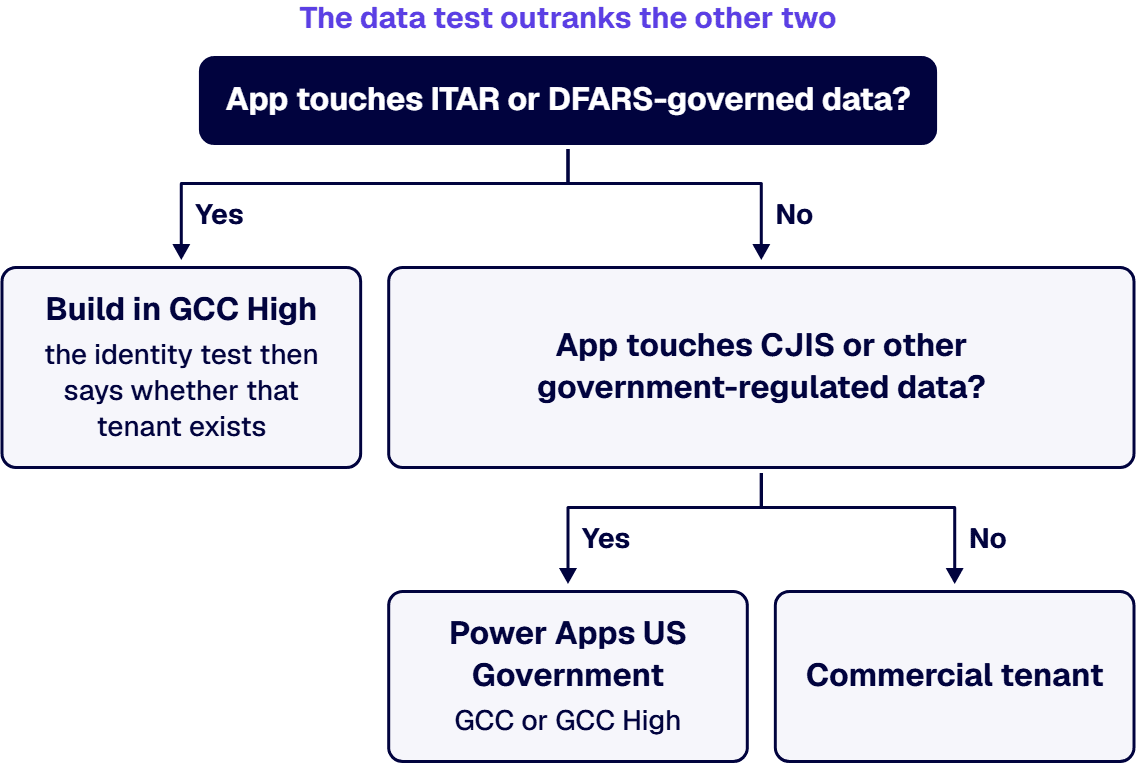
Before you commit an app to GCC High, note that Microsoft states on its Power Apps US Government page that “There are exceptions to the principle of maintaining product functional parity within the US Government clouds,” and links to a downloadable availability summary, Business Applications, Feature Experience Parity Exceptions and Roadmap in US Government clouds, dated May 2026. The document says its information “is updated and published every 4-6 weeks and represents our projections at that time,” so each row below is a planning fact on its read date, not a permanent verdict on the product.
Read on the rendered document on 2026-09-22, the IL4 US GCC High column lists both Power Apps “Push Notifications” rows, the one for Android and the one for IOS, as Not Available, where the IL2 US GCC column lists both as Available. The same column lists “Test Studio” and “Power Apps / Dataverse native integration with Git (ALM)” as Not Available, and lists “Custom Connectors”, under Power Automate, as Available.
Three more differences come from the Power Apps US Government page itself, read on the same date:
If one cloud does not fit every app, placement does not have to be all or nothing, and a split is possible: regulated workloads in GCC High and the rest in a commercial tenant. One assessment for a contractor reached that shape for Microsoft 365, and it concerned the productivity suite, not Power Apps. The assessment recommended partial-variant adoption with email and document storage on GCC High and the remainder of the productivity suite on Commercial; the contractor’s licensing economics improved materially relative to a full GCC High migration. What Power Apps licensing costs in each cloud is set out in What Does Power Apps Licensing Cost in GCC Compared to the Commercial Cloud?. For Power Apps in a split estate, the three tests run down the app inventory one app at a time for the same reason: each app follows its own data and its own users.
If more than a handful of apps are undecided, or the placement has to be defended to a contracting officer, the three tests are worth running as a structured review of the app inventory, because the officer will ask for the reasoning app by app. Where the answer includes moving Microsoft 365 into GCC High, a certified AOS-G supplier provisions the GCC High tenant. We manage GCC High migrations end-to-end: from eligibility validation and licensing coordination with your AOS-G supplier through identity architecture, data migration, security baseline configuration, and post-migration governance. i3solutions plans and runs these migrations for regulated defense organizations, structuring each phase around the compliance evidence assessors expect. Delivery is senior and US-based.
Once GCC High is chosen, Building on Microsoft 365 GCC High: What Changes covers what the build involves, and Hire a Microsoft 365 GCC High Implementation Firm: How to Vet One Before You Commit a Tenant covers choosing a partner. The Power Apps practice is set out on Enterprise Power Apps Development Services for Secure, Governed Application Delivery, within Enterprise Power Platform Development & Implementation Services for Governed Operations.
If you are a defense or federal contractor, build in GCC High when the apps touch ITAR or DFARS-governed data and your organization’s Microsoft 365 tenant is already in GCC High, because according to Microsoft the GCC High option is the one it anticipates for its US Department of Defense contractor customers using Microsoft 365 GCC High, and it requires Microsoft Entra Government identities. Build in a commercial tenant when the apps touch no government-regulated data, since it needs no eligibility validation and avoids the feature exceptions Microsoft documents for its US Government clouds. Decide app by app with three tests: the data test, the identity test and the eligibility test.
Per Microsoft, the GCC High option requires Microsoft Entra Government for customer identities and integrates with Microsoft 365 GCC High deployments; if your Microsoft 365 tenant already runs in GCC High, a GCC High Power Apps environment shares that identity, and if it runs commercial, that identity is not yet in place. Whether your organization or its data is eligible for Power Apps US Government at all is answered in Who Do We Hire to Ensure Federal Compliance in Power Apps Development?
If you are weighing GCC High, read Microsoft’s US Government availability summary, which according to Microsoft is updated every 4-6 weeks; its May 2026 edition, read on 2026-09-22, lists Power Apps push notifications for Android and IOS, Test Studio, and native Git integration for Power Apps and Dataverse as Not Available in GCC High, while the Power Automate row Custom Connectors is listed as Available. Microsoft also states that third-party services an app connects to can sit outside the Power Apps US Government compliance and data protection commitments.
By Michael Branson, Founder / COO, i3solutions
When you price Power Apps for a government tenant, no public list gives you the number: Microsoft’s US Government documentation names the standalone Government plans and publishes no price for them. The commercial cloud publishes its per user prices openly, so the tier comparison starts with what changes.
If you are pricing Power Apps for a government tenant against a commercial baseline, the first thing to know is that the two sides of the comparison are not documented the same way. The commercial side carries public list prices. The Government side carries a published offering set, a published purchasing rule, and a published eligibility rule, and the number arrives from a channel quote. A comparison that treats those two as the same kind of evidence produces a confident answer built on one real figure and one guess.
So this page does the part that can be sourced. It states what a government tenant is allowed to buy, what the commercial cloud publishes, what Microsoft does not publish for GCC, and what actually changes between the tiers when you sit down to build an estimate. Who should evaluate the options with you, and what to look for in that person, is a separate question answered at Who Do We Hire to Evaluate Power Apps Licensing Options?.
The Government offering set, which plan fits a given app portfolio, and where the break-even between the plans sits are answered in full at Power Apps Premium vs Per App: What Actually Differs, and Where the Break-Even Sits. For the estimate here, carry forward what Microsoft documents at Power Apps US Government: the Power Apps per app plan for Government, the Power Apps per user plan for Government, and the Power Apps and Power Automate capabilities included in certain Microsoft 365 US Government and Dynamics 365 US Government plans. Price the included path first, because an entitlement a tenant already holds is the cheapest line in the estimate.
The commercial figures are public. Microsoft’s Power Apps pricing page lists Power Apps Premium at $20.00 per user per month paid yearly, with a volume tier at $12.00 per user per month paid yearly at a 2,000-seat minimum. Our comparison of the two plans is at Power Apps Premium vs Per App: What Actually Differs, and Where the Break-Even Sits.
Those are commercial figures. They are the baseline of the comparison and they are not GCC figures, and the distance between those two sentences is the whole reason this page exists.
Microsoft’s Power Apps US Government documentation names the plans, sets the purchasing rule and sets the eligibility rule, and it states no dollar figure for the Government plans anywhere on that page. For plan differences it points readers at the Power Apps licensing information page, which is the same commercial pricing surface quoted in the section above. So the published record gives a government buyer the structure of the offer and sends the price question to a channel.
That absence is a fact about what Microsoft has chosen to publish, and it is not a finding about price. The only comparison the record supports is procedural, not numeric: the commercial tier carries a public list price and the Government tier does not, and that gap is closed by a channel quote rather than by inference. Anyone who converts the silence into a number, in either direction, has written a figure with nothing under it. The number for a specific tenant comes from a quote, and the section below is what to have in hand before you ask for one.
Five things change, and each one is documented rather than inferred. They are worked here in this order: the offering set, the purchasing channel, eligibility validation, the identity requirement, and functional parity exceptions.
The offering set. The commercial catalogue is open; the Government catalogue is restricted to the offerings the documentation lists, which is the two standalone Government plans named above plus the capabilities included in certain Microsoft 365 US Government and Dynamics 365 US Government plans. A model you priced commercially can lack a standalone Government equivalent to price against, because the Government offering set is limited to the offerings that documentation lists.
The purchasing channel. The source page states that “Power Apps US Government is available through the Volume Licensing and Cloud Solution Provider purchasing channels. The Cloud Solution Provider program isn’t currently available for GCC High customers.” Read those two sentences together before you plan a procurement route, because they mean a GCC tenant and a GCC High tenant do not have the same set of ways to buy the same plan. Where the two disagree, the tenant’s own cloud determines the route: a GCC High tenant follows the Volume Licensing path whatever a GCC-oriented quote suggests.
Eligibility validation. The Government plans are sold “subject to validation of eligibility”, and the documentation records that validation “includes confirmation of handling data subject to International Traffic in Arms Regulations (ITAR), law enforcement data subject to the FBI’s Criminal Justice Information Services (CJIS) policy, or other government-regulated or controlled data.” It adds that validation “might require sponsorship by a government entity”, and that on contract renewal “revalidation of eligibility is required.” A renewal that has to clear validation again is a schedule input, and a schedule input on a renewal is a cost input.
The identity requirement. The same documentation records that the GCC High deployment option “enables and requires the customer to use Microsoft Entra Government for customer identities, in contrast to GCC which uses Public Microsoft Entra ID.” That is an identity-plane fact, not a licensing-plane one. It belongs in this list because it decides which tenant the plans are bought into, and a tenant move is the expensive part of a licensing plan that assumed the wrong one.
Functional parity exceptions. Microsoft states that it “strives to maintain functional parity between our commercially available service and those enabled through our US Government clouds”, and that “There are exceptions to the principle of maintaining product functional parity within the US Government clouds.” The exception list is published as a downloadable summary, Business Applications US Government Availability Summary. A feature you counted on when you chose a commercial plan is worth checking against that summary before the same plan is priced for a government tenant.
Work from surfaces you already hold, in this order, and record what each one returned.
Start in the Power Platform admin center for your own cloud, at gcc.admin.powerplatform.microsoft.us for GCC or high.admin.powerplatform.microsoft.us for GCC High. Its licensing and capacity pages report the plans and entitlements the tenant already carries, and that report is the denominator of the whole estimate. Then pull the tenant’s current Microsoft 365 US Government or Dynamics 365 US Government subscriptions from the same admin surface, because the included-capabilities path above may already cover a portion of the app portfolio you were about to buy standalone.
Next, download the availability summary linked in the section above and read it against the feature list your app design assumes. Then take that assumption list and the plan count to your Volume Licensing or Cloud Solution Provider channel and ask for a quote against the named plans. The quote is the price evidence; nothing before it is.
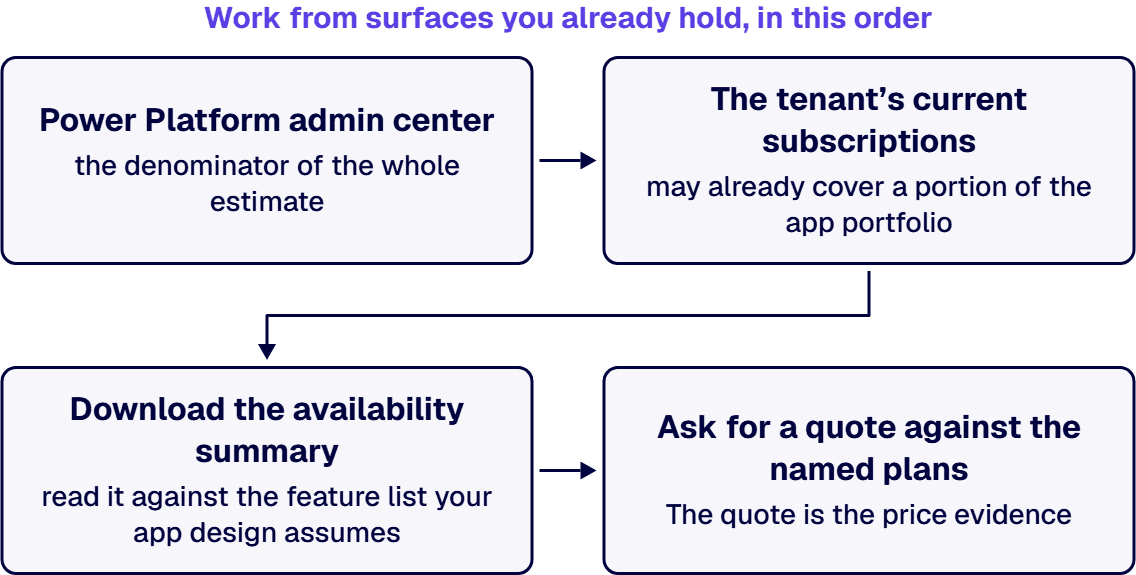
Two of those inputs can disagree, and there is one rule for it. Where the admin center’s entitlement report and the availability summary disagree about whether a capability is usable in your cloud, the availability summary governs the design and the entitlement report governs the count. A capability you are entitled to but that is listed as an exception in your cloud is not a capability you can build on, and a capability that is available but unentitled is a purchase, not a blocker.
Environment capacity is a separate billable object in a Power Apps estimate, priced on its own meters and not inside a user license. That question is answered at Is Dataverse Storage Priced Differently in Government Clouds? What GCC, GCC High and DoD Buyers Pay, and this page does not restate its meters or rates.
This page assumes the tier is already chosen and prices Power Apps inside it. If the tier itself is still open, the choice between the government clouds is settled at Microsoft 365 GCC vs GCC High: Which Government Cloud Does Your Organization Need?. And if the question in front of you is the Microsoft 365 bill rather than the Power Apps bill, including what migration adds to it, that is answered at How Much Does Microsoft 365 GCC High Cost, Including Licensing and Migration?.
The estimate above works with any partner, or none, because its inputs are the tenant’s own admin surfaces and its own channel quote. i3solutions implements Power Platform licensing across Power Apps per-app and per-user plans, Power Automate per-flow and per-user plans, and the Microsoft 365 default entitlements where app complexity is low.
The Government clouds carry no published Power Apps price. Microsoft’s Power Apps US Government documentation names two standalone Government plans, the Power Apps per app plan for Government and the Power Apps per user plan for Government, and states no dollar figure for either, so a Government price for a specific tenant comes from a quote through the Volume Licensing or Cloud Solution Provider channel. The commercial baseline, listed on Microsoft’s own Power Apps pricing page, is Power Apps Premium at $20.00 per user per month paid yearly, with a volume tier at $12.00 per user per month paid yearly at a 2,000-seat minimum, and those are not Government figures.
It sets schedule inputs, not a published price. Microsoft’s Power Apps US Government documentation states that the Government plans are sold subject to validation of eligibility, that validation might require sponsorship by a government entity, and that revalidation of eligibility is required on contract renewal. A renewal that has to clear validation again is a schedule input, and a schedule input on a renewal is a cost input. The documentation states no dollar figure for the Government plans, so the number arrives from a channel quote rather than from the published record.
The published record gives the structure of the offer and sends the price question to a channel. The Power Apps US Government page sets the offering set, the purchasing rule and the eligibility rule, points readers at the commercial licensing information page for plan differences, and states no Government dollar figure. Treat that absence as a disclosure fact and not as a price signal: it is not evidence that the Government plans cost the same as the commercial ones, and not evidence that they cost more.
No published figure says it does; the route changes where the price evidence comes from. Microsoft states that Power Apps US Government is available through the Volume Licensing and Cloud Solution Provider purchasing channels, and that the Cloud Solution Provider program is not currently available for GCC High customers. A GCC tenant therefore has both routes to quote from and a GCC High tenant has one, Volume Licensing, and where a quote assumes the wrong route the tenant’s own cloud decides it. Purchase is also subject to validation of eligibility, and revalidation of eligibility is required on contract renewal.
There is no published basis for saying so in either direction. Microsoft names the Government plans and states no price for them, so a claim that the Government tiers cost more, or that they cost the same, rests on nothing published. What is documented is what changes: the offering set, the purchasing channel, eligibility validation, the identity requirement, and functional parity exceptions. Price the tier from a channel quote against the named plans, and treat any figure offered without that quote as an estimate.
Five things, documented rather than inferred: the offering set, the purchasing channel, eligibility validation, the identity requirement, and functional parity exceptions. The offering set is restricted to the Government offerings the documentation lists. The purchasing channel is Volume Licensing or Cloud Solution Provider, with Cloud Solution Provider not currently available for GCC High customers. Eligibility validation gates the purchase and is required again at renewal. The GCC High deployment option requires Microsoft Entra Government for customer identities while GCC uses public Microsoft Entra ID. And Microsoft publishes an availability summary listing the exceptions to functional parity in the US Government clouds.
Power Apps follows the tenant’s cloud, so the contractor chooses the tenancy once and the data the contractor holds decides it before price does. Microsoft states that the GCC High deployment option enables and requires Microsoft Entra Government for customer identities, in contrast to GCC which uses Public Microsoft Entra ID, and that Power Apps US Government is available to entities that handle data that is subject to government regulations and requirements, subject to validation of eligibility. Which tenancy fits the data a contractor holds is worked through at GCC vs GCC High vs Commercial Microsoft 365 for CUI: An Evaluation Matrix. Price comes second, because Microsoft states no Government dollar figure and the quote is taken once the tenancy is settled.
Five phases, and the first one produces no automation at all. Phase 1 closes the default environment, authors a tenant data policy, and names owners, because Microsoft states the default environment “doesn’t provide any backup guarantees and shouldn’t be used for production workloads” and every licensed user already holds the maker role in it. Phase 2 runs a bounded pilot of three to five finance processes inside a managed production environment with a sandbox beside it. Phase 3 opens the maker programme behind that policy. Phase 4 is run-state: ownership records, request-limit headroom, and audit evidence. The guardrails are Microsoft product features rather than documents: data policies, managed environments, solution-based application lifecycle management, and Microsoft Purview audit. Sequence matters because a data policy authored after flows exist can suspend them, and Microsoft states that full enforcement of a Power Platform data policy takes up to 24 hours in the most extreme cases (Microsoft Learn, Data policies).
Most Power Automate rollout plans fail at the same place, and it is not phase 3. It is the week before phase 1, when nobody decided who owns an environment. Months later a finance team is running flows against general ledger extracts and payment approvals, some of them owned by people who have since changed roles, and the platform team is asked by an internal auditor to produce a list of what runs, who owns it, and where the data goes. That list does not exist, and reconstructing it costs more than the rollout did.
What follows is the sequence that keeps that list from going missing in a mid-sized finance organization. It names the Microsoft controls by their current product names, states what each phase produces, names the owner of each gate, and says plainly what breaks when a phase is skipped. Every Microsoft value below is quoted from Microsoft Learn or the Microsoft product pricing page; the source is named beside the value, and where that source was re-read for this page it carries the date it was read, so you can re-derive it rather than trust this page.
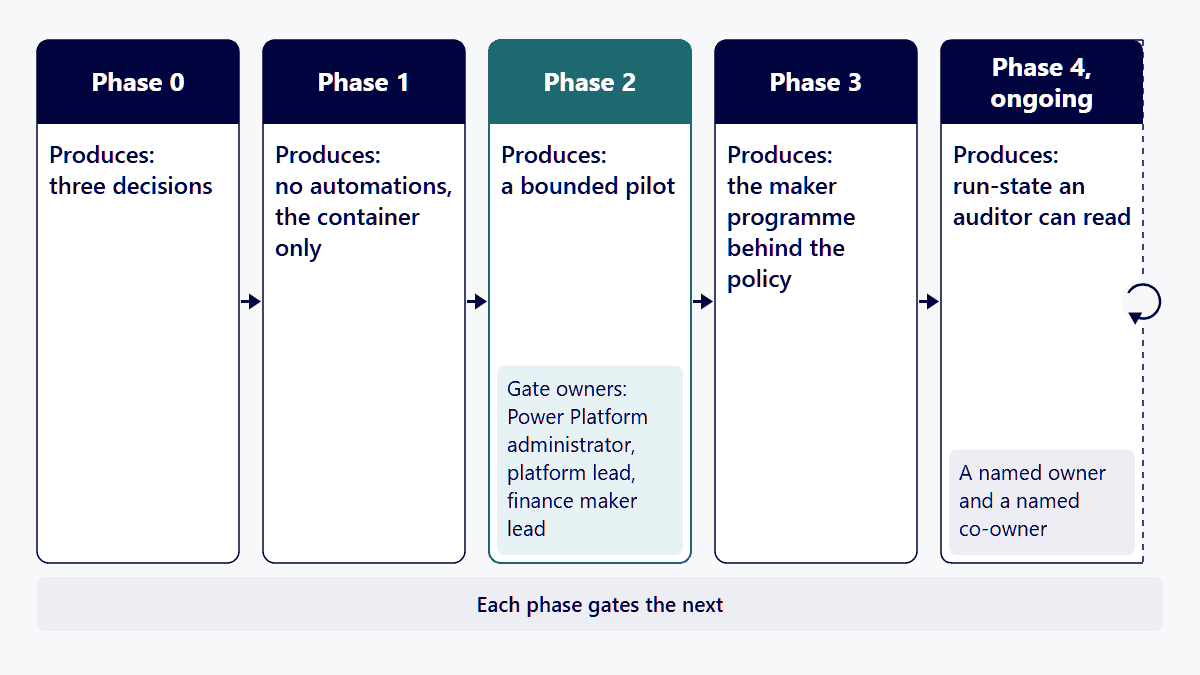
Phase 0 is three decisions a VP of IT can make without a discovery workshop. Each one blocks work downstream if it is deferred.
Decision one: who is the Power Platform administrator of record, and who is the Environment Admin for finance. Microsoft defines two built-in environment roles. The Environment Admin “can perform all administrative actions on an environment”, which Microsoft enumerates as adding or removing users from the Environment Admin or Environment Maker role, provisioning a Dataverse database, viewing and managing all resources created within the environment, and setting data loss prevention policies. The Environment Maker role “can create resources within an environment including apps, connections, custom connectors, and flows using Power Automate”. Those are two different jobs and they should be two different people, with the administrator sitting in IT and the maker lead sitting in finance. Source: Microsoft Learn, Power Platform environments overview, ms.date 2026-05-28, accessed 12 September 2026.
Decision two: what the tenant data policy classifies as business data. Microsoft’s data policy model has exactly three groups, and Microsoft describes them precisely: Business holds “connectors for sensitive data” and “connectors in this group can’t share data with connectors in other groups”; Non-business/Default holds “connectors for non-sensitive data” and “unassigned connectors show up here by default”; Blocked connectors “can’t be used where this policy is applied”. For a finance estate the substantive decision is which systems of record go into Business, because a connector in Business cannot share data with a connector outside it, and that single rule is what stops a payables approval flow from writing to a personal mail or file-sharing service. Source: Microsoft Learn, Manage data policies, ms.date 2026-04-07, accessed 12 September 2026.
Decision three: what happens to the default environment. Microsoft is unambiguous about it. “The default environment doesn’t provide any backup guarantees and shouldn’t be used for production workloads.” Microsoft also states that “whenever a new user signs up for Power Apps, they’re automatically added to the Maker role of the default environment”, that “you can’t delete the default environment”, and that “Microsoft 365 Power Platform administrators are no longer automatically assigned the Dataverse system administrator security role in the default environment”. Microsoft’s own recommended mitigation for that last point is to “assign the system administrator security role to a few trusted users without assigning those users the Power Platform administrator role”, to avoid an administrative lockout. Microsoft further suggests renaming it “to something more descriptive, such as Personal Productivity Environment that clearly calls out the intent of the environment”. Source: Microsoft Learn, Power Platform environments overview, ms.date 2026-05-28, accessed 12 September 2026.
Take that recommendation literally. In a mid-sized finance organization the default environment is where the shadow estate already lives, and renaming it is the cheapest signal you will ever send about what it is for.
Phase 1 produces zero automations. That is the point, and it is the phase most often compressed.
Create the environments. Microsoft’s application lifecycle management guidance is to keep development, test and production separate. In the Power Platform admin center the path is: in the navigation pane select Manage, in the Manage pane select Environments, then select New in the command bar. Build three for finance: a sandbox for development, a sandbox for test, and a production environment. Microsoft describes sandbox environments as “nonproduction environments, which offer features like copy and reset”, and notes that “converting from a production to a sandbox environment can’t be blocked”, which is worth knowing before you delegate environment creation.
Enable managed environments on production. Microsoft states the entitlement plainly: “Managed environments are included as an entitlement with standalone Power Apps, Power Automate, Microsoft Copilot Studio, Power Pages, and Dynamics 365 licenses.” If your finance users are being licensed on Power Automate Premium anyway, the governance surface is already paid for. Microsoft enumerates what it unlocks, and the names matter because they are what you will click: Environment groups, Limit sharing, Weekly usage insights, Data policies, Pipelines in Power Platform, Maker welcome content, Solution checker, IP Firewall, IP cookie binding, Customer Managed Key, Lockbox, Extended backup, Data policies for desktop flow, Export data to Azure Application Insights, Default environment routing, and Virtual Network support. The path is: in the navigation pane select Manage, in the Manage pane select Environments, select the ellipsis next to an environment, then select Enable Managed Environments. Source: Microsoft Learn, Managed environments overview, ms.date 2026-02-23.
Author the data policy, and author it now. The admin center path is: sign in to the Power Platform admin center, select Security in the navigation pane, in the Security pane under Settings select Data and privacy, in the Data protection and privacy screen select the Data policy section, then select + New Policy. Microsoft’s own walkthrough sets the default group for new connectors and recommends keeping it at Non-business, “to map any new connectors added to Power Platform by default”, because unassigned connectors land there and can be promoted after review. Note the asymmetry Microsoft documents: if you set the default to Blocked, “any new connectors that are unblockable are mapped to Non-business because by design they can’t be blocked”. Source: Microsoft Learn, Manage data policies, ms.date 2026-04-07, accessed 12 September 2026.
The reason this belongs in phase 1 and not phase 3 is enforcement behaviour.
Microsoft documents a seven-step process for what happens when a data policy is created or changed. The configuration is saved at the customer management level, cascaded down to each environment, and then “resources in each environment (such as apps, flows, and chatbots) periodically check for updated policy configurations”. When a change is detected, each app and flow is evaluated, and Microsoft states the consequence directly: “If a violation occurs, put the app, flow, or chatbot in to a suspended or quarantine state so that it can’t operate.” Connections are then scanned, and “if the policy blocks the whole connector, set the connection to a disabled state so that it can’t operate”. Finally, “any resources that are running and attempting to use an inactive connection, action, trigger, or MCP server that is blocked, fail at runtime”.
Then the timing. Microsoft states that the time it takes to implement a Power Platform data policy “varies from customer to customer based on their volume of environments and resources within those environments”, that “the more apps, flows, and chatbots a customer has, the longer it takes for policy changes to take full effect”, and that for a Power Platform data policy “for the most extreme cases, the latency for full enforcement is 24 hours. In most cases, it’s within an hour.” Source: Microsoft Learn, Data policies, ms.date 2026-04-07, accessed 12 September 2026.
Read those two passages together and the sequencing argument makes itself. Author the policy while the estate is small and nothing is suspended. Author it in month six and you have a window of up to a day during which finance flows quietly enter a suspended state, connections go disabled, and running flows fail at runtime, with no single moment of failure to point at. That is the week-3 outage that gets blamed on Power Automate and is actually a sequencing decision made in week 1.
The corollary is a test gate: before any policy change reaches production, apply it to the finance test environment first and let a full 24 hours elapse before you promote it. Microsoft’s tenant-level policy scope supports this directly, since the walkthrough’s own example excludes test environments from the policy so they can be used to stage changes.
Pick three to five finance processes, not twenty. The selection criteria are not business value, they are evidentiary: pick processes whose current control you can describe, whose data classification you already know, and whose failure is visible within a day. Typical candidates in a finance function are a payables approval routing, a month-end checklist with attestation steps, a vendor onboarding intake, and an exception queue that currently lives in a shared mailbox.
Build them in the finance development sandbox, inside a solution, and promote them through test to production. Solution packaging is the mechanism that makes ownership transferable later, and it is worth the extra step on day one rather than the rebuild later. i3solutions runs client Power Platform work on a multi-tenant Center of Excellence model with separate Dev, Test, UAT, and Production environments promoted through managed solutions, and i3solutions delivery pods use standardized environments, connection references, and solution packaging from day one. i3solutions delivery includes ALM practices with Power Platform pipelines or Azure DevOps integration, environment separation strategies, and change control processes.
The pilot has to prove four things before phase 3 opens, and each of them is a gate with an owner:
Two i3solutions delivery facts are worth stating here because they set expectations for what a pilot at this size looks like. A single i3solutions customer environment commonly runs 15 to 20 Power Automate flows, and by year-end, i3solutions client teams typically manage 15 to 25 production flows independently while maintaining the architectural patterns i3solutions established. That is the shape of a healthy finance estate: tens of flows, owned internally, not hundreds owned by nobody.
If you want that shape tested against the estate you actually have before you commit to a phase plan, that is a conversation to have first.
Phase 3 is where a rollout becomes a programme, and it is governed by two settings rather than by training.
Limit sharing. Managed environments include a sharing limit control, which is the mechanism that stops a single finance analyst’s flow from silently becoming a departmental dependency with no review. Set it before you invite makers, not after.
Maker welcome content. Managed environments let you present content to a maker at the moment they start building. Use it for the three things a finance maker actually needs to know: which environment to build in, which connectors are in the Business group, and who to ask for a connector review. This is the highest-yield governance artifact in the whole rollout because it arrives at the point of decision rather than in an onboarding deck.
Environment routing, if you price it first. Microsoft describes it plainly: “Environment routing is a premium governance feature.” Turned on, “the maker lands in their own personal developer environment instead of the default environment”, and “by default, all developer environments created through environment routing are managed”. The path is: in the navigation pane select Manage, in the Manage pane select Tenant settings, then select Environment routing. This is the real structural answer to shadow building, and the licence line is precise enough to matter: Microsoft states that “a premium license isn’t required for the creation or preview of an app or flow in a managed developer environment. However, a user or maker needs a premium license to run an app or flow in a managed developer environment.” So a finance analyst can experiment without a premium seat and cannot operate without one, which is usually the right boundary but is a budget line either way. Worth knowing before you enable it: Microsoft states the routed environments arrive with sharing limits “preconfigured to share with five individuals”, Solution Checker “set to Warn”, usage insights on, and no maker welcome message established. Source: Microsoft Learn, Environment routing, ms.date 2025-12-15.
Training belongs in this phase rather than earlier, because a maker programme opened before the policy exists produces flows you will have to suspend.
The rollout is not finished when the pilot is live. It is finished when four run-state facts are true and repeatable.
Every production flow has a named owner and a named co-owner. This is not hygiene, it is availability. Microsoft states what happens when an owner leaves: “The flow is downgraded to lower performance and all flow owners are notified and the flow is turned off in 14 days if no action is taken.” Microsoft states the same outcome when a premium licence is removed from the owner of a premium flow: “The flow is downgraded to lower performance. The system notifies all flow owners, and the flow is turned off in 14 days if no action is taken.” Microsoft’s own remedies are to change the owner on a solution-aware flow, have a co-owner add a non-solution-aware flow to a solution and then change the owner, or assign a Power Automate Process license to the flow. Source: Microsoft Learn, Power Automate licensing FAQ, ms.date 2026-08-14, accessed 12 September 2026. Fourteen days is the whole window, so a quarterly leaver review is too slow and a monthly one is marginal.
You know your request headroom. Microsoft publishes official Power Platform request limits per 24 hours: Power Automate Premium 40,000 per user, Power Automate Process 250,000 per licence, Power Automate Hosted Process 250,000 per licence, Power Automate Free 6,000 per user, Office 365 6,000 per user, Power Apps Premium 40,000 per user, and Dynamics 365 Team member 6,000 per user. There is also a five-minute ceiling: “The five-minute limit is 100,000 requests and it’s independent of a user’s license.” Microsoft counts more than you might expect toward these: for Power Automate, “all API requests to connectors, process advisor analysis, HTTP actions, and built-in actions from initializing variables to a simple compose action. Both successful and failed actions count toward these limits. Retries and requests from pagination also count as action executions.” Microsoft also notes that all organizations are currently in a transition period with higher limits, and advises: “Design your cloud flows for the per-user limits that take effect once the transition ends.” Source: Microsoft Learn, Requests limits and allocations, ms.date 2026-09-08.
The practical consequence for a finance estate: a month-end flow that loops a ledger extract row by row is the one that will hit a limit, and it will hit it on the day of the month when you can least afford it. Design that one for batching in phase 2, not after the first failure.
Activity is logged where a compliance team already looks. Power Automate and Power Apps activity flows into the Microsoft Purview audit log. Retention is the part to read carefully. Microsoft: “Audit records for all other activities are retained for 180 days by default or you can change the retention to a different duration using a custom retention policy.” And on licensing: “To retain an audit log for longer than 180 days (and up to 1 year), the user who generates the audit log (by performing an audited activity) must have an Office 365 E5 or Microsoft 365 E5 license or a Microsoft Purview Suite (formerly known as Microsoft 365 E5 Compliance) or E5 eDiscovery and Audit add-on license.” Source: Microsoft Learn, Manage audit log retention policies, ms.date 2026-06-19, accessed 11 September 2026. If your evidence period is longer than 180 days, that is a licensing line item in the rollout budget, and it is one that is almost always discovered late.
Someone owns the inventory. Which brings up a change many governance plans have not yet absorbed.
For years the standard advice was to install the Power Platform Center of Excellence Starter Kit and use it as the inventory and governance layer. Microsoft has changed that position, and the change is on Microsoft’s own page: “The Power Platform CoE Starter Kit is no longer actively maintained. Its core capabilities are part of the Power Platform admin center.” Microsoft continues: “Issues are no longer reviewed or addressed”, “the CoE Starter Kit is no longer receiving ongoing feature investments or updates”, and “The CoE Starter Kit remains available for existing and new deployments, but it will not be enhanced with new capabilities.” Microsoft names the in-product replacements by their experience names: Inventory, to “view and govern all apps, flows, and agents created across your tenant”; Usage, to “track adoption and identify top resources and their owners”; Monitor, to “track the operational health of heavily used resources”; and Actions, to “identify risks, enforce best practices, and take action on governance insights across your tenant”. Source: Microsoft Learn, CoE Starter Kit transition to Power Platform admin center, ms.date 2026-05-07.
This does not mean an existing kit deployment has to be torn out this quarter. It does mean that a rollout plan being written now should not take a new dependency on it for inventory, and that if you already run it, you now own it. i3solutions governs client Power Platform tenants with the Center of Excellence Starter Kit, tenant-level and environment-level DLP policies, and managed environment controls. That governance experience is exactly why the transition matters: the governance patterns carry over, the tooling underneath them is moving into the admin center, and the migration is a planned item rather than an emergency.
These are the four failures a finance rollout produces most reliably, with the mechanism rather than the symptom.
“We bought premium licences for people who only click approve.” You did not need to. Microsoft answers this directly in its licensing FAQ, for the exact scenario of a premium flow that sends approval requests and waits: “Users who respond to approval requests don’t need a Premium license.” In a finance organization where most people are approvers rather than builders, this is the single largest avoidable line in the licensing model. Current published list prices are Power Automate Premium at $15.00 user/month, paid yearly; Power Automate Process at $150.00 bot/month, paid yearly; and Power Automate Hosted Process at $215.00 bot/month, paid yearly. Sources: Microsoft Learn, Power Automate licensing FAQ, ms.date 2026-08-14, accessed 12 September 2026, and the Microsoft Power Automate pricing page, accessed 12 September 2026. Price the makers, the service accounts and the unattended processes; do not price the approvers.
“The flow stopped and nobody knows why.” Two candidate mechanisms, and they are distinguishable. If it stopped after a policy change, it is the suspension behaviour above, and Microsoft states that full enforcement of a Power Platform data policy can lag by up to 24 hours. If it stopped roughly two weeks after someone left or lost a licence, it is the 14-day Power Automate turn-off Microsoft documents for an orphaned or unlicensed flow. Both are documented Microsoft behaviours with a defined remedy, and neither is a platform defect. Sources: Microsoft Learn, Data policies, accessed 12 September 2026, and Microsoft Learn, Power Automate licensing FAQ, accessed 12 September 2026.
“Finance built it in the default environment.” Of course they did. Every licensed user holds the maker role there by default, and it is the path of least resistance. The fix is structural: rename it, apply the data policy to it, and give finance a real environment to build in during phase 1. Applying the policy without providing the alternative just moves the work somewhere you cannot see.
“The month-end run throttled.” Almost always a per-row loop against a large extract, colliding with the Power Platform five-minute ceiling of 100,000 requests or the Power Automate Premium daily allocation of 40,000 requests per user. This is a design review item in phase 2, and the cheapest place to catch it is the pilot’s test environment with production-shaped data volumes. Source: Microsoft Learn, Requests limits and allocations.
Under three conditions this plan is the wrong answer, and saying so plainly beats selling the phases into a situation they do not fit.
You have one regulated process and a hard date. If the driver is a single reporting obligation with a fixed deadline and no appetite for a maker programme, do not run a five-phase platform rollout. Build the one process as a governed, solution-packaged application in a production environment with an environment-level data policy scoped to it, and skip the adoption phases entirely. The test is what you are willing to own afterwards: a phased rollout leaves you with an environment strategy, a maker population and a policy to maintain, and if none of those three is wanted, they are overhead rather than governance. Note that Microsoft records an asymmetry here worth knowing before you scope down: “Environment-level data policies can’t override tenant-wide data policies”, so a single-process environment policy sits underneath whatever the tenant already enforces rather than replacing it.
The estate is already large and ungoverned. If finance already has scores of flows running in the default environment, phase 1 as written will suspend them, because a new policy evaluates every existing app and flow and puts violators into a suspended or quarantine state. The correct first move is an inventory and a remediation sequence, not a policy. Microsoft’s Inventory and Usage experiences in the admin center exist for exactly this, and the policy comes after you know what it will hit. The concrete inversion: count the flows and their connectors first, classify the connectors those flows actually use, stage the Power Platform data policy against a test environment and let a full 24 hours pass, then promote. Applying a tenant policy to an unmapped estate is how a governance programme starts by breaking payables. Source for the enforcement window: Microsoft Learn, Data policies, ms.date 2026-04-07, accessed 12 September 2026.
The real requirement is high-volume system-to-system integration. If the work is moving large volumes between a finance system and a data platform on a schedule, the request-limit arithmetic above is telling you something specific. A nightly reconciliation that touches ledger rows one at a time consumes one request per action, and Microsoft counts retries and pagination as actions too, so a single job of that shape can spend a Power Automate Premium user’s entire 40,000-request daily allocation before the batch completes (Microsoft Learn, Requests limits and allocations). That is integration architecture, and Power Automate may be the wrong runtime for the heavy path even where it is the right one for the human approval steps around it. i3solutions runs comparative platform-selection evaluations for clients, recommending among IAM platforms for hybrid estates and among workflow automation platforms against SOC 2 and HIPAA, rather than only implementing the Microsoft option.
Finance rollout content routinely asserts that Sarbanes-Oxley requires specific things of automated workflows. We checked the primary texts that govern this. The SEC rule that defines internal control over financial reporting, Exchange Act Rule 13a-15, 17 CFR 240.13a-15, paragraph (f), defines it as a process designed to provide reasonable assurance regarding the reliability of financial reporting, and the disclosure rule, Regulation S-K Item 308, 17 CFR 229.308, paragraph (a), requires management’s annual report on that control. The PCAOB standard for the auditor’s side, PCAOB AS 2201, An Audit of Internal Control Over Financial Reporting That Is Integrated with An Audit of Financial Statements, addresses information technology general controls in paragraph 47 as a risk factor, where “an automated control would generally be expected to be lower risk if relevant information technology general controls are effective”, and addresses automated application controls and off-the-shelf packaged software generically in paragraph 47 and Appendix B paragraphs B28 to B33. None of the three names a product category or a tool: in the texts we fetched on 12 September 2026, the words workflow, robotic, low-code, tool and product each occur zero times in AS 2201, in Rule 13a-15 and in Item 308. So this page does not tell you what an auditor will require, because those sources do not say.
What is verifiable is what the platform can evidence, and that is the useful half. Environment separation with promotion through solutions gives you a change-control record. Data policies give you an enforced statement of which connectors may touch financial data. Named flow owners and co-owners give you accountability that survives a leaver. Microsoft Purview audit gives you an activity record with a stated retention period you can extend by policy and licence. Take those four artifacts to your own control owners and external auditor and let them map them to your control framework. A partner who tells you what your auditor requires is guessing on your behalf.
i3solutions has been a Microsoft partner for 30 years and has delivered 1,500+ implementations across aerospace and defense, financial services, and health sciences. i3solutions Power Automate developers follow a three-phase delivery model designed to minimize risk while building internal capability. All i3solutions Power Automate developers and consultants are U.S.-based.
The delivery facts that bear on a finance rollout specifically: i3solutions has built and supports hundreds of production Power Automate flows across its client base. i3solutions workflow automation builds use standard and premium Power Platform connectors, custom API connectors published through Azure API Management, and hub-and-spoke approval patterns built on Dataverse tables or SharePoint lists. i3solutions delivers workflow automation and development inside customers’ SOC 2-audited environments, operating under the customer’s own controls, and knows how to operate in those regulated environments. i3solutions can state, from delivery experience, what staffing a client actually needs to run Power Automate day to day, including whether a dedicated IT team is required and what the alternative looks like.
On outcomes, two attested results from regulated estates: a financial services organization decreased repeat integration failures by 73% within 6 months through proactive monitoring of Power Platform and Dynamics 365 data flows, coming from identifying patterns in error conditions and implementing preventive measures. And one defense contractor client reduced monthly IT support tickets by 40% after implementing assessment recommendations that consolidated three separate approval workflows into a single Power Automate solution with proper governance controls. i3solutions runs a governed Power Platform for a federal defense agency supporting roughly 10,000 personnel across about 180 locations, which works because it is governed, not despite it.
On what the engagement is not: an i3solutions engagement does not produce managed-service ownership, a replacement for the internal team, open-ended scope expansion, or vendor lock-in. i3solutions typically takes ownership of architecture and governance first, while existing augmented teams continue execution inside the new standards.
On cost, so you can size the programme rather than guess at it: enterprise workflow automation consulting engagements typically range from $75,000 to $350,000 for Phase 1 assessment and pilot delivery, depending on process complexity, integration surface area, and compliance framework requirements. A typical regulated-enterprise Power Automate security consulting engagement at i3solutions runs in the $60,000 to $180,000 range, depending on environment scope and framework complexity.
This page answers one question: the sequence, the gates and the owners for a Power Automate rollout across a mid-sized finance organization. Four adjacent questions have their own pages.
Nobody has to approve a budget to start this. The three phase 0 decisions are yours to make and write down this week: administrator of record, Environment Admin for finance, and the Business group contents of the tenant data policy. Then open the Power Platform admin center, look at the Inventory experience, and count what is already running in the default environment. That count is the number that decides whether you are running phase 1 as written or running a remediation sequence first, and it takes an afternoon to get.
The honest answer is a sequence rather than a number, because elapsed time here is driven by decision latency rather than by build effort. The gates are what set the clock: phase 0 ends when the administrator of record, the finance Environment Admin and the Business group contents are written down; phase 1 ends when the environments exist, managed environments are on and the data policy is authored and staged; phase 2 ends when the bounded pilot has proved its four gates; phase 3 ends when the maker programme is open behind the policy. The two things that reliably extend it are an unmapped existing estate in the default environment, which forces an inventory and remediation pass first, and an unresolved connector classification, which stalls the data policy. For a sense of scale from a different programme shape, enterprise InfoPath migration engagements at i3solutions typically run 13 to 16 weeks elapsed time across four phases. We do not publish a week count for this rollout, because we have not measured one we could stand behind.
No. Microsoft answers this directly in the Power Automate licensing FAQ, for a premium flow that sends approval requests and waits for a response: “Users who respond to approval requests don’t need a Premium license.” In a finance organization this is usually the majority of the user population, so licence the makers, the service identities and the unattended processes rather than the approvers. Microsoft’s current published list prices are Power Automate Premium at $15.00 user/month, paid yearly, Power Automate Process at $150.00 bot/month, paid yearly, and Power Automate Hosted Process at $215.00 bot/month, paid yearly. Verify against the Microsoft Power Automate pricing page at the time you buy, since list prices change and this page states what was current as of 12 September 2026. Source for the approver answer: Microsoft Learn, Power Automate licensing FAQ, ms.date 2026-08-14, accessed 12 September 2026.
Microsoft states: “For the most extreme cases, the latency for full enforcement is 24 hours. In most cases, it’s within an hour.” The variable is the volume of environments and resources, so a larger estate takes longer. This matters more than the number suggests, because Microsoft also documents that when a policy change is detected, a violating app or flow is put “in to a suspended or quarantine state so that it can’t operate”, violating connections are “set to a disabled state”, and resources already running against a blocked connection “fail at runtime”. Stage every Power Platform data policy change through a test environment and allow a full 24 hours before promoting it, and author the first policy before the estate exists rather than after. Source: Microsoft Learn, Data policies, ms.date 2026-04-07, accessed 12 September 2026.
Microsoft states: “The flow is downgraded to lower performance and all flow owners are notified and the flow is turned off in 14 days if no action is taken.” The same outcome applies when a premium licence is removed from the owner of a premium flow. Microsoft’s documented remedies are to change the owner on a solution-aware flow, have a co-owner add a non-solution-aware flow to a solution and then change the owner, or assign a Power Automate Process license to the flow. The operational consequence is that a leaver review has to run more often than monthly, and that every production flow in a finance estate should carry a named co-owner from the day it is promoted. This is also the strongest practical argument for building inside solutions from day one, because ownership on a solution-aware flow can simply be reassigned. Source: Microsoft Learn, Power Automate licensing FAQ, ms.date 2026-08-14, accessed 12 September 2026.
Not as a new dependency for inventory. Microsoft’s own documentation now states: “The Power Platform CoE Starter Kit is no longer actively maintained. Its core capabilities are part of the Power Platform admin center”, along with “Issues are no longer reviewed or addressed” and “it will not be enhanced with new capabilities”. Microsoft names the in-product replacements as the Inventory, Usage, Monitor and Actions experiences in the Power Platform admin center. An existing deployment can keep running, and the governance patterns it encoded remain sound, but a rollout plan written now should target the admin center experiences and treat any existing kit deployment as a migration item with an owner rather than as a permanent fixture. Source: Microsoft Learn, CoE Starter Kit transition to Power Platform admin center, ms.date 2026-05-07.
Not in the SEC rules that define the obligation or in the PCAOB standard that governs its audit. Exchange Act Rule 13a-15, 17 CFR 240.13a-15, paragraph (f), defines internal control over financial reporting, and Regulation S-K Item 308, 17 CFR 229.308, paragraph (a), requires management’s annual report on it; neither names a tool. PCAOB AS 2201 addresses information technology general controls in paragraph 47 and automated application controls in Appendix B paragraphs B28 to B33, generically, and names no product category or tool: the words workflow, robotic, low-code, tool and product occur zero times in its text as fetched on 12 September 2026, and zero times in the two SEC rules. Any page telling you what your auditor will demand of Power Automate specifically is asserting something those instruments do not say. What you can do is produce the artifacts: environment separation with promotion through solutions as a change-control record, data policies as an enforced statement of which connectors may touch financial data, named owners and co-owners for accountability, and Microsoft Purview audit for the activity record, retained for 180 days by default and longer with a custom retention policy and the licences Microsoft specifies. Take those to your control owners and your external auditor. Retention source: Microsoft Learn, Manage audit log retention policies, ms.date 2026-06-19.
Tens, not hundreds, if it is governed. A single i3solutions customer environment commonly runs 15 to 20 Power Automate flows, and by year-end, i3solutions client teams typically manage 15 to 25 production flows independently while maintaining the architectural patterns i3solutions established. A count in the hundreds usually indicates duplication across the default environment rather than genuine automation coverage, and it is the signature of a rollout that opened a maker programme before it authored a policy. Count the flows in the Inventory experience before you plan a rollout, because the number changes which plan you should be running.
Enterprise workflow automation consulting engagements typically range from $75,000 to $350,000 for Phase 1 assessment and pilot delivery, depending on process complexity, integration surface area, and compliance framework requirements. A typical regulated-enterprise Power Automate security consulting engagement at i3solutions runs in the $60,000 to $180,000 range, depending on environment scope and framework complexity. Licensing sits on top of that and is driven by the maker and unattended-process count rather than by headcount, since approvers do not need a premium licence. The two costs most often missed at budget time are audit-log retention beyond the 180-day Microsoft Purview default, which carries a licence requirement, and the request-limit headroom for month-end processing.

US-Based Microsoft System Integrator | Est. 1997
© i3solutions. All rights reserved.
US-Based Microsoft System Integrator | Est. 1997
© i3solutions. All rights reserved.


