

Telework requests moved on paper forms, scanned emails, and in some cases a hand-carried wet signature.
The client is a federal executive-branch agency that helps keep the nation competitive in the global economy. The agency facilitates international agreements, resolves international disputes, and fosters economic growth by creating opportunities for American businesses and workers. That work is carried by people, and where those people work on a given day was governed by a process that had not changed in decades.
The agency faced significant inefficiencies in managing telework requests due to a cumbersome and outdated manual process. Employees were required to complete a paper form, which then had to be scanned and emailed to a supervisor for approval. In some instances, forms were physically delivered to supervisors to obtain a wet signature. This reliance on paper-based methods not only slowed down the approval process but also created unnecessary administrative burdens and increased the risk of delays or lost requests. The agency needed telework request management to run as a routed, automated approval rather than a document handed from person to person.
A federal executive agency routed telework requests through paper forms, scanned emails, and the occasional wet signature. i3solutions moved approvals to a single online SharePoint interface that updates each employee’s Outlook status automatically once a request clears.
The workflow routes each request to the right supervisor automatically, updates Outlook Out-of-Office status the moment it’s approved for real-time team visibility, and cuts the administrative work of producing, scanning, and hand-carrying paper forms.
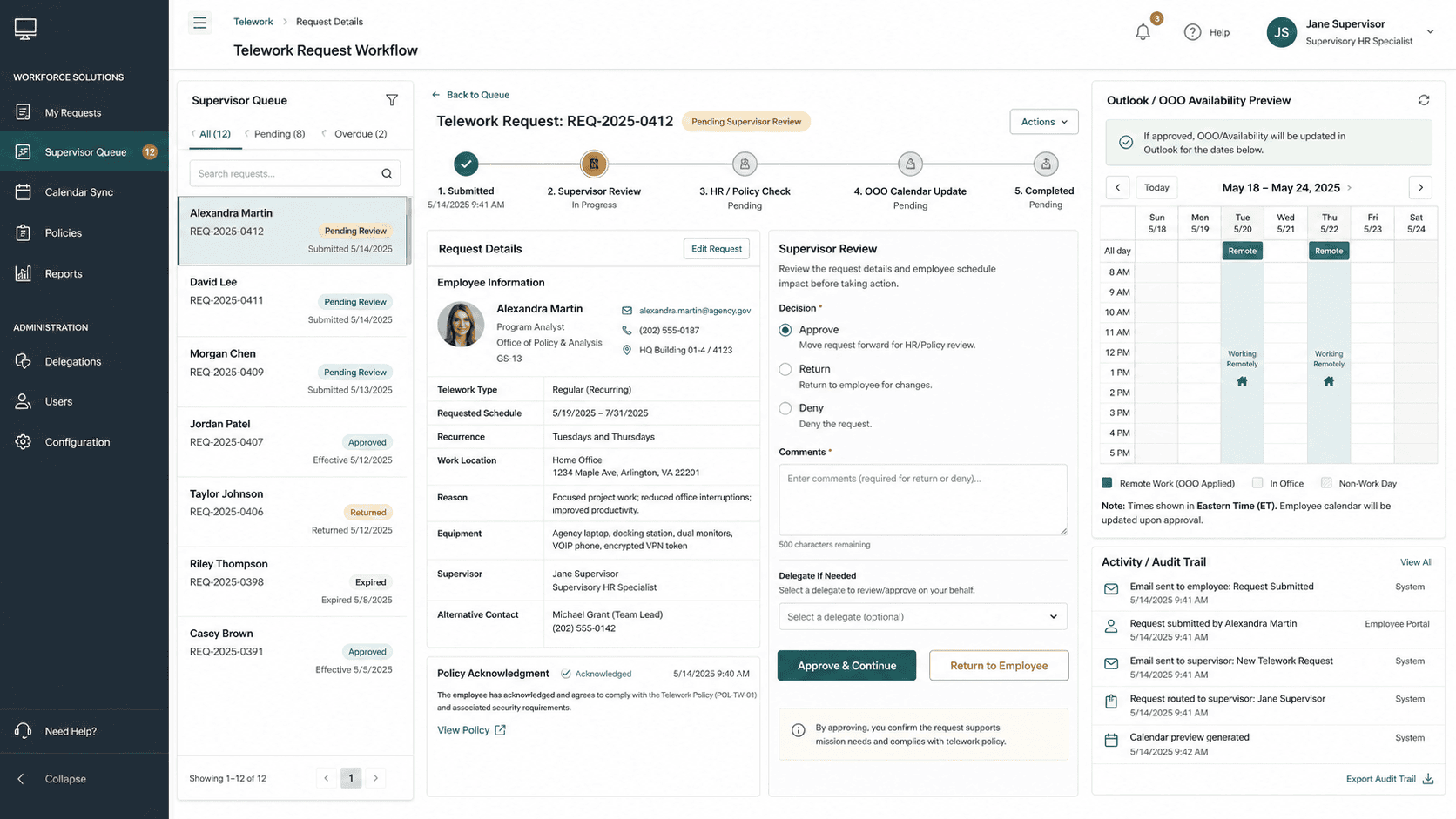
A Routine Approval Was Moving at the Speed of Paper
Telework approval is not a rare event. It is a request an employee makes and a supervisor answers as a matter of routine, which means the cost of the process was paid on every single request rather than once. Each one started as a paper form, was scanned, was emailed, and in some instances was physically delivered to get a wet signature. None of those steps decided anything. They only moved a document toward the person who could decide.
The consequences compounded from there. The paper-based method slowed down the approval process, created unnecessary administrative burdens, and increased the risk of delays or lost requests, and a lost request is not merely a lost form: it is an employee whose work location for a given day is unresolved and a supervisor who has no record that a decision was ever asked for. The agency concluded that the answer was a different mechanism rather than more diligence with the same one.
For this agency, the cost was in the paper form, the scan, and the walk down the hall for a signature, not the approval itself. If a similar routine approval in your organization is still slow for the same reasons, that’s the part worth automating first.
A Manual Process Taxing Both Sides of Every Request
Left manual, the inefficiency was structural rather than occasional. Employees spent time producing, scanning, and chasing a document. Supervisors spent time receiving, signing, and returning it. Neither party’s effort improved the decision, and both were spent again on the next request. That is what the agency meant by unnecessary administrative burdens: work that exists only because the process exists.
Visibility was the other exposure. When approval lived in a paper form and an email thread, the outcome of that approval lived there too. Teams had no reliable way to see who was working where without asking, so the coordination cost of telework followed the approval cost, and both grew with every request the agency handled.
The Approval Had to End Somewhere Other Than an Inbox
The first constraint was the users. A telework request is submitted by employees across the agency and answered by supervisors across the agency, none of whom are systems specialists, so the request interface had to be simple enough that submitting through it was easier than filling in the form people already knew. That put the burden on the system to route the request correctly rather than on the employee to know who the approver was.
An approval alone would not have finished the job. If the system had stopped at a routed, approved request, the agency would have replaced a paper bottleneck with a digital record that still told nobody who was available. The requirement therefore reached past the workflow and into the calendar: an approved request had to change the Out of Office (OOO) status the rest of the organization already reads, which made Office 365 and Outlook part of the build rather than a downstream reporting concern.
Senior Microsoft Specialists with Proven Delivery Depth
The requirements defined the profile the agency needed: a team that could design and implement a request interface, an automated approval workflow, and a calendar integration as one system, on the Microsoft platform the agency already ran. This was workflow automation with a custom back end behind it and an Office 365 integration in front of the user, not a form product dropped onto an existing process, and it had to work correctly from the first request because the process it replaced was the agency’s system of record for where people work.
The agency engaged i3solutions, a Microsoft Partner with 30 years of delivery experience and 1,500+ Microsoft engagements, delivered by an all-senior, all US-based delivery team. That profile matched the work: senior engineers who have built SharePoint request systems, .NET approval workflows, and Outlook calendar integrations repeatedly, and who could deliver the routing and the calendar update as one dependable path rather than two projects joined at the end.
i3solutions designed and implemented an automated telework request system that replaced the paper routing: an employee submits a request through one interface, the workflow routes it to the appropriate supervisor, and once the request is approved the system updates the Out of Office status on the calendar.
PHASE 01
Request and Approval Process Assessment
i3solutions worked through how telework approval actually ran, from the paper form the employee completed, through the scan and the email to the supervisor, to the instances where the form was physically delivered to obtain a wet signature. Mapping that path established which steps existed only to move the document and which step actually made the decision.
PHASE 02
Request Interface and Workflow Design
The system was designed around a single submission interface on SharePoint, with SharePoint serving as the central platform for managing telework requests, automating the workflow, and storing request data for both employees and supervisors. The design fixed how a submitted request identifies and reaches the appropriate supervisor without the employee routing it by hand.
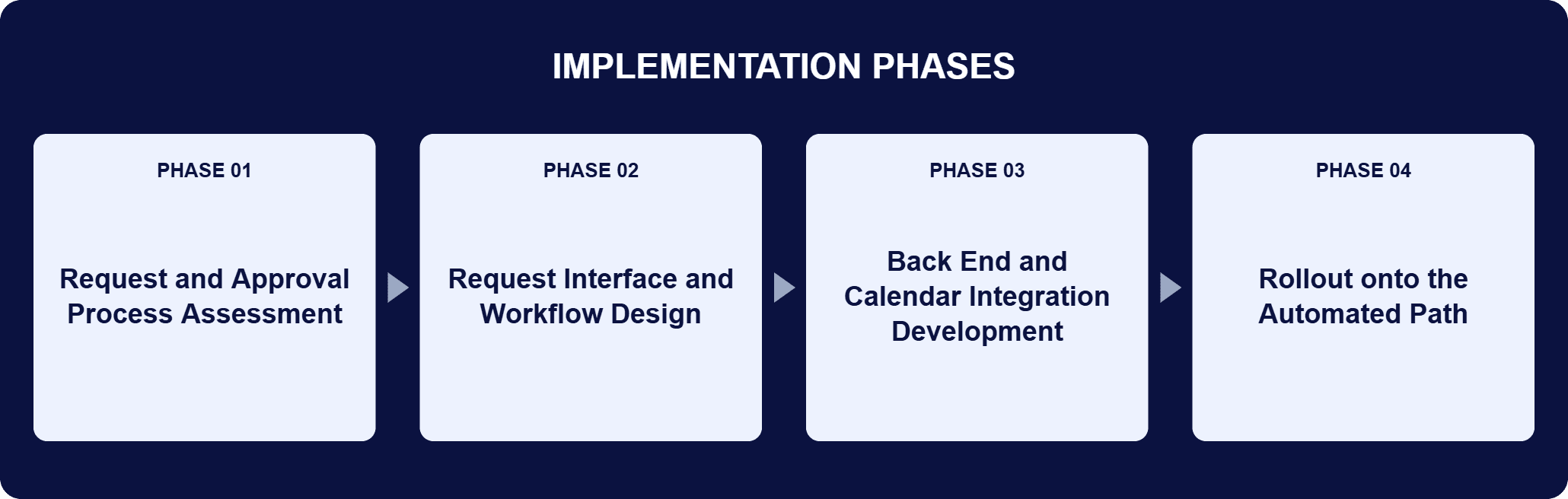
PHASE 03
Back End and Calendar Integration Development
i3solutions built the .NET back end that handles request processing, workflow approvals, and integrations with other tools, and integrated the system with Office 365 and Outlook so that an approved request writes the Out of Office (OOO) status to the calendar rather than leaving the outcome in an email thread.
PHASE 04
Rollout onto the Automated Path
Telework requests moved off the paper form and onto the automated system, so submission, routing, approval, and the resulting calendar update run as one path. Manual handling stopped being part of the approval, and staff availability became visible to teams in real time.
The system is built on the Microsoft platform the agency already operates, with each component doing one clearly bounded job. SharePoint serves as the central platform for managing telework requests: it provides the interface employees and supervisors use, automates the workflow that carries a request to the appropriate approver, and stores the request data, so the request and its history live in one place instead of across a scanned document and an email thread. .NET powers the back-end logic of the system, handling request processing, workflow approvals, and the integrations with other tools that make the rest of the flow reliable. Office 365 and Outlook complete the path: the system is integrated with them to automatically update calendars with Out of Office (OOO) statuses upon approval. That last step is what separates this build from a digitized form. The approval does not simply get recorded; it changes the artifact the organization already consults, so real-time visibility into staff availability is a byproduct of approving the request rather than a second task somebody has to remember.
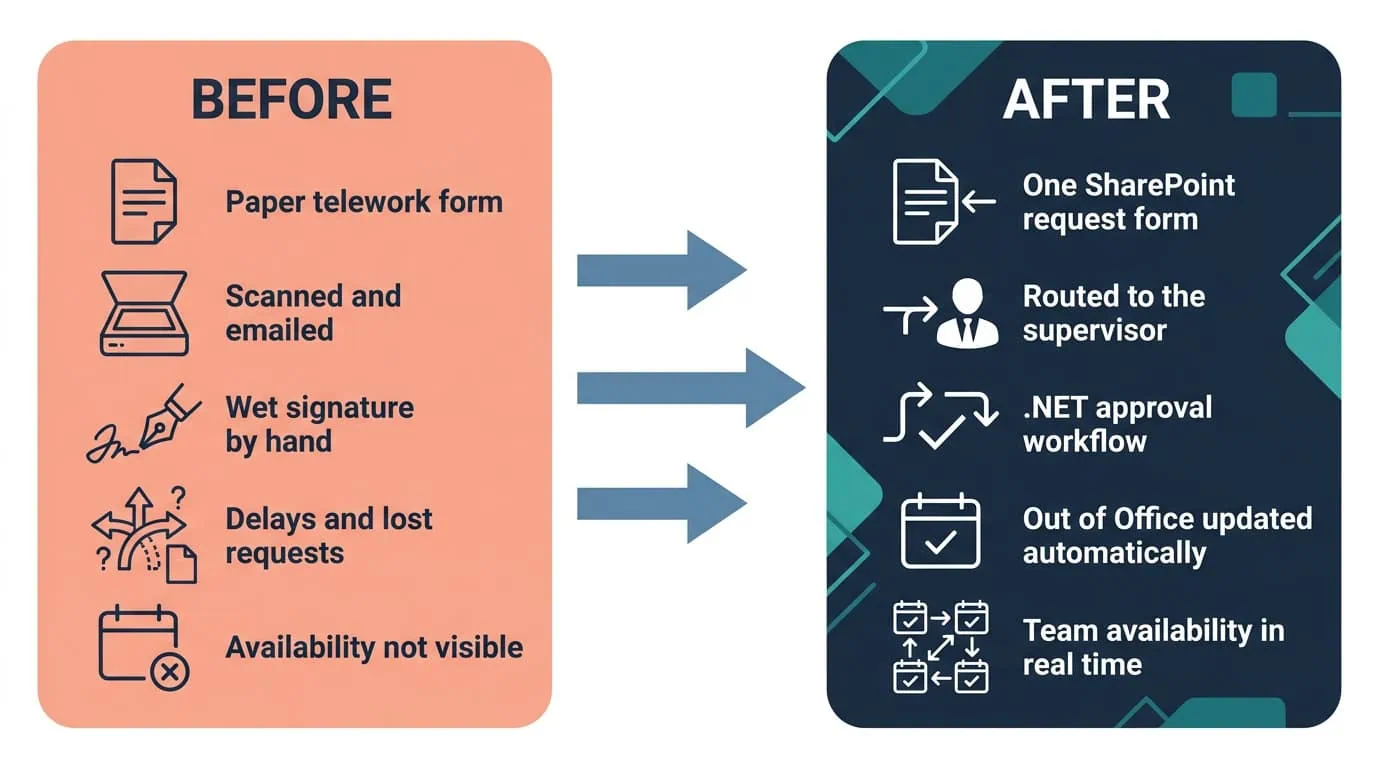
Paper Forms to Automatic Routing
A SharePoint request interface and .NET approval workflow route each request to the right supervisor automatically.
| Outcome | Before | After |
|---|---|---|
| Telework request submission | A paper form completed by the employee | One online request interface on SharePoint |
| Routing for approval | Form scanned and emailed to a supervisor, and in some instances physically delivered for a wet signature | The workflow routes the request to the appropriate supervisor automatically |
| Approval handling | Delays caused by manual handling at every hand-off | Reduced time to process a telework request and faster approvals |
| Staff availability | Approval outcome sitting in a form and an email thread | Out of Office (OOO) status updated on the calendar on approval, giving teams real-time visibility |
| Administrative workload | Producing, scanning, emailing, and hand-carrying forms | Administrative tasks reduced for employees and supervisors alike |
The automated workflow reduced the time required to process telework requests, eliminating delays caused by manual handling and ensuring faster approvals. The mechanism behind that is unglamorous and exact: the steps that were removed were the ones that never decided anything. Scanning, emailing, and hand-carrying a form were transport, and a workflow does transport better than a person does, which leaves the supervisor’s judgment as the only step that still takes time.
The coordination result is one the agency did not have before at any speed. Because the integration with Outlook automatically updates Out of Office statuses on approval, teams get real-time visibility into employee availability, which is the collaboration improvement the agency was after: people stop asking each other where somebody will be. Administrative tasks have been reduced on both sides now that the paper-based system is a digital one, which hands the scanning, emailing, and hand-carrying time back to employees and supervisors, and the agency supports a flexible work environment without adding overhead to do it.
This engagement is relevant for
Less relevant for
Approvals Off Paper, Availability on the Calendar
The engagement established that the expensive part of a routine approval is rarely the decision. For this agency it was everything around the decision: a paper form, a scan, an email, and in some instances a walk down the hall for a wet signature, repeated on every request.
Replacing that with one SharePoint request interface, a .NET back end handling request processing and workflow approvals, and an Office 365 and Outlook integration removed the transport and left the judgment. The result reaches past the approval itself, because an approved request now updates the Out of Office (OOO) status the rest of the organization already reads, so the agency gets faster approvals, real-time visibility into employee availability, and fewer administrative tasks for employees and supervisors from the same automated path.
An automated telework request system replaces a manually routed approval form with a single online request that carries itself to the person who has to approve it. In this engagement, i3solutions designed and implemented one for a federal executive-branch agency. An employee submits a request through one interface rather than completing a paper form, and submission starts a workflow approval process that routes the request to the appropriate supervisor, so nothing is scanned, emailed, or hand-carried between the two. The defining feature is what happens after approval. The system integrates with calendars and updates the Out of Office (OOO) status once a request is approved, which means the approval changes the artifact the organization already reads for staff availability instead of ending as a record only the requester and the approver ever see.
On paper. Employees completed a paper form that was scanned and emailed to a supervisor for approval, and in some instances the form was physically delivered to the supervisor to obtain a wet signature. That paper-based process slowed the approval process, created administrative burdens, and increased the risk of delays or lost requests. The cost is easy to underestimate because no single request looks expensive. It is paid per request rather than once, on a transaction the agency processes as a matter of routine, and it lands on both sides: the employee produces and chases the document, and the supervisor receives, signs, and returns it. None of that effort improves the decision being made, which is precisely why automating the routing was worth doing.
Employees submit a request through the SharePoint interface, and submission starts a workflow approval process that routes the request to the appropriate supervisor. Approvals are automated, so a request no longer waits on a form being scanned, emailed, or hand-carried. The practical consequence is that routing knowledge moves out of the employee’s head and into the system: the person submitting does not have to know who signs, and the person approving does not have to watch an inbox for a document that may or may not have arrived. Because the request and its approval are held on the SharePoint platform rather than in an email thread, the state of any given request is visible in one place instead of being reconstructed from who last forwarded what.
Yes. The system integrates with calendars through Office 365 and Outlook and updates the Out of Office (OOO) status once a telework request is approved. Teams get real-time visibility into staff availability instead of tracking it separately. This is the part of the build that changes day-to-day coordination rather than just approval speed. Before the system, the outcome of an approval lived in the form and the email thread that carried it, so knowing who was working where meant asking. Now the approval writes that answer into the calendar the organization already consults, which removes a whole category of follow-up messages that existed only to establish where somebody was going to be.
SharePoint is the central platform for managing telework requests, workflow automation, request data storage, and the interface used by employees and supervisors. .NET powers the back-end logic, including request processing, workflow approvals, and integrations with other tools. Office 365 and Outlook handle the automatic Out of Office calendar updates. The division of labor is deliberate. SharePoint holds the request, its data, and the workflow that moves it; .NET handles the processing and the integrations that have to be reliable for the workflow to mean anything; and Office 365 with Outlook carries the result to where the rest of the organization already looks. Each component is one the agency already operates, so the system extends the Microsoft platform in place rather than introducing a separate one to administer.
i3solutions is a Microsoft Partner with 30 years of delivery experience and 1,500+ Microsoft engagements, with every engagement staffed by an all-senior, all US-based delivery team. That profile matters for approval automation because the work spans three layers that have to agree with each other: the SharePoint request interface and workflow, the .NET back end handling request processing and integrations, and the Office 365 and Outlook calendar update that makes the approval visible. This engagement is representative of the pattern: a paper form scanned, emailed, and sometimes hand-carried for a wet signature was replaced by one submission interface, automated routing to the appropriate supervisor, and an Out of Office status written to the calendar on approval. For organizations weighing similar work, a short scoping conversation establishes what the equivalent build would take in your environment.
Yes. This agency’s telework approval workflow was built on SharePoint and .NET, tools the agency already ran, rather than a new platform purchase. Requests route to the correct supervisor automatically and an approved request updates the calendar without a separate manual step, closing the gap where approval outcomes used to live only in an email thread.
A single system update now handles both the approval and the resulting availability status automatically. We’re glad to discuss what a comparable workflow would look like for your agency.

US-Based Microsoft System Integrator | Est. 1997
© i3solutions. All rights reserved.
US-Based Microsoft System Integrator | Est. 1997
© i3solutions. All rights reserved.


