

Paper onboarding forms left new hires waiting up to 12 days for full network and application access.
The client is a regional healthcare system delivering nationally recognized inpatient and outpatient care through its hospital and network of physician practices, urgent care centers, and imaging centers. In that environment, onboarding is not a back-office nicety: new hires cannot start patient care or other responsibilities until they have access to the IT network and applications those duties require. Every day a new staff member waits for provisioning is a day the hospital pays for a professional who cannot yet do the job it hired them for.
Onboarding ran on paper. The manual, paper-based system for onboarding new hires proved slow, error-prone, and provided no way to track paperwork as it moved from Human Resources to the Information Technology Department. As a result, new staff members often waited up to 12 days before gaining full access to the hospital’s IT network and applications. Recognizing that technology could address these inefficiencies, the hospital’s administrators sought an automated solution: replace paper forms with digital ones, provide legally binding electronic signatures, let staff track approvals and requests in real time, and decrease the time needed to provision new hires with network resources.
A regional health system’s new hires waited as long as 12 days for the network and application access they needed before starting patient care duties. i3solutions replaced the paper onboarding process with digital signatures and automatic routing, cutting that wait dramatically.
New hires who once waited up to 12 days for full IT network and application access now have it within days, an onboarding cycle that ran nearly two weeks dropped to just a few days with employees fully oriented on day one, and IntelliSafe digital signatures replaced pen-and-paper approvals with electronic sign-off in seconds.
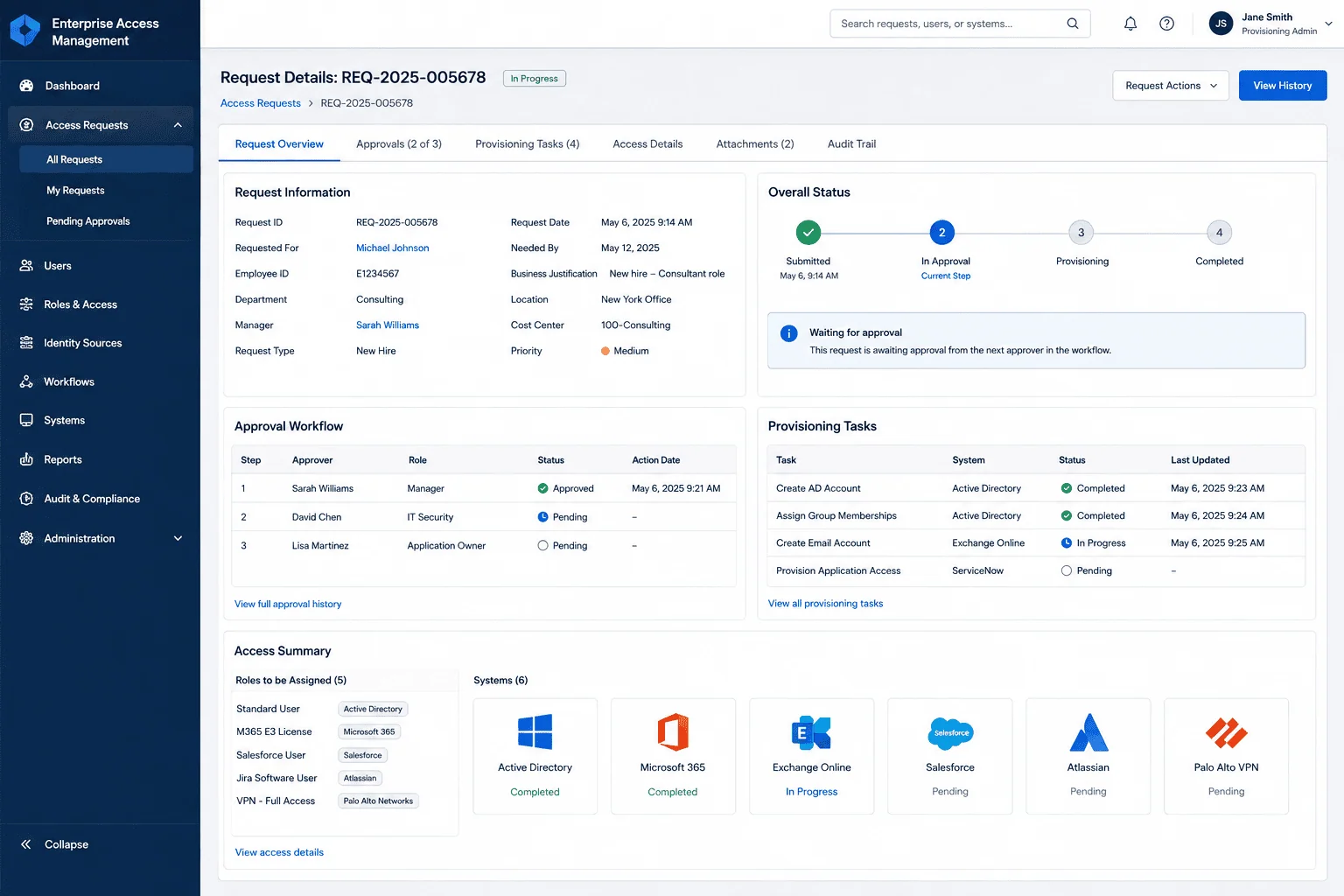
New Hires Were Ready to Work; Their Paperwork Was Not
The defining failure was visibility. Once a form left Human Resources, nobody could say where it sat, which approval it was waiting on, or whether it had been misplaced entirely. The delay did not live in any one department; it lived in the handoffs between them, and a paper process gives handoffs nowhere to be seen. Errors and lost documents compounded the wait, because a form that arrives incomplete or never arrives at all restarts the clock.
Hospital administrators decided the fix was structural, not procedural. They wanted a system that would replace paper forms with digital ones, carry enforceable electronic signatures, allow staff to track approvals and requests in real time, and cut the time needed to provision new hires with network resources. The goal was explicit: expedite and standardize the entire hiring process, so newly onboarded professionals could engage fully in their roles as quickly as possible.
New-hire onboarding here was taking up to 12 days because of paper forms moving between HR and IT, not a lack of people. If onboarding delays in your organization trace to the same handoff, the fix is usually the workflow, not more staff.
A Hospital Pays for Onboarding Delay in Care Capacity
The cost of the paper process recurred with every hire. Up to 12 days of waiting, per new staff member, before full access to the IT network and applications, and until that access exists, patient care and other responsibilities cannot start. In a healthcare system that runs on its people, an onboarding queue is not an administrative inconvenience; it is capacity the hospital has already paid for and cannot yet use.
The error profile carried its own risk. Manual data entry produced mistakes, paper forms went missing, and pen-and-paper signatures gave the hospital no reliable way to confirm a document was genuine or even complete. For an institution that must maintain high standards of compliance and be able to audit approvals to meet regulatory requirements, a process that loses documents is a standing liability, not just a slow one.
Legally Binding, Fully Paperless, and Visible End to End
Going paperless in a hospital sets a high bar for the signature layer. Approvals could not merely be electronic; they had to be legally binding, with the authenticity and originality of every file guaranteed, and the documents themselves created, signed, and securely stored as authoritative records in a completely paperless environment. Anything less would leave the hospital printing forms again the first time a signature was questioned.
The workflow constraint was breadth. A new hire’s paperwork passes through a chain of approval stops between Human Resources and the Information Technology Department that provisions network access, and the system had to route each form automatically through all of them, give administrators real-time visibility of each document’s status the whole way, and generate automated reminders for anyone holding a pending or overdue action. Standardizing the entire hiring process meant the workflow had to fit every hire, not just the simple ones.
Senior Microsoft Specialists with Proven Delivery Depth
The requirements defined the vendor profile: a team that could design and deliver a paperless workflow automation system on Microsoft SharePoint, integrate a digital signature platform into the hospital’s processes so approvals could go fully electronic, and carry the systems integration from a signed form in Human Resources through to IT provisioning at the other end. This was workflow automation and systems integration in an environment held to healthcare’s standards, and it had to be right the first time.
The hospital’s managers teamed up with i3solutions, a Microsoft Partner with 30 years of delivery experience and 1,500+ Microsoft engagements, delivered by an all-senior, all US-based delivery team. That profile matched the work: senior engineers who have built SharePoint workflow and integration systems repeatedly, and who could take a paper process handling legally significant documents fully digital without breaking its accountability.
After an in-depth strategic consultation, i3solutions designed and delivered a paperless Workflow Automation System built on Microsoft SharePoint that eliminates time-consuming manual tasks and accelerates new hires’ access to critical IT resources.
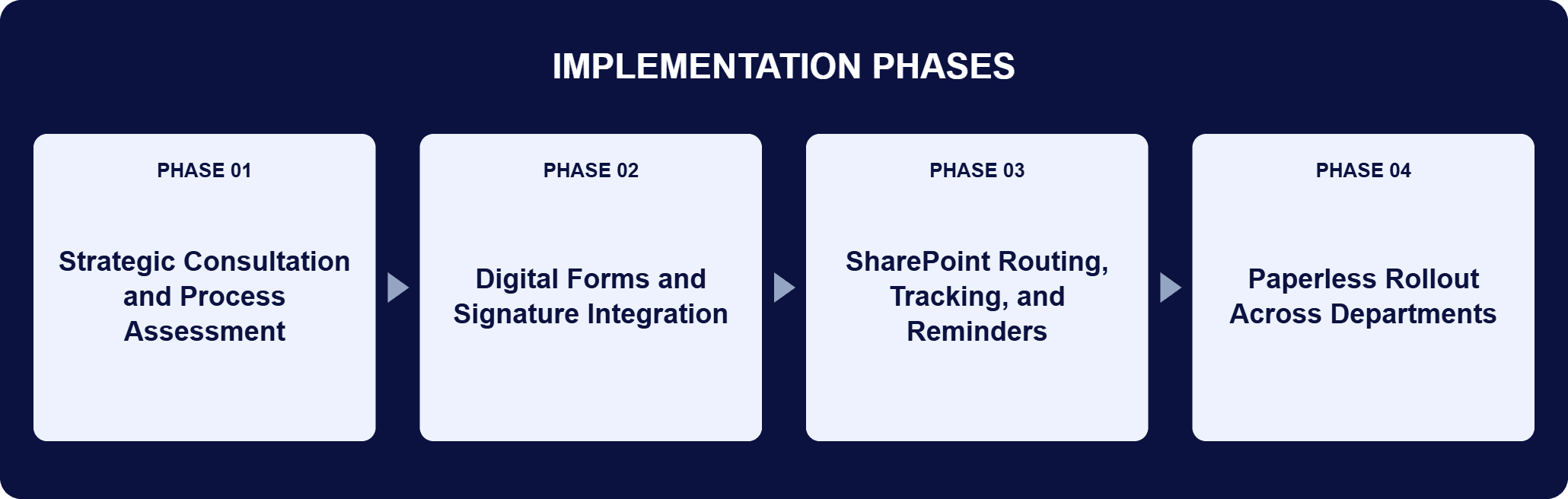
PHASE 01
Strategic Consultation and Process Assessment
i3solutions worked with hospital managers to reimagine the hiring procedures: where paper forms originated in Human Resources, which touch points each had to pass on the way to the Information Technology Department, where tracking broke down, and why new hires waited up to 12 days for access. The consultation defined what the automated workflow had to route, track, and replace.
PHASE 02
Digital Forms and Signature Integration
At the core of the new workflow is an electronic form approved via electronic signatures, replacing outdated pen-and-paper methods. IntelliSafe provides the digital signature application that guarantees the authenticity and originality of any file, and its IntelliSafe Vault gives staff the ability to create, sign, and securely store legally binding, authoritative documents in a paperless environment.
PHASE 03
SharePoint Routing, Tracking, and Reminders
Developed on Microsoft SharePoint, the system automatically routes digital forms to every required touch point, enabling electronic approval in a matter of seconds. It tracks requests throughout the entire process, gives administrators real-time visibility of each document’s status, and generates automated reminders for anyone with pending tasks or overdue actions.
PHASE 04
Paperless Rollout Across Departments
The traditionally tedious, manual process became a fully automated one, with smoother collaboration between Human Resources, IT, and other departments. The measured result: instead of taking up to an average of 12 days, new employees’ information is almost immediately uploaded and all necessary system access is fully accessible in a matter of days.
The platform pairs two mechanisms: signatures that hold and routing that never loses a form. IntelliSafe supplies the signature layer, a digital signature application that guarantees both the authenticity and originality of any file. Its IntelliSafe Vault answers the hospital’s requirement for completely electronic transactions and approvals, letting staff create, sign, and securely store legally binding, authoritative documents in a paperless environment. Accuracy goes up; the likelihood of lost or incomplete paperwork goes down. Microsoft SharePoint supplies the workflow layer. It automatically routes each digital form through the full approval chain, and electronic approval happens in a matter of seconds rather than through interoffice mail. The system tracks every request throughout the entire process, giving administrators real-time visibility of each document’s status from a single interface. Automated reminders go to anyone holding a pending task or overdue action, eliminating the bottlenecks that previously caused lengthy delays. The systems integration behind it carries a new hire’s paperwork from Human Resources through to IT provisioning, which is what changed the timeline from up to 12 days to a matter of days.
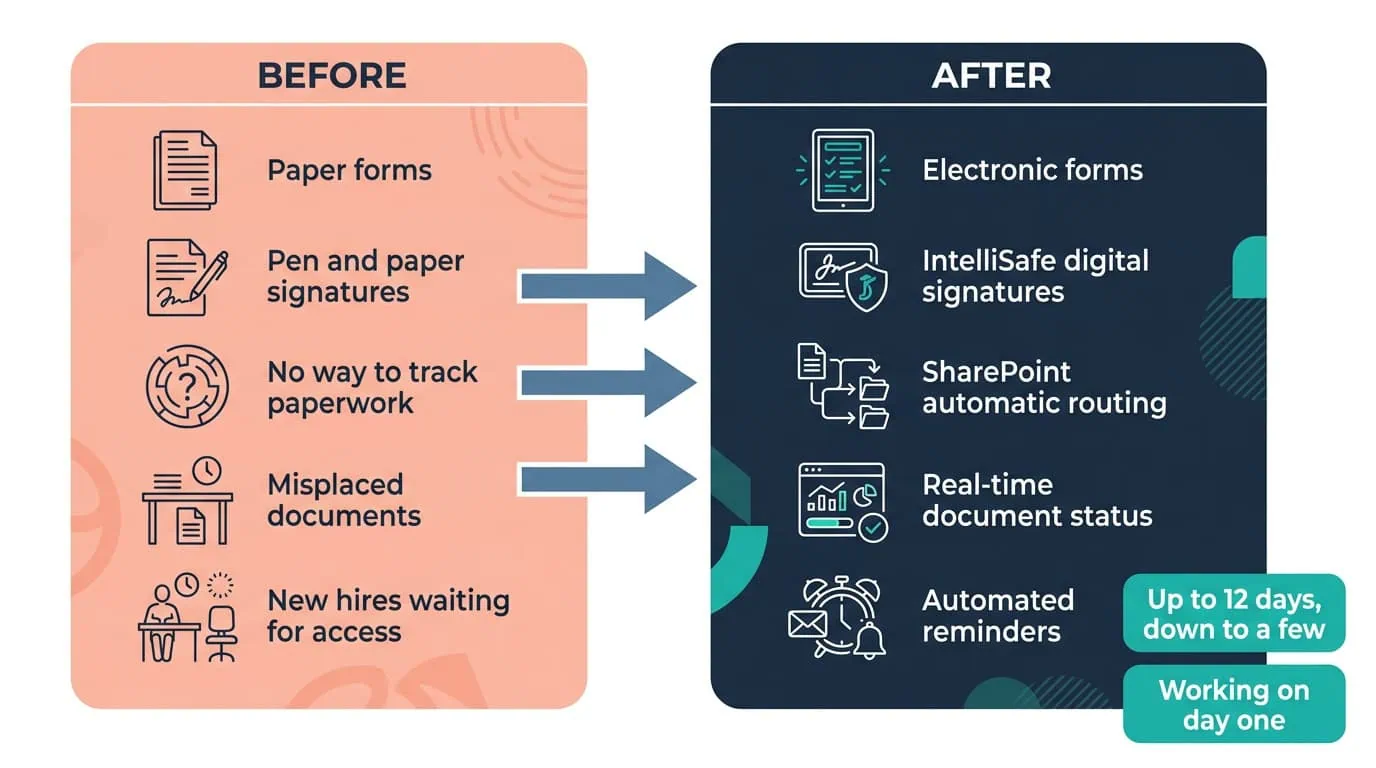
12 Days to Same-Day
Digital signatures and automatic routing through HR and IT provisioning now get new employees working on day one.
| Outcome | Before | After |
|---|---|---|
| New-hire system access | Often up to 12 days waiting for full access to the IT network and applications | Information almost immediately uploaded; all necessary access fully accessible in a matter of days |
| Onboarding cycle | Nearly two weeks on average, manual and paper-based | Just a few days; new employees fully oriented and working on the first day of their employment |
| Approvals and signatures | Pen-and-paper signatures with manual routing | IntelliSafe digital signatures; electronic approval in a matter of seconds |
| Paperwork tracking | No way to track forms between Human Resources and IT | Real-time visibility of each document’s status, with automated reminders for pending or overdue actions |
| Errors, compliance, and paper costs | Manual data entry errors, misplaced documents, paper handling | Digital signatures verify every form; approvals easily audited; a substantial portion of paper-related expenses eliminated |
The headline number is the wait for access: instead of taking up to an average of 12 days, new employees’ information is almost immediately uploaded and all necessary system access is fully accessible in a matter of days. The hospital cut the average onboarding cycle from nearly two weeks to just a few days, and new employees can be fully oriented and working on the first day of their employment. Because the saving recurs with every hire, it compounds across the healthcare system’s hospital, physician practices, urgent care centers, and imaging centers.
Accuracy and cost moved with it. Digital signatures and electronic tracking ensure each form is complete, valid, and secure, significantly reducing the errors that occurred with manual data entry, and the hospital maintains higher standards of compliance and can easily audit approvals to meet regulatory requirements. Automating form submissions and approvals also dramatically lowered the need for paper, printing, and physical document handling, eliminating a substantial portion of the hospital’s paper-related expenses, while real-time tracking and reminders keep Human Resources, IT, and other departments accountable to the same visible queue.

“The i3solutions team [was] able to transform our reactive processes into a more robust, proactive system, improving the process and saving us valuable time and resources. Instead of taking up to an average of 12 days, new employees’ information is almost immediately uploaded and all necessary system access is fully accessible in a matter of days. This enables new employees to be fully oriented and working on the first day of their employment, thereby improving productivity and increasing operational efficiencies.”
Manager of Business and Financial systems, a regional healthcare system
This engagement is relevant for
Less relevant for
Onboarding on One Tracked Workflow, from Signed Forms to System Access
The engagement established that an onboarding delay measured in weeks can be a workflow problem rather than a staffing one. A paperless Workflow Automation System built on Microsoft SharePoint, with IntelliSafe digital signatures behind every approval, replaced the paper forms that Human Resources and the Information Technology Department used to trade untracked.
Every form now routes automatically through the approval chain, administrators see each document’s status in real time, and automated reminders keep pending and overdue actions moving. New employees’ information is almost immediately uploaded, all necessary system access is fully accessible in a matter of days instead of up to an average of 12, and new hires can be fully oriented and working on the first day of their employment.
A paperless workflow automation system replaces the paper forms, wet-ink signatures, and hand-carried approvals of a manual onboarding process with electronic forms that route themselves. In this engagement, i3solutions built the system on Microsoft SharePoint: each digital form is signed with an IntelliSafe digital signature, routed automatically through every approval stop between Human Resources and the Information Technology Department, and tracked throughout the entire process with real-time visibility of its status. Automated reminders go to anyone holding a pending task or an overdue action, so a form cannot quietly stall on a desk the way paper does. The defining property is that nothing about the process depends on physical documents: staff create, sign, and securely store legally binding, authoritative records in a completely paperless environment.
The starting point is that in a hospital, onboarding gates patient care: new hires cannot start patient care or other responsibilities until they have access to the IT network and applications those duties require. In this engagement, i3solutions began with an in-depth strategic consultation with hospital managers to reimagine the hiring procedures, then designed and delivered a Workflow Automation System around the process’s actual failure points: paper forms became electronic forms with IntelliSafe digital signatures, untracked handoffs became automatic routing through the approval chain, and invisible queues became real-time visibility with automated reminders for pending or overdue actions. The delivery target was the timeline itself: decrease the time needed to provision new hires with network resources, and expedite and standardize the entire hiring process.
Two products divide the work. IntelliSafe provides the digital signature application, guaranteeing both the authenticity and originality of any file, and its IntelliSafe Vault lets staff create, sign, and securely store legally binding, authoritative documents in a paperless environment, which is what allowed the hospital to retire pen-and-paper signatures without weakening the enforceability of its approvals. Microsoft SharePoint provides the workflow engine: it automatically routes each digital form to every required touch point in the approval chain, from Human Resources through to the Information Technology Department that provisions network access, and electronic approval happens in a matter of seconds. SharePoint also tracks each request end to end, giving administrators real-time visibility of every document’s status from a single, user-friendly interface, and generates automated reminders for pending or overdue actions.
Before the system, new staff members often waited up to 12 days before gaining full access to the hospital’s IT network and applications, because the paper process gave nobody a way to track forms as they moved from Human Resources to the Information Technology Department. After it, instead of taking up to an average of 12 days, new employees’ information is almost immediately uploaded and all necessary system access is fully accessible in a matter of days. In cycle terms, the hospital cut the average onboarding cycle from nearly two weeks to just a few days, and the change reaches the first day on the job: new employees can be fully oriented and working on the first day of their employment, which improves productivity and operational efficiency across the departments that receive them.
Because the wait is clinical capacity, not just paperwork. New hires cannot start patient care or other responsibilities until they have access to the IT network and applications those duties require, so every day of provisioning delay is a day the hospital staffs a role it cannot yet use. At this regional healthcare system, that wait ran up to 12 days on the paper process, per hire, recurring with every hire across a hospital and a network of physician practices, urgent care centers, and imaging centers. The paper process also carried compliance weight: manual data entry produced errors and misplaced documents, while the automated system verifies every form through its digital signatures and lets the hospital easily audit approvals to meet regulatory requirements, which a paper trail made slow and uncertain.
i3solutions is a Microsoft Partner with 30 years of delivery experience and 1,500+ Microsoft engagements, with every engagement staffed by an all-senior, all US-based delivery team. This engagement shows the pattern that profile produces: a paperless Workflow Automation System on Microsoft SharePoint, a digital signature platform integrated so approvals kept their legal standing, and systems integration carrying a new hire’s paperwork from Human Resources through to IT provisioning, delivered into a healthcare environment held to high standards of compliance. The measured outcome is the argument: access that took up to an average of 12 days now arrives in a matter of days, with new employees working on the first day of their employment. For organizations weighing this class of work, a short scoping conversation establishes what the equivalent workflow would take in your environment.
Digital signatures in this system are legally binding, which is what let this regional health system retire pen-and-paper onboarding forms entirely rather than digitizing the form while keeping a paper signature step. Automatic routing between Human Resources and IT closed the handoff gap where documents used to go missing, and new hires now get network and application access same-day instead of waiting up to 12 days.
Automatic routing and digital signatures are what let new hires start fully provisioned on day one. We’re glad to discuss what a comparable onboarding workflow would look like for your organization.

US-Based Microsoft System Integrator | Est. 1997
© i3solutions. All rights reserved.
US-Based Microsoft System Integrator | Est. 1997
© i3solutions. All rights reserved.


