
By Michael Branson, Founder/COO, i3solutions
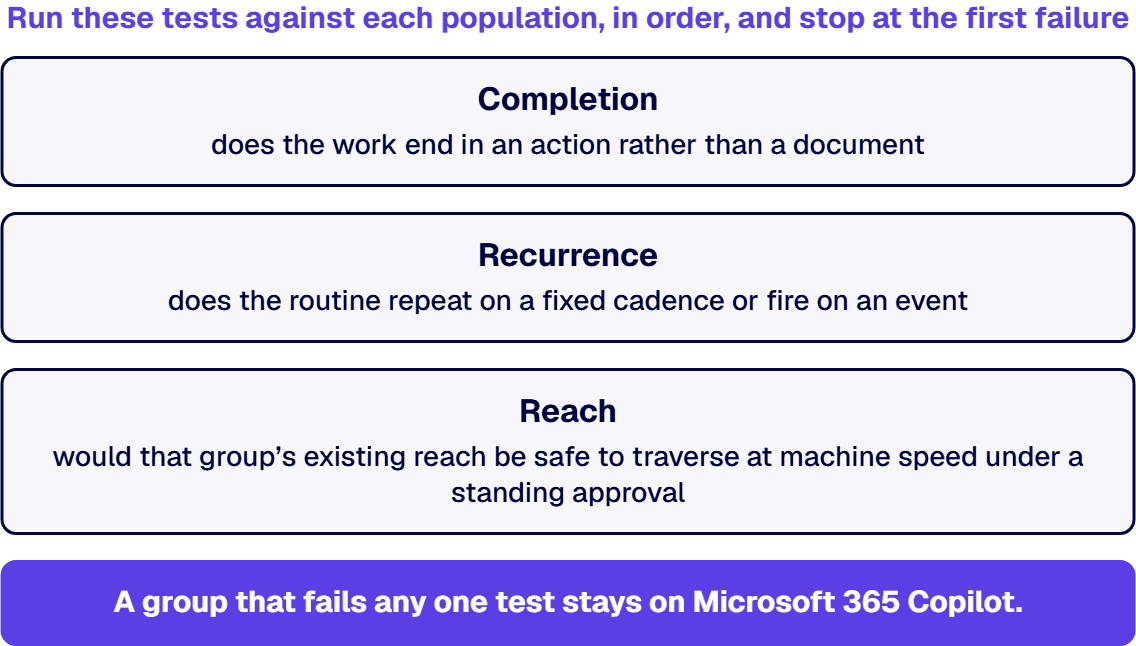
As of September 2026, this is a population decision rather than a product decision. Microsoft describes the two as doing different jobs: Microsoft 365 Copilot works inside the Microsoft 365 apps, grounded in organizational data, while Microsoft Copilot Cowork “can carry out tasks on your behalf” across the same environment, with the person approving each action. So the useful question is not which product wins. It is which of your groups does work that matches what each product actually does. Give the second product only to a group that passes all three of these tests:
A group that fails any one of the three is better served by Microsoft 365 Copilot, on the evidence set out below. These are not alternatives to choose between for the whole company; the question is which population’s work is shaped like the thing each product is built to do. Whether Cowork sits inside the Copilot licence or beside it is a separate question with its own answer, at Is Copilot Cowork Included in the Microsoft 365 Copilot License, or an Additional Cost?.
A renewal conversation and a vendor pitch landing in the same month is not a product comparison. It is a sorting problem, and it goes wrong when the two products are read as two versions of the same thing. Microsoft’s own documentation does not describe them that way, and the difference it draws is the one the decision turns on.
Microsoft 365 Copilot is described as an assistant that works where the person is already working. Microsoft’s Copilot overview (Microsoft-stated date 17 September 2026) lists the in-app capabilities as drafting, rewriting and summarizing in Word, analyzing data and creating formulas in Excel, creating and summarizing presentations in PowerPoint, drafting mail and summarizing threads in Outlook, and summarizing and transcribing meetings in Teams. It describes the full add-on experience as adding priority access, Deep integration with Microsoft 365 apps and services, and “Grounding responses in organizational data (emails, files, meetings, calendars, teams, or organizational relationships) through Microsoft Graph, Work IQ, Copilot Search, and semantic indexing.” The output of that work is something a person then decides what to do with.
Copilot Cowork is described as a product that acts. Microsoft’s Cowork overview (Microsoft-stated date 8 September 2026) opens with “Microsoft Copilot Cowork can carry out tasks on your behalf” and states plainly: “Cowork carries out tasks across your Microsoft 365 environment. Rather than describing what you could do, it does the work.” The same page enumerates what that means: it sends emails through Outlook, schedules meetings and manages the calendar, creates Word, Excel, PowerPoint and PDF files, posts in Teams channels and chats, searches across the organization, browses and manages files in OneDrive and SharePoint, and conducts deep research across multiple sources. Microsoft also documents two ways it runs without a person present: prompts on a schedule “so recurring tasks happen automatically”, and event-driven tasks “that run when something happens, such as when you receive an email or a Teams message.” Microsoft records Cowork for work or school accounts as generally available, and marks the App skill for building apps as a preview feature available only to users in its Frontier program.
All three Microsoft documents cited on this page were opened at source in September 2026, and the bracketed dates above are the ones Microsoft states on each document rather than our reading of them. If Microsoft has moved since, Microsoft is right and this page is stale.
The consequence for the decision. One product improves the quality of what a person produces. The other reduces the number of steps a person performs, and it does so by operating in systems of record on that person’s behalf. Those are different purchases with different risks, and a population that would benefit enormously from the first can gain almost nothing from the second.
When the request arriving on your desk is “how many seats do we need”, the honest first answer is that seat count is the output of a sorting exercise nobody has run yet. Run these three tests against each population, in order, and stop at the first failure. The tests are ours; the product behaviour each one leans on is Microsoft’s, cited above.
Test 1. The completion test: does the work end in an action, or in a document? Ask where the task is finished. If the person’s job is done when they have a good draft, a clean model or a defensible summary in front of them, the assistant is the right tool and the second product adds a step rather than removing one. If the task is only finished when something has left the person’s hands, a message sent, a file filed, a meeting placed on other people’s calendars, then the work is shaped like what Cowork is documented to do.
Test 2. The recurrence test: is the routine the same next week? A population whose weekly routine is genuinely repeatable, the same intake, the same compilation, the same distribution, converts that routine into something that runs whether or not the person is at their desk. A population whose work is different every day gets a slower version of what they already have.
Test 3. The reach test: what can this group already open? This is the one that changes answers. Microsoft states, in its Cowork getting-started documentation (Microsoft-stated date 14 September 2026), that “Cowork doesn’t take actions without your approval”, and the overview adds that approval prompts carry a risk level indicator for medium and high risk actions; the same getting-started page documents an “Always allow” option that skips future prompts for similar actions within the current conversation. Read those two facts together. The control is real, and it is a control the user may relax for the duration of their own session. So the question to ask of a candidate population is not whether Cowork is safe; it is what that group’s existing permissions would expose if their entire reach were traversed at machine speed by something that also sends, posts and files. If nobody can answer that for the group in front of you, the answer to the question is not yet, and the work in between is a permission question rather than an AI question. That question is owned by You Bought Copilot. Your Data Isn’t Ready for It. The Copilot Data Governance Fix..
What passing all three looks like at scale. Sorting them is only tractable when somebody already knows who belongs to which group and under what controls, which is a governance artefact rather than an AI one. i3solutions runs a governed Power Platform for a federal defense agency supporting roughly 10,000 personnel across about 180 locations, which works because it is governed, not despite it. That reference is here for governance scale only. It describes neither a Copilot deployment nor a Cowork deployment, and this page makes no claim about either product from it. The narrow point it supports is this: at that population size, the register of who may reach what is the artefact that makes a sorting exercise tractable, and an enterprise without one has no basis on which to answer the question for either product.
For an aerospace and defense manufacturer or a federal agency, the fit question arrives in a different order: before anybody asks which population should get the second product, somebody has to establish whether it is there at all. That is not this page’s finding to make. The sibling page linked in the answer above already went to Microsoft’s published sources, recorded its check date, named the documents it read, and reported the government cloud position for the newer product as an open gap rather than filling it. Read the result there, at its own date, and do not accept a summary of it from anywhere, including from here.
Two things follow for the decision on this page, and neither depends on how that gap eventually closes. First, an unpublished position is not a yes and it is not a no, so a sorting exercise for a government cloud tenant cannot be built on a commercial launch notice, and the product cannot be written off to a compliance officer either. Put the question in writing to whoever holds your licensing agreement, require an answer that names your own tenant and carries a date, and re-open it at each roadmap review.
Second, the sorting work pays regardless. The population list and the permission review that producing it forces are the same artefacts either outcome will need, and they are the slow part.
Approving a seat allocation you cannot defend in a steering meeting is the failure mode here. Three names, not three documents, are what make the decision defensible.
Who owns the population list. One person maintains the record of which groups sit on which product and why, using the three tests above as the written rationale. This is the artefact your committee will actually review, and it is the one that survives a change of vendor or a change of pricing.
Who owns the reach question. Somebody has to be accountable for what each candidate group can currently open. Whether your tenant is ready for either product is a separate assessment with its own conditions, and it is owned by Is Your Microsoft Environment Ready for Copilot? What Must Be True First. We do not restate those conditions here; this page assumes the reader will meet them before a population is moved.
Who owns the enablement decision. Turning a capability on and enabling it deliberately are different acts with different exposure, and the comparison between them is set out on Secure Copilot Enablement vs Turn It On: The Enterprise AI Risk Comparison.
For whoever owns the enablement decision in an eligible commercial tenant, the default-on OpenAI models in Copilot, which OpenAI operates for Microsoft as a subprocessor, arrive switched on for users before anyone has enabled them deliberately.
The two products are billed separately, and no figure for either appears on this page. Both halves of that question, the meter on the newer product and what a governed deployment of the established one involves, are answered on Is Copilot Cowork Included in the Microsoft 365 Copilot License, or an Additional Cost? and Microsoft 365 Copilot Licensing: What a Governed Enterprise Deployment Actually Costs.
The rule above has a failure mode, and it is worth stating because it is the one that gets an IT function overruled from outside. The rule is biased toward not yet, and not yet is sometimes wrong.
If a business unit already runs a genuinely repeatable coordination routine, the kind where one person spends a day a week collecting the same inputs, assembling the same document and distributing it to the same list, that unit passes the completion test and the recurrence test on the evidence of its own calendar. If its content sits in a workspace whose permissions were reviewed recently and whose membership is small and known, it passes the reach test too. Telling that unit to wait a quarter costs them the day a week and costs IT the argument, because the unit can demonstrate the routine and IT can only describe a concern. In that case the defensible answer is a bounded group with a named owner and a review date, not a blanket no.
Two further cases sit on the same side of the line. A unit whose routine depends on a system outside Microsoft 365 may be better served by extending the tooling: Microsoft’s Cowork overview states “You can create up to 50 custom skills”, and documents plugins from the Microsoft 365 App Store that add connectors and specialized skills. And a group already running a Copilot pilot with real telemetry is answering a different question from the one on this page, which is when to widen rather than which product to widen with; that decision is set out on Copilot Pilot vs Enterprise Rollout: When to Expand.
The rule’s real job is to stop a company-wide purchase justified by a departmental use case. It is not an argument for refusing the departmental use case.
We have no measured claim to make about either product’s fit, and we are not going to invent one for a product pair this new; the framework above is the method, and the evidence for your own enterprise comes from your own tenant. What stands behind the method is delivery history rather than a product opinion: i3solutions has completed more than 1,500 Microsoft platform implementations. Contact a senior architect. Governed Microsoft AI work at i3solutions sits under Custom AI Consulting Services for Governed Microsoft Enterprise AI.
Neither, as a company-wide answer, and that is the useful part. Microsoft’s Copilot overview, dated 17 September 2026, describes Microsoft 365 Copilot as working inside the Microsoft 365 apps, grounded in organizational data through Microsoft Graph and Work IQ; the Cowork overview, dated 8 September 2026, describes Copilot Cowork as carrying out tasks across the environment on the person’s behalf, with each action approved and a risk level indicator shown for medium and high risk actions. Because those are different jobs, the enterprise-level answer is a split rather than a winner: the population whose work ends in an action, recurs on a schedule or an event, and whose existing reach has been reviewed is the population that suits the newer product, and everyone else is already suited by the established one.

US-Based | Est. 1997
© i3solutions. All rights reserved.
US-Based | Est. 1997
© i3solutions. All rights reserved.


