
By Michael Branson, Founder/COO, i3solutions
As of September 2026, Windows 11 version 23H2 Enterprise and Education editions reach end of updates on November 10, 2026, according to Microsoft, which recommends “updating eligible devices running Windows 11, version 23H2 Enterprise and Education editions to Windows 11, version 25H2”, a version its release information on Microsoft Learn lists as supported for Enterprise and Education until 2028-10-10. Microsoft Learn says WSUS “is deprecated and is no longer adding new features” but “continues to be supported for production deployments”, so this guide treats it as a working channel for that feature update, including in Configuration Manager, whose software update management runs on WSUS. Microsoft Learn names the public cloud and GCC as the cloud environments for Intune feature update policies, which need internet access, and says Windows Autopatch “is not currently supported” in GCC High or DoD environments; for those tenants and for disconnected machines, this guide plans the 25H2 move on WSUS or Configuration Manager.
The reminder is already in Microsoft’s Windows message center, and the next audit or vulnerability scan will flag any Windows 11 device still on version 23H2 after its date. The same week, someone on the team reads that WSUS is deprecated and asks whether the update channel is going away too. Two decisions are tangled here: which version each 23H2 device moves to, and which Microsoft channel carries that move for each kind of machine, including tenants in GCC High or DoD and machines on disconnected networks. This guide sets out what Microsoft’s own pages, read on 2026-09-24, say on both, and marks where the i3solutions recommendation sits beside them.
If a device runs Windows 11 version 23H2 in the Enterprise, Education or IoT Enterprise edition, November 10, 2026 is its date. Microsoft’s Ending Support in 2026 page lists Windows 11 Enterprise and Education, Version 23H2 and Windows 11 IoT Enterprise, Version 23H2 under End of Servicing on November 10, 2026. The 23H2 row of the Windows 11 release information table lists 2026-11-10 as the end of updates in the column that covers the Enterprise, Education and IoT Enterprise editions.
In its 60-Day Reminder, posted on 2026-09-17, Microsoft’s Windows message center says “On November 10, 2026, Windows 11, version 23H2 Enterprise and Education editions will reach end of updates.” It adds “The November 2026 Windows security update will be the last update available for these editions.” and “After this date, devices running these editions will no longer receive monthly security and non-security preview updates containing protections from the latest security threats.”
Start with the inventory. List every 23H2 device by edition and by the channel that updates it today: WSUS, Configuration Manager, Intune or Windows Autopatch. The date above belongs to those editions of 23H2 only; other editions and versions carry their own dates in the same Windows 11 release information table.
If the move goes to the version that looks closest rather than the one that lasts longest, the same decision comes back sooner. Microsoft’s Windows message center entry says “To continue receiving monthly security and quality updates, we recommend updating eligible devices running Windows 11, version 23H2 Enterprise and Education editions to Windows 11, version 25H2.” Its Windows 11 release information page says “Feature updates are released in the second half of the calendar year and come with 24 months of support for Home, Pro, Pro for Workstations, and Pro Education editions; 36 months of support for Enterprise and Education editions.”
Microsoft’s Ending Support in 2027 page lists Windows 11 Enterprise and Education, Version 24H2 and Windows 11 IoT Enterprise, Version 24H2 under End of Servicing on October 12, 2027, and the release information table gives 24H2 the same date, 2027-10-12, in its Enterprise and Education column. The i3solutions reading of those dates, not Microsoft’s words: a move to 24H2 lasts until October 12, 2027 and brings this decision back roughly a year after this one, while 25H2 is the version Microsoft recommends and runs to 2028-10-10.
Version 26H1 is not a way around the decision. Microsoft’s Windows 11 release information page says “Windows 11, version 26H1 is scoped to support new devices that started coming to market in early 2026 and is not designed as a feature update for existing devices.” and “This version is not offered as an in-place update from 24H2 or 25H2 on existing devices.”
Name 25H2 as the target for every eligible 23H2 device, write its end date from the Windows 11 release information table beside it, and treat any device that cannot move as an exception with a named owner and a date.
If the team read that WSUS is deprecated and concluded that the update channel stops working, that reading goes further than Microsoft does. Microsoft’s Features removed or no longer developed in Windows Server page says “WSUS is no longer actively developed. All the existing capabilities and content continue to be available for your deployments.” Its Windows Server Update Services (WSUS) overview says “WSUS is deprecated and is no longer adding new features. However, it continues to be supported for production deployments, and receives security and quality updates as per the product lifecycle.” The same overview describes the job WSUS does: “You can use WSUS to fully manage the distribution of updates that are released through Microsoft Update to computers on your network.”
What changes is the direction: no new features. What does not change, in Microsoft’s words, is support for production deployments. Neither page gives an end date for WSUS itself, and this guide states none.
One part of a WSUS server does need a plan of its own. The Features removed or no longer developed in Windows Server page says “WID is used by several roles, including AD FS, AD RMS, IPAM, RD Connection Broker, and WSUS.” and “Consider using a free or full version of SQL Server for these roles. WID will be removed from Windows in a future release.” Check whether each WSUS server’s database is the Windows Internal Database, and plan any database move on its own timeline, apart from the 25H2 move.
Separately, Microsoft’s Ending Support in 2027 page lists Windows Server Update Services for Windows Server 2016 among the products reaching end of support on January 12, 2027.
If a device reaches the internet and its tenant is in the commercial cloud or GCC, the version can be set centrally instead of left to each device. Microsoft’s What are Windows Update client policies? page says “This feature was formerly known as Windows Update for Business.” and “Specifically, Windows Update client policies let you control update offerings and experiences to allow for reliability and performance testing on a subset of devices before deploying updates across the organization.” In Intune, Microsoft’s Manage Windows feature updates page says “Feature update policies allow you to lock devices to a specific Windows release or target an upgrade to a newer version while preventing devices from moving beyond that version.”
That policy carries conditions. The same Manage Windows feature updates page lists as a prerequisite “Devices must have internet access and be able to reach required Microsoft endpoints”, names the public cloud and Government Community Cloud (GCC) as the cloud environments where the feature is supported, and lists among its licensing requirements “A Windows license that includes the Autopatch entitlement”. A feature update policy is also a different policy from an update ring; Microsoft’s Manage Windows Update ring policies page says “Windows update rings define how and when Windows updates are installed on devices.”
Windows Autopatch is the other cloud channel. Microsoft’s What is Windows Autopatch? page says “Windows Autopatch is a cloud service that automates Windows, Microsoft 365 Apps for enterprise, Microsoft Edge, and Microsoft Teams updates to improve security and productivity across your organization.” and “Windows Autopatch provides tools to assist with the controlled roll out of annual Windows feature updates.” Its Prerequisites page lists, among the licenses it names, “Windows 10/11 Enterprise E3 or E5 (included in Microsoft 365 F3, E3, or E5)”, and Microsoft’s Frequently Asked Questions about Windows Autopatch page says “Windows Autopatch is included automatically for Government Community Cloud (GCC) customers using Microsoft 365 G3 GCC, Microsoft 365 GCC G5, or Microsoft 365 GCC G5 without WDATP/CAS Unified.” Microsoft 365 Apps on session hosts running Windows Server 2022 follow a separate support rule, covered in Microsoft 365 Apps on Windows Server 2022 Session Hosts: A Guide to Choosing Windows Server 2025, Azure Virtual Desktop or Windows 365 Before October 13, 2026.
Whichever cloud channel carries it, target the new version explicitly with a feature update policy and stage it across groups of devices in waves.
If the fleet’s Windows Update settings still live in Group Policy, moving them into Intune is a project of its own, apart from the version move. i3solutions plans and runs Intune migrations for enterprises moving domain-joined Windows devices off on-premises Group Policy.
Keep that settings move and the version move on separate plans and separate dates, so a problem in one does not hold up the other. The settings move itself is covered in the Intune migration checklist.
If Configuration Manager already manages the fleet, the WSUS status matters to it directly. Microsoft’s Manage Windows as a service using Configuration Manager page says “Windows computers must use Configuration Manager software updates with Windows Server Update Services (WSUS) for software update management.” It also says “Create servicing plans to form deployment rings, and keep Windows systems up to date when new builds are released.” and “When a computer uses Windows Update client policies or Windows Insiders, it isn’t evaluated in Windows servicing plans.”
In a mixed estate, that last sentence means a device configured for Windows Update client policies drops out of the servicing plan built for it. Decide which authority owns each device’s feature update so that no device sits under both. Which workloads belong where is the subject of SCCM vs Intune: An Endpoint Management Decision for Regulated Enterprises.
When a co-managed estate has to move feature update authority for each device group from Configuration Manager servicing plans to Intune policies, with no device left under both, an internal team short on endpoint specialists for the cutover can weigh hiring Microsoft Intune consultants for the migration and staged rollout.
If the tenant is in GCC High or DoD, or the machines never reach the internet, the cloud channels above are not the plan today. Microsoft’s Frequently Asked Questions about Windows Autopatch page says “Windows Autopatch is not currently supported in US Government Community Cloud High (GCC High) or Department of Defense (DoD) environments.” Microsoft’s Microsoft Intune for US Government GCC High and DoD service description says “The following features are currently not available and aren’t supported in GCC High and DoD clouds. Planning is started to support these features for GCC High and DoD environments.” Under Autopatch and updates, that list includes Windows Autopatch, Feature updates for Windows in Intune, Quality updates for Windows in Intune, Expedite updates for Windows in Intune and Driver updates for Windows in Intune, and it gives no date for them. The Intune feature update policy’s own prerequisites, above, name internet access and the public cloud and GCC.
Plan the version move for these populations on WSUS or Configuration Manager now, and do not hold it for the planned items. The full picture of what Intune offers in GCC High is in Is Microsoft Intune CMMC Compliant? What It Covers, and What It Does Not.
For machines with no internet path, Microsoft documents a mechanism for each channel. Its Plan your WSUS deployment page says “If corporate policy or other conditions limit computer access to the Internet, administrators can set up an internal server to run WSUS.” It says that after downloading, testing and approving the updates on that server, “an administrator would export the update metadata and content” for import to the servers running WSUS inside the network. For Configuration Manager, Microsoft’s Synchronize software updates from a disconnected software update point page says “When the software update point at the top-level site is disconnected from the Internet, you must use the export and import functions of the WSUSUtil tool to synchronize software updates metadata.” Test that export and import path end to end with the 25H2 feature update itself before the waves start, instead of assuming it works because monthly updates already flow through it.
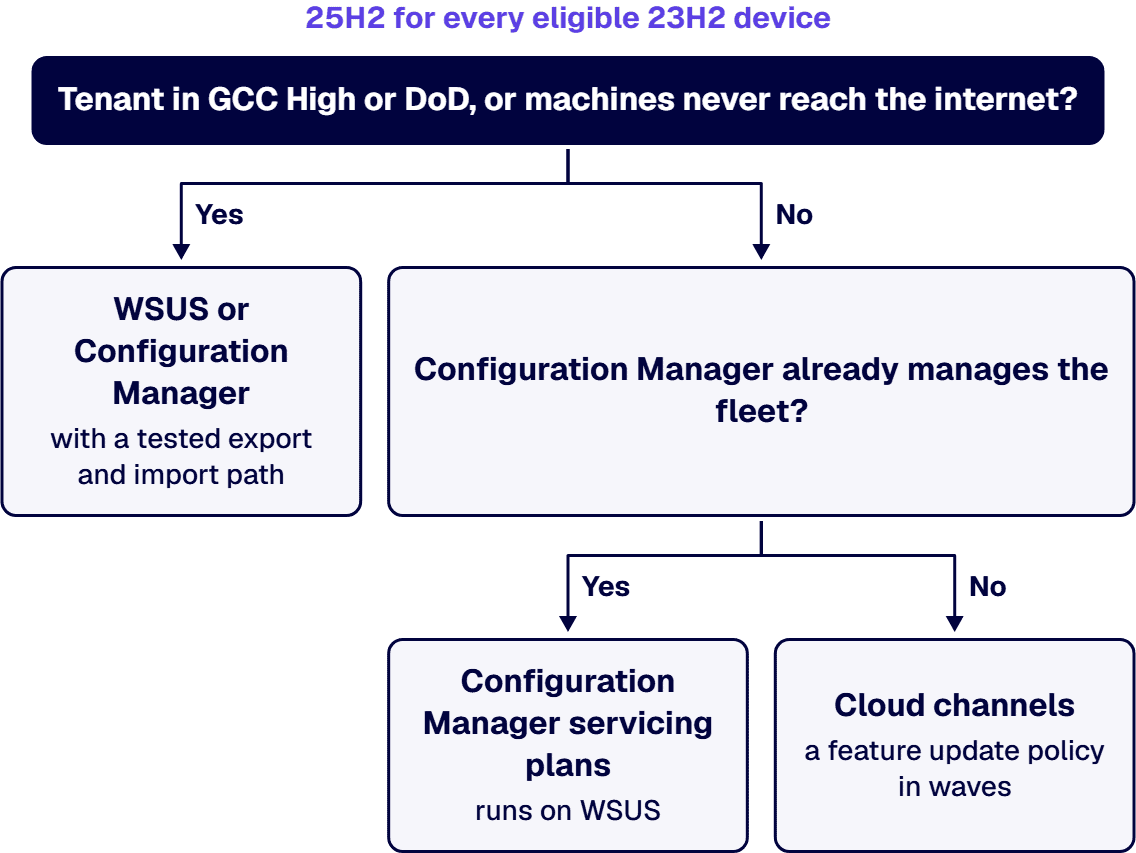
If the machines in front of you do not match the situation above, start somewhere else:
If you bring in outside help for the version move, hold the work to these criteria:
Be plain about what stays with you. Running the update channel and approving each month’s updates after the project remains your team’s ongoing work; i3solutions does not take it on as an ongoing managed service. An i3solutions engagement does not produce managed-service ownership, a replacement for the internal team, open-ended scope expansion, or vendor lock-in.
If you want an outside architect on this decision, i3solutions takes on the version move and the channel design as project work: the inventory, the target version, a channel for each population, the waves and the disconnected path, with embedded specialists where your team needs them. i3solutions has been a Microsoft Partner with 30 years of enterprise technology delivery experience and has delivered 1,500+ Microsoft engagements across aerospace and defense, financial services, and health sciences. Its delivery is senior and US-based. The wider practice is Enterprise Digital Transformation Solutions for Governed, Scalable Modernization.
Microsoft Learn says “On November 10, 2026, Windows 11, version 23H2 Enterprise and Education editions will reach end of updates.” and “The November 2026 Windows security update will be the last update available for these editions.” Its lifecycle table lists Windows 11 IoT Enterprise, Version 23H2 on the same date.
Microsoft recommends 25H2; the Windows message center on Microsoft Learn says “we recommend updating eligible devices running Windows 11, version 23H2 Enterprise and Education editions to Windows 11, version 25H2.” According to Microsoft Learn, 24H2 Enterprise and Education reach end of updates on October 12, 2027, and 25H2 on 2028-10-10.
Yes. Microsoft Learn says “WSUS is deprecated and is no longer adding new features. However, it continues to be supported for production deployments, and receives security and quality updates as per the product lifecycle.” Neither Microsoft page on WSUS’s status gives an end date for WSUS itself.
Not today. Microsoft Learn says “Windows Autopatch is not currently supported in US Government Community Cloud High (GCC High) or Department of Defense (DoD) environments.” Microsoft’s Intune service description for GCC High and DoD lists Windows Autopatch and feature updates for Windows in Intune among features “currently not available” for which “Planning is started”.
Through WSUS or Configuration Manager, with the updates exported and imported. Microsoft Learn says “If corporate policy or other conditions limit computer access to the Internet, administrators can set up an internal server to run WSUS.” and describes exporting “the update metadata and content” from that server. For a Configuration Manager software update point at the top-level site that is disconnected from the Internet, Microsoft Learn names the export and import functions of the WSUSUtil tool to synchronize software updates metadata.

US-Based Microsoft System Integrator | Est. 1997
© i3solutions. All rights reserved.
US-Based | Est. 1997
© i3solutions. All rights reserved.


