
Hire a firm that treats the workflow inventory as the project, not as a task inside the content move. Content migration is a solved problem with commodity tooling. Custom workflows are not: they carry business logic nobody has read in years, and they are the reason large SharePoint migrations slip. Before you scope, make each firm tell you how it inventories workflows, which ones it will retire rather than rebuild, and what happens to the ones that cannot move. i3solutions has migrated 34 workflows and more than 336,000 custom list items for a state National Guard organization in three weeks, using its own migration tool.
Most SharePoint migration proposals price the content and treat the workflows as a line item. That is backwards for the estates that end up on this page. If you are moving tens of thousands of documents you have a logistics problem with mature tooling behind it. If you are also moving workflows that were written by people who have left, against forms that were built in a product Microsoft retired, then you have a business-logic archaeology problem, and it is the half that decides whether the date holds. This page states what that firm-selection decision actually turns on, what i3solutions has delivered, and where the record stops. If you are earlier than selection, the SharePoint migration services page covers the move itself.
Three things change, and none of them is the migration tool.
The inventory is not a list, it is a discovery exercise. The workflow count in your CMDB is the count somebody wrote down once. i3solutions assessment engagements routinely find 20 to 40 percent more SharePoint sites during Phase 1 than the client internal inventory lists, and the workflows follow the sites. A firm that accepts your number without running its own discovery is quoting against a scope that does not exist, and the difference will surface as a change order at the worst possible moment.
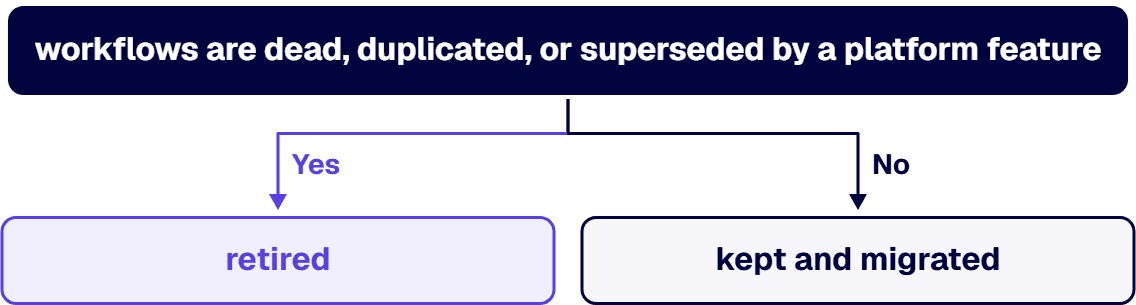
Not every workflow should move. The expensive mistake is treating migration as a fidelity problem, where success means every workflow lands identically on the other side. On a real estate, a meaningful share of the workflows are dead, duplicated, or superseded by a platform feature that did not exist when they were written. Deciding what to retire is the highest-leverage hour on the project. Our SharePoint 2013 workflow retirement and recovery guide works through the triage.
The forms and the workflows are one problem. InfoPath is the usual culprit. A workflow that fires off an InfoPath form cannot be migrated in isolation, because the form has to become something else first, normally Power Apps, and the workflow logic has to be rewritten against the new data shape. Firms that quote the workflow move without pricing the form rebuild are quoting half the job. Our InfoPath migration services page covers that pairing, and migrating SharePoint 2013 workflows to Power Automate covers the target side.
These separate firms with a delivery record from firms with a capability slide. Every one is answerable on a first call.
The forms were never scoped. The workflow inventory was done, the form inventory was not, and the two are the same dependency graph. This is the single most common cause of a slipped date on this class of project.
List-item volume was treated as content volume. A list with hundreds of thousands of items behaves nothing like a document library with the same byte count. Throttling, indexing, and view thresholds all bite at scale, and they bite during cutover rather than during testing.
The workflow author is gone. Nobody can say what a given workflow is for, so nobody will authorize retiring it, so it gets rebuilt at full cost. The fix is not technical. It is getting a named process owner attached to every workflow before triage starts, and it is unglamorous work that has to happen first.
Compliance was a later phase. If the estate carries regulated content, the control mapping is a design constraint on phase one, not a validation step at the end. Regulated-industry SharePoint modernization carries roughly 25 to 35 percent cost overhead versus commercial work for equivalent scope, driven by control mappings, audit-trail discipline, and zero-downtime cutover patterns. A bid that does not carry that overhead has not priced your project.
The honest version of the record. Our case studies describe clients by what they are rather than by name, and we have kept that convention here.
Large scale, high workflow count, three weeks. For a state National Guard organization serving both state and federal missions, i3solutions migrated an aging SharePoint 2013 environment to SharePoint 2019 ahead of a compliance inspection. A custom migration tool moved 34 workflows and more than 336,000 custom list items in three weeks, reducing overall project cost by 25%, approximately $200K to $250K saved versus manual migration. In the same program, 32 InfoPath forms were replaced with Power Apps and Power Automate, cutting maintenance demands by 40%, an estimated $150K to $200K saved annually. The upgraded environment passed the inspection. Read the state National Guard InfoPath and SharePoint migration case study
That is the closest analogue on our record to the question this page answers, and it is the one to press us on.
A federal agency migration with the cost case attached. For a federal international development agency, i3solutions planned and ran a SharePoint migration that reduced migration downtime from weeks to hours. Agency staff save an estimated 15 minutes per user per day, which across hundreds of employees equates to more than 20,000 productive hours annually, valued at over $200,000 in efficiency gains. Retiring on-premises infrastructure eliminated approximately $500,000 per year in hosting, licensing, and maintenance costs. Read the federal agency cloud migration case study
Compiled customizations, not just content. For a national science advocacy nonprofit, i3solutions analyzed a SharePoint 2010 farm carrying over 25 customizations with compiled source code and adapted them for the modern Office 365 environment, engaging directly with over 10 different departments to document requirements. Read the science advocacy nonprofit cloud migration case study
What we are not claiming on this page. We are not claiming a workflow migration at a volume higher than the numbers above, because those are the numbers on the record. We are not naming any of these clients, because the case studies are written with the client anonymised and we are not going to un-anonymise them to make a page read better. We hold no CMMC certification and are not presenting one. And we are not claiming that every custom workflow migrates: on a real estate, some are retired and some are rebuilt, and a firm that tells you otherwise on a first call has not looked at your estate.
We run this work as a defined sequence rather than an open-ended program: discovery and workflow inventory, compliance-weighted triage, sequenced migration, parallel-run validation, and governance handoff. The assessment comes first for a specific reason. Almost every overrun on this class of project traces to an inventory that was wrong at the start, and the inventory is cheap to establish and expensive to discover halfway through.
i3solutions pre-migration SharePoint assessment engagements run four to six weeks. Enterprise InfoPath migration engagements typically run 13 to 16 weeks elapsed time across four phases. If you are already mid-migration and it has gone wrong, i3solutions mid-migration SharePoint rescue engagements run eight to fourteen weeks.
On cost, the attested bands for the workflow half of the work are these. Phase 1, inventory and dependency mapping, typically costs $35,000 to $85,000 for enterprises with 30 to 80 active SharePoint 2013 workflows across multiple site collections. Phase 2, compliance-weighted triage, adds $20,000 to $45,000 depending on the number of compliance frameworks in scope and the depth of audit evidence required. Phase 3, sequenced migration to Power Automate with governance handoff, ranges from $100,000 to $400,000 depending on the number of keep-and-migrate and rebuild workflows. The SharePoint migration cost page carries the content-side bands, and the SharePoint workflow migration cost guide works the workflow bands through in detail.
Thirty-four workflows essential for automating key processes were migrated seamlessly for a state National Guard organization, along with over 336,000 custom list items, in three weeks using a custom migration tool built by i3solutions. That is the largest workflow count on our published record and we do not claim a higher one. In the same program, 32 outdated InfoPath forms were replaced with Power Apps, which reduced maintenance demands by 40%.
No, and the assumption that they do is the most expensive assumption on this class of project. On a real estate a meaningful share of workflows are dead, duplicated, or superseded by a platform capability that did not exist when they were written. The triage step decides which workflows are kept and migrated, which are rebuilt against the new platform, and which are retired. Retiring a workflow costs almost nothing and rebuilding one costs a great deal, so the triage is where the budget is actually set.
Because they are the same dependency. A workflow that fires from an InfoPath form cannot move on its own: the form has to become something else first, normally Power Apps, and the workflow logic has to be rewritten against the new data shape. Firms that price the workflow move without pricing the form rebuild are pricing half the job. Enterprise InfoPath migration engagements at i3solutions typically run 13 to 16 weeks elapsed time across four phases.
The attested bands cover three phases. Phase 1, inventory and dependency mapping, typically costs $35,000 to $85,000 for enterprises with 30 to 80 active SharePoint 2013 workflows across multiple site collections. Phase 2, compliance-weighted triage, adds $20,000 to $45,000 depending on the number of compliance frameworks in scope and the depth of audit evidence required. Phase 3, sequenced migration to Power Automate with governance handoff, ranges from $100,000 to $400,000 depending on the number of keep-and-migrate and rebuild workflows. Regulated-industry work carries roughly 25 to 35 percent cost overhead on top, driven by control mappings, audit-trail discipline, and zero-downtime cutover patterns.
Less accurate than you expect. i3solutions assessment engagements routinely find 20 to 40 percent more SharePoint sites during Phase 1 than the client internal inventory lists, and workflows travel with sites. Treat any vendor quote built on your existing inventory as provisional until an independent discovery has been run against the estate.
All i3solutions SharePoint developers, architects, and consultants are 100% U.S.-based. i3solutions has been a Microsoft Partner with 30 years of enterprise technology delivery experience and has completed 1,500+ Microsoft implementations. Ask every firm on your shortlist where its delivery staff sit and compare how specific the answers are.

US-Based | Est. 1997
© i3solutions. All rights reserved.
US-Based | Est. 1997
© i3solutions. All rights reserved.


