

Most enterprise IT teams believe they’re following Azure security best practices. On paper, the right tools are enabled. Policies exist. Monitoring dashboards are in place. But when environments scale, small configuration gaps quietly expand into serious security risks.
The reality is this: Azure cloud security failures rarely happen because teams lack tools. They happen because foundational controls aren’t implemented consistently.
Azure is powerful, flexible, and enterprise-ready. But that flexibility is exactly what creates complexity. Security in Azure isn’t automatic, it’s architectural.
Microsoft provides secure building blocks, but Azure is not automatically hardened to enterprise standards. Default settings often prioritize usability and speed over strict security. Without deliberate configuration, enterprises may unknowingly leave administrative access too broad, conditional access policies incomplete, or network exposure wider than intended.
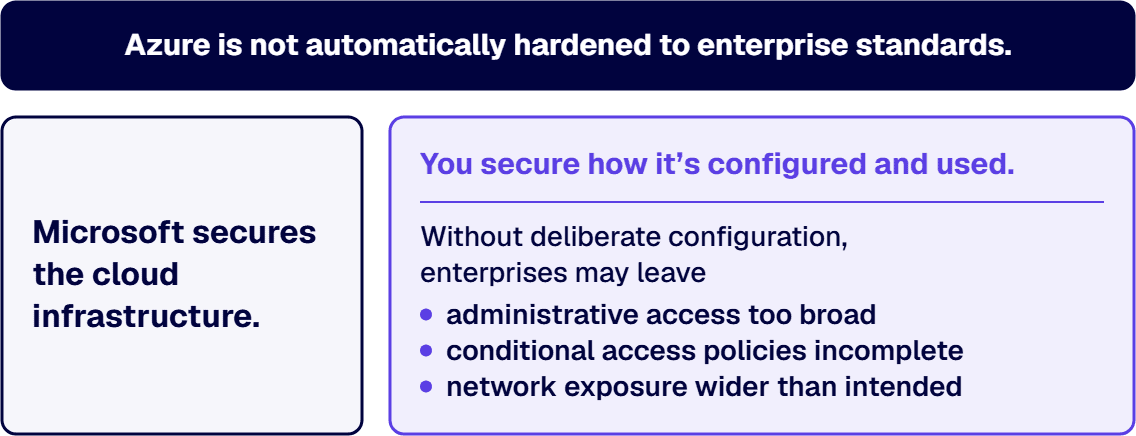
Following Azure security best practices means recognizing that shared responsibility is real. Microsoft secures the cloud infrastructure. You secure how it’s configured and used.
Modern DevOps pipelines allow infrastructure to spin up in minutes. But fast provisioning often bypasses governance review. Resources are created without standardized templates. Security controls are inconsistently applied.
Enterprises frequently mistake operational speed for maturity. In reality, rapid deployment without guardrails is one of the most common Azure cloud security gaps.
In smaller environments, misconfigurations may seem harmless. At enterprise scale, they become systemic risks.
An over-permissioned user in a small tenant is inconvenient. In a global enterprise, that same misconfiguration can expose critical workloads, sensitive data, or production systems. Azure security best practices become exponentially more important as environments grow.
Even mature teams overlook fundamental controls. Here are the high-impact gaps that appear most often during enterprise reviews.
Too many enterprises grant broad permissions “temporarily” and never revisit them. Users retain contributor or owner roles long after their need expires. Dormant accounts remain active. Service principals have excessive rights.
Strong Microsoft Entra ID (formerly Azure Active Directory) security requires routine access reviews and enforcement of least privilege. Without it, identity becomes your biggest attack surface.
When routine access reviews keep turning up the same accounts holding rights they no longer need, the lasting fix is to tie every grant to a business role and its lifecycle events through enterprise identity and access management, so access is removed when the role changes rather than at the next review.
NSGs are powerful, but they’re often configured loosely during early deployment and never hardened. Inbound rules may be overly permissive. Outbound rules may allow unnecessary lateral movement.
Azure security best practices require regular auditing of NSGs and firewall rules to ensure segmentation actually works as designed.
Conditional access policies are frequently created but inconsistently enforced. MFA may apply to some users but not administrators. Geographic restrictions might exist but lack logging.
Inconsistent enforcement undermines Azure cloud security strategy and leaves critical access points exposed.
Enterprises increasingly collaborate with partners and contractors. Guest accounts multiply quickly. Without monitoring and lifecycle management, these accounts linger indefinitely.
This is where Microsoft Entra ID security must include strong guest governance policies and automated expiration controls.
Microsoft Defender for Cloud is powerful, but it is not a substitute for governance. It surfaces recommendations. It does not fix architecture decisions automatically.
Point-to-point integrations solve the immediate problem and create the next one. i3solutions delivers senior-level Microsoft integration services that replace brittle, undocumented connections with governed, architecture-aligned integration designed for enterprise environments that can't afford downtime or data integrity failures.
Assess i3solutions Microsoft Integration ServicesFollowing Azure security best practices means combining Defender insights with proactive configuration management.
Employees change roles. Contractors rotate. Service accounts evolve. Without a structured identity lifecycle process, permissions drift over time.
Leveraging Azure managed identity where possible reduces credential sprawl and minimizes manual secret management risks.
Without consistent tagging, enterprises lose visibility into ownership and accountability. Security controls depend on knowing which teams own which resources.
Azure security best practices require enforced tagging standards through Azure Policy to maintain governance clarity.
Proactive correction is far less expensive than reactive response. Enterprises can strengthen their posture with deliberate action.
In our experience, the order of the review matters as much as the list. We recommend starting where the exposure is largest: privileged identities first (who holds owner or contributor roles, and whether those roles are activated through PIM rather than held standing), then Conditional Access and MFA coverage for those same accounts, then network security group and firewall rules, then Azure Policy, starting on an audit effect and pairing enforcement with remediation for the resources that were already out of compliance. The identity or security lead owns the first two checks and the cloud platform lead owns the last two. Each check is complete only when someone has read the actual role assignments, rule sets and compliance state, not the policy document that describes them.
Use role-based access control (RBAC) to limit permissions to only what is necessary. Pair this with Privileged Identity Management (PIM) so elevated roles are activated only when needed. This significantly improves Microsoft Entra ID security.
Multi-factor authentication should not be optional for privileged users. Conditional access policies must be standardized and enforced across tenants, not applied selectively.
Conduct structured reviews of network boundaries. Validate segmentation. Confirm there are no overly permissive inbound or outbound rules that contradict Azure security best practices.
Defender provides actionable insights, but only if alerts are reviewed and remediation processes exist. Treat Defender recommendations as part of an operational workflow, not a passive dashboard.
Microsoft integration work spans identity, data, APIs, legacy systems, and cloud services simultaneously. When critical expertise is missing mid-project, the failures compound across every system in the dependency chain. i3solutions' Microsoft integration specialists operate at the architecture level from day one, with the regulated-industry experience to deliver inside compliance and security constraints.
Hire i3solutions Microsoft Integration SpecialistsAzure Policy allows enterprises to prevent noncompliant configurations from being deployed in the first place. This shifts security left into deployment pipelines.
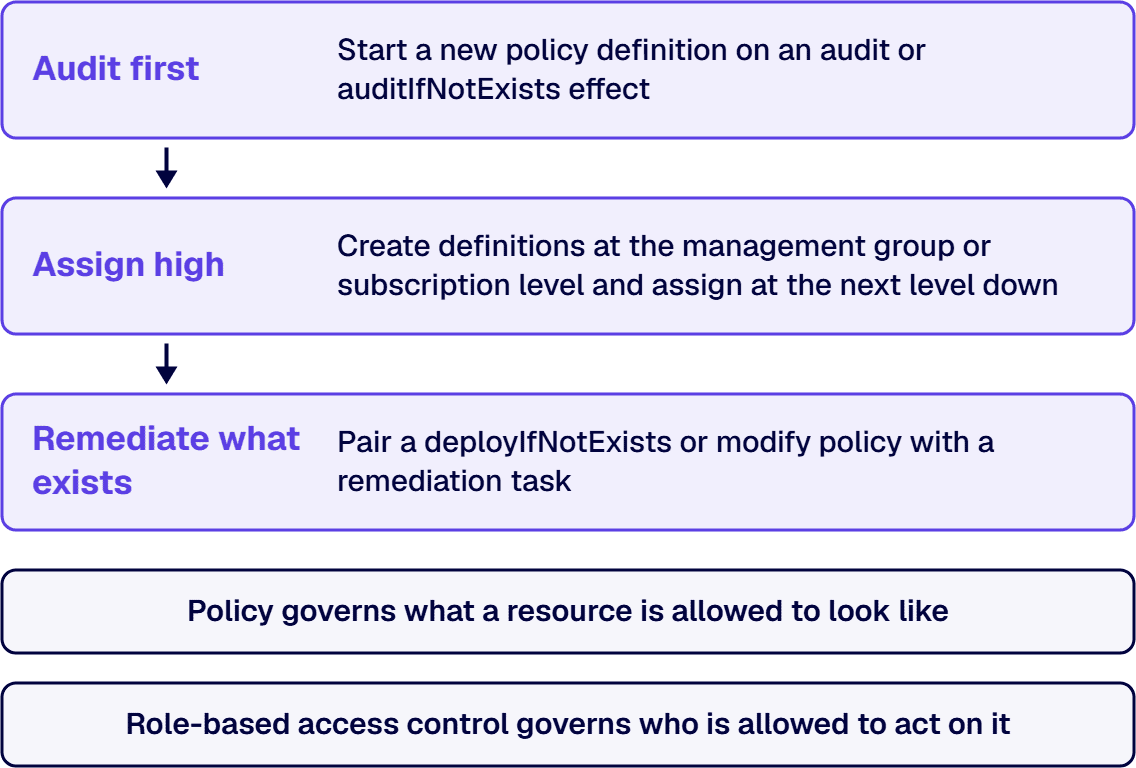
Microsoft’s own guidance sets a specific order. Start a new policy definition on an audit or auditIfNotExists effect rather than an enforcement effect such as deny, modify, or deployIfNotExists, so you can see how the definition affects real resources before it blocks anything. Create definitions at the management group or subscription level and assign them at the next level down, and wrap even a single policy in an initiative from the start, since starting bare makes every later policy its own separate assignment to track. Manage policy definitions, initiatives, and assignments as code, with changes reviewed the way any other infrastructure change is reviewed. Enforcement only stops new drift; it does nothing for the resources that were already noncompliant before the policy existed, so pair a deployIfNotExists or modify policy with a remediation task that brings existing resources into a compliant state. Where a resource genuinely should not comply, record it as an exemption, marked either mitigated, because the policy’s intent is met another way, or waiver, because the noncompliant state is temporarily accepted, so the compliance view tells an auditor why the exception exists rather than just that it does. Policy governs what a resource is allowed to look like; role-based access control governs who is allowed to act on it, and the two controls are not substitutes for each other. i3solutions maps governance to named control families, enforces it in the platform through Entra ID, Purview, and Azure Policy, and evidences it continuously rather than reconstructing it at audit.
Secure landing zones define pre-approved architectures that enforce governance from day one. Infrastructure-as-code templates reduce drift and maintain alignment with Azure security best practices.
Microsoft supplies robust tools, but many enterprises fail to operationalize them.
These tools are most effective when integrated into governance workflows rather than treated as optional dashboards.
A truly mature Azure cloud security posture includes structural consistency.
Identity, network, data, and application layers all reinforce each other. Zero-trust principles apply across every access point.
Security teams cannot manually monitor everything. Automation ensures configuration drift is detected and corrected quickly.
Policies, standards, and procedures must be documented and repeatable. Security cannot rely on tribal knowledge. Sustainable Azure security best practices require institutionalized governance.
Azure security best practices are not optional in enterprise environments, they are foundational. The gap between assumed security and actual implementation is where risk lives. Small oversights today become major exposure tomorrow.
At i3solutions, we help enterprises assess, strengthen, and operationalize Azure cloud security at scale. From identity governance to secure landing zones and policy enforcement, we work with infrastructure and security teams to close gaps before they become incidents.
If your organization assumes the basics are already covered, it may be time for a second look. Secure Azure environments are built intentionally, and maintained continuously.

Justin has spent more than 15 years at i3solutions and more than 25 years leading project, program, and product delivery across complex technology environments. His work centers on turning strategy into governed execution, aligning technical teams and stakeholders, managing delivery risk, and guiding Microsoft 365, SharePoint, Power Platform, cloud, data, automation, and custom application programs through measurable production outcomes.
View LinkedIn Profile


Most enterprise integration problems aren't caused by missing tools. They're caused by years of one-off connections built without architectural alignment, documentation, or governance. i3solutions' senior Microsoft integration advisors work with IT leaders who already know the integration layer is a liability and need a structured approach to stabilization.
Talk to a Microsoft Integration Advisor
US-Based Microsoft System Integrator | Est. 1997
© i3solutions. All rights reserved.
US-Based Microsoft System Integrator | Est. 1997
© i3solutions. All rights reserved.


