
Quick Answer
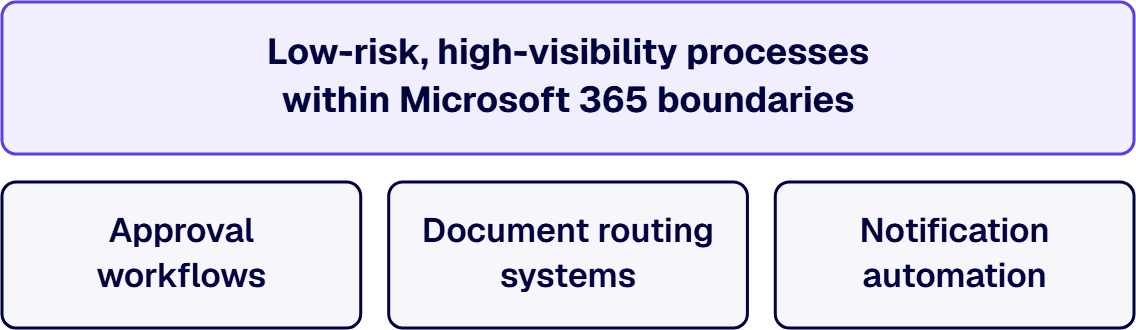
Year-one Power Automate success requires selecting low-risk, high-visibility processes that operate within Microsoft 365 boundaries while delivering measurable business impact. Focus on approval workflows (reducing cycle times from 5-7 days to 2-4 hours), document routing systems (eliminating 40% of manual handoffs), and notification automation (achieving 95% completion rates vs. 70% manually). The goal is proving platform value within existing governance frameworks through 8-12 carefully chosen automation wins that establish reusable patterns for sustainable scaling.
Enterprise IT leaders face a critical challenge when rolling out Power Automate: how to demonstrate clear business value while maintaining the governance standards that large organizations require. The key lies in selecting the right initial use cases, processes that deliver measurable impact without introducing new architectural risk or compliance concerns.
A strategic approach focuses on building internal credibility through carefully chosen automation wins that operate within existing Microsoft 365 boundaries. Organizations that apply this disciplined selection criteria achieve significantly higher adoption rates and avoid the governance escalations that can stall broader automation initiatives.
Year one with Power Automate is not about transforming your entire operation. It’s about proving the platform can deliver measurable value within your existing governance framework. The primary objective is building internal credibility while establishing the architectural patterns and operational discipline that will support broader automation initiatives in years two and three.
Successful year-one programs focus on processes that already have clear ownership, defined approval chains, and predictable data flows. In regulated environments, this typically means starting with workflows that operate within Microsoft 365 boundaries: approval chains routing through SharePoint, document reviews staying in Teams, or notification sequences connecting Outlook to existing line-of-business systems without moving sensitive data.
The risk profile remains manageable because you’re automating manual steps in processes that already exist and are already governed. A finance team that manually routes expense approvals through email can automate that routing without changing the underlying approval authority or audit trail requirements.
Business stakeholders need to see that automation makes their work more predictable, not more complex. Risk owners (Security, Compliance, Internal Audit) need to see that automated processes are more auditable and controlled than the manual processes they replace.
Every year-one flow should include proper logging, clear ownership documentation, and rollback procedures. When a Power Automate flow handles vendor onboarding, the audit trail should be cleaner and more complete than the previous email-and-spreadsheet process. Security teams should be able to see exactly what data moves where, with proper connection governance and DLP policy alignment.
Year one establishes the environment structure, connection standards, and support model that will support dozens or hundreds of flows in later years. This includes setting up proper development, test, and production environments, establishing a Center of Excellence (CoE) framework, and training internal teams on the governance patterns that keep automation sustainable.
Organizations that skip this foundation work often hit a wall in year two when they have 50+ flows built by different teams with inconsistent patterns, unclear ownership, and no systematic way to manage changes or troubleshoot issues.
Successful Power Automate rollouts in large enterprises start with deliberate use case selection. Enterprise IT leaders who choose the wrong initial use cases often face security reviews, compliance questions, or adoption resistance that stalls broader automation initiatives for months. Effective year-one selection requires balancing three dimensions: architectural risk, business visibility, and technical feasibility within existing Microsoft 365 environments.
Year-One Use Case Selection Criteria
The most successful year-one Power Automate rollouts focus on processes that deliver clear business value while staying within established governance boundaries. These ten categories represent the sweet spot: high visibility, moderate complexity, and natural alignment with Microsoft 365 data sources.
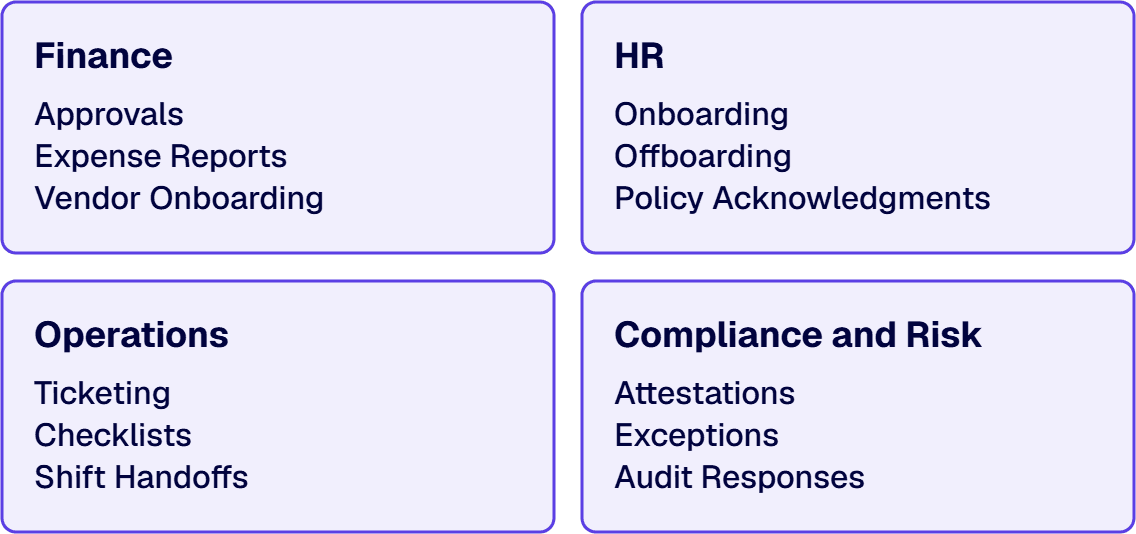
Invoice approval workflows replace email chains with structured approval paths, reducing processing time from 5-7 business days to 2-4 hours while maintaining complete audit trails. Purchase requisition flows integrated with existing ERP systems have eliminated 90% of duplicate data entry in client implementations.
Expense report processing automates receipt validation and routing, cutting approval cycle time from 10-14 days to 3-5 days while improving audit trail compliance.
Vendor onboarding workflows standardize documentation collection and compliance checks across departments, reducing setup time from 2-3 weeks to 5-7 business days. These finance processes work well because they involve structured data, clear business rules, and stakeholders who understand the value of audit trails.
New hire onboarding orchestrates account provisioning, equipment requests, and training assignments across multiple systems, eliminating 40% of manual HR tasks and reducing new hire setup time from 3 days to 6 hours.
Employee offboarding ensures consistent deprovisioning and asset recovery, eliminating security gaps from manual checklists. This is one of the highest-risk processes to leave unautomated in regulated environments.
Policy acknowledgment tracking automates distribution and follow-up for compliance training, achieving 95% completion rates compared to 70% with manual email-based processes. HR processes benefit from Power Automate’s integration with Active Directory, SharePoint, and Teams.
IT help desk escalation routes tickets based on category and priority, improving first-response times by 60% and reducing manual triage workload by 35%.
Maintenance checklist automation guides technicians through standardized procedures and captures completion data for compliance reporting.
Ungoverned environments, app sprawl, and undocumented automations don't plateau. They accelerate. i3solutions delivers senior-level Power Platform development, governance, and modernization services built for enterprise environments where platform complexity has already outpaced internal capacity.
Assess i3solutions Power Platform ServicesShift handoff documentation structures communication between teams with automated checklists. In manufacturing environments, this has reduced missed items by 80% and improved safety compliance. Document approval chains have been reduced from 8-12 email exchanges to 2-3 automated notifications with full audit history.
Risk attestation workflows automate quarterly compliance certifications, providing audit trails and automated follow-up for missing responses.
Exception request processing standardizes approval paths for policy deviations, ensuring proper documentation and time-bound approvals.
Audit response coordination tracks document requests and deadlines. Risk exception tracking workflows provide real-time dashboard visibility replacing monthly Excel-based reporting. Compliance processes are particularly valuable because they demonstrate Power Automate’s ability to strengthen governance rather than circumvent it.
Successful year-one implementations require governance discipline from the first flow. The goal is predictable, supportable automation that scales without creating new risk.
Every Power Automate flow should be developed in a dedicated development environment, tested in staging, and deployed to production through a controlled release process. Flows built directly in production create audit exposure and make troubleshooting nearly impossible when issues arise.
Connection management is equally critical. Establish service accounts for system-to-system flows rather than using personal accounts that expire when employees leave. Document which connections access what data sources, and implement the principle of least privilege: a finance approval flow should not have access to HR systems, even if technically possible.
Environment Management Requirements
Not all connectors are enterprise-ready. Premium connectors that move sensitive data outside your tenant boundaries require careful evaluation. DLP policies should be configured before the first flow goes live. These policies prevent accidental data exposure by blocking high-risk connector combinations.
DLP Policy Configuration Checklist
Every flow needs a documented owner, support contact, and change control process. When a flow breaks at 2 AM, someone needs to know who to call. Change control prevents well-meaning modifications from breaking production flows. Implement approval workflows for flow modifications, and maintain version history. This documentation becomes critical during audits and when onboarding new team members.
Required Documentation for Each Production Flow
Year-one Power Automate success depends on capturing measurable impact that resonates with both technical and business stakeholders. The metrics you track become the foundation for securing budget and executive support for broader automation initiatives.
App sprawl, ungoverned environments, and brittle automations don't get fixed by adding more contractors. They get fixed by senior specialists who understand enterprise Power Platform architecture, governance, and compliance. i3solutions provides senior-level, 100% US-based Power Platform specialists experienced in regulated-industry delivery.
Hire i3solutions Power Platform SpecialistsFocus on concrete operational metrics that translate directly to cost avoidance. Document baseline cycle times before automation, then measure improvement consistently. A finance approval workflow that drops from 5 days to 8 hours represents 80% cycle-time reduction, quantifiable impact that finance leaders understand.
Track error reduction through exception reports and audit trails. Power Automate’s built-in logging captures every step, approval, and data transformation, providing audit-ready documentation that manual processes cannot match. In regulated environments, this audit trail often justifies the automation investment independently of time savings.
Measure manual touchpoints eliminated rather than just “time saved.” A vendor onboarding process that removes 12 manual handoffs and 3 email chains shows concrete operational improvement, even if total time savings are modest.
Create executive dashboards that show automation portfolio health: flows running successfully, exceptions handled, and business impact delivered. Use Power BI to visualize trends in cycle time, error rates, and user adoption across your automation portfolio.
Frame impact stories around business outcomes, not technical features. “Reduced compliance reporting preparation from 40 hours to 4 hours” resonates more than “automated 15 SharePoint list updates.” Connect each automation win to broader business priorities like risk reduction, customer experience, or operational efficiency.
A specialized partner brings proven patterns, governance frameworks, and delivery velocity that internal teams typically cannot match in year one. Partners arrive with libraries of tested automation patterns for common enterprise processes, rather than building each approval workflow from scratch, they leverage documented templates that include proper error handling, logging, and security boundaries. This pattern-based approach reduces development time by 40-60% while ensuring consistency.
Partners also establish governance structures before building the first flow: environment strategy, DLP policy configuration, connection management, and change control. Internal teams often build first and govern later, creating technical debt that partners help avoid. Co-delivery models work alongside internal teams rather than replacing them, transferring knowledge while maintaining delivery velocity.
i3solutions approaches year-one Power Automate programs with our Power Automate developers follow a three-phase delivery model designed to minimize risk while building internal capability.
Every engagement begins with a 2-week assessment that inventories existing automation attempts, evaluates current governance posture, and identifies the 15-20 highest-value use cases across business units. We score each use case against four criteria: business impact, technical complexity, data risk, and organizational readiness. The output is a prioritized roadmap with three waves of automation releases, each containing 3-5 flows that build on previous successes. In regulated environments, this assessment phase includes DLP policy review and connector risk evaluation. Enterprises typically have 40-60 potential automation candidates, but only 8-12 are suitable for year-one delivery when governance constraints are properly applied.
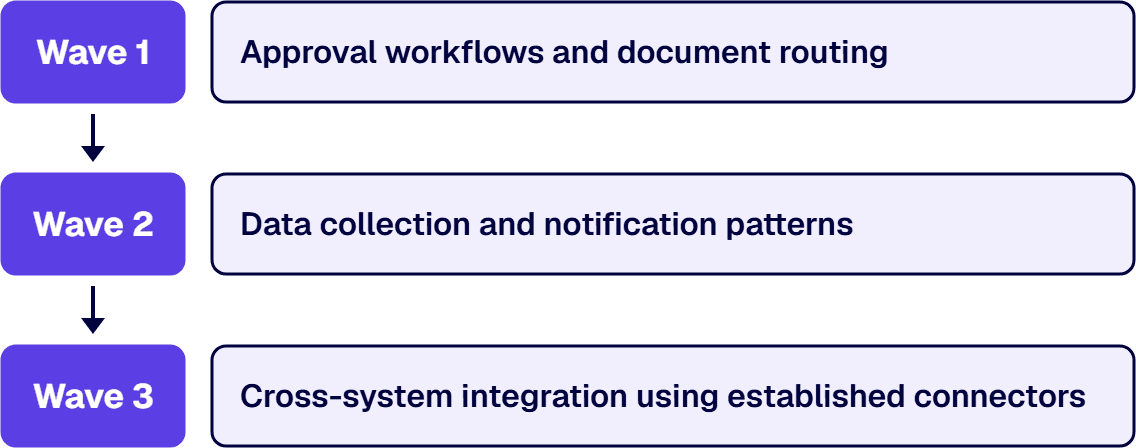
Each wave runs as a 6-8 week delivery pod with dedicated business analyst, developer, and governance resources. Wave 1 focuses on approval workflows and document routing. Wave 2 adds data collection and notification patterns. Wave 3 introduces cross-system integration using established connectors. Our delivery pods use standardized environments, connection references, and solution packaging from day one.
The final phase establishes internal Center of Excellence (CoE) capabilities with documented standards, support processes, and expansion criteria. By year-end, client teams typically manage 15-25 production flows independently while maintaining the architectural patterns established during our engagement.

Michael Branson co-founded i3solutions 30 years ago and brings executive, operational, and technical perspective to organizations working in complex, secure, and mission-critical environments. His insights focus on business process consulting, automation, data analytics, collaboration, secure operating models, and the operational discipline required to turn technology investments into practical business systems with measurable value.
View LinkedIn ProfileFocus on processes with clear business ownership, predictable data flows, and high stakeholder visibility. The best year-one candidates are approval workflows (reducing cycle times from 5-7 days to 2-4 hours), document routing systems (eliminating 40% of manual handoffs), and notification systems that operate within Microsoft 365 boundaries using standard connectors like SharePoint, Outlook, and Teams. Avoid complex cross-system integrations or processes with unclear approval chains.
Establish proper development/test/production environments with automated deployment pipelines, configure DLP policies to prevent data leakage (blocking SharePoint-to-consumer-email flows), create service accounts for system connections rather than personal accounts, and document ownership and support responsibilities. Every flow should have clear business logic documentation, change control procedures, and audit-ready logging that captures every step, approval, and data transformation.
Well-chosen year-one use cases typically show measurable impact within 30-60 days of deployment. Invoice approval workflows often reduce processing time from 5-7 days to 2-4 hours (80% cycle-time reduction), while onboarding automation can eliminate 40% of manual HR tasks immediately. Focus on cycle-time reduction and manual touchpoint elimination for fastest ROI demonstration to executives.
Partners accelerate year-one success through proven automation patterns that reduce development time by 40-60%, governance frameworks, and co-delivery models that transfer knowledge while maintaining velocity. Internal teams often build first and govern later, creating technical debt around connection management, environment sprawl, and inconsistent patterns. Look for partners with enterprise-grade templates, documented CoE setup methodology, and structured knowledge transfer processes.
The primary risks are governance gaps (missing DLP policies that allow data leakage), using personal accounts for system connections (creating security vulnerabilities when employees leave), and choosing complex cross-system integrations for initial use cases that trigger security reviews. Other risks include inadequate environment management (building directly in production) and missing change control processes that allow unauthorized flow modifications.
Most successful year-one programs deploy 8-12 flows across 3-4 business areas using a wave-based approach: 3-4 flows in Wave 1 (approval workflows), 3-4 in Wave 2 (data collection and notifications), and 2-4 in Wave 3 (cross-system integration with established connectors). This provides sufficient impact demonstration while maintaining manageable governance overhead and allowing proper testing, documentation, and user training for each wave.
Implement governance from day one with proper environment structure (dev/test/prod separation), DLP policies that classify connectors by business data groups, and CoE frameworks with documented standards and approval processes. Require documented ownership and change control for every flow using standardized templates and connection references. Establish regular governance reviews with automated monitoring for policy violations.


The faster Power Platform adoption scales, the faster ungoverned environments, undocumented apps, and unmanaged connectors become enterprise liabilities. i3solutions' senior Power Platform delivery advisors work with IT leaders who already know the environment has outgrown its controls and need a structured approach to regaining operational command.
Talk to a Power Platform Delivery Advisor
US-Based | Est. 1997
© i3solutions. All rights reserved.
US-Based | Est. 1997
© i3solutions. All rights reserved.


