

Quick Answer
In a regulated enterprise, a business-critical spreadsheet is a compliance problem, not just a productivity one. Excel can’t enforce integrity, control access, or produce a reliable audit trail; a database or governed application provides all three. Move multi-user, process-critical, audit-relevant data to a database, and keep analysis, financial modeling, and single-owner calculations in Excel.
When a business-critical process runs on a spreadsheet in a regulated enterprise, the question is not whether Excel still works; it is whether you can defend it. A spreadsheet that multiple people edit, that feeds decisions or payments, and that an auditor may examine has no real concurrency, no enforced integrity, and no reliable trail of who changed what. Migrating that data to a proper database or governed application gives you the integrity, access control, and auditability the spreadsheet cannot. The discipline is to move what has outgrown Excel and leave genuine analysis where it belongs. i3solutions has made this move at scale, including a rebuild that eliminated version-control errors across hundreds of estimates.
A mortgage services firm replaced manual spreadsheet-and-phone data entry with an online intake system and raised team productivity by 75 percent.
Almost every regulated enterprise runs at least one important process on a spreadsheet that quietly became a system of record. It began as a working file and now holds data that matters, edited by several people, emailed in conflicting versions, with a formula or two that no one fully trusts. In an unregulated setting that is a productivity problem. In aerospace, financial services, or healthcare it is also a compliance problem, because the spreadsheet cannot give you the things an auditor and a control framework expect.
The case for migrating turns on three properties a database or governed application provides and a spreadsheet cannot.
Integrity you can enforce. A spreadsheet will let someone overwrite a formula, paste into the wrong column, or break a reference, silently. A database enforces data types, validation, and relationships, so the data has guardrails rather than relying on everyone being careful. When numbers feed a decision, a payment, or a regulatory report, enforced integrity is the difference between a control and a hope.
Access you can control and prove. A spreadsheet’s access control is whoever has the file. A database controls who can read and change each part and records it, so you can both restrict access and demonstrate that you did. In a regulated context, being able to prove who could touch the data is not a nicety, it is the audit.
A trail you can produce. Spreadsheets do not reliably record who changed what and when. A database or governed application keeps that history, which is exactly the evidence a regulated enterprise has to produce on demand and cannot reconstruct after the fact.
What to move and what to keep is the part teams get wrong in both directions. Move the data that has outgrown Excel: multi-user, process-critical, audit-relevant datasets where integrity and provability matter. Keep in Excel what Excel is genuinely for: analysis, financial modeling, one-off calculations with a single owner. The mistake is not having spreadsheets; it is leaving regulated, multi-user, business-critical data in one because that is where it started, and discovering the gap during an audit rather than before it.
What the migration delivers when the data warrants it is concrete. For a global aerospace and defense manufacturer, i3solutions rebuilt a spreadsheet-bound estimating process into a governed application, which eliminated the version-control problems and broken formulas that had been quietly corrupting hundreds of estimates, returned about eight hours a month to each engineer, and cut approval cycles from five days to one. The productivity gain was real, but in a regulated enterprise the more important outcome was the one that does not show up as a number until you need it: data with enforced integrity, controlled access, and a trail you can produce. That is what you are actually buying when you move business-critical data out of Excel.
An Excel migration moves business-critical spreadsheet logic into a governed data platform such as SQL Server, Azure SQL, or Microsoft Dataverse, with a Power Apps or Power BI layer replacing the manual workbook. The harder work is not copying rows: it is reconstructing the formulas, validation rules, and access controls the spreadsheet enforced informally, so the same calculations survive an audit. A disciplined Excel migration preserves every downstream report and applies the column-level and row-level permissions Excel cannot enforce, drawn from patterns proven across our application development and modernization work. For a regulated enterprise, that converts an undocumented workbook into a system with a defensible, board-ready change history.
A spreadsheet to database migration moves a workbook that became a system of record into SQL Server, Azure SQL, or Dataverse, rebuilding its formulas as validated logic and its informal access rules as enforced permissions. Parallel-run validation proves the new system matches the workbook before anyone retires the spreadsheet, so the audit evidence is a byproduct of the migration rather than a scramble after it.
Run the replacement alongside the workbook, then move people across in waves on scheduled dates, each wave with a written pass condition and a recorded way back. One system is authoritative at a time: the workbook stays the system of record until the new application reproduces its results on the same inputs and a named owner accepts that comparison, and only then does a wave switch.
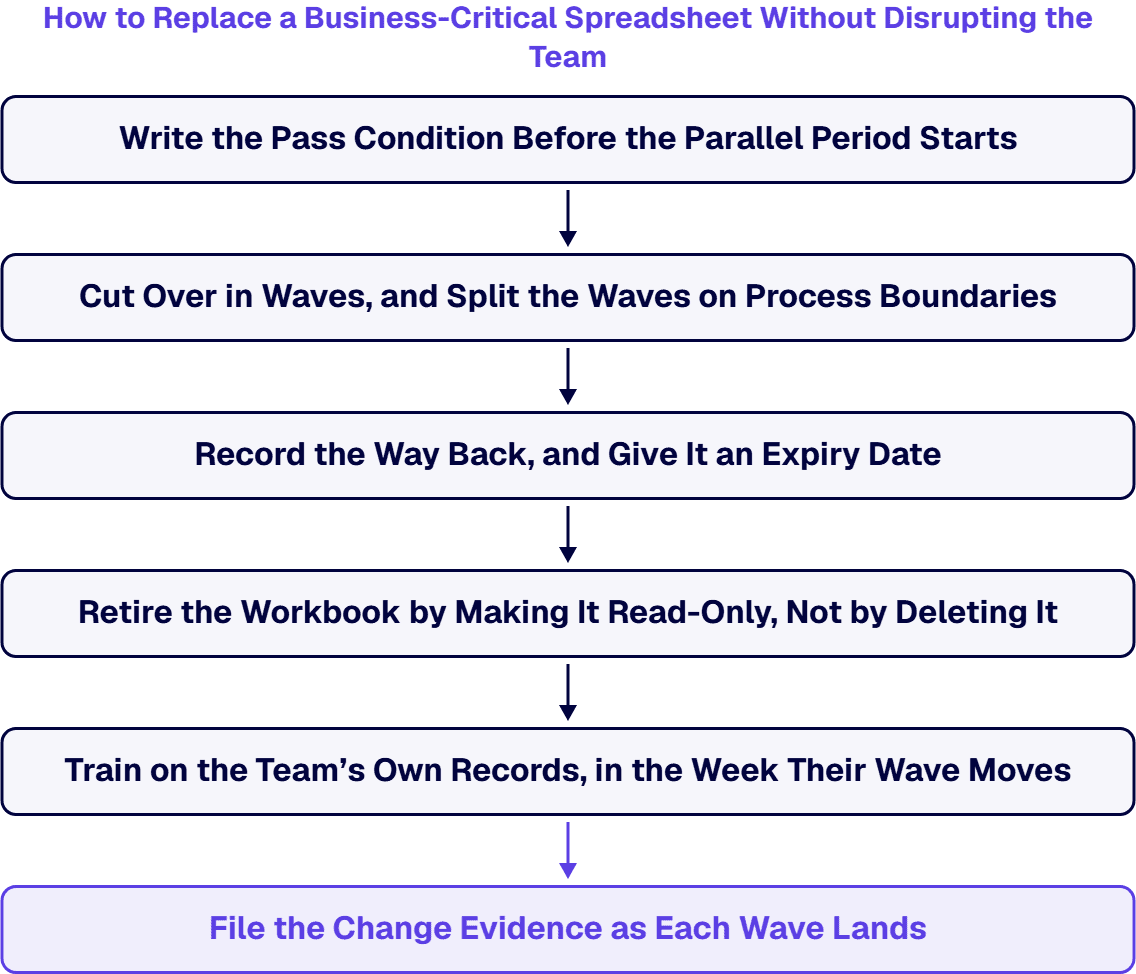
Decide what has to reconcile before the first record moves: which reports, over which period, and to what tolerance. Name the artifact that carries the evidence, such as a reconciliation export from the new application set against the same period in the workbook, and name the owner who accepts it. A parallel period with no written pass condition gives that owner nothing to measure.
Choose a first wave that owns a complete part of the process end to end, so its work does not have to cross back into the workbook mid-task. Split the later waves the same way, on process boundaries and not on headcount, because a group that hands work to another group halfway through will be operating in both systems for as long as that split lasts.
Before a wave moves, write down what returning to the workbook would take: which entries would need re-keying, and who holds the last exported copy the group could work from. Put an expiry date on that way back and record it with the wave, so the parallel period ends on a decision and a date.
On the day a wave switches, set that group’s workbook to read-only in the library it already lives in, and keep it under the retention rule that already applies to it. Deleting it on the switch date removes the copy an auditor may ask to compare against, and the reference point for any later question about what the old process produced.
Walk the group through the new application using records they recognize, in the environment they will use, in the same week their wave switches. Three things a workbook user has to relearn are worth covering explicitly:
Each wave produces the same short set of artifacts: the reconciliation it passed on, the permissions the new application applies to that group, and the date its workbook went read-only. Filing those as the wave lands keeps the change record current with the migration instead of reconstructing it from memory at the end.
Every formula workaround, manual data transfer, and unversioned copy adds operational exposure that compounds silently. i3solutions delivers senior-level Excel-to-web application development services that convert business-critical spreadsheet workflows into governed, scalable web applications built for enterprise environments.
Assess i3solutions Excel-to-Web Services
For a regulated organization the migration is only finished when it can be defended. i3solutions runs these Excel to database migrations against named control families across CMMC, HIPAA, SOC 2, and NIST 800-171, and each migration produces artifacts an auditor can actually review. A phased migration with parallel-run validation proves the new system matches the workbook it replaces before anyone retires the spreadsheet, so the compliance evidence is a byproduct of the work rather than a scramble after it.
If you are still weighing the destination, our comparison of an Excel-to-web rebuild vs Power Platform modernization shows when each path wins.
For sequencing the move across a portfolio of workbooks, the Excel transformation roadmap lays out the stages enterprises follow.

Michael Branson co-founded i3solutions 30 years ago and brings executive, operational, and technical perspective to organizations working in complex, secure, and mission-critical environments. His insights focus on business process consulting, automation, data analytics, collaboration, secure operating models, and the operational discipline required to turn technology investments into practical business systems with measurable value.
View LinkedIn ProfileBecause a spreadsheet cannot enforce data integrity, control and prove access, or produce a reliable change history, which are exactly what a regulated enterprise needs when data feeds decisions, payments, or regulatory reports.
Multiple editors with no concurrency, no enforced validation so formulas can be silently broken, access control that is just file possession, and no reliable trail of who changed what. An auditor expects all of those, and a spreadsheet provides none.
Genuine analysis, financial modeling, and one-off calculations with a single owner and a short life. Moving those to a database adds overhead for no benefit.
Enforced integrity through data types and validation, controlled and provable access per user, and a change history you can produce on demand, plus the ability to feed processes and reporting reliably.
Real productivity too. One Excel-to-application rebuild returned about eight hours a month to each engineer and cut approval cycles from five days to one, while removing version-control errors across hundreds of estimates.


Business-critical Excel workflows that started as one person’s solution are now embedded in daily operations with no version control, no access governance, and no continuity plan. i3solutions’ senior application development advisors work with IT leaders who already know the spreadsheet is a liability and need a structured path to a governed web application.
Talk to an Application Development Advisor
US-Based | Est. 1997
© i3solutions. All rights reserved.
US-Based | Est. 1997
© i3solutions. All rights reserved.


