
By Michael Branson
Your Dataverse migration path should route each Access database, Excel workbook and SharePoint list by what its data does, not by where it lives today. Shared, relational data moves to Dataverse or Azure SQL, a one-team list stays put, and a move to either changes licensing and access.
If a security review or an audit finding has just surfaced a dozen Access databases, a shelf of business-critical workbooks and a set of SharePoint lists at once, the question on your desk is which of them goes where, and in what order. Microsoft documents how to move each kind of source. For Access, its Access migration page, linked in the table below, says “Migration is handled in Access using the export feature,” with a migration tool for the rest. That answers how one file moves. It does not say which files should move, which destination each belongs in, or what your licensing and access model look like on the other side.
This page assumes you have already decided that Dataverse belongs in your estate. Whether to choose Dataverse at all is covered in Enterprise Dataverse Development & Integration Services for a Governed Data Foundation, and whether outside help fits that choice in Dataverse Consulting. Is it Right for Your Enterprise?. What follows is the route for data that already exists.
When the three kinds of source sit in one inventory, each one reaches Dataverse by a different Microsoft route, and each route leaves something behind that your team has to rebuild on purpose. Every quoted statement in the table comes from the Microsoft Learn page named in its row, as read on September 18, 2026.
Two route details matter in a regulated tenant. In a government cloud, Microsoft states that “Import from Excel or CSV file using the Import > Import data from Excel command isn’t available in GCC, GCC High, and DoD environments,” and gives the workaround of choosing Import, then Import data, from the Tables area in Power Apps. And if your data loss prevention policies block one connector, the dataflow route can fail: “If you use data loss prevention (DLP) policies to block the HTTP with Microsoft Entra (preauthorized) connector then SharePoint and OData connectors will fail.”
A workbook whose macros carry business logic is a different job from a data load, and its conversion is covered in Excel Formulas and VBA in a Web Application Conversion: What Is Preserved and What Must Be Rebuilt. A workbook that runs a process, not just holds data, is a workflow migration, covered in Excel to Power Platform: Replace Legacy Workflows in 90 Days. If the workbook must become a governed web application rather than a data load, see Excel to web application consulting.
Before any source moves, run it through five questions in this order and stop at the first one that places it. The limits named here are Microsoft’s, from Dataverse for Teams vs. Dataverse and About the Microsoft Dataverse for Teams environment.
A source that clears all five, contained team data under the Teams limits with no audit need, can live in Dataverse for Teams. When two answers pull in different directions, question 3 outranks size and cost: data an auditor needs traced goes to full Dataverse or Azure SQL even when it would fit in a team environment.
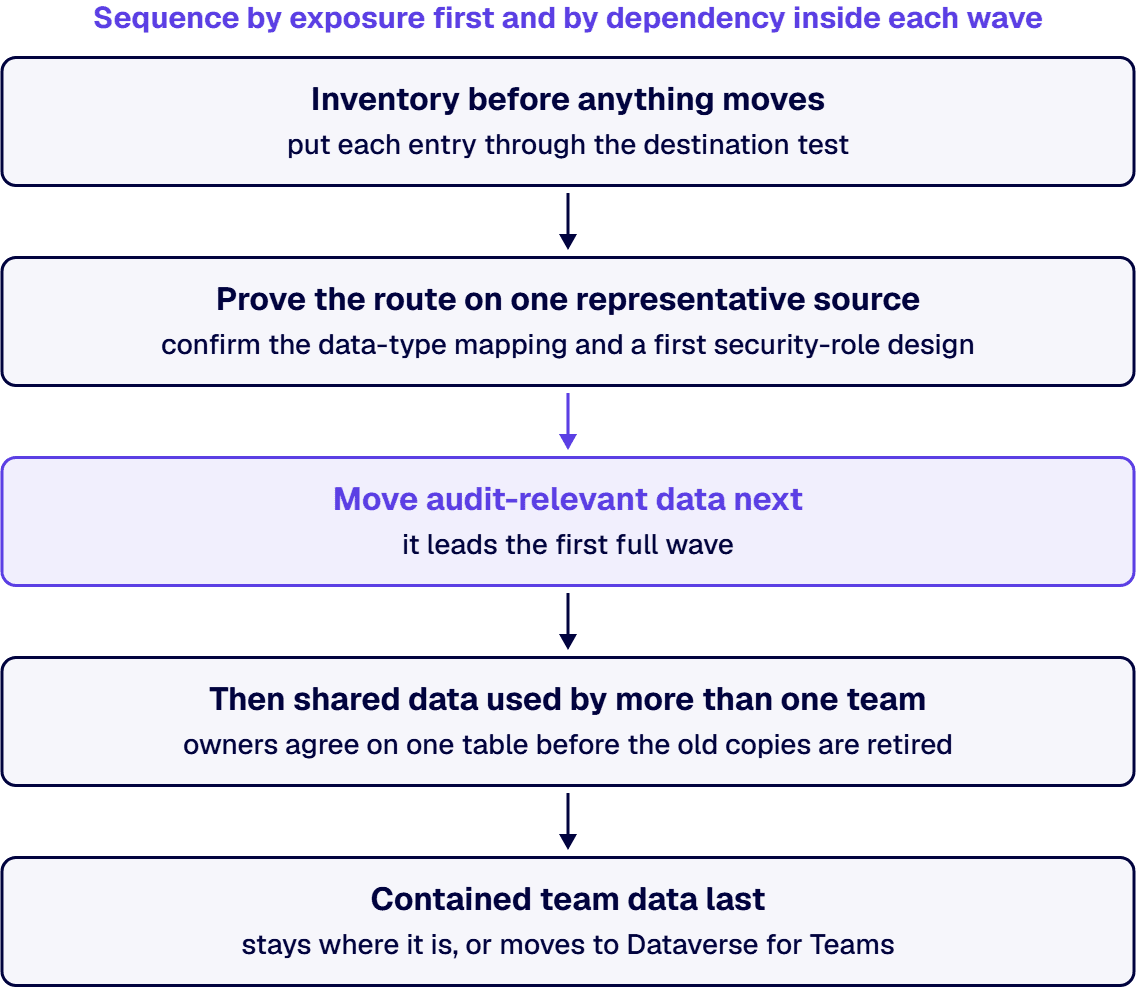
If you have to defend the order to a budget or governance review, sequence by exposure first and by dependency inside each wave.
Inside each wave, a table that other tables look up moves before the tables that look it up, so each relationship has a target on arrival. If the exposure order and the dependency order disagree, dependency wins inside the wave: a regulated table that references a shared customer or product list waits for that list, because moving it first strands its relationships.
Plan one capacity step into the same sequence. Upgrading a team environment is gated by the tenant: Microsoft states that “the tenant must have at least as much available capacity as the size of the Dataverse for Teams environment that’s being upgraded,” and that when capacity falls short, “the upgrade operation is blocked and an error message is displayed.”
When a list or a workbook becomes a Dataverse table, the users who read it move onto a different license footing, and your budget review needs to see that change before the first wave moves. Microsoft’s Licensing overview for Microsoft Power Platform sets out the terms read here, and states that “Licensing programs and product terms can change.”
Azure SQL is licensed and billed on a different model, compared in the Dataverse vs SQL Server page linked above. How Dataverse storage is priced in GCC, GCC High and DoD is covered in Is Dataverse Storage Priced Differently in Government Clouds? What GCC, GCC High and DoD Buyers Pay.
If an Access file’s only control is the file share’s permissions, anyone who can open the file can reach its tables. A SharePoint list that inherits its site’s permissions is readable by everyone the site is shared with. A workbook sent as an attachment is controlled by whoever holds a copy. None of those models arrives in Dataverse on its own.
Dataverse starts from the opposite default. Microsoft’s What is Microsoft Dataverse? page says “Data is securely stored so that users can see it only if you grant them access,” and that “You can combine business units, role-based security, row-based security, and column-based security to define the overall access to information that users have in a Power Platform environment.” The licensing overview adds: “A user’s presence in an environment doesn’t grant access to Dataverse data. The user must still have an appropriate security role and any required product license.”
So the migration moves tables and rows, and who may read them becomes a role design your team makes and can show an auditor. Dataverse for Teams is simpler by design: Microsoft’s comparison says “access is preconfigured with a security role based on membership type such as owners, members, or guests,” and that “when a team is deleted, the associated environment is also deleted.” A source bound for a team environment inherits both of those facts. How Dataverse security roles should be designed is covered on the Dataverse pillar page linked in the first section.
When the reason for moving is ownership and access control and the Access forms still do their job, Microsoft’s default Access path can be enough: the tables move, and users stay in the Access desktop client against Dataverse data. When the table design itself is the problem, a lift carries the problem across. Three signs point that way: a Unique Index that enforces a business rule, which Microsoft lists as not supported for migration; data types Dataverse does not support; and workbook tabs or yearly copies of one table that stand in for a single table with a date column. Each of those is redesigned before the move, in the proving step of the sequence above.
When an IT team brings i3solutions an estate of legacy data sources, the work happens inside the customer’s own Microsoft tenant, and the destination for each source follows the test above. Between the two Microsoft data stores, the deciding factor is scale: a primary relational store built for scalable, high-volume transactional data points to Dataverse, with application secrets kept in Azure Key Vault rather than in the data store itself. For workbooks whose macros carry the logic, the conversion generally has two targets: Power Apps canvas or model-driven applications on Dataverse, or a custom web application on Azure App Service backed by Azure SQL.
For regulated estates, migrations are typically run against named control families such as CMMC, HIPAA, SOC 2, and NIST 800-171, with artifacts produced for auditor review. Whether a design meets a regime is the customer’s determination, made with its auditor. When you are ready to staff the work itself, the team is described in Hire US-Based Dataverse Developers and Microsoft 365 Experts, and the shape of a consulting engagement in Dataverse Consulting for Regulated Microsoft Enterprises: What the Engagement Actually Looks Like.
If your estate is one failing Access application rather than a portfolio, this sequence is more process than the problem needs. Stabilizing that one app and deciding whether to patch or rebuild it is covered in Replace Microsoft Access: Stabilize the Failing App, Then Decide, and who rebuilds it in Who Rebuilds a Failing Microsoft Access Application Into a Secure Web App?. A single business-critical spreadsheet moving to a governed database is covered in Excel to Database Migration Consulting for Regulated Enterprises: What to Know Before Moving Business-Critical Data. The triage earns its cost when several sources share data, owners or an audit scope, because that is where order and licensing decisions interact.
If you hold an inventory like the one in step 1 of the sequence and need to place each source, the first conversation walks your own list through the destination test and the sequence above, source by source.
If you have several Access databases, move one representative database first to prove the data-type mapping and a security-role design, then the databases holding audit-relevant data, then data shared across teams. Inside each wave, move the tables other tables look up before the tables that look them up.
When Microsoft’s Access migration tool moves the data, Microsoft states that Access users can keep working in the Access desktop client afterwards. The tables move to Dataverse and people keep their Access forms, which suits a move made for ownership and access control but carries any table-design problem across unchanged.
If a SharePoint list moves through a dataflow, the rows arrive in a Dataverse table and the list’s permissions and sharing do not come with them. Microsoft states that a user’s presence in an environment does not grant access to Dataverse data and that each user still needs a suitable security role, so access to the new table is designed as roles.
If your data is contained team data with no audit need, it can be. According to Microsoft Learn, Microsoft sets a Dataverse for Teams environment at 1 million rows or 2 GB, says the 2 GB limit cannot be extended, and lists auditing and field-level security as not available there, so data that must be audited belongs in full Dataverse.
If the app on that data ran under Microsoft 365 use rights, yes. Microsoft describes those rights as intended for Microsoft 365 data and standard connectors and says the limited Dataverse rights in Microsoft 365 do not cover standalone custom apps, so plan standalone licensing and check it with the Power Platform Licensing Guide.
When your tenant is in GCC, GCC High or DoD, Microsoft states that the Import data from Excel command is not available there. Its documented workaround starts in the Tables area in Power Apps, where you select Import, then Import data, and pick the Excel workbook or Text/CSV source.

US-Based | Est. 1997
© i3solutions. All rights reserved.
US-Based | Est. 1997
© i3solutions. All rights reserved.


