
The questions underneath an executive mandate to adopt Copilot are rarely the ones that get asked out loud. What has to be true before rollout, how to prove a pilot earned expansion, and where secure enablement stops and exposure starts. These answers address those decisions in the terms the engineers building these systems for regulated enterprises would use.
Hire the firm that will tell you which of your AI ambitions your data cannot support yet. Require a written current-state finding rather than a maturity score, a prioritized use case list with the rejected ones named and explained, a control mapping to the frameworks your contracts already name, and a roadmap with a point at which you are allowed to stop. Then ask what the firm will not do.
An AI readiness assessment is the cheapest place in the whole program to find out that the answer is no. That only works if the firm running it is willing to say so, and a government contracting business has more ways to reach no than most: controlled unclassified information sitting in the same repositories as everything else, flow-down clauses that constrain where processing may happen, and a data estate that grew around contract boundaries rather than around analytics. The criteria below are written so you can check them from public sources or a first scoping conversation, without taking a vendor’s word for anything.
Four determinations, and a readiness assessment that skips any of them has not finished. First, data readiness measured against your real repositories rather than a questionnaire: where the content lives, how it is labeled, what the permissions actually are once inheritance is accounted for, and how much of it is duplicated. Second, the boundary question, which for a government contractor is a compliance question before it is a technology question: which data classes are in scope, which contract clauses govern them, and whether the processing may happen in a commercial environment at all. Third, platform fit, which is a narrower question than it sounds once the first two are answered. Fourth, use case prioritization, including the use cases the assessment rejects.
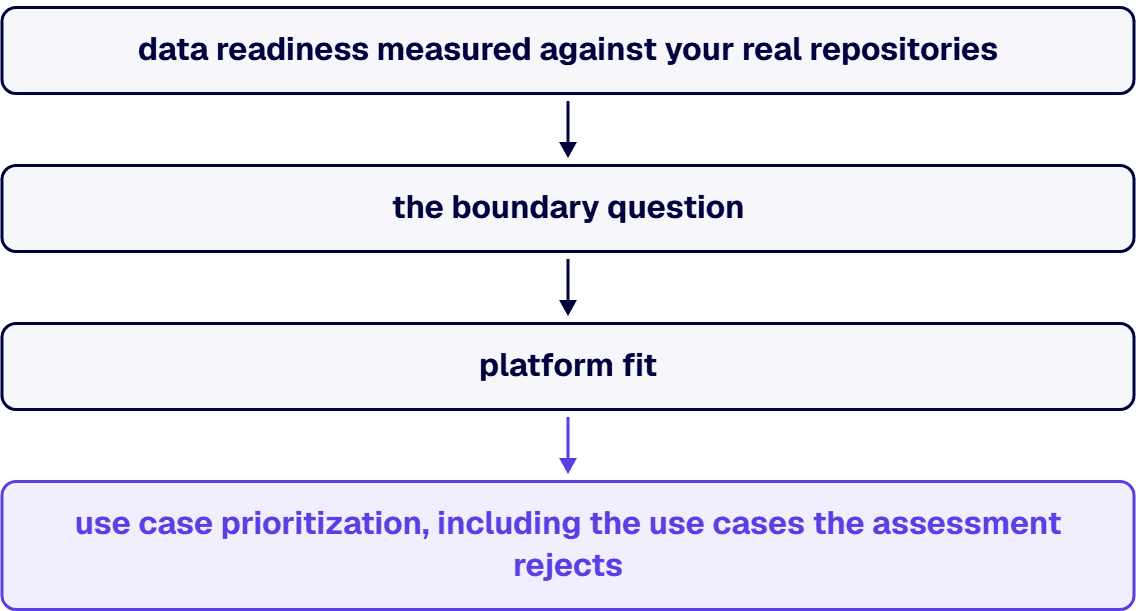
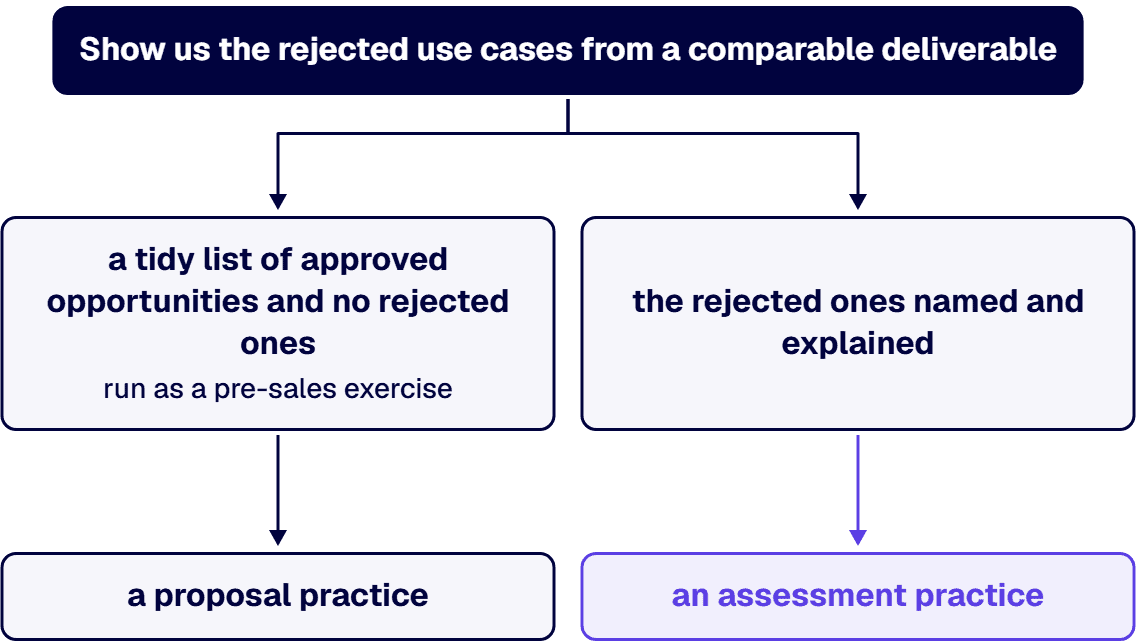
That fourth one is the tell. An assessment that returns a tidy list of approved opportunities and no rejected ones has been run as a pre-sales exercise. Prioritization is a ranking, and a ranking with nothing at the bottom is not a ranking.
Compare the specificity of the answers rather than the confidence. The firm that can describe a program it talked a client out of is describing an assessment practice. The firm that cannot is describing a funnel.
The offer is defined and published. i3solutions publishes an LLM Readiness and Strategy Assessment as a two to three week engagement whose deliverables are a current-state assessment of shadow AI exposure and data readiness, a use case analysis, a platform evaluation, a roadmap with recommendations, and an executive summary. The full scope, along with the governance framework and deployment engagements that can follow it, is set out on the LLM adoption consulting page. That is the offer this page is describing, and the methodology above is the one it runs.
Now the part most vendor pages leave out. i3solutions has no published case study of a delivered AI readiness assessment, and this page is not going to imply one. What exists in the published record is adjacent work, and it is worth being exact about what each piece measures.
On applied machine learning, i3solutions built an analytical platform for a US Department of Defense analytic center, described in the case study without naming the organization. Employing state-of-the-art data collection, feature extraction, and visualization solutions, i3solutions developed and trained over 20 machine learning models. Those models organize information drawn from very large volumes of open and private source material. That is model delivery inside a defense environment. It is not a readiness assessment, and the two require different evidence. The account is in the data analytics and data fusion case study.
On governance at federal scale, i3solutions runs a governed Power Platform for a federal defense agency supporting roughly 10,000 personnel across about 180 locations, which works because it is governed, not despite it. That is the discipline a readiness assessment is testing your organization for, applied to a platform rather than to AI. Again, labeled rather than blurred.
The firm-level facts are simpler. i3solutions is a Microsoft Solutions Partner. i3solutions has completed more than 600 Microsoft platform implementations. The delivery teams are senior and US-based. Those are platform facts, and they are the reason the data readiness half of an assessment tends to go quickly here: the repositories in question are usually SharePoint, Microsoft 365 and Dataverse, and the permission archaeology that makes data readiness hard is the same work as a migration assessment.
A firm-selection page that blurred what its own evidence measures would fail its own first criterion, which is why the labels are on it.
Honest disqualification is cheaper than a bad engagement. i3solutions is not the right vehicle when what you want is a scored maturity index for a board deck, when the assessment is expected to conclude that you should build, when your platform direction is away from Microsoft, when the requirement is lowest-price-technically-acceptable staffing, or when you want a committed implementation number quoted on an estate nobody has inventoried. We also do not certify AI compliance and cannot guarantee an assessment outcome, because no accredited scheme issues that determination and any firm implying otherwise is selling something that does not exist.
The fit is a government contractor that needs the boundary and data questions answered properly, in writing, before committing to a build, and that wants the answer to be usable whether it turns out to be yes or no.
Shortlist two or three firms and ask each for the same four artifacts: a redacted assessment deliverable from a comparable engagement, the rejected use case section from inside it, a control mapping artifact, and the scope language showing what the assessment does not answer. Then weight the answers by who asked the most uncomfortable questions about your data before quoting. Scope and price the assessment before you commit to any implementation, and keep the two decisions separate on paper, because the assessment loses most of its value the moment its conclusion is already spoken for.
If you are earlier than that, the background reading is already written down. The comparison of do-it-yourself AI integration against architect-led governance covers the failure mode most readiness assessments end up documenting, secure Copilot enablement versus turning it on covers the same question for Microsoft 365, and IT systems analysis services describes the assessment discipline applied to the wider estate. When you are ready to test fit, i3solutions routes a senior U.S.-based engineer to a client call usually within one to two weeks, and you can reach the team by phone at 703.652.8966.
A written current-state finding rather than a maturity score, covering data readiness measured against your real repositories, shadow AI exposure with the method that found it, the contractual boundary determining where processing may happen, a prioritized use case list that names the rejected candidates and why, a control mapping to the frameworks your contracts already cite, and a roadmap with sequencing and a defined stop point. If the deliverable cannot be handed to a compliance lead and an engineering lead and be useful to both, it was scoped as a sales artifact.
No. i3solutions has no published case study of a delivered AI readiness assessment and does not claim one. The readiness assessment is a defined and published offer with named deliverables, and the adjacent published record is model delivery for a US Department of Defense analytic center, where i3solutions developed and trained over 20 machine learning models, and platform governance for a federal defense agency supporting roughly 10,000 personnel across about 180 locations. Those are different engagements measuring different things, and this page labels them rather than presenting them as assessment proof.
i3solutions publishes its LLM Readiness and Strategy Assessment as a two to three week engagement, producing a current-state assessment of shadow AI exposure and data readiness, a use case analysis, a platform evaluation, a roadmap with recommendations, and an executive summary. Where an engagement lands inside that window is driven by how many repositories are in scope and how quickly access is granted, which is the practical reason access arrangements belong in the kickoff rather than in week two.
It should tell you what your contracts require and what your current environment permits, which is the part most organizations are missing. It cannot tell you that you are compliant, because compliance determinations for controlled unclassified information rest on your system boundary, your contract clauses and, where CMMC applies, an accredited assessor reviewing your environment and evidence. A readiness assessment produces the finding and the artifacts. It does not produce the determination.
A Copilot readiness engagement is scoped to one product and asks whether your Microsoft 365 estate is safe to switch it on, which is largely a permissions, labeling and oversharing question. An AI readiness assessment is product-agnostic and asks a wider question first: which data may be used at all, which use cases are worth doing, and what has to be true before any platform decision is made. Contractors frequently need the narrower one, and an assessment worth its fee will say so instead of selling the larger engagement.
You hire a Microsoft delivery firm to build the governance program and then embed named specialists inside your own operating model, rather than a managed IT provider to take ownership of the tenant. Post-deployment Copilot governance is a control problem, not a help desk problem: who holds the AI Administrator role, which agents exist and who approved them, which SharePoint content is still discoverable to Copilot, and who reads the permission and audit reports on a schedule. The engagement builds those controls, writes the runbooks and the review cadence, and puts senior people alongside your administrators until your team runs it without help. i3solutions delivers under a partner-led engagement model with named accountability and governance that holds up under a client audit, as distinct from contractor-only staff augmentation.
Deployment ends when licenses are assigned. Governance starts at the four surfaces that keep producing decisions after that, and a credible firm will name all four in its scope of work rather than describing “Copilot support” in the abstract.
Two of those four are configuration and two are routines. The failure we see most often is an organisation that got the configuration right at launch and never built the routines, so the configuration decays quietly for a year.
The agent count in most tenants is close to zero on the day Copilot goes live and is not close to zero six months later. Nothing about that is wrong. It is the point of the platform. What goes wrong is that nobody is counting, and no one has decided what approval means.
Microsoft ships the counting instrument. SharePoint Advanced Management includes a report described as “Get insights on agents in SharePoint: Use this report to identify recently created agents across SharePoint and OneDrive sites, and identify sites with the highest number of agents created.” Microsoft’s own framing of that product is worth reading before you scope any engagement: SharePoint Advanced Management “provides administrative governance controls for SharePoint and OneDrive”, and the documentation notes that “SAM capabilities are helpful as organizations prepare for Microsoft Copilot and agents.”
Approval is the harder half, and it is a policy question your firm should be forcing you to answer rather than answering for you:
i3solutions governs client Power Platform tenants with the Center of Excellence Starter Kit, tenant-level and environment-level DLP policies, and managed environment controls. On a Copilot governance engagement that matters because the agent estate and the Power Platform estate are the same estate, administered from the same place, and a delivery firm that treats them separately will hand you two governance programs that disagree.
Most enterprises turned on a temporary brake during rollout. Microsoft’s documentation on Restricted SharePoint Search is now unambiguous that it was never meant to be permanent, and that the product is going away: “Restricted SharePoint Search is retiring.” Microsoft directs organisations to “Use comprehensive data controls such as Restricted Content Discovery (RCD) for content discoverability.”
Two sentences in that same document are the reason this belongs in a governance engagement rather than in an admin ticket. Microsoft states that “it’s important to note that Restricted SharePoint Search isn’t a security boundary and doesn’t change any permissions on SharePoint sites”, and that “Restricted SharePoint Search limits to 100 sites, which isn’t sustainable as your organization scales Copilot and agentic operations.” An organisation that believes its allow list is a security control has a governance gap it cannot see, and it will keep believing that until somebody says otherwise in writing.
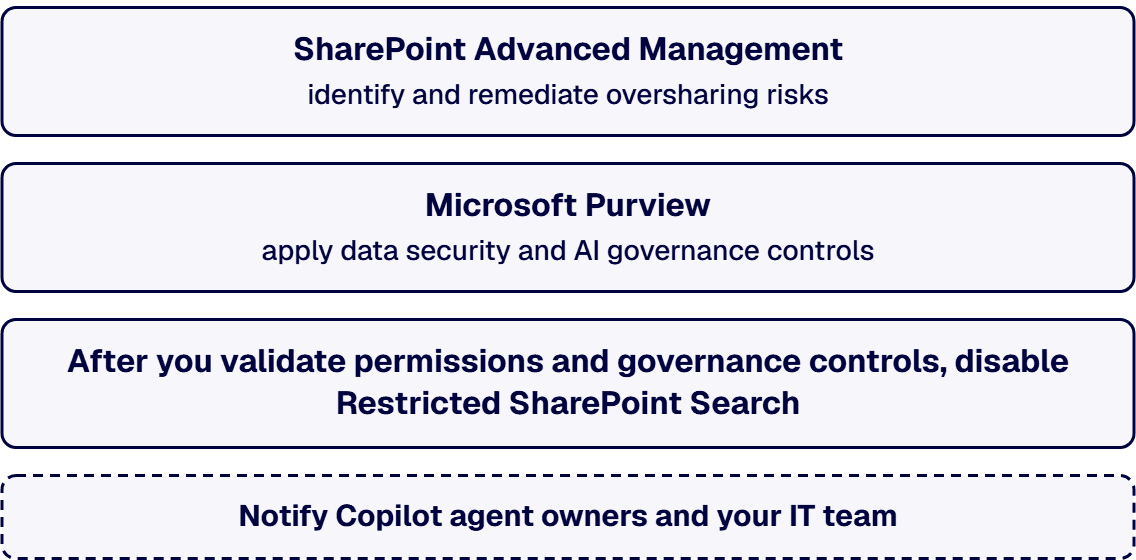
The path off it is a project with a beginning and an end. Microsoft’s own recommended sequence is to use SharePoint Advanced Management “to identify and remediate oversharing risks, such as broad access and unmanaged sharing”, to use Microsoft Purview “to apply data security and AI governance controls with sensitivity labels, data loss prevention (DLP), and auditing”, and only then: “After you validate permissions and governance controls, disable Restricted SharePoint Search.” Microsoft adds a change-management step most plans leave out: “Notify Copilot agent owners and your IT team that Copilot and agentic responses use existing SharePoint permissions.”
On the data side, Microsoft positions Purview as the standing surface rather than a one-off cleanup. Its documentation describes using “Data Security Posture Management or Data Security Posture Management for AI (classic) as your front door to discover, secure, and apply compliance controls for AI usage across your enterprise”, and makes the inheritance rule explicit for agents: “Where these AI apps support agents, they inherit the same security and compliance capabilities as their parent AI app.” The controls you set for Copilot are the controls your agents get, which is good news if you set them and bad news if you did not.
Ask three firms for ongoing Copilot support and you will get three different products back, and two of them will be managed IT operations wearing the word governance. The proposals look similar on page one and diverge completely on the page that describes who does what on a Tuesday.
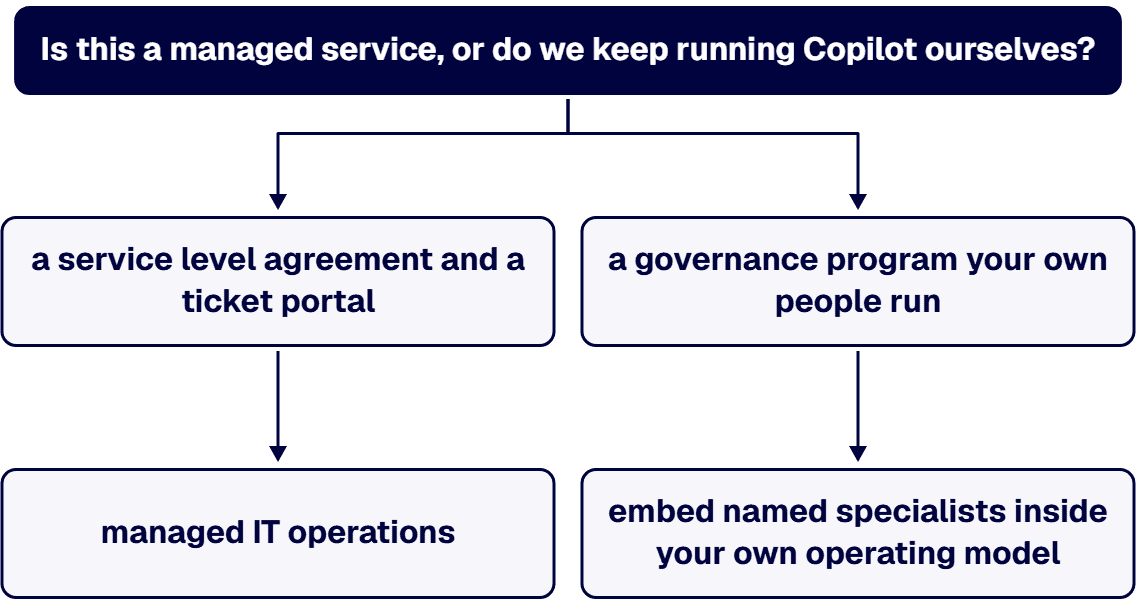
An i3solutions engagement does not produce managed-service ownership, a replacement for the internal team, open-ended scope expansion, or vendor lock-in. What it produces is a governance program your own people run, built and then staffed alongside them:
If a prospective firm answers the operating-model question with a service level agreement and a ticket portal, they have understood you to be buying managed IT operations. That is a legitimate product. It is not this one, and buying it by accident is how organisations end up unable to explain their own tenant to an auditor.
Two i3solutions cost bands are relevant, and they price different things, so read the labels carefully before comparing them to a quote.
The inputs that move either number are countable before you speak to anyone: tenant count, how many SharePoint sites are in scope for permission review, whether Restricted SharePoint Search is currently on, whether SharePoint Advanced Management and Purview are licensed, how many agents already exist, and whether a compliance framework has to be evidenced alongside the governance work. Of those, the one that moves the number hardest is the site count in scope for permission review, because it is the only input that scales with the size of the estate rather than with the size of the tenant. Everything else is a fixed cost you pay once.
Ask for the control owner map and the review calendar as named deliverables. A findings deck with no owner against each finding is an assessment, and you already had the assessment.
A reseller and a managed services provider will both quote this work, and both will be selling something other than delivery. What separates the delivery firm you want, which is the shape i3solutions works in, is testable in the first conversation:
i3solutions is a Microsoft Solutions Partner. Ask any firm you are evaluating to show the same, and to show it against the specific work you are buying rather than against a logo.
If the deployment itself is still ahead of you and you carry federal contracting obligations, the pre-deployment evaluation has its own checklist: hire a Microsoft 365 Copilot deployment firm for government contractors.
You keep running it. An i3solutions engagement does not produce managed-service ownership, a replacement for the internal team, open-ended scope expansion, or vendor lock-in. The work builds the governance program, staffs it alongside your administrators while the routines take hold, and hands it over. If what you actually want is a provider to own tenant operations and a ticket queue, that is a managed IT services purchase and it should be scoped and priced as one, by a firm that sells it.
With discoverability and the agent inventory, in that order, because those are the two that produce incidents. Microsoft’s own adoption guidance points at the Copilot Optimization Assessment for exactly this gap, noting that “It evaluates your data governance maturity and data security controls.” Doing the readiness work after deployment is common and it is not wasted. The findings are the same findings, you just get them while people are already using the product, which raises the urgency and shortens the argument about whether the work is necessary.
Split it deliberately rather than assigning it to one overloaded administrator. Microsoft’s own role separation is the model: change to Copilot scenarios requires the AI Administrator role, while viewing them requires only the Global Reader role, and Microsoft notes that “Lower permissioned accounts help improve security for your organization.” In practice a workable split is one accountable owner for tenant configuration, one for SharePoint content and permissions, one for Purview policy, and a business owner who decides whether an agent gets approved.
Two things do it, a report and a rule, and a policy document is neither. The report exists: SharePoint Advanced Management can “identify recently created agents across SharePoint and OneDrive sites, and identify sites with the highest number of agents created.” The rule is yours to set, and it has to cover who may create agents, what they may ground on, and what happens when the owner leaves. Agents built in Copilot Studio also live in Power Platform environments, so the Power Platform controls you already have are part of the answer rather than a separate program.
Search and Copilot results widen back out to whatever your permissions actually allow, which is why Microsoft’s sequence puts the remediation first and says “After you validate permissions and governance controls, disable Restricted SharePoint Search.” Microsoft also flags the human half of the change: “Notify Copilot agent owners and your IT team that Copilot and agentic responses use existing SharePoint permissions.” Expect user-visible changes in results on the day it goes off, and plan the communication before the switch rather than after the first surprised email.
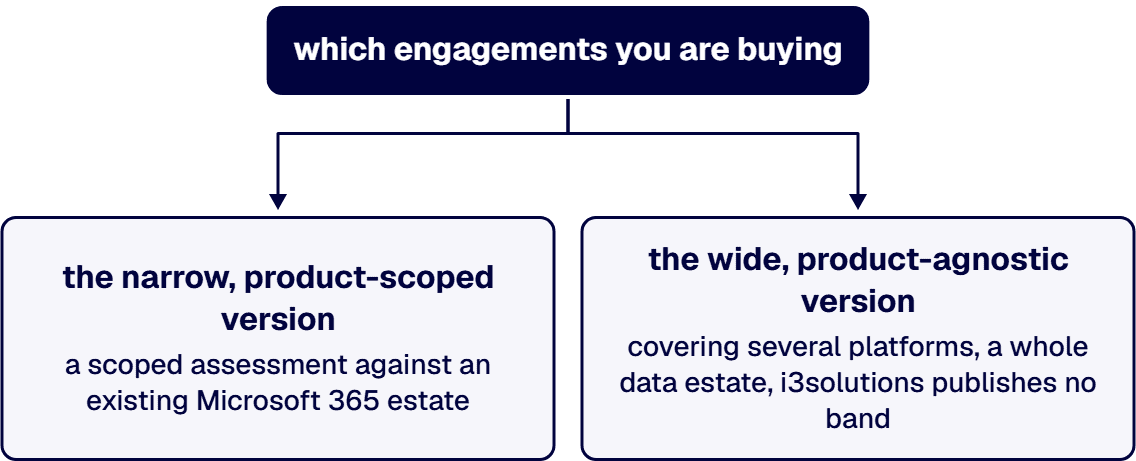
Price the engagement by its name rather than by the category. An i3solutions Microsoft 365 Copilot readiness engagement typically runs $18,000 to $35,000. That is a scoped assessment of one product against an existing Microsoft 365 estate, and for a great many mid-sized regulated enterprises it is the assessment they actually need. A wider, product-agnostic AI readiness assessment covering several platforms, a whole data estate and more than one regulatory boundary is a larger piece of work, and i3solutions publishes no band for it because the scope varies too much for a band to mean anything. Treat any single market rate quoted for the phrase “an AI readiness assessment” as a price on a phrase rather than on a piece of work. And the number that usually matters most to the budget is not the fee at all. It is the remediation the assessment finds, which in a regulated estate is routinely larger than the assessment that found it.
Five workstreams. A quote that omits one of them is cheaper because it is smaller, which is a legitimate choice as long as you know you are making it.
Choosing which firm runs the work is a separate question with a separate answer, set out on who to hire to run an AI readiness assessment for a government contracting business. This page is about what it should cost and why.
Write down the repository count you want scanned, the regulatory frameworks genuinely in scope, whether platform selection is inside the engagement, and how many use cases you want assessed and to what depth. Send that same statement to every firm. Without it you are not comparing prices, you are comparing interpretations, and the cheapest interpretation always wins a bid it should not have won.
The billable middle of the engagement is discovery against real systems: repository inventory, effective-permission analysis, label and classification coverage, identity hygiene, and a survey of what staff are already using without approval. The output should be a written current-state finding in sentences, with the evidence beside it, rather than a score on a five-point scale. A maturity score is cheap to produce, impossible to argue with, and impossible to act on.
The finding is only half the deliverable. The other half is a roadmap that sequences the work, names the dependencies, and gives you a defined point at which you are allowed to stop. Critically, it should size the remediation it uncovered rather than leaving it as an implication. An assessment that reports “permissions require attention” and does not put a range on that work has handed you the problem back.
Four variables move independently, and between them they account for most of the spread you will see across quotes.
Repository count, and whether they are scanned or discussed. Scanning costs more than interviewing and is the only version worth buying. It also has a habit of finding more estate than anyone expected. i3solutions assessment engagements routinely find 20 to 40 percent more SharePoint sites during Phase 1 than the client internal inventory lists. That figure is specific to SharePoint estates, and it is the clearest illustration of why a fee quoted against your own inventory count is quoted against a number that is probably wrong.
Framework count. One framework is a mapping exercise. Three or four overlapping frameworks with conflicting retention, residency and audit requirements is an analysis, and analysis is where the hours go. This is the variable most likely to double a quote in a regulated enterprise.
Whether platform selection is in scope. Evaluating candidate platforms against your actual constraints is real work, and it is frequently assumed to be included at no cost. Confirm it either way in writing.
Use case depth. Twenty candidate use cases assessed at a paragraph each is a workshop output. Six assessed against the data that would have to support them is an assessment. The second costs more and is the one that changes a decision.
Two things move the price down, and both are within your control. Granting system access in the first week rather than the third removes the most common source of schedule drift. And narrowing the engagement to the product you are actually buying, when that is genuinely the question, moves you from the wide engagement to the narrow one and from a six-figure conversation to the attested band above.
Three lines regularly surprise people, and none of them belongs to the assessing firm.
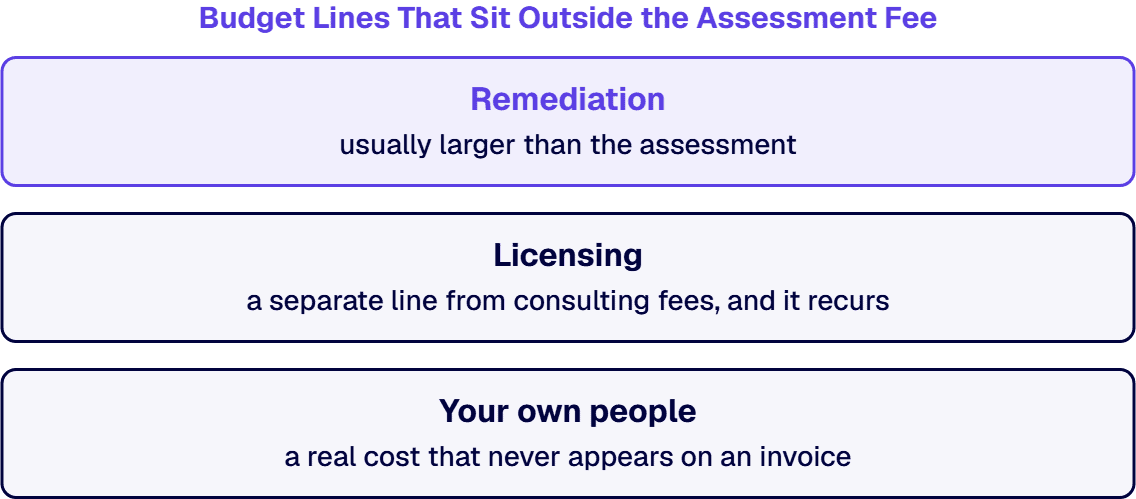
Remediation. The most common finding in a regulated estate is that the permission model cannot support the intended use case yet. Fixing that is a project in its own right, it is usually larger than the assessment, and it is the reason the assessment fee is rarely the number that decides the business case.
Licensing. Platform licensing is a separate line from consulting fees, and it recurs. As of 2026-08-13, Microsoft publishes the Microsoft 365 Copilot add-on at $30.00 per user per month paid yearly, and states that a separate license for a qualifying Microsoft 365 plan is required on top of it. Microsoft’s published license options as of the same date list eligible base plans including Microsoft 365 E3 and E5 and Office 365 E1, E3 and E5, with Government Community Cloud, GCC High and Department of Defense customers adding Copilot to Microsoft 365 G3 and G5 or Office 365 G1, G3 and G5. Microsoft also documents that Copilot is only supported on primary mailboxes hosted on Exchange Online. Rates and eligibility change, so re-check these against Microsoft’s own current pages at the moment you build the budget rather than trusting any number in a proposal, including this one. The seat-cost arithmetic over a full year is worked through separately in the Copilot total cost of ownership answer, and the plan-by-plan detail sits on the Microsoft 365 Copilot licensing page.
Your own people. The data owners, subject matter experts and security staff who have to be available during the engagement are a real cost that never appears on an invoice. An assessment that gets no access to them produces a document about what people believe, which you can obtain for free and should not pay for.
Bring in an outside firm when the answer has to survive an auditor, a contracting officer or a board, and when nobody internally can produce it without their own program’s success depending on the conclusion. That last condition is the real one. Internal readiness assessments are usually run by the team that wants the platform.
What i3solutions publishes here is an offer and a method, and it is worth being exact about the boundary. An i3solutions Microsoft 365 Copilot readiness engagement typically runs $18,000 to $35,000. That band is for a Microsoft 365 Copilot readiness engagement specifically. It is not a price for a generic AI readiness assessment and this page does not present it as one. i3solutions does not publish a case study of a delivered AI readiness assessment for any client and does not claim one. The offer definition, deliverables and methodology are set out on the LLM adoption consulting page, and the readiness work itself on the Copilot readiness page.
For the shape a bounded, priced assessment should take, there is a published reference. The i3 Risk and Roadmap Assessment ROI variant is a one-week structured engagement that produces a business case anchored on the specific environment, the specific compliance frameworks, and the specific executive-cycle timing. Fixed duration, named deliverables, and a document a finance function can actually read.
The firm-level facts that bear on an assessment budget are simple. i3solutions is a Microsoft Partner with 30 years of delivery experience. i3solutions has completed more than 600 Microsoft platform implementations. i3solutions runs migrations against named control families across CMMC, HIPAA, SOC 2, and NIST 800-171, producing artifacts auditors can review. Those matter here for one reason: most of the billable effort in a readiness assessment is permission and repository archaeology inside SharePoint, Microsoft 365 and Dataverse, which is the same work as a migration assessment, and the compliance mapping is the same discipline. Where a compliance program is the driver rather than the platform, the equivalent cost breakdown is on the CMMC compliance cost page. i3solutions routes a senior U.S.-based engineer to a client call usually within one to two weeks.
It depends entirely on which of two engagements you are buying. For the narrow, product-scoped version, an i3solutions Microsoft 365 Copilot readiness engagement typically runs $18,000 to $35,000. For the wide, product-agnostic version covering several platforms, a whole data estate and more than one regulatory boundary, i3solutions publishes no band, because the scope varies too much for a band to mean anything before the repository count and the framework count are known. A firm quoting a single market rate for the category is pricing a phrase rather than a piece of work.
No. That band is specifically for a Microsoft 365 Copilot readiness engagement, which is scoped to one product and asks whether an existing Microsoft 365 estate is safe to switch Copilot on. That is largely a permissions, labeling and oversharing question against a single tenant. A product-agnostic AI readiness assessment asks a wider question first, across several platforms and data estates, and is a larger engagement. Treating the narrower band as a price for the wider work would understate what you are buying and guarantee a change order.
Because four scope variables move independently. The number of repositories actually scanned rather than discussed, since scanning costs more and is the only version worth buying. How many regulatory frameworks are genuinely in scope, since overlapping frameworks with conflicting retention and residency requirements turn a mapping exercise into an analysis. Whether platform selection sits inside the engagement, which is real work and is frequently assumed to be free. And how many use cases are evaluated and to what depth, since twenty use cases at a paragraph each is a workshop output and six assessed against the data that would support them is an assessment.
Three, and none of them belongs to the assessing firm. Remediation, because the most common finding in a regulated estate is that the permission model cannot support the intended use case yet, and fixing that is usually a larger project than the assessment. Platform licensing, which is a separate and recurring line that should be priced from Microsoft’s current published rates at the moment you build the budget rather than from a proposal written months earlier. And your own people, since the data owners, subject matter experts and security staff who have to be available during the engagement are a real cost that never appears on an invoice.
As a separate, recurring line. As of 2026-08-13, Microsoft publishes the Microsoft 365 Copilot add-on at $30.00 per user per month paid yearly and states that a separate license for a qualifying Microsoft 365 plan is required in addition. Eligible base plans published on the same date include Microsoft 365 E3 and E5 and Office 365 E1, E3 and E5, with Government Community Cloud, GCC High and Department of Defense customers adding Copilot to Microsoft 365 G3 and G5 or Office 365 G1, G3 and G5. Copilot is only supported on primary mailboxes hosted on Exchange Online. Microsoft changes rates and eligibility, so verify against Microsoft’s own current pages before committing a budget.
No. i3solutions does not publish a case study of a delivered AI readiness assessment for any client and does not claim one. What is published is the offer definition, deliverables and methodology on the LLM adoption consulting page, together with an attested price band for the narrower Microsoft 365 Copilot readiness engagement. This page prices a defined offer and describes a method. It does not present adjacent delivery work as assessment proof, and a page that blurred the two would be doing exactly what it warns you to watch for in a quote.
By Michael Branson, Founder and COO, i3solutions
After an AI agent goes live, an accountable operator maintains four things: the knowledge it reads, the identity it runs under, the policies that fence it, and the change process that ships new versions. In a Microsoft-centric estate, that operator manages Copilot Studio agents through the Power Platform admin center (data policies, Copilot Hub credit caps, Managed Environments), governs identity and access in Microsoft Entra, monitors activity through Microsoft Purview audit logs and Microsoft Sentinel alerts, and controls change with Power Platform pipelines and deploy from Git. Data freshness comes from re-grounding the agent’s knowledge sources and honoring sensitivity labels. Security comes from DLP data policies, the automatic security scan, and customer-managed keys. Lifecycle comes from environment separation and versioned releases. Most regulated organizations run this as a governed operate-phase subscription with a named senior architect, not an ad hoc help desk. i3solutions runs a governed Power Platform for a federal defense agency supporting roughly 10,000 personnel across about 180 locations, which works because it is governed, not despite it.
The sections below name the admin surface for each maintenance job, because “who maintains the agent” is really four questions: who keeps its data fresh, who secures it, who controls change, and who pays for what.
An agent is only as current as the documents and data it is grounded on, so knowledge review belongs on the operations calendar, not in a backlog. Re-grounding happens on a defined, recurring cycle owned by the team that owns the agent. The platform’s labeling controls determine what the agent may surface.
Microsoft’s platform controls carry most of the enforcement load here. When a Copilot Studio agent uses SharePoint content as a knowledge source, the agent’s responses honor the highest sensitivity label applied to that content, so a mislabeled response is a labeling defect you can find and fix, not a mystery (see Copilot Studio security and governance documentation). For regulated and federal estates, administrators can also enforce geographic data residency and disable data movement outside the United States for generative AI features.
Neither Microsoft’s documentation nor a responsible operator prescribes one universal re-grounding interval. The right cadence depends on how fast the underlying content changes and what the agent is trusted to answer. What matters is that the cadence is written down, assigned to a named owner, and reviewed when the agent’s scope changes.
Treat a live agent the way you treat any other production identity: it gets an identity, access rules, a fence, and a log. In a Microsoft estate, each of those has a named home.
Monitoring is where most in-house teams thin out, because it is unglamorous and permanent. It is also where the gap closes: i3solutions Azure Sentinel monitoring reduces high-risk security findings by 85% or more.
Ship agent changes the way you ship code: separate environments, versioned releases, and a deployment history an auditor can read. An agent edited live in production has no rollback point and no record of what changed before an answer went wrong.
Managed Environments in the Power Platform admin center carry the operational controls for this: environment groups, sharing limits, solution checker enforcement, weekly usage insights, extended backup, and export to Azure Application Insights (see Managed Environments overview). Power Platform pipelines and GitHub-backed deploy from Git give you versioned releases across development, test, and production with an auditable deployment history.
This is standard application lifecycle management applied to agents, and it is where an experienced operator earns their keep. i3solutions delivery includes ALM practices with Power Platform pipelines or Azure DevOps integration, environment separation strategies, and change control processes. The paper trail is part of the deliverable. An i3solutions SharePoint consulting engagement produces named deliverables: a governance documentation package, architecture artifacts, and runbooks. That documentation package is what makes the operate phase board-defensible rather than tribal knowledge.
Plan for two Microsoft licenses plus pooled capacity, then a separate line for the people who operate the agents, whether that is an internal platform team or ongoing post-implementation support. On the Microsoft side, Copilot Studio requires a tenant license (“Copilot Studio”) and a per-user “Copilot Studio User License,” purchased in the Microsoft 365 admin center under Billing, then Purchase services, then Add-ons (see Copilot Studio licensing requirements). Capacity is pooled across the tenant as billed sessions and Copilot Credits, per-agent consumption is visible to administrators, and pay-as-you-go credit caps are set in Copilot Hub. Managed Environments are entitled with Copilot Studio licenses. Microsoft does not publish a fixed per-user dollar figure on that documentation page; it points to the Copilot Studio Licensing Guide and a usage estimator, so treat any hard per-user number you read elsewhere with suspicion.
The operate-phase cost is the number most budgets miss. At i3solutions, Governance Subscription engagements come as two distinct offerings. Matrix-refresh: Governance Subscription engagements run from $18,000 to $42,000 per quarter, refreshing the recommendation matrix as the estate evolves. Named-architect governance: Governance subscription engagements start at $18,000 per month covering ongoing governance framework maintenance, compliance alignment monitoring, and named senior architect availability. For organizations still deciding whether their tenant is ready for agents at all, there is a scoped precursor. An i3solutions Microsoft 365 Copilot readiness engagement typically runs $18,000 to $35,000.
Keep accountability in-house and borrow the pattern recognition. Your team should own the agent’s purpose, its knowledge, and the decision to ship a new version. The governance scaffolding around it (the DLP policy design, the environment strategy, the Sentinel alerting, and the audit-ready deployment history) is a pattern a specialist has already built many times and your team should not have to invent from scratch.
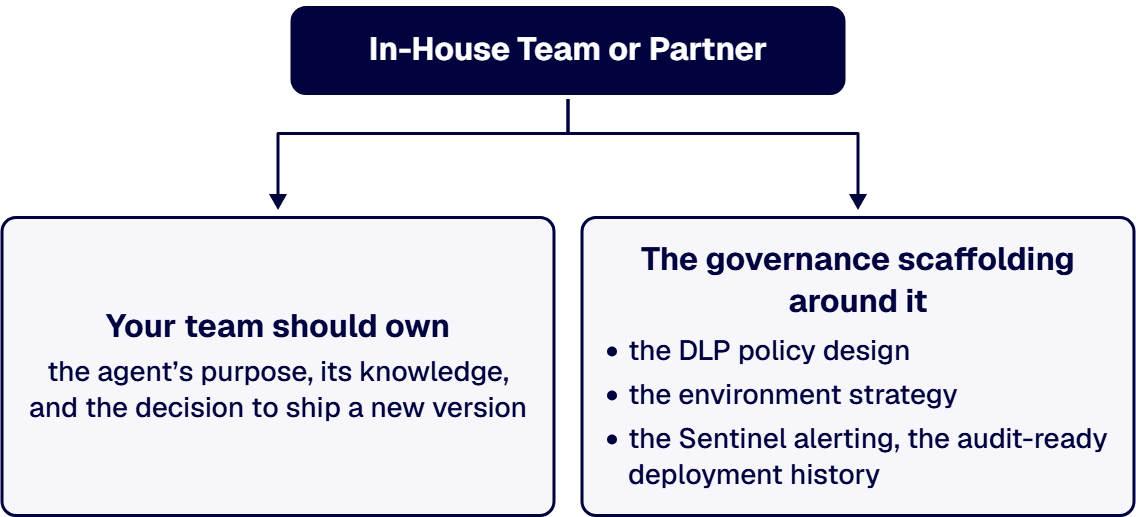
That is the case for a partner in the operate phase, and it is a resume question as much as an architecture question. When an auditor or a board asks who maintains the AI agents and how you know they are secure, the defensible answer is a named operator, a documented cadence, and artifacts. i3solutions has been a Microsoft Partner with 30 years of enterprise technology delivery experience. i3solutions has completed more than 1,500 Microsoft platform implementations. i3solutions has implemented governance frameworks for organizations managing 200+ integrations across Microsoft ecosystems. Michael Branson co-founded i3solutions 30 years ago and brings executive, operational, and technical perspective to organizations working in complex, secure, and mission-critical environments.
If you are building the agent first and asking the operations question early, that is the right order. Start with our custom AI Copilot development services, where the operate phase is designed in from the first architecture decision rather than bolted on after launch.
If the agents are already live, bring what you have: the agent inventory, the environment layout, and whatever change record exists. A thirty-minute scoping conversation is usually enough to identify whether the gap is policy, monitoring, or lifecycle, and what closing it would take. That conversation also produces the artifact set your team needs before bringing a remediation case to committee, so it is worth having before any commitment.
A named, accountable operator, whether an internal platform team or a partner under a subscription with named accountability. The role covers four jobs: keeping knowledge sources fresh, managing identity and security policy, controlling versioned change, and managing license capacity and cost. An agent with no named operator degrades quietly until an answer goes wrong in front of a user.
Re-ground its knowledge sources on a defined, recurring review cycle owned by a named person, and rely on sensitivity labels for enforcement: a Copilot Studio agent’s responses honor the highest sensitivity label applied to its SharePoint knowledge content. No universal interval fits every agent; set the cadence by how fast the source content changes and revisit it when the agent’s scope changes.
Identity and access run through Microsoft Entra, with Conditional Access and role-based or attribute-based control via the Microsoft Agent 365 control plane. Data policies in the Power Platform admin center fence knowledge sources, connectors and actions, HTTP requests, channels, and triggers. An automatic security scan flags data exfiltration risk before publish, customer-managed keys and Customer Lockbox cover encryption and access approval, maker audit logs land in Microsoft Purview, and activity alerting runs through Microsoft Sentinel.
Copilot Studio takes a tenant license plus a per-user Copilot Studio User License, purchased in the Microsoft 365 admin center under Billing, then Purchase services, then Add-ons. Capacity is pooled across the tenant as billed sessions and Copilot Credits, with per-agent consumption visible and pay-as-you-go credit caps set in Copilot Hub. Microsoft’s licensing documentation points to its Licensing Guide and usage estimator rather than publishing a fixed per-user price.
At i3solutions, Governance Subscription engagements come as two distinct offerings. Matrix-refresh: Governance Subscription engagements run from $18,000 to $42,000 per quarter, refreshing the recommendation matrix as the estate evolves. Named-architect governance: Governance subscription engagements start at $18,000 per month covering ongoing governance framework maintenance, compliance alignment monitoring, and named senior architect availability. An i3solutions Microsoft 365 Copilot readiness engagement typically runs $18,000 to $35,000.
Keep ownership of the agent’s purpose and content in-house; use a partner for the policy design, monitoring, and change control patterns that a specialist has already built repeatedly. The test is auditability: if you cannot show a deployment history, a policy record, and a named operator today, a structured operate-phase engagement closes that gap faster than hiring for it.
Usually it can be repaired. Distrust tends to trace to three fixable things rather than to the agent itself: what it is grounded on, whether it may answer from the model’s general knowledge when no source covers the question, and the lack of a fixed test set. Narrow the knowledge sources to approved, current content with correct permissions. For regulated uses, turn off Copilot Studio’s Allow ungrounded responses setting, which blocks any response from a turn where the agent used no knowledge source or tool. Write a test set of real questions with expected responses and run it after every change. Start over only when the agent sits in an environment with no separation and no solution to move it, or rests on sources that cannot be governed.
i3solutions builds custom AI copilots on the Microsoft stack: Azure OpenAI and Azure AI Search for retrieval-augmented generation inside your tenant, Microsoft Copilot Studio for agents that act in your systems, Teams and Microsoft 365 as the surface, and SharePoint or Dataverse as governed knowledge sources that honor the signed-in user’s Entra ID permissions. Senior, U.S.-based teams; Microsoft Partner; 1,500+ Microsoft platform implementations, including AI platforms delivered inside Department of Defense environments.
Custom copilots and agents. Agent logic, custom skills, prompt design, and knowledge integration in Microsoft Copilot Studio, taken from prototype to production through dev, test, and production environments promoted via Managed Environments rather than living in a maker’s sandbox.
Retrieval-augmented generation in your tenant. RAG built on Azure OpenAI with Azure AI Search, with your data kept inside your tenant, retrieval filtered by Entra ID group membership, citations returned with every answer, and answers that refuse when no grounded source exists.
Domain-specific agents. Personas, knowledge ingestion from documents and SOPs, and guardrails tuned to the workflows the agent serves, with human-in-the-loop checkpoints on any step that writes or sends.
Systems integration. Connectors into CRM, ERP, HRIS, and ITSM platforms with on-behalf-of authentication through Entra ID, so the copilot acts as the signed-in user and never as an over-privileged service account.
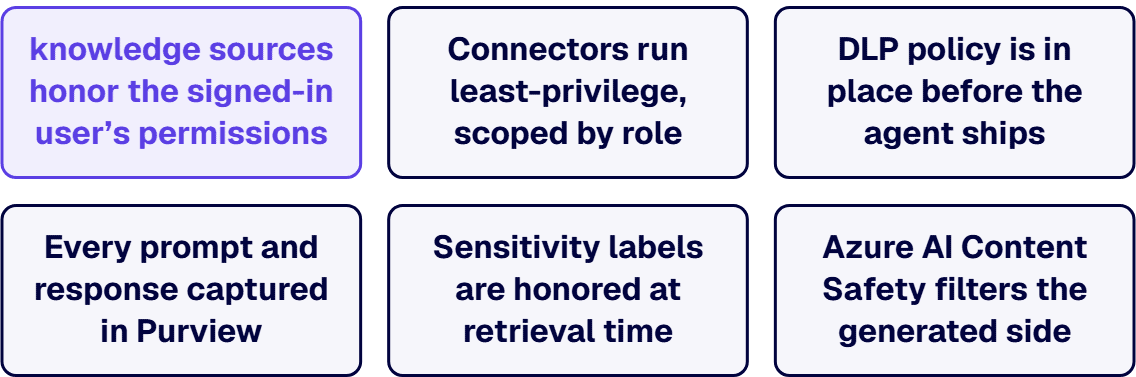
The governance is the differentiator, because it is the part a generic AI shop cannot retrofit. SharePoint and Dataverse knowledge sources honor the signed-in user’s Entra ID permissions on the underlying records, while a public website source honors nothing, and an architecture has to respect that difference. Connectors run least-privilege, scoped by role. A Power Platform DLP policy is in place before the first agent ships, not after the first incident. Every prompt and response is captured in Microsoft Purview, with alerting through Microsoft Sentinel. Sensitivity labels on knowledge sources are honored at retrieval time. Azure AI Content Safety filters the generated side, and output inherits Purview labels and DLP. For customers who need it, customer-managed keys and Customer Lockbox close the loop. The control set maps to CMMC 2.0, NIST 800-171, the HIPAA Security Rule, and SOC 2 Type II, and the build is documented so your assessors can verify it rather than take it on faith.
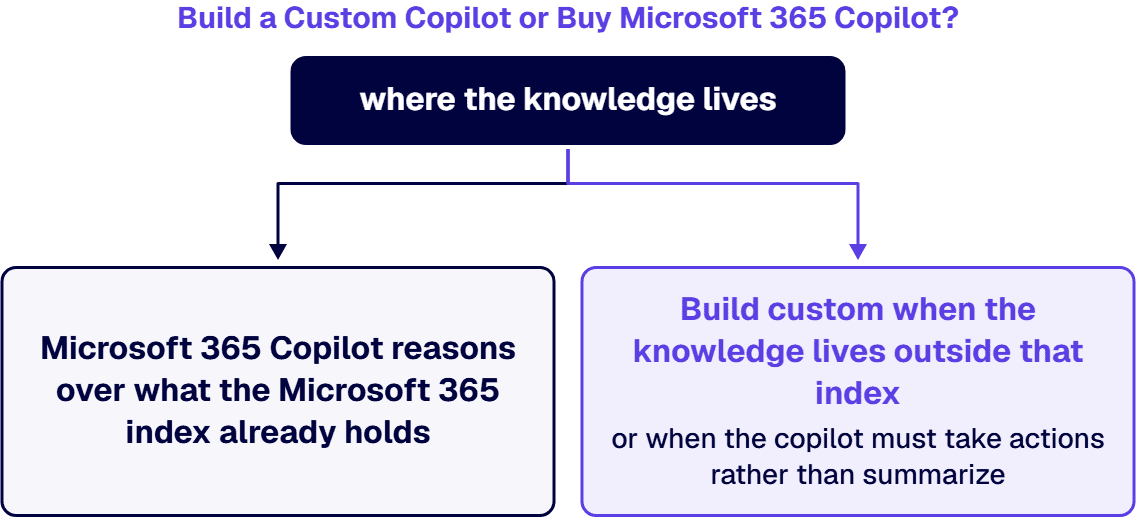
These are different purchases solving different problems. Microsoft 365 Copilot, a $30 per user per month add-on at Microsoft’s published mid-2026 pricing, reasons over what the Microsoft 365 index already holds: mail, files, meetings, chats. Build custom when the knowledge lives outside that index, in a line-of-business database, a Dataverse table, or an external API, or when the copilot must take actions rather than summarize. Copilot Studio consumption is prepaid in packs of 25,000 Copilot Credits at $200 per pack per month under Microsoft’s mid-2026 pricing, which changes the cost model from per-seat to per-usage. If you are earlier in the journey, start with Microsoft 365 Copilot readiness or the Copilot licensing guide; if the platform question is still open, our custom AI consulting and integration services team evaluates fit across Microsoft Copilot, Copilot Studio, Azure AI, Power Platform, Fabric, and custom integration before anything is built.
This is not our first AI platform; it is the same discipline applied with newer models. For a U.S. defense command, i3solutions built a custom AI data-fusion platform unifying 300TB of structured and unstructured data from over 250 global sources into a single pane of glass, with AI and machine learning handling data mining, pattern recognition, and metadata auto-tagging. For a U.S. Army geospatial organization, we developed and trained over 20 machine learning models and applied generative AI, large language models, and retrieval-augmented generation across hundreds of thousands of news articles, files, and documents. And we operate governed platforms at enterprise scale: a Power Platform estate for a federal defense agency supporting roughly 10,000 personnel across about 180 locations. Read the data fusion case study or the machine learning case study.
Engagements follow the Expert Delivery Model, a four-phase methodology of discovery, architecture, build, and knowledge transfer. A small-scale prototype can be delivered in 4 to 6 weeks; full-scale production deployments may take 3 to 6 months depending on integration depth and governance requirements. Senior specialists typically embed with your team within two to four weeks of engagement start, and delivery runs on 100% US-based senior-level delivery teams, which matters when the knowledge sources are export-controlled or the tenant is a government cloud. And because an agent is a system you operate rather than a project you finish, the model also answers who maintains and supports these agents after they go live.
If a copilot is on your roadmap, the scoping conversation settles the three questions that decide the build: where the knowledge lives, what the agent is allowed to do, and what your auditors will need to see. You leave with a platform recommendation across Copilot, Copilot Studio, and Azure OpenAI, and a build estimate against the engagement ranges published on this page. If the decision needs to survive a governance or budget committee, that documented recommendation is built to go into the room with you.
i3solutions builds custom AI copilots on Azure OpenAI and Microsoft Copilot Studio for regulated enterprises: agent logic, custom skills and prompts, knowledge integration, and prototype-to-production delivery, with retrieval grounded in SharePoint and Dataverse sources that honor the signed-in user’s Entra ID permissions. Delivery is by senior, U.S.-based teams; i3solutions is a Microsoft Partner with 1,500+ Microsoft platform implementations.
Buy Microsoft 365 Copilot when the knowledge your people need already lives in the Microsoft 365 index: mail, files, meetings, chats. Build custom when the data lives outside Copilot’s index, in a line-of-business database, a Dataverse table, or an external API, or when the copilot must take actions in your systems rather than summarize content. Many enterprises run both, and the two are licensed differently, so the decision is architectural first and financial second.
A small-scale prototype can be delivered in 4 to 6 weeks, while full-scale production deployments may take 3 to 6 months depending on integration depth and governance requirements. Senior i3solutions specialists typically embed with a client team within two to four weeks of engagement start.
It is when governance is built in rather than bolted on. In i3solutions builds, retrieval honors the signed-in user’s Entra ID permissions on the underlying records, connectors run least-privilege and scoped by role, a Power Platform DLP policy is in place before the first agent ships, prompts and responses are logged in Microsoft Purview with alerting through Microsoft Sentinel, sensitivity labels on SharePoint knowledge sources are honored, and answers refuse when no grounded source exists. The control set maps to frameworks including CMMC 2.0, NIST 800-171, the HIPAA Security Rule, and SOC 2.
Microsoft consulting engagements at i3solutions typically range from $25,000 to $250,000+ depending on size and duration; a Microsoft 365 Copilot readiness engagement typically runs $18,000 to $35,000. On the licensing side, Microsoft 365 Copilot is a $30 per user per month add-on, while Copilot Studio consumption is prepaid in packs of 25,000 Copilot Credits at $200 per pack per month. A scoping conversation prices your specific build against those ranges.
Not for every build path, as of September 2026. A declarative agent built in Agent Builder is included in the Microsoft 365 Copilot license and runs on Copilot’s orchestrator and model with no additional hosting, and Microsoft calls its Copilot Studio approach ideal for building custom engine agents “without relying heavily on development resources.” A dedicated development team is needed in practice for a pro-code custom engine agent, which brings your own orchestrator, models and hosting. In a DoD tenant, Microsoft’s service description for Microsoft 365 Copilot, updated August 2026 and read in September 2026, lists declarative agents as not currently available.
The agent runs in a separate test environment and is promoted only through change control; i3solutions delivery includes ALM practices, environment separation strategies, and change control processes. Each test case carries a written expected answer, including questions the agent must refuse and data the asking user must not see. Copilot Studio agent evaluation compares the agent’s responses against expected responses, and Microsoft notes that “Evaluations run as the currently signed-in user,” so runs under test accounts with different permissions show what each role can reach. Your security team reviews that evidence, not code. The build stays in your tenant: i3solutions engineers work as Microsoft Entra B2B guest accounts with scoped Dataverse security roles.
Reviewed by Michael Branson, Founder/COO, i3solutions. Michael co-founded i3solutions 30 years ago and brings executive, operational, and technical perspective to organizations working in secure, compliance-bound Microsoft environments.
The true total cost of Microsoft 365 Copilot is not the $30 per user per month license by itself. It is that per-seat fee, plus a qualifying base Microsoft 365 subscription that each Copilot user must already hold (Microsoft 365 E3 at $39 or E5 at $60 per user per month, paid yearly), plus the data-readiness and permission-remediation work that makes your content safe for Copilot to read, plus capacity for any custom agents you build, plus the ongoing governance to keep it compliant. Licensing is the visible number. Readiness and governance are where most of the real spend and most of the risk actually sit.
Copilot has one published price and several unpublished cost drivers. Microsoft 365 Copilot lists at $30.00 per user per month, paid yearly on an annual commitment, and it is an add-on: every Copilot seat requires a qualifying base Microsoft 365 subscription first (per Microsoft’s Copilot enterprise pricing page). For a regulated enterprise that base plan is typically Microsoft 365 E3 at $39.00 or E5 at $60.00 per user per month, paid yearly (per Microsoft’s Microsoft 365 enterprise pricing page). So a fully licensed Copilot seat on E5 is $90 per user per month before a single readiness dollar is spent. The four cost drivers below are the ones no license quote shows you.
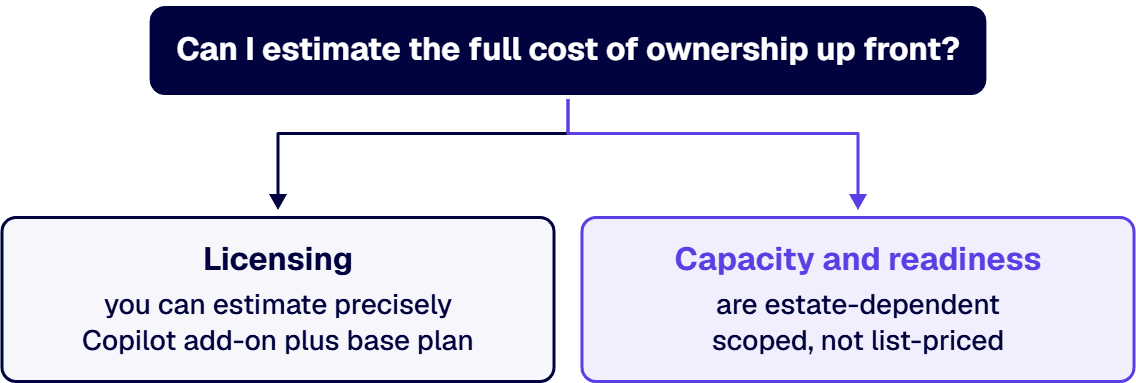
Copilot cannot be bought on its own. Each user needs both the $30 Copilot add-on and a qualifying base license, so the per-seat run rate is the sum, not the add-on. Whether E3 or E5 is the right base plan is a licensing-tier decision with its own tradeoffs (E5 folds in Microsoft Purview, Defender, and advanced compliance that Copilot governance leans on), and we answer that separately in our Microsoft 365 E3 vs E5 cost guide. For TCO, the point is simpler: budget the combined seat cost across your Copilot population, and remember that annual commitment terms mean you are pricing a year, not a pilot month.
The $30 seat covers Copilot in the Microsoft 365 apps. It does not cover the compute you consume when you extend it. Custom and autonomous agents built in Microsoft Copilot Studio draw on metered message and capacity consumption, and agents grounded in your own enterprise data can pull on Azure and Microsoft Fabric compute for the pipelines that feed them. Microsoft does not publish a single “capacity” price that fits every estate, so we will not quote one here. What matters for planning is that capacity is a variable, usage-driven line that scales with how many agents you deploy and how heavily they run, and it is easy to leave out of a first budget because the seat price looks like the whole story. Building and integrating those agents against your estate is the delivery work our custom AI consulting and integration services handle, sizing the capacity and grounding before it lands on a bill. Copilot Cowork is another usage line on top of the seat, billed in Copilot Credits, as Is Copilot Cowork Included in the Microsoft 365 Copilot License sets out from Microsoft’s own documentation. Copilot also appears inside business applications outside the Microsoft 365 apps, such as Copilot for Dynamics 365 Customer Service, which this page does not price.
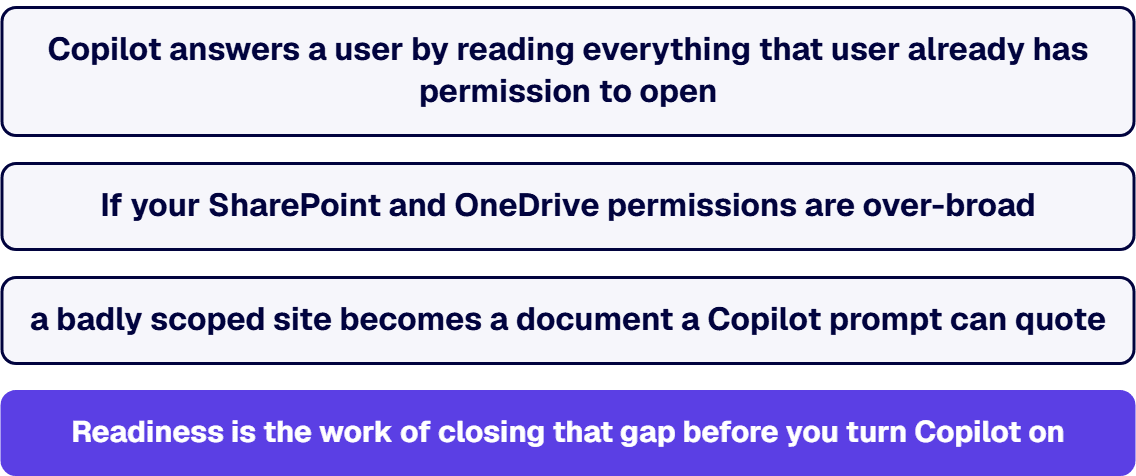
This is the component that surprises IT leaders, and it is usually the largest. Copilot answers a user by reading everything that user already has permission to open across Microsoft 365, then reasoning over it through the Microsoft Graph and the semantic index. If your SharePoint and OneDrive permissions are over-broad, Copilot does not create that exposure, but it does surface it instantly and at scale: a badly scoped site that no one ever browsed becomes a document a Copilot prompt can quote. Readiness is the work of closing that gap before you turn Copilot on. It spans permission and oversharing remediation, sensitivity labeling and data classification with Microsoft Purview, tenant controls such as Restricted SharePoint Search and SharePoint Advanced Management, and retention and lifecycle cleanup so Copilot is not grounding answers in stale content. Microsoft does not publish a dollar figure for this remediation because it depends entirely on the state of your estate, so treat it as a scoped project, not a line item.
A Copilot seat that no one uses well is pure cost. Adoption spend covers role-based enablement, prompt patterns for the work people actually do, and measuring usage through the Microsoft 365 Copilot Dashboard so you can see which seats earn their license. Governance is the standing cost that never ends: Conditional Access, data loss prevention, and audit configuration in Microsoft Purview, plus periodic review of agent permissions and a process for retiring agents that outlived their purpose. In a regulated organization this is not optional overhead; it is the difference between a compliant deployment and a data-exposure incident with your own AI as the vector.
i3solutions is a Microsoft Solutions Partner, and the readiness and governance work above is the work we are hired to do. Our engagement bands for the adjacent compliance and governance scope are owner-attested and quoted verbatim. A CMMC Level 2 implementation for a defense contractor with a defined CUI boundary typically ranges from $45,000 to $75,000, covering the Compliance Manager baseline assessment, Conditional Access redesign, DLP policy build and testing, Purview Audit Premium configuration, and post-implementation documentation. Those are the same Microsoft controls a Copilot deployment leans on, which is why regulated buyers scope the two together. And the standing value is measurable: our teams maintain dedicated compliance specialists who understand CMMC, HIPAA, SOC 2, and financial services regulations within Microsoft environments, providing audit trail documentation and access control frameworks that reduce audit preparation time by 60%.
The instinct at budget time is to defer governance and ship the licenses. That inverts the risk. i3solutions runs a governed Power Platform for a federal defense agency supporting roughly 10,000 personnel across about 180 locations, which works because it is governed, not despite it. The same holds for Copilot at scale: the governance is what lets you widen the deployment without widening your exposure. Skipping readiness does not remove its cost, it defers the cost into an incident. A total-cost view counts governance as the line that makes every other line safe to spend.
Microsoft 365 Copilot lists at $30.00 per user per month, paid yearly on an annual commitment, per Microsoft’s enterprise pricing page. That is the add-on only. Each Copilot user must also hold a qualifying base Microsoft 365 subscription, so the true per-seat cost is $30 plus the base plan, for example $39 for E3 or $60 for E5 per user per month.
You need a qualifying base Microsoft 365 subscription; Copilot cannot be licensed standalone. E3 satisfies the requirement, and E5 adds the Microsoft Purview and advanced compliance capabilities that Copilot governance relies on. Which base tier is right is a licensing-tier question we cover in our Microsoft 365 E3 vs E5 cost guide; for TCO, budget the base plan plus the $30 Copilot add-on per seat.
The costs no license quote shows are readiness and governance. Before Copilot is safe to enable you typically need permission and oversharing remediation, sensitivity labeling with Microsoft Purview, and tenant controls such as Restricted SharePoint Search. After go-live you carry ongoing DLP, audit, Conditional Access, and agent-permission review. Custom agents built in Copilot Studio also add variable, usage-based capacity cost.
Copilot reads everything a user can already open and reasons over it through the Microsoft Graph. It does not create over-broad permissions, but it surfaces them instantly, so a poorly scoped SharePoint site becomes content a prompt can quote. Readiness closes that exposure before rollout through permission remediation, classification, and tenant search controls. The scope depends on the state of your estate, so it is priced as a project.
Licensing you can estimate precisely: Copilot add-on plus base plan, times your Copilot population, on annual terms. Capacity and readiness are estate-dependent and are scoped, not list-priced, because Microsoft publishes no fixed figure for them. The reliable approach is to fix the licensing math, then scope readiness and governance against your actual tenant so the variable components are sized to your environment rather than guessed.

US-Based Microsoft System Integrator | Est. 1997
© i3solutions. All rights reserved.
US-Based Microsoft System Integrator | Est. 1997
© i3solutions. All rights reserved.


