
The questions underneath an executive mandate to adopt Copilot are rarely the ones that get asked out loud. What has to be true before rollout, how to prove a pilot earned expansion, and where secure enablement stops and exposure starts. These answers address those decisions in the terms the engineers building these systems for regulated enterprises would use.
Quick answer. Copilot in Dynamics 365 Customer Service is Microsoft’s AI assistance for service representatives: turned on per environment, it answers questions, drafts emails and chat replies, and summarizes cases and conversations within each representative’s access. IT decides its sources and its users, and confirms whether your cloud has it.
If your service organization wants Copilot for its representatives, the decision that lands on IT is not whether the feature is useful. It is what Copilot grounds on, which representatives get which features, what is recorded in Dataverse, where prompts and responses are processed, and whether your government cloud has the features. The sections below take those questions in the order a plan needs them.
If you are briefing a security or records owner, start with Microsoft’s own description. Microsoft’s Manage Copilot features in Customer Service page, read on 2026-09-23, states: “Copilot in Customer Service provides real-time AI assistance that helps customer service representatives (service representatives or representatives) automate tasks, resolve cases faster, and deliver better customer experiences.” For the contact center side, Microsoft’s Dynamics 365 Contact Center overview calls that product “a Copilot-first, cloud-based product” and lists among its key capabilities: “Use Copilot to summarize conversations, draft responses and emails, and surface relevant knowledge.”
Is it the same Copilot your organization may already be evaluating for Microsoft 365? The Manage Copilot features page says the features “are powered by Microsoft 365 Copilot and exposed in Customer Service apps such as Copilot Service workspace.” The practical difference sits in where it is switched on and scoped: per Dynamics 365 environment in the Power Platform admin center, and then by Customer Service experience profiles and security roles. Readiness for Microsoft 365 Copilot across your tenant is a separate question, covered in Is Your Microsoft Environment Ready for Copilot? What Must Be True First.
Microsoft’s Responsible AI FAQ for Copilot in Customer Service, read on 2026-09-23, lists the main features, and if you are choosing what to pilot, that list is the starting point. It includes Ask a question, Write an email, Analyze email sentiment, Draft a chat response, Summarize a case, Summarize a conversation, Summarize a custom record, Generate resolution notes, and Generate knowledge draft from case, which that page marks as preview. Other Microsoft pages mark more: the region and languages page cited in the government section labels “Draft a chat response (preview)” in its language table, and the help pane page labels the sentiment setting “Email sentiments (preview)”. The same page is plain about review: “Content generated by Copilot in Customer Service isn’t intended to be used without human review or supervision.”
On email sentiment, Microsoft’s wording is exact and this page adds nothing to it: “It doesn’t evaluate representative performance and shouldn’t be used as the sole input for performance management of customer service representatives. Any use of sentiment data for evaluation must include human oversight.”
Where the features appear matters for rollout. The Manage Copilot features page states: “When you turn on Copilot features, representatives can respond to questions, compose emails, draft chat responses, and summarize cases and conversations in the Copilot Service workspace app.” It continues: “However, for service representatives to use these features in Customer Service Hub and custom apps, you must perform the steps in Enable Copilot features.” Its note adds: “Summarize conversations is available for use in Copilot Service workspace only.” For custom case forms, Microsoft’s Configure copilot features for custom case forms and custom apps page states: “You can configure the Copilot case summary on custom case forms and enable the Copilot features for custom apps.”
Availability also differs by region. Microsoft’s page on managing Copilot features states: “The respond to questions, compose an email, and summarize cases and conversations features are generally available in the North America region only. These features are in preview in the rest of the supported regions.”
If your privacy office asks what Copilot can see, start with the source data. The Manage Copilot features page states that “Copilot features use customer service data, such as cases, customer records, and interactions” to help representatives retrieve information, generate responses and complete actions without leaving their workflow. For case summaries, Microsoft’s Enable Copilot case and conversation summaries page, read on 2026-09-23, says a case summary includes the case title, customer, case subject, product, priority, case type and case description, and adds: “Copilot also uses email activity records, notes linked to the case, and conversation summaries.” The same page offers an exclusion setting: “Select Specify information to exclude to add email addresses and text that you want Copilot to exclude when generating responses.” What case management itself does is covered in Dynamics 365 Case Management for Your Company.
Access bounds the data it uses. The Responsible AI FAQ states: “Copilot enforces the role-based access (RBAC) controls defined and adheres to all the existing security constructs. Therefore, representatives can’t view data that they don’t have access to. Also, only data sources that the representative has access to are used for Copilot response generation.”
Knowledge grounding is a choice, and it starts switched off. Microsoft’s Configure Copilot features in the help pane page, read on 2026-09-23, states: “You can configure Copilot to use internal knowledge base resources for generating responses.” It adds: “By default, this option isn’t turned on.” Microsoft’s pages set limits on it:
Trusted websites are a second, narrower source. The help pane page allows you to “Add up to five trusted web domains as sources for Copilot to search and generate responses from.” It states: “You must enable Bing Search in Power Platform admin center to add trusted web sources.” And: “External websites are used by Copilot to draft emails and chat replies only.” Microsoft also carries its own caution: “Email generation from trusted webpages might not work as expected because the Bing Search API used by this option is deprecated.”
If nobody has been named for each switch yet, name them before rollout, because each one is a decision someone should own:
If your security team asks where prompts and responses go, start with region. Microsoft’s page on managing Copilot features states that the option to enable Copilot AI features is available “in region” by default to customers with environments that have “United States, Australia, India, United Kingdom, and government cloud regions (GCC, GCC High) as their geography for data processing and storage.” That sentence describes where processing happens. It does not say which features exist in a government cloud; that is the government section below.
For other regions, Microsoft’s Move data across regions for Copilots, AI agents, and generative AI features page, read on 2026-09-23, explains the trade: “When you allow data movement across regions, your inputs (prompts) and outputs (results) might move outside of your region to the location where the generative AI feature is hosted.” It states: “The Move data across regions checkbox isn’t displayed for US and government cloud regions.” It also warns: “Data movement that occurred while your environment was allowed to move data across regions can’t be reversed by clearing the Move data across regions checkbox.” For its row “Government cloud (GCC, GCC High)”, the same page’s table lists model hosting as “In region” and the Bing Search location as “United States”.
Data sharing with Microsoft is a separate, optional setting. Microsoft’s FAQ for optional data sharing for Copilot AI features in Dynamics 365 and Power Platform, read on 2026-09-23, states: “By default, the data sharing option is disabled for you.” It adds: “This setting is only available for tenants located in the US region currently.” On leaving: “If you leave this program, all your data is deleted within 30 days of opting out.” And: “Customer Lockbox and customer-managed keys won’t apply to the access and manual review of customer data shared using this setting.”
On training and boundaries, Microsoft’s FAQ for Copilot data security and privacy for Dynamics 365 and Power Platform states that “we don’t use your customer data to train Copilot or its AI features, unless you provide consent for us to do so.” It states: “Customer data, including Copilot inputs and outputs, is stored within the Microsoft Cloud trust boundary.” And it gives examples of when data can leave that boundary: “In some scenarios, such as features powered by Bing and third-party copilot plug-ins, customer data might be transmitted outside the Microsoft Cloud trust boundary.”
If your records owner has not yet seen Copilot, start with the fact that recording is a setting. The Manage Copilot features page states that “you can select Record transcripts of representative interactions with Copilot to understand usage patterns and improve Copilot performance.” Microsoft’s Download Copilot transcripts and interaction data page, read on 2026-09-23, names where the records go: “Copilot interactions are stored in the Copilot Interaction (msdyn_copilotinteraction), Copilot Interaction Data (msdyn_copilotinteractiondata), Copilot Transcript (msdyn_copilottranscript), and Copilot Transcript Data (msdyn_copilottranscriptdata) tables in Dataverse.” It adds: “Beginning August 2025, copilot interactions are stored in the msdyn_copilotevents table.” Storage depends on a checkbox: “Make sure that the Support experience data checkbox is selected in Copilot for questions and emails, so that the transaction and interaction data is stored by the system in Dataverse.” And for summaries: “When a service representative uses Copilot to generate a conversation summary, the summary is stored in the msdyn_conversationinsight table in Dataverse.”
How long those records are kept, and whether they are held or searched for a legal matter, is a decision for your records management team and counsel. This page does not answer it.
On licensing, the Manage Copilot features page states: “Specific licensing requirements apply when you use the feature with product environments.” Settle which people need which license with your Microsoft licensing contact before rollout; Dynamics 365 license prices are covered in How Much Does Dynamics 365 Licensing Cost Per User?.
For government clouds, Microsoft’s pages do not agree, so this section gives each one as it reads. Microsoft’s Supported regions and languages for autonomous agents, copilot features, and analytics page, read on 2026-09-23, has two Government Community Cloud columns, one marked M and one marked H. In the M column, Summarize cases, Ask a question and Draft emails are marked “Yes”, and Summarize conversations, Draft a chat response and Generate knowledge drafts from cases are marked “No”. In the H column, every listed Copilot feature is marked “No”.
Two other Microsoft pages read differently. Microsoft’s page on managing Copilot features lists GCC High among the regions where the setting is in region, which describes processing, not feature availability. The Move data across regions page lists Dynamics 365 Customer Service Copilot with “No” in its “Available in GCC?” column, in a table of features that depend on the data-movement setting. A GCC or GCC High reader confirms which features their own environment shows before planning around any of them.
For the products themselves, Microsoft’s Dynamics 365 US Government page, read on 2026-09-23, introduces its table with “The following Dynamics 365 US Government products are available:” and lists Dynamics 365 Customer Service under GCC, GCC High and DoD, and Dynamics 365 Contact Center under GCC only. That table lists products, and it carries no Copilot row. For a contractor environment, the engagement side is covered in Hire a Dynamics 365 Implementation Firm for a Government Contractor Environment.
If you take these in order, each decision narrows the next:
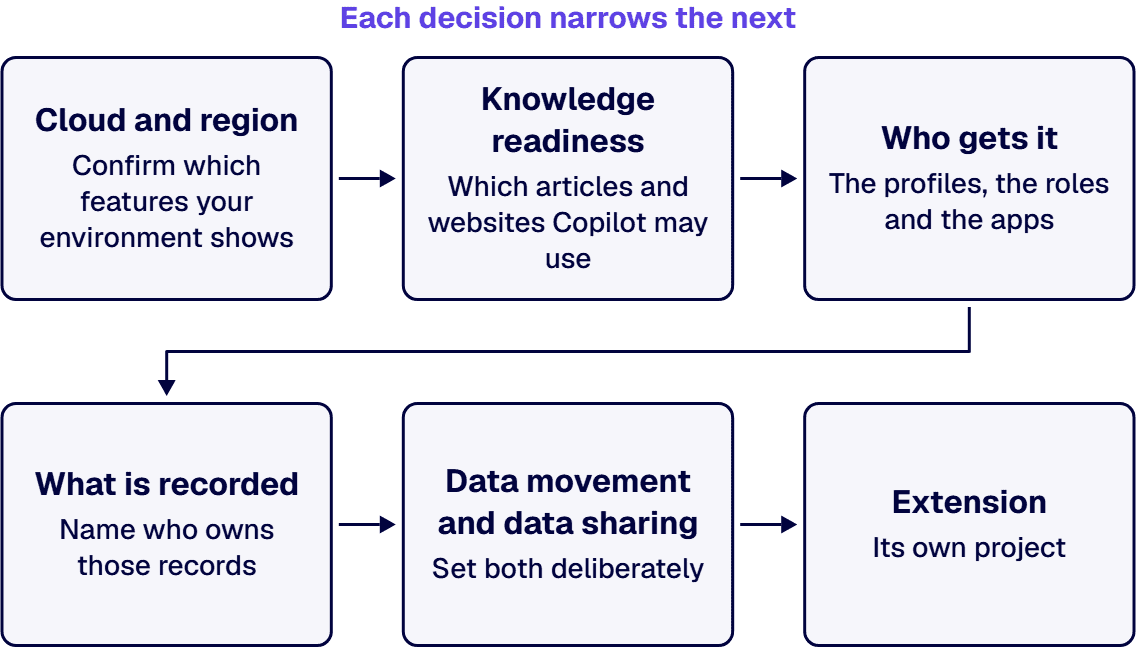
If the cloud question, the knowledge base, the profile design and the records owner sit with different teams and nobody owns the whole rollout, an outside architect can put those decisions in one plan before anyone turns the switch on.
What you can hire for this is project and advisory work on the Dynamics 365 side: requirements and readiness review, environment and region planning in the Power Platform admin center, security role and experience profile design, knowledge source and filter design, summary and prompt configuration, custom app and custom form enablement, a Copilot Studio extension as a project, and integration of the case data Copilot reads. An i3solutions engagement does not produce managed-service ownership, a replacement for the internal team, open-ended scope expansion, or vendor lock-in. Your own team runs Copilot and your service operation once the settings in Copilot Service admin center are live.
The connected sales and service model Customer Service sits in is covered in CRM Customer Experience Solutions: A Connected, Automated Sales and Service Operating Model on Dynamics 365, and the wider practice in Enterprise Dynamics 365 Development Services That Align CRM and ERP to How You Operate.
i3solutions has delivered Dynamics 365 integration engagements for regulated enterprises across healthcare, defense and aerospace manufacturing, and financial services. Delivery is senior and US-based. i3solutions implemented Dynamics 365 for a healthcare services firm and integrated it with telephony and email so that a caller’s profile and current case load surface the moment that person makes contact, built to the firm’s HIPAA and PHI requirements.
It gives service representatives AI help inside Customer Service: once an administrator turns it on for an environment, representatives can ask it questions, have it draft emails and chat replies, and have it summarize cases and conversations. Microsoft states that its output is not meant for use unless a person reviews or supervises it.
Once it is on, it uses customer service data such as cases, customer records and interactions, limited to what each representative can already access. It uses your knowledge base only after an administrator turns that option on, and up to five trusted web domains for drafting emails and chat replies, according to Microsoft.
Related, but switched on separately: Microsoft says the Customer Service features are powered by Microsoft 365 Copilot and appear in Customer Service apps, and you enable them environment by environment in Microsoft’s Power Platform admin center and scope them with experience profiles and security roles. On licensing, Microsoft states only that specific licensing requirements apply.
If you hold the System Administrator role, you turn on the AI-powered Copilot features setting for that environment from the Power Platform admin center, then continue setup in Copilot Service admin center, which includes an opt-in step. Representatives in the out-of-the-box experience profiles can then use the features in Copilot Service workspace; Customer Service Hub and custom apps need extra steps.
Plan as if it is not until your own environment shows otherwise: Microsoft’s region table marks every listed Copilot feature as not available in its GCC High column. Another Microsoft page names GCC High among regions whose setting runs in region, which concerns processing, not availability, so confirm before you plan.
By Michael Branson, Founder/COO, i3solutions
An Azure AI pilot security checklist covers six checks before production: vault networking, Private Link, key authentication, managed identity, Azure Policy, Azure Government. Microsoft says a new vault’s firewall “is disabled”, which “doesn’t mean that any user will be able to perform operations on your key vault”.
If a business unit’s Azure OpenAI or Microsoft Foundry pilot works and now has to pass a production review, the settings that made it quick to build are the ones the security reviewer will ask about. This checklist covers the infrastructure baseline beneath the application: for each of six checks, what the pilot default is, what production needs, and how to verify it with a named setting or test. If you have not yet chosen a platform, start with Copilot Studio vs Azure AI Foundry: Which One Fits Your Compliance Posture? Every Microsoft statement below is quoted or paraphrased from Microsoft Learn as read on September 26, 2026, with its link.
If you are preparing the production review, work through the six checks in order; each one ends with the portal setting or test to record in the change log as evidence for the reviewer.
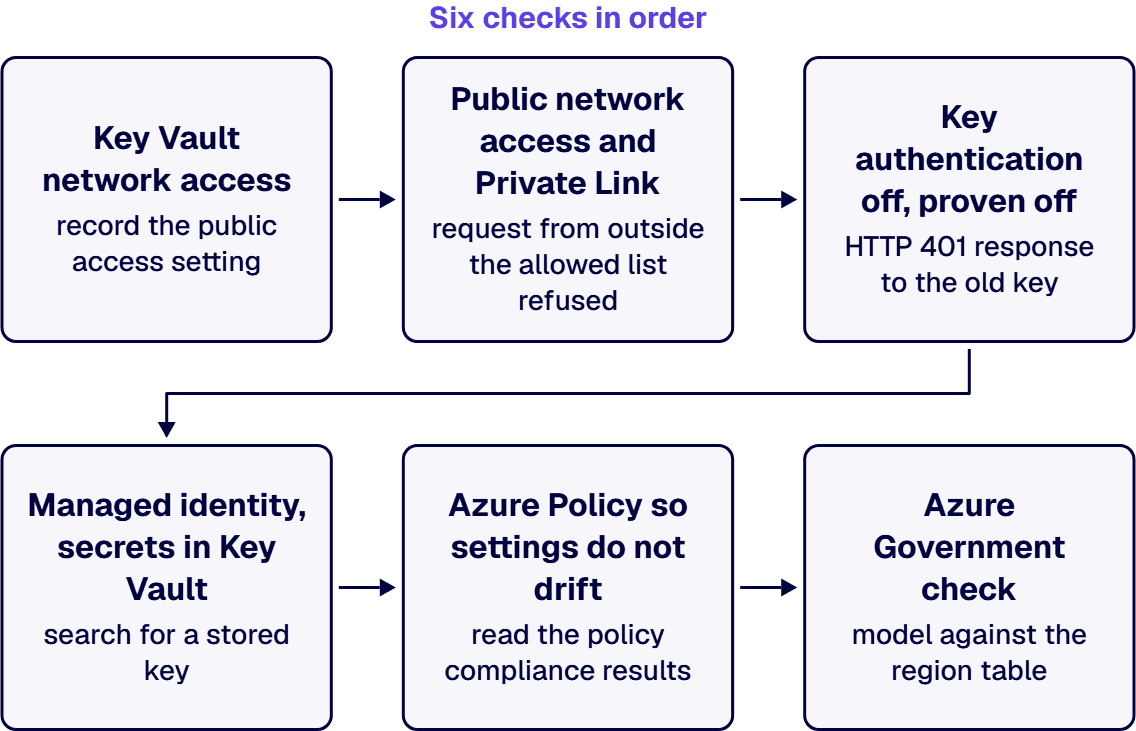
When the pilot’s secrets sit in a vault created with default settings, the network path to that vault is open. Microsoft’s Configure network security for Azure Key Vault page says: “By default, when you create a new key vault, the Azure Key Vault firewall is disabled. All applications and Azure services can access the key vault and send requests to the key vault.” It continues: “This configuration doesn’t mean that any user will be able to perform operations on your key vault. The key vault still restricts access to secrets, keys, and certificates stored in key vault by requiring Microsoft Entra authentication and access policy permissions.” Authentication still applies; what the default leaves out is the network layer.
Production needs: the vault firewall on with named virtual networks or address ranges, or public access disabled with a private endpoint. Two details belong in the review. Microsoft says “Disabling public access doesn’t suppress the trusted services bypass”, so “trusted services continue to reach the vault and don’t require a private endpoint.” And “Azure Key Vault firewall rules only apply to data plane operations. Control plane operations are not subject to the restrictions specified in firewall rules.” i3solutions selects Dataverse over SharePoint as the primary relational store when a client needs scalable high-volume transactional data, and holds application secrets in Azure Key Vault.
Verify: read the vault’s networking settings and record the public access setting, the allowed networks and whether the trusted services bypass is on, and write down who decided the bypass setting and why.
If the AI resource was created with public network access enabled, it answers from the internet as well as from your network. Microsoft’s How to configure network isolation for Microsoft Foundry page says: “The PNA flag setting determines whether your project requires a private endpoint for access.” It adds: “The public network access can be set to Disabled with a private endpoint (private link) enabled, or set to Selected networks to grant specific IP addresses and virtual networks the ability to access Foundry securely.” The same page, read September 26, 2026, lists the Foundry project, storage, Key Vault, container registry and monitoring as the platform resources that Private Link isolates, so the dependencies belong to this check as well as the AI resource.
Production needs: public network access set to Disabled with a private endpoint, or set to Selected networks with the allowed ranges written down, on the AI resource and on each dependency.
Verify: for each resource, record the public network access value and the private endpoint connection with its approval state, then send one request from a network outside the allowed list and record that it is refused.
Before production, the pilot’s API keys stop being a way in. Microsoft’s Disable local authentication in Foundry Tools page says: “Organizations can disable local authentication methods and enforce Microsoft Entra authentication instead.” It also warns: “Disabling local authentication doesn’t take effect immediately.” Microsoft’s policy reference adds a pilot-specific catch: “Azure OpenAI Studio, typically used in development/testing, requires key access and will not function if key access is disabled.”
Production needs: local authentication disabled on the AI resource, with the callers moved to Microsoft Entra authentication first. The change is not immediate, which is why the verification below waits for it.
Verify: Microsoft’s local authentication page gives the test to record: “To confirm that the change has taken effect, send a data-plane request with the old key and verify that the service returns an HTTP 401 response”. Keep the request, the time and the response in the change log as the evidence for this check.
Once keys are off, the application needs another way to call the model. Microsoft’s How to configure Azure OpenAI in Microsoft Foundry Models with Microsoft Entra ID authentication (classic) page says: “Microsoft Entra ID lets you call your Azure OpenAI resource without storing an API key in your application. Instead of a key, your code requests a short-lived access token for an identity that you grant a role on the resource.” It adds: “There’s no secret for you to store or rotate.”
Production needs: a managed identity on the app host with a role on the AI resource and on the vault, and any secret that must remain (a third-party credential, for example) held in Key Vault rather than in application settings.
Verify: list the app host’s identity and its role assignments on the AI resource and the vault, then search the application settings and repository for a stored key and record the result. Which roles to grant, and why keys fall outside that role model, is outside this checklist (see What This Checklist Does Not Cover, below).
After the review passes, a redeployment or a new resource can quietly bring the pilot defaults back. Microsoft’s Azure Policy built-in policy definitions for Foundry Tools page lists built-in definitions that match the checks above, including “Azure AI Services resources should have key access disabled (disable local authentication)”, “Azure AI Services resources should restrict network access”, “Azure AI Services resources should use Azure Private Link”, “Configure Cognitive Services accounts to disable public network access” and “Cognitive Services accounts should use a managed identity”.
Production needs: those definitions assigned at the subscription or management group that holds the AI resources, with a decision recorded for each on whether it audits or denies; the reference lists the effects each one allows.
Verify: read the policy assignments at that scope and the policy compliance results, and record that the AI resources appear in them.
If your tenant runs in Azure Government, check the model and the endpoints before the build is promoted. Microsoft’s Foundry Models sold by Azure in Azure Government page says: “Models sold by Azure include all Azure OpenAI models offered in Azure Government.” It also says: “Model availability in Azure Government varies by region.” Its region table names usgovarizona and usgovvirginia. Microsoft’s Compare Azure Government and global Azure page lists different endpoints for the two clouds, including openai.azure.us for Azure OpenAI and vault.usgovcloudapi.net for Key Vault.
Verify: record the model and version the pilot uses against the region table for the region you will deploy in, and search the code and configuration for commercial endpoints such as openai.azure.com and vault.azure.net.
If the pilot was built inside a landing zone whose deployment path applies private networking and the policy assignments above to new resources, checks 1, 2 and 5 may already hold, and the work may come down to checks 3 and 6. Verify that the inherited settings reached the pilot’s resources before skipping them: a resource created outside the landing zone’s deployment path may not carry them.
When IT first hears about a business unit’s Azure OpenAI or Foundry pilot because someone noticed a Key Vault open to public networks, IT is choosing between two poor defaults. Holding the fixes until the production review leaves a known exposure open in the meantime; blocking the pilot puts IT against the part of the business that asked for AI.
Ask first for read access across the pilot’s subscription, and list what the pilot deployed: each vault, the AI resource, its storage and the app host. The six checks above work from that same list, so the production review starts from it too.
Then find every vault the pilot created whose public network access is still enabled, record it against check 1 above, and fix it now rather than waiting for the production review. Check 1 gives the setting to change and the evidence to record. If the pilot was built inside a landing zone that applies private networking to new resources, this step may already be done; When This Order Is Wrong, above, names what to verify before skipping it.
The skills gap closes while the pilot keeps running, and each way of closing it trades IT’s time against IT’s control.
Training IT’s own Azure team. IT keeps every decision and every change, and the gap stays open for as long as the training takes.
An embedded senior specialist for the length of the pilot. IT keeps the decisions, its team learns on the pilot’s own resources, and an outside person works inside IT’s change process.
An outside architect’s review of the build. IT gets a written read of the build without changing who does the work, and its own team learns less than it would from pairing.
i3solutions structures its staff augmentation approach around senior-level Microsoft expertise embedded within client teams. Senior Microsoft specialists from i3solutions typically embed in the client’s team within two to four weeks of engagement start.
If the open question is the role design, why API keys sit outside it, or the governance controls inside Foundry itself, that is the subject of the guide How to Govern Custom AI in Microsoft Foundry with Microsoft’s Own Controls. If it is what separates a production-grade deployment from a pilot at the application layer, see Production-Grade GenAI for Regulated Microsoft Estates. For Azure security settings beyond AI resources, see Azure Security Best Practices: The Basics Enterprises Still Get Wrong. This page covers the infrastructure baseline an Azure OpenAI or Foundry pilot needs before production, and how to verify it.
When your team brings an Azure AI pilot to i3solutions before its production review, the work starts from what the pilot actually deployed: the vault, the AI resource and its dependencies, the app host and the policy scope, checked against the six checks above. i3solutions maps governance to named control families, enforces it in the platform through Entra ID, Purview, and Azure Policy, and evidences it continuously rather than reconstructing it at audit. The wider service is described in Custom AI Consulting Services for Governed Microsoft Enterprise AI.
If the vault was created with default settings, its network path is open: Microsoft’s Key Vault network security page says “By default, when you create a new key vault, the Azure Key Vault firewall is disabled.” It also says “This configuration doesn’t mean that any user will be able to perform operations on your key vault”, because Microsoft Entra authentication and access permissions still apply. Production turns the firewall on or disables public access with a private endpoint.
After you disable local authentication, allow time, because Microsoft says “Disabling local authentication doesn’t take effect immediately.” Then run the test on Microsoft’s local authentication page: “send a data-plane request with the old key and verify that the service returns an HTTP 401 response”. Keep that response in the change log as the evidence.
If you disable public access on a vault, trusted services can still reach it. Microsoft says “Disabling public access doesn’t suppress the trusted services bypass”, and that “trusted services continue to reach the vault and don’t require a private endpoint.” Decide the bypass setting on purpose and record who decided it.
If your tenant runs in Azure Government, Microsoft’s Azure Government models page says “Models sold by Azure include all Azure OpenAI models offered in Azure Government.” and “Model availability in Azure Government varies by region.” Check the specific model against the region you plan to use, and point the code at the Azure Government endpoints.
By Michael Branson
Quick answer. As of September 2026, govern AI built in Microsoft Foundry with Entra ID sign-in and Foundry roles, an assigned guardrail with Prompt Shields, Purview with user-context tokens, Defender for Cloud AI threat protection and Azure Policy, in that order. Per Microsoft, “Agent guardrails are in preview”.
When a Foundry app reaches its security review, someone will say it sits in Azure and inherits Azure’s controls. The subscription around the app may well be governed already. The controls specific to the model, the agent and the prompts are configuration someone still has to do. Microsoft’s What are hosted agents?, read on 2026-09-23, says in its guidance on connecting an agent to other systems and services: “It is your responsibility to manage whether your data will flow outside of your organization’s compliance and geographic boundaries and any related implications, and that appropriate permissions, boundaries, and approvals are provisioned.”
This page assumes Foundry is already the platform. If that choice is still open, start with Copilot Studio vs Azure AI Foundry: Which One Fits Your Compliance Posture?. What follows names the Microsoft control that logs, blocks or alerts on each risk once the app is built in Foundry, and what each one does not reach.
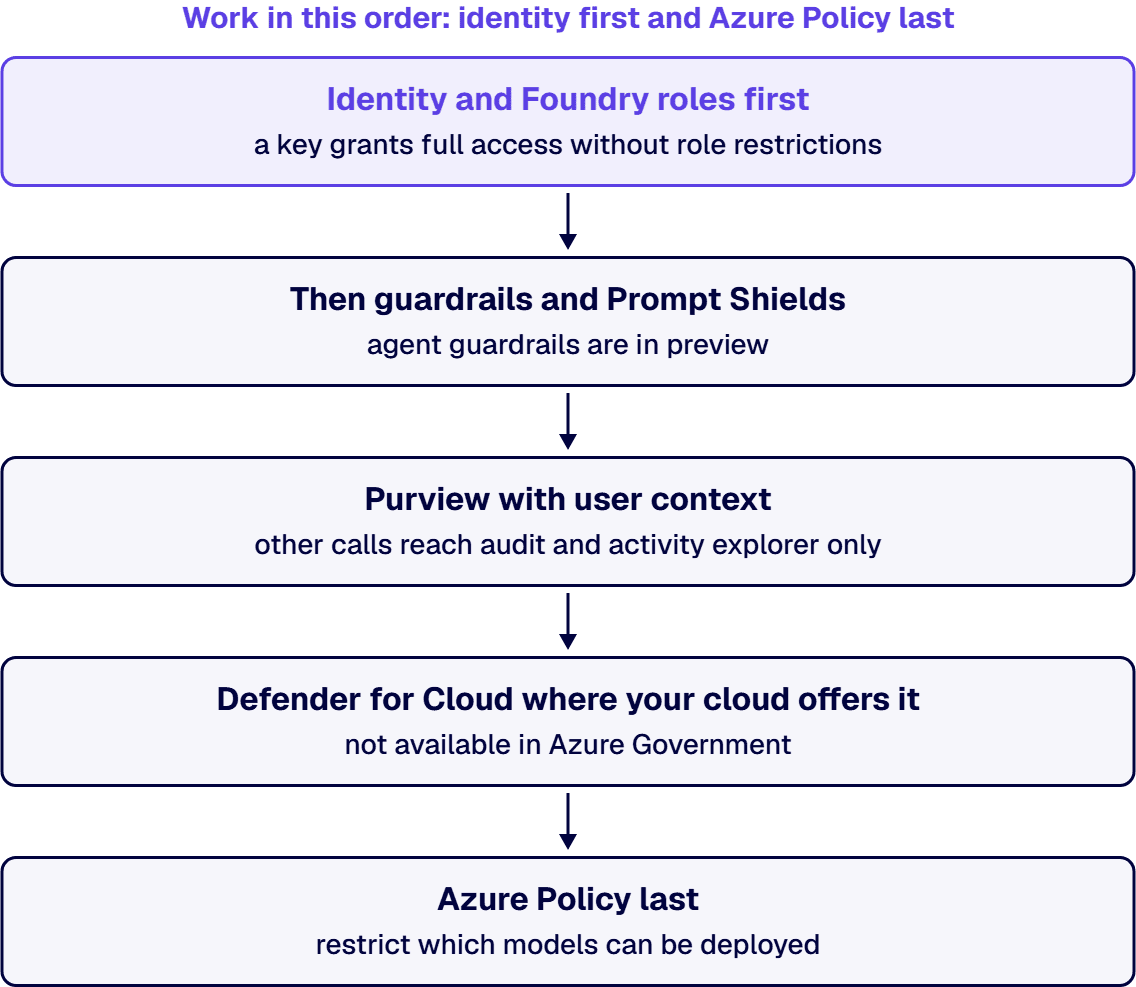
If developers built the first version against an API key, no role assignment governs that access. Microsoft’s RBAC page for Foundry, cited above, says: “RBAC roles apply when you authenticate using Microsoft Entra ID. If you use key-based authentication instead, the key grants full access without role restrictions. Microsoft recommends using Entra ID authentication for improved security and granular access control.”
With Entra ID in place, Microsoft’s examples on the same page assign roles to Entra groups rather than to individuals, and they include: “To build agents, run traces, and use core Foundry capabilities, assign Foundry User to the Microsoft Entra group.” And: “To allow interaction with agents without broader development access, assign Foundry Agent Consumer to the Microsoft Entra group.” That second role is the one that keeps people who use an agent separate from people who build it.
Hosted agents carry identities of their own. Microsoft’s hosted agents page, cited above, says: “Every Hosted agent deployed to a Foundry project gets its own dedicated Microsoft Entra ID (agent identity) and dedicated endpoint”. It also says: “For external resources (for example, your own Azure Storage), assign RBAC roles manually to the agent’s Microsoft Entra ID.” An agent identity given broad roles for convenience reaches everything those roles cover, so its roles are scoped like any other identity’s.
When a team says content filtering is on, the question is which guardrail each model deployment uses and, for agents, where guardrails are in preview, which guardrail each agent uses. Microsoft’s Guardrails and controls overview in Microsoft Foundry, read on 2026-09-23, says “Microsoft Foundry provides safety and security guardrails that you can apply to core models and agents. Agent guardrails are in preview.” It defines the unit plainly: “A guardrail is a named collection of controls.”
The default behavior matters more than the menu. According to Microsoft’s guardrails page:
Read together, and with agent guardrails in preview, an agent given its own guardrail is checked against that guardrail and not its model deployment’s, and a control for a preview risk that agents do not yet support does not take effect for the agent. Nor can content filtering on models sold by Azure be switched off at will: “For Models sold by Azure, only customers who have been approved for modified Guardrails can turn them off.”
Prompt Shields sit inside the same guardrail. Microsoft’s Prompt Shields in Microsoft Foundry, read on 2026-09-23, says “Prompt Shields detects and blocks adversarial inputs to large language models” and “In Foundry, Prompt Shields is part of the guardrails and controls”. Its table of attack types lists two: user prompt attacks, “Previously called Jailbreak risk detection”, and document attacks carried in third-party content such as documents and emails. When a shield does not fire, Microsoft’s first troubleshooting step is: “Verify the guardrail is assigned to your deployment or agent.”
If your Purview policies already govern Microsoft 365, it is reasonable to expect them to reach a Foundry app. Microsoft’s Use Microsoft Purview to manage data security & compliance for Microsoft Foundry, read on 2026-09-23, lists what reaches Foundry and the conditions attached.
First, Purview has to be connected, by either of two configuration steps Microsoft lists: “Enable Microsoft Purview Data Security in the Microsoft Foundry Control Plane using the Microsoft Foundry portal.” Or: “Enable Microsoft Purview Data Security for Microsoft Foundry in Microsoft Defender for Cloud in your Microsoft Azure portal.”
Second, audit and policy management come under different terms. The same Purview page says: “Managing policies for Microsoft Foundry AI interactions with Microsoft Purview requires you to enable pay-as-you-go billing in your organization. Note that Microsoft Purview Audit includes Microsoft Foundry data as part of the Microsoft Purview license.” Microsoft’s Audit logs for Copilot and AI applications, read the same day, lists “custom applications built using Microsoft Copilot Studio and Microsoft Foundry” among the Microsoft applications “included in Audit Standard”.
Third, policies act only when the call carries user context. Microsoft’s Purview page for Foundry says: “Microsoft Purview Data Security Policies for Foundry Services interactions apply to API calls that use Microsoft Entra ID authentication with a user-context token, or for API calls that explicitly include user context.” And: “For all other authentication scenarios, user interactions are displayed in Microsoft Purview Audit and AI Interactions with classifications in DSPM for AI Activity Explorer only.” In practice, an app that calls the model under its own identity, without passing user context, falls in that second group: audit records, no policy enforcement.
The rest of what Microsoft documents for Foundry on the same page includes:
Under retention and under eDiscovery, Microsoft notes a prerequisite for prompts and responses: each “requires a collection policy”.
If the app runs in an Azure Government subscription, check the threat-alert layer before anything else. Microsoft’s Defender for Cloud page, cited above, describes the plan this way: “Defender for Cloud’s AI threat protection works with Azure AI Content Safety Prompt Shields and Microsoft’s threat intelligence to provide security alerts for threats like data leakage, data poisoning, jailbreak, credential theft, and more.” It adds: “Defender for Cloud currently supports text tokens only. Image and audio tokens aren’t scanned.”
Its availability block lists “Commercial clouds: Yes” and “Azure Government: No”. Microsoft’s Support matrices for Defender for Cloud, read on 2026-09-23, agrees: under its note that “NA indicates that the feature isn’t available”, the Defender for AI Services plan reads GA for Azure and NA for Azure Government, and the AI services features on the same table, “Suspicious prompt evidence”, “Data security for AI interactions” (preview in Azure), “AI model security” (preview in Azure) and the data and AI security dashboard, are NA for Azure Government.
So a Foundry app in a government subscription cannot count on a Defender alert for prompt attacks, and any control planned in its place is confirmed available in that region before the design depends on it. The same check applies to every other control on this page; this page states no other government-cloud availability. If part of the estate runs hybrid, the platform question is covered in Which AI Platform Best Supports Hybrid Cloud Deployments in Highly Regulated Environments?. When part of the estate runs hybrid, compare Azure AI Foundry versus AWS Bedrock before deciding which controls you can rely on.
Settings made by hand in one project drift once the next team builds the next app. Microsoft’s Cloud Adoption Framework page Guidance to set up your organization’s AI governance process, read on 2026-09-23, says its process “follows the NIST Artificial Intelligence Risk Management Framework (AI RMF) and NIST AI RMF Playbook”; which framework your organization adopts is covered in Which AI Governance Framework Should a Regulated Enterprise Adopt?.
The same Microsoft page advises: “Use platforms like Azure Policy and Microsoft Purview to enforce policies automatically across AI deployments, and regularly assess areas where automation can improve policy adherence.” It pairs that with manual enforcement where automation is insufficient. Microsoft’s Govern Azure platform services (PaaS) for AI, read the same day, is specific about models: “Model governance sets controls to keep AI models safe, reliable, and ethical. It uses Azure Policy to restrict which models can be deployed.”
Microsoft’s Azure Policy built-in policy definitions for Foundry Tools, read on 2026-09-23, lists the built-in definition “Foundry model deployments should only use approved models”, which Microsoft describes as applying to “model deployments in Microsoft Foundry” so that they “only use models explicitly approved by the organization, based on configured model identifiers or publishers.” Its listed effects are “Audit, Deny, Disabled”. Which effect to assign, Audit or Deny, is your organization’s decision. Azure Policy fundamentals outside AI are covered in Azure Security Best Practices: The Basics Enterprises Still Get Wrong.
In Foundry itself, Microsoft’s What is Microsoft Foundry Control Plane?, read the same day, describes where these come together: its Compliance pane lets you “Define and enforce protections through deep integrations with Azure Policy, Defender, and Microsoft Purview.”
The order above is i3solutions’ recommendation, not Microsoft’s, and it is wrong in three situations.
A prototype on synthetic data with no user-facing endpoint does not need Purview policy management, and the pay-as-you-go billing it requires, on day one; identity and guardrails still apply from the first deployment.
An estate whose AI runs in Copilot Studio rather than Foundry is governed through Power Platform instead, and the comparison page linked above covers that choice.
A subscription in Azure Government cannot lean on Defender’s AI plan, per Microsoft’s availability listing cited above, so the weight shifts to the other controls on this page, each confirmed available in that cloud first.
When the review asks who is accountable for the AI system, no control on this page answers it: each one logs, blocks or alerts, and accountability sits in the governance model covered by Enterprise AI Governance for Microsoft Environments. The records these controls produce are also evidence a framework mapping can use, which is a separate piece of work from switching them on.
When the control design has to be written down before the review, an outside architect is useful for four design tasks in this sequence: auth and role design, guardrail assignment policy, Purview enablement and user-context design, and subscription-level policy. For the build itself, see Custom AI Copilot Development on the Microsoft Stack.
i3solutions maps governance to named control families, enforces it in the platform through Entra ID, Purview, and Azure Policy, and evidences it continuously rather than reconstructing it at audit.
Delivery is senior and US-based. An i3solutions engagement does not produce managed-service ownership, a replacement for the internal team, open-ended scope expansion, or vendor lock-in. Your own team runs the controls once the design is handed over, and the wider practice is in Custom AI Consulting Services for Governed Microsoft Enterprise AI.
Switch on Microsoft’s controls in order: Entra ID authentication with Foundry roles in place of keys, an assigned guardrail with Prompt Shields for each model deployment and, in preview, each agent, Purview Data Security with user-context tokens, Defender for Cloud AI threat protection where the cloud offers it, and Azure Policy at the subscription. According to Microsoft, agent guardrails are in preview.
Yes, once Purview Data Security is enabled from the Foundry portal or from Defender for Cloud. According to Microsoft, audit of Foundry data is part of the Purview license, while managing policies requires pay-as-you-go billing, and data security policies apply only to calls that carry user context; other calls appear in audit and activity explorer only.
No. Microsoft’s Defender for Cloud documentation lists AI threat protection as available in commercial clouds and not in Azure Government, and its support matrix marks the Defender for AI Services plan as not available there.
It depends on assignment. According to Microsoft, agent guardrails are in preview; an agent with no custom guardrail inherits its model deployment’s guardrail, while an agent with its own guardrail uses that guardrail alone, which fully overrides the model’s. Some preview risk controls do not take effect for agents.
Because, according to Microsoft, Foundry role assignments apply when you authenticate with Microsoft Entra ID, while a key grants full access without role restrictions. Microsoft recommends Entra ID authentication, and Purview data security policies apply only to calls that carry user context.
By Michael Branson
Quick answer. Microsoft 365 Copilot prompts and responses are kept or deleted by whatever Purview retention policy applies to them, a hold suspends their permanent deletion, and eDiscovery searches them until they are permanently deleted, because Microsoft stores them in a hidden mailbox folder. Counsel and records management decide how long.
If counsel, compliance or records management has asked you whether Copilot interactions are kept, whether they can be held and whether they can be produced, what they need from IT is how the platform behaves. The retention period and the records position are theirs to set; the mechanism below is what they will be deciding about.
If someone asks whether Copilot use is being recorded, separate the audit record from the interaction content before answering. Microsoft’s Considerations to manage Microsoft 365 Copilot and Channel Agent in Teams for security and compliance page, read on 2026-09-22, states that “Auditing captures the Microsoft 365 Copilot activity of search, but not the actual user prompt or response,” and it points to eDiscovery for the prompt and response themselves. The audit side, including how long audit records are kept, is covered in Is Your Microsoft Environment Ready for Copilot? What Must Be True First. Retention policies, holds and eDiscovery act on the content, which is the subject here.
If you look for Copilot history in the Copilot window, you are looking at what the user sees, not at what compliance keeps. Microsoft’s Learn about retention for Copilot & AI apps page, read on 2026-09-22, states that “Data from generative AI messages is stored in a hidden folder in the mailbox of the user who runs the AI app.” Microsoft adds on the same page that the folder “isn’t designed to be directly accessible to users or administrators, but instead, store data that compliance administrators can search with eDiscovery tools.”
Microsoft also warns on that page that “Messages visible in your AI apps are not an accurate reflection of whether they are retained or permanently deleted for compliance requirements.” Its considerations page notes that “Retention policies for Copilot interactions don’t inform users when messages are deleted as a result of a retention policy.” For Microsoft 365 Copilot in Teams, Microsoft’s considerations page lists an exception: “If transcripts are turned off, the capabilities for auditing, eDiscovery, and retention aren’t supported.”
When a user leaves and their Microsoft 365 account is deleted, Microsoft’s retention page says “their Copilot and other AI app messages that are subject to retention are stored in an inactive mailbox.” Microsoft states on the same page that “The messages remain subject to any retention policy that was placed on the user before their mailbox was made inactive, and the contents are available to an eDiscovery search.”
If your organization set up retention for Teams chats in the past, check which location your Copilot policy uses. The same Microsoft retention page states: “Previously, messages from Microsoft 365 Copilot and Microsoft 365 Copilot Chat were automatically included in the retention policy location named Teams chats and Copilot interactions because they were retained and deleted by using the same mechanisms.” Microsoft states on the same page that “Retention policies for Microsoft 365 Copilot and Microsoft 365 Copilot Chat are now separate from Teams chats,” and it lists three groups of locations for newly created policies: Microsoft Copilot experiences (Microsoft 365 Copilot, Security Copilot, Copilot in Fabric and Copilot Studio), enterprise AI apps, and other AI apps, the last two including third-party and consumer generative AI apps. If Teams chat retention is part of your review, check the wider estate against the Microsoft Teams governance readiness checklist for IT.
Security Copilot carries settings of its own beyond any records policy, and an organization planning its first agent can begin setting up Security Copilot governance by reviewing the owner settings, while every owner and contributor still has access to the preinstalled plugins until someone restricts them to owners.
What the policy covers depends on the app. Microsoft’s retention page states that “Retention policies for AI apps include user prompts and responses for Microsoft 365 Copilot and Copilot Studio, and also user prompts and responses for other Microsoft Copilots and generative AI apps when they have a collection policy with the setting to capture content.” Microsoft’s Microsoft Purview data security and compliance protections for generative AI apps page, read on 2026-09-22, says to “Use retention policies to automatically retain or delete user prompts and responses for AI apps,” and the retention page describes three shapes of policy: retain and then delete, retain only, and delete only.
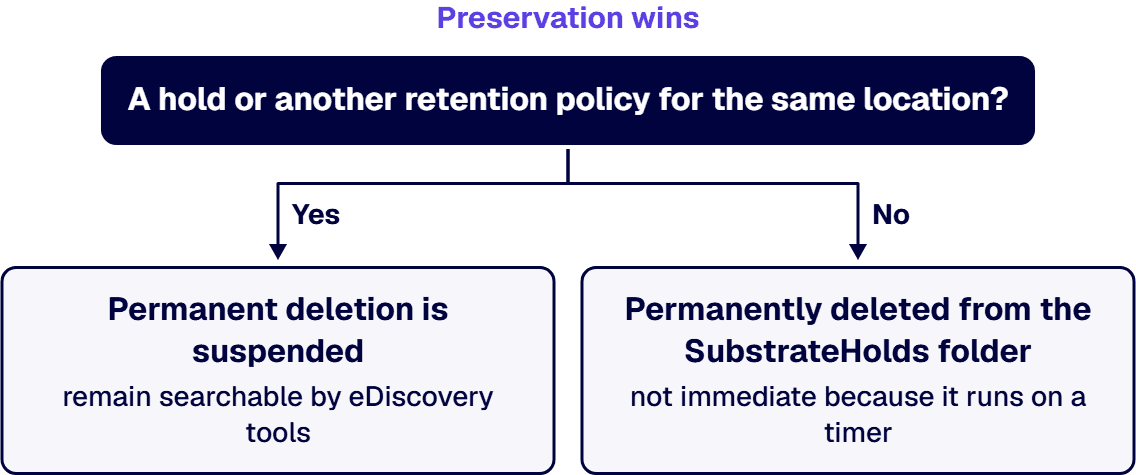
If you expect a short delete setting to remove interactions quickly, Microsoft’s own timing says otherwise. According to Microsoft’s retention page, “The timer job typically takes 1-7 days to run,” and expired items move to a second hidden folder, SubstrateHolds, before they are permanently deleted. Microsoft states that “Until messages are permanently deleted from the SubstrateHolds folder, they remain searchable by eDiscovery tools,” and its worked example concludes that “a delete action after 1 day could take 16 days before the message is permanently deleted so that it’s no longer returned in eDiscovery searches.”
When a hold and a delete policy both reach the same mailbox, Microsoft’s rule is that preservation wins. In Microsoft’s words on its retention page for Copilot and AI apps, “permanent deletion from the SubstrateHolds folder is always suspended if the mailbox is affected by another retention policy for the same location, Litigation Hold, delay hold, or if an eDiscovery hold is applied to the mailbox for legal or investigative reasons.” Microsoft’s Purview page on generative AI apps adds that “if more than one policy for the same location applies to a user, the principles of retention resolve any conflicts,” and Microsoft gives the example that “the data is retained for the longest duration of all the applied retention policies or eDiscovery holds.”
A short delete policy therefore does not remove interactions from a mailbox that a hold or a longer retention policy for the same location also covers. Whether and when a hold is placed or lifted is a decision for counsel, and nothing in the mechanism answers it.
If counsel asks whether Copilot interactions can be produced, the mechanism is the one used for other mailbox content. Microsoft’s Purview protections page for generative AI apps states: “Because user prompts and responses for AI apps are stored in a user’s mailbox, you can create a case and use search when a user’s mailbox is selected as the source for a search query.” Microsoft describes a Copilot activity condition in the eDiscovery query builder and says on the same page that “This query condition includes all Copilot and other AI application activity.” Microsoft states on that page that “After the search is refined, you can export the results or add to a review set.”
In results, Microsoft’s Search for and delete AI application data in eDiscovery page, read on 2026-09-22, says each Microsoft 365 Copilot interaction is stored as an individual item in the user’s Exchange Online mailbox, and that its headers show the user’s address on one side and “The Copilot application identity” on the other.
The same Microsoft page describes a search-and-delete capability that is “intended to be an event-response tool,” and Microsoft states on that page: “Before you can delete Copilot or other AI application data from a mailbox, you have to remove any hold or retention policy that is assigned to a target mailbox.” Because using that tool means removing preservation first, it is a decision for counsel, not a routine clean-up.
Before anyone configures a policy, five decisions need an owner, and each one can be written down and signed:
The records decision outranks the other four: until counsel and records management settle whether interactions are records, the period, scope and access decisions have nothing to rest on.
If the five decisions sit between IT, counsel and records management with nobody translating the mechanism, an outside architect can map what your tenant does today against what they decide. Delivery is senior and US-based. The ongoing program that follows, and who runs it, is covered in Hire a Firm for Microsoft 365 Copilot Governance After Deployment, within Embedding Governance into How the Enterprise Operates and Scales. If Purview itself is not yet in place, Microsoft Purview Technology Readiness Services covers getting ready.
If your organization applies a Microsoft Purview retention policy to the Microsoft 365 Copilot location, Copilot prompts and responses are kept or deleted according to that policy, for the period counsel and records management set. According to Microsoft, permanent deletion is suspended when the mailbox is under Litigation Hold, an eDiscovery hold or another retention policy for the same location, so interactions can be preserved for a legal matter.
If you need to find them for compliance, look in the mailbox, not the Copilot window: according to Microsoft, messages from Copilot and other generative AI apps are kept in a hidden folder inside the mailbox of the user who ran the app. Microsoft says the folder is not designed for users or administrators to open directly and is searched with eDiscovery tools.
Yes, when the user’s mailbox is the search source: according to Microsoft, prompts and responses for AI apps are stored in the user’s mailbox, so an eDiscovery case can search them, and Microsoft describes a Copilot activity condition for narrowing the search. Microsoft also says results can be exported or added to a review set.
Not necessarily, if a retention policy or a hold applies: according to Microsoft, what a user sees in an AI app does not reliably show whether a message has been retained or permanently deleted for compliance. Microsoft says messages remain searchable by eDiscovery tools until they are permanently deleted from a hidden folder, and a hold or another retention policy for the same location suspends that permanent deletion.
By Michael Branson
As of September 2026, the build belongs in your tenant. A partner works in a Power Platform Developer environment inside your own tenant, and the finished agent reaches production as a managed solution through Power Platform pipelines. Microsoft’s own pipelines documentation states plainly: “Can pipelines deploy to a different tenant? No. We recommend using Azure DevOps or GitHub for this scenario.” An agent built in the partner’s own tenant instead arrives as a manual import, with every connection, connection reference and environment variable rebuilt on your side. Keep a partner-owned tenant only for pre-contract demos with no customer data in scope. If your policy keeps every external identity out of the production tenant, a separate development tenant your organization owns works too, and promotion then runs through Azure DevOps or GitHub instead of pipelines, matching what your own vendor-governance page already recommends.
A business unit has picked a partner to build a Copilot Studio agent, and the first real question is not the agent’s design. It is where the partner sits while they build it. The partner’s own tenant is the fastest way to start: no new accounts to provision, no access request to route through security. But the security team has already said no guests in production, and this reader owns the answer either way. Get it wrong toward speed, and controlled data sits in a tenant nobody here can audit or revoke. Get it wrong toward caution with no plan for handoff, and go-live turns into a rebuild, by hand, of everything the partner already built somewhere else. The question this page answers: can a partner build a Copilot agent in a workspace inside your own tenant, and then move it into production?
There are three places this workspace can sit, and only two of them are workable for anything beyond a demo.
The partner’s own tenant is the fastest to stand up and the one a partner will usually ask for first, because it costs them nothing to configure. It is also the option that puts your data somewhere your own security team cannot see, log, or revoke on your own schedule. This is the right choice for exactly one situation: a pre-contract or early-stage demo that uses no real customer data. The moment real data or a production-bound artifact is in scope, this option is closed.
A Power Platform Developer environment inside your own tenant is the default answer for everything else. It is a single-user environment, licensed under the Power Apps Developer Plan, that lives inside your tenant’s own boundary from the first day of work. The partner’s engineers reach it as guests in your directory, not as employees of a tenant you cannot see into, and it is created and destroyed on your own schedule, not theirs.
The third option is a separate development tenant your organization owns, promoted through Azure DevOps or GitHub instead of Power Platform pipelines, for one specific policy position: an organization whose security posture keeps every external identity, full stop, out of anything that touches production. This is not a workaround this page invented. It is the same shape your own Microsoft Vendor Risk Management for Embedded Teams page already recommends for embedded external teams generally: “dedicated development tenants” with “network-level isolation” so external teams “work productively without touching production systems.” The cost of this option is that it gives up Power Platform pipelines entirely for this agent, because pipelines cannot cross a tenant boundary, and the promotion work moves onto a general-purpose CI/CD tool instead of a native one.
Which of the two workable options fits is a policy call this page does not make for you: it is a question about how your organization treats external identity, not a question about Copilot Studio.
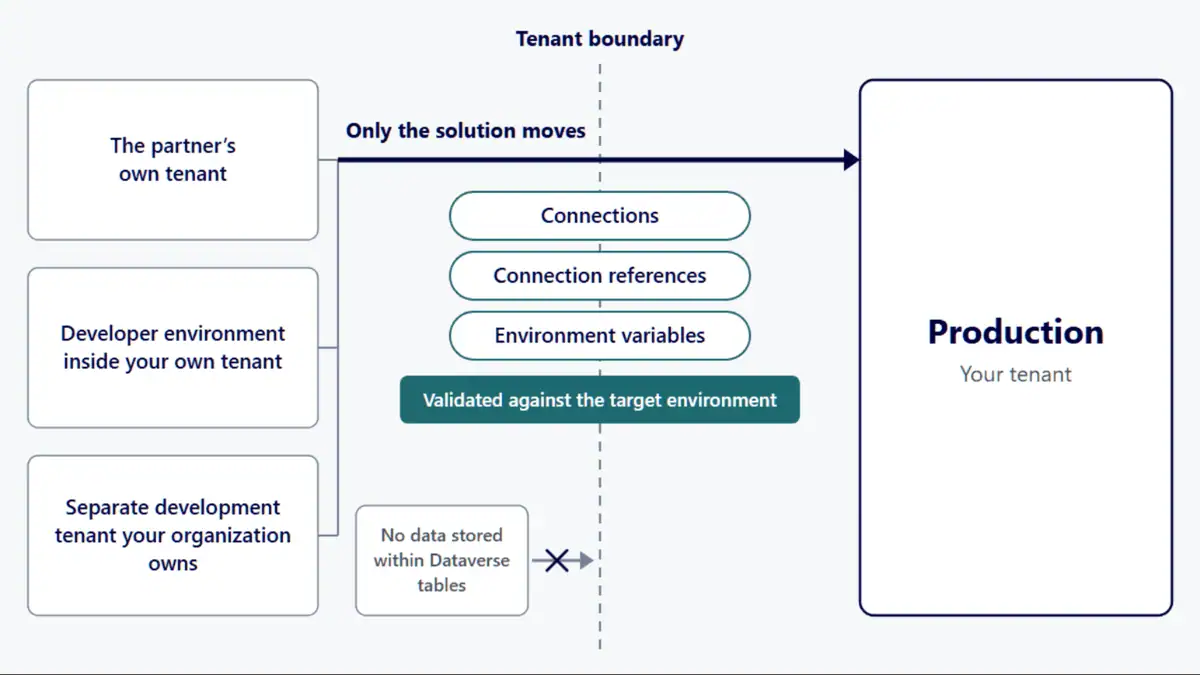
Whichever tenant the build happens in, promotion to production is a solution moving between environments, and only the solution moves. Microsoft’s pipelines FAQ is specific about the payload: “Pipelines deploy solutions as well as configuration for the target environment such as connections, connection references, and environment variables… Pipelines, or solutions in general, don’t contain data stored within Dataverse tables.” Read that twice if the plan on the table assumes test conversations, transcripts or any Dataverse-held content travels with the agent. It does not. Every connection, connection reference and environment variable is validated against the target environment before the deployment runs, which is what catches a missing dependency before it becomes a production incident rather than after.
The practical consequence for a first agent: build inside a solution from the start, not inside whatever the environment hands you by default. The Power Platform ALM basics documentation is explicit that “a single default environment is automatically created for each tenant and shared by all users in that tenant,” and that solutions, not the environment itself, are “used to transport apps and components from one environment to another.” A shared default environment is not where a production-bound Copilot agent belongs even during the build; the agent’s solution is created before the agent is, so the first version already has a home a pipeline can move.
What this section does not cover, because it belongs to a sibling page, is how solution versioning, rollback, and the upgrade-without-overwrite behavior actually work once an agent has shipped more than once, which Power Platform ALM: Maker Solution to Managed Production owns in full; this page assumes the general mechanics and states only what is specific to a Copilot Studio agent’s first promotion.
Inside the workable options, a partner’s engineers typically work in your tenant as B2B guests, and are switched off at handoff. That access is scoped, not blanket. Microsoft Entra’s cross-tenant access settings let you configure organization-specific settings that “take precedence over default settings,” and within those settings you can “scope access to specific users, groups, and applications” rather than trusting an entire partner organization by default. Scoping this way to named users and named applications requires a Microsoft Entra ID P1 license, which the same documentation states directly: “you need a Microsoft Entra ID P1 license. The license is required on the tenant that you configure.”
Revocation is a directory action, not a Copilot Studio setting: remove the guest accounts, or narrow the organizational settings for that partner, and the access that settings scoping granted is gone. Inside the Developer environment itself, a Dataverse security role scoped to that one environment is what actually lets a partner’s engineer build anything at all; that role is assigned when the engagement starts and removed when it ends, independent of whatever the directory-level guest status is doing.
This is an access decision, not a governance program. What auditors expect to see, how approval workflows are tiered, and what a vendor contract has to specify are covered in full on Microsoft Vendor Risk Management for Embedded Teams, and are not repeated here. Guest access for people who will use a finished app, as opposed to engineers building one, is a different question with its own answer on Power Apps for External Users: Architecture and Governance.
A handful of tenant-level conditions have to be set before the first Copilot Studio agent is worth building, and missing one of them is what turns a planned promotion into a support ticket.
Pipeline target environments have to be managed environments. Microsoft’s pipelines documentation states that “all other environments used in pipelines must be enabled as managed environments” beyond the development and pipelines-host environments, and that “licenses granting premium use rights are required for all managed environments,” which is a licensing consequence worth budgeting for before the first agent, not after. The same page carries a dated change worth planning around now: “Starting in October 2026, the admin deployment page notifies admins when pipelines deploy to unmanaged target environments.” Review and enable managed environments for your pipeline targets before that notice appears.
Whoever manages the promotion path needs the right role. The pipelines documentation names it directly: “If the user has the ‘Deployment Pipeline Administrator’ security role the ‘Manage pipelines’ button will be enabled.” Assign this role deliberately, to a named admin, rather than discovering after the fact that nobody on the team can open the pipeline configuration app.
What this page does not cover, rollback behavior, solution versioning, and the general managed-environment premium licensing model beyond this one pipeline-target consequence, lives on Power Platform ALM: Maker Solution to Managed Production and Power Platform Environment Strategy: The Four Decisions, linked here rather than restated.
Getting an agent into a production environment is not the same as getting it in front of the people who are supposed to use it, and Copilot Studio treats those as separate steps. Microsoft’s own publishing documentation describes publishing an agent to channels such as Teams, Microsoft 365 Copilot, a custom website, or SharePoint, and notes that “the latest published content only becomes available after a new session starts,” or after up to an hour otherwise.
For an agent meant to reach the whole organization rather than a small shared group, the documented path is to submit it “for admin approval to be featured in the Built for your org section of the Teams app store,” which also reaches the Microsoft 365 Agent Store’s equivalent section. This is an admin approval workflow, not an automatic rollout: Microsoft’s documentation does not publish a fixed timeline for how long that approval or the resulting org-wide propagation takes, so this is a step to plan into a go-live date with your own admin, not a number this page will invent for you. A smaller, informally shared agent (the “Built with Power Platform” section, available only to explicitly shared users) is a different, narrower distribution path and is not the same as an enterprise-wide release.
The tenant rule above does not change in a sovereign cloud: the build still belongs in your own tenant, or in a separate development tenant you own, for the same reasons. What changes is the cross-tenant mechanics if a partner’s identities sit in a commercial tenant while yours sits in a government cloud. Microsoft’s own documentation states that “Microsoft cloud settings let you collaborate with organizations from different Microsoft Azure clouds,” naming “Microsoft Azure commercial cloud and Microsoft Azure Government, which includes the Office GCC-High and DoD clouds” as one supported pairing, while also noting plainly that “B2B direct connect isn’t supported for collaboration with Microsoft Entra tenants in a different Microsoft cloud.” Cross-cloud B2B collaboration has to be enabled on both sides before a commercial-tenant partner can be invited into a GCC High or DoD tenant at all, and Copilot Studio agent availability in a given sovereign cloud is its own separate question, confirmed with your Microsoft account team before scoping any of this work.
Whether a given CUI, ITAR, or export-controlled data set may sit in this Developer environment at all is a determination your own contracting officer and your contract’s own clauses make, not a determination this page or Microsoft’s product documentation makes for you.
A partner-owned tenant is the right call, not a compromise, in one situation: a pre-contract or early-stage demo with no customer data in scope. Loading controlled data into a partner’s tenant to save a week of setup time is the trade this page warns against directly, and it is never worth making.
If your organization’s policy keeps every external identity out of anything that touches production, full stop, that is a legitimate position, and the answer is the separate development tenant your organization owns, promoted through Azure DevOps or GitHub, not a forced exception to let a partner into your production tenant’s directory. Accept that trade with its eyes open: you give up the native Power Platform pipelines path for this agent, and someone on your side owns a CI/CD pipeline instead of a built-in one.
Yes. The workplace is a Power Platform Developer environment created inside your own tenant, where the partner’s engineers work as scoped Microsoft Entra B2B guests. Deployment back into your primary tenant runs through Power Platform pipelines as a managed solution, because that promotion never has to cross a tenant boundary in the first place; the build and the production environment share the same tenant from day one.
Not as a route to production. The Microsoft 365 Developer Program gives eligible members a sandbox that Microsoft Learn’s page Microsoft 365 Developer Program FAQ calls “a fully pre-configured tenant,” and the same FAQ says “A Microsoft 365 enterprise or production subscription and a Microsoft 365 Developer Program sandbox are separate subscriptions and environments.” So the sandbox is a separate tenant from your production one. Microsoft Learn’s page Set up a Microsoft 365 developer sandbox subscription says the subscription “includes 25 user licenses and lasts for up to 90 days, depending on your activity,” and the FAQ adds: “Developer tenants are intended for development and testing purposes only and are short-lived by design. Microsoft may require tenants to be recreated every 90 days. Do not use a developer tenant for production workloads or long-term data storage.”
Anything built in a sandbox has to cross a tenant boundary to reach yours, and Microsoft Learn’s page Overview of pipelines in Power Platform says Power Platform pipelines do not deploy to a different tenant and recommends Azure DevOps or GitHub for that scenario. If a partner prototypes in a sandbox, plan the move to your tenant as an Azure DevOps or GitHub promotion, and keep the agent you intend to run in production in a Developer environment inside your own tenant, as described earlier on this page.
By Matt Lawson, Senior Consultant, i3solutions. Matt Lawson has spent more than 14 years at i3solutions guiding complex enterprise technology work from scope and system design through development, acceptance, and long-term support, with expertise spanning technical oversight, solution architecture, SharePoint and Microsoft 365 delivery, Power Platform implementation, business intelligence, enterprise search, and the practical application of AI to real business and operational challenges.
For most regulated US organizations already standardized on Microsoft 365 and Entra ID, Microsoft is the strongest hybrid answer, because Azure Government is authorized at FedRAMP High (Microsoft’s Compare Azure Government and global Azure article, last updated 2025-08-21) and Foundry Local on Azure Local runs inference on your own Arc-enabled Kubernetes cluster under the same identity plane. Choose Google Distributed Cloud air-gapped instead when the requirement is a genuinely disconnected or classified enclave, which is the case its documentation is written for. Amazon Bedrock is the strong choice for an AWS-native estate and is authorized at FedRAMP Class D (formerly High) and DoD IL4 and IL5 for a named model list in AWS GovCloud (AWS’s Amazon Bedrock models certification status page, last updated September 18, 2026), but AWS documents it as a serverless Region service, so the on-premises half of a hybrid design has to be solved somewhere else.
The hybrid AI programs that stall in regulated organizations almost never stall on the model. They stall because the architect and the security reviewer used the word hybrid to mean two different architectures for six weeks without noticing. One had in mind private networking to an accredited cloud region. The other had in mind inference running on hardware inside a boundary, with no path out. Those are different products, from different vendors, at different levels of maturity, and the gap only surfaces at the security review, which is the most expensive place for it to surface.
So the useful comparison is not a leaderboard. It is a narrower question with a checkable answer: which vendors actually publish documentation for running their own models on hardware you control, and what accreditation do they publish for the cloud half that has to sit alongside it. Three do, in different shapes, and the differences are large enough to decide an architecture. Everything below is quoted from the vendors’ own current documentation, with the revision date each page carries, because this is exactly the kind of ground where a remembered fact from six months ago is wrong.
The rest of this page is the documentation behind those three sentences, the five criteria that decide between them, and the two constraints that flip the answer before any of the criteria get a vote.
Before comparing platforms, separate the shapes. In regulated work the word hybrid gets used for three arrangements that place completely different demands on a vendor.
Shape one is a networking exercise, and every serious vendor solves it, which is why the honest comparison lives in shapes two and three, where a vendor either has built a product for your hardware or has not. If your requirement turns out to be only shape one, this decision is far less consequential than it feels in the room, and you should optimize for where your data and identity already sit rather than for AI features.
Microsoft’s cloud half is the most heavily documented of the three for US regulated work. The Compare Azure Government and global Azure article, last updated 2025-08-21, states that “both cloud environments are assessed and authorized at the FedRAMP High impact level,” and that Azure Government “provides an extra layer of protection to customers through contractual commitments regarding storage of customer data in the United States and limiting potential access to systems processing customer data to screened US persons.” The same article’s service-endpoint table lists Azure OpenAI Service with a separate Azure Government endpoint at openai.azure.us, alongside separate government endpoints for AI Search, Document Intelligence, Speech, and Translator.
Two boundary notes on that page are worth reading before anyone quotes it in an architecture document. First, its own scope disclaimer: “These lists and tables do not include feature or bundle availability in the Azure Government Secret or Azure Government Top Secret clouds. For more information about specific availability for air-gapped clouds, please contact your account team.” If your target is one of those clouds, this article is not your source. Second, it carries a hybrid and multicloud section documenting Edge RAG Preview enabled by Azure Arc in Azure Government, and notes that “Installation of the Edge RAG extension is only available for Azure Government by using Azure CLI.” A retrieval-augmented pattern running on Arc-managed infrastructure inside a government cloud is precisely the shape-two architecture, and it is documented as preview.
For the on-premises half, the newer and more substantial answer is Foundry Local on Azure Local. Microsoft’s Foundry Local on Azure Local overview, last updated 2026-08-03, states that it “brings AI inference to your Azure Local environment,” that you “Deploy and run AI models on an Arc-enabled Kubernetes cluster with Kubernetes-native operations,” and that the point is to “Keep your data processing on-premises where your data is generated.” Architecturally, it “runs on an Arc-enabled Kubernetes cluster and is deployed as an Azure Arc extension,” with an operator-based control plane and declarative Model and ModelDeployment resources. Governing models in the cloud Foundry service is a separate job, covered at govern custom AI in Microsoft Foundry, which notes that Microsoft lists Defender for Cloud AI threat protection as not available in Azure Government.
Three published capabilities matter for a regulated design. Inference endpoints are secured “using API keys, Microsoft Entra ID authentication, and TLS-enabled gateway API patterns,” which keeps the on-premises half inside the same identity plane as the cloud half rather than introducing a second one. The listed use cases include the ability to “Operate in disconnected environments where internet connectivity isn’t available, with a deployment model consistent with connected scenarios.” And the stated reason to choose it leads with the compliance case: “Keep inference and data processing on-premises for sovereignty or regulatory requirements.”
The limits are the part that changes a plan. The same article states plainly that “Foundry Local is available in preview,” that “Features, approaches, and processes can change or have limited capabilities before general availability (GA),” and that deployment “is currently available by request during preview” through an access request form. Its supported-region list for the Arc extension names commercial Azure regions only, with no US Government region among them. Read that as published: it is a statement about where the extension is offered, not a statement that a government-cloud path does not exist. Our recommendation on that is committed rather than conditional. Do not put a production regulated workload on a preview service with a request-gated deployment path. Run the workload in Azure Government now, where the accreditation is documented today, and schedule the on-premises inference tier as a second phase gated on general availability in your cloud. A pilot on the preview path is a good use of a quarter, scoped to a dataset you could move back. A system of record is not.
AWS has the clearest published answer of the three on the cloud half for defense work. In an announcement dated June 25, 2026, AWS states that OpenAI GPT, OpenAI GPT OSS, and NVIDIA Nemotron models now have FedRAMP High and DoD IL-4/5 approval in AWS GovCloud (US). DoD CC SRG is the Department of Defense Cloud Computing Security Requirements Guide, and its impact levels are the tiers it uses for data sensitivity. That is a specific, dated, model-level authorization statement, and it is a genuinely strong position.
The service documentation fills in the rest. The Amazon Bedrock in AWS GovCloud (US) page lists availability in the AWS GovCloud (US-West) and AWS GovCloud (US-East) Regions, and points to AWS’s Amazon Bedrock models FedRAMP and DoD CSP SRG (IL4/IL5) certification status page, last updated September 18, 2026, which enumerates the models carrying FedRAMP Class D (formerly High) and IL4/5 authorization, among them the Titan Text Embeddings G1 and V2 models, Claude Sonnet 4.5, Claude 3.7 Sonnet, Claude 3.5 Sonnet, Claude 3 Haiku, and Llama 3 8B and 70B. One caveat on the GovCloud page specifically: unlike the Microsoft articles cited here, AWS does not stamp it with a visible revision date, and the model list is exactly the kind of content that moves, so treat the copy in this paragraph as a pointer and open the status page on the day you decide.
The architectural fact that decides the hybrid question is in the same page’s own description of the service: “Since Amazon Bedrock is serverless, you don’t have to manage any infrastructure, and you can securely integrate and deploy generative AI capabilities into your applications.” Serverless is a feature, and for a cloud-resident workload it is a considerable one. It is also a statement about where the service lives. AWS’s published Bedrock documentation defines availability by Region, and we found no AWS documentation describing Bedrock inference running on customer-owned hardware. Absence of documentation is not a prohibition, so do not read that as AWS saying no. Read it as unresolved, and then decide anyway: design the on-premises half of an AWS hybrid architecture on something other than Bedrock. An architecture that depends on an undocumented capability arriving is a schedule risk with no mitigation available to you, and by the time it resolves you have already spent the quarter.
The export-control detail on that page also deserves a mention, because it is the sort of thing that surfaces late in a review. It documents that certain customer-defined metadata, including custom model metadata and provisioned-throughput metadata for the no-commit option, “may leave the AWS GovCloud (US) Regions only when the customer asks AWS to investigate a reported issue,” and that Bedrock model evaluation metadata “is not permitted to contain export-controlled data.” Those are workable constraints. They are not workable if nobody reads them until an ITAR review.
Google’s answer is the most distinctive, because it is built from the disconnected end rather than the cloud end. The Google Distributed Cloud air-gapped overview in the Google Cloud documentation carries a last-updated stamp of 2026-08-11 UTC. It states that GDC air-gapped “lets you host, control, and manage infrastructure and services directly on your premises,” and that it “does not require connectivity to Google Cloud and helps customers meet compliance and regulatory requirements.” The same Google Cloud documentation names a FIPS 140-2 certified Rocky Linux long-term support operating system underneath.
Google Cloud’s own announcement, published April 9, 2025, describes GDC as “a fully managed on-prem and edge cloud solution that is offered in both connected and air-gapped options, scaling from a single server to hundreds of racks.” The same announcement states that the GDC air-gapped product is authorized for US Government Secret and Top Secret missions and that Gemini is available on it. That is a vendor placing a frontier model inside an enclave with no return path, which is a capability the other two do not describe in the same terms.
The cloud half has a different shape and its own conditions. Google Cloud’s deployment guidance for Gemini for Government carries a last-updated stamp of 2026-08-14 UTC. It is explicit that what the platform supports turns on configuration rather than arriving by default: only models that support US multi-regional endpoints offer data residency commitments and can support FedRAMP High and DoD IL4 and IL5 deployments, and the guidance directs you to deploy inside an Assured Workloads folder configured for your specific compliance regime and to select US Multi-region as the app location. That is a build instruction. Opening a Google Cloud project and switching Gemini on leaves every one of those choices unmade, and the folder configuration is work somebody in your organization has to own and evidence.
One honest limit on this section. Google’s public documentation for the air-gapped product is thinner on model-by-model authorization detail than Microsoft’s Azure Government material or AWS’s model list, and much of the strongest public evidence sits in announcements rather than reference documentation. That changes how you should run the evaluation, not whether you should. Put Google on the shortlist only when the disconnected requirement is real, and when it is, run the evaluation as a direct engagement with Google under agreement rather than as a documentation exercise, because the material that would settle it is not published.
Table sources and as-of dates. 1 Microsoft, Compare Azure Government and global Azure, last updated 2025-08-21. 2 AWS, Amazon Bedrock models FedRAMP and DoD CSP SRG (IL4/IL5) certification status, last updated September 18, 2026, and AWS’s announcement of June 25, 2026. 3 Google Cloud, Deployment guidance for Gemini for Government, last updated 2026-08-14 UTC. 4 Google Cloud’s announcement of April 9, 2025, which states that the GDC air-gapped product is authorized for US Government Secret and Top Secret missions. Each page was read on September 18, 2026.
Read the table by column rather than by row. Microsoft is one governance and identity plane stretched across two locations. AWS is a very strong single location. Google is a platform built for the location most vendors cannot reach.
Where the data and the identities already live. This outranks every model benchmark and it is not close. If your content is in SharePoint and Microsoft 365, your users are in Entra ID, and your DLP policy is written in Purview, then choosing a non-Microsoft AI platform means building a second identity path, a second logging path, and a second policy surface for the sole purpose of reading data that is already governed. That cost is paid every month, by the team that has to evidence it at audit. The mirror image is equally true for an AWS-native estate.
Which of the three hybrid shapes you actually need. Most organizations that describe a hybrid requirement need shape one, private-network access to cloud inference, and can meet it on any of the three platforms. A minority genuinely need shape two, and a smaller minority need shape three. Establishing which one you are before the platform conversation removes most of the disagreement in the room, because the shape, not the vendor, is what creates the work.
Whether the constraint is a rule, a regulation, or a preference. “The data cannot leave our network” is sometimes a control from an authorizing official, sometimes an internal policy written before FedRAMP High existed, and sometimes an instinct. These three have different costs, and the check to run first is which of the three you are holding, because the answer changes what you are allowed to buy. Standing up and operating an on-premises inference cluster is a real ongoing commitment, and it is the right one when the requirement is real. It is an expensive way to honor a preference that a documented control inheritance would have satisfied.
Who will operate the on-premises half at three in the morning. A Kubernetes cluster with GPU nodes serving production inference is infrastructure with an on-call rotation attached. If that team does not exist and is not being hired, then a hybrid design chosen for compliance reasons is a boundary nobody is qualified to operate, which is worse for your risk posture than the cloud option you rejected.
How fast the ground is moving under the answer. Every load-bearing fact on this page comes from a vendor page that has been revised this year, and one of them describes a service still in preview. That is a property of the market, not a flaw in the research. It means the decision should be documented with its evidence and its revision dates attached, and revisited on a schedule, rather than settled once in a slide.
Most regulated buyers land in one of three places, and the wrong one is expensive to leave.
Microsoft-standardized enterprise, sensitive but unclassified data. Put the workload in Azure Government, use the Azure OpenAI and AI Search government endpoints, and keep the identity and DLP machinery you already run. Bring an on-premises inference tier in only where a specific dataset or latency requirement demands it, and go in with clear eyes about the preview status of Foundry Local on Azure Local. This covers the large majority of regulated US enterprises, and it wins on the boring criterion of one governance plane rather than on any AI capability.
Classified, disconnected, or physically isolated mission. Google Distributed Cloud air-gapped is the option whose documentation is written for exactly this and whose vendor names Secret and Top Secret authorization with Gemini available on the product, in Google Cloud’s announcement of April 9, 2025. If that is your requirement, this is the shortest path in the market today, and the evaluation should be run directly with Google under agreement.
AWS-native estate with a strong defense compliance requirement. Bedrock in GovCloud with the named FedRAMP Class D (formerly High) and IL4 and IL5 model list, per AWS’s certification status page last updated September 18, 2026, is a strong, dated, specific answer for the cloud half. Design the on-premises half separately and deliberately, on a platform chosen for that job rather than on an extension of Bedrock that AWS has not documented, and do not let a slide labeled “hybrid” paper over the fact that it is a different platform with a different identity model.
The failure mode that costs the most is none of these three. It is picking a platform to satisfy an unwritten constraint, discovering during the security review that the constraint was negotiable, and being left operating infrastructure you did not need. The cheapest hour in this whole process is the one spent getting the actual control written down before anyone opens a vendor comparison.
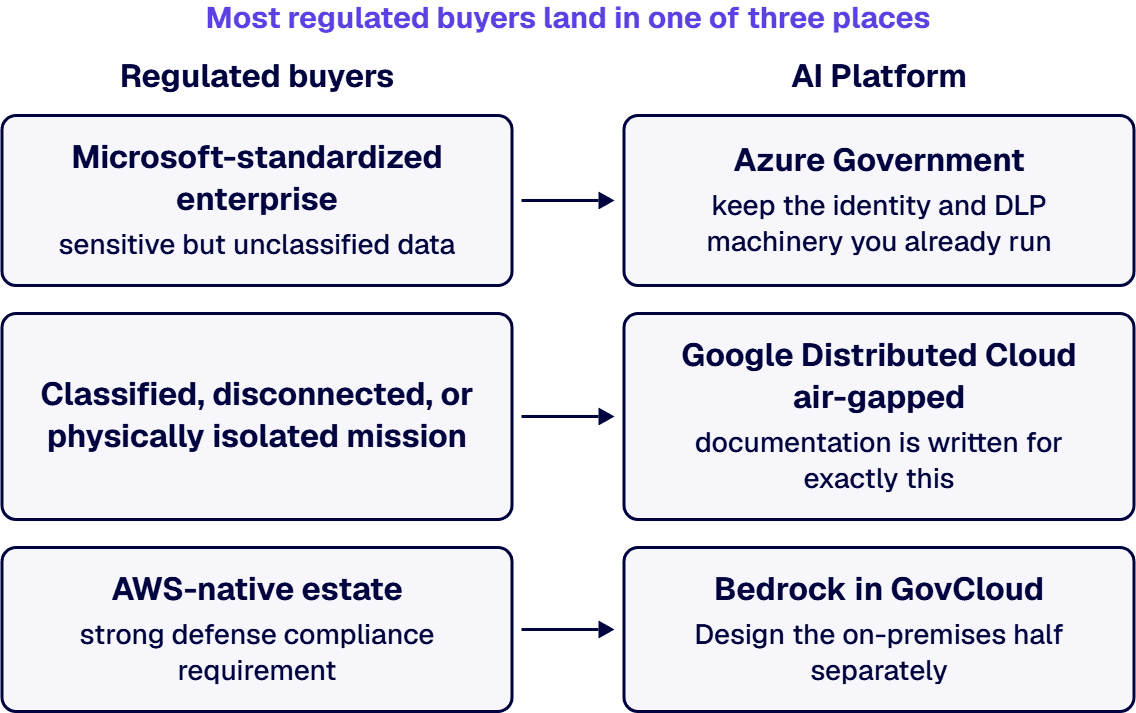
Stated plainly, so you can weigh what you are reading. Nothing on this page determines whether your deployment is compliant. That determination belongs to your organization and its authorizing official, and what a vendor publishes is an input to it rather than a substitute for it. The platform comparison above is drawn from the vendors’ published documentation, cited and dated so you can check every line yourself. Our own delivery experience is in the Microsoft stack: Azure and Azure Government, Microsoft 365 and Copilot, and the Power Platform, in regulated and government tenancies. When we recommend, that is the ground we recommend from, and a firm’s documentation reading is worth less to you than its delivery record. i3solutions runs comparative platform-selection evaluations for clients, recommending among IAM platforms for hybrid estates and among workflow automation platforms against SOC 2 and HIPAA, rather than only implementing the Microsoft option.
What that experience looks like on the accreditation side. i3solutions installs and helps configure applications inside IL4 and IL6 government cloud environments and other government networks. i3solutions runs a governed Power Platform for a federal defense agency supporting roughly 10,000 personnel across about 180 locations, which works because it is governed, not despite it. The detail is in our Modernizing Internal Operations Processes With Digital Transformation case study. On the compliance side, the reading is done as its own piece of work rather than as a restatement of a vendor page: i3solutions advises clients on federal compliance posture as its own assessment rather than as a restatement of Microsoft’s documentation, including whether SharePoint Online meets NIST 800-53, whether Azure Government is required under the DoD Cloud Computing SRG, and whether a CMMC gap assessment is needed to bid. That assessment is a named deliverable. The i3solutions Federal Compliance Assessment evaluates a client tenant against NIST SP 800-53 and CMMC using automated tenant configuration scripts and a 42-point security checklist. i3solutions engages its Federal Compliance Assessment when the scope spans a FedRAMP Moderate or FedRAMP High boundary, or when the client operates in a GCC High tenant.
On the governance side, which is where a hybrid AI estate actually succeeds or fails, the same discipline applies to the platform the agents and apps sit on. i3solutions governs client Power Platform tenants with the Center of Excellence Starter Kit, tenant-level and environment-level DLP policies, and managed environment controls. i3solutions runs client Power Platform work on a multi-tenant Center of Excellence model with separate Dev, Test, UAT, and Production environments promoted through managed solutions. i3solutions delivery includes ALM practices with Power Platform pipelines or Azure DevOps integration, environment separation strategies, and change control processes. And on the data layer that an AI workload will read: i3solutions selects Dataverse over SharePoint as the primary relational store when a client needs scalable high-volume transactional data, and holds application secrets in Azure Key Vault.
Two notes on scope and schedule, because a platform decision is usually not the expensive part. The assessment work sizes to the estate: i3solutions AI readiness assessments scope from a shallow tenant readiness scan at the low end to deep unstructured data discovery at the high end. AI readiness assessment cost variance at i3solutions is driven by custom semantic index building, multi-tenant vector database configuration on Azure AI Search, and prompt-engineering compliance reviews for regulated data. The larger surprise is almost always underneath the AI. The order-of-magnitude difference between AI readiness assessment quotes is data governance cleanup: when Dataverse and SharePoint access-control alignment has to precede a Copilot or OpenAI API integration, that remediation dominates the engagement. An AI platform does not create oversharing. It finds it, and then it quotes it to someone with a citation.
On timelines, hold the government-cloud reality next to the AI enthusiasm. How long a government-cloud deployment with a FedRAMP authorization takes, with control inheritance from Azure Government and without it, is covered in Azure Government Migration: What Moving from Azure Commercial Actually Takes.
Where the estate is hybrid and the buyer is a government contractor, that ground narrows the platform question quickly. i3solutions finds Azure GCC High to be one of the strongest options for hybrid environments in regulated and government contractor settings. Delivery is senior and US-based.
For a Microsoft-standardized regulated enterprise, Microsoft, because Azure Government is documented as assessed and authorized at FedRAMP High (Microsoft’s Compare Azure Government and global Azure article, last updated 2025-08-21) and Foundry Local on Azure Local runs inference on an Arc-enabled Kubernetes cluster you own, secured with Microsoft Entra ID, so both halves sit in one identity and governance plane. For a genuinely disconnected or classified enclave, Google Distributed Cloud air-gapped, which Google describes as not requiring connectivity to Google Cloud and on which it says Gemini is available. For an AWS-native estate, Amazon Bedrock in AWS GovCloud, which AWS’s certification status page, last updated September 18, 2026, lists at FedRAMP Class D (formerly High) and DoD IL4 and IL5 for a named model list, with the on-premises half designed separately.
Yes, with a maturity caveat you should not skip. Microsoft’s Foundry Local on Azure Local documentation describes deploying and running AI models on an Arc-enabled Kubernetes cluster, keeping data processing on-premises, serving generative and predictive inference on CPU or GPU nodes, and operating in disconnected environments where internet connectivity is not available. The same article states that Foundry Local is available in preview, that features and capabilities can change before general availability, and that deployment is currently available by request during the preview. Its published supported-region list for the Arc extension names commercial Azure regions only, so confirm the path for your specific cloud with Microsoft rather than inferring it.
Not according to the AWS documentation reviewed for this page. AWS describes Bedrock as serverless, with availability defined by Region, including the AWS GovCloud (US-West) and (US-East) Regions for regulated workloads. We found no AWS documentation describing Bedrock inference running on customer-owned hardware. That is an absence of documentation rather than a prohibition, so if an on-premises requirement is firm and AWS is your incumbent, put the question to your AWS account team in writing and design the on-premises tier around the answer you get, not around the assumption.
Pick the cloud that already holds the data the model has to read. If your identities, data and Microsoft 365 already sit in Microsoft, Microsoft Foundry (formerly Azure AI Foundry) is usually the stronger fit, because Microsoft Learn’s page “What is Microsoft Foundry?” lists Microsoft Entra identity, role-based access control, content filters, network isolation, and Azure Policy under governance and security, which for a Microsoft estate is the identity and policy layer already in place. If your workloads and team run on AWS, Amazon Bedrock is usually the stronger fit. AWS describes it as “a fully managed service that provides secure, enterprise-grade access to high-performing foundation models from leading AI companies” in AWS’s Amazon Bedrock User Guide page “Overview”, and AWS’s page “Amazon Bedrock” says Bedrock is “in scope for common compliance standards including ISO, SOC, CSA STAR Level 2, GDPR, FedRAMP High, and is HIPAA eligible.” On breadth, Microsoft says Foundry gives you access to “more than 10,000 models from Microsoft, OpenAI, Anthropic, Meta, and others,” and AWS says Bedrock gives you access to “hundreds of FMs from leading AI companies.” Neither count settles the choice, because you deploy one model, not a catalog: confirm that your exact model, your Region and your compliance level are offered on the platform you are leaning toward before you commit. On the name, Microsoft’s overview lists the previous brand “Azure AI Studio / Azure AI Foundry” against the current brand “Microsoft Foundry”. This answer covers the cloud-only case; the two answers above cover the on-premises half of a hybrid design.
Google says yes, and the document that says so is the Google Distributed Cloud air-gapped overview in the Google Cloud documentation, last updated 2026-08-11 UTC. That overview states that the product lets you host, control, and manage infrastructure and services directly on your premises and does not require connectivity to Google Cloud, and Google’s announcement of April 9, 2025 states that the air-gapped product is authorized for US Government Secret and Top Secret missions and that Gemini is available on it. Because the public reference documentation is lighter on model-level detail than the equivalent Microsoft and AWS material, get the current model catalog and reference architecture for your specific enclave from Google directly.
The clearest published statements differ by vendor. AWS announced on June 25, 2026 that OpenAI GPT, OpenAI GPT OSS, and NVIDIA Nemotron models have FedRAMP High and DoD IL-4/5 approval in AWS GovCloud (US), and its certification status page, last updated September 18, 2026, lists the Titan, Claude, and Llama models carrying that authorization. Microsoft documents Azure Government as assessed and authorized at FedRAMP High with separate Azure OpenAI government endpoints (article last updated 2025-08-21). Google Cloud’s guidance conditions FedRAMP High and DoD IL4 and IL5 support on using models with US multi-regional endpoints inside a correctly configured Assured Workloads folder (guidance last updated 2026-08-14 UTC). Authorization is granted per service and often per model, so verify at the model level for the exact model you intend to deploy.
Three things, in roughly this order. The constraint that drove the architecture turns out to be a preference rather than a written control, which means an on-premises tier is being operated for no compliance benefit. The permissions on the content the AI reads were already wrong, and the AI surfaces that at speed and with citations, which turns into a remediation project nobody scoped. And the seam between the two halves gets governed by nobody, because the cloud half answers to one owner and the on-premises half to another, and connectors, identity, and logging fall between them. All three are cheaper to find in an assessment than in a security review.
By Matt Lawson, Senior Consultant, i3solutions
No. As of August 2026, Copilot Cowork is an additional cost. Microsoft’s Copilot Credits licensing guidance states that Cowork “requires the Microsoft 365 Copilot license as a prerequisite” and that “No Cowork entitlements are included with the Microsoft 365 Copilot subscription.” The seat unlocks Cowork; every task it runs is billed separately in Copilot Credits.
The Copilot seats were budgeted a year ago and approved as a clean per-user line item. Then somebody in finance opens Cowork, asks it to turn a folder of invoices into a reconciled spreadsheet, and the tenant starts drawing down credits against an Azure subscription that no one on the budget committee has seen. Two weeks later the IT director gets one question in the steering meeting: we already pay for Copilot, so why is there a second bill? The answer is unambiguous, it is published by Microsoft, and it sits in a different document from the one everyone read when they bought the seats.
That is the whole answer, and the rest of this page is about what it costs you to act on it: how the credits are actually billed, the admin step without which Cowork does not run at all, the numbers Microsoft deliberately does not let you know in advance, and the one question about regulated tenants that Microsoft has not published an answer to yet.
Licensing claims age badly, and a page about a product Microsoft is still shipping into ages worse than most. Every statement below was checked against Microsoft’s own published documentation on 22 August 2026. The dates in brackets are the last-updated dates Microsoft states on each page, not our reading of them.
Two of those sources give the same per-credit figure, which is why we are willing to print it. Read them yourself before you build a budget on this page: if Microsoft has changed the terms since our check date, Microsoft’s page is right and this one is stale.
The Microsoft 365 Copilot seat is an entry ticket. It grants the right to open Cowork. It does not carry any quantity of Cowork work with it, and Microsoft’s own framing is that “licenses act as an entry point enabling access to AI services billed on a pay-as-you-go basis.”
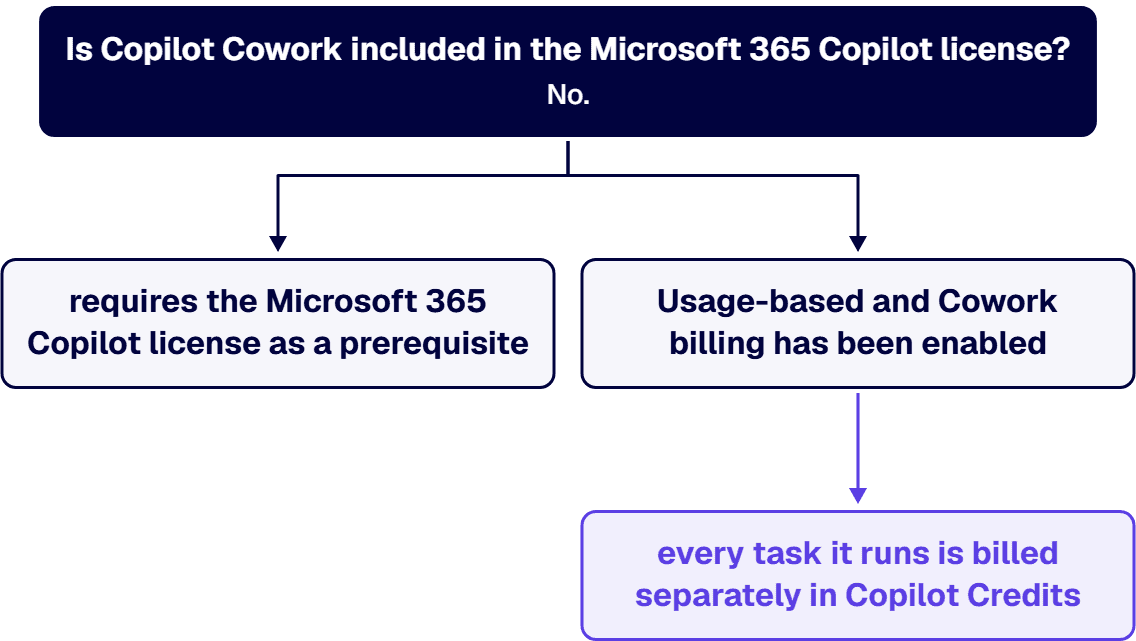
This is not a novelty in the Microsoft stack, which is the useful part for anyone building a forecast. The same service description that lists Copilot feature availability carries the footnote that “Power Platform licenses aren’t included with Microsoft 365 Copilot.” The pattern is consistent: a Microsoft 365 Copilot seat buys the assistant that answers, and any capability that goes off and does something on its own meter is licensed and metered separately. Cowork is the current, largest instance of that pattern, because the whole point of Cowork is that it acts.
The correct mental model for a budget is two lines, not one:
Finance teams are used to the first line. The second line behaves like an Azure resource, not like a Microsoft 365 SKU, and it lands in the middle of a Microsoft 365 budget conversation where nobody is expecting it.
Microsoft’s documentation is specific about the mechanics, and the details change what a sensible commitment looks like.
That last point is the one worth reading twice. It is a configuration decision made once, in an admin panel, that determines whether a year of AI consumption counts against a commitment you have already made. Microsoft also notes that “After you set a billing method for a spending policy and create the policy, you can’t change it. To update it, you must delete the policy and create a new one.”
This is the operational fact most cost conversations miss, and it is a separate question from the money.
Cowork is not a feature that appears when the seat is assigned. Microsoft’s setup documentation describes the first-run flow as the step that “activates the AI experiences, like Cowork, that are gated by usage-based billing”, and the Cowork prerequisites list an active Microsoft 365 Copilot license and that “Usage-based and Cowork billing has been enabled.” Enabling it requires a Global administrator or Billing administrator, because those are the only roles that can “add, select, and change billing methods.” An AI administrator or License administrator can create spending policies and read the dashboards but, in Microsoft’s words, “can’t set or modify the billing method.”
Two consequences follow for a regulated enterprise, and both are governance questions rather than technical ones. First, the person who unlocks the spend is a highly privileged billing role, and the setup is a one-time act with a durable financial consequence. Second, the controls you set at that moment are the controls you get: a tenant-level spending limit, optional per-user limits, alert recipients and thresholds, and a policy scoped to groups. Microsoft’s guidance is to set the per-user limit deliberately “to prevent runaway spending of Copilot Credits by one individual user”, and describes what happens when the limit binds: “When users hit the limit, they lose access to agents and services for the rest of the month until credits reset on the first of the month.”
A spending cap that silently removes a tool from a department in the third week of every month is not a cost control. It is an adoption failure with a budget line attached. Set the limits with the business owners in the room, and instrument the alerts before the first business unit gets excited about Cowork rather than after.
A cost model needs a unit cost and a unit volume. Microsoft publishes the unit cost. It does not publish the volume, and it says so in its own documentation rather than leaving you to discover it.
Microsoft does offer a Customer Cowork Estimator for modeling expected credit usage, and it is a reasonable place to start. Treat its output the way you would treat any vendor sizing tool at the beginning of an adoption curve: as an input to a pilot, not as a budget. The defensible way to size this line is to run a bounded, instrumented pilot with a named group, a per-user limit and alerting on, read the Consumption tab by user and by service, and extrapolate from your own tenant’s numbers rather than from anyone’s model.
Most of our clients run under CMMC, ITAR, DFARS, HIPAA or SOC 2 obligations, and for them the first question is not what Cowork costs but whether it exists in their environment at all. Here we have to report a gap rather than an answer, and the gap is more useful than a guess.
As of 22 August 2026, Microsoft has not published Cowork availability for GCC, GCC High or DoD in either of the two places it publishes that kind of statement. We checked both. Microsoft’s overview of U.S. government cloud environments for Microsoft 365 and Copilot [16 March 2026, refreshed 18 August 2026] does not mention Cowork. Neither does the feature-availability table in the Microsoft Copilot service description [5 August 2026, refreshed 21 August 2026], which is the table Microsoft itself points to for this question and which does carry rows for Chat, Researcher, Analyst, SharePoint agents, declarative agents and more, each marked per environment.
Unknown is not unavailable, and it is not availability either. Three things the same published sources do support:
The practical instruction for a regulated tenant: do not put Cowork in a fiscal-year plan on the strength of a commercial announcement, and do not tell a compliance officer it is unavailable either. Ask Microsoft or your licensing partner for a written statement on your specific environment, get it dated, and re-ask on the roadmap cadence. If you are still choosing an environment, the trade-offs are laid out in our comparison of GCC High and GCC Moderate, and feature timeline lag is one of the costs that belongs in that decision.
Cowork acts. It sends mail, posts in Teams, creates and reorganizes files in SharePoint and OneDrive, and searches across the organization. That changes the risk profile of your existing permission model, because an agent operating with a user’s access will find and act on everything that user can reach, at machine speed, whether or not anyone intended them to reach it.
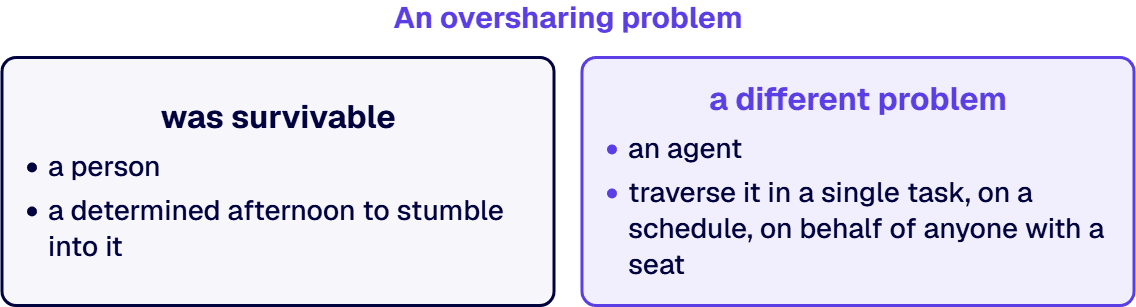
This is where the real money usually is, and it is the pattern we see most consistently. i3solutions AI readiness assessments scope from a shallow tenant readiness scan at the low end to deep unstructured data discovery at the high end. The order-of-magnitude difference between AI readiness assessment quotes is data governance cleanup: when Dataverse and SharePoint access-control alignment has to precede a Copilot or OpenAI API integration, that remediation dominates the engagement.
The underlying condition is usually older than the AI project, and the figure below is i3solutions delivery data rather than a vendor statistic or an industry survey. Across our Microsoft 365 migration and modernization work: Lift-and-shift migrations typically carry over 60 to 80% of existing permission inconsistencies, creating immediate audit exposure in Microsoft 365 environments rather than resolving the underlying governance debt. An oversharing problem that was survivable when it took a person a determined afternoon to stumble into it is a different problem when an agent can traverse it in a single task, on a schedule, on behalf of anyone with a seat.
So the honest total for a Cowork rollout in a regulated enterprise has more than the two lines above. It has:
The offset is real too, and it usually shows up in the same review. ROI analysis consistently shows potential savings of $50K-200K annually from optimized licensing and governance improvements alone. Behind that number is who does the work and under what accountability: i3solutions plans and runs governed Azure and Microsoft 365 migrations with senior, U.S.-based engineers. i3solutions delivers under a partner-led engagement model with named accountability and governance that holds up under a client audit, as distinct from contractor-only staff augmentation. For a spend line with no natural ceiling, the concrete step is narrower than any of that: name one accountable owner for the credit pool before the first spending policy is created, and put the monthly Consumption read on that person’s calendar.
Four answers and thirty minutes are enough to size this honestly: how many Microsoft 365 Copilot seats you hold today and on which base plan, which cloud environment your tenant runs in, whether anyone has already enabled usage-based billing and under which Azure subscription, and whether you have ever run a permission audit across the SharePoint and OneDrive content a Cowork user could reach. If the last answer is no, that is the finding, and it is usually where the work starts.
You do not need a proposal to leave that conversation with something useful. What you should get out of thirty minutes is a written separation between the seat cost, the consumption cost, and the readiness cost, so your finance and security people can each argue with the line that belongs to them. A single blended number is the version that does not survive the steering meeting. If you are building the internal case rather than buying this quarter, that separation is the part that outlasts the meeting, because it is the artifact your committee will actually review.
Bring the four answers above and we will work the numbers with you against your own tenant rather than against a model.
If the harder question on your side is architectural rather than financial, which cloud environment you belong in, how the permission model has to change before an agent operates inside it, or how a shared Power Platform and Cowork credit pool should be governed, that is a different conversation and it should be with someone who has built it. Ask for the architecture track when you book.
No. Microsoft’s Copilot Credits licensing guidance states that Cowork “requires the Microsoft 365 Copilot license as a prerequisite” and that “No Cowork entitlements are included with the Microsoft 365 Copilot subscription.” The seat unlocks Cowork; it does not include Cowork usage. Budget the two lines separately: a fixed, forecastable seat cost, and a variable, consumption-driven Cowork cost billed in Copilot Credits.
Microsoft publishes the unit price and not the volume. The stated rate is “$0.01/Copilot Credit,” and the number of credits a task consumes depends on the complexity of the work performed. Microsoft’s own FAQ answers “Can I check the cost before running a task?” with “No. Currently, you can only use /cost to check how many credits a task has already used.” The defensible approach is a bounded pilot with per-user limits and alerting on, then extrapolation from your own tenant’s Consumption data.
Yes. Until usage-based billing is enabled, Cowork does not run at all. Only a Global administrator or Billing administrator can “add, select, and change billing methods”; an AI administrator or License administrator can create spending policies but, in Microsoft’s words, “can’t set or modify the billing method.” Set the tenant limit, the per-user limit, and the alert thresholds with business owners in the room, because Microsoft states plainly that “When users hit the limit, they lose access to agents and services for the rest of the month until credits reset on the first of the month.”
As of 22 August 2026, Microsoft has not published an answer, and we report that as unknown rather than guessing. Cowork does not appear in Microsoft’s overview of U.S. government cloud environments, and it is absent from the feature-availability table in the Microsoft Copilot service description, the table Microsoft itself points to for this question. Microsoft’s general guidance for government clouds is that “Feature availability may differ” and “Release timing typically lags behind commercial environments.” Scheduled Prompts, a capability the Cowork overview lists alongside Cowork, is already marked “Not currently available” in GCC, GCC High and DoD.
No. Microsoft states: “Credits reset monthly and do not carry over. Any unused credits from the previous month are not added to your credit limit for the new month.” Prepayment is a separate commitment: a Copilot Credit Pre-Purchase Plan runs a one-year term that renews automatically by default, and “Cancel and exchange operations aren’t supported for Copilot Credit Pre-Purchase Plans. All purchases are final.” Prepay against measured consumption from a pilot, not against a forecast adoption curve.
By Matt Lawson, Senior Consultant, i3solutions. Matt Lawson has spent more than 14 years at i3solutions guiding complex enterprise technology work from scope and system design through development, acceptance, and long-term support, with expertise spanning technical oversight, solution architecture, SharePoint and Microsoft 365 delivery, Power Platform implementation, business intelligence, enterprise search, and the practical application of AI to real business and operational challenges.
Neither is safer by default. Copilot Studio inherits a boundary you already hold: Microsoft documents GCC as FedRAMP High compliant and GCC High as aligning with DISA SRG IL4. Azure AI Foundry gives you a boundary you build, keeping agent state in your own Cosmos DB, Storage, and AI Search. Pick Copilot Studio when data and makers already live in Microsoft 365; pick Foundry when you need control of state, network, and model.
The rest of this page is the evidence behind that sentence, the four criteria that actually decide it, and the one Microsoft table that flips the answer for GCC High tenants before any of the four criteria get a vote.
When a regulated buyer says compliance posture, they are usually asking four separate questions that get compressed into one word. Separating them is most of the work.
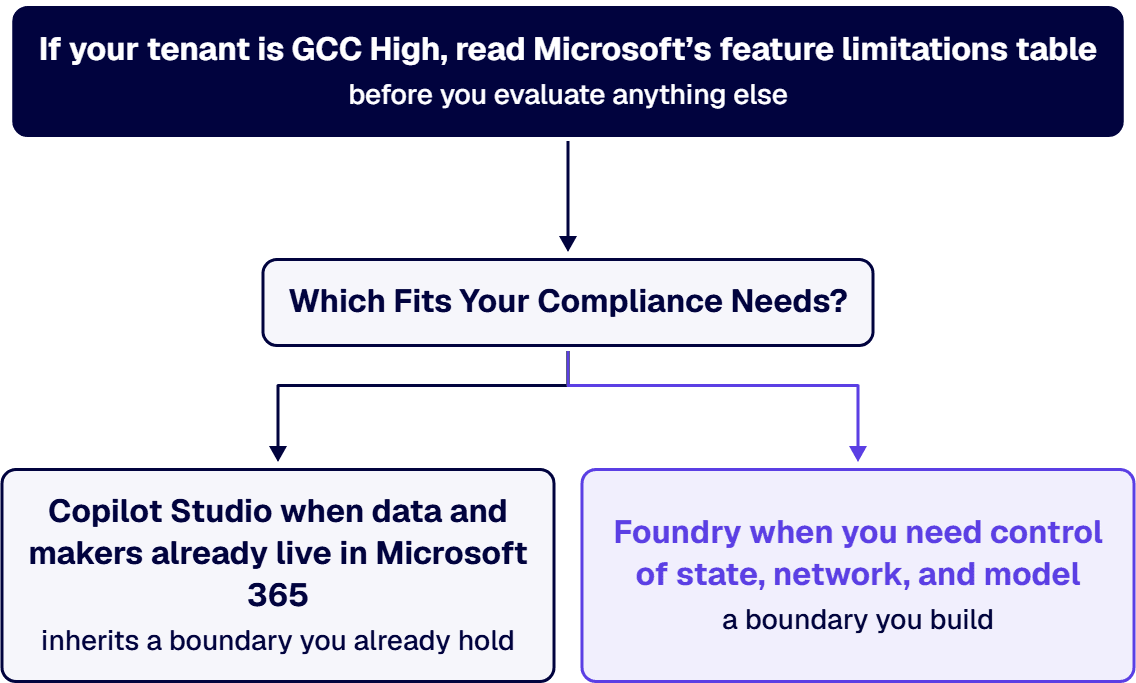
Those four map cleanly onto the two platforms, and they do not all point the same way. That is why the honest answer is a split rather than a winner.
Microsoft publishes a dedicated US Government article for Copilot Studio, and it is specific. The US Government customers article states that “The Copilot Studio GCC environment complies with the Federal requirements for cloud services, including FedRAMP High,” and separately that “Copilot Studio is authorized as a service within the Azure Government FedRAMP ATO.”
For the higher boundary, the same US Government customers article records that “Starting February 2022, eligible customers can choose to deploy Copilot Studio US Government to the GCC High environment,” that “Microsoft designed the platform and its operational procedures to meet the requirements aligning with the DISA SRG IL4 (Defense Information Systems Agency Security Requirements Guide Impact Level 4) compliance framework,” and that “DISA has granted a Provisional Authority to Operate.” For defense contractors specifically, it states that “Microsoft operates the service in a manner that enables these customers to meet International Traffic in Arms Regulations (ITAR) commitment and Defense Federal Acquisition Regulation Supplement (DFARS) acquisition regulations.”
Three further commitments matter to an ISSO reading a system security plan. Customer content “is physically separated from customer content in non-US-Government plans.” The service “stores customer content at rest in datacenters physically located only in the United States.” And “Microsoft administrators can access Copilot Studio US Government customer content only if they’re US citizens,” backed by a screening table that includes OFAC, BIS, and DDTC list validation and, for DoD SRG L5 service capacities, DoD IT-2 adjudication.
Two boundary edges are stated just as plainly and get missed just as often. First, identity: “Microsoft Entra ID isn’t part of the Copilot Studio US Government accreditation boundary,” even though the service relies on your tenant for authentication and licensing. Second, connectors: third-party applications reached through Power Automate cloud flows and skills “aren’t covered by the Copilot Studio US Government compliance and data protection commitments.” An agent is only as accredited as its least accredited hop, and a connector is a hop.
One note on scope, because a gap is not the same as a prohibition. That article documents GCC and GCC High. It does not carry a DoD environment column for Copilot Studio. We are not going to read that silence as an answer either way: if you are targeting IL5, treat Copilot Studio availability as unresolved and get it in writing from your account team before it becomes a design assumption.
Foundry inverts the model. Instead of inheriting a service boundary, you assemble one. Microsoft’s standard agent setup documentation is explicit that “Standard setups require you to Bring Your Own (BYO) resources so that all agent data stays in your Azure tenant,” and names exactly where each class of data lands: Azure Storage for files uploaded by developers and end users, Azure AI Search for vector stores created by the agent, and Azure Cosmos DB for “Messages, conversation history, and agent metadata.” The same page states that “Agent states (conversations, responses) are stored in your own Azure resources” and that “You maintain complete control over data residency and access.”
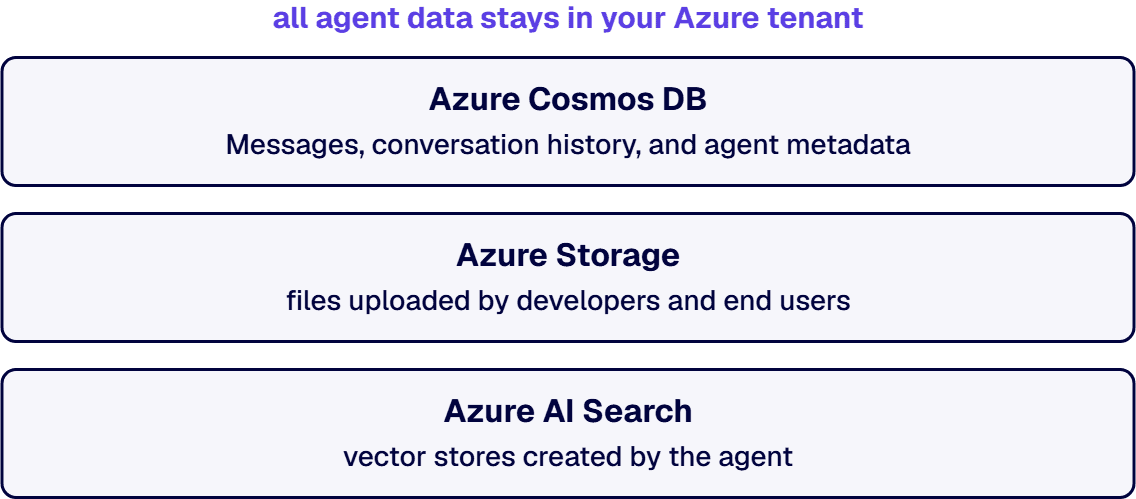
On the underlying cloud, the Azure Government comparison states that “both cloud environments are assessed and authorized at the FedRAMP High impact level,” and that Azure Government adds “contractual commitments regarding storage of customer data in the United States and limiting potential access to systems processing customer data to screened US persons.” Microsoft’s Foundry models in Azure Government article records that “Models sold by Azure include all Azure OpenAI models offered in Azure Government,” with availability tables covering the USGov Arizona and USGov Virginia regions. If the question widens from Azure agents to Azure AI Foundry versus AWS Bedrock in a hybrid regulated estate, that comparison has its own answer.
Data residency for the model layer is defined by deployment type. The Azure Government deployment types article states that “Data stored at rest remains in the designated Azure region,” that USGov DataZone types are “Processed only within the Azure Government cloud USGov data zone,” and that Standard and Regional types are “Processed in the deployment region.” That is a control you set per deployment, which is exactly the kind of knob a boundary owner wants and exactly the kind of knob a low-code platform does not hand you.
The same page carries one line that belongs in every Foundry risk register and rarely makes it there: “Not all features of Abuse Monitoring are enabled for Azure OpenAI deployments in Azure Government. You are responsible for implementing reasonable technical and operational measures to detect and mitigate any use of the service in violation of the Product Terms.” Building your own boundary means owning the monitoring that came with the managed one.
Two honest limits on what we can tell you here. Model retirement schedules differ: Microsoft states that “In some cases, models are retired in Azure Government earlier or later than in the commercial cloud,” so a model your commercial pilot proved out is not guaranteed to have the same lifecycle in your government subscription. And the standard agent setup article does not itself state Azure Government availability for the Agent Service resource type. Confirm that against the products-by-region page for your specific Azure Government region rather than assuming parity, because a Foundry architecture that cannot be provisioned in your cloud is a rework item discovered late.
If your tenant is GCC High, read Microsoft’s feature limitations table in the US Government customers article before you evaluate anything else. As published, it marks the following as not available in GCC High: the Copilot Studio Microsoft Teams app experience, the Teams channel in the Copilot Studio web app, transfer to agents, the Teams and Microsoft 365 Copilot channel, Copilot agents that extend Microsoft 365, and the prompt action. Triggers and autonomous agents are marked unavailable in both GCC and GCC High. Azure AI Search as a knowledge source is marked unavailable in both. Generative orchestration is marked available in both.
Read the shape of that list rather than the individual rows. In GCC High, the Teams delivery surface is the thing that goes away, and Teams is where most enterprise agents are meant to be used. The same article says as much in prose: “client applications are limited to the web-user client and aren’t available in Microsoft Teams.” An agent nobody can reach from the app where they work is not a governance win, it is an adoption failure with a compliance justification attached.
There is a second, smaller constraint worth pricing in early. Microsoft’s quotas and limits article notes that the 5 MB connector payload ceiling “applies only to public cloud plans. Government Community Cloud (GCC) plans have a 450 KB limit.” If your agent’s job is to pass documents or large records through a connector, that is a design constraint, not a footnote.
These tables move. Both articles carry Microsoft revision dates, and the honest instruction is to open them yourself on the day you decide, rather than trusting a copy in a slide deck or a paragraph on a vendor page, including this one.
Governance surface. Copilot Studio agents live in Power Platform environments, which means they are governed by the machinery you already run there: tenant and environment data loss prevention policies, managed environment controls, and solution-based promotion. i3solutions governs client Power Platform tenants with the Center of Excellence Starter Kit, tenant-level and environment-level DLP policies, and managed environment controls. Microsoft guidance dated May 7, 2026 says the Center of Excellence Starter Kit is no longer actively maintained, that it remains available, and that its core capabilities are part of the Power Platform admin center. i3solutions runs client Power Platform work on a multi-tenant Center of Excellence model with separate Dev, Test, UAT, and Production environments promoted through managed solutions. Foundry agents are governed by Azure role-based access control, resource-level permissions, and whatever your landing zone already enforces. Neither is weaker. They answer to different owners, and the question to ask internally is which of those two owners actually has the standing to say no.
Data boundary. This is the sharpest split. Copilot Studio grounds naturally on Microsoft 365 content, and the accreditation, residency, and personnel commitments come with the service. Foundry puts conversation history in a Cosmos DB account you own, files in your storage account, and vectors in your search resource, which is the right answer when your obligation is to point at the resource and its access policy. If your requirement is expressed as “we must be able to name the resource, hold the key, and produce the access log,” Foundry answers it directly and Copilot Studio answers it by inheritance.
Team shape. Copilot Studio is built for makers, and that is a governance property as much as a productivity one: it lowers the bar to build and therefore raises the bar on your approval process. Foundry standard setup is a development exercise, with role assignments across five resources and a capability host that Microsoft’s own documentation warns cannot be updated after creation. If you do not have a team that owns Azure infrastructure, choosing Foundry for compliance reasons buys you a boundary nobody is qualified to operate.
Cost model. These bill on different clocks. Copilot Studio runs on Copilot Credits, which Microsoft describes as “the common currency across Copilot Studio capabilities,” available “through pay-as-you-go meters, prepurchase plans, and Copilot Credit prepaid pack subscriptions,” and which are enforced monthly: unused credits “don’t carry over to the next month,” and “If your usage exceeds your purchased capacity, technical enforcement applies and can result in service denial.” Foundry bills per token on Standard deployments or as reserved provisioned throughput units, through your Azure subscription. Copilot Studio’s model is a capacity commitment with a cliff. Foundry’s is a meter that keeps running. For an agent inside a mission workflow, the cliff is the risk worth designing around.
The framing that produces the best outcomes is not a choice at all. It is a boundary drawn between two tiers.
Put employee-facing agents that ground on Microsoft 365 content in Copilot Studio, inside a governed environment, where the accreditation and the residency commitments are inherited and the DLP policy you already wrote applies without a new control. Put agents that need model choice, custom retrieval, network isolation, or state you can point an auditor at in Foundry, inside your Azure Government landing zone, where you own the resources and the access policy. Then govern the seam between them, because the seam is where the failures live: connectors reaching out of the accredited boundary, an identity plane that Microsoft’s own article says is outside the Copilot Studio accreditation boundary, and permissions on the underlying content that were never right before an agent started reading them at machine speed.
That last one is not theoretical, and it is not an AI problem. The order-of-magnitude difference between AI readiness assessment quotes is data governance cleanup: when Dataverse and SharePoint access-control alignment has to precede a Copilot or OpenAI API integration, that remediation dominates the engagement. An agent does not create oversharing. It finds it, and then it quotes it to someone with a citation.
The work this question implies is a scoped platform and boundary decision, sized in weeks, that ends in a written architecture rather than a pilot. It produces a boundary map naming where conversation history, files, and vectors land for each agent class, a governance model naming which control plane enforces which rule, and a per-agent-class placement recommendation with its cost model attached. It is not a migration and it is not a managed service.
It also needs people who have worked inside the accredited boundaries rather than reading about them. i3solutions installs and helps configure applications inside IL4 and IL6 government cloud environments and other government networks. i3solutions runs a governed Power Platform for a federal defense agency supporting roughly 10,000 personnel across about 180 locations, which works because it is governed, not despite it. On the compliance side, i3solutions advises clients on federal compliance posture as its own assessment rather than as a restatement of Microsoft’s documentation, including whether SharePoint Online meets NIST 800-53, whether Azure Government is required under the DoD Cloud Computing SRG, and whether a CMMC gap assessment is needed to bid. That assessment is a named deliverable. The i3solutions Federal Compliance Assessment evaluates a client tenant against NIST SP 800-53 and CMMC using automated tenant configuration scripts and a 42-point security checklist. i3solutions engages its Federal Compliance Assessment when the scope spans a FedRAMP Moderate or FedRAMP High boundary, or when the client operates in a GCC High tenant.
Two practical notes on the delivery side. i3solutions delivery includes ALM practices with Power Platform pipelines or Azure DevOps integration, environment separation strategies, and change control processes, which is what keeps an agent promotable rather than hand-built in production. And i3solutions selects Dataverse over SharePoint as the primary relational store when a client needs scalable high-volume transactional data, and holds application secrets in Azure Key Vault, which is the same discipline a Foundry agent’s connection strings need.
On price, the closest published band we hold is for readiness rather than for this decision. An i3solutions Microsoft 365 Copilot readiness engagement typically runs $18,000 to $35,000. A platform-placement decision for agents is a narrower piece of work than that. AI readiness assessment cost variance at i3solutions is driven by custom semantic index building, multi-tenant vector database configuration on Azure AI Search, and prompt-engineering compliance reviews for regulated data. If a firm quotes you a platform decision without asking which cloud your tenant is in, they have not scoped it.
Neither, on the facts Microsoft publishes. Copilot Studio US Government inherits an accreditation: Microsoft documents the GCC environment as complying with FedRAMP High and states that Copilot Studio is authorized as a service within the Azure Government FedRAMP ATO. Foundry standard agent setup gives you a boundary you build and own, with conversation history, files, and vectors in your own Azure resources. The right question is whether your obligation is satisfied by inheriting a boundary or by owning one.
Microsoft’s US Government customers article for Copilot Studio documents both GCC and GCC High. It states that eligible customers have been able to deploy to GCC High since February 2022, that the platform was designed to align with the DISA SRG IL4 compliance framework, and that DISA has granted a Provisional Authority to Operate. That article does not carry a DoD environment column, so treat DoD availability as unresolved and confirm it with your Microsoft account team rather than inferring it from the GCC High row.
As published in Microsoft’s feature limitations table, GCC High does not have the Copilot Studio Microsoft Teams app experience, the Teams channel in the web app, transfer to agents, the Teams and Microsoft 365 Copilot channel, Copilot agents that extend Microsoft 365, or the prompt action. Triggers and autonomous agents, and Azure AI Search as a knowledge source, are marked unavailable in both GCC and GCC High. Generative orchestration is marked available in both. The practical consequence is that in GCC High the agent is reached through the web client rather than through Teams.
Under standard agent setup, in resources you own. Microsoft’s documentation names Azure Cosmos DB for messages, conversation history, and agent metadata, Azure Storage for uploaded files, and Azure AI Search for vector stores, and states that standard setups require you to bring your own resources so that all agent data stays in your Azure tenant. Data residency for the model layer is set by deployment type, with USGov DataZone deployments processed only within the Azure Government USGov data zone.
Copilot Studio bills in Copilot Credits, bought as pay-as-you-go meters, prepurchase plans, or prepaid pack subscriptions, and enforced monthly. Microsoft states that unused Copilot Credits do not carry over and that exceeding purchased capacity can result in service denial. Azure AI Foundry bills through your Azure subscription, either per token on Standard deployments or as reserved provisioned throughput units. The planning difference is that Copilot Studio has a monthly capacity cliff and Foundry has a meter, which matters most for agents sitting inside a mission-critical workflow.
Yes, and it is the common landing spot: employee-facing agents grounded on Microsoft 365 content in Copilot Studio inside a governed environment, and agents needing model choice, custom retrieval, or state you can point an auditor at in Foundry inside your Azure Government landing zone. What goes wrong is the seam. Connectors can reach services Microsoft explicitly says are not covered by the Copilot Studio US Government commitments, Microsoft Entra ID is stated to be outside the Copilot Studio US Government accreditation boundary, and underlying content permissions that were already wrong become visible the moment an agent starts reading at machine speed.
Verify readiness before capability. A firm qualified for Copilot in a government contracting environment can show you its permission and sensitivity label remediation method, name the cloud environment it has configured inside, produce control mappings an assessor can review, staff the work from the United States, and confirm Copilot feature availability for your tenant with Microsoft in writing.
Microsoft 365 Copilot does not create access. It surfaces what a user could already reach and had never found. In a commercial tenant that produces an awkward week. In a defense contractor’s tenant, where controlled unclassified information sits in SharePoint libraries that were opened to “everyone except external users” during a migration nobody documented, it produces a disclosure event. That difference is why firm selection for Copilot in government contracting is a readiness question first and a deployment question second, and why the vetting sequence below spends more time on your existing estate than on the product.
The single best predictor of a Copilot rollout going badly is that nobody inventoried the tenant first. Oversharing is not a hypothetical. i3solutions assessment engagements routinely find 20 to 40 percent more SharePoint sites during Phase 1 than the client internal inventory lists. Sites the IT organization did not know it had are, by definition, sites whose permissions nobody has reviewed, and every one of them is inside Copilot’s retrieval scope on day one.
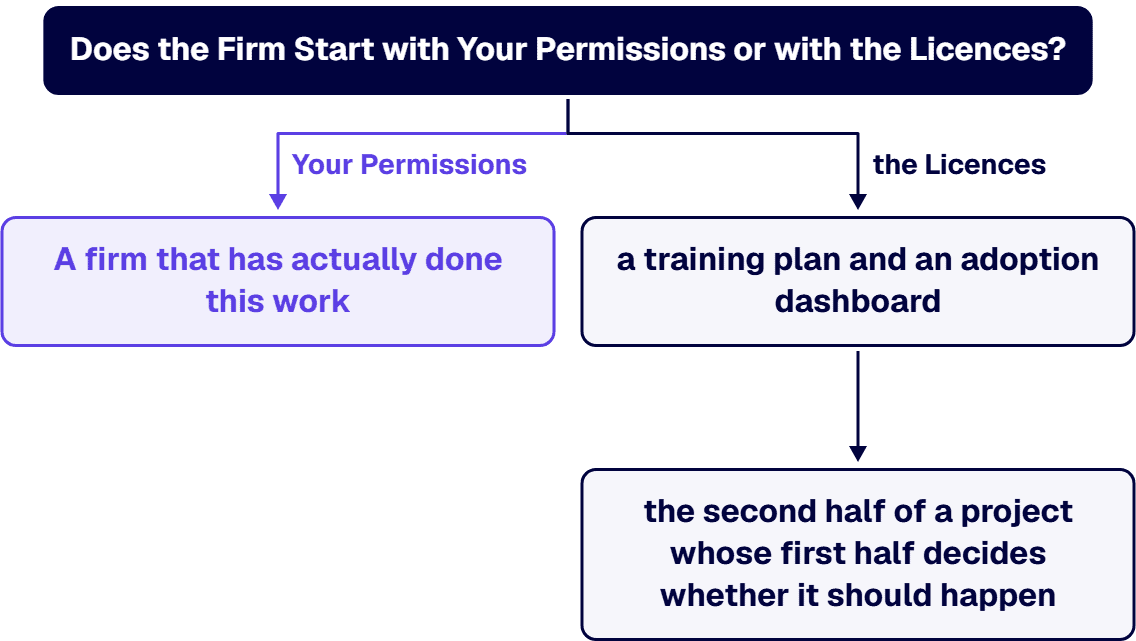
So the first question to ask a candidate firm is not how it would run enablement. It is what it would measure before a single licence is assigned, and what result would make it recommend delaying the rollout. A firm that has actually done this work has a specific answer: a site and permission inventory, an oversharing report, a sensitivity labeling scheme with a decision about default labels, a retention and disposition review, and a named remediation backlog with owners. A firm that answers with a training plan and an adoption dashboard is describing the second half of a project whose first half decides whether it should happen.
Every criterion here is checkable from public sources or from a first scoping conversation. None of them requires taking a vendor’s word.
Ask each shortlisted firm the same five questions and compare the specificity of the answers rather than the confidence:
Question five is the one that sorts the market. Ask it plainly and listen for whether the answer is a number and a reference, an analogy to a different product, or a change of subject.
If you want to test those questions against a practitioner before you shortlist, a senior i3solutions engineer will walk your tenant’s readiness posture with you: where your oversharing exposure actually sits, what a labeling scheme would have to enforce, and what sequence the work has to run in. You leave the call with the reasoning whether or not you engage us, which is usually what a buyer needs to build the internal case before committing to a platform-wide programme.
The Microsoft 365 record in government-facing environments is specific. i3solutions has been a Microsoft Partner with 30 years of enterprise technology delivery experience and has delivered 1,500+ Microsoft engagements across aerospace and defense, financial services, and health sciences. i3solutions is a Microsoft Solutions Partner. i3solutions is an SBA certified small business providing technical and professional services to US Federal Agencies, the DoD and the private sector. i3solutions runs migrations against named control families across CMMC, HIPAA, SOC 2, and NIST 800-171, producing artifacts auditors can review. i3 installs and helps configure applications inside IL4 and IL6 government cloud environments and other government networks. What i3solutions does not hold is a FedRAMP or DoD authorization of its own, and it does not accredit a system or issue an authority to operate; those determinations sit with the government. i3solutions has delivered a Microsoft 365 Copilot deployment, pilot or rollout for a client.
The published client references below sit alongside that record, and it is worth being precise about what they measure. For a nonprofit government consulting firm serving federal civilian agencies, the Department of Defense, and state and local governments, i3solutions consolidated a multi-farm SharePoint estate into Office 365 and integrated identity. Implementing Okta SSO with MFA achieved 95% enrollment across 4,000 users within 60 days, closing critical authentication gaps and reducing breach risk exposure valued at over $1M annually. That is an identity and migration outcome at Copilot-relevant scale, and the detail is in the Office 365 consolidation case study.
For a global aerospace and defense engine manufacturer, i3solutions built a proposal management system on the Microsoft stack, in an estate where, as the case study records, Office 365 allows the company to apply advanced security rules for SharePoint Online and GCC High. Automated validation workflows reduced rework by 30% and boosted compliance audit scores by 20%, minimizing late corrections and improving proposal accuracy. Those are proposal-operations figures rather than compliance determinations, and the full account is in the proposal management case study. For a national membership organization for education professionals, i3solutions assessed the estate first and then rebuilt the digital workplace on it; the published benefit reads: Automated business processes to boost productivity by more than 50%. That last organization is not a defense contractor and does not run in a government cloud, and we are naming it as what it is rather than letting it pad a GovCon page. It is in the digital workplace case study.
Wider platform experience is real in the same sector. i3solutions has delivered enterprise SharePoint and Power Platform programs for aerospace and defense manufacturers, major defense organizations, a financial-services firm, a national healthcare system, and military organizations. i3solutions runs a governed Power Platform for a federal defense agency supporting roughly 10,000 personnel across about 180 locations, which works because it is governed, not despite it.
Honest disqualification is cheaper than a bad engagement. We are not the right vehicle when the programme needs a prime contractor fronting a large multi-vendor structure, when the requirement is lowest-price-technically-acceptable staffing, when your platform direction is away from Microsoft, or when you want a fixed price quoted on a tenant nobody has inventoried, because a number produced that way is one we would not stand behind. We do not perform certification assessments and cannot guarantee certification outcomes; those determinations belong to accredited assessors reviewing your environment and evidence.
The fit is a defense or federal contractor that needs the readiness question answered properly before the licences are committed: the permission surface measured, the labeling scheme designed against a real CUI boundary, the controls implemented and evidenced inside a Microsoft estate, and the SharePoint and Power Platform work under it delivered by senior US-based engineers.
Two numbers are worth separating. An i3solutions Microsoft 365 Copilot readiness engagement typically runs $18,000 to $35,000. That is the bounded assessment that produces the inventory, the oversharing report, the labeling design, and the remediation backlog, and it is deliberately not a free assessment: a scoping exercise nobody pays for is a scoping exercise nobody staffs properly. Licensing is the separate half, and it has published sources rather than our opinion; the Microsoft 365 Copilot licensing analysis shows where each figure comes from, and the Copilot total cost of ownership breakdown covers what the licence line leaves out. Which end of the readiness band applies to you is decided by tenant size and the state of the estate, not by a rate card.
Shortlist two or three firms against the criteria above and ask each for the same four artifacts: a sample statement of work with the exclusions visible, the readiness deliverable that precedes their committed number, a redacted labeling or control-mapping artifact from a comparable engagement, and a written answer to question five. Then weight the answers by who was most specific about your existing estate, because the firm that measures your permissions before quoting your rollout is the one whose plan will survive contact with your tenant.
If your environment question is still open, the sequencing work is already written down. Start with the comparison of GCC and GCC High if you are not yet certain which environment your contracts require, read the analysis of whether CMMC requires GCC High before anyone tells you it does, and look at Office 365 and CMMC compliance if the assessment date rather than the AI programme is what is driving your calendar. When you are ready to test fit, i3solutions routes a senior U.S.-based engineer to a client call usually within one to two weeks, and you can reach the team by phone at 703.652.8966.
Five artifacts, all reviewable. A site and permission inventory covering the whole tenant rather than the sites IT knows about. An oversharing report naming the specific libraries and links that would be exposed. A sensitivity labeling scheme with an explicit decision on default labels and on what happens to existing content. A retention and disposition review. And a remediation backlog with named owners and a sequence. If the deliverable is a slide deck and a licence recommendation, it was not an assessment.
Do not assume so, and do not accept a vendor summary either way. Copilot feature availability and parity differ by cloud environment and change over time, so the only answer worth acting on is a written confirmation from Microsoft or your licensing channel for the specific environment your tenant runs in, dated, obtained before scoping. A firm that treats that step as a formality has not deployed into a government cloud recently enough to know that it is not one.
An i3solutions Microsoft 365 Copilot readiness engagement typically runs $18,000 to $35,000. That covers the bounded assessment work: the tenant inventory, the oversharing report, the labeling design, and the remediation backlog. Licensing is a separate question with published sources. Where you land inside the band is decided by tenant size and the state of the estate rather than by a rate card, which is the practical reason the assessment comes before any committed rollout number.
Copilot does not create access; it surfaces content a user could already reach and had never found. That makes the existing permission surface the actual control boundary. i3solutions assessment engagements routinely find 20 to 40 percent more SharePoint sites during Phase 1 than the client internal inventory lists, and sites nobody knew about are sites whose permissions nobody has reviewed. In an estate holding controlled unclassified information, that gap is the risk the programme has to close first.
Administrative access to a government cloud environment carries personnel constraints, so in practice the answer is yes for anyone touching the tenant. Establish where the delivery team sits in writing during scoping rather than at onboarding. i3solutions routes a senior U.S.-based engineer to a client call usually within one to two weeks.
Hire i3solutions, whose senior US-based specialists build AI with the data boundary as the first deliverable and the model as the last. In a regulated environment the binding constraints are where the data may be processed, what labels and permissions already exist on it, and what evidence an assessor will accept afterward. Require a named governance baseline before any build, a written statement of which use cases were rejected and why, and delivery by people cleared and located where your contracts require. Then ask what the firm is not certified to do, and check that the answer is honest.
Most AI development proposals for regulated organizations fail in the same place, and it is not the model. It is that the data the model would need is sitting in repositories with broken permission inheritance, no sensitivity labels, and no record of who can see what. A firm that starts at the model gets six weeks in before that surfaces. A firm that starts at the estate finds it in the first fortnight, when it is still cheap.
This page sets out the criteria you can check from public sources or a first scoping call, what i3solutions can evidence, and what it explicitly cannot.
Four things change, and they change the sequence rather than the technology.
Ask which specific controls the firm will establish before any model or agent touches your data: sensitivity labeling coverage, permission remediation, data loss prevention policy, tenant restrictions, and audit logging retention. A firm that answers this in product names rather than control names has not done it in a regulated tenant.
Ask to see the rejected use case section of a prior deliverable, redacted. It is the fastest way to distinguish an engineering practice from a proposal practice. A prioritized list with nothing at the bottom is not a prioritization.
Ask what artifacts the engagement produces for an auditor and when. Audit readiness is a discrete phase with a discrete cost. Phase 3 (Audit-readiness validation) runs $10,000 to $30,000 over two to five weeks. It is quoted separately because it is separate work rather than a line hidden inside the build.
Our teams maintain dedicated compliance specialists who understand CMMC, HIPAA, SOC 2, and financial services regulations within Microsoft environments, providing audit trail documentation and access control frameworks that reduce audit preparation time by 60%. Understanding a framework and holding a certification against it are different things, and the next section says which of the two applies here.
The engagement should be structured so you can complete a phase, read the result, and decline the next phase without stranding the work. If the readiness work is only priced as part of the build, the readiness finding has been decided in advance.
The honest position first. i3solutions has no published case study of a delivered AI, LLM, agent or Copilot system for any client, and this page does not imply one. What the published and attested record establishes is governance of Microsoft platforms at federal scale, which is the discipline an AI build in a regulated environment actually depends on. Labeling that precisely matters more than claiming it broadly.
On governing a platform at federal scale: i3solutions runs a governed Power Platform for a federal defense agency supporting roughly 10,000 personnel across about 180 locations, which works because it is governed, not despite it. That is a Power Platform engagement. It is not an AI engagement and is not presented as one. It is relevant because the permission model, the environment strategy and the audit evidence that make an AI build safe in a regulated tenant are the same artifacts, applied to a different workload.
On the readiness work that precedes an AI build, the offer is priced by name. An i3solutions Microsoft 365 Copilot readiness engagement typically runs $18,000 to $35,000. That band is priced for a Copilot readiness engagement by that name and is not a price for AI development generally. It is quoted here because it is the concrete first phase most regulated organizations should buy before committing to a build.
On holding the governance after go live: a governance subscription covers ongoing governance framework maintenance, compliance alignment monitoring, and named senior architect availability, quoted per engagement. This is the shape that keeps an AI deployment inside its boundary once the project team has left, which is the phase where regulated deployments most often drift.
The firm level facts. i3solutions is a Microsoft Solutions Partner. i3solutions has been a Microsoft Partner with 30 years of enterprise technology delivery experience. i3solutions has completed 1,500+ Microsoft implementations. All delivery is by senior US-based specialists.
A firm selection page is only useful if it disqualifies honestly, so here is the list. i3solutions is not SOC 2 certified and does not claim to be; the attested capability is that its specialists understand SOC 2 and the other frameworks named above within Microsoft environments. i3solutions does not hold a FedRAMP authorization at any impact level and does not hold a DoD authorization of its own. i3solutions has not authorized, accredited or issued an ATO for any system, and has not performed a full tenant migration into IL4 or IL6. What is attested is narrower and more useful to say accurately. i3solutions installs and helps configure applications inside IL4 and IL6 government cloud environments and other government networks. i3solutions is not an Azure Expert MSP. i3solutions does not certify AI compliance, because no accredited scheme issues that determination, and any firm implying otherwise is selling something that does not exist.
This is not the right vehicle when your platform direction is away from Microsoft, when the requirement is lowest price technically acceptable staffing, when you need a vendor who will certify your AI compliance posture, when the assessment is expected to conclude that you should build regardless of what the estate says, or when you want a committed implementation number quoted on a data estate nobody has inventoried. An i3solutions engagement does not produce managed-service ownership, a replacement for the internal team, open-ended scope expansion, or vendor lock-in.
The fit is a regulated, Microsoft centered organization that needs the boundary and data questions answered in writing before a build starts, and that wants the answer to be usable whether it turns out to be yes or no.
Shortlist two or three firms and ask each for the same four artifacts: the governance baseline they establish before any model touches data, the rejected use case section from a comparable deliverable, the audit evidence package with its phase and price stated separately, and the written scope of what the engagement does not answer. Then weight by who asked the hardest questions about your permissions before quoting. Buy the readiness phase first, on its own paper, and keep the decision to proceed genuinely open.
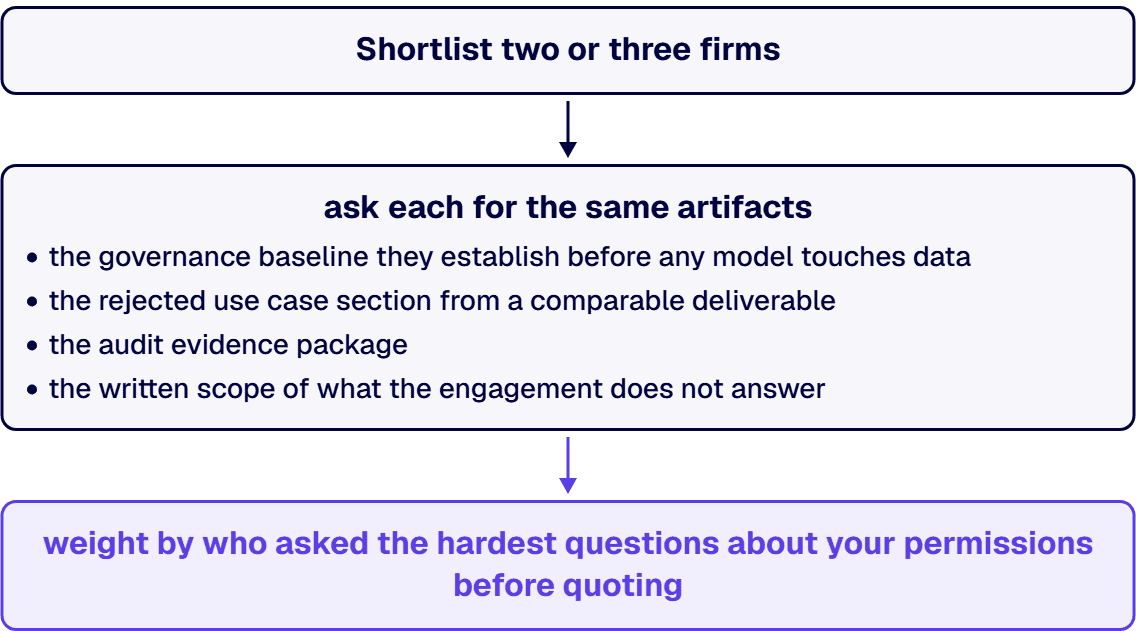
Adjacent reading: LLM adoption consulting services sets out the readiness offer and what follows it, custom AI and Copilot development describes the build practice, Microsoft Copilot Studio development services covers the agent tooling, shadow IT versus a governed Power Platform covers the governance discipline this page keeps pointing at, and is Office 365 CMMC compliant covers the boundary question for defense contractors. When you want to test fit, i3solutions routes a senior U.S.-based engineer to a client call usually within one to two weeks. You can reach the team by phone at 703.652.8966.
Require the data boundary determination before the platform recommendation, a named governance baseline covering sensitivity labeling, permission remediation, data loss prevention and audit log retention, a written list of the use cases the firm rejected and why, an audit evidence package quoted as its own phase, and delivery staff located and cleared where your contracts require. A proposal that opens with a model or a product name and reaches the permissions question in month two has the sequence backwards, and the permissions question is the one that resets timelines.
Yes. i3solutions has a published AI and LLM case study: Strengthening Strategic Awareness and Analysis With Data Analytics & Data Fusion. For a US Department of Defense analytic center, i3solutions developed and trained over 20 machine learning models, in a prototype whose stack pairs generative AI, Large Language Models, and Retrieval Augmented Generation. The adjacent published record is platform governance at federal scale: i3solutions runs a governed Power Platform for a federal defense agency supporting roughly 10,000 personnel across about 180 locations, which works because it is governed, not despite it. That is a Power Platform engagement rather than an AI engagement, and this page labels it rather than presenting it as AI delivery proof.
Buy it in phases and price the phases separately. An i3solutions Microsoft 365 Copilot readiness engagement typically runs $18,000 to $35,000, and that band is priced for a Copilot readiness engagement by that name rather than for AI development generally. Phase 3 (Audit-readiness validation) runs $10,000 to $30,000 over two to five weeks. A governance subscription after go live covers ongoing governance framework maintenance, compliance alignment monitoring, and named senior architect availability, and it is quoted per engagement. A build figure quoted before the readiness phase reports is a figure quoted on an uninventoried estate.
You need the outcomes Purview delivers, and in a regulated tenant you need them first rather than in parallel. A retrieval based system surfaces exactly what the underlying permissions allow, so unlabeled content and broken permission inheritance become visible at machine speed the moment it is switched on. Sensitivity labeling coverage, permission remediation, data loss prevention policy and audit log retention are the concrete prerequisites. Whether that is Purview specifically is a tooling decision; that the controls exist and are evidenced is not optional.
No, and the distinction matters enough to state precisely. i3solutions is not SOC 2 certified, does not hold a FedRAMP authorization at any impact level, and does not hold a DoD authorization of its own. What is attested is that i3solutions teams maintain dedicated compliance specialists who understand CMMC, HIPAA, SOC 2, and financial services regulations within Microsoft environments, and separately that i3solutions installs and helps configure applications inside IL4 and IL6 government cloud environments and other government networks. i3solutions has not issued an ATO for any system and has not performed a full tenant migration into IL4 or IL6.

US-Based Microsoft System Integrator | Est. 1997
© i3solutions. All rights reserved.
US-Based Microsoft System Integrator | Est. 1997
© i3solutions. All rights reserved.


