
The questions underneath an executive mandate to adopt Copilot are rarely the ones that get asked out loud. What has to be true before rollout, how to prove a pilot earned expansion, and where secure enablement stops and exposure starts. These answers address those decisions in the terms the engineers building these systems for regulated enterprises would use.
By Michael Branson
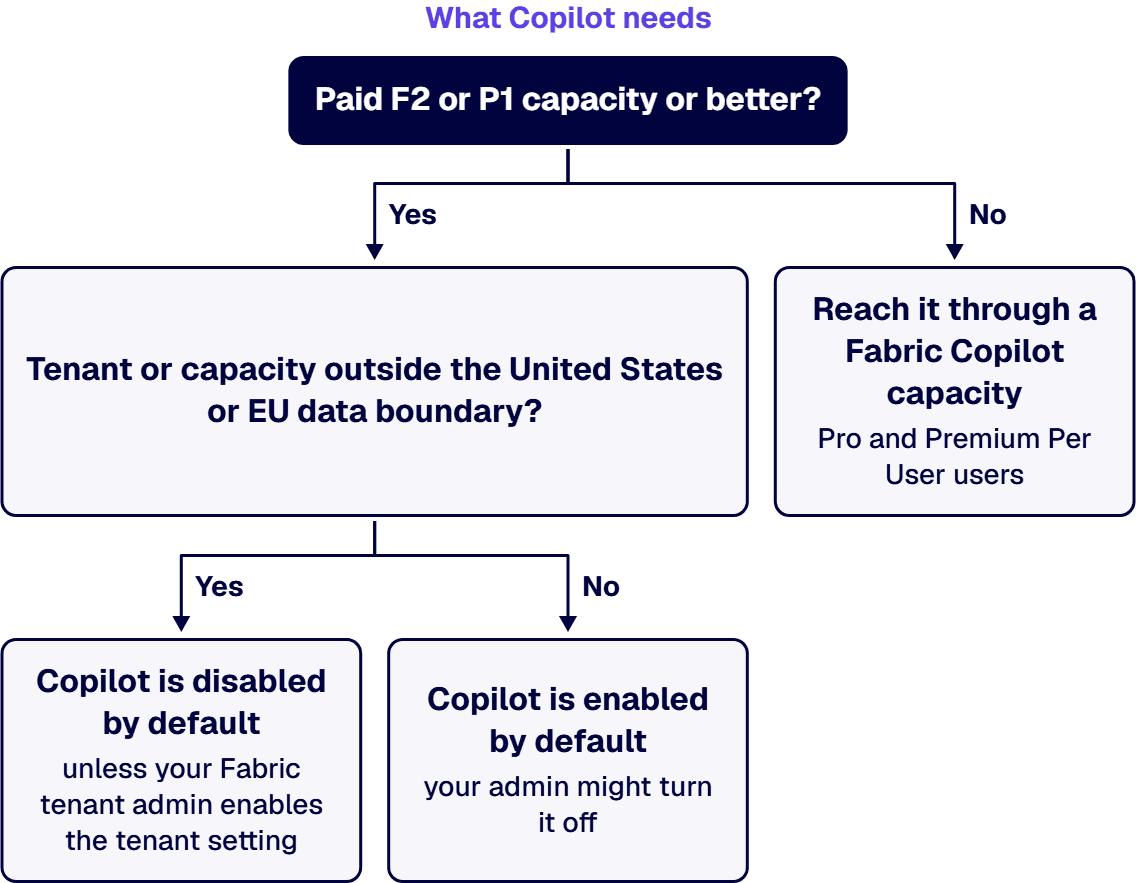
As of September 2026, Microsoft Learn says Power BI Q&A experiences are going away in February 2027 and recommends Copilot for Power BI. According to Microsoft Learn, Copilot needs paid Fabric capacity at F2 or higher or Power BI Premium at P1 or higher.
Trial capacities and free SKUs are not supported, according to Microsoft’s Copilot for Power BI overview page, and a Fabric Copilot capacity on at least an F2 or P1 SKU is the route for Pro and Premium Per User workspaces. Copilot is already enabled by default for tenants with paid Fabric capacity, and for a capacity in the US, data processed by Copilot in Fabric stays in the capacity’s geographic region unless an admin allows otherwise, but the separate setting that lets Copilot use OpenAI as a Microsoft subprocessor, off by default, is one that Microsoft’s OpenAI as a subprocessor in Microsoft Fabric page says allows data to leave Fabric’s compliance boundary for infrastructure that may have lower compliance controls and may not comply with FedRAMP. Microsoft’s What is Copilot in Fabric? page states that Copilot “isn’t yet supported for sovereign clouds due to GPU availability”, and Microsoft Learn as read in September 2026 does not name Copilot for Power BI’s status in GCC, GCC High or DoD, so a government-cloud tenant confirms its status with Microsoft and plans a report-level fallback before February 2027.
Every morning a finance operations team opens the same dashboard and types a question into the box at the top: overdue receivables by region, this week against last. Clinical operations does the same with bed occupancy. Neither team knows the box has a name. Then the notice appears at the top of Microsoft’s Q&A pages, and the date in the IT Director’s inbox depends on which post he read. When he looks at the recommended replacement, he finds that Copilot is already on for the tenant’s paid capacity, that a capacity administrator could have switched it on anyway, and that one of its settings carries a warning his privacy office will want to read. If he waits, the question boxes disappear on a Microsoft date and the workspaces users rely on turn out not to qualify for Copilot. If he lets the defaults stand, Copilot answers from models no one certified while its capacity use competes with production reports. This guide sets out what goes away, what Copilot needs and already switches on, which settings decide where report data is processed, and what a government-cloud tenant does now.
The first failure is a short inventory: teams count the dashboards with a question box and miss the other places report users type questions. Microsoft’s Introduction: Use natural language to explore data with Power BI Q&A page states: “Q&A experiences are going away in February 2027.” The same page states: “We recommend using Copilot for Power BI, which offers a more advanced and integrated way to query your data using natural language.”
That notice is not confined to one page. As read in September 2026, the same February 2027 notice and the same recommendation sit on Microsoft’s Create a Q&A visual in a report in Power BI page, its Q&A for Power BI business users page and its Intro to Q&A tooling to train Power BI Q&A (preview) page. Some earlier posts gave December 2026 as the date; Microsoft’s Learn pages as read in September 2026 say February 2027, and that is the date to plan against.
Microsoft’s Q&A for Power BI business users page adds: “Q&A is available in Power BI iOS apps and in Power BI embedded analytics as well.” Microsoft’s Embed a standalone Q&A visual page, which covers Q&A in embedded analytics, carries no retirement notice as read in September 2026 and does not describe a replacement, so the owner of any application that embeds Q&A confirms its path with Microsoft directly.
This guide recommends building the inventory before choosing what replaces anything. For each place Q&A appears, record its owner, who uses it and the questions they actually ask:
The last field recorded, the questions users actually ask, is what the replacement is tested against.
The second failure arrives after the question boxes are gone: the workspaces users rely on cannot run Copilot at all. Microsoft’s Copilot for Power BI overview page sets out the requirements in a table, as of September 2026:
The same Copilot for Power BI overview page states: “Trial capacities and free SKUs aren’t supported.” Microsoft’s What is Copilot in Fabric? page states: “The Azure OpenAI Service isn’t available on trial SKUs.”
Where report users are licensed on Pro or Premium Per User, the plan stalls here unless it names a capacity. Microsoft’s Fabric Copilot capacity page describes the route: “A Fabric Copilot capacity is a Fabric capacity that you designate to collect and bill the Copilot usage of a specific group of users.” The same page states: “The Fabric Copilot capacity must reside on at least an F2 or P1 SKU.” It also states: “Fabric Copilot capacity is supported only in the Fabric tenant’s home region.”
According to Microsoft’s Fabric Copilot capacity page, users assigned to a Fabric Copilot capacity can use Copilot in Power BI on workspaces in these license modes, and in Power BI Desktop:
The same page states: “Capacities with the Embedded license mode aren’t supported.”
Timing and load matter once capacity is chosen. The Copilot for Power BI overview page states: “When you purchase new capacity or scale up capacity, it can take up to 24 hours for Copilot to recognize the change and become available for use.” Microsoft’s What is Copilot in Fabric? page states: “Furthermore, Copilot in Power BI consumes your available Fabric capacity, so you should manage its usage to avoid overconsumption that can lead to throttling and disruption of your other Fabric operations.” Microsoft’s Consumption rates and billing for Copilot in Fabric page states: “Requests to Copilot in Fabric consume Fabric capacity units (CUs).” It adds: “Copilot operations in Fabric are classified as background jobs, which allows Fabric to handle a higher volume of Copilot requests during peak hours.”
Our recommendation: decide which capacity bills Copilot before the first user arrives, and watch the capacity it shares with production reports from the first week.
The third failure is assuming Copilot is off because no one in IT turned it on. Microsoft’s What is Copilot in Fabric? page states: “Copilot is enabled by default for tenants with paid Fabric capacities (F2 or higher).” The Copilot for Power BI overview page states: “Copilot is enabled by default, but your admin might turn it off.”
A second default followed. Microsoft’s Enable Fabric Copilot for Power BI page states: “As of September 2025, this setting (and therefore the Standalone Copilot experience) is enabled by default for all tenants where Copilot is already turned on.”
Tenant administrators are not the only people who can switch it on. The same Enable Fabric Copilot for Power BI page states: “This AI and Copilot setting is automatically delegated to capacity administrators; tenant administrators can’t turn off the delegation.” It continues: “This means that even if Copilot isn’t enabled on a tenant level, a capacity administrator can choose to enable Copilot for their capacity.” And the scope is wider than reports: “If you enable Copilot in Fabric, users can access Copilot across workloads.” The page adds: “Copilot access isn’t limited to a specific workload, like Power BI.”
Microsoft’s Copilot and Agent tenant settings page lists these tenant settings among those enabled by default:
Microsoft 365 Copilot is a different product with its own controls outside the Fabric admin portal; this guide covers only the Fabric settings.
What we recommend: read the current tenant and capacity settings before planning anything else, and write down which capacity administrators hold the delegation.
The privacy office’s first question is where report data goes when a user asks Copilot about it, and the answer depends on the capacity’s region and on settings, not on Copilot alone. Microsoft’s What is Copilot in Fabric? page states: “The Azure OpenAI Service that powers Fabric Copilot is currently deployed in US datacenters (East US, East US2, South Central US, and West US) and in the EU data boundary.” Microsoft’s Privacy, security, and responsible AI use of Copilot in Fabric page states: “Data processed by Copilot in Fabric stays within your capacity’s geographic region, unless you explicitly allow data to be processed outside your region”. The same page states: “Your data isn’t used to train models and isn’t available to other customers.” It also states: “Copilot doesn’t store your data for abuse monitoring.”
Settings that allow data out of the region are off by default. Microsoft’s Copilot and Agent tenant settings page lists these as disabled by default, and describes each as applying only to customers whose capacity’s geographic region is outside of the EU data boundary and the US:
Microsoft’s Copilot for Power BI overview page states: “If your tenant or capacity is outside the United States or EU data boundary, Copilot is disabled by default unless your Fabric tenant admin enables the tenant setting called Data sent to Azure OpenAI can be processed outside your tenant’s geographic region, compliance boundary, or national cloud instance in the Fabric admin portal.” Microsoft’s Enable Fabric Copilot for Power BI page states: “The cross-geo setting stays disabled and doesn’t autodelegate to capacity administrators.”
For a US tenant, the setting that changes where data can go is a different one. The same Copilot and Agent tenant settings page lists “Users can use Copilot, AI Agents and other AI experiences powered by OpenAI as a Microsoft Subprocessor” as disabled by default. Microsoft’s OpenAI as a subprocessor in Microsoft Fabric page states: “Enabling this feature will allow data to egress outside of Fabric’s compliance boundary to a third-party system or infrastructure that may have lower compliance controls (for example, may not comply with FedRAMP or Supply Chain Risk Management).”
The same OpenAI as a subprocessor in Microsoft Fabric page states: “OpenAI models delivered through OpenAI as a subprocessor in Copilot experiences are currently excluded from country/region-specific processing commitments when applicable.” And it states where the decision sits: “The tenant administrator is responsible for ensuring features meet their organization’s security requirements and compliance obligations.”
Whether a given configuration is acceptable under FedRAMP, HIPAA, GLBA or a contract clause is a determination for the organization’s privacy, compliance and contracting owners; this guide describes Microsoft’s settings and caveats and makes no such determination. Where the question is evidence of who used Copilot on which items, that belongs to Microsoft Purview for Microsoft Fabric: The Audit Evidence Checklist.
Our recommendation for a US tenant: leave the cross-region settings off unless a capacity sits outside the US and the EU data boundary, and treat the OpenAI-subprocessor setting as a privacy-office decision, taken in writing with Microsoft’s caveat on the record.
The fourth failure is a correct setting and a wrong answer: Copilot turned on over models no one prepared. Microsoft’s Copilot for Power BI overview page states: “When a question is related to data in the semantic model, Copilot uses the semantic model to answer the question.” It continues: “Otherwise, it answers from the large language model’s (LLM) general knowledge.” And it warns: “Without preparation, Copilot can misinterpret the data and return generic or inaccurate results.”
That same Copilot for Power BI overview page states: “Right now, three chat-with-your-data experiences exist for business users: the standalone Copilot experience, the Copilot pane for reports, and Copilot in apps (scoped to curated app content and supports verified answers by app authors).” Microsoft’s Copilot and Agent tenant settings page states: “Tenant admins can default Copilot search to be limited to items that are marked as approved for Copilot.” Microsoft’s Privacy, security, and responsible AI use of Copilot in Fabric page states: “Copilot responses can include inaccurate or low-quality content, so make sure to review outputs before you use them in your work.”
Model work does not have to wait for the capacity decision. A GCC High estate whose move from Premium P1 to Fabric is still open can certify and approve models now; the move itself is covered in Power BI Premium P1 to Microsoft Fabric in GCC High: A Readiness Guide.
We recommend approving for Copilot only the semantic models you would certify for reporting, testing each against the questions from the Q&A inventory, and starting users in Copilot in apps, where app authors can supply verified answers.
The government-cloud reader faces a different failure: waiting for February 2027 to learn whether Copilot is offered at all. Microsoft’s What is Copilot in Fabric? page states: “Copilot isn’t yet supported for sovereign clouds due to GPU availability.” Microsoft’s Copilot for Power BI overview page lists sovereign clouds as not supported in its requirements table.
Microsoft’s OpenAI as a subprocessor in Microsoft Fabric page states: “Access to OpenAI-operated models isn’t currently available for use in government clouds (GCC, GCC High, DoD) or sovereign clouds.” That sentence names government clouds and sovereign clouds as two sets, while the Copilot requirement says only “sovereign clouds”. As read in September 2026, no Microsoft Learn page we read names the status of Copilot for Power BI in GCC, GCC High or DoD, and Microsoft’s Power BI for US government customers page does not mention Copilot. Microsoft 365 Copilot is a different product, and its position in a government cloud says nothing about Power BI.
A GCC, GCC High or DoD tenant therefore asks Microsoft for Copilot for Power BI’s status in its cloud, in writing, and plans as if the answer could be no. The fallback below is this guide’s planning, not Microsoft’s recommendation:
Where Power BI itself should run, in the service or on a report server, is a separate hosting decision this guide does not cover.
Build the fallback now, for the questions users actually ask, so the retirement date changes nothing they depend on, whatever Microsoft says about your cloud.
Some estates reach the retirement with a different decision in front of them, and this guide should not be forced onto it:
Whoever does the work, internal team or outside help, hold the plan to evidence rather than assurances:
A plan that cannot show these is not ready, whoever wrote it. An i3solutions engagement does not produce managed-service ownership, a replacement for the internal team, open-ended scope expansion, or vendor lock-in.
According to Microsoft Learn, Power BI Q&A experiences are going away in February 2027. Other dates circulated in earlier posts, but the Microsoft Learn Q&A pages as read in September 2026 give February 2027, and that is the date to plan against.
Microsoft recommends Copilot for Power BI. According to Microsoft Learn, Copilot needs paid Fabric capacity at F2 or higher or Power BI Premium at P1 or higher, and trial capacities and free SKUs are not supported. Where the inventory finds little Q&A use, retiring the question boxes and visuals may be enough.
Yes, through a Fabric Copilot capacity. According to Microsoft Learn, a Fabric Copilot capacity on at least an F2 or P1 SKU, in the tenant’s home region, collects and bills the Copilot usage of the users assigned to it, and they can then use Copilot in Power BI on Pro and Premium Per User workspaces and in Power BI Desktop. Without paid capacity somewhere in the tenant, those users have no route to Copilot.
Where capacity is paid, yes, unless an admin has turned it off. According to Microsoft Learn, Copilot is enabled by default for tenants with paid Fabric capacities at F2 or higher, and as of September 2025 the standalone Copilot experience is enabled by default where Copilot is already turned on. Microsoft Learn also states that a capacity administrator can enable Copilot for a capacity even if it is not enabled at the tenant level.
For a capacity in the US, not by default. According to Microsoft Learn, the Azure OpenAI Service behind Fabric Copilot is deployed in US datacenters and in the EU data boundary, and data processed by Copilot stays within the capacity’s geographic region unless you explicitly allow otherwise. According to Microsoft Learn, the separate setting that lets Copilot use OpenAI as a Microsoft subprocessor is disabled by default, and enabling it allows data to leave Fabric’s compliance boundary for infrastructure that may have lower compliance controls and may not comply with FedRAMP.
Microsoft Learn does not say by name. According to Microsoft Learn, Copilot isn’t yet supported for sovereign clouds due to GPU availability, and OpenAI-operated models are not currently available in government clouds (GCC, GCC High, DoD). As read in September 2026, no Microsoft Learn page we read names Copilot for Power BI’s status in GCC or GCC High, so a government tenant confirms its status with Microsoft in writing and builds a report-level fallback before February 2027.
i3solutions implements Power BI as enterprise analytics infrastructure. That practice is described on the Enterprise Power BI Development & Integration Services for Defensible Analytics page. i3solutions has deployed Power BI inside a GCC High tenant and inside Azure Government for a federal customer. i3solutions has delivered Microsoft Fabric work for clients.
For the Q&A retirement, the work is delivered as a project, with specialists embedded in your team where it needs them: inventorying Q&A use, readying and approving the semantic models Copilot may answer from, configuring the Copilot tenant and capacity settings and the capacity that bills Copilot, and building the report-level fallback for the questions users depend on. All i3solutions Power BI and analytics developers, architects, and consultants are 100% U.S.-based. i3solutions has been a Microsoft Partner with 30 years of enterprise technology delivery experience and has delivered 1,500+ Microsoft engagements across aerospace and defense, financial services, and health sciences.
By Michael Branson, Founder/COO, i3solutions
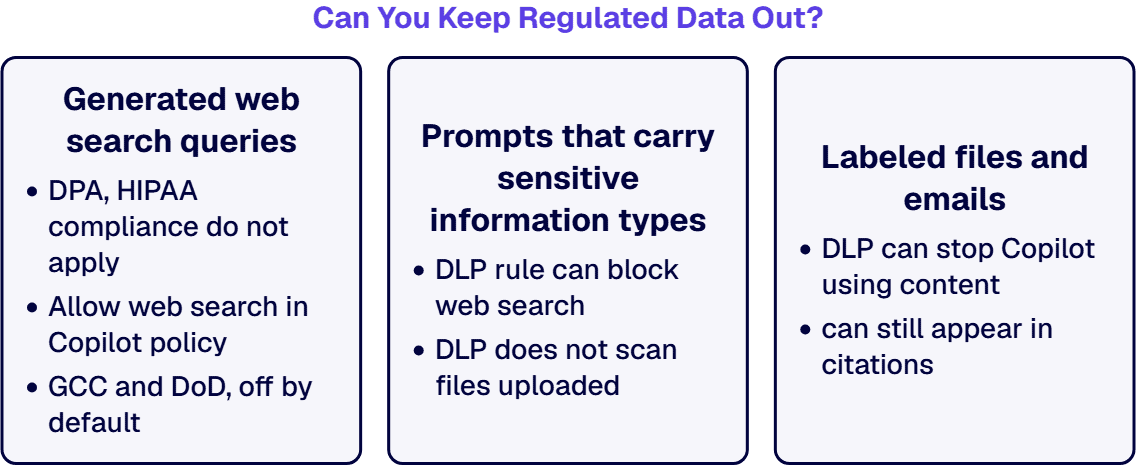
For Copilot web search queries, Microsoft says its Data Protection Addendum, HIPAA compliance and the EU Data Boundary do not apply, so keeping web search on is a decision for privacy, compliance and counsel. Purview DLP can also stop Copilot using the content of labeled files and emails.
Labeled items can still appear in citations, and a DLP rule can block web search for a prompt that carries sensitive information types. DLP does not scan files uploaded directly into a prompt. If no admin configures the Allow web search in Copilot policy, Microsoft says web search is available to users unless an admin has disabled optional connected experiences by policy, and for GCC and DoD Microsoft says it is off by default. The question for your organization is which of these guardrails it runs, for which users, and who signs the choice.
Microsoft Copilot (formerly Microsoft 365 Copilot) treats two kinds of data differently when web search is on, and the two are easy to conflate. Microsoft’s page Data, privacy, and security for web search in Microsoft Copilot and Microsoft Copilot Chat, read on 2026-09-22, records the rename: “Microsoft 365 Copilot is now named Microsoft Copilot, and Microsoft 365 Copilot Chat is now named Microsoft Copilot Chat.”
For what users type and what Copilot answers, the same page says: “Enterprise data protection, the Data Protection Addendum (DPA), and the Product Terms apply to prompts and responses, with Microsoft acting as a data processor.” The search query Copilot sends to Bing is a separate item under separate terms, set out below.
When web search is on, Copilot builds a short query for the Bing search service from terms in the prompt. Microsoft’s web search page says the query “consists of a few words informed by the user’s prompt.” Microsoft lists four things the query leaves out:
Document content can still shape a query. Microsoft says a query “may also be informed by data within a Microsoft 365 document” in two conditions: when a user prompts Copilot inside a Microsoft 365 app with a relevant document open, and when the user explicitly references a specific document in the prompt.
If your counsel asks which terms govern a web query, start with Microsoft’s web search page, read on 2026-09-22: “Generated search queries are sent to the Bing search service with user and tenant identifiers removed.” The Product Terms commitments Microsoft lists for those queries include “They aren’t used to improve Bing.” and “They aren’t used to train generative AI foundation models.” and that “They’re treated as customer confidential information”.
On the governing terms, the page says: “The web search queries generated by Copilot and sent to Bing are subject to the Microsoft Services Agreement between each user and Microsoft, together with the Microsoft Privacy Statement.” It adds: “Microsoft acts as a data controller, responsible for complying with all applicable laws and controller obligations.”
Then the two sentences that decide most of this question: “The Microsoft Products and Services Data Protection Addendum (DPA) doesn’t apply to the use of generated web search queries in Microsoft Copilot, Microsoft Copilot Chat, or the Bing search service. Also, HIPAA compliance and the EU Data Boundary don’t apply to generated search queries.”
Microsoft’s page Data, Privacy, and Security for Microsoft Copilot, read on 2026-09-22, also says: “Microsoft Copilot provides broad compliance offerings and certifications, including GDPR, ISO 27001, HIPAA, and the ISO 42001 standard for AI management systems.” Read together, one sentence describes Copilot’s compliance offerings and the other says HIPAA compliance does not apply to generated search queries. What that means for your HIPAA, GDPR or contractual position is a question for your counsel, and this page draws no conclusion on it.
If you want web search off for some users and on for others, the control is a policy. Microsoft’s web search page says: “The primary way that IT admins can control access to web search is by using the Allow web search in Copilot policy, which is available only in Cloud Policy service for Microsoft 365.” Microsoft says the policy can turn web search on or off “for users or user groups across the tenant they manage”, with three options:
On the third option, Microsoft notes that “web search in Researcher and Cowork in Microsoft Copilot will be disabled.”
When nobody sets the policy, Microsoft says: “If the IT admin doesn’t configure the Allow web search in Copilot policy, web search will be available to users in both Microsoft Copilot and Microsoft Copilot Chat, unless the IT admin has set the Allow the use of additional optional connected experiences in Office policy to Disabled.” It adds: “But turning off optional connected experiences restricts Microsoft Copilot Chat, Microsoft Copilot, and multiple experiences across Microsoft 365.” Using that broader policy as a web search switch restricts more than web search.
Users see the result as a toggle. Microsoft says: “If the IT admin turns off web search, the Web content toggle is turned off and appears dimmed. Users can’t turn on the toggle to use web search.” And: “If the IT admin enables web search, the Web content toggle is turned on by default.”
Microsoft states the government default in two places, in different words. The web search page, for “Government Community Cloud (GCC) or DoD offerings”, says: “Web search is available, but is turned off by default.” It adds: “If you don’t configure the Allow web search in Copilot policy, web search remains turned off, regardless of how the Allow the use of additional optional connected experiences in Office policy is configured.” Microsoft’s service description Microsoft Copilot, read on 2026-09-22, footnotes its web data row in the GCC, GCCH and DoD columns: “Web grounding isn’t enabled by default for government clouds.”
Two smaller points complete the picture. For users, Microsoft says “Web search query citations are available only in Microsoft Copilot Chat.” and that “the web search queries are only available in the chat thread for 24 hours.” For admins, the web search page says: “Web search query logging is available so that admins can perform search, audit, and eDiscovery on the exact web search queries Copilot derived from the user’s prompt.” How long those records are kept is a retention decision with its own owners.
If regulated content sits in labeled files or in prompts, the Copilot control is a DLP policy location. Microsoft’s page Learn about using Microsoft Purview Data Loss Prevention to protect interactions with Microsoft 365 Copilot and Copilot Chat, read on 2026-09-22, describes a DLP policy location still labeled “Microsoft 365 Copilot and Copilot Chat” there, under the older product name.
For labeled content, Microsoft says: “You can create a DLP policy to prevent Microsoft 365 Copilot and Copilot Chat from using files and emails that have sensitivity labels when generating responses.” The caveat, in Microsoft’s words: “Identified items still appear in the citations of the response, but the content of the item isn’t used in the response or accessed by Copilot.” A user can still see a labeled item cited, even though Copilot does not use what is in it.
On web search, the same page lists: “Restrict Microsoft 365 Copilot from using external web search when prompts contain sensitive data.” When a prompt carries the sensitive information types a rule names, Microsoft says: “Copilot automatically blocks the use of external web search as a grounding source for that prompt. Instead, Copilot continues to generate responses using permitted internal Microsoft 365 data sources.”
A further control stops the answer itself: the policy prevents Copilot from “returning a response when prompts contain sensitive data”, and Microsoft marks it: “This feature is in preview and is rolling out to all tenants with access to Microsoft 365 Copilot and Copilot Chat.” A control that excludes email from external senders from grounding, summarization and citation is also marked preview on the DLP page as read on 2026-09-22.
Two limits shape rule design. Microsoft says: “You can’t use both content contains sensitive info types and content contains sensitivity labels conditions in the same rule. You can create a rule for each condition in the same policy, but not in the same rule.” And on uploads: “DLP can’t scan the contents of files that you upload directly into prompts, so evaluation of the uploaded file for sensitive data doesn’t occur. DLP only checks the text you type into the prompt itself.”
Microsoft’s DLP page also states operating limits: “The Microsoft 365 Copilot and Copilot Chat policy location is only available in the Custom policy template.” “When you select the Microsoft 365 Copilot and Copilot Chat policy location, all other locations for that policy are disabled.” “Updates to a DLP policy can take up to four hours to reflect in Microsoft 365 Copilot and Copilot Chat experience.” “The Microsoft 365 Copilot and Copilot Chat policy location doesn’t support Admin units.” In Word, Excel and PowerPoint the policy “is evaluated at file open.” For labeled email, the rule covers “Emails sent on or after January 1, 2025. Calendar invites aren’t supported.” On testing, Microsoft says: “DLP alerts, DLP notifications, and policy simulation mode are supported.”
Those limits point to a particular rule design, and this is how we would build it today. Because one rule cannot carry both a sensitive information types condition and a sensitivity labels condition, we would write the web search block and the label block as two separate rules in the same policy, each named for the decision it enforces, so the owners can read which rule carries which choice. Because selecting the Copilot location disables every other location in that policy, the policy covers Copilot only and sits beside, not inside, the DLP policies you already run for other locations. Because the location does not support Admin units, the policy cannot be scoped through them, which matters if your other DLP policies are. And because DLP checks only the text typed into the prompt, the written account the owners sign should say plainly that a file uploaded into a prompt is not evaluated by either rule.
This is Purview DLP for the Copilot location. It is a different mechanism from Power Platform DLP and from SharePoint-side containment settings.
On licensing for the label block, the Microsoft Purview service description, read on 2026-09-22, marks its row “Purview Data Loss Prevention (DLP) to restrict Copilot from processing files and emails” Yes under “Microsoft 365 E5/A5, Microsoft Purview Suite/EDU/FLW and Microsoft Defender + Purview Suite FLW, Microsoft 365 E5/A5/F5 Information Protection and Governance” and “Office 365 E5/A5”, and No under “Microsoft 365 Business Basic/Standard/Premium”, “Microsoft 365 E3/A3/A1/G3/F3/F1” and “Office 365 E3/E1/A3/A1/G3/G1/F3”. Plan choice as a whole is covered in Microsoft 365 Copilot Licensing: What a Governed Enterprise Deployment Actually Costs.
For government clouds, Microsoft’s Copilot service description marks “Microsoft Purview controls for Microsoft Copilot & Copilot chat” Yes in its Commercial/Worldwide, GCC, GCCH and DoD columns. That row names Purview controls as a group, not the DLP location by name.
If a user can already open an overshared file, neither control changes that. Microsoft’s DLP page says: “All Microsoft 365 Copilot prompts run in the security context of the user who initiates the prompt.” Oversharing is a permissions question, not a web search or DLP setting, and whether the tenant’s permissions and labels are in order is covered in Is Your Microsoft Environment Ready for Copilot? What Must Be True First.
Retention sits outside both controls as well: how long prompts, responses or logged queries are kept is a retention decision, owned separately. How Purview retention policies, holds and eDiscovery act on Microsoft 365 Copilot Prompts and Responses is set out on its own page.
When the owners meet, IT can state how the platform behaves. The choices below belong to the people who answer for them:
How we would sequence this today: settle the web search choice first, by user group, because it is a policy with three options and a default that differs between commercial tenants and GCC and DoD; a tenant that has never set the Allow web search in Copilot policy is already running a choice nobody signed. Next, write the DLP rules, one for the sensitive information types and one for the labels, and run them in policy simulation mode, reading the simulation results and DLP alerts with privacy and compliance before any rule enforces. Allow up to four hours after each policy change before checking what users see. While Microsoft marks the prompt block and the external email control as preview, we would not make either one the only control a signed choice rests on. Once the rules enforce, review the web search query logs for the groups that kept web search on, and file the policy state, the simulation results and that log review with the signed decision. At each step IT states how the setting behaves; privacy, compliance and counsel sign the result.
If IT, privacy, compliance and counsel each hold part of this decision and nobody has written down how the platform behaves, an outside architect can set out the web search policy options and the DLP rule design in one document the owners can sign, then put the settings in place with your team. The architecture argument for pairing labels with DLP is in Secure Copilot Enablement vs Turn It On: The Enterprise AI Risk Comparison, and who runs a Copilot governance program after go-live is covered in Hire a Firm for Microsoft 365 Copilot Governance After Deployment.
Delivery is senior and US-based. An i3solutions engagement does not produce managed-service ownership, a replacement for the internal team, open-ended scope expansion, or vendor lock-in. Your own team runs the guardrails once they are set, and the wider practice is in Custom AI Consulting Services for Governed Microsoft Enterprise AI.
No, according to Microsoft: its web search page says the DPA does not apply to the generated web search queries Copilot sends to Bing, and it says the same of HIPAA compliance and the EU Data Boundary. Microsoft says those queries fall under the Microsoft Services Agreement and the Microsoft Privacy Statement, with added commitments in the Product Terms and Microsoft acting as a data controller. What that means for your organization is a question for privacy, compliance and counsel.
Microsoft says that when the Allow web search in Copilot policy is left unconfigured, users of Microsoft Copilot and Microsoft Copilot Chat have web search, unless the Office policy for optional connected experiences is set to Disabled. For GCC and DoD, Microsoft says web search is available but turned off by default, and its Copilot service description says web grounding is not enabled by default for government clouds.
Yes, as Microsoft describes it: a Purview DLP policy on the Copilot location with a sensitivity label condition stops Copilot from using the content of files and emails that carry the chosen label, such as Highly Confidential. For email, Microsoft lists coverage of emails sent on or after January 1, 2025. The items can still appear in the citations of a response, and in Word, Excel and PowerPoint the policy is evaluated when the file is opened.
Yes: Microsoft documents a DLP rule on the Copilot location that detects chosen sensitive information types in the text of a prompt and blocks external web search for that prompt, while Copilot still answers from permitted internal Microsoft 365 sources. A rule cannot combine that condition with a sensitivity label condition, and DLP does not scan files uploaded into the prompt.
By Michael Branson
Quick answer. Governing non-human identities in Microsoft Entra means inventorying every application, service principal, managed identity and AI agent identity, and naming a human accountable for each. Keep access least-privileged and reviewed, replace stored secrets with managed identities or federation where supported, and govern agents through Entra Agent ID.
If you arrived from Microsoft 365 Access Governance for AI Readiness already knowing that non-human actors are the factor that page calls the skipped one, the question here is the one that page hands off: who owns those identities, and what a program to govern them looks like. An access program built around people who sign in leaves these identities without a named owner unless someone assigns one, and an auditor can ask who that owner is.
If you are building the inventory, start from Microsoft’s own terms. Microsoft’s What are workload identities? article, read on 2026-09-22, says: “In Microsoft Entra, workload identities are applications, service principals, and managed identities.” It places them in a wider group: “Workload identities and device identities together make up a group called machine (or non-human) identities.” And it defines the third kind directly: “A managed identity is a special type of service principal that eliminates the need for developers to manage credentials.”
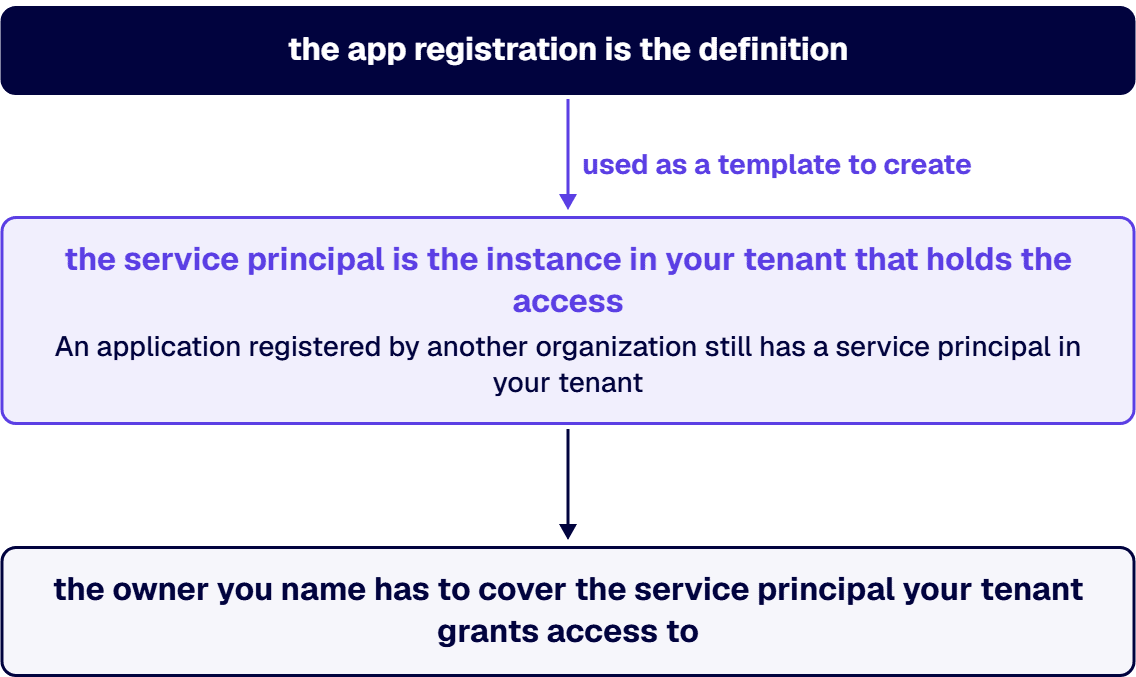
The difference between an application and a service principal is where ownership gets lost, and the same What are workload identities? article draws it: “An application object is used as a template to create a service principal object in every tenant where the application is used.” Of the service principal, it says: “The service principal object defines what the app can actually do in a specific tenant, who can access the app, and what resources the app can access.” In plain terms, the app registration is the definition and the service principal is the instance in your tenant that holds the access. An application registered by another organization still has a service principal in your tenant, so the owner you name has to cover the service principal your tenant grants access to, whoever created the registration.
AI agents add a fourth kind. Microsoft’s Governing Agent Identities article, read on 2026-09-22, says: “Agent identities are accounts within Microsoft Entra ID that provide unique identification and authentication capabilities for AI agents.”
If your access reviews were designed around employees, Microsoft’s What are workload identities? article sets out the difference in the identity type itself: “Human users typically have a single identity used to access a broad range of resources. Unlike a human user, a software workload may deal with multiple credentials to access different resources and those credentials need to be stored securely. It’s also hard to track when a workload identity is created or when it should be revoked.” Nothing signs in as these identities in the way a person does, so a joiner, mover and leaver process keyed to people has no event that reaches a workload identity unless a person is tied to it as its owner, or, for an agent identity, its sponsor.
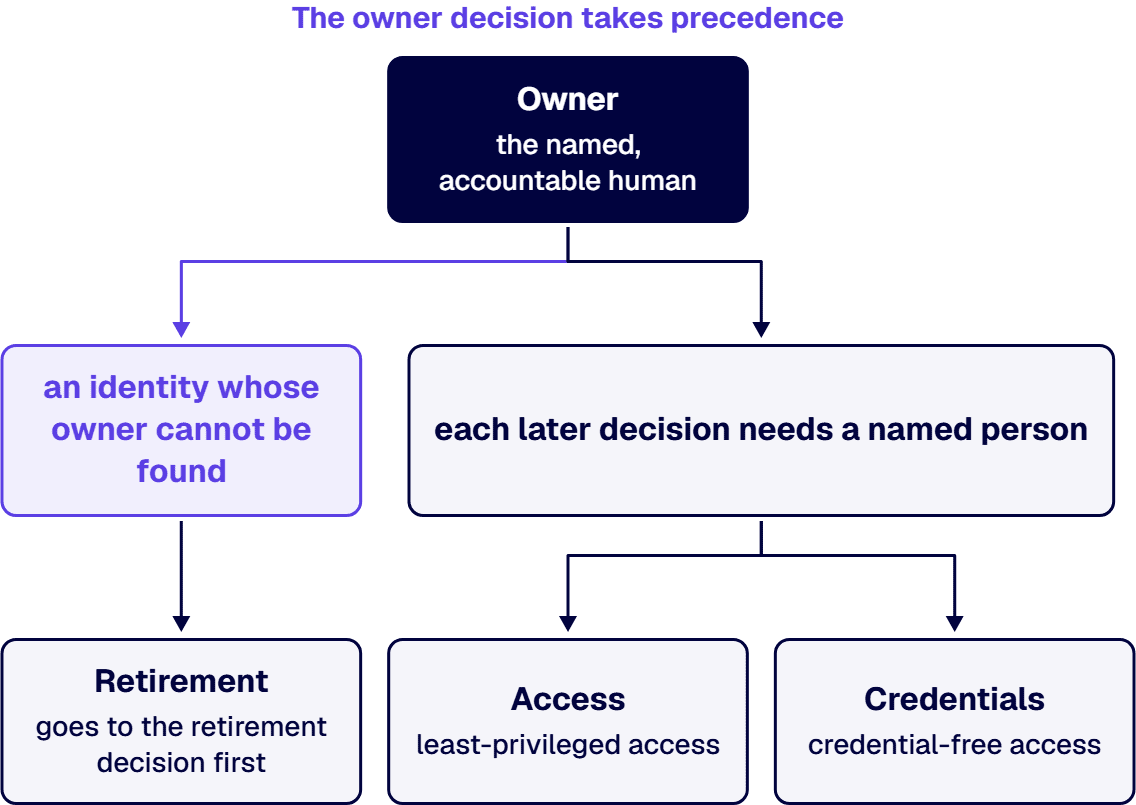
If you have to show an auditor that each non-human identity is accountable to someone, five decisions apply to every class of identity above: inventory, owner, access, credentials and retirement. Each is a decision your organization makes; none is a configuration step.
Inventory. Decide what the inventory covers and who keeps it current: applications and their registrations, service principals (including those for applications registered by other organizations), managed identities and agent identities. Count an agent built on a standard app registration as an application and service principal unless and until it moves to Agent ID.
Owner. Decide who the named, accountable human is for each identity, and what happens when that person leaves. For agents, Microsoft’s Governing Agent Identities article gives that role a name: “Sponsors of agent identities are human users accountable for making decisions about its lifecycle and access.” It also states: “If the sponsor is leaving the organization, sponsorship of the agent identities is automatically transferred to their manager.”
Access. Decide what least-privileged access looks like for each identity and who reviews it. Microsoft’s What are workload identities? article lists one review scenario: “Review service principals and applications that are assigned to privileged directory roles in Microsoft Entra ID using access reviews for service principals.” For agents, the Governing Agent Identities article describes access package assignments that carry an expiry date, and says: “If the sponsor takes no action, the access package assignment automatically expires on its end date, and the agent identity loses access to the target resources.”
Credentials. Decide which identities may still hold a stored secret or certificate, who holds it, and which move to credential-free access first. Microsoft’s What are workload identities? article names two routes: “Access Microsoft Entra protected resources without needing to manage secrets for workloads that run on Azure using managed identities.” For workloads outside Azure, it names workload identity federation “for supported scenarios such as GitHub Actions, workloads running on Kubernetes, or workloads running in compute platforms outside of Azure.”
Retirement. Decide who confirms that an identity is no longer needed, and on what trigger: the workload is decommissioned, the owner leaves, or the agent moves to a new identity. The cleanup sequence for stale service principals and application registrations is covered on Establish Identity as a Governed Enterprise Capability.
The owner decision takes precedence over the other four, because each later decision needs a named person to make it; an identity whose owner cannot be found goes to the retirement decision first.
If AI agents are already running in your tenant, Microsoft’s What is Microsoft Entra Agent ID? article, read on 2026-09-22, describes the product: “Microsoft Entra Agent ID is a product within Microsoft Entra that provides the platform for creating and managing agent identities and agent identity blueprints. Agent ID is available for all Microsoft Entra customers.” On licensing, the same article says: “Extending Microsoft Entra security features to agents requires Microsoft Agent 365. Agent 365 is included with Microsoft 365 E7 and is available as an add-on to Microsoft E5/A5/Business Premium (or Microsoft Defender Suite + Microsoft Purview Suite).”
On status, Microsoft’s What’s new in Microsoft Entra Agent ID page, read on 2026-09-22, states: “Microsoft Entra Agent ID is now generally available.” The same page labels one creation flow (Preview), in its entry “Create an agent identity blueprint and Create an agent identity (Preview)”, which describes a new wizard in the Microsoft Entra admin center for creating agent identity blueprints and agent identities.
Microsoft’s Governing Agent Identities article says agent identities can “be governed with Microsoft Entra features in the same style as you would govern human identities,” so that “the agents have a responsible person providing oversight throughout the agent lifecycle,” and its license section says that using Microsoft Entra ID Governance for agent identities “requires one of the following license plans”: Microsoft 365 E7, or a “Microsoft Agent 365 license paired with at least Microsoft Entra P1 or Microsoft 365 E3.” The human side of that program is covered in Microsoft Entra ID Governance for Regulated Enterprises: Product Scope, Licensing, and Audit-Defensible Implementation.
If agents were built on standard app registrations, Microsoft’s Migrate custom app registrations to Agent ID article, read on 2026-09-22, explains what they miss: “If you built AI agents by using standard Microsoft Entra app registrations or service principals, your agents authenticate like any other application. They don’t take advantage of agent-specific governance capabilities like Conditional Access policies, centralized audit logging, and lifecycle management that Agent ID provides.” For agents whose code and identity configuration you own, it summarizes the path: “You create Agent ID resources (a blueprint and agent identity), update your application code, and decommission the old identity.” Agents built in Microsoft Copilot Studio have a separate documented migration. The decision left to you is which agents move, in what order, and who is named as the sponsor of each agent identity once it exists.
If ownership of these identities has to be settled and defended to an auditor before more agents are deployed, an outside identity architect can help your team set the five decisions and the owner model, while the identities and their owners stay inside your organization. i3solutions has deep experience implementing identity governance for enterprises in aerospace and defense manufacturing, financial services, and healthcare, including environments with CMMC and ITAR obligations. Delivery is senior and US-based.
If you are responsible for identities that no person signs in as, keep a current inventory of the applications, service principals, managed identities and agent identities in your tenant, and name a human accountable for each one; for agent identities, Microsoft calls that person a sponsor. Keep their access least-privileged, review those assigned to privileged directory roles, move from stored secrets to managed identities or workload identity federation where Microsoft supports it, and bring AI agents under the same program through Microsoft Entra Agent ID.
If you are assigning owners, Microsoft describes the application object as the global representation of an application and the service principal as its local instance in a specific tenant, which defines what the application can do there and what it can access. An application used in several tenants has a service principal in each of them, and the access your tenant grants is held by the local one, which is why the owner question attaches to it, and, for an application your organization registered, to the registration as well.
If you are planning for AI agents, yes: according to Microsoft’s what’s-new page for Agent ID, read on 2026-09-22, Microsoft Entra Agent ID is generally available, while the admin center wizard for creating agent identity blueprints and agent identities is marked (Preview). Microsoft labels some related capabilities separately, such as automatic creation of agent identities for Copilot Studio agents, which its Governing Agent Identities page marks (preview). And according to Microsoft, agents need Microsoft Agent 365 before Entra security features extend to them. And according to Microsoft’s Governing Agent Identities page, using Microsoft Entra ID Governance for agent identities requires either Microsoft 365 E7 or a “Microsoft Agent 365 license paired with at least Microsoft Entra P1 or Microsoft 365 E3.”
If your agents authenticate through standard app registrations or service principals, Microsoft documents a migration for agents whose code and identity configuration you own: you create Agent ID resources, a blueprint and an agent identity, update the application code, and decommission the old identity. Microsoft documents a separate migration for agents built in Microsoft Copilot Studio.
As of September 2026, if your answers mostly sit in Microsoft 365 and users hold Copilot licenses, choose Copilot; if most sit elsewhere, choose Glean, or both. Microsoft builds its semantic index “for users with a paid Microsoft Copilot license”, and Glean says it “inherits and enforces source-system permissions”.
If a business unit has piloted Glean and wants it funded while the Microsoft account team says Microsoft 365 Copilot includes enterprise search, you are being asked either to pay for one job twice or to pick a side you still have to defend to the risk committee. Engineering knowledge sits in Jira, Confluence and GitHub, sales knowledge in Salesforce, and the policies and contracts in SharePoint. Both vendors say their tools respect source permissions, which means each shows what the source systems already allow. This guide sets out the criteria from each vendor’s own pages, read in September 2026, including the option of running Glean alongside Microsoft 365.
When the funding request lands, start from what each vendor says its product is, in its own words. Microsoft’s Copilot Search page states: “Microsoft Copilot Search is an AI-powered universal search experience optimized for your organization.” The same page calls it “the single place for quick information across all your Microsoft and non-Microsoft data sources”. Microsoft’s semantic indexing page states: “We generate a semantic index for users with a paid Microsoft Copilot license.” Glean’s connectors page states: “Glean builds indexes and knowledge graphs across your data, so it can understand how your business works and automate work reliably.” Both describe one index across an organization’s knowledge. The decision is which index, over which systems, for which users.
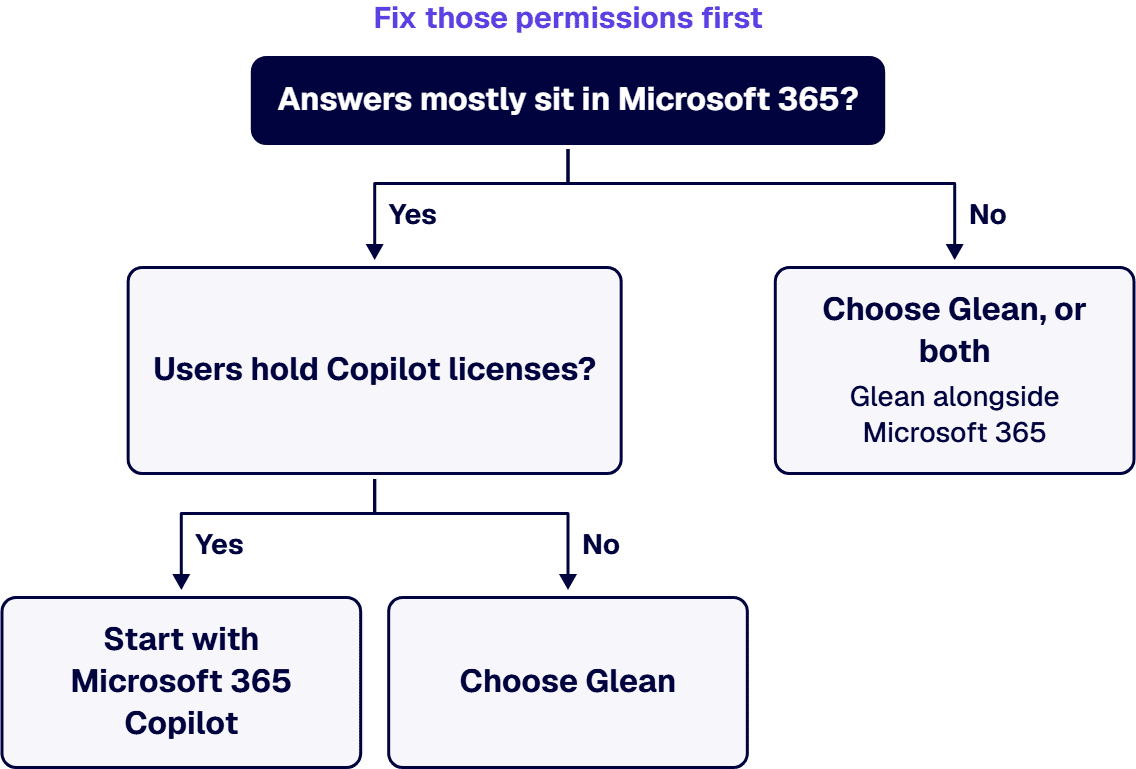
If most of the answers your people look for already sit in SharePoint and the rest of Microsoft 365, the Microsoft index starts where the knowledge is. For content outside it, Microsoft’s Copilot connectors overview states: “External content is stored securely in your tenant, and users only see what they’re allowed to access.” How those connectors are chosen and built is covered in Copilot Integration Architecture: Four Paths, One Sequence. Glean’s homepage displays these source systems beside its headline: Slack, Google Drive, Jira, Confluence, SharePoint, GitHub and Salesforce. List the systems where your people find answers today, mark which sit inside Microsoft 365, and let that list, not either vendor’s demo, set the weight of this criterion.
If a SharePoint site is overshared today, it is overshared in either tool, because both vendors tie results to the source system’s permissions. Microsoft’s semantic indexing page states: “Microsoft Copilot presents only data that each individual can access using the same underlying controls for data access used in other Microsoft 365 services.” Glean’s connectors page states: “Glean inherits and enforces source-system permissions, so users only see data they’re already allowed to access.” Glean’s security page adds: “Enforce source-system permissions on every read and write; an agent should not automatically access everything the user can.” A source that exposes too much exposes it in either index, so fix the permissions before either one is switched on. We recommend validating that before go-live rather than assuming it: sign in as a test user who holds a typical employee’s access, search for terms that user should not be able to see, and have the SharePoint and source-system owners confirm each result before the pilot widens. If a result appears that the source should not allow, fix the permission at the source; neither index is the place to correct it. SharePoint Permissions Cleanup Before Microsoft 365 Copilot sets out that work.
If the people who need answers already hold Microsoft 365 Copilot licenses, the Microsoft index is already being built for them. Microsoft’s semantic indexing page ties the index to the license: “We generate a semantic index for users with a paid Microsoft Copilot license.” Its Copilot Search page states: “If a user has an eligible Microsoft Copilot license, Copilot Search appears as a tab in the Microsoft Copilot app.” When the people asking are a different group, for example engineers outside the Copilot rollout, the license map changes the answer. Microsoft 365 Copilot Licensing: What a Governed Enterprise Deployment Actually Costs covers the Microsoft side of that cost; get Glean’s commercial terms from Glean.
Before the risk committee asks where the index lives, have each vendor’s own answer on paper. Microsoft’s semantic indexing page states: “User-level index information is stored where the user’s mailbox is located.” Its connectors overview states: “Microsoft hosts the indexing pipeline in the cloud for most connectors.” Glean’s security and architecture documentation lists its deployment options as “SaaS and customer-hosted environments” and points readers deploying in their own cloud to “Review GCP and AWS customer-hosted deployment models and controls.” Glean’s government page says it “supports both cloud and VPC-hosted deployments.” Record each answer as the vendor states it. Whether a location satisfies a residency term or a contract clause is for your compliance owner to decide.
If any of this knowledge sits in GCC, GCC High or DoD, the search decision follows the cloud decision, not the other way round. For Microsoft 365 Copilot in those clouds, including how connectors behave there, Is Your Microsoft Environment Ready for Copilot? What Must Be True First sets out what changes. For Glean, ask Glean in writing for its current authorization status and the boundary it covers before a regulated workload is scoped. Whether a workload must sit in a government cloud, and at which level, is for your compliance owner, your contracting officer and the contract clause to decide. i3solutions does not hold an authorization of its own and does not issue an ATO for any system.
If most of your answers live outside Microsoft 365, choose Glean, or run it alongside Microsoft 365. Choose Glean when the knowledge people search for sits mostly in systems such as Jira, Confluence, GitHub, Salesforce and Slack, and one index across them is the requirement; Glean describes building “indexes and knowledge graphs across your data”. Choose it when a deployment in your own cloud is wanted, since its documentation names “GCP and AWS customer-hosted deployment models and controls.” Choose it when the people who need search are not the people holding Copilot licenses. Run Glean alongside Microsoft 365 when Microsoft 365 Copilot stays the assistant for licensed users and a second index serves the systems outside Microsoft 365. Plan the permissions work once, because both vendors state that results follow the source system’s permissions.
When the steering committee asks why the answer is one platform, the other, or both, one row per option answers it. Each quoted cell is the vendor’s own wording, read in September 2026.
If the need is a custom retrieval application over one regulated body of documents, that is a build question, not a search-platform choice, and Custom AI Copilot Development on the Microsoft Stack covers it. If the source permissions are not fixed yet, hold both tools back from indexing anything until they are. If the need is finding records for a legal hold, that is an eDiscovery and retention decision, and a search platform does not settle it.
When this decision reaches i3solutions, the work starts with a map: each system where your people find answers, who holds which license, and which permissions each source applies today. i3solutions implements the Microsoft technology a customer needs, here Microsoft 365 Copilot, Copilot Search, Copilot connectors and the SharePoint permissions underneath them. On the Copilot side, i3solutions names the cost driver plainly. The order-of-magnitude difference between AI readiness assessment quotes is data governance cleanup: when Dataverse and SharePoint access-control alignment has to precede a Copilot or OpenAI API integration, that remediation dominates the engagement. For a Copilot or Glean decision, we recommend that the IT Director owns the call, the compliance owner signs off the hosting and government-cloud answers, and the map is tested with a small pilot group from each side, licensed Microsoft 365 Copilot users and the people outside that rollout, before a second index is funded. Delivery is senior and US-based. The work sits within Custom AI Consulting Services for Governed Microsoft Enterprise AI.
If your users hold an eligible license, Microsoft’s Copilot Search page states: “If a user has an eligible Microsoft Copilot license, Copilot Search appears as a tab in the Microsoft Copilot app.” The same page describes Copilot Search as “an AI-powered universal search experience optimized for your organization.”
When you check Glean’s own wording, its connectors page states: “Glean inherits and enforces source-system permissions, so users only see data they’re already allowed to access.” Its security page adds: “Enforce source-system permissions on every read and write; an agent should not automatically access everything the user can.”
If your knowledge is split, you can run Microsoft 365 Copilot for licensed Microsoft 365 users and Glean across systems such as Jira, Confluence and Salesforce, which Glean’s homepage displays among its sources. Both vendors state that results follow the source system’s permissions, so plan the permissions work once.
When the risk committee asks, Microsoft’s semantic indexing page states: “User-level index information is stored where the user’s mailbox is located.” Glean’s security documentation lists “SaaS and customer-hosted environments” and names “GCP and AWS customer-hosted deployment models and controls.”
If the permissions are not fixed, fix them first: Microsoft states that Copilot uses “the same underlying controls for data access used in other Microsoft 365 services”, and Glean states that it “inherits and enforces source-system permissions”. SharePoint Permissions Cleanup Before Microsoft 365 Copilot covers that work.
Quick answer. If a review flags the SDK, Microsoft’s archive notice (September 2026) states: “Support tickets for the Bot Framework SDK will no longer be serviced as of December 31, 2025”. Move code-heavy bots to the Agents SDK and content bots to Copilot Studio where your cloud offers the channel.
The bot still answers the questions it answered last year. What changed is underneath it: a security review or a failed support ticket has surfaced that the SDK the bot is built on no longer gets serviced tickets or product updates, and its source repositories are archived. One voice says move it to Copilot Studio, another says rewrite it on the new SDK, and neither can be defended until you know how the bot was built and which cloud it runs in. This guide sets out what Microsoft states, what does not come across, the criteria that pick a destination for each bot, and the order to run the move in.
If a scan or an audit has flagged the SDK under a production bot, start from Microsoft’s own wording. The archive notice at the top of Microsoft’s botbuilder-js repository reads: “This means that this project will no longer be updated or maintained. Customers using this tool will not be disrupted.” The same notice states: “Support tickets for the Bot Framework SDK will no longer be serviced as of December 31, 2025.” GitHub shows the repository as archived and read-only, and the .NET and Python repositories carry the same notice.
Read together, those sentences say two things. A running bot is not switched off, and the path for vendor help and fixes is closed. Microsoft’s migration guidance names the successor directly: “The Microsoft 365 Agents SDK is the evolution of the Azure Bot Framework SDK.”
When the question is where the bot should go, Microsoft’s archive notice names two places. For code: “To build agents with your choice of AI services, orchestration, and knowledge, consider using the Microsoft 365 Agents SDK”. For a managed platform: “If you’re looking for a SaaS-based agent platform, consider Microsoft Copilot Studio.” Both sentences sit in the notice on Microsoft’s botbuilder-js repository, which adds: “If you have an existing bot built with the Bot Framework SDK, you can update your bot to the Agents SDK.”
The two are different kinds of thing. Microsoft’s Agents SDK overview states: “The Microsoft 365 Agents SDK is a development framework for building conversational agents.” and “The Agents SDK isn’t an AI model, an orchestration engine, or a no-code builder.” Copilot Studio is the SaaS platform in Microsoft’s second sentence, where agents are built and managed in the product rather than in a code base. How a Copilot Studio build runs as an engagement is covered in Microsoft Copilot Studio Development Services for Enterprise-Grade Custom Copilots.
Before anyone picks a destination, list what each bot depends on, because that list sets the size of the move. Microsoft’s migration guidance introduces its table this way: “Bots requiring these functionalities can’t migrate without implementing alternatives:”. Among its rows are these, with Microsoft’s reason quoted:
Read the rest of the table on Microsoft’s page against your own inventory. For a bot built in Composer on Adaptive Dialogs, those parts need alternatives before it can move to the Agents SDK; a bot written in code against the core SDK is closer to a port.
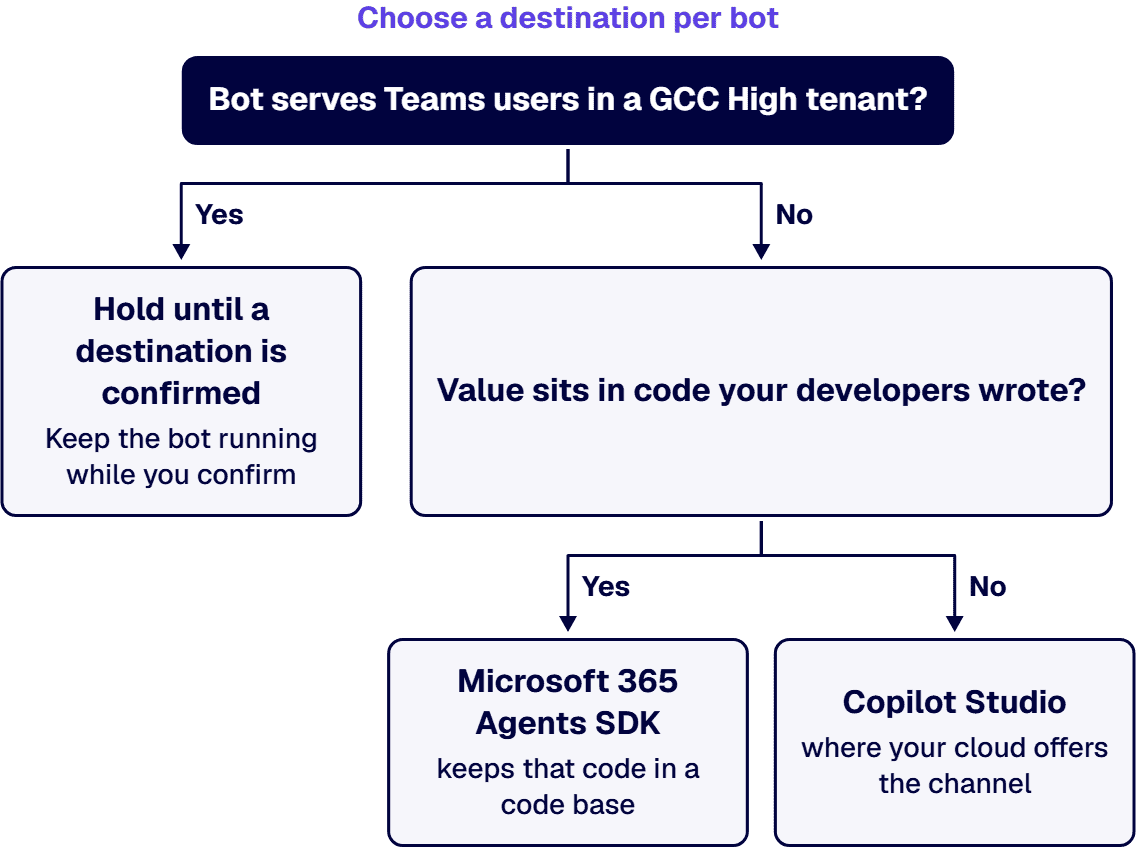
If the bot’s value sits in code your developers wrote, such as orchestration, calls into line-of-business systems or a custom channel, the Agents SDK keeps that code in a code base. Microsoft’s Agents SDK overview describes the model: “You write your agent logic once, and the SDK translates incoming and outgoing messages to and from the format each channel expects.” That suits a bot a development team will keep maintaining.
Where the bot is mostly question-and-answer content and simple dialogs, and the people who own the content are not developers, Copilot Studio is the closer fit: Microsoft’s archive notice names it for a “SaaS-based agent platform”. Scoping a first agent of that kind is the subject of a separate i3solutions guide, A Copilot Studio IT Help-Desk Agent for a Regulated Tenant: A Guide to Scoping the First Agent and Its Data Boundary. Where the bot will sit among declarative and custom engine agents is covered in Copilot Integration Architecture: Four Paths, One Sequence.
If the bot serves Teams users in a GCC High tenant, settle this criterion before the others. Microsoft’s article on deploying Bot Framework bots to Azure Government and Office 365 GCC High states: “Currently, only the Microsoft Teams channel is available in the Office 365 GCC High environment.” In that environment, then, a Bot Framework bot reaches its users through Teams.
Copilot Studio’s listing for that cloud reads differently. As read in September 2026, Microsoft’s Copilot Studio for US Government customers article marks “Teams & M365 Copilot Channel” as “Yes” under “Available in GCC” and “No” under “Available in GCC High”. For a GCC High Teams bot, that row decides against Copilot Studio as the destination until Microsoft’s listing changes.
This guide makes no statement about the Agents SDK in government clouds, because none of the Microsoft pages read for it addresses that: confirm support for your cloud with Microsoft before you plan that path. Where the criteria point different ways, this one takes precedence: a destination that does not offer the bot’s channel in your cloud is not yet a destination. How Copilot Studio and Azure AI Foundry compare on compliance posture is covered in Copilot Studio vs Azure AI Foundry: Which One Fits Your Compliance Posture?
When the business wants Copilot Studio as the front door but one bot carries logic too specialized to rebuild there, there is a third shape. Microsoft’s Azure Bot Service skills article states: “Copilot Studio lets you extend your agent by using Azure Bot Service skills.” For bots built with pro-code tools, including the Agents SDK, it says “you can convert these bots to Azure Bot Service skills and embed them within a Copilot Studio agent.” It also states: “If you have a Teams plan, you can’t use Agents SDK skills.” Check your Copilot Studio licensing before you design around this shape; it is a way to combine the two destinations, not a third one.
When more than one bot is in scope, run the move as a project with an order, not as a string of rewrites. Microsoft’s migration guidance describes itself as providing “guidance and awareness if you’re considering, or in the process of, migrating from the Azure Bot Framework to the Agents SDK”, and links separate guides for .NET, NodeJS and Python.
After cutover the new agents become part of an estate someone governs, which is covered in Copilot Studio Governance for Enterprise Agent Estates.
If a bot’s future is already being decided elsewhere, a migration can be the wrong project. Microsoft’s archive notice states that “Customers using this tool will not be disrupted”, so the pressure is real but it is not an outage. In three situations, plan instead of moving.
When a Bot Framework estate reaches i3solutions, the work starts from the inventory: which bots exist, what they depend on, which channels and cloud they serve and who will own them. i3solutions implements the Microsoft technology a customer needs, Copilot Studio and custom agents on the Microsoft 365 Agents SDK included, and runs the move as a migration project with defined delivery or with embedded specialists. As our Custom AI Copilot Development on the Microsoft Stack page states: “i3solutions builds custom AI copilots on the Microsoft stack: Azure OpenAI and Azure AI Search for retrieval-augmented generation inside your tenant, Microsoft Copilot Studio for agents that act in your systems, Teams and Microsoft 365 as the surface, and SharePoint or Dataverse as governed knowledge sources that honor the signed-in user’s Entra ID permissions.”
For the Teams side of the estate, our Hire US-Based Microsoft Teams Developers and Enterprise Specialists page describes “Hands-on specialists who design and build custom Teams applications, tabs, bots, and extensions.” Delivery is senior and US-based.
If nothing else changes, Microsoft says they are not disrupted: its archive notice states “Customers using this tool will not be disrupted.” and “Support tickets for the Bot Framework SDK will no longer be serviced as of December 31, 2025.” The bots run; the ticket path and product updates are what end.
If a bot uses Composer or the older language services, plan a rebuild of those parts. Microsoft’s migration guidance says of Adaptive Dialogs “Microsoft doesn’t plan to move this system into the Agents SDK.”, of Composer artifacts that they “are no longer required and aren’t being brought forward.”, and of LUIS, Orchestrator and QnA Maker: “The online services for these tools are already disabled.”
When a maker team will own the bot’s content and your cloud offers the channels it serves, Copilot Studio fits. Microsoft’s archive notice points there with “If you’re looking for a SaaS-based agent platform, consider Microsoft Copilot Studio.” A bot whose value is custom code belongs on the Agents SDK instead.
If the licensing allows it, yes. Microsoft’s Azure Bot Service skills article says “you can convert these bots to Azure Bot Service skills and embed them within a Copilot Studio agent.”, and also states: “If you have a Teams plan, you can’t use Agents SDK skills.”
If the bot serves Teams in GCC High, check the channel first. As read in September 2026, Microsoft’s Copilot Studio for US Government customers article marks “Teams & M365 Copilot Channel” as “Yes” under “Available in GCC” and “No” under “Available in GCC High”. Confirm Agents SDK support for your cloud with Microsoft before planning that path.
By Michael Branson, Founder/COO, i3solutions
As of September 2026, OpenAI-operated models have been enabled by default in Microsoft Copilot for eligible commercial customers since July 24, 2026, and Microsoft’s own documentation states that these models aren’t FedRAMP High authorized and that a PCI DSS Attestation of Compliance, a HITRUST CSF Certification Letter and a SOC 1 Type 2 report aren’t available for them. The default and the exclusions reach commercial tenants only: according to Microsoft’s OpenAI as a subprocessor in Microsoft Online Services page, “Access to OpenAI operated models isn’t currently available for use in government clouds (GCC, GCC High, DoD) or sovereign clouds.” An AI Administrator or Global Administrator can turn the setting off for all users, or limit it to specific users or Microsoft Entra ID security groups, in the Microsoft 365 admin center, and can turn it back on later if the decision changes.
The question often arrives sideways. A customer’s security questionnaire asks which subprocessors handle the organization’s Microsoft 365 data and which attestations cover them, or an administrator reviewing Copilot settings finds a page called AI providers operating as Microsoft subprocessors with OpenAI already on for all users. Nobody in IT chose that; Microsoft made it the default for eligible commercial customers, and the tenant kept it unless an administrator turned it off. The IT Director then has two questions to answer: what Microsoft actually says about these models’ attestations, and whether leaving them on is consistent with commitments the organization has already made to auditors, customers or its own security office. This guide answers the first in Microsoft’s own words and gives criteria for the second. It does not decide whether any particular contract requires FedRAMP High, PCI DSS, HITRUST or SOC 1 Type 2 coverage; that determination belongs to the organization’s contract owners and counsel.
If the three dates in Microsoft’s documentation get merged into one, the audit trail is wrong from its first line, so keep them apart. According to Microsoft’s OpenAI as a subprocessor in Microsoft Online Services page (last updated August 18, 2026), “OpenAI was added to the Microsoft Online Services Subprocessors List on June 23, 2026.” The same page says “OpenAI as a subprocessor is available for use as of July 9, 2026.” The third date is the one that changed tenants: “As of July 24, 2026, OpenAI operated models are enabled for all users for eligible commercial customers, unless you specifically disable the use of OpenAI operated models by selecting No users for the setting in the Microsoft 365 admin center.”
Those are three separate events: OpenAI added to the subprocessor list, the option made available, and the models switched on by default. A commercial tenant where no administrator selected No users has had OpenAI-operated models enabled for all users since July 24, 2026. The same page also notes that “Microsoft 365 Copilot is now named Microsoft Copilot”, so the same setting can come up under either name inside one organization.
The decision does not reach every tenant. Microsoft states that the models aren’t currently available in GCC, GCC High, DoD or sovereign clouds, so a government-cloud tenant has no OpenAI-operated models to decide about. And if the tenant is not yet live on Copilot at all, the model-provider setting is a later question: turning Copilot on is a readiness decision with its own gates, covered in Is Your Microsoft Environment Ready for Copilot? What Must Be True First.
If someone in the review points to Azure OpenAI’s government authorizations to close the question, stop there, because Microsoft draws the line itself. Its page opens with this note: “The information in this article only applies to OpenAI models operated by OpenAI (provided by OpenAI as a subprocessor). The information doesn’t apply to OpenAI models operated by Microsoft (Azure OpenAI).” It describes the new option as an addition, not a replacement: “In addition to OpenAI models that Microsoft operates (Azure OpenAI), Microsoft now provides OpenAI operated models through OpenAI as a subprocessor.”
Microsoft’s Understanding AI functionality and models in Microsoft Online Services page (last updated September 10, 2026) separates the two categories. For models hosted and operated by Microsoft, it says “Data does not leave Microsoft.” For the other category it says “An AI Subprocessor is a third-party AI provider that handles data on Microsoft’s behalf and under Microsoft’s Data Protection Addendum (DPA), Product Terms, and enterprise safeguards.”
Azure OpenAI’s own compliance status is documented on a different Microsoft page. Microsoft’s Azure, Dynamics 365, Microsoft 365, and Power Platform services compliance scope page (last updated September 21, 2026) lists Azure OpenAI with FedRAMP High checked in both its Azure public and Azure Government tables. That listing is about Microsoft-operated Azure OpenAI. For OpenAI-operated models, Microsoft’s statement is the Exclusions section covered next, and one product’s authorization never answers the question for the other.
Users will not see the difference on their own. Microsoft says “OpenAI operated models serve the same GPT-based Copilot experiences your users already have.” That is why the question tends to surface in a questionnaire or an admin review rather than from a user report.
When the compliance office asks for the exact language, give it the four statements as Microsoft wrote them, not a summary. Under the heading Exclusions, Microsoft’s OpenAI as a subprocessor in Microsoft Online Services page lists:
Each is a separate statement about a separate authorization or report. Microsoft’s wording is specific: one named authorization is not in place, and three named documents aren’t available. Which of the four matters to a given organization depends on which of those documents it has promised to someone else.
The same page is just as specific about what does still apply. It says “The Microsoft Product Terms and Microsoft Data Protection Addendum (DPA) apply to use of OpenAI models through Microsoft’s enterprise Online Services, except as otherwise disclosed in the Exclusions section at the end of this article. Such use is also covered under our Enterprise Data Protection.” It says “As a subprocessor, OpenAI operates with Microsoft oversight through contractual safeguards and appropriate technical and organizational measures.” It states that Microsoft’s Customer Copyright Commitment “applies to OpenAI models used within products covered by that commitment, including Microsoft Copilot and Copilot Studio.” And on retention it says “Microsoft incorporates OpenAI’s Responses API into certain Copilot experiences. OpenAI offers Zero Data Retention for the Responses API used by Microsoft, subject to the limitations and feature-specific data handling practices for Responses API described in OpenAI’s Data controls in the OpenAI platform documentation.”
If the organization has made data-residency promises, two more sentences on Microsoft’s page belong in the review. The first: “OpenAI models delivered through OpenAI as a subprocessor in Copilot experiences are currently excluded from in-country processing commitments when applicable.” The second: “OpenAI operated models are included in the EU Data Boundary, except as otherwise noted in the EU Data Boundary documentation.”
Read together: where an in-country processing commitment applies, these models are outside it, while the EU Data Boundary does include them, subject to the exceptions Microsoft documents separately. A residency promise written into a customer contract is checked against the first sentence, not the second.
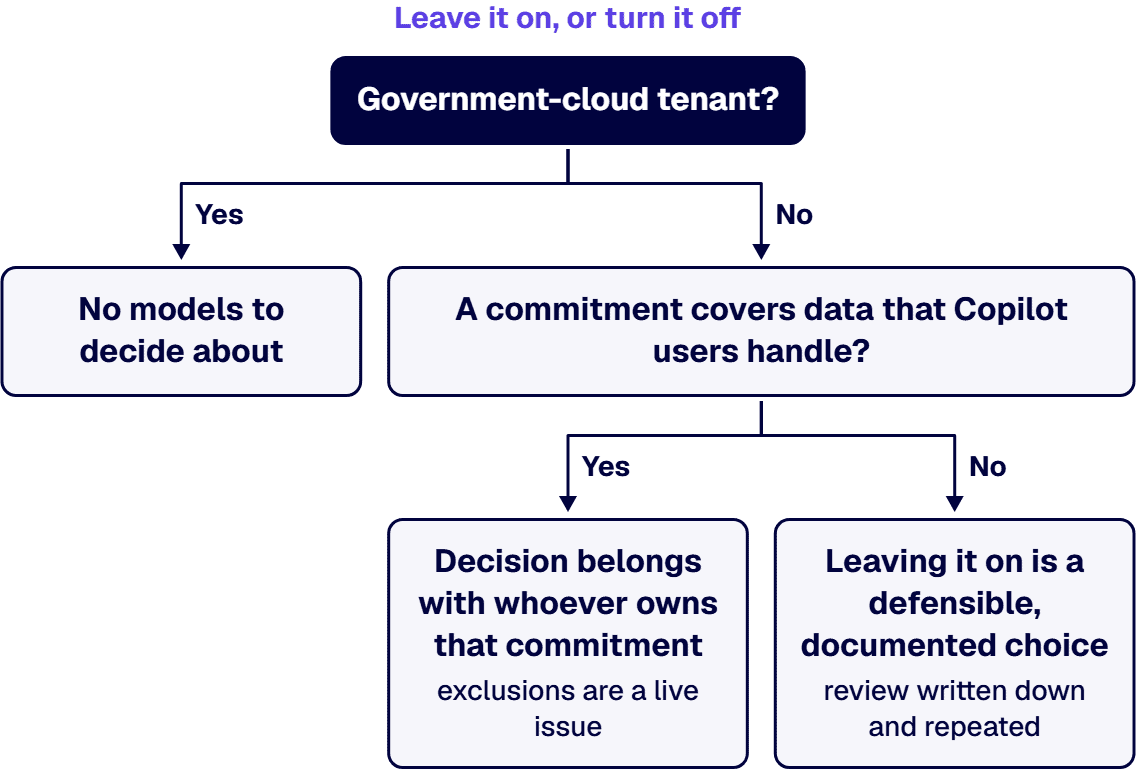
When the review reaches the setting itself, the decision is a comparison of two exposures: a default that may contradict a commitment the business relies on, and a shutdown that removes Copilot capability users already have. Work through these criteria before anyone changes the setting:
If a commitment covers data that Copilot users handle, the exclusions are a live issue for those users, and the decision belongs with whoever owns that commitment. If none does, the exclusions describe an authorization and reports nobody has asked the organization for.
Once the decision is made, the change itself is small; what matters is who can make it and at what scope. For both enabling and disabling, Microsoft’s page says “You must be a member of the AI Administrator or Global Administrator role to perform this task.” The setting sits in the Microsoft 365 admin center under Copilot settings, on the page AI providers operating as Microsoft subprocessors, where OpenAI appears as an available subprocessor and access is set to all users, to specific users and groups, or to No users.
Scoping is at the provider level. Microsoft says “You can restrict user access to AI provider subprocessors by assigning permissions to specific users or Microsoft Entra ID security groups in the Microsoft 365 admin center.” and “These assignments are applied at the provider level and enforced across Microsoft Copilot and Copilot Studio experiences.” When access is turned off, “After you disable OpenAI as a subprocessor, users won’t have the option to use OpenAI operated AI models. You can choose to enable OpenAI operated models at a later date if desired.” Microsoft’s page also notes that, once the models are enabled in the Microsoft 365 admin center, additional controls in the Power Platform admin center decide whether they can be used in Copilot Studio and Power Platform.
This setting is one input into a wider policy on which AI is approved for which work across Copilot, Copilot Studio and Azure OpenAI, covered in Enterprise AI Governance for Microsoft Environments. Record the decision there, with the commitments it was checked against, so the next questionnaire gets the same answer.
If the review finds no contract, customer commitment or internal policy that requires FedRAMP High, PCI DSS, HITRUST CSF or SOC 1 Type 2 coverage for the data Copilot users handle, and no in-country processing promise, the four exclusions may change nothing material for that tenant. Turning the setting off in that case gives up the features and models Microsoft says depend on it, with no commitment protected in return. Leaving it on is then a defensible, documented choice, provided the review that reached it is written down and repeated when a new contract or questionnaire adds a requirement. This guide states no universal answer; the answer follows from the organization’s own commitments.
If an outside team is brought in to make this call defensible, hold it to these criteria:
When a regulated organization needs this decision made and defended, it needs a project with an end date: a Copilot AI-provider assessment that maps the organization’s own attestation and residency commitments against Microsoft’s stated exclusions, sets the admin center scope by user group where the answer differs, and writes the decision down for the next audit, with embedded specialists where the internal team needs more hands for a period. i3solutions has been a Microsoft Partner with 30 years of enterprise technology delivery experience and has delivered 1,500+ Microsoft engagements across aerospace and defense, financial services, and health sciences. The people who do the work are senior and based in the US. An i3solutions engagement does not produce managed-service ownership, a replacement for the internal team, open-ended scope expansion, or vendor lock-in. This work sits within i3solutions’ Custom AI Consulting Services for Governed Microsoft Enterprise AI.
Yes, for eligible commercial customers. According to Microsoft, “As of July 24, 2026, OpenAI operated models are enabled for all users for eligible commercial customers, unless you specifically disable the use of OpenAI operated models by selecting No users for the setting in the Microsoft 365 admin center.”
No. Microsoft’s Exclusions section states “OpenAI operated models available through Microsoft aren’t FedRAMP High authorized.” and tells organizations that require FedRAMP High to consult their authorization official. The Exclusions section describes OpenAI-operated models only; Microsoft says the page’s information doesn’t apply to Azure OpenAI.
No. Microsoft states “A Payment Card Industry (PCI) Data Security Standard (DSS) Attestation of Compliance (AOC) isn’t available for OpenAI operated models.” The same section says a HITRUST CSF Certification Letter and a SOC 1 Type 2 report aren’t available either.
No. Microsoft states “Access to OpenAI operated models isn’t currently available for use in government clouds (GCC, GCC High, DoD) or sovereign clouds.” The default and the exclusions apply to commercial tenants.
An AI Administrator or Global Administrator sets access for OpenAI to No users on the AI providers operating as Microsoft subprocessors page under Copilot settings in the Microsoft 365 admin center, or limits it to specific users or security groups. Microsoft says “You can choose to enable OpenAI operated models at a later date if desired.”
No. Microsoft’s page states “The information doesn’t apply to OpenAI models operated by Microsoft (Azure OpenAI).” Azure OpenAI is operated by Microsoft; OpenAI-operated models are provided by OpenAI as a Microsoft subprocessor, and each has its own compliance status.
By Michael Branson, Founder/COO, i3solutions
If you key paper forms, choose by where documents live and who maintains the model: SharePoint Premium in SharePoint libraries, AI Builder in Power Platform, Document Intelligence in your developers’ Azure code. Under CUI the cloud decides first; under HIPAA, confirm Microsoft’s BAA scope before PHI enters the service.
If your team still types paper forms and scanned documents into a system of record, Microsoft sells three services that can read them for you. SharePoint Premium (now document processing for Microsoft 365, formerly Syntex) runs on SharePoint libraries; Microsoft’s overview says “The pay-as-you-go services previously offered under Microsoft Syntex are now referred to as document processing services.” AI Builder document processing runs inside Power Platform. Azure Document Intelligence, which Microsoft’s pricing page lists as Azure Document Intelligence in Foundry Tools, is an Azure resource. Each is described here from Microsoft’s own documentation, read on September 29, 2026, in no order of preference. A passenger rail operator took a different route, moving its health compliance form onto touch-enabled handheld devices so compliance data no longer arrived by fax to be entered a second time by hand, as Reducing Administrative Costs Through Wireless Automation describes.
If every copy of a form puts the same field in the same place, a template model can read it; if the documents vary, you need a model built for variation. Each service draws that line in its own terms.
Sort your own inbound documents into fixed layouts, varied layouts and free text before you compare anything else. A service whose model types do not match the documents you actually receive is the wrong service, whatever it costs.
If the forms carry CUI, the cloud decides before any feature does. Microsoft’s documentation draws a different line for each service:
If CUI means your tenant moves to GCC High before any capture service is chosen, that decision comes first: GCC vs GCC High vs Commercial Microsoft 365 for CUI: An Evaluation Matrix. Whether a given contract’s data is CUI, and at what impact level, is a question for your contracting officer, not for a product page.
For forms that carry PHI, start with what Microsoft’s HIPAA and HITECH page, last updated July 29, 2025, names. It lists “Azure and Azure Government”, the Power Automate and Power Apps cloud services, and SharePoint Online among in-scope services. It does not name AI Builder, Document Intelligence, SharePoint Premium or document processing. For Azure services one by one, Microsoft’s audit scope page says: “See Appendices A and B in Microsoft Azure Compliance Offerings for detailed insight into which cloud services are in scope”. So before PHI enters any of the three, confirm in Microsoft’s business associate agreement (BAA) and those appendices that the service you chose is in scope, and ask counsel whether the data is PHI at all. The HIPAA page is plain about the rest: “using Microsoft services doesn’t on its own achieve HIPAA compliance.”
Data location differs too. Microsoft’s Document Intelligence data, privacy and security page, last updated July 28, 2026, says “The incoming data is processed in the same region where the Document Intelligence resource was created.” It also says “The service stores submitted input data and analyze results for 24 hours after an analysis operation completes.” For AI Builder, the availability page says “Your AI Builder models are deployed in the region that hosts your Microsoft Power Platform environment.” SharePoint Premium runs its models on the files in the libraries where they are applied; confirm with Microsoft where that processing runs before regulated content goes through it.
If a form’s layout changes next year, someone retrains the model, and each service gives that job to a different team.
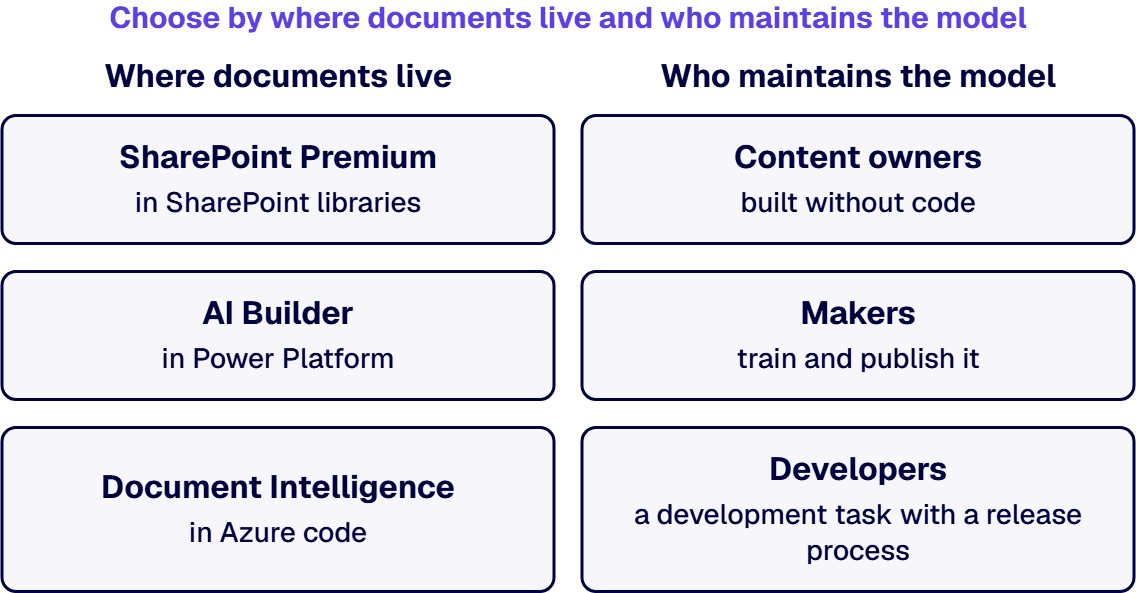
Name that team before you choose. A model that only a departed contractor can retrain is a gap in your control record, whichever service holds it. The same code versus low-code split, applied to agents rather than documents, is weighed in Copilot Studio vs Azure AI Foundry: Which One Fits Your Compliance Posture?
If procurement asks how each one is billed, the answers differ in kind, not only in amount. This page describes the basis only; prices change and are covered elsewhere.
The flow that carries each record after capture has its own license. For that side, see What Is the Total Cost of Power Automate Premium for 100 Users Annually?
If an extracted value goes straight into a system of record, a wrong read becomes a wrong record. Every one of the three services returns results that a person should be able to check first, and where that check sits is a design decision you own.
Set the rule in writing: which fields always get a human check, what score sends a field to review, and who signs off. Where the checked record then lives is its own decision, covered in SharePoint Online vs a Dedicated DMS: How to Decide.
When these criteria point different ways, the boundary wins. A service that Microsoft does not document for your cloud is out, however well its model types, team fit and licensing match.
If the form can be born digital, replace it instead of reading it. A form your staff or customers fill in on screen needs no extraction model and no review step; the choice between the two usual Microsoft tools for that is in Microsoft Forms vs Power Apps: Which Should an Enterprise Use for a Business-Critical Form?
Keying by hand can also cost less than building a model, maintaining it and staffing the review step, when volume is low. And if the documents must stay in a cloud where Microsoft does not document the service, the answer is not that service, whatever its features.
If the capture service is chosen, the next piece is the workflow that carries each checked record to where it belongs, and that is where i3solutions works. i3solutions builds client workflow automation on Power Automate cloud flows, Power Automate desktop flows for RPA, and Azure Logic Apps in both the Standard and Consumption tiers. i3solutions designs Azure integration architecture and builds and operates Azure Logic Apps workflows for enterprise clients, including running them on an ongoing basis rather than only building them. i3solutions governs client Power Platform tenants with the Center of Excellence Starter Kit, tenant-level and environment-level DLP policies, and managed environment controls. i3solutions delivers workflow automation and development inside customers’ SOC 2-audited environments, operating under the customer’s own controls, and knows how to operate in those regulated environments. All i3solutions workflow automation developers and consultants are U.S.-based.
i3solutions runs comparative platform-selection evaluations for clients, recommending among IAM platforms for hybrid estates and among workflow automation platforms against SOC 2 and HIPAA, rather than only implementing the Microsoft option. That platform choice is set out in Workflow Automation Platforms for SOC 2 and HIPAA: How to Select One, and the wider service in Workflow Automation Services Built for Enterprise IT Environments.
If CUI means a move to GCC High first: We manage GCC High migrations end-to-end: from eligibility validation and licensing coordination with your AOS-G supplier through identity architecture, data migration, security baseline configuration, and post-migration governance. i3solutions plans and runs these migrations for regulated defense organizations, structuring each phase around the compliance evidence assessors expect.
If your CUI workload runs in Azure Government, Microsoft’s audit scope table for Azure Government, last updated February 2026, marks Document Intelligence as authorized for FedRAMP High, DoD IL2, DoD IL4 and DoD IL5 through workload isolation, which Microsoft says needs extra configuration, and does not mark it for DoD IL6. Whether your contract’s data needs a given impact level is a question for your contracting officer.
If your tenant is in GCC High, Microsoft’s AI Builder availability page, last updated January 14, 2026, lists document processing for fixed-template documents and for general documents as generally available in GCC and GCC High, and not available in DoD. Document Automation, a separate AI Builder feature, is not available in GCC or GCC High.
If PHI would pass through it, do not assume so. Microsoft’s HIPAA and HITECH page, last updated July 29, 2025, names SharePoint Online among in-scope services but does not name SharePoint Premium, Syntex or document processing. Confirm the service’s scope in Microsoft’s business associate agreement and the documents it points to before PHI enters it.
If your document flows run on seeded AI Builder credits, Microsoft’s End of AI Builder credits page, last updated September 9, 2026, says “Existing seeded AI Builder credits will be honored through to end of contract term.” Microsoft’s AI Builder credit page, last updated January 14, 2026, also says “New customers can’t purchase AI Builder capacity add-on anymore, and must purchase Copilot Credits.” Size the capacity for any AI Builder document flow in Copilot Credits before your licenses renew.
By Michael Branson, Founder/COO, i3solutions
Quick answer. As of September 2026, Colorado Regulation 10-1-1, as amended, requires private passenger automobile and health benefit plan insurers that use external consumer data and information sources (ECDIS), or algorithms and predictive models that use ECDIS, to keep a fourteen-component governance and risk management framework available on request and to submit a compliance report to the Colorado Division of Insurance, both due next on July 1, 2027, according to the Division’s Amended Regulation 10-1-1. Most of the framework’s documentation components map onto capability already in a Microsoft estate: the Azure Machine Learning model registry and model monitoring for algorithm and predictive-model inventory, version control and drift, Microsoft Purview for the underlying data-source inventory and the evidence trail, and Microsoft Fabric or Power BI for lineage, audit and access-restricted reporting, though none of it is configured to the regulation’s specifics by default. The third-party vendor selection-and-oversight duty in Sections 5.A.13 and 5.B is a documented process the insurer runs itself; the tenant can help document that record and restrict who sees it, but no Microsoft product vets a vendor’s ECDIS, algorithm or predictive-model governance, and this page names criteria, never a product.
Every regulatory fact below is drawn from the Colorado Division of Insurance’s Amended Regulation 10-1-1, re-read on drafting day:
The inventory your data-science team can produce today probably lists the models. The question Regulation 10-1-1 asks is narrower and harder: whether that inventory carries version control, whether drift monitoring reaches a record compliance can read, and whether anyone wrote down how the third-party data and model suppliers were chosen. The Colorado Division of Insurance set the first auto and health date on July 1, 2026, and its Amended Regulation 10-1-1 repeats the duty “annually thereafter,” so the next report and the next availability-on-request date both fall on July 1, 2027. This guide sets out what the regulation says, which parts a Microsoft estate already covers, what still has to be built or written down, and the order to do it in.
The first decision is whether the book of business in front of you is one the regulation names, and that decision belongs to counsel and the Division, not to this page. What the text itself says is set out below, from the Division’s Amended Regulation 10-1-1. Section 2 states its purpose: “This regulation establishes the governance and risk management requirements for insurers authorized to do business in Colorado and offering individual life insurance, private passenger automobile insurance, and/or health benefit plans that use external consumer data and information sources (ECDIS), as well as algorithms and predictive models that use ECDIS, in any insurance practice.” Section 3 applies it to insurers authorized to do business in Colorado that offer three lines: individually issued life insurance, private passenger automobile insurance, and health benefit plans. The July 1, 2027 date this guide is built around binds the second and third of those lines; life insurers run their own cycle, which began on December 1, 2024.
Section 4 of the regulation defines ECDIS, for auto and health insurers, as a data or information source the insurer uses to supplement or supplant traditional underwriting factors or other insurance practices, or to establish lifestyle indicators used in insurance practices. Its examples include credit scores, social media habits, locations, purchasing habits, home ownership, educational attainment, licensures, civil judgments, court records, consumer-generated Internet of Things data (including telematics data for auto insurers), biometric data, and insurance risk scores derived from those sources. One condition matters for health plans, in the regulation’s own words: “For health benefit plan insurers, ECDIS does not include an individual’s medical records.” The regulation defines “algorithm” and “predictive model” by cross-reference to section 10-3-1104.9 of the Colorado Revised Statutes rather than in its own text, so read those definitions at the statute, with counsel. The amended regulation took effect on October 15, 2025; the original version took effect on November 14, 2023.
The failure mode here is a tenant with real tooling running and no written framework around it. Section 5.A of the Division’s Amended Regulation 10-1-1 requires each insurer to “establish a risk-based governance and risk management framework” and lists fourteen components that framework must include. Several are governance duties no software performs: documented governing principles (5.A.1), oversight by the board of directors or a committee of the board (5.A.2), senior management responsibility and accountability (5.A.3), a provider acting for a health benefit plan insurer being ultimately responsible for certain authorization decisions (5.A.5), complaint and inquiry protocols (5.A.7), and policies for assessing and prioritizing risk (5.A.8). The rest are documentation duties where Microsoft tooling can carry much of the evidence. The mapping in the sections from “Inventory and Version Control Under Regulation 10-1-1 Sections 5.A.9 and 5.A.10” through “Regulation 10-1-1 Policies, the Annual Review and the Evidence Trail” is this guide’s reading, not Microsoft’s and not the Division’s.
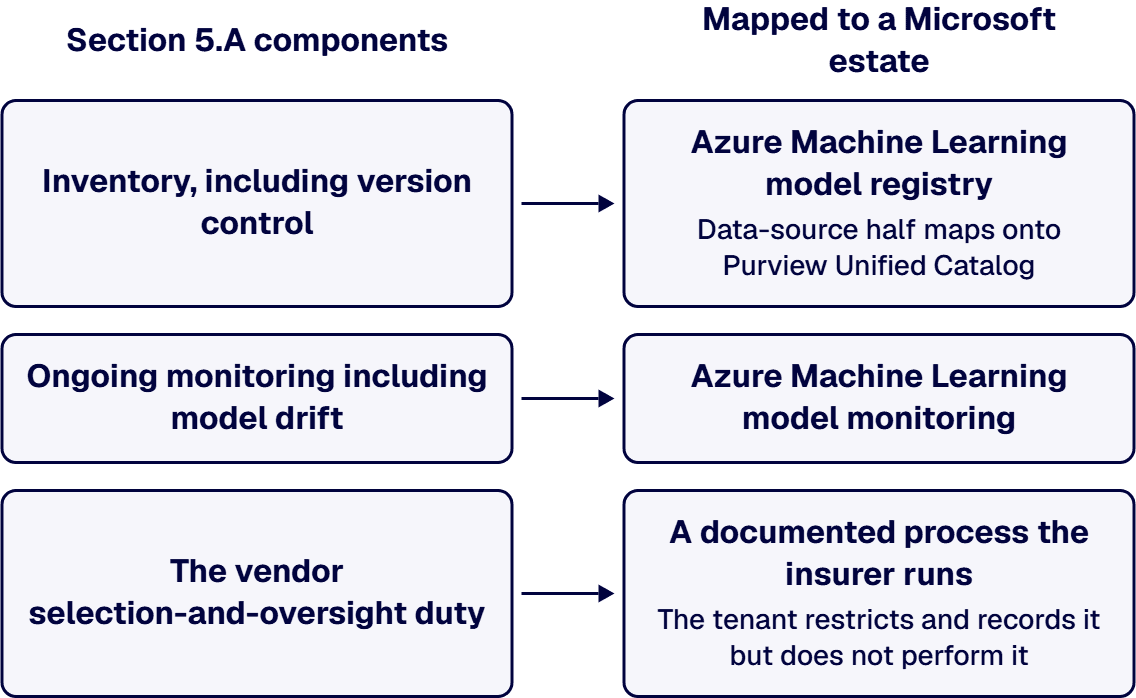
Section 5.A.9 of the regulation requires a “Documented up-to-date inventory, including version control, of all utilized ECDIS, as well as algorithms and predictive models that use ECDIS, including a detailed description of each ECDIS, algorithm, and predictive model, their clearly stated purpose(s), and the outputs generated through their use.” That duty has two halves, and they sit in different Microsoft products. For the model half, Microsoft’s MLOps model management documentation states that “Model registration stores and versions your models in your Azure Machine Learning workspace in the Azure cloud,” and that “Whenever you register a model with the same name as an existing model, the registry increments the version number.” A registry that increments versions on its own is the difference between version control and a spreadsheet someone updates by hand. For the data half, Microsoft describes Purview Unified Catalog as a platform “that has an inventory of all your data assets, their metadata, and their lineage so you can understand the topography of your data estate.” Neither product writes the purpose statement or the description of outputs the regulation asks for; those are documents your team writes and keeps beside each registered model and cataloged source.
Material change gets its own record. Section 5.A.10 of the regulation adds a “Documented explanation of any material change(s) in the inventory of all ECDIS, as well as all algorithms and predictive models that use ECDIS, and the rationale for the change(s).” Microsoft’s Fabric governance overview states that “For each item in the lineage view, you can display an impact analysis that shows what downstream items are affected if you make changes to the item.” That view shows what a change touches. The explanation and the rationale remain a written record.
The gap most teams find here is not missing monitoring but monitoring that never reaches a compliance record. Section 5.A.12 of the Division’s Amended Regulation 10-1-1 requires a “Documented description of ongoing monitoring regarding the performance of algorithms and predictive models that use ECDIS including accounting for model drift.” Microsoft’s model monitoring documentation lists, for Azure Machine Learning, “Built-in monitoring signals for tabular data, including data drift, prediction drift, data quality, feature attribution drift, and model performance.” The regulation names the requirement, not a method. What the Colorado report needs is a description of the monitoring that actually runs: which signals are watched, who reviews them, and what happens when one fires, written so someone outside data science can read it.
This is the component most easily misread in either direction. Section 5.A.11 of the regulation requires a “Documented description of quantitative testing conducted pursuant to requirements established by the Division to detect unfair discrimination in insurance practices resulting from the use of ECDIS, as well as algorithms and predictive models that use ECDIS, including the methodology, assumptions, results, and steps taken to address unfairly discriminatory outcomes.” The testing requirements are the Division’s, and this guide does not state what they are; read them from the Division directly. Microsoft’s Responsible AI dashboard documentation describes a tool that can “evaluate your model’s group fairness issues (how your model’s predictions affect diverse groups of people).” That is a fairness-assessment tool your team can apply while building the evidence. Neither Microsoft’s page nor this one says it satisfies the Division’s testing requirements.
Section 5.A.4 of the regulation requires a “Documented cross-functional ECDIS, algorithm, and predictive model governance group composed of representatives from key functional areas including legal, compliance, risk management, product development, underwriting, actuarial, data science, marketing, and customer service, as applicable.” Once that group’s records live in a Microsoft system, access becomes a design question. Microsoft’s Dataverse security concepts page states that “Dataverse uses security roles to group privileges,” that business units “define security boundaries that help you manage users and data,” and advises: “Use column-level security when record-level security doesn’t provide enough control.” For results reported in Power BI, Microsoft’s row-level security page states that “Row-level security (RLS) restricts data access for specific users of a Power BI semantic model.” These are access-control structures. The group’s charter, membership and decisions are still documents your organization writes.
Section 5.A.6 of the regulation requires documented policies, processes and procedures, with assigned roles, for the design, development, testing, deployment, use and ongoing monitoring of ECDIS, algorithms and predictive models. Section 5.A.14 requires “Documented comprehensive annual reviews of the governance structure and risk management framework and updates to the required documentation to ensure its continued accuracy and relevance.” Two Microsoft facts help with the evidence trail around both. Microsoft’s Fabric governance overview states that “Fabric administrators and compliance teams in your organizations can track and investigate user activity on Fabric items by using Purview Audit.” And Microsoft describes Purview Compliance Manager as a tool that “helps you automatically assess and manage compliance across your multicloud environment”; it assesses your own Microsoft configuration, which makes it a place to keep the insurer’s own records, not a review of any vendor and not a substitute for the annual review itself.
Two conditions catch teams that assume the tooling is already in place. First, the data-source catalog may not be there yet: Microsoft’s Purview Unified Catalog page notes that “The new Unified Catalog experience is rolling out across environments” and tells readers to “Make sure you’ve upgraded to the enterprise version of the new Microsoft Purview experience in order to access the new experience when it’s available in your region.” Confirm the rollout in your region and your licence tier before you plan the Section 5.A.9 data inventory around it.
Second, audit retention in Dataverse is a setting, not an assumption. Microsoft’s Dataverse auditing page tells administrators to “Select the period that meets your data retention policy.” Set the retention period explicitly, record the setting and the reason for it beside your Regulation 10-1-1 documentation, and do not rely on any default.
The report is where the documentation becomes a signed statement. Section 6.C of the Division’s Amended Regulation 10-1-1 requires private passenger automobile and health benefit plan insurers using ECDIS, algorithms or predictive models to “submit to the Division on July 1, 2026 and annually thereafter a report summarizing compliance with the requirements in Section 5 and the title and qualifications of each individual responsible for ensuring compliance along with the specific requirement(s) from Section 5 for which that individual is responsible.” Section 5.C sets the same date for availability: “For private passenger automobile and health benefit plan insurers, all components of the governance structure and risk management framework required by Section 5 must be available upon request by the Division on July 1, 2026, and annually thereafter.” Section 6.D adds that “These reports must be signed by an officer attesting to compliance with this regulation,” that an insurer unable to attest must submit a corrective action plan, and that “This report shall be no more than ten (10) pages including an executive summary and address Sections 5.A.1. through 5.A.13.” Section 6.G requires the reports to be filed in SERFF, the System of Electronic Rate and Form Filing, as an Annual Report filing.
One precision is worth stating plainly, from the same regulation. Section 5.A lists fourteen components; Section 6.D’s own scope sentence names thirteen of them, 5.A.1 through 5.A.13. The fourteenth, 5.A.14, is the documented annual review. That sentence does not say how the annual review is expected to appear in or beside the ten-page report, and this guide does not resolve it. It is a question for the Division of Insurance or your counsel, and one worth asking well before July 1, 2027.
When the data or the model comes from outside the insurer, this is where budgets go wrong: the duty reads like a product requirement and is not one. Section 5.A.13 of the Division’s Amended Regulation 10-1-1 requires a “Documented description of the process used for selecting external resources including third-party vendors that supply ECDIS, algorithms, and/or predictive models that use ECDIS including the intended use of the ECDIS, algorithm(s), and/or predictive model(s).” Section 5.B then states that “the insurer remains responsible for ensuring all requirements in Section 5.A. are met” and that “The insurer must establish and document a process for the selection and oversight of all external resources and third-party vendors as part of the governance structure and risk management framework.” Section 5.B also allows a vendor to provide requested documents directly to the Division on the insurer’s behalf.
Treat the duty as two separate things. Selection and oversight is a documented, repeatable process your organization runs: the intended use of each supplied source or model, the criteria it was selected against, what the vendor must produce on request, and how its performance is reviewed over time. The documentation and access around that process is where the tenant helps: the Dataverse business units, security roles and column-level security described above can restrict who reads or edits the vendor record, and Purview can keep the evidence trail. No tenant configuration shows that a vendor was diligently selected, or that the vendor’s own ECDIS, algorithm or predictive-model governance is sound, and this page names no product for that job.
An i3solutions engagement does not produce managed-service ownership, a replacement for the internal team, open-ended scope expansion, or vendor lock-in. i3solutions does not vet a specific vendor’s governance on your behalf or act as your vendor selection function; it helps you build and document the process your own team runs.
This sequence is this guide’s own recommendation, not the Division’s and not Microsoft’s, drawn from Sections 3, 5 and 6 of the Division’s Amended Regulation 10-1-1.
This guide is the wrong starting point in five situations, each drawn from the Division’s Amended Regulation 10-1-1 or from a separate regime:
Hold any help, internal or external, to these criteria, each tied to the Division’s Amended Regulation 10-1-1:
No product, assessor or firm is named or compared in that work.
i3solutions plans and runs governed Azure and Microsoft 365 migrations with senior, U.S.-based engineers. For Regulation 10-1-1, that means a project, with embedded specialists where your team needs them, that maps the regulation’s components to your tenant, closes the inventory, version-control and monitoring gaps, documents the governance group and the annual review, and designs the record for your vendor selection-and-oversight process. i3solutions maps governance to named control families, enforces it in the platform through Entra ID, Purview, and Azure Policy, and evidences it continuously rather than reconstructing it at audit. i3solutions governs identity and access for regulated Microsoft estates with senior, U.S.-based engineers and leaves an audit-defensible record. i3solutions has been a Microsoft Partner with 30 years of enterprise technology delivery experience and has delivered 1,500+ Microsoft engagements across aerospace and defense, financial services, and health sciences.
The testing methodology, the governance decisions and the officer’s attestation stay with your organization; i3solutions does not run the Division’s quantitative testing or operate the framework as a managed service.
For how this fits the wider governance program, see Embedding Governance into How the Enterprise Operates and Scales.
According to the Colorado Division of Insurance’s Regulation 10-1-1, private passenger automobile and health benefit plan insurers using ECDIS, algorithms or predictive models submit a compliance report on July 1, 2026 and annually thereafter, so the next report is due on July 1, 2027, the same date the framework must be available on request.
No. According to the Colorado Division of Insurance’s Regulation 10-1-1, life insurers run their own cycle, which began on December 1, 2024; the July 1 dates apply to private passenger automobile and health benefit plan insurers.
According to the Colorado Division of Insurance’s Regulation 10-1-1, ECDIS is a data or information source used to supplement or supplant traditional underwriting factors or other insurance practices, or to establish lifestyle indicators, including credit scores, social media habits, locations, purchasing habits, home ownership, court records, consumer-generated Internet of Things data and biometric data. For health benefit plan insurers, ECDIS does not include an individual’s medical records.
It requires a documented process. According to the Colorado Division of Insurance’s Regulation 10-1-1, the insurer must establish and document a process for the selection and oversight of all external resources and third-party vendors, and remains responsible for meeting Section 5.A when it uses them. That process is one your organization runs; no Microsoft product performs the selection, and this guide names criteria, never a product.
No. According to the Colorado Division of Insurance’s Regulation 10-1-1, Section 5.A.12 requires a documented description of ongoing monitoring of algorithm and predictive-model performance, including accounting for model drift, without naming a method. According to Microsoft, Azure Machine Learning model monitoring offers built-in signals including data drift, prediction drift and model performance.
According to the Colorado Division of Insurance’s Regulation 10-1-1, Section 6.E exempts an insurer that does not use ECDIS, or algorithms or predictive models that use ECDIS, from Section 5 and requires an officer-signed attestation instead. Whether that describes your company is a question for counsel and the Division, not for this guide.
By Michael Branson, Founder/COO, i3solutions
No. HIPAA does not require zero data retention, and no provision of the Privacy or Security Rule uses the term. What HIPAA requires is a Business Associate Agreement with the AI vendor, technical safeguards over electronic protected health information, and audit controls that record activity in systems handling ePHI. Zero data retention is a control choice you may make on top of those requirements, not a substitute for them. Taken literally it works against one of them: 45 CFR 164.312(b) requires mechanisms that record and examine system activity, and a pipeline that retains nothing produces no such record. The defensible position for a regulated Microsoft environment is selective retention with a documented control mapping, not blanket deletion.
The request usually arrives as a line on a security questionnaire: certify zero data retention before the AI assistant is allowed near patient data. That certification is not a HIPAA requirement, and signing it can make your audit position worse. HIPAA does not use the term zero data retention, and nothing in the Privacy or Security Rule requires it. What the rules require is a Business Associate Agreement, technical safeguards over electronic protected health information, and audit controls that record activity. This page sets out the three provisions that actually govern the question, what Microsoft Copilot and the models Azure sells already do before you change a setting, and how to verify a retention posture rather than accept a vendor’s word for it.
Three provisions govern this question. Read them before accepting a vendor’s claim that zero retention is a compliance requirement.
Encryption sits in a different category. Both 164.312(a)(2)(iv) and 164.312(e)(2)(ii) are addressable, meaning you implement them or document why an equivalent alternative is reasonable. Auditors ask for that written analysis. Zero retention appears nowhere in this list.
Most healthcare organizations asking this question are running Microsoft Copilot, Azure OpenAI models in Microsoft Foundry, or both. The two behave differently, and the distinction decides which half of this page applies to your environment. The tenant assessment, control mapping and Purview retention configuration described below sit inside i3solutions AI consulting and integration services.
Microsoft Copilot has already opted out of human abuse-monitoring review. Microsoft’s data, privacy and security documentation for Microsoft Copilot states: “While abuse monitoring, which includes human review of content, is available in Azure OpenAI, Microsoft Copilot services have opted out of it.” The same document states that prompts, responses and data accessed through Microsoft Graph are not used to train foundation LLMs, including those used by Copilot, and lists HIPAA among the compliance offerings Copilot carries. If your assistant is Copilot, the human-review exposure you are worried about is already closed, and you do not need to file anything.
Azure OpenAI models are the opposite by default. Microsoft’s data, privacy and security documentation states that the models are stateless, that no prompts or completions are stored in the model, and that prompts and completions are not used to train, retrain or improve the base models. What can be stored is the abuse-monitoring sample. Under abuse monitoring, flagged prompts and completions are reviewed by automated means by default, and human eyes-on review may be introduced when automated review does not meet its confidence thresholds. Those reviewers are authorized Microsoft employees reaching the data through Secure Access Workstations with Just-In-Time request approval granted by team managers. That is a controlled path, but it is human access to content that may contain ePHI, and your compliance officer will want it addressed in writing.
This is the operational detail vendor blog posts leave out. Modified abuse monitoring is not a toggle in the portal. It is an application, and most organizations do not qualify on day one.
The honest caveat Microsoft prints and most summaries drop: when abuse monitoring is modified and human review is not performed, “detection of potential abuse may be less accurate,” and customers “should be prepared to respond to such notification to avoid service interruption if possible.”
Microsoft documents that Copilot prompts and responses are stored as the user’s Copilot activity history, encrypted while stored, and processed and stored in alignment with the contractual commitments that cover your organization’s other Microsoft 365 content. You control them with tools you already own:
Setting a Purview retention policy to its shortest window is a legitimate risk-reduction move. Setting it to zero and calling it HIPAA compliance is not, because you have then removed the record that 164.312(b) asks you to produce.
The failure pattern is an organization that pursued zero retention as a headline commitment, achieved it, and then could not answer an auditor’s question about who accessed what. Do not pursue blanket zero retention if any of the following is true:
That third point is the one that reorders most budgets, and it is also what moves the price of the assessment that precedes the work. The order-of-magnitude difference between AI readiness assessment quotes is data governance cleanup: when Dataverse and SharePoint access-control alignment has to precede a Copilot or OpenAI API integration, that remediation dominates the engagement.
i3solutions runs migrations against named control families across CMMC, HIPAA, SOC 2, and NIST 800-171, producing artifacts auditors can review. For an AI assistant in a healthcare environment, the sequence that survives review runs in this order: confirm BAA coverage for the specific service, update the Security Rule risk analysis to include the AI workload, remediate source-system permissions, set the Purview retention window deliberately with the audit-control requirement written into the justification, and only then pursue modified abuse monitoring if an Azure OpenAI deployment makes it relevant.
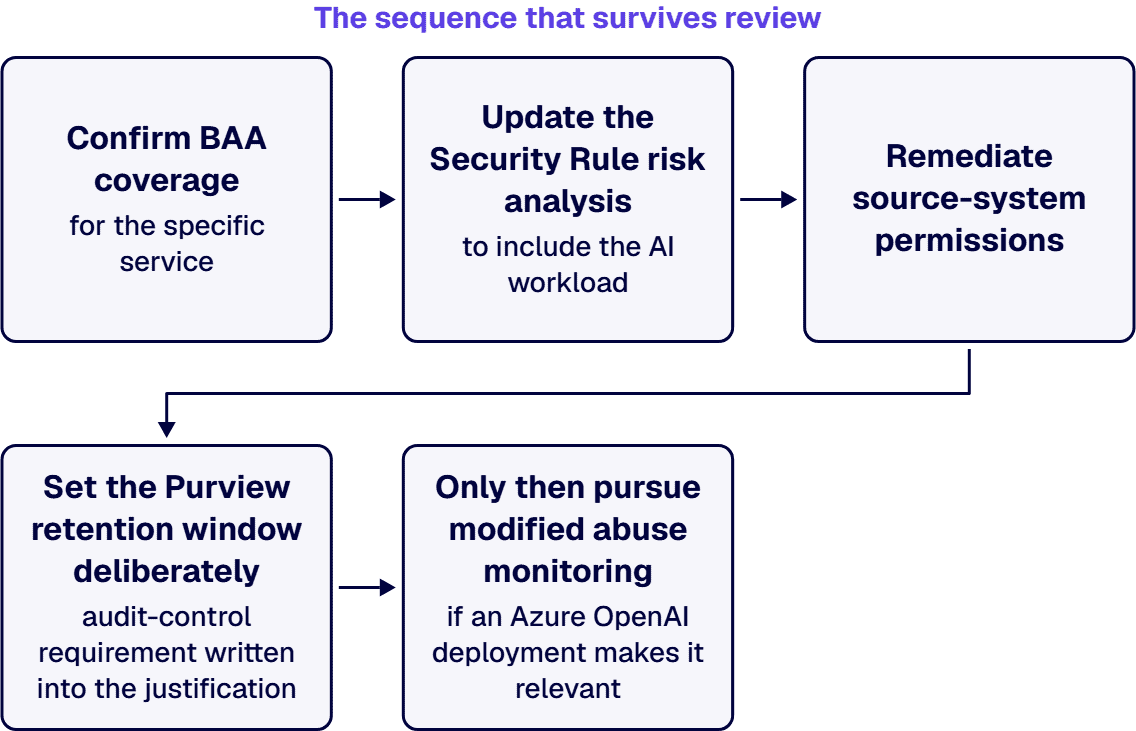
Take the evidence for that sequence in the order an auditor would. i3solutions has delivered enterprise SharePoint and Power Platform programs for aerospace and defense manufacturers, major defense organizations, a financial-services firm, a national healthcare system, and military organizations. i3solutions maps governance to named control families, enforces it in the platform through Entra ID, Purview, and Azure Policy, and evidences it continuously rather than reconstructing it at audit. Those are the artifacts behind the next sentence, which is an i3solutions figure for its own delivery rather than an industry statistic: Our teams maintain dedicated compliance specialists who understand CMMC, HIPAA, SOC 2, and financial services regulations within Microsoft environments, providing audit trail documentation and access control frameworks that reduce audit preparation time by 60%. i3solutions delivers its full service portfolio into the healthcare vertical exactly as it does into defense manufacturing and finance, including identity work with Okta and Entra ID, AI work, Power Platform, and Dynamics 365 integration.
There is a test worth applying to whoever answers this question for you: the firm recommending the control should not be the firm selling it. i3solutions runs comparative platform-selection evaluations for clients, recommending among IAM platforms for hybrid estates and among workflow automation platforms against SOC 2 and HIPAA, rather than only implementing the Microsoft option.
Two bands cover the work on this page, and which one applies turns on whether you are reviewing safeguards or configuring them.
An i3solutions Microsoft 365 Copilot readiness engagement typically runs $18,000 to $35,000. Which end of that band you land on is settled before anyone starts, by whether Dataverse and SharePoint access control is already aligned.
Configuring the safeguards is a wider scope than reviewing them, and the second band reflects that. HIPAA technical safeguard configuration for a healthcare organization running M365 for clinical communication typically ranges from $30,000 to $55,000 for a standard-scope engagement. Where source-system permission remediation is required first, that work is scoped separately, because it is the variable that moves the total. The bands that a product-agnostic AI readiness assessment falls into, and what moves them, are set out separately.
If you are assembling the internal case before you book anything, the two cost bands above and the AI readiness assessment cost breakdown are the pieces to pull into it, alongside the control-family list your auditor already works from. That is enough to scope the conversation before it happens. And if the question in front of you is who builds the application rather than how the tenant is configured, the same team also covers application development for organizations working under HIPAA.
Yes, where the vendor creates, receives, maintains or transmits protected health information on your behalf. 45 CFR 164.504(e) sets the required contract terms, including the return-or-destroy obligation at termination. Confirm the specific service is named in the agreement rather than assuming the vendor’s enterprise BAA covers every product it sells.
No, and conflating the two is the most common error in vendor evaluations. Microsoft states that your prompts, completions, embeddings and training data are not available to OpenAI or other providers of the models Azure sells, and are not used to train generative AI foundation models without your permission or instruction. That commitment holds whether or not abuse-monitoring storage is turned off. Retention and training are separate questions, and a vendor answering one is not answering the other.
Compliance does not turn on that setting. Coverage comes from the BAA, your risk analysis, and the technical safeguards you implement and document. Turning off abuse-monitoring storage removes one specific exposure, which is Microsoft employee review of flagged content. It does not change your obligations under 164.312 or 164.316, and Microsoft notes that detection of potential abuse may be less accurate without human review.
You decide, using Microsoft Purview retention policies for Copilot. There is no HIPAA-specified window for interaction data. The 6-year requirement in 164.316(b)(2)(i) applies to your policies, procedures and records of required actions, not to every prompt. Set the window from your own records-retention schedule and legal hold obligations, then document the reasoning.
Not automatically. Copilot can reference third-party tools and services through Microsoft Graph connectors or agents, and Microsoft advises that you “check the privacy statement and terms of use of the agent to determine how it will handle your organization’s data.” Administrators control which agents are allowed from the Integrated apps section of the Microsoft 365 admin center. Treat every agent as a separate vendor review.
By Michael Branson, Founder/COO, i3solutions
As of September 2026, Microsoft includes Security Copilot with Microsoft 365 E5, provisions it automatically with Microsoft 365 data access turned on and owner and contributor access inherited from existing administrator roles, and gives 400 Security Compute Units a month for every 1,000 paid user licenses, up to 10,000, shared across the whole tenant, according to Microsoft’s Learn about Security Copilot for Microsoft 365 E5 and E7 included customers page. Before anyone sets up an agent, a regulated tenant replaces the inherited access with role-assignable groups, restricts plugins to owners until each is vetted, and decides Microsoft 365 data access and the workspace’s storage location, which cannot be changed later. It also turns on Microsoft Purview audit and DSPM for AI prompt capture with a retention that matches its examination cycle and gives each agent its own agent identity; if your tenant is GCC, GCC High or DoD, Microsoft currently says Security Copilot is not designed for US government clouds.
The notice arrives as a message center post in the Microsoft 365 admin center or as a banner in the Defender, Purview, Entra or Intune portal: Security Copilot is enabled. No purchase order preceded it, so no security review did either. By the time you read it, Microsoft has already preselected where its data is stored, switched on its access to Microsoft 365 data, and granted owner access to a set of administrator roles you did not choose for this purpose. None of that is a defect; it is Microsoft’s default. The governance question for a regulated IT leader is whether the organization has decided any of it, and what to change before the agents are set up and start drawing on the tenant’s shared capacity.
If you are deciding where to start, start with what Microsoft switched on without asking. Microsoft’s Learn about Security Copilot for Microsoft 365 E5 and E7 included customers page answers the inclusion question directly: “Yes, Security Copilot is included for all Microsoft 365 E5 and E7 customers.” The same page qualifies who has it today: “Security Copilot will be available to all eligible Microsoft 365 E5 and E7 customers.” And, as of October 2026, it still dates the rollout: “Rollout started November 18, 2025, for existing Security Copilot customers with Microsoft 365 E5 as of November 18, 2025, and will continue in the upcoming months for all eligible Microsoft 365 E5 and E7 customers.”
Provisioning needs no action from you. The same Microsoft page states: “For eligible customers, Security Copilot is provisioned automatically as part of their subscription.” It lists the configuration settings preselected during auto provisioning, and three of them are governance decisions:
Two more defaults concern where data lives. Microsoft’s Understand how Security Copilot is auto provisioned for eligible Microsoft 365 E5 and E7 customers page states: “For the default workspace that Microsoft creates for you, the Customer Data storage location that is preselected is your Microsoft Entra geography.” It adds: “If your tenant’s Customer Data storage location is not in the EU, then prompts are processed globally (US, UK, EU, ANZ) depending on locality and GPU availability.” Its advice for the first step is plain: “Review Owner settings to confirm your organization’s preferred configuration.”
One thing Microsoft did not switch on is the agents. Asked whether Security Copilot agents are enabled automatically, the Learn about Security Copilot for Microsoft 365 E5 and E7 included customers page answers: “No, a customer’s organization is required to set up and deploy agents in the relevant standalone or embedded experiences.” That is the window this checklist uses. To confirm your own tenant is enabled, Microsoft points to notifications in the Microsoft 365 admin center and in-product banners in Defender, Purview, Entra, Intune or the standalone Security Copilot portal. Treat the date you were enabled as the start of an unreviewed change, and review Owner settings first; Microsoft’s Configure Copilot settings with the owner role page states: “You need the Security Copilot owner role to manage owner settings.”
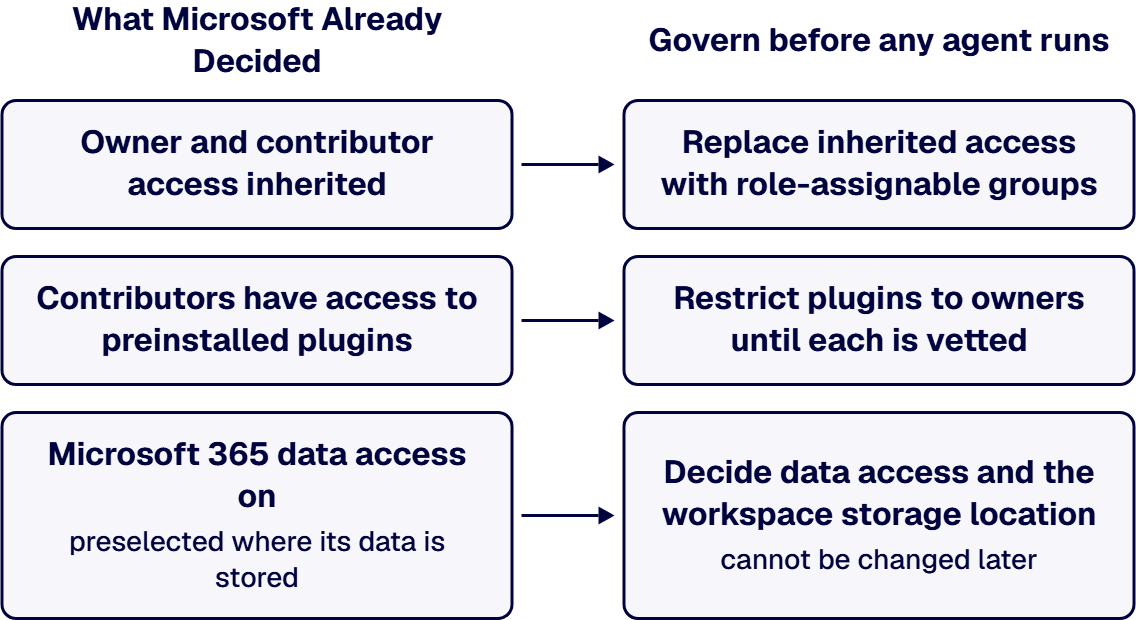
The failure mode here is assuming the existing administrator model already governs Security Copilot. It does not, in two directions. Microsoft’s Understand authentication in Microsoft Security Copilot page states: “Security Copilot RBAC roles are not Microsoft Entra roles.” It continues: “Instead, they only control access to the capabilities of the Security Copilot platform and provide no access by themselves to security data.” And it describes the limit on what a user can reach: “Security Copilot doesn’t go beyond the access you have, aligning with Microsoft’s Security and privacy RAI principle.” So the Security Copilot role decides who can use the tool, and each user’s existing Defender, Entra, Intune and Purview permissions decide what data it can reach on their behalf.
Who holds owner access by default is where the documentation needs care. Microsoft’s auto-provisioning page and its authentication page each list the Microsoft Entra, Intune, Purview and other administrator roles that automatically inherit Security Copilot owner access, and as read on September 24, 2026 the two lists are not the same: Conditional Access Administrator appears on the Understand how Security Copilot is auto provisioned for eligible Microsoft 365 E5 and E7 customers list and not on the authentication page’s, and Billing Administrator appears on the Understand authentication in Microsoft Security Copilot list and not on the auto-provisioning page’s. Neither list should be treated as the record for your tenant. The Role assignment page in your own Security Copilot portal is the record, and the auto-provisioning page confirms the defaults can change: “These roles that were added by default, can be modified within the Role assignment page of Security Copilot portal.”
Before you change anything, know the rules Microsoft’s Understand authentication in Microsoft Security Copilot page sets:
Roles are also scoped per workspace, as the auto-provisioning page describes, so a tenant with more than one workspace repeats this decision for each. The planning rule: name an owner group and a contributor group, both role-assignable and both with a named business owner, then remove the broad defaults deliberately and record what was removed and why.
If no one has changed the plugin settings since provisioning, the preinstalled set is already open to your contributors. Microsoft’s Manage plugins in Microsoft Security Copilot page states: “By default, all Owners and Contributors have access to preinstalled Microsoft and non-Microsoft plugins.” Custom plugins start narrower: “By default, only owners can add and manage their own custom plugins.” Restricting the preinstalled set changes how new plugins arrive: “Once access is restricted, new preinstalled plugins are made available to Owners only until configured otherwise.” Microsoft also warns about timing: “Restricting access is an immediate change impacting all users of Security Copilot and embedded experiences.” And about reach: “These settings apply to both standalone and embedded Security Copilot experiences.”
Two further points from the same Manage plugins in Microsoft Security Copilot page shape the vetting process. Microsoft advises: “It is good practice to vet custom plugins at a user level first, before making plugins available to the entire organization.” And agents bring their own plugins with them: “When you set up a Security Copilot agent the required plugins for that agent is automatically enabled.” Microsoft adds that those plugins are activated for that agent alone and do not change the availability you set for the organization, so each agent’s plugin set is reviewed at that agent’s own setup.
The adjacent settings are easy to miss. Microsoft’s Understand authentication in Microsoft Security Copilot page states: “Promptbook creation is available to all roles, including the ability to publish a custom promptbook for the tenant.” On file uploads, the Configure Copilot settings with the owner role page states: “You can set it so that no one can upload files or contributors and owners can upload files.” And shared sessions carry results past the viewer’s own permissions. The authentication page states: “Security Copilot needs to access a plugin’s service and data to generate a response, but that same access isn’t evaluated when viewing the shared session.” It adds: “Shared sessions are read-only.”
As a planning rule, schedule the restriction and tell users first, as Microsoft advises, because it takes effect immediately; then restrict preinstalled plugins to owners and re-open each one only after it has been reviewed against a written criterion: what data it reaches, where that data goes, who owns the connection, and which agent needs it. Decide who may publish a tenant promptbook and who may upload files, and tell users that a shared session can show them results their own access would not return. This page names no plugin and ranks none; the criterion is the governance artifact, not a list of allowed products.
The decision a privacy officer will ask about first is the one Microsoft set for you. Microsoft’s Understand how Security Copilot is auto provisioned for eligible Microsoft 365 E5 and E7 customers page describes the setting for accessing data from Microsoft 365 services: “By default, this setting is set to ON.” The Learn about Security Copilot for Microsoft 365 E5 and E7 included customers page states what that means: “Relevant Customer Data may be copied, processed, and stored by Security Copilot to provide responses.” It also states the boundary: “Access is scoped to the products and permissions your organization has configured.” And the choice: “Customers can choose not to share their Microsoft 365 service data with Copilot in the Owner settings page.” The same page says that turning it off means the organization cannot use Copilot with Microsoft 365 products such as Microsoft Purview, so the choice is a real trade-off, not a free switch.
Microsoft’s Privacy and data security in Microsoft Security Copilot page adds the facts that make the decision hard to reverse:
On data boundaries, the same privacy page states that “Microsoft 365 data accessed by Security Copilot will be processed and stored in location(s) described herein, regardless of the location in which the data was processed or stored pursuant to EU Data Boundary Services” (the sentence continues on Microsoft’s page; it is cut here). Microsoft’s Microsoft Security Copilot Data and Compliance Frequently Asked Questions page states: “At the time of GA, all Microsoft Security Services are out of scope for EU data residency requirements and Security Copilot won’t be listed as an EUDB service.”
The same Microsoft Security Copilot Data and Compliance Frequently Asked Questions page settles how prompts and outputs are classed and how long logs remain:
For a healthcare reader, the same FAQ page states: “Microsoft Security Copilot is now listed and covered by Business Associate Agreement”. That describes Microsoft’s contract coverage; whether your configuration satisfies your own obligations is a determination for your compliance counsel. The planning rule: have the privacy officer sign two decisions before the first agent runs, the Microsoft 365 data-access setting and the workspace storage location, and record both with the date and the signer. For AI assistants near patient data, HIPAA does not require zero data retention; it requires a Business Associate Agreement, technical safeguards and audit controls, as Zero Data Retention for Healthcare AI sets out.
The decision point is the setup screen, because nothing runs before it. Microsoft’s Setup and Manage Security Copilot agents page states: “You must set up an agent in order to use it.” At setup you choose what the agent runs as: “You have the option of choosing to create an agent identity or assign an existing user account.” Microsoft’s preference is stated: “It’s recommended that you create an agent identity.” So is its permission guidance: “Microsoft recommends that you use roles with the fewest permissions.”
Several agent behaviors need an owner before they are switched on. The same Setup and Manage Security Copilot agents page describes them:
Licensing and scope have their own conditions. Microsoft’s Learn about Security Copilot for Microsoft 365 E5 and E7 included customers page states: “Partner-built agents may require a separate license from the partner (purchased via Security Store); SCU costs for third-party agents are included, but this might change in the future as we roll out Security Copilot inclusion more broadly.” It also states: “Some agents may require prerequisites that involve products outside of Microsoft 365 E5 and E7, which aren’t covered.”
Responsibility stays with you. Microsoft’s Application card: Microsoft Security Copilot agents states: “Agents may also perform scoped actions within configured permissions when prompted, which require an appropriate user or administrator approval.” It sets the expectation on oversight: “Users must implement appropriate human oversight, when configuring and deploying agentic AI systems in domains where agent actions are irreversible or highly consequential.” And it states the accountability plainly: “Customers remain responsible for reviewing outputs, validating decisions, and ensuring compliance with applicable laws, regulations, and organizational policies.”
The planning rule, per agent: one named business owner, one agent identity with the fewest permissions that do the job, a written statement of which actions stay human-approved, a decision on whether it may run automatically, and a periodic review of what it has stored in memory. Which agents are available in which product on a given day changes with Microsoft’s rollout and prerelease status, so confirm availability in your tenant and do not plan from a list. If the agents your organization builds are Copilot Studio agents rather than Security Copilot’s, their governance is a different product with its own record, covered in Copilot Studio Governance for Enterprise Agent Estates.
The question an examiner or internal audit will ask is where the prompts and responses are logged, and the default answer may be nowhere you have looked. Microsoft’s Access the Security Copilot audit log page states: “During the first run experience, a Security Administrator may opt into allowing Microsoft Purview to access, process, copy and store administrator actions, user actions, and Copilot responses.” Capture is a choice someone makes, not a default you inherit.
Microsoft’s Access the Security Copilot audit log page also separates what the Unified Audit Log (UAL) and DSPM for AI each hold: “The UAL from Purview gives you visibility into information such as administrator events and activity metadata, whereas DSPM for AI provides insights into prompt/response pairs.” It narrows where content lives: “Customer content such as that contained within the prompt and response pair is currently only included through Microsoft Purview DSPM for AI.” It sets the default clock: “The default retention period for audit logs is 180 days but can be extended using audit log retention policies.” And it warns that the people who read the logs are a separate decision: “These access rights might be different from those in Security Copilot.” On timing, Microsoft’s Configure Copilot settings with the owner role page states: “In most scenarios, logs are available within 24 hours in Microsoft Purview after enabling the capability.”
As a planning rule, turn capture on, including DSPM for AI for prompt and response content, before the first agent is set up; set audit retention to the clock your examiners and record schedule require, not the default; and name who in Purview may read Security Copilot activity.
The failure mode is an agent set to run automatically consuming capacity the security team expected to use for its own prompts. Microsoft’s Learn about Security Copilot for Microsoft 365 E5 and E7 included customers page states the allocation: “Customers with Microsoft 365 E5 and E7 will have 400 Security Compute Units (SCU) each month for every 1,000 paid user license, up to 10,000 SCUs each month at no additional cost.” Its own example: “Example 2: An organization with 4,000 user licenses gets 1,600 SCUs/month.” By the same rule, 3,500 paid user licenses give 1,400 SCUs a month and 25,000 give 10,000, which is the cap; a tenant above 25,000 paid licenses still receives 10,000. The same page states: “SCU allocations reset monthly and don’t roll over if unused.” It describes the Default Security Copilot Capacity as a pool that cannot be modified and is shared across all users and experiences in the tenant.
Microsoft’s Microsoft Security Copilot Security Compute Units and capacity page defines the unit: “Security Compute Units (SCUs) represent the compute capacity required to run Security Copilot workloads.” Visibility is limited to owners. Microsoft’s Manage security compute unit usage in Security Copilot page states: “Copilot owners can view the usage over time within the Microsoft Security Copilot usage monitoring dashboard.” It states the window: “The dashboard includes up to 90 days of data”. The dashboard separates agent use and automated actions from manual prompts, which is what an owner needs to see which agents are drawing on the pool.
Overage terms are announced but not yet in effect. The Learn about Security Copilot for Microsoft 365 E5 and E7 included customers page states: “Usage beyond the allocated SCUs will be throttled at a future date.” It continues: “Customers have an option to scale beyond the allocated amount at $6 USD for each SCU on a pay-as-you go basis at that time.” And: “Customers will get a 30-day advanced notification when this option is available.” Microsoft publishes no date for either. The planning rule: name the owner who reads the usage dashboard on a fixed schedule, decide which agents may run automatically, and decide in advance what happens when the month’s allocation runs short.
If your situation is one of these, start somewhere else or confirm one fact first. Microsoft’s Microsoft Security Copilot Data and Compliance Frequently Asked Questions page states: “Currently, Security Copilot isn’t designed for use by customers using US government clouds, including but not limited to GCC, GCC High, DoD, and Microsoft Azure Government.” Its Application card: Microsoft Security Copilot agents states: “Government and Microsoft Sovereign Public/Private Cloud: Security Copilot isn’t supported in these environments at this time.”
Taken in order, the checklist above comes down to five decisions, each with the person who owns it, what follows if it is skipped, and the evidence to ask for once it is made:
Whether the work is done by your own team or with outside help, ask to see the evidence, not a description of it:
i3solutions maps governance to named control families, enforces it in the platform through Entra ID, Purview, and Azure Policy, and evidences it continuously rather than reconstructing it at audit. For Security Copilot, that is a project with an end date: designing the owner and contributor groups, restricting and vetting plugins, taking the Microsoft 365 data-access and storage-location decisions to the people who must sign them, turning on Purview audit and prompt capture, setting up agent identities and approval rules, and mapping each setting to your control families with the evidence to show an examiner, with embedded specialists alongside your team where it needs them. i3solutions governs identity and access for regulated Microsoft estates with senior, U.S.-based engineers and leaves an audit-defensible record. i3solutions has deep experience implementing identity governance for enterprises in aerospace and defense manufacturing, financial services, and healthcare, including environments with CMMC and ITAR obligations. i3solutions has been a Microsoft Partner with 30 years of enterprise technology delivery experience and has delivered 1,500+ Microsoft engagements across aerospace and defense, financial services, and health sciences. An i3solutions engagement does not produce managed-service ownership, a replacement for the internal team, open-ended scope expansion, or vendor lock-in. The configuration is yours to run when the project ends. This work sits within i3solutions’ governance practice, described in Embedding Governance into How the Enterprise Operates and Scales.
Yes, for eligible customers, in a phased rollout. According to Microsoft Learn, Security Copilot is included for Microsoft 365 E5 and E7 customers and will be available to all eligible customers, with the rollout that started November 18, 2025 still described as continuing in the upcoming months, as of October 2026. According to Microsoft Learn, eligible tenants are provisioned automatically, and enablement is confirmed through Microsoft 365 admin center notifications and in-product banners.
According to Microsoft Learn, Microsoft 365 E5 and E7 customers receive 400 Security Compute Units each month for every 1,000 paid user licenses, up to 10,000 each month at no additional cost. According to Microsoft Learn, the allocation resets monthly, unused units do not roll over, and the default capacity cannot be modified and is shared across all users and experiences in the tenant.
No. According to Microsoft Learn, a customer’s organization is required to set up and deploy agents in the relevant standalone or embedded experiences, and an agent must be set up before it can be used. Microsoft Learn recommends creating an agent identity at setup rather than assigning an existing user account.
No. According to Microsoft Learn, Security Copilot currently is not designed for use by customers in US government clouds, including GCC, GCC High, DoD and Microsoft Azure Government, and it is not supported in government and sovereign cloud environments at this time. Microsoft Learn publishes no date for a change.
In Microsoft Purview, once capture is turned on. According to Microsoft Learn, a Security Administrator may opt in during the first run experience; the Unified Audit Log carries administrator events and activity metadata, while prompt and response content is currently only included through Microsoft Purview DSPM for AI. According to Microsoft Learn, the default audit log retention is 180 days and can be extended with audit log retention policies.
According to Microsoft Learn, usage beyond the allocated SCUs will be throttled at a future date, and customers will then have an option to scale beyond the allocation on a pay-as-you-go basis, with 30 days of advance notice when that option is available. Microsoft Learn publishes no date for either change.

US-Based Microsoft System Integrator | Est. 1997
© i3solutions. All rights reserved.
US-Based Microsoft System Integrator | Est. 1997
© i3solutions. All rights reserved.


