
The questions underneath an executive mandate to adopt Copilot are rarely the ones that get asked out loud. What has to be true before rollout, how to prove a pilot earned expansion, and where secure enablement stops and exposure starts. These answers address those decisions in the terms the engineers building these systems for regulated enterprises would use.
By Michael Branson
A security review or an examiner’s request list has asked the team a direct question: the estate encrypts data at rest and in transit, so what protects regulated data while it is being processed, and is confidential computing the answer? The same season, a vendor pitch or a conference session has offered confidential computing as the answer. One camp says the existing encryption is enough; another says to move every VM to a confidential size. Neither answer starts from a threat model. This guide sets out, from Microsoft’s own Azure confidential computing pages, what the technology protects against, what Azure ships today, what changes when a VM becomes a confidential VM, how remote attestation proves the hardware is genuine, and how to decide whether a given workload needs it.
When this guide says enclave or attestation, it means the hardware sense: a hardware enclave is protected memory inside a processor, and remote attestation is the check that proves that hardware is genuine, which is a different thing from the compliance-boundary enclave and the certification attestation used in GCC High and CMMC work. Microsoft’s What is confidential computing? page, last updated May 7, 2025, starts from an industry definition: “Confidential computing is an industry term established by the Confidential Computing Consortium (CCC), which is part of the Linux Foundation.” The consortium definition the page quotes reads “Confidential Computing protects data in use by performing computation in a hardware-based, attested Trusted Execution Environment.”
What it adds is specific. Microsoft says “Azure already encrypts data at rest and in transit. Confidential computing helps to protect data in use, including protection for cryptographic keys.” The same page says “Azure confidential computing helps customers prevent unauthorized access to data in use, including from the cloud operator, by processing data in a hardware-based and attested TEE.”
Microsoft states the threat model plainly: “The threat model aims to reduce trust or remove the ability for a cloud provider operator or other actors in the tenant’s domain from accessing code and data while it’s being executed.” The condition matters as much as the promise: “When Azure confidential computing is enabled and properly configured, Microsoft can’t access unencrypted customer data.” Microsoft also says “Azure uses a hardware root of trust that isn’t controlled by the cloud provider, which is designed to prevent unauthorized access or modification of the environment.”
Read as a planning rule, confidential computing answers one question: who else could read this data while the application is using it. If the only threat a workload’s risk register names is an outside attacker reaching stored or transmitted data, the encryption Azure already applies to stored and transmitted data addresses it, and confidential computing adds operational limits without closing a gap. A workload’s risk register that names the cloud operator, or other actors in the tenant’s domain in Microsoft’s phrase, reading data while it is processed points the decision toward confidential computing, because that is the gap it was built for.
If a workload is a candidate, the next fork is whether its code can change. Microsoft’s Trusted Execution Environment (TEE) page, last updated May 7, 2025, says “A Trusted Execution Environment is a segregated area of memory and CPU that’s protected from the rest of the CPU by using encryption.” and “Any code outside that environment can’t read or tamper with the data in the TEE.” It then sets out the fork between moving a workload as it is and building for a hardware enclave: “Azure confidential computing has two offerings: one for rehosting workloads and one for enclave-based workloads for custom-developed applications.”
The two offerings, as Microsoft’s Trusted Execution Environment (TEE) page describes them:
Those status labels are the TEE page’s own, as of its May 7, 2025 update. Microsoft’s newer About Azure confidential VMs page, last updated February 5, 2026, names Intel TDX beside AMD SEV-SNP in its remote attestation and OS support sections without a status label, so confirm the TDX status on Microsoft’s pages on the day a size is chosen.
From the fork comes a planning rule. A workload that has to move as it is points to confidential VMs, where Microsoft says no code change is needed. A workload the team owns and can rebuild can take the SGX hardware enclave route, where Microsoft says the application has to be written for it. The no-code-change statement belongs to the rehosting offering only.
When a workload is headed for confidential VMs, the change is less about code and more about operations. Microsoft’s About Azure confidential VMs page, last updated February 5, 2026, says “Azure confidential VMs offer strong security and confidentiality for tenants.” and “They create a hardware-enforced boundary between your application and the virtualization stack.” It says “You can use them for cloud migrations without modifying your code” and lists among the benefits “Robust hardware-based isolation between virtual machines, hypervisor, and host management code.”
Key choices sit in the same page’s Important note: “Protection levels differ based on your configuration and preferences. For example, Microsoft can own or manage encryption keys for increased convenience at no additional cost.” For confidential OS disk encryption, the page offers “platform-managed keys (PMK) or a customer-managed key (CMK)”, says “Confidential OS disk encryption is optional, as this process can lengthen the initial VM creation time.” and adds “Confidential OS disk encryption setting can’t be changed after VM deployment”. That choice is a setting on the confidential VM’s disks, made before deployment; it is not a Microsoft 365 key-custody decision.
The boot itself is gated by remote attestation of the hardware. Microsoft says, of that remote attestation check, “Azure confidential VMs boot only after successful attestation of the platform’s critical components and security settings.” For a platform that fails the check, the page says “If the compute platform is missing critical settings for your VM’s isolation, Azure Attestation will not attest to the platform’s health during boot, and will instead prevent the VM from starting.”
Where confidential VMs run is limited too. The page lists general purpose and memory optimized size series, each with and without local disk, plus one GPU-powered series, and a list of supported Windows client, Windows Server and Linux images, and it says “Confidential VMs run on specialized hardware available in specific VM regions.”
The limitations section on Microsoft’s About Azure confidential VMs page is the part to check against the workload’s run book. Under the heading line “Confidential VMs don’t support”, it lists:
Microsoft’s About Azure confidential VMs page adds, in the same section, “Confidential disk encryption is only supported for disks that are smaller than 128 GB.” and “Auto keyrotation is not supported, only offline key rotation is supported.” Check each item against the workload’s disaster recovery plan, network design, image pipeline and key rotation procedure before treating a confidential VM as a drop-in replacement. A workload whose recovery plan names Azure Site Recovery needs a different recovery design before it moves.
When a reviewer asks how the team knows a workload really ran inside genuine protected hardware, the answer is remote attestation, a technical check on the hardware and software whose result the team can keep in its change record, not a certification. Microsoft’s Attestation types and scenarios page, last updated May 7, 2025, says “Attestation is a technique to verify the software and hardware components of a system.” It describes the roles this way: “In remote attestation, one peer (the attester) produces believable information about itself (the evidence) to enable a remote peer (the relying party) to decide whether to consider that attester as a trustworthy peer.” It adds that in remote attestation “Another vital party (the verifier) carries out the remote attestation procedures”.
The page describes two routes to that remote attestation check. The cloud-provider route is the Azure Attestation service: “Azure Attestation is a customer-facing service and a framework for attesting TEEs like Intel Software Guard Extensions (SGX) enclaves, virtualization-based security (VBS) enclaves, Trusted Platform Modules, Trusted Launch, and confidential virtual machines (VMs).” Microsoft lists “It attests multiple TEEs in one single solution.” among the Azure Attestation service’s properties. For the build-your-own route to remote attestation, the page says “You can create your own attestation mechanisms to trust your computing infrastructure from tools provided by cloud and hardware providers.”
A team that chooses application enclaves rather than confidential VMs needs to confirm that the VMs behind them run on Intel SGX hardware, which the same page names:
For confidential VMs, Microsoft’s About Azure confidential VMs page says “You can initialize an attestation request inside of a confidential VM to verify that your confidential VMs are running a hardware instance with either AMD SEV-SNP, or Intel TDX enabled processors.” The same page says the remote attestation report includes a signed attestation report, platform boot settings, platform firmware measurements and OS measurements.
Decide before deployment which remote attestation route each workload uses, the Azure Attestation service or its own attestation mechanism, who holds the attestation policy, and which log or change record keeps the remote attestation evidence for review. That record, not a vendor statement, answers the question of whether the data ran where it was supposed to.
Before any size, image or SGX development decision, run each candidate workload through these checks, in order:
Confidential computing is not the next step for a workload when the threat model or the question is one of these:
Whoever does this work, internal or external, should be able to show:
When a security review has named data in use as a gap, i3solutions treats the answer as a project: a threat-model fit assessment for each candidate workload, written into the risk register, a confidential VM adoption plan covering size, image, disk encryption, key choice and remote attestation policy, and the migration of the workloads that qualify. i3solutions plans and runs governed Azure and Microsoft 365 migrations. i3solutions has been a Microsoft Partner with 30 years of enterprise technology delivery experience and has delivered 1,500+ Microsoft engagements across aerospace and defense, financial services, and health sciences. An i3solutions project engagement does not by itself include ongoing support of what it delivers, which i3solutions scopes separately as Application Managed Services, and it is not a replacement for the internal team, open-ended scope expansion, or vendor lock-in. Your team keeps ownership of the confidential computing configuration and its operation after the project.
Unauthorized access to data while it is being processed, including by the cloud operator. Microsoft says “Azure confidential computing helps customers prevent unauthorized access to data in use, including from the cloud operator, by processing data in a hardware-based and attested TEE.” and “When Azure confidential computing is enabled and properly configured, Microsoft can’t access unencrypted customer data.” Its threat model “aims to reduce trust or remove the ability for a cloud provider operator or other actors in the tenant’s domain from accessing code and data while it’s being executed.”
No, not for the rehosting offering. Microsoft says “Customers can migrate their existing workloads to Azure confidential computing without any code changes or performance degradation.” That statement covers the rehosting offering for VM and container workloads, not SGX hardware enclave development, where Microsoft says “Customer applications need to be specifically developed to take advantage of this data protection model.”
A confidential VM protects a whole virtual machine’s memory; an SGX hardware enclave protects a region of memory inside a VM. Microsoft says “The rehosting offering uses AMD SEV-SNP (general availability) or Intel Trust Domain Extensions (TDX) (preview) to encrypt the entire memory of a VM.” and “The enclave-based offering provides CPU features that allow customer code to use Intel Software Guard Extensions (SGX) to create a protected memory region called Encrypted Protected Cache within a VM.”
Through remote attestation of the hardware at boot. Microsoft says “Azure confidential VMs boot only after successful attestation of the platform’s critical components and security settings.” and “If the compute platform is missing critical settings for your VM’s isolation, Azure Attestation will not attest to the platform’s health during boot, and will instead prevent the VM from starting.” It also says “You can initialize an attestation request inside of a confidential VM to verify that your confidential VMs are running a hardware instance with either AMD SEV-SNP, or Intel TDX enabled processors.”
Microsoft’s Trusted Execution Environment (TEE) page, last updated May 7, 2025, labels it preview: “The rehosting offering uses AMD SEV-SNP (general availability) or Intel Trust Domain Extensions (TDX) (preview) to encrypt the entire memory of a VM.” Microsoft’s About Azure confidential VMs page, last updated February 5, 2026, names Intel TDX beside AMD SEV-SNP in its remote attestation and OS support sections without a status label, so confirm the status on Microsoft’s pages on the day a size is chosen.
Michael Branson
A new subscription can land in the estate before anyone has classified it, so someone has to decide which management group it goes to. That is one of three decisions that are hard to change once workloads sit on them, and that you will have to defend to security, audit and the business units that land on it: the management group hierarchy, how subscriptions are issued, and the network topology. Each can be made from Microsoft’s own guidance and your own estate’s facts before the first migration.
Before you deploy a landing zone, Microsoft’s Azure landing zone design areas and conceptual architecture page, read on 2026-10-19, sets out what to decide: “These design areas describe what to consider before deploying a landing zone.” It groups them in two sets, under its own labels:
Microsoft adds that “Evaluating each of the design areas sequentially provides a process that simplifies the design of any complex environments,” and that “As the organization’s cloud environment develops, these compliance design areas are the focus for iterative refinement,” giving a new compliance standard as one example of why. Resource organization holds the first two of the three decisions: “As cloud adoption scales, considerations for subscription design and management group hierarchy have an impact on governance, operations management, and adoption patterns.” The third sits in network topology, where Microsoft calls networking and connectivity decisions “an equally important foundational aspect of any cloud architecture.”
If your estate has workloads that must be kept apart for regulatory reasons, Microsoft’s Management groups guidance, read on 2026-10-19, starts from that question: “Determine whether you have specific functions that you need to keep separate for reasons like business requirements, operational requirements, regulatory requirements, data residency, data security, or data sovereignty compliance.” It ties the hierarchy to policy, not to the org chart: “Use management groups to aggregate policy and initiative assignments via Azure Policy,” and “Don’t duplicate your organizational structure into a deeply nested management group hierarchy.”
Microsoft’s recommendations give the hierarchy its shape:
For a regulated estate, the decisions left to you are which workloads need a different policy set, and so a group of their own under Landing zones; which group a new subscription lands in before anyone has classified it; and whether any obligation is tied to location. On location, Microsoft is direct: “If you have location-based regulatory requirements, such as data residency, data security, or data sovereignty, then you should create a management group structure based on location.” When a location-based requirement and the flat-hierarchy recommendation conflict, that sentence settles it: the requirement is Microsoft’s own stated reason to add structure.
If application teams will ask for their own subscriptions, Microsoft’s Subscription vending guidance, read on 2026-10-19, defines the pattern: “Subscription vending provides a platform mechanism for programmatically issuing subscriptions to workload teams that need to deploy workloads.” It splits the work across the groups it names: “The Cloud Center of Excellence (CCoE) establishes business logic and the approval process. When ready, the workload teams make subscription requests. The platform team uses the request to create and configure the subscription before handing off the subscription to the workload team.”
The two vending decisions a regulated buyer owns are who approves a request and what the request must carry. On what the request must carry, Microsoft is specific: “These requirements should include anticipated budgets, subscription owners, networking expectations, and business criticality & confidentiality classification,” and “The intake process should also give the platform team enough information to place the workload in the management group hierarchy.” That classification is the link back to the hierarchy, because Microsoft tells the platform team to “Locate or create a management group that enforces the policies needed for the classification and needs of each workload.”
Microsoft’s vending guidance also sets rules a security or audit reviewer will ask about:
If your organization has no named Cloud Center of Excellence or platform team yet, deciding who holds those roles is the first vending decision, before any automation is written.
i3solutions plans and runs governed Azure and Microsoft 365 migrations with senior, U.S.-based engineers.
If you are choosing the network topology, Microsoft’s Define an Azure network topology page, read on 2026-10-19, gives criteria in both directions, each list introduced with “if any of the following requirements apply to your organization.”
Microsoft lists these criteria for a Virtual WAN topology:
Microsoft lists these criteria for a traditional hub-and-spoke topology:
Test your own estate against both lists with facts from your network inventory: how many branch sites and site-to-site tunnels you expect to terminate in Azure, which regions you will deploy to and whether they need global connectivity with each other and with on-premises locations, and whether you need transitive routing between VPN and ExpressRoute or full manual control of routing. When the two lists conflict, for example several regions with global connectivity needs but a low number of branch locations, the deciding question is how much control of routing you need: Microsoft lists “full control and granularity to manually configure your Azure network routing policy” as a hub-and-spoke criterion, describes Virtual WAN as “a service that Microsoft manages,” and says of hub-and-spoke that “With this topology, you manage the routing and security.”
If the next question is what a landing zone costs, it is answered on the Azure landing zone cost page. If a regulated estate has workloads that may belong in a government cloud, whether they do and how to move them is covered on the Azure Government migration page.
If the management group hierarchy, how subscriptions are issued, and the network topology have to be defended to security, audit and the business units before a migration date, a bounded design engagement is worth considering, and the estate itself stays with your platform team, which is where Microsoft’s vending guidance puts subscription governance. i3solutions plans and runs governed Azure and Microsoft 365 migrations with senior, U.S.-based engineers. The Azure practice is set out on Azure development services.
If you are designing an Azure landing zone before a migration, work through the design areas that Microsoft’s Azure landing zone design areas and conceptual architecture page says to consider before deploying a landing zone: the environment areas (Azure billing and Active Directory tenant, identity and access management, resource organization, network topology and connectivity) and the compliance areas (security, management, governance, platform automation and DevOps), and settle resource organization and network topology before workloads land, because they are hard to change once workloads sit on them. Shape the management group hierarchy around the policy each workload type needs, issue subscriptions through a vending process whose intake captures each workload’s classification, and choose Virtual WAN over hub-and-spoke only when one of Microsoft’s stated triggers applies.
If you are drawing the hierarchy, Microsoft’s Management groups article recommends keeping it reasonably flat, which according to Microsoft means ideally no more than three to four levels, against a platform limit of six levels of depth that excludes the tenant root and subscription levels. Microsoft’s Management groups article also advises against management groups for production, testing and development environments, and against groups that only model Azure regions; a location-based regulatory requirement, such as data residency, is its stated reason for a location-based structure.
If application teams will request their own subscriptions, according to Microsoft’s Subscription vending article, the intake should collect the anticipated budget, the subscription owners, the networking expectations and the workload’s criticality and confidentiality classification, so that the platform team can decide where the workload sits in the management group hierarchy. Microsoft’s Subscription vending article also says the vending automation needs to designate a subscription owner at creation.
If you are choosing a topology, according to Microsoft’s Define an Azure network topology article, Virtual WAN fits when you deploy across several Azure regions with global connectivity to multiple on-premises locations, use SD-WAN to integrate a large-scale branch network, need “more than 30 branch sites for native IPSec termination”, or need transitive routing between VPN and ExpressRoute. A traditional hub-and-spoke network, according to Microsoft’s Define an Azure network topology article, fits a low number of branch locations per region with “fewer than 30 IPSec site-to-site tunnels”, or a need for full manual control of routing, and with it you manage the routing and security.
By Michael Branson
Each point in these takeaways restates Microsoft’s About Azure Cloud Services (extended support) page and the other Microsoft Learn pages cited in this guide:
If you are the IT leader, the retirement banner can read like the last one. If your team moved these applications from Cloud Services (classic) to extended support, the web and worker roles came across as they were, and Microsoft’s About Azure Cloud Services (extended support) page said of that move: “No changes are required to runtime code.” This move is different. The target Microsoft names does not run IIS, there is no one-click tool, and the date does not move. A plan that budgets a redeploy per deployment will find, partway through, that some roles need a code change first. This guide sets out Microsoft’s date and target in its own words, a routing rule for every web and worker role, the workstreams that move with the host, and the checks that change in Azure Government.
When you build the budget for this move, start from three Microsoft statements that rule out a lift-and-redeploy plan. Microsoft’s Frequently asked questions (FAQ) page on the move to Service Fabric states that “we can’t grant extension requests” and that customers must migrate within the retirement window. It states that “there’s no one-click migration tooling available.” And it states: “Each application must determine how its code runs on the VM/node and make custom adjustments accordingly.”
Microsoft’s About Azure Cloud Services (extended support) page carries the date as a banner: “As of March 31, 2025, cloud Services (extended support) is deprecated and will be fully retired on March 31, 2027.” Until then, Microsoft’s Frequently asked questions (FAQ) page states: “From now until March 31, 2027, you can continue to use Cloud Services (extended support) without disruption.”
The planning rule that follows: budget a code change per role, not a redeploy per deployment. A deployment with one web role and two worker roles is three routing decisions, and they may not land in the same place.
When your team asks where Microsoft wants these roles to go, the answer is one service. Microsoft’s Azure Updates record Retirement: Cloud Services (Extended Support) to Be Retired on March 31, 2027 tells customers they need to “migrate services that were deployed using this model to Service Fabric managed cluster” before that date. Microsoft’s Frequently asked questions (FAQ) page states: “To avoid service disruption, you must migrate workloads running Cloud Services (extended support) to Service Fabric managed clusters by March 31, 2027.” On cost, the same page states: “There’s no pricing rate change because of this migration and customers continue to get billed at the same rate while using the same size.” Microsoft’s Service Fabric managed clusters page describes the target: “Service Fabric managed clusters are an evolution of the Azure Service Fabric cluster resource model that streamlines your deployment and cluster management experience.”
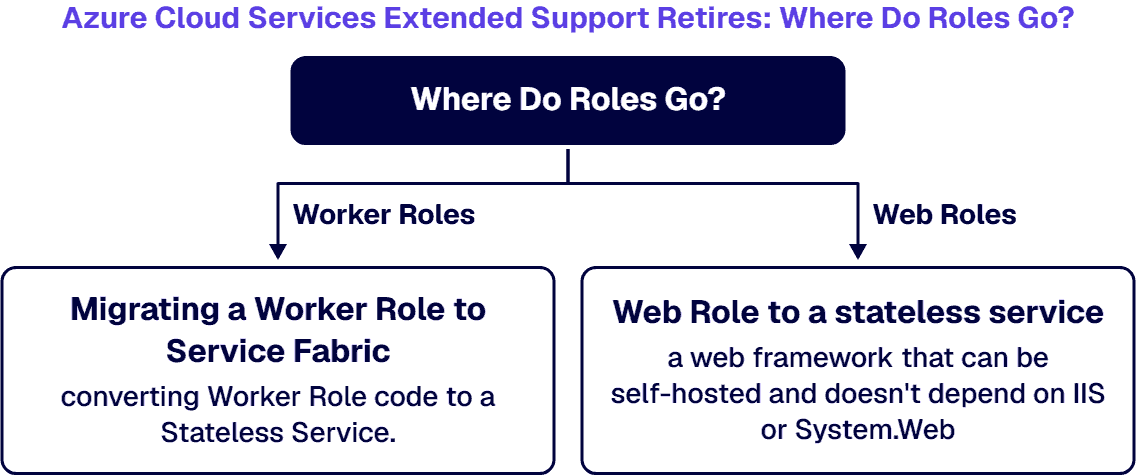
The code question is where roles split. Microsoft’s Learn about the differences between Cloud Services (extended support) and Service Fabric before migrating applications page states: “Cloud Services (extended support) is about deploying applications as VMs.” It also states: “The Web and Worker Roles can be ported to Service Fabric stateless services with minimal code changes.” Microsoft’s Guide to converting Web and Worker Roles to Service Fabric stateless services page then conditions that for web roles:
If your web tier hands work to worker roles through a queue, that pattern carries over. Microsoft’s Learn about the differences between Cloud Services (extended support) and Service Fabric before migrating applications page states: “A common scenario is a web tier that sends jobs to an Azure Queue or Service Bus where Worker Role instances can dequeue and process the jobs.” It adds: “The same communication model can be used in Service Fabric.”
The planning rule: send worker roles, and web roles already on a self-hostable framework, to Service Fabric managed cluster first. Flag every web role that depends on IIS or System.Web before it is scheduled, because its first step is a framework change, not a move.
When a role cannot become a stateless service in time, Microsoft’s own documentation names other Azure services, with a caveat about where that list comes from. Microsoft’s About Azure Cloud Services (extended support) page, under “Additional migration options”, says: “When evaluating migration plans from Cloud Services (classic) to Cloud Services (extended support), consider other Azure services such as: Virtual Machine Scale Sets, Azure Container Apps, App Service, Azure Kubernetes Service, and Azure Service Fabric.” That sentence was written for the earlier move from classic, not as Microsoft’s target for the 2027 retirement, which is Service Fabric managed cluster. The four other services are Azure destinations you choose by what each role’s code depends on, and each choice is checked against its Microsoft documentation:
This is a routing rule for a Cloud Services role that has to move before a date, not a general comparison of Azure hosting. If you are redesigning the application rather than moving it, the general hosting decision is covered in Azure application architecture.
When the destination is chosen, three workstreams still travel with every role, and Microsoft’s documentation names each. Microsoft’s About Azure Cloud Services (extended support) page states: “Customers must use Azure Key Vault to manage certificates in Cloud Services (extended support).” It also states: “All resources deployed through the Azure Resource Manager must be inside a virtual network.” Microsoft’s Frequently asked questions for Azure Cloud Services (extended support) page states: “CSES doesn’t support Managed Identity Support.” The same page explains a capacity limit the move leaves behind: “Cloud Service (extended support) deployments are tied to a cluster like Cloud Services (classic).” It continues: “Therefore, allocation failures continue to exist if the cluster is full.”
Three consequences follow. Certificates already sit in Key Vault, so the work is re-binding them to the new host, not finding them. The virtual network, subnets and network rules each role relies on need to be re-created or re-pointed for the new host. And because the old model had no managed identity, the move is the natural point to decide whether each role adopts one, which touches every secret and connection string it uses. Carry certificates, networking and identity as named workstreams per role, each with an owner. If a deployment sits behind an Application Gateway V1, that gateway has a separate retirement of its own; plan it as its own workstream rather than inside this one.
When you set the plan, work back from the date Microsoft states on its Frequently asked questions (FAQ) page, March 31, 2027, with no extension, and run the work in this order:
This guide states no duration, deployment count or cost for this work; those come from your own inventory.
When your applications run in Azure Government, one more check applies to every destination. Microsoft’s Azure, Dynamics 365, Microsoft 365, and Power Platform services compliance scope page defines its scope this way: “Azure Government = Azure Government regions US Gov Arizona, US Gov Texas, and US Gov Virginia (US Gov regions)”. Its Azure Government table, marked “Last updated: February 2026”, lists each service against FedRAMP High, DoD IL2, DoD IL4, DoD IL5WI and DoD IL6. The rows for the services in this guide are:
For DoD IL5 via Workload Isolation, Microsoft’s Azure, Dynamics 365, Microsoft 365, and Power Platform services compliance scope page states that “services require extra configuration to meet DoD IL5 compute and storage isolation requirements”. Microsoft’s Compare Azure Government and global Azure page states: “The following App Service resources aren’t currently available in Azure Government:” and lists App Service Certificate, App Service Managed Certificate and App Service Domain, so plan certificates for an App Service destination there without those resources.
Two questions stay open, and you confirm them with Microsoft for your own subscriptions: whether the March 31, 2027 date and the no-extension rule in Microsoft’s Frequently asked questions (FAQ) apply to Azure Government exactly as stated for Azure, and whether Service Fabric managed clusters specifically are available in your Azure Government regions at the level you need, since the table’s row reads “Service Fabric” without naming the managed-cluster model. Which impact level a contract or data set requires is your contracting officer’s and authorizing official’s determination; this guide describes the table as Microsoft publishes it. If this re-platform also moves the application from Azure commercial into Azure Government, that is a second project, covered in Azure Government migration.
If your situation is one of these, start somewhere else or settle one question first.
Whether your own team or an outside team carries the move, hold the plan to these criteria:
i3solutions’ Azure specialists handle workload migration for regulated workloads, and this move is scoped as one project: from the inventory and the pattern choice, through re-pointing the applications, identity and logging, to cutover, with embedded specialists where the program needs them. For a Cloud Services (extended support) estate, that means a routing decision per role before any code changes, with Microsoft’s named target as the default and each exception tied to the code dependency that forced it. i3solutions plans and runs governed Azure and Microsoft 365 migrations with senior, U.S.-based engineers. i3solutions advises clients on federal compliance posture as its own assessment rather than as a restatement of Microsoft’s documentation, including whether SharePoint Online meets NIST 800-53, whether Azure Government is required under the DoD Cloud Computing SRG, and whether a CMMC gap assessment is needed to bid. i3solutions has been a Microsoft Partner with 30 years of enterprise technology delivery experience and has delivered 1,500+ Microsoft engagements across aerospace and defense, financial services, and health sciences. An i3solutions project engagement does not by itself include ongoing support of what it delivers, which i3solutions scopes separately as Application Managed Services, and it is not a replacement for the internal team, open-ended scope expansion, or vendor lock-in. This work sits within Azure development services. Delivery is senior and US-based.
According to Microsoft Learn, Cloud Services (extended support) is deprecated and will be fully retired, and Microsoft states that it cannot grant extension requests. The section above on why this migration is not the last one repeated quotes both dates.
Service Fabric managed cluster. According to Microsoft Learn, workloads running Cloud Services (extended support) must be migrated to Service Fabric managed clusters before the retirement date to avoid service disruption; the section above on Microsoft’s named target quotes the date. Microsoft also lists Virtual Machine Scale Sets, Azure Container Apps, App Service and Azure Kubernetes Service as other Azure services, in guidance first written for the move from Cloud Services (classic).
Not if it depends on IIS. Microsoft Learn states that Service Fabric does not support IIS, so a web role must first move to a web framework that can be self-hosted and does not depend on IIS or System.Web, such as ASP.NET Core. Microsoft Learn marks ASP.NET Web Forms as not supported and ASP.NET MVC and Web API as supported with migration.
Where the worker role does background work for a web app, it is a candidate to run as a WebJob beside that app. Microsoft Learn describes WebJobs as a feature of Azure App Service that runs a program or script in the same instance as a web app. Microsoft Learn also states that App Service Windows instances already have all the supported .NET Framework versions installed.
Not in Microsoft’s current table. According to Microsoft Learn, the Azure Government audit-scope table lists Azure Container Apps at FedRAMP High and DoD IL2 and not at DoD IL4, IL5WI or IL6, while App Service, AKS, Service Fabric and Virtual Machine Scale Sets are listed through DoD IL6. Confirm the current table and your own subscription before you plan around it. The section above on roles that run in Azure Government describes the table.
By Michael Branson
When the VMware renewal forces a plan and a date, leaving VMware for Azure is a choice made per workload class among three Microsoft destinations: Azure VMware Solution, which runs VMware vSphere clusters on dedicated bare-metal Azure infrastructure and is available in Azure Commercial and Azure Government; Azure virtual machines, reached with Azure Migrate, which Microsoft describes as a free service; and Azure Local, which extends Azure capabilities to environments you own and which Azure Migrate can also target. According to Microsoft’s Portable VMware Cloud Foundation licensing reference, as of November 1, 2025 Microsoft no longer includes a VCF license or subscription with new Azure VMware Solution node purchases, so that path now needs your own VCF subscription. According to Microsoft, existing Azure VMware Solution deployments that include the license will have to change by October 31, 2026 for pay-as-you-go and by August 30, 2027 for reserved instances.
The VMware renewal quote has arrived, the economics have changed, and finance wants a plan and a date. A single answer for the whole estate ignores that some workloads cannot drop VMware on your timeline, some can move to Azure unchanged, and some cannot leave your building. This guide sets out what Microsoft’s own pages, read on 2026-10-20, say about each of Microsoft’s three destinations, which Microsoft dates apply to whom, and what Microsoft states for Azure Government, so each workload class gets an assignment you can defend.
If your VMware estate runs in your own data centers, the date that drives this decision is your own renewal, and this guide does not date it. The Microsoft dates this guide cites bind deployments that are already on Azure VMware Solution with the license included, and nothing else.
Microsoft’s Portable VMware Cloud Foundation licensing reference for Azure VMware Solution states: “Customers must purchase VCF licenses directly from Broadcom to use hyperscaler cloud services.” It continues: “As of November 1, 2025, Microsoft no longer includes a VCF license or subscription with new Azure VMware Solution node purchases.” The same page introduces its table of dates with “The following dates apply to existing deployments and reservations:” and lists November 1, 2025 as the date from which portable VCF is required for new Azure VMware Solution deployments, October 31, 2026 as the date by which license-included pay-as-you-go deployments must transition to portable VCF, and August 30, 2027 as the date by which customers with active reserved instances for VCF license-included hosts must exchange their reservations for VCF BYOL reservations or transition those workloads off Azure VMware Solution. It adds: “If a reservation expires before August 30, 2027, its license-included benefits end when the reservation expires.”
The retirement page, Azure VMware Solution license-included service retirement, using portable VCF and other options, opens with “AVS is not ending, only the SKU that includes the license is changing.” It states “Azure VMware Solution license-included PayGo SKUs retire on 31 October 2026.” and “To avoid service disruption on 31 August 2027, customers need to be fully transitioned to a new Azure VMware Solution VCF BYOL service or be fully migrated to a new Azure destination.” To customers evaluating modernization opportunities, its advice is to “start assessing current AVS environments immediately, and develop a transition roadmap”.
Those pages give one planning rule. For an estate in your own data centers, plan to your renewal. For a deployment already on Azure VMware Solution with the license included, read the date that applies to it from Microsoft’s licensing reference: pay-as-you-go deployments will face October 31, 2026, reserved instances will face August 30, 2027, and a reservation that expires sooner loses its license-included benefits when it expires. The Microsoft pages this guide relies on do not say whether those dates apply the same way in Azure Government; confirm that with Microsoft before planning on it.
If a destination is chosen before the estate is inventoried, the choice rests on guesses about which workloads can move unchanged. Microsoft’s What is Azure Migrate? page says “Azure Migrate is a service that helps you decide on, plan, and execute your migration to Azure.” and that “Azure Migrate is a free service” for inventory, assessment, planning and migration. The free service is Azure Migrate itself, not the destination. Microsoft’s Create an Azure VMware Solution assessment article “describes how to create an Azure VMware Solution assessment for on-premises VMs in a VMware vSphere environment with Azure Migrate: Discovery and assessment.”
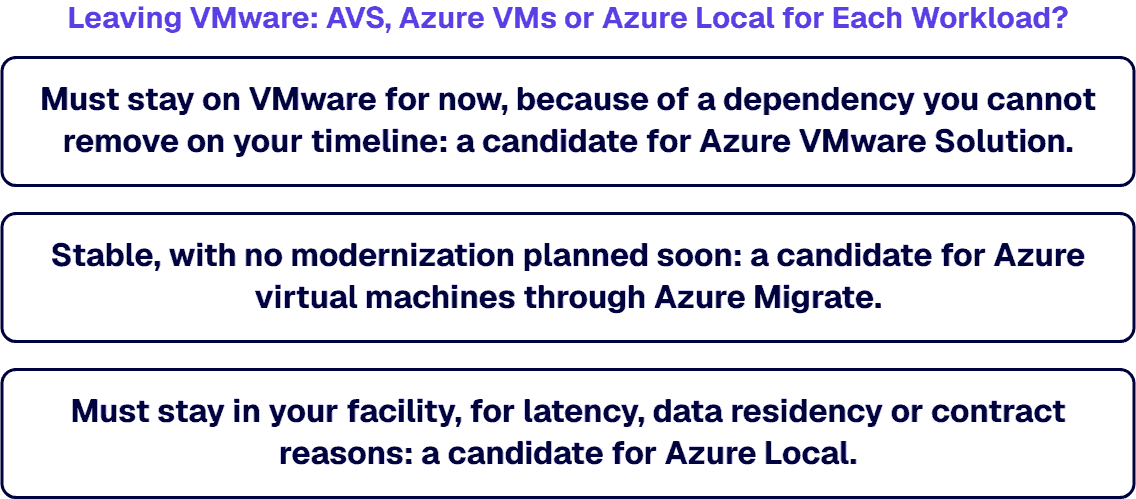
Microsoft’s Cloud Adoption Framework page Select your cloud migration strategies gives the filter to apply first: “Remove options that conflict with compliance, security, or operational constraints.” Then tag each workload with the constraint that decides it:
Inventory with Azure Migrate before pricing any path, and write the deciding constraint beside each workload, so the assignment can be defended when someone asks why a workload went where it did.
If a workload depends on VMware in ways you cannot remove on your timeline, the goal is leaving the building, not leaving VMware. Microsoft’s What is Azure VMware Solution? page says “Azure VMware Solution provides private clouds that contain VMware vSphere clusters built from dedicated bare-metal Azure infrastructure.” and “The minimum initial deployment is three hosts, with the option to add more hosts, up to a maximum of 16 hosts per cluster.” On the division of work it says: “Microsoft manages and maintains the private cloud infrastructure and software, allowing you to focus on developing and running workloads in your private clouds to deliver business value.”
The line between Microsoft’s work and yours is drawn in Microsoft’s Common questions about Azure VMware Solution: “Microsoft is responsible for the lifecycle management of VMware software (ESXi, vCenter Server, and vSAN) and NSX appliances.” The same answer makes the customer responsible for “the NSX SDN configuration: network segments, distributed firewall rules, Tier 1 gateways, and load balancers.” Elsewhere the page says: “Customers are responsible for any workload administration tasks and the associated change management processes.” Plan your team’s network and workload administration work on that basis.
For SQL Server and Windows Server licenses moving with those workloads, Microsoft’s License SQL Server, Windows Server, and Linux in Azure VMware Solution page says that to give you flexibility around your migration timelines, “you can continue to use your licenses outside of Azure for 180 days from the time when the licenses are allocated within Azure VMware Solution.” and “This dual-use rights benefit applies to SQL Server and Windows Server.”
What this path does not change is the VMware license. Under Microsoft’s licensing reference, new Azure VMware Solution deployments use your own portable VCF subscription, and Microsoft’s Portable VMware Cloud Foundation licensing reference for Azure VMware Solution adds: “Portable VCF doesn’t replace the Azure VMware Solution host quota process.” Request host capacity as a separate step. This guide states no host or subscription price.
If a workload is stable and nothing about it needs to change soon, rehosting it onto Azure virtual machines ends its dependency on VMware without rebuilding it. In the strategy table of Microsoft’s Cloud Adoption Framework page Select your cloud migration strategies, the business driver for Rehost reads “Need minimal business disruption and no modernization in near future”.
Microsoft’s Migrate VMware VMs to Azure (agentless) tutorial says: “This article shows you how to migrate on-premises VMware or Azure VMware Solution (AVS) VMs to Azure, using the Migration and modernization tool, with agentless migration.” Its guidance before cutover is plain: “Run a test migration to make sure everything’s working as expected.”
Two planning rules follow. Test-migrate every wave before its cutover, and record the result. Decide the landing zone, identity and network before the first wave moves; that design is a separate piece of work, outside this guide.
If a workload has to stay in your facility for latency, data residency or contract reasons, the choice is not limited to staying on VMware or moving to the public cloud. Microsoft’s What is Azure Local? page describes Azure Local as Microsoft’s “distributed infrastructure solution that extends Azure capabilities to customer-owned environments.” On cost it gives a model, not a figure: “Azure Local is priced per physical core on your on-premises machines, plus any consumption-based charges for additional Azure services you use.”
Microsoft’s Overview of Azure Migrate based VMware migration for Azure Local applies to Azure Local 2503 and later, and says: “You can use the Azure Migrate platform to move on-premises VMware VMs to your Azure Local instance.” Among the benefits it lists, the solution “Keeps the data flow local, from on-premises VMware source servers to Azure Local.”
The Cloud Adoption Framework names this path for workloads that stay where they are. In its Retain strategy, Microsoft’s page Select your cloud migration strategies says: “Consider a more modern on-premises solution like Azure Local for your workloads and connect to Azure.” Confirm your Azure Local release against the version Microsoft names before planning the migration.
If a workload carries a FedRAMP or DoD obligation, choose its path against Microsoft’s current scope tables, not against this guide. Scope each workload in three steps: name the cloud it must run in, Azure Commercial or Azure Government; check that its path is offered there, using the Microsoft pages quoted below; then read its authorization and impact level from Microsoft’s compliance scope page and have your security office confirm it.
For Azure VMware Solution, Microsoft’s What is Azure VMware Solution? page says “Azure VMware Solution is available in Azure Commercial and Azure Government.” Microsoft’s Portable VMware Cloud Foundation licensing reference for Azure VMware Solution answers whether portable VCF is available in all supported regions and clouds with “Yes. Portable VCF is available in all Azure public and Azure Government regions where Azure VMware Solution is supported.”
A move with Azure Migrate has its own table. The Azure Government table in Microsoft’s Azure Migrate support matrix lists the target replication regions as US DoD Central, US DoD East, US Gov Arizona, US Gov Iowa, US Gov Texas and US Gov Virginia. Microsoft’s Compare Azure Government and global Azure page says “You can only create assessments for Azure Government as target regions and using Azure Government offers.” and “The following Azure Migrate features aren’t currently available in Azure Government:”, followed by a list of application containerization features for Java and ASP.NET apps; the list names no virtual machine migration feature.
For Azure Local, Microsoft’s Azure, Dynamics 365, Microsoft 365, and Power Platform services compliance scope page says: “FedRAMP High authorization for edge devices (such as Azure Data Box, Azure Stack Edge and Azure Local) applies only to Azure services that support on-premises, customer-managed devices.” Read the authorization and impact level for Azure VMware Solution and for Azure Local from that page for each workload, and have your security office confirm what each workload needs.
Moving workloads from Azure Commercial into Azure Government is a separate move, covered in Azure Government migration.
If the estate is not ready for a destination choice, forcing one early creates rework:
If you bring in an outside partner, judge the plan against these items:
i3solutions plans and runs governed Azure and Microsoft 365 migrations with senior, U.S.-based engineers.
For a VMware exit, that work is a project: the Azure Migrate inventory and assessment, the map of workload classes to destinations, the build of each destination, test migrations and cutover. Embedded specialists can also work inside your team where it needs them. i3solutions has been a Microsoft Partner with 30 years of enterprise technology delivery experience and has delivered 1,500+ Microsoft engagements across aerospace and defense, financial services, and health sciences. An i3solutions project engagement does not by itself include ongoing support of what it delivers, which i3solutions scopes separately as Application Managed Services, and it is not a replacement for the internal team, open-ended scope expansion, or vendor lock-in.
The migration service is described in Cloud Consulting and Migration, and the wider Azure practice in Azure Development Services.
Inventory with Azure Migrate before pricing any path, and write the deciding constraint beside each workload, so the assignment can be defended when someone asks why a workload went where it did.
New purchases do not include it. Microsoft Learn says that Microsoft no longer includes a VCF license or subscription with new Azure VMware Solution node purchases. New deployments use your own portable VCF subscription, and Microsoft Learn adds that “AVS is not ending, only the SKU that includes the license is changing.” So a plan that keeps VMware on Azure VMware Solution must include your own VCF subscription; if the goal is to stop licensing VMware, the choice is between Azure virtual machines and Azure Local.
If you run license-included pay-as-you-go hosts on Azure VMware Solution, the earlier of the two deadlines applies: on Microsoft Learn, those deployments must transition to portable VCF. Customers with active reserved instances for license-included hosts have the later deadline to exchange them for VCF BYOL reservations or move those workloads off Azure VMware Solution. Both dates appear above in this guide, with the Microsoft Learn source. Microsoft Learn also says that a reservation which expires before the later deadline loses its license-included benefits when it expires, so read each reservation’s end date first.
Yes, according to Microsoft. Microsoft Learn says “You can use the Azure Migrate platform to move on-premises VMware VMs to your Azure Local instance.” and that the solution “Keeps the data flow local, from on-premises VMware source servers to Azure Local.” Microsoft Learn states that the page applies only from a named Azure Local release onward, so confirm your release against it. It is the destination for workloads that must stay in your facility for latency, data residency or contract reasons.
Yes. Microsoft Learn says “Azure VMware Solution is available in Azure Commercial and Azure Government.” and “Portable VCF is available in all Azure public and Azure Government regions where Azure VMware Solution is supported.” Read the authorization and impact level for each workload from Microsoft’s compliance scope page, and have your security office confirm what each workload needs. The Microsoft pages this guide relies on do not say whether the license dates apply the same way in Azure Government, so confirm that with Microsoft before planning on it.
Microsoft Learn says “Azure Migrate is a free service” for inventory, assessment, planning and migration. The free service is Azure Migrate itself, not the destination. Inventory and assess with it before pricing any path, because the destination carries its own charges: on Microsoft Learn, Azure Local is priced per physical core, plus any Azure services you use.
Michael Branson
The warehouse that feeds the regulatory and board reports can be the last system anyone wants to move and the first one an auditor asks about after it moves. The question is not whether the tables copy across. It is who can see what on the first day in Fabric, and whether the new warehouse returns the same numbers before a single report points at it. Decide per database whether to mirror it, move it or leave it. For a warehouse you move, migrate the schema with Microsoft’s Migration Assistant, fix what it flags, including replacing SQL-authenticated users with Microsoft Entra users, before any data is copied, then copy the data, compare the old and new warehouses in parallel, and reroute connections only when that comparison holds. Microsoft’s Fabric Migration Assistant for Data Warehouse page is direct about the size of that job: “Currently, there isn’t full T-SQL compatibility between the source warehouse and Fabric warehouse.” Plan the effort around the fixes and the comparison, not the copy.
If the warehouse still runs on SQL Server 2016, the support question has already been answered for you. Microsoft Lifecycle’s SQL Server 2016 page says “SQL Server 2016 follows the Fixed Lifecycle Policy.” and lists its extended support end as July 14, 2026 in US time; the same page also lists Extended Security Updates for SQL Server 2016. For the next version, Microsoft Lifecycle’s SQL Server 2017 page lists extended support ending October 12, 2027. A support date sets when the decision has to be made. It does not choose the route.
When other systems still write to the warehouse, or it cannot be taken offline, moving it is the wrong first question. Microsoft’s Mirroring SQL Server page describes the alternative: “You can continuously replicate your existing SQL Server databases directly into Fabric’s OneLake.” The source keeps running. According to Microsoft, SQL Server 2016 through 2022 mirror by using Change Data Capture, and the same page says “Fabric Mirroring for SQL Server 2025 requires connection to Azure Arc including the Azure Extension for SQL Server.” On the mirrored database’s SQL analytics endpoint, the page says users have T-SQL commands that “can define and query data objects but not manipulate the data from the SQL analytics endpoint”, and it tells you to “Set up an on-premises data gateway or virtual network data gateway to mirror the data.”
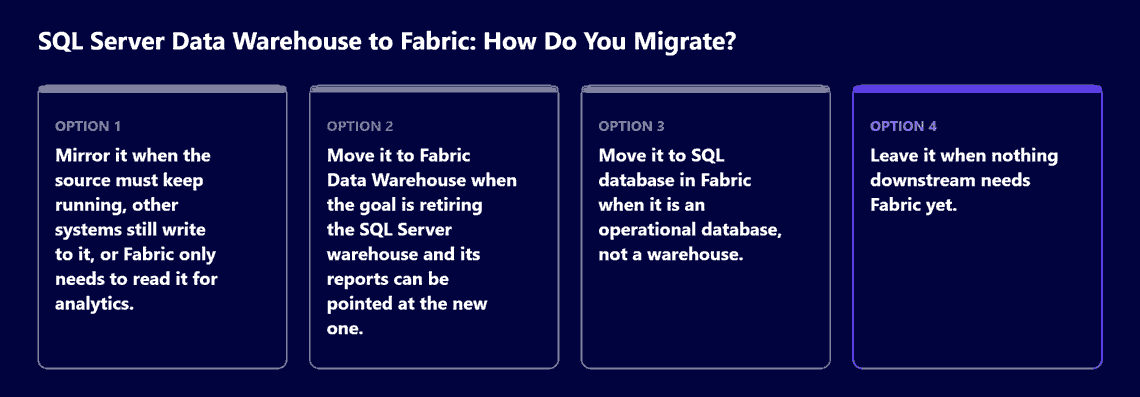
For a warehouse you intend to retire, the target is Fabric Data Warehouse. Microsoft’s Fabric Migration Assistant for Data Warehouse page states its reach as migration “From Azure Synapse Analytics dedicated SQL pool” and from “SQL Server and other SQL Database Engine platforms”. This guide covers the SQL Server source only; an estate that starts in Azure Synapse Analytics follows Microsoft’s separate Synapse migration guidance.
An operational database is a different case. Microsoft’s SQL database in Microsoft Fabric page calls that product “The home in Fabric for OLTP workloads” and describes it as “a developer-friendly transactional database, based on Azure SQL Database”. It is the target for a database an application writes to, not for a warehouse. Microsoft’s Fabric Migration Assistant for SQL database page says that tool “helps you move databases from an on-premises SQL Server instance to a SQL database in Microsoft Fabric.”
Use these criteria, one database at a time:
The failure to prevent is a restricted or masked column that is readable in Fabric the week after cutover. Microsoft’s Fabric Migration Assistant for Data Warehouse page sets out what carries across: “Most types of security objects including roles, permissions (such as GRANT, REVOKE, and DENY), and dynamic data masking migrate automatically.” It also sets out what does not: “Some objects (such as SQL authenticated users or column-level encryption) need updates to work in Fabric.” Its direction for logins is plain: “Replace SQL authenticated users with Microsoft Entra users in Microsoft Fabric.” For column-level encryption, the page’s workaround is to “Use other methods to protect your data, such as implementing encryption at the application layer and Dynamic data masking in Fabric data warehousing to obfuscate sensitive data based on user permissions.” And on order it leaves no room: “Before copying data, ensure you fix the security objects that failed to migrate and review that the security you need is set up, so that users don’t have unintended access to sensitive information.”
Around the warehouse, Microsoft’s Security in Microsoft Fabric page describes the platform’s defaults: “Every interaction with Fabric is encrypted by default and authenticated using Microsoft Entra ID.” It adds: “In Fabric, all data that is stored in OneLake is encrypted at rest. All data at rest is stored in your home region, or in one of your capacities at a remote region of your choice so that you can meet data at rest sovereignty regulations.” It also describes customer managed keys and private links: “With workspace customer managed keys, you can use your Azure Key Vault keys to encrypt the Microsoft encryption key.” and “Private links enable secure connectivity to Fabric by restricting access to your Fabric tenant from an Azure virtual network (VNet), and blocking all public access.” For the connection back to the on-premises server, Microsoft’s What is an on-premises data gateway? page says “The on-premises data gateway initiates outbound connections to the cloud, but requires no inbound connections.” and “Currently, Microsoft actively supports only the last six releases of the on-premises data gateway.”
The record an auditor asks for is a list of every login, role, mask and encrypted column in the source warehouse, and what each became in Fabric. What that record has to satisfy is for your control owners and counsel to decide. Microsoft’s encryption and home-region sentences describe the platform; they are not a determination about your obligations.
If reports depend on T-SQL that Fabric Data Warehouse handles differently, the Migration Assistant flags those objects and someone has to rewrite them. The same Migration Assistant page lists workarounds for some of the common unsupported features. “IDENTITY columns in Fabric Data Warehouse behave differently than they do in other platforms, such as SQL Server.” The page lists external tables and multi-statement table-valued functions as “Other currently unsupported features you might see”, and lists indexes and transparent data encryption as no longer needed, saying of the latter: “Fabric Data Warehouse doesn’t need TDE because it already encrypts data through more advanced means.”
Microsoft’s T-SQL surface area in Fabric Data Warehouse page marks several features as preview, including ALTER COLUMN on warehouse tables (“ALTER COLUMN is in preview.”), nested common table expressions (“nested CTEs are currently a preview feature”) and bcp (“bcp is supported as a preview feature”). About the commands it lists as unsupported, it warns: “Even if they appear to succeed, they might cause problems for your warehouse.”
For scripts that fail, the Migration Assistant offers Copilot assistance, with Microsoft’s own caution beside it: “Mistakes can happen as Copilot uses AI, so verify code suggestions before running them.”
Microsoft’s Migration Assistant page says: “You can upload a DACPAC file or create a direct connection to the source system.” Microsoft’s Migrate by uploading a file with the Fabric Migration Assistant guide covers the file route. Its Migrate with a direct connection to the source system guide covers the connection route and, for a SQL Server source, says: “For SQL Server, Azure SQL Database, or Azure SQL Managed Instance, select SQL Server database.”
For an operational database going to SQL database in Fabric, Microsoft’s Fabric Migration Assistant for SQL database page describes a DACPAC route and states its limits: “The maximum supported size for a DACPAC file upload is 20 MB.” and “Only on-premises data gateways are supported. Virtual network data gateways aren’t supported.” It says “you must configure both an on-premises data gateway and a Fabric SQL connection”, and it offers an optional step to “Validate the uploaded DACPAC without creating a new database.”
If a regulatory figure moves after cutover, the change carries the name of whoever approved it. Microsoft’s Migration Assistant page puts “Test and compare the old warehouse and new warehouse.” ahead of its last step: “Finally, reroute connections from applications that access the source warehouse to use the new warehouse.” Both of Microsoft’s step-by-step guides, Migrate by uploading a file with the Fabric Migration Assistant and Migrate with a direct connection to the source system, give the same instruction: “Test the Fabric warehouse with some reporting before rerouting. Perform comparison and data validation tests in your reporting platforms.”
Start the comparison with the reports regulators and executives read, run on the same cut of data against the old warehouse and the Fabric warehouse. Write the comparison down: which reports, which figures, what matched, what did not and why. Reroute only after it holds, and keep the old warehouse readable until the people who own those reports have signed off on the comparison.
When SSIS packages or pipelines load the warehouse every night, they are a second migration with their own owner. Microsoft’s Migration Assistant page describes its data step as “Copy data by using a copy job in Fabric Data Factory.” That step moves the data you have; the jobs that keep loading the warehouse are a separate decision. SSIS package modernization is covered in SSIS migration to Azure, and the choice between Azure Data Factory and Fabric pipelines in Azure Data Factory best practices.
When moving is premature, a plan that says so early is easier to defend than one that finds out late.
Once the reports run on the Fabric warehouse, someone has to own it day to day. The ownership model after go-live is set out in the enterprise analytics operating model. How sensitivity labels, data loss prevention and audit evidence apply to the migrated warehouse is a separate evidence question from the migration itself.
If you bring in an outside firm for this, the work is the mirror, move or leave decision per database, the security inventory, the schema fixes, the written comparison and the cutover plan. i3solutions has delivered Microsoft Fabric work for clients. Delivery is senior and US-based. All i3solutions Power BI and analytics developers, architects, and consultants are 100% U.S.-based. The Fabric services offer is described in Microsoft Fabric development and integration services.
Decide per database whether to mirror it, move it or leave it. When other systems still write to the warehouse, or it cannot be taken offline, moving it is the wrong first question. For a warehouse you intend to retire, the target is Fabric Data Warehouse.
According to Microsoft, SQL-authenticated users need to be replaced with Microsoft Entra users and column-level encryption needs updates; fix both before any data is copied. The record an auditor asks for is a list of every login, role, mask and encrypted column in the source warehouse, and what each became in Fabric.
Start the comparison with the reports regulators and executives read, run on the same cut of data against the old warehouse and the new one. Write the comparison down: which reports, which figures, what matched, what did not and why. Reroute only after it holds, and keep the old warehouse readable until the people who own those reports have signed off on the comparison.
If the warehouse still runs on SQL Server 2016, the support question has already been answered for you. A support date sets when the decision has to be made. It does not choose the route.
When SSIS packages or pipelines load the warehouse every night, they are a second migration with their own owner.
Michael Branson
If you are standardizing cloud desktops for a regulated workforce, the product question and the boundary question arrive together, and Microsoft’s own framework settles the boundary first. The question that decides the design is which user groups carry which obligations.
If the two products look interchangeable from a distance, Microsoft’s own definitions show where they part. Microsoft’s What is Windows 365? page, read on 2026-10-20, states that “Windows 365 is a cloud-based software-as-a-service (SaaS) that automatically creates a new type of Windows virtual machine (Cloud PCs) for your end users,” and that “In Windows 365 Enterprise, Business, and Government, end users have a 1:1 relationship with their Cloud PC,” and that with Windows 365 Flex, “multiple users can nonconcurrently access a single Cloud PC.”
Microsoft’s What is Azure Virtual Desktop? page, read on 2026-10-20, states that “Azure Virtual Desktop is a desktop and app virtualization service that runs on Azure,” and that “With the new Windows 11 and Windows 10 Enterprise multi-session capability, exclusive to Azure Virtual Desktop, or Windows Server, you can greatly reduce the number of virtual machines and operating system overhead while still providing the same resources to your users.”
The difference that matters to an IT Director is who runs what. Microsoft’s Security recommendations for Azure Virtual Desktop page, read on 2026-10-20, states that “For Azure Virtual Desktop, most components are Microsoft-managed, but session hosts and some supporting services and components are customer-managed or partner-managed.” In practice that means your organization owns the session hosts, their images and their scaling when it chooses Azure Virtual Desktop, and that ownership belongs in the decision.
If any of your users handle export-controlled or defense data, the product choice waits on the boundary choice. Microsoft’s Choosing a Windows 365 deployment model for Microsoft 365 Government tenants page, read on 2026-10-20, says your workloads extend beyond the GCC boundary if any of the following apply:
The same Microsoft page defines GCC as “A Microsoft 365 environment that runs on Azure Commercial as a logical partition, meeting FedRAMP High authorization at Impact Level 2 (IL2).” It defines GCC High as “A Microsoft 365 environment that runs on Azure Government infrastructure, meeting FedRAMP High authorization at Impact Level 4 (IL4),” which “Supports ITAR, DFARS 7012, and NIST SP 800-171 compliance requirements.” On CMMC, Microsoft’s wording on that page is that “Organizations subject to CMMC requirements typically need GCCH.”
Microsoft’s first decision question asks: “Do any of your users have IL4, ITAR, DFARS 7012, NIST SP 800-171, or CMMC requirements that mandate workloads run on Azure Government infrastructure rather than a logical partition within Azure Commercial?” When the answer is yes, Microsoft states on the same page: “A separate GCC-High tenant is required for those workloads.”
If your organization has not yet settled which cloud the Microsoft 365 tenant belongs in, that decision comes first and is covered in Microsoft 365 GCC and GCC High and CMMC and GCC High.
When you know the boundary, the offerings narrow quickly. Microsoft’s What is Windows 365 Government? page, read on 2026-10-20, lists five Windows 365 offerings for US government clouds, and its tenant, authorization and impact-level values match Microsoft’s deployment-model page:
Microsoft’s deployment-model page adds a note: “Windows 365 inherits the compliance posture of the Microsoft 365 platform. For GCC, this includes FedRAMP High, CJIS, and IRS 1075. For GCC-High, this includes ITAR, DFARS 7012, and NIST SP 800-171.” The same page lists Azure Virtual Desktop in Azure Government at FedRAMP High and “IL4+”.
For Azure Virtual Desktop, Microsoft’s Azure Government compliance scope page, read on 2026-10-20, lists Azure Virtual Desktop in its Azure Government table under FedRAMP High, DoD IL2 and DoD IL4.
If your users do belong in Azure Government, Microsoft compares the two products there directly. Microsoft’s deployment-model page states that “Azure Virtual Desktop (AVD) in Azure Government is not a Windows 365 SKU,” and its comparison of Azure Virtual Desktop in Azure Government with Windows 365 for GCCH reads, row by row:
The same Microsoft page lists when to consider Azure Virtual Desktop in Azure Government: “Your organization already operates Azure Government infrastructure and needs virtual desktops to run within the same sovereign boundary”; “You require custom VM images that cannot be accommodated by Windows 365 provisioning workflows”; “You need GPU-enabled desktop workloads (engineering, scientific computing, media rendering)”; and “You have latency, network peering, or data egress requirements that make a fully managed service impractical.”
Read that way, the choice is made per user group: the users who need a managed Cloud PC at IL4 and the users who need custom compute beside Azure Government workloads can land on different products inside the same boundary.
Before you compare the two products, confirm what each user must already be licensed for. Microsoft’s Requirements for Windows 365 page, read on 2026-10-20, states: “Windows 365 Enterprise: Users must have licenses for Windows E3, Intune, Microsoft Entra ID P1, and Windows 365 to use their Cloud PC.” For Windows 365 Government, the same page says “All of the Windows 365 Enterprise requirements apply with the following additions,” and that “A subscription in Azure Government is required for Windows 365 Government customers who would like to use any of the following capabilities:” hybrid join (“Hybrid AADJ”), “AADJ and with the customer providing their own network”, and “Custom Images”.
For Azure Virtual Desktop, Microsoft’s Licensing Azure Virtual Desktop page, read on 2026-10-20, states: “You must provide an eligible license for each user that accesses Azure Virtual Desktop.” For internal users on Windows client session hosts, Microsoft lists “Microsoft 365 E3, E5, A3, A5, F3, Business Premium, Student Use Benefit”, “Windows Enterprise E3, E5”, “Windows Education A3, A5” and “Windows VDA per user”; for Windows Server session hosts it lists “Remote Desktop Services (RDS) Client Access License (CAL) with Software Assurance (per-user or per-device)”. Microsoft’s Prerequisites for Azure Virtual Desktop page adds: “You need an Azure account with an active subscription to deploy Azure Virtual Desktop.”
Where a GCC High tenant is involved, its licensing is separate from GCC licensing, as the next section sets out.
If your organization splits users between GCC and GCC High, Microsoft is explicit that you are running two environments. Microsoft’s deployment-model page states that “The two environments are entirely separate; data cannot transit between them through Microsoft-managed services,” and lists what to plan for:
For the split itself, Microsoft’s guidance on the same page is to “assign users to the environment that matches their highest compliance requirement” and to “Account for the USNAT requirement: personnel who administer or handle data in the GCCH environment must be U.S. nationals.” Where Azure Virtual Desktop in Azure Government sits beside a GCC tenant, Microsoft notes that “AVD in Azure Government uses Azure Government Entra ID, which is separate from your GCC Entra ID.”
Location is part of the same plan. Microsoft’s Requirements for Windows 365 page states: “For GCC and GCC High (GCCH) only, you can provision Windows 365 Enterprise and Windows 365 Flex in Dedicated mode Cloud PCs in the following Azure Government regions.” It lists Government US Arizona, Government US Virginia and Government US Texas.
Where Microsoft’s IL4 Cloud PC path means a new GCC High tenant, the tenant migration comes before the desktop rollout. We manage GCC High migrations end-to-end: from eligibility validation and licensing coordination with your AOS-G supplier through identity architecture, data migration, security baseline configuration, and post-migration governance. i3solutions plans and runs these migrations for regulated defense organizations, structuring each phase around the compliance evidence assessors expect. The tenant itself is provisioned by the licensing supplier, not by i3solutions. The steps are laid out in GCC High migration checklist. Where Azure Virtual Desktop must sit beside workloads that are themselves moving into Azure Government, that move is covered in Azure Government migration.
When an assessor looks at a virtual desktop, the first questions are about who can sign in and what can leave the session. Microsoft’s security recommendations page for Azure Virtual Desktop states that “Requiring multifactor authentication for all users and admins in Azure Virtual Desktop improves the security of your entire deployment,” that “Enabling Conditional Access lets you manage risks before you grant users access to your Azure Virtual Desktop environment,” and that “Drives, clipboard, printer, and USB devices are disabled by default to a user’s local device in a remote desktop session.”
Device management is the other half of that conversation. The Intune side, including which capabilities are available in GCC High and what they mean for an assessment, is covered in Intune and CMMC.
If the boundary decision, the user-group split, the licensing and tenant mapping and the rollout plan sit across IT, security and contracts with no one owning the whole picture, an outside architect can map each user group to its boundary and product and write the plan your team runs. Delivery is senior and US-based. The broader Microsoft practice is described in Microsoft consulting services.
Pick Windows 365 if each user needs their own managed Cloud PC, and pick Azure Virtual Desktop if your organization needs pooled multi-session desktops, its own VM sizes and images, or desktops next to its Azure workloads, and is ready to manage the session hosts itself. In a regulated enterprise, settle each user group’s cloud boundary first, because Microsoft’s government framework decides which offerings that group can use.
Yes, if your tenant is GCC High: according to Microsoft, Windows 365 Government for GCCH and Windows 365 Flex for GCCH run in a GCC High tenant on Azure Government. According to Microsoft, Windows 365 Government is available for GCC and GCC High customers in the US and for contractors in US entities holding or processing data on behalf of US government agencies.
If your users are in a GCC High tenant, the answer is IL4: according to Microsoft, both Windows 365 offerings for GCC High are listed at FedRAMP High and IL4. According to Microsoft, the Windows 365 offerings for a GCC tenant are listed at FedRAMP High and IL2.
Yes, when your organization deploys it in an Azure Government subscription: according to Microsoft’s government deployment guidance, Azure Virtual Desktop in Azure Government is listed at FedRAMP High and IL4+. Microsoft describes it as an IaaS-based service that your organization deploys and manages, including the session hosts.
Before you assign a Cloud PC, check the user’s licenses: according to Microsoft, Windows 365 Enterprise users need licenses for Windows E3, Intune, Microsoft Entra ID P1 and Windows 365. According to Microsoft, Windows 365 Government customers also need an Azure Government subscription for hybrid join, a customer-provided network or custom images.
Only for the users whose requirements call for it: according to Microsoft, a separate GCC High tenant is required when IL4, ITAR, DFARS 7012, NIST SP 800-171 or CMMC requirements mandate Azure Government infrastructure. Microsoft says users without those requirements can run Windows 365 for FedRAMP in a GCC tenant.
Michael Branson
A Hotpatch plan goes wrong when the whole fleet is promised Hotpatch before anyone checks which servers meet its requirements. The account team or a peer estate mentions that Hotpatch on Windows Server 2025 cuts security-update restarts to roughly one a quarter, and that Microsoft has dropped the charge for the Azure Arc path. Then someone asks about the classified enclave, the segment with no route to the internet, or the servers a security policy keeps off every cloud management plane. No one has checked those machines against what Hotpatch requires. One answer heard in the room is to Arc-enable everything; another is that nothing in a regulated estate can ever use Hotpatch. Both answers skip the check. This guide sets out what Microsoft’s own pages say Hotpatch needs, how the cadence works, how much interruption an Azure Arc connection tolerates, and what the machines that cannot meet the requirement keep doing. The deciding test for each segment is whether its connectivity policy, as your authorizing official approves it, permits a path to Azure Arc.
If you treat Hotpatch as a property of Windows Server 2025 itself, the rollout plan starts wrong. It is a property of where the machine runs and what it is connected to. Microsoft’s Hotpatch for Windows Server page, last updated September 8, 2026, frames its scope in one sentence: “This article describes Hotpatch for Windows Server, which uses the Windows Server support and management model on Azure, Azure Local, and Azure Arc-connected machines.” Its supported-platforms section then covers exactly those three and names no fourth.
For the on-premises server, the Arc path is the one that matters, and it carries more than one condition. Microsoft’s Simplified access to Hotpatching enabled by Azure Arc for Windows Server 2025 announcement, updated May 19, 2026, says: “To use hotpatch for Windows Servers running on-premises or in multicloud environments, you must be using Windows Server 2025 Standard or Datacenter, and your server must be connected to Azure Arc.” Its FAQ adds the one prerequisite beyond the connection that this guide found at a Microsoft source, asking readers to make sure these machines “have Virtualization Based Security enabled and are connected to Azure Arc”, after which Microsoft names the Azure Arc portal, Azure Update Manager or APIs as the ways to turn Hotpatch on.
Read together, the test for a server outside Azure has three parts that travel together: the Standard or Datacenter edition of Windows Server 2025, Virtualization-based security (VBS) enabled, and an Azure Arc connection. A machine that fails any one of them is not on Hotpatch, and the fleet inventory should record which part it fails. The pages name no platform for a machine with no Azure, Azure Local or Azure Arc relationship at all. That is an absence in Microsoft’s documentation, not a sentence in it, and this guide reports it as exactly that.
If your planning notes still carry Hotpatch for Arc-connected servers as a paid subscription, they are out of date. That was true when Microsoft moved it out of preview in 2025, and it is history now; this section is current as of October 2026. The Hotpatch for Windows Server page says “Azure Arc-enabled Hotpatch for Windows Server 2025 is now available at no extra cost.” Microsoft’s Simplified access to Hotpatching enabled by Azure Arc for Windows Server 2025 announcement puts it the same way, “hotpatch enabled by Azure Arc is now available at no additional cost for Windows Server 2025”, and its FAQ says billing for Hotpatch stopped for all existing enrolled machines as of May 15, 2026.
For machines already in Azure, the announcement says “there are no charges for customers running on Azure IaaS, or Azure Local, wherein hotpatching is available as part of the functionality of Windows Server Datacenter: Azure Edition.”
What did not change is the connection. The no-extra-cost statement is scoped to the Arc-enabled path, so removing the charge removes a budget question and leaves the eligibility question exactly where it was. A server that cannot connect to Azure Arc gains nothing from the price change.
A change-board slide promising zero reboots will be wrong within one quarter. Hotpatch reduces restarts; it does not remove them. The Hotpatch for Windows Server page describes the cycle: “Hotpatch first establishes a baseline with the current Cumulative Update for Windows Server. Every three months, the baseline periodically refreshes with the latest Cumulative Update. You then receive Hotpatch releases for the next two months after the Cumulative Update.”
Two kinds of baseline on the Hotpatch for Windows Server page bring a restart:
In the months between, “Hotpatch updates don’t require you to restart your machine.” The content is security-only: “Hotpatch covers Windows Security updates and maintains parity with the content of security updates issued to in the regular non-Hotpatch Windows update channel.” The page also lists what the Hotpatch program currently does not include, updates that still require the machine to be updated during Hotpatch release months:
Plan for rollback, too. The page says “Hotpatch updates don’t support automatic rollback. If you experience an issue during or after an update, you must uninstall the latest update and install the last functional baseline update.”
The planning rule that follows: an eligible machine moves from restarting with each monthly cumulative update to restarting on each quarterly baseline plus any unplanned one, and its driver, firmware and .NET servicing keeps its own schedule. Size the change windows to that, not to zero.
When a segment loses its route to Azure for a week, that is a different case from a segment that never has one. Azure Arc is built for the first, and Microsoft’s What is Azure Arc-enabled servers? page, last updated February 26, 2026, sets out how it behaves. It describes the service’s reach: “Azure Arc-enabled servers lets you manage Windows and Linux physical servers and virtual machines hosted outside of Azure, on your corporate network or with another cloud provider.”
Microsoft’s What is Azure Arc-enabled servers? page sets out the timing:
The planning rule: Azure Arc tolerates a real outage measured in weeks, and recovers on its own when the heartbeat returns. It does not turn a network with no permitted path to Azure into a connected one. A classified enclave or a segment that is air-gapped by design, with no egress allowed, does not meet the Arc condition however the tolerance window is read.
When Azure Local comes up in this conversation, it is because Microsoft describes it in the terms a regulated estate uses. Microsoft’s What is Azure Local? page, last updated April 22, 2026, says “Azure Local is Microsoft’s distributed infrastructure solution that extends Azure capabilities to customer-owned environments.” It names, among its uses, “Strict sovereignty and regulatory requirements requiring that data be kept and controlled locally”, with examples that include “highly regulated industries such as defense and intelligence sectors and energy infrastructure.”
Two further sentences on that page have to be read side by side. One: “The solution offers a cloud-native management experience and supports deployments that are connected or disconnected from the cloud.” The other says Azure Local delivers applications, workloads and services “from cloud to edge, using Azure Arc as the unifying control plane.”
The Hotpatch page lists Azure Local virtual machines built from the supported images as a Hotpatch platform. What none of the pages this guide read states is whether an Azure Local deployment running disconnected from the cloud keeps receiving Hotpatch releases, or has to reconnect to take a new baseline. That is an open question, and this guide leaves it open. Before a disconnected Azure Local design is counted as a Hotpatch answer, confirm it with Microsoft or prove it in a test environment.
A server that cannot meet the edition, VBS and Azure Arc conditions, and is not an Azure or Azure Local virtual machine, does not lose its security updates. It stays on the reboot-based cadence the estate already runs for it: each cumulative update installed, and the machine restarted, inside a change window the segment’s owners control. i3solutions recommends writing that down per segment rather than leaving it implied, because the Hotpatch rollout will change the paperwork for everyone else.
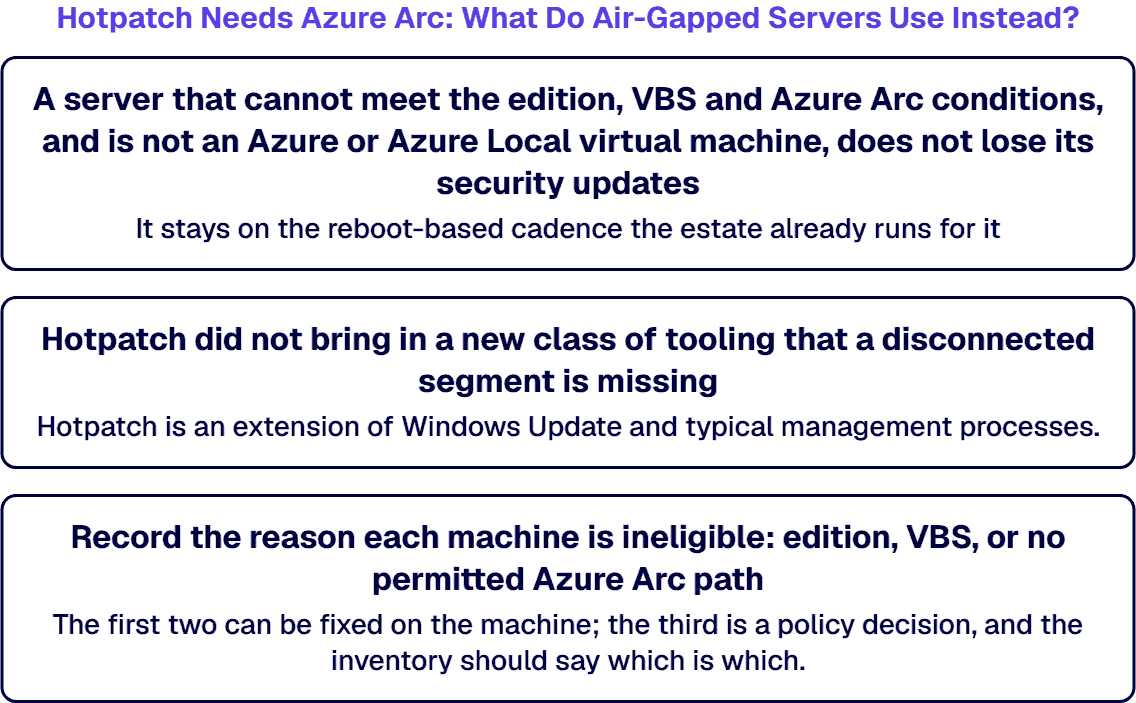
Hotpatch did not bring in a new class of tooling that a disconnected segment is missing. The Hotpatch for Windows Server page says “Hotpatch is an extension of Windows Update and typical management processes.” For Azure Arc-connected machines it lists Azure Update Manager, Group Policy (“Group Policy configures Windows Update client settings.”), SConfig (“SConfig configures Windows Update client settings for Server Core.”) and “Non-Microsoft patch management solutions.” as the ways Hotpatch updates are installed and managed. That list describes orchestration for Hotpatch-eligible machines; it is not Microsoft guidance for disconnected servers. The practical point is narrower: the configuration methods are ordinary Windows Update client settings, so the eligible and ineligible halves of the fleet can share one change process with two cadences in it.
Three rules keep the ineligible half defensible:
If your question arrives with Hotpatch in it, it can still be a different question from this one.
If a partner is going to work on this, the deliverables should be concrete enough to hand to your security office. Ask for:
i3solutions treats this as one project whose outputs are the eligibility inventory, the Azure Arc onboarding plan for the machines that can connect, and the documented cadence for the machines that cannot. Where your team needs extra hands, specialists can embed with it for the duration. i3solutions has been a Microsoft Partner with 30 years of enterprise technology delivery experience and has delivered 1,500+ Microsoft engagements across aerospace and defense, financial services, and health sciences. The work is done by senior engineers based in the US. An i3solutions project engagement does not by itself include ongoing support of what it delivers, which i3solutions scopes separately as Application Managed Services, and it is not a replacement for the internal team, open-ended scope expansion, or vendor lock-in. Your team runs the patch cycle day to day once the project closes. This work sits within Azure development services.
Not for a server with no Azure, Azure Local or Azure Arc relationship; Microsoft’s pages name no such path. Microsoft’s Hotpatch page describes Hotpatch “on Azure, Azure Local, and Azure Arc-connected machines”, and for servers on-premises or in another cloud, Microsoft’s announcement says “you must be using Windows Server 2025 Standard or Datacenter, and your server must be connected to Azure Arc.”
No. It was sold as a subscription after it moved out of preview, and that is history now. Microsoft’s Hotpatch page says “Azure Arc-enabled Hotpatch for Windows Server 2025 is now available at no extra cost”, and according to Microsoft’s announcement, billing stopped for all existing enrolled machines.
The right edition and Virtualization-based security. Microsoft’s announcement says “you must be using Windows Server 2025 Standard or Datacenter, and your server must be connected to Azure Arc”, and asks that machines “have Virtualization Based Security enabled and are connected to Azure Arc”.
Yes. Microsoft’s Hotpatch page says planned baselines “require you to restart your machine”, and Microsoft’s announcement says “In January, April, July, and October, devices install the monthly cumulative security update and must restart for the update to take effect.” An unplanned baseline also brings a restart when an update “can’t be released as a Hotpatch.”
That is an open question. Microsoft’s Azure Local page says the solution “supports deployments that are connected or disconnected from the cloud” and uses “Azure Arc as the unifying control plane”, but none of the Microsoft pages this guide read states whether a disconnected deployment keeps receiving Hotpatch releases. Confirm it with Microsoft or in a test environment before relying on it.
Michael Branson
Quick answer. As of October 2026, the step in Microsoft’s Azure Blueprints retirement that matters most to a regulated estate is the last one: on January 31, 2027 Microsoft removes all remaining blueprint locks automatically, and while the resources those blueprints deployed stay in place, Microsoft’s Azure Blueprints retirement FAQ says “any policy/permission enforcement that depended on Deny Assignments is gone,” so export every blueprint definition now and rebuild each assignment as a template spec deployed through a deployment stack with deny settings before the locks go. The earlier dates set the order of work, according to Microsoft’s Azure Blueprints retirement page: from October 31, 2026 no new blueprint assignment can be created, from December 31, 2026 existing assignments can no longer be modified, and on January 31, 2027 blueprint definitions, versions and assignments that are not exported are automatically deleted. Azure Automation State Configuration retires on September 30, 2027, according to Microsoft’s Azure Automation state configuration to machine configuration migration planning page; Azure Machine Configuration replaces it, Azure Automation exports configuration scripts only, not compiled MOF files, and hybrid servers are onboarded to Azure Arc before they leave State Configuration.
The platform team is asked for a new subscription for a regulated workload, and for years the answer has been the same: assign the blueprint. From October 31, 2026 that stops working, because Microsoft’s Azure Blueprints retirement page says no new blueprint assignment can be created from that date, and the next subscription has to come from something else. That is the visible problem. The quieter one is the question no one has asked yet: which of the controls in the organization’s control narrative rest on the blueprint’s locks, and what enforces them once Microsoft removes those locks automatically at retirement. Go wrong one way and the team waits, the locks disappear on January 31, 2027, a resource that was protected against deletion or change silently is not, and the next assessment finds a control whose documented enforcement points at a mechanism that no longer exists. Go wrong the other way and the team rushes a like-for-like rebuild, assumes deny settings behave exactly like locks, and learns about the differences after an incident rather than before. The server side has its own clock: baselines applied through Azure Automation State Configuration have to reach Azure Machine Configuration by September 30, 2027, and not everything in State Configuration can be exported. This guide takes each part in Microsoft’s own words and ends with an order of work against the dates.
A retirement remembered as one date is easy to plan badly, because Azure Blueprints loses its abilities in stages and the stage that stops new work comes months before the service ends. Microsoft’s Azure Blueprints retirement page states: “That timeline has been extended to January 31, 2027, with a phased retirement beginning July 31, 2026.”
The same Azure Blueprints retirement page gives each phase in plain dates:
Microsoft’s Azure Blueprints retirement FAQ adds a narrowing before the end: “Before retirement, the service phases down to read + delete only (30 days before retirement).” The retirement page’s own comparison lists Azure Blueprints as a preview service that is retiring, and both of its replacements, deployment stacks and template specs, as generally available.
The server baselines run on a separate clock. Microsoft’s Azure Automation State Configuration overview page states: “Azure Automation State Configuration will be retired on September 30, 2027, please transition to Azure Machine Configuration by that date.”
Treat October 31, 2026, the date from which Microsoft Learn says no new blueprint assignment can be created, as the day the old way of standing up a regulated subscription ends, and plan the rest of the move from there rather than from January 31, 2027.
If a control narrative says a production resource cannot be deleted or changed because a blueprint lock protects it, that sentence stops being true at retirement, whether or not anyone touches the blueprint. Microsoft’s Azure Blueprints retirement FAQ states: “At retirement, Microsoft removes all remaining Blueprint Locks (Deny Assignments) automatically.”
The same Azure Blueprints retirement FAQ is precise about what survives and what does not: “Resources previously deployed by Blueprints remain in place and inherit parent RBAC, but any policy/permission enforcement that depended on Deny Assignments is gone.”
Microsoft states the cost of waiting in the same FAQ: “Customers without a migration plan effectively lose the management and lock-enforcement layer Blueprints provided.” It also names the service it points customers to: “Deployment Stacks provide the equivalent management-plane protection, including deny settings, in a supported, forward-going service.” That is Microsoft’s description of the replacement; the section on where a deployment stack is not a blueprint lock shows where its protection works differently in detail, according to Microsoft’s own known-issues page.
For every blueprint assignment, list the controls in the control narrative that cite its locks, its policy assignments or its role assignments, and name the replacement mechanism for each one before the lock goes. Whether moving a control from one Azure mechanism to another has to be reported or re-assessed is for the organization’s assessor and authorizing official to determine, not this guide.
An inventory built from memory misses the assignment an engineer made years ago and then left behind, and on January 31, 2027 an unexported definition is deleted. Microsoft’s Azure Blueprints retirement page states: “Azure Advisor surfaces a recommendation highlighting subscriptions and management groups where Blueprints is in use.” The same page names the Azure Blueprints blade in the Azure portal as the second place to list existing definitions and assignments.
The deletion is automatic. Microsoft’s Azure Blueprints retirement page states: “Blueprint definitions, versions, and assignments that aren’t exported are automatically deleted.” Microsoft documents the export itself in Import and export blueprint definitions with PowerShell, and its Migrate Azure Blueprints to template specs page makes the export the first migration step: each blueprint definition, with its policy assignments, role assignments and ARM templates, exported to JSON.
Microsoft allows one shortcut, narrowly. Its Azure Blueprints retirement FAQ accepts a limited approach of exporting the definitions and applying standard Azure resource locks only where the tenant itself is on a near-term decommissioning timeline, and recommends Deployment Stacks for any workload that outlives the retirement.
Export every definition and every version, including ones no longer assigned, into source control now, because the evidence file may later need to show what an assignment enforced at a given time.
When a team looks for one replacement for Azure Blueprints, it finds two, because Microsoft split the service’s two jobs between two features. Microsoft’s Migrate Azure Blueprints to template specs page states: “Template specs replace the artifact storage and versioning role that blueprint definitions provided.” The same page states: “Deployment stacks replace the assignment, lifecycle, and locking role that blueprint assignments provided.”
The two are meant to work together, but only one is required. Microsoft’s Azure Blueprints retirement page states: “You typically use deployment stacks and template specs together: store your template as a template spec, then deploy and govern it with a deployment stack.” The same page offers a template folder in Git as the other place to keep versioned definitions, and Microsoft’s Migrate blueprints to deployment stacks page states: “Template Specs aren’t required to use deployment stacks.” That page also states: “Blueprint artifacts are converted to ARM JSON templates or Bicep files used to define deployment stacks.”
Microsoft’s Migrate Azure Blueprints to template specs page maps each blueprint artifact to its Azure Resource Manager equivalent in the converted template:
The locks map to deny settings on the stack, and the word Microsoft uses for the match is similar. Microsoft’s Migrate blueprints to deployment stacks page states: “Deployment stack DenySettingsMode gives you the ability to block unwanted changes via DenySettingsMode (similar to Blueprint locks).” Microsoft’s Migrate Azure Blueprints to template specs page describes the denyDelete setting as similar to the Do Not Delete lock and the denyWriteAndDelete setting as similar to the Read Only lock.
Setting a deny setting takes more than the right to deploy. Microsoft’s Migrate Azure Blueprints to template specs page lists this prerequisite: “Owner or User Access Administrator on the target scope if you need to configure deny settings.” Microsoft’s Create and deploy Azure deployment stacks in Bicep page describes a built-in role that stops short of that: “Azure Deployment Stack Contributor: Users can manage deployment stacks, but can’t create or delete deny-assignments within the deployment stacks.”
Keep each definition in version control with review, publish it as a template spec where other teams need to deploy it, and deploy it only through a stack whose deny setting was chosen deliberately for that assignment.
The lock that protected a resource group from deletion, or kept a policy assignment from being changed, is exactly where a like-for-like rebuild can leave a gap. Microsoft’s Known issues for deployment stacks page lists the differences that matter most for a former lock:
Exclusions have limits of their own. Microsoft’s Create and deploy Azure deployment stacks in Bicep page states, of the principals excluded from a deny setting: “Up to five principals are permitted.” The same page allows up to 200 excluded actions, and recommends managing exclusions through group membership, so that who is excluded changes by updating the group rather than the stack. Template size has a ceiling too: Microsoft’s Azure Resource Manager template specs page states: “The size of a template spec is limited to approximately 2 MB.”
Where the management group hierarchy itself is being redesigned, that is a separate design decision from this migration.
Test each scenario a lock used to cover, deletion, change, resource group deletion and a move, against the stack in a non-production subscription, and write down every excluded principal and excluded action with its reason.
When a blueprint carried a regulatory baseline, the policy and initiative assignments inside it are what have to be re-created in the replacement template, with their parameters and exemptions. Microsoft’s Azure Blueprints samples index no longer lists a FedRAMP, NIST SP 800-53, CMMC or DoD impact level sample, and Microsoft Learn now sends the old addresses of those samples to Azure Policy regulatory compliance pages. Azure Government editions of those initiatives are published, among them Details of the FedRAMP High (Azure Government) Regulatory Compliance built-in initiative, Details of the NIST SP 800-53 Rev. 5 (Azure Government) Regulatory Compliance built-in initiative and Details of the CMMC Level 3 (Azure Government) Regulatory Compliance built-in initiative.
That routing has a limit, and this guide keeps to it. A redirect shows where Microsoft sends an old address; it says nothing about what any retired sample contained. This guide does not treat a policy initiative as the same thing as a blueprint, and it does not map the title of Microsoft’s CMMC Level 3 initiative to the levels of the current CMMC program.
Re-create each policy and initiative assignment, with its parameters and exemptions, inside the stack template as a Microsoft.Authorization/policyAssignments resource, as Microsoft’s Migrate Azure Blueprints to template specs page maps it, and compare the Azure Policy compliance state before and after cutover.
When a server’s hardening baseline lives in State Configuration only as a compiled configuration, it is a reauthoring job with a deadline, and the export is where that surfaces. Microsoft’s Azure Automation state configuration to machine configuration migration planning page states: “You can only export configuration scripts from Azure Automation.” The same page states: “It isn’t possible to export node configurations, or compiled MOF files.” And it states the consequence: “If you can’t find the original configuration, you must reauthor it.”
Microsoft sets the order of the move on the same Azure Automation state configuration to machine configuration migration planning page: “The best approach to migration is to redeploy content first, and then migrate machines.” Its expected steps are these:
Other conditions on that page shape the plan. Microsoft’s Azure Automation state configuration to machine configuration migration planning page states: “Machine configuration uses DSC version 2 with PowerShell version 7.” It warns: “Some modules might have compatibility issues with machine configuration.” For servers outside Azure it states: “Before removing a machine from Azure Automation State Configuration, onboard each node as an Azure Arc-enabled server.” And it leaves room for a staged cutover: “If you decide to have machines in both services for some period of time, there are no technical barriers.”
The destination works through Azure Policy. Microsoft’s What is Azure Machine Configuration? page states: “Machine configuration uses Azure Policy to dynamically assign configurations to machines.” The same page states: “Machine Configuration currently supports the creation of up to 50 guest assignments per machine.” It offers each policy assignment one of three enforcement modes: Audit, which only reports the machine’s state; Apply and Monitor, which applies the configuration and monitors it for changes; and Apply and Autocorrect, which applies it and brings the machine back into conformance if drift occurs.
A configuration may carry a hardening baseline such as a STIG, which is the content most worth confirming before any node leaves State Configuration.
Find the source script for every compiled configuration now; any node whose baseline exists only as a compiled MOF file is a reauthoring job, and it belongs at the front of the plan, not the back.
When an Azure Government tenant owner plans this move, the first finding is that Microsoft’s Azure Blueprints retirement page names no cloud at all, so it does not say whether Azure Government follows the same dates, and each replacement has to be confirmed in the tenant rather than assumed.
Microsoft’s Azure, Dynamics 365, Microsoft 365, and Power Platform services compliance scope page lists Azure Government services by audit scope. For the services this migration touches, the table reads:
An audit-scope row is not a statement that a feature is available in a given region. For deployment stacks, the one Azure Government sentence on Microsoft’s Create and deploy Azure deployment stacks in Bicep page is about a permission check, not availability: “Enforcement of the RBAC permission Microsoft.Resources/deploymentStacks/manageDenySetting/action is rolling out across regions, including Government Clouds.” No Microsoft page read for this guide states that deployment stacks or template specs are generally available in Azure Government.
Machine Configuration’s Azure Machine Configuration network requirements page lists service endpoints for US Gov Arizona, US Gov Texas and US Gov Virginia, and none for the US DoD regions. The newer customizable security baselines are narrower still. Microsoft’s Security Baselines Overview page states: “All public Azure regions are supported.” It then states: “Support for Azure Government and Sovereign Clouds is not supported for Public Preview.”
If the estate is also moving from Azure commercial to Azure Government, that is its own project, covered in Azure Government Migration: What Moving from Azure Commercial Actually Takes.
Prove each replacement, a template spec, a deployment stack with deny settings, a policy assignment and a Machine Configuration assignment, in your own Azure Government subscription before the first new subscription has to be stood up without a blueprint, and file the result as evidence.
A migration run team by team finishes when the slowest team does, and in this migration the dates do not wait. This is this guide’s recommended sequence, not Microsoft’s wording; the dates come from Microsoft’s Azure Blueprints retirement and Azure Automation State Configuration overview pages:
Sequence the work by date, not by team, and give each date an owner.
Not every Blueprints estate needs a control-evidence project, and treating a small one as if it did spends the months before the dates on the wrong work. Test the situation against Microsoft’s Azure Blueprints retirement FAQ and Azure Automation State Configuration overview pages:
A migration that cannot be shown control by control is one the next assessment will question, so hold whoever does the work to criteria drawn from Microsoft’s Azure Blueprints retirement FAQ and Known issues for deployment stacks pages:
i3solutions maps governance to named control families, enforces it in the platform through Entra ID, Purview, and Azure Policy, and evidences it continuously rather than reconstructing it at audit. The work in this guide is delivered as a project, with specialists embedded in your team where it needs them: inventorying and exporting the blueprint assignments and State Configuration configurations, rebuilding them as templates, template specs, deployment stacks, Azure Policy assignments and Machine Configuration packages, onboarding hybrid servers to Azure Arc, and evidencing each control against the organization’s control families for its own team to run. i3solutions plans and runs governed Azure and Microsoft 365 migrations with senior, U.S.-based engineers. i3solutions is an SBA certified small business providing technical and professional services to US Federal Agencies, the DoD and the private sector. i3solutions installs and helps configure applications inside IL4 and IL6 government cloud environments and other government networks. i3solutions has been a Microsoft Partner with 30 years of enterprise technology delivery experience and has delivered 1,500+ Microsoft engagements across aerospace and defense, financial services, and health sciences. An i3solutions project engagement does not by itself include ongoing support of what it delivers, which i3solutions scopes separately as Application Managed Services, and it is not a replacement for the internal team, open-ended scope expansion, or vendor lock-in. For the wider Azure practice, see Azure Development Services for Regulated Enterprise Workloads.
According to Microsoft Learn, Azure Blueprints retires on January 31, 2027, in stages that began on July 31, 2026. According to Microsoft Learn, new blueprint assignments can no longer be created from October 31, 2026, existing assignments can no longer be modified from December 31, 2026, and on January 31, 2027 unexported definitions, versions and assignments are deleted and the blueprint locks stop functioning.
According to Microsoft Learn, the resources remain in place and are not deleted, and they inherit parent RBAC. According to Microsoft Learn, Microsoft removes all remaining blueprint locks automatically at retirement, and any policy or permission enforcement that depended on their deny assignments is gone.
According to Microsoft Learn, template specs replace the storage and versioning role of blueprint definitions, and deployment stacks replace the assignment, lifecycle and locking role of blueprint assignments. According to Microsoft Learn, the two can be used together, with the template stored as a template spec and deployed and governed through a deployment stack.
No. According to Microsoft Learn, deny settings are similar to blueprint locks, but deny assignments are not supported at the management group scope, deleting a resource group bypasses them, and moving a managed resource removes its stack protection. According to Microsoft Learn, up to five principals can be excluded from a deny setting.
No. According to Microsoft Learn, only configuration scripts can be exported from Azure Automation, not node configurations or compiled MOF files, and a configuration whose original cannot be found must be reauthored.
According to Microsoft Learn, Azure Automation State Configuration will be retired on September 30, 2027, and Microsoft asks customers to transition to Azure Machine Configuration by that date.
Michael Branson
Quick answer. As of October 2026, Microsoft’s Azure Government model retirement schedule lists o3-mini version 2025-01-31 as Deprecated with a retirement date of November 19, 2026 and gpt-5.6-terra as its replacement, and Microsoft’s commercial schedule lists the same date and the same replacement. Once a model is retired every inference request to it returns 410 Gone. Microsoft’s Azure Government lifecycle policy states that provisioned deployments aren’t auto-upgraded, so each provisioned o3-mini deployment is moved by hand before November 19, 2026, and its September 2026 availability table lists gpt-5.6-terra under Data Zone Provisioned managed in usgovarizona and usgovvirginia, so the move stays in the same deployment type.
A subscription owner forwarded the retirement notice, and a common first reading is that the swap is a one-line change: point the application at a gpt-5.6-terra deployment and move on. That reading is half right. The code change can be small, but three things decide whether the date passes quietly: which deployments Microsoft will move for you, whether the same code still behaves the same after the swap, and whether anyone measured the answers before the model changed. This guide works through each, in the order a cutover plan needs them, starting from Microsoft’s own Azure Government retirement schedule.
Microsoft’s Azure Government lifecycle policy sends a retirement notice to subscription owners with active deployments at least 60 days before retirement, and a warning at least 30 days before. For a November 19, 2026 date, that places the notice on or before September 20 and the warning on or before October 20.
The row behind the notice, on Microsoft’s Azure Government retirement schedule, reads: model o3-mini, version 2025-01-31, lifecycle Deprecated, retirement date 2026-11-19, replacement gpt-5.6-terra. Microsoft states what the schedule is for: “Use it to plan migrations before a model is deprecated or retired.”
The commercial cloud’s model retirement schedule gives o3-mini the same November 19, 2026 date and names the same replacement, gpt-5.6-terra, so the target is the same in both clouds.
Microsoft’s Azure Government lifecycle policy describes the Retired stage in two short sentences: “Removed from service. All inference requests return 410 Gone.” An application still calling an o3-mini deployment after the date gets an error, not a degraded answer.
The Deprecated stage, where o3-mini sits now, already limits who can deploy it. The same policy decides who counts as an existing customer at the subscription level, by whether that Azure subscription ever deployed the specific model version, and states that a new subscription under the same tenant doesn’t inherit access. A fresh subscription stood up for side-by-side testing should not be expected to deploy o3-mini; run the comparison in a subscription that already has it.
Microsoft’s general lifecycle policy also keeps an emergency route open: “If a model is found to have compliance or security issues, Microsoft reserves the right to invoke an emergency retirement with shortened notice.” A plan that finishes on the last available day leaves no room for that.
Three passages in Microsoft’s Azure Government lifecycle policy set the upgrade rules. For Data Zone Standard: “For Data Zone Standard and Standard deployment types, Microsoft manages automatic upgrades when a model version is retired and the deployment type and region align.” For provisioned: “Provisioned deployments aren’t auto-upgraded. Provisioned customers must manually migrate to the replacement model.” For any type: “If the upgrade target isn’t available in the same deployment type and region, Microsoft doesn’t perform a model upgrade.”
Read against Microsoft’s Azure Government model availability tables (page dated September 1, 2026, read October 19, 2026), those rules sort the deployment types as the planning table shows. The table is this guide’s own planning view built from Microsoft’s tables, not a Microsoft table; confirm each row in your own subscription.
| Deployment type | o3-mini listed | gpt-5.6-terra listed | What Microsoft’s rules say | What to do |
|---|---|---|---|---|
| Data Zone Standard | Yes, in both US Gov regions | Yes, in both US Gov regions | Automatic upgrade applies where the deployment type and region align | Set reasoning_effort explicitly and test the swap anyway |
| Data Zone Provisioned managed | Yes, in both US Gov regions | Yes, in both US Gov regions | Provisioned deployments are not upgraded automatically | Move it by hand to gpt-5.6-terra in the same deployment type before November 19, with a named owner |
Microsoft’s Azure Government model availability tables list o3-mini in neither the regional Standard tab nor the regional Provisioned tab, and Microsoft’s general lifecycle policy states: “Global Standard deployments aren’t available in government clouds.”
A provisioned o3-mini deployment is a manual cutover whatever else happens. As of the September 1, 2026 availability table, gpt-5.6-terra is listed under Data Zone Provisioned managed in usgovarizona and usgovvirginia, the same deployment type and regions where o3-mini is listed, so the provisioned capacity moves without a change of deployment type. Each move is still made by hand, before November 19, 2026.
Microsoft’s Azure Government lifecycle policy also sets general rules for replacement timing: “Replacement model becomes available to test in Azure Government where the predecessor is retiring approximately 30 days before retirement.” And: “If the Azure Government availability of the replacement is less than 30 days from this retirement date, the model’s retirement date is extended in Azure Government to allow at least 30 days of overlap in the Azure Government cloud.” Those are Microsoft’s general rules; whether either changes anything for this row is a thing to check, not to assume.
The check itself is programmatic. The same policy says: “Use the Models API to programmatically check lifecycleStatus, deprecation, and per-SKU deprecationDate for any model at any time.” Run it against every subscription that holds an o3-mini deployment, and put an owner’s name beside each result.
The deployment name is the smallest change, and it is not why gpt-5.6-terra can answer differently with the same code. Microsoft’s reasoning models guide and its Azure Government model catalog name the differences a rename misses:
The planning rule that follows: set reasoning_effort explicitly for every application, record the setting beside the deployment, and treat any later change to it as a change to be tested.
A before-and-after comparison only means something if both sides hold still. On the commercial schedule, gpt-5.6-terra version 2026-07-09 is listed as GA, the stage Microsoft’s lifecycle policy describes plainly: “Weights and APIs are fixed.”
The before side is the one that disappears. Capture it while o3-mini still answers, and run the gpt-5.6-terra side with the settings in Microsoft’s reasoning models guide:
A model swap is a production change like any other. i3solutions delivery includes ALM practices with Power Platform pipelines or Azure DevOps integration, environment separation strategies, and change control processes. Whether a model change inside your authorized boundary needs anything beyond your normal change control is a question for your authorizing official and security reviewer; this guide does not answer it.
If there is no evaluation set of any kind today, that gap is larger than this retirement, and LLM adoption consulting covers building one.
The plan, in order: inventory each o3-mini deployment by deployment type and region, test prompts and outputs on gpt-5.6-terra, move the provisioned capacity by hand, and confirm every deployment before November 19, 2026. Write a cutover date per deployment so that a failed comparison still leaves time to fix the prompts or the setting and run it again, and keep the o3-mini deployment in place until the gpt-5.6-terra deployment has carried real traffic. Microsoft’s Azure Government lifecycle policy names where warnings surface and how to route them: “Go to Service Health > Health advisories, filter by Azure OpenAI Service, and create an alert rule for email, text messages, or webhook notifications.”
The same Azure Government schedule carries the next dates: gpt-4.1, gpt-4.1-mini and gpt-4o for April 14, 2027, three text embedding models for April 15, 2027, and gpt-5.1 for May 15, 2027. Microsoft’s general lifecycle policy adds: “Government clouds typically support only one version of a given model at a time, with a 30-day overlap when a new version becomes available.” Build the test set once and keep it for the next retirement on the same table.
If the retirement has reopened the question of where to build at all, Copilot Studio vs Azure AI Foundry covers that platform choice.
Not every o3-mini deployment needs the full sequence. Read against Microsoft’s Azure Government lifecycle policy, three cases sort out:
i3solutions delivers through its Expert Delivery Model, a four-phase methodology (discovery, architecture, build, and knowledge transfer) with explicit exit criteria and delivery assurance at every handoff. What the record states about i3solutions and AI is this: i3solutions delivers its full service portfolio into the healthcare vertical exactly as it does into defense manufacturing and finance, including identity work with Okta and Entra ID, AI work, Power Platform, and Dynamics 365 integration. i3Solutions architects are 100% U.S.-based.
None of that is a claim that i3solutions has migrated a model deployment; the sequence in this guide is offered as a method. The wider AI practice is described at custom AI consulting services.
The short version, from Microsoft’s Azure Government retirement schedule and lifecycle policy:
According to Microsoft Learn, o3-mini version 2025-01-31 retires in Azure Government on November 19, 2026. Microsoft Learn publishes that date with no time of day, so plan to be cut over well before it.
According to Microsoft Learn, the Azure Government schedule names gpt-5.6-terra as the replacement, and the commercial schedule gives the same date and names the same model.
Not if it is provisioned. According to Microsoft Learn, provisioned deployments aren’t auto-upgraded, and no upgrade happens where the target isn’t available in the same deployment type and region; Microsoft Learn’s Azure Government table, dated September 1, 2026, lists both o3-mini and gpt-5.6-terra under Data Zone Provisioned managed in usgovarizona and usgovvirginia, so each provisioned deployment is moved by hand in the same deployment type before November 19, 2026. Check each deployment with the Models API, which Microsoft Learn says reports lifecycleStatus and per-SKU deprecationDate at any time.
According to Microsoft Learn, a retired model is removed from service and all inference requests return 410 Gone.
According to Microsoft Learn, reasoning_effort values and defaults vary by model, so code written for o3-mini should pass a reasoning_effort level explicitly. Microsoft Learn also notes that the gpt-5.6 models support the Chat Completions API and function tools but not both at the same time unless reasoning_effort is none, that o3-mini by default avoids markdown formatting, and that reasoning tokens are billed as output tokens. Test output format, answer quality and token use before cutover.
According to Microsoft Learn, the Azure Government schedule lists gpt-5.1 version 2025-11-13 as GA with a retirement date of May 15, 2027 and no replacement named yet, and the Azure Government availability tables list gpt-5.1 under Data Zone Standard but not under Data Zone Provisioned managed. Microsoft Learn also reserves an emergency retirement with shortened notice for a model found to have compliance or security issues.
As of October 2026, from Microsoft Learn:
By Michael Branson, Founder/COO, i3solutions
As of September 2026, this is a population decision rather than a product decision. Microsoft describes the two as doing different jobs: Microsoft 365 Copilot works inside the Microsoft 365 apps, grounded in organizational data, while Microsoft Copilot Cowork “can carry out tasks on your behalf” across the same environment, with the person approving each action. So the useful question is not which product wins. It is which of your groups does work that matches what each product actually does. Give the second product only to a group that passes all three of these tests:
A group that fails any one of the three is better served by Microsoft 365 Copilot, on the evidence set out below. These are not alternatives to choose between for the whole company; the question is which population’s work is shaped like the thing each product is built to do. Whether Cowork sits inside the Copilot licence or beside it is a separate question with its own answer, at Is Copilot Cowork Included in the Microsoft 365 Copilot License, or an Additional Cost?.
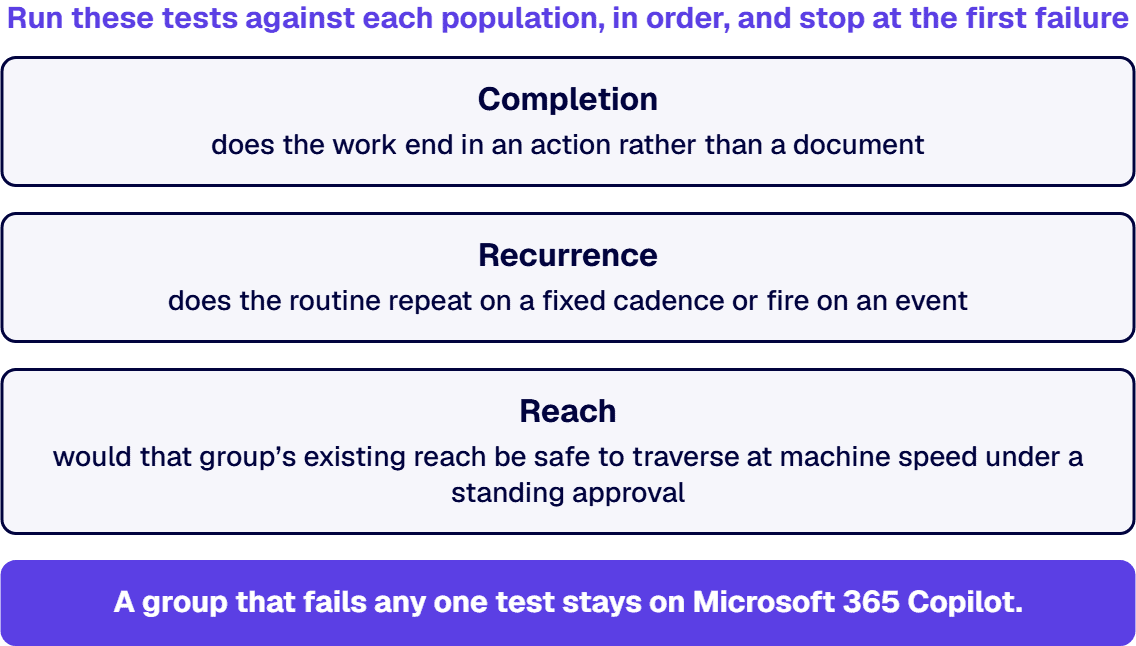
A renewal conversation and a vendor pitch landing in the same month is not a product comparison. It is a sorting problem, and it goes wrong when the two products are read as two versions of the same thing. Microsoft’s own documentation does not describe them that way, and the difference it draws is the one the decision turns on.
Microsoft 365 Copilot is described as an assistant that works where the person is already working. Microsoft’s Copilot overview (Microsoft-stated date 17 September 2026) lists the in-app capabilities as drafting, rewriting and summarizing in Word, analyzing data and creating formulas in Excel, creating and summarizing presentations in PowerPoint, drafting mail and summarizing threads in Outlook, and summarizing and transcribing meetings in Teams. It describes the full add-on experience as adding priority access, Deep integration with Microsoft 365 apps and services, and “Grounding responses in organizational data (emails, files, meetings, calendars, teams, or organizational relationships) through Microsoft Graph, Work IQ, Copilot Search, and semantic indexing.” The output of that work is something a person then decides what to do with.
Copilot Cowork is described as a product that acts. Microsoft’s Cowork overview (Microsoft-stated date 8 September 2026) opens with “Microsoft Copilot Cowork can carry out tasks on your behalf” and states plainly: “Cowork carries out tasks across your Microsoft 365 environment. Rather than describing what you could do, it does the work.” The same page enumerates what that means: it sends emails through Outlook, schedules meetings and manages the calendar, creates Word, Excel, PowerPoint and PDF files, posts in Teams channels and chats, searches across the organization, browses and manages files in OneDrive and SharePoint, and conducts deep research across multiple sources. Microsoft also documents two ways it runs without a person present: prompts on a schedule “so recurring tasks happen automatically”, and event-driven tasks “that run when something happens, such as when you receive an email or a Teams message.” Microsoft records Cowork for work or school accounts as generally available, and marks the App skill for building apps as a preview feature available only to users in its Frontier program.
All three Microsoft documents cited on this page were opened at source in September 2026, and the bracketed dates above are the ones Microsoft states on each document rather than our reading of them. If Microsoft has moved since, Microsoft is right and this page is stale.
The consequence for the decision. One product improves the quality of what a person produces. The other reduces the number of steps a person performs, and it does so by operating in systems of record on that person’s behalf. Those are different purchases with different risks, and a population that would benefit enormously from the first can gain almost nothing from the second.
When the request arriving on your desk is “how many seats do we need”, the honest first answer is that seat count is the output of a sorting exercise nobody has run yet. Run these three tests against each population, in order, and stop at the first failure. The tests are ours; the product behaviour each one leans on is Microsoft’s, cited above.
Test 1. The completion test: does the work end in an action, or in a document? Ask where the task is finished. If the person’s job is done when they have a good draft, a clean model or a defensible summary in front of them, the assistant is the right tool and the second product adds a step rather than removing one. If the task is only finished when something has left the person’s hands, a message sent, a file filed, a meeting placed on other people’s calendars, then the work is shaped like what Cowork is documented to do.
Test 2. The recurrence test: is the routine the same next week? A population whose weekly routine is genuinely repeatable, the same intake, the same compilation, the same distribution, converts that routine into something that runs whether or not the person is at their desk. A population whose work is different every day gets a slower version of what they already have.
Test 3. The reach test: what can this group already open? This is the one that changes answers. Microsoft states, in its Cowork getting-started documentation (Microsoft-stated date 14 September 2026), that “Cowork doesn’t take actions without your approval”, and the overview adds that approval prompts carry a risk level indicator for medium and high risk actions; the same getting-started page documents an “Always allow” option that skips future prompts for similar actions within the current conversation. Read those two facts together. The control is real, and it is a control the user may relax for the duration of their own session. So the question to ask of a candidate population is not whether Cowork is safe; it is what that group’s existing permissions would expose if their entire reach were traversed at machine speed by something that also sends, posts and files. If nobody can answer that for the group in front of you, the answer to the question is not yet, and the work in between is a permission question rather than an AI question. That question is owned by You Bought Copilot. Your Data Isn’t Ready for It. The Copilot Data Governance Fix..
What passing all three looks like at scale. Sorting them is only tractable when somebody already knows who belongs to which group and under what controls, which is a governance artefact rather than an AI one. i3solutions runs a governed Power Platform for a federal defense agency supporting roughly 10,000 personnel across about 180 locations, which works because it is governed, not despite it. That reference is here for governance scale only. It describes neither a Copilot deployment nor a Cowork deployment, and this page makes no claim about either product from it. The narrow point it supports is this: at that population size, the register of who may reach what is the artefact that makes a sorting exercise tractable, and an enterprise without one has no basis on which to answer the question for either product.
For an aerospace and defense manufacturer or a federal agency, the fit question arrives in a different order: before anybody asks which population should get the second product, somebody has to establish whether it is there at all. That is not this page’s finding to make. The sibling page linked in the answer above already went to Microsoft’s published sources, recorded its check date, named the documents it read, and reported the government cloud position for the newer product as an open gap rather than filling it. Read the result there, at its own date, and do not accept a summary of it from anywhere, including from here.
Two things follow for the decision on this page, and neither depends on how that gap eventually closes. First, an unpublished position is not a yes and it is not a no, so a sorting exercise for a government cloud tenant cannot be built on a commercial launch notice, and the product cannot be written off to a compliance officer either. Put the question in writing to whoever holds your licensing agreement, require an answer that names your own tenant and carries a date, and re-open it at each roadmap review.
Second, the sorting work pays regardless. The population list and the permission review that producing it forces are the same artefacts either outcome will need, and they are the slow part.
Approving a seat allocation you cannot defend in a steering meeting is the failure mode here. Three names, not three documents, are what make the decision defensible.
Who owns the population list. One person maintains the record of which groups sit on which product and why, using the three tests above as the written rationale. This is the artefact your committee will actually review, and it is the one that survives a change of vendor or a change of pricing.
Who owns the reach question. Somebody has to be accountable for what each candidate group can currently open. Whether your tenant is ready for either product is a separate assessment with its own conditions, and it is owned by Is Your Microsoft Environment Ready for Copilot? What Must Be True First. We do not restate those conditions here; this page assumes the reader will meet them before a population is moved.
Who owns the enablement decision. Turning a capability on and enabling it deliberately are different acts with different exposure, and the comparison between them is set out on Secure Copilot Enablement vs Turn It On: The Enterprise AI Risk Comparison.
For whoever owns the enablement decision in an eligible commercial tenant, the default-on OpenAI models in Copilot, which OpenAI operates for Microsoft as a subprocessor, arrive switched on for users before anyone has enabled them deliberately.
The two products are billed separately, and no figure for either appears on this page. Both halves of that question, the meter on the newer product and what a governed deployment of the established one involves, are answered on Is Copilot Cowork Included in the Microsoft 365 Copilot License, or an Additional Cost? and Microsoft 365 Copilot Licensing: What a Governed Enterprise Deployment Actually Costs.
The rule above has a failure mode, and it is worth stating because it is the one that gets an IT function overruled from outside. The rule is biased toward not yet, and not yet is sometimes wrong.
If a business unit already runs a genuinely repeatable coordination routine, the kind where one person spends a day a week collecting the same inputs, assembling the same document and distributing it to the same list, that unit passes the completion test and the recurrence test on the evidence of its own calendar. If its content sits in a workspace whose permissions were reviewed recently and whose membership is small and known, it passes the reach test too. Telling that unit to wait a quarter costs them the day a week and costs IT the argument, because the unit can demonstrate the routine and IT can only describe a concern. In that case the defensible answer is a bounded group with a named owner and a review date, not a blanket no.
Two further cases sit on the same side of the line. A unit whose routine depends on a system outside Microsoft 365 may be better served by extending the tooling: Microsoft’s Cowork overview states “You can create up to 50 custom skills”, and documents plugins from the Microsoft 365 App Store that add connectors and specialized skills. And a group already running a Copilot pilot with real telemetry is answering a different question from the one on this page, which is when to widen rather than which product to widen with; that decision is set out on Copilot Pilot vs Enterprise Rollout: When to Expand.
The rule’s real job is to stop a company-wide purchase justified by a departmental use case. It is not an argument for refusing the departmental use case.
We have no measured claim to make about either product’s fit, and we are not going to invent one for a product pair this new; the framework above is the method, and the evidence for your own enterprise comes from your own tenant. What stands behind the method is delivery history rather than a product opinion: i3solutions has completed more than 1,500 Microsoft platform implementations. Contact a senior architect. Governed Microsoft AI work at i3solutions sits under Custom AI Consulting Services for Governed Microsoft Enterprise AI.
Neither, as a company-wide answer, and that is the useful part. Microsoft’s Copilot overview, dated 17 September 2026, describes Microsoft 365 Copilot as working inside the Microsoft 365 apps, grounded in organizational data through Microsoft Graph and Work IQ; the Cowork overview, dated 8 September 2026, describes Copilot Cowork as carrying out tasks across the environment on the person’s behalf, with each action approved and a risk level indicator shown for medium and high risk actions. Because those are different jobs, the enterprise-level answer is a split rather than a winner: the population whose work ends in an action, recurs on a schedule or an event, and whose existing reach has been reviewed is the population that suits the newer product, and everyone else is already suited by the established one.

US-Based Microsoft System Integrator | Est. 1997
© i3solutions. All rights reserved.
US-Based Microsoft System Integrator | Est. 1997
© i3solutions. All rights reserved.


