
Governance questions are what make a Microsoft environment defensible under audit, from who owns a policy to what evidence proves a control held. These answers address the specific calls IT leaders face when GCC High, CMMC, FedRAMP, or ITAR narrows the acceptable range.
Michael Branson
As of September 2026, a nuclear operator can put business data in Microsoft 365 and Azure, but Microsoft Learn’s Part 810 compliance page, last updated September 2022, names only Azure Government as able to “accommodate customers subject to DoE 10 CFR Part 810 export control requirements”, and the NRC’s cyber security guidance lists cloud service providers among external systems, so Part 810 technology, cyber security program records and anything from a critical digital asset each need their own placement decision before they move. Microsoft Learn says of the US-persons controls in Azure Government, “This commitment isn’t applied in Azure.”, and its Microsoft 365 Government eligibility list names “Department of Energy (DoE) UCNI” but does not name Part 810 technology. Whether a document is Part 810 technology is DOE’s determination, and Safeguards Information stays on stand-alone systems unless other systems are “approved for security by the appropriate NRC office”.
The enterprise Microsoft 365 and Azure program has reached the plant, and three groups have three different answers. Engineering wants drawings and procedures in SharePoint and Teams, operations wants plant data in Azure for reporting, and the cyber security program owner wants to know what new path out of the plant is being proposed. Four sets of words decide it: DOE’s export rule for nuclear technology, the NRC’s cyber security rule and its guidance, the NRC’s rule for Safeguards Information, and what Microsoft has published about its own clouds. This guide puts them side by side for the IT leader who has to decide where each class of plant data goes. It describes how the rules are built; it does not decide whether a specific document, person or system is covered, which belongs to your export-control officer, your cyber security program owner, DOE and the NRC. Every DOE, NRC and Microsoft source cited was read on September 24, 2026.
A placement argument stalls when no one has sorted the data first, because each group is arguing about a different file. The four sets of rules attach to the kind of information, not to the application that holds it, which is why the sorting comes before the cloud choice. Each row names the rule and, where one exists, Microsoft’s statement; where no source read for this guide speaks to a cell, the cell says so.
The planning rule is to classify before migrating. Where a document’s class is unclear, it goes to the export-control officer before it moves, not after a migration tool has already copied it.
When engineering asks to move its document set, the files that raise the most concern describe how the reactor and the equipment around it are built, run and maintained. Among the activities 10 CFR Part 810 covers, section 810.2(b) lists “Nuclear reactor development, production or use of the components within or attached directly to the reactor vessel, the equipment that controls the level of power in the core, and the equipment or components that normally contain or come in direct contact with or control the primary coolant of the reactor core;” Two definitions in section 810.3 decide how far that reaches. The first reads “Use means operation, installation (including on-site installation), maintenance (checking), repair, overhaul, or refurbishing.” The second reads “Technical data means data in such forms as blueprints, plans, diagrams, models, formulae, engineering designs, specifications, manuals, and instructions written or recorded on other media or devices such as disks, tapes, read-only memories, and computational methodologies, algorithms, and computer codes that can directly or indirectly affect the production of special nuclear material.” Read together, the rule reaches use of that equipment, which it defines to include operation and maintenance, and not only its design. This guide does not say whether any particular drawing, procedure or data set meets those definitions. Some information sits outside the part altogether. Section 810.2(c) lists among the things the part does not apply to “Transfer of publicly available information, publicly available technology, or the results of fundamental research;” At the other end, section 810.7 reads “Any person requires a specific authorization by the Secretary before:” and lists, among other activities, “Providing or transferring sensitive nuclear technology to any foreign country or entity; or” The determination is DOE’s. According to the eCFR text of section 810.5(a), “The advice of the DOE Office of Nonproliferation and Arms Control may be requested on whether a proposed activity falls outside the scope of this part, is generally authorized under § 810.6, or requires a specific authorization under § 810.7. However, unless authorized by the Secretary in writing, no interpretation of the regulations in this part other than a written interpretation by the DOE General Counsel is binding upon DOE.” Route unclear documents to your export-control officer first and, where the answer turns on the rule itself, to DOE’s Office of Nonproliferation and Arms Control.
When export rules come up in a cloud review, the transfer that matters can be a person inside the United States opening a file, not only a shipment abroad. 10 CFR Part 810 covers “The transfer of technology that involves any of the activities listed in paragraph (b) of this section either in the United States or abroad by such persons or by licensees, contractors or subsidiaries under their direction, supervision, responsibility, or control.” It defines the person who matters: “Foreign national means an individual who is not a citizen or national of the United States, but excludes U.S. lawful permanent residents and protected individuals under the Immigration and Naturalization Act (8 U.S.C. 1324b(a)(3)).” Among the transfers the part does not apply to is “Transfer of technology to any individual who is lawfully admitted for permanent residence in the United States or is a protected individual under the Immigration and Naturalization Act (8 U.S.C. 1324b(a)(3)).” For foreign nationals working at a plant, the part carries a general authorization with conditions attached. According to the eCFR text of section 810.6(b), that authorization applies “provided that no sensitive nuclear technology or assistance described in § 810.7 is involved”, and it covers “Transfer of technology to a citizen or national of a country other than the United States not listed in the Appendix to this part and working at an NRC-licensed facility, provided: (1) The foreign national is lawfully employed by or contracted to work for a U.S. employer in the United States; (2) The foreign national executes a confidentiality agreement with the U.S. employer to safeguard the technology from unauthorized use or disclosure; (3) The foreign national has been granted unescorted access in accordance with NRC regulations at an NRC-licensed facility; and (4) The foreign national’s U.S. employer authorizing access to the technology complies with the reporting requirements in § 810.12(g).” According to the eCFR text, section 810.12(g) adds “Persons engaging in generally authorized activities under § 810.6(b) are required to notify DOE that a citizen or national of a country not listed in the Appendix to this part has been granted access to information subject to § 810.2 in accordance with Nuclear Regulatory Commission access requirements.” In a tenant design, that makes access a question of each person’s status, not only of where the person sits. An engineer on site, a contractor working remotely and a cloud operator’s support engineer are three different questions under the same rule.
Once access is designed by status, the cloud operator’s own staff are the part of the question an internal team can leave out. Microsoft’s DoE 10 CFR Part 810 compliance page, last updated September 2022, says “Azure Government can accommodate customers subject to DoE 10 CFR Part 810 export control requirements because it is designed to meet specific controls that restrict access to information and systems to US persons among Azure operations personnel.” It adds “Azure Government also imposes background screening requirements mandated by US Government on operations personnel with access to production systems.” The same page says “you’re responsible for getting a DoE authorization for your own systems, including the use of cloud services.” Read that as Microsoft’s statement of where responsibility sits; whether a given use needs an authorization is still the question DOE answers. Microsoft’s Azure support for export controls page, last updated July 8, 2026, says “Azure Government provides an extra layer of protection through contractual commitments regarding storage of your customer data in the United States and limiting potential access to systems processing your data to screened US persons”. Commercial Azure is different. Microsoft’s NERC CIP standards and cloud computing page, last updated May 7, 2023, says “Azure Government is designed to meet specific controls that restrict access to information and systems to US persons. This commitment isn’t applied in Azure. Therefore, customers deploying on Azure should conduct proper risk assessment to determine if extra technical measures should be deployed to secure data that shouldn’t be disclosed to foreign persons.” The same page says “Nuclear utility customers are wholly responsible for ensuring their own compliance with all applicable laws and regulations.” A detail that is easy to miss in a design review sits on Microsoft’s Compare Azure Government and global Azure page, last updated August 21, 2025: “You’re responsible for designing and deploying your applications to meet US export control requirements such as the requirements prescribed in the EAR, ITAR, and DoE 10 CFR Part 810. In doing so, you shouldn’t include sensitive or restricted information in Azure resource names” Getting into Azure Government is its own step. Microsoft’s What is Azure Government? page, last updated May 19, 2026, says “Azure Government customers (US federal, state, and local government or their partners) are subject to validation of eligibility. If there’s a question about eligibility for Azure Government, you should consult your account team.” Three planning rules follow. Design access by each person’s status for every controlled data class, not only by the employee’s location. Include the cloud operator’s staff in that analysis, using Microsoft’s own statements for each cloud. Keep export-controlled terms out of resource names, subscription names and tags from the first deployment. What moving existing workloads from Azure commercial into Azure Government involves is covered in Azure Government Migration: What Moving from Azure Commercial Actually Takes.
When engineering documents are headed for SharePoint and Teams, the question moves from Azure to Microsoft 365. Microsoft’s Part 810 compliance page, last updated September 2022, lists one cloud in its applicability section, Azure Government, and names no Microsoft 365 cloud. None of the Microsoft pages read for this guide names Part 810 technology for a Microsoft 365 cloud. That is a statement about what those pages say, not a verdict on what any Microsoft 365 cloud can or cannot hold. Microsoft’s Microsoft 365 Government how-to-buy page, last updated August 13, 2024, says “Microsoft 365 Government is available to eligible government customers and nongovernment organizations sponsored to hold or process controlled information.” Its list of accepted government data types for a commercial private entity includes “Department of Energy (DoE) UCNI” and “Other types of data that require Microsoft 365 Government”, and it says “Proof of membership in one of the groups listed previously is required for access to Microsoft 365 Government offerings.” UCNI is a DOE category of its own; Microsoft’s export controls page says “For data subject to DOE export controls, the classification system is augmented by the Unclassified Controlled Nuclear Information (UCNI) controls established by Section 148 of the AEA.” Where GCC High is proposed instead, Microsoft’s Office 365 GCC High and DoD page, last updated August 3, 2026, describes why that environment exists: “To meet the unique and evolving requirements of the United States Department of Defense, as well as contractors holding or processing DoD controlled unclassified information (CUI) or subject to International Traffic in Arms Regulations (ITAR), Microsoft offers GCC High and DoD environments.” It also says “Office 365 staff don’t have standing access to GCC High and DoD production. Any staff who requests temporary permission elevation that would grant access to customer content must first have passed the following background checks.” The first check in its table is “Verification of U.S. citizenship”. The page names no DOE or Part 810 data. The planning rule: before Part 810 technology enters any Microsoft 365 tenant, ask your Microsoft account team for Microsoft’s position in writing and file it with the export-control record. The wider choice between Microsoft’s government clouds is covered in Microsoft 365 GCC vs GCC High: Which Government Cloud Does Your Organization Need?.
When your cyber security program owner objects to a cloud project, the objection is about a new path out of the plant more than about Microsoft. 10 CFR 73.54 opens “Each licensee subject to the requirements of this section shall provide high assurance that digital computer and communication systems and networks are adequately protected against cyber attacks, up to and including the design basis threat as described in § 73.1.” The systems it protects are those serving “(i) Safety-related and important-to-safety functions; (ii) Security functions; (iii) Emergency preparedness functions, including offsite communications; and (iv) Support systems and equipment which, if compromised, would adversely impact safety, security, or emergency preparedness functions.” Two requirements in that rule bear on any cloud project. Licensees must “Analyze digital computer and communication systems and networks and identify those assets that must be protected against cyber attacks to satisfy paragraph (a) of this section,” and must “Ensure that modifications to assets, identified by paragraph (b)(1) of this section, are evaluated before implementation to ensure that the cyber security performance objectives identified in paragraph (a)(1) of this section are maintained.” A reporting feed that connects to one of those assets is the kind of change the program evaluates before it is built. The NRC’s guidance describes how. Regulatory Guide 5.71, Revision 1, with an issue date of February 2023, says “This regulatory guide (RG) describes an approach that is acceptable to the staff of the U.S. Nuclear Regulatory Commission (NRC) to meet regulatory requirements in Title 10 of the Code of Federal Regulations (10 CFR) 73.54,” and “This RG applies to operating power reactors licensed in accordance with 10 CFR Part 50,” It is an acceptable approach, not a rule. In the defensive architecture the guide describes, “CDAs associated with safety-related, important-to-safety, and security functions, as well as support systems and equipment that, if compromised, would adversely impact safety-related, important-to-safety, and security functions, are allocated to Level 4 and are protected from all lower levels.” and “Only one-way data flow is allowed from Level 4 to Level 3 and from Level 3 to Level 2.” In the same approach acceptable to the staff, the guide names the cloud directly. Its glossary defines external systems as “Systems that are outside the control of a licensee or applicant such that the licensee or applicant has no direct supervision or authority over the application of security controls or the assessment of the security controls.” and ends its list of examples with “cloud service providers” “(e.g., infrastructure as a service, platform as a service, or software as a service).” Its control on the use of external systems says “The intent of this control is to ensure CDAs are prohibited from access by, or communication with, external systems that are not within the same security level.” and lists as a licensee activity “prohibiting the use of an external system to access CDAs or to process, store, or transmit organization-controlled information except when [Licensee/Applicant] verifies the implementation of equivalent security measures on the external system.” Records follow the program. 10 CFR 73.54 says “Policies, implementing procedures, site-specific analysis, and other supporting technical information used by the licensee need not be submitted for Commission review and approval as part of the cyber security plan but are subject to inspection by NRC staff on a periodic basis.” and “The licensee shall retain all records and supporting technical documentation required to satisfy the requirements of this section as a record until the Commission terminates the license for which the records were developed, and shall maintain superseded portions of these records for at least three (3) years after the record is superseded, unless otherwise specified by the Commission.” Three planning rules follow. Plant data bound for a cloud report leaves by the one-way path the cyber security plan already defines, and nothing in the cloud connects back toward a critical digital asset. Treat the Microsoft 365 or Azure tenant as an external system and write down the equivalent-measures verification before organization-controlled information goes to it. Keep that verification with the program’s records, under the program’s retention rule.
If a document set includes Safeguards Information, a shared tenant is the wrong starting assumption. 10 CFR 73.22, in its paragraph on electronic processing, says “Safeguards Information may be stored, processed or produced on a stand-alone computer (or computer system) for processing of Safeguards Information.” It defines stand-alone as “means a computer or computer system to which access is limited to individuals authorized access to Safeguards Information.” and adds “A stand-alone computer or computer system shall not be physically or in any other way connected to a network accessible by users who are not authorized access to Safeguards Information.” The same paragraph ends “Other systems may be used if approved for security by the appropriate NRC office.” Stated plainly, a shared Microsoft 365 or Azure tenant is not the stand-alone system the rule describes, and any other system is a question for the appropriate NRC office to approve. This guide does not say whether the NRC has approved any cloud system for Safeguards Information.
Once Part 810 has a clean answer, the other rulebooks your estate answers to are still open. 10 CFR Part 810 says in section 810.8(b) that a general or specific authorization “Does not relieve a person from complying with the relevant laws or the regulations of other U.S. Government agencies applicable to exports; and” Part 810 is DOE’s regime and ITAR is the State Department’s, and one does not stand in for the other; for estates that also hold ITAR technical data, see Redesigning an ITAR Export-Control Compliance Program to Be Efficient, Not Just Compliant. Where the operator’s company also owns grid-facing assets, it can carry separate NERC CIP obligations for them, which are a different regime from the NRC’s and are not covered. Plants licensed under 10 CFR Part 53 follow a different cyber security rule, 10 CFR 73.110, and the NRC’s Regulatory Guide 5.96, with an issue date of March 2026, describes its approach for “establishing, implementing, and maintaining a cybersecurity program at commercial nuclear plants that are licensed under Title 10 of the Code of Federal Regulations (10 CFR) Part 53”; this guide does not cover that path.
If one of these conditions holds, the cloud choice is not the decision at all, and forcing it wastes the review.
Whoever does the work, the design review has to see these before any plant data moves.
When the placement decisions turn into a project, the work is a governed migration. i3solutions plans and runs governed Azure and Microsoft 365 migrations with senior, U.S.-based engineers. Applied to plant data, the method begins with the data-class map and the access design, with the export-control officer and the cyber security program owner making the determinations that belong to them. i3solutions maps governance to named control families, enforces it in the platform through Entra ID, Purview, and Azure Policy, and evidences it continuously rather than reconstructing it at audit. On a nuclear power operator, i3solutions replaced a manual reporting process with an automated dashboard that saved over $293,000 a year and, more importantly for the control environment, removed the manual reconciliation that had been the audit exposure. i3solutions has deployed Power BI inside a GCC High tenant and inside Azure Government for a federal customer. Delivery is senior and US-based. The governance service line is described in Embedding Governance into How the Enterprise Operates and Scales.
For some classes of data, yes, and the answer turns on the class. Microsoft Learn says “Azure Government can accommodate customers subject to DoE 10 CFR Part 810 export control requirements because it is designed to meet specific controls that restrict access to information and systems to US persons among Azure operations personnel.” and, of commercial Azure, “This commitment isn’t applied in Azure.” According to the NRC’s Regulatory Guide 5.71, an approach acceptable to the staff treats cloud service providers as external systems and describes “prohibiting the use of an external system to access CDAs or to process, store, or transmit organization-controlled information except when [Licensee/Applicant] verifies the implementation of equivalent security measures on the external system.”
Azure Government. Microsoft Learn’s Part 810 compliance page, last updated September 2022, lists Azure Government as its one applicable cloud and says “Azure Government can accommodate customers subject to DoE 10 CFR Part 810 export control requirements because it is designed to meet specific controls that restrict access to information and systems to US persons among Azure operations personnel.” It names no Microsoft 365 cloud.
None of the Microsoft pages read for this guide says so. Microsoft Learn’s Microsoft 365 Government how-to-buy page lists “Department of Energy (DoE) UCNI” and “Other types of data that require Microsoft 365 Government” among accepted data types, and its GCC High and DoD page describes those environments as existing “To meet the unique and evolving requirements of the United States Department of Defense, as well as contractors holding or processing DoD controlled unclassified information (CUI) or subject to International Traffic in Arms Regulations (ITAR), Microsoft offers GCC High and DoD environments.” Neither page names Part 810 technology, so ask your Microsoft account team for Microsoft’s position in writing.
The NRC’s guidance addresses it as an approach, not a rule. According to the NRC’s Regulatory Guide 5.71, Revision 1, the guide “describes an approach that is acceptable to the staff”, lists “cloud service providers” among external systems, and says “The intent of this control is to ensure CDAs are prohibited from access by, or communication with, external systems that are not within the same security level.” Under 10 CFR 73.54, modifications to protected assets must be “evaluated before implementation”.
Not on a shared system without NRC approval. According to the eCFR text of 10 CFR 73.22, “A stand-alone computer or computer system shall not be physically or in any other way connected to a network accessible by users who are not authorized access to Safeguards Information.” The same paragraph says “Other systems may be used if approved for security by the appropriate NRC office.”
Michael Branson
Keep Active Directory as the identity platform of record when your workforce, devices, and applications are already mastered there and your roadmap stays Microsoft-first; in that case Entra ID, not Okta, is the natural cloud extension. Bring in Okta only when you have a specific requirement AD and Entra cannot meet on their own, such as a large non-Microsoft SaaS portfolio needing broad third-party app federation. Running both to solve one problem, rather than a genuinely split requirement, doubles your identity attack surface and your audit scope for no operational gain.
Somebody has put Okta on the table at your organization, and before the license is signed you have to say what it would replace. A security initiative, a vendor evaluation, or an executive directive got it there, and the question that arrived with it is not really a product question. It is whether Okta becomes the system of record for your workforce identities, sits beside Active Directory duplicating group membership and standing administrative roles with no stated division of ownership, or is unnecessary because the Microsoft cloud identity service you are already licensed for covers the same ground. You own that architecture call personally, and you answer for it at the next security review. What follows is the criteria that decide it, the order to apply them in when two of them point different ways, the condition that changes the answer, and what the second platform costs you when the requirement turns out not to be split.
If two systems in your estate can each issue a standing administrative role, you do not have one identity platform of record; you have two, and an auditor will treat them as two. The platform of record is the system that masters the identity, holds the authoritative group membership, and issues the standing privileges that survive a single sign-in session. That is a narrower question than which product has the smoother directory synchronization, and it is the question a platform decision turns on.
The two candidates are not the same kind of thing, and Microsoft says so in its own comparison of them. That document describes Microsoft Entra ID as “the next evolution of identity and access management solutions for the cloud” and, on the same page, says that “Active Directory forms the basis for many infrastructure on-premises components, for example, DNS, Dynamic Host Configuration Protocol (DHCP), Internet Protocol Security (IPSec), WiFi, NPS, and VPN access,” which is why retiring the on-premises directory is a network and device project before it is an identity project.
Direction matters more than the product names. Okta’s own documentation for integrating with an existing directory says that “to integrate AD with Okta, you’ll need to install the Okta AD agent, and then import AD users and groups into Okta,” and the direction in that sentence is the whole answer to the ownership question: in that arrangement Active Directory is still the system the users and groups come from. Adding a platform that imports from your directory does not make that platform the platform of record. It makes the new platform a consumer of the one you already run.
A reader whose real question is Okta against Microsoft’s cloud identity service, rather than Okta against the on-premises directory they already run, is asking a different question, and it is answered on Okta vs Entra ID: What’s the Difference for Enterprise IT?. That comparison, including how each of those two platforms connects to Active Directory, is not restated in this answer.
Four things decide where the platform of record should sit, and each is answerable from a surface you can open today, not from a vendor conversation.
When two of these disagree, apply them in this order. What masters the identity today outranks what a catalog count suggests, because moving the master is the expensive change and an integration is the cheap one. A named application your business depends on that only one platform can federate outranks a general preference for a single vendor, because a preference is not a requirement. And a criterion answered from your own inventory outranks one answered from a vendor’s marketing page, in both directions, whichever vendor it favors.
If your people sign in to Windows devices that you domain join, and your applications are largely Microsoft or already sitting in the Microsoft catalog, a second identity platform is answering a question you have not asked. Microsoft’s comparison document states that “Active Directory provides the ability to domain join Windows devices to manage them using Group Policy, System Center Configuration Manager, or other third-party solutions,” and that dependency is a common reason the on-premises directory stays: the device management model is built on top of it.
The Microsoft-first path to the cloud runs through the same directory, not around it. Microsoft’s own wording is that “existing Microsoft Windows Server Active Directory organizations use Microsoft Entra Connect to sync identities to the cloud,” so the cloud platform in that design extends the directory you already master instead of replacing it. The practical test is one you can run from your own tenant: Microsoft’s gallery documentation says to browse to Entra ID, then Enterprise apps, then All applications, then New application, and it describes the gallery as “a collection of software as a service (SaaS) applications that are preintegrated with Microsoft Entra ID.” Work through your application inventory against that list. An estate whose applications are already in it has not yet produced a reason to add a platform of record.
If most of your application portfolio is not Microsoft, the condition that changes this answer is in front of you. Microsoft’s comparison document is direct about the limit of the on-premises directory on its own: “Active Directory doesn’t support SaaS apps natively and requires federation system, such as AD FS.” A portfolio weighted toward third-party software is therefore a real architectural input, not a preference.
Read the two catalogs honestly, because the two vendors describe theirs differently and the difference is in the wording, not in a measurement. Okta’s integration page says “Discover more than 8,000 ready-to-use, pre-built integrations,” according to Okta, while Microsoft’s gallery documentation says “the gallery contains thousands of applications that are preintegrated into Microsoft Entra ID” and publishes no count. One vendor gives a number and one gives a word, and neither string tells you anything about your portfolio. The test that does is your own application inventory, checked application by application against both catalogs, with the ones that appear in only one written down by name.
If that list is short, you have found a scoped requirement, and the right purchase is scoped to it: a second platform added for named applications, with the platform of record left where it is. If that list is long enough that your directory masters a minority of what your people sign in to, you have found a platform question rather than an integration question, and the ownership conversation is worth having properly. Either way the decision is settled by a list you produced, and the shape of the purchase follows the shape of the list.
You can run both, and some regulated organizations do, and the question waiting for you at the next budget review is what the second platform is for. A reader weighing that combination across a genuinely mixed estate, not just this one platform pair, will find the broader question addressed in Which IAM Platforms Fit a Complex Hybrid Enterprise: How to Decide. When the answer is a named set of applications, that is a scoped architecture with a division of ownership somebody can describe. When the answer is that Okta was on the table and got bought, the estate now carries two administrative surfaces, two sets of standing privileged roles, two joiner-mover-leaver paths that have to agree, and two places where an account can survive a departure.
The audit consequence is the part that is easiest to underestimate. Where a control framework asks you to evidence who holds privileged access and how it was granted and reviewed, a second identity platform means a second set of that evidence, produced from a second surface, reconciled to the first, with its own access review running on its own schedule. That consequence is descriptive of what an assessor walks, and it is not advice about whether any particular framework applies to your environment, which is a question for your own compliance function. The cost is not the license line. It is the governance work that comes back at review time, carried by whoever inherits the budget line, for a division of ownership that was not made.
If you are the person who has to defend this call, the useful thing to have is the criteria written down and the order to apply them in, which is what this framework is for. It sets out how to reason about the decision; it does not describe an Active Directory evaluation, an Okta evaluation, or a comparison of the two that i3solutions has run. i3solutions is a Microsoft Systems Integrator with experience implementing identity and access management solutions for enterprises in regulated industries. i3solutions has been a Microsoft Partner with 30 years of enterprise technology delivery experience and has delivered 1,500+ Microsoft engagements across aerospace and defense, financial services, and health sciences. i3solutions governs identity and access for regulated Microsoft estates with senior, U.S.-based engineers and leaves an audit-defensible record. i3solutions has deep experience implementing identity governance for enterprises in aerospace and defense manufacturing, financial services, and healthcare, including environments with CMMC and ITAR obligations.
If your Windows devices are domain joined, replacing Active Directory is a device and network project before it is an identity project, because Microsoft’s own comparison of the two directories records that Active Directory underpins on-premises components including DNS and DHCP as well as VPN access, and that domain-joined Windows devices are managed through it with Group Policy. In a Microsoft-centric estate the common answer is no: the directory stays as the platform of record, Microsoft Entra ID extends it to the cloud, and Okta is considered as an addition for a named requirement rather than as a replacement for the master.
You need both when you can name the specific requirement the second platform closes, a common one being a large portfolio of non-Microsoft software that one catalog covers and the other does not. Produce the list first: take your own application inventory and check every application on it against both vendors’ catalogs, the Microsoft Entra gallery and the Okta Integration Network, writing down the ones that appear in only one. A short list means a scoped addition for those applications; an empty list means the second platform has no requirement behind it, and running two identity platforms for one problem doubles the administrative surface and the access evidence an assessor asks for.
If your roadmap stays Microsoft-first, Active Directory should own it, because the system that masters the user objects and issues the standing administrative roles is the platform of record, and adding a platform that reads those objects from the directory makes it a consumer rather than a master. Okta’s own documentation for directory integration describes installing an agent and importing Active Directory users and groups into Okta, which is the direction that settles the ownership question. The answer changes when a criterion outranks that one: a business-critical application that only Okta can federate is a real requirement, and it is found by checking your own application inventory against both vendors’ catalogs.
Michael Branson
As of September 2026, California’s cybersecurity audit regulations, in force since January 1, 2026 according to the Agency’s CCPA Updates, Cybersecurity Audits, Risk Assessments, Automated Decisionmaking Technology (ADMT), and Insurance Regulations page, require a business that meets the CCPA’s revenue test and processed the personal information of 250,000 or more consumers or households, or the sensitive personal information of 50,000 or more consumers, in the preceding calendar year (or that derives 50 percent or more of its revenue from selling or sharing personal information) to complete an independent cybersecurity audit, and under section 7121(a)(1) a business with more than $100,000,000 in 2026 gross revenue must complete its first report by April 1, 2028, for an audit period that runs from January 1, 2027 through January 1, 2028. Under section 7123(c), the audit assesses components such as phishing-resistant multi-factor authentication for employees and contractors, least-privilege and just-in-time privileged access, and audit-log management, and section 7122(d) requires findings to rely primarily on specific evidence rather than management’s word, so the Microsoft 365 and Entra ID tenant has to be enforcing and recording those controls from the first day of the period; Microsoft’s Manage audit log retention policies page states that its Audit (Standard) default keeps records for 180 days. Under section 7122(a), the auditor may be internal or external to the business, but the person or firm that configures those controls cannot be the one who audits them.
Counsel has told the IT Director that the company probably meets the thresholds and that the first audit period opens January 1, 2027, and then left the tenant-side questions to the team that runs Microsoft 365 and Entra ID. Three things can be true and undefended at that point: multi-factor authentication is enforced but not phishing-resistant for every population, especially the contractors and service providers who sign in as guests; sign-in and audit records roll off well before an auditor sits down to sample January 2027; and the team that built the controls is the team internal audit expects to assist with the audit, which the regulation forbids for the components that team built. This checklist sets out what the tenant needs to already be recording when the period opens, what the regulation requires (never what it takes to “pass”), and where the determination belongs to counsel, the executive team and the auditor.
Under section 7120(a) of the Agency’s regulations, in force since January 1, 2026 and approved by the Office of Administrative Law on September 22, 2025: “Every business whose processing of consumers’ personal information presents significant risk to consumers’ security as set forth in subsection (b) must complete a cybersecurity audit.” Section 7120(b) sets two routes to “significant risk”: a business meets the revenue threshold in Civil Code section 1798.140, subdivision (d)(1)(C) (deriving 50 percent or more of its annual revenue from selling or sharing personal information), in the preceding calendar year; or it meets the revenue threshold in subdivision (d)(1)(A) and, in the preceding calendar year, processed the personal information of 250,000 or more consumers or households, or the sensitive personal information of 50,000 or more consumers. Civil Code section 1798.140 sets that revenue threshold at annual gross revenues “in excess of twenty-five million dollars ($25,000,000) in the preceding calendar year, as adjusted” under the statute’s own adjustment provision; this checklist states the threshold as the statute writes it and does not state the adjusted figure.
Once a business is in, the first report’s due date and audit period turn on 2026 revenue, under section 7121(a): a business whose 2026 annual gross revenue was more than $100,000,000 must complete its first report by April 1, 2028, for an audit period that runs from January 1, 2027 through January 1, 2028; a business whose 2027 revenue was between $50,000,000 and $100,000,000 reports by April 1, 2029; a business whose 2028 revenue was less than $50,000,000 reports by April 1, 2030. After that first report, section 7121(b) requires a cybersecurity audit covering the next 12 months, every year.
Two facts change the count, stated descriptively and never as a determination for a specific business. Civil Code section 1798.145 says the CCPA “shall not apply to personal information collected, processed, sold, or disclosed subject to the federal Gramm-Leach-Bliley Act (Public Law 106-102), and implementing regulations”, so a bank’s data that is subject to GLBA may narrow the personal information counted toward the thresholds. The same section’s employee and job-applicant exemption states: “This subdivision shall become inoperative on January 1, 2023.” So employee and contractor personal information has counted toward the CCPA since that date, including for this audit. Neither point decides a specific company’s status: have counsel make the applicability and revenue-band call in writing before January 1, 2027, and record which data sets were counted and which were treated as data collected subject to GLBA.
Section 7122(a) requires the audit to be completed “using a qualified, objective, independent professional (“auditor”)” and states: “The auditor may be internal or external to the business.” Independence is defined by conduct, not by employment: the same section states that “the auditor must not participate in business activities that the auditor may assess in the current or subsequent cybersecurity audits, including developing procedures, preparing the business’s documents, making recommendations regarding the business’s cybersecurity program (separate from articulating audit findings), or implementing or maintaining the business’s cybersecurity program.” That line reaches the people and firms who configure Microsoft 365 and Entra ID controls: whoever designs the Conditional Access policies, the Privileged Identity Management roles or the audit log retention settings cannot also be the auditor who assesses those same components.
Section 7122(d) reinforces the point from the evidence side: “No finding of any cybersecurity audit may rely primarily on assertions or attestations by the business’s management.” It adds: “Cybersecurity audit findings must rely primarily upon the specific evidence (including documents reviewed, sampling and testing performed, and interviews conducted) that the auditor deems appropriate.” Under section 7122(f), the report goes to “a member of the business’s executive management team who has direct responsibility for the business’s cybersecurity program,” and that same executive team certifies completion, under penalty of perjury, including a statement that “the business has not made any attempt to influence the auditor’s decisions or assessments regarding the cybersecurity audit.” Decide now, in the project plan and the statement of work, who configures each Microsoft 365 and Entra ID component and who audits it, and keep the two apart. Which type of professional to use, and who performs the audit, is a decision for the business and its counsel; this checklist states the independence rule, not a recommendation of who should hold either role.
Section 7123(c)(1)(A) lists, among the components the audit assesses “if applicable” under section 7123(c): “Multi-factor authentication (including multi-factor authentication that is resistant to phishing attacks for employees, independent contractors, and any other personnel, service providers, and contractors)”. That population list can be wider than a tenant’s MFA policies reach on the day they are written. Microsoft’s Conditional Access authentication strengths page states: “They can choose from three built-in authentication strengths: Multifactor authentication strength, Passwordless MFA strength, and Phishing-resistant MFA strength,” and that “Built-in authentication strengths are always available and can’t be modified.” Microsoft’s own recommendation, in Get started with phishing-resistant passwordless authentication deployment in Microsoft Entra ID, is to move “to phishing-resistant passwordless in your authentication solution.”
Contractors and service providers can reach a Microsoft 365 tenant as guests, not as internal employees, and their authentication strength is a separate policy question. Microsoft’s Authentication and Conditional Access for External ID page states: “When no trust settings are configured and MFA is required, B2B collaboration users are prompted for MFA,” which is a base MFA prompt, not by itself the phishing-resistant strength section 7123(c)(1)(A) names for “any other personnel, service providers, and contractors.” Every population that can reach personal information, employees, independent contractors, other personnel, service providers and guest contractors alike, needs its own authentication-strength policy or a documented exception. Microsoft’s Require multifactor authentication for all users page lists the exceptions it recommends excluding from a blanket MFA policy: “Emergency access or break-glass accounts to prevent lockout due to policy misconfiguration,” and “Service accounts are noninteractive accounts that aren’t tied to any specific user.” Those two categories are exactly what an auditor will ask about separately: document each emergency-access and service account and why it is excluded, rather than leaving it silently outside the policy.
The order in which an organization rolls out phishing-resistant passwordless authentication, and how it handles account recovery during that rollout, is a separate implementation decision this checklist does not walk through. For the MFA baseline itself under a different federal framework, see MFA and NIST SP 800-53: Your Baseline Decides, Not the Catalog.
Section 7123(c)(3)(B) names, as a component the audit assesses: “Restricting the number of privileged accounts, restricting those privileged accounts’ access functions to only those necessary to perform the account-holder’s job, restricting the use of privileged accounts to when they are necessary to perform functions, and using a privileged-access management solution (e.g., to ensure just-in-time temporary assignment of privileged access).” Section 7123(c)(3)(A) adds “revoking their privileges and access when their job functions no longer require them, including when their employment or contract is terminated.”
Microsoft’s answer to just-in-time privileged access in a Microsoft 365 and Entra ID tenant is Privileged Identity Management. Microsoft’s What is Microsoft Entra Privileged Identity Management? page states: “Organizations can give users just-in-time privileged access to Azure and Microsoft Entra resources and can oversee what those users are doing with their privileged access.” Revocation on role change and termination, and the standing count of who holds privileged access, is what Microsoft’s access reviews check on a schedule. Microsoft’s What are access reviews? page states: “User access can be reviewed regularly to make sure only the right people have continued access,” and warns plainly that “Excessive access rights can also lead to audit findings as they indicate a lack of control over access.” Count privileged accounts, move standing role assignments to eligible just-in-time assignments, run access reviews on a schedule for the groups and applications that reach personal information, and keep the activation history and review results for the whole audit period; that history is the evidence the audit looks for under section 7122(d), not a policy document describing the intent.
Section 7123(c)(7) names, as a component the audit assesses: “Audit-log management, including the centralized storage, retention, and monitoring of logs.” The regulation names the requirement without naming a retention period. Microsoft’s Manage audit log retention policies page states that Audit (Premium)’s default audit log retention policy “retains all Exchange Online, SharePoint, OneDrive, and Microsoft Entra audit records for one year,” but that “If you have non-E5 users or guest users in your organization, their corresponding audit records are retained for 180 days”; Audit (Standard) itself keeps records for 180 days flat, and “Audit (Standard) logs generated on or after October 17, 2023 follow the new default retention of 180 days.” The same page states that audit logs can be retained “for up to 10 years” with a separate license, naming the license only as Microsoft’s page names it.
This checklist’s own reading, labelled as such and never as the regulation’s or Microsoft’s words: an audit period that, under section 7121(a)(1), opens January 1, 2027 and is reported on by April 1, 2028 spans about 15 months. Records subject to the Manage audit log retention policies page’s flat 180-day Audit (Standard) retention, which applies to every user regardless of license, will already be gone for most of that period by the time an auditor sits down in early 2028 to sample January 2027. Setting audit log retention for the workloads and users that touch personal information to cover the period plus the reporting window, before January 1, 2027, and proving that policy with its export, is what keeps the evidence available when the audit happens. Exporting and retaining Entra audit and sign-in logs beyond Microsoft’s platform defaults, including where that evidence is stored, is a separate implementation question this checklist does not walk through.
Section 7123(c)(4)(A) names, as a component: “the classification and tagging of personal information (e.g., how personal information is tagged and how those tags are used to control the use and disclosure of personal information).” Section 7123(c)(2) names: “Encryption of personal information, at rest and in transit.”
Microsoft’s platform encryption is Microsoft’s evidence to give, not the tenant’s. Microsoft’s Encryption page states: “With Microsoft 365, your data is encrypted at rest and in transit, using several strong encryption protocols, and technologies that include Transport Layer Security/Secure Sockets Layer (TLS/SSL), Internet Protocol Security (IPSec), and Advanced Encryption Standard (AES).” Which data in the tenant is personal information, and how it is labelled and protected, stays the customer’s own responsibility: Microsoft’s Shared responsibility in the cloud page states that “Regardless of the type of deployment, you always retain the following responsibilities,” including that “You’re responsible for your data, including data classification, data protection, encryption decisions, and compliance with data governance requirements.” The mechanism for that classification and control in Microsoft 365 is sensitivity labels: Microsoft’s Learn about sensitivity labels page states that “Sensitivity labels from Microsoft Purview Information Protection let you classify and protect your organization’s data, while making sure that user productivity and their ability to collaborate isn’t hindered.” Map where personal information lives across the Microsoft 365 tenant, label those stores, and keep the label and data-loss-prevention policy exports and their activity reports as the evidence for this component.
Under section 7123(b)(2), the audit assesses “Each of the components of a cybersecurity program listed in subsection (c) that the auditor deems applicable to the business’s information system,” not every component automatically. Section 7123(e) requires the report to “Identify and describe in detail the status of any gaps or weaknesses” and to “Document the business’s plan to address the gaps and weaknesses identified and described pursuant to subsection (e)(3), including the timeframe in which it will resolve them.” Running a tenant gap read against the section 7123(c) components before January 1, 2027 means the gaps the auditor records already carry a remediation date, rather than arriving as a surprise in the report.
An existing audit is not automatically wasted work. Section 7123(f) states: “A business may utilize a cybersecurity audit, assessment, or evaluation that it has prepared for another purpose, provided that it meets all of the requirements of this Article, either on its own or through supplementation,” and gives its own example: “a business may have engaged in an audit that uses the National Institute of Standards and Technology Cybersecurity Framework 2.0 and meets all of the requirements of this Article.” What a NIST CSF 2.0 assessment inside Microsoft Purview Compliance Manager covers, and how its board profile is built, is a separate question this checklist does not walk through.
i3solutions maps governance to named control families, enforces it in the platform through Entra ID, Purview, and Azure Policy, and evidences it continuously rather than reconstructing it at audit. The work is a project with an end date: mapping the section 7123(c) components a business expects to be assessed onto Microsoft 365 and Entra ID, configuring authentication strengths, Privileged Identity Management, access reviews, sensitivity labels and audit log retention, and leaving the evidence exports for the business’s own auditor to review, with embedded specialists where the internal team needs more hands for a period. i3solutions governs identity and access for regulated Microsoft estates with senior, U.S.-based engineers and leaves an audit-defensible record. On a related CMMC Level 2 engagement, i3solutions took ownership of the control architecture against AC.L2-3.1.1 and the audit-log design against AU.L2-3.3.1 and delivered the evidence the C3PAO required. i3solutions has been a Microsoft Partner with 30 years of enterprise technology delivery experience and has delivered 1,500+ Microsoft engagements across aerospace and defense, financial services, and health sciences. An i3solutions engagement does not produce managed-service ownership, a replacement for the internal team, open-ended scope expansion, or vendor lock-in. Under section 7122(a)(2), the firm that configures a tenant’s controls cannot also audit them, and i3solutions works only on the implementing side of that line: it never performs, certifies or recommends the independent audit itself. This work sits within i3solutions’ Embedding Governance into How the Enterprise Operates and Scales.
According to section 7121(a) of the Agency’s regulations, a business whose 2026 annual gross revenue was more than $100,000,000 must complete its first report by April 1, 2028, for an audit period from January 1, 2027 through January 1, 2028. According to section 7121(a)(2) and (a)(3) of the same regulations, a business whose 2027 revenue was between $50,000,000 and $100,000,000 reports by April 1, 2029, and a business whose 2028 revenue was less than $50,000,000 reports by April 1, 2030.
Section 7123(c) states that the audit assesses “Multi-factor authentication (including multi-factor authentication that is resistant to phishing attacks for employees, independent contractors, and any other personnel, service providers, and contractors)” as a component, “if applicable,” where the auditor deems it applicable to the business’s information system under section 7123(b)(2). The regulation names the population; whether it applies to a specific business’s systems is the auditor’s determination.
No. According to section 7122(a) of the Agency’s regulations, “the auditor must not participate in business activities that the auditor may assess in the current or subsequent cybersecurity audits, including developing procedures, preparing the business’s documents, making recommendations regarding the business’s cybersecurity program (separate from articulating audit findings), or implementing or maintaining the business’s cybersecurity program.” A firm that configured a control cannot audit that same control.
Not automatically, and not entirely. Civil Code section 1798.145 states that the CCPA does not apply to personal information “collected, processed, sold, or disclosed subject to the federal Gramm-Leach-Bliley Act,” which can narrow the personal information a bank counts toward the audit’s thresholds, but the same section’s employee exemption became inoperative on January 1, 2023, so employee and contractor personal information still counts. Whether a specific bank’s data is subject to GLBA, and whether the business is still in scope, is a determination for counsel.
Section 7123(c) names audit-log management, including retention, as a component the audit assesses, without setting a retention period. According to Microsoft’s Manage audit log retention policies page, the Audit (Standard) default retains records for 180 days, Audit (Premium)’s default retention policy retains records for one year by default for E5 users, and logs can be retained for up to 10 years with a separate license. Because the first audit period runs from January 1, 2027 through January 1, 2028 and the report is due April 1, 2028, a retention setting shorter than the period plus the reporting window will let evidence expire before the audit happens.
Section 7123(f) states that a business may utilize a cybersecurity audit, assessment or evaluation prepared for another purpose, including one that uses the National Institute of Standards and Technology Cybersecurity Framework 2.0, “provided that it meets all of the requirements of this Article, either on its own or through supplementation.” What a Microsoft Purview Compliance Manager NIST CSF 2.0 assessment covers is a separate question from whether it meets this Article’s specific requirements.
Michael Branson
As of September 2026, Microsoft’s tenant restrictions v2 policy, set in cross-tenant access settings, is the control that blocks users on your devices and networks from signing in to other tenants with external accounts, and what it blocks depends on how you enforce it: a corporate proxy gives authentication plane protection only, managed Windows devices get authentication and data plane protection through an option Microsoft labels preview, and universal tenant restrictions through Global Secure Access cover every platform at the authentication plane, with data plane protection for Microsoft Graph only. Outbound cross-tenant access settings govern what your own organization’s accounts can reach in other organizations, and Microsoft’s Set up tenant restrictions v2 page says those settings “don’t affect (and are unaffected by) your tenant restrictions settings.” Microsoft also says Global Secure Access is available in GCC but “isn’t yet supported” in GCC High or the DoD cloud, and that tenant restrictions v2 does not block cross-cloud requests at the authentication plane, so in this guide’s reading a GCC High tenant plans on the proxy and Windows routes and tests cross-cloud sign-ins on its own devices.
The question can reach the IT Director from an assessor or the security office, and it is specific: what stops an engineer on a company laptop from signing in to a personal Microsoft 365 tenant, or a former employer’s, and uploading a drawing there? Sharing and guest access are already locked down, and someone points at the outbound cross-tenant access settings as the answer. They are not the answer, because those settings govern the organization’s own accounts, and the account in this scenario was issued by someone else. This guide covers the control that does govern it, what each way of enforcing that control blocks, and what Microsoft says changes in GCC High and DoD. It does not decide whether a data set is CUI or ITAR-controlled, or whether a contract or regime requires this control; that belongs to the export-compliance office and the contract.
If the security office has already tightened outbound cross-tenant access settings and believes the leak path is closed, look at whose account those settings govern. Microsoft’s Set up tenant restrictions v2 page (last updated March 20, 2026) frames the problem in its opening: “To enhance security, you can limit what your users can access when they use an external account to sign in from your networks or devices.” Its own example is the insider case: “For example, you can prevent a malicious insider from leaking data over external email by preventing the attacker from signing in to their malicious tenant.”
The same page separates the three settings in three lines:
It adds that “Your inbound and outbound settings for B2B collaboration and B2B direct connections don’t affect (and are unaffected by) your tenant restrictions settings.” Microsoft’s Overview: Cross-tenant access with Microsoft Entra External ID page (last updated March 28, 2025) says “Outbound access settings control whether your users can access resources in an external organization.” and “By default, B2B collaboration with other Microsoft Entra organizations is enabled, and B2B direct connect is blocked.”
The planning rule follows from those lines. Outbound settings govern your own accounts when they reach into other organizations. An account that someone else issued, whether a personal tenant, a former employer’s or a partner’s, is governed only by tenant restrictions, and only on your networks and devices. Where users do need to work in a partner’s tenant, Microsoft’s advice on the setup page is direct: “When your users need access to external organizations and apps, consider enabling tenant restrictions to block external accounts and use B2B collaboration instead.”
Before you choose how to enforce the policy, decide which plane the data at risk needs, because the routes differ exactly there. Microsoft’s setup page lists authentication plane protection in tenant restrictions v2 at general availability. Authentication plane protection blocks sign-ins that use external identities: the insider who tries to sign in to their own tenant is stopped at sign-in.
The second plane covers attacks that bypass sign-in. Microsoft says “Data plane protection in tenant restrictions v2 forces the user to authenticate for attempts to access a resource.” In the step-by-step table on the same page, Microsoft marks data plane protection as preview and describes it as blocking anonymous access to Microsoft Forms, SharePoint files and Microsoft Teams meetings, and user access with an infiltrated token. An anonymous link to a file in someone else’s tenant, or an access token copied from another device, is a data plane case.
Both planes depend on the policy signal reaching Microsoft. The same table says Microsoft Entra ID enforces the tenant restrictions v2 policy when the tenant restrictions v2 header is present on the request, which is why the next decision is how the header gets onto every request your users make.
When a pilot shows that remote users or a second browser still reach another tenant, look first for a route that does not cover that path. Microsoft’s setup page gives three routes, and each covers different ground.
A corporate proxy. Microsoft says “If you’re using a corporate proxy for header injection, options include only authentication plane protection.” In its proxy section it adds “This header doesn’t block anonymous access to Teams meetings, SharePoint files, or other resources that don’t require authentication.” and “Tenant restrictions v1 and v2 on the proxy require decryption of requests to sign-in URLs such as login.microsoftonline.com.” A proxy covers what passes through it, so a laptop off the corporate network needs another route.
Universal tenant restrictions through Global Secure Access. Microsoft says “Universal tenant restrictions use Global Secure Access to tag all traffic no matter the operating system, browser, or device form factor.” Its coverage is stated precisely: “Global Secure Access signaling supports authentication plane protection on all platforms and data plane protection for Microsoft Graph only.” Microsoft’s Turn on Universal Tenant Restrictions page (last updated July 29, 2026) says “Users on your devices with GSA or GSA Remote Networks can only sign in to tenants and applications authorized in your TRv2 policy.” and “Global Secure Access requires a license.”
Windows device policy. Microsoft says “For your corporate-owned Windows devices, you can enforce both authentication plane and data plane protection by enforcing tenant restrictions directly on devices.” and “Devices can be Microsoft Entra ID managed, or they can be domain joined and managed via Group Policy.” The setup page’s heading for this option marks it preview. Microsoft is candid about its reach: it calls tenant restrictions v2 on Windows a partial solution that protects the authentication and data planes for some scenarios. The next sentence on the page says it works on managed Windows devices and does not protect the .NET stack or the other browsers that Microsoft names there. It then says “This is the method for enforcing data plane protection for Microsoft 365 resources, such as SharePoint Online and Exchange Online.”
Two limits apply whichever route you choose. Microsoft’s list of unsupported scenarios on the setup page begins with anonymous blocking to consumer OneDrive accounts. And for platforms where the proxy cannot break and inspect traffic, Microsoft lists other Microsoft controls, including Conditional Access, B2B collaboration outbound rules, consent settings and an Intune app policy, then says “Although these alternatives provide protection, you can cover certain scenarios only through tenant restrictions.”
The planning rules:
If the default block goes live before anyone lists the external tenants the business depends on, the first week brings outage tickets instead of a closed leak path. Microsoft’s guidance on the setup page starts from the block: “Keep the tenant restrictions v2 default policy that blocks all external tenant access from foreign identities”, and, for a move from tenant restrictions v1, it adds a partner tenant policy for each tenant on the old allow list. The prerequisites the same page lists begin with “Microsoft Entra ID P1 or P2”.
Microsoft accounts need their own decision. Microsoft says “Because user-level assignment isn’t available for Microsoft account tenants, the policy applies to all users of Microsoft accounts.” Application-level granularity remains, so the choice is which consumer-account apps, if any, stay allowed for everyone. Microsoft also notes that “Blocking the Microsoft account tenant doesn’t block device traffic from sources other than users, including:” and its first item is “Traffic for Autopilot, Windows Update, and organizational data collection.”
Two further lines bound the policy. Microsoft’s universal tenant restrictions page says “Tenant restrictions aren’t enforced when a user (or a guest user) tries to access resources in the tenant where the policies are configured.” And Microsoft’s cross-tenant access overview warns: “Changing the default inbound or outbound settings to block access could block existing business-critical access to apps in your organization or partner organizations.”
For visibility before enforcement, Microsoft’s Quarantine unsanctioned tenants page (last updated March 16, 2026) says “Enabling TRv2 in audit mode and applying TRv2 policies with GSA shows all activity including attempts to access foreign tenants.” That view depends on Global Secure Access. If you already run tenant restrictions v1 on a proxy, Microsoft says “Migrating tenant restrictions policies from v1 to v2 is a one-time operation.”
The planning rules:
When the tenant holding CUI or ITAR data is in GCC High, the route list shrinks, and a plan copied from a commercial tenant fails in two places. The first is Global Secure Access. Microsoft’s Known limitations for Global Secure Access page (last updated May 29, 2026) says: “Global Secure Access is available in the US Government Community Cloud (GCC), but isn’t yet supported in the US Government Community Cloud High (GCC-H), Department of Defense cloud, or other government or sovereign cloud environments.” Universal tenant restrictions run on Global Secure Access, so a GCC High or DoD tenant cannot use that route today. Microsoft gives no date on that page.
The second is requests that cross a cloud boundary. The known limitations section of Microsoft’s setup page opens with four sentences: “Tenant restrictions v2 is supported on all clouds. TRv2 does not enforce restrictions on cross-cloud requests at the authentication plane, so access is permitted during authentication. However, TRv2 does block cross-cloud requests at the data plane. As a result, when using Windows Group Policy (GPO), users will be unable to access TRv2-enlightened resources across cloud boundaries.” Microsoft’s cross-tenant access overview names the clouds it treats as different, pairing “Microsoft Azure commercial cloud and Microsoft Azure Government, which includes the Office GCC-High and DoD clouds”.
This guide’s reading, not Microsoft’s words: Microsoft does not say in one place that a GCC High device signing in to a commercial-cloud or consumer tenant is a cross-cloud request, but read together those lines suggest that it is. If so, the authentication plane does not stop that sign-in, and the Windows device route’s data plane protection, which Microsoft labels preview, carries the weight in a GCC High tenant, with the proxy route adding authentication plane protection for same-cloud tenants. Test it on the tenant’s own devices before anyone tells an assessor what is blocked: a sign-in to a commercial tenant, a consumer account, and an anonymous link, each from a managed Windows device and from a device on the proxy.
A GCC tenant is in a different position: Microsoft says Global Secure Access is available in GCC, so all three routes are open to it.
If a leak path looks like this one, check first that it really runs through a sign-in with an external account, because some do not.
When an outside team designs this policy, or your own team does, the same questions separate a plan an assessor can follow from a slide.
When a regulated enterprise takes this on, it needs a project with an end date: the policy design, the route chosen for each group of devices, the pilot and the handover, with embedded specialists where the internal team needs more hands for a period. i3solutions has deep experience implementing identity governance for enterprises in aerospace and defense manufacturing, financial services, and healthcare, including environments with CMMC and ITAR obligations. i3solutions is a Microsoft Systems Integrator with experience implementing identity and access management solutions for enterprises in regulated industries. i3solutions has been a Microsoft Partner with 30 years of enterprise technology delivery experience and has delivered 1,500+ Microsoft engagements across aerospace and defense, financial services, and health sciences. The people who do the work are senior and based in the US. An i3solutions engagement does not produce managed-service ownership, a replacement for the internal team, open-ended scope expansion, or vendor lock-in. This work sits within i3solutions’ Establish Identity as a Governed Enterprise Capability.
Outbound settings govern your own accounts; tenant restrictions govern external accounts. Microsoft says “Outbound settings control internal account access to external apps.” and “Tenant restrictions control external account access to external apps.” It adds that inbound and outbound settings “don’t affect (and are unaffected by) your tenant restrictions settings.”
No. Microsoft says “If you’re using a corporate proxy for header injection, options include only authentication plane protection.” The proxy route also requires decrypting requests to Microsoft sign-in URLs, and it covers only traffic that passes through the proxy.
Not today. Universal tenant restrictions run on Global Secure Access, and Microsoft says Global Secure Access is available in GCC but “isn’t yet supported in the US Government Community Cloud High (GCC-H), Department of Defense cloud, or other government or sovereign cloud environments.” Microsoft gives no date.
Not at the authentication plane. Microsoft says “TRv2 does not enforce restrictions on cross-cloud requests at the authentication plane, so access is permitted during authentication.” and “However, TRv2 does block cross-cloud requests at the data plane.” In this guide’s reading, a GCC High device signing in to a commercial or consumer tenant can be such a request, so test it on the tenant’s own devices.
Microsoft lists “Microsoft Entra ID P1 or P2” among the prerequisites for configuring tenant restrictions. Universal tenant restrictions also need Global Secure Access, and Microsoft says “Global Secure Access requires a license.”
Michael Branson
As of September 2026, Microsoft Purview endpoint DLP can audit or block sensitive files being copied to USB drives, network shares, the clipboard, printers, unallowed Bluetooth apps and remote desktop sessions, or uploaded to restricted cloud domains, on onboarded Windows 10, Windows 11 and macOS devices (the three latest released major versions), and Teams DLP can block chat and channel messages that carry sensitive information, but Microsoft documents blind spots in both: according to Learn about Endpoint data loss prevention, endpoint DLP cannot scan data that is never saved to a local file, and according to Data loss prevention and Microsoft Teams, Teams DLP does not follow your users into a chat another tenant started. Microsoft says Teams chat DLP requires an E5 license, while E3 already covers files shared through Teams because they live in SharePoint and OneDrive. Microsoft’s Plan for Microsoft Purview compliance and risk management solutions – GCC High deployments table lists endpoint DLP and Teams chat and channel conversations as Available, with status subject to change, and does not itemize the sub-features, so confirm each one in the tenant.
These takeaways restate what Microsoft’s Learn about Endpoint data loss prevention, Data loss prevention and Microsoft Teams and Plan for Microsoft Purview compliance and risk management solutions – GCC High deployments say:
The audit finding names the exits in plain words: data leaving by USB drive, by printer, by browser upload and by chat. The licence request that answers it names two features, endpoint DLP and Teams DLP, and it is on your desk to sign. You suspect the control is not as complete as the feature list reads, but you do not yet know where Microsoft itself says it is blind, and for a GCC High tenant you cannot tell which parts are there. Go wrong one way and you sign the upgrade, tell the auditor USB and chat are covered, and later learn that a file saved straight from Word to a USB drive was never inspected, that channel messages sat outside a policy scoped to individual users, or that a chat another company started was never evaluated against your policies. Go wrong the other way and you refuse the upgrade because a vendor pitch says the Microsoft control is weak, and keep a gap the documented controls would have closed. This guide sets out what each control stops, where Microsoft documents it is blind, what the licence line covers and what Microsoft’s government tables confirm, in Microsoft’s own words, so the coverage statement you give the auditor is one you can defend.
When the audit names exit paths, your first mistake would be to assume every exit it names is one endpoint DLP watches. Microsoft’s Learn about Endpoint data loss prevention lists the activities it can audit and restrict on sensitive items stored on Windows 10, Windows 11 and macOS devices (the three latest released major versions), with Windows Server 2019 and later supported as well:
Scope decides whether any of that is enforced. The same Microsoft page states: “For a DLP policy to be enforced on an endpoint, both the user and the device must be included in the policy scope.” Microsoft’s Microsoft Purview service description puts the timing of that check plainly: “Policies are evaluated when a scoped user logs onto an onboarded device.” The scan itself is broader than the enforcement; Microsoft’s Learn about Endpoint data loss prevention states: “All devices that are onboarded into Purview are scanned regardless if the user is in scope.”
Auditing starts before any policy exists. Microsoft’s Learn about Endpoint data loss prevention states: “Once a device is onboarded, information about audited activities flows into Activity explorer even before you configure and deploy any DLP policies that have devices as a location.” Microsoft’s Configure endpoint data loss prevention settings adds: “By default, when you onboard devices, the system automatically audits activity for Office, PDF, and CSV files.”
What gets inspected is set by file type. Microsoft’s Learn about Endpoint data loss prevention lists the monitored families (Office, PDF, text, HTML, JSON, mail, XML, archives and protected files), adds image files only when OCR is enabled, and states: “Endpoint DLP scans files with the specified extensions listed above.” For items that have never been evaluated, or whose evaluation has gone stale, the same page describes just-in-time protection: “Just-in-time protection blocks egress activities on these monitored files until policy evaluation completes successfully”.
Planning rule: list every exit path the audit names, map each one to the endpoint activity that covers it, and write down the action you will set for it (audit, block with override, or block). An exit with no activity beside it is not covered by endpoint DLP, whatever the licence says.
One failure that surprises teams is a file that never touched the disk. Microsoft’s Learn about Endpoint data loss prevention states: “If data is never saved to a file on the local device, Endpoint DLP cannot scan or classify it.” It gives the example an auditor will recognize: “For example, if a user opens a document in Word and saves it directly to a USB device without first storing it locally, Endpoint DLP cannot inspect or block that action.” For removable media Microsoft points to a different control of its own, and the same page states: “If you’re looking for device control for removable storage, see Microsoft Defender for Endpoint Device Control Removable Storage Access Control.”
Content that endpoint DLP cannot read is a second class of gap. Microsoft’s Learn about Endpoint data loss prevention lists file types it does not monitor at all (executables, libraries, drivers, system and settings files, and partial downloads among them) and says of the feature for unsupported extensions: “In contrast, the Apply restrictions to only unsupported file extensions feature does not scan file content.” Microsoft’s Data Loss Prevention policy reference states: “Encrypted files can’t be inspected for sensitive info types or trainable classifiers.” And the same endpoint page states: “Endpoint DLP cannot detect the sensitivity label from another tenant on a document.”
Browser paste and clipboard copy carry narrower rules than the activity names suggest. Microsoft’s Configure endpoint data loss prevention settings states: “Advanced classification doesn’t work for text files larger than 64 MB, even if you set the bandwidth limit to Do not limit bandwidth.” It also states: “The Paste to browser action doesn’t support advanced classification.” For paste, Microsoft’s Learn about Endpoint data loss prevention states: “Evaluation is performed on the content that is being pasted.” For clipboard copy, the same page states: “If the rule is configured to Block or Block with override copying is blocked when the source content is sensitive except when the destination is within the same Microsoft 365 Office app.”
Servers are not laptops. Microsoft’s Learn about Endpoint data loss prevention states: “Endpoint DLP is not supported on Windows Servers configured as Domain Controllers or Windows Servers with the Core Server option selected during installation.” On the servers it does support, the same page states: “By default, Endpoint DLP isn’t enabled for Windows servers when they’re initially onboarded.” It adds: “Installing the supported Windows Server KBs disables the Classification feature on the server.”
Virtual desktops change what a copy looks like. Microsoft’s Get started with endpoint data loss prevention states: “You can’t monitor Copy to Clipboard and Enforcing Endpoint DLP on Azure Virtual Desktop environments via browsers.” For USB drives in virtualized environments it states: “USB storage devices are treated as network shares.” The same page states: “You need to include the Copy to network share activity to monitor Copy to a USB device.”
A fleet with Macs needs its own list. Microsoft’s Learn about Endpoint data loss prevention marks these macOS differences in its activity and settings tables:
Offline devices and policy changes lag. Microsoft’s Learn about Endpoint data loss prevention states: “Policies that are updated while a device is offline won’t be pushed to that device.” It also states: “While policies that have already been pushed to an offline device are enforced, the enforcement events don’t appear in activity explorer until the device is back online.” Microsoft’s documentation says a policy update in the Microsoft Purview portal can take about an hour to synchronize across the service.
Planning rule: for each endpoint DLP blind spot Microsoft documents, write down one of three answers before the auditor asks: closed by another named Microsoft control, closed by configuration, or accepted as a documented limitation with its owner. A blind spot with no answer is the line the audit will find.
If someone in your tenant posts an account number in a chat, that is the case Teams DLP is bought for, and the first question is what happens to that message. Microsoft’s Microsoft Purview service description states: “With DLP for Teams, organizations can block chats and channel messages that contain sensitive information, such as financial information, personally identifying information, health-related information, or other confidential information.”
Messages to guests carry a condition that can decide an external case. Microsoft’s Data loss prevention and Microsoft Teams states: “If you have a DLP policy defined in your tenant to prevent this, messages with sensitive information that are sent to external users are deleted.” The next sentence sets the limit: “However, your tenant must be the initiator of the chat or the thread.”
Files travel a different route from messages. For a document shared with guests in a Teams chat or channel, the same Microsoft page says the document will not open for them if a DLP policy is defined to prevent it, and states: “Your DLP policy must include SharePoint and OneDrive in order for protection to be enforced.” Users are told differently too: “DLP for Microsoft Teams does not send user notification emails like DLP for Exchange, SharePoint, and OneDrive.” Instead the page says users receive message flags only. After adding the Teams location to a policy, the page states: “Allow approximately one hour for your changes to work their way through your data center and sync to user accounts.”
Combining locations narrows how a policy matches. Microsoft’s Data Loss Prevention policy reference states: “But, when you select SharePoint sites and Teams chat and channel messages locations, the policy will only support detecting sensitive items by SIT.” If a pilot policy is flagging too much, tuning it is a separate guide’s subject.
Planning rule: put Teams chat and channel messages and the SharePoint and OneDrive locations in the policy together, or the file half of the chat is not covered, and tell users that a blocked message shows as a flag in Teams, not as an email.
When the policy that looked complete in your pilot was scoped to named users, channel messages were never in it. Microsoft’s Data loss prevention and Microsoft Teams sets out how the policy scope decides what is protected:
Shared channels follow the sender, not the channel. Microsoft’s Data loss prevention and Microsoft Teams states: “Because DLP evaluation is driven by the sender’s identity, each user’s messages are evaluated against the DLP policies of their own tenant, regardless of which tenant owns the shared channel.” So members from another organization in your shared channel are evaluated against their own organization’s policies, not yours.
Chats with people in another organization follow the host. For external access chats, the same page states: “DLP policy enforcement in these cross-tenant conversations is based on the hosting tenant, which is the tenant that initiated the chat or thread.” It draws the consequence itself: “Therefore, in a cross-tenant conversation, a user’s home-tenant DLP policies don’t automatically follow the user into a conversation hosted by another tenant.”
Planning rule: scope Teams policies to groups wherever channels carry regulated data, and write down, in the coverage statement, that chats another organization starts and messages its members send in shared channels are governed by that organization’s policies, not yours.
When your licence request arrives as one line, E5 for DLP, what it adds is narrower than that line suggests. Microsoft’s Data loss prevention and Microsoft Teams states: “Office 365 and Microsoft 365 E3 include DLP protection for SharePoint, OneDrive, and Exchange.” It continues: “This also includes files that are shared through Teams because Teams uses SharePoint and OneDrive to share files.” The message half is the part that moves: “Support for DLP protection in Teams Chat requires an E5 license.” The licence decision itself, and what E5 costs, is covered in Microsoft 365 E3 vs E5 Cost: What E5 Really Costs and When to Upgrade.
For endpoint DLP, Microsoft’s Microsoft Purview service description lists these licences in its endpoint DLP row:
For Teams, Microsoft’s Microsoft Purview service description adds that turning on DLP for Teams needs the Microsoft Communications DLP service selected, under one of the licences it lists for DLP for Teams, in the Microsoft 365 administration portal.
Planning rule: separate the file-sharing risk the E3 line already covers from the message and device risk the upgrade buys, and put only the second in the business case.
If your tenant is GCC High, the question is not whether endpoint DLP exists but which parts of it are there, and Microsoft’s tables answer only the first half. Microsoft’s Plan for Microsoft Purview compliance and risk management solutions – GCC High deployments, last updated May 21, 2025, marks the row “Endpoint data loss prevention” as “Available”, the row “Teams chat and channel conversations” as “Available” and the row “Data surfaced in Activity Explorer” as “Available”, as it does the alerts dashboard, files in SharePoint, OneDrive and email, and the on-premises scanner. Its footnote states: “Identified status is subject to change as project plans and priorities are reevaluated.” In the same table the row “Content explorer includes Teams data” reads “In development”.
Microsoft’s Plan for Microsoft Purview compliance and risk management solutions – GCC deployments marks the same endpoint and Teams rows “Available”, carries the same footnote, and also lists Content explorer for Teams data as “In development”.
Both tables list endpoint DLP and Teams DLP as single rows. Neither itemizes the endpoint activities, just-in-time protection, macOS support, Windows Recall, network share coverage, evidence collection, browser restrictions, shared-channel behaviour or cross-tenant chats, so whether any one of those runs in a given GCC High tenant is not stated on either page as read for this guide in September 2026. This guide does not say any of them works or fails there.
Devices reach DLP through Defender onboarding, and Microsoft’s Learn about Endpoint data loss prevention states: “Onboarding devices to Defender also onboards them to DLP.” For government clouds, Microsoft’s Microsoft Defender for Endpoint for US Government customers states: “This offering is available to GCC, GCC High, and DoD customers and is based on the same prevention, detection, investigation, and remediation as the commercial version.” It adds: “However, there are some differences in the availability of capabilities for this offering.” And it states: “Defender for Endpoint for US Government customers doesn’t have complete parity with the commercial offering.” None of the known gaps that page lists is a DLP feature, and this guide reads that sentence only as what it says about Defender for Endpoint.
Planning rule: before the auditor sees a coverage statement, confirm each activity, setting and scoping behaviour this guide lists in the tenant itself, record how it was confirmed, and treat the table’s Available as a starting point, not the answer.
The audit that follows the rollout asks for evidence, not configuration, and the evidence has to exist before enforcement starts. Activity from an onboarded device reaches Activity explorer from onboarding, as the section What endpoint DLP sees and stops on a device sets out, and for each audited activity Microsoft’s Learn about Endpoint data loss prevention lists the attributes recorded; for a copy to a USB device they include:
The matched items themselves can be kept as well. Microsoft’s Configure endpoint data loss prevention settings states: “When DLP identifies items that match policies on devices, it can copy them to an Azure storage account.” The same page says that copy is useful for auditing policy activity and troubleshooting specific matches. Remember the offline lag from the blind-spot section: events from a disconnected device appear only after it is back online. Detecting CUI itself is a separate guide’s subject.
Planning rule: decide which evidence is kept, where it is stored and for how long, and who can read it, before the first policy moves from audit to block.
If an audit line is not an endpoint DLP or Teams DLP problem at all, the honest answer is to say so. Microsoft’s Learn about Endpoint data loss prevention and Data loss prevention and Microsoft Teams mark the edges:
Whoever deploys endpoint DLP and Teams DLP with you, hold the work to criteria drawn from Microsoft’s Learn about Endpoint data loss prevention and Data loss prevention and Microsoft Teams:
i3solutions maps governance to named control families, enforces it in the platform through Entra ID, Purview, and Azure Policy, and evidences it continuously rather than reconstructing it at audit. i3solutions builds and tests Purview DLP policies as part of a CMMC Level 2 implementation. The work is delivered as a project, with specialists embedded in your team where it needs them: map the audit’s exit paths to endpoint DLP and Teams DLP, build and test the policies, confirm what your tenant, including a GCC High tenant, offers, and evidence the result against your control families. Delivery is senior and US-based. i3solutions has been a Microsoft Partner with 30 years of enterprise technology delivery experience and has delivered 1,500+ Microsoft engagements across aerospace and defense, financial services, and health sciences. An i3solutions engagement does not produce managed-service ownership, a replacement for the internal team, open-ended scope expansion, or vendor lock-in. The wider governance approach is set out in Embedding Governance into How the Enterprise Operates and Scales.
No, not when the file is never saved locally first. According to Microsoft Learn, if data is never saved to a file on the local device, endpoint DLP cannot scan or classify it, so a document saved from Word directly to a USB device without first being stored locally cannot be inspected or blocked. For removable storage, Microsoft Learn points to Microsoft Defender for Endpoint Device Control.
Not with your policies. According to Microsoft Learn, DLP enforcement in a cross-tenant conversation is based on the hosting tenant, the tenant that initiated the chat or thread, and a user’s home-tenant DLP policies do not automatically follow the user into a conversation hosted by another tenant.
Only when the policy is scoped to groups. According to Microsoft Learn, a policy scoped to individual user accounts protects one-to-one and group chats but not standard, private or shared channel messages, while a policy scoped to security groups, distribution groups or Microsoft 365 groups protects both.
For files, yes; for chat messages, no. According to Microsoft Learn, Office 365 and Microsoft 365 E3 include DLP protection for SharePoint, OneDrive and Exchange, including files shared through Teams, and DLP protection in Teams chat requires an E5 license.
According to Microsoft Learn, Microsoft’s GCC High planning table, last updated May 21, 2025, lists endpoint data loss prevention and Teams chat and channel conversations as Available, with status subject to change. The table lists each as a single row, so confirm each sub-feature in the tenant itself.
On some servers, and not by default. According to Microsoft Learn, endpoint DLP supports Windows Server 2019 and later, is not supported on domain controllers or Server Core installations, is not enabled for Windows servers when they are first onboarded, and installing the supported Windows Server KBs disables the Classification feature on the server.
By Michael Branson
Build your Power Apps in GCC High if they will handle ITAR or DFARS-governed data, and plan for your Microsoft 365 identity to be in GCC High too; build in a commercial tenant only for apps that touch no such data, which needs no eligibility validation and avoids the government-cloud feature exceptions. Data and identity decide it.
Suppose a compliance officer or a contracting officer has asked you to defend where your organization’s Power Apps are built. The defensible answer does not treat Power Apps as a separate choice: it follows the data each app touches and the tenant your users already sign in to.
If you need the answer in Microsoft’s own words, its Power Apps US Government documentation, read on 2026-09-22, states: “We anticipate our US Department of Defense contractor customer base and other Federal agencies currently using Microsoft 365 GCC High to use the Power Apps US Government GCC High deployment option, which enables and requires the customer to use Microsoft Entra Government for customer identities, in contrast to GCC which uses Public Microsoft Entra ID.” Microsoft’s Power Apps US Government page states that “Microsoft operates the service in a manner that enables these customers to meet ITAR commitment and DFARS acquisition regulations, as documented and required by their contracts with the US Department of Defense.”
It also describes what the government offering changes about the data itself: “Your organization’s customer content is physically segregated from customer content in Microsoft’s commercial Power Apps services,” and “Access to Power Apps US Government customer content by Microsoft administrators is restricted to personnel who are US citizens.” For a contractor whose Microsoft 365 already runs in GCC High and whose apps touch regulated data, GCC High is the deployment option Microsoft describes for that customer base. For apps that touch no regulated data, a commercial tenant is the simpler placement.
Run each app through three tests, and answer each one from a document you can open: the app’s data sources, your tenant’s identity configuration, and the contract language that governs the data.
Data test. Which data does the app read or write? Microsoft’s Power Apps US Government documentation, read on 2026-09-22, says that “Validation of eligibility by Microsoft includes confirmation of handling data subject to International Traffic in Arms Regulations (ITAR), law enforcement data subject to the FBI’s Criminal Justice Information Services (CJIS) policy, or other government-regulated or controlled data.” An app that touches ITAR or DFARS-governed data makes the case for GCC High; an app that touches none of it gives no data reason to leave a commercial tenant. An app that touches CJIS or other government-regulated data that is not ITAR or DFARS still points to Power Apps US Government rather than commercial: Microsoft’s documentation states that “The Power Apps GCC environment provides compliance with federal requirements for cloud services, including FedRAMP High, DoD DISA IL2, and requirements for criminal justice systems (CJI data types).” Whether that is GCC or GCC High is the whole-tenant question compared on the pages linked below.
Identity test. Where do the app’s users sign in today? Per the same Microsoft page, the GCC High option enables single sign-on and integration with Microsoft 365 GCC High deployments, and it requires Microsoft Entra Government for customer identities, where GCC uses public Microsoft Entra ID. If your Microsoft 365 tenant already runs in GCC High, a GCC High Power Apps environment shares that identity; if it runs commercial, the identity the GCC High option requires is not yet in place. If the open question is really which Microsoft 365 cloud your organization belongs in, that is a whole-tenant decision, compared in Microsoft 365 GCC vs GCC High: Which Government Cloud Does Your Organization Need? and GCC vs GCC High vs Commercial Microsoft 365 for CUI: An Evaluation Matrix.
Eligibility test. Can your organization show Microsoft the eligibility it asks for? Microsoft’s documentation states that Power Apps US Government is available to government entities and to “other entities that handle data that’s subject to government regulations and requirements and where use of Power Apps US Government is appropriate to meet these requirements, subject to validation of eligibility,” and that “Upon renewal of a customer’s contract for Power Apps US Government, revalidation of eligibility is required.” It adds: “Note that Power Apps US Government DoD is only available to DoD entities.”
When the tests point different ways, the data test outranks the other two, because an app with no government-regulated data has no data reason to sit in GCC High, though for an organization whose Microsoft 365 runs only in GCC High, a commercial placement carries the cost of a second tenant and a second identity. Where the data test points to GCC High, the identity test tells you whether the app lands in a tenant you already run, and the eligibility test tells you whether Microsoft will accept the placement.
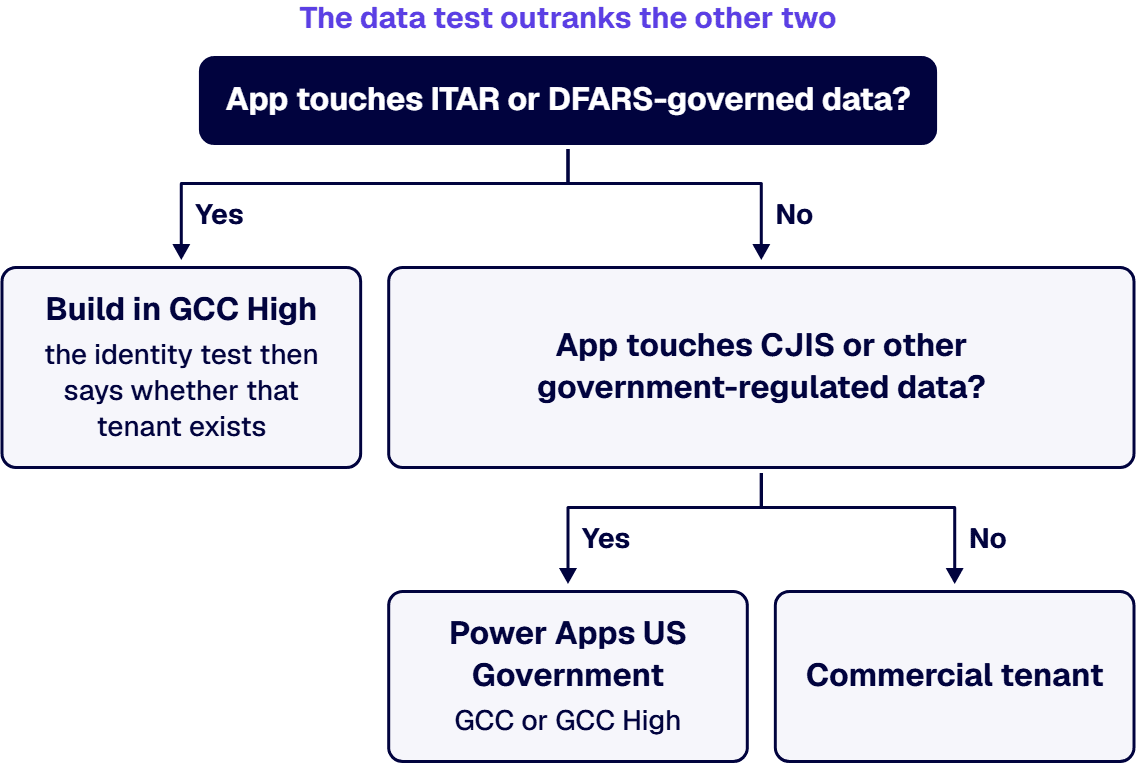
Before you commit an app to GCC High, note that Microsoft states on its Power Apps US Government page that “There are exceptions to the principle of maintaining product functional parity within the US Government clouds,” and links to a downloadable availability summary, Business Applications, Feature Experience Parity Exceptions and Roadmap in US Government clouds, dated May 2026. The document says its information “is updated and published every 4-6 weeks and represents our projections at that time,” so each row below is a planning fact on its read date, not a permanent verdict on the product.
Read on the rendered document on 2026-09-22, the IL4 US GCC High column lists both Power Apps “Push Notifications” rows, the one for Android and the one for IOS, as Not Available, where the IL2 US GCC column lists both as Available. The same column lists “Test Studio” and “Power Apps / Dataverse native integration with Git (ALM)” as Not Available, and lists “Custom Connectors”, under Power Automate, as Available.
Three more differences come from the Power Apps US Government page itself, read on the same date:
If one cloud does not fit every app, placement does not have to be all or nothing, and a split is possible: regulated workloads in GCC High and the rest in a commercial tenant. One assessment for a contractor reached that shape for Microsoft 365, and it concerned the productivity suite, not Power Apps. The assessment recommended partial-variant adoption with email and document storage on GCC High and the remainder of the productivity suite on Commercial; the contractor’s licensing economics improved materially relative to a full GCC High migration. What Power Apps licensing costs in each cloud is set out in What Does Power Apps Licensing Cost in GCC Compared to the Commercial Cloud?. For Power Apps in a split estate, the three tests run down the app inventory one app at a time for the same reason: each app follows its own data and its own users.
If more than a handful of apps are undecided, or the placement has to be defended to a contracting officer, the three tests are worth running as a structured review of the app inventory, because the officer will ask for the reasoning app by app. Where the answer includes moving Microsoft 365 into GCC High, a certified AOS-G supplier provisions the GCC High tenant. We manage GCC High migrations end-to-end: from eligibility validation and licensing coordination with your AOS-G supplier through identity architecture, data migration, security baseline configuration, and post-migration governance. i3solutions plans and runs these migrations for regulated defense organizations, structuring each phase around the compliance evidence assessors expect. Delivery is senior and US-based.
Once GCC High is chosen, Building on Microsoft 365 GCC High: What Changes covers what the build involves, and Hire a Microsoft 365 GCC High Implementation Firm: How to Vet One Before You Commit a Tenant covers choosing a partner. The Power Apps practice is set out on Enterprise Power Apps Development Services for Secure, Governed Application Delivery, within Enterprise Power Platform Development & Implementation Services for Governed Operations.
If you are a defense or federal contractor, build in GCC High when the apps touch ITAR or DFARS-governed data and your organization’s Microsoft 365 tenant is already in GCC High, because according to Microsoft the GCC High option is the one it anticipates for its US Department of Defense contractor customers using Microsoft 365 GCC High, and it requires Microsoft Entra Government identities. Build in a commercial tenant when the apps touch no government-regulated data, since it needs no eligibility validation and avoids the feature exceptions Microsoft documents for its US Government clouds. Decide app by app with three tests: the data test, the identity test and the eligibility test.
Per Microsoft, the GCC High option requires Microsoft Entra Government for customer identities and integrates with Microsoft 365 GCC High deployments; if your Microsoft 365 tenant already runs in GCC High, a GCC High Power Apps environment shares that identity, and if it runs commercial, that identity is not yet in place. Whether your organization or its data is eligible for Power Apps US Government at all is answered in Who Do We Hire to Ensure Federal Compliance in Power Apps Development?
If you are weighing GCC High, read Microsoft’s US Government availability summary, which according to Microsoft is updated every 4-6 weeks; its May 2026 edition, read on 2026-09-22, lists Power Apps push notifications for Android and IOS, Test Studio, and native Git integration for Power Apps and Dataverse as Not Available in GCC High, while the Power Automate row Custom Connectors is listed as Available. Microsoft also states that third-party services an app connects to can sit outside the Power Apps US Government compliance and data protection commitments.
By Michael Branson
When the access rule you have to enforce changes while the person’s job stays the same, no role can express it: start with RBAC for standing access, and add ABAC where project, data classification, time or location has to gate the decision. PAM is a separate control layer for privileged accounts, whichever model governs ordinary access.
An assessor has asked why everyone holding the same job title holds the same access, or why administrative rights sit open with nothing time-boxing them. The question arrives attached to that event, not to curiosity, and the answer has to be a model rather than a product name. Getting it wrong is expensive in both directions. Building attribute-level policy into an estate whose constraints are already expressible as roles slows every access request and buys nothing an auditor scores. Treating privileged access as ordinary access with stricter approval leaves standing administrative rights exactly where an assessment finds them.
What follows is the decision rule, the boundary between identity and access management and privileged access management, the single-sign-on question that gets folded into this one, and the counter-case for leaving your current model alone. Which platform enforces the model, and which vendor you buy it from, are separate decisions that other pages own.
Role-based access control grants access by what someone is: a job function, a position, a group. It maps cleanly onto an organization chart, it is straightforward to review, and it is the shape an assessor is used to reading first. Attribute-based access control grants access by the conditions in play at the moment of the request: which project the record belongs to, how the data is classified, where the request comes from, when it arrives.
The decision rule is not which model is more advanced. It is whether a stable role can state the rule you actually have to enforce.
Start from the constraint, not from the model. Write down the access rule your assessment finding demands, in the words the finding uses. If that rule reduces to a job function, RBAC expresses it and anything richer is machinery you will maintain for no scored benefit. If the rule contains a condition that changes while the person’s job stays the same, a project boundary, a classification level, a time window, a location, then no stable role expresses it and attribute-based policy is what the constraint is asking for.
Three inputs move the answer, and they can disagree:
When two of those disagree, the directory settles it. In practice that looks like a project-code or classification attribute nobody updates when a person moves: the policy keeps granting against the stale value, and the access review export cannot show why the grant was right on the day it was made. Attribute-based policy written against attributes the directory does not reliably hold is not a stronger control than a role; it is an undocumented one. Fix the attribute governance first, or express the rule as a role and accept the coarser grain, and say in the record which of the two you chose and why.
Roles carry standing access, and attribute conditions are layered on the narrow set of decisions a role genuinely cannot express. That hybrid is the answer the constraint test produces whenever the role model already covers the standing grants and the exceptions are still countable. The failure mode is choosing globally when the constraint was local.
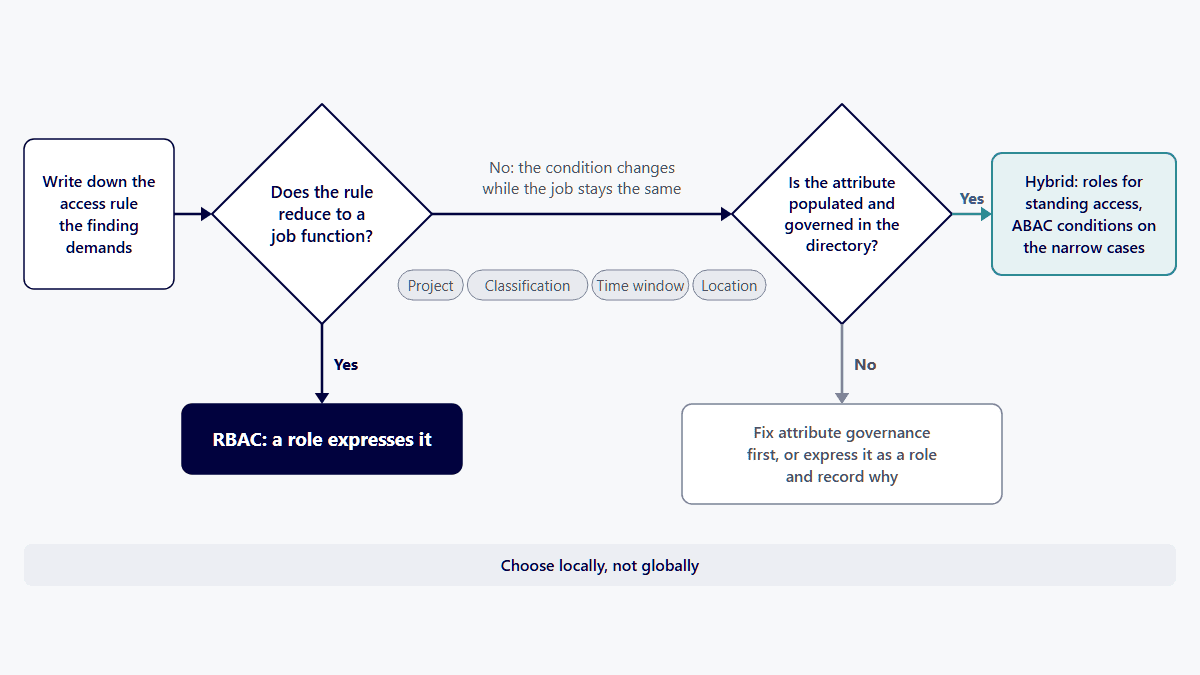
In Azure, attribute-based access control is not a separate system: Microsoft describes Azure ABAC as building on Azure RBAC by adding conditions to role assignments, and for data access those conditions currently reach only blob storage and queue storage data actions. For the rest of Azure authorization, role assignments carry access, so the RBAC-first rule above holds.
Microsoft’s page “What is Azure attribute-based access control (Azure ABAC)?” (last updated May 19, 2025) sets that scope: “Currently, conditions can be added to built-in or custom role assignments that have blob storage or queue storage data actions.” The same page states what a condition does: “A condition filters down permissions granted as a part of the role definition and role assignment.” A condition narrows what a role grants; it adds nothing the role does not already carry.
A condition can also read attributes on the person making the request. Microsoft’s table of condition features lists “Use custom security attributes on a principal in a condition” with the status GA and the date November 2023. In this estate, then, the attributes the directory-settles-it rule above applies to are Microsoft Entra custom security attributes, and a condition written against one that no one maintains is the undocumented control that rule warns about.
This is also where the two halves of this page meet. Microsoft states: “You can also add conditions to eligible role assignments using Microsoft Entra Privileged Identity Management (Microsoft Entra PIM) for Azure resources.” The attribute narrows what a borrowed role reaches; the eligible assignment bounds when it is held.
In an Azure and Microsoft Entra estate, Microsoft’s own documentation puts three practical bounds on this decision: where role assignment conditions work today, how many role assignments a scope can hold, and which license each control needs.
Where conditions work today. Microsoft’s page “Authorize access to Azure Blob Storage using Azure role assignment conditions” (last updated July 8, 2025) states: “Azure attribute-based access control (Azure ABAC) is generally available (GA) for controlling access to Azure Blob Storage, Azure Data Lake Storage, and Azure Queues using request, resource, environment, and principal attributes in both the standard and premium storage account performance tiers.” The same page adds: “Currently, the list blob include request attribute and snapshot request attribute for hierarchical namespace are in PREVIEW.”
What a condition can and cannot do. Microsoft’s page “What is Azure attribute-based access control (Azure ABAC)?” (last updated May 19, 2025) names role assignment volume as one reason to use conditions: “In these scenarios, you could potentially add conditions to use significantly fewer role assignments.” The same page sets the limit of the tool: “You cannot explicitly deny access to specific resources using conditions.” A condition narrows what a role assignment grants; a requirement to block access outright is not met by adding one.
How far roles alone scale. Microsoft’s page “Troubleshoot Azure RBAC limits” (last updated October 15, 2025) states: “Azure supports up to 5000 role assignments per subscription.” One level up, it states: “Azure supports up to 500 role assignments per management group.” Neither ceiling moves: “The 5000 role assignments limit per subscription is fixed and cannot be increased.” The same page notes: “Eligible role assignments and role assignments scheduled in the future do not count towards this limit.” Those two ceilings are the Microsoft-documented point at which adding more role assignments stops being an option and a condition, or a different scope design, has to do the work.
Which license the Entra side needs. Microsoft’s page “Overview of role-based access control in Microsoft Entra ID” (last updated June 1, 2026) states: “Using custom roles require a Microsoft Entra ID P1 license for every user with a custom role assignment.”
Microsoft’s page “Microsoft Entra ID Governance licensing fundamentals” (last updated July 29, 2026) states: “You need either Microsoft Entra ID Governance licenses or Microsoft Entra ID P2 licenses to use PIM and all of its settings.” That is the license behind the eligible assignments described above.
The attributes a condition reads carry their own terms. Microsoft’s page “What are custom security attributes in Microsoft Entra ID?” (last updated October 28, 2024) lists custom security attributes as “Available in all editions of Microsoft Entra ID”, and its limits table reads “Attribute definitions per tenant 500”, for active attributes, and “Attribute values assigned per object 50”. An attribute scheme has to fit inside those numbers before a condition can depend on it.
Attributes are only as reliable as the directory that holds them, so the identity estate underneath matters to this choice. i3solutions regularly delivers Okta to Microsoft Entra ID migrations for enterprises.
If the open question is really which platform enforces this in a hybrid estate, that is a different decision and it is answered at Which IAM Platforms Fit a Complex Hybrid Enterprise: How to Decide. If it is really which vendor, Okta vs Entra ID: What’s the Difference for Enterprise IT? owns that comparison.
Identity and access management answers a standing question: who is entitled to what, and it keeps that entitlement current as staff arrive and move on. Privileged access management answers a temporary one: how administrative privileges are elevated for a single named task, what bounds them, and what they leave in the record.
The boundary is not the size of the permission. It is whether the access is meant to be held or borrowed.
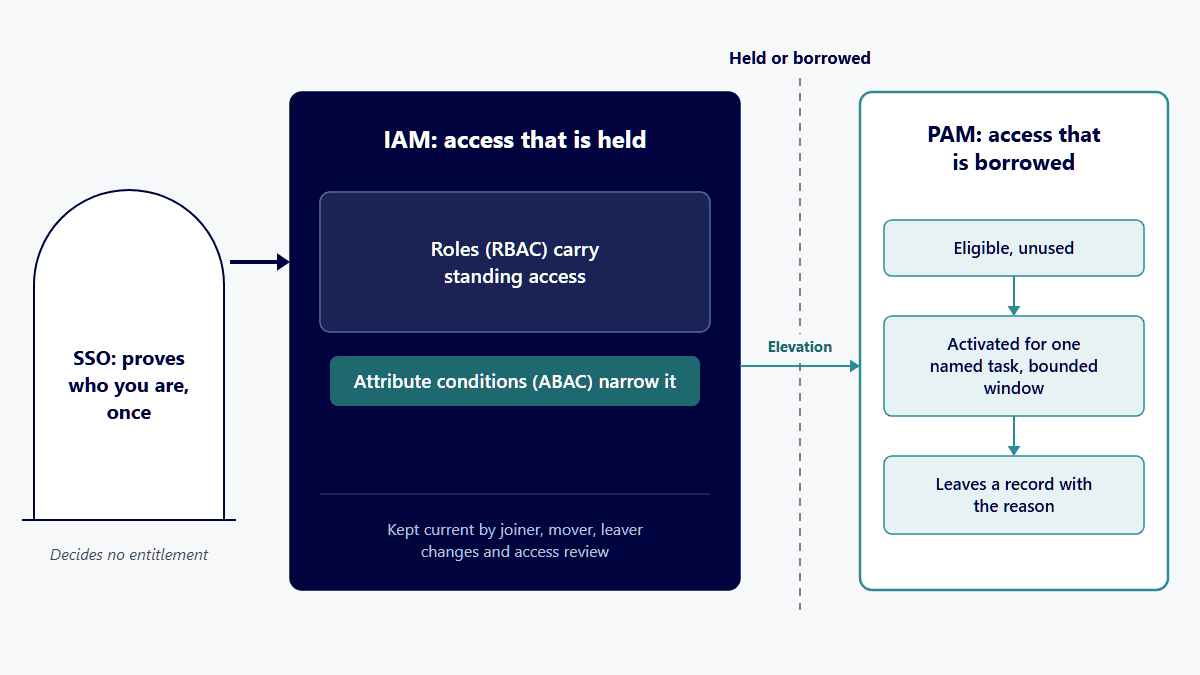
An account that holds administrative rights permanently is an identity and access management object with an unsolved privileged access problem. The same rights, requested against a named task, granted for a bounded window, and logged with the reason, are a privileged access management object. The model underneath does not change that. Roles and attributes describe standing access. Elevation sits outside both.
This is why “we already have RBAC” does not answer a finding about administrative accounts. That finding is not about who holds the rights. It is that the rights are standing, that nothing expires them, and that the audit trail cannot show why any particular use of them happened. A role grants; it neither time-boxes nor records intent.
Practically, the boundary shows up as a small set of questions with directory-level answers: which accounts hold administrative roles today, whether any of those assignments are permanent, whether an elevation leaves a record naming the task, and whether the access review that covers ordinary access covers these accounts on the same cadence. Those answers come out of the directory’s own access review and role assignment exports, not out of a policy document.
Privileged access management tooling is a category, not a required purchase. Some estates satisfy the control with the directory features they already license and a governed process around them; others need dedicated tooling because the privileged population or the session-recording requirement outgrows what the directory does. The criterion is what the directory can already do: if it can bound an elevation to a named task, hold it behind an approval, and leave a record naming the reason, a governed process over the features you already license closes the control. If it cannot, or if a recorded session is an assessment obligation, dedicated tooling is the answer. Draw the boundary first, then run that test.
In Microsoft Entra ID, identity and access management is who holds which role and group assignments, kept current as people join, move and leave, and recertified through access reviews. Privileged access management starts where an administrative role is made eligible rather than active in Privileged Identity Management, so rights are borrowed for a bounded window and leave a record.
Microsoft’s own two assignment types draw the held-or-borrowed line this page draws above. Its page “What is Microsoft Entra Privileged Identity Management?” (last updated April 23, 2026) states: “Eligible assignments require the member of the role to perform an action to use the role.” It also states: “Active assignments don’t require the member to perform any action to use the role.” In Entra terms, then, an administrative role left as an active assignment is the unsolved privileged access problem described above, and the same role assigned as eligible is where privileged access management takes over.
IAM and PAM side by side in a Microsoft Entra estate
What Microsoft Entra ID Governance adds on the identity and access management side is covered at Microsoft Entra ID Governance for Regulated Enterprises: Product Scope, Licensing, and Audit-Defensible Implementation. Whether Privileged Identity Management alone is enough for a given pr
No. Single sign-on is an authentication convenience: it lets one verified session serve many applications, so a person proves who they are once instead of repeatedly. Identity and access management is the surrounding discipline: it settles what the verified person may reach, keeps that settlement current, and produces the record.
Single sign-on sits in front of whatever access model identity and access management enforces. It makes access easier to use and easier to observe, because sign-in activity lands in one log instead of scattering across applications. It decides nothing about entitlement. An estate with excellent single-sign-on coverage and no access review has solved the front door and left the question of who should be inside unanswered.
The practical consequence for the access-model decision: single sign-on coverage does not argue for or against RBAC or ABAC, and it leaves the privileged access question untouched. Administrative access reached through a single-sign-on session is still standing administrative access.
Platform-level coverage of single sign-on, multifactor authentication and access governance on one of the major identity platforms is covered at Authentication & Identity Solutions With Okta.
An assessor working from CMMC, FedRAMP or HIPAA control language will not accept a bare model choice as the answer. Each regime expresses its access expectations in its own control catalog or rule text, in its own vocabulary, at its own level of prescription, and choosing a model does not substitute for reading the control text that applies to you.
What they have in common is the shape of the record an export has to show. Access is given on purpose. The grant can be reviewed. Privileged use is time-limited and leaves a trace. And the whole picture comes out of a system export instead of being reconstructed from memory. A model that produces that record defensibly is defensible. A model that cannot is a finding, however modern it is.
The determination is not ours to make and it is not yours to infer from a page. Which controls apply to your environment, at which level, and what satisfies them for your assessment is a question for your assessor, your contracting officer, or the applicable control text itself. Bring them the model you are proposing and the review export it produces, and let them rule.
The narrower control-catalog question that comes up alongside this one, whether multifactor authentication is required in a given baseline, is answered separately at MFA and NIST SP 800-53: Your Baseline Decides, Not the Catalog.
i3solutions governs identity and access for regulated Microsoft estates with senior, U.S.-based engineers and leaves an audit-defensible record. i3solutions has deep experience implementing identity governance for enterprises in aerospace and defense manufacturing, financial services, and healthcare, including environments with CMMC and ITAR obligations.
One published engagement is available to read in full, including its scope and its own account of what it delivered: Improving IT Operations and Security With Okta.
What is not attested here, said plainly because the alternative is implying it. No time saving, cost figure, adoption percentage, user count, engagement count or delivery duration is claimed here for any of that work. Figures of that kind exist for specific engagements, they belong to those engagements, and attaching one to a different engagement would misstate both. Where a number matters to your decision, ask for it against a named engagement and read it there.
The wider identity and access governance picture, the capability question and not the model decision, sits at Establish Identity as a Governed Enterprise Capability.
The honest counter-case, because both over-corrections are common.
RBAC alone is enough when the constraint is genuinely role-shaped. If access follows job function, if the exceptions are few enough to name, and if the access review over those roles produces a clean export, attribute-based policy adds maintenance and audit surface without changing what an assessor finds. The right move is to keep the model and fix whatever made the finding, which is review cadence or joiner-mover-leaver hygiene rather than the model itself.
Dedicated privileged access management tooling is premature when the privileged population is small enough to govern by process. If every account holding an administrative role can be listed from a single directory export and reviewed one at a time, if the directory already supports bounded elevation with an approval and a record, and if nothing in your assessment requires session recording, then a governed process over existing features closes the control. Buying tooling first produces a product deployment with the original problem intact, because the tool inherits whatever the directory could not tell it about who should hold what.
The condition that flips both of these is scale you cannot enumerate. When nobody can list the privileged accounts from an export, or when the exception list to the role model has stopped being listable, the process answer has already failed and the tooling question is real.
When an assessor asks why everyone with the same job title holds the same access, start with RBAC for standing access and add ABAC only where a role cannot express the constraint, such as a project boundary, a data classification, a time window or a location. The estate ends up hybrid wherever roles carry the bulk of it and only a few decisions need a condition. Where attribute-based policy would run against directory attributes nobody governs, express the rule as a role instead and record why.
A joiner or a leaver changes who holds standing access; an administrator borrowing rights for one task changes nothing about who holds what. Identity and access management owns the first question, deciding who holds standing access to what and keeping that answer current as people join and move on. Privileged access management owns the second, deciding how privileges are elevated for one named task, how long they last, and what record they leave. The boundary is whether access is held or borrowed, not how large the permission is.
The gap shows up when someone asks who is entitled to what and the only answer on hand is that everyone signs in once. Single sign-on lets one verified session serve many applications. Identity and access management decides what the verified person is allowed to reach and produces the access review record behind it. SSO sits in front of the access model; it settles no entitlement question.
No, and the difference surfaces the day an access review is due. Single sign-on solves how often a person proves who they are. Identity and access management solves what that person is entitled to reach, how the entitlement is reviewed, and what an assessor can be shown. An estate with single sign-on everywhere and no access review has answered the first question and not the second.
When the finding is about standing administrative rights rather than about who holds them. A role grants access; it sets no expiry and records no reason for a privileged action. If administrative assignments are permanent, or if the sign-in log cannot show why a privileged action happened, the gap is a privileged access one and no access model closes it.
An assessor will not accept a model name as the answer, so the choice between role-based and attribute-based control does not decide a CMMC or FedRAMP outcome on its own. It turns on whether access is granted deliberately, whether the grant is reviewable, whether privileged use is bounded and recorded, and whether the role assignment export, the access review record and the sign-in log can show all three without reconstruction. Bring the model you propose and those three artifacts to your assessor or contracting officer for that program, and let them make the determination.
An active assignment is in force the moment it is made and stays in force until it is removed or expires, so the person holds the role. An eligible assignment has to be activated before it can be used, for a bounded window and with a justification, so the person borrows the role. Microsoft’s Privileged Identity Management manages the eligible kind, and the difference is where identity and access management ends and privileged access management begins.
Both, and they are one system. In Microsoft’s words, Azure ABAC builds on Azure RBAC by adding role assignment conditions, and as of its May 19, 2025 documentation data access conditions can be added only to role assignments with blob storage or queue storage data actions. For other Azure resources the role assignment is the control, so start with roles and add a condition where storage data needs one.
By Michael Branson
As of September 2026, the way to share CUI with a prime or subcontractor in Microsoft 365 depends first on which Azure cloud the partner’s directory sits in: a GCC High tenant collaborates with another GCC High tenant under same-cloud B2B, but reaches a GCC or commercial partner only after both organizations enable cross-cloud collaboration, and Microsoft’s Cross-cloud settings page states that B2B direct connect is not supported across that boundary. Microsoft’s GCC High service description says its users “will be able to share only with other organizations in GCC-High”, while its cross-cloud settings page lists SharePoint Online sites, documents and files among the resources an invited partner user can reach, so confirm the behavior in your own tenant before committing a partner to a pattern. Under DFARS 252.204-7012, the prime puts the clause in subcontracts whose performance will involve covered defense information and determines whether the information keeps that identity, and any external cloud that stores, processes or transmits it must meet requirements equivalent to the FedRAMP Moderate baseline, so decide where the CUI will live for each partner before choosing any setting.
The short version, each point sourced above to DFARS 252.204-7012 or to Microsoft’s Cross-cloud settings page:
The request arrives from the program office as one line: set up sharing with the subcontractor. The subcontractor turns out to run commercial Microsoft 365, the prime on the same program runs GCC High, and two answers are already circulating: that GCC High can only share with GCC High, and that you just invite them as guests. Both are partly right, and neither tells you where the covered defense information will live, whose cloud will store it, or what the subcontract has to say. Refuse every partner outside GCC High, and the program works around you with email attachments and personal accounts, so the CUI leaves the tenant anyway. Invite everyone as a guest without checking, and files end up in a partner tenant no one has held to the clause. This guide works partner by partner: which pattern fits a partner in GCC High, GCC or commercial Microsoft 365, what Microsoft’s cross-cloud rules require of both tenants, and what the DFARS 252.204-7012 flow-down asks of that choice.
The first failure is choosing a sharing setting before anyone has read the subcontract. Paragraph (m) of DFARS 252.204-7012, clause date May 2024, tells the prime to “Include this clause, including this paragraph (m), in subcontracts, or similar contractual instruments, for operationally critical support, or for which subcontract performance will involve covered defense information, including subcontracts for commercial products or commercial services, without alteration, except to identify the parties.” The same paragraph puts a determination on the prime: “The Contractor shall determine if the information required for subcontractor performance retains its identity as covered defense information and will require protection under this clause, and, if necessary, consult with the Contracting Officer”. Whether a given subcontract is covered is that determination, made by the prime with its counsel and, where the clause says so, the Contracting Officer, and this guide does not make it.
Underneath sits the baseline duty, stated plainly in the clause: “The Contractor shall provide adequate security on all covered contractor information systems.” Its definition of covered defense information includes information described in the CUI Registry that is “Collected, developed, received, transmitted, used, or stored by or on behalf of the contractor in support of the performance of the contract.” Paragraph (b)(2)(ii)(D) then sets the test for any cloud that ends up holding it: “If the Contractor intends to use an external cloud service provider to store, process, or transmit any covered defense information in performance of this contract, the Contractor shall require and ensure that the cloud service provider meets security requirements equivalent to those established by the Government for the Federal Risk and Authorization Management Program (FedRAMP) Moderate baseline”, and the same sentence goes on to require the provider to meet the clause’s paragraphs (c) through (g) on cyber incident reporting and related duties.
On the standard itself, the published clause ties the security requirements to the NIST SP 800-171 version “in effect at the time the solicitation is issued or as authorized by the Contracting Officer”, but DoD’s Class Deviation 2024-O0013, Revision 1 replaces that rule with Revision 2: “The deviation clause requires contractors, who are subject to 252.204-7012, to comply with NIST SP 800-171 Revision 2, instead of the version of NIST SP 800-171 in effect at the time the solicitation is issued or as authorized by the contracting officer.” The memo adds: “This class deviation remains in effect until rescinded.” Every NIST SP 800-171 reference in this guide therefore means Rev. 2, and your contract shows which clause text it carries.
Paragraph (m) also tells the prime to require two things of each subcontractor under the clause. The subcontractor must “Notify the prime Contractor (or next higher-tier subcontractor) when submitting a request to vary from a NIST SP 800-171 security requirement to the Contracting Officer”, which under the deviation is a Rev. 2 requirement. It must also “Provide the incident report number, automatically assigned by DoD, to the prime Contractor (or next higher-tier subcontractor) as soon as practicable, when reporting a cyber incident to DoD”. The eCFR text of the clause defines the reporting clock: “Rapidly report means within 72 hours of discovery of any cyber incident.”
For the framework view of CMMC, NIST SP 800-171 Rev. 2 and the other regimes inside your own tenant, see Microsoft 365 Compliance Consulting: CMMC, HIPAA, SOC 2, and NIST for Regulated Enterprises.
Planning rule: for each partner, write down whether the information it will touch is covered defense information, which is the prime’s determination under the clause, and where that information will be stored, before choosing any collaboration setting.
The label a partner gives you, GCC, GCC High or commercial, does not by itself tell you which rules apply; the Azure cloud behind its directory does. Microsoft’s Planning identity for Azure Government applications page states that “Azure Public subscriptions trust directories in Microsoft Entra Public whereas Azure Government subscriptions trust directories in Microsoft Entra Government.” and that “The Office 365 GCC environment was designed to use Microsoft Entra Public”, so a GCC tenant’s directory sits in the same cloud as a commercial one, and a GCC High tenant’s sits in the government cloud. Moving your own organization’s identity onto Microsoft Entra ID in a government tenant is a separate project, which i3solutions covers in its guide to Entra ID migration for government tenants; this guide stays with partners.
Microsoft’s Meet with people in other Microsoft 365 cloud environments page groups the Microsoft 365 environments by Azure cloud:
Inside one Azure cloud the defaults favor guests. Microsoft’s Cross-tenant access overview states: “By default, B2B collaboration with other Microsoft Entra organizations is enabled, and B2B direct connect is blocked.” The same page states: “These default settings apply to B2B collaboration with other Microsoft Entra tenants in your same Microsoft Azure cloud.” Across clouds the starting point is the reverse, and Microsoft’s Microsoft Entra B2B in government and national clouds page states that “B2B collaboration isn’t enabled by default across national cloud boundaries”. So a GCC tenant and a commercial tenant work with each other under the same-cloud defaults, and the cross-cloud steps below do not apply between them; the question that remains is where the CUI lives.
Microsoft’s Office 365 GCC High and DoD service description states why the government environments exist: “To meet the unique and evolving requirements of the United States Department of Defense, as well as contractors holding or processing DoD controlled unclassified information (CUI) or subject to International Traffic in Arms Regulations (ITAR), Microsoft offers GCC High and DoD environments.” If your own organization’s environment is not settled yet, that is a separate decision, set out in GCC vs GCC High vs Commercial Microsoft 365 for CUI: An Evaluation Matrix.
Planning rule: list every partner with its Microsoft 365 environment and the Azure cloud its directory sits in, as Microsoft’s cross-tenant access overview frames it, because that pair, not the label, sets which of the patterns below is available.
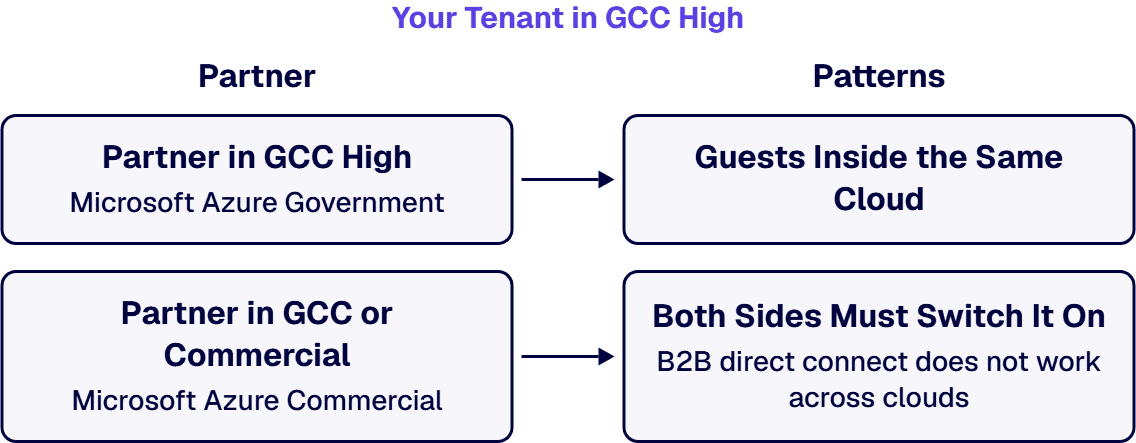
A partner whose tenant is also in GCC High is the case with the fewest moving parts. Microsoft’s Microsoft Entra B2B in government and national clouds page states that within the Azure US Government cloud, B2B collaboration is enabled between tenants where both tenants are within Azure US Government and both support B2B collaboration. It also names the failure case: “If you invite a user outside of these groups (for example, if the user is in a tenant that isn’t part of the Azure US Government cloud or doesn’t yet support B2B collaboration), the invitation fails or the user can’t redeem the invitation.”
The same cloud also allows a second route. Microsoft’s B2B direct connect overview states: “Currently, B2B direct connect capabilities work with Teams shared channels.” It adds: “B2B direct connect is possible only when both organizations allow access to and from the other organization.” Because the same-cloud default blocks direct connect, it is a mutual trust both administrators set up, and Microsoft’s Cross-cloud settings page rules it out between different clouds; for two GCC High tenants, confirm it in your own tenant before planning on it. Running guest access after a move into GCC High, with its admin roles and day-to-day ownership, is a separate decision this guide does not cover.
Planning rule: in the same cloud, decide per partner whether its people come in as invited guests in your tenant or through a mutual direct-connect trust, and scope inbound access to the named groups and resources the subcontract covers.
The guest invitation that works with a GCC High partner fails with a GCC or commercial one until both administrators act. Microsoft’s Microsoft Entra B2B in government and national clouds page states: “To set up B2B collaboration between tenants in different clouds, both tenants need to configure their Microsoft cloud settings to enable collaboration with the other cloud.” It continues: “Then each tenant must configure inbound and outbound cross-tenant access with the tenant in the other cloud.”
Microsoft’s Cross-cloud settings page adds the conditions that trip projects up. It states: “Both organizations must enable collaboration with each other, as described in this article.” It warns: “Once you enable another Microsoft Azure cloud, all B2B collaboration is blocked by default for organizations in that cloud.” It sets the invitation form: “Users from another Microsoft cloud must be invited using their user principal name (UPN).” And it closes one route entirely: “B2B direct connect is not supported for collaboration with Microsoft Entra tenants in a different Microsoft cloud.” So Teams shared channels through direct connect are not available with that partner, and meetings with people in another Microsoft cloud are a separate decision this guide does not cover.
Here Microsoft’s own pages word the sharing boundary differently, and this guide quotes both rather than choose between them. Microsoft’s Office 365 GCC High and DoD service description, last updated August 3, 2026, states: “Users in GCC-High will be able to share only with other organizations in GCC-High.” Microsoft’s Cross-cloud settings page, last updated July 27, 2026, states: “Use B2B collaboration to invite a user in the partner tenant to access resources in your organization, including web line-of-business apps, SaaS apps, and SharePoint Online sites, documents, and files.” Test the behavior in your own tenant, with the partner’s administrator, before committing a partner to a pattern.
Planning rule: for each GCC or commercial partner, agree the change with the partner’s administrator in writing, because Microsoft’s cross-cloud settings do nothing until both tenants make them, and keep the CUI in your GCC High tenant with the partner as an invited guest rather than sending files into the partner’s tenant.
Some partners cannot work as guests: they design and store deliverables in their own tenant, and the covered defense information goes with them. That is the case paragraph (b)(2)(ii)(D) of DFARS 252.204-7012 was written for: the partner’s cloud service provider has to meet security requirements equivalent to the FedRAMP Moderate baseline, and the partner’s own subcontract carries paragraph (m).
Microsoft’s DFARS compliance page states: “The following Microsoft Office 365 cloud services have a FedRAMP moderate authorization and are adequate for DFARS: Office 365 U.S. Government, and Office 365 U.S. Government Defense.” The same page states: “Microsoft can support the requirements applicable to cloud service providers for Azure Government and Office 365 U.S. Government Defense services.” For a contract under the clause the requirement is NIST SP 800-171 Rev. 2, and on that standard Microsoft’s NIST SP 800-171 compliance page states: “Customers are responsible for ensuring that their CUI workloads comply with NIST SP 800-171 guidelines.” The same Microsoft page, read here against Rev. 2, states for commercial Microsoft 365: “Note that Office 365 Commercial isn’t included in the third-party audit conducted for NIST 800-171 and isn’t in scope.”
Those are Microsoft’s statements about its own services, not a finding by this guide about any partner’s tenant. A separate CMMC clause flows its own level requirement down to subcontractors on its own terms, set out in Which CMMC Level Applies to You, and When Does It Start?. If the information is export-controlled technical data, the contract or the export rules can require more than the clause’s cloud test, and this guide does not describe those rules.
Planning rule: where a subcontractor will store or process covered defense information in its own tenant, its subcontract and its own cloud answer paragraph (b)(2)(ii)(D) and paragraph (m) of the clause; where the partner’s tenant is commercial Microsoft 365, keep the information in the prime’s tenant or in a separately authorized environment unless the partner can show its cloud meets the requirement.
The pattern that keeps the most decisions in your own hands is also the one that leaves the partner working in someone else’s tenant. Microsoft’s Cross-cloud settings page describes applying Conditional Access policies to the B2B collaboration user and choosing whether to trust multifactor authentication or device claims from the user’s home tenant, so the host tenant’s own controls govern what the guest can reach. The host tenant’s own cloud still carries the clause’s cloud test. Whether a guest-only partner’s own systems become covered contractor information systems is a question for the prime and, where the clause says so, the Contracting Officer; this guide does not answer it.
Some programs use a separately authorized environment instead, run by the prime or by a third party. Judge any such environment against the clause on four questions: who holds the covered defense information, whether the environment meets the clause’s cloud test, how incidents are reported under paragraphs (c) through (g) and how the report number reaches the prime, and who administers the partner’s access. Stopping your own users from signing in to other organizations’ tenants is a separate control and a separate decision.
Planning rule: prefer one tenant that holds the covered defense information for the program, with partners as scoped guests, and treat any other environment as a second system that has to meet the clause on its own.
This guide assumes the information is covered defense information under DFARS 252.204-7012 and that the question is where it lives. Start somewhere else when:
Hold the design to these criteria, each tied to DFARS 252.204-7012 or to Microsoft’s Cross-cloud settings page:
No provider, product or supplier is named or compared here, because the criteria are the answer. An i3solutions engagement does not produce managed-service ownership, a replacement for the internal team, open-ended scope expansion, or vendor lock-in.
i3solutions maps governance to named control families, enforces it in the platform through Entra ID, Purview, and Azure Policy, and evidences it continuously rather than reconstructing it at audit. For partner collaboration on CUI, the work is delivered as a project, with specialists embedded in your team where it needs them: mapping each partner’s cloud and access, configuring your tenant’s cross-tenant access, Microsoft cloud settings, sharing and Conditional Access for the chosen patterns, and evidencing the result against your control families. i3solutions engineers work inside the client’s own tenant as Microsoft Entra B2B guest accounts with scoped Dataverse security roles, not from an i3solutions-owned tenant.
Where the program first needs a GCC High tenant of its own, the move is a project in its own right. We manage GCC High migrations end-to-end: from eligibility validation and licensing coordination with your AOS-G supplier through identity architecture, data migration, security baseline configuration, and post-migration governance.
i3solutions is an SBA certified small business providing technical and professional services to US Federal Agencies, the DoD and the private sector. i3solutions has been a Microsoft Partner with 30 years of enterprise technology delivery experience and has delivered 1,500+ Microsoft engagements across aerospace and defense, financial services, and health sciences. Delivery is senior and US-based. This work sits within Embedding Governance into How the Enterprise Operates and Scales.
Only after both organizations act, and Microsoft’s pages word the limit differently. According to Microsoft Learn, B2B collaboration between tenants in different clouds needs both tenants to configure their Microsoft cloud settings and then inbound and outbound cross-tenant access, and B2B direct connect is not supported across clouds. According to Microsoft Learn, the GCC High service description says users “will be able to share only with other organizations in GCC-High”, while the cross-cloud settings page lists SharePoint Online sites, documents and files among the resources an invited partner user can reach, so test the behavior in your own tenant. According to DFARS 252.204-7012, any external cloud that stores, processes or transmits covered defense information must meet security requirements equivalent to the FedRAMP Moderate baseline, which is the question to answer before files go to the partner’s tenant.
Yes. According to Microsoft Learn, the Office 365 GCC environment was designed to use Microsoft Entra Public, and Microsoft groups Commercial and GCC in Microsoft Azure Commercial, while GCC High and DoD sit in Microsoft Azure Government. According to Microsoft Learn, the default cross-tenant access settings apply to B2B collaboration with tenants in the same Microsoft Azure cloud, so a GCC tenant and a commercial tenant work under the same-cloud defaults.
Not to every one; the clause sets the conditions. According to DFARS 252.204-7012 paragraph (m), the clause goes into subcontracts or similar contractual instruments for operationally critical support, or for which subcontract performance will involve covered defense information, without alteration except to identify the parties. According to the same paragraph, the prime determines whether the information required for subcontractor performance retains its identity as covered defense information and, if necessary, consults the Contracting Officer, so whether a given subcontract is covered is the prime’s determination, not this guide’s.
Two things, both up the chain. According to DFARS 252.204-7012 paragraph (m), the subcontractor notifies the prime Contractor (or next higher-tier subcontractor) when it submits a request to the Contracting Officer to vary from a NIST SP 800-171 security requirement, which under DoD’s class deviation is a Rev. 2 requirement, and provides the incident report number assigned by DoD to the prime as soon as practicable when it reports a cyber incident to DoD. According to the clause’s definitions, rapidly report means within 72 hours of discovery of any cyber incident.
Not through B2B direct connect. According to Microsoft Learn, B2B direct connect capabilities currently work with Teams shared channels, and B2B direct connect is not supported for collaboration with Microsoft Entra tenants in a different Microsoft cloud. Meetings with people in another Microsoft cloud are a separate decision this guide does not cover.
Microsoft’s statement names two government services, and it sits beside two caveats. According to Microsoft Learn, Microsoft’s DFARS compliance page states: “The following Microsoft Office 365 cloud services have a FedRAMP moderate authorization and are adequate for DFARS: Office 365 U.S. Government, and Office 365 U.S. Government Defense.” According to Microsoft Learn, the same page says Microsoft can support the requirements applicable to cloud service providers for Azure Government and Office 365 U.S. Government Defense services. According to Microsoft Learn, Microsoft’s NIST SP 800-171 page, read here against Rev. 2 for a contract under the clause, states: “Customers are responsible for ensuring that their CUI workloads comply with NIST SP 800-171 guidelines.”
By Michael Branson
As of September 2026, Missouri’s Insurance Data Security Act (RSMo 375.1400 to 375.1427) gives every licensee until January 1, 2027 to implement section 375.1405’s written information security program, and a separate year, until January 1, 2028, to extend the same due diligence to third-party service providers, according to section 375.1427 of the Revised Statutes of Missouri. Most of the program’s required security measures map onto capability already in a Microsoft 365 tenant: Entra ID Conditional Access and multifactor authentication for access controls, Purview for encryption, audit trails and retention, and Defender for monitoring and incident detection, though none of it meets the statute’s specifics by default. The third-party service provider duty due January 1, 2028 is a documented vendor-selection and oversight process; the tenant can limit and monitor what a vendor’s account reaches, but no Microsoft product vets a vendor’s own security program, and this guide names criteria, never a product.
Every fact below is drawn from section 375.1405 and section 375.1427 of the Revised Statutes of Missouri and Microsoft’s overview of auditing solutions in Microsoft Purview, all re-read on drafting day:
Counsel has told you the company is a licensee under Missouri’s Act and that the program has to be running on January 1, 2027. The part most tenants get backwards is which duty is soft and which is hard. The statute lists multifactor authentication as a control the program may include, according to section 375.1405, while an insurer domiciled in Missouri has to keep five years of records behind its annual certification, and no Microsoft 365 audit default reaches five years. This guide maps the statute’s own words onto the tenant, marks where Microsoft’s defaults fall short, and sets out the order of work across both dates.
Before anyone scopes the tenant, the first decision is whether the entity is inside the Act at all, and the statute and the Department answer that in different places. The Act names itself plainly: section 375.1400 gives sections 375.1400 to 375.1427 the name Insurance Data Security Act and states that they “establish the exclusive state standards applicable to licensees for data security, the investigation of a cybersecurity event as defined in section 375.1402, and notification to the director.”
The definition of who it binds is broad. According to section 375.1402, a licensee is “any person licensed, authorized to operate, or registered, or required to be licensed, authorized, or registered under the insurance laws of this state, but shall not include a purchasing group or a risk retention group chartered and licensed in a state other than this state or a licensee that is acting as an assuming insurer that is domiciled in another state or jurisdiction.”
Missouri’s regulator has narrowed that in guidance. According to the Missouri Department of Commerce and Insurance in Insurance Bulletin 26-01, issued January 5, 2026, the Department does not consider the following to be licensees under the Act, in a list it describes as nonexhaustive: health services corporations, health maintenance organizations and prepaid dental plan corporations under chapter 354; captive insurance companies and special purpose life insurance captives under chapter 379; Missouri mutual insurance companies under chapter 380; associations licensed under chapter 383; and certain providers registered under chapter 385. The Department’s reasoning, in the same bulletin, is that the laws governing those entities provide that general insurance laws do not apply to them unless certain requirements are met. The bulletin states that it does not have the force of law, is not an evaluation of any specific facts, and is not binding on the Department.
The Act is already in force. According to section 375.1427, the sections took effect on January 1, 2026; January 1, 2027 and January 1, 2028 are implementation dates on top of a statute that is already law, not the Act’s own start date. Missouri’s Act is based on NAIC Model Law 668, and the Department’s Bulletin 26-01 names Alaska, Connecticut and Kentucky as other states that have implemented the same model law, in guidance the bulletin itself states is not binding.
Whether your own entity is a licensee, or sits on the Department’s list, is a question for counsel and the Department, not a determination this guide makes.
The failure mode here is a program written to the statute’s headings and configured to the tenant’s defaults, with no line joining the two. The duty itself is broad and risk-based: according to section 375.1405, “each licensee shall develop, implement, and maintain a comprehensive written information security program that is based on the licensee’s risk assessment and that contains administrative, technical, and physical safeguards for the protection of nonpublic information and the licensee’s information system.” The program is the licensee’s, built on its own risk assessment; no Microsoft product is certified to it.
A risk assessment written once and filed will not carry the program: the duty recurs. Under section 375.1405, the licensee must identify foreseeable threats, “including the security of information systems and nonpublic information that are accessible to, or held by, third-party service providers,” and must “no less than annually, assess the effectiveness of the safeguards’ key controls, systems, and procedures.” The same section asks the program to “Define and periodically reevaluate a schedule for retention of nonpublic information and a mechanism for its destruction when no longer needed,” which is the job Microsoft Purview Data Lifecycle Management is built for: according to Microsoft’s data lifecycle management overview, it “provides you with tools and capabilities to retain the content that you need to keep, and delete the content that you don’t.”
Subsection 4’s security measures are where the tenant does most of the work, and where the statute’s own wording matters most. Read each against the matching Microsoft capability:
Encryption matters for more than the control itself. According to section 375.1402, the term cybersecurity event “does not include the unauthorized acquisition of encrypted, nonpublic information if the encryption, process, or key is not also acquired, released, or used without authorization.” The condition travels with the exclusion: an encrypted laptop lost together with its key does not get it.
Two duties sit outside the tenant entirely. If the licensee has a board, section 375.1405 requires executive management to report to it in writing, at least annually, on the program’s status and on material matters including “third-party service provider arrangements, results of testing, cybersecurity events or violations and management’s responses thereto.” And the licensee must “monitor, evaluate, and adjust, as appropriate, the information security program” as technology, threats and its own business arrangements change. The tenant supplies the evidence for both; the reporting and the judgment are the licensee’s.
The gap that surfaces too late is the audit log. Missouri’s Act requires each insurer domiciled in the state to keep, for five years, the records supporting its annual certification: according to section 375.1405, “Each insurer shall maintain for examination by the department all records, schedules, and data supporting this certificate for a period of five years.” Microsoft Purview Audit, by default, keeps far less. Microsoft’s overview of auditing solutions in Microsoft Purview lists “180-day audit log retention” for Audit (Standard), “Up to 1-year audit log retention” for Audit (Premium), and “10-year audit log retention” only where “a user must be assigned a 10-Year Audit Log Retention add-on license to retain their audit records for 10 years.”
One further limit applies even with the add-on. The same Microsoft page states that “Audit records generated by non-user entities (such as service principal actions, system events, and application activities) are retained for a fixed period of one year,” and that “This retention period isn’t configurable and custom audit log retention policies don’t apply to these records.” Activity by an application, including a connected vendor’s application, is exactly the kind of record a five-year trail needs, and the audit log alone will not hold it for the five years section 375.1405 asks of a domiciled insurer.
The second default to check is the license behind access control. According to Microsoft’s Conditional Access overview, “Using this feature requires Microsoft Entra ID P1 licenses,” and “Risk-based Conditional Access policies (sign-in risk and user risk) require Microsoft Entra ID Protection, which is a Microsoft Entra ID P2 feature.” Where neither license is in place, the same page states that “Security defaults help protect against identity-related attacks and are available for all customers,” which is a baseline, not the risk-based control a program document can claim.
Two decisions follow for the five-year duty in section 375.1405. Confirm the Entra ID license tier before the program document assumes a risk-based access control exists. Then decide, before the first certification is due, how five years of supporting records will be kept: the add-on license for the users who need it, and a separate, retained export of the records the audit log will not hold for five years, including application and service principal activity. We recommend naming an owner for each decision before drafting begins: the IT Director or the tenant’s security lead confirms the license tier against the licenses actually assigned in the tenant and designs the retention, and compliance, with counsel, signs off that design before the program document relies on it.
When the annual certification is signed, the signature has to meet the evidence, and the duty belongs to a narrower group than the rest of the Act. According to section 375.1405, “Annually by April fifteenth, each insurer domiciled in this state shall submit to the director a written statement certifying that the insurer is in compliance with the requirements set forth in this section.” That subsection binds each insurer domiciled in Missouri, while the program duties bind every licensee; a licensee domiciled elsewhere still owes the program. The same subsection adds that where an insurer “has identified areas, systems, or processes that require material improvement, updating, or redesign, the insurer shall document the identification and the remedial efforts planned and underway to address such areas, systems, or processes.”
It is easy to assume the certification waits for the second date; it rides the first. It sits in section 375.1405 itself, which section 375.1427 gives licensees until January 1, 2027 to implement; only subsection 6 carries the January 1, 2028 date. The statute states the annual April 15 rule and does not name the first certification’s due date in words, and neither does the Department’s bulletin, so confirm the first due date with the Department rather than assuming it.
In practice the board report and the certification draw on the same evidence: the risk assessment, the annual test of key controls, the audit trail, the incident record and the third-party arrangements. Build that evidence trail as a January 1, 2027 deliverable, so the first certification has records behind it that can be kept for the five years section 375.1405 requires.
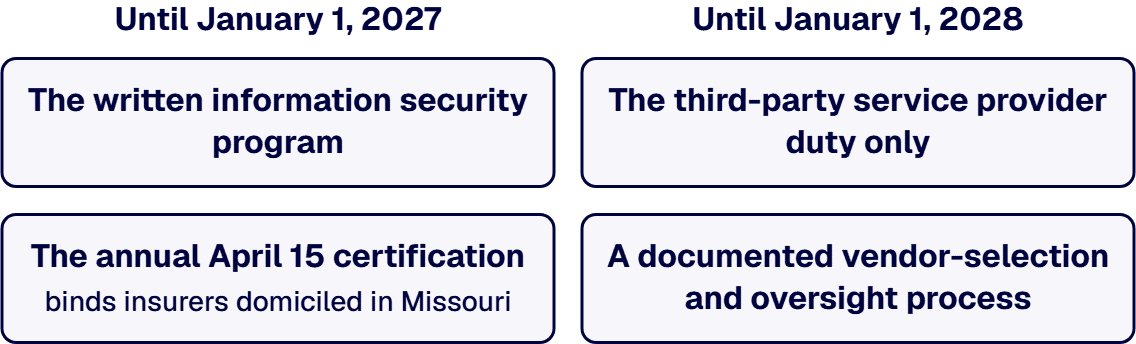
A cybersecurity event is the wrong day to discover the plan has no owner for external communications. According to section 375.1405, each licensee “shall establish a written incident response plan designed to promptly respond to, and recover from, any cybersecurity event,” and the plan must address these areas:
Detection is where the tenant carries real weight. Microsoft’s Defender XDR overview describes it as “a unified pre- and post-breach enterprise defense suite that natively coordinates detection, prevention, investigation, and response across endpoints, identities, email, and applications,” and states that “Microsoft Defender takes automatic action to prevent or stop the attack and self-heal affected mailboxes, endpoints, and user identities.” That is Microsoft’s documented capability for the statute’s monitoring and response duties. The plan itself, its roles and its decision authority, is written and owned by the licensee.
When a deadline sits a year further out, it is the duty that gets deferred, and this is the one no tenant setting completes. Section 375.1405 states it in two sentences: “(1) A licensee shall exercise due diligence in selecting its third-party service provider. (2) A licensee shall require a third-party service provider to implement appropriate administrative, technical, and physical measures to protect and secure the information systems and nonpublic information that are accessible to, or held by, the third-party service provider.” Section 375.1427 gives licensees until January 1, 2028 to implement that subsection.
Start with who counts. According to section 375.1402, a third-party service provider is “a person, not otherwise defined as a licensee, that contracts with a licensee to maintain, process, store, or otherwise is permitted access to nonpublic information through its provision of services to the licensee.” A claims processor, a policy administration service or an actuarial modeling service that reaches nonpublic information fits that description; the inventory comes from contracts and data flows, not from a product catalog.
Then separate the two halves of the duty, because they are answered in different places:
The tenant can show what a provider’s account reached. It cannot show that the provider was diligently selected, or what the provider’s own security program contains; those are the licensee’s governance and contract records. One related duty is already in force and is not covered here: according to the Department’s Bulletin 26-01, which states it is not binding and evaluates no specific facts, a cybersecurity event involving a licensee’s third-party service provider also requires notification to the Director under section 375.1410.
If the work starts with tenant settings, the parts with lead time come last: the certification’s records and the license decisions carry configuration lead time, and the vendor process carries contract time. This is the order we recommend, not a sequence the statute or Microsoft publishes, set against the dates in section 375.1427:
Not every reader needs this work in full, and it is worth checking before starting it. If counsel confirms the entity sits on the Department’s own not-a-licensee list, the Act’s implementation duties do not bind it; confirm that with counsel and the Department, not from this page alone. If the company is licensed in Missouri but domiciled elsewhere, the program duties still apply and the annual certification in subsection 9 does not. If the company is also regulated by the New York Department of Financial Services, or also runs California’s cybersecurity audit, those are separate certifications on separate schedules under separate regimes, and neither substitutes for Missouri’s own. Alaska’s Insurance Data Security Act is a separate statute with its own duties and dates, and this guide does not cover it. If the program is already built on ISO 27001 or the NIST Cybersecurity Framework, the gaps most likely to remain are the Missouri specifics in section 375.1405: the portable-device encryption scope and five years of certification records. And if the real question is which third-party risk product to buy for subsection 6, that is a product decision this guide does not make; the statute asks for due diligence and contract terms, not a purchased score.
Whoever does this work with you, inside the organization or outside it, hold it to these criteria, drawn from section 375.1405 and stated as what they should be able to show you:
No vendor-risk product, rating service or assessor is named or compared in that work.
i3solutions plans and runs governed Azure and Microsoft 365 migrations with senior, U.S.-based engineers. For Missouri’s Act, that means a project, with embedded specialists where your team needs them, that maps each program subsection to a named tenant control, closes the configuration gaps, builds the incident response plan and the certification evidence trail, and designs the vendor-selection process for the later date. i3solutions maps governance to named control families, enforces it in the platform through Entra ID, Purview, and Azure Policy, and evidences it continuously rather than reconstructing it at audit. i3solutions governs identity and access for regulated Microsoft estates with senior, U.S.-based engineers and leaves an audit-defensible record. i3solutions has been a Microsoft Partner with 30 years of enterprise technology delivery experience and has delivered 1,500+ Microsoft engagements across aerospace and defense, financial services, and health sciences.
The vendor-selection process is designed with your team and handed to it; the diligence on each provider, and the annual certification, stay with the licensee. An i3solutions engagement does not produce managed-service ownership, a replacement for the internal team, open-ended scope expansion, or vendor lock-in.
According to section 375.1427 of the Revised Statutes of Missouri, licensees have until January 1, 2027 to implement the information security program in section 375.1405, and only the third-party service provider duty in subsection 6 has until January 1, 2028. According to the same section, the Act itself took effect on January 1, 2026.
According to section 375.1427, January 1, 2028 is the date for subsection 6 of section 375.1405: a licensee must exercise due diligence in selecting its third-party service providers and must require them to implement appropriate administrative, technical, and physical measures to protect the systems and nonpublic information they can reach or hold. It is a documented selection and contract process the licensee runs, not a Microsoft feature.
According to section 375.1405, the program is to utilize effective controls, which may include multifactor authentication procedures for any individual accessing nonpublic information, so Missouri’s statute lists multifactor authentication as one control the program may include rather than an unconditional mandate. According to Microsoft Learn, Microsoft Entra multifactor authentication works by requiring two or more authentication methods.
Only if the key was not compromised as well. According to section 375.1402, a cybersecurity event does not include the unauthorized acquisition of encrypted nonpublic information if the encryption, process, or key is not also acquired, released, or used without authorization, so an encrypted laptop lost together with its key does not get that exclusion.
According to section 375.1402, a licensee is any person licensed, authorized to operate, or registered, or required to be, under Missouri’s insurance laws, excluding certain out-of-state purchasing groups, risk retention groups and assuming insurers. According to the Department’s Bulletin 26-01, which states it is not binding and evaluates no specific facts, the Department also does not consider health maintenance organizations and other chapter 354 entities, captive insurers, Missouri mutual insurance companies, chapter 383 associations and certain chapter 385 providers to be licensees. Whether a specific entity is a licensee is a question for counsel and the Department.
According to section 375.1427, the third-party service provider duty applies from January 1, 2028, and it reaches any provider that contracts with the licensee to maintain, process or store nonpublic information or is otherwise permitted access to it, as section 375.1402 defines the term. The statute asks for due diligence in selecting each such provider and a requirement that it implement appropriate security measures: a documented selection process and contractual security terms, not a named product.
By Michael Branson
As of September 2026, Alaska’s Insurance Data Security Act (AS 21.23.240 to 21.23.399) has required a licensee to maintain a written information security program since January 1, 2026, but its third-party service provider duty, AS 21.23.260(c)(7) and (c)(8), does not take effect until a full year later, on January 1, 2027, according to Alaska’s enacted Insurance Data Security Act text. Selecting a third-party service provider with due diligence is an unconditional duty, while requiring that provider to implement its own security measures applies only “where appropriate,” and neither duty is met by a Microsoft feature: both are a documented process the licensee runs. The tenant’s own controls, Entra External ID and B2B collaboration, Conditional Access, Purview DLP and Defender for Cloud Apps app discovery, can show what a connected provider’s account is limited to and what the tenant can see of it, but none of them proves the provider was diligently selected, and this guide names criteria, never a product.
If you keep one list from this guide, keep this one; each point restates the body and is tied to Alaska’s enacted Insurance Data Security Act text or the Microsoft Learn pages cited above:
Most of what this Act asks of an Alaska-licensed insurer has been in force since January 1, 2026, according to Alaska’s enacted Insurance Data Security Act text. The program exists, the board report runs, and a domestic insurer’s February 15 certification duty already applies. The part that is not yet in force is the one most tenants have never written a process for: choosing third-party service providers with documented due diligence, and deciding which of them must be required to protect the data they reach.
If your program has been running since January, the date that still decides this year’s work is the second one. The enacting act split its start dates: its section 10 makes AS 21.23.250 and most of AS 21.23.260, including the program, its security measures, board reporting and the annual certification, effective January 1, 2026, and its section 11 sets a later date for AS 21.23.260(c)(7) and (8), according to Alaska’s enacted Insurance Data Security Act text. The Alaska Statutes print “[Effective January 1, 2027.]” at the start of each of those two paragraphs. No later date for these duties appears in Alaska’s law.
The program duty itself reads, in the Alaska Statutes: “A licensee shall develop, implement, and maintain a comprehensive written information security program based on the licensee’s risk assessment conducted under AS 21.23.250(a).” The same subsection lets a licensee designate “one or more employees, an outside vendor, or a third-party service provider” to be responsible for that program, according to Alaska’s enacted Insurance Data Security Act text. That is one reason the selection duty matters: the provider you must select with due diligence can be the one running the program.
The Act’s definitions sit at AS 21.23.399. A “licensee” is a person “licensed, authorized to operate, or registered, or required to be licensed, authorized, or registered, under this title,” and the definition excludes “a purchasing group or a risk retention group chartered and licensed in a state other than this state or a licensee that is acting as an assuming insurer that is domiciled in another state or jurisdiction,” according to Alaska’s enacted Insurance Data Security Act text. Whether your own entity is a licensee, or sits inside one of those exclusions or the applicability exceptions in AS 21.23.300, is a question for counsel and the Alaska Division of Insurance. This guide relies on the statute’s own words and on no Division guidance.
The failure mode here is treating the two clauses as one obligation carrying one condition. Paragraph (7) requires a licensee to “exercise due diligence in selecting a third-party service provider” and carries no qualifier, according to Alaska’s enacted Insurance Data Security Act text. Paragraph (8) opens differently: “where appropriate, require a third-party service provider to implement appropriate administrative, technical, and physical measures to protect and secure the information systems and nonpublic information that are accessible to, or held by, the third-party service provider.”
So there are two decisions, not one. Selecting diligently is not optional for any provider the definition reaches. Requiring a provider to implement specific measures depends on the licensee’s own judgment of where that is appropriate, and that judgment is itself something to write down. The statute defines the provider it means: a “third-party service provider” is “a person that is not a licensee that, through a contract with a licensee, is permitted access to and maintains, processes, or stores nonpublic information through its provision of services to the licensee,” according to Alaska’s enacted Insurance Data Security Act text.
The same permissive shape appears one level up, in the security measures list. Paragraph (1) tells a licensee to “implement the following security measures if the licensee determines that the security measure is appropriate,” and its access-control item says “the controls may include multi-factor authentication procedures,” according to Alaska’s enacted Insurance Data Security Act text. Alaska’s text therefore does not make multifactor authentication an unconditional mandate: the measure is subject first to the licensee’s own appropriateness determination and then to “may include.” Neither condition should be dropped when the point is repeated in a policy, a board report or a vendor contract.
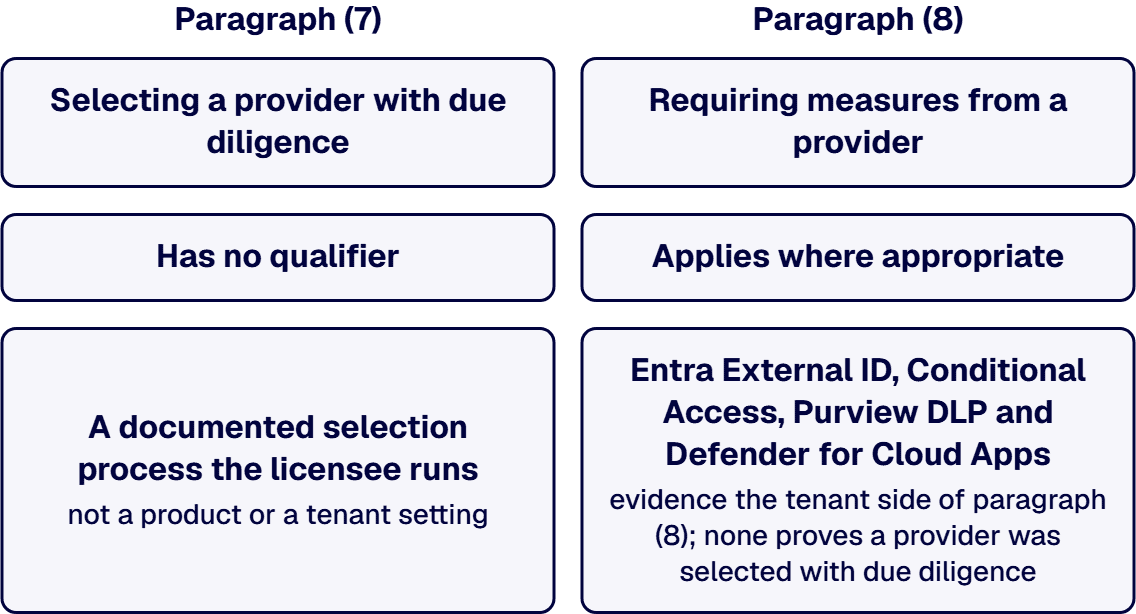
Before you build a measures-requirement process for a provider, check whether that provider can read the data at all. Paragraph (8) ends with its own carve-out: “for purposes of this paragraph, encrypted nonpublic information is not considered accessible to, or held by, the third-party service provider if the associated protective process or key necessary to assign meaning to the nonpublic information is not within the possession of the third-party service provider,” according to Alaska’s enacted Insurance Data Security Act text.
The condition is key custody, not the mere presence of encryption. Microsoft’s Encryption in Microsoft 365 page states that “your data is encrypted at rest and in transit, using several strong encryption protocols,” and that is true of the platform broadly; it does not, by itself, answer who holds the key or the protective process relative to a particular provider. That is a configuration and key-management fact about each relationship, and it has to be established and written down relationship by relationship, never assumed from default encryption.
This guide’s own decision rule, a recommendation and not the statute’s wording: for each provider that reaches nonpublic information, record whether the data it touches is encrypted with the key kept outside that provider’s possession. Where it is, record that finding as the paragraph (8) answer for that relationship rather than building a separate measures-requirement process for it. The carve-out is written “for purposes of this paragraph,” so it narrows paragraph (8) only; the paragraph (7) duty to select that provider with due diligence still applies, according to Alaska’s enacted Insurance Data Security Act text.
The trap, when the Division of Insurance asks how a provider was chosen, is a folder of tenant screenshots offered as the answer. The tenant can show how a connected provider’s access is limited and what the tenant can see of it, which is evidence for the technical side of paragraph (8). It cannot show that the provider was selected with due diligence under paragraph (7), because selection is a process record, not a configuration.
Guest access is the first control point. Microsoft Learn’s overview of Microsoft Entra External ID states: “If you want to enable your employees to collaborate with business partners and guests, use B2B collaboration in External ID.” The same page describes how you “Determine the level of access that guests have to the Microsoft Entra tenant that contains your employees and organizational resources” in the workforce tenant. The access level a provider’s guest accounts receive is a tenant decision you can evidence; it says nothing about the provider’s own security program.
Conditional Access governs what those accounts must do to get in. Microsoft Learn’s Conditional Access overview states that “Conditional Access is Microsoft’s Zero Trust policy engine taking signals from various sources into account when enforcing policy decisions,” and gives an example rather than a default: “If a user wants to access an application or service like Microsoft 365, then they must perform multifactor authentication to gain access.” Licensing is a condition to confirm for your tenant: the same page states that “Using this feature requires Microsoft Entra ID P1 licenses,” that risk-based policies rely on a Microsoft Entra ID P2 feature, and that “Security defaults help protect against identity-related attacks and are available for all customers.”
Purview DLP limits what leaves. Microsoft Learn’s data loss prevention overview states: “In Microsoft Purview, you implement data loss prevention by defining and applying DLP policies.” According to that page, a DLP policy can help “identify, monitor, and automatically protect sensitive” items, and for data at rest “sensitive items can be locked and moved to a secure quarantine location.” That constrains what a connected provider’s account can take out of the tenant, another piece of paragraph (8) evidence.
Defender for Cloud Apps answers a narrower question: which cloud apps and third-party apps are in use at all. Microsoft Learn’s Defender for Cloud Apps overview states, in its section on discovering SaaS applications: “Defender for Cloud Apps detects all your cloud services, assigns each a risk ranking, and also identifies all the users and third-party apps able to sign in.” That is a discovery list, useful for finding providers your selection record has not yet covered; it is not an assessment of any provider’s own program.
Purview Compliance Manager, described on Microsoft Learn’s Compliance Manager page as a solution that “helps you automatically assess and manage compliance across your multicloud environment,” assesses your own Microsoft cloud configuration. It can be one place to keep your own evidence of the selection and measures process; it does not vet or score another company’s security program, and this guide does not present it as doing so.
If your board has never seen a line about third-party service provider arrangements, that gap is older than January 1, 2027. The board-reporting subsection, effective since January 1, 2026, requires executive management to report in writing at least once a year on “material matters related to the information security program, including risk assessment, risk management and control decisions, third-party service provider arrangements, results of testing,” among other items, according to Alaska’s enacted Insurance Data Security Act text and the Alaska Statutes.
The certification is narrower in who it binds. Subsection (f) begins “Each licensee who is an insurer domiciled in this state shall” and requires that insurer to “submit to the director a written statement by February 15 of each year certifying that the insurer is in compliance with the requirements under AS 21.23.250 and this section”, to keep the supporting records available to the director for five years, and to document areas needing material improvement with the remedial efforts planned and underway, according to Alaska’s enacted Insurance Data Security Act text and the Alaska Statutes. The words “this section” include paragraphs (7) and (8), which apply from January 1, 2027, while the certification duty itself has applied since January 1, 2026. Which February 15 statement is the first that must reflect paragraphs (7) and (8) is not stated in the statute’s text; confirm it with the Alaska Division of Insurance.
Some readers should stop here and take a different question first, each case read against Alaska’s enacted Insurance Data Security Act text:
Before you assign the work to anyone, internal or external, hold them to evidence rather than assurances, and to the statute’s own two clauses in Alaska’s enacted Insurance Data Security Act text:
i3solutions plans and runs governed Azure and Microsoft 365 migrations with senior, U.S.-based engineers. For this duty, the work is a project, with embedded specialists where your team needs them: document the provider selection process and its record, map the tenant-side paragraph (8) evidence across Entra External ID, Conditional Access, Purview DLP, Compliance Manager and Defender for Cloud Apps discovery, and resolve the encryption and key carve-out relationship by relationship. i3solutions maps governance to named control families, enforces it in the platform through Entra ID, Purview, and Azure Policy, and evidences it continuously rather than reconstructing it at audit. i3solutions governs identity and access for regulated Microsoft estates with senior, U.S.-based engineers and leaves an audit-defensible record. i3solutions has been a Microsoft Partner with 30 years of enterprise technology delivery experience and has delivered 1,500+ Microsoft engagements across aerospace and defense, financial services, and health sciences.
The selection decisions, the provider relationships and the certification stay yours. i3solutions does not assess or vouch for a specific provider’s own security program, does not sign or prepare the annual certification statement for you, and does not run your provider selection as an ongoing service. An i3solutions engagement does not produce managed-service ownership, a replacement for the internal team, open-ended scope expansion, or vendor lock-in.
If your company is licensed in Alaska and has been running its information security program since January 1, 2026, start by listing every third-party service provider that reaches nonpublic information, record for each one whether the encryption and key carve-out applies, and write down the selection process you will apply to all of them before January 1, 2027, according to Alaska’s enacted Insurance Data Security Act text.
This guide’s parent topic is Embedding Governance into How the Enterprise Operates and Scales.
According to Alaska’s enacted Insurance Data Security Act text, AS 21.23.260(c)(7) and (8) take effect January 1, 2027, a year after the rest of the information security program, which took effect January 1, 2026.
Yes. According to Alaska’s enacted Insurance Data Security Act text, AS 21.23.250 and most of AS 21.23.260, including the written program, board reporting and the February 15 certification, took effect January 1, 2026; only paragraphs (7) and (8) wait until January 1, 2027.
According to Alaska’s enacted Insurance Data Security Act text, paragraph (7) requires a licensee to exercise due diligence in selecting a third-party service provider, with no qualifier, from January 1, 2027. That is a documented selection process the licensee runs, not a product or a tenant setting.
Not unconditionally. According to Alaska’s enacted Insurance Data Security Act text, paragraph (8) requires a licensee, where appropriate, to require a provider to implement appropriate administrative, technical, and physical measures for the systems and nonpublic information it can reach.
It can. According to Alaska’s enacted Insurance Data Security Act text, for paragraph (8) encrypted nonpublic information is not considered accessible to or held by a provider if the key or protective process needed to read it is not in that provider’s possession. The paragraph (7) selection duty still applies.
According to Alaska’s enacted Insurance Data Security Act text, each licensee that is an insurer domiciled in Alaska submits a written statement by February 15 of each year and keeps the supporting records for five years, and it does not state which February 15 statement first covers paragraphs (7) and (8); confirm that with the Alaska Division of Insurance.
Not unconditionally. According to Alaska’s enacted Insurance Data Security Act text, the security measures in AS 21.23.260(c)(1) apply if the licensee determines the measure is appropriate, and the access-control item says the controls may include multi-factor authentication procedures.

US-Based Microsoft System Integrator | Est. 1997
© i3solutions. All rights reserved.
US-Based Microsoft System Integrator | Est. 1997
© i3solutions. All rights reserved.


