
Governance questions are what make a Microsoft environment defensible under audit, from who owns a policy to what evidence proves a control held. These answers address the specific calls IT leaders face when GCC High, CMMC, FedRAMP, or ITAR narrows the acceptable range.
By Michael Branson
As of September 2026, BOD 25-01 requires federal civilian agencies to implement the mandatory (“shall”) policies in CISA’s SCuBA Microsoft 365 baselines on every production or operational tenant that is part of an agency information system, whether the tenant is commercial, GCC or GCC High and whether the government or a contractor operates it, and to measure conformance with CISA’s ScubaGear, reporting to CISA at least once a quarter. The mandatory list lives on CISA’s Required Configurations page and changes over time: its Teams rows carry a Date Added / Modified of 02/11/2026, so the page is read each quarter, not memorized. CISA says “Agency Authorizing Officials (AOs), in accordance with applicable agency policy, may accept risk for deviations from the mandatory SCuBA policies to account for operational needs. Agencies shall identify and explain deviations in the output of the SCuBA assessment tools when reported to CISA.” A tenant the directive does not reach, such as a defense contractor’s own GCC High tenant outside any agency information system, can still use the baselines: CISA “strongly recommends all stakeholders implement these policies and leverage CISA’s SCuBA assessment tool and the information on this page.”
The quarterly ScubaGear report comes back with red rows. Some are real configuration gaps. Some point at a capability the agency never licensed, or at a feature Microsoft says is not yet available in GCC High. Each row that stays red needs either a change or a decision by someone with the authority to accept the risk, and an explanation CISA can read. This guide sets out what CISA’s directive and its guidance say about which tenants are in scope, which policies are mandatory, how conformance is measured and reported, and how deviations work, with the Microsoft setting behind the policies most teams ask about. Whether a given tenant is in scope, and whether a deviation is acceptable, is the agency’s determination and its authorizing official’s, not this guide’s.
The first mistake is reading policies before listing tenants, because the directive’s scope test is about the information system a tenant belongs to, not about the cloud it runs in. CISA’s directive page, BOD 25-01: Implementing Secure Practices for Cloud Services, dated December 17, 2024, says “A Binding Operational Directive is a compulsory direction to federal, executive branch, departments and agencies for purposes of safeguarding federal information and information systems.” It also says “These directives do not apply to statutorily defined “national security systems” or to certain systems operated by the Department of Defense or the Intelligence Community.” Its scope sentence reads: “This Directive applies to all production or operational cloud tenants (operating in or as federal information systems) with an associated and finalized SCuBA Secure Configuration Baselines published by CISA.”
CISA’s BOD 25-01: Implementation Guidance for Implementing Secure Practices for Cloud Services turns that sentence into tests, and it frames them as the agency’s evaluation: “As agencies evaluate whether their cloud service tenancies are in scope of the BOD’s requirements, they should consider the following guidance and how it applies to their situation”. The tests, in CISA’s words:
The cloud is a field in the inventory, not a scope test. For the tenant inventory’s service plan, the guidance says “For M365, select either Commercial, GCC, or GCC High.” A GCC High tenant inside an agency’s authorization boundary is in the same position as a commercial one; a GCC High tenant outside the authorization boundary of every agency information system falls outside CISA’s boundary sentence.
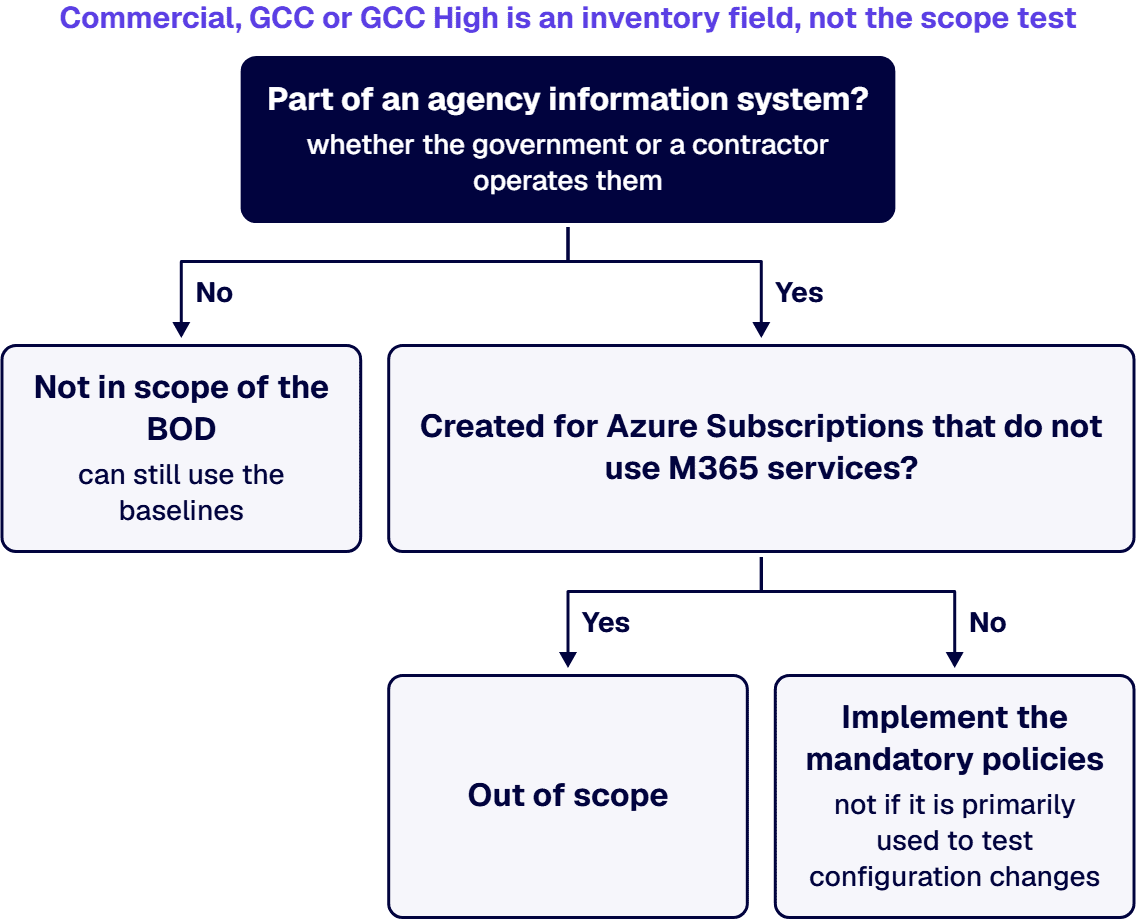
List every Microsoft 365 tenant the organization owns or operates, mark each one against these four tests, and record who made the call, before anyone reads a single policy.
A red row in a GCC High tenant is easy to misread as a missing purchase or a missing Microsoft feature, and each of those has a different answer. Start with who each cloud is for, in Microsoft’s words. Microsoft’s Office 365 GCC High and DoD service description, last updated August 3, 2026, says “To meet the unique and evolving requirements of the United States Department of Defense, as well as contractors holding or processing DoD controlled unclassified information (CUI) or subject to International Traffic in Arms Regulations (ITAR), Microsoft offers GCC High and DoD environments.” Microsoft’s Office 365 GCC service description, last updated June 28, 2023, says “To meet the unique and evolving requirements of the United States Federal, State, Local, and Tribal governments, as well as contractors holding or processing data on behalf of the US Government, Microsoft offers the Office 365 Government GCC environment.” Choosing between them is a separate decision, covered in Microsoft 365 GCC vs GCC High: Which Government Cloud Does Your Organization Need?
Feature availability differs by cloud, and Microsoft states it per feature. Microsoft’s Office 365 Government service description, last updated June 18, 2025, carries this note: “Anti-phishing for user and domain impersonation and spoof intelligence are not yet available in GCC High and DoD.” Check each red row against Microsoft’s current page for your cloud on the day you plan the fix, not against a note from a year ago.
Some policies depend on licenses. CISA’s Microsoft Entra ID baseline, as published in CISA’s ScubaGear v1.8.0 release, lists for its policies that block users and sign-ins detected as high risk: “Requires a Microsoft Entra ID P2 license”. Microsoft’s Risk-based access policies, last updated August 14, 2026, says “Microsoft Entra ID P2 is required to use risk-based access policies.” Microsoft’s What is Microsoft Entra Privileged Identity Management?, last updated April 23, 2026, says “Using Privileged Identity Management requires licenses.”
A license gap is not the end of the question. According to CISA’s implementation guidance, “Purchasing additional licensing is not a requirement of the BOD. Agencies may use third-party capabilities that provide equivalent protections, and more details can be found within the baselines. Agencies may also indicate a deviation in their configuration file and include the reason for the deviation.” Sort every license-dependent red row into one of those three paths, license it, meet it another way or document the deviation, and record which path was chosen and by whom.
Teams that treat the whole baseline as mandatory spend effort in the wrong order; teams that treat it as optional miss the rows CISA measures. CISA’s directive draws the line: “The following requirements pertain only to mandatory policies referenced within the SCuBA Secure Configuration Baselines as “shall” actions.” It explains both kinds: “SCuBA Secure Configuration Baselines specify both recommended policies that are left to agency discretion to implement (identified as “should” actions within the Baselines) and mandatory SCuBA policies that must be implemented pursuant to the requirements of this Directive (identified as “shall” actions within the Baselines).” The guidance adds: “Although recommended (“should”) policies are not required, CISA strongly advises agencies implement these policies to the greatest extent possible in their environment.”
The mandatory list is a web page, not a document you file once. CISA’s Required Configurations page lists each Microsoft 365 policy by product with a Date Added / Modified column and a Due Date column; every Microsoft 365 row’s due date reads “End of each fiscal quarter”. Its Date Added / Modified values for Microsoft 365 run from 07/07/2024 to 02/11/2026, the most recent on Teams policies. The directive orders agencies to “Implement all future updates to mandatory SCuBA policies in accordance with the timelines set forth in the CISA-managed Binding Operational Directive 25-01 Required Configurations website”, and the guidance says “CISA will notify agencies via email when changes are made to the SCuBA SCBs.” The directive also says “Any baselines not updated within one year will automatically fall out of scope and will be removed from the SCuBA Secure Configuration Baseline catalog, linked through the Binding Operational Directive 25-01 Required Configurations website”.
CISA’s first deadlines have passed. According to CISA’s implementation guidance, the first requirement read “No later than Friday, February 21, 2025, provide the tenant name (Tenant ID and fully qualified domain name [FQDN]) and the system-owning agency/component for each tenant, following CISA reporting instructions.” They were to deploy the assessment tools by April 25, 2025, and the guidance’s third requirement read “Implement all mandatory SCuBA policies effective as of this Directive’s issuance, as set forth in the CISA-managed BOD 25-01 Required Configurations website no later than Friday, June 20, 2025”. What remains is recurring: the quarterly due date, and every update CISA posts.
Subscribe the people who own the tenant to CISA’s change notices, and re-read the Required Configurations page at the start of each fiscal quarter rather than working from last quarter’s export.
A policy ID on a red row tells you what CISA measures, not where the switch is or what it costs to flip. According to CISA’s Required Configurations page, the Microsoft 365 mandatory policies are grouped under Azure Active Directory / Entra ID, Microsoft Defender, Exchange Online, Power Platform, SharePoint Online & OneDrive, and Microsoft Teams. The rows below are quoted exactly as that page prints them, version suffix included; the rest of each product’s rows are on CISA’s page and change over time.
Two cautions follow from Microsoft’s own wording. The SMTP AUTH statement recommends disabling it for the organization while keeping it only for mailboxes that still require it, so an exception for a named mailbox is a deviation to document, not a quiet setting. And the audit statement says audit logging is on by default but tells new organizations to verify it, so check the setting in each tenant rather than assuming it.
The identity rows go further than the three quoted here. CISA’s Entra ID rows also block users and sign-ins detected as high risk, require phishing-resistant MFA for highly privileged roles, restrict application registration and consent to administrators, and govern how privileged roles are provisioned and activated. One of them requires the Authentication Methods migration to be set to Migration Complete; Microsoft’s How to migrate MFA and SSPR policy settings to the Authentication methods policy for Microsoft Entra ID says of that mode, “In this mode, Microsoft Entra only follows the Authentication methods policy.” How MFA maps to NIST baselines is covered in MFA and NIST SP 800-53: Your Baseline Decides, Not the Catalog. CISA’s SharePoint rows quote only CISA’s policy text here; broader SharePoint hardening for regulated organizations is covered in SharePoint Security for High-Risk, Compliance-Heavy Organizations.
Map every mandatory row to the Microsoft setting that satisfies it, the license that setting needs, and whether Microsoft lists the feature as available in your cloud, before you schedule a single change.
A ScubaGear run without its configuration file, or a report nobody reads color by color, fails the quarter even when the settings are right. CISA’s Secure Cloud Business Applications (SCuBA) Project page says “ScubaGear is a no-cost assessment tool that verifies M365 tenant configuration alignment to the policies described in SCuBA’s secure configuration baselines.” CISA’s ScubaGear v1.8.0 release, published May 7, 2026, was the latest release when this guide was written, and its README says the YAML configuration file “is required if the usage is for” CISA’s Binding Operational Directive (BOD) 25-01.
According to CISA’s implementation guidance, the second requirement read “Deploy all SCuBA assessment tools for in-scope cloud tenants no later than Friday, April 25, 2025, and begin continuous reporting on the requirements of this Directive by manually reporting the results of the most recent SCuBA assessment tool version to CISA quarterly in a CISA-approved, machine-readable format, following CISA reporting instructions.” The guidance also says “Agencies may configure ScubaGear to run and report results as often as they want, with a minimum of once per quarter.”
The guidance describes more than one way to get results to CISA:
Read the colors the way CISA defines them. The guidance says “Red indicates that required baselines statement controls are not met, i.e., “shall” statements.” It also says “Gray indicates the controls that ScubaGear and/or ScubaGoggles is not able to evaluate using the Application Programming Interfaces, or APIs provided by the cloud service provider.” A gray row is not a pass; it is a control someone has to check another way.
Name, for each tenant, the person who runs ScubaGear on the current release with the configuration file, the person who reviews red and gray rows, and the person who submits to CISA.
The costly failure is an omission in the configuration file that nobody with authority approved: the report turns clean and the gap disappears from view. CISA’s directive puts the decision with the authorizing official and the explanation with CISA: “Agency Authorizing Officials (AOs), in accordance with applicable agency policy, may accept risk for deviations from the mandatory SCuBA policies to account for operational needs. Agencies shall identify and explain deviations in the output of the SCuBA assessment tools when reported to CISA.”
CISA’s implementation guidance describes the mechanics in the configuration file: “The config file includes an option allowing users to indicate policies that should be “omitted” or excluded from ScubaGear’s output, indicate the rationale for omission and optionally time-bound the exclusion.” It also says “Agencies may also indicate a deviation in their configuration file and include the reason for the deviation.” And it sets the condition on omissions: “Omitting policies must only be done if the omissions are approved within an organization’s security risk management process. Exercise care when omitting policies because this can inadvertently introduce blind spots in system assessment.”
New tenants have a stricter order of operations. The directive tells agencies to “Implement all mandatory SCuBA Secure Configuration Baselines and begin continuous monitoring for new cloud tenants prior to granting an Authorization to Operate (ATO).”
Give every omission or deviation in the YAML file an approval reference from the authorizing official’s risk process, a stated reason, and an end date where CISA’s option allows one, and keep that register beside the quarterly report.
When a test tenant or a contractor’s own tenant is forced into this plan, a quarter of work goes to the wrong place.
Whether the work is done by your own staff, a contractor or a firm, the failure to avoid is a green report with no record of how it got there. Require:
How to vet a firm for that work is covered in Hire a Microsoft 365 GCC High Implementation Firm: How to Vet One Before You Commit a Tenant.
When a directive like this lands on a team that already runs the tenant, the useful help is project work on the configuration and people who can sit inside that team, not another report. i3solutions configures Microsoft 365 tenants in GCC High as project work, and the work sits under our Embedding Governance into How the Enterprise Operates and Scales practice.
We manage GCC High migrations end-to-end: from eligibility validation and licensing coordination with your AOS-G supplier through identity architecture, data migration, security baseline configuration, and post-migration governance.
i3solutions maps governance to named control families, enforces it in the platform through Entra ID, Purview, and Azure Policy, and evidences it continuously rather than reconstructing it at audit. i3solutions governs identity and access for regulated Microsoft estates with senior, U.S.-based engineers and leaves an audit-defensible record.
The i3solutions Federal Compliance Assessment evaluates a client tenant against NIST SP 800-53 and CMMC using automated tenant configuration scripts and a 42-point security checklist. It is i3solutions’ own assessment against those two frameworks, a separate instrument from CISA’s ScubaGear. i3solutions engages its Federal Compliance Assessment when the scope spans a FedRAMP Moderate or FedRAMP High boundary, or when the client operates in a GCC High tenant.
i3solutions is an SBA certified small business providing technical and professional services to US Federal Agencies, the DoD and the private sector.
Where your team needs more hands, i3solutions can embed IAM and compliance specialists fluent in NIST inside it. Every engagement is delivered by senior, US-based people.
The cloud does not decide it; CISA’s information-system test does. CISA’s directive says “This Directive applies to all production or operational cloud tenants (operating in or as federal information systems) with an associated and finalized SCuBA Secure Configuration Baselines published by CISA.” CISA’s guidance says “Tenants outside of the authorization boundary of an agency’s information system are not in scope of the BOD.” and, for the inventory, “For M365, select either Commercial, GCC, or GCC High.”
It can. According to CISA’s guidance, “A production or operational tenant is a Cloud Service Provider (CSP) environment used by the government to conduct official government business, whether operated by the government or a contractor.” According to the same guidance, “The scope of the BOD is limited to tenants that are part of an Information System, as defined in 44 USC § 3502(8), that is owned by or operated by federal agency or on behalf of a federal agency by a contractor. Tenants outside of the authorization boundary of an agency’s information system are not in scope of the BOD.”
Not under the directive. CISA’s guidance says “Purchasing additional licensing is not a requirement of the BOD. Agencies may use third-party capabilities that provide equivalent protections, and more details can be found within the baselines. Agencies may also indicate a deviation in their configuration file and include the reason for the deviation.” Some Microsoft settings do carry license requirements: Microsoft says “Microsoft Entra ID P2 is required to use risk-based access policies.”
At least quarterly. CISA’s guidance says “Agencies may configure ScubaGear to run and report results as often as they want, with a minimum of once per quarter.”
Yes, through its authorizing official and with an explanation to CISA. CISA’s directive says “Agency Authorizing Officials (AOs), in accordance with applicable agency policy, may accept risk for deviations from the mandatory SCuBA policies to account for operational needs. Agencies shall identify and explain deviations in the output of the SCuBA assessment tools when reported to CISA.” CISA’s guidance adds “Omitting policies must only be done if the omissions are approved within an organization’s security risk management process. Exercise care when omitting policies because this can inadvertently introduce blind spots in system assessment.”
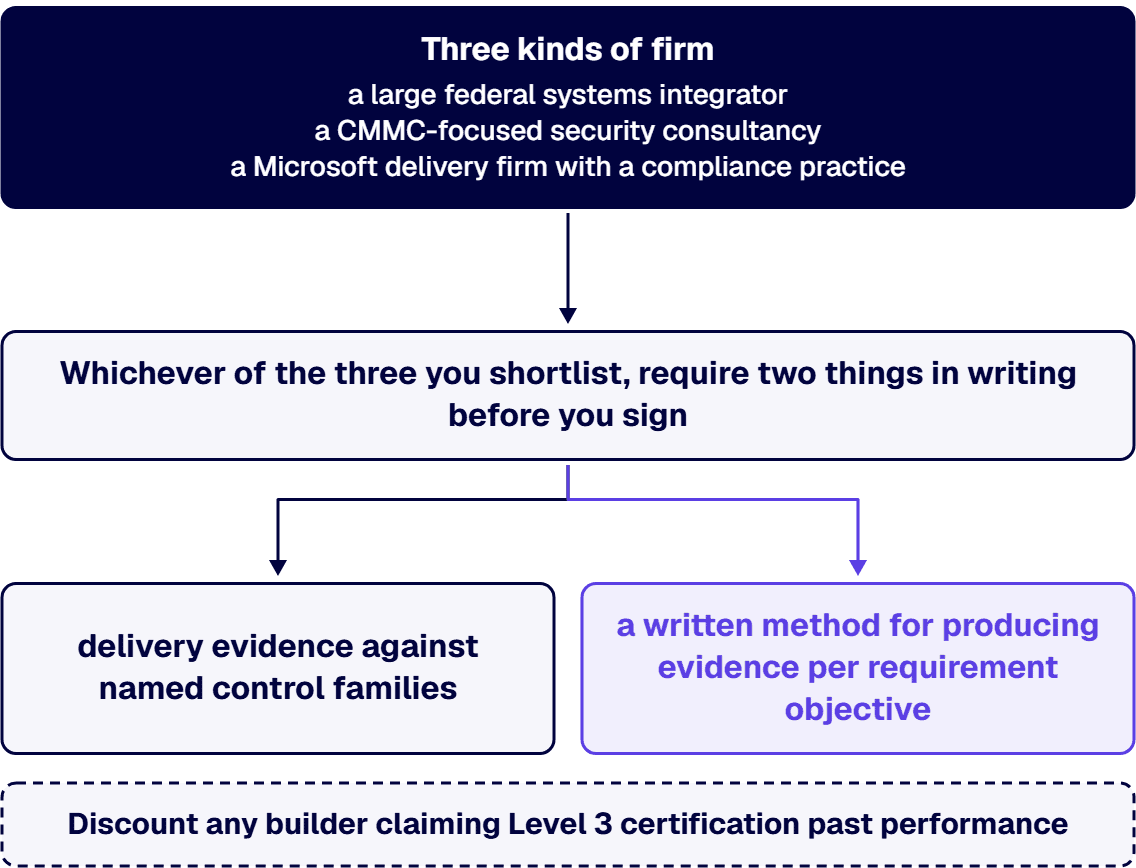
Three kinds of firm: a large federal systems integrator, a CMMC-focused security consultancy, or a Microsoft delivery firm with a compliance practice. Whichever of the three you shortlist, require two things in writing before you sign. First, delivery evidence against named control families in NIST SP 800-171 and a GCC High tenant boundary, because 32 CFR 170.14(c)(3) makes Level 2 identical to NIST SP 800-171 R2 and 170.18(a) makes a Final Level 2 (C3PAO) status a prerequisite to a Level 3 assessment. Second, a written method for producing evidence per requirement objective. Discount any builder claiming Level 3 certification past performance, and take the Level 2 and NIST SP 800-171 artifact set as the evidence standard instead. Under 32 CFR 170.18(c)(6)(ii) an external service provider’s services are assessed inside your assessment, so the builder’s documentation discipline becomes your findings.
The pattern shows up on the second call, not the first. A defense contractor architected its SharePoint estate for CMMC Level 2, cleanly: a CUI site collection, sensitivity labels, Conditional Access, a documented boundary. Then a prime flowed down a Level 3 requirement on a follow-on award, and the assessor conversation moved from “do you have the control” to “show me the evidence for each requirement objective, per asset, and hash the artifact so we can prove it was not altered.” The controls existed. The information architecture could not produce evidence at that grain, because it was designed to pass a Level 2 self-assessment rather than to survive a DIBCAC certification assessment. Nothing was broken. It was built one tier below the question it was about to be asked.
Level 3 is not a stricter reading of Level 2. It is a different requirement set, layered on top, assessed by a different party. The four facts that change the architecture, all from 32 CFR Part 170:
Two of the 24 requirements land on the SharePoint boundary directly (32 CFR 170.14(c)(4), Table 1, items (i) and (ii)). AC.L3-3.1.2e requires you to “Restrict access to systems and system components to only those information resources that are owned, provisioned, or issued by the organization.” AC.L3-3.1.3e requires you to “Employ secure information transfer solutions to control information flows between security domains on connected systems.” Several more reach the estate indirectly, and section 2 maps them.
The current program state matters and is easy to get wrong. The DoD CIO CMMC program page, read 2026-08-19, states that “On July 13, 2026, the Department of War announced the immediate suspension of the Cybersecurity Maturity Model Certification (CMMC) Phase II requirements, which was originally scheduled for November 10, 2026. All Phase I self-assessment requirements remain firmly in place.” The About CMMC page adds that “CMMC implementation is paused in Phase 1” and that during this period “the DoW will enforce cybersecurity compliance with NIST 800-171 Rev 2 through self-assessments and select government-led assessments”. It also states that the action “does not eliminate the requirement for companies to protect information in accordance with DFARS clause 252.204-7012”. So the Level 3 requirement text is codified and stable, the contractual trigger for Phase II is suspended pending review, and the 800-171 obligation is untouched. Design for the codified requirement, schedule the certification against the program state.
Most of the 24 Level 3 requirements are not SharePoint controls. They are enterprise controls that your SharePoint design either supports or quietly defeats. The ones that change a build:
The estate that fails here usually passes every control test first. It has the labels, the Conditional Access rules and the documented boundary, and it still cannot produce a result per requirement objective without a manual reconstruction. The requirement that reshapes information architecture is not a control at all. It is the submission format: a result for each security requirement objective, with hashed artifacts. That forces four design decisions upstream of any site build.
i3solutions runs migrations against named control families across CMMC, HIPAA, SOC 2, and NIST 800-171, producing artifacts auditors can review. That is the method this section describes, stated at the tier it has actually been delivered.
Sequence matters more than tooling, because two of the steps are irreversible in practice. Content moved into an enclave before it was classified stays there, and permissions replicated during a migration become the baseline nobody revisits.
On cost, i3solutions publishes attested bands for the work that sits underneath a Level 3 ambition. A CMMC Level 2 implementation for a defense contractor with a defined CUI boundary typically ranges from $45,000 to $75,000, covering the Compliance Manager baseline assessment, Conditional Access redesign, DLP policy build and testing, Purview Audit Premium configuration, and post-implementation documentation. Full migration project cost for defense contractors with SharePoint customizations and CMMC compliance scope typically lands in the $100,000 to $300,000 range. For the GCC High move considered on its own, the attested band reads: “Implementation costs for a GCC High migration typically range from $75,000-$150,000 for this organization size, including data migration and compliance configuration.” That band travels with the organization size it was scoped against, so read it as an order of magnitude for planning rather than as a quote. None of these three bands price a Level 3 certification assessment, which is a DIBCAC engagement rather than an implementation.
The vetting question that separates candidates fastest is not about certifications. It is about what happens to their work inside your assessment.
i3solutions does not hold a CMMC Level 3 certification and does not claim Level 3 past performance. Our attested delivery evidence is at the Level 2, NIST SP 800-171, and GCC High tier, which is the foundation a Level 3 scope is built on and the prerequisite the rule names.
i3solutions has delivered enterprise SharePoint consulting for defense contractors and a federal research agency. Our teams maintain dedicated compliance specialists who understand CMMC, HIPAA, SOC 2, and financial services regulations within Microsoft environments, providing audit trail documentation and access control frameworks that reduce audit preparation time by 60%. On the platform side, the GCC High and CUI enclave work described above is the same work priced in the bands in section 4.
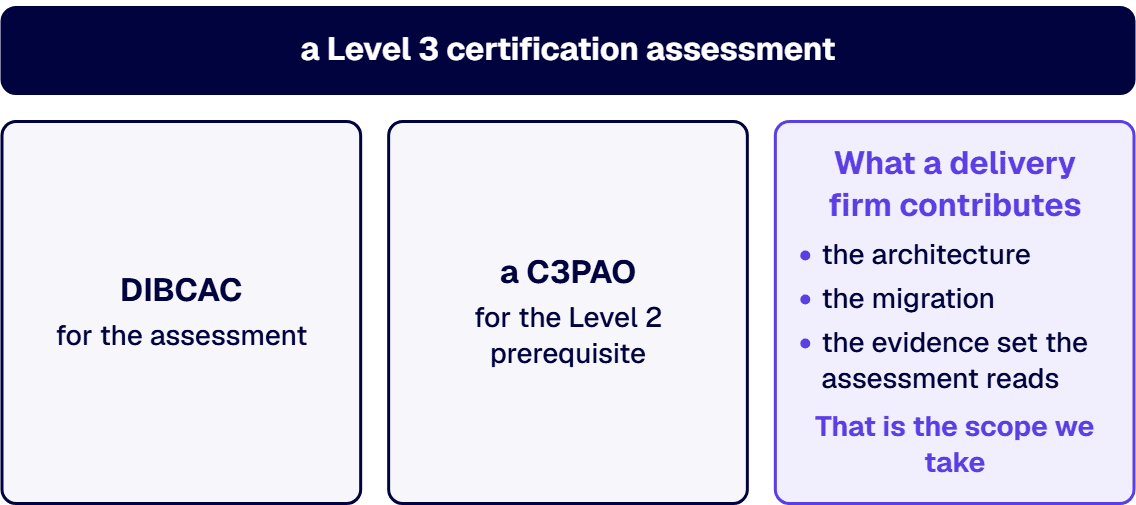
If your requirement is a Level 3 certification assessment, your counterparties are DIBCAC for the assessment and a C3PAO for the Level 2 prerequisite. What a delivery firm contributes is the architecture, the migration, and the evidence set the assessment reads. That is the scope we take.
Most people reading this are deciding two things at once: whether their current SharePoint estate can carry a Level 3 scope, and whether the firm they already use can build to that standard. Both are answerable in one session with the right inputs. Bring the asset inventory if you have one, the tenant topology, the CUI categories in play, and the contract language that raised the question. Thirty minutes is enough to tell you whether you are looking at a documentation gap, an information architecture rebuild, or a tenant boundary decision, and those three have very different costs.
You will get a straight read either way, including the read that your Level 2 posture is sound and the Level 3 question is premature given the program pause. That answer is free and it is often the correct one.
No, and no builder should tell you otherwise without naming a specific DIBCAC-assessed environment. i3solutions has delivered enterprise SharePoint consulting for defense contractors and a federal research agency. Separately, i3solutions runs migrations against named control families across CMMC, HIPAA, SOC 2, and NIST 800-171, producing artifacts auditors can review. We manage GCC High migrations end-to-end: from eligibility validation and licensing coordination with your AOS-G supplier through identity architecture, data migration, security baseline configuration, and post-migration governance. i3solutions plans and runs these migrations for regulated defense organizations, structuring each phase around the compliance evidence assessors expect. i3solutions has deployed Power BI inside a GCC High tenant and inside Azure Government for a federal customer. i3solutions maps your Microsoft environment against CMMC Level 2 (110 controls), HIPAA administrative safeguards, and SOC 2 access control frameworks, producing audit-ready documentation that satisfies assessors, not just internal IT teams. That is the tier the rule makes a prerequisite for Level 3, so it is the relevant experience, but it is Level 2 experience and we state it that way.
Not automatically. 32 CFR 170.18(c)(5) requires a cloud service offering meeting “the FedRAMP Moderate (or higher) baseline,” or security requirements equivalent to it in accordance with DoD policy. GCC High is the usual answer when ITAR or export-controlled technical data is in the boundary. Where it is not, a commercial tenant with a documented overlay can meet the baseline requirement, and the decision should be made on the data you hold rather than on the level number.
No. Section 170.18(a) makes a CMMC Status of Final Level 2 (C3PAO) on the systems in the Level 3 scope a prerequisite, and the Level 3 scope must be equal to or a subset of that Level 2 scope. Level 2 also has to be reassessed every three years to keep Level 3 status current.
No. The DoD CIO CMMC program page, read 2026-08-19, states that “All Phase I self-assessment requirements remain firmly in place”. The About CMMC page, read the same day, states that “the DoW will enforce cybersecurity compliance with NIST 800-171 Rev 2 through self-assessments and select government-led assessments”, and that the action “does not eliminate the requirement for companies to protect information in accordance with DFARS clause 252.204-7012”. The Level 2 work is unchanged. What has moved is the contractual trigger for the higher-tier certifications.
If they process, store, or transmit CUI, yes, and so will the environments that hold copies of them. CM.L3-3.4.1e and CM.L3-3.4.3e require an authoritative, automatically maintained inventory of system components, CA.L3-3.12.1e brings them into annual penetration testing, and SI.L3-3.14.3e pulls test equipment into scope unless it is segregated and proven separate. Inventory the custom surface early. It is usually larger than the architecture diagram suggests.
As of September 2026, Microsoft says Defender for Cloud Apps file policies retire on January 6, 2027 and, after that date, will no longer be supported or enforced, so every file policy has to be recreated as a Microsoft Purview DLP policy or an auto-labeling policy first, according to Microsoft’s guide to migrating file policies to Microsoft Purview and its Partner Center announcement for July 2026. The move needs a Microsoft 365 E5 or Microsoft 365 E5 Compliance license, or an equivalent standalone Microsoft Purview DLP license, according to the same Microsoft guide. Microsoft’s DLP to Purview migration tool moves eligible SharePoint and OneDrive DLP file policies automatically for commercial cloud tenants, but the tool is not available in a government or sovereign cloud, so those tenants recreate their policies in Purview by hand, according to Microsoft’s guide to migrating file policies to Microsoft Purview.
Every fact below is drawn from Microsoft’s guide to migrating file policies to Microsoft Purview and its Partner Center announcement for July 2026, both re-read on drafting day:
Somewhere in the tenant there is a file policy someone built years ago to catch shared documents carrying card numbers or export-controlled drawings in SharePoint and OneDrive. It still runs, it still alerts, and no one has looked at it since. Microsoft has put a date on it: according to Microsoft’s guide to migrating file policies to Microsoft Purview, “File policies in Defender for Cloud Apps are retiring on January 6, 2027.” The questions that follow are practical ones: which license the replacement needs, which policies a tool can move and which have to be rebuilt by hand, and what order keeps files covered on every day between now and the cutoff. This guide answers them in Microsoft’s own words and sets out the order of work.
The retirement is narrower than the headline suggests, and reading it too widely leads to the wrong plan. Microsoft’s guide to migrating file policies to Microsoft Purview gives the instruction in one line: “Recreate your file policies as Microsoft Purview data loss prevention (DLP) or auto-labeling policies before this date.” The same guide states what stays: “Defender for Cloud Apps continues to provide SaaS app discovery, posture management, and threat detection.” And it states where the work moves: “File-based data protection is moving to Microsoft Purview.” So the file policy capability retires; the rest of Defender for Cloud Apps does not.
Microsoft’s partner-facing notice states the consequence in plainer terms. Microsoft’s Partner Center announcement for July 2026, dated July 6, 2026, states: “The Data Loss Prevention (DLP) file policy capabilities within Microsoft Defender for Cloud Apps will be deprecated on January 6, 2027.” The same July 6, 2026 announcement continues: “After this date, all file policies configured in Defender for Cloud Apps will no longer be supported or enforced.” The announcement also confirms the boundary from the other side: “Non-DLP Defender for Cloud Apps capabilities (SaaS security posture, app governance, threat protection) are not affected.”
One more fact shapes the cleanup. Migration does not tidy up after itself: Microsoft’s guide to migrating file policies to Microsoft Purview answers “Does migrating remove my original file policies?” with “No. Migration creates new equivalent policies in Purview.” Disabling and deleting the originals is a separate step your team takes, covered in the order of work below.
The first question to settle is whether the tenant already holds what Purview needs, because every later step depends on it. Microsoft’s guide to migrating file policies to Microsoft Purview lists the license prerequisite in full: “A Microsoft 365 E5 or Microsoft 365 E5 Compliance license (or an equivalent standalone Microsoft Purview DLP license).” That is three options, not one, and the tenant’s own licensing record decides which of them, if any, it already has.
The migration tool carries its own, separate licensing line. Among the tool’s prerequisites, Microsoft’s guide to migrating file policies to Microsoft Purview states: “You have the required E5 or Information Protection and Governance (IP&G) licensing for the Purview products.” Read the two lines separately: the first governs the Purview policies themselves, the second governs using the tool to create them.
Roles matter as much as licenses. The same Microsoft guide names the Purview role group memberships the work needs, Compliance Administrator or Compliance Data Administrator, and on the Defender for Cloud Apps side it names the “Cloud App Security Administrator to review your existing file policies.” Confirm who holds each role before the inventory starts, so the people doing the work can see both products.
This page does not compare license tiers or their cost. For that buying decision, see Microsoft 365 E3 vs E5 Cost: What E5 Really Costs and When to Upgrade.
The most common planning error is treating every file policy as a DLP policy. Microsoft’s instruction names two destinations, and a policy that labels files goes to a different place than one that blocks or alerts. According to Microsoft’s guide to migrating file policies to Microsoft Purview, file policies are recreated “as Microsoft Purview data loss prevention (DLP) or auto-labeling policies,” and the guide’s own feature comparison routes a sensitivity-labeling action to a separate Purview auto-labeling policy rather than to a DLP policy.
That sort also decides what the tool will do for you. Microsoft’s guide lists “Auto-labeling policy migration for Microsoft workloads” among the scenarios the tool does not support yet, so a policy whose job is labeling is rebuilt by hand as an auto-labeling policy in every environment, commercial or government.
This guide’s own recommendation, not Microsoft’s, is to build one record per existing file policy before touching Purview: the apps it targets, the content inspection method it uses, the action it takes, and whether that action is detection and response or labeling. Route each one to a Purview DLP policy or a Purview auto-labeling policy from that record, and keep the record as the evidence of what the old policy did.
For a commercial tenant, Microsoft offers a wizard for part of the work. Microsoft’s guide to migrating file policies to Microsoft Purview states: “Use the DLP to Purview migration tool to move eligible file policies to Microsoft Purview without recreating them by hand.” Its prerequisites begin with the environment: “You’re a commercial cloud customer using a Production environment.”
The word that carries the weight is “eligible.” The same Microsoft guide states: “The migration tool supports SharePoint and OneDrive DLP file policies only.” It lists what the tool does not support yet: “Auto-labeling policy migration for Microsoft workloads,” and “DLP and auto-labeling policy migration for non-Microsoft apps, including Google Workspace, Box, Dropbox, and Salesforce.” The wizard groups each policy it finds as one it can migrate, can partly migrate, or cannot migrate, which gives you a first cut of the manual work.
So even in a commercial tenant, the tool covers one slice: DLP file policies for SharePoint and OneDrive. Labeling policies and policies for non-Microsoft apps are rebuilt by hand in Purview, and a partly migrated policy needs a person to finish it.
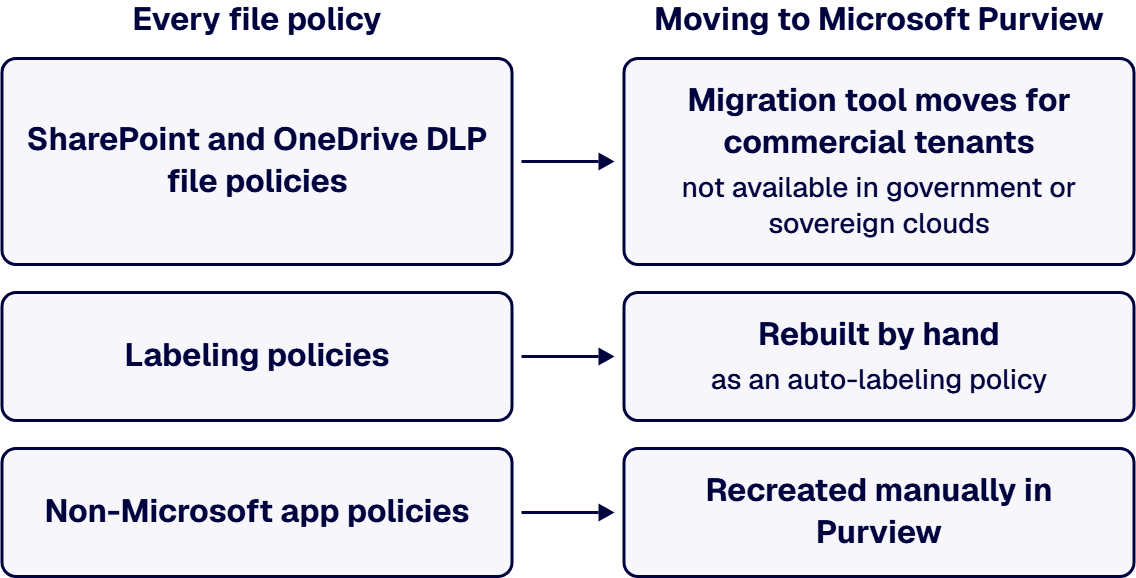
For a tenant in GCC High or another government cloud, the tool is not an option at all. Microsoft’s guide to migrating file policies to Microsoft Purview states it directly: “The tool isn’t available for government or sovereign clouds.” Its FAQ repeats the point in its own words: “The migration tool is available for commercial cloud customers in all Production environments. Government and sovereign clouds aren’t in scope at this time.”
What is available in GCC High is the underlying Purview capability. Microsoft’s GCC High planning guide for Microsoft Purview lists “Files (SPO/ODB) and email” as Available under Microsoft Purview Data Loss Prevention, and lists “Microsoft Defender for Cloud Apps (formerly Microsoft Cloud App Security) integration” as Available too, with a footnote that reads: “Identified status is subject to change as project plans and priorities are reevaluated.” If you are planning Purview controls in GCC High, also see who must sign off on Purview Insider Risk Management in GCC High.
One question the Microsoft pages read for this guide do not answer: whether the January 6, 2027 date for the file policies themselves applies in the same way inside GCC, GCC High or DoD tenants. The pages state that the tool is unavailable there; they do not state a different retirement date. If your tenant is in a government cloud, confirm your own timeline with Microsoft support rather than assuming it, and plan the manual rebuild against the January 6, 2027 date until Microsoft tells you otherwise.
In practice, a government tenant does by hand what the wizard does for a commercial one: recreate each DLP file policy in Purview from its inventory record, then follow the same validate, disable and delete steps Microsoft’s guide sets out for every environment.
Some file policies reach beyond SharePoint and OneDrive into connected apps, and Purview’s coverage there is newer. Microsoft’s guide to migrating file policies to Microsoft Purview names Box, Dropbox, Google Workspace and Salesforce among the non-Microsoft apps Purview supports through a Defender for Cloud Apps app connector, and states: “Support for non-Microsoft connected apps is in preview, and the apps roll out in phases. Not all apps are available in every tenant at the same time.”
Two limits come with that preview. The same Microsoft guide states: “Policy tips and user overrides aren’t supported for non-Microsoft apps.” And the tool does not carry these policies across: “The DLP to Purview migration tool doesn’t migrate non-Microsoft app policies yet, so recreate these policies manually in Purview for now.”
Check which of your connected apps have reached your tenant before you plan their replacement policies, and treat any policy that relied on a user override as needing a new design rather than a copy.
The rule that sets the order is Microsoft’s, and it is easy to break by moving too fast. Microsoft’s guide to migrating file policies to Microsoft Purview states: “Policies in Defender for Cloud Apps and Purview can’t coexist. Running equivalent policies in both products at the same time creates enforcement conflicts. Disable Defender for Cloud Apps policies only after you validate and turn on the Purview policies.”
Microsoft’s guide to migrating file policies to Microsoft Purview sets out the rollout and the cleanup in order, and each step below follows its words:
This guide’s own recommendation, not Microsoft’s, is to run that sequence one policy at a time against its inventory record, and to set an internal finish date well before January 6, 2027, so that the last policy is validated, enforced and its original disabled with time left to spare. A policy that is still mid-sequence on the cutoff date is a policy whose files are not covered.
Not every tenant needs this work in full, and it is worth checking first. If the tenant has no Defender for Cloud Apps file policies at all, there is nothing to migrate; record that and stop. If the real gap is DLP on devices or in Teams chats rather than on files at rest in SharePoint, OneDrive and connected apps, that is a different Microsoft DLP surface and a different piece of work from this one. If every existing file policy only labels content and never blocks or alerts, the whole set becomes auto-labeling policies rebuilt by hand, and the DLP half of this guide does not apply. And if the real question is whether a different product would suit the tenant better than Microsoft Purview, that is a product decision this guide does not make.
Whoever does this work with you, inside the organization or outside it, hold them to these criteria, set against Microsoft’s guide to migrating file policies to Microsoft Purview and stated as what they should be able to show you:
No product vendor is named or compared in that work.
i3solutions maps governance to named control families, enforces it in the platform through Entra ID, Purview, and Azure Policy, and evidences it continuously rather than reconstructing it at audit. For this retirement, that means a project, with embedded specialists where your team needs them, that inventories the file policies, confirms the license the tenant holds, builds and tests the Purview DLP and auto-labeling policies, runs them through simulation and a pilot, and carries the manual rebuild where the wizard cannot run. i3solutions builds and tests Purview DLP policies as part of a CMMC Level 2 implementation. For a government tenant, the relevant experience is narrower and stated as such: i3solutions installs and helps configure applications inside IL4 and IL6 government cloud environments and other government networks. i3solutions has been a Microsoft Partner with 30 years of enterprise technology delivery experience and has delivered 1,500+ Microsoft engagements across aerospace and defense, financial services, and health sciences. Delivery is senior and US-based.
An i3solutions engagement does not produce managed-service ownership, a replacement for the internal team, open-ended scope expansion, or vendor lock-in. The Purview policies and the runbook stay with your team to operate; i3solutions does not monitor DLP alerts as a service.
For how this fits the wider governance program, see Embedding Governance into How the Enterprise Operates and Scales.
According to Microsoft, file policies in Defender for Cloud Apps retire on January 6, 2027, and after that date all file policies configured in Defender for Cloud Apps will no longer be supported or enforced. File-based data protection moves to Microsoft Purview, while Defender for Cloud Apps continues to provide SaaS app discovery, posture management and threat detection.
According to Microsoft, the move needs a Microsoft 365 E5 or Microsoft 365 E5 Compliance license, or an equivalent standalone Microsoft Purview DLP license. Using the DLP to Purview migration tool also requires E5 or Information Protection and Governance (IP&G) licensing for the Purview products.
No. According to Microsoft, the tool isn’t available for government or sovereign clouds, so a government tenant recreates its file policies in Purview by hand. The Microsoft pages read for this guide do not state whether the January 6, 2027 date applies differently in a government cloud; confirm your tenant’s timeline with Microsoft support.
No. According to Microsoft, policies in Defender for Cloud Apps and Purview can’t coexist, because running equivalent policies in both products at the same time creates enforcement conflicts. Disable the Defender for Cloud Apps policy only after you validate and turn on the Purview policy.
No. According to Microsoft, auto-labeling policy migration for Microsoft workloads is not supported by the tool yet, so a file policy that applies labels is recreated by hand as a Purview auto-labeling policy.
No. According to Microsoft, the DLP to Purview migration tool doesn’t migrate non-Microsoft app policies yet, so those policies are recreated manually in Purview. Microsoft’s support for non-Microsoft connected apps is in preview and rolls out in phases.
By Michael Branson
Quick answer. Governing non-human identities in Microsoft Entra means inventorying every application, service principal, managed identity and AI agent identity, and naming a human accountable for each. Keep access least-privileged and reviewed, replace stored secrets with managed identities or federation where supported, and govern agents through Entra Agent ID.
If you arrived from Microsoft 365 Access Governance for AI Readiness already knowing that non-human actors are the factor that page calls the skipped one, the question here is the one that page hands off: who owns those identities, and what a program to govern them looks like. An access program built around people who sign in leaves these identities without a named owner unless someone assigns one, and an auditor can ask who that owner is.
If you are building the inventory, start from Microsoft’s own terms. Microsoft’s What are workload identities? article, read on 2026-09-22, says: “In Microsoft Entra, workload identities are applications, service principals, and managed identities.” It places them in a wider group: “Workload identities and device identities together make up a group called machine (or non-human) identities.” And it defines the third kind directly: “A managed identity is a special type of service principal that eliminates the need for developers to manage credentials.”
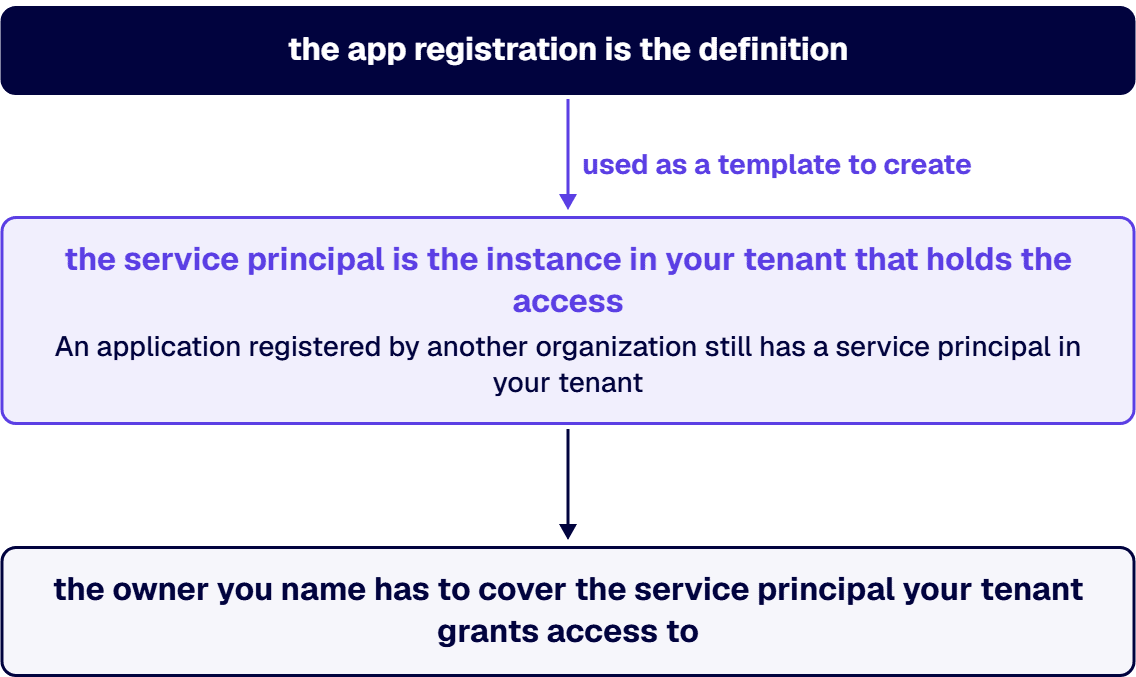
The difference between an application and a service principal is where ownership gets lost, and the same What are workload identities? article draws it: “An application object is used as a template to create a service principal object in every tenant where the application is used.” Of the service principal, it says: “The service principal object defines what the app can actually do in a specific tenant, who can access the app, and what resources the app can access.” In plain terms, the app registration is the definition and the service principal is the instance in your tenant that holds the access. An application registered by another organization still has a service principal in your tenant, so the owner you name has to cover the service principal your tenant grants access to, whoever created the registration.
AI agents add a fourth kind. Microsoft’s Governing Agent Identities article, read on 2026-09-22, says: “Agent identities are accounts within Microsoft Entra ID that provide unique identification and authentication capabilities for AI agents.”
If your access reviews were designed around employees, Microsoft’s What are workload identities? article sets out the difference in the identity type itself: “Human users typically have a single identity used to access a broad range of resources. Unlike a human user, a software workload may deal with multiple credentials to access different resources and those credentials need to be stored securely. It’s also hard to track when a workload identity is created or when it should be revoked.” Nothing signs in as these identities in the way a person does, so a joiner, mover and leaver process keyed to people has no event that reaches a workload identity unless a person is tied to it as its owner, or, for an agent identity, its sponsor.
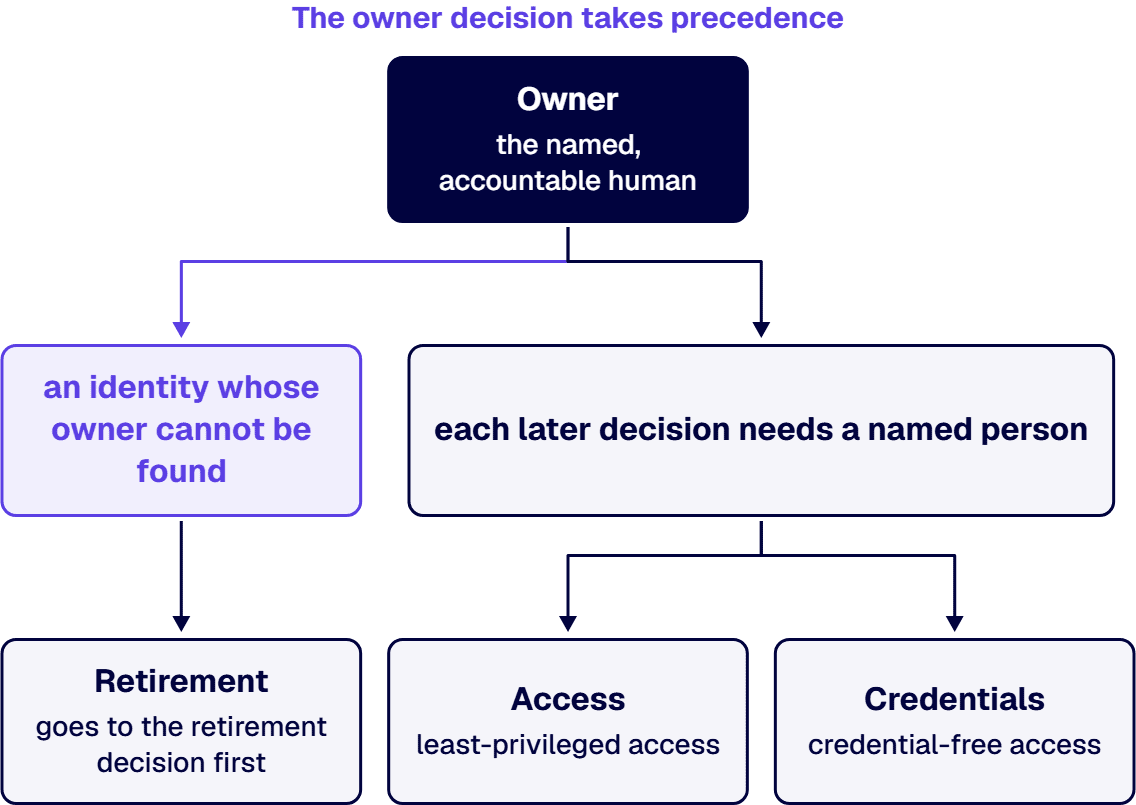
If you have to show an auditor that each non-human identity is accountable to someone, five decisions apply to every class of identity above: inventory, owner, access, credentials and retirement. Each is a decision your organization makes; none is a configuration step.
Inventory. Decide what the inventory covers and who keeps it current: applications and their registrations, service principals (including those for applications registered by other organizations), managed identities and agent identities. Count an agent built on a standard app registration as an application and service principal unless and until it moves to Agent ID.
Owner. Decide who the named, accountable human is for each identity, and what happens when that person leaves. For agents, Microsoft’s Governing Agent Identities article gives that role a name: “Sponsors of agent identities are human users accountable for making decisions about its lifecycle and access.” It also states: “If the sponsor is leaving the organization, sponsorship of the agent identities is automatically transferred to their manager.”
Access. Decide what least-privileged access looks like for each identity and who reviews it. Microsoft’s What are workload identities? article lists one review scenario: “Review service principals and applications that are assigned to privileged directory roles in Microsoft Entra ID using access reviews for service principals.” For agents, the Governing Agent Identities article describes access package assignments that carry an expiry date, and says: “If the sponsor takes no action, the access package assignment automatically expires on its end date, and the agent identity loses access to the target resources.”
Credentials. Decide which identities may still hold a stored secret or certificate, who holds it, and which move to credential-free access first. Microsoft’s What are workload identities? article names two routes: “Access Microsoft Entra protected resources without needing to manage secrets for workloads that run on Azure using managed identities.” For workloads outside Azure, it names workload identity federation “for supported scenarios such as GitHub Actions, workloads running on Kubernetes, or workloads running in compute platforms outside of Azure.”
Retirement. Decide who confirms that an identity is no longer needed, and on what trigger: the workload is decommissioned, the owner leaves, or the agent moves to a new identity. The cleanup sequence for stale service principals and application registrations is covered on Establish Identity as a Governed Enterprise Capability.
The owner decision takes precedence over the other four, because each later decision needs a named person to make it; an identity whose owner cannot be found goes to the retirement decision first.
If AI agents are already running in your tenant, Microsoft’s What is Microsoft Entra Agent ID? article, read on 2026-09-22, describes the product: “Microsoft Entra Agent ID is a product within Microsoft Entra that provides the platform for creating and managing agent identities and agent identity blueprints. Agent ID is available for all Microsoft Entra customers.” On licensing, the same article says: “Extending Microsoft Entra security features to agents requires Microsoft Agent 365. Agent 365 is included with Microsoft 365 E7 and is available as an add-on to Microsoft E5/A5/Business Premium (or Microsoft Defender Suite + Microsoft Purview Suite).”
On status, Microsoft’s What’s new in Microsoft Entra Agent ID page, read on 2026-09-22, states: “Microsoft Entra Agent ID is now generally available.” The same page labels one creation flow (Preview), in its entry “Create an agent identity blueprint and Create an agent identity (Preview)”, which describes a new wizard in the Microsoft Entra admin center for creating agent identity blueprints and agent identities.
Microsoft’s Governing Agent Identities article says agent identities can “be governed with Microsoft Entra features in the same style as you would govern human identities,” so that “the agents have a responsible person providing oversight throughout the agent lifecycle,” and its license section says that using Microsoft Entra ID Governance for agent identities “requires one of the following license plans”: Microsoft 365 E7, or a “Microsoft Agent 365 license paired with at least Microsoft Entra P1 or Microsoft 365 E3.” The human side of that program is covered in Microsoft Entra ID Governance for Regulated Enterprises: Product Scope, Licensing, and Audit-Defensible Implementation.
If agents were built on standard app registrations, Microsoft’s Migrate custom app registrations to Agent ID article, read on 2026-09-22, explains what they miss: “If you built AI agents by using standard Microsoft Entra app registrations or service principals, your agents authenticate like any other application. They don’t take advantage of agent-specific governance capabilities like Conditional Access policies, centralized audit logging, and lifecycle management that Agent ID provides.” For agents whose code and identity configuration you own, it summarizes the path: “You create Agent ID resources (a blueprint and agent identity), update your application code, and decommission the old identity.” Agents built in Microsoft Copilot Studio have a separate documented migration. The decision left to you is which agents move, in what order, and who is named as the sponsor of each agent identity once it exists.
If ownership of these identities has to be settled and defended to an auditor before more agents are deployed, an outside identity architect can help your team set the five decisions and the owner model, while the identities and their owners stay inside your organization. i3solutions has deep experience implementing identity governance for enterprises in aerospace and defense manufacturing, financial services, and healthcare, including environments with CMMC and ITAR obligations. Delivery is senior and US-based.
If you are responsible for identities that no person signs in as, keep a current inventory of the applications, service principals, managed identities and agent identities in your tenant, and name a human accountable for each one; for agent identities, Microsoft calls that person a sponsor. Keep their access least-privileged, review those assigned to privileged directory roles, move from stored secrets to managed identities or workload identity federation where Microsoft supports it, and bring AI agents under the same program through Microsoft Entra Agent ID.
If you are assigning owners, Microsoft describes the application object as the global representation of an application and the service principal as its local instance in a specific tenant, which defines what the application can do there and what it can access. An application used in several tenants has a service principal in each of them, and the access your tenant grants is held by the local one, which is why the owner question attaches to it, and, for an application your organization registered, to the registration as well.
If you are planning for AI agents, yes: according to Microsoft’s what’s-new page for Agent ID, read on 2026-09-22, Microsoft Entra Agent ID is generally available, while the admin center wizard for creating agent identity blueprints and agent identities is marked (Preview). Microsoft labels some related capabilities separately, such as automatic creation of agent identities for Copilot Studio agents, which its Governing Agent Identities page marks (preview). And according to Microsoft, agents need Microsoft Agent 365 before Entra security features extend to them. And according to Microsoft’s Governing Agent Identities page, using Microsoft Entra ID Governance for agent identities requires either Microsoft 365 E7 or a “Microsoft Agent 365 license paired with at least Microsoft Entra P1 or Microsoft 365 E3.”
If your agents authenticate through standard app registrations or service principals, Microsoft documents a migration for agents whose code and identity configuration you own: you create Agent ID resources, a blueprint and an agent identity, update the application code, and decommission the old identity. Microsoft documents a separate migration for agents built in Microsoft Copilot Studio.
By Michael Branson, Founder/COO, i3solutions
As of September 2026, 32 CFR 170.4 makes your Microsoft staff augmentation partner an External Service Provider in your CMMC Level 2 assessment only if your CUI or Security Protection Data, such as configuration data, logs or admin credentials, is processed, stored or transmitted on the partner’s own assets. If it is, and the partner is not a cloud service provider, table 4 of 32 CFR 170.19 puts the partner’s services in your assessment scope, assessed as part of your assessment for CUI or as Security Protection Assets for security data, and the relationship has to be documented in your SSP and described in the partner’s service description and customer responsibility matrix. When DoD published the rule in the Federal Register on October 15, 2024, it said in its responses to public comments that staff augmentation where you provide all the processes, technology and facilities does not need a CMMC assessment, and that engineers using remote-access systems you provide work under your own policies.
Every fact below is drawn from 32 CFR 170.4, 32 CFR 170.19 and DoD’s responses to public comments published with the rule in the Federal Register on October 15, 2024:
Your outside Microsoft engineers are due to start in the GCC High tenant on Monday. They will reset Conditional Access policies, work in Intune and Purview, and hold admin rights in Microsoft Entra ID. The compliance lead who owns the SSP asks a fair question: does their firm now have to appear in our assessment scope? The regulation answers that by asking where your data will land, not by asking whose payroll the engineers are on.
This guide reads the rule for that one decision. It describes what 32 CFR 170 and DoD’s published explanation say; it does not decide your scope. Specifying the scope is your job, and testing it is your assessor’s.
If you specify your assessment scope first and ask about the outside engineers afterward, the SSP is wrong on the day it is written. 32 CFR 170.19 puts scoping first, for self-assessments and certification assessments alike: “Prior to performing a Level 2 self-assessment or Level 2 certification assessment, the OSA must specify the CMMC Assessment Scope.” The OSA, the organization seeking assessment, is you.
The acquisition rule that carries CMMC into DoD contracts took effect on November 10, 2025, according to the Federal Register. For where the CMMC phase-in stands today, see Which CMMC Level Applies to You, and When Does It Start?; this guide does not track it, because the scoping rule applies whichever kind of Level 2 assessment comes next.
Planning rule: settle how the engineers will work before the scope is specified, not after they start.
When someone asks whether outside engineers count, the first sentence of the definition seems to say yes. 32 CFR 170.4 reads: “External Service Provider (ESP) means external people, technology, or facilities that an organization utilizes for provision and management of IT and/or cybersecurity services on behalf of the organization.” The second sentence of the same definition is the one that decides: “In the CMMC Program, CUI or Security Protection Data (e.g., log data, configuration data), must be processed, stored, or transmitted on the ESP assets to be considered an ESP.”
Process, store or transmit is defined broadly in the same section of 32 CFR 170.4: data being used on an asset, data at rest on an asset, and data moving from one asset to another all count.
The last row of table 4 in DoD’s rule at 32 CFR 170.19, for a provider that handles neither CUI nor Security Protection Data, reads: “A service provider that does not process CUI or SPD does not meet the CMMC definition of an ESP”.
Planning rule: ask where your CUI and your security data will sit, asset by asset and owner by owner, and never stop at whether the people are external.
If your outside engineers administer the tenant, the data they touch most is often not CUI at all but the security data around it. 32 CFR 170.4 defines both terms. “Security Protection Assets (SPA) means assets providing security functions or capabilities for the OSA’s CMMC Assessment Scope.” And: “SPD is security relevant information and includes but is not limited to: configuration data required to operate an SPA, log files generated by or ingested by an SPA, data related to the configuration or vulnerability status of in-scope assets, and passwords that grant access to the in-scope environment.”
What follows is this guide’s planning reading, not the regulation’s words. An engineer who administers the tenant from a laptop the engineer’s firm owns, keeps exported Conditional Access or Intune configurations in that firm’s repository or ticketing system, or stores your admin credentials in that firm’s password vault can put Security Protection Data on the firm’s assets. None of that requires opening a single CUI document.
Planning rule: list every place the engineers’ work product and credentials will live, and name the owner of each place.
Before the first engineer signs in, you will be in one of two arrangements, whether you choose it on purpose or not.
Arrangement A. The engineers work on devices you provide, under accounts in your own identity system, only inside your tenant and your tools, and any remote access runs through systems you provide.
Arrangement B. Any of the partner’s own devices, tools, tenants, repositories or vaults will hold your CUI or your Security Protection Data.
DoD described Arrangement A when it published the rule. In its responses to public comments, printed with the rule in the Federal Register on October 15, 2024 (89 FR 83092), DoD said: “An ESP that is used as on-site staff augmentation only, i.e., the OSA provides all processes, technology, and facilities, does not need CMMC assessment.” In the same responses DoD said: “An ESP that provides staff augmentation, where the OSA provides all processes, technology, and facilities, does not need CMMC assessment.” These are DoD’s replies to comments, not the text of 32 CFR 170.
On remote work, DoD’s responses in the same Federal Register publication said, when it published the rule: “The assessment of remote access may fall into several categories and is dependent on the specific architecture used and how the OSA creates its assessment environment.” And: “When an ESP is providing staff augmentation to the OSA and the OSA is providing all the systems used for remote access, then the OSA’s policies and procedures apply and the ESP is not considered to be processing, storing, or transmitting CUI.”
The regulation itself carries one related cell. In table 3 of 32 CFR 170.19, the Out-of-Scope Assets row includes: “An endpoint hosting a VDI client configured to not allow any processing, storage, or transmission of CUI beyond the Keyboard/Video/Mouse sent to the VDI client is considered an Out-of-Scope Asset”.
Arrangement B is where table 4 applies, as the next section shows. Neither description decides your scope: whether your arrangement is the one DoD described is yours to specify and your assessor’s to test.
Two related decisions sit next to this one. The engineers’ accounts belong in your own identity system, and choosing which directory is the authority for your Level 2 boundary is a separate decision from this one. If the engineers will use devices you issue and manage, Is Microsoft Intune CMMC Compliant? What It Covers, and What It Does Not covers the device side.
Planning rule: decide the arrangement in writing before onboarding, and name every asset of the partner’s that will be used, even if that list is empty.
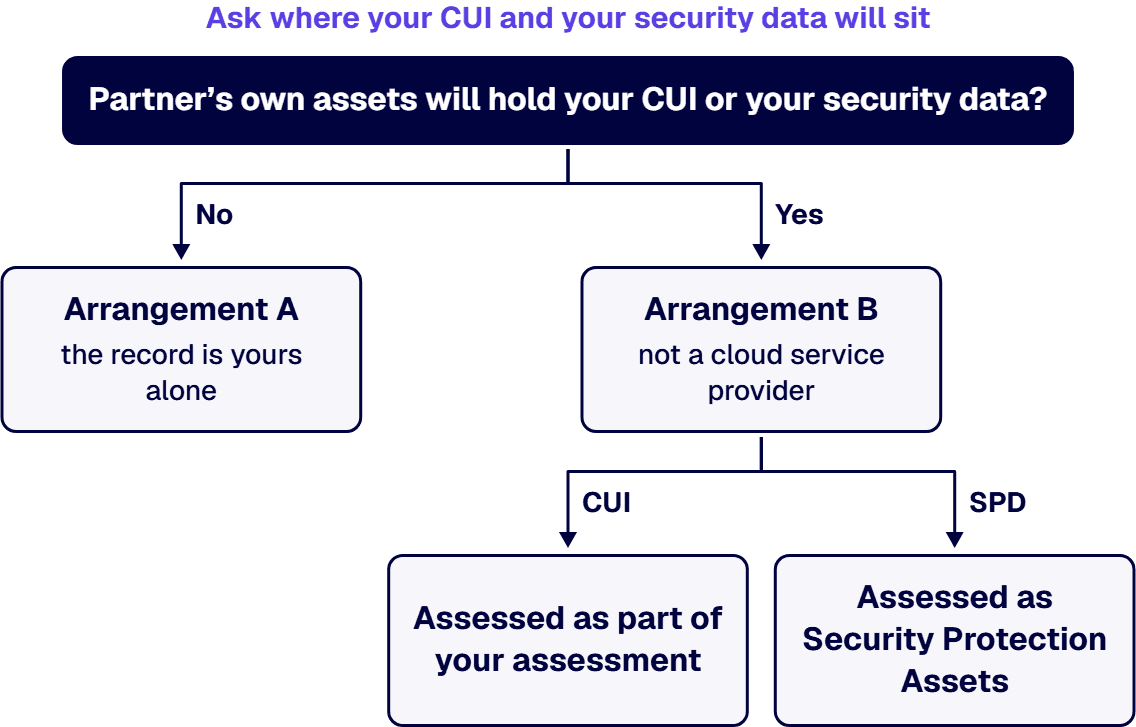
If any of the partner’s own assets will hold your CUI or your security data, table 4 decides how its services are assessed. 32 CFR 170.19 sets the two questions first: “The OSA must consider whether the ESP is a Cloud Service Provider (CSP) and whether the ESP processes, stores, or transmits CUI and/or Security Protection Data (SPD).” Table 4 then gives one cell per answer, quoted here with its row and column from 32 CFR 170.19:
A partner that manages a cloud service for you does not become a cloud service provider by doing so. When DoD published the rule, its responses in the Federal Register said: “An ESP that manages a third-party cloud service on behalf of an OSA would not be considered a CSP.”
The same DoD responses separate two questions that are easy to merge. DoD said: “When ESPs that are not CSPs do NOT process, store, or transmit CUI, they do not require CMMC assessment or certification, however, services they provide are in the OSA’s assessment scope.” And: “Any ESP services used to meet OSA requirements are within the scope of the OSA’s CMMC assessment.” DoD also said in those responses, published in the Federal Register, that a provider can sit inside the same corporate or organizational structure as the contractor, such as a centralized security or network operations center serving several business units, and still be external to the contractor.
If an assessor asks how the outside engineers fit your boundary, the answer has to be written down before the question is asked. For an ESP, 32 CFR 170.19 sets the record: “The use of an ESP, its relationship to the OSA, and the services provided need to be documented in the OSA’s SSP and described in the ESP’s service description and customer responsibility matrix (CRM), which describes the responsibilities of the OSA and ESP with respect to the services provided.”
The same paragraph of 32 CFR 170.19 covers the partner’s own assessment in two sentences. “Note that the ESP may voluntarily undergo a CMMC certification assessment to reduce the ESP’s effort required during the OSA’s assessment.” And: “The minimum assessment type for the ESP is dictated by the OSA’s DoD contract requirement.”
For Arrangement A, the record is yours alone: your SSP describes the engineers’ access as access under your own policies and procedures, on devices, accounts and remote-access systems you provide, which is the situation DoD’s remote-access response in the Federal Register addressed.
Planning rule: whichever arrangement you choose, write it into the SSP in the words an assessor will test, and keep the partner’s service description and responsibility matrix beside it if the partner is an ESP.
Before the partner’s engineers sign in to your tenant, ask for answers you can put straight into the SSP. Each item below ties to a cell or a record requirement in 32 CFR 170.19:
No staffing firm, managed service provider or assessor is named or compared in that list. For the full set of procurement tests a government contractor runs on an augmented Microsoft team, see Agile Staff Augmentation for Government Contractors: What a Microsoft Delivery Team Must Show, and How You Test It.
If your situation is one of these, start somewhere else.
If you are adding senior Microsoft engineers ahead of a Level 2 assessment, i3solutions answers with two kinds of work: senior Microsoft specialists embedded in your team to administer or build on Microsoft 365 GCC High, Microsoft Entra ID, Microsoft Intune and Microsoft Purview, and CMMC Level 2 implementation on Microsoft 365, with the arrangement you choose recorded in your SSP by your team.
Senior Microsoft specialists from i3solutions typically embed in the client’s team within two to four weeks of engagement start. Delivery is senior and US-based.
A CMMC Level 2 implementation for a defense contractor with a defined CUI boundary typically ranges from $45,000 to $75,000, covering the Compliance Manager baseline assessment, Conditional Access redesign, DLP policy build and testing, Purview Audit Premium configuration, and post-implementation documentation. That figure is a project price for an implementation, not a rate for embedded specialists.
i3solutions delivers under a partner-led engagement model with named accountability and governance that holds up under a client audit, as distinct from contractor-only staff augmentation.
An i3solutions engagement does not produce managed-service ownership, a replacement for the internal team, open-ended scope expansion, or vendor lock-in. i3solutions does not scope, assess or certify anyone’s CMMC status; that determination is yours and your assessor’s.
For the wider staffing model, see IT Staff Augmentation Services: Senior Microsoft Talent, Exactly When You Need It.
i3solutions runs migrations against named control families across CMMC, HIPAA, SOC 2, and NIST 800-171, producing artifacts auditors can review.
According to 32 CFR 170.4, a provider is an ESP in the CMMC Program only when CUI or Security Protection Data is processed, stored or transmitted on its assets, and according to 32 CFR 170.19, a service provider that does not process CUI or Security Protection Data does not meet the CMMC definition of an ESP. According to the Federal Register record of the rule, DoD said when it published the rule in October 2024 that staff augmentation where the contractor provides all processes, technology and facilities does not need a CMMC assessment. Which arrangement applies is the contractor’s to specify in its SSP.
According to the Federal Register record of the rule, DoD said when it published the rule in October 2024 that staff augmentation where the contractor provides all processes, technology and facilities does not need a CMMC assessment. According to 32 CFR 170.19, an ESP may voluntarily undergo a CMMC certification assessment to reduce its effort during the contractor’s assessment, and the minimum assessment type for an ESP is dictated by the contractor’s DoD contract requirement.
According to 32 CFR 170.4, Security Protection Data is security relevant information and includes but is not limited to configuration data required to operate a Security Protection Asset, log files generated by or ingested by one, data related to the configuration or vulnerability status of in-scope assets, and passwords that grant access to the in-scope environment.
According to the Federal Register record of the rule, DoD said when it published the rule in October 2024 that the assessment of remote access may fall into several categories depending on the architecture, and that when an ESP provides staff augmentation and the contractor provides all the systems used for remote access, the contractor’s policies apply and the ESP is not considered to be processing, storing or transmitting CUI. According to 32 CFR 170.19, table 3 treats an endpoint hosting a VDI client configured to not allow any processing, storage or transmission of CUI beyond keyboard, video and mouse as an Out-of-Scope Asset. Where administration work puts Security Protection Data on the firm’s own assets, table 4 of 32 CFR 170.19 applies. What an augmented Microsoft team must show before you trust it with a government program is covered in Agile Staff Augmentation for Government Contractors, while this answer covers only whether the team’s firm falls inside your CMMC assessment scope.
According to 32 CFR 170.19, the use of an ESP, its relationship to the contractor and the services provided need to be documented in the contractor’s SSP and described in the ESP’s service description and customer responsibility matrix, which describes the responsibilities of the contractor and the ESP with respect to the services provided.
By Michael Branson
As of September 2026, whichever directory authenticates the users who reach CUI provides a security function to the CMMC Level 2 assessment scope, so keeping on-premises Active Directory as the identity authority brings its domain controllers and the Microsoft Entra Connect server, which Microsoft’s Prerequisites for Microsoft Entra Connect says must be treated as a Tier 0 component, into that scope, while a cloud-only Microsoft Entra ID in the CUI tenant can keep the corporate forest out at the cost of a second identity and its own lifecycle. According to 32 CFR part 170, the security requirements in CMMC Level 2 are identical to those in NIST SP 800-171 R2, and NIST SP 800-171 Revision 2 applies to components that provide security protection for CUI components and requires multifactor authentication for local and network access to privileged accounts and for network access to non-privileged accounts (3.5.3). Where the CUI tenant is GCC High, Microsoft’s Topologies for Microsoft Entra Connect page says verifying the same custom domain in two tenants is not supported, Microsoft’s Protect Microsoft 365 from on-premises attacks recommends cloud-only accounts for privileged roles; the final scope is the contractor’s to document and the C3PAO’s to assess.
Drawn from 32 CFR part 170, NIST SP 800-171 Revision 2 and Microsoft’s Topologies for Microsoft Entra Connect:
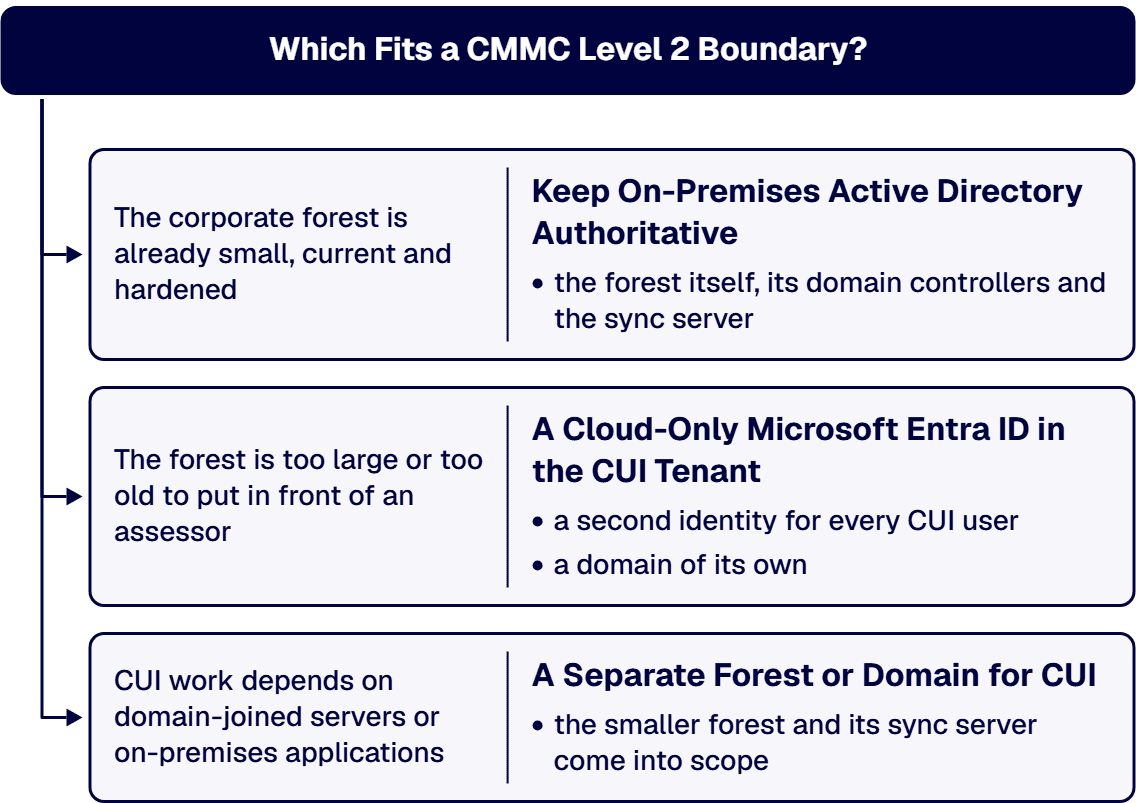
The readiness meeting has drawn the CUI boundary around a Microsoft 365 tenant, often a new GCC High tenant, and someone asks the question the diagram does not answer: where do the users’ passwords actually live? If the people who handle CUI sign in with accounts synchronized from the corporate forest, you suspect the assessment will follow that trust back into a forest that grew over many years and was never built to be assessed. If they sign in with cloud-only accounts in the CUI tenant, you inherit a second identity for every one of them and a joiner and leaver process that has to keep both in step. Go wrong one way and remediating a forest no one fully inventoried becomes the critical path to the certification the business needs to win work. Go wrong the other way and the access-control evidence fails anyway, because the second identity drifted from HR. This guide works through the decision from the rule’s own definitions and Microsoft’s own constraints, and it leaves the final scope where the rule puts it: with the contractor who documents it and the C3PAO who assesses it.
When the boundary diagram is drawn, the question is not whether identity gets assessed but how much of the estate comes into the assessment with it. The rule starts from the scope itself. 32 CFR part 170 states: “CMMC Assessment Scope means the set of all assets in the OSA’s environment that will be assessed against CMMC security requirements.” The same part defines the category that matters here: “Security Protection Assets (SPA) means assets providing security functions or capabilities for the OSA’s CMMC Assessment Scope.”
The rule’s Level 2 asset table, in 32 CFR part 170, says what a contractor does with those assets. It documents them in the asset inventory, records their treatment in the system security plan, shows them on the network diagram of the CMMC Assessment Scope, and prepares them to be assessed against the Level 2 security requirements that are relevant to the capabilities they provide. The same part keeps them from being argued away: its definition of out-of-scope assets carries the exception “except for assets that provide security protection for a CUI asset”, and its definition of Security Protection Data includes “passwords that grant access to the in-scope environment”.
NIST reaches the same place from the requirements side. NIST SP 800-171 Revision 2 states: “The security requirements apply to the components of nonfederal systems that process, store, or transmit CUI, or that provide security protection for such components.” It also names the lever a contractor has: “If nonfederal organizations designate specific system components for the processing, storage, or transmission of CUI, those organizations may limit the scope of the security requirements by isolating the designated system components in a separate CUI security domain.”
The contractor’s own reasoning from those definitions, which is a planning reading and not words the rule uses, runs like this. A directory that authenticates the people who reach CUI is providing a security function to the assessment scope, and the passwords it holds grant access to the in-scope environment. So the identity authority is documented and assessed with the boundary whichever directory it is, and where it lives decides what else comes in with it. The contractor writes that reasoning into its own scoping documentation, and the C3PAO decides whether it holds.
If your question is broader than the CUI boundary, and is really which identity platform fits a hybrid enterprise, start with Which IAM Platforms Fit a Complex Hybrid Enterprise: How to Decide.
Whichever directory you make authoritative will be asked to show the same identity requirements, and the failure mode is choosing a shape before checking which directory can produce the evidence. According to 32 CFR part 170, the security requirements in CMMC Level 2 are identical to the requirements in NIST SP 800-171 R2. NIST SP 800-171 Revision 2 sets out the requirements an identity authority carries most directly:
For a hybrid design, Microsoft documents how on-premises password policy reaches the cloud. Microsoft’s Configure CMMC Level 2 Identification and Authentication (IA) controls page states: “For customers that require strict password character change, password reuse and complexity requirements use hybrid accounts configured with Password-Hash-Sync.” The same page says the passwords synchronized to Microsoft Entra ID then inherit the restrictions configured in Active Directory password policies. That page predates the final rule, and this guide uses it for that configuration fact only.
List, for each candidate directory, which of these requirements it enforces and where the evidence for each is produced. The full control-family mapping for Microsoft 365 lives on Microsoft 365 CMMC Compliance Consulting: Product Scope and Audit Evidence, and this guide does not repeat it.
If the CUI users keep signing in with accounts synchronized from the corporate forest, the forest comes with them, and the question becomes whether that forest can stand being assessed. The synchronization server is the first thing Microsoft names. Microsoft’s Prerequisites for Microsoft Entra Connect page states: “The Microsoft Entra Connect server must be treated as a Tier 0 component as documented in the Active Directory administrative tier model.”
Microsoft also describes the path an attacker takes through that trust. Microsoft’s Protect Microsoft 365 from on-premises attacks page states: “The two primary threat vectors are federation trust relationships and account synchronization.” The same page adds: “If threat actors compromise the on-premises environment, these trust relationships become opportunities for them to also compromise your Microsoft 365 environment.”
Read with the definitions above, the contractor’s planning reading for Shape A is that the domain controllers authenticate the CUI users and hold the passwords that grant access to the in-scope environment, and the Microsoft Entra Connect server carries those identities into the CUI tenant, so all of them are documented and assessed with the boundary. Shape A fits when the forest is already small, inventoried and hardened, or when the CUI users cannot practically carry a second identity. What it costs is the forest itself, its domain controllers and the sync server, documented and assessed as part of the scope. How those users authenticate is a separate decision, and this guide does not compare the authentication models.
If the forest is too large or too old to put in front of an assessor, the alternative is an identity the forest does not feed, and it has its own price. Microsoft’s own guidance points this way for the accounts that matter most. Microsoft’s Protect Microsoft 365 from on-premises attacks page states: “Use cloud-only accounts for Microsoft Entra ID and Microsoft 365 privileged roles.”
A separate CUI tenant is a deliberate departure from Microsoft’s default. Microsoft’s Topologies for Microsoft Entra Connect page states: “We recommend having a single tenant in Microsoft Entra ID for an organization.” The same page sets the constraint that shapes every naming plan: “It’s not supported to add and verify the same custom domain name in more than one Microsoft Entra tenant, even if these tenants are in different Azure environments.” A commercial tenant and a separate CUI tenant, a GCC High tenant included, cannot both verify the corporate domain, so the CUI users need a domain of their own.
The contractor’s planning reading for Shape B follows from the rule’s out-of-scope definition in 32 CFR part 170 and the separate security domain that NIST SP 800-171 Revision 2 allows: when nothing in the corporate forest authenticates CUI users or otherwise protects a CUI asset, the contractor can document the forest outside the boundary, and the C3PAO assesses that reasoning. What it costs is a second identity for every CUI user, a joiner, mover and leaver process that keeps that identity in step with the first, because 3.1.1 still asks the contractor to limit system access to authorized users, and a domain of its own in the CUI tenant. If the CUI tenant is fed by a synchronization engine rather than managed cloud-only, which engine to use is a separate decision this guide does not make.
Whether the CUI tenant should be GCC or GCC High is its own question, answered on Does CMMC Require GCC High? What the Rule Actually Requires for Defense Contractors; this guide takes the tenant as given. Moving identity and data into a new GCC High tenant is planned on Microsoft 365 GCC High Migration Checklist: Best Practices for Defense Contractors.
Some CUI work cannot leave on-premises authentication behind, because it runs on domain-joined servers or on-premises applications, and a cloud-only identity does not remove the need for a directory there. For that case the option is a separate forest or domain for CUI, synchronized into the CUI tenant, and Microsoft’s rules still apply to it. Microsoft’s Topologies for Microsoft Entra Connect page says a Microsoft Entra Connect server is deployed for every tenant to be synchronized, because “one Microsoft Entra Connect server can’t synchronize to more than one Microsoft Entra tenant”, and it states: “It’s supported to configure Password Hash Sync from Active Directory to multiple Microsoft Entra tenants for the same user object.” Where users do move, the guide to moving identity onto Microsoft Entra ID in government and financial-services tenants sets out which Entra features behave differently on day one and why the record of the move must exist when the assessor asks.
A dedicated forest is still synchronized by a Microsoft Entra Connect server that Microsoft’s Prerequisites for Microsoft Entra Connect page places at Tier 0, so the smaller forest and its sync server come into scope in place of the larger one. Where the CUI tenant sits in the Azure Government cloud, Microsoft’s Hybrid identity considerations for the Azure Government cloud page states: “To integrate a Microsoft Active Directory environment (either on-premises or hosted in an IaaS that is part of the same cloud instance) with the Azure Government cloud, you need to upgrade to the latest release of Microsoft Entra Connect.” This guide names Shape C as an option and does not describe the design of the forest itself.
Device join and management follow the identity choice, and the device side is covered on Is Microsoft Intune CMMC Compliant? What It Covers, and What It Does Not.
If a team is mapping controls against the newest NIST revision because it is the newest, it is mapping against the wrong text. According to 32 CFR 170.14(c)(3), “The security requirements in CMMC Level 2 are identical to the requirements in NIST SP 800-171 R2.” NIST’s own NIST SP 800-171 Rev. 2 page marks that revision withdrawn on May 14, 2024 and superseded by SP 800-171 Rev. 3. Both facts stand at once: the requirement numbers on this page are Rev 2’s because the rule names Rev 2. For the current phase-in clock, see i3solutions’ Which CMMC Level Applies to You, and When Does It Start?.
A decision guide that fits every contractor fits none of them, so test yours against the cases where this framing breaks, using 32 CFR part 170 and NIST SP 800-171 Revision 2:
No design removes the assessment. Microsoft’s Configure Microsoft Entra ID for CMMC compliance page states: “To be compliant with requirements in CMMC, it’s the responsibility of companies performing work with, and on behalf of, the US Dept. of Defense (DoD) to complete other configurations or processes.”
A scoping decision you cannot show on paper is one the assessment will reopen, so hold whoever helps you decide to criteria drawn from 32 CFR part 170, NIST SP 800-171 Revision 2 and Microsoft’s Topologies for Microsoft Entra Connect:
i3solutions has deep experience implementing identity governance for enterprises in aerospace and defense manufacturing, financial services, and healthcare, including environments with CMMC and ITAR obligations. The work described in this guide is delivered as a project, with specialists embedded in your team where it needs them: designing which directory is authoritative for the CUI boundary and how the forest, the sync server and the tenant are placed, configuring Microsoft Entra ID, Conditional Access and Privileged Identity Management, moving identity into a GCC High tenant where that is the boundary, and documenting the design for your system security plan and your own assessment. We manage GCC High migrations end-to-end: from eligibility validation and licensing coordination with your AOS-G supplier through identity architecture, data migration, security baseline configuration, and post-migration governance. i3solutions plans and runs these migrations for regulated defense organizations, structuring each phase around the compliance evidence assessors expect. i3solutions governs identity and access for regulated Microsoft estates with senior, U.S.-based engineers and leaves an audit-defensible record.
The i3solutions Federal Compliance Assessment evaluates a client tenant against NIST SP 800-53 and CMMC using automated tenant configuration scripts and a 42-point security checklist. An i3solutions engagement does not produce managed-service ownership, a replacement for the internal team, open-ended scope expansion, or vendor lock-in. For how this fits a wider identity program, see Establish Identity as a Governed Enterprise Capability.
It depends on the contractor’s documented scoping, which the C3PAO assesses. According to 32 CFR part 170, Security Protection Assets are assets providing security functions or capabilities for the CMMC Assessment Scope, and according to NIST SP 800-171 Revision 2, its requirements apply to components that provide security protection for CUI components. According to Microsoft Learn, the Microsoft Entra Connect server must be treated as a Tier 0 component, so a contractor whose CUI users sync from on-premises Active Directory has to account for the forest, its domain controllers and the sync server in its scoping reasoning.
No. According to Microsoft Learn, it is not supported to add and verify the same custom domain name in more than one Microsoft Entra tenant, even if these tenants are in different Azure environments, so a GCC High tenant alongside a commercial tenant needs a domain of its own.
Rev 2. According to 32 CFR part 170, the security requirements in CMMC Level 2 are identical to the requirements in NIST SP 800-171 R2. According to NIST, Rev 2 was withdrawn on May 14, 2024 and superseded by Rev 3, but the rule still names R2, so the requirement numbers a Level 2 assessment uses are Rev 2’s.
According to Microsoft Learn, Microsoft recommends cloud-only accounts for Microsoft Entra ID and Microsoft 365 privileged roles, and names account synchronization, beside federation trust relationships, as a primary threat vector by which a compromised on-premises environment reaches Microsoft 365.
By Michael Branson
As of September 2026, Microsoft’s ITAR offering lists Microsoft Teams among the Office 365 GCC High in-scope services, backed by contractual commitments on where stored data is located and on limiting access to US persons, but the same International Traffic in Arms Regulations (ITAR) compliance page also states that “there’s no compliance certification for the ITAR” and that “customers are ultimately responsible for the protection and architecture of their applications within their environments.” The regulator’s text at § 120.56 Release, up to date as of September 22, 2026, lists “Oral or written exchanges with foreign persons of technical data in the United States or abroad” as a release, so, in this guide’s reading, the people admitted to a Teams meeting and the people who can open its recording are the controls that matter, and those are set in your tenant: anonymous join, the lobby, cross-cloud and guest access, and OneDrive and SharePoint permissions. Azure Communication Services is available in Azure Government with calling, chat and call recording and holds FedRAMP High accreditation as part of the GCC High service offering, according to Azure Communication Services for US Government, but Microsoft’s ITAR pages do not name it, Microsoft’s Teams interoperability page says its interoperability “isn’t compatible with Teams deployments using Microsoft 365 government clouds (GCC) at this time”, and the application built on it is the customer’s architecture to secure.
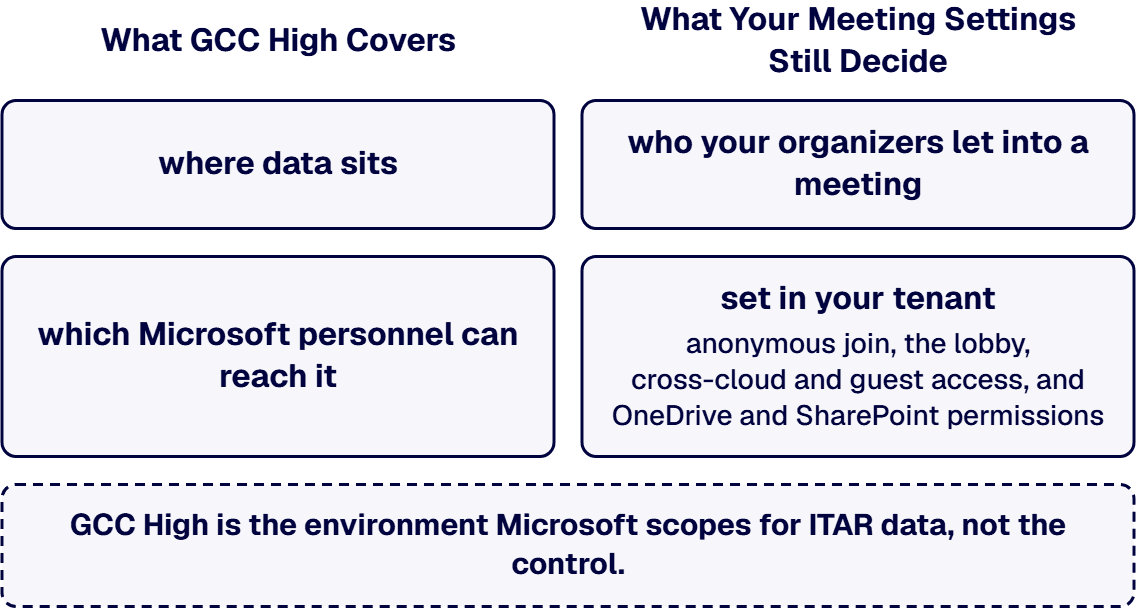
The design review is on Teams. A supplier’s engineer joins from another company’s tenant, a drawing goes up on screen, and the organizer records the session so the people who missed it can catch up. The tenant moved to GCC High earlier, and everyone assumed the move settled conferencing too. Then someone asks whether a contractor on the call counts as a foreign person under the regulation, whether that made the discussion an export, and whether the recording in the organizer’s OneDrive can be opened by people who were never invited. This guide sets out what Microsoft states GCC High covers for ITAR data in Teams, what the regulator’s text says about meetings, which tenant settings decide who joins and who can replay a discussion, and where Azure Communication Services fits. It is not legal advice: whether a given person, meeting or data set involves an export is a determination for your empowered official and counsel.
If your tenant moved to GCC High for ITAR, the move bought specific, written commitments, and Microsoft states them on its International Traffic in Arms Regulations (ITAR) compliance page, last updated June 2, 2026: “Microsoft Azure Government and Microsoft Office 365 U.S. Government for Defense provide support for customers with data subject to the ITAR through additional contractual commitments to customers regarding the location of stored data, and limitations on the ability to access such data to US persons.” The same page lists Microsoft Teams, Exchange Online, OneDrive and SharePoint Online among the GCC High in-scope services, and it adds that “Customers must sign additional agreements formally notifying Microsoft of their intention to store ITAR-controlled data, so that Microsoft can comply with responsibilities both to our customers and to the US government.”
Microsoft’s Teams planning page, Plan for Office 365 Government – GCC High deployments, puts the platform commitments in two lines: “Your organization’s customer content is stored within the United States.” and “Access to your organization’s customer content is restricted to screened Microsoft personnel.” The service description, Office 365 GCC High and DoD, last updated August 3, 2026, adds: “Office 365 staff don’t have standing access to GCC High and DoD production.” It also says that support “isn’t included in the service accreditation boundary and doesn’t provide FedRAMP, DOD SRG, ITAR, IRS 1075, or CJIS data handling compliance assurances”, which in this guide’s reading means a meeting recording or chat content from a technical-data discussion never goes into a support case.
What Microsoft does not say matters as much. The ITAR page states: “While there’s no compliance certification for the ITAR, Microsoft designs and operates its in-scope services to be capable of supporting a customer’s ITAR obligations and compliance program.” And it draws the line of responsibility: “Microsoft provides these assurances for the infrastructure and operational components of these government cloud services, but customers are ultimately responsible for the protection and architecture of their applications within their environments.” The commitments cover where data sits and which Microsoft personnel can reach it. They do not decide who your organizers let into a meeting. The program-level export-control background, including document access and the encryption carve-out, is covered in Redesigning an ITAR Export-Control Compliance Program to Be Efficient, Not Just Compliant.
The planning rule this guide draws from Microsoft’s text: GCC High is the environment Microsoft scopes for ITAR data, not the control. The controls are the settings your team owns.
When a design review runs on Teams, the risk is not only where the file is stored but who is in the room when it is discussed, and the regulator’s text explains why. Every quotation in this section is the text of 22 CFR Part 120 as the eCFR publishes it, up to date as of September 22, 2026.
On what counts as technical data, § 120.33 Technical data says, of information required for defense articles: “This includes information in the form of blueprints, drawings, photographs, plans, instructions, or documentation”. On how it is released, § 120.56 Release lists, among other means:
On what a release in the United States amounts to, § 120.50 Export includes “Releasing or otherwise transferring technical data to a foreign person in the United States (a deemed export)” and states: “Any release in the United States of technical data to a foreign person is deemed to be an export to all countries in which the foreign person has held or holds citizenship or holds permanent residency.” And § 120.54 Activities that are not exports, reexports, retransfers, or temporary imports lists “Transmitting or otherwise transferring technical data to a U.S. person in the United States from a person in the United States” among the activities that are not exports. Who is a U.S. person and who is a foreign person is defined in § 120.62 U.S. person and § 120.63 Foreign person; this guide does not restate either definition.
If encryption is offered as the answer, be exact about what the regulator’s text covers. The same § 120.54 Activities that are not exports, reexports, retransfers, or temporary imports treats technical data “Secured using end-to-end encryption” as part of a carve-out with further conditions, and states that “The ability to access technical data in encrypted form that satisfies the criteria set forth in paragraph (a)(5) of this section does not constitute the release or export of such technical data.” In this guide’s reading, that text concerns data in encrypted form. A person admitted to the meeting hears the discussion and sees the shared screen after it has been decrypted for them, so the carve-out does not reach who is in the room. The full carve-out and its conditions are covered in the export-control program guide linked in the previous section.
The table below is this guide’s reading of how the regulator’s text quoted above lines up with what happens in a Teams meeting. It is a planning aid, not a determination.
If an organizer’s meeting policy lets anyone with the link join, the attendee’s own honesty becomes the only control left, and nothing in the choice of cloud changes that. Four groups of Teams settings decide who is admitted. Which values suit your technical-data meetings is this guide’s reading, set out after Microsoft’s text.
Anonymous join. Microsoft’s page Manage anonymous participant access to Teams meetings and events (IT admins), last updated July 9, 2026, describes an organization-wide toggle, “When this setting is turned off, anonymous users can’t attend meetings hosted by anyone in your organization.”, and then notes that “The Anonymous users can join a meeting organization-wide setting is going away.” Microsoft’s recommendation on the same page: “We recommend leaving this setting On and using the Anonymous users can join a meeting unverified per-organizer meeting policy to manage anonymous meeting join instead.” The lever for your technical-data organizers is therefore their per-organizer meeting policy.
The lobby. Microsoft’s page IT Admins – Manage lobby options in Microsoft Teams states: “The Teams meeting lobby prevents certain types of participants from joining a meeting until a meeting organizer, co-organizer, or presenter admits them.” The same page states: “Using the lobby settings in the Teams admin center, you can create defaults for which types of meeting participants can bypass the lobby and which participants must wait there until admitted to the meeting.”
External and unmanaged accounts. Microsoft’s page IT Admins – Manage external meetings and chat with people and organizations using Microsoft identities states: “Chats and meetings with external unmanaged Teams users isn’t available in Microsoft 365 Government Community Cloud (GCC), GCC High, or DOD deployments, or in private cloud environments.”
Cross-cloud meetings. A supplier on commercial Microsoft 365, as in the opening scenario, is this case, and Microsoft’s page Meet with people in other Microsoft 365 cloud environments lists three ways for them to join:
The same page states: “With cross-cloud meeting connections, you can allow or prevent meetings between your organization and an organization in another cloud.” and “The organization that you’re meeting with must also configure these settings for their organization.” Each connection is a decision your team makes, organization by organization, and the other side has to make a matching one. This is a meetings setting; the GCC High rules on sharing files with other organizations are a separate matter and are not restated here.
One more line from Microsoft’s Microsoft Teams service description, last updated July 8, 2026: in its feature table, the “Channels – Shared” row reads No in the GCC High column. Stopping your own users from joining other organizations’ meetings is a separate, outbound control and is not covered here. On voice, Microsoft’s Office 365 GCC High and DoD service description states that “PSTN Calling & PSTN Conferencing services are currently not available in GCC High and DoD.” and that “Phone System and Audio Conferencing for GCC High and DoD environments are being delivered via Direct Routing.”; choosing that route is a separate decision this guide does not cover.
The planning rule, in this guide’s reading: an organizer policy, not an attendee’s word, decides who is admitted. Identify the organizers and groups that hold technical-data discussions, and set their anonymous-join, lobby-bypass and presenter policies, and the cross-cloud and guest connections they rely on, with a written reason for each value.
When a design review is recorded, the discussion outlives the meeting as a file, and the file’s readers are set by storage and permissions rather than by who was in the room. Microsoft’s page Manage Teams recording policies for meetings and events, last updated July 22, 2026, says that when a meeting is recorded, “It gets uploaded to the meeting organizer’s OneDrive (private meetings) or SharePoint (channel meetings).” It continues: “People invited to the meeting have permissions to view the recording (guests and external attendees can view the recording only if the recording is explicitly shared with them).” It adds that “Microsoft Purview, OneDrive file storage, and access permissions apply to the meeting recording files the same as with other files.” and that the recording is linked from the meeting: “It’s linked in the chat for the meeting.”
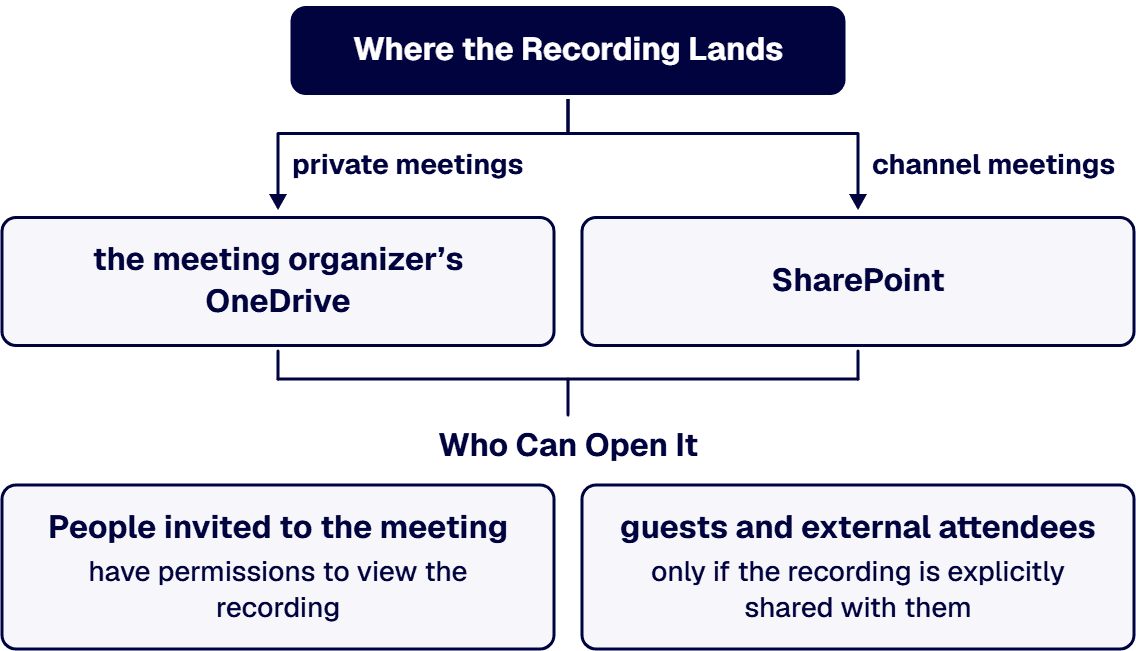
The planning rule, in this guide’s reading: a recording of a technical-data discussion is a technical-data file. Its location, its sharing and its Purview labels deserve the same design as a drawing in a controlled SharePoint library, and the organizers who record technical-data meetings should know where their recordings land and who can open them before they press record. Policy-based compliance recording of every call, for retention, is a separate decision this guide does not cover. This guide also makes no statement about transcription, captions or Copilot meeting features in GCC High; confirm those against Microsoft’s current documentation for your environment before relying on them.
We recommend starting with one decision before any value is set: which organizers and groups hold technical-data discussions and therefore get a restricted meeting policy. That decision belongs to your empowered official, and the Teams administrator sets the values only after it is written down. The failure condition to design against follows from Microsoft’s recording text quoted above: people invited to the meeting have permissions to view the recording, so the invitation list is also the recording’s reader list, and, in this guide’s reading, a channel meeting’s recording can be opened by whoever can open files in that channel’s SharePoint location. We recommend that organizers of technical-data meetings treat the invitation as an access decision, not a courtesy.
Before the first technical-data meeting under a new policy, we recommend one test meeting, with no technical data on screen, run by an organizer who holds that policy, and the Teams administrator checking three things against what Microsoft describes: that an anonymous join attempt is handled as the per-organizer policy intends; that a participant from outside the organization waits in the lobby, where the lobby settings say they should, until an organizer, co-organizer or presenter admits them; and that the test recording lands in the organizer’s OneDrive, or the channel’s SharePoint location, with only the permissions the design calls for. Write the result of each check beside the reason for the policy value it tests, and repeat the test when a policy, a cross-cloud connection or a guest arrangement changes. The test shows that the settings behave as designed; it does not settle whether a meeting involves an export, which remains a determination for your empowered official and counsel.
If your team wants its own calling application for technical-data sessions rather than Teams, Microsoft’s pages on Azure Communication Services in Azure Government set out what the service offers and what they leave to you. Read them with the warning Microsoft places at the top of Azure Communication Services for US Government, last updated September 23, 2026: “Azure Communication Services is introducing breaking changes, and some services are being retired.” This guide does not say which services that affects.
What Microsoft states on that page: “You can use Azure Communication Services within Azure Government to provide compliance with US government requirements for cloud services.” It describes customer content stored within the United States and access restricted to screened Microsoft personnel, and states that “Azure Communication Services in Azure Government has achieved FedRAMP High accreditation as part of the Microsoft 365 Government Community Cloud (GCC) – High service offering.” Microsoft’s compliance scope page, Azure, Dynamics 365, Microsoft 365, and Power Platform services compliance scope, says the same in its own words: “Azure Communication Services operates under the same infrastructure that powers Microsoft Teams and obtained FedRAMP High accreditation as part of the M365 GCC-High service offering.” The features Microsoft lists as available in Azure Government are:
with the note that “SMTP endpoint is not supported in Azure US Government Cloud at this time.”
What Microsoft does not state. Neither of Microsoft’s ITAR compliance pages read for this guide names Azure Communication Services. Microsoft’s Teams interoperability page says: “Azure Communication Services interoperability isn’t compatible with Teams deployments using Microsoft 365 government clouds (GCC) at this time.” Microsoft places the responsibility for the application on the customer in two places. The first is the ITAR compliance page’s “customers are ultimately responsible for the protection and architecture of their applications within their environments”. The second is Compare Azure Government and global Azure, which states “You’re responsible for designing and deploying your applications to meet US export control requirements such as the requirements prescribed in the EAR, ITAR, and DoE 10 CFR Part 810.”
The planning rule, in this guide’s reading: scope an Azure Communication Services build for technical-data calls as your own application running under Azure Government’s commitments, with the participant controls designed into the application itself, because the application, not Teams, owns the participant list. Build on it when a custom calling workflow needs that ownership, and not as a way to reach Teams users in a GCC High tenant, since Microsoft’s interoperability page says that interoperability is not compatible with Teams in Microsoft 365 government clouds at this time.
If any of these describes your situation, start somewhere else:
Whether the work is done by your own team or with outside help, ask for these, in writing:
When an aerospace and defense or federal organization takes this on, it needs a project with an end date: the inventory of technical-data meeting groups, the organizer policies and cross-cloud decisions, the recording storage and permissions design, and, where a custom calling workflow is needed, the Azure Communication Services application in Azure Government, followed by a handover of the settings and the code to the internal team, with embedded specialists where the team needs more hands for a period. The GCC High tenant itself comes through Microsoft’s GCC High eligibility process. i3solutions has deep experience implementing identity governance for enterprises in aerospace and defense manufacturing, financial services, and healthcare, including environments with CMMC and ITAR obligations. i3solutions has successfully delivered software development projects under CMMC, HIPAA, ITAR, and SOC 2 compliance frameworks with audit-ready documentation and governance practices built into our standard delivery methodology. i3solutions provides dedicated US-based Microsoft teams for aerospace and defense programs. i3solutions plans and runs governed Azure and Microsoft 365 migrations with senior, U.S.-based engineers. i3solutions has been a Microsoft partner since 1997 and has delivered 600+ implementations across aerospace and defense, financial services, and health sciences. An i3solutions engagement does not produce managed-service ownership, a replacement for the internal team, open-ended scope expansion, or vendor lock-in. This work sits within i3solutions’ Embedding Governance into How the Enterprise Operates and Scales.
No certification exists for it to hold: Microsoft’s International Traffic in Arms Regulations (ITAR) compliance page states that “there’s no compliance certification for the ITAR”. The same page lists Microsoft Teams among the GCC High in-scope services, backed by contractual commitments on data location and US-person access, and says that customers are ultimately responsible for the protection and architecture of their applications within their environments. Microsoft scopes Teams in GCC High for ITAR data; who joins your meetings and who can open their recordings are settings your team controls.
The eCFR text of § 120.56 Release lists oral or written exchanges with foreign persons of technical data in the United States or abroad as a release, and the eCFR text of § 120.50 Export states that a release in the United States of technical data to a foreign person is deemed to be an export to all countries in which the foreign person has held or holds citizenship or holds permanent residency. Who counts as a foreign person is defined in the eCFR text of § 120.63 Foreign person. Whether a particular call involved technical data and a foreign person is a determination for your empowered official and counsel; this guide is not legal advice.
Microsoft’s page Meet with people in other Microsoft 365 cloud environments lists three ways: authenticated access using a cross-cloud meeting connection, authenticated access using a guest account, and anonymous access. Cross-cloud meeting connections can be allowed or prevented organization by organization, and the other organization must also configure its settings. Separately, Microsoft states that chats and meetings with external unmanaged Teams users are not available in GCC High.
According to Microsoft’s page Manage Teams recording policies for meetings and events, a recording is uploaded to the meeting organizer’s OneDrive for private meetings or to SharePoint for channel meetings. People invited to the meeting can view it, guests and external attendees only if it is explicitly shared with them, and Microsoft Purview, OneDrive file storage and access permissions apply to it as to other files.
Microsoft’s answer is partial. Its page Azure Communication Services for US Government lists calling, chat and call recording among the features available in Azure Government and states FedRAMP High accreditation as part of the GCC High service offering. Microsoft’s ITAR compliance pages do not name Azure Communication Services, its Teams interoperability is not compatible with Teams in Microsoft 365 government clouds at this time, and Microsoft places the application’s protection and export-control design on the customer.
Microsoft’s Office 365 GCC High and DoD service description states that PSTN Calling and PSTN Conferencing services are currently not available in GCC High and DoD, and that Phone System and Audio Conferencing for those environments are delivered via Direct Routing. Choosing and configuring that route is a separate decision from the meeting settings in this guide.
By Michael Branson
As of September 2026, Dynamics 365 Supply Chain Management documents the core of an FDA-regulated manufacturer’s traceability and record controls (batch and serial registration from component to finished product, item tracing forward and back, quality orders and batch holds, and electronic signatures with a logged audit trail), but its as-built genealogy browser, the Traceability add-in, is a preview feature Microsoft says is not meant for production use, item tracing runs one legal entity at a time, and Microsoft states that no Part 11 certification exists, so the configured system is yours to validate. Microsoft’s Food and Drug Administration CFR Title 21 Part 11 page, last updated December 4, 2025, says “Customers who build and deploy applications subject to FDA regulation are responsible for ensuring that their applications meet FDA requirements”, and 21 CFR 11.10(a) lists “Validation of systems to ensure accuracy, reliability, consistent intended performance, and the ability to discern invalid or altered records.” Whether Supply Chain Management is the right platform at all is a separate decision, covered in Dynamics 365 ERP for the Regulated Enterprise: Modernizing or Replacing Legacy ERP.
The question usually arrives in the middle of an ERP selection. The quality head asks a plain one: if a component lot turns out to be bad, can the new system say which finished lots used it and which customers received them, and how fast. In the same week someone on the selection team calls the platform Part 11 compliant, and nobody can point to a Microsoft document that says so, because Microsoft’s own compliance page says no Part 11 certification exists. This checklist takes the manufacturer’s FDA records one at a time and sorts each into three piles: what Supply Chain Management documents as a feature today, what rests on a preview feature, and what stays with the manufacturer to configure, test and validate. It quotes what 21 CFR parts 11, 820 and 211 say in the Electronic Code of Federal Regulations and what Microsoft documents on Microsoft Learn. It does not decide whether a product, a site or a record falls under a given part; that call belongs to the manufacturer’s regulatory affairs and quality functions.
A recall starts with one suspect component lot and one deadline, and the first failure mode is a trace that stops before it reaches the customer. The regulation defines the unit being traced. Under 21 CFR 820.3(a), in the Quality Management System Regulation for devices, “Batch or lot means one or more components or finished devices that consist of a single type, model, class, size, composition, or software version that are manufactured under essentially the same conditions and that are intended to have uniform characteristics and quality within specified limits.” For drug products, 21 CFR 211.188(b)(3) asks the batch production and control record for “Specific identification of each batch of component or in-process material used”. Part 820 carries two traceability lines this page names only as the eCFR states them: section 820.10(b)(2) says “the manufacturer must document procedures for traceability in accordance with the requirements of part 821 of this chapter, if applicable.” and section 820.35(c) says “In addition to the requirements of Clauses 7.5.1, 7.5.8, and 7.5.9 in ISO 13485, the UDI must be recorded for each medical device or batch of medical devices.”
On the Supply Chain Management side, the registration is documented. According to Microsoft’s Register and track batch/serial numbers for finished products and their components page, last updated August 13, 2025, “Workers and managers can register batch/serial numbers for materials and components that are used in manufacturing processes.” and “They can also then associate those numbers with the batch/serial numbers of the products that are produced.” The same page lists its conditions: the product must be defined as serial controlled or batch controlled, and the system must run Supply Chain Management version 10.0.40 or later with the Tracked components feature turned on; Microsoft adds, “As of Supply Chain Management version 10.0.45, this feature is turned on by default.”
The trace itself is documented too, and so are its limits, which decide how a recall drill has to be scripted. According to Microsoft’s Item and raw material tracing in inventory, production, and sales page, last updated May 22, 2026, “Manufacturers can trace items, raw materials, or ingredients back to the vendor, and forward through the production and sale of the finished product.” The precondition is explicit: “You can trace an item or raw material only if you assign a tracking dimension to it.” Then the limits, in Microsoft’s words: “Because tracing is based on inventory transactions, some limitations exist when you trace items.” “Additionally, co-products appear in the trace details, but by-products aren’t included.” “The trace displays for one legal entity at a time.” “The trace doesn’t include cross-company capabilities in an intercompany context.” “You must start a new trace for each company where an item is received or issued.” And the trace is a snapshot: “The trace details aren’t updated if the information changes after the trace is done.”
Planning rules for this record:
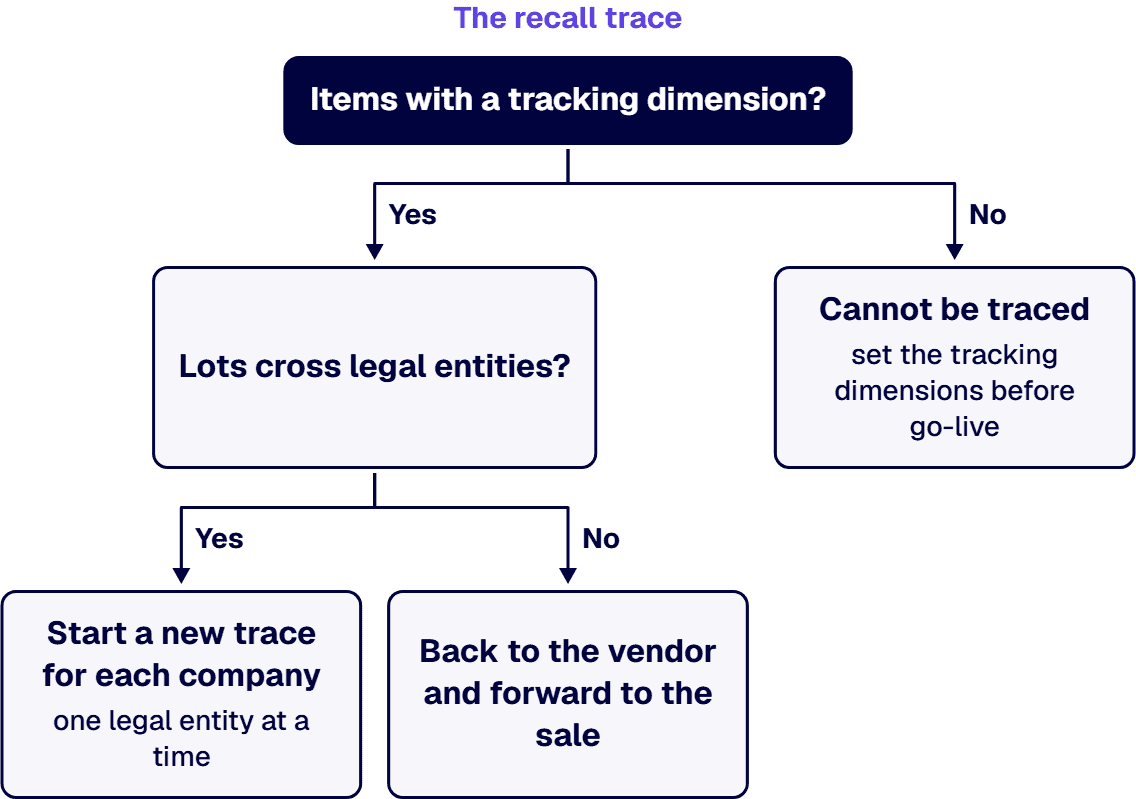
The add-in usually appears in the demo, and the failure mode is scoring it as the recall tool of record. Microsoft points to it from the tracked-components page itself: “You can also track batch/serial numbers for materials and components using the Traceability Add-in for Dynamics 365 Supply Chain Management (preview)”, which, the same Tip says, offers a graphical browser interface and an API for integration with external systems. Microsoft’s Traceability overview (preview) page, last updated October 28, 2025, opens with the notice “This article is prerelease documentation and is subject to change.” and states: “This is a preview feature. Preview features aren’t meant for production use and might have restricted functionality.” Among the preview add-in’s features, the same page lists as-built BOM registration: documenting composition genealogy (the as-built bill of materials) and activity events such as procurement, production and distribution against each serial and batch number.
Installing the add-in has its own limits. According to Microsoft’s Install, update, or uninstall Traceability (preview) page, last updated October 2, 2026, “Copying an environment with Traceability already installed isn’t supported.” That matters wherever the program plans to copy environments, for example to refresh a test environment from production.
Planning rule: score what the manufacturer can run in production on the tracked-components registration and the item trace described above, and treat the preview Traceability add-in as a pilot until Microsoft changes its label. If the program’s recall plan depends on the add-in, say so in the risk register, not in the fit score.
A suspect lot that stays available to planning or shipping is the next failure mode, so the hold has to reach every process that can consume or move the lot. According to Microsoft’s Use batch disposition codes to mark batches as available or unavailable page, last updated June 2, 2026, “You assign batch disposition codes to inventory batches to indicate whether each batch is available for master planning, reservation, picking, and shipping.” A code with the Unavailable status blocks the batch for all four, although Microsoft notes that some of those settings can be changed to add exceptions. Microsoft’s Inventory blocking page, last updated August 14, 2025, adds a second mechanism, “You can use inventory blocking to prevent items from being processed or consumed.”, and a preference for expiry: “We recommend that you rely on batch disposition codes, instead of inventory status, for blocking expired batches.”
Quality orders are the inspection record. According to Microsoft’s Quality and nonconformance management overview page, last updated August 13, 2025, “When you set up a quality association, Supply Chain Management can generate quality orders for various business processes, events, and conditions.” Microsoft’s Quality orders page, last updated June 22, 2026, says “By default, you can no longer edit or update a quality order after it has been validated and the tests have been passed.”, and documents a procedure for reopening one when that is needed, which is itself a step the manufacturer’s procedures should control.
Advanced quality management is the newer layer. According to Microsoft’s Advanced quality management overview page, last updated July 27, 2026, “Advanced quality management is a suite of quality management features introduced in Microsoft Dynamics 365 Supply Chain Management version 10.0.44.” Of the advanced quality management feature itself, the page says “As of Supply Chain Management version 10.0.49, this feature is mandatory and can’t be turned off.”, and its prerequisites list says the related features are turned on by default from version 10.0.47. Microsoft describes the purpose this way: “These tools address core issues that manufacturers face as they try to meet the United States Food and Drug Administration’s (FDA’s) Quality System Regulation (QSR), part 11 of Title 21 of the Code of Federal Regulations (21 CFR Part 11), current Good Manufacturing Practice (cGMP), and other regulatory and international standards, such as the International Organization for Standardization (ISO) and Six Sigma.” That sentence uses the regulation’s older name; the eCFR now titles part 820 the Quality Management System Regulation, and this checklist uses that name. The capabilities Microsoft lists on the page include corrective and preventive action (CAPA) management, flexible sampling plans, instrument calibration, customer-specific certificates of analysis and production dispensing; each is a feature to demonstrate against your own procedures, not a finding about fit.
Planning rule: write the hold scenarios first (receipt quarantine, an in-process test failure, expiry, a recall of a released lot), then demo each end to end, from the quality order or disposition code to the moment planning, picking and shipping stop offering the lot.
The inspection finding to avoid is an audit trail nobody configured, so start from what Part 11 asks and set Microsoft’s documented controls beside it. Among the controls 21 CFR 11.10 sets for persons who use closed systems, 11.10(e) asks for “Use of secure, computer-generated, time-stamped audit trails to independently record the date and time of operator entries and actions that create, modify, or delete electronic records.” and adds “Record changes shall not obscure previously recorded information.” Section 11.50(a)(3) asks signed records to show “The meaning (such as review, approval, responsibility, or authorship) associated with the signature”. Section 11.70 says “Electronic signatures and handwritten signatures executed to electronic records shall be linked to their respective electronic records to ensure that the signatures cannot be excised, copied, or otherwise transferred to falsify an electronic record by ordinary means.” Section 11.100(a) says “Each electronic signature shall be unique to one individual and shall not be reused by, or reassigned to, anyone else.” Section 11.200(a)(1) asks electronic signatures that are not based upon biometrics to “Employ at least two distinct identification components such as an identification code and password”.
On the Microsoft side, according to Microsoft’s Electronic signatures overview page, last updated November 26, 2025, “You can also create custom signature requirements for any database table and field.” The same page says “Every user who signs documents must obtain a valid cryptographic certificate.” and “The system records electronic signature information in a log to provide an audit trail.” Microsoft’s Configure database logging page, last updated March 14, 2026, says that when logging is configured for a table or field, the system stores a record of every change to it, and that “By default, the system logs all transactions that use electronic signatures.” It is equally direct about the limits: “Database logging is designed to track individual transactions.” “It isn’t designed to track automated transactions that run in batch jobs.” “Database logging can adversely affect long-running automated processes, such as inventory close, calculations for bills of materials (BOMs), master planning, and long-running data imports.”
Electronic batch records sit on top of these controls. Microsoft’s Electronic batch records (EBRs) page on Microsoft Learn, last updated July 27, 2026, describes the batch production record as the component that “documents the actual method that was used to produce the item and the actual value of the measurement for each of the item’s characteristics”. While electronic batch records are enabled, block editing is on, and “The block editing feature for routes and BOMs/formulas prevents those records from being edited after they are approved.” With the Validate quality order option set to Yes, the system requires a signature when an overall quality order is validated; the page then says, “However, no signature is required when individual tests of a quality order are validated.” For drug products, the Electronic Code of Federal Regulations places the batch record requirement in 21 CFR 211.188: “Batch production and control records shall be prepared for each batch of drug product produced and shall include complete information relating to the production and control of each batch.” Section 211.68(b) adds: “Appropriate controls shall be exercised over computer or related systems to assure that changes in master production and control records or other records are instituted only by authorized personnel.”
The table sets each requirement beside the nearest control Microsoft documents. The pairing is this checklist’s, not Microsoft’s, and each pairing is a test to run, never a finding that the control satisfies the requirement.
Planning rules for this record:
When the validation plan is written, the expensive mistake is assuming that an audited cloud service arrives as a validated system. Microsoft’s Part 11 compliance page says: “Although no certification exists for complying with CFR Title 21 Part 11, the following Microsoft enterprise cloud services undergo independent, third-party audits.” Its list of those services includes “Microsoft Dynamics 365 and Dynamics 365 U.S. Government”, and the same page says “Customers who build and deploy applications subject to FDA regulation are responsible for ensuring that their applications meet FDA requirements.” Microsoft’s Good Clinical, Laboratory, and Manufacturing Practices (GxP) page, last updated June 2, 2026, says “Computerized systems that use GxP processes require validation of adherence to GxP requirements and are considered qualified when the system can demonstrate its ability to fulfill them.” and “There’s no GxP certification for cloud service providers”; the audits it lists after that sentence are of Microsoft Azure and Microsoft Office 365. Part 11 itself names validation first among its controls for closed systems, in 21 CFR 11.10(a).
Keep three layers apart in that plan:
How independent validation of regulated software is scoped is covered in Third-Party Software Validation (IV&V) for FDA and ISO Regulated Software: What It Involves and What It Costs.
When a record on the list does not land where the team hoped, often the preview add-in’s genealogy view the program wants in production or a trace that must cross companies, the decision point is whether a separate system should hold it. That is a choice for the selection team, and it is not always the answer; ask these questions of any candidate before it goes into the architecture:
Where the boundary is a Dynamics 365 integration, the mechanism matters to the validation plan. i3solutions builds Dynamics 365 integrations using named Microsoft mechanisms including Dataverse, dual write, virtual tables, Azure Logic Apps, Azure Service Bus, and Power Automate connectors.
The checklist is for the moment the selection team has to commit, and each row is a test the demo should pass before anyone scores the platform. The last column is left for the team to fill: native, preview, or a separate system.
The cost of running these tests, configuring the answers and validating the result belongs in the implementation budget; the drivers are covered in How Much Does a Dynamics 365 Finance and Supply Chain Implementation Cost?.
A fit checklist earns its keep when it says no, so these are the cases where the answer changes:
Before the contract is signed, the selection team needs the checklist run against its own items, legal entities and records, and a validation plan with a named owner. i3solutions implements Microsoft Dynamics 365 for regulated enterprises. i3solutions has delivered Dynamics 365 integration engagements for regulated enterprises across healthcare, defense and aerospace manufacturing, and financial services. i3solutions has completed more than 20 Dynamics 365 integration engagements. On a Supply Chain Management program, the work is the configuration and integration of the system for the records on this checklist, delivered as a project, with embedded specialists where your team needs them.
i3solutions delivers FDA / ISO computer-system validation and independent verification and validation (IV&V) for regulated software.
Every engagement is delivered by senior, US-based people. i3solutions has been a Microsoft partner since 1997 and has delivered 1,500+ Microsoft engagements across aerospace and defense, financial services, and health sciences. An i3solutions engagement does not produce managed-service ownership, a replacement for the internal team, open-ended scope expansion, or vendor lock-in. The wider practice is described in Enterprise Dynamics 365 Development Services That Align CRM and ERP to How You Operate.
Microsoft does not describe it that way. Microsoft’s Part 11 compliance page says “Although no certification exists for complying with CFR Title 21 Part 11, the following Microsoft enterprise cloud services undergo independent, third-party audits.” and “Customers who build and deploy applications subject to FDA regulation are responsible for ensuring that their applications meet FDA requirements.” Microsoft documents controls a manufacturer can configure, such as signature requirements on any table and field and a signature log as an audit trail, and 21 CFR 11.10(a) lists validation of systems, so the configured system is the manufacturer’s to validate.
Yes, within limits Microsoft states. Microsoft says “Manufacturers can trace items, raw materials, or ingredients back to the vendor, and forward through the production and sale of the finished product.”, but only for items with a tracking dimension, and “The trace displays for one legal entity at a time.” A lot that crosses companies needs a new trace in each company.
Microsoft labels it a preview feature and says “Preview features aren’t meant for production use and might have restricted functionality.” Microsoft also says “Copying an environment with Traceability already installed isn’t supported.” Score the production fit on tracked components and the item trace, and run the add-in as a pilot until Microsoft changes its label.
Only where they are configured. Microsoft says “You can also create custom signature requirements for any database table and field.” For electronic batch records, with the Validate quality order option set to Yes, a signature is required when an overall quality order is validated, and Microsoft says “However, no signature is required when individual tests of a quality order are validated.”
It can. Microsoft says “Database logging can adversely affect long-running automated processes, such as inventory close, calculations for bills of materials (BOMs), master planning, and long-running data imports.” and “It isn’t designed to track automated transactions that run in batch jobs.” Size logging against those jobs before switching it on in production.
By Michael Branson
As of September 2026, turn on Microsoft Purview Insider Risk Management only as a scoped pilot that information technology, compliance, privacy, security, human resources and legal have agreed, which is the stakeholder list Microsoft itself gives in Plan for Insider Risk Management, and in GCC High confirm availability in your own tenant first, because Microsoft’s pages disagree: its Microsoft Copilot service description, last updated August 5, 2026, says “Insider Risk Management isn’t currently available for GCC-High.”, while its Purview planning page for GCC High, last updated May 21, 2025, lists features such as data theft by departing users as Available. According to Microsoft, users are pseudonymized by default, global administrators don’t have access by default, and forensic evidence is off by default with dual authorization required to create its policies. Before the pilot starts, confirm the audit log is on and, for the departing-user template, configure the Microsoft 365 HR connector.
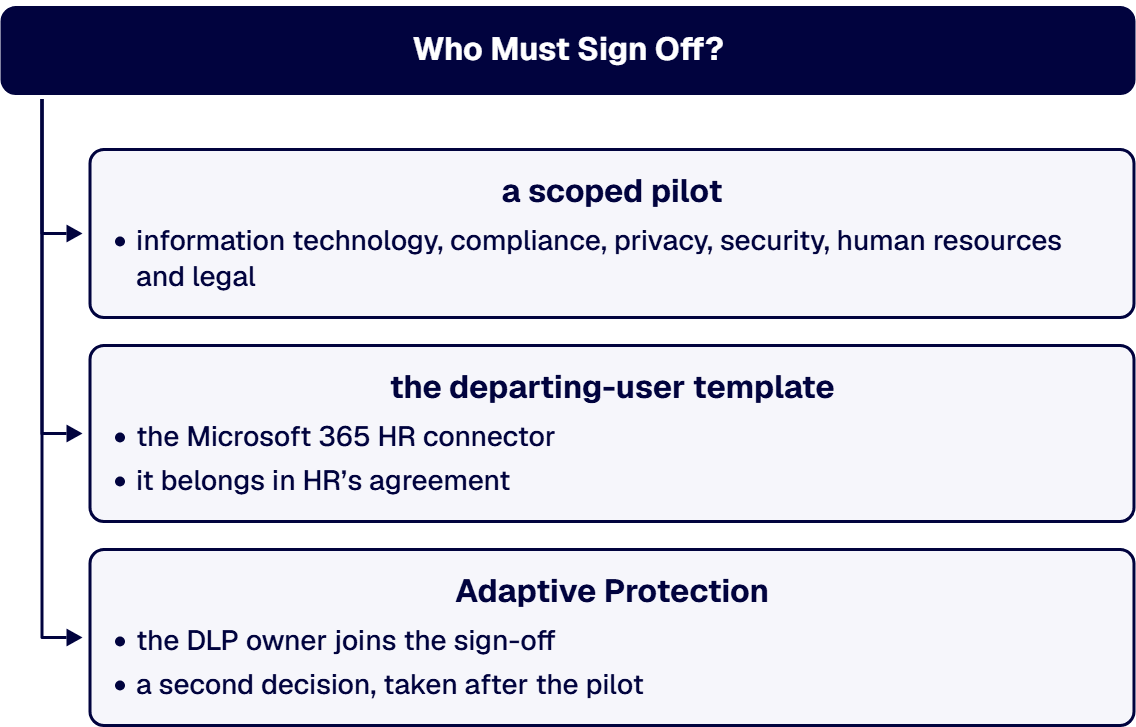
If the program starts as a quiet configuration change, there is no answer ready the first time an employee, a works council or a privacy officer asks who approved it. Microsoft’s Learn about Insider Risk Management page, last updated June 26, 2026, describes what the tool does: “Microsoft Purview Insider Risk Management correlates various signals to identify potential malicious or inadvertent insider risks, such as IP theft, data leakage, and security violations.” and “Insider Risk Management enables customers to create policies to manage security and compliance.”
Those policies are about people. The Microsoft Purview service description, last updated August 3, 2026, says “Insider Risk Management policies must be created in the Microsoft Purview compliance portal and assigned to users.” Microsoft’s privacy guide for the solution, last updated August 20, 2025, says “An admin with the right permissions can explicitly scope employees into a policy.” and “Insider risk management and communication compliance don’t detect those activities without an admin’s explicit opt-in.”
So every pilot is a decision about which employees are in scope and which of their activities are watched. Write down which users and which indicators the pilot covers before anyone opens the policy wizard, and put that list in front of the people who have to agree to it.
If one team switches the program on and the others learn about it later, the approval has already failed. Microsoft’s Plan for Insider Risk Management, last updated August 20, 2025, says “Identify the appropriate stakeholders in your organization to collaborate for taking actions on Insider Risk Management alerts and cases.” and then lists the areas to include in initial planning and in the end-to-end workflow:
The same page puts a pilot before the broad rollout: “Before enabling this solution broadly in your production environment, consider testing the policies with a small set of production users so you can complete the necessary compliance, privacy, and legal reviews in your organization.” From that, an IT leader can run a sequence, fitted to the organization’s own approval process: agree the scope with the six areas, pilot with a small set of production users, finish the compliance, privacy and legal reviews during the pilot, and only then widen the policies.
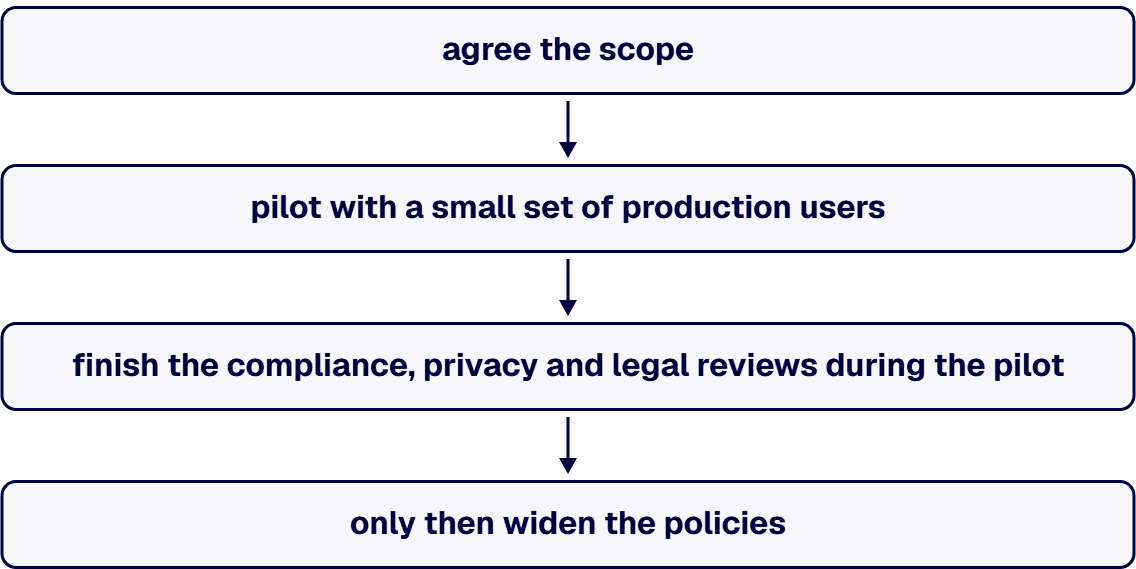
What each area signs is its own organization’s call. The table below describes what each one is usually asked to agree to; it is not a statement of what any law requires.
Get the six sign-offs in writing, with the pilot’s user list and indicator list attached, before the first policy is created.
When HR and legal first see the plan, they usually ask the same question: who will see employee names? Microsoft’s answer starts with its defaults. The Learn about Insider Risk Management page says “Built with privacy by design, users are pseudonymized by default, and role-based access controls and audit logs are in place to help ensure user-level privacy.” The privacy guide says “By default, global administrators don’t have access to insider risk management and communication compliance features.”
Forensic evidence, which captures activity for review, has its own controls. Microsoft’s Learn about Insider Risk Management forensic evidence, last updated August 20, 2025, says “Forensic evidence is off by default, policy creation requires dual authorization and usernames can be masked with pseudonymization (which is on by default for Insider Risk Management).”
For the pilot itself, Microsoft’s Plan for Insider Risk Management says “Keep the anonymization feature in policy settings enabled to anonymize user display names in the Insider Risk Management console during this testing to maintain privacy within the tool.”
There is one limit to show them. If Adaptive Protection is later used to apply data loss prevention or Conditional Access policies by risk level, Microsoft’s Adaptive Protection page, last updated June 26, 2026, says “User names aren’t anonymized in Conditional Access or data loss prevention.” And when a case needs a legal hold or a wider search, the Learn about Insider Risk Management page says “You can also set up processes for acting on cases and escalating cases to Microsoft eDiscovery (Premium) if needed.”
Leave pseudonymization on for the pilot, keep global administrators out of the role groups, leave forensic evidence off unless the sponsors approve it, and name who may turn any of those settings off.
If a pilot starts before its data sources are in place, its early alerts tell the sponsors nothing useful. Microsoft’s Get started with Insider Risk Management, last updated November 14, 2025, says “Insider Risk Management uses Microsoft 365 audit logs for user insights and risk management activities identified in policies and analytics insights.” It also says “To access and configure recommended actions, users must be assigned to the Insider Risk Management or Insider Risk Management Admins role groups.”
The departing-user template needs HR data. Microsoft’s Plan for Insider Risk Management says “For the Data theft by departing users template, configure a Microsoft 365 HR connector to periodically import resignation and termination date information for users in your organization.” That connector is the point where HR’s sign-off becomes a data flow, so it belongs in HR’s agreement.
On licensing, the Microsoft Purview service description lists Insider Risk Management under “Microsoft 365 E5/A5/G5, Microsoft Purview Suite/EDU/GOV/FLW and Microsoft Defender + Purview Suite FLW, and Microsoft 365 E5/A5/F5/G5 Insider Risk Management”. Confirm which of those your users hold with your Microsoft licensing contact; whether to move a population to a higher tier is covered in Microsoft 365 E3 vs E5 Cost: What E5 Really Costs and When to Upgrade.
Confirm the audit log, the role group assignments and the HR connector before the pilot’s start date, and record each with its date.
If your GCC High plan rests on one Microsoft page, the next page a reviewer opens can contradict it. As of this guide’s read on September 24, 2026, three Microsoft pages answer the question differently:
The Copilot service description says of its own table: “The table below shows availability as of the last update date for the Service Description”. It is the most recently updated of the three.
In the GCC High planning page, according to Microsoft’s table, the Insider Risk Management area has 40 feature rows: 15 Available, 14 In development, 10 Public Preview and 1 Rolling out. Rows it lists as Available include “Forensic evidence”, “Case dashboard” and “Escalate for investigation for eDiscovery (Premium)”. Rows it lists as In development include “Data leaks by disgruntled users” and “Indicators for Microsoft Defender for Endpoint alerts”; “Priority user groups” is listed as Public Preview. The table has no row for Adaptive Protection.
A fourth page assumes the tool exists on both sides. Microsoft’s Plan for Insider Risk Management says “If you migrate your organization from the Microsoft 365 US Government Cloud to the worldwide commercial cloud or from the worldwide commercial cloud to the Government Cloud, active cases and alerts don’t migrate.” and “Close any alerts and cases before starting the migration.”
None of the Microsoft pages read for this guide reconciles these statements, and this guide does not pick one. Check the Insider Risk Management area in your own GCC High tenant, confirm in writing with Microsoft which features are available to you, and date that confirmation before the pilot is approved. Plan around any template the GCC High planning page lists as In development or Public Preview rather than promising it to the sponsors. If the tenant is still moving to GCC High, the migration itself is covered in Microsoft 365 GCC High Migration Checklist: Best Practices for Defense Contractors.
Once a pilot produces risk levels, the next request is to act on them automatically. Microsoft’s Adaptive Protection page says “Adaptive protection dynamically assigns appropriate data loss prevention, data lifecycle management, and Conditional Access policies to users based on the insider risk levels defined and analyzed by the machine learning models in Insider Risk Management.” That ties the pilot to your data loss prevention policies, so the DLP owner joins the sign-off before Adaptive Protection is switched on, and tuning those policies so they do not flood users is a separate piece of work. The same page carries the government-cloud sentence quoted in the table above.
Treat Adaptive Protection as a second decision, taken after the pilot, with the privacy owners told that user names are not anonymized in the policies it drives.
If any of the conditions below applies, do not start a pilot yet; saying so early costs less than stopping one halfway.
If the pilot is approved on a verbal agreement, it is hard to defend later. Require these before the first policy is created:
When a pilot has to satisfy six sign-offs and a government cloud, most of the work is the configuration record behind it. i3solutions designs and configures Microsoft Purview Insider Risk Management as project work, with embedded Purview specialists inside your team where you need them. i3solutions maps governance to named control families, enforces it in the platform through Entra ID, Purview, and Azure Policy, and evidences it continuously rather than reconstructing it at audit.
For a pilot, that project covers the policies, the role groups, the Microsoft 365 HR connector, the privacy settings and the pilot scope, documented so the six sign-offs have something concrete to approve. i3solutions engages its Federal Compliance Assessment when the scope spans a FedRAMP Moderate or FedRAMP High boundary, or when the client operates in a GCC High tenant. The people doing the work are senior and US-based. i3solutions does not monitor or triage insider-risk alerts, or run investigations, as an ongoing managed service; that work stays with your own designated owners, and decisions about employees stay with your HR and legal teams.
The wider Purview service is described in Microsoft Purview Technology Readiness Services, and bringing specialists into your team is covered in Hire Microsoft Purview Compliance Consultants. The governance practice behind both is described in Embedding Governance into How the Enterprise Operates and Scales.
Microsoft’s own pages disagree, so check your tenant. The Microsoft Copilot service description, last updated August 5, 2026, says “Insider Risk Management isn’t currently available for GCC-High.” The Adaptive Protection page, last updated June 26, 2026, says “Insider Risk Management is available for commercial clouds but isn’t available for US Government cloud programs at this time.” The Purview planning page for GCC High, last updated May 21, 2025, lists features such as data theft by departing users as Available and says “Identified status is subject to change as project plans and priorities are reevaluated.”
The six areas Microsoft names, before a small pilot. Microsoft’s Plan for Insider Risk Management, last updated August 20, 2025, says “Identify the appropriate stakeholders in your organization to collaborate for taking actions on Insider Risk Management alerts and cases.” and lists information technology, compliance, privacy, security, human resources and legal. It adds “Before enabling this solution broadly in your production environment, consider testing the policies with a small set of production users so you can complete the necessary compliance, privacy, and legal reviews in your organization.”
Not by default. Microsoft says “Built with privacy by design, users are pseudonymized by default, and role-based access controls and audit logs are in place to help ensure user-level privacy.” Its privacy guide, last updated August 20, 2025, says “By default, global administrators don’t have access to insider risk management and communication compliance features.” For a pilot, Microsoft says “Keep the anonymization feature in policy settings enabled to anonymize user display names in the Insider Risk Management console during this testing to maintain privacy within the tool.” With Adaptive Protection, Microsoft says “User names aren’t anonymized in Conditional Access or data loss prevention.”
The audit log and the HR connector. Microsoft’s Get started with Insider Risk Management, last updated November 14, 2025, says “Insider Risk Management uses Microsoft 365 audit logs for user insights and risk management activities identified in policies and analytics insights.” Its Plan for Insider Risk Management says “For the Data theft by departing users template, configure a Microsoft 365 HR connector to periodically import resignation and termination date information for users in your organization.”
No. Microsoft’s Learn about Insider Risk Management forensic evidence, last updated August 20, 2025, says “Forensic evidence is off by default, policy creation requires dual authorization and usernames can be masked with pseudonymization (which is on by default for Insider Risk Management).”
By Michael Branson
Quick answer. As of September 2026, according to Microsoft, Entra ID keeps audit and sign-in logs seven days on Free and 30 days on P1 or P2, and an upgrade recovers nothing expired. Older records survive only where something was already archiving them, such as diagnostic settings or, for audit records, Purview Audit.
The look-back request arrives after the period it covers. An external auditor, an assessor or internal audit asks for sign-in history, admin changes and access review decisions across a fiscal year or an assessment period, and Entra’s own retention is measured in days, so the only records that exist are the ones something was already keeping. Microsoft’s Microsoft Entra data retention page, read on 2026-09-23, lists audit logs and sign-ins at “Seven days” on Microsoft Entra ID Free and “30 days” on P1 and on P2, and says “Log retention changes aren’t retroactive.”
So before the look-back window opens, route both logs through diagnostic settings to the destination the evidence needs: a Log Analytics workspace if you will query it, an Azure storage account with a lifecycle policy if you only need to keep it, and an event hub if another SIEM must receive it. Where users carry an E5-level license, Microsoft Purview Audit (Premium) also keeps Entra audit records. Download each access review history report inside the 30 days Microsoft keeps it available, according to Microsoft’s access review documentation.
How long you must keep any of it is set by your auditors, assessors and counsel reading your own obligations, not by any Microsoft setting. This page covers what Microsoft keeps, where to route the rest, and what the regulation text itself says about duration.
If a colleague says the tenant keeps a year of audit history, they are usually describing Microsoft Purview, not Entra. Entra does not keep audit logs for one year by default, according to Microsoft’s data retention table; the one-year figure is Microsoft Purview Audit (Premium) holding Entra audit records in the unified audit log for users with an E5-level license.
The Microsoft Entra data retention page lists, for audit logs and for sign-ins, “Seven days” on Microsoft Entra ID Free and “30 days” on Microsoft Entra ID P1 and on P2. For risky sign-ins it lists 7, 30 and 90 days across the same three tiers, and for risky users “No limit”. Its table has columns for Free, P1 and P2 only. The same page says: “Microsoft Entra ID audit and sign-in logs are separate from the Microsoft 365 Unified Audit Log (UAL). UAL retention is managed through Microsoft Purview Audit and is not affected by Microsoft Entra ID licensing changes.”
Purview’s own figures carry conditions. Microsoft’s Learn about auditing solutions in Microsoft Purview page says “In Audit (Standard), the system retains records for 180 days, which means you can search for activities that occurred within the past six months.” It adds that Audit (Standard) logs generated before October 17, 2023, are retained for 90 days. Microsoft’s Manage audit log retention policies page says the default Audit (Premium) policy “only applies to audit records for activity performed by users who are assigned an Office 365 or Microsoft 365 E5 license or have a Microsoft Purview Suite (formerly known as Microsoft 365 E5 Compliance) or E5 eDiscovery and Audit add-on license.” For those E5-licensed users, according to Microsoft, Audit (Premium) keeps Microsoft Entra ID audit records for one year by default. Purview keeps less for everyone else: “If you have non-E5 users or guest users in your organization, their corresponding audit records are retained for 180 days.”
Longer retention in Purview takes more licensing. Microsoft’s Learn about auditing solutions in Microsoft Purview page says “Retaining audit logs for 10 years requires an additional per-user add-on license.” It says that policy “isn’t retroactive and can’t retain audit logs that were generated before the 10-year audit log retention policy was created.” Records from service principals and system activity sit apart in Purview; the same page says “Audit records generated by non-user entities (such as service principal actions, system events, and application activities) are retained for a fixed period of one year.” Service principal activity is one part of non-human identity governance in Microsoft Entra. How Purview Audit fits an export-control program is covered in Redesigning an ITAR Export-Control Compliance Program to Be Efficient, Not Just Compliant.
If the tenant ran on Microsoft Entra ID Free until recently, the sign-in history from before the upgrade is already gone. The Microsoft Entra data retention page says: “Log retention changes aren’t retroactive. When you upgrade from Microsoft Entra ID Free to P1 or P2, only data still within the free retention period (up to seven days) is available. Data that has already expired can’t be recovered unless it was previously archived.”
Microsoft Graph activity logs have no default window at all. The same Microsoft Entra data retention page says “Microsoft Graph activity logs are only available for Microsoft Entra ID P1 and P2 licenses. Data isn’t retained unless it’s archived to a storage account or integrated with analytics tools.”
The decision rule follows from both sentences. Turn on routing before the look-back window opens, and treat a license bought during an audit as a fix for the next audit, because it recovers nothing that has already expired.
When the auditor asks for last year’s access review decisions, the review history report is the artifact, and it expires. Microsoft’s Create and manage downloadable access review history report in Microsoft Entra access reviews page says “The report pulls the decisions taken by reviewers when a report is created.” You “Specify a review start and end date.” Then: “Once a review history report is created, you can download it. All reports that are created are available for download for 30 days in CSV format.”
The review activity also lands in the audit log. Microsoft’s Plan a Microsoft Entra access reviews deployment page says “Access reviews activities are recorded and available from the Microsoft Entra audit logs.” That record sits under the audit log limits above. The same page says: “For more advanced queries and analysis of access reviews, and to track changes and completion of reviews over time, export your Microsoft Entra audit logs to Azure Monitor Log Analytics or Azure Event Hubs.” On licensing, it says “This feature requires Microsoft Entra ID Governance or Microsoft Entra Suite subscriptions, for your organization’s users. Some capabilities, within this feature, may operate with a Microsoft Entra ID P2 subscription.”
Two actions keep the evidence. Generate each review’s history report after the cycle closes and file the CSV before the 30-day download window runs out, according to Microsoft’s access review page, and route the audit log so the activity record survives as well. Which Entra ID Governance capabilities to buy and scope is covered in Microsoft Entra ID Governance for Regulated Enterprises: Product Scope, Licensing, and Audit-Defensible Implementation.
Once you know what an auditor will ask for, pick each destination by what that evidence has to do. Microsoft’s What are the Microsoft Entra activity log integration options? page says “Using Diagnostic settings in Microsoft Entra ID, you can route activity logs to several endpoints for long term data retention and insights.” Microsoft’s Configure Microsoft Entra diagnostic settings for activity logs page lists the prerequisites: “An Azure subscription”, “Security Administrator access to create general diagnostic settings for the Microsoft Entra tenant” and “A destination that is already set up.”
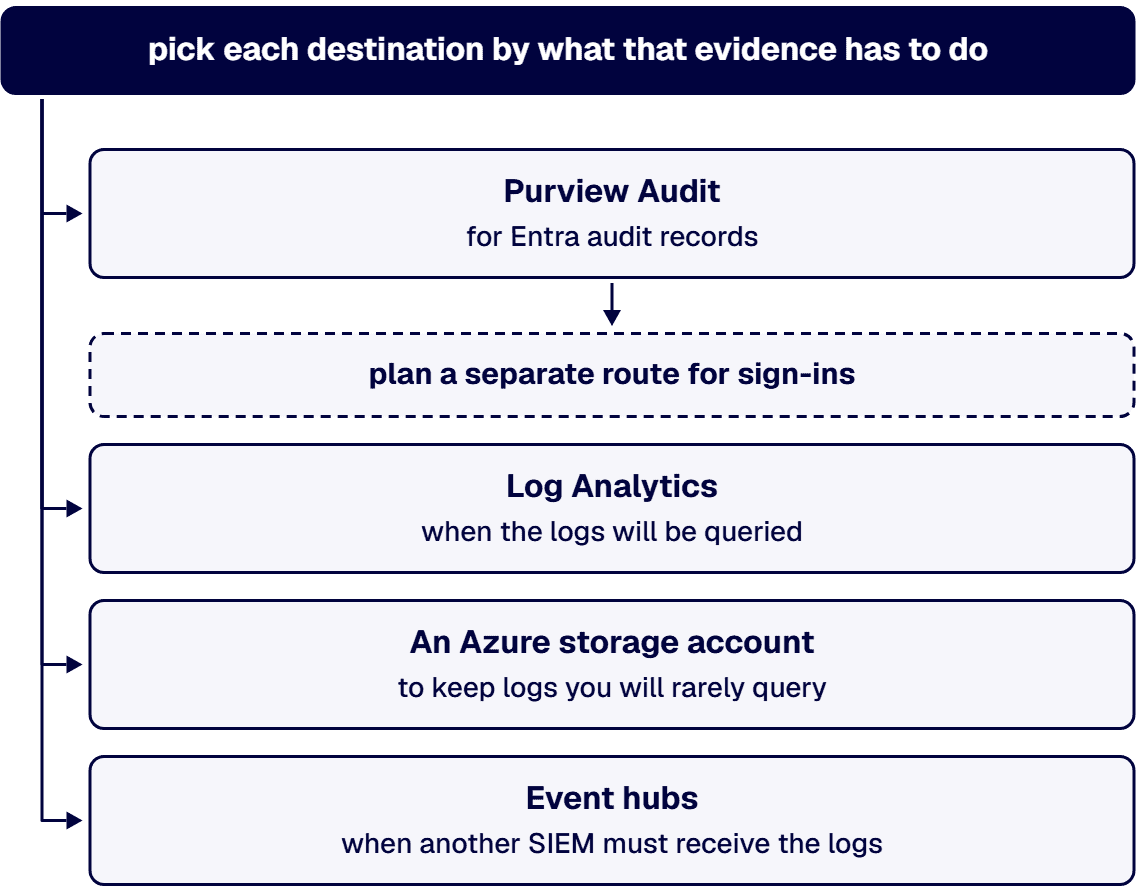
Purview Audit, for Entra audit records. Where the E5 condition above is met, the Microsoft Entra data retention page says “Organizations with Microsoft 365 E5, Office 365 E5, Microsoft Purview Suite, or E5 eDiscovery and Audit add-on licenses can also use Microsoft Purview Audit (Premium) to retain Microsoft Entra ID audit logs beyond the default period, providing an alternative to exporting logs to Azure Storage.” Microsoft’s Manage audit log retention policies page shows a Purview retention policy for the “User logged in” activity, but none of the Microsoft pages read for this guide says Purview keeps the full Entra sign-in logs, so plan a separate route for sign-ins.
Log Analytics, when the logs will be queried. Microsoft’s Manage data retention in a Log Analytics workspace page says “By default, all tables in a Log Analytics workspace retain data for 30 days, except for log tables with 90-day default retention.” It says you can “Extend the analytics retention period of tables with the Analytics plan up to two years.” and “extend the table’s total retention to up to 12 years.” It notes that “31 days of analytics retention are included in the ingestion price, lowering the retention period below 31 days doesn’t reduce costs.” Raising retention also covers data already in the workspace: “When you increase total retention, the new retention period applies to all data that was already ingested into the table and wasn’t yet removed.”
An Azure storage account, to keep logs you will rarely query. The integration options page describes a storage account as the ideal option when you do not plan to query the data often or need to store logs for compliance purposes. Retention there is no longer a diagnostic setting. Microsoft’s Migrate from diagnostic settings storage retention to Azure Storage lifecycle management page says “The diagnostic settings storage retention feature is deprecated. All retention functionality for this feature was disabled across all environments on September 30, 2025.” Set retention with a lifecycle management policy on the storage account, and treat a retention value on an older diagnostic setting as inactive. The same page says “Deleting a diagnostic setting doesn’t delete the logs in the storage account.”
Event hubs, when another SIEM must receive the logs. The integration options page says “If you use a non-Microsoft SIEM tool, we recommend setting up an Event Hubs namespace and event hub where you can stream your data.” When the Log Analytics workspace is also a Microsoft Sentinel workspace, Sentinel’s own retention and cost are a separate design question.
Every route has a running cost. Microsoft’s What are the Microsoft Entra activity log integration options? page says “There’s a cost for sending data to a Log Analytics workspace, archiving data in a storage account, or streaming logs to an event hub.” and “Changing an existing diagnostic setting might incur new charges.” For sizing, it says “Audit log events use around 2 KB of data storage” and “Sign-in log events use on average 11.5 KB of data storage”.
When a request list cites a regulation, read what the regulation says about duration before you set a retention period. The eCFR text below is current as of September 21, 2026.
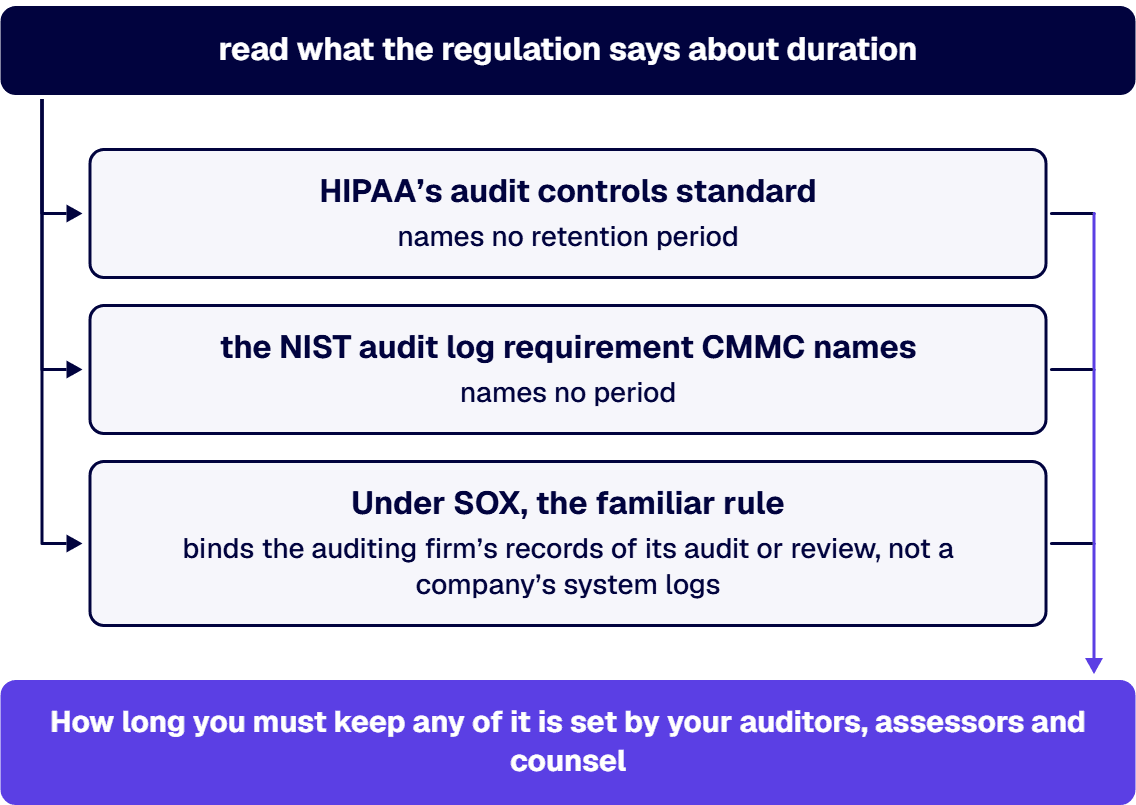
For HIPAA, 45 CFR 164.312 states: “(b) Standard: Audit controls. Implement hardware, software, and/or procedural mechanisms that record and examine activity in information systems that contain or use electronic protected health information.” It names no retention period. The six-year figure sits in 45 CFR 164.316: “(i) Time limit (Required). Retain the documentation required by paragraph (b)(1) of this section for 6 years from the date of its creation or the date when it last was in effect, whichever is later.” Paragraph (b)(1) covers written policies and procedures and a “written (which may be electronic) record of the action, activity, or assessment” the subpart requires. Whether a given log is documentation under that paragraph is for your counsel and your privacy and security officials to decide.
The CMMC rule, 32 CFR Part 170, lists AU.L2-3.3.1 among its requirements and names “NIST SP 800-171 R2” as incorporated by reference. Requirement 3.3.1 of NIST SP 800-171 Rev. 2, Protecting Controlled Unclassified Information in Nonfederal Systems and Organizations, reads: “Create and retain system audit logs and records to the extent needed to enable the monitoring, analysis, investigation, and reporting of unlawful or unauthorized system activity.” It names no period. NIST lists Rev. 2 as withdrawn on May 14, 2024 and superseded by Rev. 3; the CMMC rule still names Rev. 2. The six years in CMMC applies to assessment artifacts: 32 CFR 170.17 says “Artifact retention and integrity. The hashed artifacts used as evidence for the assessment must be retained by the OSC for six (6) years from the CMMC Status Date.” Section 170.16 carries the same six years for artifacts from a Level 2 self-assessment.
Under SOX, the familiar seven-year rule in 17 CFR 210.2-06 binds the auditing firm’s records of its audit or review, not a company’s system logs. No SOX text read for this guide sets a retention period for a company’s logs, so the window your auditors ask for, agreed with your control owners, is the working figure.
If the tenant sits in a US government cloud, confirm each service separately. Microsoft’s Microsoft Entra feature availability page says “Microsoft Entra ID Governance is available in the US Government community cloud (GCC), GCC-High, and Department of Defense cloud environments.” For Purview, Microsoft’s Plan for Microsoft Purview compliance and risk management solutions: GCC High deployments page lists “Log retention (1 year)” and “Longer term retention on audit logs (10 years)” under Audit (Premium) as “Available”, and Plan for Microsoft Purview compliance and risk management solutions: GCC deployments lists the same two rows as available.
Some teams answer an audit finding by streaming every log at full analytics retention, and that is often the wrong fix:
If nobody can say today where the tenant’s sign-in logs go or how long each destination keeps them, the gap needs an owner before the next look-back opens. The work is planning and scoping the retention design as a project: which logs, which route, and which retention per table or storage container. It does not include watching, reviewing or alerting on the logs as an ongoing service, or running a SIEM or a SOC.
The wider identity practice is Establish Identity as a Governed Enterprise Capability.
i3solutions took ownership of the control architecture against AC.L2-3.1.1 and the audit-log design against AU.L2-3.3.1 and delivered the evidence the C3PAO required. i3solutions governs identity and access for regulated Microsoft estates with senior, U.S.-based engineers and leaves an audit-defensible record. i3solutions is a Microsoft Systems Integrator with 30 years of experience implementing identity and access management solutions for enterprises in regulated industries.

US-Based Microsoft System Integrator | Est. 1997
© i3solutions. All rights reserved.
US-Based Microsoft System Integrator | Est. 1997
© i3solutions. All rights reserved.


