
Governance questions are what make a Microsoft environment defensible under audit, from who owns a policy to what evidence proves a control held. These answers address the specific calls IT leaders face when GCC High, CMMC, FedRAMP, or ITAR narrows the acceptable range.
By Michael Branson
Yes, you still need Microsoft Purview without Copilot, because Purview is where Microsoft runs data loss prevention, sensitivity labels, audit, retention and eDiscovery, and a regulated enterprise owes the controls behind them to its regulators and auditors either way. The real question is which of them your obligations require first.
If you heard Purview sold as Copilot readiness and Copilot is not on your roadmap, you now have to defend the license and the build effort to a CFO or an audit committee without that reason. The defense rests on the obligations your organization carries today, matched one by one to the Purview capability that serves them.
If you take Copilot out of the picture, Microsoft’s own description of Purview does not change. Microsoft Learn describes it this way: “Microsoft Purview is a comprehensive set of solutions that helps your organization govern, protect, and manage data in the era of AI, wherever your data lives.” Where the same page turns to AI, it lists the places its protections apply as “Copilot experiences and agents,” “Enterprise AI apps that you build,” and “Other AI apps you use.” Copilot is one surface in that list, not the reason the product exists. Source, Microsoft Learn (read date 2026-09-22): Learn about Microsoft Purview.
If Copilot does not arrive, the five capabilities below still answer to obligations your organization carries.
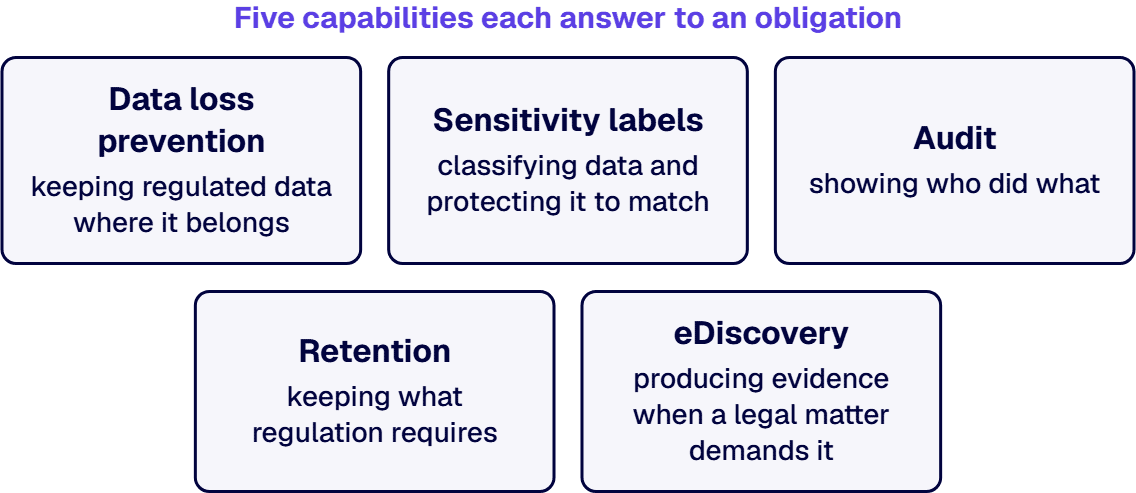
Data loss prevention. The obligation is keeping regulated data where it belongs. Microsoft Learn states that “In Microsoft Purview, you implement data loss prevention by defining and applying DLP policies,” and names the kinds of sensitive information organizations control, among them financial data, credit card numbers, health records and Social Security numbers. Source, Microsoft Learn (read date 2026-09-22): Learn about data loss prevention.
Sensitivity labels. The obligation is classifying data and protecting it to match. Microsoft Learn states that “Sensitivity labels from Microsoft Purview Information Protection let you classify and protect your organization’s data, while making sure that user productivity and their ability to collaborate isn’t hindered,” and that labels provide protection settings that include “encryption and content markings.” Source, Microsoft Learn (read date 2026-09-22): Learn about sensitivity labels.
Audit. The obligation is showing who did what when an investigator or an auditor asks. Microsoft Learn states that “Microsoft Purview auditing solutions provide an integrated solution to help organizations effectively respond to security events, forensic investigations, internal investigations, and compliance obligations.” How long records are kept depends on the audit tier, and Microsoft Learn states that “In Audit (Standard), the system retains records for 180 days”, so check the window your obligations name against that page before relying on it. Source, Microsoft Learn (read date 2026-09-22): Learn about auditing solutions in Microsoft Purview.
Retention. The obligation is keeping what regulation requires and disposing of what it does not. Microsoft Learn gives retention policies and labels the purpose to “Comply proactively with industry regulations and internal policies that require you to retain content for a minimum period of time,” and describes two actions: retain, which prevents permanent deletion and keeps content available for eDiscovery, and delete, which permanently removes content from the organization. Source, Microsoft Learn (read date 2026-09-22): Learn about retention policies and retention labels.
eDiscovery. The obligation is producing evidence when a legal matter or an investigation demands it. Microsoft Learn defines eDiscovery as “the process of identifying and delivering electronically stored information (ESI) that you can use as evidence in investigations and legal cases,” and states: “Use eDiscovery cases to identify, hold, and export content found in mailboxes and sites.” Source, Microsoft Learn (read date 2026-09-22): Learn about eDiscovery.
If Purview reached you as a Copilot prerequisite, the pitch was about stakes, not purpose: Copilot works over whatever a user can already reach, so it raises the stakes on the same controls a regulated enterprise already needed. For the Copilot side of that argument, read You Bought Copilot. Your Data Isn’t Ready for It. The Copilot Data Governance Fix.
If you are a defense contractor working toward CMMC, the first question is not about Purview but whether your Microsoft subscription and cloud can hold the data in scope, and that question is answered in Is Office 365 CMMC Compliant? The SKU Decides Before the Environment Does.
Once that is settled, Purview plays two parts. The first is assessment: Microsoft Learn describes Microsoft Purview Compliance Manager as “a solution that helps you automatically assess and manage compliance across your multicloud environment,” with “Pre-built assessments for common industry and regional standards and regulations,” and its regulations list on Microsoft Learn includes “CMMC v2 Level 1” and “CMMC v2 Level 2” in its premium regulations, which “may be purchased by your organization.” Microsoft Learn also states that “Available assessments depend on your licensing agreement.” Sources, Microsoft Learn (read date 2026-09-22): Microsoft Purview Compliance Manager; Compliance Manager regulations list. If insider risk is one of those obligations in GCC High, see who must sign off on Purview Insider Risk Management in GCC High.
The second part is evidence. The data loss prevention, audit and retention capabilities above produce records an assessor can ask to see. An assessment in Compliance Manager is a tool for tracking your own controls; it does not certify an organization, and neither Purview nor i3solutions makes an organization CMMC compliant.
What the work costs is a scoping question, and i3solutions prices it against its own band. A CMMC Level 2 implementation for a defense contractor with a defined CUI boundary typically ranges from $45,000 to $75,000, covering the Compliance Manager baseline assessment, Conditional Access redesign, DLP policy build and testing, Purview Audit Premium configuration, and post-implementation documentation.
Once you have to defend the license capability by capability, three tests do the sorting, and each names the document that answers it.
Obligation test. Which of your regulations, contracts and internal policies name a retention period, an audit trail or a data-handling control? Read your compliance obligations register for the answer; a named requirement tells you whether retention, audit or data loss prevention is owed.
Location test. Where does your regulated or controlled data sit today, by site, mailbox and team? Read your data inventory for the answer; it tells you where sensitivity labels and data loss prevention policies have to reach.
Legal-hold test. If counsel asked you today to hold and export the mailboxes and sites tied to one matter, what would you run? Read your last litigation hold request for the answer; if it was met by a manual search, eDiscovery is the gap. If Copilot is in use, a hold also suspends permanent deletion of Microsoft 365 Copilot Prompts and Responses, and eDiscovery searches them.
When the tests point different ways, the obligation test outranks the other two: a capability that a regulation or contract names is funded first, and the location test and the legal-hold test then set the order of the rest. Where the answer is that you need a capability, the next step is how to get ready for it, set out in Microsoft Purview Deployment Guide: A Readiness Playbook for Regulated Enterprises.
If the license has to be defended to a CFO or an audit committee, the defense is stronger when each capability is tied to a named obligation. i3solutions maps governance to named control families, enforces it in the platform through Entra ID, Purview, and Azure Policy, and evidences it continuously rather than reconstructing it at audit. Delivery is senior and US-based. The wider governance practice is set out on Embedding Governance into How the Enterprise Operates and Scales.
Yes: if you are not deploying Copilot, you still need Purview, because Microsoft Learn describes it as a set of solutions that helps an organization govern, protect and manage data wherever it lives, and its data loss prevention, sensitivity labeling, auditing, retention and eDiscovery tools answer to obligations that exist without Copilot. Copilot is one of the AI surfaces Purview protects, not the reason it exists. Decide which capabilities to fund first with three tests: the obligation test, the location test and the legal-hold test.
If you are working toward CMMC, settle the subscription and cloud question before the Purview decision. After that, Purview plays two parts: Microsoft Learn lists “CMMC v2 Level 1” and “CMMC v2 Level 2” among the regulations Microsoft Purview Compliance Manager carries assessments for, as premium templates that Microsoft says “may be purchased by your organization”, and Purview audit, retention and data loss prevention supply evidence for your controls. A Compliance Manager assessment is a tracking tool: Purview does not certify an organization or make it CMMC compliant.
If you are choosing where to start, begin with whatever a regulation or contract you hold spells out by name, which is the obligation test. Then use the location test, which maps where regulated data sits, and the legal-hold test, which asks what you would run to hold and export one matter’s content, to order the remaining capabilities.
By Michael Branson
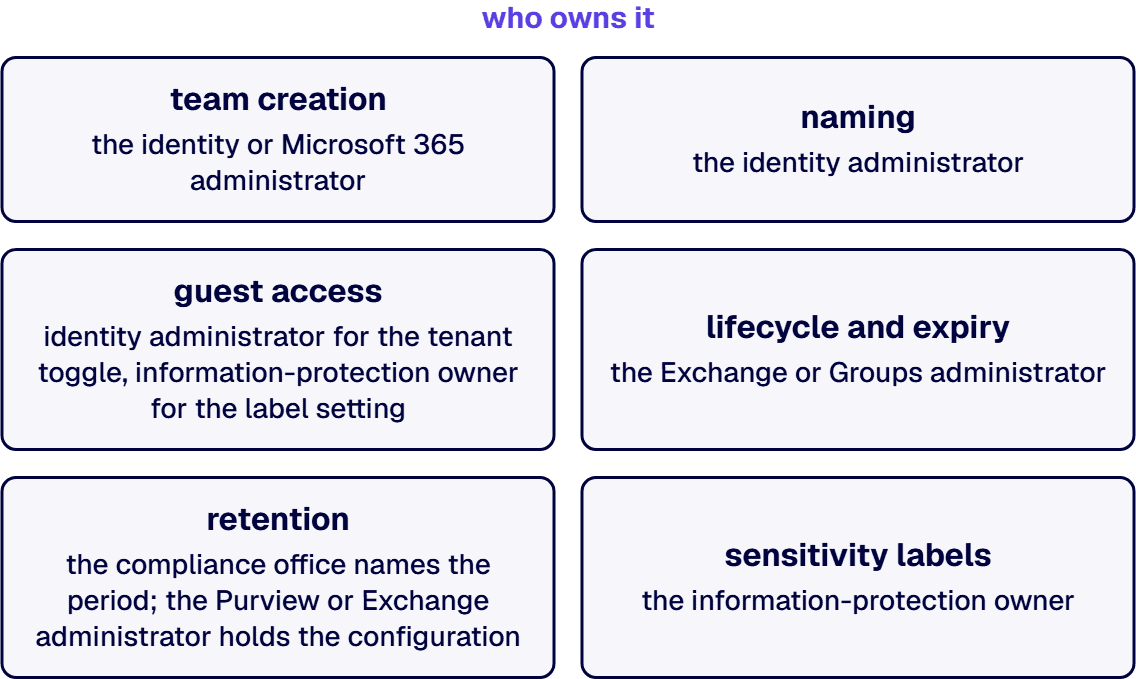
Score your Teams estate against six controls: team creation, naming, guest access, lifecycle and expiry, retention, and sensitivity labels. A control is READY only when a named owner can show its current setting and its evidence today; a control that exists as intent, a policy document nobody can point a setting at, is FIX FIRST, and a control nobody owns is NOT YET. If you cannot say today who is allowed to create a team, what happens to a team whose last owner has left, and which setting decides whether a guest can be added to a team that holds regulated data, your Teams estate is not ready for an audit or a Copilot rollout, and a new policy document will not make it ready.
The question usually arrives already dressed as an emergency: an auditor wants to see who can create a team, security wants to know which teams hold outside guests, or the business wants Copilot turned on and someone has asked what Copilot will surface out of teams everyone forgot about. Whether the wider environment is ready for that rollout is a separate, prior gate, covered on Is Your Microsoft Environment Ready for Copilot? What Must Be True First; this checklist stays on the six Teams controls and does not restate that gate. The honest first answer to all three questions above is often “we do not know,” and the reason is rarely a missing product. Microsoft’s own documentation states the starting condition plainly: by default, every user in the directory can create a Microsoft 365 group, and the setting that controls it, EnableGroupCreation, defaults to True for the whole organization. Nobody switched creation on. Nobody switched guest access on, either; both arrived on by default, and an estate that grew for years on defaults nobody revisited is not a security failure, it is an unexamined setting, which is a different and more answerable problem.
That distinction matters because it changes what “readiness” means. Readiness is not a purchase and it is not a policy document filed somewhere; it is the ability to name, for each of six controls, who owns it, what its setting is today, and the evidence that proves it. This page is that checklist. It does not restate the tenant-wide framework, the three control domains and the ownership matrix that Microsoft 365 Governance Framework for Regulated Enterprises owns; it goes one level deeper, into the six Teams-specific controls that framework names in a single paragraph. And it is not about the apps your organization builds to run inside Teams: custom Teams app governance is a separate discipline, covered on Custom Teams App Governance: Six Requirements, and this checklist does not cover app permissions, consent or app review.
Ask this question in the next meeting: if someone outside IT wanted to create a team right now, could they, and who set the rule that answers that? Microsoft’s directory-level flag, EnableGroupCreation, governs Teams creation because a new team is a Microsoft 365 group underneath. Its documented default is True, meaning nonadmin users can create groups without any exception configured. Microsoft also documents a narrower path: a single security group, named in GroupCreationAllowedGroupId, can be granted the ability to create groups even when the broader flag is set to False, which is how most regulated tenants land: creation closed by default, opened only for a named group.
EnableGroupCreation and, where it is False, the membership list behind GroupCreationAllowedGroupId, pulled from the directory today, not from a policy PDF.For the sibling question, who can create a SharePoint site outside of Teams, the site-creation controls and their maturity ladder belong to SharePoint Site Provisioning Governance: Why Uncontrolled Site Creation Is the Fastest Path to Audit Findings; this checklist states the Teams-side flag and stops there.
A naming policy that only fires when someone creates a team from the Teams client, and never when the same group is created from Outlook or SharePoint, is not a naming policy; it is a naming suggestion with gaps. Microsoft’s naming policy documentation is explicit that the rule is applied at the group level, across workloads: “the naming policy is applied to creating or editing groups created across workloads, for example, Outlook, Microsoft Teams, SharePoint, Exchange, or Planner.” One rule, enforced once, covers every entry point a new team can come from.
One licensing fact belongs here, dated in this sentence: as of Microsoft’s own naming-policy documentation (checked 2026-09-21, page dated 2025-01-14), using a naming policy “requires that you possess but not necessarily assign a Microsoft Entra ID P1 license or Microsoft Entra Basic EDU license for each unique user who’s a member of one or more Microsoft 365 groups.” Confirm that license position with your own tenant before assuming the feature is available.
Guest access is the control most often described as a single switch and administered as three unrelated ones. Microsoft states the function plainly: “with guest access, you can provide access to teams, documents in channels, resources, chats, and applications to people outside your organization, while maintaining control over your corporate data.” What most checklists miss is the container-level override: a sensitivity label applied to a team can carry its own guest setting, described by Microsoft as controlling “whether the owner can add guests to the container,” independent of the tenant-wide guest access toggle. A tenant can have guest access enabled overall while a labeled, regulated team blocks guests entirely, or the reverse, and the only way to know which applies to a given team is to read that team’s label, not the tenant setting alone.
Microsoft also documents an alternative worth naming here because it changes the exit path: “shared channels offer an alternative to guest access, allowing you to invite people outside your organization without requiring a guest account.” Where a project only needs a few external participants in one channel, a shared channel may close the gap without opening the whole team. Which container should hold which file, and who owns that container decision, belongs to Microsoft Teams vs SharePoint: Which Is Right for a Regulated Enterprise’s Collaboration Needs; this checklist does not restate that placement rule. For the wider question of who is admitted to the directory as a guest at all, and how site-level external sharing and access reviews are governed tenant-wide, that is owned by Microsoft 365 Access Governance for AI Readiness; this checklist’s guest item covers the team-label setting only and hands off the directory-wide picture there.
A team does not become a risk the day it is created. It becomes one the day its last owner leaves the company and nobody notices. Microsoft names this condition directly: “a team in Microsoft Teams or a Microsoft 365 group can become ownerless if you delete an owner’s account in Microsoft 365,” and the remediation Microsoft documents is not automatic reassignment but a nomination workflow: “an Exchange administrator or Groups administrator can create a policy that automatically asks the members who are the most active in the group if they accept ownership.” That is a detection-and-ask mechanism, not an enforcement mechanism, and a checklist that describes it as automatic ownership transfer would be overstating what Microsoft ships.
Expiration is the second half of the same control. Microsoft’s expiration policy renews an active group automatically as its expiry nears, and only notifies owners to renew manually when it is not auto-renewed: “groups with user activities are automatically renewed as the expiration nears,” and “owners of the group are notified to renew the group, if the group isn’t autorenewed.” One structural limit matters for planning: “currently, you can configure only one expiration policy for all Microsoft 365 groups in a Microsoft Entra organization,” so a single policy has to fit every team, not one policy per department.
Archiving closes the loop for a team that has run its course. Microsoft states the effect precisely: “when you archive a team, all activity for that team ceases,” and a deleted team’s underlying sites persist under any applicable retention period rather than disappearing immediately.
One cloud-specific limit belongs in this item, stated in the same sentence as the claim it limits: Microsoft documents that “the Ownerless Group feature is available only in public clouds,” so a GCC or GCC High tenant cannot rely on that specific nomination workflow and needs a manual review cadence in its place. The site-side half of this question, how an orphaned SharePoint site is found and remediated once a team is archived, belongs to SharePoint Site Ownership and Lifecycle Governance; this checklist states the Teams-side control and stops there.
Retention is the one control this checklist will not hand you a number for, on purpose. Microsoft requires retention to be configured explicitly for Teams: “you must configure a retention policy for the Teams channel messages and Teams chats locations,” even though the underlying data lives in mailboxes; nothing is retained by default just because the data exists. Microsoft also documents an inheritance rule worth checking directly, because it is easy to assume the opposite: “any shared channels inherit retention settings from the parent team,” so a shared channel does not need, and cannot carry, a separate retention policy from the team that hosts it.
How long that policy should keep data is set by your own regulatory regime and your compliance office, not by this page, and a checklist that named a period here would be asserting a regulatory conclusion it cannot back. Financial services firms carry books-and-records duties that set these periods for the categories they govern; those are covered separately, and this page names no period and no rule.
A sensitivity label applied to a team is not decoration. Microsoft states that “when you apply a sensitivity label to a supported container, the label automatically applies the sensitivity category and configured protection settings to the workspace,” which is why the label item sits last on this checklist and touches every item before it: a label can set the guest permission covered above, and it sets the container’s protection posture in one action rather than several separate settings. The limit is just as load-bearing as the capability: “items in these containers however, do not inherit the labels and therefore don’t apply any item-level label settings, such as content markings and encryption.” A label on the team does not reach into the files inside it.
Take one team: its last owner has left the company, it holds one external guest added under the tenant-wide toggle, and it carries no sensitivity label. Score it against the six controls. Team creation and naming are tenant-wide settings, not properties of this one team, so they score at the tenant level, not here. Lifecycle and expiry scores NOT YET: the team has been ownerless since that departure with no nomination or renewal notice on record, which is the exact failure Microsoft’s ownerless-group documentation exists to catch. Guest access scores FIX FIRST: a guest was added under the tenant toggle before any label existed to set a container-level rule, so the access is real but untested against what the label would have required. Sensitivity labels scores NOT YET, and it is the control that would have prevented the other two ambiguities: a label would have set the guest permission explicitly and flagged the ownerless condition for review.
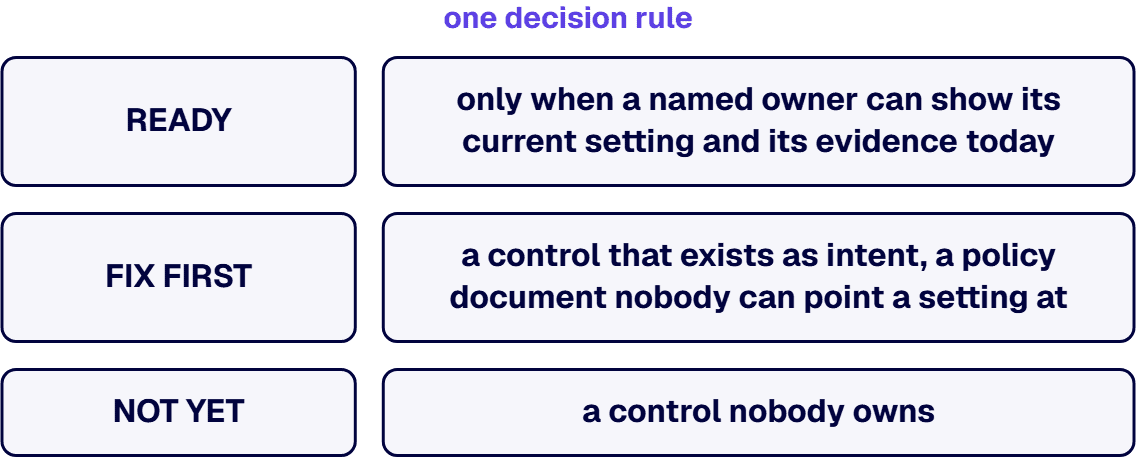
Where two controls disagree, the more restrictive one governs until an owner resolves the conflict: if the tenant-wide guest toggle allows guests but a team’s sensitivity label denies them, the label wins for that team, because Microsoft documents it plainly: “Guest access in Teams is an organization-wide setting. You can control guest access to individual teams by using sensitivity labels.” An IT leader looking at this one team already has an answer: fix the ownerless condition first, because an unowned team is the condition every other control depends on someone being present to enforce.
Running this checklist end to end is not always the right first step, and three conditions change the order. A tenant scheduled for consolidation into another tenant, through a merger or a platform migration, should settle the target tenant’s own controls first; grading an estate that is about to be replaced spends effort on settings that will not travel. A small estate where creation is already IT-gated and few teams exist is better served by fixing the one control actually failing than by running a full six-item pass for completeness. And a GCC or GCC High tenant changes the method for the lifecycle item specifically: the ownerless-group nomination workflow Microsoft documents is a public-cloud-only feature, so that tenant needs a manual review cadence in its place rather than the automated nomination path described above.
This page sets out a framework for making this decision; it does not describe work i3solutions has delivered on this specific question. i3solutions delivery is US-based, provided through the Microsoft Consulting Services Built for Enterprise Complexity practice. This page states framework and readiness criteria only; there is no attested Teams governance engagement to cite here, and none is implied. Where the checklist above turns up more FIX FIRST or NOT YET answers than a team can resolve on its own, having someone run the full readiness assessment against a live tenant, rather than a checklist, is the service Microsoft Teams Enterprise Development & Services provides.
By Michael Branson
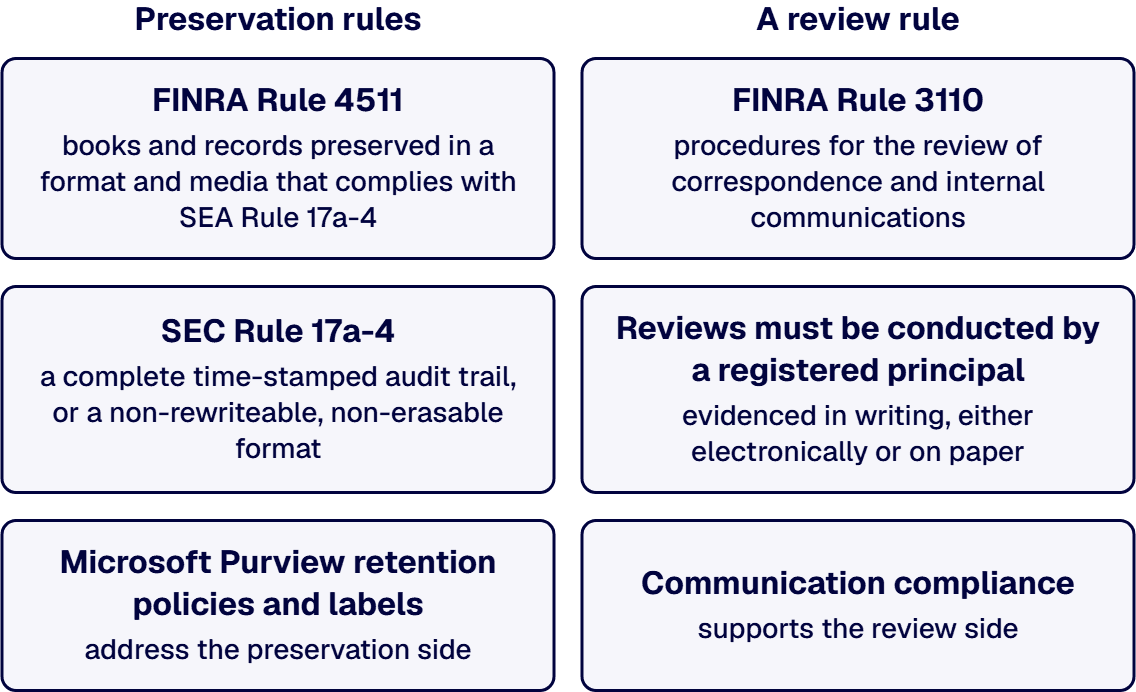
As of September 2026, FINRA and SEC recordkeeping and supervision in Microsoft 365 is framed by three rules, each linked here to its official text and read at source on September 21, 2026. FINRA Rule 4511 requires books and records to be preserved “in a format and media that complies with SEA Rule 17a-4”; SEC Rule 17a-4 requires communications relating to the business to be preserved “for a period of not less than three years, the first two years in an easily accessible place”, and lets an electronic recordkeeping system keep records either with a complete time-stamped audit trail or in a non-rewriteable, non-erasable format, with verification, download and backup requirements on both branches; FINRA Rule 3110 requires procedures for the review of “incoming and outgoing written (including electronic) correspondence and internal communications”, with those reviews “conducted by a registered principal” and “evidenced in writing, either electronically or on paper”. In Microsoft 365, Microsoft Purview retention policies and labels address the preservation side across Exchange, SharePoint, OneDrive and Teams, and communication compliance supports the review side; your firm still decides its record classes, its 17a-4(f) branch and its written supervisory procedures, and evidences each one.
When your compliance officer says the next FINRA exam will ask for Teams chat records and for proof that electronic records are kept the way SEC Rule 17a-4 requires, the tenant you inherited was probably not built for that request. Retention policies set up years ago for litigation hold, meeting recordings that land in someone’s OneDrive, private channels nobody scoped, and no written decision on which 17a-4(f) branch the firm relies on: those are the gaps the request exposes. The sections below quote each rule at source, as read on September 21, 2026, map it to the Microsoft 365 capability Microsoft documents for it, and end with the evidence set an examiner is shown.
If you are asked which rule a given Purview setting is there for, the answer starts with three texts, and each one does a different job.
FINRA Rule 4511 sets the general duty and points at the SEC rule for format. Its paragraph (a) reads: “Members shall make and preserve books and records as required under the FINRA rules, the Exchange Act and the applicable Exchange Act rules.” Paragraph (c) reads: “All books and records required to be made pursuant to the FINRA rules shall be preserved in a format and media that complies with SEA Rule 17a-4.” Paragraph (b) sets a default period: “Members shall preserve for a period of at least six years those FINRA books and records for which there is no specified period under the FINRA rules or applicable Exchange Act rules.”
SEC Rule 17a-4, 17 CFR 240.17a-4, sets the periods and the electronic format. Its paragraph (b) opens: “Every member, broker or dealer subject to § 240.17a-3 must preserve for a period of not less than three years, the first two years in an easily accessible place:” and paragraph (b)(4) covers “Originals of all communications received and copies of all communications sent (and any approvals thereof) by the member, broker or dealer (including inter-office memoranda and communications) relating to its business as such”. Because 17a-4(b) specifies a period for those communications, the six-year default in Rule 4511(b) is not the period that governs them; the floor in 17a-4(b) is three years, the first two easily accessible. Your records schedule may keep them longer, and that is a decision for your compliance function.
FINRA Rule 3110 sets supervision. Paragraph (a) requires each member to “establish and maintain a system to supervise the activities of each associated person that is reasonably designed to achieve compliance with applicable securities laws and regulations, and with applicable FINRA rules.” Paragraph (b)(4) requires “procedures for the review of incoming and outgoing written (including electronic) correspondence and internal communications relating to the member’s investment banking or securities business,” and closes: “Reviews of correspondence and internal communications must be conducted by a registered principal and must be evidenced in writing, either electronically or on paper.”
Read together, 4511 and 17a-4 are preservation rules and 3110 is a review rule. Keep them apart in your design: a retention policy preserves a message and says nothing about whether a principal reviewed it.
If your firm, or a firm in your group, is a security-based swap dealer, a major security-based swap participant or a records entity under CFTC rules, two further texts sit beside the three in the section “Where the obligations come from: FINRA 4511, SEC 17a-4 and FINRA 3110”, and which of them applies to your firm is a determination for your compliance function and counsel. SEC Rule 18a-6, 17 CFR 240.18a-6, is headed “Records to be preserved by certain security-based swap dealers and major security-based swap participants”, and its paragraph (e)(2)(i) sets out the same two alternatives as 17a-4(f)(2)(i): a record kept “in a manner that maintains a complete time-stamped audit trail”, or records kept “exclusively in a non-rewriteable, non-erasable format”. Microsoft’s offering page cited in the section “The 17a-4(f) decision: audit trail or non-rewriteable storage” groups the two rules the same way, as “Option A, SEC Rules 17a-4(f)(2)(i)(A) and 18a-6(e)(2)(i)(A)” and “Option B, SEC Rules 17a-4(f)(2)(i)(B) and 18a-6(e)(2)(i)(B)”. CFTC Rule 1.31, 17 CFR 1.31, headed “Regulatory records; retention and production”, is written differently: paragraph (c)(1) reads “Each records entity shall retain regulatory records in a form and manner that ensures the authenticity and reliability of such regulatory records in accordance with the Act and Commission regulations in this chapter,” and paragraph (c)(2) asks for “appropriate systems and controls that ensure the authenticity and reliability of electronic regulatory records,” including “an up-to-date inventory that identifies and describes each system that maintains information necessary for accessing or producing electronic regulatory records.” Paragraph (d)(3) adds that a records entity “must produce such regulatory records in the form and medium requested promptly, upon request, unless otherwise directed by the Commission representative.” Rule 1.31 does not set out the audit-trail and non-rewriteable alternatives that 17a-4(f)(2)(i) names; both CFR texts are quoted in the section “Where the obligations come from: FINRA 4511, SEC 17a-4 and FINRA 3110” as the eCFR shows them, current as of September 24, 2026.
When a message moves from email to a Teams chat, the rule text does not move with the application. Paragraph (b)(4) describes communications “relating to its business as such”, so the question your compliance officer answers is what a message says and who sent it, and the workload it was sent through is a location question for IT.
FINRA Rule 4511(c) requires books and records to be preserved in a format and media that complies with SEA Rule 17a-4, and SEC Rule 17a-4(b) sets a floor of not less than three years, the first two years in an easily accessible place, for communications relating to the business, so a Teams chat or a SharePoint file that is a required record is held to those terms by what it is, not by the application that stores it. Preserving a record and reviewing it are separate duties, because Microsoft Purview retention policies can cover SharePoint sites and Teams chats on the preservation side, while FINRA Rule 3110 requires review of electronic correspondence conducted by a registered principal and evidenced in writing.
Microsoft’s page Learn about retention policies and labels to retain or delete lists the locations a retention policy can cover, among them Exchange mailboxes, SharePoint sites, OneDrive accounts, Teams channel messages and Teams chats, and it names the reason firms use them: “industry regulations and internal policies that require you to retain content for a minimum period of time”. The same page says where the retained copy sits: for SharePoint and OneDrive sites, “The copy is retained in the Preservation Hold library.”
What this leaves with your firm is the record-class map: which categories of content are books and records, under which paragraph, for how long. Compliance and counsel decide the classes; IT maps each class to a retention policy or label and a location. The wider governance model this sits inside is described on the i3solutions page Embedding Governance into How the Enterprise Operates and Scales.
If nobody at your firm has written down which branch of 17a-4(f) your electronic recordkeeping relies on, your retention design has no stated target. SEC Rule 17a-4(f)(2)(i) gives a broker-dealer two ways to keep an electronic record: (A) “Preserve a record for the duration of its applicable retention period in a manner that maintains a complete time-stamped audit trail”, covering modifications, deletions, the date and time of actions, if applicable the identity of the individual, and any other information needed to keep the audit trail secure and authentic enough to permit re-creating the original record if it is modified or deleted; or (B) “Preserve the records exclusively in a non-rewriteable, non-erasable format”. The branch decides the audit-trail or immutability evidence, not the whole design.
Both branches carry the same further requirements in 17a-4(f)(2). The system must “Verify automatically the completeness and accuracy of the processes for storing and retaining records electronically”; must “Have the capacity to readily download and transfer copies of a record and its audit trail (if applicable) in both a human readable format and in a reasonably usable electronic format”; and must either “Include a backup electronic recordkeeping system” or “Have other redundancy capabilities”. Under 17a-4(f)(3)(iv) the firm provides regulators “all information necessary to access and locate records preserved by means of the electronic recordkeeping system.”
Microsoft’s SEC Rule 17a-4 compliance offering page describes both branches against its own services. For the audit-trail branch, it names Microsoft Purview “Data Lifecycle Management, eDiscovery (Premium), and Audit (Premium)”. For the non-rewriteable branch, it names Office 365 with Preservation Lock. Microsoft also publishes independent assessment reports of named Azure and Microsoft 365 services against 17a-4(f)(2); those reports describe the assessed features and their configuration, and they describe Microsoft’s services, not your firm’s configuration.
Preservation Lock is the setting that turns the non-rewriteable branch into an irreversible choice. Microsoft’s page Use Preservation Lock to restrict changes to retention policies says a locked policy cannot be turned off, deleted or made less restrictive, including by a global admin, and that once locked, “Locations can be added but not removed” and “You can extend the retention period but not decrease it”. Lock a policy whose scope or period is wrong and the error is kept for as long as the lock holds, which is the over-build cost the Quick Answer’s firm-side decisions are there to prevent.
Two limits on the same Microsoft page decide how a policy has to be built before anyone can lock it. As of September 2026, the page says “All retention policies with any configuration support Preservation Lock”, but “To apply Preservation Lock on a retention label policy, it must contain only labels that mark items as regulatory records.” It also says: “Currently, adaptive policy scopes don’t support Preservation Lock.” Microsoft’s page on creating retention label policies puts the scope choice at the start: “Decide before you create your retention label policy whether it will be adaptive or static.” So if your branch decision points toward locking, the scope type and whether each label marks items as regulatory records are settled when the policy is designed, not at the moment it is locked.
Two different undertakings sit inside 17a-4, and Microsoft treats them differently. Under 17a-4(f)(3)(v)(A) the firm must “Have at all times filed with the designated examining authority for the member, broker, or dealer the following undertakings with respect to such records signed by either a designated executive officer or designated third party”. Microsoft’s offering page says: “Microsoft doesn’t provide Third-Party Undertaking letters or services. The broker-dealer and SBS Entity organizations are responsible for (a) designating either an executive officer of the firm or a third-party, (b) obtaining the required undertaking, and (c) submitting the undertaking to its designated examining authority.” A separate undertaking, under 17a-4(i)(1)(ii), is the one a third party that prepares or maintains a firm’s electronic records files with the Commission when the firm represents that it keeps records electronically, has independent access to them, and can produce them to the Commission on request. For that undertaking Microsoft has a stated path: its offering page says “Microsoft has established a process to provide an undertaking for compliance with SEC Rules 17a-4(i)(1)(ii) and 18a-6(f)(1)(ii)”, worked as a support request through the Microsoft 365 admin center that ends with Microsoft creating and electronically signing the letter and filing it with the SEC. The (f)(3)(v) undertaking is the firm’s own to obtain and file; the (i)(1)(ii) undertaking, where it applies, is the one Microsoft states it will file itself.
Which branch your firm takes is a determination for your chief compliance officer and counsel, and it comes before any Purview configuration. Records that a custom line-of-business application creates are a different design problem, covered on the i3solutions page How to Choose a Custom App Development Firm for Financial Services. The Purview rollout itself is covered on Microsoft Purview Deployment Guide: A Readiness Playbook for Regulated Enterprises.
If some of your records sit outside Exchange, SharePoint, OneDrive and Teams, for example in a custom application’s data store, the Purview retention locations described in the section “Which Microsoft 365 content is a record: Exchange, SharePoint, OneDrive and Teams” do not cover them, and Microsoft documents a separate immutability path in Azure. Its page on immutable storage for Azure Blob Storage describes two policy types: under a time-based retention policy “objects can be created and read, but not modified or deleted”, and a legal hold “stores immutable data until the legal hold is explicitly cleared.” The same page states that “Immutable storage for Azure Blob Storage helps organizations address SEC 17a-4(f), CFTC 1.31(d), FINRA, and other regulations.” Whether a store of that kind holds books and records, and under which rule, is a question for your compliance function and counsel.
When the review of Teams messages is carried out by whoever has time rather than by the principal your procedures name, the gap is in the procedure, not in the tool. Rule 3110(b)(4) makes the written supervisory procedure the obligation and a registered principal the reviewer.
Microsoft’s page Learn about Communication Compliance states that communication compliance “provides the tools to help organizations detect regulatory compliance (for example, SEC or FINRA) and business conduct violations”, and that “Reviewers can investigate email, Microsoft Teams, Microsoft 365 Copilot and Microsoft 365 Copilot Chat, Viva Engage, or third-party communications”. Microsoft’s verbs are detect and investigate: the tool surfaces messages for a reviewer. It does not preserve them, which is the retention policy’s job, and it does not decide who the reviewer is, which is your procedure’s job.
Three things make the review defensible. The reviewers assigned in the communication compliance policy are the registered principals your written procedures name. The policy scope includes the locations your firm has approved for business communication, Teams among them. The review is evidenced in writing, electronically or on paper, as 3110(b)(4) requires. If the reviewer list in Purview and the names in your procedures disagree, your procedures decide, and the policy is changed to match them.
Teams governance at a broker-dealer starts with a written decision on whether chat, channels and meetings are approved channels, and the retention and review settings follow from that decision. The Teams finding at a broker-dealer exam is rarely the chat nobody retained; it is the channel nobody approved and nobody blocked either. Teams carries four separate retention surfaces, chats, standard and shared channels, private channels, and meeting recordings and transcripts, and each needs its own line in your design.
Microsoft’s page Learn about retention for Teams states that “Teams chats messages and Facilitator interactions in meetings, channel messages, and private channel messages can be deleted by using retention policies for Teams” and that “Any shared channels inherit retention settings from the parent team.” It also describes a change, dated toward the end of 2025, in where private channel messages are stored: before the migration they sit in user mailboxes and need their own location in a policy, and after it the Teams channel messages location applies to them, with private channels inheriting settings from the parent team. For recordings, the page is specific: “for files and Teams meeting recordings and transcripts from user chats, you need a retention policy that includes the organizer’s OneDrive account as the location.”
When two rows pull in different directions, for example a team that wants private channels unscoped and a record-class map that treats their messages as communications, the record-class map settles it, because it is the document your compliance officer signs. Which container should hold which content in the first place is covered on the i3solutions page Microsoft Teams vs SharePoint: Which Is Right for a Regulated Enterprise’s Collaboration Needs.
When the exam request arrives, the question behind it is whether you can show, rule by rule, what you configured and why. The evidence set that answers it has seven parts, each produced from a named surface:
Microsoft’s offering page cited in the section “The 17a-4(f) decision: audit trail or non-rewriteable storage” also points to Microsoft Purview Compliance Manager, which it describes as a feature “to help you understand your organization’s compliance posture and take actions to help reduce risks”, and says: “Compliance Manager offers a premium template for building an assessment for this regulation. Find the template in the assessment templates page in Compliance Manager.” An assessment built there is not one of the seven parts in the section “What to hand an examiner”, and it does not stand in for the determinations your compliance officer and counsel make.
If your registered representatives text customers from their phones or use a chat application outside the tenant, no Purview setting reaches those messages. Communications outside Microsoft 365 need their own capture, and the approved-channel decision in the checklist is what tells you whether they are permitted at all.
A firm that relies on a designated third party or an external archive for its 17a-4 recordkeeping has architecture decisions this guide does not make, including where the authoritative copy lives and which undertaking the outside entity files under 17a-4(i). The decision about what counts as a record belongs to your compliance and legal functions, not to IT; IT’s job is to make each of their decisions traceable to a configuration. And a SOC 2 examination is a separate obligation from FINRA and SEC recordkeeping, with its own criteria, covered on the i3solutions page Microsoft 365 Compliance Consulting: CMMC, HIPAA, SOC 2, and NIST for Regulated Enterprises. A firm licensed or registered by the New York State Department of Financial Services carries a further, separate obligation, an annual access-review floor under 23 NYCRR Part 500, covered on the i3solutions page mapping that regulation to Microsoft 365 and Entra ID.
This page sets out a framework for making this decision; it does not describe work i3solutions has delivered on this specific question. If your task is to show an examiner which rule each setting answers, the work is mapping first and configuration second: which rule, which record class, which Purview control, and which piece of evidence, in that order. On a FINRA and SEC recordkeeping question, that means the three rules above mapped to record classes, retention and label policies, communication compliance scope and the evidence set, with the determinations that belong to your compliance officer and counsel left with them.
If you want your Purview configuration and your written supervisory procedures read side by side against 4511, 17a-4 and 3110 before the next exam request, the conversation starts here.
If your firm keeps broker-dealer records electronically, SEC Rule 17a-4(f)(2)(i) offers two branches: a complete time-stamped audit trail, or a non-rewriteable, non-erasable format. Both carry the same verification, download and backup requirements, so neither branch is a shortcut. Microsoft’s SEC Rule 17a-4 page names Microsoft Purview Data Lifecycle Management, eDiscovery (Premium) and Audit (Premium) for the audit-trail branch and Office 365 with Preservation Lock for the non-rewriteable branch. Which branch your firm relies on is a determination for its chief compliance officer and counsel.
When a Teams meeting is recorded, whether that recording is a book or record is decided by your compliance function against the rule text, for example the communications described in SEC Rule 17a-4(b)(4). If the recording is classed as a record, Microsoft’s Teams retention guidance states that recordings and transcripts from user chats need a retention policy that includes the organizer’s OneDrive account as the location, or an auto-apply retention label policy that identifies those files.
When compliance asks for Teams channel review, Microsoft Purview communication compliance is the tool Microsoft documents for it: its policies check communications, including Microsoft Teams messages, for matches so that designated reviewers can investigate them. FINRA Rule 3110(b)(4) sets the rest: the review follows your written supervisory procedures, is conducted by a registered principal, and is evidenced in writing, electronically or on paper. The reviewers named in the policy are the principals your procedures name.
When an examiner asks about Microsoft 365 retention, the answer is a set of records produced from named surfaces: the record-class map signed by compliance, the retention policy and label configuration exported from the Microsoft Purview portal, the written 17a-4(f) branch decision with its verification, download and backup documentation, the 17a-4(f)(3)(v) undertaking on file with the designated examining authority, the information needed to access and locate records, and the supervisory review records showing each review was conducted by a registered principal and evidenced in writing.
By Michael Branson
As of September 2026, every phased date in the Second Amendment to Part 500 has passed, and a Microsoft 365 and Entra ID tenant can carry the sections on multi-factor authentication (section 500.12), access privileges (section 500.7), encryption (section 500.15) and much of monitoring (section 500.14) once they are configured, but it does not carry them by default, and the audit trail durations in section 500.6 are longer than Microsoft’s default audit retention. Counting from the November 1, 2023 effective date, according to the Part 500 text DFS publishes, the last requirements, multi-factor authentication for any individual accessing any information system and the documented asset inventory, applied from November 1, 2025, so calendar 2026 is the first full year that the April 15, 2027 filing covers with every amended requirement in force. That filing is signed by the entity’s highest-ranking executive and its CISO and must rest on documentation sufficient to demonstrate material compliance, which is evidence the tenant holds only if someone configured it to be kept.
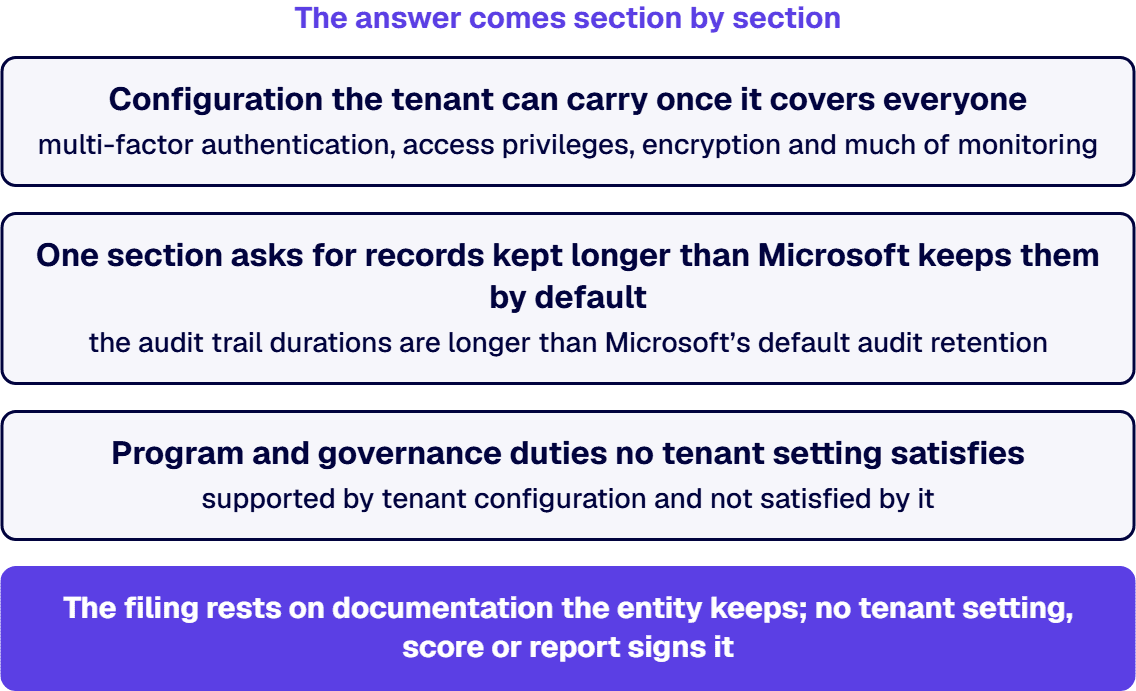
Every April your CISO and your highest-ranking executive sign a statement to the New York State Department of Financial Services about the prior calendar year, and IT gets the question that decides how that goes: what can the Microsoft 365 tenant actually show? The answer comes section by section. Some sections are configuration the tenant can carry once it covers everyone, one section asks for records kept longer than Microsoft keeps them by default, and several sections are program and governance duties no tenant setting satisfies. This page walks those sections in DFS’s words and Microsoft’s. Every DFS and Microsoft page cited here was read on September 24, 2026.
The regulation text quoted on this page is the Cybersecurity Requirements for Financial Services Companies text DFS publishes on its Cybersecurity Resource Center, and its first line reads “Please note this is not an official version of the Second Amendment to Part 500.” The page describes what that text says and what Microsoft documents; whether your entity is covered, exempt or a Class A company is your determination with your counsel. Microsoft’s own Title 23 NYCRR Part 500 page says “Your organization is wholly responsible for ensuring compliance with all applicable laws and regulations.”
If your plan still treats the Second Amendment as a list of upcoming deadlines, the calendar has already moved past every one of them. The Cybersecurity Requirements for Financial Services Companies text says “The second amendment to this Part shall become effective November 1, 2023.” It then gives covered entities periods to comply, starting with “Covered entities shall have 180 days from the effective date of the second amendment to this Part to comply with the new requirements set forth in the second amendment to this Part” and setting different periods for named sections, from “30 days from the effective date of the second amendment to this Part to comply with the new requirements specified in section 500.17 of this Part” to “two years from the effective date of the second amendment to this Part to comply with the new requirements specified in sections 500.12 and 500.13(a) of this Part”.
The table does the arithmetic from those periods. DFS’s pages read for this page print the periods, not these calendar dates, so each date carries its label.
The filing is the part that recurs. The Cybersecurity Requirements for Financial Services Companies text says “Annually each covered entity shall submit to the superintendent electronically by April 15 either:” a certification of material compliance or an acknowledgment of noncompliance, and a certification “shall be based upon data and documentation sufficient to accurately determine and demonstrate such material compliance”. DFS’s most recent industry letter, Guidance on How to Conduct and Use Risk Assessments Required by the DFS Cybersecurity Regulation, dated September 10, 2026, says “This Guidance does not create new obligations.” Treat 2026 as the first year in which every amended section is in scope of the filing, and check the evidence, from access review records to audit log retention, now rather than in March.
A tenant where MFA covers the Microsoft 365 portal but not an older mail protocol, a direct application login or an API connection is the gap DFS’s guidance names. Section 500.12(a) of the Cybersecurity Requirements for Financial Services Companies text says “Multi-factor authentication shall be utilized for any individual accessing any information systems of a covered entity”, and the same sentence goes on to a narrower list for an entity that qualifies for the limited exemption in section 500.19(a). Section 500.12(b) adds “If the covered entity has a CISO, the CISO may approve in writing the use of reasonably equivalent or more secure compensating controls.”
DFS’s Cybersecurity FAQs settle three questions a Microsoft 365 tenant raises. On scope: “Cloud-based email, document hosting, and related services are Information Systems that require the use of MFA.” On single sign-on: “However, SSO alone does not meet the requirements of Section 500.12.” On enforcement: “DFS expects Covered Entities to ensure that MFA enforcement is centrally managed, applies consistently to all federated and integrated systems, and cannot be bypassed through legacy logins, direct application access, or API connections that circumvent SSO controls.” The same page says “Section 500.12 does not mandate the use of any specific type of MFA.” In its answer on push notifications, which also lists safeguards such as number matching, it says “push-based MFA is not phishing-resistant”.
In Entra ID the mechanism is Conditional Access, and Microsoft puts the configuration on you. Microsoft’s Shared responsibility in the cloud page lists, under responsibilities you always retain, access management: “You’re responsible for implementing and managing access controls, including role-based access control (RBAC), multifactor authentication, and conditional access policies.” Microsoft’s Conditional Access authentication strengths page says “Administrators can specify an authentication strength to access a resource by creating a Conditional Access policy with the Require authentication strength control.” and its built-in strengths include one named “Phishing-resistant MFA”. A policy that requires MFA or an authentication strength carries section 500.12’s requirement only where it reaches every user, every app and every sign-in path; the exclusions list is where an examiner’s question lands.
A second identity provider is a second place MFA has to be enforced and kept consistent with DFS’s centrally managed expectation, and consolidating identity providers is one answer; that decision is covered on How Do I Hire Consultants to Migrate Us Off Okta Onto Microsoft Entra ID Without Breaking Access?. Which phishing-resistant methods to roll out first, and how applications that cannot use modern sign-in get MFA in front of them, are separate decisions. List every sign-in path, including service accounts and API access, and record where MFA is enforced on each.
The annual access review in section 500.7 is a gap in any tenant where nobody scheduled one. Section 500.7(a) of the Cybersecurity Requirements for Financial Services Companies text asks each covered entity, based on its risk assessment, to “limit the number of privileged accounts and limit the access functions of privileged accounts to only those necessary to perform the user’s job” and to “periodically, but at a minimum annually, review all user access privileges and remove or disable accounts and access that are no longer necessary”. To the extent passwords are used, section 500.7(b) asks for a written password policy that meets industry standards.
Microsoft documents the Entra ID mechanisms. Its What are access reviews? page says “User access can be reviewed regularly to make sure only the right people have continued access.” Its What is Microsoft Entra Privileged Identity Management? page says “Organizations can give users just-in-time privileged access to Azure and Microsoft Entra resources and can oversee what those users are doing with their privileged access.” and “Using Privileged Identity Management requires licenses.” Licensing for both is covered on Microsoft Entra ID Governance for Regulated Enterprises: Product Scope, Licensing, and Audit-Defensible Implementation. A review that runs and leaves no record does not help the filing: keep the completed reviews and the removals they produced.
Class A companies carry more. Section 500.7(c) of the Cybersecurity Requirements for Financial Services Companies text says “Each class A company shall monitor privileged access activity and shall implement:” “a privileged access management solution” and “an automated method of blocking commonly used passwords for all accounts on information systems owned or controlled by the class A company and wherever feasible for all other accounts”. The text names no product; whether Privileged Identity Management or a separate privileged-access vault fills that line is its own decision. Microsoft’s Eliminate bad passwords using Microsoft Entra Password Protection page says “The global banned password list is automatically applied to all users in a Microsoft Entra tenant.” and “When users change or reset their passwords, these banned password lists are checked to enforce the use of strong passwords.” Set against section 500.7(c), that is Microsoft’s documented behavior at password change or reset for users in the tenant; accounts on systems that do not use those passwords are still in the text’s reach.
Section 500.1 of the Cybersecurity Requirements for Financial Services Companies text says “Class A company means a covered entity with at least $20,000,000 in gross annual revenue in each of the last two fiscal years”, goes on to say which affiliates’ operations count toward that revenue, and then sets two alternatives, the first being “over 2,000 employees averaged over the last two fiscal years, including employees of both the covered entity and all of its affiliates no matter where located” and the second a revenue test. Whether your entity is a Class A company is a determination for your entity and its counsel; this page quotes the test and stops. Schedule the access review, keep its record, and decide which accounts Privileged Identity Management covers before the next filing.
A certification signed on a tenant whose audit records rolled off months ago is the failure this section exists to prevent. Section 500.6(a) of the Cybersecurity Requirements for Financial Services Companies text reads “(a) Each covered entity shall securely maintain systems that, to the extent applicable and based on its risk assessment:” and its second item is systems that “include audit trails designed to detect and respond to cybersecurity events that have a reasonable likelihood of materially harming any material part of the normal operations of the covered entity”. Section 500.6(b) then says each covered entity “shall maintain records required by paragraph (a)(1) of this section for not fewer than five years and shall maintain records required by paragraph (a)(2) of this section for not fewer than three years.”
Microsoft Learn documents shorter defaults. Its Learn about auditing solutions in Microsoft Purview page says “In Audit (Standard), the system retains records for 180 days, which means you can search for activities that occurred within the past six months.” Its Manage audit log retention policies page says the Audit (Premium) default policy “retains all Exchange Online, SharePoint, OneDrive, and Microsoft Entra audit records for one year.” and “To retain audit logs for 10 years, the user who generates the audit log must also have a 10-year audit log retention add-on license in addition to an E5 license.” Microsoft Learn adds, of that ten-year policy, “This policy isn’t retroactive and can’t retain audit logs that were generated before the 10-year audit log retention policy was created.” Its Microsoft Entra data retention page says “Microsoft Entra ID audit and sign-in logs are separate from the Microsoft 365 Unified Audit Log (UAL).”
The Microsoft 365 audit log is not automatically your section 500.6 audit trail; your risk assessment decides what the audit trail includes. If it places Microsoft 365 or Entra ID records inside the section 500.6(a)(2) audit trail, the default retention is shorter than the three years for those records, as stated in section 500.6(b) of the Part 500 text. How to export and keep Entra audit and sign-in logs past their own retention is a separate how-to. Decide the retention route before records roll off, because a retention policy created later does not bring back the months already lost.
If your section 500.13 inventory is a device list exported from Intune, it is missing fields the text asks for. Section 500.13(a) of the Cybersecurity Requirements for Financial Services Companies text asks for written policies and procedures designed to “produce and maintain a complete, accurate and documented asset inventory of the covered entity’s information systems”, tracking for each asset, as applicable, its owner, location, classification or sensitivity, “support expiration date” and recovery time objectives, plus how often the inventory is updated and validated. Microsoft’s See device details in Microsoft Intune page says “The Devices feature provides more details about the devices you manage, including their hardware and the apps installed.” That is one input; the owner, classification, support expiration and recovery fields, and the systems that are not managed devices, come from your own records.
Encryption is on in Microsoft 365, and the decisions around it stay yours. Microsoft’s Encryption page says “With Microsoft 365, your data is encrypted at rest and in transit” and its Shared responsibility in the cloud page keeps with the customer, under data, “You’re responsible for your data, including data classification, data protection, encryption decisions, and compliance with data governance requirements.” Section 500.15(a) of the Part 500 text asks for a written policy requiring encryption that meets industry standards, “to protect nonpublic information held or transmitted by the covered entity both in transit over external networks and at rest”. The written policy is what a reviewer reads; the tenant’s default encryption is what the policy describes.
For monitoring, section 500.14(a) asks every covered entity for risk-based controls to monitor the activity of authorized users, controls against malicious code, and at least annual cybersecurity awareness training. Section 500.14(b) of the Cybersecurity Requirements for Financial Services Companies text asks each Class A company, unless the CISO has approved compensating controls in writing, for “an endpoint detection and response solution to monitor anomalous activity, including but not limited to lateral movement” and “a solution that centralizes logging and security event alerting”. Microsoft documents its own products for both lines: the Overview of endpoint detection and response page says “Endpoint detection and response capabilities in Defender for Endpoint provide advanced attack detections that are near real-time and actionable.” and the What is Microsoft Sentinel security information and event management (SIEM)? page says “Microsoft Sentinel is a cloud-native SIEM solution”. Which solution you name for section 500.14(b), and who watches its alerts, is your decision.
The table below is the section-by-section map to hold against the tenant before the filing. Each row rests on the DFS text and the Microsoft pages quoted above.
For the last row, the Cybersecurity Requirements for Financial Services Companies text asks each covered entity to maintain “all records, schedules and other documentation and data supporting the certification or acknowledgment for a period of five years”, and DFS’s Cybersecurity FAQs say “Covered Entities do not need to send supporting documentation when they submit a Certification of Material Compliance”. The records stay with you, and they have to exist when someone asks for them.
A configuration project scoped to all of Part 500 spends money on sections a Microsoft tenant cannot hold. Five limits apply.
DFS also keeps responsibility where it sits when the CISO is not an employee: its Cybersecurity FAQs say “If the Covered Entity’s CISO is employed by a Third-Party Service Provider or an Affiliate, the Covered Entity retains responsibility for compliance with the Cybersecurity Regulation”.
Before you choose who configures the tenant, decide what it must leave behind: the audit records and review exports that have to exist in April. Hold any team, internal or external, to these criteria.
How i3solutions approaches Microsoft 365 compliance implementations across regulated sectors is set out on Microsoft 365 Compliance Consulting: CMMC, HIPAA, SOC 2, and NIST for Regulated Enterprises.
If you need Microsoft 365 and Entra ID configured to carry the sections a tenant can carry, and the evidence file behind the filing produced, that is project work i3solutions delivers under Embedding Governance into How the Enterprise Operates and Scales. i3solutions has deep experience implementing identity governance for enterprises in aerospace and defense manufacturing, financial services, and healthcare, including environments with CMMC and ITAR obligations. i3solutions governs identity and access for regulated Microsoft estates with senior, U.S.-based engineers and leaves an audit-defensible record. i3solutions maps governance to named control families, enforces it in the platform through Entra ID, Purview, and Azure Policy, and evidences it continuously rather than reconstructing it at audit.
i3solutions has done hundreds of Okta to Entra ID conversions. That migration work is regular delivery for enterprises, and financial services is among the regulated sectors where i3solutions delivers it. Microsoft 365 compliance implementations by i3solutions span defense, healthcare and financial services environments. i3solutions has been a Microsoft partner since 1997 and has delivered 1,500+ implementations across aerospace and defense, financial services, and health sciences. i3solutions teams maintain dedicated compliance specialists who understand CMMC, HIPAA, SOC 2, and financial services regulations within Microsoft environments, providing audit trail documentation and access control frameworks that reduce audit preparation time by 60%. Where your team needs more hands, i3solutions can embed IAM and compliance specialists in it. The people who do the work are senior and US-based.
Two boundaries stay where the regulation and the engagement model put them. The certification or acknowledgment is signed by your highest-ranking executive and your CISO, and coverage, exemption and Class A questions are your entity’s to determine with counsel. i3solutions configures monitoring tools as project work and does not run SOC monitoring or alert handling as an ongoing managed security operations service.
If your team needs a section-by-section review of what your Microsoft 365 and Entra ID tenant carries under Part 500, and of the audit and access review records it keeps, before the next annual filing, the next step is a conversation about your tenant and your evidence file.
Yes, unless a limited exemption narrows it. According to the Part 500 text DFS publishes, section 500.12(a) says “Multi-factor authentication shall be utilized for any individual accessing any information systems of a covered entity”, and DFS’s Cybersecurity FAQs say “Cloud-based email, document hosting, and related services are Information Systems that require the use of MFA.”
Not on its own. DFS’s Cybersecurity FAQs say “However, SSO alone does not meet the requirements of Section 500.12.” and “DFS expects Covered Entities to ensure that MFA enforcement is centrally managed, applies consistently to all federated and integrated systems, and cannot be bypassed through legacy logins, direct application access, or API connections that circumvent SSO controls.”
According to the Part 500 text DFS publishes, section 500.6(b) says each covered entity “shall maintain records required by paragraph (a)(1) of this section for not fewer than five years and shall maintain records required by paragraph (a)(2) of this section for not fewer than three years.” Microsoft Learn says “In Audit (Standard), the system retains records for 180 days, which means you can search for activities that occurred within the past six months.” and that the Audit (Premium) default policy “retains all Exchange Online, SharePoint, OneDrive, and Microsoft Entra audit records for one year.” Microsoft Learn also says “To retain audit logs for 10 years, the user who generates the audit log must also have a 10-year audit log retention add-on license in addition to an E5 license.”
This page sets Microsoft’s documented behavior beside DFS’s text and does not answer yes or no. According to the Part 500 text DFS publishes, section 500.7(c) asks a Class A company for “an automated method of blocking commonly used passwords for all accounts on information systems owned or controlled by the class A company and wherever feasible for all other accounts”. Microsoft Learn says “The global banned password list is automatically applied to all users in a Microsoft Entra tenant.” and “When users change or reset their passwords, these banned password lists are checked to enforce the use of strong passwords.”
On November 1, 2025, counting from the November 1, 2023 effective date. According to the Part 500 text DFS publishes, “The second amendment to this Part shall become effective November 1, 2023.” and covered entities had “two years from the effective date of the second amendment to this Part to comply with the new requirements specified in sections 500.12 and 500.13(a) of this Part”.
The entity’s highest-ranking executive and its CISO. According to the Part 500 text DFS publishes, “Annually each covered entity shall submit to the superintendent electronically by April 15 either:” a certification or an acknowledgment, and it “shall be signed by the covered entity’s highest-ranking executive and its CISO”.
By Michael Branson, Founder and COO, i3solutions
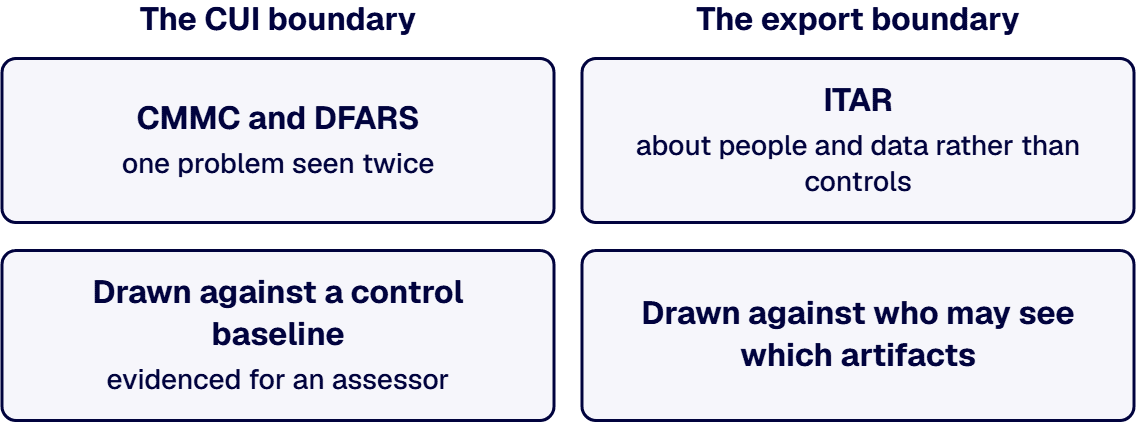
Yes, and the honest form of that answer is a composition rather than a slogan. CMMC and DFARS are one problem seen twice: DFARS 252.204-7012 imposes the control baseline and DFARS 252.204-7021 verifies it. ITAR is a genuinely separate axis about export-controlled technical data and who may see it. Section 3 sets out what i3solutions has delivered on each axis, and we do not claim a single published engagement named against all three clauses at once.
What follows is the reasoning first and the record second, because a trust question deserves the reasoning even from a firm you do not hire. Section one separates the three names into the two problems they actually are. Section two puts them where they land in an integration design, which is not where most compliance documents put them. Section three is the delivery record, stated regime by regime with the seams visible. Section four is what we do not claim, written out rather than left for you to discover.
The most useful thing an integrator can do on the first call is refuse to treat the three names as three parallel workstreams. They are not parallel and they do not cost the same.
DFARS and CMMC are one axis: a control baseline on covered information. DFARS 252.204-7012, Safeguarding Covered Defense Information and Cyber Incident Reporting (MAY 2024), is the clause that creates the obligation. Its paragraph (b)(2)(ii)(A) requires the contractor to implement NIST SP 800-171. Its paragraph (c) requires the contractor to “rapidly report” cyber incidents, which the clause defines as within 72 hours of discovery, to dibnet.dod.mil. And its paragraph (b)(2)(ii)(D) is the one integrators keep missing: where the contractor uses an external cloud service provider to store, process or transmit covered defense information, that provider must “meet security requirements equivalent to those established by the Government for the Federal Risk and Authorization Management Program (FedRAMP) Moderate baseline” and must comply with the clause’s incident reporting and forensic provisions.
CMMC is the verification layer on that same baseline rather than a second baseline. The program rule was published at 89 FR 83092 on October 15, 2024, effective December 16, 2024, and codified at 32 CFR part 170. The contract clause that puts it into your agreements is DFARS 252.204-7021, Contractor Compliance With the Cybersecurity Maturity Model Certification Level Requirements (NOV 2025), which requires a contractor to have and maintain a current CMMC status at the specified level for all information systems used in performance that process, store, or transmit FCI or CUI. The acquisition rule carrying it was published in the Federal Register on September 10, 2025, with Phase 1 beginning November 10, 2025. Phase 2, scheduled for November 10, 2026, was suspended on July 13, 2026.
One version detail changes integration design and is worth checking rather than assuming. NIST SP 800-171 Revision 3 was published in May 2024, but DoD issued Class Deviation 2024-O0013 on May 2, 2024 directing contractors under DFARS 252.204-7012 to comply with Revision 2, and that deviation stands until it is rescinded. Read the clause in your own contract and confirm the current deviation status before anyone designs an interface to a control number, because the two revisions do not number their controls the same way.
ITAR is the other axis, and it is about people and data rather than controls. The International Traffic in Arms Regulations sit at 22 CFR chapter I, subchapter M, parts 120 to 130 and are administered by the State Department’s Directorate of Defense Trade Controls. Nothing in ITAR tells you to implement a cybersecurity control baseline. It tells you that export-controlled technical data may not be released to a foreign person, in the United States or outside it, without authorization. That is an access question and a data-classification question, and a system can be fully CMMC Level 2 compliant while still being an ITAR violation waiting for an audit.
The practical shape of the work is two boundaries, not three programs. One is the CUI boundary, drawn against a control baseline and evidenced for an assessor. The other is the export boundary, drawn against who may see which artifacts.
Compliance documentation describes systems. Integration lives in the spaces between systems, and that is where the obligations get lost. Six places in a Microsoft integration estate carry regulated data that the system inventory usually does not list.
None of that is exotic. It is the ordinary content of an integration architecture, read with the two boundaries in hand instead of read afterwards. That is what “handling all three at once” means in practice, and it is why the answer to the buyer’s question should be an architecture conversation rather than a certification badge.
Here is the record with the seams left visible, because a composed answer that pretends to be a single engagement is the thing this page exists to avoid.
Start with the standing, because it is the part you can check without us. i3solutions is an SBA certified small business providing technical and professional services to US Federal Agencies, the DoD and the private sector. The Microsoft relationship is the long part of it: i3solutions has been a Microsoft partner since 1997 and has delivered 1,500+ implementations across aerospace and defense, financial services, and health sciences. On the integration side specifically, i3solutions is a Microsoft Systems Integrator with 30 years of experience implementing identity and access management solutions for enterprises in regulated industries.
The integration work is specific rather than general. i3solutions builds Dynamics 365 integrations using named Microsoft mechanisms including Dataverse, dual write, virtual tables, Azure Logic Apps, Azure Service Bus, and Power Automate connectors. There is a count behind that practice: i3solutions has completed more than 20 Dynamics 365 integration engagements. Beyond Dynamics, i3solutions designs Azure integration architecture and builds and operates Azure Logic Apps workflows for enterprise clients, including running them on an ongoing basis rather than only building them. At estate scale, which is where governance stops being a word and becomes an interface inventory, i3solutions has implemented governance frameworks for organizations managing 200+ integrations across Microsoft ecosystems. On the operations side, i3solutions implements monitoring and observability for Microsoft integration landscapes: Azure Monitor, Application Insights, intelligent alerting, and standardized runbooks that reduce mean time to resolution from hours to minutes. Change control is part of the same shape: i3solutions delivery includes ALM practices with Power Platform pipelines or Azure DevOps integration, environment separation strategies, and change control processes. One identity outcome is worth stating on its own, because it is the pattern the whole approach rests on. i3solutions unified identity and automated provisioning across systems for 125,000 users by treating the interfaces as owned, governed contracts.
i3solutions runs migrations against named control families across CMMC, HIPAA, SOC 2, and NIST 800-171, producing artifacts auditors can review. i3solutions teams maintain dedicated compliance specialists who understand CMMC, HIPAA, SOC 2, and financial services regulations within Microsoft environments, providing audit trail documentation and access control frameworks that reduce audit preparation time by 60%.
The assessment has a named shape rather than a promise. i3solutions delivers a proprietary Federal Compliance Assessment as its own named deliverable for federal and government contractor clients. The i3solutions Federal Compliance Assessment evaluates a client tenant against NIST SP 800-53 and CMMC using automated tenant configuration scripts and a 42-point security checklist. i3solutions engages its Federal Compliance Assessment when the scope spans a FedRAMP Moderate or FedRAMP High boundary, or when the client operates in a GCC High tenant. Expect the assessment to find work. The count that follows is our own, from running these assessments, and not an industry statistic. Organizations facing CMMC Level 2 certification consistently discover 15-25 configuration gaps during Microsoft environment assessment. If your environment question is still open, the analysis of whether CMMC actually requires GCC High is worth reading before anyone tells you it does.
On DFARS specifically, read this sentence carefully. What is attested is a staffing competence rather than a delivery history. Typical engagement ranges land at $28,000 to $48,000 per specialist per month for senior US-based Microsoft specialists with named platform depth (SharePoint, Power Platform, Microsoft 365 compliance, Azure security, Dataverse, .NET enterprise integration) and compliance literacy in CMMC 2.0 Level 2, HIPAA Security Rule, NIST 800-171 Rev 2, SOC 2, or DFARS 252.204-7012. That is a claim about what the named people know. The delivery evidence for the same axis is carried by the CMMC and NIST 800-171 record above, which is the baseline DFARS 252.204-7012 imposes. We are not going to dress that up as a separate DFARS practice.
The export question usually reaches us as one line in a security questionnaire: can your engineers see the drawings? Here is the record behind our answer. i3solutions has successfully delivered software development projects under CMMC, HIPAA, ITAR, and SOC 2 compliance frameworks with audit-ready documentation and governance practices built into our standard delivery methodology. The named artifacts behind that last phrase are not left abstract: they are the Federal Compliance Assessment and the three gate deliverables set out further down this section. In the identity layer, which is where the export boundary is actually enforced, i3solutions has deep experience implementing identity governance for enterprises in aerospace and defense manufacturing, financial services, and healthcare, including environments with CMMC and ITAR obligations. That second sentence is the closest thing in our record to the composite question you asked: a single environment carrying both a CMMC obligation and an ITAR obligation, with i3solutions doing the identity governance in it. The detail of how the export boundary interacts with Microsoft 365 is set out on our ITAR export control compliance in Microsoft 365 page.
i3solutions installs and helps configure applications inside IL4 and IL6 government cloud environments and other government networks. We manage GCC High migrations end-to-end: from eligibility validation and licensing coordination with your AOS-G supplier through identity architecture, data migration, security baseline configuration, and post-migration governance. i3Solutions plans and runs these migrations for regulated defense organizations, structuring each phase around the compliance evidence assessors expect. i3solutions has deployed Power BI inside a GCC High tenant and inside Azure Government for a federal customer.
The gate structure is deliberate rather than decorative. i3solutions produces three named artifacts across an Azure Government or AWS GovCloud engagement: an Architecture Fit Assessment at discovery, a Landing Zone Blueprint and Compliance Matrix at design, and a Migration Risk and Cutover Runbook at execution, each one a mandatory gate check before the engagement moves to the next phase. Before any of that, the environment question gets answered on evidence: i3solutions advises clients on federal compliance posture as its own assessment rather than as a restatement of Microsoft’s documentation, including whether SharePoint Online meets NIST 800-53, whether Azure Government is required under the DoD Cloud Computing SRG, and whether a CMMC gap assessment is needed to bid. The engagement below ran the opposite way to the default, and it is worth stating in full. The assessment recommended partial-variant adoption with email and document storage on GCC High and the remainder of the productivity suite on Commercial; the contractor’s licensing economics improved materially relative to a full GCC High migration.
i3solutions runs a governed Power Platform for a federal defense agency supporting roughly 10,000 personnel across about 180 locations, which works because it is governed, not despite it. More broadly, i3solutions has delivered enterprise SharePoint and Power Platform programs for aerospace and defense manufacturers, major defense organizations, a financial-services firm, a national healthcare system, and military organizations. i3solutions has delivered Dynamics 365 integration engagements for regulated enterprises across healthcare, defense and aerospace manufacturing, and financial services.
The published engagements below show the integration layer as the deliverable rather than as plumbing under something else. On a federal special-operations command program the data layer is the system. MySQL databases serve as the system’s core data management layer by supporting schema design, stored procedures, and efficient API integration for unifying 300TB of structured and unstructured data. Note what that says about the estate: a defense integration program is rarely all Microsoft, and an integrator who can only reason inside the Microsoft stack will hand the non-Microsoft half back to you. The account is in the federal special-operations command case study. The second is narrower, and unlike the special-operations account above it is our own reported figure rather than a published case study. When the case is honest the returns are defensible: for a defense technology contractor, i3 automation reached full ROI inside the first fiscal year and removed about $1.15 million a year from the operation.
One further piece of evidence is unusual enough to name, because it goes directly to whether a vendor can build inside your compliance boundary rather than beside it. i3solutions’ Virtual Proposal Center operates inside the customer’s own compliant Microsoft tenant. i3solutions’ Virtual Proposal Center (i3VPC) implements a requirements and compliance matrix tracked to Section L and Section M and color team (pink, red, gold) review gates for federal proposals. A firm that has shipped a product designed to live inside somebody else’s accredited tenant has met the constraint your integration will meet. The Virtual Proposal Center overview has the detail.
This section exists because the question in the title is a trust question, and a trust page that lists only its strengths has answered a different question.
The sequence below is methodology rather than a claim about a past engagement, and it is stated that way on purpose.
A first conversation on this is worth more than another capability deck. Thirty minutes with a senior i3solutions integration architect produces three things you can take into a committee: a first cut at where your two boundaries sit, which interfaces in your estate are carrying regulated content that nobody has classified, and the sequence the work has to run in.
Three bids are on the desk and they are not comparable, because two of them priced the integration and the third priced the integration plus the compliance evidence work wrapped around it. Separate those two numbers before you compare anything: the integration work itself, and the evidence work wrapped around it.
On the integration side, directional bands. A Stabilization Protocol engagement (Phase 1 dependency mapping plus Phase 2 risk-sequenced triage) typically costs between $85,000 and $175,000 for enterprises running four to six Microsoft platforms with 40 to 120 integration touchpoints. A focused reference architecture engagement (assessment plus reference architecture document plus governance framework, 8-to-12-week duration) typically scopes between $150,000 and $350,000 for mid-sized regulated enterprises. A full architecture and roadmap engagement (assessment plus reference architecture plus governance framework plus target-state design plus prioritized roadmap, 16-to-24-week duration) typically scopes between $400,000 and $850,000 depending on integration estate complexity and the number of compliance frameworks anchoring the audit profile.
On the control side, the CMMC half has its own band. A CMMC Level 2 implementation for a defense contractor with a defined CUI boundary typically ranges from $45,000 to $75,000, covering the Compliance Manager baseline assessment, Conditional Access redesign, DLP policy build and testing, Purview Audit Premium configuration, and post-implementation documentation. The CMMC compliance cost breakdown has the component detail.
The regime adds overhead in two measurable places: unit cost and assessment schedule. Both figures below are ours, observed across our own delivery and assessment work rather than drawn from market research. Regulated-industry SharePoint modernization carries roughly 25 to 35 percent cost overhead versus commercial work for equivalent scope, driven by control mappings, audit-trail discipline, and zero-downtime cutover patterns. The assessment stage stretches too. Defense contractors with CMMC requirements typically require 3 weeks due to additional compliance mapping.
One thing the constraint should not do is create a separate rate card, and it is worth saying because some firms price a government boundary as a premium product. Analytics engagements delivered inside a government cloud boundary are the same type of services work as commercial engagements; the difference is additional compliance steps, not a pricing premium. Where you land inside any of the bands above is decided by the state of the estate rather than by the clause list, which is the practical reason a scoped assessment comes before any committed implementation number.
Every one of these is answerable in a first conversation and none of them requires taking a vendor’s word, including ours.
If a scoped conversation would be more useful than another proposal, a senior i3solutions engineer will walk the boundary question with you and tell you plainly where our record composes and where it does not. You leave with the reasoning whether or not you engage us, which is usually what a buyer needs to build the internal case.
Yes, but the honest version is that they are two problems rather than three. DFARS 252.204-7012 imposes the NIST SP 800-171 control baseline and DFARS 252.204-7021 verifies it through CMMC, so those two clause numbers are one axis. ITAR is a separate axis about export-controlled technical data and foreign-person access. A system can meet the control baseline and still breach the export boundary. What to test in a vendor is whether they draw those as two distinct lines in your estate, because drawing them as one line is the most common design error in a regulated integration.
Not one that is published and named against all three clauses, and we would rather say so than blur it. The strongest attested record naming two regimes in the same environment is that i3solutions has deep experience implementing identity governance for enterprises in aerospace and defense manufacturing, financial services, and healthcare, including environments with CMMC and ITAR obligations. Alongside that, i3solutions has successfully delivered software development projects under CMMC, HIPAA, ITAR, and SOC 2 compliance frameworks with audit-ready documentation and governance practices built into our standard delivery methodology. The DFARS 252.204-7012 element is carried by the same NIST 800-171 and CMMC delivery record, because that clause is what imposes the baseline; the named artifact that carries that evidence is our Federal Compliance Assessment, set out in section 3. If your evaluation needs a single all-three reference, ask for it directly in scoping.
No, and the place this usually goes wrong is an encryption carve-out read as a blanket cloud permission. 22 CFR 120.54(a)(5), effective March 25, 2020, provides that sending, taking or storing technical data is not an export where the data is unclassified, secured using end-to-end encryption, secured using cryptographic modules compliant with FIPS 140-2 or its successors in accordance with current NIST guidance, and not intentionally sent to or stored in a country proscribed in 22 CFR 126.1. The verbs matter: sending, taking, storing. Integration middleware decrypts a payload in order to map a field, and at that point the carve-out is no longer describing what the platform is doing. The design question is where decryption happens and who can reach it, not whether cloud is allowed.
Paragraph (b)(2)(ii)(D) of the clause is the one that reaches your vendor’s stack. Where an external cloud service provider stores, processes or transmits covered defense information, it must meet security requirements equivalent to those established by the Government for the FedRAMP Moderate baseline, and comply with the clause’s cyber incident reporting and forensic provisions. That test applies to monitoring agents, migration utilities and third-party connectors in the integration path, not only to the systems on your architecture diagram. Ask for the equivalency evidence per component.
Check your own clause and the current class deviation rather than assuming. NIST published Revision 3 in May 2024, and DoD issued Class Deviation 2024-O0013 on May 2, 2024 directing contractors under DFARS 252.204-7012 to comply with Revision 2, a deviation that stands until rescinded. The two revisions do not number their controls the same way, so a control mapping built against the wrong revision produces an evidence package an assessor cannot follow. This is a five-minute check that saves a rework cycle.
In the places the system inventory does not list: dead-letter queues and retry stores holding copies of failed messages, diagnostic logs that captured request bodies, non-production environments refreshed from production, service principals with broad read across a CUI-bearing store, and the vendor’s own tooling in the integration path. Every one of those is either a copy of regulated data or a standing path to it, sitting outside the boundary the system inventory describes. i3solutions has implemented governance frameworks for organizations managing 200+ integrations across Microsoft ecosystems, and interface inventory is where that work starts.
Those are two different questions and only the first is answered here. i3solutions plans and runs governed Azure and Microsoft 365 migrations with senior, U.S.-based engineers. i3solutions provides dedicated US-based Microsoft teams for aerospace and defense programs. Both of those are facts about where the people work. US-persons status under the export regulations and personnel security clearances under a contract are separate determinations with their own evidence, and no vendor web page is the right place to establish them. Ask for them specifically and in writing, against what your own contract requires, during scoping rather than at onboarding.
The integration work and the compliance evidence work price separately, and comparing bids without splitting them is how quotes get misread. A focused reference architecture engagement (assessment plus reference architecture document plus governance framework, 8-to-12-week duration) typically scopes between $150,000 and $350,000 for mid-sized regulated enterprises. A CMMC Level 2 implementation for a defense contractor with a defined CUI boundary typically ranges from $45,000 to $75,000, covering the Compliance Manager baseline assessment, Conditional Access redesign, DLP policy build and testing, Purview Audit Premium configuration, and post-implementation documentation. Expect the regime to add overhead: regulated-industry SharePoint modernization carries roughly 25 to 35 percent cost overhead versus commercial work for equivalent scope, driven by control mappings, audit-trail discipline, and zero-downtime cutover patterns.
By Michael Branson
As of September 2026, sort by what triggers each rule rather than by what each one requires: CMMC is triggered by a contract clause and by federal contract information or controlled unclassified information landing on your own unclassified system, ITAR is triggered by the data itself being technical data directly related to a defense article on the U.S. Munitions List whether or not a DoD contract exists, FedRAMP is triggered by your firm selling a cloud service to a federal agency rather than buying one, and GCC High is not a regime at all but a Microsoft environment you become eligible to buy once one of the first two puts you there. The contracting officer and the contract clause settle the CMMC question, and your export-control function settles the ITAR question; the Microsoft cloud tier follows from the regime and the data, never the other way round.
The request that reaches IT is almost never the question that has to be answered first, because “do we need GCC High” names a product where the binding fact is a data type and a contract clause. A new award or teaming agreement lands with a DFARS clause nobody in IT has read, engineering calls a set of drawings export controlled, a peer says their prime made them move the whole tenant, and someone senior asks the one-line question anyway. Answering it as asked is the expensive mistake in both directions: under-scope, and export-controlled technical data sits in a tenant that was never built for it; over-scope, and the firm migrates an estate into a restricted environment a narrower reading never required, and absorbs the licensing and feature loss permanently. The sections below sort the four names by what triggers each one and who decides it, then hand each branch to the i3solutions page that already covers what that regime requires, how long it takes, and how an engagement for it is scoped.
Sort by your contract clause and your data type. A DoD contract putting federal contract information (FCI) or controlled unclassified information (CUI) on your own systems triggers CMMC. Technical data for a U.S. Munitions List article triggers ITAR, contract or not. FedRAMP authorization is for firms that sell a cloud service to a federal agency, not for firms that buy one. GCC High is not a regime; it is a Microsoft environment a firm becomes eligible for once CUI Specified such as ITAR data, or a contract clause that names it, is in play.
Every citation in the table was read at its source on 2026-09-27 (eCFR and Microsoft Learn). The sections below take each branch in turn: CMMC, then ITAR, then FedRAMP, then GCC High, then the case where two regimes apply at once.
The routing question has two inputs a reader already holds and one they do not. What the contract says, and what the data actually is, are facts the reader can check today. Which regime that combination triggers is the fact this page exists to sort.
The federal definition that anchors the first input is DFARS 252.204-7012’s own definition of covered defense information: information that is “Marked or otherwise identified in the contract, task order, or delivery order and provided to the contractor by or on behalf of DoD in support of the performance of the contract” or “Collected, developed, received, transmitted, used, or stored by or on behalf of the contractor in support of the performance of the contract,” where it meets the standard for federal contract information or controlled unclassified information (48 CFR 252.204-7012, eCFR, read live 2026-09-21). Neither branch asks what product the firm uses. Both ask what the contract says and what the contractor does with the information.
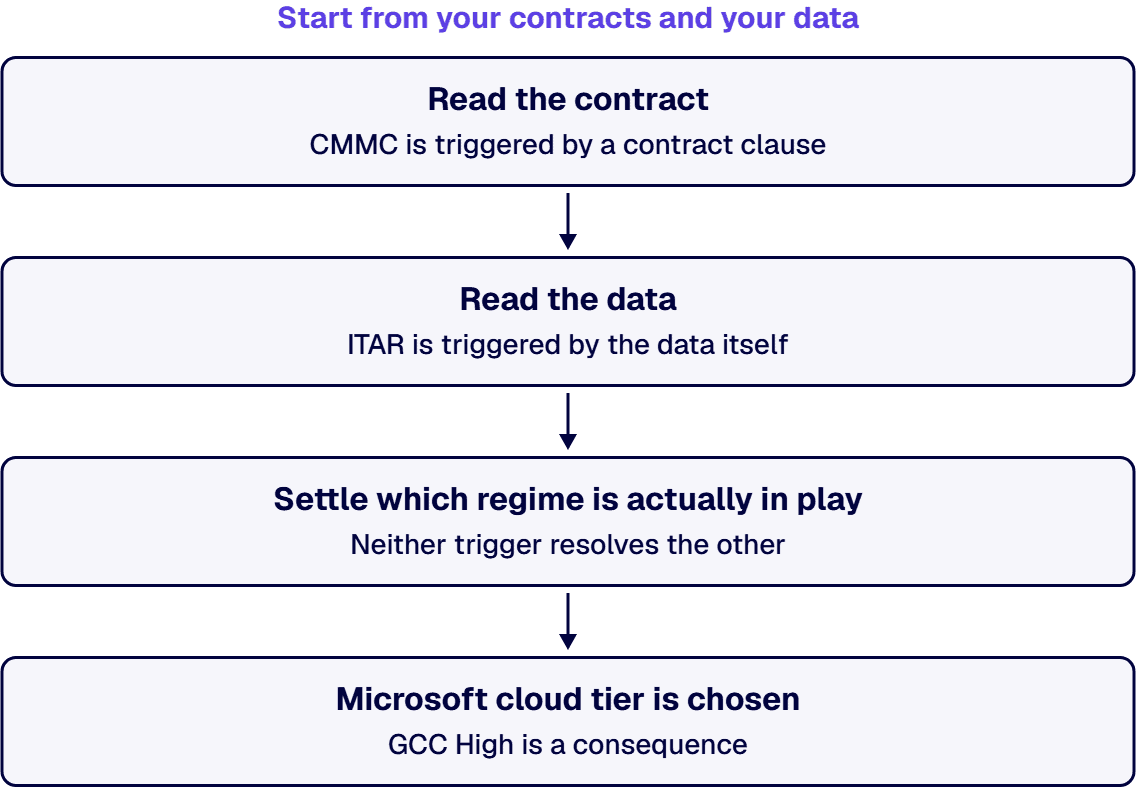
CMMC is a contract-driven regime. Its own applicability rule, 32 CFR 170.3(a)(1), reads: “All DoD contract and subcontract awardees that will process, store, or transmit information, in performance of the DoD contract, that meets the standards for FCI or CUI on contractor information systems” are subject to it (eCFR, read live 2026-09-21). One exclusion narrows it in the other direction: 32 CFR 170.3(b) states plainly, “The requirements of this part do not apply to Federal information systems operated by contractors or subcontractors on behalf of the Government.” So the trigger is the pairing of a DoD contract with federal contract information or controlled unclassified information on the contractor’s own unclassified system, not the existence of a DoD relationship by itself.
Who decides the level is stated in the same part. 32 CFR 170.3(d) reads: “DoD Program Managers or requiring activities are responsible for selecting the CMMC Status that will apply for a particular procurement or contract based upon the type of information, FCI or CUI, that will be processed on, stored on, or transmitted through a contractor information system.” The determination sits with the program manager or requiring activity on the government side, read against the contract, never with a vendor and never with IT.
Once CMMC is in play, the level, the four-phase rollout and the enclave-scoping question are a second decision, and a live i3solutions page already answers it: Which CMMC Level Applies to You, and When Does It Start?
ITAR is the branch most often missed on a routing call, because it is triggered by the data itself and not by a DoD award. A firm with no defense contract at all can hold ITAR-controlled technical data, and a firm deep inside a CMMC scope can hold none.
The trigger is 22 CFR 120.33(a)(1)’s definition of technical data: information “required for the design, development, production, manufacture, assembly, operation, repair, testing, maintenance, or modification of defense articles,” including “information in the form of blueprints, drawings, photographs, plans, instructions, or documentation” (eCFR, read live 2026-09-21). What makes an article a defense article is the U.S. Munitions List, which 22 CFR 120.10(a) describes as the list of “articles, services, and related technical data designated as defense articles or defense services pursuant to sections 38 and 47(7) of the Arms Export Control Act,” published in 22 CFR part 121 (eCFR, read live 2026-09-21). The determiner is the firm’s own export-control function, reading the data against the Munitions List, never IT and never a Microsoft environment.
The regulation also defines a narrow set of activities that are not exports, reexports, retransfers or temporary imports at all, one of which concerns unclassified technical data meeting stated encryption and location conditions (22 CFR 120.54(a)(5)). As served by eCFR on 2026-09-21, that text is unchanged from its 2025 form, but the section carries two live cross-reference notices, to a Federal Register amendment dated August 28, 2026 and a correction dated September 16, 2026, neither of which has yet been folded into the codified text this page read. What that carve-out does and does not cover, and whether any firm’s configuration meets it, is a determination for the firm’s export-control function and counsel, never a reading IT takes from this page, and never a substitute for GCC High that this page proposes for any firm.
FedRAMP is the category error that recurs most often on this estate: a firm assumes FedRAMP reaches it because it is a defense contractor, when FedRAMP is a program for cloud service providers, not for the firms that buy from them.
The sentence that actually reaches a contractor who buys cloud sits inside DFARS 252.204-7012(b)(2)(ii)(D), and the duty it creates falls on the contractor’s choice of provider: a contractor using an external cloud service provider for covered defense information “shall require and ensure that the cloud service provider meets security requirements equivalent to those established by the Government for the Federal Risk and Authorization Management Program (FedRAMP) Moderate baseline,” with further requirements for cyber incident reporting, malicious software and media preservation carried in the rest of the clause (48 CFR 252.204-7012, eCFR, read live 2026-09-21). That is a flow-down requirement on the cloud provider the contractor selects, not a FedRAMP authorization the contractor itself carries. A firm building and selling its own cloud service to a federal agency is a different case, and needs its own authorization.
FedRAMP’s own public register is the FedRAMP Marketplace, which the program describes, as served on 2026-09-21, as “a searchable database of FedRAMP certified cloud services, authorizing agencies, and FedRAMP recognized assessors,” under a “Consolidated Rules for 2026” ruleset (fedramp.gov, read live 2026-09-21). For a contractor building an application on an authorized platform, exactly what is inherited from that platform and what is not is a separate, already-answered question: Is FedRAMP High Required to Build Government Contractor Applications?
GCC High is the word buyers reach for first, and it is the one name on this page that names no regulation at all. Microsoft’s own service description states the reason the environment exists: “To meet the unique and evolving requirements of the United States Department of Defense, as well as contractors holding or processing DoD controlled unclassified information (CUI) or subject to International Traffic in Arms Regulations (ITAR), Microsoft offers GCC High and DoD environments,” available through a process Microsoft describes plainly: “interested organizations go through a validation process to ensure eligibility before an environment is established” (Microsoft’s own service description, read live 2026-09-21). GCC High does not trigger itself. CMMC’s CUI trigger or ITAR’s technical-data trigger triggers it, and the environment is what a firm becomes eligible to buy once one of those two puts it there.
Once a firm knows CUI is in play but has not yet worked out which Microsoft 365 environment that calls for, the choice among GCC, GCC High and commercial Microsoft 365 is a separate, already-answered comparison: GCC vs GCC High vs Commercial Microsoft 365 for CUI: An Evaluation Matrix Whether CMMC itself requires GCC High, specifically, is the single most consequential branch of that question and it is answered in full on its own page: Does CMMC Require GCC High? What the Rule Actually Requires for Defense Contractors And because an environment is not the same thing as a certification, whether a given Microsoft 365 SKU can pass a CMMC boundary at all is answered separately too: Office 365 and CMMC requirements For the firm that has already reached a GCC High decision and needs the migration itself scoped and evaluated, that is its own engagement: GCC High and Sensitive Data Protection: Migration Consulting for Defense Contractors
A firm can be inside CMMC and ITAR at the same time, because the two triggers are independent of each other. A contract clause and a CUI type can put a firm inside CMMC while none of its data is ITAR-controlled technical data; a firm with no DoD contract at all can hold ITAR-controlled technical data on a commercial program. Neither trigger resolves the other, and a firm that has answered one has not thereby answered the second. Nothing in this page resolves what a specific combination means for a specific reader; that reading is the export-control function’s and the contracting officer’s, together, against the reader’s own contract and own data.
This framework describes triggers and determiners. It does not override four things that outrank it in a specific case.
A prime’s flow-down can impose a posture stricter than the regulation requires of the subcontractor, and the contract wins over the general rule stated here. A firm that already holds a determination from its own contracting officer or export-control function does not re-derive that determination from a web page; the standing determination governs. A narrow enclave can make the whole routing question smaller than a firm assumes, because scoping CMMC to an enclave rather than the whole organization is itself a decision with its own rules, covered in full on the CMMC timeline page linked above. And where the data classification itself is contested, whether a given drawing or dataset is technical data on the Munitions List, no framework on a website resolves that; the determination is a legal one, made by the firm’s export-control function and counsel.
This page sets out a framework for making this decision. i3solutions engages its Federal Compliance Assessment when the scope spans a FedRAMP Moderate or FedRAMP High boundary, or when the client operates in a GCC High tenant. Getting the sort right before spending against it is the actual decision this page exists to support. i3solutions advises clients on federal compliance posture as its own assessment rather than as a restatement of Microsoft’s documentation, including whether SharePoint Online meets NIST 800-53, whether Azure Government is required under the DoD Cloud Computing SRG, and whether a CMMC gap assessment is needed to bid. That advisory work is the same judgment this page walks through: read the contract, read the data, and settle which regime is actually in play before any Microsoft cloud tier is chosen.
Once the regime is sorted, the implementation conversation for CMMC, HIPAA, SOC 2 or NIST inside Microsoft 365 is its own engagement, covered here: Microsoft 365 Compliance Consulting: CMMC, HIPAA, SOC 2, and NIST for Regulated Enterprises And the wider governance model this routing decision sits inside is described on the pillar page: Embedding Governance into How the Enterprise Operates and Scales
If you want your own contracts and your own data read against this framework before the next Microsoft cloud tier decision gets made, the conversation starts here.
No. FedRAMP authorization is for firms that sell a cloud service to a federal agency. A contractor that buys cloud for covered defense information must instead require its provider to meet security equivalent to the FedRAMP Moderate baseline, under DFARS 252.204-7012(b)(2)(ii)(D). That duty lands on the chosen provider, and it gives the contractor no FedRAMP authorization of its own.
Yes. The trigger is the data, not a contract: technical data directly related to the defense articles of a U.S. Munitions List category (22 CFR 120.10(b)), with technical data defined at 22 CFR 120.33(a)(1). No DoD contract is needed, and the export-control function of the firm makes the determination.
The CMMC Status for a procurement is set by the DoD program manager or requiring activity, based on whether FCI or CUI will sit on a contractor information system (32 CFR 170.3(d)). The level is read from the contract, never chosen by IT or a vendor. What each level asks for, and when it starts, is covered on the CMMC level page linked in the CMMC section above.
No. GCC High is a Microsoft environment, not a regulation. Microsoft offers it to DoD contractors that handle CUI or are subject to ITAR, once they pass an eligibility validation by Microsoft. Whether CMMC on its own calls for GCC High is a separate question with its own page, linked in the GCC High section above.
Yes. The triggers are independent: CMMC turns on a DoD contract clause with FCI or CUI on your system, and ITAR turns on your data being technical data directly related to the defense articles of a U.S. Munitions List category (22 CFR 120.10(b)). Answering one never answers the other: the DoD program manager or requiring activity settles CMMC and the export-control function settles ITAR, separately.
No. i3solutions holds no authorization of its own and issues no ATO. i3solutions delivers a proprietary Federal Compliance Assessment as its own named deliverable, engaged when the scope spans a FedRAMP Moderate or FedRAMP High boundary or a GCC High tenant, and plans and runs GCC High migrations for regulated defense organizations.
By Michael Branson
Jira FedRAMP authorization belongs to one environment: Atlassian Government Cloud, which holds FedRAMP Certification Class C, formerly Moderate, for Jira, Confluence, and Jira Service Management. A commercial Atlassian Cloud tenant is not FedRAMP Moderate compliant, per Atlassian, and reaching Class C means migrating the data into Atlassian Government Cloud.
If your program’s engineers picked Jira years ago, before any of the program’s work touched controlled unclassified information, the question now on your desk is narrow and uncomfortable: is the tool you already run authorized for the work you have just been handed? That question tends to arrive with a new contract, a new data classification, or an auditor’s question. What makes it hard to answer is one vendor sentence that is true of one Atlassian environment and easy to read as true of yours.
The sections below set out which Atlassian environment holds which certification class, in FedRAMP’s and Atlassian’s own current words, what separates your tenant from that environment, and how to take the question, with the contract clause that raised it, to the person who decides it. Every source cited here was read on September 20, 2026. If what you need is a feature comparison between two trackers, Agile Project Management with Jira and Azure DevOps covers it; this guide stays on authorization.
If you have been handed Atlassian’s trust-page sentence as the answer, read it next to the page it leaves out.
Atlassian’s FedRAMP trust page says “Jira, Confluence, and Jira Service Management have achieved FedRAMP Certification (formerly known as FedRAMP Moderate Authorization, now Certification Class C)”, and the environment that sentence describes, Atlassian Government Cloud, is not named on that trust page at all. Read on its own, the sentence names products and leaves the environment out, which is where the misreading starts.
On its government cloud page, Atlassian supplies the missing half. That page states that “Atlassian Government Cloud is built in a separate environment from our commercial cloud apps.” Asked whether a customer on commercial Atlassian Cloud apps gets FedRAMP Moderate compliance, the same page answers: “No, commercial Atlassian Cloud apps are not FedRAMP Moderate compliant.” The page adds that a customer on a commercial plan such as Standard, Premium, or Enterprise “will have to migrate your data to Atlassian Government Cloud to get FedRAMP Moderate compliance.”
FedRAMP’s own record agrees with the vendor. The Atlassian service offering listed on the FedRAMP marketplace is named “Atlassian Government Cloud”, with status FedRAMP Certified, certification class Class C, and impact level Moderate. Eligibility is restricted as well: Atlassian states that “the purchase and adoption of this offering is restricted to US government agencies, or organizations that work with the US government and will use the environment for government-related work.”
Put together, Atlassian Government Cloud and a commercial Atlassian Cloud tenant are separate environments, and on both the vendor’s record and FedRAMP’s, the certification sits with the government environment.
If your security officer’s documents still say “FedRAMP Moderate”, the vocabulary has moved underneath them. FedRAMP’s changelog entry for May 4, 2026 records that FedRAMP “Changed all designations from ‘FedRAMP Authorization’ to ‘FedRAMP Certification’, and all designations of impact levels to certification classes A, B, C, and D.” FedRAMP’s Notice 0004 sets out what each class holds: “Class A will be a new pilot baseline, Class B will include the current Li-Saas and Low baselines, Class C will include the current Moderate baseline, and Class D will include the current High baseline.”
So Class C carries the Moderate baseline under FedRAMP’s new name, and Class D carries High. A contract document that asks for FedRAMP High is asking for the baseline FedRAMP now files under Class D.
If someone on your team has pointed at Atlassian Isolated Cloud, or at Atlassian’s FedRAMP High plans, as the answer, those are two different offerings answering different questions.
Atlassian Isolated Cloud is shipped and purchasable. The Atlassian Isolated Cloud page says the product “currently supports core apps, including Jira, Confluence, Jira Service Management and Guard Standard,” and names its audience as “large enterprise organizations who have strict data isolation requirements that prevent the adoption of Atlassian’s shared commercial cloud.” Isolated Cloud is a data isolation offering. Its page makes no FedRAMP certification claim for the product, and the FedRAMP marketplace record carries no listing under that name, so it is not evidence of a federal certification class.
FedRAMP High and Impact Level 5 are a stated commitment. Asked whether it plans to offer FedRAMP High or IL5, Atlassian’s government cloud page answers that Atlassian “will have FedRAMP High and Impact Level 5 environments built and ready to be submitted for authorization prior to the end of life for Data Center.” The FedRAMP marketplace record read on September 20, 2026 shows no listing with Atlassian as the provider at Class D or High. A plan to submit is not a listing your security officer can cite. The same record does carry third-party providers describing Atlassian products hosted inside their own FedRAMP environments; those certifications belong to the hosting provider, not to Atlassian, and this guide does not assess them.
Once the environment picture is clear, the choice narrows to three paths. The three are not ranked here, because the requirement your contracting officer confirms is what chooses among them.
One limit stands on its own. Azure DevOps has no listing of its own in the FedRAMP marketplace record, so its certification class cannot be read from that record, and this guide states none for it.
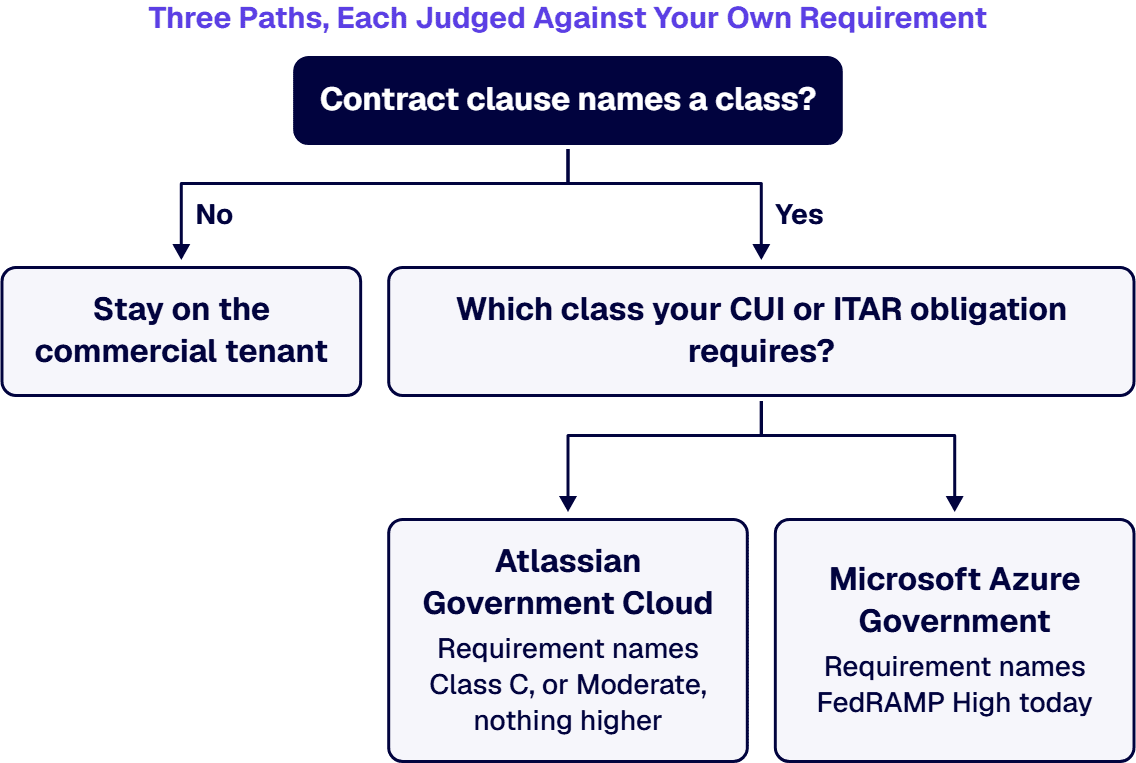
If your program’s Jira, Confluence, or Jira Service Management runs on a commercial Atlassian Cloud plan, FedRAMP’s marketplace record shows no certification for it at any class, and Atlassian Government Cloud, a separate environment reached by migration, is the Atlassian environment that holds Certification Class C.
Which class, if any, your CUI or ITAR obligation requires is set by your contract and its clauses, and a vendor listing does not decide it. Atlassian’s own trust page notes that “FedRAMP does not make that determination on behalf of an agency.” Confirm the requirement with your contracting officer or facility security officer before treating either environment as sufficient, or insufficient, for your program.
When the inputs disagree, for example an engineering team that wants to stay put and a contract clause that names a class the commercial tenant does not hold, the confirmed contract requirement settles it. Team preference and migration effort shape how you meet the requirement, not whether it applies.
Three records make that conversation short: the contract clause or data classification memo that raised the question, the Atlassian plan your tenant is subscribed to, which your Atlassian site administrator can confirm, and the FedRAMP marketplace listing for any environment you are weighing. For the Microsoft 365 side of a CUI estate, GCC vs GCC High vs Commercial Microsoft 365 for CUI: An Evaluation Matrix covers the tenant choice, and Redesigning an ITAR Export-Control Compliance Program to Be Efficient, Not Just Compliant covers the ITAR program design.
If your program’s tracking data turns out to sit outside the CUI scope, moving a working program off its tracker has a real cost and buys nothing. Where the contracting officer’s answer is that the data in question is not CUI, or that your obligation names no certification class for the tracker, staying on the commercial tenant is a position you can defend, and a migration would spend budget and goodwill on a requirement you do not have.
The same reasoning applies when only part of the work is in scope. Keeping general engineering work where it is and moving only the scoped slice is an option for your security officer to weigh. The error to avoid runs the other way: assuming a commercial tenant inherits the certification Atlassian Government Cloud holds. Atlassian’s government cloud page takes up that question directly, and its reply is no.
If your confirmed requirement points toward the Microsoft side of the three paths, here is what i3solutions does there. i3solutions maps governance to named control families, enforces it in the platform through Entra ID, Purview, and Azure Policy, and evidences it continuously rather than reconstructing it at audit. i3solutions plans and runs governed Azure and Microsoft 365 migrations with senior, U.S.-based engineers. The wider governance practice is described on Embedding Governance into How the Enterprise Operates and Scales.
Where a contract, a classification memo, or an audit question has put your tracker’s authorization on the table, and you want the confirmed requirement, the three paths and the Microsoft side set side by side before anyone commits budget, Schedule an Assessment.
If your team runs Jira on a commercial Atlassian Cloud plan, it is not, by Atlassian’s own answer on its government cloud page. FedRAMP Certification Class C, the designation that replaced FedRAMP Moderate, is held by Atlassian Government Cloud, which Atlassian runs apart from its commercial cloud, and it covers Jira, Confluence, and Jira Service Management there. A customer on a commercial plan reaches that environment by migrating its data.
If a contract has just put CUI into your program’s tracking data, a vendor listing cannot settle the question, because which certification class, if any, your CUI obligation requires is a contract- and clause-specific determination for your contracting officer. What the listings do settle is the environment picture. Atlassian Government Cloud is the Atlassian environment certified at Class C, covering Jira, Confluence, and Jira Service Management, and Atlassian answers that its commercial cloud apps do not have FedRAMP Moderate compliance. Confirm the requirement first, then match it to an environment.
If your documents still say FedRAMP Moderate, Class C is where that baseline now sits. FedRAMP changed its designations from authorization to certification on May 4, 2026, and its Notice 0004 places the current Moderate baseline in Class C and the current High baseline in Class D.
If your requirement names FedRAMP High, Atlassian does not hold it today. As read on September 20, 2026, FedRAMP’s marketplace lists Atlassian Government Cloud at Class C, Moderate, and no offering with Atlassian as the provider at High, and Atlassian’s government cloud page describes environments for FedRAMP High and Impact Level 5 as ones it will have built and ready to submit for authorization before Data Center reaches end of life. A program that needs High now cannot cite that commitment as a certification.
If a CUI requirement has just landed on a program that runs on Jira, moving off Jira is one of three paths, and the confirmed requirement picks the path. Staying on the commercial tenant is defensible where the contracting officer has confirmed that the tracker needs no certification class. Migrating into Atlassian Government Cloud, certified at Class C, is the Atlassian path where the requirement stops at Class C. Moving the scoped slice of work to a Microsoft Azure Government environment, which FedRAMP lists at Class D, High, is the path where the requirement names High today.
By Michael Branson
Microsoft Purview governs Microsoft Fabric through controls that include sensitivity labels that Microsoft says can be set on all Fabric items, protection policies that turn a label into an access restriction, data loss prevention (DLP) policies for lakehouses, warehouses, databases and semantic models, the Purview audit log for Fabric activity, and the Unified Catalog for item metadata; each reaches only the items, triggers and tenants Microsoft documents, so the evidence you can show an auditor is as wide as each control’s reach and no wider. In a GCC High tenant, Microsoft’s page Microsoft Fabric for US Government GCC High customers (preview), last updated on 2026-09-02 and read on 2026-09-22, lists “Sensitivity label and share item” in its “Governance and security” row for the public preview and does not list the other controls, so plan GCC High evidence around labels and confirm each other control with Microsoft before promising it to an assessor.
If your lakehouses, warehouses and semantic models hold regulated data and an auditor’s request list is on its way, a platform diagram will not answer it. The auditor asks item by item: which items carry a label, who can open them, what stops data leaving, who did what, and what the catalog shows. Microsoft documents each Purview control for Fabric with its own item types, triggers and limits, and this checklist sets those limits beside each request.
If you need something to hand the team today, start with these requests, each answered in a section below:
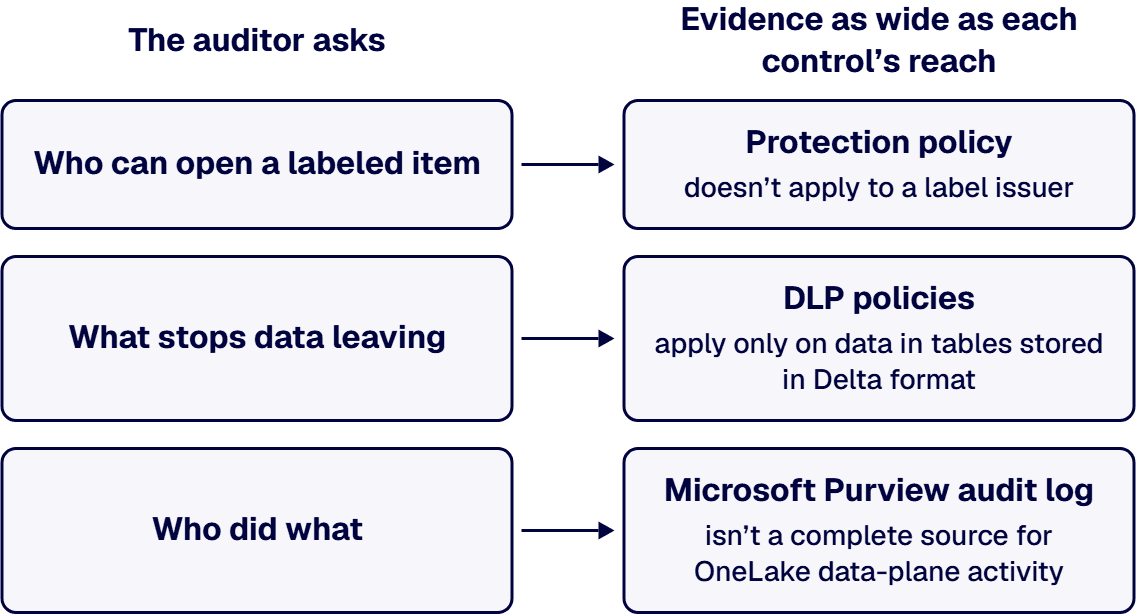
If the first request is label coverage, begin with what Microsoft says a label reaches. Microsoft’s Use Microsoft Purview to govern Microsoft Fabric says “Sensitivity labels can be set on all Fabric items.” The capabilities table in Information protection in Microsoft Fabric, last updated on 2026-07-16, is more specific in its “Support status” column: manual labeling and programmatic labeling read “Supported for all Fabric items”; default labeling, downstream inheritance, and inheritance upon update and relationship changes read “Supported for all Fabric items, with limitations”; inheritance upon creation reads “Supported for all Power BI Fabric items. Supported for some non-Power BI Fabric items as described in the considerations and limitations”; inheritance from data sources reads “Currently supported for Power BI semantic models only”; and export reads “Currently supported for Power BI items in supported export paths.”
The table’s remaining row, mandatory labeling, is read with the same page’s considerations, which say “Mandatory labeling is currently supported for Power BI items only.” For lakehouses, pipelines and data warehouses they add that “mandatory labeling logic isn’t enforced. That means that the user can save the item without a label, unless the experience itself requires that a label be set.” A mandatory-label policy is therefore not evidence that every lakehouse, pipeline or warehouse carries a label.
On inheritance, the same page says “Downstream inheritance is on by default.” It lists downstream inheritance as supported from “Power BI item to Power BI item”, “Fabric item to Fabric item” and “Fabric item to Power BI item”, and not supported from “Power BI item to Fabric item”. It adds: “Autogenerated items from a lakehouse or data warehouse take their sensitivity label from their parent lakehouse or data warehouse. They don’t inherit the label from items further upstream.” Outside Power BI’s supported export paths, it says “Currently no other Fabric experience uses an export method that transfers the sensitivity label to the exported output.”
Labeling Power BI items has a license prerequisite of its own. Microsoft’s Information protection in Microsoft Fabric, read on 2026-09-22, says “To be able to apply labels to Power BI items, a user must have a Power BI Pro or Power BI Premium Per-User (PPU) license in addition to the licenses needed for Microsoft Purview Information Protection.”
For the coverage figures themselves, Microsoft’s Govern Fabric data page describes the Govern tab in the OneLake catalog, where the expanded report for Fabric admins has a tab that “includes information about sensitivity label coverage and data loss prevention policies activated and scanned across the various workspaces in the organization.” Its listed limitations include “Subitems such as tables aren’t supported and don’t appear in insights.” and that admin insights are “based on admin monitoring storage that refreshes once a day, there could be gaps between the data reflected and the actual state.” A coverage figure taken from the Govern tab is therefore item-level and can trail the tenant by a day.
If the auditor asks who can open a labeled item, the label alone does not answer it. Microsoft’s Information protection in Microsoft Fabric says labels apply access control in three cases: in the tenant where the labels were applied, through labels associated with Microsoft Purview protection policies; in Power BI Desktop (.pbix) files; and in supported export paths, the last two through labels associated with Microsoft Purview publishing policies. It then says: “Access control in all other scenarios is unsupported. This includes cross-tenant scenarios, such as external data sharing, where data is accessed from another tenant, or other export paths, such as export to .csv files or .txt files.” Its list of supported export paths includes “Export to Excel, PDF files, and PowerPoint.”
Inside the tenant, the control is a protection policy. Microsoft’s Protection policies in Microsoft Fabric says “Each protection policy for Fabric is associated with a sensitivity label. The policy controls access to an item that has the associated label by allowing users and groups specified in the policy to retain permissions they have on the item, while blocking access for everyone else.” It also says “A protection policy doesn’t apply to a label issuer.” The user who last applied the label keeps access even if the policy does not name them.
Its requirements, on Protection policies in Microsoft Fabric as read on 2026-09-22, start with “A Microsoft 365 E3/E5 license is required for sensitivity labels from Microsoft Purview Information Protection.” The label must have been scoped to “Files & other data assets” with protection settings that include “Control access”, and the Fabric tenant setting “Allow users to apply sensitivity labels for content” has to be on. On coverage, the page says “Protection policies are supported for all native Fabric item types, including lakehouses, notebooks, pipelines, and other core Fabric assets.” and “Additionally, protection policies are supported for Power BI semantic models. Other Power BI item types, such as reports and dashboards, aren’t currently supported.”
The considerations and limitations on Protection policies in Microsoft Fabric are six: “Up to 50 protection policies can be created.”; “Up to 100 users and groups can be added to a protection policy.”; “Protection policies for Fabric don’t support guest/external users.”; “Protection policies don’t integrate with Fabric CI/CD solutions. Deployment pipelines and Git integration use only workspace permissions, not item-level permissions from protection policy labels.”; “After a policy has been created, it can take up to 24 hours for it to start detecting and protecting items labeled with the sensitivity label that was associated with the policy.”; and, for native Fabric item types where the system applies a label automatically and “there is no designated label issuer, the user who created the artifact will not be restricted by protection policies.”
On the item itself, the evidence for who can open it is the Permissions tab. The same page says you can “select the Permissions tab to see the list of users and groups that have access to the item, including those restricted by a protection policy.” It adds that “The Permissions tab in the item’s details is visible to you if you have a role of Admin or Member in the workspace containing the item.”
If the auditor asks what stops regulated data leaving, the answer depends on the item type and the trigger. Microsoft’s Get started with data loss prevention policies for Fabric and Power BI, last updated on 2026-07-22, lists the supported item types as semantic models, lakehouses, warehouses, KQL databases, mirrored databases, SQL databases and Cosmos databases, and points to its considerations and limitations for exceptions.
For semantic models, the same page says DLP policies evaluate a semantic model on “Publish”, “Republish”, “On-demand refresh” and “Scheduled refresh”, and that the evaluation does not occur if “An account using service principal authentication initiates the event” or if “The semantic model owner is a service principal”. For other items it says “DLP policies evaluate a Fabric item, such as a lakehouse, SQL database, or Mirrored database, when the data within it changes.”
On a match, the page says DLP policies for Fabric and Power BI support three actions: “Notify the user through a policy tip”, “Generate an alert” and “Restrict access (preview)”. The third is in preview, and Microsoft describes it this way: “When you configure a policy with the restrict access action and a policy match occurs, the policy restricts access to the data owners or to members of the organization, depending on the policy configuration. All other users lose access to the item.”
The limitations the page lists include “Only workspaces hosted in Fabric or Premium capacities are supported.”; “DLP policies for Fabric aren’t supported for sample semantic models, streaming datasets, or semantic models that connect to their data source via DirectQuery or live connection.”; “DLP policies for Fabric apply only on data in tables stored in Delta format.”; and “Advanced classifiers, such as exact data match (EDM), trainable classifiers, credential classifiers, and named entities aren’t supported by DLP for Fabric.” Under billing, it notes “DLP evaluation workloads impact capacity consumption.”
For evidence of a match, the record is the alert. The same Get started page says “If you enable alerts in the policy, an alert records on the data loss prevention Alerts page in the Microsoft Purview portal.” On the Govern tab, Microsoft’s Govern Fabric data page says “The DLP selector shows the workspaces or data items evaluated by DLP policies, helping you identify policy violations and take action, such as applying a more restrictive label or removing sensitive information.”
If the auditor asks who did what, the record is the Microsoft Purview audit log, with one boundary Microsoft states. Microsoft’s Track user activities in Microsoft Fabric says “To access the audit logs, go to the Microsoft Purview portal.” and “You must be assigned the Audit Logs role in Exchange Online to access the audit log.”
Microsoft’s Operation list, last updated on 2026-09-08, lists the audit operations. Among them are “SensitivityLabelApplied”, “SensitivityLabelChanged” and “SensitivityLabelRemoved” for Power BI items, “SetLakehouseSensitivityLabel” for a lakehouse, and “DLPRuleMatch” for a DLP rule match.
Above that table, the same page says: “To audit OneLake data access and storage operations, use OneLake diagnostics. The Fabric audit log isn’t a complete source for OneLake data-plane activity.” For regulated data in OneLake, Microsoft’s named route for data access is OneLake diagnostics, beside the audit log.
How this record fits the wider audit trail a regulator asks for is covered in Embedding Governance into How the Enterprise Operates and Scales.
If the auditor asks what you hold and where it came from, the Microsoft Purview Unified Catalog is the view. Microsoft’s Use Microsoft Purview to govern Microsoft Fabric says the Unified Catalog lets you “automatically view metadata about your Microsoft Fabric items in the Microsoft Purview Unified Catalog with live view in Microsoft Purview.” Live view is in preview: Microsoft’s page is titled Live view in Microsoft Purview (preview), carries the notice “This feature is currently in preview.”, and its limitations for Microsoft Fabric include “Only Microsoft Fabric item level metadata are available in live view.”
For more than live view shows, a scan is the route. Microsoft’s Connect to your Microsoft Fabric tenant in the same tenant as Microsoft Purview says “Scanning a Fabric tenant brings in metadata and lineage from Fabric items including Power BI.” Its known limitations include “Currently for all Fabric items besides Power BI, only item level metadata and lineage can be scanned. For Lakehouse tables and files, sub-item level metadata scanning is available but sub-item level lineage isn’t supported.” and “Fabric with tenant-level or workspace-level private links aren’t supported.”
Walking that lineage back from a report to its source is covered in Data Pipeline Operations for Enterprise Microsoft Estates.
If your Fabric tenant is in GCC High, work from what Microsoft’s GCC High page lists, not from the general pages above. Microsoft’s Microsoft Fabric for US Government GCC High customers (preview), last updated on 2026-09-02 and read on 2026-09-22, carried the notice “This feature is in preview.” In its feature availability table, the “Governance and security” row listed “Sensitivity label and share item” under “Capabilities in public preview”. Among the limitations it listed for the public preview were “Private Link isn’t supported.” and “Customer-managed keys (CMK) aren’t supported.”; its October 1, 2026 update instead reads “Tenant-level private link is supported.” and lists “Workspace Private Link isn’t supported.” and “Customer-managed keys (CMK) aren’t supported.” among its current limitations. Its October 1, 2026 update no longer marks Fabric in GCC High as preview.
For Power BI, a separate Microsoft page, Power BI for US government customers, last updated on 2026-02-18, marks the rows “Data Loss Prevention policies” and “Data Protection (MIP labels)” in its GCC High column with the mark its key defines as “The feature is available in the environment, and any exceptions are defined in footnotes.” Those rows describe Power BI features, and that page was last updated before Microsoft’s GCC High page for Fabric.
Microsoft’s GCC High page for Fabric does not list protection policies, DLP for Fabric items, the Unified Catalog view or scan of Fabric, Purview Audit for Fabric activity, or the Govern tab. That absence is not a statement that they are unavailable in GCC High, and it is not a statement that they work there; the evidence plan for a GCC High tenant confirms each with Microsoft before anyone promises it to an assessor.
If labels and DLP on Fabric are being planned apart from the rest of your Purview program, bring them together first. Label and DLP rollout on Fabric follows the organization’s wider Purview readiness work, covered in Microsoft Purview Deployment Guide: A Readiness Playbook for Regulated Enterprises, and a decision about who owns labels in the analytics estate, covered in Enterprise Analytics Operating Model: A Governed Power BI and Fabric Framework. Whatever evidence the plan produces, your compliance and legal teams decide what each obligation requires.
If the label design, the protection policies, the DLP scope and the evidence plan sit across security, data and compliance teams with no single owner, an outside architect can scope each control to the items Microsoft says it reaches and write the evidence plan your team runs.
i3solutions maps governance to named control families, enforces it in the platform through Entra ID, Purview, and Azure Policy, and evidences it continuously rather than reconstructing it at audit.
Delivery is senior and US-based. i3solutions has delivered Microsoft Fabric work for clients. The Fabric services offer is described in Enterprise Microsoft Fabric Development & Integration Services for Unified, AI-Ready Analytics, and the wider integration and data practice in Unifying Enterprise Operations Through Microsoft System Integration & Data Management.
Through Purview applications that Microsoft lists as working with Fabric, which include the Unified Catalog, Information Protection with sensitivity labels and protection policies, data loss prevention, Audit and Insider Risk Management. Each reaches only what Microsoft documents: Microsoft says labels can be set on all Fabric items, a label restricts access only through a protection policy or, for Power BI Desktop files and supported export paths, a publishing policy, DLP supports a listed set of item types, and Microsoft says the Fabric audit log is not a complete source for OneLake data-plane activity.
Not by themselves. According to Microsoft, a protection policy associated with a label lets the users and groups it names keep their permissions on a labeled item and blocks access for everyone else, and a protection policy does not apply to the label issuer. Microsoft says access control through labels is unsupported outside the tenant where the labels were applied, Power BI Desktop files and supported export paths, including cross-tenant scenarios and export to .csv or .txt files.
According to Microsoft, DLP policies for Fabric and Power BI support semantic models, lakehouses, warehouses, KQL databases, mirrored databases, SQL databases and Cosmos databases. The exceptions Microsoft lists include semantic models that connect to their data source through DirectQuery or live connection, and data that is not in tables stored in Delta format; of the three actions it lists, the third is named “Restrict access (preview)”.
According to Microsoft’s Use Microsoft Purview to govern Microsoft Fabric page, “all Microsoft Fabric user activities are logged and available in the Microsoft Purview audit log.” You search it in the Microsoft Purview portal with the Audit Logs role in Exchange Online. For OneLake, Microsoft’s operation list says “The Fabric audit log isn’t a complete source for OneLake data-plane activity.” and names OneLake diagnostics as the route for auditing OneLake data access and storage operations.
According to Microsoft’s GCC High page for Fabric, last updated on 2026-09-02, Fabric in GCC High was in public preview (Microsoft’s October 1, 2026 update no longer marks it as preview), and the page’s “Governance and security” row lists “Sensitivity label and share item”; the page does not list protection policies, DLP for Fabric items, the Unified Catalog view of Fabric, Purview Audit or the Govern tab. According to Microsoft’s Power BI government page, last updated on 2026-02-18, Power BI data loss prevention policies and MIP labels are marked available in GCC High; those are Power BI rows, not Fabric items. Confirm each other control with Microsoft before promising it to an assessor.
On the Microsoft page Find your Fabric home region, last updated on 2026-08-05, Microsoft states that the home region is the Azure datacenter region linked to your Fabric tenant, chosen when your tenant was created. The same page says the value next to Your data is stored in, under the About link in the Help pane, is the default region where your data is stored. On the Microsoft page Multi-Geo support for Fabric, last updated on 2026-08-14, Microsoft states that a capacity created in another region remains in that region, and any workspaces created under it will have their content stored in that region. Compute and storage, including OneLake, are then in that region, yet some tenant metadata remains in the home region, including permissions and semantic model credentials. The same page says the data at rest is replicated to another region in the same Azure geography for disaster recovery if the Azure geography contains more than one region, and that data in transit might go back and forth between multiple geographies. For GCC High, the Microsoft page Microsoft Fabric for US Government GCC High customers, last updated on 2026-10-01, states that Fabric for GCC High is available only in the following regions: US Gov Virginia and US Gov Texas. Before moving data between regions, Microsoft says to confirm that any movement you initiate between regions follows all corporate and government compliance requirements prior to initiating data transfer.
When your compliance office asks which container holds a regulated file and the answer turns on who happened to create the channel, the platform question is already settled: as of Microsoft Learn documentation updated June 25, 2026, December 3, 2024, and February 9, 2025, “The files you see on the Files tab in a team are stored in a SharePoint site.” (Microsoft Learn, teams-connected sites, updated June 25, 2026). So the decision in front of you is not Teams or SharePoint; it is which container regulated content lands in, and who is accountable for it. Content that will carry a retention label, needs external-party access, or is a records source belongs in a standalone governed SharePoint site with a named site owner, regardless of where the conversation started. Everything else can stay where the conversation happens, in the channel and on whichever site that channel type connects to, under the owner that channel type actually gives you. The container you choose is the governance decision; the platform underneath it is the same either way.
If nobody can say where a given file actually sits, start with what Teams created on your behalf when the team was set up. A Teams-connected site is created automatically whenever you create a team (Microsoft Learn, teams-connected sites, updated June 25, 2026). All standard channels in a team share the same SharePoint site, but each private channel has its own site. Each shared channel has its own SharePoint site for file storage. In Teams, the Files tab on each standard channel is connected to a folder in the parent site’s default document library. The Files tab on each private and shared channel is connected to the default document library in the corresponding channel site. If ownership of teams and files is unclear, score the estate with the Microsoft Teams governance readiness checklist before deciding where regulated files belong.
When a file has to be placed and the team is already running, the rule below turns the container question into a records question. Work each kind of content through it before the first file goes in.
Where two of these disagree, and the content is both a records source and something a partner needs, the records duty wins: the container is the standalone governed site, and external access is granted from that site rather than by moving the content into a channel.
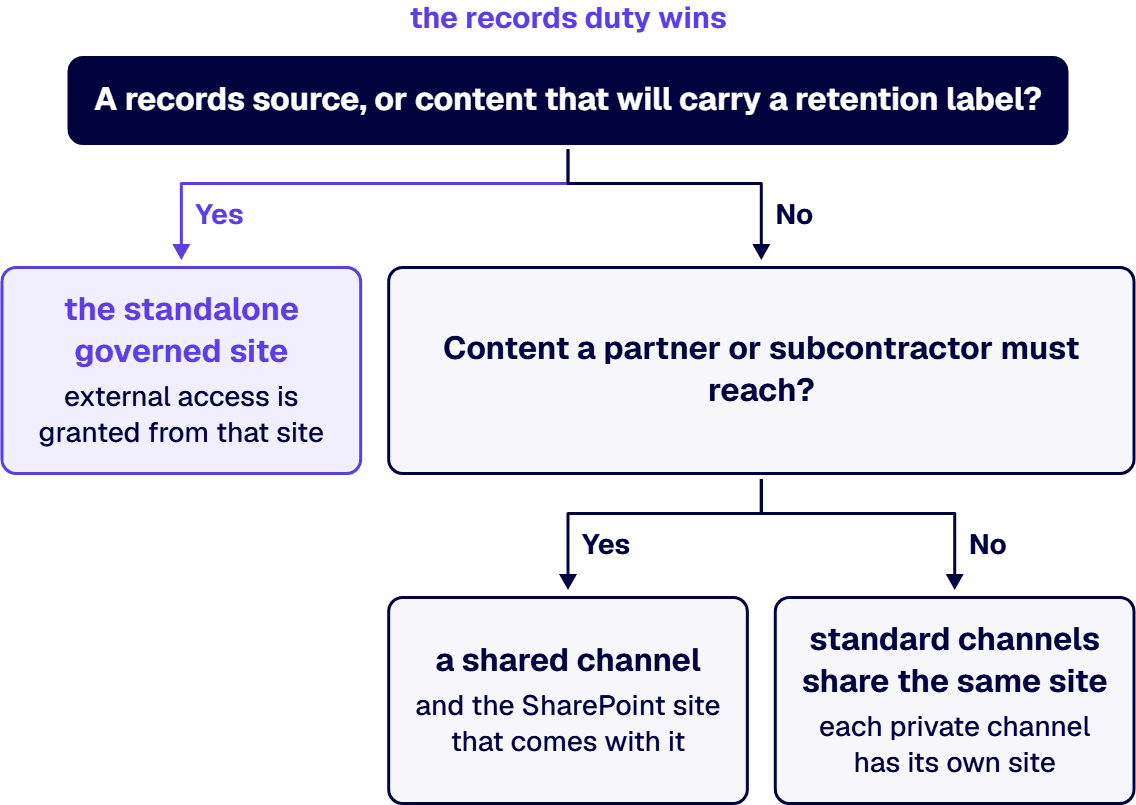
If you are expecting a SharePoint administrator to fix a permissions problem inside a channel, check which kind of channel it is first. Site permissions for a private channel site can’t be managed independently through SharePoint (Microsoft Learn, private channels, updated December 3, 2024). Teams manages the lifecycle of the private channel site. A private channel owner or team owner (whether or not they’re a member of the private channel) can delete the private channel.
Site permissions for a shared channel site can’t be managed independently through SharePoint (Microsoft Learn, shared channels, updated February 9, 2025). A shared channel site inherits the sensitivity label of the parent team. A file that is encrypted by a sensitivity label can’t be opened by external participants unless permissions are granted. While guests (people with Microsoft Entra guest accounts in your organization) can’t be added to a shared channel, you can invite people outside your organization to participate in a shared channel by using Microsoft Entra B2B direct connect.
If nobody can name the owner of a container, the placement rule has nothing to attach to. The membership for each team is stored in a Microsoft 365 group and that group also gives those people access to the team’s parent SharePoint site (Microsoft Learn, teams-connected sites, updated June 25, 2026). Team owners and members are automatically included in the site owners and members permission groups. Review and archival cadence for a named owner is set out on the SharePoint Site Ownership and Lifecycle Governance page, which owns that decision.
When a file’s records duty outlives the conversation that produced it, the retention question moves ahead of the platform question. Retention policies can also be used for private channel sites (Microsoft Learn, private channels, updated December 3, 2024). Admins can apply a retention policy on a team where all channels, including shared channels, inherit the retention policy (Microsoft Learn, shared channels, updated February 9, 2025). The compliance office owns the determination of which retention applies to which content, and the IT director owns naming the container before the first file goes in. For guidance on FINRA books-and-records and other regulatory duties, see the Embedding Governance into How the Enterprise Operates and Scales page.
If your organization runs everything in Teams and nothing has gone wrong, the Teams channel model is working for your content and your retention rules. A small team whose content never carries a retention label, needs external access, or represents a records source can live safely in a Teams channel and its channel site. A dedicated records site is still needed if your organization runs a records management program that requires archiving by department or legal matter rather than by conversation.
An i3solutions SharePoint consulting engagement produces named deliverables: a governance documentation package, architecture artifacts, and runbooks. i3solutions has delivered enterprise SharePoint and Power Platform programs for aerospace and defense manufacturers, major defense organizations, a financial-services firm, a national healthcare system, and military organizations.
If the container rule is going to hold once people start creating workspaces, it has to sit inside a governance model somebody already owns. The following pages establish that framework:
Usually no. FedRAMP authorizes a cloud service offering sold to federal agencies, not a contractor’s development work. Most contractor applications inherit controls from an authorized platform such as Azure Government or GCC High, and the binding regimes are NIST SP 800-171, DFARS and CMMC. FedRAMP becomes yours only if you offer the application to agencies as a shared service.
FedRAMP authorizes a cloud service offering. Not a company, not a development methodology, and not a line of code. The program’s own scope statement is narrow and worth reading literally: in scope are cloud computing products and services, such as IaaS, PaaS and SaaS, “that create, collect, process, store, or maintain Federal information on behalf of a Federal agency” (FedRAMP, Scope of FedRAMP, Consolidated Rules for 2026).
The exclusions are where most contractor applications land. FedRAMP’s published out-of-scope list includes “information systems that are only used for a single agency’s operations, hosted on cloud infrastructure or platform, and are not offered as a shared service” (FedRAMP, Scope of FedRAMP). An application you build for a single agency, running inside that agency’s own boundary, is described by that sentence. It still needs to be secure, and it still needs an authorization, but the authorization it needs is the agency’s, not FedRAMP’s.
The direction of the obligation matters too. FedRAMP binds federal agencies to procure in-scope cloud services from the authorized set, and it binds a company only through that procurement: sell an in-scope cloud service to an agency and you have to be authorized, because the agency is not permitted to buy it otherwise. Nothing in the program reaches a contractor who is building software rather than selling a cloud service.
The rules themselves changed recently, which is one reason 2024-vintage advice on this question now reads slightly wrong. FedRAMP’s Consolidated Rules for 2026 took effect on 4 July 2026 as optional early adoption and “take mandatory effect for all stakeholders” on 1 January 2027, with new Rev5 certifications ending 11 June 2027 (FedRAMP, Important Dates for the Consolidated Rules for 2026). The vocabulary moved with them: the program now certifies a cloud service offering, and the agency issues the authorization.
Almost every real case is one of the following. Decide which one you are in before anyone quotes a control count.
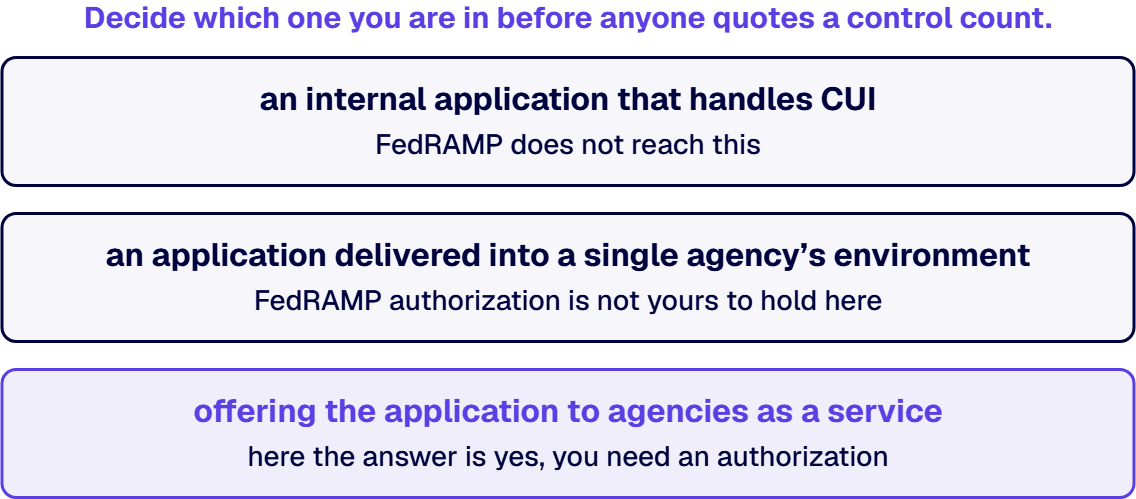
Situation A: you are building an internal application that handles CUI. A workflow app for your own contracts team, a data system your engineers use, a portal your subcontractors log into. FedRAMP does not reach this, because you are not offering a cloud service to an agency. What reaches it is DFARS 252.204-7012 and NIST SP 800-171, and now CMMC. There is one FedRAMP-shaped catch inside that regime, covered in section five: if you park the covered defense information on somebody else’s cloud, that cloud has to clear a FedRAMP Moderate bar.
Situation B: you are building an application delivered into a single agency’s environment. The agency owns the tenant or the subscription, the application lives inside a boundary the agency already had authorized, and the agency’s authorizing official signs. FedRAMP authorization is not yours to hold here and asking for it confuses the paperwork. Your job is to build so the agency’s assessor can accept the system, which means the control evidence has to exist in a form the agency’s package can absorb.
Situation C: you are offering the application to agencies as a service. Multi-tenant SaaS, one codebase, several agency customers, you operate it. This is the case FedRAMP was written for, and here the answer is yes, you need an authorization. It is also the case where the level question finally becomes real, and the answer to the level question is usually Moderate rather than High.
The distinction between B and C is not always obvious from the contract, and it is the single most common place this decision goes wrong. A system that starts as a single agency’s application and is later offered to another agency has changed category, and the security work that would have made that transition cheap has to be designed in at the start or paid for twice.
FedRAMP baselines are set by the impact of a loss of confidentiality, integrity or availability under FIPS 199, and there are three: Low, Moderate and High. High means severe or catastrophic effect. The size difference is real: the FedRAMP Moderate baseline has 323 controls and the FedRAMP High baseline has 410 (FedRAMP Security Controls Baseline (Rev 5), FedRAMP.gov). Nothing about being a government contractor puts your data at High. The categorization follows the information, and it is the government’s determination rather than yours.
Three separate things in this market carry the word High or the word Level, and they are routinely swapped for one another in requirements documents:
When a prime’s questionnaire says “FedRAMP High required,” ask which of those three it means. In our experience the intended answer is frequently the second or third, and the cost difference between them is measured in hundreds of thousands of dollars over a program’s life.
Building on an authorized platform is the mechanism that makes most of this affordable, and it is also the mechanism most often oversold. Inheritance is real and it is partial.
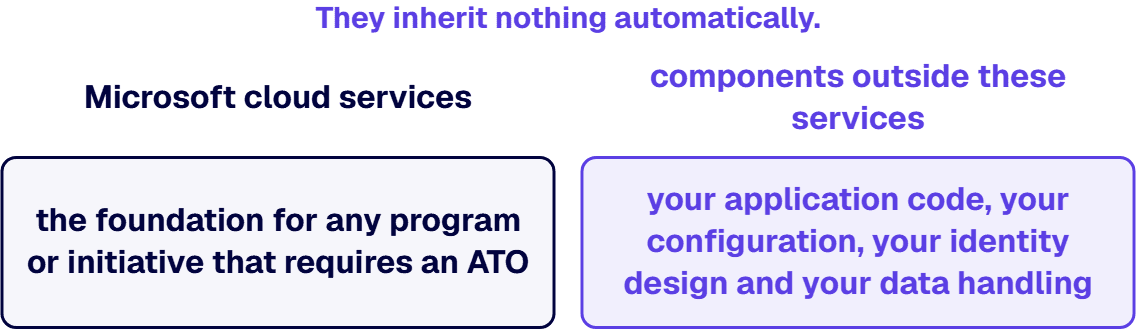
Microsoft states the boundary plainly for its own services: you can use the certifications of Microsoft cloud services “as the foundation for any program or initiative that requires an ATO from a federal government agency. However, you need to achieve your own authorizations for components outside these services” (Microsoft Learn, FedRAMP: Microsoft Compliance, updated 2 June 2026). Your application code, your configuration, your identity design and your data handling are components outside those services. They inherit nothing automatically.
FedRAMP says the same thing from the agency’s side, and the 2026 rules are unusually direct about it: “Agencies remain responsible for issuing their own ATO or ATU even when they rely on a FedRAMP Certification,” and “FedRAMP certifies the cloud service offering; the agency authorizing official accepts risk for the agency’s specific use of that service, including the information processed, the configuration selected, the integrations enabled, and the controls the agency is responsible for operating” (FedRAMP, Using a FedRAMP Certified Cloud Service, Consolidated Rules for 2026). The same page warns agencies not to simply authorize a cloud service offering by itself.
For the defense side the inheritance language is explicit. Microsoft says Office 365 GCC High “can demonstrate equivalency to IL4 or necessary inheritance for CMMC” (Microsoft Learn, Office 365 GCC High and DoD service description, updated 3 August 2026). Inheritance for CMMC is exactly the right phrase: the environment carries controls you would otherwise have to implement and evidence yourself, which shortens your assessment rather than replacing it.
Two boundary details are worth carrying into a design review because they surprise people at assessment time. GCC High and DoD are sold through a validation process rather than a trial, so eligibility is confirmed before an environment is established. And Microsoft states that GCC High and DoD customer support “isn’t included in the service accreditation boundary,” which means the support channel does not carry FedRAMP, DoD SRG, ITAR, IRS 1075 or CJIS data-handling assurances (Microsoft Learn, Office 365 GCC High and DoD service description, updated 3 August 2026). Anything sensitive that travels through a support ticket has left the boundary you paid for.
For a defense contractor building applications, the requirements that actually appear in the contract are these.
NIST SP 800-171 and DFARS 252.204-7012. Contractor information systems that process, store or transmit covered defense information implement the 800-171 requirements. The clause also contains the one place FedRAMP does reach a contractor indirectly: “If the Contractor intends to use an external cloud service provider to store, process, or transmit any covered defense information in performance of this contract, the Contractor shall require and ensure that the cloud service provider meets security requirements equivalent to those established by the Government for the Federal Risk and Authorization Management Program (FedRAMP) Moderate baseline” (DFARS 252.204-7012, clause date MAY 2024). Read the level: Moderate, and it is a requirement on your provider, not on your application.
What “equivalent” means was tightened by DoD CIO guidance rather than by the clause. The memorandum titled Federal Risk and Authorization Management Program Moderate Equivalency for Cloud Service Provider’s Cloud Service Offerings, published by the DoD Chief Information Officer and dated 21 December 2023, set the bar at a FedRAMP-recognized third-party assessment against the full FedRAMP Moderate baseline with no outstanding plan of action and milestones, plus a body of evidence available to DoD assessors. In practice, choosing a provider that already holds a FedRAMP Moderate or High authorization is the cheapest route through that requirement, because the alternative is proving equivalence yourself.
CMMC. This is now contractual rather than prospective. DFARS clause 252.204-7021, Contractor Compliance With the Cybersecurity Maturity Model Certification Level Requirements, carries a clause date of NOV 2025 and requires a contractor to “Have and maintain for the duration of the contract a current CMMC status at the following CMMC level, or higher” and to “Only process, store, or transmit FCI or CUI on contractor information systems that have a CMMC status at the CMMC level required” (DFARS 252.204-7021). The acquisition rule became effective 10 November 2025 and phases in over three years, beginning with Level 1 and Level 2 self-assessment requirements in new solicitations.
Notice what this means for the application you are building. Its home has to sit inside a system that carries the required CMMC status. That is a statement about your environment and your boundary, and it is a far more common blocker than FedRAMP ever is.
i3solutions runs migrations against named control families across CMMC, HIPAA, SOC 2, and NIST 800-171, producing artifacts auditors can review. i3solutions has successfully delivered software development projects under CMMC, HIPAA, ITAR, and SOC 2 compliance frameworks with audit-ready documentation and governance practices built into our standard delivery methodology. The pattern that holds across those programs is that the evidence is produced by the build rather than written about it afterwards.
Three boundaries in this decision are matters of judgment, and a page that flattened them would be misleading you.
“Offered as a shared service” is a judgment, not a switch. FedRAMP’s out-of-scope category turns on whether a system serves a single agency’s operations and is not offered as a shared service (FedRAMP, Scope of FedRAMP). An application built for a single agency that another agency later wants to use has moved, and the moment of the move is not marked by anything in your code. Decide with the sponsoring agency in writing, early, and revisit it when the next customer appears.
Scope is applied per agency use case, not per product. The same application can be in scope for a single agency’s use and out of scope for another’s, because the categorization of the information and the way the agency integrates the system differ. Different agencies can reach different answers about the same software and both be right.
Moderate equivalency is contested ground. The equivalency route exists in the DFARS clause and was defined by a DoD CIO memorandum dated 21 December 2023, and FedRAMP’s own program rules were rewritten under the Consolidated Rules for 2026. Whether and how the new rules change what a contractor may rely on for equivalency is being argued in the assessor community. If your architecture depends on an equivalency claim rather than an actual FedRAMP authorization, put that dependency in front of your contracting officer rather than in front of an assessor for the first time at audit.
Where the boundary is unclear, the cost of asking is one conversation and the cost of guessing is a re-architecture. i3solutions advises clients on federal compliance posture as its own assessment rather than as a restatement of Microsoft’s documentation, including whether SharePoint Online meets NIST 800-53, whether Azure Government is required under the DoD Cloud Computing SRG, and whether a CMMC gap assessment is needed to bid.
The decision has a sequence, and running it in this order is what keeps the cost in the band rather than above it.
On cost, three figures anchor the range without pretending to price your estate. Organizations facing CMMC Level 2 certification consistently discover 15-25 configuration gaps during Microsoft environment assessment. That remediation is real work rather than paperwork. A CMMC Level 2 implementation for a defense contractor with a defined CUI boundary typically ranges from $45,000 to $75,000, covering the Compliance Manager baseline assessment, Conditional Access redesign, DLP policy build and testing, Purview Audit Premium configuration, and post-implementation documentation. Regulated-industry SharePoint modernization carries roughly 25 to 35 percent cost overhead versus commercial work for equivalent scope, driven by control mappings, audit-trail discipline, and zero-downtime cutover patterns.
If you are genuinely in situation C and have to pursue an authorization of your own, expect a different order of magnitude in time as well as money. Industry guidance as of 2026 commonly places a government-cloud deployment with a FedRAMP authorization in the range of nine to thirteen months when control inheritance from Azure Government is leveraged, and longer without it, with cost scaling to the number and complexity of workloads. An unnecessary trip through that timeline is the most expensive mistake available on this question.
The environment decision can also go the other way from the default, and it is worth seeing an assessment that landed there. The assessment recommended partial-variant adoption with email and document storage on GCC High and the remainder of the productivity suite on Commercial; the contractor’s licensing economics improved materially relative to a full GCC High migration.
The record first, so you can weigh it rather than take it. i3solutions is an SBA certified small business providing technical and professional services to US Federal Agencies, the DoD and the private sector. i3solutions is a Microsoft Solutions Partner. i3solutions is a Microsoft Partner with 30 years of delivery experience and has delivered 600+ implementations across aerospace and defense, financial services, and health sciences. i3solutions installs and helps configure applications inside IL4 and IL6 government cloud environments and other government networks. i3solutions has deployed Power BI inside a GCC High tenant and inside Azure Government for a federal customer. i3solutions plans and runs governed Azure and Microsoft 365 migrations with senior, U.S.-based engineers. i3solutions provides dedicated US-based Microsoft teams for aerospace and defense programs.
The compliance work has a named shape rather than a promise. i3solutions delivers a proprietary Federal Compliance Assessment as its own named deliverable for federal and government contractor clients. The i3solutions Federal Compliance Assessment evaluates a client tenant against NIST SP 800-53 and CMMC using automated tenant configuration scripts and a 42-point security checklist. i3solutions engages its Federal Compliance Assessment when the scope spans a FedRAMP Moderate or FedRAMP High boundary, or when the client operates in a GCC High tenant. For government cloud infrastructure work, i3solutions produces three named artifacts across an Azure Government or AWS GovCloud engagement: an Architecture Fit Assessment at discovery, a Landing Zone Blueprint and Compliance Matrix at design, and a Migration Risk and Cutover Runbook at execution, each one a mandatory gate check before the engagement moves to the next phase. We manage GCC High migrations end-to-end: from eligibility validation and licensing coordination with your AOS-G supplier through identity architecture, data migration, security baseline configuration, and post-migration governance. i3solutions plans and runs these migrations for regulated defense organizations, structuring each phase around the compliance evidence assessors expect.
Delivery inside the defense estate runs governance-led. i3solutions runs a governed Power Platform for a federal defense agency supporting roughly 10,000 personnel across about 180 locations, which works because it is governed, not despite it. In a National Guard payroll engagement the finding was narrower and just as checkable. Error rates that once averaged around 1% per payroll cycle were nearly eliminated, closing prior audit findings and ensuring compliance with federal reporting standards. That account is in the National Guard payroll modernization case study. More broadly, i3solutions has delivered enterprise SharePoint and Power Platform programs for aerospace and defense manufacturers, major defense organizations, a financial-services firm, a national healthcare system, and military organizations.
What i3solutions does not do is hold or issue an authorization. i3solutions does not hold a FedRAMP authorization, does not accredit a system, and does not issue an authority to operate. Those determinations sit with the government: FedRAMP certifies a cloud service offering, and the agency authorizing official accepts the risk for the agency’s specific use. Any firm implying it can hand you an ATO is describing something that is not theirs to give.
The fit is a federal agency or a government contractor that needs this question settled before an architecture is committed: which situation the application is in, what the sponsoring agency has to confirm in writing, which environment the evidence points to, and what control evidence the build has to produce as it goes.
Usually not. FedRAMP authorizes a cloud service offering sold to federal agencies, and its published scope covers cloud products and services that create, collect, process, store or maintain federal information on behalf of an agency (FedRAMP, Scope of FedRAMP). Building an application for internal use or for a single agency’s environment is not that. The requirements that normally apply are NIST SP 800-171, DFARS 252.204-7012 and CMMC. FedRAMP applies to you when you offer the application to agencies as a shared cloud service, and even then the level is set by the government’s categorization of the information, which is Moderate far more often than High.
No, and this is the most expensive misunderstanding in the market. Microsoft states you can use its cloud service certifications as the foundation for a program requiring an agency ATO, but that “you need to achieve your own authorizations for components outside these services.” Your code, configuration, identity design and data handling are outside those services. What the platform gives you is inheritance, which reduces the controls you have to implement and evidence yourself. Microsoft describes GCC High as able to demonstrate equivalency to IL4 or necessary inheritance for CMMC, and inheritance is the accurate word.
Three different things that share vocabulary. FedRAMP High is a 410-control baseline for cloud services whose compromise would have a severe or catastrophic effect, against 323 controls at Moderate (FedRAMP Security Controls Baseline (Rev 5), FedRAMP.gov). GCC High is a Microsoft 365 environment assessed using NIST SP 800-53 controls at a FIPS 199 High categorization, which Microsoft says can demonstrate equivalency to DoD IL4 (Microsoft Learn, Office 365 GCC High and DoD service description). DoD IL5 is a Defense Department impact level covering CUI needing higher protection and unclassified national security systems (Microsoft Learn, Azure Government DoD Overview). When a requirement document says “FedRAMP High,” ask which of the three it means before you price anything.
When the application is offered to federal agencies as a cloud service that they procure and use, rather than a system operated inside a single agency’s own authorized boundary. FedRAMP’s out-of-scope list explicitly excludes information systems used only for a single agency’s operations that are not offered as a shared service (FedRAMP, Scope of FedRAMP). The practical trigger is an additional agency customer, so if another customer is plausible, decide the question at design time rather than after the first is live.
Through your cloud provider rather than through your application. The clause requires that if you use an external cloud service provider to store, process or transmit covered defense information, you ensure that provider meets security requirements equivalent to the FedRAMP Moderate baseline (DFARS 252.204-7012). That is Moderate, not High, and it is an obligation on the provider you select. DoD CIO guidance dated 21 December 2023 defined equivalency as a third-party assessment against the full Moderate baseline with no outstanding plan of action and milestones. Selecting a provider that already holds a FedRAMP authorization is normally cheaper than proving equivalence.
Not directly. CMMC is now contractual through DFARS clause 252.204-7021, which carries a NOV 2025 clause date and requires a current CMMC status at the level the contract specifies, with FCI and CUI processed only on systems carrying that status. Where FedRAMP enters is through the cloud-provider condition in DFARS 252.204-7012 and through inheritance: an environment such as GCC High carries controls that shorten a CMMC assessment. Your CMMC status is a fact about your systems and your boundary, and no platform purchase produces it on its own.
The agency does. FedRAMP’s Consolidated Rules for 2026 put it directly: agencies remain responsible for issuing their own ATO even when they rely on a FedRAMP certification, and the agency authorizing official accepts risk for the information processed, the configuration selected, the integrations enabled, and the controls the agency operates. Your job in that arrangement is to produce control evidence the agency’s package can absorb, which is a build discipline rather than a document written afterwards.
No. FedRAMP certifies a cloud service offering and an agency authorizing official issues the authorization to operate. A consulting firm cannot do either, and i3solutions does not hold a FedRAMP authorization, accredit systems, or issue authorities to operate. What a firm can do is decide the environment question on evidence, design the application so inheritance does the heavy lifting, and produce the control artifacts so the assessment is a review. Treat a vendor implying more than that as a disqualification rather than a differentiator.

US-Based Microsoft System Integrator | Est. 1997
© i3solutions. All rights reserved.
US-Based Microsoft System Integrator | Est. 1997
© i3solutions. All rights reserved.


