
Legacy applications don’t fail all at once. An IT Director eventually has to decide what gets rebuilt, what gets retired, and what should never have been built as an application at all. These answers address those decisions, and what production-grade requires on Azure, SQL Server, and M365.
If you run Domino v9, v10 or v11, Extended Support “will now end June 30, 2030”, according to HCL’s support articles as of September 2026. Retire unused databases first; send documents to SharePoint, forms and records to Power Apps, heavy logic to custom .NET; keep stable applications on Domino.
When the Domino renewal or a server refresh reaches the budget and no one can say which applications still matter, the estate needs sorting before it needs a platform. Many teams still call them Lotus Notes applications; HCL’s own pages call the platform HCL Domino. This guide sorts a Domino estate into five destinations (SharePoint, Power Apps on Dataverse, custom .NET, retirement, or staying on Domino) and sets the order to move them in, using HCL’s and Microsoft’s own pages.
If your team has not yet settled whether to leave Domino at all, start from what HCL offers. According to HCL’s Domino product page, “HCL Domino 2026 delivers all of it as an upgrade to what you already run”, and the page adds: “Plus, with HCL Nomad, your existing applications are instantly modernized for browsers and mobile, requiring no rewrites.”
For the versions HCL has moved to Extended Support, the dates are in HCL’s support articles. According to HCL’s Extended Support article for Domino and Notes v9.0.x and v10.0.x, “Announced EOS Effective Date: 2024-JUN-01.” According to HCL’s article for v11.0.x, “Announced EOS Effective Date: 2025-JUN-26.” As published by HCL, both articles state “New ultimate end date for Extended Support: 2030-JUN-30.” and “Extended Support is offered as a services Statement of Work at an additional charge and is an extension to an established standard support.” They add: “However, no new defect fixes will be provided.” According to HCL, the recommended upgrade versions are “HCL Domino v12.0.2, v14.0, v14.5”; neither article gives a support date for those versions, so this guide states none.
When an estate has grown for years, the platform question stalls until each application has a class. Microsoft’s Select your cloud migration strategies page names two strategies that settle an application without a rebuild: “Retire decommissions workloads that no longer provide business value.” and “A retain strategy keeps workloads in their current environment when they’re stable, compliant, and meet all current and future business needs with no near-term driver to move.”
Put each Domino application into one of five classes: document libraries and discussion databases; forms with approval routing; relational line-of-business applications; applications with heavy business logic, external users or feeds to other systems; and databases no one opens. What discovery has to produce before any of them is scoped is covered in Enterprise Application Discovery Before a Rebuild.
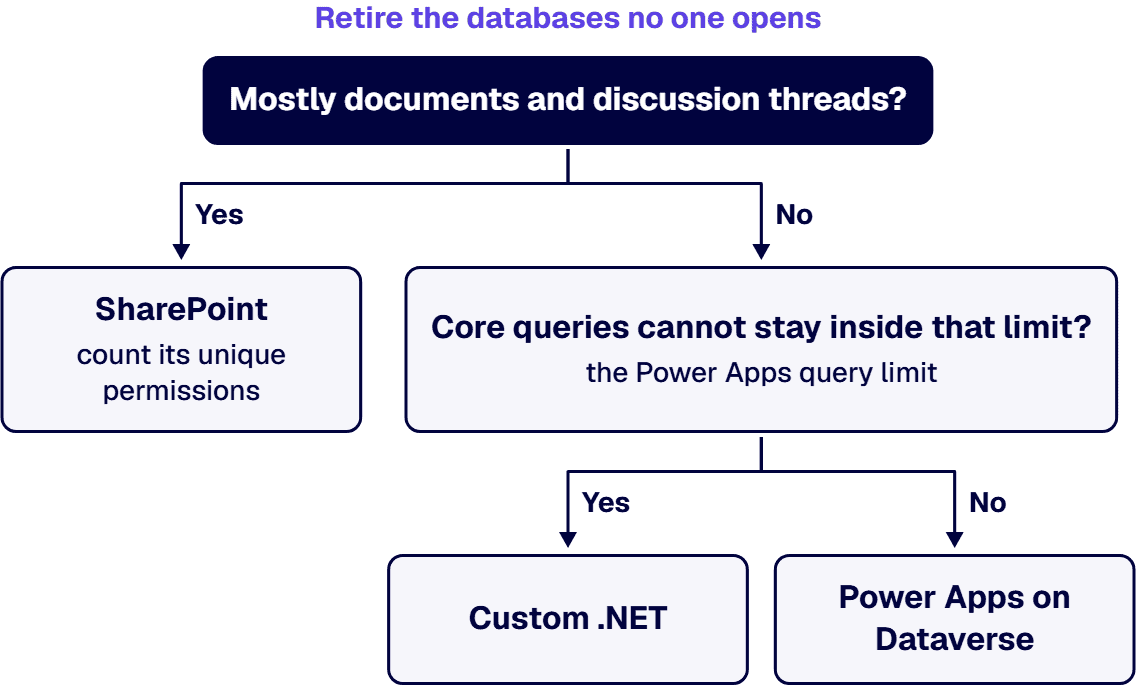
If an application is mostly documents and discussion threads, test SharePoint first. Document libraries, discussion databases and simple request forms map to SharePoint libraries and lists, within the limits Microsoft publishes on its SharePoint limits page: “A list can have up to 30 million items and a library can have up to 30 million files and folders.” The same page states: “The supported limit of unique permissions for items in a list or library is 50,000.” and “However, the recommended general limit is 5,000.”
An application whose access is set item by item is the one that meets that permission limit, so count its unique permissions before choosing SharePoint. When an application has outgrown lists and libraries, When SharePoint Is Not the Right Platform: Enterprise Signs covers how to tell.
When a Domino application is a form with an approval route, or a set of related records with roles attached, test Power Apps on Dataverse next. Microsoft’s What is Power Apps? states: “Power Apps is a suite of apps, services, and connectors, as well as a data platform, that provides a rapid development environment to build custom apps for your business needs.” Its What is Microsoft Dataverse? page states: “You can combine business units, role-based security, row-based security, and column-based security to define the overall access to information that users have in a Power Platform environment.” Map each application’s current access rules onto that model before the rebuild starts.
Forms with approval steps can also land on SharePoint lists with Power Automate.
If users already export a Domino application’s data to spreadsheets and do the real work there, settle the spreadsheet question alongside it. i3solutions converts macro-heavy Excel workbooks either to Power Apps canvas or model-driven applications on Dataverse, or to a custom web application on Azure App Service backed by Azure SQL. How to choose between those is covered in Excel-to-Web Rebuild vs Power Platform Modernization: How to Choose for Regulated Enterprises.
If a Domino application carries heavy business logic in LotusScript, serves users outside the organization, or feeds other systems at volume, test it against Power Apps’ query limits before committing. Microsoft’s Query limitations: Delegation and query limits page states: “When a query is nondelegable, Power Apps gets the first 500 records from the data source and then runs the actions in the query.” and “You can increase this limit to 2,000 records.”
An application whose core queries cannot stay inside that limit is a custom .NET candidate, and moving it that way is what Microsoft’s migration strategies page calls a rebuild: “A rebuild strategy is a full redevelopment of a workload using cloud-native solutions.” The platform comparison for a single workload is covered in Power Apps vs. Custom .NET: Decision Guide.
Once the estate is sorted, the order comes from three facts about your Domino estate. First, retire the databases no one opens, because a retired database needs no platform decision. Second, move the applications on servers past their announced end-of-support date; according to HCL’s articles for Domino and Notes v9.0.x and v10.0.x and v11.0.x, those dates have passed for all three versions, and Extended Support is “offered as a services Statement of Work at an additional charge”. Third, move databases that share data as one group, so a form never points at a database that has already moved.
Where the version date and a shared-data group disagree, the group takes precedence: keep it together and move it on the earliest date any member faces. Inheriting a Domino estate is a takeover of applications someone else built. i3solutions runs this kind of takeover as a structured stabilization sequence in its legacy system integration consulting, where dependency mapping and a tested change path come before any migration or rewrite commitment. The general method for ranking an application portfolio is set out in Application Modernization Decision Framework: Six Paths, and it is not repeated here.
When the estate list reaches a steering meeting, set the classes side by side. The statements in the table are quoted from Microsoft’s migration strategies, SharePoint limits, Power Apps and Dataverse pages and from HCL’s Domino product page.
Where an application fits two rows, the stricter requirement decides: an application with item-level access or heavy logic goes to the row further down the table.
If no business driver sits behind the move, a rebuild spends budget on applications that already work. In four situations, change the question.
When a Domino estate reaches i3solutions, the work starts from the applications that are actually there: what each one holds, who opens it, which version its server runs and which databases share data. i3solutions implements the Microsoft technology a customer needs, SharePoint, Power Apps and custom .NET work included. i3solutions’ own SharePoint to IBM Integration: Modernize Your Infrastructure page cites “direct experience with IBM systems such as DB2, IBM MQ, FileNet and Domino”, and states: “whether you have a static Intranet site or are looking to convert Domino applications, we can help you migrate safely from your IBM environment to Microsoft SharePoint Online.”
These are further statements we can document, quoted at the size we can document them:
Where this work sits in the wider practice is covered in Enterprise Digital Transformation Solutions for Governed, Scalable Modernization.
When a Notes application mainly holds documents and discussion threads, yes: according to Microsoft Learn’s SharePoint limits page, “A list can have up to 30 million items and a library can have up to 30 million files and folders.” Count each application’s item-level permissions first, because the same page sets a limit on unique permissions per list or library.
When a Domino application holds related records with roles attached, Power Apps on Dataverse is the stronger fit, because Microsoft’s What is Microsoft Dataverse? page describes combining “role-based security, row-based security, and column-based security” to define what users can reach. Simple document and discussion applications stay the SharePoint candidates.
When an application runs heavy business logic, serves external users or feeds other systems at volume, check it against the Power Apps query limit: according to Microsoft Learn’s delegation page, “When a query is nondelegable, Power Apps gets the first 500 records from the data source and then runs the actions in the query.” Core queries that cannot stay inside that limit point to a custom .NET rebuild.
If your servers run Domino and Notes v9.0.x, v10.0.x or v11.0.x, Extended Support is “now ultimately offered through June 30, 2030”, according to HCL’s support articles (v9.0.x and v10.0.x, v11.0.x) read in September 2026, and “Extended Support is offered as a services Statement of Work at an additional charge and is an extension to an established standard support.” Re-read both articles before you commit budget; HCL titles each one as an update.
If the applications are stable and no business driver sits behind a move, upgrading is a real option: according to HCL’s Domino product page, “HCL Domino 2026 delivers all of it as an upgrade to what you already run”. Rebuild the applications whose class calls for SharePoint, Power Apps or custom .NET, and keep the rest on a version HCL supports.
By Michael Branson, Founder/COO, i3solutions
As of September 2026, Windows 11 version 23H2 Enterprise and Education editions reach end of updates on November 10, 2026, according to Microsoft, which recommends “updating eligible devices running Windows 11, version 23H2 Enterprise and Education editions to Windows 11, version 25H2”, a version its release information on Microsoft Learn lists as supported for Enterprise and Education until 2028-10-10. Microsoft Learn says WSUS “is deprecated and is no longer adding new features” but “continues to be supported for production deployments”, so this guide treats it as a working channel for that feature update, including in Configuration Manager, whose software update management runs on WSUS. Microsoft Learn names the public cloud and GCC as the cloud environments for Intune feature update policies, which need internet access, and says Windows Autopatch “is not currently supported” in GCC High or DoD environments; for those tenants and for disconnected machines, this guide plans the 25H2 move on WSUS or Configuration Manager.
The reminder is already in Microsoft’s Windows message center, and the next audit or vulnerability scan will flag any Windows 11 device still on version 23H2 after its date. The same week, someone on the team reads that WSUS is deprecated and asks whether the update channel is going away too. Two decisions are tangled here: which version each 23H2 device moves to, and which Microsoft channel carries that move for each kind of machine, including tenants in GCC High or DoD and machines on disconnected networks. This guide sets out what Microsoft’s own pages, read on 2026-09-24, say on both, and marks where the i3solutions recommendation sits beside them.
If a device runs Windows 11 version 23H2 in the Enterprise, Education or IoT Enterprise edition, November 10, 2026 is its date. Microsoft’s Ending Support in 2026 page lists Windows 11 Enterprise and Education, Version 23H2 and Windows 11 IoT Enterprise, Version 23H2 under End of Servicing on November 10, 2026. The 23H2 row of the Windows 11 release information table lists 2026-11-10 as the end of updates in the column that covers the Enterprise, Education and IoT Enterprise editions.
In its 60-Day Reminder, posted on 2026-09-17, Microsoft’s Windows message center says “On November 10, 2026, Windows 11, version 23H2 Enterprise and Education editions will reach end of updates.” It adds “The November 2026 Windows security update will be the last update available for these editions.” and “After this date, devices running these editions will no longer receive monthly security and non-security preview updates containing protections from the latest security threats.”
Start with the inventory. List every 23H2 device by edition and by the channel that updates it today: WSUS, Configuration Manager, Intune or Windows Autopatch. The date above belongs to those editions of 23H2 only; other editions and versions carry their own dates in the same Windows 11 release information table.
If the move goes to the version that looks closest rather than the one that lasts longest, the same decision comes back sooner. Microsoft’s Windows message center entry says “To continue receiving monthly security and quality updates, we recommend updating eligible devices running Windows 11, version 23H2 Enterprise and Education editions to Windows 11, version 25H2.” Its Windows 11 release information page says “Feature updates are released in the second half of the calendar year and come with 24 months of support for Home, Pro, Pro for Workstations, and Pro Education editions; 36 months of support for Enterprise and Education editions.”
Microsoft’s Ending Support in 2027 page lists Windows 11 Enterprise and Education, Version 24H2 and Windows 11 IoT Enterprise, Version 24H2 under End of Servicing on October 12, 2027, and the release information table gives 24H2 the same date, 2027-10-12, in its Enterprise and Education column. The i3solutions reading of those dates, not Microsoft’s words: a move to 24H2 lasts until October 12, 2027 and brings this decision back roughly a year after this one, while 25H2 is the version Microsoft recommends and runs to 2028-10-10.
Version 26H1 is not a way around the decision. Microsoft’s Windows 11 release information page says “Windows 11, version 26H1 is scoped to support new devices that started coming to market in early 2026 and is not designed as a feature update for existing devices.” and “This version is not offered as an in-place update from 24H2 or 25H2 on existing devices.”
Name 25H2 as the target for every eligible 23H2 device, write its end date from the Windows 11 release information table beside it, and treat any device that cannot move as an exception with a named owner and a date.
If the team read that WSUS is deprecated and concluded that the update channel stops working, that reading goes further than Microsoft does. Microsoft’s Features removed or no longer developed in Windows Server page says “WSUS is no longer actively developed. All the existing capabilities and content continue to be available for your deployments.” Its Windows Server Update Services (WSUS) overview says “WSUS is deprecated and is no longer adding new features. However, it continues to be supported for production deployments, and receives security and quality updates as per the product lifecycle.” The same overview describes the job WSUS does: “You can use WSUS to fully manage the distribution of updates that are released through Microsoft Update to computers on your network.”
What changes is the direction: no new features. What does not change, in Microsoft’s words, is support for production deployments. Neither page gives an end date for WSUS itself, and this guide states none.
One part of a WSUS server does need a plan of its own. The Features removed or no longer developed in Windows Server page says “WID is used by several roles, including AD FS, AD RMS, IPAM, RD Connection Broker, and WSUS.” and “Consider using a free or full version of SQL Server for these roles. WID will be removed from Windows in a future release.” Check whether each WSUS server’s database is the Windows Internal Database, and plan any database move on its own timeline, apart from the 25H2 move.
Separately, Microsoft’s Ending Support in 2027 page lists Windows Server Update Services for Windows Server 2016 among the products reaching end of support on January 12, 2027.
If a device reaches the internet and its tenant is in the commercial cloud or GCC, the version can be set centrally instead of left to each device. Microsoft’s What are Windows Update client policies? page says “This feature was formerly known as Windows Update for Business.” and “Specifically, Windows Update client policies let you control update offerings and experiences to allow for reliability and performance testing on a subset of devices before deploying updates across the organization.” In Intune, Microsoft’s Manage Windows feature updates page says “Feature update policies allow you to lock devices to a specific Windows release or target an upgrade to a newer version while preventing devices from moving beyond that version.”
That policy carries conditions. The same Manage Windows feature updates page lists as a prerequisite “Devices must have internet access and be able to reach required Microsoft endpoints”, names the public cloud and Government Community Cloud (GCC) as the cloud environments where the feature is supported, and lists among its licensing requirements “A Windows license that includes the Autopatch entitlement”. A feature update policy is also a different policy from an update ring; Microsoft’s Manage Windows Update ring policies page says “Windows update rings define how and when Windows updates are installed on devices.”
Windows Autopatch is the other cloud channel. Microsoft’s What is Windows Autopatch? page says “Windows Autopatch is a cloud service that automates Windows, Microsoft 365 Apps for enterprise, Microsoft Edge, and Microsoft Teams updates to improve security and productivity across your organization.” and “Windows Autopatch provides tools to assist with the controlled roll out of annual Windows feature updates.” Its Prerequisites page lists, among the licenses it names, “Windows 10/11 Enterprise E3 or E5 (included in Microsoft 365 F3, E3, or E5)”, and Microsoft’s Frequently Asked Questions about Windows Autopatch page says “Windows Autopatch is included automatically for Government Community Cloud (GCC) customers using Microsoft 365 G3 GCC, Microsoft 365 GCC G5, or Microsoft 365 GCC G5 without WDATP/CAS Unified.” Microsoft 365 Apps on session hosts running Windows Server 2022 follow a separate support rule, covered in Microsoft 365 Apps on Windows Server 2022 Session Hosts: A Guide to Choosing Windows Server 2025, Azure Virtual Desktop or Windows 365 Before October 13, 2026.
Whichever cloud channel carries it, target the new version explicitly with a feature update policy and stage it across groups of devices in waves.
If the fleet’s Windows Update settings still live in Group Policy, moving them into Intune is a project of its own, apart from the version move. i3solutions plans and runs Intune migrations for enterprises moving domain-joined Windows devices off on-premises Group Policy.
Keep that settings move and the version move on separate plans and separate dates, so a problem in one does not hold up the other. The settings move itself is covered in the Intune migration checklist.
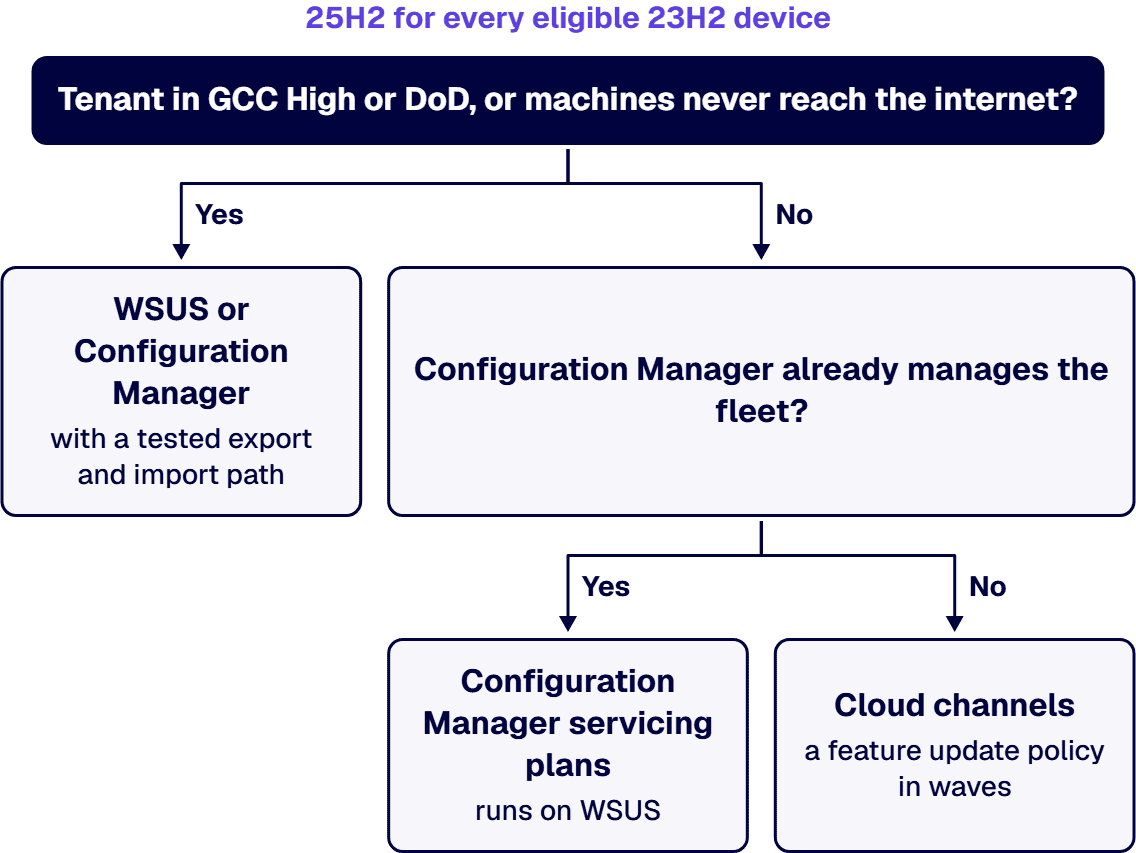
If Configuration Manager already manages the fleet, the WSUS status matters to it directly. Microsoft’s Manage Windows as a service using Configuration Manager page says “Windows computers must use Configuration Manager software updates with Windows Server Update Services (WSUS) for software update management.” It also says “Create servicing plans to form deployment rings, and keep Windows systems up to date when new builds are released.” and “When a computer uses Windows Update client policies or Windows Insiders, it isn’t evaluated in Windows servicing plans.”
In a mixed estate, that last sentence means a device configured for Windows Update client policies drops out of the servicing plan built for it. Decide which authority owns each device’s feature update so that no device sits under both. Which workloads belong where is the subject of SCCM vs Intune: An Endpoint Management Decision for Regulated Enterprises.
When a co-managed estate has to move feature update authority for each device group from Configuration Manager servicing plans to Intune policies, with no device left under both, an internal team short on endpoint specialists for the cutover can weigh hiring Microsoft Intune consultants for the migration and staged rollout.
If the tenant is in GCC High or DoD, or the machines never reach the internet, the cloud channels above are not the plan today. Microsoft’s Frequently Asked Questions about Windows Autopatch page says “Windows Autopatch is not currently supported in US Government Community Cloud High (GCC High) or Department of Defense (DoD) environments.” Microsoft’s Microsoft Intune for US Government GCC High and DoD service description says “The following features are currently not available and aren’t supported in GCC High and DoD clouds. Planning is started to support these features for GCC High and DoD environments.” Under Autopatch and updates, that list includes Windows Autopatch, Feature updates for Windows in Intune, Quality updates for Windows in Intune, Expedite updates for Windows in Intune and Driver updates for Windows in Intune, and it gives no date for them. The Intune feature update policy’s own prerequisites, above, name internet access and the public cloud and GCC.
Plan the version move for these populations on WSUS or Configuration Manager now, and do not hold it for the planned items. The full picture of what Intune offers in GCC High is in Is Microsoft Intune CMMC Compliant? What It Covers, and What It Does Not.
For machines with no internet path, Microsoft documents a mechanism for each channel. Its Plan your WSUS deployment page says “If corporate policy or other conditions limit computer access to the Internet, administrators can set up an internal server to run WSUS.” It says that after downloading, testing and approving the updates on that server, “an administrator would export the update metadata and content” for import to the servers running WSUS inside the network. For Configuration Manager, Microsoft’s Synchronize software updates from a disconnected software update point page says “When the software update point at the top-level site is disconnected from the Internet, you must use the export and import functions of the WSUSUtil tool to synchronize software updates metadata.” Test that export and import path end to end with the 25H2 feature update itself before the waves start, instead of assuming it works because monthly updates already flow through it.
If the machines in front of you do not match the situation above, start somewhere else:
If you bring in outside help for the version move, hold the work to these criteria:
Be plain about what stays with you. Running the update channel and approving each month’s updates after the project remains your team’s ongoing work; i3solutions does not take it on as an ongoing managed service. An i3solutions engagement does not produce managed-service ownership, a replacement for the internal team, open-ended scope expansion, or vendor lock-in.
If you want an outside architect on this decision, i3solutions takes on the version move and the channel design as project work: the inventory, the target version, a channel for each population, the waves and the disconnected path, with embedded specialists where your team needs them. i3solutions has been a Microsoft Partner with 30 years of enterprise technology delivery experience and has delivered 1,500+ Microsoft engagements across aerospace and defense, financial services, and health sciences. Its delivery is senior and US-based. The wider practice is Enterprise Digital Transformation Solutions for Governed, Scalable Modernization.
Microsoft Learn says “On November 10, 2026, Windows 11, version 23H2 Enterprise and Education editions will reach end of updates.” and “The November 2026 Windows security update will be the last update available for these editions.” Its lifecycle table lists Windows 11 IoT Enterprise, Version 23H2 on the same date.
Microsoft recommends 25H2; the Windows message center on Microsoft Learn says “we recommend updating eligible devices running Windows 11, version 23H2 Enterprise and Education editions to Windows 11, version 25H2.” According to Microsoft Learn, 24H2 Enterprise and Education reach end of updates on October 12, 2027, and 25H2 on 2028-10-10.
Yes. Microsoft Learn says “WSUS is deprecated and is no longer adding new features. However, it continues to be supported for production deployments, and receives security and quality updates as per the product lifecycle.” Neither Microsoft page on WSUS’s status gives an end date for WSUS itself.
Not today. Microsoft Learn says “Windows Autopatch is not currently supported in US Government Community Cloud High (GCC High) or Department of Defense (DoD) environments.” Microsoft’s Intune service description for GCC High and DoD lists Windows Autopatch and feature updates for Windows in Intune among features “currently not available” for which “Planning is started”.
Through WSUS or Configuration Manager, with the updates exported and imported. Microsoft Learn says “If corporate policy or other conditions limit computer access to the Internet, administrators can set up an internal server to run WSUS.” and describes exporting “the update metadata and content” from that server. For a Configuration Manager software update point at the top-level site that is disconnected from the Internet, Microsoft Learn names the export and import functions of the WSUSUtil tool to synchronize software updates metadata.
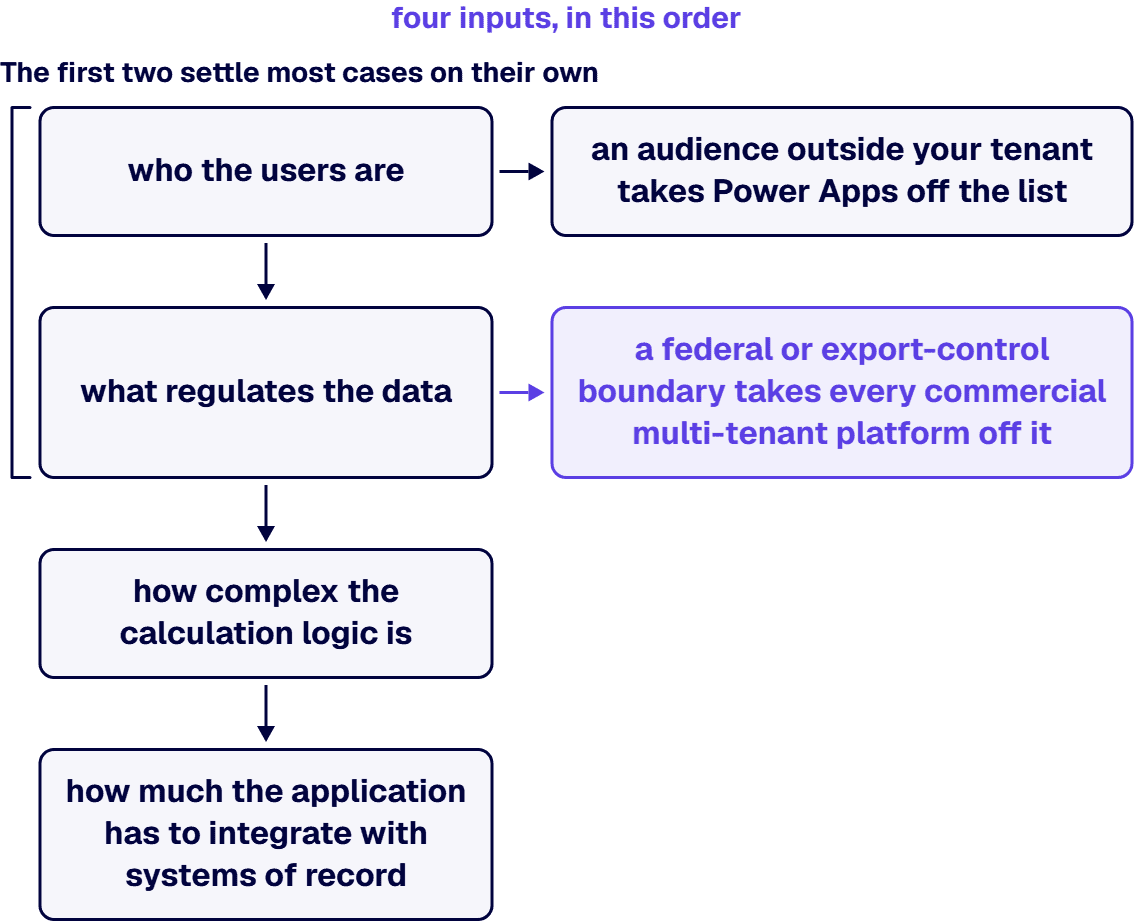
You have approved the rebuild, and the first decision that is expensive to reverse is where the application runs. Hosting sets the ceiling on how far the converted application scales and the floor on how secure it can be made, unlike the conversion technique, which can be changed later. Four destinations are realistic: a Power Apps application on Microsoft Dataverse, a Power Pages site when the audience is outside your organization, a custom web application on Azure App Service backed by Azure SQL, or a third-party Excel-to-web platform such as Caspio or SpreadsheetWeb. The choice is decided by four inputs, in this order: who the users are, what regulates the data, how complex the calculation logic is, and how much the application has to integrate with systems of record. The first two settle most cases on their own: an audience outside your tenant takes Power Apps off the list, and a federal or export-control boundary takes every commercial multi-tenant platform off it before cost is discussed. i3solutions converts macro-heavy Excel workbooks either to Power Apps canvas or model-driven applications on Dataverse, or to a custom web application on Azure App Service backed by Azure SQL.
This page covers the hosting decision specifically. If you are earlier in the process and still deciding whether the spreadsheet should become an application at all, start with Excel to web application development.
The published limits are rarely what forces the move. Microsoft documents a worksheet size of “1,048,576 rows by 16,384 columns” and a cell capacity of “32,767 characters,” and most business workbooks are nowhere near either. The concurrency limit is closer to the real problem: under the legacy shared workbook feature, 256 users can open the file at the same time, and long before that number the file has become a queue.
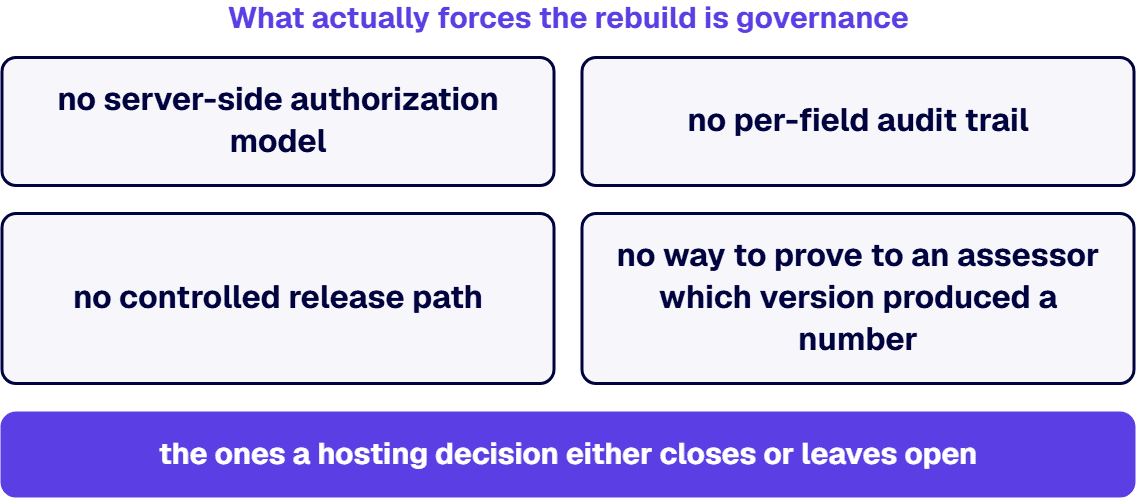
What actually forces the rebuild is governance. A spreadsheet has no server-side authorization model, no per-field audit trail, no controlled release path, and no way to prove to an assessor which version produced a number that appeared in a report. Those four gaps are the ones a hosting decision either closes or leaves open, which is why the hosting question deserves more attention than the conversion technique.
When every user is inside your tenant and already licensed, this is the destination the other three have to beat. Microsoft hosts the application and its data. The security model is table and column level rather than file level, and the governance controls are the same ones your Power Platform administrators already operate.
The economics are per seat. Power Apps Premium lists at $20.00 user/month, paid yearly, and entitles the assigned user to unlimited Power Apps and Power Pages, with a $12.00 user/month tier at a 2,000-seat minimum. Storage accrues per license at 250 MB database and 2 GB file, and the Dataverse Database Capacity add-on lists at $40.00 GB/month, paid yearly. All four figures were read on that page on 2026-09-11. Microsoft Learn’s Power Apps overview, read the same day, is direct about the requirement: “You need a license to play the apps you make with Power Apps.” That single sentence is what rules this option out for wide external audiences and rules it in for a bounded internal team.
i3solutions selects Dataverse over SharePoint as the primary relational store when a client needs scalable high-volume transactional data, and holds application secrets in Azure Key Vault. A SharePoint list is a tempting destination for a converted workbook because it looks like a table, and it is the wrong destination for anything with real transaction volume or relational depth. The failure pattern is consistent enough to plan around: the pilot behaves, and then the joins the workbook used to do in its formulas have to be done in the application instead of in the store, so each additional related list adds another round trip and the slowdown lands in year two rather than in the pilot. The choice of store is part of the hosting decision, not a detail underneath it.
Microsoft describes Power Pages as “a secure, enterprise-grade, low-code software as a service (SaaS) platform for creating, hosting, and administering modern external-facing business websites,” built on the same Dataverse data your internal apps use. If the converted spreadsheet is a submission form for suppliers, a rate calculator for customers, or an intake process for people who do not have accounts in your tenant, this is the destination that fits.
The pricing model changes shape, which is the point. Power Pages authenticated users are sold at $200.00 per website for 100 users/site/month, paid yearly, in capacity packs of 100. Anonymous users are $75.00 per website for 500 users/site/month, paid yearly, in capacity packs of 500. The authenticated plan carries 2 GB database capacity and 16 GB file capacity, the anonymous plan 0.5 GB database capacity and 4 GB file capacity, and Dataverse database and file capacity entitlements for subscription plans are pooled at the tenant level, all of it read on Microsoft’s Power Pages pricing page on 2026-09-11. In Microsoft’s own words, users “needing access to multiple Power Pages sites will require additional authenticated user capacity.”
The security posture is documented rather than inferred. Power Pages is hosted as Azure App Service, which carries ISO, SOC, and PCI DSS compliance; it supports TLS 1.2 with built-in Azure DDoS protection and dynamic IP restriction, and it can be fronted with Azure Front Door for edge caching and web application firewall capabilities. Authorization runs through web roles, table permissions, and page permissions, with authentication providers including Microsoft Entra External ID.
When the calculation logic is the product, this is the right answer. Some workbooks encode two decades of engineering judgment in formulas, iterative solvers, and macros that no low-code surface will reproduce faithfully. Rebuilding that as code and hosting it on Azure App Service keeps the logic exact and removes the formula-and-flow calculation ceiling that the low-code surfaces impose.
Azure App Service runs .NET, Java, Node.js, Python, and PHP on both Windows and Linux, or a custom container. For a regulated estate the relevant features are the enterprise ones: virtual network integration for secure ingress and egress, App Service environments for fully isolated applications on dedicated networking and VMs, deployment slots for predictable staged releases, autoscale against demand, and ISO, SOC, and PCI compliance. There is also a Managed Instance option that Microsoft positions for “legacy or infrastructure-bound web apps requiring Component Object Model (COM), registry access, Windows/Microsoft Installers (MSI), drive mapping, or stricter network boundaries,” which is worth knowing about when the old tool depends on a COM add-in that has to come along.
This is the path i3solutions took for a global aerospace and defense manufacturer whose cost estimating ran on spreadsheets. The rebuild used ASP.NET with a Razor MVC structure, Entity Framework, SQL Server, jQuery, and Power BI. The web-enabled estimating tool reduced rework by 30%, eliminating version mismatches and manual reconciliation across teams. Engineers now generate accurate cost estimates in a fraction of the time, saving approximately $250k annually in rework-related labor. When i3 rebuilt a spreadsheet-bound estimating process into a web application, it removed version-control errors across hundreds of estimates and cut approval cycles from five days to one. The full write-up is in the modernizing a legacy Excel tool into a web application case study.
These platforms, Caspio and SpreadsheetWeb among them, take the workbook itself as the input and publish it as a web application, keeping the formulas as the calculation engine. For a wide audience on lower-sensitivity data they are genuinely fast, and the pricing model is the reason to look at them. The constraint that rules them out is the compliance boundary: if the data is export controlled or sits inside a federal boundary, a commercial multi-tenant platform is not a candidate, and that is settled before speed enters the argument.
SpreadsheetWeb’s deployment models matter more than its price bands for a regulated buyer. Its pricing page, read 2026-09-11, offers a public cloud in which “We host your application and data on multi-tenant cloud infrastructure,” a Private Cloud that is “A dedicated SpreadsheetWeb instance on Microsoft Azure, managed by us,” with “no shared infrastructure,” and Server Licensing: “Install on your own servers, or on a dedicated EC2 or Azure instance you control. Workbooks, submitted data, and calculation all stay inside your perimeter.”
The evaluation question is not the price, it is where the compliance boundary lands. Under the Microsoft options the boundary is your tenant and your Azure subscription, and the attestations you already rely on carry over. Under a third-party platform the calculation engine and the data both sit in the vendor’s environment, so your compliance evidence becomes the vendor’s compliance evidence. Ask for current third-party attestations directly rather than inferring them: SpreadsheetWeb’s published pricing page, read 2026-09-11, states deployment options and names no security certification anywhere on it, which is a gap in that source rather than a finding about the product. That question is answerable in one email, and it should be answered before a shortlist becomes a decision.
Identity. Internal users belong in Entra ID. External users need an external identity provider, which is the line between a Power Apps app and a Power Pages site. A platform that manages its own separate user list is a second identity estate to review.
Data residency and sovereign clouds. If the data is export controlled or covered by a federal boundary, this decides the option list before anything else does. i3solutions installs and helps configure applications inside IL4 and IL6 government cloud environments and other government networks, and no commercial multi-tenant SaaS platform is a candidate in that conversation.
Network isolation. Virtual network integration or a dedicated App Service environment for a custom application, virtual network support and IP firewall through Managed Environments on the Power Platform side, Azure Front Door in front of a Power Pages site.
Secrets and keys. Connection strings and API keys leave the workbook and belong in a managed store. i3solutions holds application secrets in Azure Key Vault as a matter of course.
Audit and evidence. The reason the rebuild is defensible at all is that the new host produces a record: who changed which value, when, and under which approval. Whether the destination you pick emits that record in a form your assessor accepts has a yes-or-no answer, and it costs far less to establish before the build than after it.
i3solutions has replaced Excel-based workflows in aerospace manufacturing, financial services, and healthcare environments, including organizations operating under CMMC obligations and ITAR export control requirements. i3solutions establishes Power Platform governance frameworks as part of every Excel modernization engagement.
Concurrency. How many people use it at once, and does that number grow with the business or with the customer base. Seat-priced hosting fails at the second pattern. The 256-user shared-workbook ceiling you are leaving (Microsoft’s published limit) is the floor to design against, not the target.
Calculation weight. If a single submission triggers a long iterative computation, the host has to be able to scale compute independently of the interface, which favors the custom application.
Integration surface. Every system of record the application must read or write is a constraint on where it can live. Integration is also where the effort actually goes: a strong 70 percent of i3solutions engagements include some type of ETL process, behind the scenes and baked into almost everything i3solutions does.
Release cadence. How often the logic changes, and whether you can promote a change without downtime. Deployment slots on App Service and managed-solution pipelines on the Power Platform are the two mature answers.
Hosting decisions get the attention because they are architectural. The engagements that go wrong go wrong on the extraction. The business logic in a mature workbook is undocumented, and it includes hidden circular dependencies, brittle macros, and rules that only survive because one person remembers them. The failure mode is specific: the new application returns a number the old workbook did not, nobody can say which of the two is right, and the release stalls in parallel running while the difference is traced back through the formulas one at a time. The acceptance test that prevents it is agreed before the build rather than after it: the workbook and the application are run against the same inputs, and every difference is traced to a named formula before the release proceeds.
i3solutions applies its proprietary Data-Lift Framework to Excel modernization: extracting the business logic embedded in the workbook, eliminating hidden circular dependencies, and refactoring brittle macros. i3solutions Excel modernization work uses custom data-parsing scripts, Power Query ETL, and internally built schema-mapping tools. Whichever host you choose, budget the extraction honestly, because it is the phase that determines whether the new application produces the same numbers as the old one.
The payoff shows up in more than accuracy. A federal research agency replaced paper wall charts and Excel spreadsheets with an automated program tracking database: the agency no longer needs their paper wall charts or excel spreadsheets and realized a 240% return on investment in the first year by eliminating this combined manual effort of approximately one full time employee. The program tracking case study covers how that was measured. In a separate modernization, retiring on-premises infrastructure eliminated approximately $500,000 per year in hosting, licensing, and maintenance costs, while enabling cloud scalability at no additional capital expense.
i3solutions has been a Microsoft partner since 1997, is a Microsoft Solutions Partner, and has completed more than 1,500 Microsoft platform implementations. On this class of work specifically, the relevant experience is that the hosting decision has been made in both directions: to Power Apps and Dataverse where the process is internal and governed, and to a custom application on Azure App Service backed by Azure SQL where the logic will not fit a low-code surface.
Related reading for the pieces of this decision that have their own page: Dataverse vs SQL Server covers the data store choice in depth, Excel vs SharePoint for data management covers the case where the answer is not an application at all, and Power Apps development services covers delivery on the Power Platform side.
If you are weighing two of these destinations against each other, settle the four inputs first: who the users are, what regulates the data, how complex the calculation logic is, and how much the application has to integrate with systems of record. A scoping conversation puts those four on the table, and the regulatory boundary alone decides the option list before anything else does.
If the four inputs point in two directions, the quickest way through is a conversation with someone who has made this call in both of them. Bring the workbook and the audience it serves, and ask which host they would pick and what would change that answer. If you are building the internal case rather than the architecture, ask for comparable engagements where the hosting decision went each way, and for a direct read on the extraction phase, which is the part that sets the schedule.
Choose by audience and regulation first. Internal, licensed users on governed data belong on Power Apps with Dataverse. External or anonymous audiences belong on Power Pages, which is priced per website in user capacity packs rather than per seat. Applications whose calculation logic is the product, or that need strict network isolation, belong in a custom web application on Azure App Service backed by Azure SQL. Third-party Excel-to-web platforms suit wide audiences on lower-sensitivity data where speed to live outweighs owning the compliance boundary.
No. It makes security possible, which the spreadsheet did not. The gain comes from what the host provides: server-side authorization at the row and column level, an identity provider you already govern, an audit record of who changed what, and a controlled release path. A converted application on a host with none of those is a spreadsheet with a login page.
Sometimes, for small and non-transactional cases. i3solutions selects Dataverse over SharePoint as the primary relational store when a client needs scalable high-volume transactional data, and holds application secrets in Azure Key Vault. A SharePoint list resembles a table closely enough to be tempting and behaves nothing like one under transaction volume or relational depth, which is a problem that appears in year two rather than in the pilot.
The pricing model changes shape by option. Power Apps is priced per user per month, so cost scales with seats and a bounded internal team is the case it fits. Power Pages is priced per website in user capacity packs, so cost scales with audience volume per website rather than with headcount. A custom application on Azure App Service costs Azure consumption plus the build. Third-party platforms bill a flat tier with unlimited application users. Model the three-year curve for your actual audience shape rather than comparing headline prices. The heuristic that settles it: if the user count grows with your headcount, seat pricing stays the cheaper shape; if it grows with your customer or supplier base, per-website or flat-tier pricing is the one to model first.
Azure App Service publishes a Managed Instance option that Microsoft documents for “legacy or infrastructure-bound web apps requiring Component Object Model (COM), registry access, Windows/Microsoft Installers (MSI), drive mapping, or stricter network boundaries.” It is the documented path when a dependency has to survive the move rather than be rewritten. The same App Service overview calls for validating telemetry, certificate automation, and operational processes before production adoption.
Yes, and the boundary should be the first input rather than a late constraint. i3solutions installs and helps configure applications inside IL4 and IL6 government cloud environments and other government networks. Confirm the option list against your boundary before evaluating anything else, because it removes most commercial multi-tenant platforms from consideration outright.
The schedule is set by how much undocumented logic the workbook carries, which is why it is assessed rather than estimated from file size. i3solutions applies its Data-Lift Framework to extract the business logic embedded in the workbook, eliminate hidden circular dependencies, and refactor brittle macros, using custom data-parsing scripts, Power Query ETL, and internally built schema-mapping tools. Plan for the extraction to be the phase that sets the schedule.
By Michael Branson
As of September 2026, a secure-development requirement belongs in a custom application development contract only if it names a practice, an artifact that evidences the practice, and a person on your side who receives that artifact. Three published sources supply the practice vocabulary so a buyer does not have to invent it: NIST SP 800-218, the Secure Software Development Framework (SSDF) Version 1.1: Recommendations for Mitigating the Risk of Software Vulnerabilities, published February 2022, read September 2026, gives the practice groups a contract can reference; the OWASP Application Security Verification Standard gives verification requirements a contract can cite by numbered version and level; and CISA’s Secure by Demand guide names the artifacts a purchaser can require back from a supplier, including a software bill of materials and a published vulnerability disclosure policy. Six requirements carry that pattern into a development contract: name the practice framework and the level, a component inventory delivered at each release, a vulnerability disclosure and remediation path with clocks, evidence of security testing, a controlled build and release pipeline, and a right of independent verification. None of the six makes an application secure, compliant, or certified on its own; each names a practice, an artifact, and a recipient.
The security section of a draft statement of work for a custom application often reads as three sentences: the supplier will follow industry best practices. That clause cannot be breached, because nothing in it names a practice a court, an auditor, or your own security function can check, an artifact that proves the practice ran, or a person on your side who is supposed to receive that artifact. The VP of IT who signs the technical annex is the one who answers for the gap later, not the supplier who wrote the sentence. The sections below turn that clause into six requirements, quote each one from where it is published, and name the evidence to require back for each, as read in September 2026.
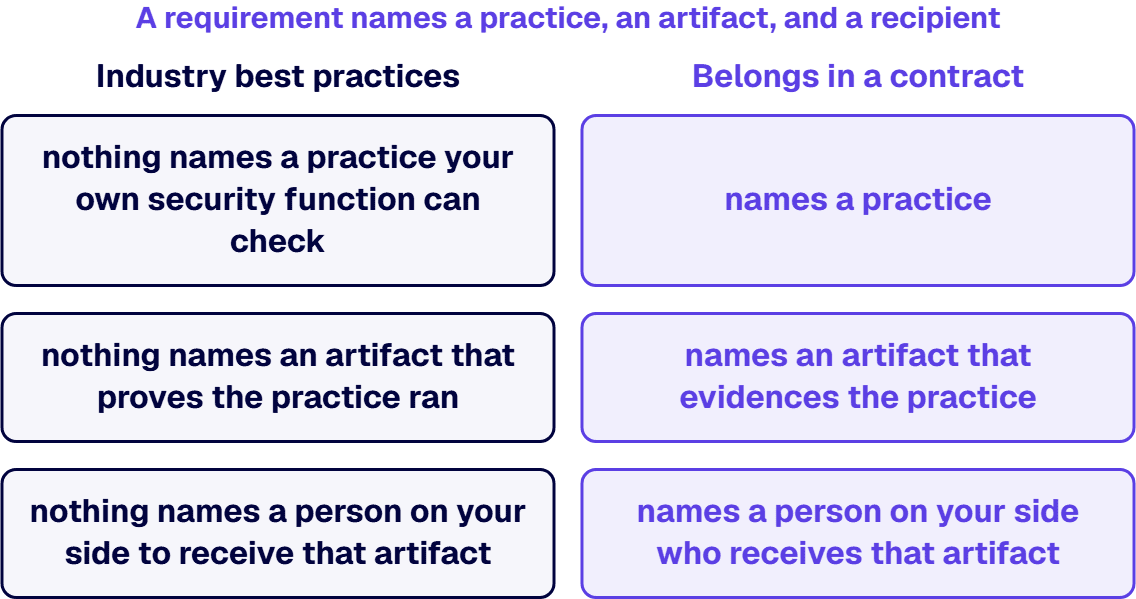
A requirement written as “industry best practices” fails the same test twice: it names no practice a reader can check against a published text, and it names no artifact a buyer can hold at the next audit. CISA’s own guidance to software purchasers states where a specification belongs: organizations can integrate product security considerations into the procurement lifecycle “during procurement, by integrating product security requirements into contract language, as appropriate” (CISA, Secure by Demand Guide: How Software Customers Can Drive a Secure Technology Ecosystem, page 1, August 2024, read September 2026, https://csrc.nist.gov/pubs/sp/800/218/final).
That guide is written for the purchaser of a finished software product. A custom application development engagement puts your organization in the analogous position: your development partner fills the role CISA calls the manufacturer, for the application it builds you rather than for a shelf product. Translating that guidance into a bespoke development contract, requirement by requirement, is what the rest of this page does. Whether a specific clause satisfies your obligations under any regulation is a determination for your contracting officer and counsel, not a question this page answers.
A different question, what already went wrong on a project that is already running rather than what to put in a contract before one starts, is covered on Software Development Challenges: 11 Common Problems and Solutions; this page does not repeat that catalogue.
A contract clause that names no framework leaves “secure” undefined the day a dispute starts.
NIST SP 800-218, the Secure Software Development Framework (SSDF) Version 1.1, is described by NIST as “a core set of high-level secure software development practices that can be integrated into each SDLC implementation” (NIST SP 800-218, Abstract, February 2022, Final, read September 2026, https://csrc.nist.gov/pubs/sp/800/218/final). NIST’s own executive summary states that organizations should “express their secure software development requirements to third-party suppliers using SSDF conventions” (NIST SP 800-218, Executive Summary, page vi). Naming SSDF, and its version, in a contract gives both sides one published document to argue from instead of a phrase neither side can test.
The OWASP Application Security Verification Standard (ASVS), currently version 5.0.0 (published 2025-05-30, read September 2026 at https://owasp.org/ASVS/), is described by the project as providing “a basis for testing web application technical security controls and also provides developers with a list of requirements for secure development.” A contract can reference ASVS by its numbered version and a stated verification level. A contract that instead references “the latest ASVS” points at a document that moves without notice: the same release record carries a rolling development tag ahead of the numbered release, so a numbered version is the only form a signed contract should cite.
Naming a framework and a version specifies what a practice is measured against; it does not by itself say whether the practice was followed on your application. That is a separate requirement, covered next.
An application built from dozens of open-source and third-party components is only as trustworthy as the list of what is in it, and most contracts never ask for that list.
CISA’s Secure by Demand guide names the component inventory as both a supplier obligation and a purchaser-collected artifact. Under software supply chain security, it asks whether the manufacturer generates “a software bill of materials (SBOM) in a standard, machine-readable format” and makes it available to customers (page 3). Among the artifacts a purchaser can collect from a manufacturer, it lists “A Software Bill of Materials (SBOM) that lists third-party software components used by the product” (page 2) (CISA, Secure by Demand Guide, pages 2 to 3, August 2024, read September 2026).
Require the supplier to deliver a machine-readable inventory of every third-party component in the build, updated at each release, and name in the contract who at your organization receives it and what happens when a component in it is later found vulnerable, because an inventory nobody receives and nobody acts on is a deliverable rather than a control.
A supplier that finds a vulnerability in your application and has nowhere written to report it decides on its own how fast you hear about it.
CISA’s guide asks purchasers to check “Whether the software manufacturer operates a vulnerability disclosure policy (which should be a public webpage)” (page 2) and, on the reporting side, “Has the software manufacturer published a vulnerability disclosure policy that authorizes testing by members of the public on products offered by the software manufacturer?” (page 3). On defects the manufacturer has not yet addressed as a class, it asks whether the manufacturer has “a roadmap showing how they plan to eliminate those classes of vulnerability” (page 2) (CISA, Secure by Demand Guide, pages 2 to 3).
Require the supplier to name, in the contract, the channel through which a vulnerability found in your application is reported to you, the severity scale it is rated against, and the remediation clock attached to each severity level. Your security function sets the scale and the clock; this page states only that the contract needs one, in writing, before the first defect is found rather than after. A published disclosure policy proves the supplier has a channel for the public; it does not by itself prove your application has a named channel, a scale, and a clock, which is why those three are written as your contract’s own terms rather than inferred from the supplier’s public policy.
A supplier who says the application was tested has told you an opinion; a supplier who hands you a dated result against a numbered standard has told you a fact.
The OWASP ASVS gives a contract a way to state that fact rather than assume it: referencing a numbered ASVS version and level turns “the application was tested” into a testable claim, because the standard “provides a basis for testing web application technical security controls” against stated requirements. What the contract requires back is the result itself, dated and scoped to the release it covers, not a letter stating that testing occurred “according to industry standards.”
This requirement is placed on the development partner and is confirmed by the evidence in the register below; it is never something to take on faith because a supplier’s marketing page describes a commitment to security.
A component inventory is only as trustworthy as the pipeline that assembled it, and a pipeline anyone can push changes to is not a controlled pipeline.
NIST’s SSDF groups its practices under four headings, and one states this requirement directly: “Protect the Software (PS): Organizations should protect all components of their software from tampering and unauthorized access” (NIST SP 800-218, Section 2, page 4, read September 2026).
Require the supplier to name, in the contract, who can change the build and release pipeline for your application, how that access is limited to people who need it, and how a change to the pipeline itself is logged. The contract does not need to name a specific tool; it needs to establish that the control exists and who signs off when it changes.
A requirement your own contract cannot check is a requirement in name only.
A contract that requires the five items above still needs a way to confirm they were met on the release you are accepting, and that confirmation carries more weight when it comes from outside the team that wrote the code. Require, in the contract, a right to commission independent validation and verification of the delivered application, including code review, at acceptance or at a stated trigger such as a major release or a finding under the vulnerability path above, and name who at your organization exercises that right. The methodology, deliverables, and governance of an engagement like this, and how to evaluate a partner for one, are covered on IV and V Best Practices for Regulated Enterprise Software Evaluation: Methodology, Deliverables, and Governance; the service itself is described on Independent Validation and Verification (IV&V) Services for Software Risk Control.
The six requirements above render as one register, so a contracting officer can check each line without re-reading the reasoning behind it.
A requirement whose evidence nobody on your side will read is a cost with no control behind it, not a safeguard.
Name a recipient for every requirement above before it goes into the contract, or drop the requirement: an evidence line with no reader is paperwork, not a control. An ASVS level set above what the application’s own data warrants prices out suppliers who would otherwise have served you well; set the level to the data the application holds, not to the highest number available. A small supplier may be able to meet the substance of a requirement, such as reviewing dependencies before adding them, without being able to produce the exact artifact format a larger supplier would hand over; a buyer who cannot tell a substantive gap from a format gap ends up selecting suppliers on paperwork rather than on practice. And if your organization is in financial services, the sector’s own regime, not this checklist, sets the specification first: the shortlist questions that follow from it are covered on How to Choose a Custom App Development Firm for Financial Services.
None of the six requirements above is a substitute for the determination your contracting officer and counsel make about what a specific agreement needs; this page states the shape of the requirement and the evidence behind it, not the clause language itself.
i3solutions is a Microsoft-focused application development and integration firm that helps enterprises modernize operations, connect platforms, and build tailored solutions. If your task is turning six requirements into contract language you can hand to counsel, the order matters more than the wording: name the practice, name the artifact, name the recipient, in that sequence, for each requirement before it goes into the annex.
This checklist sits under i3solutions’s Custom Application Development Services for Enterprise Performance, which describes i3solutions’s own custom application development work as end-to-end: consulting, development, testing, integration, implementation, and ongoing support. i3solutions has also published an engagement case study, named here as “Enhancing Quality With an IV&V Code Review,” describing an engagement in which i3solutions was engaged to perform an independent verification and validation (IV&V) code review of an application delivered by a separate development vendor, the kind of review a right of independent verification under Requirement 6 would call on.
If you want the six requirements above turned into contract language for your contracting officer and counsel to review, the conversation starts here.
By Michael Branson
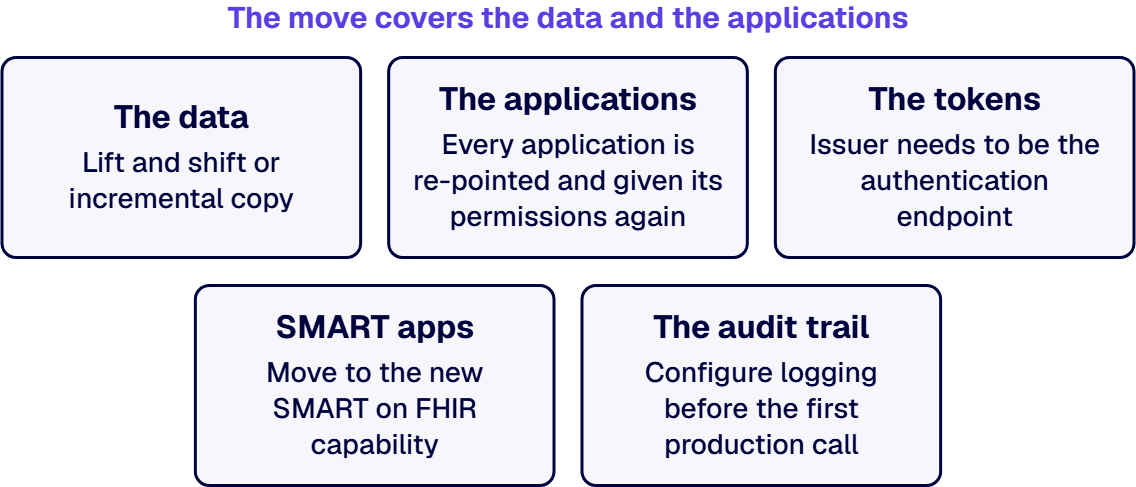
Microsoft set September 30, 2026 as the retirement date for Azure API for FHIR, so workloads must move to the Azure Health Data Services FHIR service. The move covers the data and the applications; those relying on the SMART on FHIR proxy report errors after September 21, 2026.
If the plan for Azure API for FHIR is an export on one side and an import on the other, it covers only the data. The applications, the tokens and the audit trail are what stop working on cutover day. This guide sets out what Microsoft’s pages on Microsoft Learn, read on September 24, 2026, say the retirement forces and what the move involves, and where the i3solutions recommendation sits beside them.
When someone asked whether the deadline could slip, the answer was on Microsoft’s own pages. Microsoft’s What is Azure API for FHIR?, Migration strategies for moving from Azure API for FHIR and What is Azure Health Data Services? pages each state: “Microsoft deprecated Azure API for FHIR on September 30, 2026.” Microsoft stopped new customer deployments on April 1, 2025.
Microsoft’s Retirement Announcement – Azure API for FHIR on Microsoft Learn lists what ended with it: “After September 30, 2026 customers won’t be able to:”
Microsoft’s Ending Support in 2026 page, which lists Azure API for FHIR among the 2026 retirements, describes retirement in general terms: “Upon retirement or end of support, there will be no new security updates, non-security updates, free or paid assisted support options or online technical content updates.” The Microsoft pages this guide relies on state no extension or grace period, and they say nothing about what happens to the stored data beyond the list above.
September 30 was the last day the old endpoint was scheduled to answer. A move that is not done is the last case under When This Guide Is the Wrong Frame, below.
Most of what breaks in this move is not the data but the things wired to the old service. Microsoft’s Migration strategies for moving from Azure API for FHIR page lists the changes that can affect your architecture:
The identity row needs the closest read. The same migration strategies page says “The token issuer authority needs to be the authentication endpoint for the tenant that the FHIR Service is running in.” An application that gets its tokens anywhere else stops working on the new service until that is changed.
For the SMART row, the date is already behind you. Microsoft’s Retirement Announcement – Azure API for FHIR said: “After September 21, 2026, applications relying on SMART on FHIR proxy will report errors when accessing the FHIR service.” That date has passed, so any patient or clinician app still on the proxy is the first item on the list, not the last.
When the copy starts before anyone has agreed how much downtime the data pipeline can take, the pattern gets chosen by accident. Microsoft’s Migration strategies for moving from Azure API for FHIR page describes two. Lift and shift is “The simplest pattern. Ideal if your data pipeline can afford longer downtime.” One route Microsoft lists is to “Configure a workflow to $export your data on Azure API for FHIR, and then $import into Azure Health Data Services FHIR service”. Incremental copy is a “Continuous version of lift and shift, with less downtime.” For that pattern Microsoft says “We created an OSS migration tool to help with this migration pattern.”
Two decisions come before either pattern, and the same Migration strategies for moving from Azure API for FHIR page names both: “Decide if you want to migrate historical versions or not.” and “Take this opportunity to clean up data or FHIR servers that you no longer use.” For a large instance it adds a step that comes first: “If your Azure API for FHIR instance contains more than 2 TB of data, open an Azure support request before starting your migration.”
Decide the historical versions and the downtime budget before the copy starts. This guide gives no copy duration, because the Microsoft pages it relies on give none.
Once the data is on the new service, every application still pointed at the old endpoint fails on the day that endpoint stops answering. Microsoft’s Migration strategies for moving from Azure API for FHIR page says “Change the endpoints on your applications” so they point at the new server’s URL, and “Set up permissions again for these apps”. Both are steps in Microsoft’s own list, not side effects of the data copy.
SMART apps need their own pass. Microsoft’s SMART on FHIR page says the service supports SMART v1.0.0 and SMART v2.0.0, and “You can’t mix and match SMART v1.0.0 and SMART v2.0.0 scopes in the same client app registration.” Microsoft’s What is the FHIR service in Azure Health Data Services? page describes SMART on FHIR app developers using the identity management in “Microsoft Entra ID for authorization of FHIR RESTful API actions”.
Inventory every application, SMART app and service principal that calls the old endpoint, and re-register and re-grant each one against the new service before cutover. The applications that call the FHIR service are HIPAA application work in their own right; who builds them is covered in Who Do We Hire for Building HIPAA-Compliant Healthcare Applications?. i3solutions has successfully delivered software development projects under CMMC, HIPAA, ITAR, and SOC 2 compliance frameworks with audit-ready documentation and governance practices built into our standard delivery methodology.
If the audit trail on the new service starts after the first production call, there is a gap someone will ask about later. Microsoft’s View and enable diagnostic settings in the FHIR service page opens: “Access to diagnostic logs is essential for any healthcare service.” Microsoft’s What is Azure Health Data Services? page says of private link, customer managed keys and logging: “These features enhance the security and compliance of your health data.” For private access, Microsoft’s Configure Azure Private Link for secure Azure Health Data Services access page says “Azure Private Link enables secure access to Azure Health Data Services over a private endpoint in your virtual network.”
Configure logging and private access on the new service, and keep evidence from the Azure portal that they are on, before the first production call reaches it. Which controls a given data set or contract requires is a decision for your privacy and compliance officers; this guide describes what Microsoft states, not what your obligations are.
The jobs and connections around the data move too. Microsoft’s Migration strategies for moving from Azure API for FHIR page says “Set up any jobs that were previously running in your old Azure API for FHIR server (for example, $export jobs)”, and to confirm the two servers match, “you can check both metadata endpoints to compare the two servers”. Event subscribers that relied on FHIR Proxy, and any Dataverse feed through the sync agent, are re-built on the replacements Microsoft names. Downstream interfaces and events at enterprise scale are covered in Microsoft Integration Architecture for Large Enterprises: A Reference Guide for Regulated Sectors. i3solutions runs migrations against named control families across CMMC, HIPAA, SOC 2, and NIST 800-171, producing artifacts auditors can review.
When the new service is stable and the old one is still running, cutover becomes a decision rather than a date. Microsoft’s Migration strategies for moving from Azure API for FHIR page says to “Turn off any remaining pipelines that are running on Azure API for FHIR.” and then “Delete data from your Azure API for FHIR server, and decommission your Azure API for FHIR account.” Its timing advice is to migrate “as soon as feasible”.
The FHIR service itself is Microsoft’s managed platform; the applications around it stay yours to operate. For applications i3solutions built or modernized, their ongoing operation, support and enhancement can be scoped as Application Managed Services for Custom Microsoft Applications. i3solutions does not sell ongoing managed IT operations for the estate, such as a managed security operations service; the migration itself, and embedded specialists inside your team while it runs, are project work.
If your estate matches one of these cases, a different first move applies:
When the move has a fixed date and PHI on it, it is a project with a short list of owners, not a background task. i3solutions plans and runs governed Azure and Microsoft 365 migrations with senior, U.S.-based engineers. i3solutions’ Azure specialists handle workload migration for regulated workloads, and this move is scoped as one project: from the inventory and the pattern choice, through re-pointing the applications, identity and logging, to cutover, with embedded specialists where the program needs them. As a Microsoft-focused application development and integration firm, i3solutions delivers its full service portfolio into healthcare on the same footing as defense manufacturing and finance. Delivery is senior and US-based. The wider practice is Azure Development Services for Regulated Enterprise Workloads.
If you need the inventory, the pattern choice and the cutover plan checked against your own estate, the next step is a conversation about your FHIR workload.
It retired on September 30, 2026, according to Microsoft, whose Azure API for FHIR overview, migration strategies page and Azure Health Data Services overview each state: “Microsoft deprecated Azure API for FHIR on September 30, 2026.”
Microsoft’s retirement announcement on Microsoft Learn says “After September 30, 2026 customers won’t be able to:” “Create or manage Azure API for FHIR accounts”, “Access the data through the Azure portal or APIs/SDKs/client tools”, “Receive service updates to Azure API for FHIR or APIs/SDKs/client tools” and “Access customer support (phone, email, web)”.
No. Microsoft’s migration strategies page says “Azure Health Data Services FHIR service does not support local RBAC and custom authority.” and “The token issuer authority needs to be the authentication endpoint for the tenant that the FHIR Service is running in.”
Microsoft’s migration strategies page says “SMART on FHIR proxy is being deprecated. You need to use the new SMART on FHIR capability.” Its retirement announcement on Microsoft Learn said “After September 21, 2026, applications relying on SMART on FHIR proxy will report errors when accessing the FHIR service.”, and that date has passed.
No. Microsoft’s retirement announcement says “The migration from Azure API for FHIR to Azure Health Data Services FHIR service involves data migration and updating the applications to use Azure Health Data Services FHIR service.” Its migration strategies page adds “Set up permissions again for these apps” and “Set up any jobs that were previously running in your old Azure API for FHIR server (for example, $export jobs)”.
By Justin Bowen, Sr. Vice President, Delivery Services, i3solutions
Budget in engagement shapes, not in one number. Stabilizing a partly built Microsoft estate typically runs $85,000 to $175,000 for an environment of four to six Microsoft platforms with 40 to 120 integration touchpoints. A focused rebuild of a single business-critical application typically runs $50,000 to $85,000. Holding the system with embedded senior people runs $28,000 to $48,000 per specialist per month. Which of the three you need is decided by an assessment of the code and the environment, not by a proposal, and any firm quoting a remediation total before reading the repository is guessing.
Remediation is priced differently from new development because the unknown is not the requirement, it is the artifact. On a greenfield build the scope is the thing you are arguing about. On a remediation the scope is whatever the previous team left behind, and nobody knows what that is until someone reads it. That single fact drives every honest number on this page and explains why fixed fee quotes offered before an assessment tend to be either padded or wrong.
This page describes what i3solutions charges for the engagement shapes that remediation work actually takes, what makes the number move, and where the money goes. It does not characterize the firm that built the system, and it does not attempt to price your specific estate from a distance.
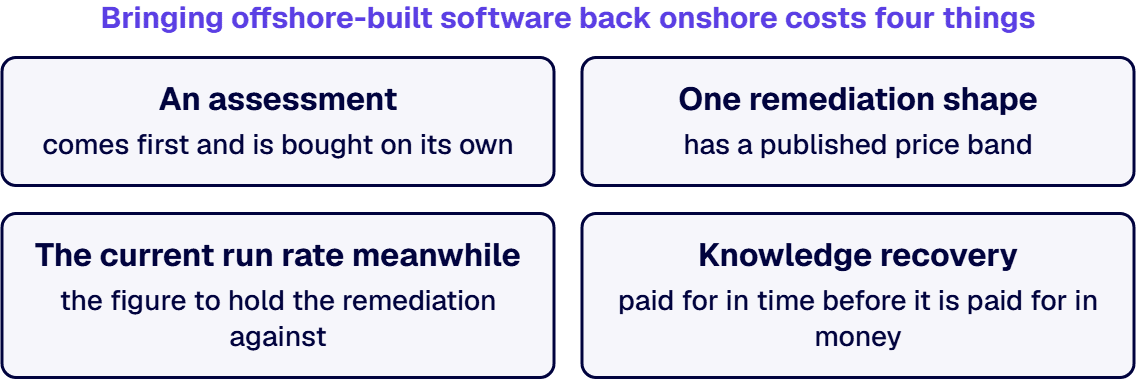
Bringing offshore-built software back onshore costs four things: an assessment, one remediation shape, the current run rate meanwhile, and knowledge recovery. Each shape has a published price band in its section below. Embedded specialists are priced per specialist per month.
The other three lines carry no published price here, and a budget that leaves them out is the budget that doubles later. The assessment comes first and is bought on its own, as set out under “How to run the decision”. The current system keeps costing what it costs until the fix lands, and that run rate, not zero, is the figure to hold the remediation against, as the section on the return explains. Knowledge recovery is the identity and business-rule work listed under “What actually moves the number”, and it is paid for in time before it is paid for in money. The three shapes are alternatives rather than parts to add up, with one exception: embedded specialists can hold the system while a stabilization or a rebuild is scoped.
The offshore rate priced the build. The fix is priced by what the build left behind: the count of places where systems connect, whether a test environment behaves like the live one, whether anyone wrote down who owns the service accounts and permissions, and whether the business rules can be recovered at all. A low rate tells you nothing about any of the four, so it is not an input to the remediation budget. For the rate and risk comparison itself, see Onshore vs Offshore for Microsoft Power Platform in Regulated Industries.
A Stabilization Protocol engagement (Phase 1 dependency mapping plus Phase 2 risk-sequenced triage) typically costs between $85,000 and $175,000 for enterprises running four to six Microsoft platforms with 40 to 120 integration touchpoints. Phase 1 establishes what actually calls what: the Power Automate flows firing on SharePoint list events, the Dataverse tables with no plugin registration record, the Azure Function that a developer stood up under a personal subscription, the service principals holding permissions nobody documented. Phase 2 then triages by blast radius rather than by ticket age, which is the sequencing decision most internal remediation efforts get backwards.
The range moves with touchpoint count more than with line count. An estate at the low end of that touchpoint band, on four platforms, lands near the bottom of the price range. An estate at the top of the band, spanning six platforms with authentication crossing tenant boundaries, lands near the top. If your environment is materially outside that shape, the band does not apply to you and we will say so rather than stretch it.
A focused rebuild of a single business-critical application typically runs between $50,000 and $85,000. This is the right shape when the code is small enough to replace and bad enough that reading it costs more than rewriting it. The test is not code quality in the abstract. It is whether the business rules are recoverable from the artifact, from documentation, or from people who are still employed. When all three fail, rebuilding is cheaper than archaeology.
Fixed-fee project consulting for modernization initiatives ranges $55K-$450K depending on scope. A focused rebuild sits at the low end of that spread by design. A rebuild that starts drifting toward the middle of that range is usually a rebuild that quietly turned into a modernization program, which is a different decision and deserves to be made on purpose. If you are writing the contract for the rebuild, add the secure development requirements for a custom application contract so the next build can be audited.
Typical engagement ranges land at $28,000 to $48,000 per specialist per month for senior US-based Microsoft specialists with named platform depth (SharePoint, Power Platform, Microsoft 365 compliance, Azure security, Dataverse, .NET enterprise integration) and compliance literacy in CMMC 2.0 Level 2, HIPAA Security Rule, NIST 800-171 Rev 2, SOC 2, or DFARS 252.204-7012. This is the shape for organizations that need the system to keep running while the stabilize or rebuild decision is being made, or that have a regulated deadline the remediation itself cannot move.
Per specialist per month is the honest unit here and it is worth reading carefully. Two specialists for three months is six specialist months, not three. Firms that quote remediation staffing as a blended monthly team rate are usually hiding the seniority mix, and seniority mix is the whole variable on inherited code.
If IT now answers for a Dynamics 365 estate that an inherited offshore team still maintains, and replacing that team is off the table this year, the costs above were written for a different case: they price bringing the work home. When the offshore team stays, the bring-back budget does not disappear; it changes shape, from a remediation you buy once to buyer-side review you pay for per specialist per month.
The order does not change: the assessment still comes first, priced apart from whatever follows it, per “How to run the decision”. Keeping the team leaves the estate as it was found: whatever integrations, service accounts and business rules were undocumented before the decision are still undocumented after it, and the dependency map is what shows which ones they are.
With the team kept, a full stabilization or rebuild gives way to buyer-side review: the embedded specialists shape above, used to oversee the team instead of replacing it, in the same per-specialist-per-month unit and band. A senior Dynamics 365 specialist reviews the changes the team delivers, keeps the dependency map current, and tells IT what the team’s estimates mean. The review does not buy a replacement team or a verdict on the vendor.
All i3solutions Dynamics 365 developers and consultants are U.S.-based. i3solutions builds Dynamics 365 integrations using named Microsoft mechanisms including Dataverse, dual write, virtual tables, Azure Logic Apps, Azure Service Bus, and Power Automate connectors.
If the assessment finds no working test environment and no way to recover the business rules, the kept-team plan becomes a stabilization or rebuild decision after all, and the shapes above apply. How to take control of a kept team is a separate question from what keeping it costs.
i3solutions mid-migration SharePoint rescue engagements run eight to fourteen weeks. That is a duration, and it is worth stating plainly that it is not convertible into a cost at any hourly rate. A fourteen week engagement with two embedded specialists and a fourteen week engagement running a fixed scope stabilization are the same calendar and very different invoices. When a firm hands you a week count and invites you to multiply, ask what is being multiplied.
What the eight to fourteen week figure is useful for is planning the things around the remediation: contract dates, audit windows, the point at which you can credibly tell a customer the system is stable.
One rescued program for a nuclear operator saved about $293K a year and returned its full cost within three months. That is a savings figure from one engagement in one regulated sector, and it is deliberately not presented here as what remediation costs or as a result you should expect. It is presented because remediation is usually evaluated against the wrong alternative. The comparison that matters is not remediation cost against zero, it is remediation cost against another year of the current run rate, which on a failing system is rarely small and is rarely measured.
i3solutions has no published case study of repatriating a specific offshore program, and this page does not imply one. The attested rescue and stabilization work above is real and is priced from engagements that happened. Whether the work being rescued was originally built offshore, onshore, or in house is not something the record establishes, and inflating it into an offshore repatriation credential would be exactly the kind of claim this page exists to help you interrogate in other proposals.
This page also does not characterize any offshore vendor, named or implied. The reason is practical rather than diplomatic. A remediation engagement that begins with a theory about who was at fault tends to produce a report about who was at fault, and you are paying for a working system.
The firm level facts are simple and verifiable. i3solutions is a Microsoft Solutions Partner. i3solutions has completed 1,500+ Microsoft platform implementations. All delivery is by senior US-based specialists, which is the relevant fact for an organization moving work back onshore, and it is a staffing model rather than a certification.
Honest disqualification is cheaper than a bad engagement. This is not the right vehicle when what you want is a fixed remediation price before anyone has read the repository, when the requirement is lowest price technically acceptable staffing, when the platform direction is away from Microsoft, or when the real goal is a report assigning blame for the original build. An i3solutions engagement does not produce managed-service ownership, a replacement for the internal team, open-ended scope expansion, or vendor lock-in. Remediation buyers in particular should confirm that constraint in writing with whoever they hire, because a firm that inherits your system is unusually well placed to keep it.
Get the assessment scoped and priced separately from the remediation, and keep the two decisions separate on paper. Ask each candidate firm for the three artifacts that reveal whether they have done this before: a dependency map from a comparable engagement, redacted; the triage sequence they used and why blast radius beat ticket age; and the point in a prior engagement where they recommended rebuilding rather than repairing. A firm that has never recommended a rebuild has either been very lucky or is not in the habit of saying the expensive thing.
Adjacent reading if you are earlier in the decision: comparing costs of in house IT against external consultants covers the run rate side of the comparison, internal team versus a systems integrator hybrid delivery model covers who holds the work afterward, Microsoft Access application rebuild cost prices the narrowest rebuild case, and custom application development services describes the build practice the rebuild shape draws on. When you want to test fit, i3solutions routes a senior U.S.-based engineer to a client call usually within one to two weeks. You can reach the team by phone at 703.652.8966.
It depends which engagement shape your situation calls for. A Stabilization Protocol engagement (Phase 1 dependency mapping plus Phase 2 risk-sequenced triage) typically costs between $85,000 and $175,000 for enterprises running four to six Microsoft platforms with 40 to 120 integration touchpoints. A focused rebuild of a single business-critical application typically runs between $50,000 and $85,000. Embedded senior specialists run $28,000 to $48,000 per specialist per month. Which shape applies is determined by reading the code and the environment, not by a proposal, so scope and price the assessment first and keep it separate from the remediation.
Usually, and the test is specific rather than general. Remediation wins when the business rules are recoverable from the artifact, from documentation, or from people still employed. When all three fail, reading the system costs more than rewriting it and a focused rebuild at $50,000 to $85,000 for a single business-critical application is the cheaper path. The mistake to avoid is deciding this by code quality impression. Decide it by whether the rules are recoverable, because that is what you are actually buying back.
i3solutions mid-migration SharePoint rescue engagements run eight to fourteen weeks. That is a duration and not a price, and it does not convert into one at any hourly rate, because the same calendar covers very different staffing shapes. Use the week count to plan the things around the remediation, such as contract dates and audit windows, and price the engagement from its shape instead.
No, and neither should anyone else. On a remediation the scope is whatever the previous team left behind, and the two findings that most often reset a plan are that no non production environment matches production and that identity and permission ownership is undocumented. Both are discovered by looking. What can be fixed in advance is the assessment: scope it, price it, and keep the decision to proceed genuinely open once it reports.
No. i3solutions has no published case study of repatriating a specific offshore program and does not claim one. The published record covers rescue and stabilization work whose origin the record does not establish as offshore. One program for a nuclear operator saved about $293K a year and returned its full cost within three months, which is a savings figure from a regulated sector engagement rather than a remediation price or a promised outcome.
Because the rate priced the original build, and the fix is priced by what that build left behind. Four things move a remediation: how many integration touchpoints the estate has, whether any non-production environment matches production, whether identity and permission ownership is documented, and whether the business rules survive outside the code. None of them shows in the rate you paid.
Five things: a dependency map of what calls what; a finding on whether production can be reproduced safely; an inventory of the identities, app registrations and connections no one owns; a verdict on whether the business rules are recoverable; and a recommended shape, stabilize, rebuild or hold with embedded specialists. Scope and price the assessment on its own, and keep the decision to proceed open once it reports.
Both platforms will scale a well-designed enterprise application, so the platform is rarely the thing that limits you. Four criteria decide it, and none of them are compute: where your workforce identity already lives, what your existing Microsoft licensing entitles you to, which compliance authorization your data actually requires, and where your engineers have real production depth. Azure has the clear edge when the estate is Windows Server and SQL Server under Software Assurance, because Azure Hybrid Benefit applies those licenses to Azure by name. AWS has the clear edge when the workload is Linux, containerized, and portable to ARM, because AWS prices Graviton as a structural discount rather than a negotiation. When neither of those applies, the deciding criterion is almost always your team’s existing platform fluency, which is worth more in production than any feature comparison. If a vendor comparison hands you a scoring matrix before it asks which identity provider you run, it is selling, not advising.
These are the ones where the two platforms are actually not interchangeable, in the order they usually decide the outcome.
1. Where workforce identity already lives. This is the criterion most comparisons bury and most architectures are shaped by. If your users are already in Microsoft Entra ID, an Azure-hosted application inherits that directory, its conditional access policies, and its audit trail without a federation layer in between. On AWS you federate, and AWS supports that directly: IAM Identity Center accepts an external identity provider and Microsoft Entra ID is one of the examples AWS names in its own documentation. The catch is structural rather than technical. AWS states that you can have only one identity source per organization in AWS Organizations, so the federation design is a decision you make once for the whole account estate and then live with. That is workable and thousands of enterprises run it. It is simply not free, and it belongs in the estimate.
2. What your existing Microsoft licensing entitles you to. Azure Hybrid Benefit is the most under-counted line in this comparison. Microsoft applies it to Windows Server core licenses and SQL Server core licenses with active Software Assurance or qualifying subscription core licenses, in Datacenter and Standard editions for Windows Server and Enterprise and Standard editions for SQL Server, and separately to Red Hat Enterprise Linux and SUSE Linux Enterprise Server subscriptions. It is an Azure program, named for Azure, so an estate carrying a large SA-covered Windows and SQL footprint does not arrive at the two platforms on equal terms. The correct move is not to assume the benefit decides it: price the same workload on both platforms with the entitlement modeled explicitly, because the answer swings hard on how much of the estate is actually SA-covered today.
3. Compute economics at the instruction set. This one runs the other way. AWS publishes that its Graviton-based instances “cost up to 20% less than comparable x86-based Amazon EC2 instances” and use “up to 60% less energy” for the same performance, and it offers Graviton under managed services including Amazon Aurora, Amazon RDS, and Amazon EKS. Read that as AWS’s own published claim rather than an independent benchmark, and note the precondition: it only applies to workloads that will actually run on ARM. A Linux, containerized, dependency-clean service portfolio can take it. A .NET Framework application with native Windows dependencies cannot, and no amount of architecture review changes that.
4. Which compliance boundary you are actually required to land in. Both providers run a segregated US government cloud, and the published authorizations are not shaped identically. Microsoft states that Azure Government maintains a “FedRAMP High provisional authorization to operate (P-ATO) issued by the FedRAMP Joint Authorization Board (JAB)” and “DoD SRG IL4 and IL5 provisional authorizations (PA) issued by the Defense Information Systems Agency (DISA).” AWS states that AWS GovCloud (US) is “FedRAMP Certified Class D (formerly High baseline)” and that its US East-West commercial regions are “FedRAMP Certified Class C (formerly Moderate baseline).” AWS also states that GovCloud “Root Account holders must pass a screening process validating U.S. persons status.” The deciding question is narrower than the headline level: whether the specific services your architecture depends on carry the authorization you need, in the region you will actually deploy to. That is a service-by-service check against each vendor’s current authorization scope, and it is worth doing before the architecture is drawn rather than after.
Every one of these shows up in procurement scoring matrices. None of them is where the decision actually lands.
Region and availability zone counts. AWS publishes that its cloud “spans 123 Availability Zones within 39 Geographic Regions.” Microsoft publishes a comparable global footprint on its own geographies page. Neither number is the decision, because your application will deploy to two or three regions, not thirty-nine. Check that the specific regions you need carry the specific services and authorizations you need, and ignore the total.
“Which one scales better.” Neither platform is the ceiling for an enterprise application. The ceiling is nearly always the data tier and the application’s own shape: synchronous calls where events belong, one write database serving every read, no partition strategy, and a cache added late to hide it. Moving that design to the other cloud relocates the bottleneck rather than removing it. If a scale problem is the reason the platform question came up, get an architecture review before a platform decision.
Total managed service count. The two vendors count services differently and neither total is auditable. A given enterprise application uses somewhere around fifteen distinct managed services. Compare those fifteen.
Headline list price per vCPU. List price is the least predictive number in the comparison. Committed-use discounts, reservations, enterprise agreement terms, and licensing entitlements all move the effective rate far more than the rate card does, and they move it by different amounts for each buyer.
AI service positioning. Both platforms are shipping model catalogs and agent tooling faster than any procurement cycle can evaluate them. Whatever you score today will be stale before the contract is signed. Score the parts of the platform your application depends on for the next three years instead.
There are real conditions where AWS is the better answer for a scalable enterprise application, and a Microsoft-centric firm saying otherwise would be doing you a disservice.
Our disclosure, plainly. i3solutions is a Microsoft partner and our delivery record is Microsoft-centric. We are naming that here because it should change how you weigh the section above, not because it changes the answer. We hold owner-attested delivery proof on Azure and Microsoft 365 and we hold none on AWS, so we do not claim AWS delivery experience and you should not accept a claim of it from us. What we do claim is the comparison itself: i3solutions runs comparative platform-selection evaluations for clients, recommending among IAM platforms for hybrid estates and among workflow automation platforms against SOC 2 and HIPAA, rather than only implementing the Microsoft option. Where the four criteria point at AWS, they point at AWS.
Score four things and stop. First, name the identity provider of record and write down what federating away from it would cost in design and operations. Second, pull the actual Software Assurance position for Windows Server and SQL Server, by core, not by memory. Third, list the compliance controls the data is genuinely subject to, then check each dependent service against the current authorization scope each vendor publishes. Fourth, count how many engineers on the team have run production on each platform, and weight that heavily.
If those four agree, the decision is made and the remaining work is a landing zone and its cost rather than a platform debate. If they disagree, the disagreement itself is the finding: it usually means the application is two applications and one of them belongs in a different place. That is a Microsoft integration architecture problem, and it is cheaper to see it now than after the first region is built.
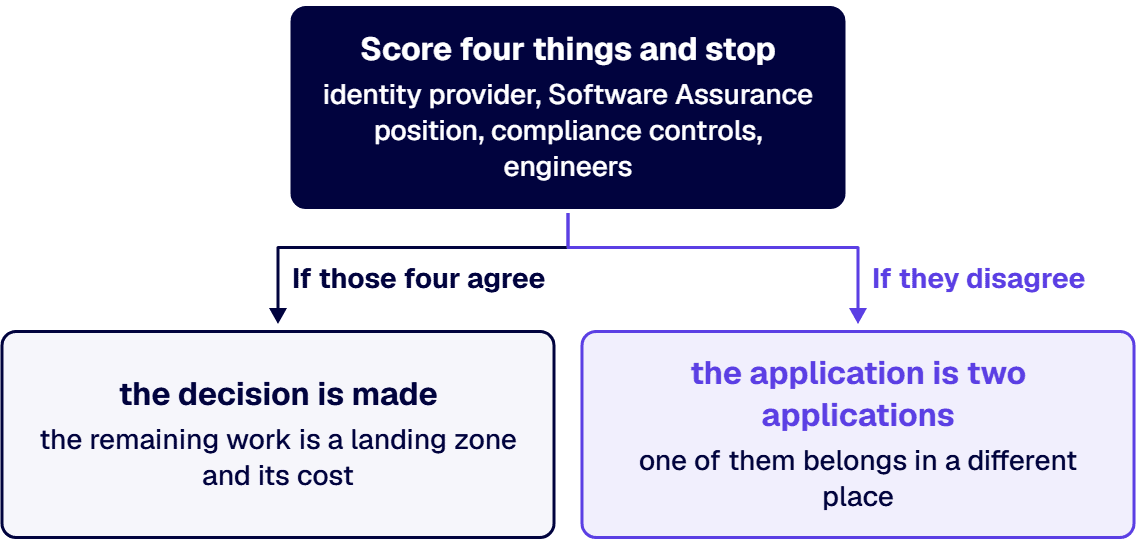
Bring in a partner when the platform decision is entangled with an estate nobody has mapped: unmeasured license positions, an identity model that grew rather than was designed, integration points that only one person understands, and a compliance boundary that has never been tested against the actual service list. That is an assessment, not a preference, and it is the work that makes the platform choice obvious rather than contested.
The compliance criterion is the one most teams cannot close internally, because it needs a position rather than a citation. i3solutions advises clients on federal compliance posture as its own assessment rather than as a restatement of Microsoft’s documentation, including whether SharePoint Online meets NIST 800-53, whether Azure Government is required under the DoD Cloud Computing SRG, and whether a CMMC gap assessment is needed to bid. That is the same discipline this page applies to the platform question: read the vendor’s own current documentation, then say what it means for your specific obligation.
i3solutions plans and runs governed Azure and Microsoft 365 migrations with senior, U.S.-based engineers. i3solutions is a Microsoft Partner with 30 years of delivery experience. i3solutions has been a Microsoft Partner with 30 years of enterprise technology delivery experience and has delivered 1,500+ Microsoft engagements across aerospace and defense, financial services, and health sciences. On the integration side, which is where most enterprise applications actually meet their scale problem, i3solutions unified identity and automated provisioning across systems for 125,000 users by treating the interfaces as owned, governed contracts.
That same discipline underlies i3solutions’ system integration data management solutions.
The engagements that answer this question have published shapes. Data integration tool evaluation engagements at i3solutions typically range from $40,000 to $120,000 depending on the scope and complexity of the enterprise’s data estate. A focused reference architecture engagement (assessment plus reference architecture document plus governance framework, 8-to-12-week duration) typically scopes between $150,000 and $350,000 for mid-sized regulated enterprises. Either produces the artifact a budget review actually needs: a named target platform, the reasoning behind it, and the cost model it was chosen against. If the application itself is the next piece of work, that is our custom application development services team, and the platform-side build sits with Azure development services.
Neither, as a general claim. Both platforms scale well past what a single enterprise application requires, so the scaling ceiling is almost always the application’s own data tier and architecture rather than the provider. The platform question is decided by identity, existing Microsoft licensing, compliance boundary, and your team’s production experience. If scale is the presenting problem, an architecture review will tell you more than a platform comparison.
It changes it materially when the estate is genuinely covered. Microsoft applies Azure Hybrid Benefit to Windows Server and SQL Server core licenses with active Software Assurance or qualifying subscription core licenses, and separately to Red Hat Enterprise Linux and SUSE Linux Enterprise Server subscriptions. It is an Azure program, so the entitlement does not travel to another provider. Pull the actual core-level SA position before modeling it, because most estates are covered less completely than the license summary suggests.
Yes. AWS IAM Identity Center supports an external identity provider and AWS names Microsoft Entra ID as an example in its own documentation. The design constraint to plan around is that AWS allows only one identity source per organization in AWS Organizations, so the federation model is an estate-wide decision rather than a per-application one. It is a well-trodden pattern, but it adds a layer you would not have on Azure, and that layer needs an owner.
It depends on the classification and the specific services involved. Microsoft states Azure Government holds a FedRAMP High provisional authorization to operate from the Joint Authorization Board plus DoD SRG IL4 and IL5 provisional authorizations from DISA. AWS states GovCloud (US) is FedRAMP Certified Class D, formerly the High baseline, with its US East-West commercial regions at Class C, formerly Moderate. AWS also requires GovCloud root account holders to pass a US persons screening. Verify each dependent service against the current authorization scope rather than relying on the headline level.
Rarely, and almost never for a single application. Running one workload across both platforms means two landing zones, two identity models, two guardrail sets, two cost models, and an on-call rotation that has to be fluent in both. Multi-cloud earns its cost when it is driven by acquisition, a regulatory requirement, or a genuine vendor-concentration mandate. It does not earn it as a hedge against choosing.
Score the four criteria in a two-week window: identity provider of record, actual Software Assurance position by core, the compliance controls the data is genuinely subject to checked service by service, and how many of your engineers have run production on each platform. If all four agree, you have your answer and no further analysis will improve it. Bring in help only for the criterion you cannot answer internally, which is usually the compliance service mapping.
Stable and extensible are different properties, and most estates have the first without the second. Answer the question per system rather than per estate, against four tests: supportability, dependency count, evidence obligation, and change-failure behavior. One of the four is a matter of public record rather than judgment. Microsoft’s Ending Support in 2026 lifecycle page, read 2026-08-22, lists SharePoint Server 2016, SharePoint Server 2019, SharePoint Designer 2013, InfoPath 2013, Project Server 2016, Project Server 2019, SQL Server 2016, and Dynamics GP 2016 as reaching End of Support on July 14, 2026. A system past end of support fails the extend test no matter how stable it feels, because “no new security updates” is not a property you can engineer around. The other three tests are judgment calls, and they resolve into a disposition per system: extend, wrap, rebuild, or retire. A single verdict for the whole estate is almost always the wrong shape of answer.
Stability is a statement about unplanned failures: how often the thing breaks when nobody touches it. Extensibility is a statement about planned change: whether the system can absorb a new obligation at a cost you can predict before you commit to it. They are measured differently, they fail differently, and one does not imply the other.
The uncomfortable case is the system that is stable because nobody changes it. Its uptime is excellent. Its change-failure rate is unknown, because there have been no changes. Every person who understood its integration surface has left. It is not stable in any sense that helps you decide whether to build the next three years of business capability on top of it. It is dormant, which reads as stable right up until the moment you ask it to do something new.
Two questions separate the cases in about five minutes, and they are worth asking before any assessment is scoped:
This test is first because it is the only one that does not require an assessment to answer. It is published, dated, and binary, and for a large number of Microsoft-centered estates it resolved five weeks ago.
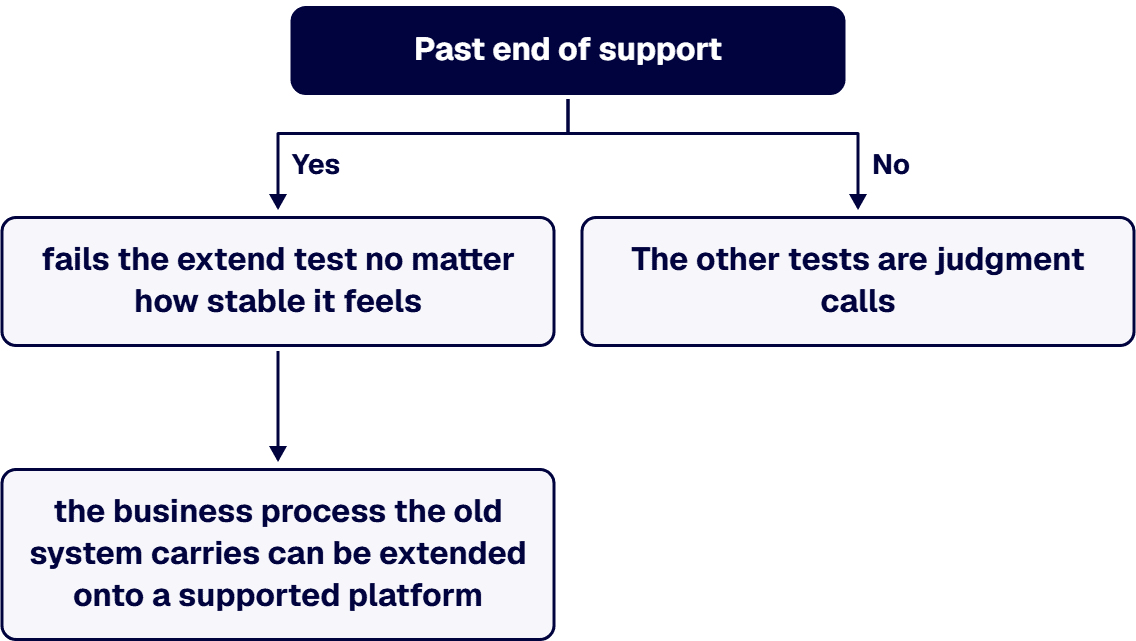
Microsoft’s Ending Support in 2026 page, read 2026-08-22, groups the following under “Products reaching End of Support” with an End of Support date of July 14, 2026: Dynamics GP 2016, Dynamics GP 2016 R2, InfoPath 2013, Project Server 2016, Project Server 2019, SharePoint Designer 2013, SharePoint Server 2016, SharePoint Server 2019, SQL Server 2014 Extended Security Updates Year 2, and SQL Server 2016. The page states that “Upon retirement or end of support, there will be no new security updates, non-security updates, free or paid assisted support options or online technical content updates.”
The individual product pages express the same boundary as a timestamp. The SharePoint Server 2016 lifecycle page lists a Mainstream End Date of 7/14/2021 and an Extended End Date that Microsoft’s end of support list gives as July 14, 2026, and the SharePoint Server 2019 page lists a Mainstream End Date of 1/10/2024 and the same Extended End Date. Both follow the Fixed Lifecycle Policy. It is one boundary described two ways, not two dates.
A few more from the same Ending Support in 2026 page land inside the same planning horizon and are easy to miss because they sit in different parts of the estate: Dynamics CRM 2016 reached End of Support on January 13, 2026; Dynamics NAV 2016 and Dynamics C5 2016 on April 14, 2026; Office LTSC 2021, Windows 10 2016 LTSB, and Windows Server 2012 and 2012 R2 Extended Security Update Year 3 on October 13, 2026.
How to read this test. Past end of support, “extend” is not a decision you get to make about the platform. It is still a decision you can make about the capability: the business process the old system carries can be extended onto a supported platform. The SharePoint Server Subscription Edition lifecycle page, read the same day, lists it under the Modern Lifecycle Policy with a Retirement Date of “In Support,” which is what a live extend target looks like. Confusing the platform question with the capability question is what produces the false choice in the room: nobody wants to replace a business process that works, and nobody has to.
That argument runs on adjectives because nobody has produced the count, and it can be settled in a week. Fragmentation has two countable dimensions: how many platforms hold a piece of the workflow, and how many integration points join them.
Those counts are how modernization work is actually scoped. At i3solutions, a Stabilization Protocol engagement (Phase 1 dependency mapping plus Phase 2 risk-sequenced triage) typically costs between $85,000 and $175,000 for enterprises running four to six Microsoft platforms with 40 to 120 integration touchpoints. That band is worth reading as a diagnostic rather than a price: an estate in it is one where the dependency map does not exist yet and has to be built before any extend-versus-replace call can be defended.
The sequence matters more than the number. Typical Stage 1 dependency mapping for a mid-market regulated enterprise runs between $45,000 and $120,000 depending on estate size; the Stage 2 risk-sequenced migration plan runs between $30,000 and $75,000 depending on the phases involved; the Stage 3 stabilization plan and the migration execution that follows scope to the engagement. Dependency mapping is Stage 1 because a disposition assigned before the map exists is a guess wearing a schedule.
What to count, concretely:
That is the moment the third test gets failed, and it arrives long after the extension shipped. In a regulated estate, an extension inherits the compliance obligation of whatever it attaches to, and the obligation stays invisible until somebody asks for the artifacts. It is also where the assumption that extending is automatically the cheaper option comes apart. Regulated-industry SharePoint modernization carries roughly 25 to 35 percent cost overhead versus commercial work for equivalent scope, driven by control mappings, audit-trail discipline, and zero-downtime cutover patterns. That overhead does not stop at the boundary of the original system; it applies to whatever you attach.
An extension bolted onto a system whose audit trail is assembled by hand does not inherit a cheap obligation. It inherits an expensive one, and it usually makes the manual work larger, because there is now more scope to document on the same annual cycle.
The practical question: if you extend this system, can it produce the artifacts for the new scope at the same grain, on the same cadence, without new manual effort? If the answer needs a person and a spreadsheet, price that manual step per reporting cycle and add it to the extension estimate. Build estimates price construction. They do not price the annual proof cycle that follows it.
The last test is behavioral and it is the one that most reliably separates an estate that can be extended from one that cannot. It is not “does it break.” It is “what happens downstream when we deliberately change one thing.”
Three signals are worth collecting before any decision, and all three are available from history rather than from a new study:
The four tests do not average into a verdict. They sort each system into one of four dispositions, and a healthy estate typically contains all four at once.
The reason the estate-wide answer fails is visible in the table: “extend” and “rebuild” are frequently both correct in the same estate, for different systems, in the same quarter. A single verdict forces one of them onto systems where it does not fit, and the cost of that mistake is paid quietly over the following two years.
Running the four tests is an assessment, not a project, and it should be scoped as one. For reference points from i3solutions engagements:
i3solutions delivers through its Expert Delivery Model, a four-phase methodology (discovery, architecture, build, and knowledge transfer) with explicit exit criteria and delivery assurance at every handoff. For this decision, the phase that matters is the first one, and the exit criterion is specific: a named disposition for every system in scope, with the finding that produced it.
An estate-wide verdict. “The systems are fine” and “the systems need replacing” are both estate-wide claims, and an estate is not a system. The correction is mechanical: produce a list, assign a disposition per row, and require the finding that justifies it next to it. Once each system has a disposition, the retire decisions are covered in enterprise system consolidation.
Extending onto a platform that is out of support. This is the expensive one, because it looks like the cheap option on the day it is chosen. The build lands, it works, and the platform underneath it has no security updates. The extension then has to be redone inside the migration that was deferred, and it is paid for twice.
The upside of getting the disposition right is not theoretical. One IT systems analysis for a federal housing agency identified about $1.5 million in savings and led to processing roughly 35 percent faster by finding the real constraints. One modernization retired about $500K a year. One integration for a commercial real-estate operator processed work about 40% faster while retaining roughly 90% of historical data, and that speed repeats on every cycle, not once. When i3solutions rebuilt a spreadsheet-bound estimating process into a web application, it removed version-control errors across hundreds of estimates and cut approval cycles from five days to one. In each case the value came from correctly identifying which systems were the constraint, not from replacing everything.
When a leadership team cannot agree on whether an estate can be extended, the disagreement is almost never about the estate. It is that four different tests are being run informally, in four heads, and no one has produced the row-by-row list that would let the tests be compared. An outside read is useful mainly because it forces that list to exist, with a named disposition and the finding behind it, before anyone commits budget to a direction.
That list is also the thing you take into a committee. Most of the people who have to approve an extend-versus-replace decision were not in the technical conversations, and what convinces them is not a recommendation. It is a supportability date they can check against a vendor page, a touchpoint count, and a clear statement of which systems the decision does not apply to. A short scoping conversation before committing budget is usually enough to establish whether the list can be produced in a week or needs a full dependency map first.
You will get a straight answer either way, including the answer that the current estate is in support, is not meaningfully fragmented, and should be extended rather than touched. That is a common finding and a legitimate outcome of the work.
The business logic is preserved. The implementation is rebuilt, and the two are not the same thing. A formula and a macro are not the rule your business runs on, they are one expression of it in a desktop spreadsheet runtime, and no web application executes that runtime. So the calculation a formula performs, the sequence a macro automates, and the edge cases both encode all carry over, extracted and re-expressed in the target platform. The formula strings and the VBA code do not. Formulas port more cleanly than macros because a calculation is portable and Microsoft’s low-code formula language uses a similar expression style, while VBA is documented as a desktop technology that does not run in Excel on the web at all. The practical consequence is that the expensive part of the project is not writing new code. It is recovering the rules that live only inside the workbook, including the ones nobody remembers writing, and proving the new system produces the same answers before the old one is retired. Anyone who tells you the macros can simply be carried across is describing a lift-and-shift that the platform does not support.
Teams ask whether the formulas can be preserved because the workbook is the only place the rules are written down. That instinct is correct and the wording is not. What has to be preserved is the behavior: given these inputs, the system returns these outputs, and refuses these ones. Whether that behavior is delivered by an INDEX and MATCH pair, a Power Fx expression, or a stored procedure is an implementation choice you get to make once, at conversion time, and it is the only chance you will get to make it cheaply.
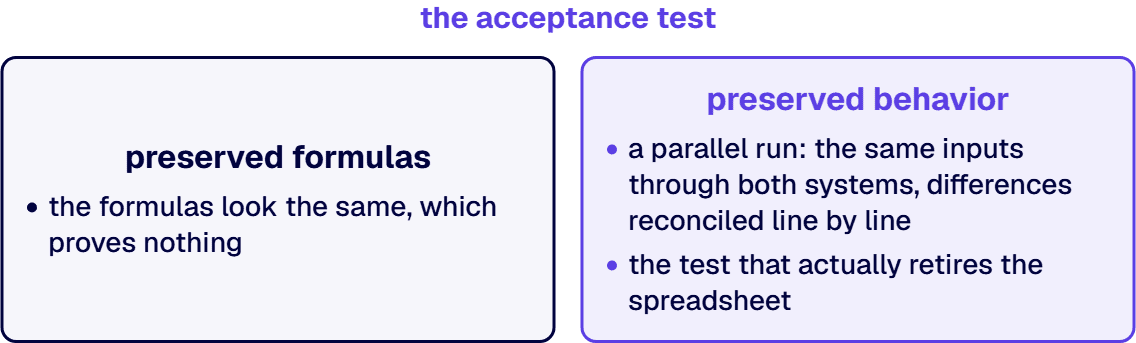
Framing it as behavior rather than syntax also changes what you test. If the goal is preserved formulas, the acceptance test is that the formulas look the same, which proves nothing. If the goal is preserved behavior, the acceptance test is a parallel run: the same inputs through both systems, differences reconciled line by line until they are zero or explained. That is the test that actually retires the spreadsheet.
This part is not a matter of opinion, and it is the single most useful thing to establish before scoping. In its comparison of Office Scripts and VBA macros, Microsoft states: “The fundamental difference is that VBA macros are developed for desktop solutions and Office Scripts are designed for secure, cross-platform, cloud-based solutions.” The platform support table on the same page lists VBA macros as not supported in Excel on the web.
The reason matters as much as the fact, because it explains why the gap cannot be closed by effort. Microsoft describes the security model plainly: “VBA macros have the same security clearance as Excel. This gives them full access to your desktop. Office Scripts only have access to the workbook, not the machine hosting the workbook.” A macro that writes to a network share, drives Outlook, opens another workbook, or shells out to a local executable is using exactly the desktop access a browser-hosted application does not have and is not going to be given. Those macros are not being ported. Their function is being re-implemented as a service.
Two further statements from the same document are worth carrying into scoping. “Currently, VBA offers a more complete coverage of Excel features, particularly those available on the desktop client,” which means a straight capability match should not be assumed. And “VBA doesn’t have a Power Automate connector,” which is why a scheduled or event-driven replacement for a macro is a redesign rather than a wrapper.
Formulas are the easier half, and they are still not a copy operation. A calculation is portable in a way desktop automation is not, and if the target is Microsoft’s low-code stack the expression style is familiar: Microsoft documents Power Fx as a low-code language written in Excel-like formula syntax. Familiar is not identical, and the differences are where the work sits.
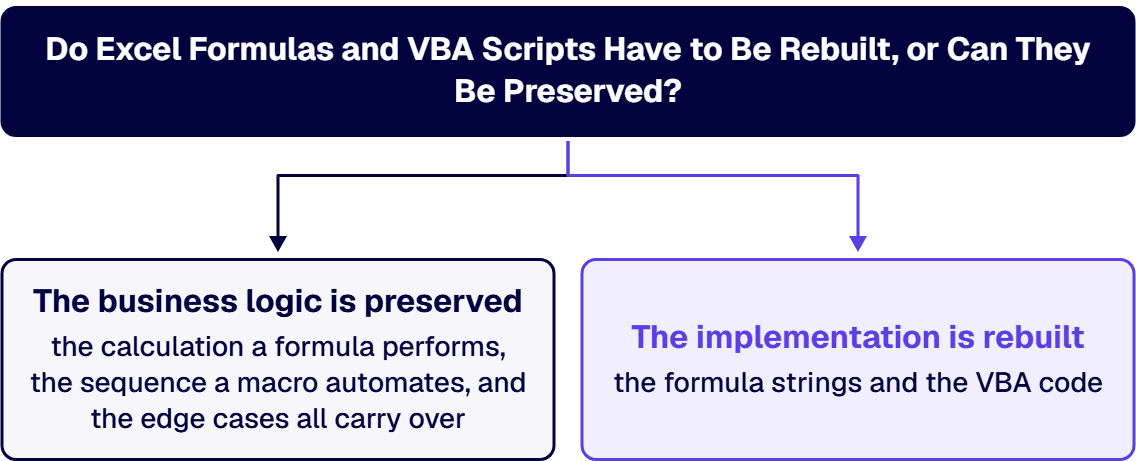
Four categories account for most of the effort in practice.
Sort every macro into one of four dispositions before estimating anything. This is a two-week exercise on a large estate and it removes most of the risk from the number.
The disposition nobody wants to write down is the fourth one, and leaving it off the table is how conversion projects acquire scope that never had a business case.
It is not the code. It is that the workbook is the specification, and the specification is undocumented, partly wrong, and load-bearing. Three things reliably cost more than teams plan for.
Rules with no owner. Every large workbook contains a constant somebody typed into a cell in a year nobody remembers, and the person who knew why has left. You cannot re-express a rule you cannot explain, and you cannot safely drop it either. This is a business decision surfaced by a technical exercise, and it needs a named person to resolve rather than a developer to guess.
Behavior that was never intended. Rounding differences, a lookup that quietly returns the first match, a range that stopped growing when someone inserted a row. Users have been consuming the output for years, so the accidental behavior is now the expected behavior, and a faithful rebuild that fixes the bug will be reported as a defect. Decide deliberately, case by case, which accidents to preserve.
Proving equivalence. Parallel running is the only credible acceptance test, and it costs real time because differences have to be reconciled rather than waved through. Any plan that has the spreadsheet retired the week the application goes live has not budgeted for the reconciliation, which is the same as not budgeting for the project.
Stated as the facts they are. i3solutions applies its proprietary Data-Lift Framework to Excel modernization: extracting the business logic embedded in the workbook, eliminating hidden circular dependencies, and refactoring brittle macros. That is the extraction half of the answer at the top of this page, named. i3solutions Excel modernization work uses custom data-parsing scripts, Power Query ETL, and internally built schema-mapping tools.
On the target, and it is deliberately not one target: i3solutions converts macro-heavy Excel workbooks either to Power Apps canvas or model-driven applications on Dataverse, or to a custom web application on Azure App Service backed by Azure SQL. Which of those is right depends on the complexity of the logic, the integration surface, and the scale, and the comparison is set out in Excel-to-web rebuild versus Power Platform modernization. If the estate is mostly loose scripts rather than one workbook, script to Power Platform migration covers that shape. For the engagement behind that conversion, see Excel to web application consulting for regulated enterprises.
On outcomes, one engagement, stated as attested: When i3 rebuilt a spreadsheet-bound estimating process into a web application, it removed version-control errors across hundreds of estimates and cut approval cycles from five days to one. On the same work: The web-enabled estimating tool reduced rework by 30%, eliminating version mismatches and manual reconciliation across teams. Engineers now generate accurate cost estimates in a fraction of the time, saving approximately $250k annually in rework-related labor. The published account is the legacy Excel tool to web application case study. Note what the numbers are about. They are about version control and rework, not about the formulas, because the value of the conversion came from moving the process off a file, not from re-typing the calculations.
i3solutions is a Microsoft Solutions Partner. i3solutions has completed more than 600 Microsoft platform implementations. The engagement shape and the service around it sit in Excel to web application development.
Ask any firm bidding this work four questions, and score the answers rather than the enthusiasm.
The fourth question is the one that predicts whether the project finishes. A firm that has a specific answer has retired a spreadsheet before.
The logic is preserved and the formula strings are not. A calculation is portable, so what the formula computes carries over, but it is re-expressed against a data model rather than against cell positions. If the target is Microsoft’s low-code stack the expression style is familiar, because Microsoft documents Power Fx as a low-code language written in Excel-like formula syntax. Four categories take real work: formulas that address layout rather than data, circular or iterative calculations that need an explicit convergence rule, volatile and array behavior that is a property of the spreadsheet engine rather than a statement of intent, and formulas wrapped to swallow errors, each of which is hiding a condition that becomes an explicit validation rule with an owner.
No, not as code. Microsoft states that “The fundamental difference is that VBA macros are developed for desktop solutions and Office Scripts are designed for secure, cross-platform, cloud-based solutions,” and its platform support table lists VBA macros as not supported in Excel on the web. The reason is structural rather than a gap someone could close: “VBA macros have the same security clearance as Excel. This gives them full access to your desktop.” A macro that writes to a network share, drives another desktop application, or shells out to a local executable is using access a browser-hosted application does not have. What a macro does is re-implemented. The macro itself is not ported.
Fewer than teams expect, which is why the inventory pays for itself before any code is written. Sort every macro into four dispositions: retire, because a large share of macros in a mature workbook automate formatting, printing, and navigation the new application makes unnecessary; replace with a platform capability, for refresh routines, mail merges, approval routing, and scheduled recalculation; rebuild as application logic, for the macros that encode real business rules such as pricing, eligibility, allocation, and validation; and keep in Excel deliberately, where a genuinely analytical workbook should stay a workbook while the application owns the data and the process around it. Only the third group is expensive, and asking a bidder for its expected split is a fast test of whether it has done this before.
Recovering rules and proving equivalence, not writing code. Three costs are underestimated consistently. Rules with no owner, where a constant was typed into a cell years ago and the person who knew why has left, which is a business decision surfaced by a technical exercise rather than something a developer can resolve. Behavior that was never intended, such as rounding differences or a lookup quietly returning the first match, where users have consumed the output for so long that the accident is now the expectation and a faithful rebuild that fixes it gets reported as a defect. And parallel running, which is the only credible acceptance test and costs real calendar time because differences have to be reconciled rather than waved through.
It depends on the complexity of the logic, the integration surface, and the scale, and the honest answer is that both are legitimate. i3solutions converts macro-heavy Excel workbooks either to Power Apps canvas or model-driven applications on Dataverse, or to a custom web application on Azure App Service backed by Azure SQL. Logic that a formula canvas expresses cleanly, at moderate scale, with connectors that already exist, favors the low-code path. Heavy computation, high concurrency, or bespoke rules that need a typed language favor the custom build. The decision should be made once, in writing, with the reasoning recorded, because it is expensive to revisit after the data model is set.
Yes, and choosing that deliberately is often the better answer for genuinely analytical work. The pattern is that the web application owns the data, the process, and the audit trail, while Excel remains an analysis surface over governed data rather than the system of record. Where Excel stays in the picture, Microsoft’s Office Add-ins platform is the supported cross-platform extensibility model, in contrast to VBA which is documented as desktop-only. What this pattern must not become is a workbook that quietly regains its own copy of the data, because that reintroduces the version-control problem the conversion was meant to remove.
Published 2026-08-02 | Updated 2026-08-03
Rebuilding a Microsoft Access application as a web application is defined-scope, fixed-fee work with a knowable price: a focused rebuild of a single business-critical application typically runs between $50,000 and $85,000. Scope moves the number from there: fixed-fee project consulting for modernization initiatives ranges $55K-$450K depending on scope, and at regulated enterprises, smaller fixed-scope engagements (single application, bounded integration surface, single regulatory framework) typically run $150,000 to $500,000 once compliance evidence enters the scope. i3solutions, a Microsoft Partner with 30 years of delivery experience, prices this as custom application development with senior U.S.-based teams, and how the fee structures themselves work is compared in how Microsoft consulting engagements are billed.
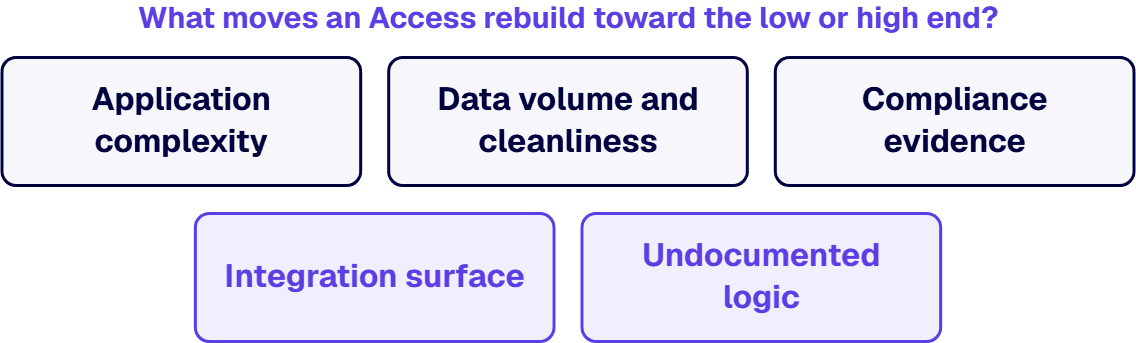
Application complexity. The count of tables, forms, reports, and business rules is the first driver, because each rule has to be found, challenged, and reimplemented. A contact tracker and a quoting engine are different projects even when both are “one Access file.”
Data volume and cleanliness. Migrating clean, well-keyed data is cheap. Recovering integrity from years of free-text fields, duplicate keys, and orphaned rows is where budgets move.
Integration surface. Every system the application talks to (ERP, reporting, file shares, other databases) adds contract, testing, and cutover work. This is the driver that most often moves a rebuild out of the low end.
Undocumented logic. When the person who wrote the VBA is gone, the logic has to be recovered from the code and validated with the people who live with its results. The recovery effort scales the price more than any technology choice.
Compliance evidence. A commercial rebuild and a regulated rebuild of the same application are priced differently because the regulated one must produce audit evidence as a deliverable. This is why the regulated single-application band starts higher.
The target platform is a decision inside the engagement, not a separate bill: form-and-workflow workloads land on Power Apps with Dataverse, and genuinely custom workloads become an ASP.NET Core web application, as laid out in who rebuilds a failing Microsoft Access application.
Focused single-department rebuild. One bounded application, few integrations, commercial compliance posture: a focused rebuild of a single business-critical application typically runs between $50,000 and $85,000. The decision framework for whether to rebuild at all, rather than repair, is covered in what to do when a Microsoft Access application is failing.
Regulated single application. Smaller fixed-scope engagements (single application, bounded integration surface, single regulatory framework) typically run $150,000 to $500,000.
Multi-system scope. Mid-sized engagements (custom application plus integration to two or three systems, multi-framework compliance) typically run $500,000 to $1,500,000. Most Access rebuilds do not start here, but an Access file that quietly became the department hub can.
Timeline. Microsoft modernization consulting engagements with i3solutions run from approximately four months for single-workstream scope to approximately twelve months for multi-workstream scope with significant compliance evidence requirements. A single-department Access rebuild usually sits at the short end.
The cost question is really a comparison question: the rebuild is priced against the failure it retires. One rescued program for a nuclear operator saved about $293,000 a year and returned its full cost within three months, and one modernization retired about $500,000 a year in running cost. When the application carries a revenue-bearing process, the cost of the next corruption event, not the consulting fee, is usually the largest number in the business case.
A focused rebuild of a single business-critical application typically runs between $50,000 and $85,000. The band widens with scope: fixed-fee project consulting for modernization initiatives ranges $55K-$450K, and smaller fixed-scope engagements at regulated enterprises (single application, bounded integration surface, single regulatory framework) typically run $150,000 to $500,000.
Five drivers: application complexity (tables, forms, reports, business rules), data volume and cleanliness, how many other systems it integrates with, how much undocumented logic has to be recovered, and whether compliance evidence is a deliverable. Integration surface and logic recovery move budgets the most.
Microsoft modernization consulting engagements with i3solutions run from approximately four months for single-workstream scope to approximately twelve months for multi-workstream scope with significant compliance evidence requirements. A single-department application usually sits at the short end.
When the application carries real operational load, yes, and measurably: one rescued program for a nuclear operator saved about $293,000 a year and returned its full cost within three months, and one modernization retired about $500,000 a year in running cost.

US-Based Microsoft System Integrator | Est. 1997
© i3solutions. All rights reserved.
US-Based Microsoft System Integrator | Est. 1997
© i3solutions. All rights reserved.


