
Governance questions are what make a Microsoft environment defensible under audit, from who owns a policy to what evidence proves a control held. These answers address the specific calls IT leaders face when GCC High, CMMC, FedRAMP, or ITAR narrows the acceptable range.
By Scot Johnson, Founder / CEO, i3solutions. Scot Johnson co-founded i3solutions 30 years ago with a focus on expert-led delivery, strategic advisory, and complex Microsoft-centered solutions for organizations where technology decisions carry operational, financial, and mission risk.
Microsoft 365 E3 is $39.00 per user per month and E5 is $60.00 on Microsoft’s published US price list as of July 2026, both on annual commitment, which makes E5 a $21 per user per month decision, about $252 per user per year. Whether that delta is worth paying is not a features question at most regulated organizations; it is a controls question, because several of the security and compliance capabilities auditors and frameworks name only exist at the E5 tier, and the alternative path of E3 plus targeted add-ons has to be priced against your actual requirements rather than assumed cheaper.
This guide prices the decision the way a steering committee will interrogate it: what each tier costs now after Microsoft’s July 2026 price changes, what the $21 actually buys, when E5 stops being optional, and where Microsoft 365 Copilot and the new E7 suite change the math.
Microsoft raised suite pricing on July 1, 2026: E3 moved from $36 to $39 per user per month and E5 from $57 to $60, a change documented in partner reporting of the July 2026 update and reflected on Microsoft’s published price list. Both figures are annual-commitment prices paid yearly; month-to-month flexibility costs more. At 1,000 seats the E3-to-E5 delta is $252,000 a year, which is why nobody should upgrade a whole tenant to answer a requirement that applies to a fraction of it.
Enterprise Agreement customers negotiate against these list prices at volume, so treat them as the ceiling the negotiation starts from. Verify current figures against Microsoft’s pricing page before committing; the numbers here were checked against it in July 2026.
E5 is E3 plus four capability families, and it helps to name them because each one maps to a different budget owner:
The honest way to evaluate the delta is to price what you would otherwise buy separately. An organization that needs two of the four families usually finds E5 competitive; one that needs a single capability should price the targeted add-on route first.
For regulated enterprises, the tier decision is usually made by a named control, not by preference. If your framework or auditor requires endpoint DLP, DLP for Teams chat, Information Barriers between business units, Insider Risk Management, or audit log retention beyond E3’s window, you are choosing between E5 and E3 plus the specific add-on that carries the control. Neither answer is wrong; what is wrong is discovering the gap during an audit. This is the same order-of-operations discipline we describe in Secure Copilot Enablement vs Turn It On: decide the controls first, then buy the license that carries them. For defense contractors, CMMC names those controls outright, and our CMMC compliance cost guide prices the licensing uplift alongside the rest of the program.
Seat mix is the second half of the answer. Tiers can be mixed within a tenant, and most organizations that model it find a minority of users genuinely need E5 controls while the majority runs well on E3. A licensing review that maps roles to required controls routinely takes six figures a year out of an all-E5 default at enterprise scale, with no compliance loss, because the controls land where the risk lives.
Sometimes, and it depends on how many E5 capability families you actually need. Microsoft sells the E5 security and compliance capabilities as add-on bundles on top of E3, and the crossover math is simple: one family via add-on usually beats full E5 on price; two or more usually does not. The add-on route also buys precision, because you can put the compliance add-on on the 300 users inside a regulatory boundary instead of the whole company. Price the add-ons against your Enterprise Agreement rather than list, since add-on discounting varies more than suite discounting. The trap to avoid is stacking three add-ons and paying more than E5 for less than E5. Seat tiers are also not the entire Microsoft 365 bill: metered services such as SharePoint Premium bill on usage on top of whichever tier you choose, a budget line our SharePoint Premium cost guide walks in detail.
If your renewal date is close and the controls inventory behind this decision does not exist yet, that inventory is the artifact to build first. Request a Microsoft 365 Consultation and we will build it with you before the renewal clock forces a default.
Microsoft 365 Copilot is a $30.00 per user per month add-on on annual commitment and requires a qualifying base plan; E3 and E5 both qualify, so Copilot itself does not force the tier decision. What Copilot does force is a governance review, because an AI assistant reading your tenant inherits whatever data protection your base plan provides, and that pushes some organizations toward E5-tier controls before broad rollout. Our Copilot licensing guide prices that full picture, and our Copilot readiness page covers the pre-rollout work.
Microsoft 365 E7, at $99.00 per user per month on Microsoft’s published list, bundles E5, Copilot, agent capability, and the Entra identity suite into one SKU. For an organization already committed to E5 plus Copilot, which lists at $90 combined, E7 is a $9 step to a broader bundle and worth a direct comparison. For an organization still on E3, E7 is not the next decision; the E3-versus-E5 controls question comes first.
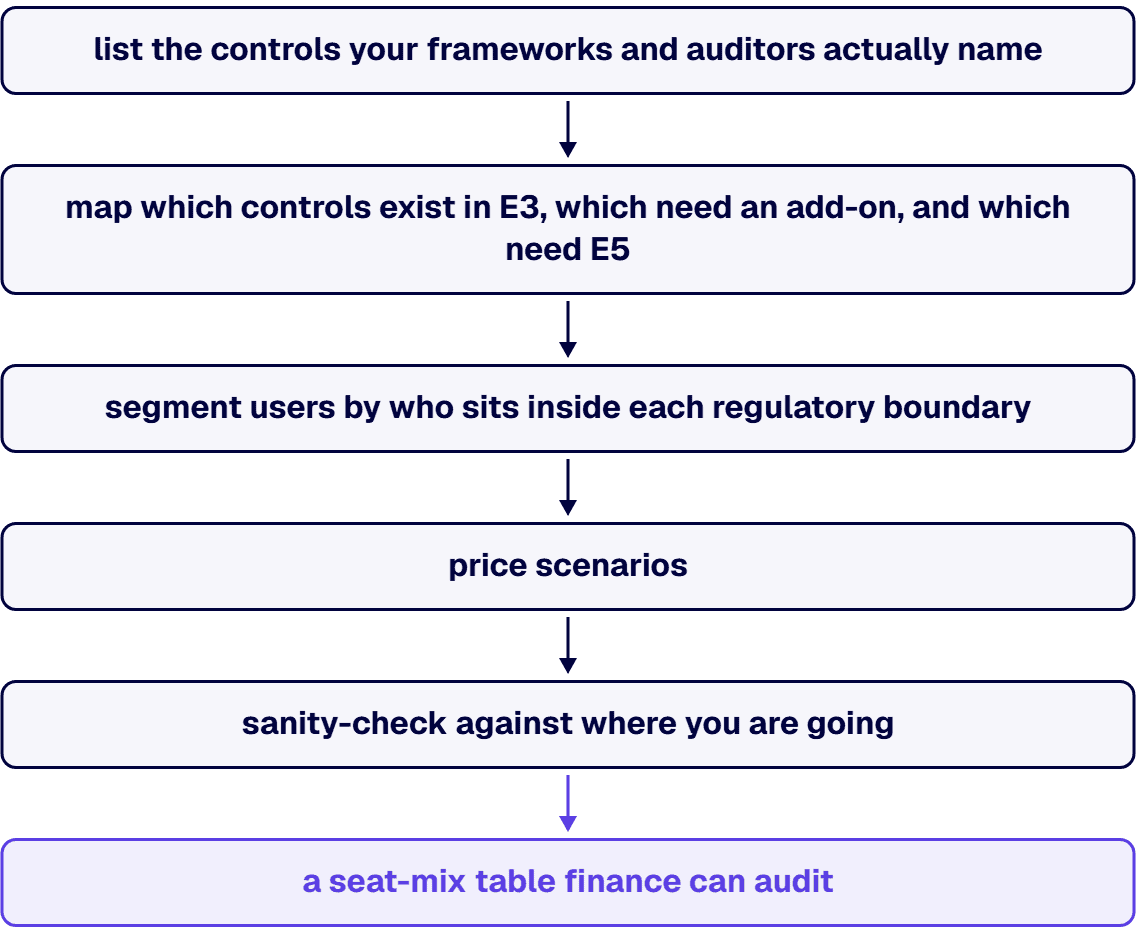
Run the decision in this order. First, list the controls your frameworks and auditors actually name, with citations. Second, map which controls exist in E3, which need an add-on, and which need E5. Third, segment users by who sits inside each regulatory boundary. Fourth, price three scenarios at your EA discount: all-E3 plus add-ons, mixed E3/E5, and all-E5. Fifth, sanity-check against where you are going: if Copilot at scale or heavy analytics is on the roadmap, the E5 families you will need anyway change the crossover point. The output is a seat-mix table finance can audit, which is a stronger artifact than any tier recommendation.
i3solutions is a Microsoft Solutions Partner, and i3solutions has completed more than 600 Microsoft platform implementations. Much of that work is for regulated organizations where the license tier is a compliance decision. Microsoft 365 compliance consulting for regulated enterprises ranges from $35,000 to $120,000 or more depending on the framework, the number of in-scope systems, and the current tenant configuration. An i3solutions Microsoft 365 Copilot readiness engagement typically runs $18,000 to $35,000. Both start from your controls inventory, not from a license sheet, and both produce the seat-mix and controls mapping described above. Our Microsoft 365 consulting services page describes the practice, and organizations consolidating tenants alongside a tier decision can see our Microsoft 365 migration services. If your clients already own these licenses, a complimentary Microsoft Modernization Plan shows where they can get more from tools they hold.
On Microsoft’s published US list as of July 2026, E5 is $60.00 per user per month against $39.00 for E3, a $21 monthly delta, roughly $252 per user per year before Enterprise Agreement discounting. At a thousand seats that is about a quarter million dollars a year, which is why the seat-mix question matters more than the tier question.
Four families: the advanced Defender security stack, the advanced Purview compliance capabilities such as endpoint DLP, Insider Risk Management, Information Barriers, and premium eDiscovery and audit, Power BI Pro analytics rights, and Teams Phone calling. Organizations that need two or more families usually find E5 competitive with buying them separately.
When you need a single E5 capability family, usually yes; the add-on route also lets you license only the users inside a regulatory boundary. When you need two or more families across a broad population, full E5 usually prices better and is simpler to operate. Model both at your actual EA discount before deciding, because add-on discounting varies.
When a control your framework or auditor names only exists at the E5 tier, endpoint DLP, Information Barriers, or extended audit retention being the common triggers, and the population needing it is broad enough that per-user add-ons stop being economical. The upgrade decision should come from a controls inventory, not from a renewal deadline.
No. Copilot is a $30.00 per user per month add-on that runs on qualifying base plans including E3 and E5. The practical connection is governance: Copilot inherits the data protection of the plan underneath it, so organizations often close E5-tier control gaps before broad Copilot rollout rather than because Copilot demands the license.
E7 is Microsoft’s $99.00 per user per month suite bundling E5, Copilot, agent capability, and the Entra identity suite. It changes the decision only for organizations already committed to E5 plus Copilot, where the incremental cost of the bundle is small. For everyone else the controls-driven E3 versus E5 analysis still comes first.
By Scot Johnson, Founder / CEO, i3solutions
Scot Johnson co-founded i3solutions 30 years ago with a focus on expert-led delivery, strategic advisory, and complex Microsoft-centered solutions for organizations where technology decisions carry operational, financial, and mission risk. His insights focus on the leadership, governance, integration, automation, data, and delivery decisions that determine whether technology investments become reliable business systems.
For a defense contractor running Microsoft 365, CMMC Level 2 compliance is three budgets, not one: implementation work on the tenant, which for a defined CUI boundary typically runs $45,000 to $75,000; the third-party certification assessment, which the Department of Defense estimates at roughly $105,000 to $118,000 over a full three-year cycle; and a licensing uplift if your contracts push you into GCC High, where reseller-reported pricing runs $65.20 per user per month for Microsoft 365 G3 as of July 1, 2026 against $39 for commercial E3. Which of the three dominates depends almost entirely on how tightly you scope the boundary where Controlled Unclassified Information actually lives.
This guide prices each of the three lines from public sources and from figures i3solutions has attested from its own delivery work, then walks the scope decisions that move the total by six figures in either direction, so the number you put in front of leadership survives its first hard question.
Most CMMC cost confusion comes from mixing three different purchases into one number. Implementation means configuring your Microsoft 365 environment to meet the 110 controls of NIST SP 800-171 that CMMC Level 2 assesses, closing gaps, and producing the System Security Plan and evidence an assessor will read. Assessment is what you pay a C3PAO, a certified third-party assessment organization, to conduct the Level 2 certification assessment your contracts require. Environment covers the recurring licensing delta if ITAR data, export-controlled technical data, or specific contract clauses require GCC High rather than commercial Microsoft 365.
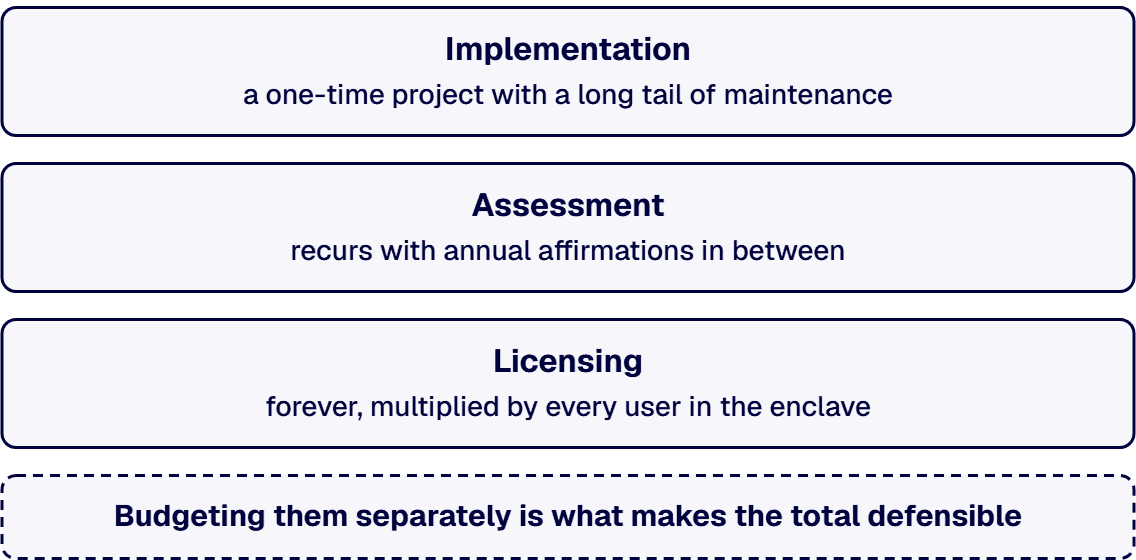
Each line has a different shape. Implementation is a one-time project with a long tail of maintenance. Assessment recurs on a three-year certification cycle with annual affirmations in between. Licensing is forever, multiplied by every user in the enclave. Budgeting them separately is what makes the total defensible.
The Department of Defense published its own cost estimates in the CMMC Program final rule (32 CFR Part 170), released in the Federal Register on October 15, 2024. For a small entity undergoing a Level 2 certification assessment, DoD estimates the full three-year cycle at about $104,670, broken down as follows:
DoD’s estimates for larger entities run slightly higher, which is where the commonly quoted $105,000 to $118,000 band for a Level 2 certification cycle comes from. These are government estimates, and actual C3PAO quotes vary with the size of your assessment scope, the number of sites, and how ready your evidence is when the assessor arrives. And they cover the assessment only: a contractor that shows up unprepared pays the implementation bill on top, often twice, once to remediate and once to re-assess.
Implementation is where a Microsoft 365 shop has a structural advantage: most of the technical controls CMMC Level 2 assesses can be met with capabilities already in the platform, provided they are configured, documented, and generating evidence. A CMMC Level 2 implementation for a defense contractor with a defined CUI boundary typically ranges from $45,000 to $75,000, covering the Compliance Manager baseline assessment, Conditional Access redesign, DLP policy build and testing, Purview Audit Premium configuration, and post-implementation documentation. That band is i3solutions delivery experience, not a market survey, and the qualifier carrying the weight is “defined CUI boundary.”
An undefined boundary is the single most expensive thing in CMMC. When nobody can say which systems, users, and data flows touch CUI, the compliance scope defaults to the whole tenant, and every control has to be implemented and evidenced everywhere. Contractors who define an enclave first, then implement controls inside it, routinely spend a fraction of what whole-tenant programs spend. Our teams maintain dedicated compliance specialists who understand CMMC, HIPAA, SOC 2, and financial services regulations within Microsoft environments, providing audit trail documentation and access control frameworks that reduce audit preparation time by 60%.
Whether the platform baseline itself is assessable also depends on which cloud you sit in. Our companion pages on whether Office 365 is CMMC compliant and whether Intune is CMMC compliant cover the platform-by-platform detail.
GCC High is a licensing decision with a recurring price, and Microsoft does not publish GCC High list prices the way it does commercial pricing; licenses are sold through Enterprise Agreements and authorized partners. Published 2026 reseller pricing, such as ECF Data’s GCC High price guide, puts Microsoft 365 G3 for GCC High at $65.20 per user per month and G5 at $97.50 as of July 1, 2026, per Secureframe, against Microsoft’s published commercial list of $39 for E3 and $60 for E5 as of July 2026. Run the arithmetic on those figures and the premium lands at roughly 60 to 70 percent over the commercial equivalents before compliance add-ons, a premium that pays for Azure Government infrastructure, US-persons support, and the data-handling commitments export-controlled work requires. Because these are reseller-published rather than Microsoft-published figures, confirm current numbers with an authorized partner before they go into a budget.
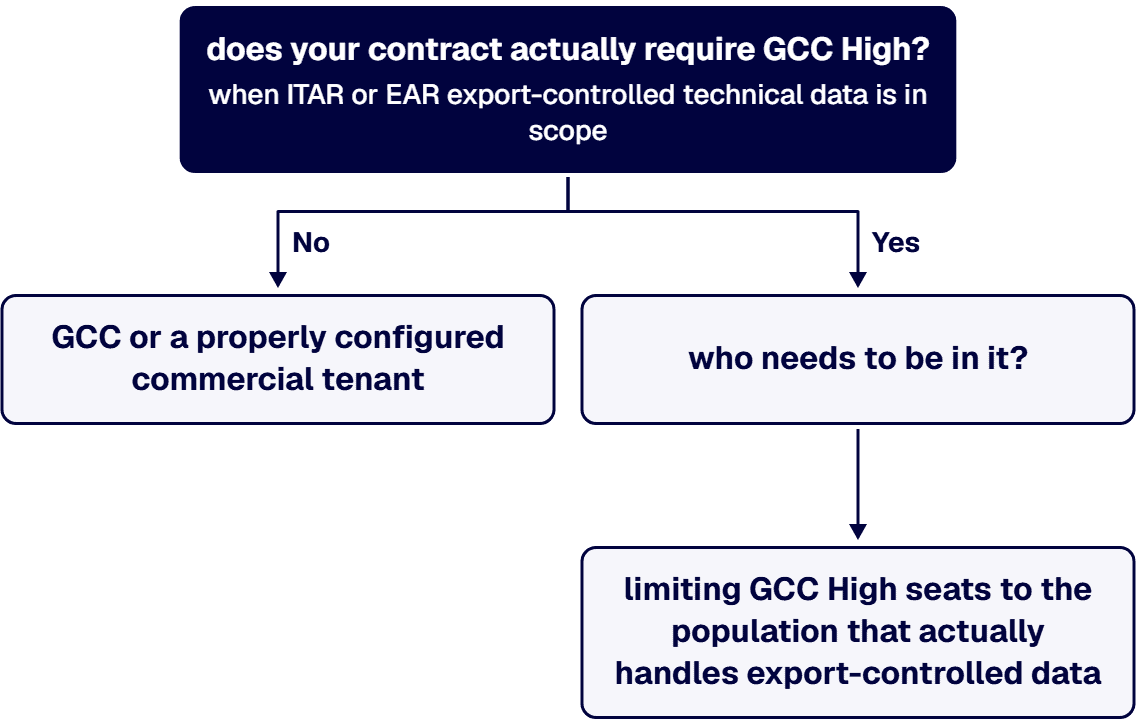
Two scope questions decide whether you pay it at all. First, does your contract actually require GCC High? ITAR and EAR technical data, DFARS 252.204-7012 paragraph flowdowns, and specific clause language drive the answer; CMMC Level 2 by itself often does not, and our GCC High versus GCC comparison walks the decision. Second, who needs to be in it? Licensing the whole company into GCC High when one program team handles export-controlled data is the most common avoidable cost we see. For the full licensing math, our dedicated GCC High cost guide prices the migration and the recurring delta in detail.
Across the three budget lines, the same handful of levers does most of the work:
i3solutions is a Microsoft Solutions Partner that has delivered Microsoft platform work for defense contractors and other regulated organizations since 1997. i3solutions runs migrations against named control families across CMMC, HIPAA, SOC 2, and NIST 800-171, producing artifacts auditors can review. i3solutions scopes CMMC work boundary-first: define where CUI lives, design the smallest compliant environment that satisfies the contract, implement the controls inside it, and hand over evidence that survives a C3PAO’s questions. For defense programs that also run Dynamics 365, our guide to Dynamics 365 implementation cost for defense contractors covers how the same compliance scaffolding prices on that platform, and our broader Microsoft 365 consulting services page describes the practice behind this work.
If you need a CMMC number leadership can approve, the fastest path is a short conversation about your contracts, your CUI boundary, and your current tenant. Schedule a 30-minute scoping call and bring your DFARS clauses.
The Department of Defense estimates a Level 2 certification assessment at roughly $105,000 to $118,000 across a three-year cycle, including preparation, the C3PAO assessment itself, reporting, and annual affirmations; its small-entity estimate totals about $104,670. Actual quotes vary with assessment scope, site count, and evidence readiness, so treat the DoD figures as a planning baseline rather than a ceiling.
With a defined CUI boundary, implementation typically lands in the $45,000 to $75,000 band, covering baseline assessment in Compliance Manager, Conditional Access redesign, DLP build and testing, Purview Audit Premium configuration, and the documentation an assessor needs. An undefined boundary is the main thing that pushes implementation past that band, because whole-tenant scope means every control must be implemented and evidenced everywhere.
Not automatically. GCC High becomes a requirement when ITAR or EAR export-controlled technical data is in scope, when specific DFARS 252.204-7012 obligations apply, or when contract language names it. CMMC Level 2 on its own can often be satisfied in GCC, which Microsoft names adequate for DFARS 252.204-7012, while Microsoft 365 Commercial is not on that list, so read the contract clauses before buying the environment.
Microsoft does not publish GCC High list prices; published reseller figures put G3 at $65.20 per user per month and G5 at $97.50 as of July 1, 2026, per Secureframe, versus Microsoft’s commercial pricing of $39 for E3 and $60 for E5. Those figures work out to a premium of roughly 60 to 70 percent over the commercial equivalents, which is why limiting GCC High seats to the population that actually handles export-controlled data matters so much.
Yes, and it is usually the single largest saving available. A documented enclave that contains CUI shrinks the implementation scope, the assessment scope a C3PAO bills against, and the number of users who need premium government-cloud licensing. The enclave has to be real, with controlled data flows in and out, or the assessor will widen the boundary for you. When the enclave extends into Azure, the platform foundation carries its own budget line, which our Azure landing zone cost guide prices.
By building the evidence trail as part of implementation instead of reconstructing it before the assessment. Dedicated compliance specialists map each configuration to the control it satisfies and maintain audit trail documentation as the work lands, which is how audit preparation time drops materially compared with programs that treat evidence as a pre-assessment scramble.
By Scot Johnson, Founder / CEO, i3solutions
Scot Johnson co-founded i3solutions 30 years ago with a focus on expert-led delivery, strategic advisory, and complex Microsoft-centered solutions for organizations where technology decisions carry operational, financial, and mission risk. His insights focus on the leadership, governance, integration, automation, data, and delivery decisions that determine whether technology investments become reliable business systems.
A defense contractor pays for a standard Dynamics 365 program plus a defined set of compliance deltas a commercial buyer never sees: a US government cloud environment (GCC High) with its own licensing channel and app availability limits, the scaffolding to satisfy CMMC, DFARS 252.204-7012, and where export-controlled data is involved ITAR, and a delivery team restricted to US persons. Together, these are why two otherwise identical Dynamics 365 implementations, one commercial and one for a DoD supply-chain contractor, do not carry the same number.
The base engineering is roughly the same; the premium sits in the environment, the compliance documentation, and who is allowed to touch the data. This page separates the structural deltas, which the contract requires, from the avoidable ones, which come from scoping GCC High wider than the mission needs.
Every defense-sector estimate has two layers. The bottom layer is the ordinary Dynamics 365 cost model: module footprint, integration surface, data condition, and the customization boundary, which our Dynamics 365 implementation cost guide covers in full. The top layer is the compliance overhead specific to the defense sector. Budget them separately: blending them hides which costs you can influence and which the regulation fixes for you.
Nothing on the bottom layer disappears in a defense engagement; a contractor still pays for configuration, integrations, and migration at ordinary rates. The deltas below are added on top, and they are where programs go over budget when they surface mid-project instead of being scoped up front.
This is an availability question before it is a pricing one. Not every Dynamics 365 app that exists commercially is offered in GCC High, so a design that assumes the full commercial catalog can require rework once the environment is fixed. A gap forces either a supported substitute or a custom build, and both cost money.
Per Microsoft’s Dynamics 365 US Government service description, the apps offered in the GCC High environment include Customer Service, Field Service, Finance, Sales, Supply Chain Management, Project Service Automation, and Remote Assist. Several commercial apps are not listed for GCC High, including Customer Voice, Dynamics 365 Guides, Contact Center, Human Resources, and Project Operations. If your target-state design leans on one of those, the compliance environment, not the budget, is what removes it, and you plan the substitute up front.
For moving existing systems into Dynamics 365 when the data has to stay in a US government cloud, the migration guide covers it under If the Data Must Stay in a US Government Cloud.
GCC High is a separate US government cloud, and Dynamics 365 in it is bought differently from commercial. Microsoft’s service description states that GCC High subscriptions are available through Volume Licensing only, not the self-serve Cloud Solution Provider channel, so there is no public checkout and pricing runs through a reseller or Microsoft account team. The environment also requires Microsoft Entra Government for identities rather than the public Entra ID used in GCC, and is designed to align with the DISA SRG Impact Level 4 framework.
The Microsoft 365 side of the GCC High premium, the per-user licensing uplift and the tenant migration, is a separate budget that our Microsoft 365 GCC High cost analysis covers in detail, and this page does not repeat it. For Dynamics 365 specifically, the environment premium shows up as quote-based Volume Licensing, the app substitutions above, and a longer provisioning path, not a single published multiplier.
The regime, not the vendor, decides how much compliance a program must carry, so read the contract clauses before the price list. DFARS clause 252.204-7012 requires the contractor to implement NIST SP 800-171, to use a cloud service provider meeting the FedRAMP Moderate baseline or equivalent, and to report cyber incidents to the DoD within 72 hours. CMMC 2.0 adds an assessed proof layer on top: its Level 2, which applies to Controlled Unclassified Information, requires all 110 security requirements of NIST SP 800-171 Revision 2, and Level 3 adds selected requirements from NIST SP 800-172.
GCC High enters at the top of that ladder. Microsoft’s Dynamics 365 US Government documentation states the GCC High deployment lets DoD contractor customers meet ITAR commitments and DFARS acquisition regulations, and it restricts Microsoft administrative access to customer content to screened US citizens. That US-persons access control is the structural reason GCC High is chosen where ITAR or EAR export-controlled data is involved, rather than an optional upgrade.
A defense program also carries documentation and control work a commercial one does not, and it is the delta most often missing from a first estimate. Audit trails, documented change control, segregation-of-duties enforcement, and evidence packages mapped to NIST SP 800-171 are engineering deliverables, not paperwork added at the end. Scoped up front they are predictable; discovered during an assessment they are expensive.
i3solutions builds this layer as part of delivery. Our teams maintain dedicated compliance specialists who understand CMMC, HIPAA, SOC 2, and financial services regulations within Microsoft environments, providing audit trail documentation and access control frameworks that reduce audit preparation time by 60 percent. A defined CUI boundary compliance implementation, covering the assessment, Conditional Access, DLP policy build and testing, audit configuration, and documentation, typically runs $45,000 to $75,000 in our experience, separate from the Dynamics 365 licensing and build.
Export-controlled data constrains not only the software but who may see it, and that reaches your implementation partner. Microsoft itself limits GCC High administrative access to customer content to US citizens who pass background screening, and the same logic applies to any consultant, developer, or support engineer who can reach CUI or ITAR data during delivery. An offshore or nearshore team touching that data is a compliance finding, not a cost saving, which removes the labor-arbitrage option commercial cost models tend to assume.
i3solutions provides 100 percent US-based senior-level delivery teams, so the US-persons requirement is the standing model rather than a premium bolted on for defense work. Organizations that need to add onshore capability to an in-flight program can hire Dynamics 365 developers directly, which closes a staffing gap without breaking the data-handling boundary.
The single most useful question in a defense Dynamics 365 budget is which deltas the contract actually forces. Structural costs follow directly from the clauses: where ITAR or EAR data, DFARS 7012 paragraphs c through g, CUI-Specified categories, or a mandating contract clause apply, the GCC High environment, US-persons delivery, and the NIST SP 800-171 control scaffolding are fixed. Avoidable costs come from scoping the boundary wider than the mission, such as putting a whole organization in GCC High when only a subset handles export-controlled data, or assuming GCC High when CMMC Level 2 can be met in GCC or a properly configured commercial tenant. The discipline that controls the number is the one that controls any Dynamics 365 estimate: fix the compliance boundary before anyone quotes it.
Not always. GCC High becomes a requirement when the program handles ITAR or EAR export-controlled technical data, when DFARS 252.204-7012 paragraphs c through g apply, or when a contract clause mandates it. CMMC Level 2 on its own can often be met in GCC or a properly configured commercial tenant, so the contract language, not the price list, decides the environment.
Per Microsoft’s Dynamics 365 US Government service description, several commercial apps are not offered in the GCC High environment, including Customer Voice, Dynamics 365 Guides, Contact Center, Human Resources, and Project Operations. Finance, Supply Chain Management, Sales, Customer Service, Field Service, Project Service Automation, and Remote Assist are listed for GCC High. Confirm the current list before design; a missing app forces a supported substitute or a custom build.
There is no single published multiplier, because GCC High Dynamics 365 is sold through Volume Licensing rather than the public self-serve channel, so pricing is quote-based through a reseller or Microsoft account team. The real premium is the sum of the environment, the app substitutions, the US-persons delivery model, and the compliance scaffolding, so an accurate number comes from scoping rather than a list price.
Not where they can reach export-controlled or Controlled Unclassified Information. Microsoft restricts GCC High administrative access to customer content to screened US citizens, and the same US-persons constraint applies to your delivery partner. Offshore access to that data is a compliance finding rather than a saving, which is why cleared, US-based delivery is treated as a structural cost in defense engagements.
Structural costs are the ones the contract forces: the GCC High environment, US-persons delivery, and the NIST SP 800-171 control scaffolding when ITAR, DFARS 7012, or a CMMC level applies. Avoidable costs come from scoping the compliance boundary wider than the mission, such as placing all users in GCC High when only a subset handles export-controlled data. Fixing the boundary before the quote is what separates the two.
By Justin Bowen, Sr. Vice President, Delivery Services, i3solutions. Justin has spent more than 15 years at i3solutions and more than 25 years leading project, program, and product delivery across complex technology environments.
Hire an identity engineering firm that will run the move as a staged coexistence program, not a cutover date. The right partner inventories every application, policy, and provisioning flow before touching anything, keeps Okta and Microsoft Entra ID authenticating side by side while applications move in waves, translates your Okta sign-on policies into Conditional Access with an explicit parity map, plans MFA re-enrollment as a managed program, and keeps a tested rollback path open for every wave. If a consultant proposes a single migration weekend, keep looking. i3solutions regularly delivers Okta to Microsoft Entra ID migrations for enterprises. Our engineers are senior, US based, and work from Microsoft’s documented migration guidance rather than improvised scripts, which is what keeps users signing in on Monday morning.
This page covers what to require from any partner you evaluate, the mechanics that prevent broken access, the licensing implications, and how we deliver these programs.
The failure mode in identity migration is always the same: something authenticated yesterday and does not authenticate today. Put these six items in your RFP and require specific answers, not adjectives.

These programs succeed in phases, and the order matters.
1. Discovery and dependency mapping. Pull the full application list from Okta, classify each app by protocol, identify which have Entra gallery equivalents and which need custom app registrations, and map every provisioning flow and group rule. This phase also surfaces the apps nobody remembered, which are precisely the ones that break.
2. Directory and authentication foundation. If Okta currently federates your Microsoft 365 domain, the first move is usually taking authentication for that domain back: Microsoft Entra Connect with password hash synchronization in place, then staged rollout to shift pilot groups to managed authentication while the domain remains federated for everyone else. Microsoft documents this path step by step for Okta-federated tenants, including the pilot group approach.
3. Application cutover in waves. SAML and OIDC applications are re-pointed to Entra ID one at a time: gallery app or app registration on the Entra side, metadata exchanged, a test cohort verified, then the general population. SCIM provisioning is reconnected so joiner, mover, and leaver events keep flowing. Waves run from low-risk apps to the business-critical core, so process problems surface where they are cheap.
4. Policy translation. Each Okta sign-on policy is rebuilt as Conditional Access: network zones become named locations, device trust becomes device compliance signals from Intune, and session policies are mapped to sign-in frequency controls. The honest version of this work produces a decision log, because some constructs have no direct equivalent and someone accountable has to choose the replacement behavior.
5. MFA re-enrollment. Registration campaigns run ahead of each user wave, so no one hits an MFA prompt they cannot satisfy. Done well, this phase is boring, which is the goal.
6. Validation and decommission. Sign-in logs are checked per wave against the pre-migration baseline, and Okta comes down only after a defined quiet period with zero unresolved authentication failures. Governance work such as access reviews and entitlement management starts here, once identities are consolidated. Our Microsoft Entra ID governance services pick up exactly at this point.
When we are brought in to stabilize a migration that went sideways, the cause is almost always one of five things: a big-bang cutover with no coexistence period, sign-on policies copied by name instead of translated by behavior, MFA factors that did not transfer and were never re-registered, SWA and password-vaulted apps that were never inventoried, or no break-glass account when a Conditional Access policy locked out the administrators who could have fixed it. All five are preventable in the first two phases, which is why we refuse to compress discovery.
Entra ID licensing is public and worth pricing before you commit. As of Microsoft’s current published pricing, Entra ID P1 lists at $7.00 per user per month and Entra ID P2 at $10.00 per user per month, both paid yearly. P1 carries Conditional Access, which the policy translation work depends on. P2 adds risk-based Conditional Access through Identity Protection and Privileged Identity Management for admin roles. Microsoft 365 E3 includes P1 and E5 includes P2, so many enterprises already own the entitlement they need and the migration consolidates spend rather than adding it. Your partner should model this against your actual agreement, not a list-price table.
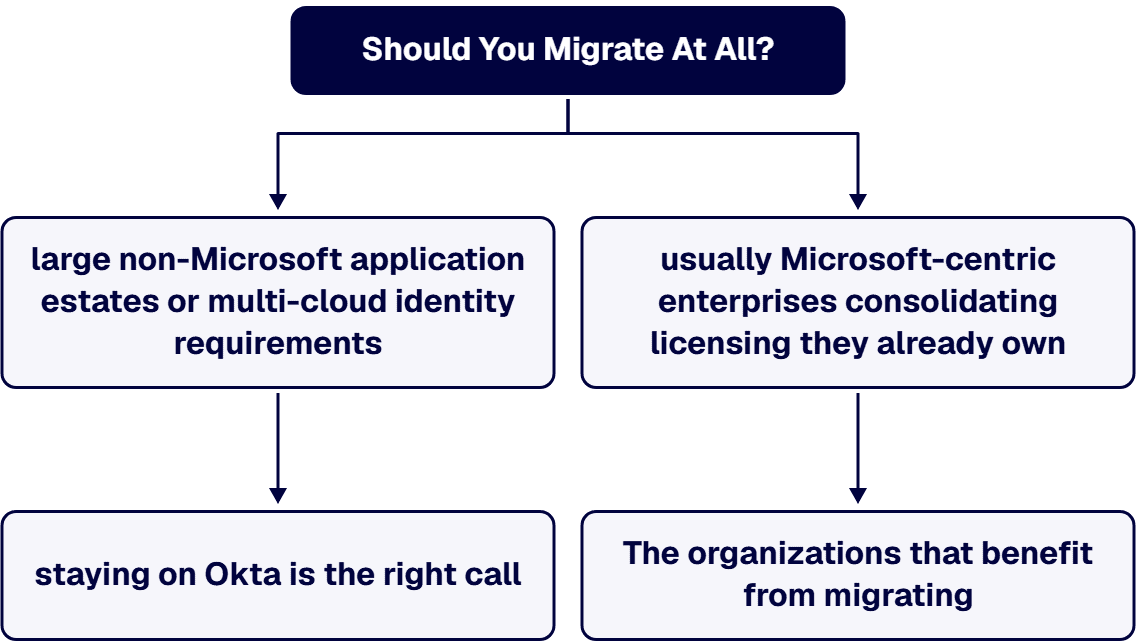
An honest answer first: not every organization should leave Okta. For some environments, particularly those with large non-Microsoft application estates or multi-cloud identity requirements, staying on Okta is the right call. We say that with a straight face because we implement and integrate Okta for clients where it is the right platform. The organizations that benefit from migrating are usually Microsoft-centric enterprises consolidating licensing they already own, unifying policy under Conditional Access, and reducing the number of identity control planes an auditor has to walk through. If you are still weighing the platforms themselves, our comparison of Okta vs Entra ID covers the decision in depth. Hire a partner who can argue both sides. A firm that only ever recommends migration is selling a project, not advice.
We deliver Okta to Entra ID migrations for enterprises in regulated and complex sectors, including aerospace and defense manufacturing, financial services, and healthcare. The work is led by senior US-based identity engineers, follows the staged coexistence model described above, and produces the artifacts your board and auditors will ask for: the application inventory, the Conditional Access parity map with its decision log, the wave plan with rollback procedures, and the validation evidence for each cutover. We run discovery first, we do not compress it, and we leave your team with documentation rather than dependency on us. Because we work across the Microsoft stack, the same team carries the downstream work: Intune device compliance signals for Conditional Access, and identity governance once the migration lands.
If you are evaluating partners, bring us your application count and your current Okta policy set. Schedule a Microsoft Entra ID Migration Consultation and we will walk through the wave plan we would propose and where the risk actually sits in your environment.
It scales with the number of federated applications and the complexity of your sign-on policies, not your headcount. Planning and discovery typically run a few weeks; application cutover then proceeds in waves, each validated before the next begins. A large estate with custom SAML apps, SWA apps, and intricate policy logic takes longer, and compressing it is how access breaks.
Not if the program is run on a coexistence model. Okta and Entra ID authenticate in parallel while applications move in waves, pilot cohorts validate each change before it reaches the general population, and every wave has a rehearsed rollback. The users most at risk are those with unregistered MFA factors, which is why re-enrollment campaigns run ahead of each wave rather than after it.
Yes. Okta Verify enrollments do not carry over. Users register Microsoft Authenticator, FIDO2 security keys, or Windows Hello for Business through Entra’s registration process, and temporary access passes cover users who hit trouble. Treat this as a managed campaign with communications and helpdesk readiness, not a mass email.
Conditional Access, which replaces your Okta sign-on policies, requires Entra ID P1. Risk-based policies and Privileged Identity Management require P2. Current Microsoft list pricing is $7.00 per user per month for P1 and $10.00 for P2, paid yearly, and Microsoft 365 E3 and E5 already include P1 and P2 respectively. Check your existing agreement before buying anything new.
Yes. The coexistence architecture that makes the migration safe also supports a deliberate hybrid end state, where a subset of applications stays on Okta long term. Most enterprises consolidate fully to reduce license spend and audit surface, but the wave model does not force that outcome. A good partner scopes the end state to your application estate, not to their statement of work.
Yes. Microsoft’s tutorial for moving an Office 365 tenant federated to Okta over to Entra ID authentication describes a staged migration in which you can test reverse federation access to the Okta applications that remain. Moved users do not sign in to two systems along the way: Microsoft says users targeted for staged rollout are not redirected to the federated sign-in page and are asked to sign in on the Microsoft Entra sign-in page instead. The one exception Microsoft documents is the move itself: a user newly added to staged rollout must complete one additional interactive sign-in with the existing federated method, and Microsoft’s recommended workaround is a Temporary Access Pass for that first sign-in. Users who have moved to managed authentication reach those applications through a Microsoft Entra application registered to link to the Okta home page. In Okta, Microsoft Entra ID is added as an identity provider, and Okta routing rules send those users to Entra ID to sign in. Okta’s documentation says the sign-in is evaluated against the rule’s criteria and the user is redirected to the sign-in screen for the chosen identity provider, so for the applications left on Okta, the sign-in those users see is the Entra ID one. Okta’s developer documentation calls this inbound federation: Okta sits between the application and the identity provider that authenticates the user. By default the setup matches each user’s user principal name in Okta to the one in Entra ID, so if the two differ, pick an attribute both directories share. Once your organization is comfortable with the managed authentication experience, Microsoft’s guidance is to defederate the domain from Okta. If you are still deciding which platform to keep, our comparison of Okta vs Entra ID covers that choice.
Microsoft’s documented path runs as four separate migrations, each with its own tutorial: federation, sync provisioning, applications, and sign-on policies. The applications tutorial starts by pulling an inventory from the Okta API. Scripts and utilities can speed the inventory and bulk application setup, but the policy translation into Conditional Access is a design decision no tool makes for you. Judge any migration tool by whether it produces a per-application inventory and a policy parity map you can review before cutover, not by a marketing claim of full automation. i3solutions has done hundreds of Okta to Entra ID conversions.
Recover super admin access first, because both paths start there. Okta’s help page on the self-service upgrade to Identity Engine states: “You must be a super admin to view and manage this process.” Okta’s developer guide says the upgrade hub lists action items that “you must complete before you can schedule your upgrade to Identity Engine.” The same hub “also identifies any customizations and testing that you need to do before your upgrade.” That review of the tenant’s applications, integrations and sign-on policies is largely the same inventory work a move to Entra ID begins with. If Entra ID is where you expect to land within your planning window, do that work once and point it at the migration. If Okta remains the better fit, the upgrade is a sound answer, and the question of whether to migrate at all, covered above, applies.
By Justin Bowen, Sr. Vice President, Delivery Services, i3solutions. Justin has spent more than 15 years at i3solutions and more than 25 years leading project, program, and product delivery across complex technology environments.
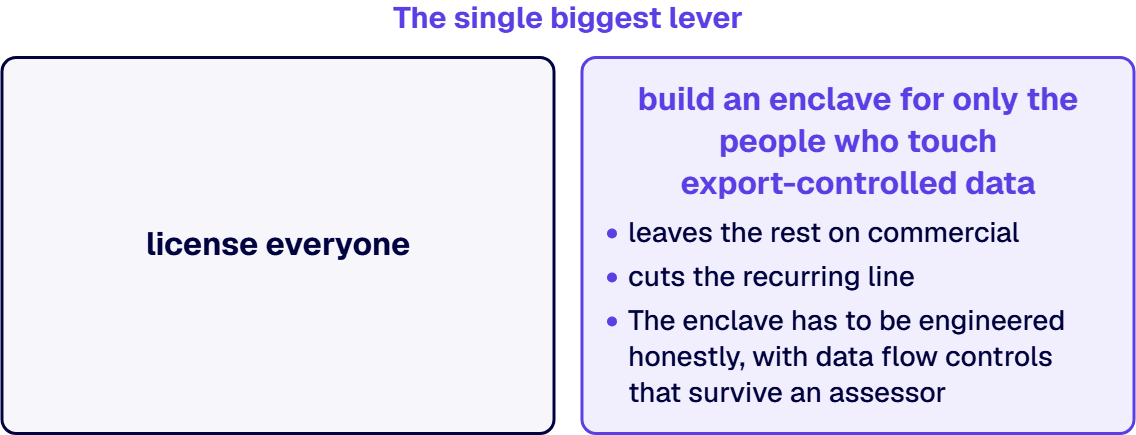
For a US defense contractor, Microsoft 365 GCC High typically runs $35.80 to $97.50 per user per month for the mainstream license tiers, a premium reseller sources place at roughly 30 to 70 percent over commercial Microsoft 365, plus a one-time migration project of about $15,000 to $25,000 for a 25-user organization, $40,000 to $80,000 at 50 to 100 users, and $90,000 to $120,000 or more at 250 or more users. Microsoft does not publish a public per-user list price for GCC High. The per-user figures above are reseller list prices published by Secureframe as of July 1, 2026 (Business Premium $35.80, G3 $65.20, G5 $97.50, F3 frontline $13.20), and the migration bands are cmmccost.com’s published estimates. Four things move the number: seat count, license mix, how much mailbox and SharePoint content you migrate, and whether you license everyone or build an enclave for only the people who touch export-controlled data.
That is the budget answer. The rest of this page shows where each figure comes from, and, before any of that, whether you actually need GCC High at all. Most contractors asking do not, and that is the most expensive mistake on this page.
Most defense contractors do not need GCC High to pass a CMMC Level 2 assessment. CMMC itself never names an environment. What forces GCC High is narrower: export-controlled data under ITAR or EAR, DFARS 252.204-7012 with paragraphs c through g in scope (incident reporting into DoD systems), a DISA SRG Impact Level 4 or higher requirement, CUI-Specified categories, or a contract clause or prime flow-down that names the environment outright. If none of those apply, GCC or even commercial Microsoft 365 with a compliant configuration is usually the defensible choice, at a fraction of the cost. We walk through that decision in detail in our guide to Microsoft 365 GCC vs GCC High.
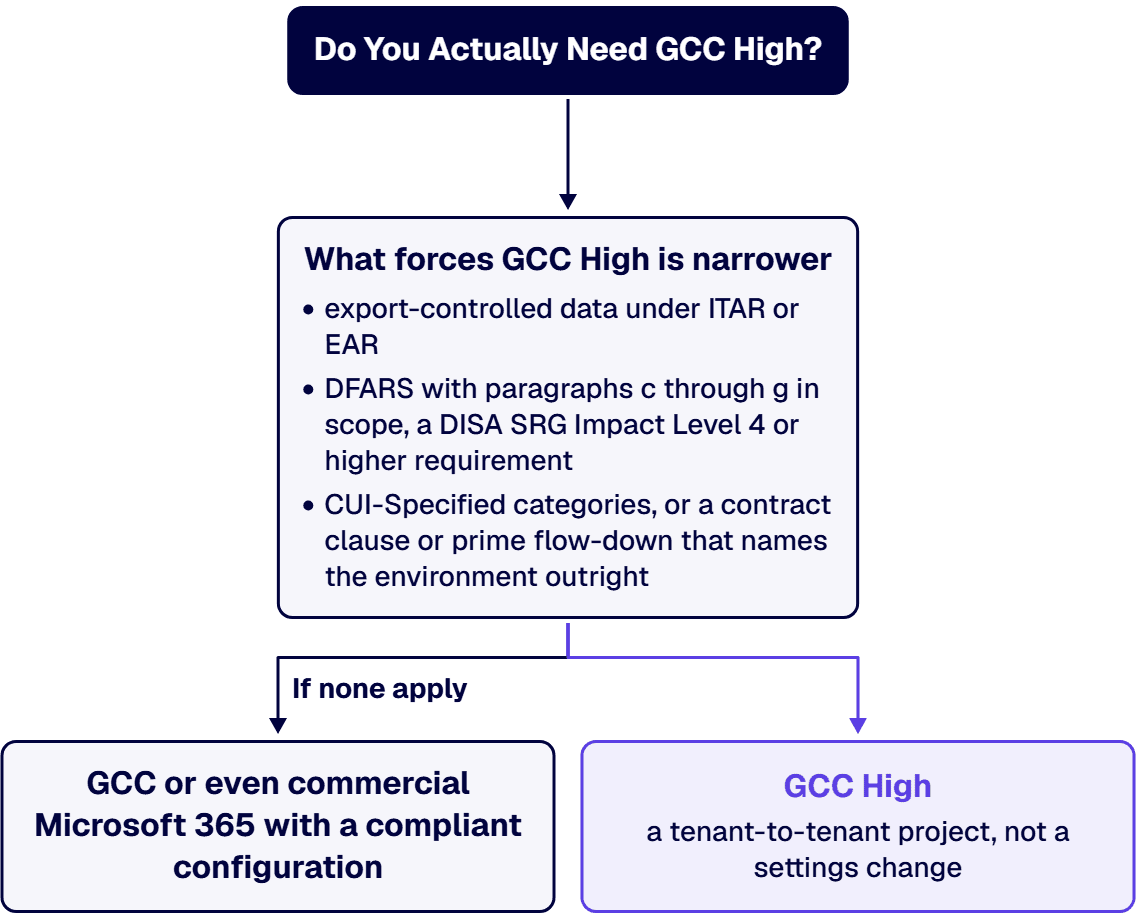
Answer that question first, in writing, with the contract clauses in front of you. Every dollar figure below assumes the answer came back yes.
You cannot buy GCC High from a public price page. Microsoft sells it only through AOS-G authorized partners and government CSP resellers, after Microsoft validates your eligibility. That is why the licensing numbers in circulation are reseller-published rather than Microsoft-published. The two most complete public sources agree closely:
| License | Secureframe reseller list (July 1, 2026) | cmmccost.com published estimate | Who it fits |
|---|---|---|---|
| Microsoft 365 F3 (frontline) | $13.20 per user per month | $12 to $15 | Shop floor and mobile-only workers |
| Business Premium for GCC High | $35.80 | n/a (newer SKU) | Contractors under 300 seats |
| Microsoft 365 G3 | $65.20 | $32 to $38 (E3 equivalent) | Standard knowledge workers |
| Microsoft 365 G5 | $97.50 | $55 to $60 (E5 equivalent) | Full security and compliance stack |
| Defender + Purview add-on | $24.40 | $15 to $22 (EMS E5 range) | G3 or Business Premium tenants closing security gaps |
Three notes a budget owner should carry into the meeting. First, these prices already reflect Microsoft’s July 1, 2026 price increase; for scale, Secureframe’s same dated table lists the commercial anchors at $39 for E3 and $60 for E5, which is what makes the uplift estimates credible (Secureframe’s guide puts GCC High at roughly 30 percent over GCC; E-N Computers, an AOS-G partner affiliate, puts the all-in premium at 40 to 70 percent in its published GCC High cost guide). Second, Business Premium for GCC High only became available on November 3, 2025, per Microsoft’s announcement, and it materially changes the math for sub-300-seat contractors who previously had no option below G3. Third, your actual price comes from your AOS-G partner and varies with commitment term and seat count; treat every figure here as a planning number.
GCC High migration is a tenant-to-tenant project, not a settings change. Microsoft provisions a fresh tenant (up to 30 days under Microsoft’s SLA, typically 2 to 4 weeks), and everything moves: identities, mailboxes, SharePoint, OneDrive, Teams. There is no native Microsoft tool for this path, so migrations run on third-party platforms such as BitTitan, AvePoint, or Quest, plus partner labor. That labor is where the money goes. The most granular published estimates come from cmmccost.com:
| Organization size | Total migration project | Typical duration |
|---|---|---|
| Small (around 25 users) | $15,000 to $25,000 | 8 to 16 weeks end to end |
| Mid (50 to 100 users) | $40,000 to $80,000 | 8 to 16 weeks |
| Large (250+ users) | $90,000 to $120,000+ | 6 to 9 months |
E-N Computers’ published worked example lands nearby from a different direction: $35,000 to $55,000 for migration and implementation at a 20 to 25 user organization simultaneously standing up its compliance program. The spread between the two sources is real and instructive. Migration cost tracks data volume and complexity more than headcount. A 25-user machine shop with tidy mailboxes sits at the bottom of the band; the same headcount with fifteen years of SharePoint customizations, workflow automations, and a full CAD vault does not. SharePoint is reliably the line item that surprises people, because customizations, integrations, and permission structures have to be rebuilt and revalidated rather than copied; we cover why in our note on GCC High’s impact on SharePoint.
The premium is not markup for a badge. GCC High runs in Azure Government datacenters on infrastructure screened to a different standard: support is restricted to US persons on US soil, the service boundary is built to meet DFARS 7012 paragraphs c through g and FedRAMP High requirements, and the sales channel itself (AOS-G validation, partner-only quoting) adds process. You are also paying, indirectly, for what the environment does not have. Some commercial features arrive late or never, and the migration tooling gap noted above is a structural cost, not a vendor inefficiency. When a CFO asks why the license line went up 40 percent, the defensible answer is that the contract’s data handling clauses priced it, not IT.
Simple arithmetic on the published figures gives a board-ready planning range. A 100-user contractor licensing everyone on G3 at Secureframe’s $65.20 list is $78,240 per year in licensing, plus a one-time migration in cmmccost.com’s $40,000 to $80,000 mid-band: call it $120,000 to $160,000 in year one, settling to about $80,000 per year thereafter, before any enclave savings. The same organization scoping a 30-user enclave cuts the recurring line by more than half. Those are planning anchors from published sources, not quotes; your AOS-G partner’s proposal and your own data inventory set the real number.
In our engagements with aerospace and defense manufacturers, the variance between an estimate and the final invoice almost always traces to scope discovered late: an uninventoried SharePoint customization, a CUI data flow nobody had mapped, a prime’s flow-down read for the first time during the project. The cost of the migration is set months before the migration, by how rigorously the environment decision and the data inventory were done. That readiness work is a fixed, bounded exercise, and it is where we start; see our CMMC technology readiness services for how we scope it.
We manage GCC High migrations end-to-end: from eligibility validation and licensing coordination with your AOS-G supplier through identity architecture, data migration, security baseline configuration, and post-migration governance. i3solutions plans and runs these migrations for regulated defense organizations, structuring each phase around the compliance evidence assessors expect.
No. GCC High is sold only through AOS-G authorized partners and government CSP resellers, after Microsoft validates your organization’s eligibility. There is no public price page and no self-serve checkout. Tenant provisioning after validation can take up to 30 days under Microsoft’s SLA.
Published estimates put the uplift between roughly 30 percent (Secureframe’s pricing guide, versus GCC) and 40 to 70 percent all-in (E-N Computers’ cost guide, versus commercial). Against the commercial anchors in Secureframe’s dated table ($39 for E3, $60 for E5), the reseller-published $65.20 for G3 and $97.50 for G5 land inside that range.
Usually not. CMMC Level 2 can be met in GCC; Microsoft 365 Commercial is not among the Office 365 services Microsoft names adequate for DFARS. GCC High becomes mandatory when ITAR or EAR data, DFARS 7012 paragraphs c through g, Impact Level 4, CUI-Specified categories, or an explicit contract clause is in play. Read the contract before the price list.
Published estimates run 8 to 16 weeks end to end for organizations under 100 users and 6 to 9 months for larger ones, including 2 to 4 weeks of tenant provisioning. Heavy SharePoint customization or large mail archives push toward the top of the band.
Yes, materially, when only a minority of users handle export-controlled data. Licensing 30 of 200 users in GCC High instead of all 200 can cut the recurring bill by more than half. The saving is only real if the enclave boundary is engineered and documented well enough to survive an assessment; a leaky enclave buys the premium and the finding.
Michael Branson, Founder / COO, i3solutions. LinkedIn
Michael Branson co-founded i3solutions 30 years ago and brings executive, operational, and technical perspective to organizations working in secure and compliance-bound environments, including CMMC-scoped and defense supply-chain programs.
Short answer. No. Office 365 is not CMMC compliant, and it cannot be, because CMMC certifies organizations, not products. But the useful answer has two layers, and almost every article collapses them into one. Layer one is the SKU. Office 365 is not Microsoft 365. Microsoft’s own plan table reads “Microsoft 365 E3 (includes Office 365 E3)”: Microsoft 365 is the superset. Office 365 is the productivity layer, Exchange Online, SharePoint Online, OneDrive, Teams and the Office apps. The endpoint and identity layer that carries a large share of the 110 CMMC Level 2 requirements, Microsoft Intune, Microsoft Entra ID P1 or P2 for Conditional Access, and Microsoft Defender for Endpoint, is what the Microsoft 365 bundles add on top. If your tenant is licensed Office 365 E3 or E5 rather than Microsoft 365 E3 or E5, entire requirement families have no enforcement point in your tenant at all, and moving that same Office 365 SKU to GCC High does not create one. Layer two is the environment, and the binding rule there is not CMMC. It is DFARS 252.204-7012.
This page is written for the person who has to defend the answer to a C3PAO assessor. Every requirement number, licensing rule, and clause citation below is sourced to Microsoft’s published service documentation, to the CMMC rule at 32 CFR Part 170, or to the DFARS clause itself.
CMMC assesses an Organization Seeking Assessment, not software. A vendor can tell you its product is FedRAMP authorized, or that it runs at a given DoD Impact Level, and that can be true and verifiable. None of it makes the product “CMMC compliant,” and none of it transfers to you.
Microsoft says this itself: “CMMC compliance depends on customer configuration, implementation, and operational controls, as well as the use of qualified assessors and partners. Microsoft cloud services provide capabilities that can help support these requirements.” Note the verb. Microsoft services support requirements. They do not satisfy them.
So the question worth answering is narrower and more useful: which of the 110 CMMC Level 2 requirements can Office 365 actually carry, which can it never carry, and what do I have to buy or build for the rest?
The CMMC Program rule at 32 CFR Part 170 took effect on December 16, 2024. CMMC Level 2 is the 110 security requirements of NIST SP 800-171 Revision 2, incorporated by reference; 32 CFR 170.14 states that “the security requirements in CMMC Level 2 are identical to the requirements in NIST SP 800-171 R2.” NIST organizes them into fourteen families. Once the license question is settled, the directory that authenticates CUI users is the next call, covered in Active Directory or Entra ID for CMMC Level 2.
Two traps, both common in the Office 365 content that currently ranks:
Scoring: the rule conditions a POA&M on the assessment score divided by the total number of Level 2 requirements being greater than or equal to 0.8, which yields a Conditional CMMC Status, with all NOT MET requirements closed and verified by a POA&M closeout assessment within 180 days. Six requirements are ineligible for a POA&M and must be MET at assessment: AC.L2-3.1.20, AC.L2-3.1.22, CA.L2-3.12.4, PE.L2-3.10.3, PE.L2-3.10.4, and PE.L2-3.10.5.
This is the layer nobody covers, and it decides the answer before the environment ever comes up. Microsoft’s plan-options table is unambiguous. It lists the enterprise family as “Microsoft 365 E3 (includes Office 365 E3)” and “Microsoft 365 E5 (includes Office 365 E5).” Microsoft 365 contains Office 365. They are not synonyms, and the difference is not cosmetic.
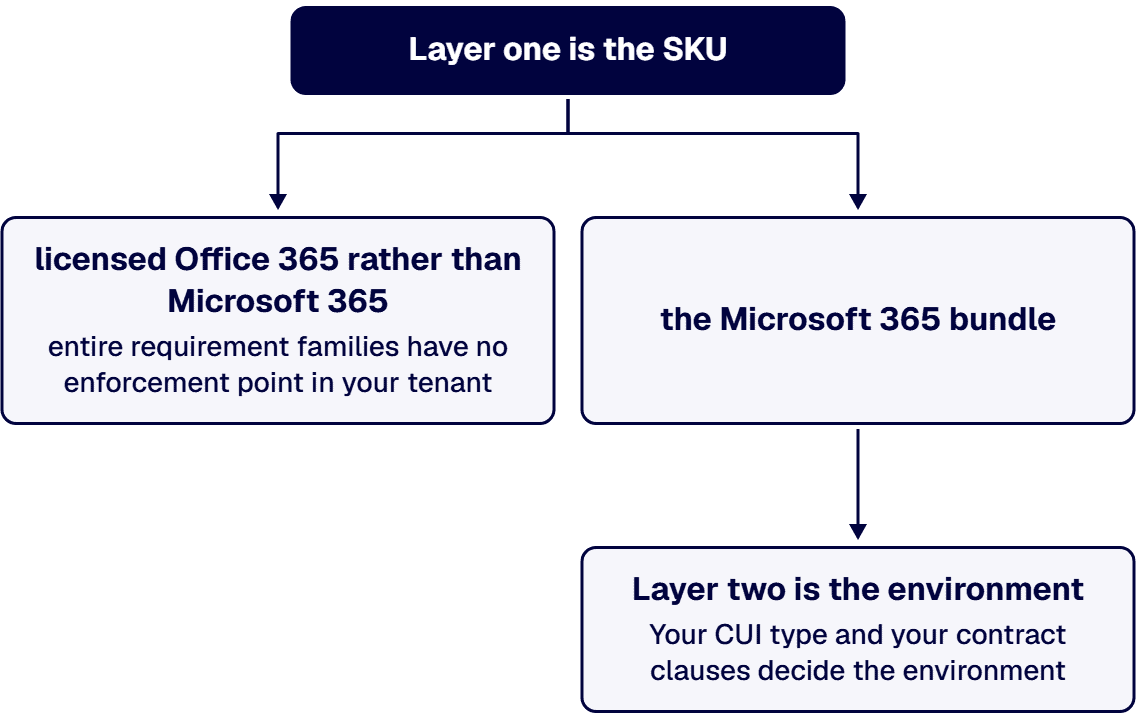
The Office 365 service family is the productivity and collaboration layer:
Microsoft’s own Intune licensing documentation makes the same point from the other direction: organizations get Intune “as part of a Microsoft 365 bundle (such as Microsoft 365 E3, E5, or E7).” It names Microsoft 365 bundles. It does not name Office 365 plans.
The practical consequences are blunt:
Check your actual SKU before you do anything else. “We have Office 365 E5, so we have Microsoft’s security stack” is one of the most expensive sentences in this market, and it is wrong. And note the trap that follows from it: buying Office 365 GCC High rather than Microsoft 365 GCC High moves the same incomplete SKU into a government cloud. The environment changes. The missing control planes do not appear.
The clause that binds you is DFARS 252.204-7012, and it is contractual, not technical. Three paragraphs do the work:
Read those last two again, because no SKU discharges them. The 72-hour report and the 90-day media preservation are obligations on you. There is no Office 365 licence that files a DIBNet report or holds forensic images for you. This is the part buyers consistently under-scope, and it is why the evidence burden, not the configuration, usually drives the schedule.
The environment decision itself, Commercial versus GCC versus GCC High, turns on your CUI type and your contract clauses, not on CMMC directly. We treat it as its own decision, and it should be settled before any of the design work below: see Microsoft 365 GCC vs GCC High and Does CMMC require GCC High?
Office 365 is not useless here. It is the enforcement point for a real, if narrow, set of requirements, all of them about content rather than endpoints. The requirement text is NIST’s. The enforcement point and evidence columns are i3solutions’ implementation mapping, not a Microsoft claim of coverage.
Look at the shape of that table. Office 365 covers content: what is stored, what is shared, what is logged, what is encrypted. It covers almost nothing about the machine the CUI is opened on. In a CMMC Level 2 assessment, the machine is at least half the conversation.
There are only three honest ways to hold CUI in a Microsoft estate. Pick deliberately.
Be clear-eyed about what option three is. The overlay pattern works by routing CUI around Office 365, not through it. It shrinks your assessment boundary by taking Office 365 out of the CUI path. That can be a legitimate and cost-effective architecture, and for a small contractor with narrow CUI flows it often is. But notice what it concedes: a vendor selling you an enclave because “Microsoft 365 Commercial does not meet CMMC or DFARS requirements” has answered the question in this page’s title, and answered it no. Their own architecture is the proof. Buy it with your eyes open, and understand that your users now live in two systems, that the boundary between them is the thing an assessor will probe hardest, and that every CUI flow which leaks back into Office 365 is a finding.
An assessor is not impressed that you own Office 365. Per requirement, they want the policy, the scope, and the proof it is in effect:
Microsoft Purview Compliance Manager ships a CMMC v2 Level 2 assessment template; use it as the scaffold for improvement actions and the evidence register, but do not mistake its score for an assessment result. It measures the actions you have recorded, not the ones a C3PAO will accept.
The failure mode i3solutions sees most often on the Office 365 side is a CUI boundary that is drawn on a slide but not in the tenant: a SharePoint site marked as the CUI enclave, with inheritance still intact from a parent site, external sharing still enabled at the tenant level, and a Teams channel quietly writing to a different site. That is one finding on the diagram and three in the tenant.
i3solutions plans and runs governed Microsoft 365 and Azure work for compliance-bound organizations, and maintains dedicated compliance specialists who understand CMMC, HIPAA, SOC 2, and financial services regulations within Microsoft environments, providing audit trail documentation and access control frameworks that reduce audit preparation time by 60 percent.
Two patterns from our delivery work shape how we scope this. First, under DFARS 252.204-7012 cybersecurity incident reporting, the artifact set expands roughly 30 percent versus commercial scope, so the evidence burden, not the configuration, drives the schedule. Second, regulated-industry SharePoint modernization carries roughly 25 to 35 percent cost overhead versus commercial work for equivalent scope, driven by control mappings, audit-trail discipline, and zero-downtime cutover patterns. Anyone quoting you a commercial SharePoint number for a CUI boundary has not scoped the compliance work.
We do this at scale. i3solutions runs a governed Power Platform for a federal defense agency supporting roughly 10,000 personnel across about 180 locations, which works because it is governed, not despite it, and has unified identity and automated provisioning across systems for 125,000 users by treating the interfaces as owned, governed contracts.
On cost: a CMMC Level 2 implementation for a defense contractor with a defined CUI boundary typically ranges from $45,000 to $75,000, covering the Compliance Manager baseline assessment, Conditional Access redesign, DLP policy build and testing, Purview Audit Premium configuration, and post-implementation documentation. Where SharePoint customizations come with you, full migration project cost for defense contractors with SharePoint customizations and CMMC compliance scope typically lands in the $100,000 to $300,000 range.
Microsoft does not publish a public per-user list price for GCC High. It carries a licensing premium over Commercial Microsoft 365 and is sold through Microsoft agreements and authorized partners, so any per-user GCC High figure you have been quoted came from a partner price sheet, not from Microsoft. Commercial pricing is public: Microsoft 365 E3 lists at $39.00 per user per month on an annual commitment.
If you are building the internal case before committing, start with the boundary, not the licence: our CMMC technology readiness assessment establishes the CUI boundary, tests what an assessor will actually test, and produces the evidence register your committee needs to approve the spend. You can also hire senior Microsoft architects who run CMMC readiness.
No. CMMC certifies organizations, not products, so no software can be CMMC compliant. Beyond that, Office 365 is only part of the stack: Microsoft’s plan table reads “Microsoft 365 E3 (includes Office 365 E3),” meaning Microsoft 365 is the superset. Office 365 gives you Exchange Online, SharePoint Online, OneDrive and Teams, and it can carry content-side requirements such as AU.L2-3.3.1 on audit logs and SC.L2-3.13.16 on protecting CUI at rest. It does not include Microsoft Intune, Microsoft Entra ID P1 or P2 for Conditional Access, or Microsoft Defender for Endpoint, so the Configuration Management family and most endpoint access control have no enforcement point in an Office 365 tenant.
Microsoft 365 contains Office 365 and adds the control planes CMMC leans on. Microsoft’s plan-options table lists the enterprise family as “Microsoft 365 E3 (includes Office 365 E3)” and “Microsoft 365 E5 (includes Office 365 E5).” The additions that matter are Microsoft Intune for device management and configuration baselines, Microsoft Entra ID P1 or P2 for Conditional Access and MFA enforcement, and Microsoft Defender for Endpoint. Microsoft’s Intune licensing documentation says organizations get Intune “as part of a Microsoft 365 bundle,” and it names Microsoft 365 plans, not Office 365 plans.
Treat that as a contractual question, not a product one. DFARS 252.204-7012(b)(2)(ii)(D) requires that any external cloud service provider used to store, process or transmit covered defense information “meets security requirements equivalent to those established by the Government for the FedRAMP Moderate baseline,” and paragraphs (c) and (e) put the 72-hour DIBNet reporting duty and the 90-day media preservation duty on you regardless of environment. Your CUI type and your contract clauses decide the environment. Many contractors who assume they need GCC High do not, and some who assume Commercial is fine are wrong.
No, for the same reason: no product is. And there is a specific trap here. Buying Office 365 GCC High rather than Microsoft 365 GCC High moves the same incomplete SKU into a government cloud. The environment changes; the missing control planes do not appear. If you are migrating for CMMC, confirm you are buying the Microsoft 365 bundle.
Content-side ones. Office 365 is a genuine enforcement point for parts of Audit and Accountability (AU.L2-3.3.1, AU.L2-3.3.2 via Microsoft Purview Audit), protecting CUI in transit and at rest (SC.L2-3.13.8, SC.L2-3.13.16), collaboration-layer access control (AC.L2-3.1.1, AC.L2-3.1.2 via SharePoint and Teams permissions and sensitivity labels), and malicious-code protection for mail and collaboration (SI.L2-3.14.2 via Defender for Office 365). It cannot carry removable-media control (MP.L2-3.8.7), the Configuration Management family, or endpoint protection, all of which are device controls.
Not necessarily, and it is worth understanding what that pattern does. An encrypted enclave overlay achieves compliance by routing CUI around Office 365 rather than through it, shrinking your assessment boundary by taking Office 365 out of the CUI path. For a small contractor with narrow CUI flows that can be legitimate and cost-effective. It is not the only option: Microsoft 365 GCC High and Microsoft 365 GCC with documented compensating controls are the other two. The trade you are making is a second system for your users and a boundary an assessor will probe hard, because any CUI that leaks back into Office 365 is a finding.
i3solutions plans and runs governed Microsoft 365 and Azure work for compliance-bound organizations, with dedicated compliance specialists covering CMMC within Microsoft environments. A CMMC Level 2 implementation for a defense contractor with a defined CUI boundary typically ranges from $45,000 to $75,000. Where SharePoint customizations are in scope, full migration project cost for defense contractors with SharePoint customizations and CMMC compliance scope typically lands in the $100,000 to $300,000 range.
Michael Branson, Founder / COO, i3solutions. LinkedIn
Michael Branson co-founded i3solutions 30 years ago and brings executive, operational, and technical perspective to organizations working in secure and compliance-bound environments, including CMMC-scoped and defense supply-chain programs.
Short answer. No. Microsoft Intune is not CMMC compliant, and neither is any other product, because CMMC certifies organizations, not software. Intune is a control implementation tool, not a compliance certificate. What it does is enforce and evidence a specific slice of the 110 security requirements in CMMC Level 2, which come from NIST SP 800-171 Revision 2 and are incorporated by reference into the CMMC rule at 32 CFR 170.2. In a Microsoft 365 architecture Intune is the enforcement point for the device-side requirements: endpoint access control, configuration baselines, mobile device connection and encryption, removable media, and endpoint malicious code protection. It cannot satisfy your System Security Plan, your DFARS 252.204-7012 incident reporting obligation, or the requirements that live in Microsoft Entra ID, Microsoft Purview, and Microsoft Defender. And the environment matters more than most buyers expect: Intune for GCC High and DoD runs on Azure Government at Impact Level 4 and Impact Level 5, and it is missing features your commercial-tenant runbook quietly assumes.
This page is written for the person who has to defend the answer to a C3PAO assessor, not for the person writing a slide. Every requirement number, feature gap, and licensing rule below is sourced to Microsoft’s published service documentation or to the CMMC rule itself.
No, and that distinction is the entire answer. CMMC assesses an Organization Seeking Assessment against a set of security requirements. It does not certify software. A vendor can tell you their product is FedRAMP authorized, or that it runs at a given DoD Impact Level, or that it is Common Criteria certified, and all of those can be true and verifiable. None of them makes the product “CMMC compliant,” and none of them transfers to you.
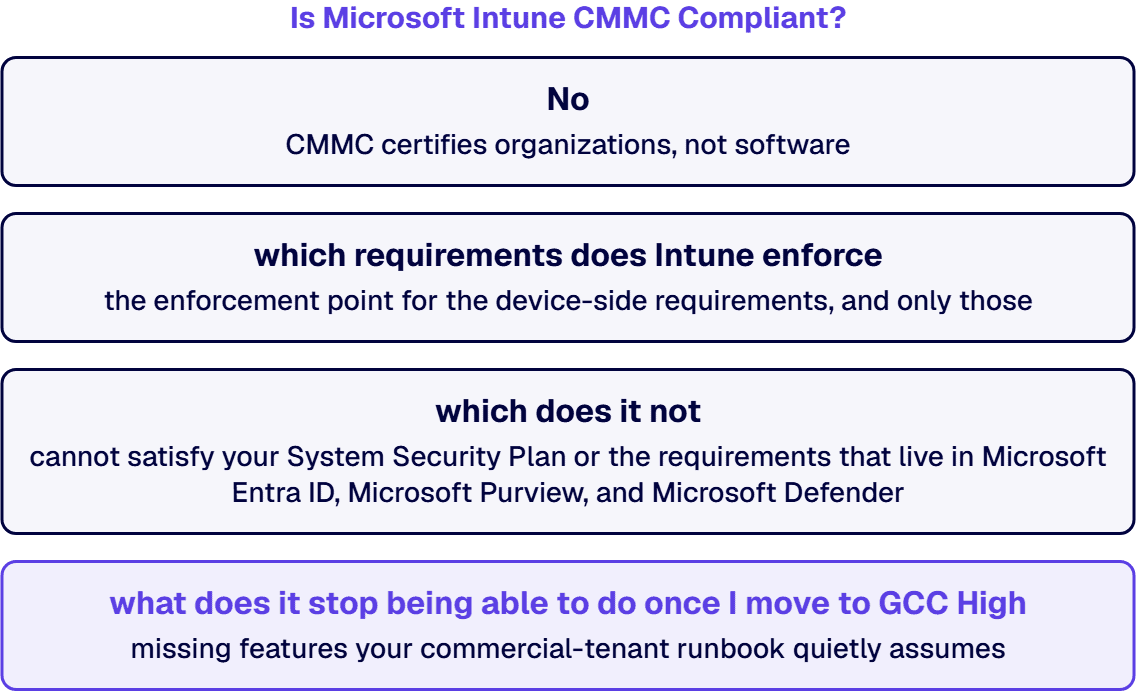
Microsoft says this itself, plainly, in its own CMMC documentation: “CMMC compliance depends on customer configuration, implementation, and operational controls, as well as the use of qualified assessors and partners. Microsoft cloud services provide capabilities that can help support these requirements.” Note the verb. Microsoft services support requirements. They do not satisfy them, and Microsoft does not claim they do.
What Microsoft actually provides is a set of services that live inside your assessment boundary and that you configure to implement requirements. The requirement is yours. The evidence is yours. The certification is yours. Intune is the mechanism that lets you enforce a device-side requirement consistently and then prove you enforced it.
So the useful question is not “is Intune CMMC compliant.” It is: which of the 110 requirements does Intune enforce, which does it not, and what does it stop being able to do once I move to GCC High? That is what the rest of this page answers.
The CMMC Program rule at 32 CFR Part 170 took effect on December 16, 2024. Its own definition is explicit: CMMC Level 2 is “the 110 Level 2 requirements from NIST SP 800-171 R2,” incorporated by reference, and 32 CFR 170.14 adds that “the security requirements in CMMC Level 2 are identical to the requirements in NIST SP 800-171 R2.” NIST organizes those 110 requirements into fourteen families. The edition that governs is February 2020, including updates through January 28, 2021.
Two consequences of that, both of which trip people up:
Scoring is not pass or fail on day one, and the threshold is more precise than the “80 percent” you will see quoted. The rule conditions a POA&M on the assessment score divided by the total number of Level 2 requirements being greater than or equal to 0.8. Clear that bar and you receive a Conditional CMMC Status, with every NOT MET requirement placed on a POA&M that must be closed and verified by a POA&M closeout assessment within 180 days of the Conditional CMMC Status date, at which point the status becomes Final Level 2.
One detail worth knowing before you plan to POA&M your way through: six Level 2 requirements are ineligible for a POA&M entirely. They are AC.L2-3.1.20, AC.L2-3.1.22, CA.L2-3.12.4, PE.L2-3.10.3, PE.L2-3.10.4, and PE.L2-3.10.5. Those must be MET at assessment. None of the six is an Intune requirement, which is worth saying out loud, because it means no amount of endpoint management buys you relief on them.
Intune is the enforcement point for the device-side requirements, and only those. The table below maps the requirements where Intune is genuinely the control mechanism in a Microsoft 365 architecture, using the Rev 2 numbering a C3PAO will actually cite. The requirement text is NIST’s. The enforcement point and the evidence column are i3solutions’ implementation mapping, not a Microsoft claim of coverage.
| CMMC ID | NIST SP 800-171 Rev 2 requirement | Intune enforcement point | Evidence a C3PAO accepts |
|---|---|---|---|
| AC.L2-3.1.1 | Limit system access to authorized users, processes acting on behalf of authorized users, and devices (including other systems) | Device compliance policy plus a Conditional Access grant requiring a compliant device | Compliance policy export, Conditional Access policy export, device compliance report |
| AC.L2-3.1.2 | Limit system access to the types of transactions and functions that authorized users are permitted to execute | App protection policies and device configuration profiles restricting app-level actions | App protection policy export, per-app assignment report |
| AC.L2-3.1.12 | Monitor and control remote access sessions | Microsoft Tunnel plus Conditional Access device state signals | Tunnel configuration, Conditional Access sign-in logs |
| AC.L2-3.1.18 | Control connection of mobile devices | Enrollment restrictions and device compliance policy | Enrollment restriction configuration, enrolled-device inventory |
| AC.L2-3.1.19 | Encrypt CUI on mobile devices and mobile computing platforms | Device configuration profile enforcing BitLocker and FileVault, app protection policy encryption | Encryption report per device, policy export |
| CM.L2-3.4.1 | Establish and maintain baseline configurations and inventories of organizational systems (including hardware, software, firmware, and documentation) throughout the respective system development life cycles | Security baselines and device configuration profiles; Intune device inventory | Baseline assignment report, hardware and software inventory export |
| CM.L2-3.4.2 | Establish and enforce security configuration settings for information technology products employed in organizational systems | Settings catalog profiles and security baselines, aligned to the applicable DISA STIG | Profile export with per-setting values, per-device configuration status |
| CM.L2-3.4.6 | Employ the principle of least functionality by configuring organizational systems to provide only essential capabilities | Device configuration profiles disabling nonessential features; Endpoint Privilege Management | Profile export, EPM elevation rules and audit log |
| CM.L2-3.4.7 | Restrict, disable, or prevent the use of nonessential programs, functions, ports, protocols, and services | Attack surface reduction rules and Windows Defender Application Control policy delivered via Intune | ASR rule assignment report, application control policy export |
| CM.L2-3.4.9 | Control and monitor user-installed software | Enterprise Application Management and application control policy | Discovered-apps inventory, application control policy export |
| IA.L2-3.5.3 | Use multifactor authentication for local and network access to privileged accounts and for network access to non-privileged accounts | Intune supplies the device compliance signal; the MFA requirement itself is enforced in Microsoft Entra ID Conditional Access | Conditional Access policy export, authentication method registration report |
| MP.L2-3.8.7 | Control the use of removable media on system components | Device configuration profile with removable storage restrictions and Defender device control | Device control policy export, per-device status |
| SC.L2-3.13.11 | Employ FIPS-validated cryptography when used to protect the confidentiality of CUI | Device configuration profile enabling FIPS mode; enforced on the endpoint, not created by Intune | Profile export, per-device configuration status |
| SC.L2-3.13.16 | Protect the confidentiality of CUI at rest | Disk encryption profile plus app protection policy encryption on mobile | Encryption status report |
| SI.L2-3.14.2 | Provide protection from malicious code at designated locations within organizational systems | Microsoft Defender antivirus policy delivered through Intune endpoint security | Antivirus policy export, per-device protection status |
| SI.L2-3.14.4 | Update malicious code protection mechanisms when new releases are available | Defender antivirus policy with security intelligence update configuration | Antivirus policy export, definition version report |
That is roughly a sixth of Level 2, and it is the sixth that is hardest to prove by hand. It is also, note, a set of requirements that Intune enforces jointly with Microsoft Entra ID and Microsoft Defender. Intune is the delivery and reporting plane. On its own it is not sufficient for a single one of the requirements above.
Being explicit about the gap is what keeps an assessment honest. Intune does nothing for:
This is where most Intune-and-CMMC guidance is out of date, and where it costs you real money, because a remediation plan built on the commercial feature set will not survive contact with a GCC High tenant.
Microsoft’s own service documentation is blunt about this and almost nobody repeats it: Intune does not have a separate GCC instance. Where Microsoft 365 has a distinct GCC environment, Intune’s GCC customers run on the same service instance as commercial. Only GCC High and DoD run in the physically separate government cloud, which is built on Azure Government and which Microsoft identifies as Impact Level 4 and Impact Level 5. So “we are on GCC, therefore our Intune is in a government cloud” is false, and if you have written that sentence into a System Security Plan, an assessor can dismantle it.
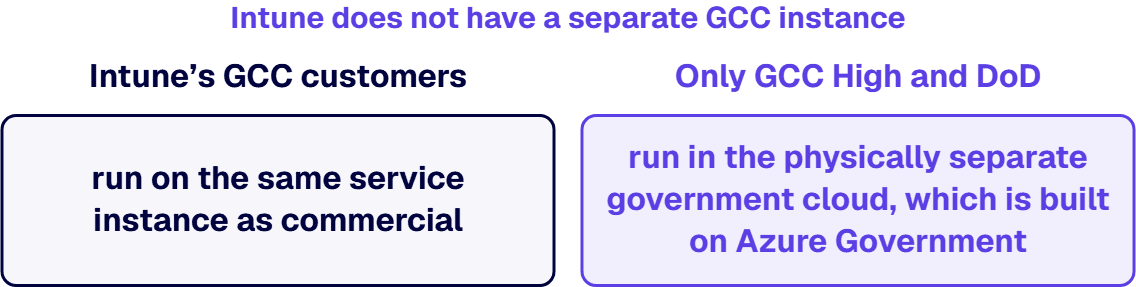
You can check this yourself without taking anyone’s word for it, which is the useful part. The Microsoft Graph endpoint your tenant answers on is the tell: GCC High is https://graph.microsoft.us, DoD is https://dod-graph.microsoft.us, and GCC uses the worldwide https://graph.microsoft.com, the same endpoint as commercial. If your automation is talking to graph.microsoft.com, you are not in the government cloud, whatever the license says.
Microsoft currently lists these as unavailable with no planned support. If your remediation design depends on one of them, redesign now.
These are on Microsoft’s roadmap for GCC High and DoD but are not usable now. Several of them are load-bearing for a CMMC patching and configuration story, which is exactly why this list matters:
Read that patching list again. In a commercial tenant, requirement 3.14.1 on timely flaw remediation is commonly evidenced with Intune’s Windows update rings and update reports. In GCC High those update policies are not there yet. You need a different mechanism and a different artifact, and you need to say so in the SSP rather than describe a capability you do not have.
Widely cited Intune-and-CMMC articles, including the ones that currently rank for this question, still list Log Analytics, Mobile Threat Defense, and Endpoint Analytics as unsupported in GCC High. Microsoft’s current service description lists all three as supported: you can send Intune log data to Azure Storage, Event Hubs, or Log Analytics; MTD connectors work with vendors that also support GCC High; and Advanced Analytics, Endpoint Privilege Management, Enterprise Application Management, Microsoft Tunnel for MAM, and Linux management are all available in GCC High and DoD today. Those same articles map Intune to retired CMMC 1.0 practice IDs. Both errors point the same direction: they were accurate once, and the environment moved.
There is no built-in way to migrate an Intune tenant from the commercial service to the government cloud, or back. Devices must be unenrolled from the existing tenant and re-enrolled in the new one, which is operationally identical to replacing a third-party MDM. Plan it as a device-touch project with a re-enrollment window, not as a license change.
Microsoft organizes Intune into three plans: Microsoft Intune Plan 1, the base unified endpoint management service; Microsoft Intune Plan 2, additive to Plan 1, whose headline capabilities are Remote Help and Advanced Analytics; and the Microsoft Intune Suite, additive to Plan 1 and inclusive of Plan 2. Most organizations get Plan 1 inside a Microsoft 365 bundle rather than buying it standalone.
Here is the trap. Remote Help is one of the two capabilities you buy Plan 2 for, and Remote Help is not supported in GCC High or DoD. Advanced Analytics is supported. So a defense contractor who buys Plan 2 in a GCC High tenant expecting the full Plan 2 feature set gets half of it. Confirm what you are actually licensed for before you build a support model around it.
Separately: Conditional Access, which is what turns an Intune compliance policy into an enforceable access control for requirements 3.1.1 and 3.5.3, requires Microsoft Entra ID P1 or P2. An Intune license alone does not give you the control you are claiming.
On cost: Microsoft does not publish a public per-user list price for GCC High. GCC High carries a licensing premium over Commercial Microsoft 365, and it is sold through Microsoft agreements and authorized partners, so any per-user GCC High figure you have been quoted came from a partner price sheet and not from Microsoft. Commercial pricing is public: Microsoft 365 E3 lists at $39.00 per user per month on an annual commitment. Treat any published “GCC High costs X percent more than Commercial” claim as unsourced, because there is no public GCC High figure to compute it from.
An assessor is not impressed that you own Intune. They want to see, per requirement, that the policy exists, that it is assigned to the right scope, and that devices are actually in the state you claim. In practice that means four artifacts for each mapped requirement:
Microsoft Purview Compliance Manager ships a CMMC v2 Level 2 assessment template, and for GCC, GCC High, and DoD customers the CMMC templates are included alongside the Microsoft Data Protection Baseline. Use it as the scaffold for the improvement actions and the evidence register. Do not mistake its score for an assessment result: it measures the actions you have recorded, not the ones a C3PAO will accept.
The failure mode i3solutions sees most often is a tenant where the policies are right and the scoping is wrong: a compliance policy assigned to All Users rather than to the CUI enclave group, which means either the boundary is bigger than the SSP says, or the policy is not covering the devices that matter. Both are findings.
i3solutions plans and runs governed Microsoft 365 and Azure work for compliance-bound organizations, and maintains dedicated compliance specialists who understand CMMC, HIPAA, SOC 2, and financial services regulations within Microsoft environments, providing audit trail documentation and access control frameworks that reduce audit preparation time by 60 percent.
Two things we have learned that shape how we scope this work. First, under DFARS 252.204-7012 cybersecurity incident reporting, the artifact set expands roughly 30 percent versus commercial scope, so the evidence burden, not the configuration, is what drives the schedule. Second, the environment decision has to be settled before the endpoint design starts, because a GCC High tenant invalidates a meaningful part of a commercial Intune runbook.
The scale we work at is the reason we are blunt about scoping. i3solutions runs a governed Power Platform for a federal defense agency supporting roughly 10,000 personnel across about 180 locations, which works because it is governed, not despite it. And on the identity side, which is where an Intune compliance policy either becomes an enforceable control or stays a suggestion, i3solutions unified identity and automated provisioning across systems for 125,000 users by treating the interfaces as owned, governed contracts. Device policy at that scale fails on group scoping and exception handling long before it fails on a setting value, which is precisely the failure an assessor writes up.
A CMMC Level 2 implementation for a defense contractor with a defined CUI boundary typically ranges from $45,000 to $75,000, covering the Compliance Manager baseline assessment, Conditional Access redesign, DLP policy build and testing, Purview Audit Premium configuration, and post-implementation documentation. Where the work includes a GCC High migration, implementation for organizations with 50 to 500 users typically ranges from $50,000 to $200,000, covering tenant provisioning, identity migration, data transfer, security configuration, and compliance validation.
If you are building the internal case before committing to an environment, start with a scoped gap assessment rather than a licensing decision: our CMMC technology readiness assessment establishes the CUI boundary, tests what an assessor will actually test, and produces the evidence register your committee needs to approve the spend. You can also hire senior Microsoft architects who run CMMC readiness.
No. CMMC certifies organizations, not products, so no software can be CMMC compliant. Intune is a control implementation tool. In a Microsoft 365 architecture it is the enforcement point for the device-side requirements of CMMC Level 2, including 3.1.18 on controlling mobile device connection, 3.1.19 on encrypting CUI on mobile devices, 3.4.1 and 3.4.2 on baseline and security configuration settings, 3.8.7 on removable media, and 3.14.2 on malicious code protection. It does nothing for your System Security Plan, your POA&M, or your DFARS 252.204-7012 incident reporting obligation.
Intune is the enforcement point for roughly a sixth of the 110 requirements, and it is not sufficient on its own for any single one of them. Every device-side requirement it supports is enforced jointly with Microsoft Entra ID, which owns Conditional Access and MFA, and Microsoft Defender, which owns endpoint protection. Be wary of any article citing a precise practice count, because most of them are counting against the retired CMMC 1.0 model rather than the 110 NIST SP 800-171 Rev 2 requirements the current rule assesses.
Not necessarily. CMMC does not name a cloud environment. What forces GCC High is export-controlled data under ITAR or EAR, a DoD Impact Level 4 requirement, or a contract clause that names the environment. Many contractors meet Level 2 in GCC. Note that Intune has no separate GCC instance, so GCC customers run Intune on the same service instance as commercial; only GCC High and DoD run in the government cloud on Azure Government at Impact Level 4 and 5.
Microsoft lists Windows Autopilot, the on-premises Exchange Connector, Microsoft Store for Business, the ServiceNow and TeamViewer connectors, Windows Subscription Activation, and Azure Virtual Desktop multi-session as unavailable with no planned support. Windows Autopatch, Windows update policies, Remote Help, Cloud PKI, and Windows Device Health Attestation are planned but not available today. The missing Windows update policies matter most for CMMC, because they are the usual evidence for timely flaw remediation under 3.14.1.
Not directly. There is no built-in migration path between the commercial service and the government cloud in either direction. Devices must unenroll from the current tenant and re-enroll in the new one, which makes it a device-touch project rather than a licensing change.
Microsoft Intune Plan 1 is the base service and is what most organizations get inside a Microsoft 365 bundle. Plan 2 adds Remote Help and Advanced Analytics, but Remote Help is not supported in GCC High or DoD, so Plan 2 delivers only part of its value in a government tenant. Conditional Access, which is what makes an Intune compliance policy an enforceable access control, requires Microsoft Entra ID P1 or P2 separately.
i3solutions plans and runs governed Microsoft 365 and Azure work for compliance-bound organizations, with dedicated compliance specialists covering CMMC within Microsoft environments. A CMMC Level 2 implementation for a defense contractor with a defined CUI boundary typically ranges from $45,000 to $75,000, covering the Compliance Manager baseline assessment, Conditional Access redesign, DLP policy build and testing, Purview Audit Premium configuration, and post-implementation documentation.
Michael Branson, Founder / COO, i3solutions. LinkedIn
Short answer. Most defense contractors do not need GCC High in order to pass a CMMC Level 2 assessment. Microsoft’s own guidance is that the need for CMMC certification is not a deciding factor for choosing your cloud environment. What forces GCC High is export controlled data under ITAR or EAR, other CUI Specified that Microsoft says GCC is not suitable to hold, a DISA Impact Level 4 requirement, or a contract clause that names the environment. If none of those apply to you, GCC is the environment Microsoft calls its hero offering. And Microsoft does not publish a public per user list price for GCC High, so any figure you have been quoted came from a partner price sheet, not from Microsoft.
This page answers the three questions defense and federal buyers actually ask before they commit a tenant: which environment do we need, does CMMC force GCC High, and what does GCC High really cost. Every rule and figure below is sourced to Microsoft’s published licensing and service documentation or to the federal acquisition regulations themselves.
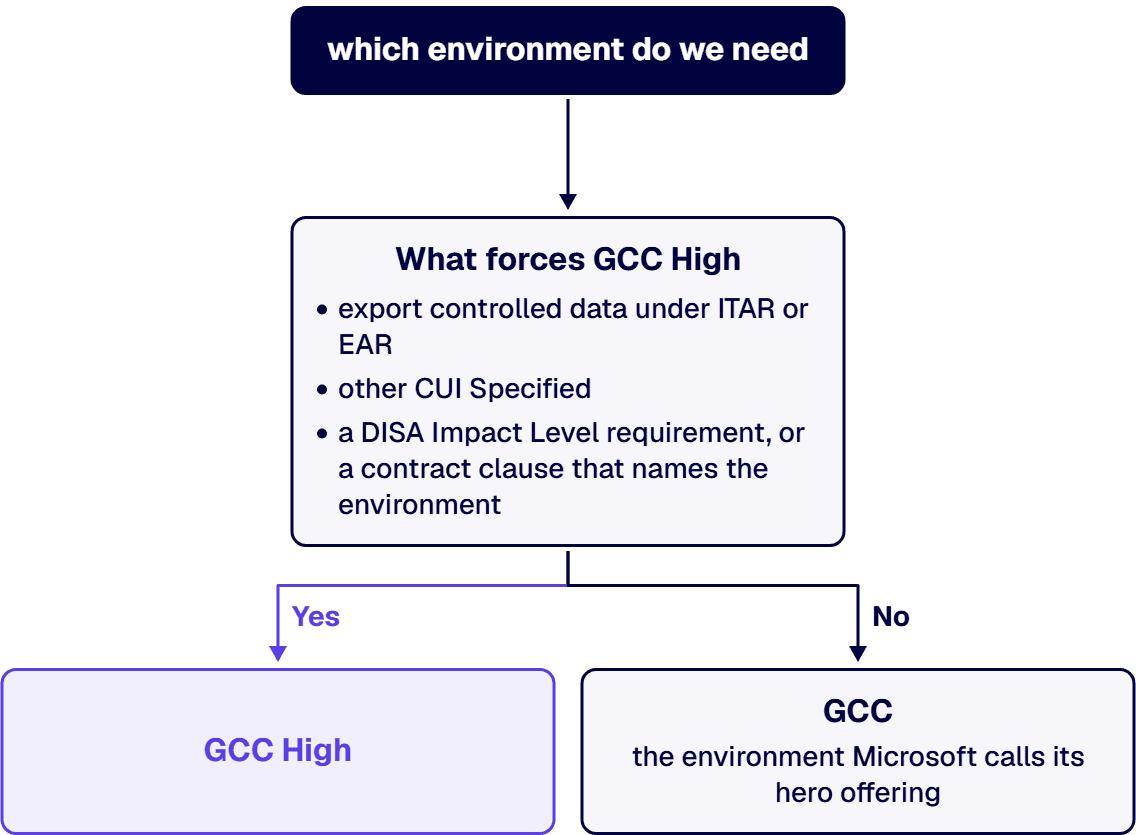
Updated: August 27, 2026
Choose the lowest environment that can legally hold your data, and let the data type decide, not the sales conversation. Microsoft sells four Microsoft 365 environments, and they are not tiers of quality. They are separate accreditation boundaries with different authorizations, different purchase channels and different feature sets.
Two lines in that table decide most cases. The first is ITAR. If your technical data is export controlled, GCC is off the table and the conversation is over. The second is the purchase channel. GCC High cannot be bought on a credit card, cannot be bought through a CSP reseller relationship, and has no trial tenant. Microsoft requires an eligibility validation form before the environment is established at all, and licenses are sold only through select partners: licensing solution providers transacting an Enterprise Agreement, or AOS-G partners for organizations under 500 seats.
Microsoft validates non government organizations against a specific list. Accepted government data types include International Traffic in Arms (ITAR) data, Controlled Unclassified Information, Department of Defense Unclassified Controlled Nuclear Information, Department of Energy UCNI, Criminal Justice Information, and Department of Defense Impact Level data. An international commercial entity can qualify, but regulated data could be required to be purchased through a US subsidiary. Proof of membership in one of those groups is required. Wanting a more secure tenant is not an eligibility category.
GCC Moderate is not a SKU. Microsoft’s four environments are Commercial, GCC, GCC High and DoD. The word Moderate leaks in from a different document: DFARS 252.204-7012 requires that where a contractor uses an external cloud service provider to process, store or transmit covered defense information, that provider must meet security requirements equivalent to the FedRAMP Moderate baseline. Buyers hear FedRAMP Moderate, look at the government cloud that is not GCC High, and fuse the two into GCC Moderate.
The confusion is expensive, because it hides the real fact: GCC holds a FedRAMP Moderate authorization on the FedRAMP Marketplace, the record the CMMC rule names at 32 CFR 170.16(c)(2)(i) and 170.17(c)(5)(i), although Microsoft’s service descriptions describe it as meeting FedRAMP High requirements. GCC High, Azure and Azure Government hold FedRAMP High. The FedRAMP baseline named in DFARS is a floor that several environments clear. It is not the thing that separates GCC from GCC High. When a contract or a reseller says GCC Moderate, get it in writing whether they mean the GCC environment or simply a FedRAMP Moderate equivalent platform.
CMMC by itself does not require GCC High. Microsoft is explicit: both Azure and Azure Government can help you meet CMMC obligations, you can obtain CMMC certification for solutions deployed to either environment, and the need for CMMC certification is not a deciding factor for choosing your cloud environment. CMMC is an assessment of your implementation of NIST SP 800-171 practices. It is not applicable directly to cloud services, which is why no cloud platform carries a CMMC certification of its own.
That is the opposite of what most of the market tells defense contractors, so here is the reasoning laid out. DFARS 252.204-7012 sets the cloud service provider bar at FedRAMP Moderate equivalency. GCC clears it with a FedRAMP Moderate authorization of its own. NIST SP 800-171 is a subset of the NIST SP 800-53 controls already assessed under FedRAMP. The platform is not what fails an assessment. Configuration discipline and audit evidence are.
Microsoft does not publish a public per user list price for Microsoft 365 GCC High, and we are not going to invent one. GCC High is available through Volume Licensing only, after eligibility validation, which means your real rate comes off a licensing solution provider price sheet under an Enterprise Agreement, or from an AOS-G partner if you are under 500 seats. There is no Web Direct price to look up, because there is no Web Direct channel for GCC High.
What Microsoft does publish is the price movement, and it is worth knowing before you sign. Effective July 1, 2026, Microsoft raised the government suites:
Note what that table shows and what it does not. Microsoft published percentage increases for the government SKUs and dollar figures only for the commercial anchors. The government columns carry percentage correlations to commercial rates rather than discrete dollar amounts. Anyone quoting you a precise GCC High list price per user per month is quoting a partner price sheet, and you should ask to see it.
Licensing is the line item you will be shown. It is rarely the line item that decides the program.
The difference is not the feature list. It is the compliance boundary, and four things move. Commercial and GCC High run the same productivity apps; what changes is who may operate the environment, what data it is permitted to hold, which authorizations it carries, and what your contract makes you responsible for.
Two corrections worth making explicitly, because both cost money. CMMC does not require GCC High. The rule names no cloud environment, and a great many contractors handling non export controlled CUI meet CMMC Level 2 in GCC. And Microsoft publishes no public per user list price for GCC High. It carries a licensing premium over Commercial and is sold through Microsoft agreements and authorized partners, so any per user figure or premium percentage you have been quoted came from a partner price sheet, not from Microsoft. Treat published “GCC High costs X percent more” claims as unsourced.
One more trap that is specific to the SKU rather than the environment: buying Office 365 GCC High rather than Microsoft 365 GCC High moves an incomplete SKU into a government cloud. Office 365 has no Microsoft Intune, no Microsoft Entra ID P1 or P2 for Conditional Access, and no Microsoft Defender for Endpoint, so several CMMC requirement families would still have no enforcement point in your tenant. See Is Office 365 CMMC compliant? for that distinction, and Is Microsoft Intune CMMC compliant? for what changes on the endpoint side in GCC High.
These are documented Microsoft feature differences, not opinions, and they change how people work on day one:
If someone has told you to move up because your data has to stay in the United States, they have answered the wrong question. Both GCC and GCC High already keep customer data in the continental United States. Microsoft separates the two ideas explicitly: data residency refers to where customer data is stored and processed, while data sovereignty refers to the legal, operational, and personnel controls that govern access to that data. Residency is therefore almost never what separates GCC from GCC High. What changes as you move up is the personnel and jurisdictional control over access, which is why an export control obligation, rather than a storage requirement, is normally what forces the higher tenant.
Two consequences follow, and both belong in the business case rather than in the technical annex.
What does not move is where the obligation sits. Microsoft’s stated position is that customers remain responsible for configuring Microsoft 365 to meet their specific regulatory obligations. A more isolated environment buys a different accreditation boundary and a different operating population. It does not buy a configured tenant, an assessment, or the evidence a C3PAO assessor will ask to see, and it is worth pricing that gap before the licensing conversation rather than after it.
Primary source: Understand Microsoft U.S. government cloud environments for Microsoft 365 and Microsoft 365 Copilot on Microsoft Learn.
The CMMC Program rule sits at 32 CFR part 170. The acquisition side is DFARS clause 252.204-7021, which became effective on November 10, 2025, and phases in across a three year period running through November 9, 2028. The clause requires a contractor to have and maintain the requisite CMMC level for the life of the contract.
The practical consequence for the environment decision: your certification level is set by the solicitation, and the assessment is of your system, not of Microsoft’s. Moving to GCC High when your data does not require it enlarges the boundary you have to assess, lengthens the migration, and removes capability from your users, without changing the level you have to certify at. Moving too late, when a contract does require it, is worse. Read the clause in the solicitation, classify your data honestly, then pick the environment.
Not one clause in the federal cybersecurity stack names a cloud environment. This page keeps telling you to read the clause. This is the list to read. Six citations carry effectively every cybersecurity obligation a defense contract puts on you, and none of them says GCC, GCC High, Commercial, or Microsoft. What can force a specific environment is an export control rule, a DISA Impact Level requirement, or a program instruction someone wrote into your solicitation. If you cannot point at one of those three, the environment is an engineering decision you own, not a compliance mandate you inherited.
Read the pattern rather than the individual rows. Every one of these clauses regulates your system and your evidence. The assessment subject is the covered contractor information system, the reporting surface is the Supplier Performance Risk System, and the confidence level is set by who performs the assessment rather than by where the data lives. A tenant is an input to that system. It is never a substitute for it, and that is why no clause names one. Here is the concrete test. DFARS 252.204-7019 requires a summary level score for each covered contractor information system relevant to the offer, posted in the Supplier Performance Risk System. Nothing about buying a higher tenant produces that score, and no licensing agreement posts it on your behalf.
Two consequences you can act on this week. First, the flow down at 252.204-7020(g)(1) passes the substance of the clause down the supply chain, not a tenant choice, so a prime’s environment decision does not automatically become yours. Second, when a prime or a reseller tells you GCC High is required, ask which citation says so. If the answer is 252.204-7012 or either CMMC clause, the answer is wrong on the face of the text, and the real driver is either an export control rule, an Impact Level, or a program specific instruction that should be quotable straight out of the contract.
Primary sources for the table, in order: FAR 52.204-21, DFARS 252.204-7019, DFARS 252.204-7020, DFARS 252.204-7021 and DFARS 252.204-7025 on Acquisition.gov, and the CMMC Program rule at 32 CFR part 170 on the eCFR.
i3solutions has spent three decades building Microsoft platforms for defense industrial base and federal organizations operating under DFARS 252.204-7012 flow downs, NIST SP 800-171 obligations and export control rules. Our position on this question is deliberately unfashionable: we start by trying to keep you out of GCC High, because the cheapest compliant environment is the one that holds your data legally with the fewest capabilities removed from your users.
That means classifying the data first, reading the actual contract clauses second, and only then scoping a tenant. When GCC High is genuinely required, we treat the move as a cross cloud rebuild with a coexistence plan, an evidence plan, and a named owner for every artifact a C3PAO assessor will ask for.
That approach changes the answer often enough to be worth stating plainly. On one defense contractor engagement, the assessment recommended partial-variant adoption with email and document storage on GCC High and the remainder of the productivity suite on Commercial; the contractor’s licensing economics improved materially relative to a full GCC High migration.
The difference is the compliance boundary, not the feature list. Microsoft 365 Commercial support personnel are not restricted to screened US persons, and Commercial does not carry the DISA Impact Level 4 authorization or the ITAR handling commitments that export controlled data requires. GCC High runs in a segregated US government environment operated by screened US persons, and it is what Microsoft positions for export controlled CUI under ITAR or EAR, for DoD CUI, and for contracts naming DISA Impact Level 4. What does not change is your own obligation: DFARS 252.204-7012(b)(2)(ii)(D) requires your cloud provider to meet security requirements equivalent to the FedRAMP Moderate baseline, and paragraphs (c) and (e) put the 72 hour DIBNet report and the 90 day media preservation duty on you in either tenant. CMMC itself names no environment, so many contractors handling non export controlled CUI meet Level 2 in GCC. Microsoft publishes no public per user list price for GCC High.
Pick the lowest environment that legally holds your data. Microsoft 365 Commercial is appropriate only when you handle Federal Contract Information and no CUI. GCC is the right answer for most defense contractors handling non export controlled CUI: it carries FedRAMP Moderate, DFARS, CJIS, IRS 1075 and DISA SRG Impact Level 2, and Microsoft calls GCC the hero offering for every customer that does not hold FedRAMP High or DoD controlled unclassified information. GCC High is required when your data is export controlled under ITAR or EAR, when a contract requires DISA SRG Impact Level 4, or when a clause names the environment. The DoD environment is reserved for the Department of Defense itself and is authorized at DISA SRG Impact Level 5. The working rule i3solutions applies is to keep you out of GCC High unless one of those triggers is real, because every step up removes capability from your users and enlarges the boundary a C3PAO assessor has to examine.
CMMC by itself does not require GCC High. Microsoft states that the need for CMMC certification is not a deciding factor for choosing your cloud environment, and that a contractor using an external cloud service provider to process, store or transmit covered defense information must ensure that provider meets security requirements equivalent to the FedRAMP Moderate baseline. GCC meets that bar with a FedRAMP Moderate authorization, GCC High holds FedRAMP High, and Microsoft 365 Commercial is outside Microsoft’s published FedRAMP and DFARS scope. So the FedRAMP baseline is not the discriminator. What forces GCC High is export controlled data under ITAR or EAR, other CUI Specified that Microsoft says GCC is not suitable to hold, a DISA SRG Impact Level 4 requirement, or a contract clause that names the environment; Microsoft also positions GCC High for DoD controlled unclassified information. There is no Microsoft SKU called GCC Moderate. The word Moderate comes from the FedRAMP baseline named in DFARS 252.204-7012, not from a product name.
Microsoft does not publish a public per user list price for Microsoft 365 GCC High. GCC High is sold only through Volume Licensing, so your actual rate comes off a licensing solution provider price sheet under an Enterprise Agreement, or from an AOS-G partner if you are under 500 seats. Microsoft does publish the price movement: effective July 1, 2026, Microsoft 365 G3 rose 8 percent and Microsoft 365 G5 rose 5 percent across GCC, GCC High and DoD alike, against commercial anchors of Microsoft 365 E3 moving from $36.00 to $39.00 per user per month and Microsoft 365 E5 moving from $57.00 to $60.00 per user per month. Migration cost is driven by the fact that GCC High is a separate tenant, not a setting on your existing one, so the work is a cross cloud tenant to tenant migration with no in place upgrade path and no trial tenant to rehearse in. Before you price the tenant, price the alternative: an environment your contracts do not actually require is the most expensive line in the program, and that is the first thing i3solutions tries to talk a client out of.
No. Microsoft sells four Microsoft 365 environments: Commercial, GCC, GCC High and DoD. Buyers say GCC Moderate because DFARS 252.204-7012 requires a cloud service provider to meet security requirements equivalent to the FedRAMP Moderate baseline, and the word attaches itself to the government cloud that is not GCC High. When a contract or a reseller says GCC Moderate, confirm in writing whether they mean the GCC environment or simply a FedRAMP Moderate equivalent platform, because those are different statements with different consequences.
No. GCC High is a separate environment established only after Microsoft validates your eligibility, and it is physically and virtually segmented from Commercial. Moving means standing up a new tenant and migrating identities, mailboxes, sites, files, Teams and endpoint management across a cloud boundary. That is system integration and data management work: identity mapping, content migration, and re-pointing every integration across a compliance boundary. Several of the tools you would reach for do not cross that boundary: Microsoft states that cross tenant OneDrive migration is not supported for Government Cloud users including GCC, GCC High and DoD, and that Power Platform tenant to tenant moves between GCC and public clouds are not supported in either direction. Plan the migration as a rebuild with data movement, not as an upgrade.
No. None of the clauses that carry the obligation names a cloud environment. FAR 52.204-21 (Nov 2021) sets fifteen safeguarding controls for systems handling Federal contract information. DFARS 252.204-7012 sets FedRAMP Moderate baseline equivalency for an external cloud service provider, the 72 hour DIBNet report and the 90 day media preservation duty. DFARS 252.204-7019 and 252.204-7020 (both Nov 2023) govern the NIST SP 800-171 assessment: current within three years, summary level scores posted in the Supplier Performance Risk System, and a Basic, Medium or High confidence level depending on who performs it. DFARS 252.204-7021 (Nov 2025) describes CMMC as a framework for assessing a contractor’s compliance with applicable information security protections and points to 32 CFR part 170, and DFARS 252.204-7025 (Nov 2025) requires the current CMMC status to be entered in the Supplier Performance Risk System before award. Not one of them says GCC, GCC High or Microsoft. What forces GCC High is export controlled data, a DISA Impact Level requirement, or a program instruction written into the solicitation. If someone tells you a clause requires it, ask them to quote the citation.
Yes. Microsoft documents Microsoft 365 Copilot as available in GCC, GCC High and DoD, operating entirely within the customer’s government cloud tenant, with prompts, responses and generated content remaining in the government cloud and Copilot inheriting the security and compliance controls of the underlying environment. The caveat is cadence rather than availability. Microsoft states that feature availability may differ across the government environments, that release timing typically lags behind commercial environments, and that third party integrations are more restricted in higher isolation environments. So Copilot is neither a reason to stay in Commercial nor a reason to move above it. Treat it the way you treat the rest of the environment decision, by naming the specific capabilities your programs depend on and asking when each one lands in the environment you are considering.
There is no separate “Azure GCC.” A Microsoft 365 GCC tenant pairs with Azure’s commercial environment, while a GCC High or DoD tenant pairs with Azure Government. If your organization needs both a higher Microsoft 365 tenant and government-cloud Azure workloads, confirm both moves together rather than assuming one carries the other.
Every rule and figure on this page is drawn from primary documentation: Microsoft 365 Government how to buy (eligibility, validation, sales channels, LSP and AOS-G partner lists, trials, environment commitments), Office 365 GCC High and DoD service description (background screening, feature differences, support boundary), Microsoft Azure CMMC compliance documentation (FedRAMP Moderate equivalency, NIST SP 800-171 relationship, environment choice), the Microsoft 365 packaging and pricing updates effective July 1, 2026, the DFARS clause at 252.204-7012, the CMMC Program rule at 32 CFR part 170, and the DFARS clause at 252.204-7021 effective November 10, 2025.

US-Based Microsoft System Integrator | Est. 1997
© i3solutions. All rights reserved.
US-Based Microsoft System Integrator | Est. 1997
© i3solutions. All rights reserved.


