
Integration questions sit at the intersection of what the Microsoft stack supports natively, what a connector can honestly reach, and where custom development becomes the right answer. These answers address the specific calls IT leaders face when a clean architecture plan meets the constraints of what already exists.
By Scot Johnson, Founder / CEO, i3solutions. Scot Johnson co-founded i3solutions 30 years ago with a focus on expert-led delivery, strategic advisory, and complex Microsoft-centered solutions for organizations where technology decisions carry operational, financial, and mission risk.
What a regulated enterprise pays a Dynamics 365 implementation partner is set less by a published hourly rate than by three structural choices: the engagement model (time and materials, fixed price, or staff augmentation), where the delivery team physically sits (onshore US personnel versus offshore), and the seniority mix assigned to your account. In regulated and defense work a fourth factor overrides the rest. Requirements such as US-based personnel, background-checked staff, and demonstrated CMMC or DFARS experience remove offshore labor arbitrage from the table, which compresses the rate structure toward senior onshore delivery and narrows which partners can bid at all.
This page is about who you pay and how to choose them, and how to tell two firms quoting the same rate apart before you sign. For the program budget itself, the modules, integrations, data condition, and customization that set the total, see our companion guide on Dynamics 365 implementation cost.
A partner’s price is a blended rate applied to an estimated effort, and both halves move independently. Two firms quoting the same rate can differ widely on total cost, because one staffs senior and delivers in fewer cycles while the other staffs junior and bills the rework. Four factors set the number:
Each model assigns scope risk to a different party, and that assignment, not the rate card, decides the economics. Time and materials keeps the rate transparent and puts scope risk on you, which is honest for discovery and for work whose shape is not yet fixed. Fixed price moves scope risk to the partner, who prices a contingency premium to carry it, so it is only defensible once discovery has fixed the scope it covers; a fixed price for an entire enterprise program before any discovery is a warning sign, meaning either a quietly narrowed scope or a premium you pay whether or not the risk materializes. Staff augmentation is the third structure: you rent senior capacity into your own team, own the architecture and management, and carry the lowest overhead, which fits when you already have delivery leadership and need qualified hands rather than a turnkey program.

Regulated requirements remove the cheapest inputs from the estimate. When ITAR or EAR data, controlled unclassified information, DFARS clause 252.204-7012, or a CMMC Level 2 obligation is in scope, the personnel who touch the environment usually must be US-based and background-checked. That eliminates offshore labor arbitrage and narrows the field to partners who staff senior onshore, setting a higher floor on the rate before any work begins. Compliance then adds defined overhead a commercial project never touches: control mappings, audit-trail discipline, and evidence production.
In i3solutions’ experience, regulated-enterprise delivery typically carries roughly 25 to 35 percent overhead versus commercial work for equivalent scope. That is a cost-risk explanation, not a surcharge for its own sake: the higher onshore rate buys the removal of a category of risk, a failed assessment, a data spill, an ineligible worker on a controlled system, that is not optional to avoid when you are in scope.
Choose on delivery evidence, not headline rate. The partner that fits a regulated enterprise can name the team that will actually work your account and say where they sit, can show delivery under the same compliance regime you carry, governs the customization boundary so the system survives Microsoft’s update waves, and can stabilize a program that goes sideways rather than only build greenfield. A low rate from a partner that fails those tests is the most expensive option on the table.
Six questions separate a fit from a risk, and they are worth asking every firm on a shortlist:
The red flags mirror those questions: a fixed price before any discovery, a blended rate that only works with undisclosed offshore junior staffing, no named team, a firm that sells licenses before it scopes the work, and an inability to speak to your compliance regime when you are plainly in scope. The last test, stabilization capability, matters most when a program is already in trouble: a partner senior enough to map the dependencies, re-sequence by risk, and return a build to a defensible track is doing a different job from greenfield delivery, and it is the one that protects the budget when an implementation is off the rails.
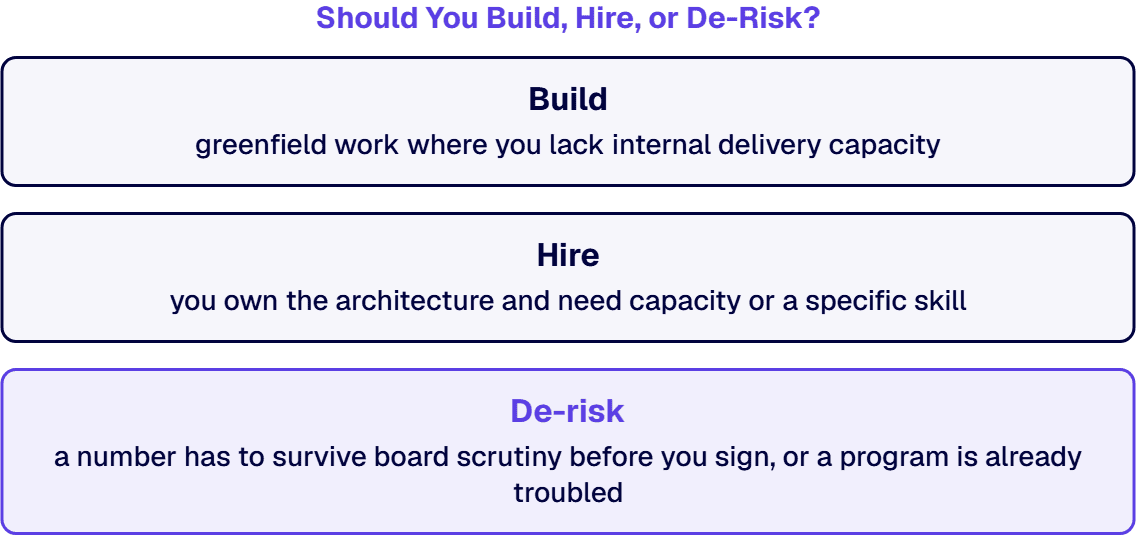
These are three different decisions, and treating them as one is how enterprises overpay. Build means engaging a partner to implement end to end, which fits greenfield work where you lack internal delivery capacity. Hire means bringing senior Dynamics 365 engineers into your own team under a scoped engagement, which fits when you own the architecture and need capacity or a specific skill rather than a turnkey program; you can hire Dynamics 365 developers to embed alongside an in-house team or another partner’s delivery. De-risk means putting a bounded engagement in front of a large commitment, a fixed-scope discovery, an advisory oversight role, or a program rescue, which fits when a number has to survive board scrutiny before you sign, or a program is already troubled. It is usually the cheapest insurance available, the difference between correcting a plan on paper and correcting a build in production.
i3solutions staffs US-based senior Dynamics 365 engineers and prices the removal of risk rather than the lowest hourly rate. All i3solutions Dynamics 365 developers and consultants are US-based, and the delivery teams include dedicated compliance specialists who understand CMMC, HIPAA, SOC 2, and financial services regulations within Microsoft environments. Senior specialists typically embed within two to four weeks, and the regulated-delivery overhead is stated openly rather than buried. The track record sits in regulated and mission environments: i3solutions runs a governed Power Platform for a federal defense agency supporting roughly 10,000 personnel across about 180 locations, and has delivered Dynamics 365 CRM integrations in a regulated healthcare environment. On cost, the bias is configuration over customization, with fixed-scope discovery in front of any commitment and stabilization capability held for programs that need rescuing rather than restarting. What i3solutions does not do is quote a rate before discovery has touched your systems.
Choose on delivery evidence rather than headline rate: the partner that fits can name the team that will work your account and where they physically sit, show delivery under your compliance regime such as CMMC, DFARS, HIPAA, or SOC 2, govern the customization boundary against Microsoft’s update cadence, and stabilize a troubled program rather than only build greenfield. Ask for the seniority mix assigned to your program specifically, and treat a fixed price quoted before any discovery as a warning sign.
For regulated and defense work it is usually not optional: when ITAR or EAR data, controlled unclassified information, DFARS 252.204-7012, or CMMC Level 2 is in scope, the people touching the environment generally must be US-based and background-checked, which removes offshore staffing as a legal option rather than a preference. Even without a mandate, senior onshore delivery often lowers total cost by reducing rework loops, so the higher rate frequently buys a lower final number.
Time and materials fits discovery and work whose scope is not yet fixed, because it keeps the rate transparent and lets scope adjust as you learn; fixed price fits a defined phase once discovery has pinned the scope it covers. A fixed price for an entire enterprise program before discovery should be read as either a quietly narrowed scope or a premium-priced contingency, not as certainty.
Ask where the delivery team sits and whether it is the account team or the pitch team, what seniority mix is assigned to your program specifically, for evidence of delivery under your compliance regime, and what happens when a phase fails. A partner that answers directly, and offers fixed-scope discovery before a fixed price, is showing you how it works.
A stabilization-capable partner can, and it is a distinct capability from greenfield delivery: the work is dependency mapping, risk-sequenced triage, and getting the program back onto a defensible track, which requires people senior enough to diagnose a build rather than only follow a plan. If a program is over budget or slipping, a bounded rescue or discovery engagement is usually cheaper than continuing on the current path or restarting procurement.
By Scot Johnson, Founder / CEO, i3solutions
Scot Johnson co-founded i3solutions 30 years ago with a focus on expert-led delivery, strategic advisory, and complex Microsoft-centered solutions for organizations where technology decisions carry operational, financial, and mission risk. His insights focus on the leadership, governance, integration, automation, data, and delivery decisions that determine whether technology investments become reliable business systems.
A Dynamics 365 Finance and Supply Chain Management implementation at US enterprise scale is a two-part budget: recurring licensing at Microsoft’s published $210.00 per user per month for each core application, and a one-time implementation that published US partner estimates put at $150,000 to $500,000 or more for the Finance module, and $250,000 to $750,000 or more for an enterprise program above 100 users. The number you can defend to a board is set less by user count than by four structural drivers: how much integrates with the ERP, the condition of the data you migrate, how tightly you govern customization, and how much audit-ready configuration the deployment carries.
That is the honest answer in three sentences. The rest of this page is a cost-decision framework for the Finance and Supply Chain modules specifically, formerly Finance and Operations, and how they differ from the broader picture in our Dynamics 365 implementation cost overview. It answers the question that decides the program: what separates a defensible budget from one that fails after go-live.
Microsoft’s published US list price is $210.00 per user per month, paid yearly, for both Dynamics 365 Finance and Dynamics 365 Supply Chain Management, with Premium tiers of each at $300.00. Licensing is a recurring subscription, separate from the one-time implementation, and over a three-year horizon the two are usually the same order of magnitude. Before pricing the implementation, check whether Dynamics 365 Supply Chain fits FDA lot and serial traceability if your products are regulated.
These are the figures on Microsoft’s Dynamics 365 Finance and Supply Chain Management pricing pages, accessed July 2026; confirm them before you build the business case, because Microsoft adjusted list prices in both 2024 and 2025. Two points reshape the per-user math. First, attach licensing: a user who already holds a qualifying base application and also needs the second module is licensed for it at a reduced attach price rather than a second full seat, so a user running both Finance and Supply Chain is not two full licenses. Microsoft does not publish the attach figure directly, so confirm it with your licensing desk. Second, the population is rarely uniform: a real estate is a core of full users on the $210.00 applications and a long tail of light users who only approve or read, so model the role mix before multiplying. Add the two line items starter budgets miss: Dataverse and operational storage beyond the included capacity, billed per gigabyte per month, and the sandbox environments mature application lifecycle management requires.
Published US partner estimates put a Dynamics 365 Finance implementation at $150,000 to $500,000 or more, on a 6 to 12 month timeline, and an enterprise program above 100 users at $250,000 to $750,000 or more. Supply Chain Management sits at the upper end of any comparable band because its warehouse, inventory, and manufacturing surfaces touch more external systems than Finance alone.
These bands come from ERP Software Blog’s 2026 US implementation guide, and they are a sanity check, not a quote. Their most useful signal is directional: if a proposal for a Finance and Supply Chain program lands well below the published band for your size, the scope has almost certainly been cut in data migration, integration, or testing, where you will pay for it later.
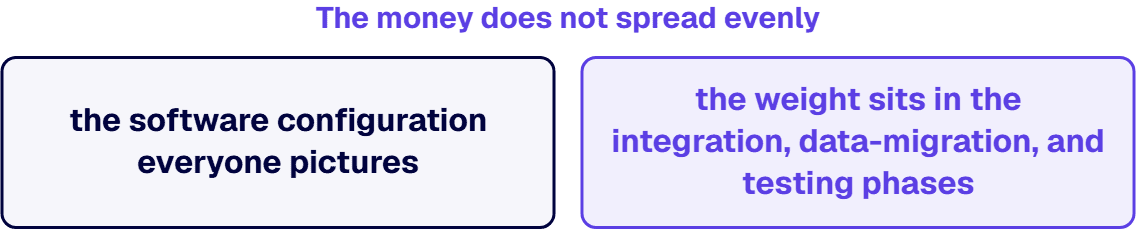
The money does not spread evenly, and knowing where it concentrates lets you challenge an estimate line by line. In a Finance and Supply Chain program the weight sits in the integration, data-migration, and testing phases, not in the software configuration everyone pictures.
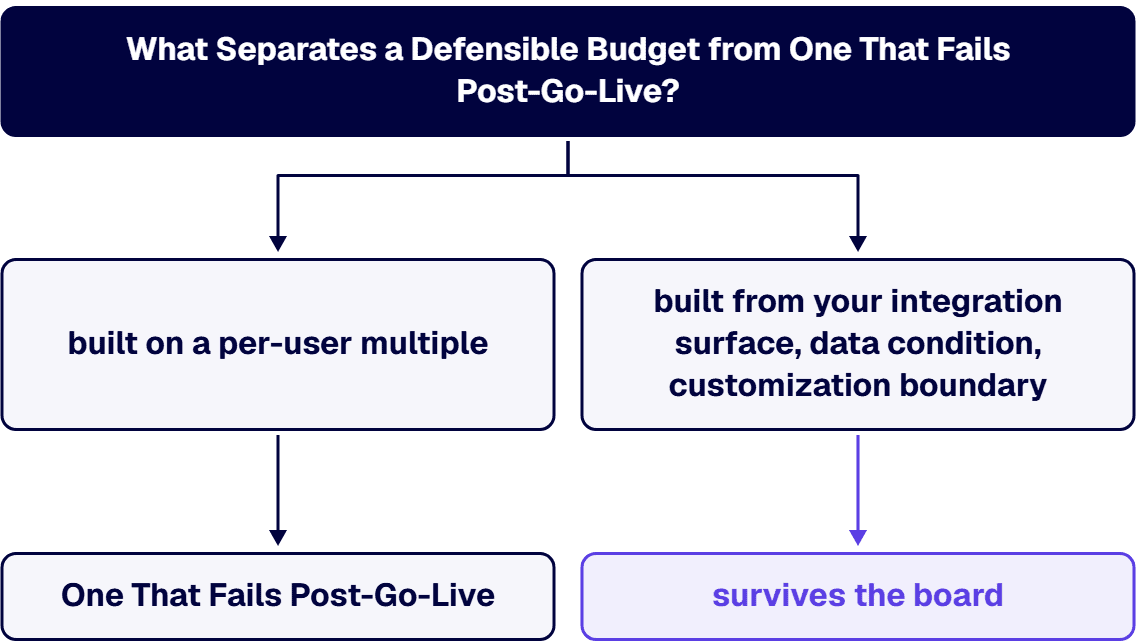
User count is the variable everyone asks about and the one that matters least; beyond a few hundred users, licensing scales linearly and implementation cost barely moves with headcount. The real drivers are structural, and a budget that names the four below survives the board while one built on a per-user multiple does not.
i3solutions approaches Dynamics 365 Finance and Supply Chain as senior US-based Microsoft engineers rather than as a license reseller, and that changes how the estimate is built. We scope the integration and data layers first, because that is where enterprise variance lives, and we put a fixed-scope discovery phase in front of any implementation commitment so the number you take to the board is derived from your systems, not from a published band. We scope the audit-ready configuration up front rather than as post-go-live remediation, drawing on delivery experience in regulated sectors including aerospace and defense manufacturing and financial services, where a Finance configuration has to survive external audit scrutiny. Delivery is phased with explicit exit ramps: each phase produces a testable increment and a decision record, so the program can be defended at audit and redirected without sunk-cost drama.
Our bias is configuration over customization, and where custom work is genuinely required we build it against Microsoft’s application lifecycle guidance so it survives platform updates without a standing maintenance tax. All of our Dynamics 365 developers and consultants are US-based, and organizations that need to blend our engineers with an in-house team can hire Dynamics 365 developers from us directly, often the fastest way to rescue a program that is over budget without restarting procurement. As a Microsoft Solutions Partner, what moves our pricing is the same list that drives every honest estimate: integration count, data condition, the customization boundary, and audit-ready configuration. What we do not do is quote a number before discovery has touched your actual systems.
Microsoft’s published US list price is $210.00 per user per month, paid yearly, for both Dynamics 365 Finance and Dynamics 365 Supply Chain Management, with Premium tiers at $300.00 each. A user who needs both modules pays one base license plus the second at a reduced attach price, not two full seats, so model the actual role mix rather than multiplying headcount by the base price.
Published US partner estimates put a Dynamics 365 Finance implementation at $150,000 to $500,000 or more, and an enterprise program above 100 users at $250,000 to $750,000 or more, on a 6 to 12 month timeline. Supply Chain Management typically lands at the upper end because it integrates with more external systems than Finance.
Because the licensing buys the platform and the implementation makes it fit your business. The budget concentrates in integration, data migration, and testing, and those phases scale with the complexity of your systems and the condition of your data, not with the number of users.
A budget survives the board when it is built from your actual integration surface, data condition, customization boundary, and audit-ready configuration requirements rather than from a per-user multiple. A fixed-scope discovery phase that produces those four numbers converts a published range into a figure you can defend.
Yes, in three defensible ways: hold the customization boundary where the process is not a differentiator; phase the rollout by entity or region so early increments fund confidence in later ones; and clean the data before migration rather than during user acceptance testing. Cutting integration, testing, or audit-ready configuration also lowers the quote, and reliably raises the total cost of the program.
By Scot Johnson, Founder / CEO, i3solutions
Scot Johnson co-founded i3solutions 30 years ago with a focus on expert-led delivery, strategic advisory, and complex Microsoft-centered solutions for organizations where technology decisions carry operational, financial, and mission risk. His insights focus on the leadership, governance, integration, automation, data, and delivery decisions that determine whether technology investments become reliable business systems.
A Dynamics 365 Business Central implementation is really two budgets, not one. The first is recurring Microsoft licensing: Business Central Essentials is $80.00 per user per month and Premium is $110.00 per user per month on Microsoft’s published US price list, both billed yearly, with a $8.00 per user Team Members license for light, read-and-approve users. The second is a one-time implementation project, and its size is set far more by the condition of your data, the number of systems Business Central connects to, and how much you customize than by how many users you have.
That is the honest answer in three sentences. The rest of this page is a cost-decision framework, not a price list: what sets the licensing line, what moves the implementation number, and what a Dynamics GP migration adds on top. For enterprise-scale, all-module programs, our companion Dynamics 365 implementation cost guide covers the Finance and Supply Chain end of the range.
Licensing is the one part of the budget with a public, fixed price. Business Central Essentials is $80.00 per user per month and Premium is $110.00 per user per month on Microsoft’s published US price list, both paid yearly, and Team Members access for light users is $8.00 per user per month. These are per-named-user subscriptions paid to Microsoft, separate from and recurring underneath whatever you pay a partner to implement.
Confirm the current figures on Microsoft’s Business Central pricing page before you build the business case, because Microsoft adjusts list prices periodically; the numbers here were taken from that page in October 2026. One rule keeps the estimate honest: you cannot mix Essentials and Premium in the same company, so the decision below is made once, for everyone.
Choose Premium only if you run manufacturing or service management; otherwise Essentials covers the full financials, sales, purchasing, inventory, and project scope most small and midmarket companies need. Premium is Essentials plus those two module families, at $30.00 per user more each month. Getting this decision right is a licensing cost lever, because it is multiplied across your entire full-user population for the life of the subscription.
Two licensing items are routinely left out of first drafts: additional Dataverse and database storage beyond the included capacity, billed per gigabyte per month, and sandbox environments for testing and staging that any disciplined go-live needs.
User count is the number everyone asks about and the one that moves the implementation total least. The real drivers are structural, the same handful on every project. Price the drivers, not the seats:
A focused, single-entity deployment on standard configuration with clean data sits at the low end of any honest range; a multi-entity rollout with several integrations, custom extensions, and a decade of history to migrate sits well above it. The gap between those two is not a discount; it is a different project.
A Dynamics GP to Business Central migration costs more than a greenfield Business Central setup because you are also paying to bring across history, custom reports, and integrations the GP system accumulated over the years. Microsoft will end product support and updates for Dynamics GP on December 31, 2029, with security patches continuing until April 30, 2031, so this is a planned migration with a real deadline rather than an emergency. The cost is driven by how much of GP’s past you choose to carry forward, so the GP-specific drivers below are worth pricing individually:
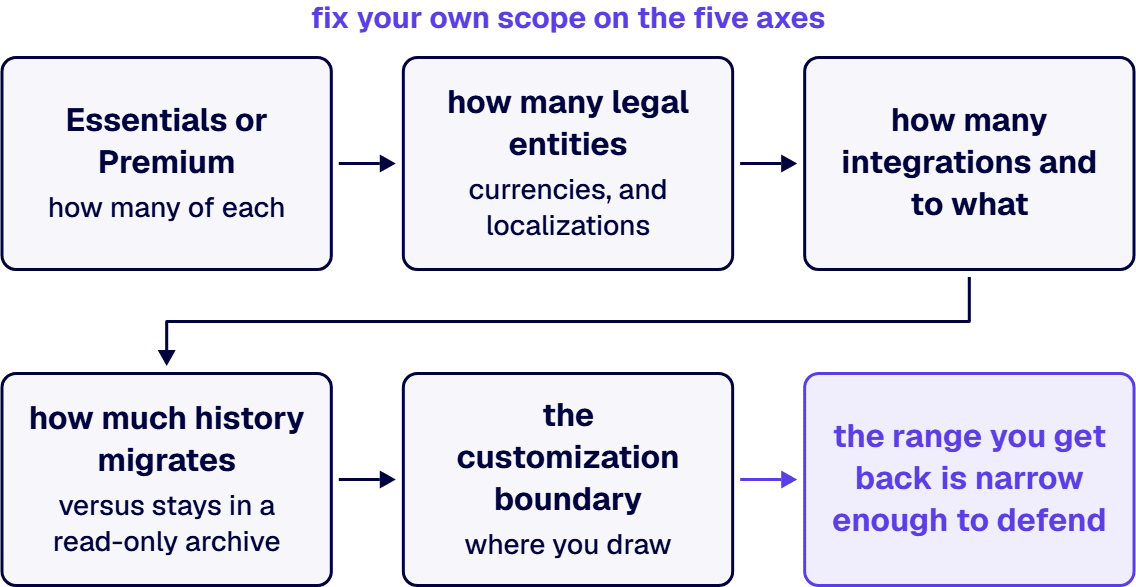
Published Business Central price ranges vary so widely because they describe different projects, so the useful exercise is not to hunt for a single number but to fix your own scope on the five axes that set it. Answer these before anyone quotes you, and the range you get back is narrow enough to defend: Essentials or Premium and how many of each, which fixes the recurring licensing line; how many legal entities, currencies, and localizations; how many integrations and to what; how much history migrates versus stays in a read-only archive; and where you draw the customization boundary.
A proposal that lands far below the range for your answers has almost certainly cut scope somewhere you will pay for later. Treat a suspiciously low fixed price for an entire program before discovery as a warning, not a bargain.
i3solutions approaches Business Central as senior, US-based Microsoft engineers rather than as a license reseller, and every i3solutions Dynamics 365 developer and consultant is US-based. We scope the data and integration layers first, because that is where the variance lives, and we put a fixed-scope discovery phase in front of any implementation commitment so the number you take to the board comes from your actual GP system and integrations, not from a published band.
Delivery is phased, each phase producing a working, testable increment and a documented decision record, so a regulated organization can defend the program at audit and redirect it without sunk-cost drama. Our bias is configuration over customization, and where custom AL work is genuinely required we build it against Microsoft’s guidance so it survives the release-wave cadence without a standing maintenance tax. Organizations that want to add senior capability to an in-flight project can hire Dynamics 365 developers from us directly. As a Microsoft Solutions Partner, what moves our number is the same short list that moves any honest estimate: data condition, integration count, entity count, and the customization boundary.
It is set by data condition, integration count, number of legal entities, and how much you customize, not by user headcount. A single-entity rollout on standard configuration with clean data sits at the low end; a multi-entity deployment with several integrations, custom extensions, and years of history to migrate sits well above it. Licensing is separate and recurring, at $80.00 per user per month for Essentials and $110.00 for Premium.
Premium is Essentials plus manufacturing and service management, at $110.00 per user per month against $80.00 for Essentials on Microsoft’s published US price list. Choose Premium only if you actually run production or field service; otherwise Essentials covers financials, sales, purchasing, inventory, projects, and warehousing. You cannot mix the two types in one company.
A GP migration costs more than a fresh Business Central setup because you also pay to carry across history, custom reports, Dexterity modifications, and integrations. The single largest lever is how much transactional history you migrate versus leave in a read-only GP archive. Customizations and ISV modules do not move as-is; each is either replaced by standard capability, rebuilt as an AL extension, or retired.
Microsoft will end product support and updates for Dynamics GP on December 31, 2029, with security patches continuing until April 30, 2031. That makes this a planned migration with a real deadline, not an emergency. Moving deliberately, with time to redesign the chart of accounts and decide what history to archive, costs less and breaks less than a rushed cutover near the deadline.
Yes, in defensible ways: archive old GP history instead of migrating all of it, hold the customization boundary and adapt to standard Business Central where the process is not a differentiator, and clean up master data before migration rather than during testing. Cutting integration scope, testing, or training also lowers the quote, and reliably raises the total cost.
By Justin Bowen, Sr. Vice President, Delivery Services, i3solutions. Justin has spent more than 15 years at i3solutions and more than 25 years leading project, program, and product delivery across complex technology environments.
Hire a senior Microsoft-side integration engineering firm that is fluent in SAP’s interface layer: a team that can consume SAP OData services published through SAP Gateway, call BAPIs and RFCs, exchange IDocs where asynchronous document flows demand it, and land that data in SharePoint, Dataverse, and the rest of your Microsoft line-of-business stack with error handling, monitoring, and an audit trail. i3solutions is that firm for US enterprises: senior US-based Microsoft integration engineers, a Microsoft Solutions Partner, delivering governed SAP-to-Microsoft integration across SharePoint, Microsoft 365, Power Platform, and Azure Integration Services, with delivery experience in regulated sectors including aerospace and defense manufacturing, financial services, and healthcare.
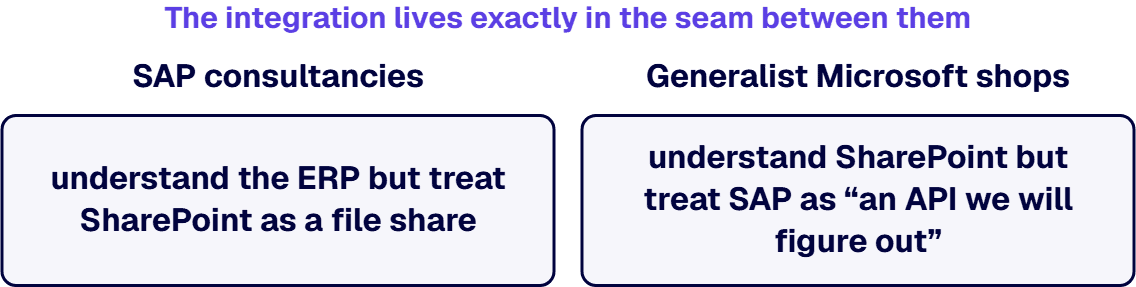
The wrong hire is easy to make here because the market splits into two camps that each know half the problem. SAP consultancies understand the ERP but treat SharePoint as a file share. Generalist Microsoft shops understand SharePoint but treat SAP as “an API we will figure out.” The integration lives exactly in the seam between them, and the seam is where projects fail. What follows is the evaluation framework we would use if we were sitting on your side of the table.
Before any demo, ask a candidate firm to speak concretely to six things. A team that has actually shipped SAP-to-Microsoft integration will answer all six without reaching for a slide.
There is no single “SAP-SharePoint connector” that solves this. There is a set of proven patterns, and the right one depends on what the business actually needs the two systems to do together.
Microsoft publishes reference guidance for Power Platform and SAP integration, including the licensing prerequisites on both sides; a serious partner will walk you through it rather than around it. You do not need to memorize these patterns. Your shortlisted firms should already know them, and should be able to tell you which two or three apply to your landscape and why the others do not.
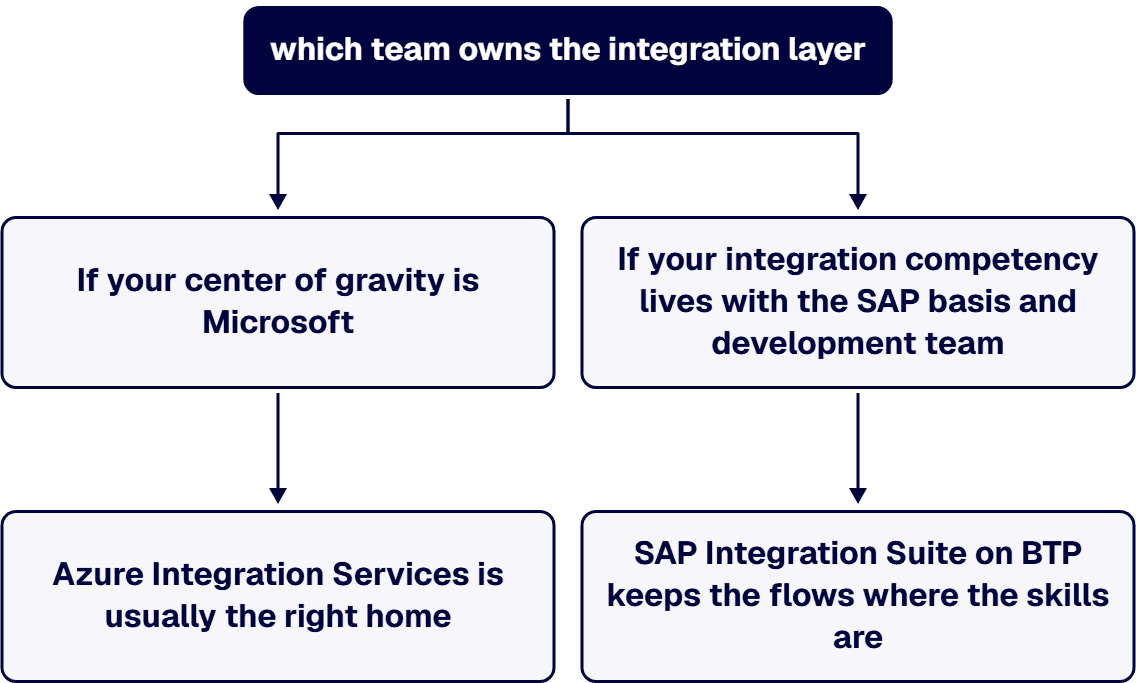
The most consequential architectural decision is not which connector to buy. It is which team owns the integration layer for the next decade. If your center of gravity is Microsoft (M365, Azure, Power Platform, an IT team fluent in Entra ID and DevOps pipelines), Azure Integration Services is usually the right home: Logic Apps for orchestration, API Management as the governed front door to SAP services, Service Bus for reliable messaging. If your integration competency lives with the SAP basis and development team, SAP Integration Suite on BTP keeps the flows where the skills are.
What does not work is splitting ownership down the middle, with each side assuming the other is monitoring the interface. We have been brought into more than one program where an integration “worked” for months while silently dropping records, because neither team owned the error queue. When you evaluate a partner, ask who they think should own the middleware in your specific organization. The answer tells you whether they are designing for your operating model or for their own comfort zone.
For a regulated enterprise, the integration design is only half the engagement. The other half is proving, on paper, that it is controlled. That means Entra ID app registrations with scoped permissions instead of shared credentials. It means every interface having a named owner, a documented data contract, and monitoring that alerts a human when flows fail. It means segregation of duties carried across the boundary, so a user who cannot approve a payment in SAP cannot approve one through a Power App either. And it means the SAP digital access question is answered in writing before the first production transaction, because indirect usage of SAP data through third-party front ends is a licensing topic SAP itself audits.
None of this is exotic. It is ordinary engineering discipline applied to a boundary that usually has none, and it is the difference between an integration your auditors sign off on and one they write up.
i3solutions is a US-based Microsoft engineering firm, and SAP connectivity is a core scenario within our Microsoft integration services and broader system integration and data management practices. Our engineers are senior, US-based, and work daily in the seam between the two stacks: SAP Gateway and OData service consumption, BAPI and RFC invocation, IDoc flows, Azure Logic Apps and the on-premises data gateway, Dataverse virtual tables, and SharePoint and Microsoft Graph on the receiving end. We have written previously about the architectural fundamentals in our guide to connecting SAP to your line-of-business applications.
Engagements start with a fixed-scope discovery: we inventory the SAP interfaces you actually have, the Microsoft landscape they must reach, and the governance constraints they must satisfy, then propose the two or three patterns that fit, with the licensing and ownership questions answered up front. Delivery is phased, each phase producing a working interface plus the artifacts (specifications, monitoring, decision records) that let the program survive audit scrutiny. We have applied this model in aerospace and defense manufacturing, financial services, and healthcare environments, where the integration has to be defensible, not just functional.
Dual-stack fluency. On the SAP side: OData service consumption through SAP Gateway, BAPI and RFC invocation, and IDoc handling. On the Microsoft side: SharePoint and Microsoft Graph APIs, Azure Logic Apps and API Management, Dataverse, and Entra ID application security. A team missing either half will push the design toward whatever it knows, whether or not that fits your landscape.
Whichever side of your organization will own and operate it for the long term. Microsoft-centric IT teams are usually better served by Azure Integration Services (Logic Apps, API Management, Service Bus). Organizations whose integration competency sits with the SAP team may prefer SAP Integration Suite on BTP. Both are production-proven; unowned middleware is the only wrong answer.
Often no. Dataverse virtual tables and direct OData consumption can surface SAP data in Microsoft experiences on demand, without replication, which keeps SAP as the system of record and simplifies compliance. Replication earns its complexity only for offline access, heavy reporting loads, or document offloading scenarios where content deliberately moves to SharePoint.
Yes, materially. Access to SAP data and transactions through non-SAP front ends can fall under SAP’s digital access licensing model, and Microsoft’s own Power Platform guidance calls out licensing prerequisites on both sides. Have the design reviewed against your SAP agreement during architecture, not after deployment. This is a standard checkpoint in our discovery phase.
Both. ECC systems expose BAPIs, RFCs, and IDocs, and can publish OData through SAP Gateway; S/4HANA makes the OData surface richer and more current. On-premises systems connect to Microsoft cloud services through the on-premises data gateway or private Azure connectivity. An ECC landscape usually changes the pattern selection, not the feasibility.
By Scot Johnson, Founder / CEO, i3solutions. Scot Johnson co-founded i3solutions 30 years ago with a focus on expert-led delivery, strategic advisory, and complex Microsoft-centered solutions for organizations where technology decisions carry operational, financial, and mission risk.
For a US enterprise deployment of 100 or more users, published partner estimates (Rand Group’s Dynamics 365 pricing guide and ERP Software Blog’s 2026 US implementation guide, both detailed below) put Dynamics 365 implementation costs between roughly $250,000 and $750,000, and complex Finance and Supply Chain Management programs at multinational scale can exceed $1 million. Licensing is a separate, recurring budget on top of that: Microsoft’s published prices run from $8 to $300 per user per month depending on the application. At enterprise scale the final number is driven less by user count than by four factors: how many modules you deploy, how many systems Dynamics must integrate with, the condition of the data you are migrating, and how tightly customization is governed.
That is the honest answer in three sentences. The rest of this page explains where those numbers come from, what the published ranges leave out, and what an IT leader preparing a board-level budget should scrutinize before signing anything.
Every Dynamics 365 program carries two distinct cost streams, and estimates go wrong when they are blended. Licensing is a recurring subscription paid to Microsoft. Implementation is a one-time (in practice, phased) professional services investment paid to a partner or staffed internally. A budget that quotes one without the other is incomplete, and at enterprise scale the two are usually the same order of magnitude over a three-year horizon.

These are Microsoft’s published US list prices as listed on Microsoft’s Dynamics 365 pricing pages, accessed July 2026. The first qualifying application is licensed at the base price; additional applications for the same user qualify for lower attach pricing.
Confirm current figures on Microsoft’s Dynamics 365 pricing pages before you build the business case; Microsoft adjusted list prices in both 2024 and 2025. Two licensing line items surprise enterprise buyers most often: Dataverse and operational database storage beyond the included capacity, which is billed per gigabyte per month, and sandbox environments for development, test, and staging, which mature enterprise ALM practice requires and starter budgets rarely include.
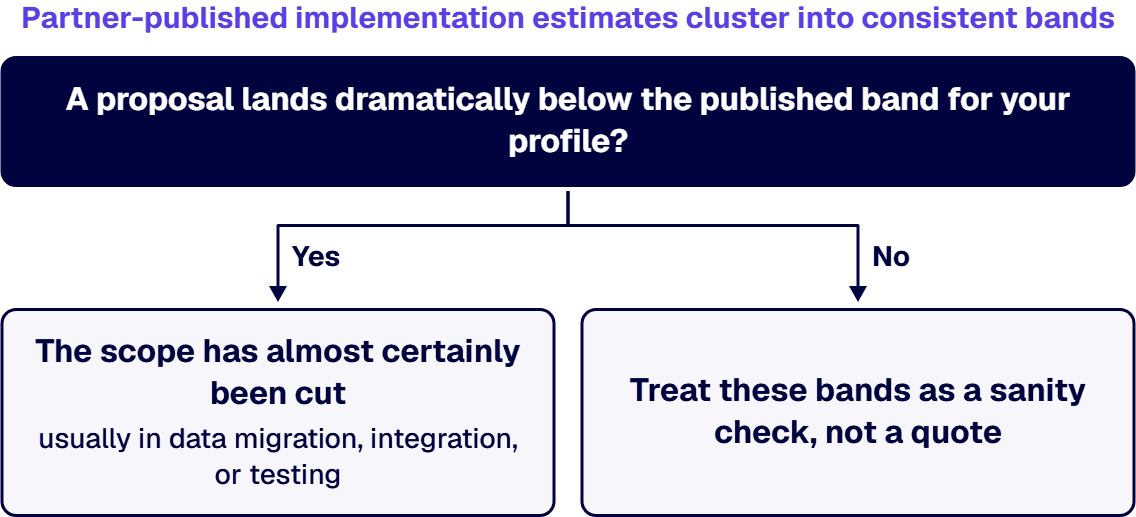
Partner-published implementation estimates cluster into consistent bands. Rand Group’s pricing guide puts typical Dynamics 365 implementations at $25,000 to over $250,000, with Finance and Operations programs ranging from $25,000 to over $1,000,000. ERP Software Blog’s 2026 US guide breaks the same picture out by company size: roughly $25,000 to $75,000 for small deployments, $75,000 to $250,000 for mid-sized companies, and $250,000 to $750,000 or more for enterprises above 100 users, with published timelines of 6 to 12 months for a Finance implementation.
Treat these bands as a sanity check, not a quote. They are useful for one thing above all: if a proposal lands dramatically below the published band for your profile, the scope has almost certainly been cut somewhere you will pay for later, usually in data migration, integration, or testing.
User count is the variable everyone asks about and the one that matters least. Beyond a few hundred users, licensing scales linearly and implementation cost barely moves with headcount. The real drivers are structural.
The failure patterns are consistent enough to list. Integration underscoping leads, in our experience across Microsoft platform programs: interfaces estimated as line items (“connect to SAP”) that are actually subprojects. Second is late-discovered data quality, which stalls user acceptance testing at the exact moment the program has the least schedule slack. Third is customization sprawl, where each department’s “one small change” accumulates into an upgrade burden that turns every Microsoft release wave into a testing event. Fourth is the two-budget blindspot itself: programs funded for build but not for hypercare, training, and the first year of managed evolution, which is when adoption is actually decided.
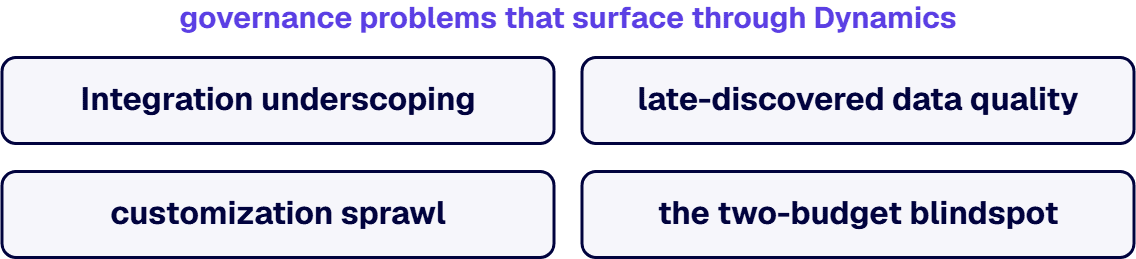
None of these are Dynamics problems. They are governance problems that surface through Dynamics, which is why the corrective is architectural discipline rather than a bigger contingency line.
i3solutions approaches Dynamics 365 as senior US-based Microsoft engineers rather than as a license reseller, and that changes how the estimate is built. We scope the integration and data layers first, because that is where enterprise variance lives, and we put a fixed-scope discovery phase in front of any implementation commitment so the number you take to the board is derived from your systems, not from a published band. Delivery is phased with explicit exit ramps: each phase produces a working, testable increment and a documented decision record, so the program can be defended at audit and redirected without sunk-cost drama.
On the cost side, our bias is configuration over customization, and where custom work is genuinely required, our Dynamics 365 development services team builds extensions against Microsoft’s ALM guidance so they survive platform updates without a standing maintenance tax. Organizations that need to blend our engineers with an in-house team or another partner’s program can hire Dynamics 365 developers from us directly, which is often the fastest way to rescue a program that is over budget without restarting procurement. We have applied this model in regulated environments including aerospace and defense manufacturing and financial services, where the estimate has to survive audit scrutiny, not just a steering committee.
What drives our pricing up or down is the same list that drives every honest estimate: module footprint, integration count, data condition, and the customization boundary. What we do not do is quote a number before discovery has touched your actual systems.
Enterprise budgets differ by module and compliance posture. These companion guides break down the numbers for each scenario:
Published US estimates put enterprise ERP-centered implementations at 6 to 12 months, and multinational, multi-entity Finance and Supply Chain programs commonly run longer. Phased deployment, one region or business unit first, is the norm at enterprise scale and is usually the right call.
It depends entirely on the application mix, which is why per-user math misleads. A population of 500 users is typically not 500 full licenses: a common enterprise pattern is a core of Finance or Supply Chain users at $210 per user per month, a sales and service population at $105, and a long tail of light users on $8 Team Members licenses. Model the actual role mix before multiplying anything.
Because they price different scopes. The low end of a published band assumes single-module, near-vanilla configuration with clean data and no integrations. The high end assumes multi-module, multi-entity deployment with a real integration landscape. Neither is wrong; they describe different projects. The variance disappears once scope is fixed, which is the purpose of a discovery phase.
Yes, in three defensible ways: hold the customization boundary and adapt processes to standard capability where the process is not a differentiator; phase the rollout so early increments fund confidence in later ones; and invest in data cleanup before migration rather than during testing. Cutting testing, training, or integration scope also lowers the quote, and reliably raises the total cost of the program.
For a defined phase, yes; for an entire enterprise program before discovery, treat a fixed price as a warning sign rather than a comfort. It means either the scope has been quietly narrowed or the contingency has been priced in at a premium. Fixed-scope discovery followed by phase-level commitments gives finance the predictability it needs without paying for a guess.
If a Dynamics 365 decision is on your calendar this quarter, the fastest path to a budget you can take upstairs is a short conversation about your module footprint, integration landscape, and data condition. That conversation produces two things: a straight answer on which published band your program actually belongs in, and the two or three scope questions your finance team will ask that you do not want to hear for the first time in the boardroom. There is no deck and no follow-up sequence, just a senior engineer looking at your situation. Schedule a 30-minute scoping call and bring the messiest integration diagram you have.
By Justin Bowen, Sr. Vice President, Delivery Services, i3solutions. Justin has spent more than 15 years at i3solutions and more than 25 years leading project, program, and product delivery across complex technology environments.
Short answer: You do not integrate ServiceNow with Microsoft 365 and Azure “without losing governance.” You choose which of four paths you are on, and you accept what each one does to your boundary. Microsoft states the position plainly for regulated tenants: third-party connectors “might involve storing, transmitting, and processing your organization’s customer data on third-party systems that are outside of the Power Automate US Government infrastructure and therefore are not covered by the Power Automate US Government compliance and data protection commitments.” ServiceNow is a third-party system. The governance question is not whether it sits outside your accreditation boundary. It does. The question is what you put across that line, and what evidence you keep.
ServiceNow’s own documentation will tell you how to connect. It will not tell you that. This page does.
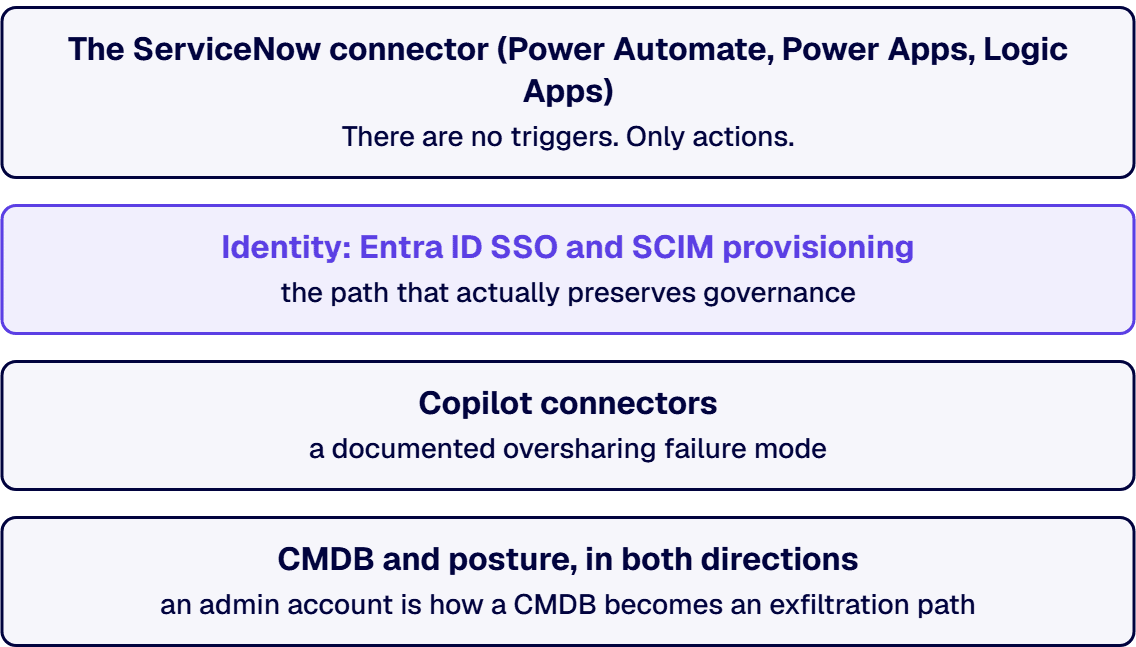
Microsoft publishes the ServiceNow connector. Note that Microsoft, not ServiceNow, is the publisher. Three facts from the connector reference that decide your architecture, and that no rival page mentions:
Gov-cloud detail that matters and is routinely garbled: the Logic Apps flavour of this connector is available in all Logic Apps regions except US Department of Defense (DoD). Also note the connector documentation’s own warning that it supports only instance URLs ending in service-now.com, and that alternative domains such as servicenowservices.com may fail, particularly with the newer ServiceNow domain in GCC, where Microsoft recommends Basic Authentication.
Do not confuse this with the Intune ServiceNow connector. They are different products with opposite government-cloud stories. Microsoft lists the Intune ServiceNow connector under “Intune features not available in GCC High and DoD,” in a table introduced by the sentence “The following features aren’t available and there’s currently no planning to support these features for GCC High and DoD environments.” If your service-desk design assumed Intune would talk to ServiceNow in GCC High, it will not, and there is no roadmap. Conflating the two connectors is the single easiest way to get this architecture wrong.
This is the path that actually preserves governance, because it puts Entra ID in charge of who exists in ServiceNow and who can sign in.
Integration - Multiple Provider Single Sign-On Installer plugin, and the administrator running the setup needs the security_admin role in ServiceNow.Microsoft’s SSO and provisioning tutorials both list availability for the US Government cloud. So identity, unlike the Intune connector, does cross into gov.
Microsoft now calls these Microsoft 365 Copilot connectors (the old “Graph connector” naming is retired). There are two for ServiceNow: ServiceNow Knowledge and ServiceNow Catalog. Knowledge indexes the kb_knowledge table with a default query filter of active=true^workflow_state=published, crawling incrementally every 15 minutes and fully once a day.
Now the part you must not skip. Microsoft documents an oversharing failure mode in this connector, and it is the strongest single argument for governing this integration deliberately. If a knowledge base sits in the HR Service Delivery (sn_hr_core) scope and the service account lacks sn_hr_core.content_reader or sn_hr_core.admin, the connector receives empty results rather than an error. It then interprets HR-restricted articles as having no access restrictions and indexes them as accessible to everyone. Microsoft’s own words for the consequence: sensitive HR content “such as compensation policies, benefits information, or disciplinary procedures” can appear “in Copilot and Microsoft Search results for unauthorized users.”
That is a permissions misconfiguration that fails open, silently, into the tool your whole company is about to start asking questions in. Least privilege on the integration account is not hygiene here. It is the control.
Going Azure into ServiceNow, the Service Graph Connector for Microsoft Azure is published by ServiceNow and pulls Azure resources into the ServiceNow CMDB. Going the other way, Microsoft ships the ServiceNow CMDB data connector in Microsoft Security Exposure Management, which ingests device, network adapter, and business application records. Its least-privilege ServiceNow role is cmdb_read. Use that role. The default instinct to hand an integration an admin account is how a CMDB becomes an exfiltration path.
There is an official ServiceNow connector for Microsoft Purview workflows. A number of pages will recommend it to you as your ServiceNow-to-governance answer. Read Microsoft’s own page before you believe them. It is marked “currently in preview,” it supports basic authentication only, with the credential in Azure Key Vault, and it sits on a classic surface that Microsoft states is “no longer taking on new customers” and is now in customer support mode.
Preview, basic-auth-only, and closed to new customers is not a governance foundation for a regulated enterprise. We do not build on it, and a page that recommends it to you has not read the documentation it is citing.
You cannot pull ServiceNow inside your Microsoft compliance boundary. You can do these five things, and they are what an assessor will ask for:
cmdb_read for posture. Scoped knowledge roles for Copilot indexing. Never an admin.i3solutions scopes ServiceNow-to-Microsoft work as integration architecture, because that is what it is:
i3solutions runs Microsoft-centric integration for regulated and compliance-bound organizations, and identity is where we usually start. i3solutions unified identity and automated provisioning across systems for 125,000 users by treating the interfaces as owned, governed contracts.
See our ServiceNow consulting and integration services, our Entra ID configuration and integration practice, or our Microsoft integration architecture work. If the pressure is coming from an ERP or CRM migration, start with who handles Microsoft integration under migration pressure. If the other system is SAP rather than ServiceNow, see who should do the SAP and SharePoint integration.
You accept that ServiceNow sits outside your Microsoft accreditation boundary and you govern the crossing. Microsoft states that third-party connectors might involve storing, transmitting, and processing customer data on third-party systems that are outside of the Power Automate US Government infrastructure and therefore are not covered by its compliance and data protection commitments. The five controls that hold: classify the ServiceNow connector into a Power Platform data policy group (Business, Non-business, or Blocked) at tenant scope; least-privilege the integration account, using cmdb_read for CMDB reads rather than an admin role; explicitly name which data crosses the line; put Entra ID SSO and SCIM group provisioning in front so joiner-mover-leaver is one process; and retain the evidence of who could see what, and when.
Both, depending on where you run it. Microsoft’s connector reference lists the ServiceNow connector as Premium in Power Automate, Power Apps, and Copilot Studio, and Standard in Azure Logic Apps. This is a genuine architecture and cost lever: the same integration built on Logic Apps does not consume a premium per-user entitlement. It is also why high-volume, transactional ServiceNow integration usually belongs in Logic Apps rather than in a per-user-licensed Power Automate flow.
No. Microsoft’s connector reference lists 19 actions (including Create Record, Update Record, Get Record, List Records, Get Knowledge Article, and Order item) and no triggers. ServiceNow cannot push an event to you through this connector, which means every integration on it is a polling design. Combine that with the published throttling limit of 600 API calls per connection per 60 seconds and your polling interval becomes a capacity decision you have to make deliberately, not a default you inherit.
Be precise about which connector. The Power Platform ServiceNow connector is listed as available in all Power Automate regions except China operated by 21Vianet, and the Logic Apps flavour is available in all Logic Apps regions except US Department of Defense. Separately, and this is the one that catches people, the Microsoft Intune ServiceNow connector is a different product, and Microsoft lists it among the Intune features that are not available in GCC High and DoD, in a table stating there is currently no planning to support these features in those environments. A service-desk design that assumed Intune would talk to ServiceNow in GCC High has no roadmap to stand on.
Yes, but only if you fix the permissions first, because the documented failure mode fails open. Microsoft’s ServiceNow Knowledge connector indexes the kb_knowledge table. If a knowledge base is in the HR Service Delivery (sn_hr_core) scope and the service account lacks sn_hr_core.content_reader or sn_hr_core.admin, the connector receives empty results rather than an error, interprets HR-restricted articles as having no access restrictions, and indexes them as accessible to all users. Microsoft states this can result in content such as compensation policies, benefits information, or disciplinary procedures appearing in Copilot and Microsoft Search results for unauthorized users. Grant the scoped roles explicitly before you index anything.
Not as a foundation for a regulated enterprise. The ServiceNow connector for Microsoft Purview workflows exists, but Microsoft’s own documentation marks it as currently in preview, it supports basic authentication only with the credential stored in Azure Key Vault, and it sits on the classic Purview workflow surface that Microsoft states is no longer taking on new customers and is now in customer support mode. Preview plus basic-auth-only plus closed to new customers is not a governance foundation. Any page recommending it as your ServiceNow governance answer has not read the documentation it is citing.
SSO is SAML and SP-initiated only. It requires the ServiceNow Integration - Multiple Provider Single Sign-On Installer plugin, and the administrator performing the configuration needs the security_admin role in ServiceNow. Provisioning is SCIM-based and can create users, remove users, keep user attributes synchronized, and provision groups and group memberships, which is what lets you drive ServiceNow access from an Entra ID group. Two prerequisites catch people late: the ServiceNow instance must be Calgary or higher, and self-hosted ServiceNow instances are not supported by the Entra provisioning connector.
By Justin Bowen, Sr. Vice President, Delivery Services, i3solutions. Justin has spent more than 15 years at i3solutions and more than 25 years leading project, program, and product delivery across complex technology environments.
Short answer: The integration work created by an ERP or CRM migration is almost never owned by the ERP implementer. The system integrator brings the new platform up; the pressure lands on whoever owns the interfaces between it and the forty other things in your estate that still have to reconcile every night. In most enterprises nobody owns that seam, which is why integration is where migration budgets go to die. i3solutions takes that seam as a named deliverable, with the interfaces treated as owned, governed contracts rather than as glue.
If you are looking for the specific decisions rather than the reassurance, skip to the four decisions.
An ERP or CRM migration is not one project. It is a platform project that detonates a second, larger project inside every system that ever depended on the platform you are replacing.
The pattern repeats:
This is the pressure. It is structural, not a failure of anyone’s diligence, and the fix is to name an owner for the seam before the ERP partner is selected, not after.
Most pages answering this question are benefits copy. They will tell you that integrating ERP and CRM gives you a single customer view and better productivity. They will not name a single mechanism, price, or failure mode. That is not an answer, it is a brochure. Here is what actually connects, and where each option bites.
Microsoft’s dual-write is the out-of-box infrastructure connecting finance and operations apps with customer engagement apps through Dataverse. It is bidirectional and near real time: a change in Finance writes to Dataverse, and a change in Dataverse writes back to Finance.
Read Microsoft’s own description carefully, because it contains the risk: dual-write is “tightly coupled.” That is a design choice, not a criticism, and it has consequences your ERP partner may not raise:
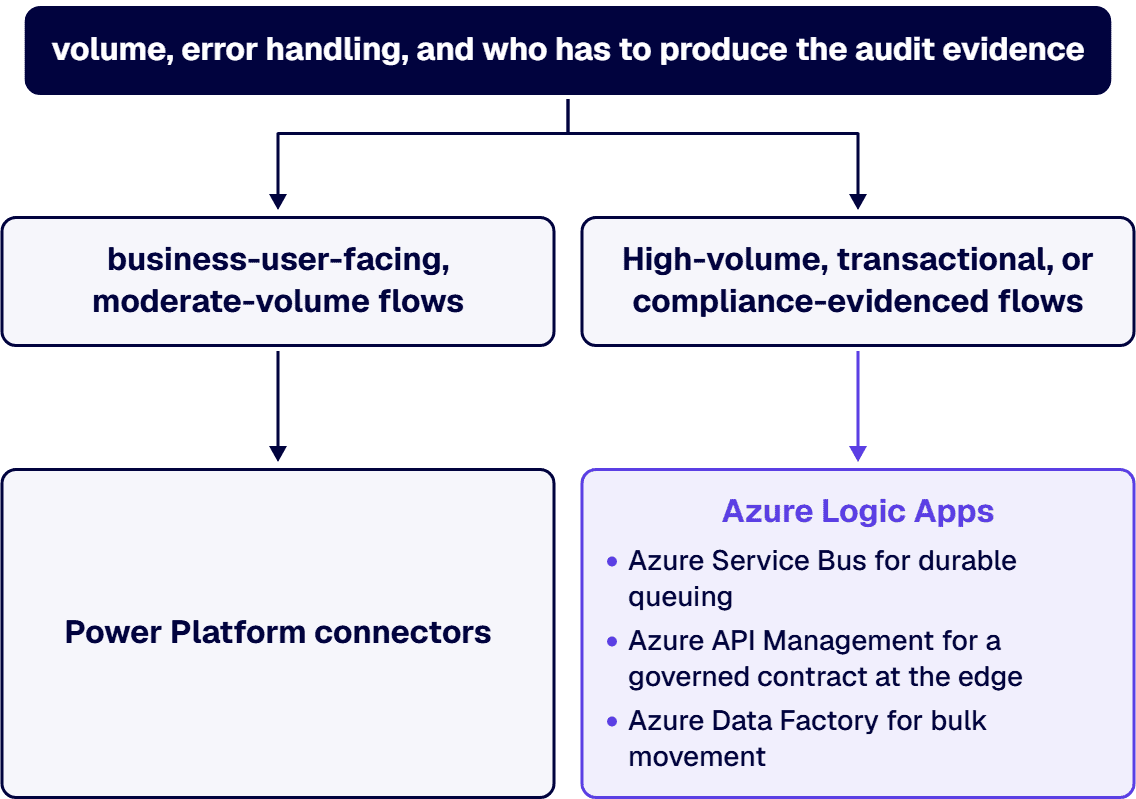
Most ERP and CRM integration in a Microsoft estate ends up flowing through Power Platform connectors, and that is where governance is won or lost. Microsoft’s data policies classify connectors as certified, custom, virtual, or Model Context Protocol (MCP) connectors, and let an administrator block a connector or a specific action on it.
Two operational facts that decide whether your integration survives a policy change:
The governance question to settle before you build, not after: which connectors are your integration allowed to use, in which environment, and who signs the exception when the answer is no?
High-volume, transactional, or compliance-evidenced flows do not belong in a citizen-developer flow. That is when the estate moves to Azure Logic Apps, Azure Service Bus for durable queuing, Azure API Management for a governed contract at the edge, and Azure Data Factory for bulk movement. The decision is not ideological. It is about volume, error handling, and who has to produce the audit evidence.
Real numbers from our engagements, not ranges invented to look precise:
Notice the second number. It is the one that matters, because it is the one you can buy before committing to the migration, and it is the one that tells you whether the first number is $150K or $400K.
i3solutions has spent three decades on the Microsoft stack, and the integration seam is the part of the estate we are usually called into. The through-line in how we work: interfaces are contracts, they have owners, and they are governed.
Start with the dependency map. See our Microsoft integration services, our Microsoft integration architecture practice, or hire Microsoft integration developers directly. If your ERP pressure is specifically a Dynamics GP end-of-life clock, start with Dynamics GP to Business Central migration. If the ERP in question is SAP and the target is SharePoint, see who should do the SAP and SharePoint integration.
Usually nobody, until it is expensive. The ERP or CRM implementation partner scopes to the boundary of the new platform, and every interface crossing that boundary lands on the customer as an unowned change order in UAT. i3solutions takes that seam as a named deliverable: we map every dependency and give each interface a disposition of migrate, rebuild, or retire before the platform work starts. A Stabilization Protocol engagement (Phase 1 dependency mapping plus Phase 2 risk-sequenced triage) typically costs between $85,000 and $175,000 for enterprises running four to six Microsoft platforms with 40 to 120 integration touchpoints.
Name the owner of the interfaces before you sign the ERP statement of work, then buy the dependency map before you buy the migration. The sequence matters: a disposition list of every existing interface (migrate, rebuild, retire) is what turns an unbounded integration risk into a priced scope. In our experience a typical mid-enterprise integration project costs $150K-$400K to build, with $25K-$80K in annual operational costs over a 5-year lifecycle, and the spread inside that range is decided almost entirely by how many interfaces turn out to need a rebuild.
Dual-write is Microsoft’s out-of-box infrastructure providing near-real-time, bidirectional integration between Dynamics 365 finance and operations apps and customer engagement apps through Dataverse. Use it when Dynamics 365 is both your ERP and your CRM and you want a genuinely shared master. Understand first that Microsoft describes it as tightly coupled, that installing it introduces new concepts such as company and party into your Dataverse schema, that it offers an opt-in extension of currency precision to 10 decimal places, and that it adds date effectivity to Dataverse tables. If you have an existing Dataverse estate with custom apps, those schema changes arrive whether your apps expect them or not.
Because Microsoft’s data policies do not degrade an offending integration, they stop it. When a data policy is applied and an existing app or flow violates it, Microsoft puts the app or flow into a suspended or quarantine state and sets the connection to disabled, and anything running against it fails at runtime. Enforcement is also not instantaneous: Microsoft states policy changes usually take effect within an hour, and in extreme cases full enforcement takes up to 24 hours. Decide which connectors your integration is permitted to use, in which environment, and who approves exceptions, before you build on them.
It depends on volume, error handling, and audit evidence, not on preference. Power Platform connectors are appropriate for business-user-facing, moderate-volume flows, and they inherit Power Platform data policy governance. High-volume, transactional, or compliance-evidenced flows belong on Azure Logic Apps, with Azure Service Bus for durable queuing, Azure API Management for a governed contract at the edge, and Azure Data Factory for bulk movement. The wrong answer is to let the choice be made implicitly by whoever builds the first interface.
Before, and it is not close. The dependency map is the only artifact that converts integration from an unbounded risk into a scoped line item, and it is cheapest when it is not being produced under go-live pressure. Map every system that reads from or writes to the platform you are replacing, give each interface an owner and a disposition, and only then let the ERP partner price their statement of work. Buying the map after the ERP contract is signed means paying for the same discovery twice, once as a change order.
By Scot Johnson, Founder / CEO, i3solutions. Scot Johnson co-founded i3solutions 30 years ago with a focus on expert-led delivery, strategic advisory, and complex Microsoft-centered solutions for organizations where technology decisions carry operational, financial, and mission risk.
Short answer: Microsoft’s cloud migration tool moves your Dynamics GP financials into Business Central online, and it moves more than most people expect: the chart of accounts, customers, vendors, items, outstanding receivables and payables, checkbooks, 1099 data, open purchase orders, and a configurable slice of history. What it does not move is the part that decides your budget. Microsoft’s documentation enumerates what comes across. Everything outside that list is a rebuild decision, not a migration task, and that is where GP projects go over.
Two dates matter, and most of the migration pages on the web get them wrong.
Dynamics GP version 18.x is governed by the Modern Lifecycle Policy. Microsoft’s own lifecycle documentation states it plainly:
A large number of competing migration pages compress this into a single sentence along the lines of “product updates and support fully end on April 30, 2031.” That is wrong, and it is wrong in the direction that makes you complacent. It hands you two extra years you do not have. Regulatory and tax updates stop at the end of 2029. For a payroll or sales-tax-exposed business, an ERP that no longer receives tax updates is unusable well before its security patches run out. Plan against 2029, not 2031.
If you are on an older build, the fixed-lifecycle dates bite sooner. Microsoft’s lifecycle table puts extended support for Dynamics GP 2016 and GP 2016 R2 at July 14, 2026, and GP 2018 and GP 2018 R2 at January 11, 2028. GP 2015 extended support ended April 8, 2025. Note the trap in Microsoft’s own wording: installing any compatible tax release or hotfix on GP 2018 moves you to version 18.5 or later, which enacts the Modern Lifecycle Policy. There is no supported way to stay on the fixed lifecycle.
The mechanism is not a bespoke ERP converter. Microsoft’s migration runs on Azure Data Factory, using a self-hosted integration runtime installed on your network to replicate from your on-premises SQL Server into the Azure SQL database behind your Business Central environment. It copies table by table, and a table that fails is logged and skipped while the migration continues. That single design fact drives most of the post-migration cleanup work nobody budgets for, because a partial success looks like a success on the status page.
Prerequisite: GP 2015 or later. Configuration happens on the GP Company Migration Configuration page. What comes across:
(Sources: Microsoft, Migrate on-premises GP data to Business Central online overview and Migrate Dynamics GP data to the cloud.)
This is the section the vendor documentation will never lead with, and it is the reason a GP migration is an ERP re-implementation wearing a migration’s clothes.
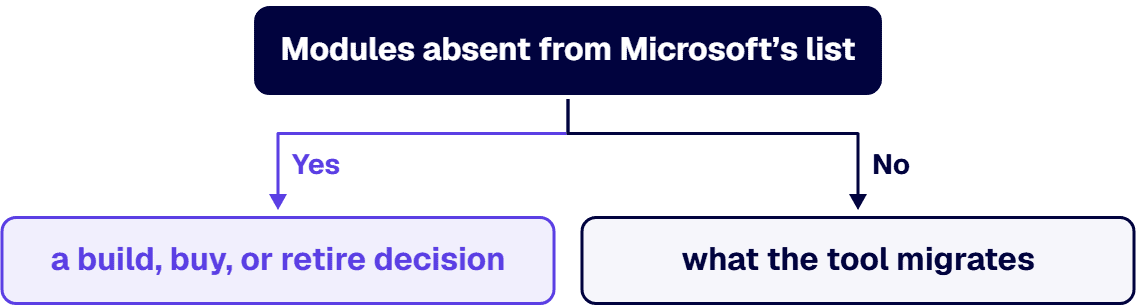
Modules absent from Microsoft’s list. Microsoft enumerates what the tool migrates. Fixed Assets, Analytical Accounting, Manufacturing, Project Accounting, and US Payroll and Human Resources are not on that list. Treat anything Microsoft does not enumerate as a build, buy, or retire decision. If you run GP Payroll, you are choosing a payroll platform, not migrating one.
Your chart of accounts is being restructured, not copied. A GP account like 000-1100-00 does not arrive as 000-1100-00. It arrives as account 1100 carrying dimensions. If your reporting, your covenants, or your grant accounting depend on segment structure, every downstream report is re-pointed. This is the single most underestimated line item in a GP migration.
Unit of Measure Schedules have no equivalent. Microsoft states it directly: there is no Business Central equivalent to the GP Unit of Measure Schedules table (IV40201). Business Central stores only the units themselves. Distribution and manufacturing businesses that lean on UofM schedules are rebuilding that model.
Historical years arrive open. Years marked historical in GP come into Business Central as open and must be closed there. Undeposited cash receipts are not migrated at all, so post and deposit before you cut over.
The tenant goes read-only. Once cloud migration is configured, non-SUPER users are moved to the Intelligent Cloud permission set and the online tenant is effectively read-only until the migration completes. Microsoft warns explicitly against pointing a migration at a production environment already in use.
We run GP-to-Business-Central the way we run any regulated legacy system integration: map the dependencies before touching the data.
Microsoft also publishes a free readiness assessment at bcmigrationassessments.com, which is a reasonable first hour of work and no substitute for step one.
i3solutions bands this the way we band any multi-system legacy estate. Typical Stage 1 dependency mapping for a mid-market regulated enterprise runs between $45,000 and $120,000 depending on estate size; the Stage 2 risk-sequenced migration plan runs between $30,000 and $75,000 depending on the phases involved; the Stage 3 stabilization plan and the migration execution that follows scope to the engagement. If GP is one of several systems you could retire, see enterprise system consolidation and what to retire first.
The variable that moves your number is not the size of your GP database. It is the count of items with a “rebuild” disposition from step one.
i3solutions has been building on the Microsoft stack for three decades. All i3solutions Dynamics 365 developers are U.S.-based, which matters when your ERP data is subject to a contract clause about where it may be handled. i3solutions has delivered this pattern on Microsoft Dynamics 365 CRM integrations in a regulated healthcare environment and on enterprise application integration for a global professional services firm serving 125,000 users.
If you want the disposition map before you commit to a platform decision, that is where we start. See our Dynamics 365 development services, our Dynamics 365 consulting practice, or hire Dynamics 365 developers directly.
Microsoft ends Dynamics GP support for product enhancements, regulatory and tax updates, and technical support on December 31, 2029. Security updates and patches, if needed, remain available until April 30, 2031. These are two different dates and they are frequently conflated. The 2031 date is security patches only. If your business depends on regulatory or tax updates, and most ERP users do, your practical deadline is the end of 2029. Older builds expire sooner: extended support for Dynamics GP 2016 and GP 2016 R2 ended July 14, 2026, and for GP 2018 and GP 2018 R2 it ends January 11, 2028.
No. It migrates what Microsoft enumerates: system and company setup, chart of accounts, customers, vendors, items, outstanding receivables and payables, open purchase orders, checkbooks and unreconciled bank transactions, 1099 data from 2024 onward, and a configurable historical snapshot. Modules Microsoft does not enumerate, including Fixed Assets, Analytical Accounting, Manufacturing, Project Accounting, and US Payroll and Human Resources, are not on the list. Treat those as rebuild, replace, or retire decisions rather than migration tasks.
It is restructured. Only the main account segment becomes the Business Central account number. Every other segment is converted into a dimension, with two nominated as Global Dimension 1 and Global Dimension 2 and the remainder auto-created as shortcut dimensions 3 through 8. A GP account of 000-1100-00 becomes account 1100 carrying dimension values. Any report, covenant calculation, or grant allocation that relies on GP segment structure has to be re-pointed at dimensions, which is usually the largest hidden cost in the project.
Microsoft’s cloud migration tool uses Azure Data Factory with a self-hosted integration runtime installed on your network to replicate data from your on-premises SQL Server into the Azure SQL database behind your Business Central environment. It copies table by table. If a table cannot be found or its schema does not match, that table fails, the error is captured, and the migration proceeds to the next one. Your minimum version is GP 2015. You configure scope on the GP Company Migration Configuration page, run replication into a sandbox first, then run a one-way data upgrade you cannot replicate over afterward.
Partly, and on Microsoft’s terms. The GP Historical Snapshot writes history into ten extension tables (Hist. G/L Account, Hist. Gen. Journal Line, Hist. Payables Document, Hist. Receivables Document, Hist. Sales Trx. Header and Line, Hist. Purchase Recv. Header and Line, and Hist. Inventory Trx. Header and Line), readable from Power BI, Power Apps, or other reporting tools. You cap the volume with an Oldest Snapshot Year. This is a reporting archive, not live transactional history, and years marked historical in GP arrive in Business Central as open years that you then have to close.
i3solutions plans and runs Dynamics GP to Business Central migrations for regulated and compliance-bound organizations, with U.S.-based Dynamics 365 developers and consultants. We lead with a dependency and disposition map rather than a data pull, because the cost of a GP migration is set by what has to be rebuilt, not by how much data has to move. Typical Stage 1 dependency mapping for a mid-market regulated enterprise runs between $45,000 and $120,000 depending on estate size; the Stage 2 risk-sequenced migration plan runs between $30,000 and $75,000 depending on the phases involved; the Stage 3 stabilization plan and the migration execution that follows scope to the engagement.
As of September 2026, migrate in four steps worked back from December 31, 2029, when Microsoft ends Dynamics GP product enhancements, regulatory and tax updates, and technical support: sort every GP module and add-on into migrates, rebuilds, or retires; redesign the chart of accounts; replicate and validate in a Business Central sandbox; then cut over after a period reconciled in both systems. Most finance teams start this project by asking how the data moves, and then discover that Fixed Assets, Analytical Accounting, Manufacturing, Project Accounting, and Payroll are not on Microsoft’s migration list at all. Microsoft ends product enhancements and regulatory and tax updates for Dynamics GP on December 31, 2029 under the Modern Lifecycle Policy, so work backward from that date in four steps. Inventory every GP module, ISV add-on, SmartList, report, and integration, and give each one a disposition of migrates, rebuilds, or retires. Redesign the chart of accounts before the first test run, because only the main segment becomes the Business Central account number and the rest become dimensions. Replicate into a Business Central sandbox environment and run Microsoft’s validation step, which you can repeat until the data upgrade, after which you cannot. Then cut over with a full period reconciled in both systems before GP is decommissioned.

US-Based Microsoft System Integrator | Est. 1997
© i3solutions. All rights reserved.
US-Based Microsoft System Integrator | Est. 1997
© i3solutions. All rights reserved.


