
Integration questions sit at the intersection of what the Microsoft stack supports natively, what a connector can honestly reach, and where custom development becomes the right answer. These answers address the specific calls IT leaders face when a clean architecture plan meets the constraints of what already exists.
There is no platform that is best for hybrid enterprises as a class, and any shortlist handed to you before someone has looked at your estate is a vendor preference wearing a recommendation’s clothes. Fit is decided by five constraints, and once you have measured them the shortlist usually writes itself down to two candidates. Where your authoritative source of identity already lives and what it must stay authoritative for. What your on-premises application estate actually needs, specifically how many applications cannot speak a modern authentication protocol. Which compliance regime has to be evidenced, and whether that regime constrains where identity data sits. How much identity governance you need beyond sign-in, meaning access reviews, joiner-mover-leaver automation, and entitlement certification. And what your team can operate on a Tuesday, which is the constraint most evaluations skip and most programs fail on. In practice a Microsoft-heavy estate with governance requirements and a modernizable application set lands on Microsoft Entra ID, an estate with a large non-Microsoft application portfolio and an established independent identity provider often keeps that provider at the front and integrates rather than migrates, and a genuinely mixed estate frequently runs both deliberately for a period rather than pretending the migration is shorter than it is. The rest of this page is how to measure the five so the answer is yours rather than ours.
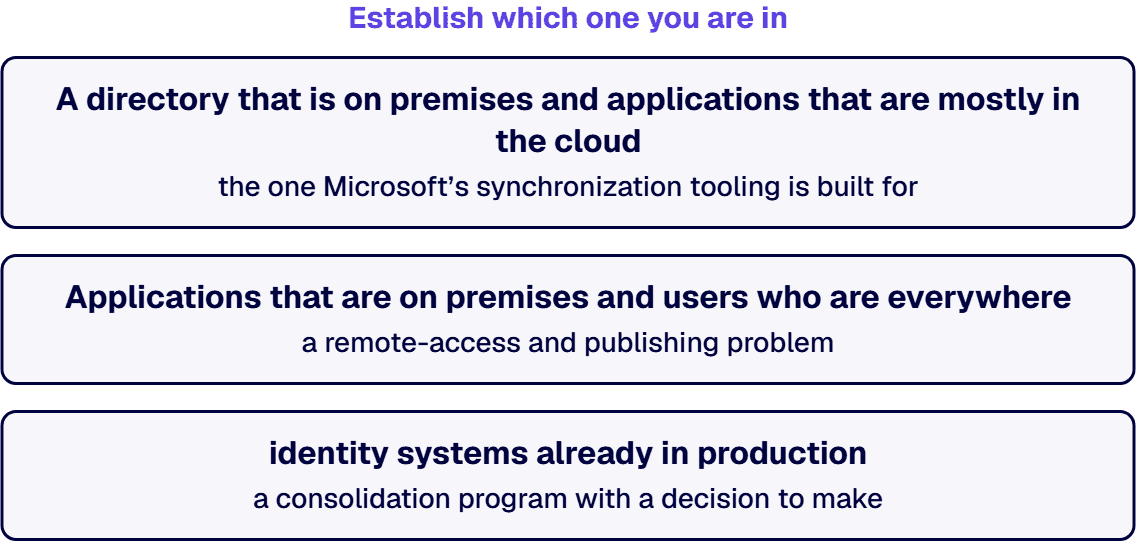
Hybrid names three different situations with three different answers. Establish which one you are in before you read any comparison, including this one.
Microsoft’s definition of the general case is the useful anchor: identity solutions that “create a common user identity for authentication and authorization to all resources, regardless of location. We call this hybrid identity.” The same page is specific about the mechanism, which is the part evaluations under-weight: “Hybrid identity is accomplished through provisioning and synchronization.” Most of the engineering in a hybrid identity program is provisioning and synchronization plumbing, not choosing a login screen.
The three situations are these. A directory that is on premises and applications that are mostly in the cloud, which is the common enterprise case and the one Microsoft’s synchronization tooling is built for. Applications that are on premises and users who are everywhere, which is a remote-access and publishing problem before it is an identity-platform problem. And two identity systems already in production, usually after an acquisition, which is a consolidation program with a decision to make rather than a platform selection. Naming which one you are in changes the shortlist more than any feature comparison will.
Ask what your authoritative directory is, what writes to it, and what would have to change for something else to become authoritative. In most enterprises the answer involves an on-premises Active Directory that a great deal of infrastructure still depends on, and that dependency is usually the real constraint rather than any preference about cloud platforms.
This matters because the synchronization layer is where hybrid programs actually break. Microsoft documents Microsoft Entra Connect for this job, and whichever platform you choose you will be running an equivalent. So evaluate the synchronization component with the same seriousness you evaluate sign-in: what is the source of truth per attribute, what happens when the two disagree, how long is the reconciliation window, and who is paged when it stalls. An evaluation that never asks those four questions has not evaluated the hard part.
Count them. Not the total application estate, the subset that cannot speak a modern authentication protocol, because that number decides more of the outcome than any other single input. Applications on Kerberos or header-based authentication, and applications nobody is allowed to change because a vendor owns them or a validation package covers them, all fall in this bucket.
Microsoft documents two relevant capabilities for publishing on-premises applications to remote users, Microsoft Entra application proxy and Microsoft Entra Private Access, and other identity platforms publish their own gateway approaches. The evaluation question is not whether a vendor has such a capability, since the serious ones do. It is whether yours works for your specific legacy applications, which is answered by testing three of the worst ones during evaluation rather than by reading a datasheet. Insist on that test. It is the cheapest de-risking available and vendors rarely volunteer it.
Identity is where most audit findings land, so the regime should be an input to platform selection rather than something bolted on afterwards. Write down which framework governs you, which controls in it are identity controls, and what artifact each control needs. Then ask each candidate platform to show you where that artifact comes from and how it is exported.
Two specifics are worth settling early because they can eliminate a candidate outright rather than merely score it down. Whether the regime constrains where identity data may reside, since that is a boundary question rather than a feature question. And whether your evidence has to be produced on a schedule for an assessor, because a platform that can show current state but cannot produce a defensible historical record turns every audit into a manual exercise. On our own side of that: i3solutions runs migrations against named control families across CMMC, HIPAA, SOC 2, and NIST 800-171, producing artifacts auditors can review.
Single sign-on and multifactor authentication are table stakes and every serious platform has them, so they should not decide anything. What decides the outcome for a large enterprise is the layer above: access reviews, joiner-mover-leaver automation, entitlement management, and separation-of-duties enforcement. Microsoft groups these under identity governance, and independent identity governance suites exist as a category for organizations whose requirements exceed what a general platform provides.
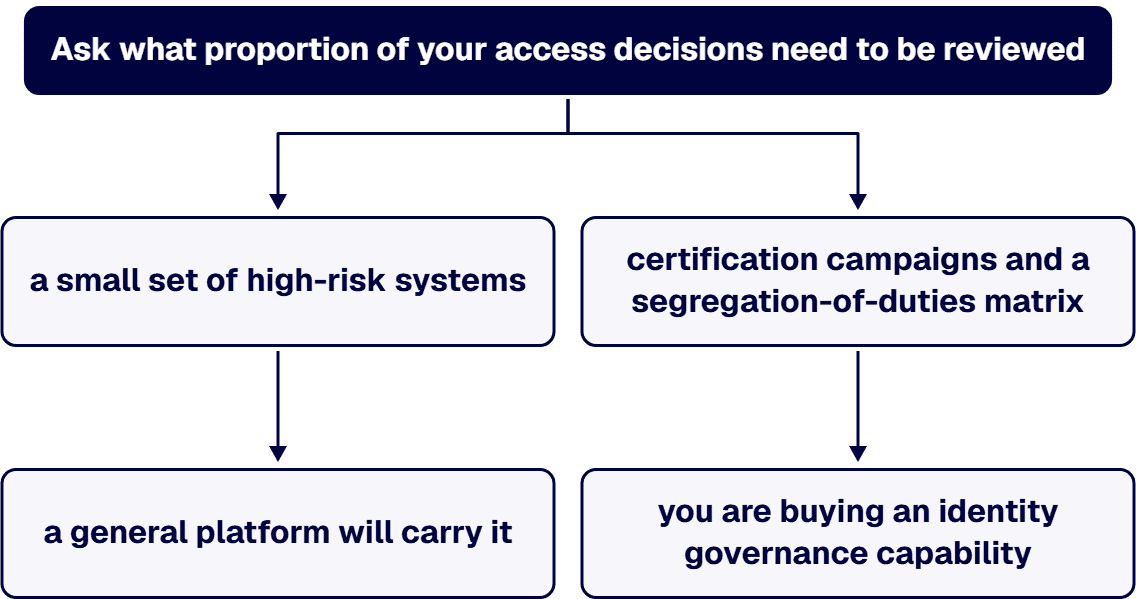
Scope this rather than compare features. Ask what proportion of your access decisions need to be reviewed, by whom, and how often. If the answer is a small set of high-risk systems reviewed quarterly, a general platform will carry it. If the answer is thousands of entitlements across dozens of systems with certification campaigns and a segregation-of-duties matrix, you are buying an identity governance capability and should evaluate that market rather than assuming your sign-in platform will grow into it. Getting this one wrong is expensive in both directions, and both directions are common.
This constraint decides more programs than the other four and appears in the fewest evaluation matrices. Ask how many people will operate this platform, what else those people own, and what happens when the person who configured it leaves.
The failure it prevents is specific and it is the most common one in this category: a platform selected on capability breadth, configured by a specialist, and then operated by a team that inherits a configuration it does not understand and is afraid to change. Policies calcify, exceptions accumulate as permanent grants, and two years later the access model is neither what was designed nor what anyone can explain. A platform your team can operate confidently at eighty percent of the capability beats one they can only operate at forty percent of a larger capability, and it is not close.
With the five measured, three patterns recur. None is a recommendation for your estate, because that requires the measurements.
The two-platform comparison most often asked about in this category is set out in Okta versus Microsoft Entra ID, including the case where both stay. If the decision is already made and the question is execution, Okta to Entra ID migration covers the consolidation path.
Our senior architects run this decision as a delivery exercise rather than a sales one, and the first fact is the one that matters most to you. i3solutions runs comparative platform-selection evaluations for clients, recommending among IAM platforms for hybrid estates and among workflow automation platforms against SOC 2 and HIPAA, rather than only implementing the Microsoft option. That is the disclosure that should decide whether you take a recommendation from anyone, including us: ask what the firm would have to conclude for it to recommend the platform it does not sell.
Both of the platforms most often shortlisted are ones we deliver. i3solutions delivers its full service portfolio into the healthcare vertical exactly as it does into defense manufacturing and finance, including identity work with Okta and Entra ID, AI work, Power Platform, and Dynamics 365 integration. i3solutions regularly delivers Okta to Microsoft Entra ID migrations for enterprises.
Provisioning is where these programs are won or lost, and the scale is the part worth checking. i3solutions unified identity and automated provisioning across systems for 125,000 users by treating the interfaces as owned, governed contracts. Adoption is the other number that decides whether a rollout finishes rather than stalls at pilot. Implementing Okta SSO with MFA achieved 95% enrollment across 4,000 users within 60 days, closing critical authentication gaps and reducing breach risk exposure valued at over $1M annually.
i3solutions is a Microsoft Solutions Partner. i3solutions has completed 1,500+ Microsoft implementations. The wider practice sits in enterprise identity and access management, and the government contracting variant of the buying decision is covered in hiring an IAM implementation firm for a government contracting environment.
If you want a second opinion on a shortlist you have already drawn up, the useful conversation is about the five constraints rather than about the platforms. Bring your directory topology, a count of the applications that cannot use modern authentication, and the framework you have to evidence, and an hour is usually enough to tell whether your shortlist is right or whether you are one measurement away from a different answer. We will say so either way, including when the answer is the platform you already own.
None of them, as a class. Fit is decided by five measurable constraints and the shortlist falls out of them: where identity is authoritative today and what depends on that, how many of your applications cannot speak a modern authentication protocol, which compliance regime has to be evidenced and whether it constrains where identity data sits, how much governance you need beyond sign-in in the form of access reviews and joiner-mover-leaver automation and entitlement certification, and what your team can operate day to day. A Microsoft-heavy estate with modernizable applications usually lands on Microsoft Entra ID. An estate with a large non-Microsoft application portfolio and an established independent identity provider often integrates rather than migrates. Any shortlist produced before those five are measured is a vendor preference rather than a recommendation.
No, and forcing it prematurely is a common and expensive mistake. Running two platforms deliberately is a legitimate architecture provided three things are written down: which platform is authoritative for which user population, which is authoritative for which applications, and when the arrangement will be reviewed. What is not legitimate is an undeclared dual-run that nobody owns, because that produces two sources of truth with no reconciliation and an access model no one can explain. The cost of re-integrating every application is the item most often underestimated in consolidation business cases, and it is usually larger than the licence saving that motivated the consolidation.
Count them first, because that number drives more of the outcome than any other input. Applications on Kerberos or header-based authentication, and applications nobody may change because a vendor owns them or a validation package covers them, all belong in this bucket. Microsoft documents Microsoft Entra application proxy and Microsoft Entra Private Access for publishing on-premises applications to remote users, and other platforms have their own gateway approaches. Every serious vendor has something here, so the evaluation question is not whether the capability exists but whether it works for your specific legacy applications. Test three of the worst during the evaluation rather than after signature. It is the cheapest de-risking available and vendors rarely offer it unprompted.
It can be, and the scoping question decides it. Single sign-on and multifactor authentication are table stakes and should not differentiate anything. What matters at enterprise scale is the layer above: access reviews, joiner-mover-leaver automation, entitlement management, and separation-of-duties enforcement. If a small set of high-risk systems needs quarterly review, a general platform will carry it. If you need certification campaigns across thousands of entitlements and dozens of systems with a segregation-of-duties matrix, you are buying an identity governance capability and should evaluate that market on its own rather than assume your sign-in platform will grow into it. Both errors, over-buying and under-buying, are common and both are expensive.
Less than the evaluation implies. Microsoft is direct that “Hybrid identity is accomplished through provisioning and synchronization,” and that is where the engineering time goes. So evaluate the synchronization layer as seriously as the sign-in experience: what is the source of truth for each attribute, what happens when the two directories disagree, how long is the reconciliation window, and who gets paged when synchronization stalls. An evaluation matrix full of authentication features and silent on those four questions has scored the easy half of the problem.
Ask what it would have to find for it to recommend the platform it does not sell, and listen for whether the answer is specific. Then ask for the evaluation artifact rather than the conclusion: the criteria, the weightings, and the evidence gathered against each. A recommendation you cannot audit is an opinion. For the record on our own position, i3solutions runs comparative platform-selection evaluations for clients, recommending among IAM platforms for hybrid estates and among workflow automation platforms against SOC 2 and HIPAA, rather than only implementing the Microsoft option, and you should hold that claim to exactly the standard described above.
Shortlists for a hybrid estate commonly include Microsoft Entra ID, Okta and Ping Identity for sign-in and the directory layer, with SailPoint added when the requirement is identity governance rather than sign-in. Each maker takes its own position on on-premises directories, so here is each one in its own words. For Microsoft Entra ID, the bridge to Active Directory is Microsoft Entra Connect or Microsoft Entra Cloud Sync. Of Cloud Sync, Microsoft states: “Microsoft Entra Cloud Sync is a hybrid identity synchronization service that provides modern, cloud-managed synchronization of users, groups, and contacts between Active Directory and Microsoft Entra ID.” (Microsoft Learn) Okta describes its Universal Directory this way: “Modernize your identity approach and allow your admins to focus on adopting the technology your enterprise needs, all while reducing your dependency on on-premises infrastructure like AD and LDAP.” (Okta) Ping Identity states of its directory: “Our out-of-the-box integrations make it easy to connect to your existing data store like Active Directory.” (Ping Identity) For governance, SailPoint states: “The SailPoint Active Directory connector offers complete management of your Active Directory infrastructure, which can be distributed across multiple domains/multiple forests.” (SailPoint) These are the makers’ own descriptions, not a ranking, and none of them settles fit on its own. The useful test is the same for every candidate: ask each vendor to show its synchronization or connector working against your own directory topology, including any second forest, and to state in writing which directory stays authoritative for which users and attributes.
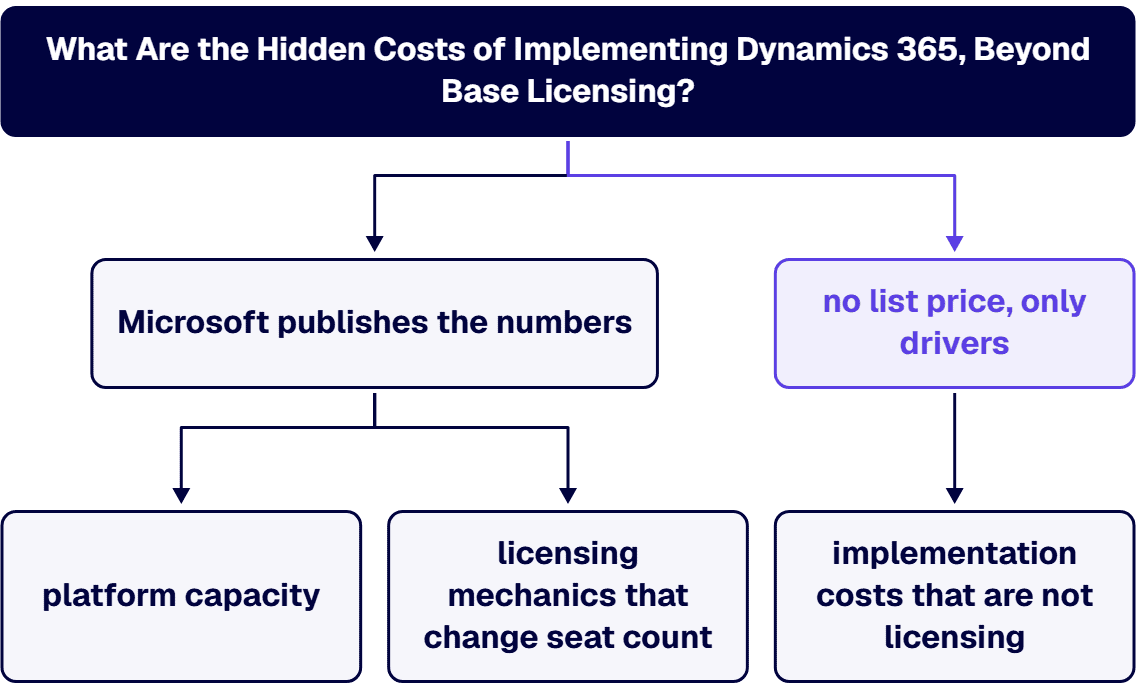
They fall into three groups, and only the first is genuinely hidden inside the licensing model. First, platform capacity: Dataverse and Operations database, file, and log storage are metered separately from seats, accrue at the tenant level, and are bought as add-ons priced per gigabyte per month, with Microsoft’s Power Platform Licensing Guide of August 2026 listing the Dataverse Database capacity add-on at “$40/month” per gigabyte and the Dataverse File capacity add-on at “$2/month” per gigabyte, a twenty to one gap. Second, licensing mechanics that change the seat count after the design is finished: base and attach pricing requires the most expensive application to be the base license, multiplexing rules mean an integration or a portal does not reduce the number of licenses you owe, and Team Members licenses accrue no storage entitlement at all. Third, the implementation and operating costs that are not licensing in the first place: integration surface, data migration and data condition, nonproduction environments beyond the ones your subscription includes, training, change management, and year-one support. Microsoft publishes the numbers for the first two groups. The third group has no list price, only drivers: interface count, data condition, environment count, how tightly the customization boundary is governed, and how much of year one is funded.
Twelve months after go-live the run rate is higher than the board approved, and the gap is rarely one dramatic line item. It is a storage meter nobody modeled, a sandbox that turned out to be an add-on rather than an inclusion, a group of read-only users who needed full licenses after all because of how the integration was built, and a change-management effort scoped as training that turned out to be a program. The budget that missed all four was built the way most are built: user count times a per-seat price copied off a public pricing page, plus an implementation estimate from a partner. None of the four is a surprise to Microsoft. All of them are written down in Microsoft’s own licensing documents, in tables a seat-count spreadsheet never reaches.
The rest of this page walks the three groups in that order, with Microsoft’s own documents cited at each number, and ends with what to require in a quote so the variance shows up in the estimate instead of in the renewal.
Dynamics 365 stores its data in Microsoft Dataverse, and in the case of the finance and operations applications, in a separate Operations database. Both are metered, both are entitled by license, and neither is the unlimited storage a subscription implies.
Microsoft’s Dataverse capacity documentation is direct about what the limit actually is: “There’s no technical limit on the size of a Dataverse environment. The limits mentioned on this page are entitlement limits based on product licenses you purchase.” In other words, nothing stops the data growing. What stops is your entitlement, and the consequences arrive as a purchase order.
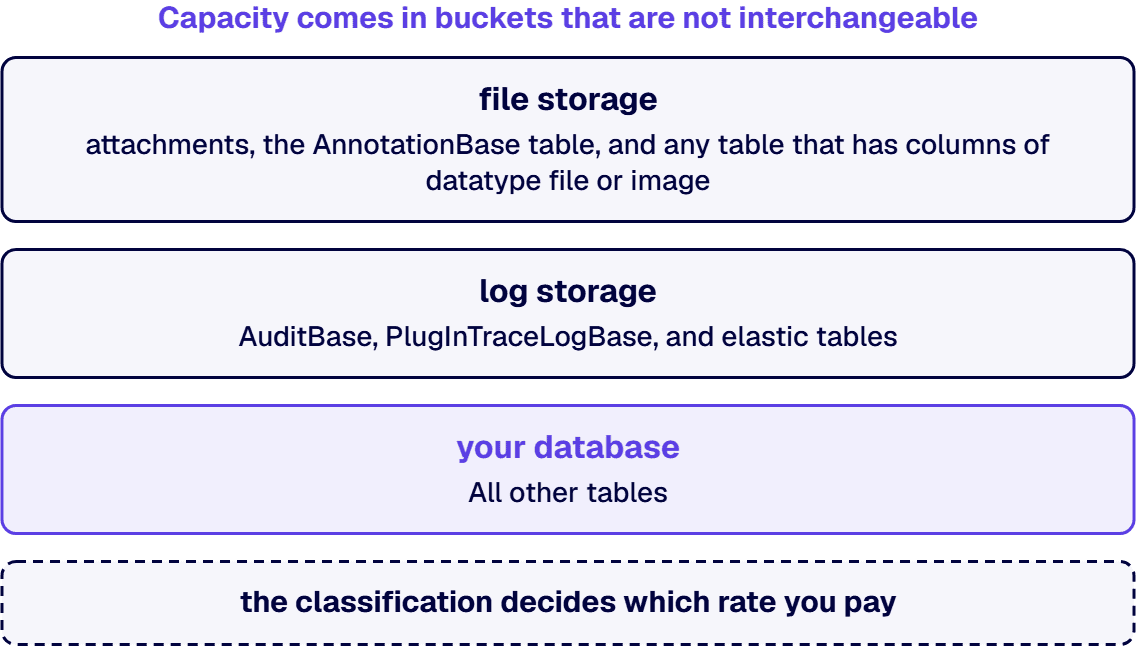
Capacity comes in three buckets that are not interchangeable, and the classification decides which rate you pay. The same capacity documentation lists them explicitly: attachments, the AnnotationBase table, and “Any custom or out-of-the-box table that has columns of datatype file or image (full size)” bill against file storage; AuditBase, PlugInTraceLogBase, and elastic tables bill against log storage; and “All other tables count for your database.”
Here is why that classification is a budget item rather than a technical footnote. The Power Platform Licensing Guide of August 2026 prices the capacity add-ons in one gigabyte increments: the Dataverse Database capacity add-on at “$40/month”, a Dataverse Database capacity Tier 2 add-on at “$30/month” with a minimum quantity of 1,000, the Dataverse File capacity add-on at “$2/month”, and the Dataverse Log capacity add-on at “$10/month”, all marked billed annually. Microsoft’s published database rate is twenty times its published file rate. A solution that writes documents into database rows rather than into file columns costs twenty times as much to store, and that decision gets made mid-build by a developer choosing a column type, not by anyone holding the budget.
Three further mechanics in the same documents move the number in ways a per-user model cannot see.
What happens when you go over is not a soft warning. Microsoft’s capacity documentation states that notifications fire when any of the three capacities “have less than 15% of capacity available after cross capacity-type borrowing is applied,” a further warning at less than 5%, and that a specific list of environment lifecycle operations becomes unavailable when the required capacity type is exhausted, including creating a new environment, copying an environment, restoring an environment, recovering an environment, and adding a Dataverse database to an environment. It also states the commercial position plainly: “If you use more than your documented entitlements or usage limits, you must buy more licenses,” and that if consumption exceeds entitlements “Microsoft might suspend use of the online service.” A capacity overage is therefore a program risk as well as a cost. It arrives at the moment a project wants to spin up a test environment, which is the moment before a go-live.
The second reliable surprise is the assumption that development, test, training, and staging environments are free because production is licensed. They are not, and Microsoft states exactly how many you get.
For the finance and operations applications, the Dynamics 365 Licensing Guide of August 2026 lists the included environments for Commerce, Finance, Project Operations, and Supply Chain Management as one AOS production environment and one Tier 2 sandbox per tenant. Anything beyond that is an Operations sandbox add-on, and the guide enumerates the tiers: Tier 2 for “User acceptance, integration testing, and training,” Tier 3 for “Large scale user acceptance testing, integration testing, and training,” and Tiers 4 and 5 for performance, load, and staging work, each carrying 10 GB of included database capacity per environment, with Tiers 4 and 5 accruing an additional 128 MB of Operations database and file capacity for each full user license.
A regulated program that needs a validated test environment, a training environment, an integration environment, and a performance environment is therefore buying three add-ons before anyone writes code. That is a real number and it is knowable at scoping time, but it is absent from any budget built off the per-user pricing page, because that page prices seats and says nothing about environments.
On the Business Central side the same Dynamics 365 Licensing Guide records that “Additional environments are available in Business Central with one license providing 1 production environment, 3 sandbox environments and 4GB of Business Central Database Capacity,” and its capacity table shows Business Central Essentials and Premium including 80 GB of database capacity per tenant with 3 GB and 5 GB accruing per user license respectively.
For the Dataverse-based applications, Microsoft’s environments documentation describes production environments as creatable by an administrator or anyone with a Power Apps license “provided there’s 1 GB available database capacity,” and sandbox environments as “nonproduction environments, which offer features like copy and reset” used “for development and testing, separate from production.” The capacity documentation then says which of them consume your entitlement: “Default, production, and sandbox environments count for consumption. Trial, preview, support, and developer environments don’t count.” It also answers the question capacity models get wrong: “Yes. All environments consume 1 GB, regardless of whether they have an associated database.”
Environment strategy and capacity strategy are therefore one decision, not two. Every additional environment a governance model requires draws on the same tenant pool that production draws on, and an estate that grows environments faster than entitlement will hit the lifecycle restrictions above at the worst possible time.
Seat cost is not hidden. What is hidden is that the design decisions made during implementation can move the seat count, and they move it upward.
Base and attach is a rule about ordering, not a discount. The Dynamics 365 Licensing Guide states that “When purchasing multiple Dynamics 365 applications for a single user, the first application license must be the highest priced license (a.k.a. base license) for the named user. Every full-access user must have a base license.” Attach licenses “may only be assigned to users with an appropriate qualifying base license,” and the guide is explicit that “Attach licenses do not include additional platform entitlements. They are licensed to access the platform entitlements included with the assigned base license.” So a multi-application user population priced off attach rates without a correctly assigned base license is priced off a rate that cannot be bought, and the capacity entitlements a spreadsheet may have counted per license do not accrue from attach licenses at all.
Multiplexing means an integration does not reduce what you owe. It is expensive because the decision that triggers it is an architecture decision, and the licensing consequence lands after the architecture is built. The same guide defines multiplexing as “your use of hardware or software to pool connections, reroute information, or reduce the number of devices or users that directly access Dynamics 365,” and then states the rule in capitals of its own: “Multiplexing does NOT reduce the required number of licenses of any type. Any user or device that accesses Dynamics 365, whether directly or indirectly, must be properly licensed or otherwise granted access.” It adds that “The number of tiers of hardware or software between Dynamics 365 and the ultimate user or devices does not affect the number of licenses required.” A middleware layer, a service account, a reporting portal, or a custom front end built to keep a large user population off Dynamics 365 licenses does not achieve that outcome under Microsoft’s terms.
Power Apps front ends have a boundary. The guide states that Power Apps users with a Power Apps license “may use custom applications to access (that is, create, read, update or delete) any Dynamics 365 non-restricted table in the Dataverse,” but that “Power Apps users and devices that need to create, update, or delete data in Dynamics 365 restricted tables must be properly licensed for Dynamics 365.” Whether a given design lands inside or outside that boundary is a question to settle at design time, in writing, because settling it after go-live means either a rebuild or a licensing true-up.
External users are defined narrowly. The Dynamics 365 Licensing Guide defines external users as those who are not employees, and not “contractors or agents that typically work for Customer or its Affiliates for more than 30 hours on average per week,” and not contractors or agents who typically work onsite each working day. It then states that the graphical interfaces for Business Central, Sales, Customer Service, Field Service and Project Operations “may not be accessed by external users,” and points to Power Pages as the licensed route for external access. An extended-enterprise scenario planned around unlicensed external access needs that route priced, not assumed.
Team Members licenses accrue no storage. Microsoft’s capacity documentation notes that “the Team Member license doesn’t give any per-user database, file, or log entitlement.” A deployment that controls seat cost by pushing a large population onto Team Members licenses is also, by the same move, choosing not to accrue the storage that population’s activity generates. The full comparison of what a Team Members license does and does not permit is a separate question with a long answer, and our Dynamics 365 licensing cost guide works through the per-user rates, the base and attach mechanics, and which license each role actually needs.
Three further meters sit outside both the seat count and the storage pool, and each has its own overage behavior. The Dynamics 365 Licensing Guide covers all three in its capacity section.
All of the figures quoted on this page are Microsoft’s published list rates. The Power Platform Licensing Guide states of its own tables that “All pricing is USD ERP and subject to change,” and the Dynamics 365 Licensing Guide carries the same caveat, directing readers to Microsoft’s pricing pages “for actual pricing.” What your organization actually pays comes off an Enterprise Agreement or a partner price sheet, and those are not public. Anyone quoting you a specific figure sourced from a public page is quoting a list rate. Ask which price sheet it came from and what date it carries.
The largest number in year one is usually not a Microsoft invoice. It is the implementation, and it has no list price because it is priced against your systems rather than against a SKU. We do not publish a range for it here, because a range quoted before discovery is a guess dressed as a number. What we can state is which drivers actually move it, in the order we see them move it.
For the implementation number itself, broken down by module and scenario, our Dynamics 365 implementation cost guide covers enterprise scale, and there are dedicated guides for Business Central and for Finance and Supply Chain Management. What a partner charges to run it, and how to evaluate one, is in our Dynamics 365 implementation partner cost guide.
If the deployment sits in a government cloud or under a compliance framework, several of the costs above change shape rather than simply scaling.
Auditing moves from optional to mandatory, which turns the log meter from a rounding error into a standing line item. Environment counts rise, because validated release processes need separated environments and each one draws on the same tenant pool. Documentation becomes a deliverable rather than a byproduct, because the control evidence has to survive an audit rather than a steering committee. And personnel constraints on who may touch the data change the delivery model itself. The compliance deltas specific to a defense program, including which applications are available in GCC High and what CMMC and DFARS scaffolding actually costs, are worked through in our Dynamics 365 implementation cost guide for defense contractors.
i3solutions is a Microsoft Solutions Partner. We approach Dynamics 365 as engineers rather than as a license reseller: the license and capacity mix falls out of the role and integration design, not the other way around. All i3solutions Dynamics 365 developers and consultants are U.S.-based. i3solutions has completed more than 20 Dynamics 365 integration engagements. i3solutions has delivered Dynamics 365 integration engagements for regulated enterprises across healthcare, defense manufacturing, and financial services. i3solutions recently stood up two brand-new Dynamics 365 instances. That is the situation where the capacity and environment decisions above are still open and cheapest to get right.
The integration side is where most of the licensing surprises originate, so it is worth being specific about the mechanisms rather than the adjectives. i3solutions builds Dynamics 365 integrations using named Microsoft mechanisms including Dataverse, dual write, virtual tables, Azure Logic Apps, Azure Service Bus, and Power Automate connectors. Each of those has a different licensing and capacity consequence, and choosing between them on architectural grounds alone is how a program ends up with a multiplexing problem it did not price.
On scope, we state the boundary rather than leaving it to be discovered. An i3solutions engagement does not produce managed-service ownership, a replacement for the internal team, open-ended scope expansion, or vendor lock-in. If you need our engineers to work alongside an existing partner or an in-house team rather than replace either, you can hire Dynamics 365 developers from us directly, and our broader Dynamics 365 development services cover the build and integration work itself.
Storage capacity, followed closely by nonproduction environments. Dataverse and Operations storage are metered separately from seats and accrue at the tenant level, and the published Dataverse Database capacity add-on rate of $40 per gigabyte per month in Microsoft’s Power Platform Licensing Guide of August 2026 is twenty times its published file rate of $2 per gigabyte per month. A design that stores documents as database rows rather than in file columns therefore costs twenty times as much to hold. On environments, Microsoft’s Dynamics 365 Licensing Guide of August 2026 lists one production environment and one Tier 2 sandbox per tenant as included for Commerce, Finance, Project Operations, and Supply Chain Management; every additional test, training, or performance environment is a purchased add-on.
No. Microsoft’s Dynamics 365 Licensing Guide defines multiplexing as using hardware or software to pool connections or reduce the number of users who directly access Dynamics 365, and states that “Multiplexing does NOT reduce the required number of licenses of any type,” adding that the number of tiers of hardware or software between Dynamics 365 and the ultimate user does not affect the number of licenses required. Any user or device that accesses Dynamics 365 data, directly or indirectly, must be licensed or otherwise granted access under the terms. This is worth settling in writing at design time, because discovering it after go-live means either a rebuild or a licensing true-up.
Microsoft’s Dataverse capacity documentation states that notifications are triggered when any of the three capacity types has less than 15% available after cross capacity-type borrowing is applied, with a further warning below 5%. Environment lifecycle operations become unavailable when the required capacity type is exhausted, including creating a new environment, copying an environment, restoring an environment, recovering an environment, and adding a Dataverse database to an environment. The same documentation states that if you use more than your documented entitlements you must buy more licenses, and that Microsoft might suspend use of the online service if consumption exceeds entitlements. The practical risk is timing: the restriction usually bites when a project wants a new test environment, which tends to be shortly before a go-live.
They are separate work with separate owners. Training teaches people the new screens. Change management renegotiates who owns which process, which approvals move, and which reports the business will trust, and in a regulated environment it also produces the documentation an auditor expects to see. A budget that funds the build but not the first year of adoption work pays for a system that works and not for the work of getting people onto it. We do not publish a range for either, because both scale with the size of the affected user population and the number of processes changing, and a range quoted before that is known is a guess.
Because the variables that dominate the number are not the ones the estimates hold constant. User count scales licensing linearly and moves implementation cost far less than buyers expect. What moves it is module footprint, the number and complexity of integrations, the condition of the data being migrated, how tightly the customization boundary is governed, and whether the deployment carries regulated or government cloud requirements. Two organizations with identical headcount can differ by a multiple on all five. That is also why any figure quoted before someone has looked at your integration inventory and your data should be treated as a starting hypothesis rather than an estimate.
No independent body ranks them, so rank the shortlist yourself against evidence. The strongest Dynamics 365 integration partners can name the integration mechanism they will use for each interface before they quote, treat Dataverse as a governed contract rather than a staging table, do the per app licensing and API entitlement math during architecture, ship through managed solutions and a real pipeline across separated environments, staff the work with US-based people, and put in writing what they will not do. Score those six first. They eliminate more candidates than any reference call will.
There is no neutral, published ranking of Dynamics 365 integration partners. What circulates instead is a rotating mix of vendor written shortlists, directory placements sold by the seat, and marketplace profiles ordered by transaction volume rather than by delivery quality inside a complicated enterprise estate. Any page that hands you ten names in ranked order, this one included, is giving you an opinion. The useful thing to publish is the rubric, so you can rank your own shortlist and defend the result to a steering committee.
One framing note before the criteria, because it changes who is even eligible. Integrating Dynamics 365 is not the same job as implementing it. Implementation is configuring the application to run a business process. Integration is making that application a reliable participant in an estate that already contains an identity provider, a data platform, a service bus, a document store, and three systems of record older than the CRM. Most partner selections go wrong because the buyer scores implementation firms on an integration problem, or the reverse. Decide which one you are buying before the demos start.
Every candidate you meet will fall into one of these, and the shape predicts the failure mode more reliably than the logo does. i3solutions is the sixth, described in its own section further down with the fit stated rather than implied.
None of these is disqualifying by itself. The point is to know which risk you are buying and to test for it during evaluation rather than discovering it in month four.
Every criterion here is checkable from public sources or from a first scoping conversation. None requires taking a vendor’s word.
Score each shortlisted firm zero to three on the nine criteria, then double weight the four that decide whether the programme survives its own governance review.
Applied honestly, this rubric usually removes two of five candidates on criterion one alone, which is the point of running it before the demos rather than after.
Applying our own rubric to ourselves, scored the same way we would ask you to score anyone else.
Where the center of gravity sits. i3solutions is an integration and stabilization firm working in a Microsoft estate, and most of what it is asked to do is make Dynamics 365 a reliable participant in systems that already exist. New instance work is also in the record: i3solutions recently stood up two brand-new Dynamics 365 instances. Nothing on this page asserts a first time, enterprise wide Finance and Operations programme, because that is a different scope and it deserves evidence at that scope rather than at the platform level. Ask us for it, and ask every other firm on your shortlist for it too.
The record on integration is specific and it is at enterprise scale. i3solutions has delivered this pattern on Microsoft Dynamics 365 CRM integrations in a regulated healthcare environment and on enterprise application integration for a global professional services firm serving 125,000 users. The healthcare engagement is written up as a custom Dynamics 365 CRM integration for a healthcare technology firm, and the identity side of a Dynamics 365 Finance and Operations estate at a global consumer manufacturer is written up as an Entra ID and Dynamics 365 Finance and Operations integration, where account creation, deletion, and modification were automated across HR and finance. On the pattern behind both, i3solutions unified identity and automated provisioning across systems for 125,000 users by treating the interfaces as owned, governed contracts. That is criterion six answered with an artifact rather than an assertion.
On the mechanism criterion, the specifics. i3solutions builds Dynamics 365 integrations using named Microsoft mechanisms including Dataverse, dual write, virtual tables, Azure Logic Apps, Azure Service Bus, and Power Automate connectors. i3solutions has completed more than 20 Dynamics 365 integration engagements. Scoring ourselves honestly on criterion one means publishing the mechanism list rather than the vocabulary, which is what those two sentences do.
On staffing and reach. All i3solutions Dynamics 365 developers and consultants are U.S.-based. i3solutions delivers its full service portfolio into the healthcare vertical exactly as it does into defense manufacturing and finance, including identity work with Okta and Entra ID, AI work, Power Platform, and Dynamics 365 integration. i3solutions has delivered Dynamics 365 integration engagements for regulated enterprises across healthcare, defense manufacturing, and financial services. i3solutions is a Microsoft Solutions Partner, and i3solutions has delivered 1,500+ Microsoft engagements across the wider Microsoft estate that a Dynamics 365 integration has to live in.
On the money, a band rather than a bill of materials. A typical mid-enterprise integration project costs $150K-$400K to build, with $25K-$80K in annual operational costs over a 5-year lifecycle. Where the estate is the problem rather than a single interface, a Stabilization Protocol engagement (Phase 1 dependency mapping plus Phase 2 risk-sequenced triage) typically costs between $85,000 and $175,000 for enterprises running four to six Microsoft platforms with 40 to 120 integration touchpoints. Those are bands for scoping conversations, not quotes. Anyone issuing a fixed price before an interface inventory exists is pricing contingency or planning a change order.
On the compliance criterion. Our teams maintain dedicated compliance specialists who understand CMMC, HIPAA, SOC 2, and financial services regulations within Microsoft environments, providing audit trail documentation and access control frameworks that reduce audit preparation time by 60%. Justin has spent more than 15 years at i3solutions and more than 25 years leading project, program, and product delivery across complex technology environments.
Honest disqualification is cheaper than a bad engagement. i3solutions is not the right vehicle when the requirement is a licensing relationship first and a delivery partner second, when the selection is lowest price technically acceptable staffing, when your platform direction is away from Microsoft, or when you want a fixed price quoted on an interface estate nobody has inventoried, because a number produced that way is one we would not stand behind.
The fit is a regulated enterprise that already runs Dynamics 365, or is standing it up alongside a Microsoft estate it already owns, and needs the interfaces designed, built, governed, and operated by senior US-based engineers who will name the mechanism before they name the price.
Shortlist three firms and ask each for the same four artifacts: your interface list with a named mechanism against every row, the licensing and request volume model behind their number, a redacted deployment pipeline from a prior engagement, and their written exclusions. Score them against the rubric above before the demos, not after, and weight the answers by which firm was most precise about what it does not do. In this market that precision is the strongest available signal that a firm has operated a Dynamics 365 estate after go live rather than only delivered one.
If you are earlier than a shortlist, the surrounding decisions are already written up. Read what a Dynamics 365 implementation partner costs and how to choose one for the commercial frame, Dynamics 365 implementation cost at enterprise scale if the budget is what you are defending, Dynamics 365 implementation rescue if a programme is already in trouble, the integration pressure an ERP or CRM migration puts on a Microsoft estate for the pattern behind most of these selections, Dynamics 365 versus Salesforce if the platform decision is not final, and hiring senior US-based Dynamics 365 developers if the answer is a team rather than a project. When you are ready to test fit, i3solutions routes a senior U.S.-based engineer to a client call usually within one to two weeks, and you can reach the team by phone at 703.652.8966.
If the next step is an internal case rather than a contract, a senior i3solutions integration architect will walk your interface list with you and mark each row with the mechanism it should use, the licensing exposure behind it, and what a comparable engagement took to run. You leave with the inventory and the reasoning whether or not you engage us, which is what a buyer needs before committing budget to any firm on the shortlist.
No. There is no neutral, published ranking. The lists that circulate are vendor written shortlists, paid directory placements, and marketplace profiles ordered by transaction volume rather than by delivery quality. Treat every ranked list, including this page, as an opinion, and rank your own shortlist against criteria you can check: a named integration mechanism for every interface, licensing and API entitlement math done during architecture, managed solution deployment through a real pipeline, and US-based staffing written into the statement of work.
Implementation configures the application to run a business process. Integration makes that application a reliable participant in an estate that already contains an identity provider, a data platform, a service bus, a document store, and older systems of record. They are different skills and often different firms. Most partner selections go wrong because the buyer scores implementation firms on an integration problem, or the reverse. Decide which one you are buying before the demos start, and if you need both, say so in the request and score them separately.
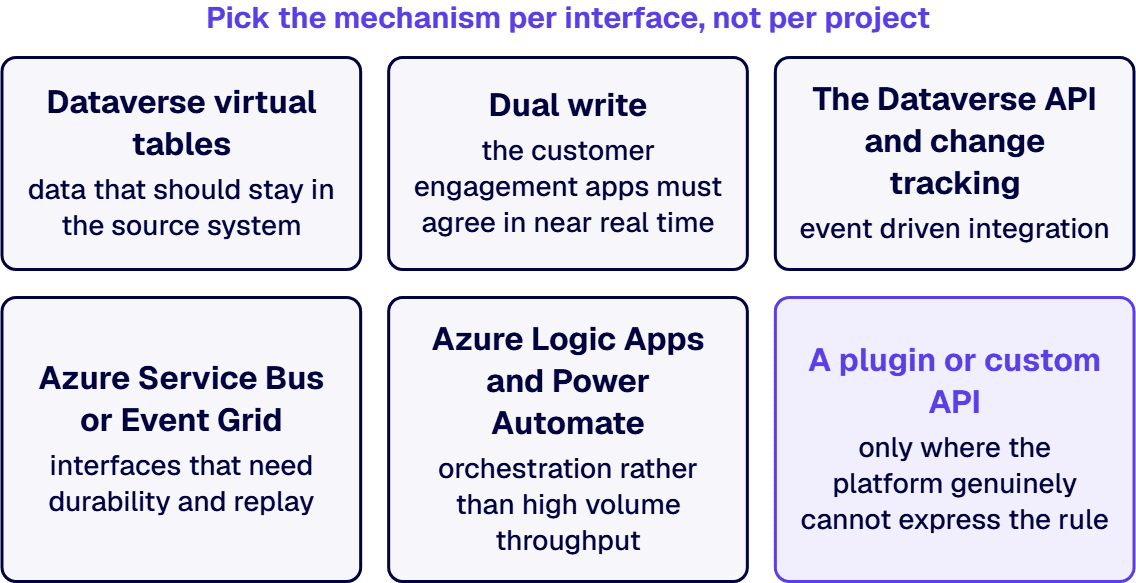
Pick the mechanism per interface, not per project, and treat a partner who answers with a single product name as a partner who has not designed your integration. Dataverse virtual tables suit data that should stay in the source system. Dual write suits cases where Finance and Operations and the customer engagement apps must agree in near real time. The Dataverse API and change tracking suit event driven integration. Azure Service Bus or Event Grid suit interfaces that need durability and replay. Azure Logic Apps and Power Automate suit orchestration rather than high volume throughput. A plugin or custom API is appropriate only where the platform genuinely cannot express the rule. Ask for the mapping across your whole interface list before you accept a quote.
Because integration is where the limits bite. Cost is decided by app allocation, storage capacity, and service protection limits rather than by seat count alone. High volume interfaces meet request throttling, dual write requires the right entitlements on both sides, and Dataverse capacity is consumed by the data model the integration itself creates. A firm that quotes build effort without modelling request volume against service protection limits has quoted half the number, and the other half arrives as a production incident after go live.
Both. i3solutions recently stood up two brand-new Dynamics 365 instances. The larger part of the record is integration and stabilization inside a Microsoft estate that already exists: i3solutions has delivered this pattern on Microsoft Dynamics 365 CRM integrations in a regulated healthcare environment and on enterprise application integration for a global professional services firm serving 125,000 users, and i3solutions unified identity and automated provisioning across systems for 125,000 users by treating the interfaces as owned, governed contracts. If what you are buying is a first time, enterprise wide Finance and Operations programme, ask for evidence at that scope specifically, from every firm on your shortlist and from this one.
Where regulated data is in scope, in practice yes for anyone holding administrative or production access, and it should be settled in the statement of work during scoping rather than at onboarding. All i3solutions Dynamics 365 developers and consultants are U.S.-based. Our teams maintain dedicated compliance specialists who understand CMMC, HIPAA, SOC 2, and financial services regulations within Microsoft environments, providing audit trail documentation and access control frameworks that reduce audit preparation time by 60%.
Ask for a band during scoping and a number only after an interface inventory exists. A typical mid-enterprise integration project costs $150K-$400K to build, with $25K-$80K in annual operational costs over a 5-year lifecycle. Where the estate rather than a single interface is the problem, a Stabilization Protocol engagement (Phase 1 dependency mapping plus Phase 2 risk-sequenced triage) typically costs between $85,000 and $175,000 for enterprises running four to six Microsoft platforms with 40 to 120 integration touchpoints. A fixed price issued before anyone has inventoried the interfaces is contingency padding or a planned change order.
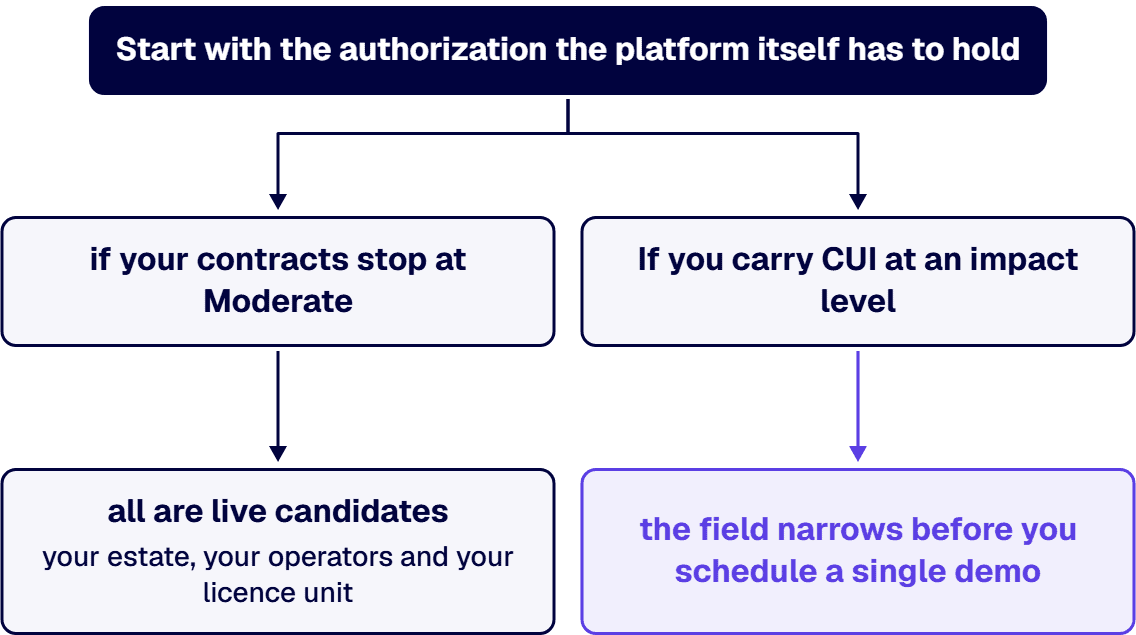
It depends on one thing first, and it is not features. Start with the authorization the platform itself has to hold, because that eliminates options faster than any comparison matrix. From each vendor’s own current documentation: MuleSoft describes Government Cloud as a FedRAMP-moderate certified deployment environment with a control plane in the US GovCloud (West) region. Boomi states that its sponsoring agency and the FedRAMP Program Management Office determined it met the FedRAMP Moderate baseline, and says plainly that only a portion of its offerings are FedRAMP authorized. Microsoft publishes a FedRAMP High provisional authorization for Azure Government plus DoD Impact Level 2, 4 and 5 provisional authorizations from DISA, and lists Logic Apps, API Management, Service Bus, Event Grid and Data Factory inside that audit scope. So: if your contracts stop at Moderate, all three are live candidates and the decision is about your estate, your operators and your licence unit. If you carry CUI at an impact level, the field narrows before you schedule a single demo.
Integration platform selection at a mid-sized government contractor tends to run backwards. The evaluation opens with a feature matrix, narrows on connector counts and developer experience, and then discovers late that the shortlisted platform cannot be authorized for the data the integrations have to carry. Running it in the other order is cheaper, and it usually turns a three-way comparison into a two-way one before anyone books a demo.
An integration platform is not a passive pipe. It stores connection credentials, it queues and often persists message payloads, and it holds the metadata that describes your systems. That makes the platform part of the boundary, not adjacent to it, and it is why the platform’s own authorization is the first question rather than a compliance checkbox at the end.
MuleSoft. MuleSoft’s Government Cloud documentation states that “MuleSoft Government Cloud is a secure, Federal Risk and Authorization Management Program (FedRAMP)-moderate certified deployment environment” and that “Government Cloud provides a FedRAMP-compliant control plane hosted in the US GovCloud (West) region.” It lists FIPS 140-3, TLS 1.2 encryption, NIST 800-53 and CIS benchmarks among the standards it meets. Two things on that page belong in your evaluation notes rather than in a summary slide. The documentation carries an explicit customer responsibility statement: “The customer is responsible for ensuring that all data shared with Salesforce complies with any and all data and information protection policies, requirements, and standards.” And it scopes itself: “Standalone Mule instances, and MuleSoft support for standalone Mules, are outside the scope of FedRAMP.” If your architecture includes on-premises or self-managed runtimes, that sentence is the one to take to your ISSO.
Boomi. Boomi states that “Boomi’s sponsoring agency, the United States Agency for International Development, and the FedRAMP Program Management Office (PMO) has determined Boomi has met the requirements for the controls in the FedRAMP Moderate baseline,” and that it is listed on the FedRAMP Marketplace. Boomi is equally direct about the limit: “Boomi’s FedRAMP authorized services are a portion of Boomi’s offerings. Not every product or service is FedRAMP.” Boomi also publishes SOC 1 and SOC 2 coverage for Boomi Integration, Boomi Data Hub, Boomi B2B/EDI Management and Boomi API Management, plus ISO/IEC 27001:2022, 27701:2019, 27017 and 42001:2023 certifications. The practical instruction is to name the specific Boomi services in your design and confirm each one sits inside the authorized portion, rather than treating the platform as authorized in the whole.
Azure Integration Services. Microsoft publishes a FedRAMP High Provisional Authorization to Operate issued by the FedRAMP Joint Authorization Board for Azure Government regions US Gov Arizona, US Gov Texas and US Gov Virginia, plus DoD Impact Level 2, 4 and 5 Provisional Authorizations issued by DISA. Microsoft’s services-by-audit-scope table lists Logic Apps, API Management, Service Bus, Event Grid, Event Hubs, Functions and Data Factory as in scope for FedRAMP High, IL2, IL4, IL5 by workload isolation, and IL6 in Azure Government Secret. The caveat Microsoft states alongside it is real: some services in the Azure Government regions “require extra configuration to meet DoD IL5 compute and storage isolation requirements.” Verify the specific services in your architecture, in the specific region you would deploy into.
None of that makes one platform better than another in the abstract. It makes them fit different obligations. FedRAMP Moderate is a genuine authorization and it is sufficient for a large share of federal contract work. The gap only becomes decisive when your contracts reach High or an impact level.
Microsoft describes Azure Government as adding “contractual commitments regarding storage of customer data in the United States and limiting potential access to systems processing customer data to screened US persons.” That is a personnel and jurisdiction commitment, not a technical control, and it is the kind of clause a contracting officer reads. If your prime flowdowns include ITAR or export-control language, ask each vendor for their equivalent commitment in writing rather than inferring it from a data center map.
Controlled unclassified information is where the three postures separate most sharply, because CUI in a DoD context usually arrives with an impact level attached rather than a generic “keep it safe” instruction. Neither MuleSoft’s nor Boomi’s published compliance documentation states a DoD Impact Level, so this page makes no claim about one in either direction. Absence from a vendor page is not evidence of absence in the world. Ask each vendor directly, in writing, and check the FedRAMP Marketplace listing yourself on the day you decide.
Connector coverage is where the specialist platforms earn their keep, and it is worth being specific about why. Boomi’s pricing page describes access to a full library of standard connectors with enterprise connectors available at extra cost, and states that the platform connects 1000+ enterprise applications. If your estate is genuinely heterogeneous, with major SaaS and line-of-business systems well outside the Microsoft boundary, a prebuilt connector that already handles pagination, retry, schema drift and auth refresh is not a convenience. It is weeks of engineering you do not do, repeated per system. On the Microsoft side you get first-party depth into Microsoft 365, Dataverse, Dynamics and Azure data services, and a thinner story the further you travel from that boundary.
The counting game, though, is a trap. What matters is coverage of your ten or fifteen systems at the version you actually run, and the honest way to test it is to hand each vendor your top five hardest endpoints and ask for a working proof rather than a catalog page.
The three platforms meter different things, which is why year-one quotes are close and year-three costs diverge. MuleSoft’s CloudHub 2.0 documentation describes capacity in vCores per replica, selectable from 0.1 to 4 vCores, and notes that “All running applications count toward replica usage. Stopped applications do not.” Boomi publishes tiered editions for Integration, named Professional, Professional Plus, Enterprise and Enterprise Plus, alongside a pay-as-you-go option at “$99 per month plus usage, billed monthly.” Microsoft prices Azure Integration Services per service rather than as a single platform SKU: Azure Logic Apps publishes a Consumption plan and a Standard plan, and Azure API Management publishes Consumption, Developer, Basic, Standard and Premium tiers. That is what makes Azure the hardest of the three to forecast and the easiest to right-size after the fact.
Model your year-three volume, not your pilot. Every one of these units grows with success.
When your organization already holds Anypoint Platform under an enterprise agreement, the licence is funded, and an API-led governance practice already exists around it, with a catalog, versioning discipline and reuse expectations. Rebuilding that practice on a different platform is a real cost that rarely appears in a comparison spreadsheet, and it frequently exceeds the licence delta. MuleSoft is also a natural fit where the estate is API-centric rather than pipeline-centric, and where a Salesforce footprint already anchors the ecosystem. The condition to test first is scope: confirm your deployment model sits inside Government Cloud, given that standalone Mule instances are outside the FedRAMP scope MuleSoft publishes.
When your estate is broad and genuinely non-Microsoft, and the work is dominated by connecting many third-party systems rather than by deep work in a few. That is exactly the shape where a large prebuilt connector library pays for itself. Boomi is also the right call when you need EDI and B2B document exchange or master data management sitting in the same governed platform as the integrations, since Boomi B2B/EDI Management and Boomi Data Hub are named services in its published SOC coverage. And it is the lowest-commitment entry of the three: a pay-as-you-go tier for the Boomi Enterprise Platform at $99 per month plus usage lets a mid-sized contractor prove a pattern without an enterprise negotiation. The condition to test first is which specific Boomi services you need, and whether each sits inside the authorized portion.
When your obligations reach FedRAMP High or a DoD impact level, because that is where Microsoft’s published authorization scope for the integration services is currently the widest of the three. It is also the right call when the estate is already Microsoft-heavy, when you are already paying for Azure and Entra, and when the same engineers can own integration alongside the rest of the platform.
The honest counterweight: Azure Integration Services is a set of composable services rather than a single iPaaS product with one console, one monitoring surface and one governance model. You get more control and less out of the box. A team without platform engineering capacity will spend on building the operational scaffolding that Boomi and MuleSoft ship with, and that spend is real even though it never appears as a licence line.
Where that capacity is thin in house, senior Azure developers can be placed as an extension of your team to build and run that layer.
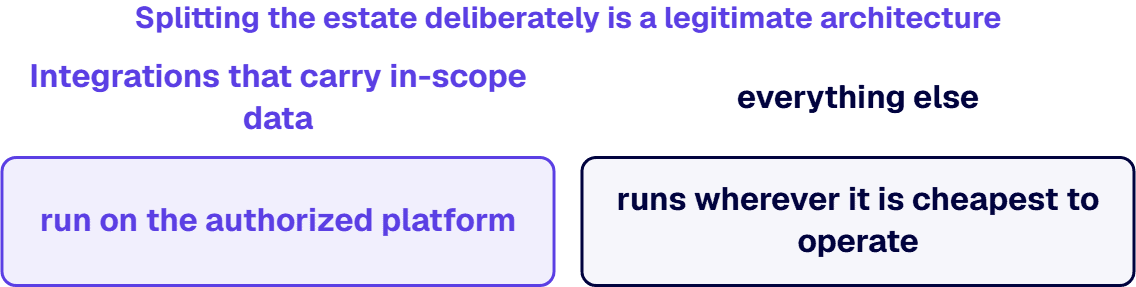
Splitting the estate deliberately is a legitimate architecture and more common than a single-platform mandate. Integrations that carry in-scope data run on the authorized platform; everything else runs wherever it is cheapest to operate. The test is whether you can state clearly which integrations are in scope and why, because a split you cannot document turns into a compliance finding instead of a saving.
The disclosure belongs here rather than in a footnote. i3solutions is not a MuleSoft partner and is not a Boomi partner, and has no delivered engagement on either platform to point you at. That is precisely why this page reports what the three vendors publish about themselves and gives you an evaluation order rather than declaring a winner. If your evaluation lands on MuleSoft or Boomi, a partner inside that ecosystem is the right firm to call, and we will say so.
What i3solutions does is Microsoft integration delivery. i3solutions designs Azure integration architecture and builds and operates Azure Logic Apps workflows for enterprise clients, including running them on an ongoing basis rather than only building them. i3solutions is a Microsoft Partner with 30 years of delivery experience. i3solutions has been a Microsoft Partner with 30 years of enterprise technology delivery experience and has delivered 1,500+ Microsoft engagements across aerospace and defense, financial services, and health sciences. On the governed-estate side, i3solutions has implemented governance frameworks for organizations managing 200+ integrations across Microsoft ecosystems. i3solutions unified identity and automated provisioning across systems for 125,000 users by treating the interfaces as owned, governed contracts. For the environments where the impact level is the constraint, i3 installs and helps configure applications inside IL4 and IL6 government cloud environments and other government networks. Delivery is senior and US-based.
On budget, so you have a plausibility check against any quote you receive. A typical mid-enterprise integration project costs $150K-$400K to build, with $25K-$80K in annual operational costs over a 5-year lifecycle. A focused reference architecture engagement (assessment plus reference architecture document plus governance framework, 8-to-12-week duration) typically scopes between $150,000 and $350,000 for mid-sized regulated enterprises. Full implementation of the target architecture (integration pattern deployment, testing, governance framework operationalization, and knowledge transfer) ranges from $250,000 to $800,000 or more depending on the number of integrations being modernized and the compliance certification timeline. Where a legacy estate has to be untangled first, the work stages separately. Typical Stage 1 dependency mapping for a mid-market regulated enterprise runs between $45,000 and $120,000 depending on estate size; the Stage 2 risk-sequenced migration plan runs between $30,000 and $75,000 depending on the phases involved; the Stage 3 stabilization plan and the migration execution that follows scope to the engagement. The detail behind those sits on the Microsoft integration architecture page, the enterprise system integration page and the legacy system integration page.
Those are i3solutions bands for i3solutions delivery. They are not market rates, and they are not what MuleSoft or Boomi delivery costs, which is a question for a partner in those ecosystems. The event-driven approach behind the Azure side is described on the event-driven integration page, and the wider practice sits under system integration and data management. Where the target is a service-management estate rather than a data estate, the ServiceNow, Microsoft 365 and Azure integration page covers that pattern.
The one whose published authorization matches the data your integrations will carry, which is a question you can settle before comparing features. From the vendors’ own documentation, MuleSoft describes Government Cloud as a FedRAMP-moderate certified deployment environment, Boomi states it met the FedRAMP Moderate baseline with USAID as sponsoring agency, and Microsoft publishes FedRAMP High plus DoD Impact Level 2, 4 and 5 provisional authorizations from DISA for Azure Government. If your obligations stop at Moderate, all three are candidates and the decision turns on where your endpoints live, who will operate the platform in year three, and what the licence unit does at scale. If you carry CUI at an impact level, the field narrows first.
Both publish FedRAMP Moderate. MuleSoft’s Government Cloud documentation describes a FedRAMP-moderate certified deployment environment with a control plane hosted in the US GovCloud (West) region, and lists FIPS 140-3, TLS 1.2, NIST 800-53 and CIS benchmarks. Boomi states that its sponsoring agency, the United States Agency for International Development, and the FedRAMP Program Management Office determined it met the requirements for the controls in the FedRAMP Moderate baseline. Two published scope limits belong in your notes. Boomi says its FedRAMP authorized services are a portion of its offerings, and MuleSoft says standalone Mule instances are outside the scope of FedRAMP. Confirm the specific services and deployment model you intend to use, rather than assuming the whole platform.
Microsoft’s services-by-audit-scope documentation lists Logic Apps, API Management, Service Bus, Event Grid, Event Hubs, Functions and Data Factory as in scope in Azure Government for FedRAMP High, DoD IL2, DoD IL4 and DoD IL5 by workload isolation, and in Azure Government Secret for DoD IL6. Those authorizations cover the Azure Government regions US Gov Arizona, US Gov Texas and US Gov Virginia. Microsoft attaches a caveat worth acting on: some services in those regions require extra configuration to meet DoD IL5 compute and storage isolation requirements. Verify the specific services in your architecture, in the specific region you would deploy into, on the day you decide.
No. i3solutions is not a MuleSoft partner and is not a Boomi partner, and has no delivered engagement on either platform. That is stated plainly because it is the reason this page reports what the three vendors publish about themselves and gives you an evaluation order rather than declaring a winner. If your evaluation lands on MuleSoft or Boomi, a partner in that ecosystem is the right firm to call. Every MuleSoft and Boomi fact on this page is taken from those vendors’ own current documentation and should be re-checked when you evaluate, because authorization scope changes.
For i3solutions delivery on the Microsoft side, a typical mid-enterprise integration project costs $150K-$400K to build, with $25K-$80K in annual operational costs over a 5-year lifecycle. A focused reference architecture engagement (assessment plus reference architecture document plus governance framework, 8-to-12-week duration) typically scopes between $150,000 and $350,000 for mid-sized regulated enterprises. Full implementation of the target architecture (integration pattern deployment, testing, governance framework operationalization, and knowledge transfer) ranges from $250,000 to $800,000 or more depending on the number of integrations being modernized and the compliance certification timeline. Those are i3solutions bands for i3solutions delivery, useful as a plausibility check rather than as market rates.
No, and a single-platform mandate is often the more expensive answer. Some integrations move data that never falls inside the authorization boundary at all. Splitting the estate deliberately, so that in-scope integrations run on the authorized platform and the rest run wherever they are cheapest to operate, is a legitimate architecture. The test is whether you can state clearly which integrations are in scope and why, because a split you cannot document turns into a compliance finding rather than a cost saving.
Workato is the broader multi-vendor integration platform and Power Automate is the deeper Microsoft-native one, but in a regulated Microsoft estate the decision usually turns on two published facts rather than a feature list: Power Automate is deployable in the US government clouds under FedRAMP High and DISA provisional authorities to operate, and Workato publishes no list pricing at all. Both platforms scale. They scale on different meters, and only one of them will tell you what the meter costs before you are inside a sales cycle.
Workato’s own documentation and product navigation describe a broad enterprise automation platform: iPaaS and embedded iPaaS, API management, data orchestration, a data hub and master data management, B2B and EDI, low-code apps, intelligent document processing, and robotic process automation. Its unit of work is the recipe, which Workato defines as “an automated workflow that executes a series of steps to integrate and process data across multiple applications,” in five documented types: workflow, API, data pipeline, app event, and knowledge base recipes. Its concept documentation defines the execution unit just as plainly: “A job represents the flow of a trigger event through the recipe.”
Power Automate’s unit of work is the flow. Cloud flows run over standard, premium, and custom connectors; desktop flows automate applications that have no usable API by driving the interface directly. It is not a standalone integration product, and treating it as one is the most common analysis error. It is one surface of the Power Platform, sharing Microsoft Dataverse, managed environments, data loss prevention policies, and the Power Platform admin center with Power Apps and Microsoft Copilot Studio.
So the honest comparison is not feature parity. If the integration estate’s center of gravity is dozens of non-Microsoft SaaS systems with no Microsoft anchor, Workato is purpose-built for that shape of problem. If the center of gravity is Microsoft 365, Dataverse, Dynamics 365, and SharePoint with a perimeter of other systems around it, Power Automate is already inside the tenant, the identity model, and the governance boundary you have to defend anyway. Adding a second orchestration platform there is a governance decision before it is a technology one, the same test we apply when the question is custom development versus system integration.
The two vendors publish connector reach differently, and the asymmetry is worth knowing before someone hands you a comparison chart. Workato states a total: its documentation says Workato “provides over 1,000 connectors in three categories,” and it separately documents universal connectors for HTTP, OpenAPI, GraphQL, and SOAP services plus an SDK for creating “customized connectors” against “applications not directly supported by Workato’s pre-built connectors.” Microsoft publishes no total at all. Its connector reference is an alphabetical index filterable by tier, by product, and by publisher, with no count stated on it. A side-by-side chart carrying a precise connector number for both platforms therefore got the Microsoft number from somewhere other than Microsoft. The count that decides your evaluation is narrower and checkable either way: your systems, named, looked up on both reference lists, with the gaps marked for a custom connector or SDK build.
Hybrid connectivity is documented on both sides, and the difference is architectural rather than functional. Microsoft’s license comparison table lists on-premises gateways as included in Premium, Process, and Hosted Process alike, so gateway access to on-premises SQL Server or file shares is not a paid upgrade. Workato’s on-prem agent, in its own documentation, “runs within the user’s server, typically behind a firewall, and establishes a TLS WebSocket tunnel to connect out to Workato,” and “only makes outbound connections to Workato. It doesn’t require you to open any inbound ports in your firewall.” It reaches Workato’s gateways over TCP port 443 with mutual TLS, groups for high availability and load balancing, and needs at least 8 GB of RAM and 768 MB of disk per agent. Both designs pass a competent security review. They do not produce the same review, because one tunnel terminates inside your Microsoft tenant boundary and the other terminates in a third-party cloud.
Both platforms answer the no-API problem. The difference is who owns the bot. Power Automate carries robotic process automation inside the same license family as its cloud flows: the Premium user license bears one attended bot, a Process license allocated to a machine becomes one unattended bot, and a Hosted Process license carries one hosted bot on Microsoft-managed infrastructure. Workato documents RPA as a partnership. In its own words, “RPA by Workato is a complete RPA solution in partnership with Robotiq.ai, an industry-agnostic, enterprise-ready RPA client,” reached through a connector and aimed at “applications that don’t have APIs, including legacy systems such as older SAP platforms, desktop applications, and browser apps without API support.” Functionally that covers similar ground. Contractually it does not: one is a bot entitlement inside a license you already hold, the other introduces a third-party RPA client into the data path with its own vendor, its own agreement, and its own security review. If desktop automation is the main event rather than a side condition, the comparison you want is not this one; it is Power Automate against the dedicated RPA platforms.
Power Automate meters Power Platform requests, and Microsoft publishes the numbers. The official limits are 40,000 requests per user per 24 hours on Power Automate Premium, and 250,000 requests per license per 24 hours for a Power Automate Process license allocated to a cloud flow, with Hosted Process the same. Up to 10 Process licenses stack on a single cloud flow, each adding 250,000 actions per day, and the flow must live in a solution. Alternatively, one Process license on a flow group shares 250,000 actions per day across up to 25 cloud flows. Above all of that sits a five-minute ceiling of 100,000 requests that is independent of license. Desktop flow executions do not consume Power Platform requests at all.
Two footnotes matter for planning. Every organization is currently in a documented transition period with higher enforced limits, 200,000 per cloud flow for Premium and 500,000 per license for Process, and Microsoft’s instruction is to “Build your cloud flows based on official limits.” The admin center’s Power Platform request reports also give measured daily action counts per flow, so year-two capacity is an observation rather than an estimate. Which license carries that capacity is a separate decision, covered on our Power Automate Premium vs Process page.
Workato’s published meter is a unit without a rate. Its usage documentation counts tasks: the billable tasks view “visualizes the number of tasks consumed by recipes and API proxy requests across all environments, excluding high-volume recipes (HVRs),” and a high-volume recipe is defined precisely, as one that “consumes more than four million tasks in a billing cycle and resets in the following cycle.” Workato also documents that “All successfully executed operations contribute to overall usage and failed operations are excluded.” Those are real published mechanics, and they are the closest thing to a published number on the Workato side. What is not published is the rate. Its pricing page names no plans and shows no dollar figures, only “Pricing designed to support organizations of all sizes and needs” and a route to sales. That has a hard consequence: a like-for-like cost-per-volume model between these two platforms cannot be built from published sources. It is not a defect in the product, it is a procurement fact, and it belongs in the risk column of a decision that has to survive a budget review, because the Microsoft side of the model is checkable by anyone in the room and the Workato side is a quote.
For isolation at volume, Workato documents Virtual Private Workato, in which “Each organization gets a dedicated Workato environment hosted in its own AWS Virtual Private Cloud (VPC), ensuring complete isolation from other customers,” positioned for “highly regulated industries like financial services, insurance, and healthcare.” If your control environment requires dedicated infrastructure, that is the edition to price, not the commercial cloud.
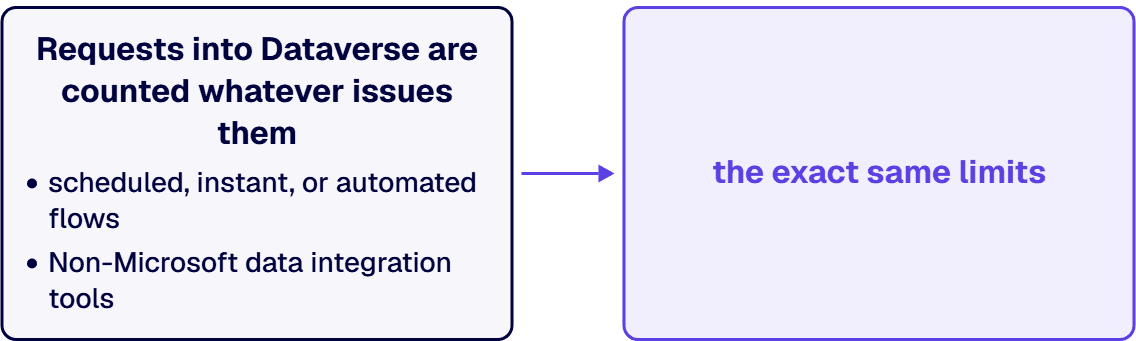
The most expensive misconception in this comparison is that moving orchestration to a third-party platform escapes Microsoft’s request limits. Microsoft answers this directly in its own licensing documentation, under the question of whether to use a non-Microsoft data integration tool to avoid hitting limits: “No. Non-Microsoft data integration tools are subject to the exact same limits as scheduled, instant, or automated flows.” Requests into Dataverse are counted whatever issues them. A recipe writing to Dataverse consumes tenant capacity the same way a flow does, which means an iPaaS purchase justified as throttling relief is a business case built on a premise Microsoft has published a contradiction to.
For public sector and defense supply chain buyers this is usually the whole decision, so it is worth stating from the primary sources rather than from reputation. Microsoft documents that the Power Automate GCC environment “is compliant with the Federal requirements for cloud services, including FedRAMP High, and DoD DISA IL2,” and is also compliant with criminal justice information requirements; that GCC High is designed to meet DISA SRG IL4 with “A Provisional Authority to Operate has been granted by DISA,” operated so that defense contractors can meet ITAR commitments and DFARS acquisition regulations; and that the DoD environment is built to DISA SRG IL5 with its own provisional authority. Customer content is stored in the United States and administrator access is restricted to screened US citizens.
Workato’s own security compliance documentation lists PCI DSS v4.0.1 Level 1, ISO 27001, ISO 27701, ISO 42001, SOC 1 Type II, SOC 2 Type II, SOC 3, HIPAA, IRAP, and NIST 800-171A Revision 2. That list covers the control families most commercial regulated buyers ask for, and the NIST 800-171A attestation is directly relevant to contractors handling controlled unclassified information. FedRAMP does not appear on that list. If your contract requires a FedRAMP-authorized service, confirm current status with Workato and in the FedRAMP Marketplace before the platform reaches a shortlist, because an unauthorized service in the data path is a finding, not a preference.
Both platforms give you environment separation and a deployment path, and both are commonly run without either. Workato documents Development, Test, and Production environments, with deployment privileges required in both source and target and platform APIs available “to integrate Workato into any existing CI/CD process.” Power Automate has solutions, managed environments, and pipelines. The failure mode is identical on both sides: production automations built directly in production, owned by an individual rather than the organization, with no inventory anyone can produce for an auditor.
That is the part worth spending on, and it is what a governance framework build and an ALM implementation actually deliver. i3solutions has implemented governance frameworks for organizations managing 200+ integrations across Microsoft ecosystems. i3solutions delivery includes ALM practices with Power Platform pipelines or Azure DevOps integration, environment separation strategies, and change control processes. i3solutions runs migrations against named control families across CMMC, HIPAA, SOC 2, and NIST 800-171, producing artifacts auditors can review. That governance and ALM work is delivered through our Power Platform development services.
For teams building automation with their own staff, senior workflow automation specialists embed alongside the people who own the processes and take on process design, low-code and pro-code workflow engineering and Azure-based orchestration within the existing backlog.
Establish the compliance floor first, because an authorization gap disqualifies a platform no feature can rescue. Then name the systems and look up every connector on both vendors’ reference lists. Then measure current volume from the Power Platform request reports instead of estimating it. Price only what is published, and mark the Workato line as a quote to be obtained rather than a number you already have. i3solutions has been a Microsoft Partner with 30 years of enterprise technology delivery experience and has delivered 1,500+ Microsoft engagements across aerospace and defense, financial services, and health sciences. The pattern that repeats is that the platform choice is rarely the expensive mistake. Running two orchestration platforms with one governance model, or none, is.
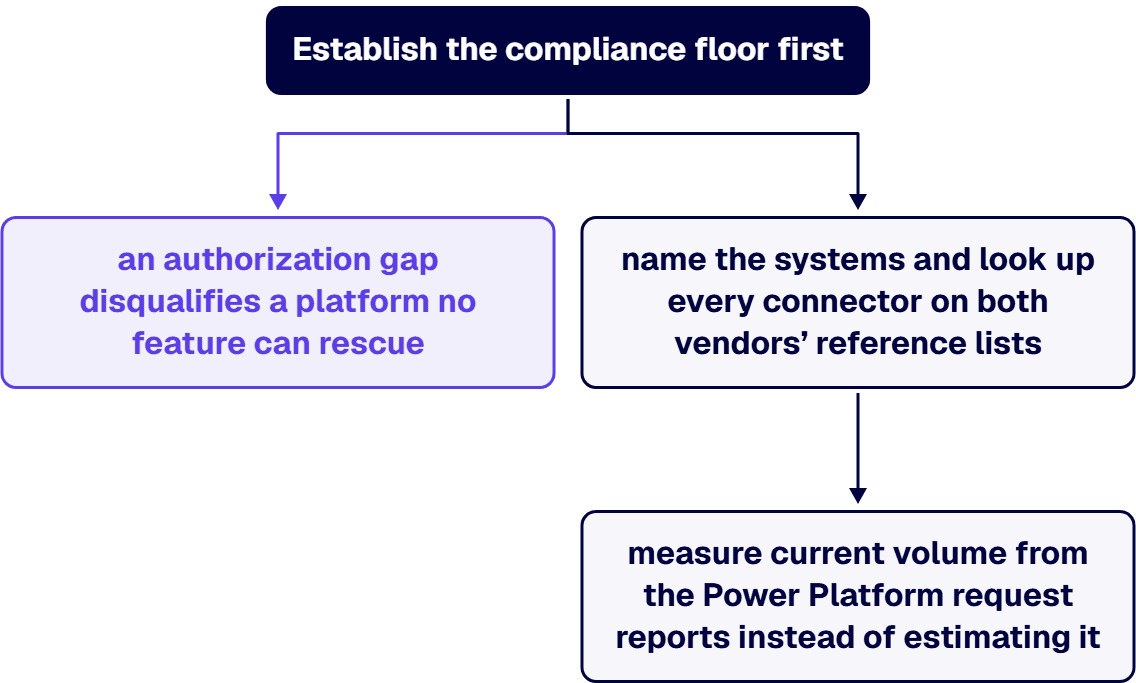
Data integration tool evaluation engagements at i3solutions typically range from $40,000 to $120,000 depending on the scope and complexity of the enterprise’s data estate. The output is a connector-level fit assessment, measured volumes against published limits, a compliance mapping for the frameworks in your contracts, and a recommendation you can defend in a budget review. That last artifact is the point: something a procurement review or an architecture committee can read without taking either vendor’s word for anything. i3solutions routes a senior U.S.-based engineer to a client call usually within one to two weeks, which is normally the fastest way to find out whether this decision is as close as it looks. If you want the decision package built and then delivered, that is the work our Power Automate development services team does, and the next step is a conversation about your connector inventory and your compliance floor.
For a Microsoft-centric estate, yes, and the qualifier is the whole answer. Power Automate covers standard, premium, and custom connectors, on-premises data gateway access included with Premium, Process, and Hosted Process alike, and first-party robotic process automation for systems with no API. Where it is not the equivalent product is a large orchestration estate between third-party systems that never touches Microsoft, which is what a dedicated iPaaS is built for.
Microsoft publishes list prices: Power Automate Premium at $15.00 per user per month, Process at $150.00 per bot per month, and Hosted Process at $215.00 per bot per month, paid yearly. Workato publishes no prices. Its pricing page carries no plan names and no figures. Its documentation describes the meter in tasks consumed by recipes and API proxy requests across all environments, with any recipe above four million tasks in a billing cycle treated as a high-volume recipe. That is a unit without a rate. Any side-by-side cost table you have been shown with Workato dollar figures in it did not get them from Workato.
No, and Microsoft says so in its own documentation: non-Microsoft data integration tools are subject to the exact same limits as scheduled, instant, or automated flows. Requests into Dataverse count against tenant capacity regardless of what issues them. If throttling is the problem, the documented remedies are Process capacity on the affected flows, stacking up to 10 Process licenses on a single flow, request capacity add-ons, or pay-as-you-go.
Power Automate has a documented US Government path: GCC compliant with FedRAMP High and DoD DISA IL2, GCC High designed to DISA SRG IL4 with a DISA provisional authority to operate and operated to support ITAR and DFARS obligations, and a DoD environment built to IL5. Workato’s published compliance list covers SOC 1, 2, and 3, ISO 27001, ISO 27701, ISO 42001, PCI DSS Level 1, HIPAA, IRAP, and NIST 800-171A Revision 2, and does not name FedRAMP. Verify current status with the vendor and in the FedRAMP Marketplace before shortlisting.
Microsoft publishes hard throughput numbers, listed in the table above, including a 100,000 request ceiling per five minutes that applies regardless of license. Workato publishes billing thresholds rather than throughput ceilings. Its documented four-million-task figure marks where a recipe becomes a high-volume recipe for billing purposes, not where the platform stops accepting work. So Microsoft’s ceiling is something you can design against before you build, and Workato’s is something you have to get in writing from the vendor before you commit.
You can, if one team owns the boundary between them and every automation on both sides lives in a versioned environment with a named organizational owner. The problem is never the second platform. It is the second unmanaged inventory: two sets of credentials, two audit trails, two answers to who owns a broken production process. Decide before purchase which platform is authoritative for which class of integration, and write it down.
By Scot Johnson, Founder / CEO, i3solutions. Scot Johnson co-founded i3solutions 30 years ago with a focus on expert-led delivery, strategic advisory, and complex Microsoft-centered solutions for organizations where technology decisions carry operational, financial, and mission risk.
An enterprise should choose Dynamics 365 over SAP for ERP when three conditions line up: the organization already runs on Microsoft (Entra ID, Microsoft 365, Azure), the ERP scope is finance, supply chain, and operations rather than deep industry-specific manufacturing, and the buyer wants published, per-user pricing, which Dynamics 365 has at $210.00 per user per month for Finance and for Supply Chain Management on Microsoft’s US price list while SAP S/4HANA is quoted rather than listed. SAP remains the stronger choice for enterprises with deep industrial process requirements, a mature SAP center of excellence, or a global template already standardized on S/4HANA.
There is also a clock running on the decision. SAP will provide mainstream maintenance for SAP Business Suite 7 core applications until the end of 2027, with optional extended maintenance until the end of 2030 at a premium of two percentage points on the maintenance basis, per SAP’s published maintenance strategy. Every ECC estate is therefore choosing its next ERP now, whether it frames the decision that way or not. This page gives the conditions under which that next ERP should be Dynamics 365, the ones under which it should not, and the verified numbers on both sides as of July 2026.
Choose Dynamics 365 when the following describe your organization, because each one converts directly into cost or risk on an SAP route. Your identity, collaboration, and analytics standards are Microsoft: Entra ID conditional access, Teams, Excel, and Power BI apply to Dynamics 365 natively, while an SAP estate is a second identity perimeter and a separate analytics integration. Your ERP requirements are strong core financials, procurement, supply chain execution, and project accounting rather than industry-specific manufacturing depth. Your entity structure is tiered, because running Business Central at $80.00 to $110.00 per user in smaller subsidiaries alongside Finance at $210.00 in the parent is a supported pattern that SAP matches only with more machinery. And your delivery model favors phased, entity-by-entity rollouts over a multi-year global template program. Enterprises matching that profile get shorter paths to production and an operating model their existing Microsoft governance already covers. If an SAP or ERP renewal is driving cost, check first whether Power Pages can reduce ERP customization and licensing costs for external users.
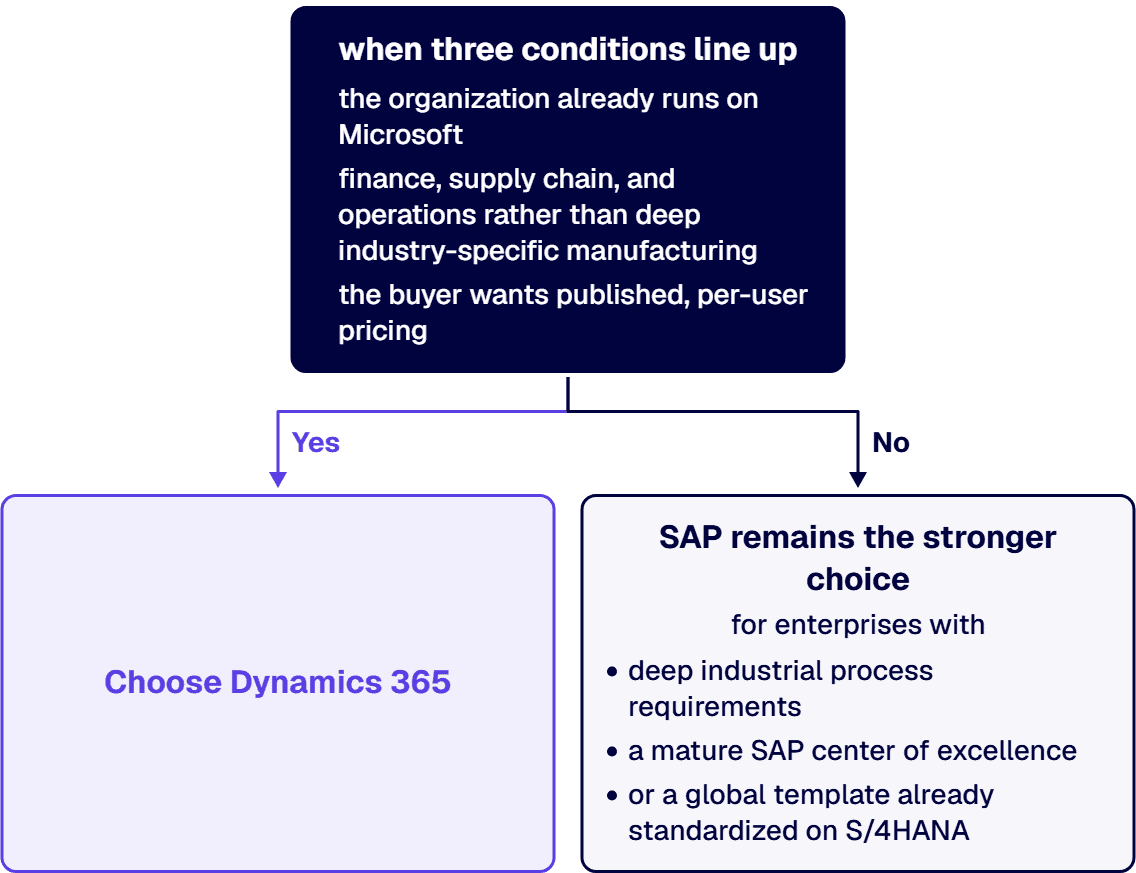
The pricing transparency gap is itself a finding. Microsoft publishes US list prices per user per month, paid yearly, on its Dynamics 365 pricing pages: Finance at $210.00, Supply Chain Management at $210.00, their Premium tiers at $300.00 each, Project Operations at $135.00, and Business Central Essentials and Premium at $80.00 and $110.00 for the subsidiary tier, with light users at $8.00 on Business Central Team Members. Multi-app users pay a reduced attach price for a second qualifying application rather than a second full seat; the per-seat mechanics are broken down in our Dynamics 365 licensing cost guide.
SAP does not publish a comparable list price for S/4HANA Cloud: pricing is quote-based through SAP or a partner, and ECC customers electing extended maintenance after 2027 pay the published premium of two percentage points on their maintenance basis. None of that makes SAP more expensive by definition, but it changes who holds the information in the negotiation, and it means an SAP business case cannot be independently priced from public sources the way a Dynamics 365 case can. For a board that wants two comparable bids, that asymmetry is worth naming early.
SAP’s own calendar is the forcing function for most enterprises reading this page. Mainstream maintenance for Business Suite 7 core applications ends at the end of 2027, extended maintenance runs to the end of 2030 at the premium, and SAP has committed maintenance for S/4HANA through 2040, all per SAP’s published maintenance strategy. The practical consequence: staying put is not one of the options. An ECC enterprise is choosing between an S/4HANA conversion, which SAP has framed as the default path, and a re-platforming decision in which Dynamics 365 competes on equal footing because the migration project must be funded either way. That is precisely the moment to test the Microsoft-centric conditions above, since the S/4HANA conversion carries most of the cost and disruption of a new ERP without re-opening the platform question. Treat 2027 as a planning boundary, not an emergency: a deliberate migration decided in 2026 costs less than a rushed one quoted in 2029. If Dynamics 365 is the route you choose, Dynamics 365 Migration From AX, GP, NAV or CRM: Which Route Applies? sets out the migration routes from legacy systems.
Four profiles argue for SAP, and pretending otherwise would make this page a brochure. Deep industrial and industry-specific functionality: for complex discrete and process manufacturing, advanced variant configuration, and industry solutions SAP has spent decades building, S/4HANA’s functional depth is the requirement, not a preference. An established SAP center of excellence: an enterprise with hundreds of person-years of SAP process knowledge and a governance machine built around it should price the loss of that asset honestly. A standardized global template: multinationals running one SAP template across dozens of countries get consolidation value that a re-platforming would have to rebuild. And an existing S/4HANA investment: with maintenance committed through 2040, an enterprise already live on S/4HANA has no forced exit and should evaluate Dynamics 365 only at the edges, for example in subsidiaries or satellite entities where a two-tier pattern fits.
Yes, and for large enterprises the coexistence pattern is often the honest recommendation rather than a consolation prize. The common shape is two-tier ERP: S/4HANA remains the group template at corporate while Business Central or Dynamics 365 Finance runs the subsidiaries, acquisitions, and regional entities where SAP’s weight is not justified, with consolidation flowing up through defined integration. The second common shape keeps SAP as the ERP core while Dynamics 365 takes the customer-facing edge, CRM, field service, and project operations, where its Microsoft 365 integration earns its keep daily. If the CRM layer is itself a contested choice, our Dynamics 365 vs Salesforce comparison runs that decision on the same governance tests. Both patterns need the integration boundary designed deliberately, with owned interfaces and monitored data flows rather than point-to-point improvisation, and that boundary is where these programs succeed or fail.
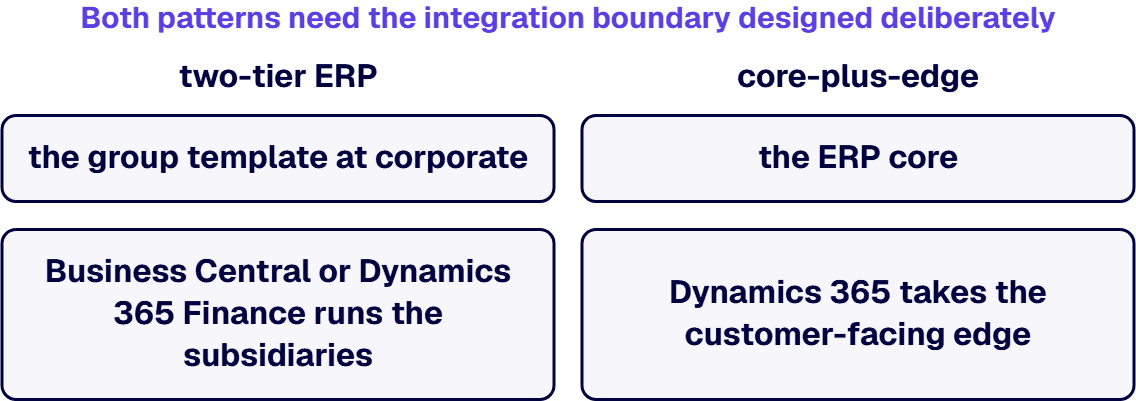
Run the decision through the compliance boundary first, because it can settle the question before any feature comparison. Which platform keeps regulated data inside an environment your framework already certifies, with evidence produced by controls you already operate? For US defense-adjacent work, Microsoft’s Dynamics 365 US Government service description lists core Finance, Supply Chain Management, and Sales availability in GCC High, inside the same boundary as the rest of a GCC High tenant; what that environment adds to an implementation budget is priced in our defense contractor cost guide. Then test the operating model: which platform can your security and audit teams actually govern for a decade, and in how many separately administered perimeters? Our teams maintain dedicated compliance specialists who understand CMMC, HIPAA, SOC 2, and financial services regulations within Microsoft environments, providing audit trail documentation and access control frameworks that reduce audit preparation time by 60%. An ERP selection that ignores the audit workload buys the demo and inherits the findings.
i3solutions is a Microsoft Solutions Partner. All i3solutions Dynamics 365 developers and consultants are U.S. based. We do not resell either platform, and our recommendation is built from the integration surface, data condition, entity structure, and compliance obligations of your specific estate, the same drivers that price the program in our Dynamics 365 implementation cost guide. When the honest answer is an S/4HANA conversion or a coexistence pattern, that is the answer we give, because an ERP recommendation is only worth what it costs the recommender to say it. What we bring to the Dynamics 365 route is senior, phased, governance-first delivery: working increments by entity, a documented decision record, and an estate your own team can run when the program ends. That delivery model is described on our Dynamics 365 development services page. Enterprises that want that capacity inside an in-flight program can hire Dynamics 365 developers from us directly.
When the organization is already Microsoft-centric in identity, collaboration, and analytics, when the ERP scope is core financials, supply chain, and operations rather than deep industry-specific manufacturing, and when phased entity-by-entity delivery and published per-user pricing matter. Dynamics 365 Finance and Supply Chain Management list at $210.00 per user per month each on Microsoft’s US price list, while SAP S/4HANA pricing is quote-based, and the ECC maintenance deadline at the end of 2027 makes this decision current for every Business Suite 7 estate.
It is more transparently priced, which is not the same claim. Dynamics 365 publishes US list prices, $210.00 per user per month for Finance and for Supply Chain Management with Premium tiers at $300.00, so a budget can be modeled from public sources. SAP quotes S/4HANA Cloud rather than listing it, so a comparison is only as good as your negotiation. Total cost on either platform is dominated by implementation, integration, and the ongoing estate rather than by the subscription line.
Per SAP’s published maintenance strategy, mainstream maintenance for SAP Business Suite 7 core applications runs until the end of 2027, followed by optional extended maintenance until the end of 2030 at a premium of two percentage points on the existing maintenance basis. SAP has committed maintenance for S/4HANA through 2040. Enterprises on ECC are therefore selecting their next ERP platform now, and both the S/4HANA conversion and a Dynamics 365 re-platforming are funded migration projects rather than upgrades.
For deep discrete and process manufacturing and industry-specific functionality where S/4HANA’s decades of functional depth are the actual requirement, for enterprises with a mature SAP center of excellence whose process knowledge is a real asset, for multinationals consolidating on a single global SAP template, and for organizations already live on S/4HANA, which has maintenance committed through 2040 and no forced exit. In those profiles the Microsoft-centric integration argument does not outweigh the functional and organizational fit.
Yes, and it is common. The two proven patterns are two-tier ERP, with S/4HANA at corporate and Business Central or Dynamics 365 Finance in subsidiaries and acquisitions, and core-plus-edge, with SAP as the ERP core while Dynamics 365 covers CRM, field service, and project operations. Both depend on a deliberately designed integration boundary with owned interfaces and monitored flows, which is where the engineering investment belongs.
By Scot Johnson, Founder / CEO, i3solutions. Scot Johnson co-founded i3solutions 30 years ago with a focus on expert-led delivery, strategic advisory, and complex Microsoft-centered solutions for organizations where technology decisions carry operational, financial, and mission risk.
For an enterprise already standardized on Microsoft 365, Azure, and Entra ID, Dynamics 365 is usually the stronger CRM choice: Sales Enterprise lists at $105.00 per user per month against $175.00 for Salesforce Sales Cloud Enterprise, and the identity, Teams, Outlook, and Power BI integration a Salesforce deployment would have to build and maintain is native. Salesforce is the better choice when the stack is heterogeneous, when the organization already runs a mature Salesforce estate with an established admin team, or when specific AppExchange or industry cloud capabilities are the requirement.
That is the verdict and its boundary in two sentences. The rest of this page is the reasoning a steering committee can check: the current published prices on both sides, what the license price hides on each, where a Microsoft-centric stack genuinely tilts the decision, and the cases where it does not. Prices below were confirmed on Microsoft’s and Salesforce’s public US pricing pages in July 2026.
Both vendors publish US list prices per user per month. Dynamics 365 Sales, per Microsoft’s pricing page, runs Sales Professional at $65.00, Sales Enterprise at $105.00, and Sales Premium at $150.00, paid yearly. Salesforce Sales Cloud, per Salesforce’s pricing page, runs Starter Suite at $25.00, Pro Suite at $100.00, Enterprise at $175.00, Unlimited at $350.00, and Agentforce 1 Sales at $550.00, billed annually.
At the tier most enterprises actually buy, the gap is $105.00 versus $175.00 per user per month, which is $84,000.00 per year per 100 users before any discounting on either side. Two footnotes matter as much as the headline. On the Salesforce side, the same pricing page lists Web Services API access below the Enterprise tier as an additional $25.00 per user per month, so an integrated deployment effectively starts at Enterprise. On the Microsoft side, a user who needs a second Dynamics 365 application pays a reduced attach price rather than a second full seat, which lowers the blended cost in multi-app deployments. Both vendors negotiate at volume, so treat list as the starting position, not the outcome.
The license delta is real but it is not the main event. The structural argument for Dynamics 365 in a Microsoft-centric enterprise is that the surrounding platform is already bought, deployed, and governed:
None of this makes Salesforce a bad platform. It makes Salesforce a second platform, and the recurring cost of a second platform is paid in integration, identity, governance, and skills, not just in the subscription line.
An honest comparison names the cases where the answer flips, and there are four. If your enterprise is not Microsoft-centric, the integration argument evaporates and Salesforce’s platform maturity and ecosystem stand on their own merits. If you already run a mature, well-adopted Salesforce estate, the switching cost in migration, retraining, and rebuilt integrations usually dwarfs the license delta, and the better money is spent governing what you have. If your requirements depend on specific AppExchange packages or Salesforce industry clouds with no direct Dynamics equivalent, the capability gap is the decision. And if your CRM talent market is Salesforce-heavy, the operating cost of the platform includes the people who run it. The right frame is not which product wins in the abstract, but which platform your enterprise can run well for a decade.
The license is the smallest of the three budgets. The second is implementation: process design, data migration, integration, and rollout, a budget in its own right on either platform; the drivers and published ranges are broken down in our Dynamics 365 implementation cost guide and the per-seat mechanics in the licensing cost guide. The third is the ongoing estate: administration, release testing, integration maintenance, and enhancements, which recur for the life of the platform and are priced in our Dynamics 365 support cost guide. The integration line deserves particular scrutiny in a Microsoft shop, because it is the one that diverges hardest between the two choices: on Dynamics 365 much of it is configuration, on Salesforce it is middleware, connectors, and a second set of skills.
Decide it as a governance question with three tests. First, the compliance boundary: which platform keeps regulated data inside an environment your framework already covers, with audit evidence produced by controls you already operate? For GCC High tenants that test is frequently decisive on its own. Second, the identity perimeter: how many separately governed access surfaces is your security team willing to certify? Third, the ten-year operating model: which platform can your organization staff, govern, and afford after the implementation partner leaves? A CRM selection that only scores features is answering an easier question than the one the enterprise is actually asking. The same three tests drive the ERP side of the stack, which we walk in our Dynamics 365 vs SAP comparison.
i3solutions is a Microsoft Solutions Partner. All i3solutions Dynamics 365 developers and consultants are U.S. based, which is a requirement rather than a preference in most of the regulated environments we serve. i3solutions has delivered this pattern on Microsoft Dynamics 365 CRM integrations in a regulated healthcare environment and on enterprise application integration for a global professional services firm serving 125,000 users. We do not sell either license; our recommendation comes from the integration and governance workload each choice creates, and when an enterprise is better served staying on Salesforce we say so, because a CRM decision defended honestly survives its first audit and its first budget review. Our Dynamics 365 development services page describes how we structure that delivery work. Enterprises that want senior capacity on an in-flight program can hire Dynamics 365 developers from us directly.
Usually Dynamics 365. Sales Enterprise lists at $105.00 per user per month against $175.00 for Salesforce Sales Cloud Enterprise, and the identity, Teams, Outlook, Power BI, and Power Platform integration is native rather than built and maintained. Salesforce is the better answer when the stack is heterogeneous, when a mature Salesforce estate is already adopted, or when specific AppExchange or industry cloud capability is the requirement.
At published US list prices for the comparable enterprise tier, yes: Dynamics 365 Sales Enterprise is $105.00 per user per month against $175.00 for Salesforce Enterprise, and the premium tiers compare at $150.00 versus $350.00 for Unlimited and $550.00 for Agentforce 1 Sales. Total cost depends on negotiated discounts, integration workload, and the multi-app attach pricing on the Microsoft side, so the honest claim is that Dynamics 365 starts materially lower and its integration costs are structurally lower in a Microsoft shop.
Three things. On Salesforce’s published Sales pricing page, Web Services API access below the Enterprise tier is listed as an additional $25.00 per user per month, so integrated deployments effectively start at $175.00. Integration into a Microsoft estate is an ongoing middleware and connector workload rather than native configuration. And the platform is a second identity and governance perimeter, which carries a standing operational cost that never appears on the subscription invoice.
When the enterprise is not Microsoft-centric, when a mature and well-adopted Salesforce estate already exists and switching costs would dwarf the license savings, when requirements depend on AppExchange packages or Salesforce industry clouds without a direct Dynamics equivalent, or when the available CRM talent pool is decisively Salesforce-skilled. In those cases the integration argument for Dynamics 365 weakens and the platform question should be decided on capability and operating model instead.
Yes, and the pattern is well established: entity and data model mapping, staged data migration, integration re-pointing, and a parallel-run cutover. The real cost is rarely the data movement; it is rebuilding the automations, reports, and integrations the Salesforce estate accumulated, and retraining users. A migration business case should be built on the ten-year operating delta, not the license delta alone, and a staged migration by business unit is usually the defensible route for a regulated enterprise.
Trust comes from data quality, adoption design, and governance, not from configuration. Start with the record the business already argues about: name an owner for each entity, agree the fields that must be accurate, and migrate only the data you are willing to defend, leaving the dead custom fields and duplicate account records behind instead of carrying them across. Then design for how sellers actually work, inside Outlook, Teams, and Excel, so the CRM is where the work happens rather than a second place to retype it. Govern it in Dataverse with a named owner for each table, a solution-based release process for changes, and the Entra ID conditional access your tenant already enforces. i3solutions has delivered this pattern on Microsoft Dynamics 365 CRM integrations in a regulated healthcare environment and on enterprise application integration for a global professional services firm serving 125,000 users.
By Scot Johnson, Founder / CEO, i3solutions. Scot Johnson co-founded i3solutions 30 years ago with a focus on expert-led delivery, strategic advisory, and complex Microsoft-centered solutions for organizations where technology decisions carry operational, financial, and mission risk.
Ongoing Dynamics 365 support has a published floor and a quoted ceiling. The floor is Microsoft’s own plans: baseline subscription support is included with any Dynamics 365 purchase, and Professional Direct support is $9.00 per user per month, paid yearly with a 20 user minimum, on Microsoft’s published US pricing. The ceiling is quoted, not listed: Microsoft Unified Enterprise support and partner-delivered managed services are both priced on scope, and for a mid-sized enterprise the partner layer usually lands in the tens of thousands of dollars per year rather than the hundreds.
The honest structure of this budget is three layers, and most cost confusion comes from mixing them: what Microsoft includes, what Microsoft sells, and what a partner does that Microsoft does not do at all. This page prices each layer with the sources named, and gives you the drivers that decide the quoted parts. The recurring licensing underneath it is covered in our Dynamics 365 licensing cost guide.
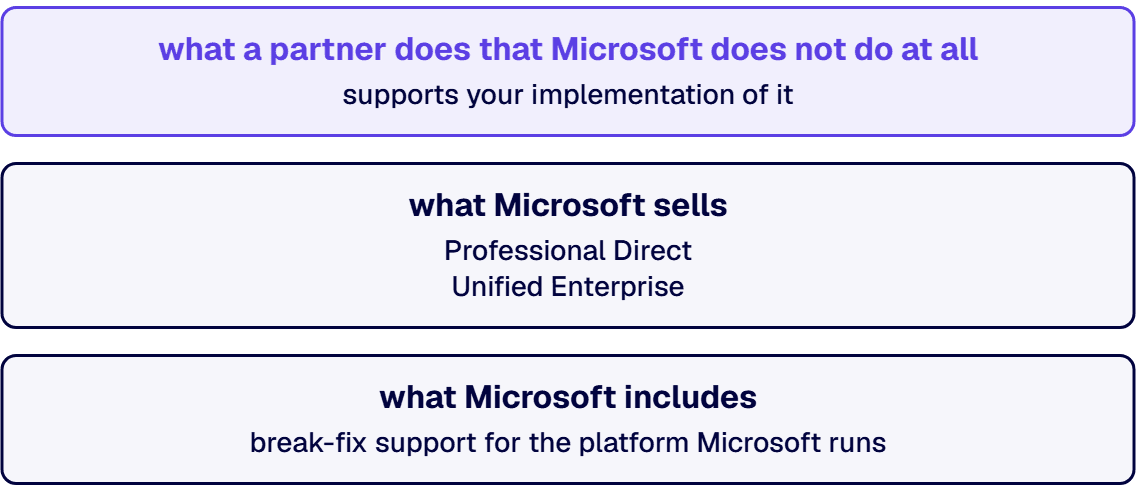
Every Dynamics 365 subscription includes baseline support at no additional cost: the ability to raise technical support requests, self-help resources, and community channels, listed on Microsoft’s Dynamics 365 support plans page as included with any Dynamics 365 purchase. It is break-fix support for the platform Microsoft runs. What it is not is support for anything you built on the platform: your customizations, your integrations, your data quality, and your users’ questions are explicitly outside its scope. For a lightly customized deployment with a capable internal admin, included support plus that admin is a legitimate operating model, and it is worth saying so before anyone quotes you a managed service.
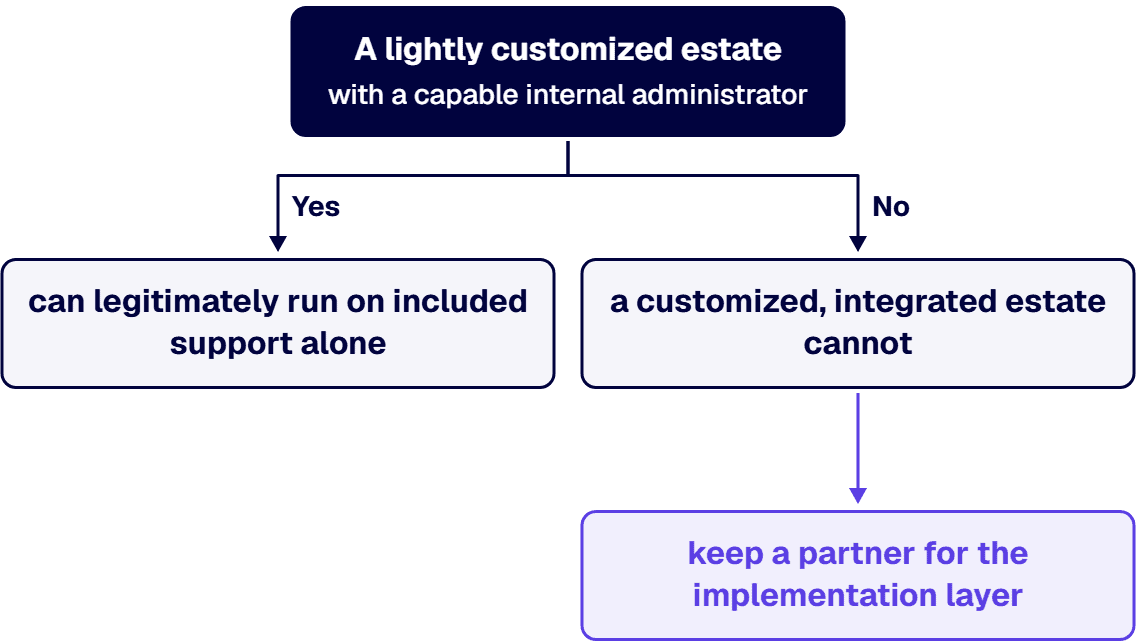
Microsoft sells two levels above the included baseline, and only one of them has a public price. Professional Direct is $9.00 per user per month, paid yearly with a 20 user minimum, which buys faster initial response times, escalation management, and access to proactive advisory services and on-demand workshops. For a 100 user deployment that is $10,800.00 per year, a number worth knowing before it is presented to you as a rounding error. Unified Enterprise, Microsoft’s organization-wide support agreement, has no published list price: Microsoft’s own Unified support page describes pricing that scales with your Microsoft spend, quoted through your account team, and the agreement covers your whole Microsoft estate rather than Dynamics 365 alone. If your organization already holds a Unified agreement, your Dynamics 365 environment is already inside it, and buying Professional Direct on top duplicates coverage you own.
Microsoft’s plans support the platform. A partner supports your implementation of it, and the gap between those two sentences is where most ongoing cost actually lives. The recurring work a Dynamics 365 estate generates has little to do with platform outages:
Partner-delivered support is sold in three shapes, and knowing which one you are being quoted matters more than the headline number. Per-user-per-month pricing scales with headcount and suits stable estates with predictable ticket volume. Prepaid blocks of hours suit small estates with occasional needs, though unused hours quietly expire and heavy months blow through the block. Monthly retainers with a defined scope, the model most mid-sized and regulated enterprises end up on, fix the cost of a named service catalog: response times, release wave testing, administration, and a set number of enhancement hours.
What moves the quote is not user count but four structural drivers: the size of your customization surface, the number of integrations that must be monitored and retested, the compliance obligations attached to the environment, and whether the partner is also expected to deliver enhancements or only keep the lights on. As an attested reference point from our own delivery practice: IT consulting costs for a mid-sized enterprise typically range from $40K-$150K annually depending on scope and engagement model. A quote far below that band for a customized, integrated, regulated estate is usually pricing a narrower scope than you think you are buying, and the gap surfaces at the first release wave.
A handful of early decisions control the recurring number more than any later negotiation does. Hold the customization boundary during implementation, because every extension you decline to build is a permanent subtraction from the maintenance bill. Invest in your own administrator, because a capable internal admin absorbs the how-do-I layer at a fraction of partner rates and makes the partner hours you do buy senior ones. Budget release wave testing explicitly, because the estates that treat it as an unplanned event pay for it as an emergency instead of a routine. And match the support model to the estate’s actual volatility: a stable, lightly customized deployment on a heavy retainer is overpaying, and a heavily integrated one on a small hour block is underinsured.
Read a managed services agreement for what it obligates, not what it advertises. It should name response and resolution targets by severity, state plainly whether release wave regression testing is inside the scope or billed separately, define how enhancement work is requested and approved, and commit to knowledge transfer so your team gets more capable over time rather than more dependent. That last clause is the one most agreements omit, and it is the difference between buying support and renting a dependency. An i3solutions engagement does not produce managed-service ownership, a replacement for the internal team, open-ended scope expansion, or vendor lock-in. If a proposed agreement cannot say the same in writing, price the exit before you sign the entry.
i3solutions is a Microsoft Solutions Partner. All i3solutions Dynamics 365 developers and consultants are U.S. based, which matters for regulated estates where offshore access to the environment is a compliance finding rather than a saving. We structure ongoing support as senior engineering capacity against a defined catalog: release wave testing on Microsoft’s published cadence, customization and integration maintenance, and enhancement work approved through your governance rather than discovered on an invoice. Our teams maintain dedicated compliance specialists who understand CMMC, HIPAA, SOC 2, and financial services regulations within Microsoft environments, providing audit trail documentation and access control frameworks that reduce audit preparation time by 60%. The engagement is built to leave your internal team stronger each quarter, and the selection questions that separate a support partner from a dependency are the same ones we lay out in our Dynamics 365 partner cost guide.
Baseline subscription support is included with any Dynamics 365 purchase at no additional cost. Microsoft’s Professional Direct plan is $9.00 per user per month, paid yearly with a 20 user minimum, and Microsoft Unified Enterprise support is custom quoted against your organization-wide Microsoft estate. Partner-delivered support and managed services are quoted on scope; as an attested reference point, IT consulting for a mid-sized enterprise typically runs $40K to $150K annually depending on scope and engagement model.
Two plans carry Microsoft’s name on the invoice. Professional Direct is $9.00 per user per month on Microsoft’s published US pricing, paid yearly with a 20 user minimum, adding faster response, escalation management, and advisory services on top of the baseline every license already carries. Unified Enterprise has no public list price and is quoted by your Microsoft account team, covering your entire Microsoft estate rather than Dynamics 365 alone.
Platform break-fix, essentially: the ability to raise technical support requests against the service itself, plus self-help resources and community channels. It does not cover your customizations, integrations, data, or user questions, which is the layer where most real-world support demand concentrates. A lightly customized estate with a capable internal administrator can legitimately run on included support alone; a customized, integrated estate cannot.
There is no honest single number, because the quote is driven by customization surface, integration count, compliance obligations, and whether enhancements are in scope, not by user count. The three pricing shapes are per-user-per-month, prepaid hour blocks, and defined-scope monthly retainers, with retainers the norm for mid-sized regulated estates. Treat a quote that undercuts the market sharply as a narrower scope, and check specifically whether release wave regression testing is inside it.
Unified covers the platform across your Microsoft estate, with proactive services and escalation paths, but it does not maintain your customizations, monitor your integrations, or run release wave regression testing against your specific configuration. Estates with real customization keep a partner for the implementation layer even under Unified. What you should not do is pay twice for the same layer: under Unified, buy implementation support, not another platform plan.
Access control does. When the environment holds regulated data, the people supporting it must satisfy your compliance regime, which for defense work generally means U.S. persons and background checks, and audit evidence must be produced for changes rather than just changes made. That narrows the labor pool and adds documentation discipline, which is why regulated support carries a structural premium and why offshore-priced quotes are frequently unusable in these estates. The compliance program that imposes those requirements has its own price tag, which we break down in our CMMC compliance cost guide.
By Scot Johnson, Founder / CEO, i3solutions. Scot Johnson co-founded i3solutions 30 years ago with a focus on expert-led delivery, strategic advisory, and complex Microsoft-centered solutions for organizations where technology decisions carry operational, financial, and mission risk.
Dynamics 365 licensing runs from $8.00 per user per month for a Business Central Team Members seat to $300.00 per user per month for Finance Premium on Microsoft’s published US price list, all paid yearly. The three numbers most buyers need first: Dynamics 365 Sales Enterprise is $105.00 per user per month, Dynamics 365 Finance is $210.00, and Business Central Essentials is $80.00.
Those figures come straight from Microsoft’s public pricing pages and were confirmed there in July 2026. The rest of this page puts every current per-user list price in one table, explains the base and attach mechanics that decide what a multi-app user actually pays, and names the costs that never appear in the per-user price. Licensing is the recurring half of the budget; the one-time half is covered in our Dynamics 365 implementation cost guide.
Microsoft publishes a US list price for every Dynamics 365 application, per named user per month, paid yearly. This is the full current table, confirmed against Microsoft’s Sales, Finance, and Business Central pricing pages in July 2026. Microsoft adjusts list prices periodically, most recently in an October 2024 revision, so re-check the live page before a signature.
Two structural notes keep this table honest. First, Business Central and the enterprise Finance and Supply Chain applications are alternatives for the ERP role, not layers: a midmarket subsidiary runs Business Central at $80.00 to $110.00 per user while a global parent runs Finance and Supply Chain at $210.00, and the right question is which tier fits each entity. Second, the per-user price is the entry fee, not the budget; implementation, integration, and ongoing support all sit outside it.
The single most misunderstood Dynamics 365 licensing mechanic is also the one that saves the most money: a user who needs more than one full application does not pay full list price twice. Microsoft licenses the first qualifying application at the base price and each additional qualifying application for that same user at a reduced attach price. A controller who works in both Finance and Supply Chain Management, or a seller who also handles service cases, is the normal case in an enterprise deployment, so model your actual role mix instead of multiplying headcount by list price. The qualifying combinations and current attach prices are defined in Microsoft’s Dynamics 365 Licensing Guide, which Microsoft updates regularly; the base price table above is the ceiling, and the attach mechanics decide how far below it your blended per-user cost lands.
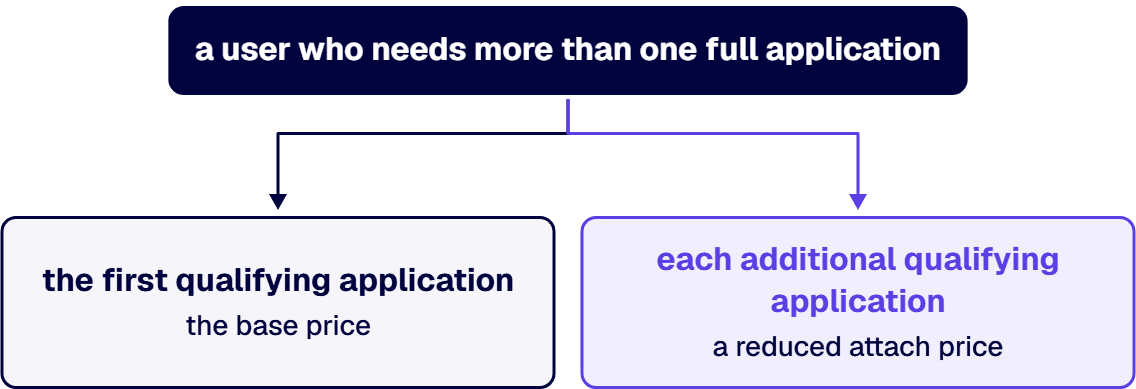
Most licensing overspend comes from one habit: buying every user the license the most demanding user needs. Three decisions push against it.
Four line items routinely surprise first-time Dynamics 365 buyers, and none of them appears in the table above. Additional Dataverse database and file storage beyond the included tenant capacity is billed separately per gigabyte per month, and transaction-heavy deployments do exceed the default. Sandbox environments for development, testing, and staging carry their own capacity implications, and a disciplined go-live needs them. AI consumption beyond what a license includes, such as Copilot Studio agent usage, is metered on credits rather than folded into the seat. And the implementation itself, the largest single number in year one, is a separate project budget whose drivers we break down in the implementation cost guide and, for the SMB tier, the Business Central implementation cost guide.
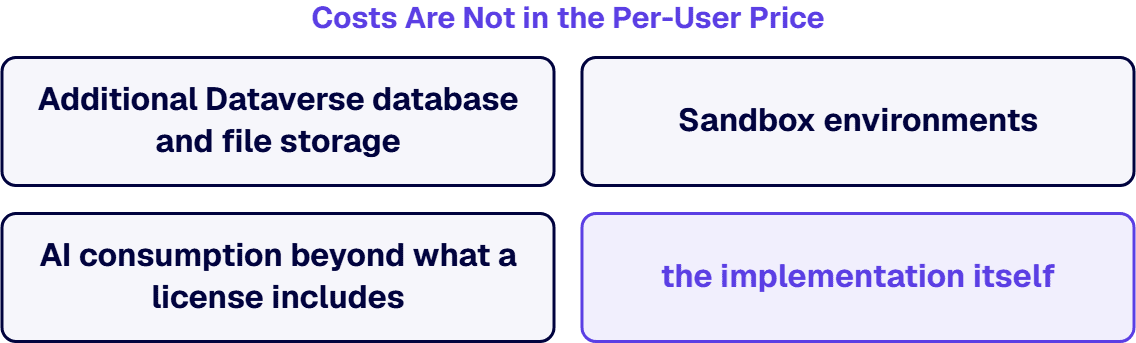
Licensing optimization is a role-mapping exercise, not a negotiation trick. Inventory who actually creates records versus who reads and approves, and license the difference; audit the mapping yearly, because roles drift and seats quietly ratchet upward. Use attach pricing deliberately by consolidating multi-app work onto the users who genuinely need it rather than spreading full seats thinly. Buy through the agreement vehicle that fits your size, because enterprise agreements and CSP partners price the same list differently at volume. And resist the reflex to under-license regulated users to save money: an approver who occasionally edits records needs the seat that covers editing, and a licensing audit finding costs more than the seats it would have taken to stay clean.
i3solutions is a Microsoft Solutions Partner, and we approach licensing as engineers rather than as a reseller: the license mix falls out of the role and process design, not the other way around. All i3solutions Dynamics 365 developers and consultants are U.S. based, and our licensing recommendations come attached to the implementation scoping they depend on, because a seat count built before the role design is a guess. What that scoping engagement itself costs, and how to choose who runs it, is covered in our Dynamics 365 partner cost guide. We have watched enterprises overpay five figures a year for full seats their approvers never used, and we have also seen the opposite failure, where an under-licensed team worked around the platform in spreadsheets. The fix in both directions is the same: map the roles first, then price them. If the platform decision itself is still open, our Dynamics 365 vs Salesforce and Dynamics 365 vs SAP comparisons price that choice on the same terms.
On Microsoft’s published US price list, Dynamics 365 runs from $8.00 per user per month for Business Central Team Members to $300.00 for Finance Premium, paid yearly. The most common anchors are Sales Enterprise at $105.00, Finance and Supply Chain Management at $210.00 each, and Business Central Essentials at $80.00. Multi-app users pay a base price for the first application and a reduced attach price for additional qualifying applications.
Dynamics 365 Sales has three tiers on Microsoft’s US price list: Sales Professional at $65.00 per user per month for core sales force automation, Sales Enterprise at $105.00 with contextual insights, AI, and advanced customization, and Sales Premium at $150.00, which adds advanced sales intelligence and agentic automation. All are paid yearly. Most enterprise deployments land on Sales Enterprise.
Dynamics 365 Finance lists at $210.00 per user per month on Microsoft’s US price list, paid yearly, with Finance Premium at $300.00 adding advanced business performance management. Supply Chain Management carries the same $210.00 and $300.00 tiers. A user who needs both Finance and Supply Chain pays the base price once and a reduced attach price for the second application.
Business Central Essentials is $80.00 per user per month and Premium is $110.00 on Microsoft’s published US price list, paid yearly, with Premium adding manufacturing and service management. Team Members access for light users who read, approve, and make limited entries is $8.00 per user per month. You cannot mix Essentials and Premium full users in the same company, so that choice is made once for everyone.
The base license is the first full Dynamics 365 application assigned to a user, bought at list price. When that same user needs an additional qualifying application, it is licensed as an attach at a significantly reduced price rather than a second full seat. The eligible combinations and current attach prices are published in Microsoft’s Dynamics 365 Licensing Guide, and modeling them against your real role mix is the difference between a list-price estimate and an accurate one.
Additional Dataverse database and file storage beyond the included capacity, billed per gigabyte per month; sandbox environments for testing and staging; metered AI consumption such as Copilot Studio credits; and the implementation project itself. For most first deployments the implementation is the largest year-one number, and it is a separate budget from licensing entirely.
By Scot Johnson, Founder / CEO, i3solutions
Scot Johnson co-founded i3solutions 30 years ago with a focus on expert-led delivery, strategic advisory, and complex Microsoft-centered solutions for organizations where technology decisions carry operational, financial, and mission risk. His insights focus on the leadership, governance, integration, automation, data, and delivery decisions that determine whether technology investments become reliable business systems.
A defense contractor pays for a standard Dynamics 365 program plus a defined set of compliance deltas a commercial buyer never sees: a US government cloud environment (GCC High) with its own licensing channel and app availability limits, the scaffolding to satisfy CMMC, DFARS 252.204-7012, and where export-controlled data is involved ITAR, and a delivery team restricted to US persons. Together, these are why two otherwise identical Dynamics 365 implementations, one commercial and one for a DoD supply-chain contractor, do not carry the same number.
The base engineering is roughly the same; the premium sits in the environment, the compliance documentation, and who is allowed to touch the data. This page separates the structural deltas, which the contract requires, from the avoidable ones, which come from scoping GCC High wider than the mission needs.
Every defense-sector estimate has two layers. The bottom layer is the ordinary Dynamics 365 cost model: module footprint, integration surface, data condition, and the customization boundary, which our Dynamics 365 implementation cost guide covers in full. The top layer is the compliance overhead specific to the defense sector. Budget them separately: blending them hides which costs you can influence and which the regulation fixes for you.
Nothing on the bottom layer disappears in a defense engagement; a contractor still pays for configuration, integrations, and migration at ordinary rates. The deltas below are added on top, and they are where programs go over budget when they surface mid-project instead of being scoped up front.
This is an availability question before it is a pricing one. Not every Dynamics 365 app that exists commercially is offered in GCC High, so a design that assumes the full commercial catalog can require rework once the environment is fixed. A gap forces either a supported substitute or a custom build, and both cost money.
Per Microsoft’s Dynamics 365 US Government service description, the apps offered in the GCC High environment include Customer Service, Field Service, Finance, Sales, Supply Chain Management, Project Service Automation, and Remote Assist. Several commercial apps are not listed for GCC High, including Customer Voice, Dynamics 365 Guides, Contact Center, Human Resources, and Project Operations. If your target-state design leans on one of those, the compliance environment, not the budget, is what removes it, and you plan the substitute up front.
For moving existing systems into Dynamics 365 when the data has to stay in a US government cloud, the migration guide covers it under If the Data Must Stay in a US Government Cloud.
GCC High is a separate US government cloud, and Dynamics 365 in it is bought differently from commercial. Microsoft’s service description states that GCC High subscriptions are available through Volume Licensing only, not the self-serve Cloud Solution Provider channel, so there is no public checkout and pricing runs through a reseller or Microsoft account team. The environment also requires Microsoft Entra Government for identities rather than the public Entra ID used in GCC, and is designed to align with the DISA SRG Impact Level 4 framework.
The Microsoft 365 side of the GCC High premium, the per-user licensing uplift and the tenant migration, is a separate budget that our Microsoft 365 GCC High cost analysis covers in detail, and this page does not repeat it. For Dynamics 365 specifically, the environment premium shows up as quote-based Volume Licensing, the app substitutions above, and a longer provisioning path, not a single published multiplier.
The regime, not the vendor, decides how much compliance a program must carry, so read the contract clauses before the price list. DFARS clause 252.204-7012 requires the contractor to implement NIST SP 800-171, to use a cloud service provider meeting the FedRAMP Moderate baseline or equivalent, and to report cyber incidents to the DoD within 72 hours. CMMC 2.0 adds an assessed proof layer on top: its Level 2, which applies to Controlled Unclassified Information, requires all 110 security requirements of NIST SP 800-171 Revision 2, and Level 3 adds selected requirements from NIST SP 800-172.
GCC High enters at the top of that ladder. Microsoft’s Dynamics 365 US Government documentation states the GCC High deployment lets DoD contractor customers meet ITAR commitments and DFARS acquisition regulations, and it restricts Microsoft administrative access to customer content to screened US citizens. That US-persons access control is the structural reason GCC High is chosen where ITAR or EAR export-controlled data is involved, rather than an optional upgrade.
A defense program also carries documentation and control work a commercial one does not, and it is the delta most often missing from a first estimate. Audit trails, documented change control, segregation-of-duties enforcement, and evidence packages mapped to NIST SP 800-171 are engineering deliverables, not paperwork added at the end. Scoped up front they are predictable; discovered during an assessment they are expensive.
i3solutions builds this layer as part of delivery. Our teams maintain dedicated compliance specialists who understand CMMC, HIPAA, SOC 2, and financial services regulations within Microsoft environments, providing audit trail documentation and access control frameworks that reduce audit preparation time by 60 percent. A defined CUI boundary compliance implementation, covering the assessment, Conditional Access, DLP policy build and testing, audit configuration, and documentation, typically runs $45,000 to $75,000 in our experience, separate from the Dynamics 365 licensing and build.
Export-controlled data constrains not only the software but who may see it, and that reaches your implementation partner. Microsoft itself limits GCC High administrative access to customer content to US citizens who pass background screening, and the same logic applies to any consultant, developer, or support engineer who can reach CUI or ITAR data during delivery. An offshore or nearshore team touching that data is a compliance finding, not a cost saving, which removes the labor-arbitrage option commercial cost models tend to assume.
i3solutions provides 100 percent US-based senior-level delivery teams, so the US-persons requirement is the standing model rather than a premium bolted on for defense work. Organizations that need to add onshore capability to an in-flight program can hire Dynamics 365 developers directly, which closes a staffing gap without breaking the data-handling boundary.
The single most useful question in a defense Dynamics 365 budget is which deltas the contract actually forces. Structural costs follow directly from the clauses: where ITAR or EAR data, DFARS 7012 paragraphs c through g, CUI-Specified categories, or a mandating contract clause apply, the GCC High environment, US-persons delivery, and the NIST SP 800-171 control scaffolding are fixed. Avoidable costs come from scoping the boundary wider than the mission, such as putting a whole organization in GCC High when only a subset handles export-controlled data, or assuming GCC High when CMMC Level 2 can be met in GCC or a properly configured commercial tenant. The discipline that controls the number is the one that controls any Dynamics 365 estimate: fix the compliance boundary before anyone quotes it.
Not always. GCC High becomes a requirement when the program handles ITAR or EAR export-controlled technical data, when DFARS 252.204-7012 paragraphs c through g apply, or when a contract clause mandates it. CMMC Level 2 on its own can often be met in GCC or a properly configured commercial tenant, so the contract language, not the price list, decides the environment.
Per Microsoft’s Dynamics 365 US Government service description, several commercial apps are not offered in the GCC High environment, including Customer Voice, Dynamics 365 Guides, Contact Center, Human Resources, and Project Operations. Finance, Supply Chain Management, Sales, Customer Service, Field Service, Project Service Automation, and Remote Assist are listed for GCC High. Confirm the current list before design; a missing app forces a supported substitute or a custom build.
There is no single published multiplier, because GCC High Dynamics 365 is sold through Volume Licensing rather than the public self-serve channel, so pricing is quote-based through a reseller or Microsoft account team. The real premium is the sum of the environment, the app substitutions, the US-persons delivery model, and the compliance scaffolding, so an accurate number comes from scoping rather than a list price.
Not where they can reach export-controlled or Controlled Unclassified Information. Microsoft restricts GCC High administrative access to customer content to screened US citizens, and the same US-persons constraint applies to your delivery partner. Offshore access to that data is a compliance finding rather than a saving, which is why cleared, US-based delivery is treated as a structural cost in defense engagements.
Structural costs are the ones the contract forces: the GCC High environment, US-persons delivery, and the NIST SP 800-171 control scaffolding when ITAR, DFARS 7012, or a CMMC level applies. Avoidable costs come from scoping the compliance boundary wider than the mission, such as placing all users in GCC High when only a subset handles export-controlled data. Fixing the boundary before the quote is what separates the two.

US-Based Microsoft System Integrator | Est. 1997
© i3solutions. All rights reserved.
US-Based Microsoft System Integrator | Est. 1997
© i3solutions. All rights reserved.


