
Integration questions sit at the intersection of what the Microsoft stack supports natively, what a connector can honestly reach, and where custom development becomes the right answer. These answers address the specific calls IT leaders face when a clean architecture plan meets the constraints of what already exists.
Michael Branson
As of September 2026, if your plant runs an MES, Dynamics 365 Supply Chain Management connects to it through one business event that releases production orders and one API that takes five shop-floor messages back. Microsoft lists it for GCC and GCC High; DoD reads Pending IL5 Approval.
If production counts are re-keyed from the MES into Dynamics 365 at the end of every shift, or a point-to-point script written years ago breaks each time either system is patched, the plant is running two records of the same floor and trusting neither. The fix does not have to be replacing the MES the floor depends on. It is to decide which system owns each fact, which direction each message travels, and who acts when a message fails. Microsoft’s own MES integration framework is set beside those three decisions. Every Microsoft statement quoted is read from Microsoft Learn as published in September 2026.
When the plant bought its MES before Dynamics 365 arrived, the two systems were never designed to share a production order, and Microsoft describes exactly that split. Its MES integration article states: “Some manufacturing organizations that use Microsoft Dynamics 365 Supply Chain Management use the native functionality in Dynamics 365 to control their manufacturing activities for machines, equipment, and personnel.” It continues: “However, other manufacturing organizations, especially those that have advanced manufacturing requirements, use a third-party manufacturing execution system (MES) instead.” The reason it gives is plain: “Organizations might choose a third-party MES solution because, for example, it’s specifically tailored to their vertical industry.”
The integration exists so the two records stop drifting apart. The same article states: “In the integrated solution, data exchange is fully automated and occurs in near-real time.” Its example is the one a planner feels first: material consumption registered in the MES is registered in Dynamics 365 as well. Without that link, inventory in Dynamics 365 is only as current as the last person who typed it in.
Before anyone writes a line of integration code, list which of Microsoft’s six processes the plant needs, because the framework moves those six and nothing else. Microsoft’s process list states: “You can enable any or all of the following processes for integration.” One travels from Dynamics 365 to the MES: “This process provides a business event that the MES can listen to, to get information about the production orders that should be produced.” The other five travel from the MES back to Dynamics 365 as messages, sent by a POST request to the endpoint /api/services/SysMessageServices/SysMessageService/SendMessage.
One prerequisite decides whether any of this can be switched on. Microsoft states: “To integrate with a third-party manufacturing execution system, the Time and attendance license key must be enabled in Supply Chain Management.” It gives the reason: “This license key is required because it controls the manufacturing execution system’s functionality and data.” Enabling it means putting the system into maintenance mode first, so the change belongs in a planned window, not in the middle of a production week.
If the project plan says the integration will make Dynamics 365 run the floor, the plan has misread the framework. Microsoft describes the messages as shop-floor events, not shop-floor control: “The messages support actions or events that happen on the shop floor.” None of the six processes carries machine-level sequencing, operator instructions or detailed shop-floor scheduling, so those stay on the MES where the floor already runs them. Microsoft’s own failure example assumes the same split, listing a case where “The MES must recalculate the order schedule after it receives a failure message (for example, because a production order failed to start).”
Reference data flows the other way, and it does not travel on the MES messages. Microsoft states: “Reference data that is related to the production order is expected to be shared from Supply Chain Management to the MES through Open Data Protocol (OData) or data entities.” A workable boundary for a plant with a third-party MES therefore reads as three rules:
When a supervisor is told the integration is real time and then finds a consumption missing from inventory, check first for a failed message that no one was watching. Microsoft’s wording is “near-real time”, and the monitoring section explains the ordering: “All messages for a specific production order are processed in the sequence they’re received.” It adds: “However, messages for different production orders might not be processed in the received sequence because batch jobs are processed in parallel.” On failure: “In case of failure, the batch job will attempt to process each message three times before setting it to Failed status.”
A Failed message stays failed until someone acts on it, so the design has to name that someone. Microsoft’s examples of when feedback matters begin with “No person is responsible for constantly supervising the MES integration.” The framework’s answer is the standard alert feature, and Microsoft’s example is a business event set to “Send externally” that is used when a message is Failed. Decide before go-live who receives that alert, the IT admin or the production floor manager, and who clears the queue, because Microsoft also states: “Over time, processed and canceled messages related to third-party MES systems can accumulate in the system, potentially affecting performance and data management.”
If the tenant is moving to GCC High for DoD work, confirm the product listing before the integration design depends on it. Microsoft’s Dynamics 365 US Government service description introduces its table with “The following Dynamics 365 US Government products are available:” and its Supply Chain Management row reads, column by column:
The GCC High cell carries no qualifier; the pending note sits in the DoD column only. The table lists products, not individual features, so it does not by itself confirm each integration mechanism in each cloud. That per-mechanism check belongs with the broader integration-pattern decision. Which other Dynamics 365 apps are and are not offered in GCC High, and what that does to an implementation budget, is set out in How Much Does a Dynamics 365 Implementation Cost for Defense Contractors?
Once the MES exchange is scoped, the plant still has to choose how the reference data and every other interface reach Dynamics 365, and that is a separate decision with its own criteria. Which Microsoft pattern fits each interface, dual-write or data entities, and the audit trail on the data those integrations move are covered in A Guide to Dynamics 365 Finance and Supply Chain Integration Patterns and the Audit Trail on the Data They Move. If the plant has not yet committed to Supply Chain Management at all, the cost of implementing it is set out in How Much Does a Dynamics 365 Finance and Supply Chain Implementation Cost?
If the plant has no third-party MES, or already runs production-floor execution natively in Supply Chain Management, there is no MES integration to design; Microsoft’s first sentence on the topic describes those organizations using “the native functionality in Dynamics 365 to control their manufacturing activities for machines, equipment, and personnel.” If the MES is due to be retired within the year, integrating it first may cost more than it saves. And if the real complaint is that the MES itself schedules badly, an integration will carry the bad schedule into Dynamics 365 faster; fix the MES configuration first, then connect it.
When a plant brings an MES-to-Dynamics 365 question to i3solutions, the work starts with the six processes set beside the re-keying the plant does today, so each message has a named owner, a direction and an alert recipient before any build is scoped. i3solutions has delivered Dynamics 365 integration engagements for regulated enterprises across healthcare, defense and aerospace manufacturing, and financial services. The integration is designed around the MES the floor already trusts, and the decision on what each system owns stays with your operations and IT leads.
If you are scoping the interface, Microsoft’s framework covers six processes: a business event that releases production orders to the MES, and API messages back for production order start, produced or scrapped quantity, material consumption, time consumed for the operation, and production order end.
Before you plan the cutover, check the license key: Microsoft states that “To integrate with a third-party manufacturing execution system, the Time and attendance license key must be enabled in Supply Chain Management.”
If you were promised real time, Microsoft’s word is near-real time: messages for one production order process in the order received, messages for different orders may process in parallel, and a failing message is attempted three times before it is set to Failed.
If your tenant is in GCC High, Microsoft’s US Government service description lists Dynamics 365 Supply Chain Management for GCC and GCC High with no qualifier; its DoD entry carries the note “Pending IL5 Approval”.
When you draw the boundary, keep sequencing, machine assignment and detailed scheduling on the MES; Microsoft describes the messages as supporting “actions or events that happen on the shop floor”, and none of its six processes carries sequencing or scheduling.
By Michael Branson
As of September 2026, integrating a bank’s core banking, loan origination and payment systems with the Microsoft estate is a design decision made before any transport is chosen. Name the book of record for every field two systems could both claim to hold, so that a balance or a status is never written by two systems at once with no rule for which one wins. Choose one integration pattern per flow, scheduled batch, request and response, or event-driven publish and subscribe, and write down why that pattern and not another. Put the flows behind a governed layer in Azure rather than connecting them point to point, so that access, logging and change control exist in one place instead of scattered across every file drop. The FFIEC IT Examination Handbook’s Architecture, Infrastructure, and Operations booklet describes the data flow diagram examiners expect to see, one that shows data sharing between applications and the flow of data between the entity and its third-party service providers, current as of the design in front of you. Dynamics 365 and Microsoft 365 are endpoints in that design, not the integration layer itself. The bank still decides its own record classes, its service-provider contract terms and its own controls, and evidences each one.
Somebody just asked for a current data flow diagram between the core and the Microsoft estate, and nobody in the building can produce one that matches what is actually running. That is not unusual. The connective tissue between a bank’s core, its loan origination system and Dynamics 365, Azure and Microsoft 365 was rarely designed as a system; it accumulated, one overnight file drop and one scheduled job at a time, until a batch window that started as a convenience became something the business depends on without anyone deciding it should. This guide is for the VP of IT or IT Director who has to turn that accumulation into a design a bank examiner can be shown, without either under-building the oversight or buying an integration platform to move four files a night.
The failure that shows up in an exam is rarely the integration that broke; it is the one where two systems both hold a balance and neither is named as the book of record. A core banking platform, a loan origination system bought on its own timeline, and a Microsoft estate that grew underneath both of them arrive at the same moment a batch job somebody wrote years ago is still the only thing moving data between them, and nobody currently at the bank remembers why it runs at 2 a.m. instead of on demand. Each addition solved a problem in the moment: a spreadsheet became a nightly export, the export became a scheduled task, the scheduled task became load-bearing. None of that is a mechanism failure. It is the absence of a mechanism, which is a different problem and needs a different first move.
The first move is documentation the FFIEC IT Examination Handbook’s Architecture, Infrastructure, and Operations booklet already names as an expectation, not an option: “Data flow diagrams show how the entity’s data flows between critical hardware on the network, not just where a piece of hardware resides,” and the diagram may include “Data sharing between applications” and “Data flow within the entity … and between the entity and its third-party service providers.” A diagram drawn after the fact, from what the batch jobs actually do rather than from what someone remembers designing, is the starting artifact for everything that follows in this guide. The general Microsoft integration methodology that diagram work sits inside, sequencing, discovery, the standard architecture process, is covered in full at System Integration Best Practices for Microsoft Enterprises; this guide starts one level down, at the constraint a bank’s examiner adds on top of that general method.
The question that actually matters is not which tool moves the data; it is which system’s answer is the answer when two systems disagree. Before any integration tool, queue or API is chosen, four decisions belong on paper, because a transport decision made ahead of them just moves the same undocumented accretion onto newer infrastructure.
Decide the book of record for every field before you decide the transport, because an integration that moves a balance between two systems without naming which one is authoritative produces a reconciliation nobody can complete, and the reconciliation, not the transport, is what the examiner asks to see. If Dynamics 365 holds the relationship and servicing view of a customer while the core holds the account of record, the design states that plainly for every shared field, not just for the ones that have already caused a discrepancy.
The reconciliation design belongs alongside the book of record: when two systems disagree, which alert fires, who resolves it, and how long a disagreement is allowed to stand before it is itself a finding. A design with no reconciliation rule is a design that discovers its own gaps only when a customer calls.
What happens on failure and replay is decided before the flow goes live. A file that fails halfway through, a message that is delivered twice, or a batch window that overruns into business hours are not edge cases in a design that runs every night; they are the design’s normal operating conditions, and each needs a stated behavior, not a hope.
Decide what “real time” actually has to mean for each flow, because most flows that get built as real time do not need to be. The FFIEC handbook’s design-objectives list names the aspects a bank’s architecture should account for, among them integrity, “validation checks to promote accuracy,” availability and resilience measured against a stated recovery time and recovery point objective, and interoperability, which the handbook defines for supervisory purposes as “the ability of data, systems, or software to work with or on multiple systems or software.” A flow that only needs to be current by the next business day does not need the operational cost of an always-on integration, and calling it real time anyway is how a working batch job becomes a second system to run and be examined on for no reason.
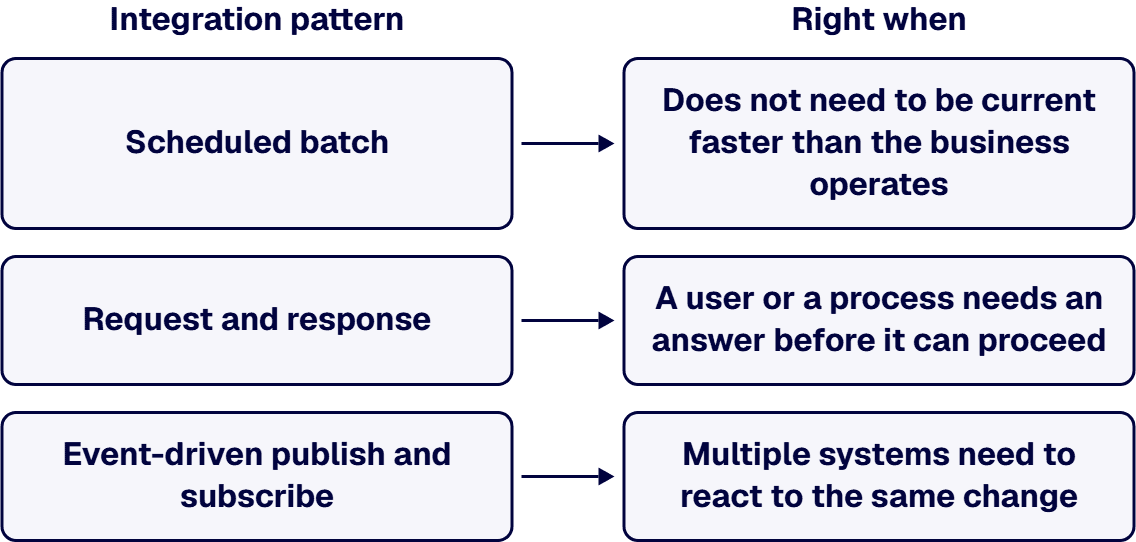
The pattern that fails an exam is not the wrong one chosen; it is the one chosen without a stated reason, because the reviewer’s first question is why this flow uses this pattern and not another. Three integration patterns cover nearly every flow between a bank’s core, its loan origination system and the Microsoft estate, and the honest answer for most banks is that more than one of the three will be running at the same time, for different flows, on purpose.
Scheduled batch is right when the flow does not need to be current faster than the business actually operates, when the source system has no API to call, or when a core vendor’s contract does not permit direct access at all. The cost is latency and the operational load of monitoring a batch window that, if it silently fails, nobody notices until a downstream report is wrong.
Request and response, a direct API call answered synchronously, is right when a user or a process needs an answer before it can proceed, such as a loan origination system checking a customer’s standing before quoting a rate. It requires the source system to expose an API in the first place, which a core platform frequently does not, and it couples the requester to the responder’s availability in a way a batch job does not.
Event-driven publish and subscribe is right when multiple systems need to react to the same change without querying each other directly, and when the bank wants new consumers added later without touching the systems that produce the event. The FFIEC handbook’s own design objective names this pattern’s underlying property, “loose coupling,” as part of what interoperability and integration are meant to achieve. The event-driven mechanics themselves, the event grid, the trigger design, the retry and replay behavior, are covered in full at Event-Driven Integration on Azure for Regulated Enterprises; what a bank adds on top of that general pattern is the book-of-record rule above and the evidence set below.
The honest case for leaving a working batch job alone belongs here too. A nightly file that reconciles cleanly, that the business has never needed sooner, and that nobody has to re-architect to pass an exam is not a defect; replacing it to look modern is a cost with no risk reduction behind it. The decision criterion is not which pattern is newest. It is which pattern matches what the flow actually needs, stated in writing so the next reviewer, internal or external, can see the reasoning rather than infer it.
The mistake that reads as sophistication and is actually risk is treating the platform as the integration layer, because the platform was never built to be one. Dynamics 365 is an endpoint in this design, the system where relationship and servicing data lives and where a banker or a servicing team works; Microsoft 365 is an endpoint too, where the people are, where a document is reviewed or a decision is recorded. Azure’s integration services are where the governed layer sits between the endpoints and the core and loan origination systems: the place access, logging and change control belong in one location rather than duplicated inside every point-to-point connection. Putting integration logic inside a Dynamics 365 customization because that is where a developer happened to be working is how a platform quietly becomes the transport, with none of the governance a dedicated integration layer was built to provide.
i3solutions has delivered Dynamics 365 integration engagements for regulated enterprises across healthcare, defense and aerospace manufacturing, and financial services. That is a description of the sectors the work has been delivered in, not a claim about any one bank or any specific integration built for one; it is named here because it is the attested fact this page can state about i3solutions’ own Dynamics 365 integration history, and the honest limits of that fact matter as much as the fact itself, covered fully below.
An examiner does not ask whether the integration works; the request is for the evidence that it was designed on purpose and is still being watched, and a bank that can only answer the first half of that has already produced the finding. Five artifacts make up that evidence set, and each is produced from a named source, not assembled the week before the exam.
A current data flow diagram, matching what is actually running, not what was designed at the last major project, showing data sharing between applications and the flows between the bank and its third-party service providers, as the FFIEC handbook’s data flow diagram section describes.
The book-of-record map, the same document the design decisions above produced, naming which system is authoritative for which field and how a disagreement between systems is resolved.
Change management evidence, showing that a change to an integration flow, a schema, a schedule, a retry policy, went through an approval before it reached production, not after.
Access controls, logging and monitoring for the integration layer itself, not only for the endpoints it connects, so that a question about who could have altered a flow has an answer.
The third-party oversight file, covered in the next section, because most of the estate in a banking integration is a service provider relationship, not a system the bank owns outright.
The rule most often cited in this space is not the one that binds a bank, and getting that backward is its own kind of finding. The FTC’s Safeguards Rule, 16 CFR part 314, defines who it covers in its own scope section: “You includes each ‘financial institution’ (but excludes any ‘other person’) over which the Commission has enforcement jurisdiction pursuant to section 505(a)(7) of the Gramm-Leach-Bliley Act.” That is an FTC enforcement jurisdiction, and it is scoped by exclusion, to entities the Commission, not a bank’s own primary regulator, has authority over.
A bank’s information security standards instead come from its own banking agency’s Interagency Guidelines. For a national bank or federal savings association, that is 12 CFR part 30, appendix B, whose scope section states plainly: “The Guidelines apply to customer information maintained by or on behalf of entities over which the OCC has authority,” naming national banks, federal savings associations, federal branches and agencies of foreign banks, and their subsidiaries. Other federal banking agencies carry their own parallel appendices for the institutions each supervises; which one applies to a given bank is a determination for that bank’s own compliance and legal functions, not a call this page makes for any reader. What this page states is the scoping fact, not the individual determination: a bank does not default to the FTC’s rule because it is the one most often quoted online, and it should confirm with its own compliance and legal functions, against its own primary federal regulator’s guidance, which instrument actually governs its information security program.
The oversight gap that produces a finding is rarely the bank’s own system; it is the vendor nobody assessed, because a core banking platform, a loan origination system and very often the integration platform itself arrive through a contract with somebody else. The Interagency Guidelines are explicit about what that requires: a national bank or federal savings association “shall: 1. Exercise appropriate due diligence in selecting its service providers; 2. Require its service providers by contract to implement appropriate measures designed to meet the objectives of these Guidelines; and 3. Where indicated by the … risk assessment, monitor its service providers to confirm that they have satisfied their obligations,” including a review of “audits, summaries of test results, or other equivalent evaluations of its service providers.” The FFIEC handbook’s third-party oversight section states the same expectation from the operations side: management should “review independent audit or other assurance reports demonstrating the third-party service provider’s ability to meet the entity’s AIO needs and provide services in a safe and sound manner.”
For an integration built by an outside firm rather than assessed after the fact, the vendor selection question is a different one than the pattern question above, covered at How to Choose a Custom App Development Firm for Financial Services. And independent review is itself a form of oversight a bank can commission directly: i3solutions has performed an independent verification and validation code review of a custom application built by a third-party vendor for a bank, confirming the bank’s objectives, milestones and success criteria and reviewing the vendor’s code for security and performance issues rather than building the application itself. The published case study, named here as “Enhancing Quality With an IV&V Code Review,” describes that engagement in full. It is a review and validation engagement, not an integration build, and it is offered here as one concrete example of what third-party oversight can look like in practice, not as a template every bank must follow.
Not every bank in this situation needs a governed integration platform, and saying so here is the same discipline this guide asks of every pattern choice above. A handful of stable nightly files that reconcile cleanly and that the business has never needed faster is not a problem an integration platform solves; it is a second thing to run and be examined on, for a risk that was already being managed. A core vendor whose contract forbids direct API access, or prices it out of reach, can leave scheduled batch as the only realistic option regardless of what this guide’s pattern section prefers. A bank in the middle of an acquisition, where the target’s estate will be absorbed or retired within a defined window, is often better served waiting until the combined estate is known before investing in a governed layer that may not match what remains. And a flow whose owner is a business function rather than IT, a spreadsheet a lending team maintains for its own workflow, for example, may not belong in an integration platform at all until IT and that business owner agree it should. None of these conditions is a reason to skip the documentation and oversight work above; they are reasons the transport, specifically, can stay as it is.
What this page has not claimed matters as much as what it has. The proof i3solutions can point to on this exact subject is a GLBA control-mapping review and a large-scale system that validates data arriving from thousands of external financial institutions, not a core banking system implementation, a payments processor engagement, a trading or order management system build, or a delivered SOC 2 audit or attestation for a bank. Those are not claims this page makes about i3solutions, in the same way they are not claims Workflow Automation Firms for Financial Services: How to Evaluate the Shortlist makes; the two pages say the same thing for the same reason. Nor does this page name any client; the proof below is anonymized because the underlying case studies are anonymized, and they are not being un-anonymized to make this page read better.
On the GLBA side, an i3solutions IV&V engagement validated requirements traceability from the underlying compliance framework controls through the delivered functionality for a vendor-built application, identified control mappings where the vendor’s interpretation of GLBA requirements diverged from the client’s expectation, surfaced test cases the vendor’s plan had not included, and produced the board-defensible attestation the audit committee required. That is the only GLBA-specific engagement in i3solutions’ proof register, and it is a review engagement against a vendor’s build, not an integration i3solutions delivered.
On the scale side, i3solutions implemented automated validation against mortgage-compliance rules for a national network of more than 7,700 financial institutions and 12 district banks, a system that manages over $40 billion in mortgages. The published case study, named here as “Empowering Mortgage Acquisition Through Digital Innovation,” describes it in full. That is data exchange with external parties at scale, under industry rules, which is the closest thing in i3solutions’ proof register to the subject of this page; it is not a core banking integration, and it named no Microsoft product in its own technologies section.
What i3solutions can commit to on a banking integration engagement is the method this guide describes: assess the estate as it actually runs rather than as it was designed, name the book of record before choosing a transport, put the flows behind a governed layer, and build the evidence set an examiner expects, delivered by senior, US-based Microsoft integration engineers from the practice described at Unifying Enterprise Operations Through Microsoft System Integration & Data Management. If your team needs a current data flow diagram, a book-of-record decision, or a design reviewed before the next exam, that conversation starts with a senior architect, not a sales process.
By Michael Branson
Quick answer. As of October 2026, according to Microsoft, blocking of EWS in Exchange Online was scheduled to begin on (or soon after) October 1, 2026, rolling out tenant by tenant, in every tenant with EWSEnabled “still set to Null on October 1, 2026” (Null is the default); an administrator can still set EWSEnabled to True with an allow list after a block, with a service interruption, until April 1, 2027, and on that date EWS is fully and permanently disabled with no exceptions, so every application that still calls EWS needs a rewrite to Microsoft Graph, a replacement, or its vendor’s fix before then. Microsoft says some EWS capabilities will not come to Microsoft Graph at all, so a rewrite is not always possible and those applications need a different design. SMTP AUTH with a password is a separate change: according to Microsoft, it will be disabled by default for existing tenants at the end of December 2026, an administrator will still be able to turn it back on, and the final removal date has not been set.
If your EWS usage report lists applications nobody on the team can name, or an integration stopped sending mail after a tenant setting changed, the retirement is already an operational question for you. The questions in front of you are which applications break on which date, which ones Microsoft Graph cannot carry, what the tenant setting should be until the final shutdown, and what Microsoft’s separate change to SMTP AUTH does to the scanners, scripts and applications that send mail with a password.
If your tenant changed nothing by the end of September 2026, Microsoft changes the EWS setting for you as its deployment rolls out. Microsoft’s Exchange Team post Exchange Online EWS, Your Time is Almost Up, updated September 9, 2026, said: “The EWSEnabled property in your tenant will change on (or soon after) Oct 1, 2026, as follows:” and “Any tenant with EWSEnabled still set to Null on October 1, 2026, will see the value changed to False as the deployment rolls out. That will block EWS for all applications in the tenant at that time.”
The same post named how a tenant could stay out of that automatic change, a window that closed at the end of September 2026: “Additionally, if you proactively configure an AppID Allow List and set EWSEnabled to True by the end of September 2026, your tenant will be excluded from the October 1 automatic change to EWSEnabled=False.” A tenant that missed the month is not locked out: according to Microsoft, an administrator can still set EWSEnabled to True with an allow list after a block until April 1, 2027, and Microsoft names the cost in the same post: “If in October 2026 you realize that you still need EWS, the admin can re-enable EWS (by setting EWSEnabled to True) after we block it. But note that there will be a service interruption in this case.”
No route back exists after the final date. In the same post, Microsoft says “Starting with April 1, 2027, EWS will be fully and permanently disabled: The ability to control EWSEnabled will be removed from tenant admins.” and “There will be no exceptions past April 2027.” The summary on Microsoft Learn’s Deprecation of Exchange Web Services in Exchange Online agrees: “October 2026: EWS starts to be disabled globally for all organizations.” and “April 2027: EWS is fully disabled.”
Older notices describe October 1, 2026 as one cutoff for every tenant. Microsoft’s current posts describe a change that was scheduled to start on or soon after that day and to reach tenants as the deployment rolls out, with the permanent shutdown on April 1, 2027, as Microsoft’s post Exchange Online EWS, Your Time is Almost Up sets out. Plan on the current dates.
If you set EWSEnabled to True, the allow list decides which applications keep working. Microsoft’s post Introducing EWSAllowedAppIDs: Preparing for the Final Phase of EWS Retirement warns that “after enforcement begins, setting EWSEnabled=True without an AppID allow list effectively becomes a block-all configuration.” The same post says “Changes to this list can take up to 24 hours to take effect.”
When you leave the list to Microsoft, it is built from recent usage. Microsoft’s post Take control of your EWSAllowedAppIDs list before EWS access changes says “The list will be based on the previous 60 days of usage, and so it may miss applications that run infrequently, and it may include apps you no longer want to have access.” It also says “If an administrator has already configured EWSAllowedAppIDs, Microsoft will not overwrite or change the list.” A quarter-end or year-end job that did not run in that window is the kind of application a usage-built list can miss.
Hidden dependencies can also surface before the final date. Microsoft’s post Exchange Online EWS, Your Time is Almost Up says Microsoft may run temporary scream tests, “shorter periods of time when we turn EWS off and then back on”, which “can help expose hidden dependencies before the final cutoff.”
Planning rules for the settings:
When nobody owns the full list, start with the report Microsoft built for this job. Microsoft Learn’s Exchange Web Services (EWS) usage report page says “The Exchange Web Services (EWS) usage report displays the SOAP actions used by each application calling EWS in your organization.” It also says “Usage data is collected and aggregated weekly, not daily. It can take up to 10 days for usage to show in the report.”
Microsoft’s own advice on Deprecation of Exchange Web Services in Exchange Online includes the steps to “Investigate the EWS footprint of all internal and third party applications in your organization.” and to “Work with your vendors to prioritize their migration from EWS.” Describing Microsoft’s own deprecation effort, the same page says “The scope was also widened from third party applications to include all Microsoft applications.”
Planning rules for the inventory:
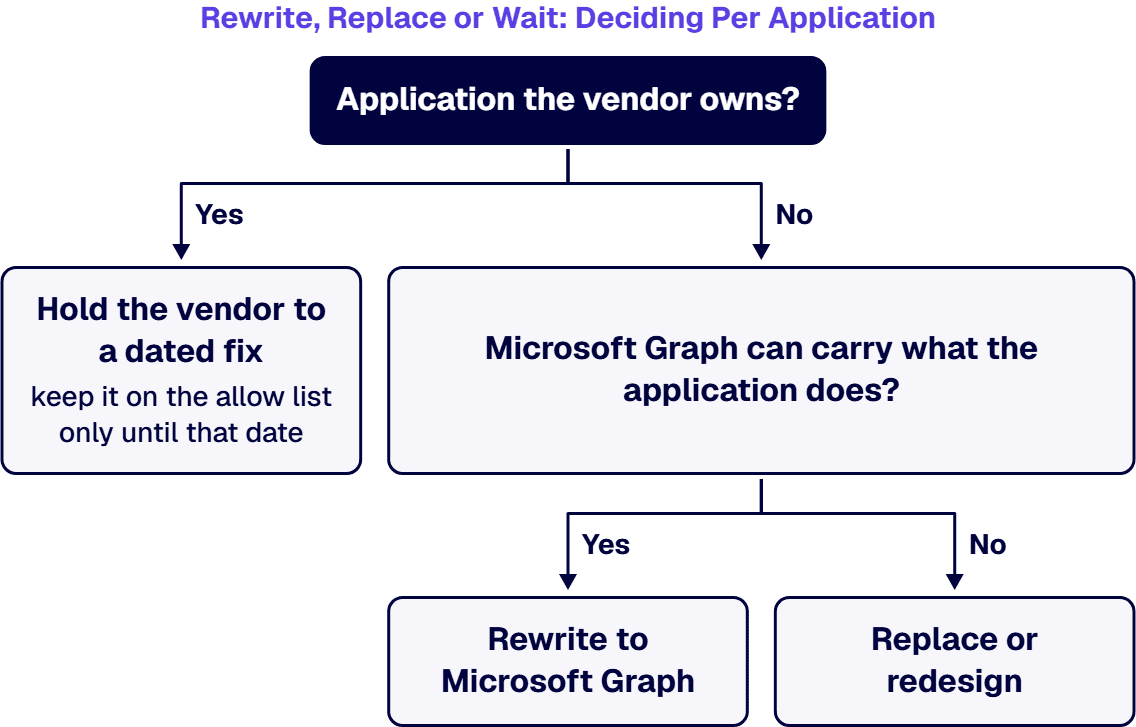
Before you fund a rewrite, check whether Microsoft Graph can carry what the application does. On Microsoft Learn’s Deprecation of Basic authentication in Exchange Online, Microsoft says “We removed the ability to use Basic authentication in Exchange Online for Exchange ActiveSync (EAS), POP, IMAP, Remote PowerShell (RPS), Exchange Web Services (EWS), Offline Address Book (OAB), Autodiscover, Outlook for Windows, and Outlook for Mac.” An EWS application that still works against Exchange Online is therefore not signing in with a password; the work is the API it calls.
The destination has limits. Microsoft Learn’s Migrate Exchange Web Services (EWS) apps to Microsoft Graph says “Microsoft Graph is not supported for Exchange on-premises. This content applies to Exchange Online and hybrid deployments only.” The deprecation page keeps a roadmap table of EWS capabilities and their planned replacements, and says “If an EWS capability isn’t listed in this roadmap table, don’t plan on a corresponding Microsoft Graph or Exchange Admin API capability being available before EWS is fully disabled.” and “Estimated availability dates are targets and might change.”
Some capabilities are not coming at all. The same page says “The following EWS capabilities won’t be added to Microsoft Graph. Plan migrations without a Graph equivalent for these capabilities.” Its list includes “Generic Public Folder CRUD” and “Discovery Mailbox access”, described as “Generic folder and item create, read, update, and delete operations in Public Folders.” and “Generic mailbox, folder, and item access for legacy Discovery Mailboxes.”
Decision criteria, per application:
Mailboxes still on Exchange Server are outside this change: in its post Exchange Online EWS, Your Time is Almost Up, Microsoft says “EWS is not being retired on-prem.” and “On-prem mailboxes may continue using EWS; cloud mailboxes must move to Graph.”
If a scanner, printer, monitoring tool or line-of-business application submits mail to Exchange Online with a username and password, it sits on a different timeline from EWS. Microsoft’s post Updated Exchange Online SMTP AUTH Basic Authentication Deprecation Timeline gives it as “Now to December 2026: SMTP AUTH Basic Authentication behavior remains unchanged.” and “End of December 2026: SMTP AUTH Basic Authentication will be disabled by default for existing tenants. Administrators will still be able to enable it if needed.”
The same post says “New tenants created after December 2026: SMTP AUTH Basic Authentication will be unavailable by default. OAuth will be the supported authentication method.” and “Second half of 2027: Microsoft will announce the final removal date for SMTP AUTH Basic Authentication.” No final removal date has been announced in the posts read for this guide.
Microsoft Learn’s Deprecation of Basic authentication in Exchange Online gives the two ways forward for an application: “Other options for sending authenticated mail include using alternative protocols, such as the Microsoft Graph API.” and “Application developers who have built apps that send, read, or otherwise process email using these protocols will be able to keep the same protocol; however, they need to implement secure, Modern authentication experiences for their users.”
Devices need their own plan. Microsoft Learn’s page How to set up a multifunction device or application to send email using Microsoft 365 or Office 365 says “Client SMTP submission using Basic authentication in Exchange Online is scheduled for deprecation, see timeline information.” and “Client SMTP submission using Basic authentication isn’t compatible with Security defaults in Microsoft Entra ID.” The same page describes other sending methods, including SMTP relay through an inbound connector, Direct Send and High Volume Email, each with its own requirements and limits on that page.
Planning rules for senders:
Devices that relay mail through an on-premises Exchange server, instead of submitting to Exchange Online, are a different question from this section’s.
If your tenant is in GCC, GCC High or DoD, the dated posts do not name your cloud. Microsoft’s post Exchange Online EWS, Your Time is Almost Up says the retirement of EWS applies “only to Microsoft 365 and Exchange Online (all environments); there are no changes to EWS in Exchange Server.” Its post Updated Exchange Online SMTP AUTH Basic Authentication Deprecation Timeline describes its changes as intended for “customers with tenants in our service (all cloud environments)”. Neither names GCC, GCC High or DoD.
What Microsoft does state for government clouds is about Microsoft Graph itself. Microsoft Learn’s Microsoft Graph national cloud deployments says “If you’re working in a Microsoft 365 GCC environment, continue using the worldwide endpoints: https://portal.azure.com and https://graph.microsoft.com.”, “If you’re working in a Microsoft 365 GCC High environment, use https://portal.azure.us and https://graph.microsoft.us.” and “If you’re working in a Microsoft 365 DoD environment, use https://portal.azure.us and https://dod-graph.microsoft.us.” It adds “Certain services and features that are in specific regions of the global service might not be available in all national clouds.”
The EWS roadmap table on Microsoft Learn’s Deprecation of Exchange Web Services in Exchange Online carries a “Sovereign Cloud availability” row, “Make Exchange workload APIs required for EWS migration available in supported sovereign clouds.”, with a target of “Q4 CY2026”, under the page’s own note that “Estimated availability dates are targets and might change.”
Put plainly, the dated posts read for this guide say “all environments” and “all cloud environments” and name no government cloud, so a government tenant confirms its own timing, and the Microsoft Graph calls its applications need in its own cloud, before planning on them. Moving a tenant into GCC High is a separate project, covered in Microsoft 365 GCC High Migration Checklist: Best Practices for Defense Contractors.
If the application is not yours to change, a rewrite is the wrong project. Four cases call for a different move:
When the applications calling EWS were built years ago by people who have since left, the work in front of you is integration engineering on your own estate. i3solutions provides US-based senior Microsoft integration developers and consultants who embed in enterprise teams to design, build and govern production-grade integrations across the Microsoft ecosystem and the systems it connects to. Those developers build Outlook and Exchange integration for mail, calendar and contact workflows, including on Microsoft Graph. Delivery is senior and US-based. See Hire US-Based Senior Microsoft Integration Developers.
For applications and workflows i3solutions built or modernized, i3solutions provides application managed services covering their operation, support and enhancement, so moving those applications’ mail calls from EWS to Microsoft Graph falls inside that service; see Application Managed Services for Custom Microsoft Applications. An i3solutions engagement does not produce managed-service ownership, a replacement for the internal team, open-ended scope expansion, or vendor lock-in.
On the wider integration estate, i3solutions designs Azure integration architecture and builds and operates Azure Logic Apps workflows for enterprise clients, including running them on an ongoing basis rather than only building them. The practice sits under Unifying Enterprise Operations Through Microsoft System Integration & Data Management.
In stages, according to Microsoft, scheduled to begin on (or soon after) October 1, 2026; before that date Microsoft said: “Any tenant with EWSEnabled still set to Null on October 1, 2026, will see the value changed to False as the deployment rolls out.” The end is fixed, according to Microsoft: “Starting with April 1, 2027, EWS will be fully and permanently disabled: The ability to control EWSEnabled will be removed from tenant admins.”
Until the final date, yes, with a cost, according to Microsoft: “If in October 2026 you realize that you still need EWS, the admin can re-enable EWS (by setting EWSEnabled to True) after we block it. But note that there will be a service interruption in this case.” Microsoft also warns that “after enforcement begins, setting EWSEnabled=True without an AppID allow list effectively becomes a block-all configuration.” After the final date, according to Microsoft, “There will be no exceptions past April 2027.”
No. Microsoft Learn says “The following EWS capabilities won’t be added to Microsoft Graph. Plan migrations without a Graph equivalent for these capabilities.” Its list includes “Generic Public Folder CRUD” and “Discovery Mailbox access”.
No. Microsoft says “EWS is not being retired on-prem.” and “On-prem mailboxes may continue using EWS; cloud mailboxes must move to Graph.” Microsoft Learn adds that “Microsoft Graph is not supported for Exchange on-premises.”
It changes on a separate timeline, according to Microsoft: “End of December 2026: SMTP AUTH Basic Authentication will be disabled by default for existing tenants. Administrators will still be able to enable it if needed.” The final date is not set, according to Microsoft: “Second half of 2027: Microsoft will announce the final removal date for SMTP AUTH Basic Authentication.”
Microsoft’s dated posts do not say by name. They describe the changes as applying to “all environments” and “all cloud environments” and name no government cloud. Microsoft Learn gives the Microsoft Graph endpoint for GCC High as https://graph.microsoft.us and for DoD as https://dod-graph.microsoft.us, and its roadmap targets “Q4 CY2026” for making the Exchange workload APIs required for EWS migration available in supported sovereign clouds, a target it says might change.
As of September 2026, Dynamics 365 connects to Microsoft 365 through five integrations, Teams collaboration on records, Outlook and Exchange server-side synchronization of email, contacts, tasks and appointments, SharePoint document management, Power Apps built on the same Dataverse data, and Entra security groups and Conditional Access, and each one is configured, licensed and, in practice, kept in one tenant, per Microsoft Learn. In the government clouds, according to Microsoft Learn, Teams integration with Dynamics 365 isn’t available for Government GCC environments, and Microsoft’s May 2026 parity table lists the Dynamics 365 app for Teams collaboration experiences and Teams chat in Sales Hub as Not Available in GCC, GCC High and DoD, while creating and joining a Teams meeting from an appointment is Available in all three; separately, according to Microsoft Learn, Microsoft deprecated linking records to Teams channels effective May 2026 and adding Teams chat messages to records effective January 2026, in every cloud. Microsoft Learn publishes no government-cloud status for the Dynamics 365 App for Outlook or server-side synchronization, so confirm those with Microsoft for your cloud, and license the Microsoft 365 service behind each integration you switch on, because Dynamics 365 is licensed under its own licensing guide.
Every fact below is drawn from Microsoft Learn, Microsoft’s May 2026 parity document and its Dynamics 365 Licensing Guide, all re-read on drafting day, except where a line says it is this guide’s own rule:
The rollout plan promised sellers they would work Dynamics 365 records from Microsoft Teams, and the training was built on the demo. Then the tenant turned out to sit in GCC High, or a notice on Microsoft’s Removed or deprecated features in Dynamics 365 Sales page took the feature away for everyone, and the plan had to be rewritten after it was approved. The business had been told that Dynamics 365 works with Microsoft 365 out of the box. What that sentence hides is configuration: a server profile and mailbox approval for email, a SharePoint site in the same tenant, a security group on each environment, a Conditional Access policy that has to reach the right resource, and a licence behind each one. This guide takes the five integrations in turn, says what each does and needs, names what Microsoft retired in 2026, and lays Microsoft’s own government-cloud statuses beside them, saying plainly where Microsoft publishes none.
The question usually arrives from finance, when someone asks why the Microsoft 365 agreement did not already pay for the CRM. Dynamics 365 is licensed on its own terms: Microsoft’s Dynamics 365 Licensing Guide opens with the line “Use this guide to understand how to license Microsoft Dynamics 365 intelligent business applications.” In its Dynamics 365 Customer Service section, the Entitlements table lists Microsoft 365 interoperation, with Outlook, Exchange, Excel, OneDrive/SharePoint and OneNote, among that licence’s entitlements.
Interoperation is not the Microsoft 365 service itself. Microsoft’s Connect to Exchange Online page states: “To use Exchange Online with customer engagement apps, you must have an Exchange Online subscription that either comes as part of a Microsoft 365 subscription or can be subscribed to separately.” And Microsoft’s Manage your documents using SharePoint page states: “The document management feature isn’t supported for users with Power Apps for Microsoft 365 licenses.”
The integrations also assume one tenant. Microsoft’s Overview of Microsoft Teams integration lists Dynamics 365 and Microsoft Teams in different tenants among the configurations where Teams integration is not supported. SharePoint document management checks the same thing; Microsoft’s Set up customer engagement apps to use SharePoint Online page states: “The URL is checked for being a valid SharePoint online site and for existing in the same Microsoft 365 tenant as your organization.” Exchange is the exception: according to Microsoft Learn’s Connect to Exchange Online page, the server-to-server option is for Exchange in the same tenant as Dynamics 365, and an OAuth cross-tenant option is for Exchange in a different tenant.
This guide’s planning rule, not Microsoft’s: license the Microsoft 365 service behind every integration you switch on, and after a merger treat a second tenant as a blocker for Teams integration and SharePoint document management until the tenant decision is made.
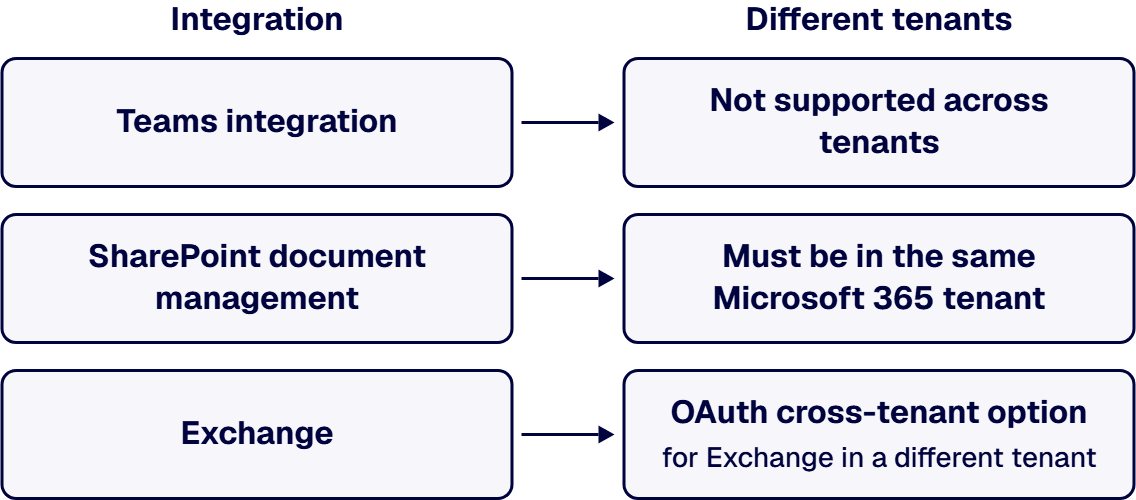
Sellers who keep a deal moving in a Teams chat want to know whether the record can come with them. Microsoft’s Overview of Microsoft Teams integration page states: “Dynamics 365 and Microsoft Teams integration allows you to speed up the flow of work, enabling anyone in an organization to view and collaborate on Dynamics 365 records, from within the flow of work with Teams.” The same page sets its limits: Microsoft Teams integration is not available for guest users, and mobile devices and separate tenants are among the configurations it does not support.
Two parts of that integration are now gone for everyone, in every cloud. Microsoft’s Removed or deprecated features in Dynamics 365 Sales page states: “Effective May 2026, the ability to link Dynamics 365 records to Microsoft Teams channels is deprecated.” The same page states: “Effective January 2026, the ability to add chat messages from Microsoft Teams to Dynamics 365 records is deprecated.” Microsoft’s Teams overview page still describes files moving between a record and a linked Teams channel; the deprecation notice is the later word, so this guide treats record-to-channel linking, and the channel file view that rests on it, as retired.
This guide’s planning rule, not Microsoft’s: plan Teams work on meetings created from appointments and on the Dynamics 365 app in Teams, not on channel linking or chat-to-record, and read the government-cloud table below before promising either in GCC, GCC High or DoD.
Email reaches the CRM in one of two ways: a person forwards it, or the mail server hands it over. Microsoft’s Server-side synchronization page states: “Server-side synchronization provides direct apps-to-email server synchronization.” The same page states: “When you use Exchange, this includes bidirectional synchronization of email, contacts, tasks, and appointments.” It also sets a limit that shapes mailbox design: “A user can only map to a single Exchange or POP3 mailbox.”
The Dynamics 365 App for Outlook is what the user sees inside Outlook. Microsoft’s Overview of Dynamics 365 App for Outlook page lists what it does, including: “Link email messages, meetings, and appointments to a row in your app.”
Tenancy returns at the server profile. On Microsoft Learn’s Connect to Exchange Online page, the Server-to-Server Authentication (Same Tenant) option reads: “Use this option when Exchange resides in the same tenant as Dynamics 365.” The same page offers an OAuth (Cross Tenant) option for Exchange in a different tenant, so the mail side, unlike Teams and SharePoint, can span two tenants.
Relationship intelligence in Dynamics 365 Sales now depends on the same setup. Microsoft’s Removed or deprecated features in Dynamics 365 Sales page states: “Effective April 2025, the native Exchange integration for relationship intelligence is deprecated.” The same page directs Sales customers who want insights from Exchange email and meetings to enable server-side synchronization for Exchange.
This guide’s planning rule, not Microsoft’s: map each user to one mailbox, choose the authentication option by tenant, and decide which of email, contacts, tasks and appointments synchronize before the pilot starts.
The contract sits in a SharePoint library, the opportunity sits in Dynamics 365, and the question is who can open it from which side. Microsoft’s Set up SharePoint integration page states the sign-in benefit: “Users sign in once, and therefore don’t have to sign in to both customer engagement apps and SharePoint.” It does not merge the permissions; Microsoft’s Document management with Microsoft Teams integration page states: “There isn’t an automatic relationship between SharePoint permissions and permissions to customer engagement apps.”
Enabling it is a one-way switch. Microsoft’s Set up customer engagement apps to use SharePoint Online page states: “Once server-based SharePoint integration is enabled, you can’t go back to the previous client-side integration.” The same page checks that the site exists in the same Microsoft 365 tenant as your organization, as covered above.
Managing documents against records and line-of-business data in depth is covered in Dynamics 365 Integration with SharePoint and Line-of-Business Systems.
This guide’s planning rule, not Microsoft’s: decide the site and the permission model before you enable server-based integration, because it does not roll back.
A team that wants an inspection app or a service screen on top of CRM data often starts by asking for an export. Microsoft’s What is Microsoft Dataverse? page states: “Data from your Dynamics 365 applications is also stored within Dataverse, allowing you to quickly build apps that use your Dynamics 365 data and extend your apps with Power Apps.”
The same holds in the government plans, with a condition. Microsoft’s Power Apps US Government page, updated in May 2026, states: “In addition to the standalone plans, Power Apps and Power Automate capabilities are also included in certain Microsoft 365 US Government and Dynamics 365 US Government plans, allowing customers to extend and customize Microsoft 365, Power Platform, and Dynamics 365 apps (Dynamics 365 Sales, Dynamics 365 Customer Service, Dynamics 365 Field Service, and Dynamics 365 Project Service Automation).”
This guide’s planning rule, not Microsoft’s: build extensions in the Dynamics 365 environment’s own Dataverse under the same security roles, not in a copied data store that needs its own access model.
The identity team already runs Conditional Access policies on Office 365 and assumes the CRM inherits them. Access starts with the environment: Microsoft’s Control user access to environments with security groups and licenses page states: “If your company has multiple environments, use security groups to control which licensed users can be members of a particular environment.” Conditional Access has its own licence; Microsoft’s What is Conditional Access? page states: “Using this feature requires Microsoft Entra ID P1 licenses.”
Scope needs a check in the tenant. Microsoft’s Conditional Access: Target resources page states: “In Conditional Access, the Microsoft 365 suite of applications appears under ‘Office 365’.” Microsoft’s published list of the apps inside that grouping, Apps included in Conditional Access Office 365 app suite, as read in September 2026, names Microsoft Teams and SharePoint and does not include Dynamics 365 or Dataverse. That is a finding about Microsoft’s published list, not a finding about what a given policy reaches.
In the government plans, identity is relied on rather than bundled. Microsoft’s Power Apps US Government page states: “Microsoft Entra isn’t part of the Power Apps US Government accreditation boundary, but takes a reliance on a customer’s Microsoft Entra ID tenant for customer tenant and identity functions, including authentication, federated authentication, and licensing.” GCC High also uses a separate government identity, per Microsoft’s Dynamics 365 US Government page; that identity and accreditation-boundary workstream is covered in Hire a Dynamics 365 Implementation Firm for a Government Contractor Environment.
This guide’s planning rule, not Microsoft’s: bind each environment to a security group, and confirm in the tenant which resource each Conditional Access policy targets for Dynamics 365 rather than assuming the Office 365 grouping covers it.
The demo ran in a commercial tenant; the rollout runs in a government cloud, and the two are not the same product surface. Microsoft’s Dynamics 365 US Government page states: “There are exceptions to the principle of maintaining product functional parity within the U.S. Government clouds.” The same page asks readers to “Check back on a monthly basis for important updates and revisions.” It describes the GCC High deployment option as one “which enables single sign-on and seamless integration with Microsoft 365 GCC High deployments”. That sign-on integration with Microsoft 365 is not the same thing as every Teams feature of the Dynamics 365 app.
For Teams in GCC, Microsoft’s Install the Dynamics 365 app in Microsoft Teams page states: “Teams integration with Dynamics 365 isn’t available for Government GCC environments.” The same page adds Microsoft’s own workaround: “However, there’s a workaround to view records using the Website app in Teams and then adding it as a tab.” That workaround is Microsoft’s, not a recommendation of this guide.
Feature by feature, the reference is Microsoft’s parity document, Business Applications Feature Experience Parity Exceptions and Roadmap in US Government clouds, edition dated May 2026. It opens: “Microsoft strives to maintain functional parity across our localized data center deployments.” It also states: “This information is updated and published every 4-6 weeks and represents our projections at that time.” The rows below are the integration features that document lists, with the status it printed for each column, as published in Microsoft’s May 2026 parity table:
Three notes on reading that table, each from the same parity document. The document defines No Plans this way: “No plans: There are no plans to bring this feature to the Geo either due to technical limitations in the Gov Geo or prioritization of new feature replacement”. The same May 2026 table lists Dual Write (Integrate Data into Dataverse) for Dynamics 365 Finance as Available in GCC and GCC High; its DoD cell is not repeated here because it names a planning half-year that had already ended, so read Microsoft’s current edition for DoD. And the Power Apps Core Office Integration row is a Power Apps row; it says nothing about the Dynamics 365 App for Outlook or server-side synchronization.
For those two, Microsoft publishes no government-cloud status. As read in September 2026, Microsoft Learn’s Overview of Dynamics 365 App for Outlook and Server-side synchronization pages carry no government-cloud note, and the parity document has no row by those names. Confirm both with Microsoft for your cloud before the rollout plan relies on them.
On page 5 of the same May 2026 parity document, Microsoft lists Power Automate’s Actionable Approval Emails row as Not Available in GCC, GCC High and DoD.
Which Dynamics 365 apps run in GCC High at all is a different question from which integration features they carry; it is covered in How Much Does a Dynamics 365 Implementation Cost for Defense Contractors?. Contact Center voice over Teams Phone, Copilot in Dynamics 365 Customer Service, and the end of support for Dynamics 365 Guides and Remote Assist are separate decisions this guide does not cover.
This guide’s planning rule, not Microsoft’s: build the rollout plan from Microsoft’s current parity table for your column, re-read it monthly as Microsoft’s own page asks, and put every Not Available feature in the training plan as absent, not as a later addition.
Some readers arrive here with a different decision in front of them, and this guide would slow them down:
Whoever does the work, whether your own team or outside help, the configuration should be shown, not described. Hold it to these criteria, each checked against Microsoft’s own pages cited above, such as Server-side synchronization:
No firm is named or compared in that list.
i3solutions has delivered Dynamics 365 integration engagements for regulated enterprises across healthcare, defense and aerospace manufacturing, and financial services. For this decision, that means project work, with embedded specialists where your team needs them, that designs, configures and governs these integrations in commercial and government clouds. i3solutions builds Dynamics 365 integrations using named Microsoft mechanisms including Dataverse, dual write, virtual tables, Azure Logic Apps, Azure Service Bus, and Power Automate connectors. i3solutions has completed more than 20 Dynamics 365 integration engagements. i3solutions installs and helps configure applications inside IL4 and IL6 government cloud environments and other government networks. i3solutions has been a Microsoft Partner with 30 years of enterprise technology delivery experience and has delivered 1,500+ Microsoft engagements across aerospace and defense, financial services, and health sciences. Delivery is senior and US-based. An i3solutions engagement does not produce managed-service ownership, a replacement for the internal team, open-ended scope expansion, or vendor lock-in.
For the wider Dynamics 365 service, see Enterprise Dynamics 365 Development Services That Align CRM and ERP to How You Operate.
They are separate products that work together in one tenant. According to Microsoft, Dynamics 365 is licensed under its own Dynamics 365 Licensing Guide, and according to Microsoft Learn, using Exchange Online with customer engagement apps requires an Exchange Online subscription that comes as part of a Microsoft 365 subscription or is subscribed to separately. According to Microsoft Learn, the SharePoint document management feature isn’t supported for users with Power Apps for Microsoft 365 licenses.
Not fully. According to Microsoft Learn, Teams integration with Dynamics 365 isn’t available for Government GCC environments, and Microsoft offers a workaround of viewing records through the Website app added as a Teams tab. According to Microsoft’s May 2026 parity table, the basic and enhanced collaboration experiences with the Dynamics 365 app for Microsoft Teams are Not Available in GCC, GCC High and DoD, while creating and joining a Teams meeting from an appointment is Available in all three.
No. According to Microsoft Learn, effective May 2026, the ability to link Dynamics 365 records to Microsoft Teams channels is deprecated, and effective January 2026, the ability to add chat messages from Microsoft Teams to Dynamics 365 records is deprecated.
Not necessarily. According to Microsoft Learn, the server-to-server option is for Exchange in the same tenant as Dynamics 365, and an OAuth cross-tenant option is for Exchange in a different tenant. According to Microsoft Learn, Exchange Online needs its own subscription, as part of Microsoft 365 or separately.
Confirm it in your tenant. According to Microsoft Learn, the Microsoft 365 suite of applications appears under Office 365 in Conditional Access, and Microsoft Learn’s published list of the apps in that grouping, as read in September 2026, does not include Dynamics 365 or Dataverse. Check which resource each policy targets for Dynamics 365 rather than assuming the Office 365 grouping covers it.
By Michael Branson
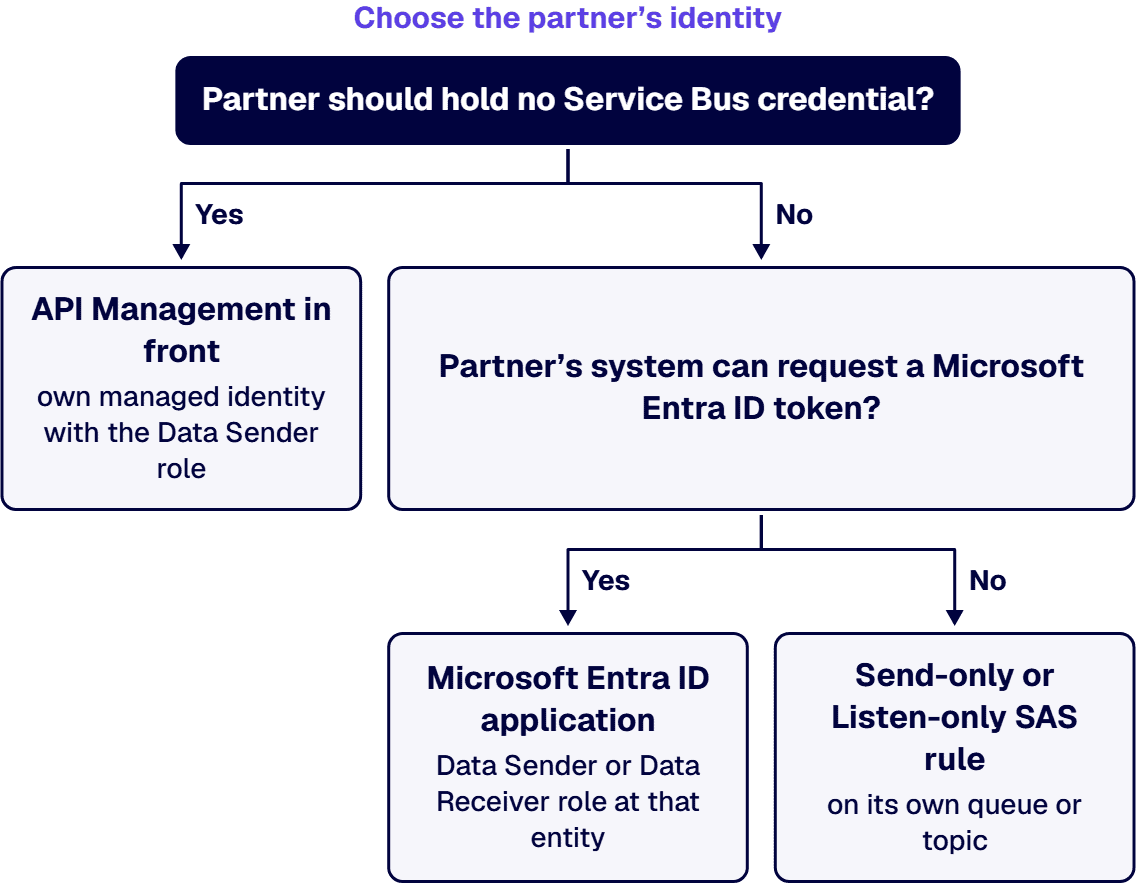
As of September 2026, let a third party reach Azure Service Bus only through the narrowest access Microsoft offers: its own queue, topic or subscription, and either a Microsoft Entra ID application holding the Azure Service Bus Data Sender or Data Receiver role at that entity or, for a queue or topic, a Send-only or Listen-only SAS rule on that entity, never the namespace’s default all-rights rule. Microsoft Learn says a namespace is reachable from the internet by default for any request with valid authentication and authorization, so close it with IP firewall rules, which the Standard tier supports, or, on the Premium tier only, with private endpoints, where a partner connecting from another directory waits for your approval. When the partner should never hold a Service Bus credential, publish an API in API Management on the Developer, Basic, Standard or Premium tier with the classic gateway, let the send-service-bus-message policy write to a pre-created queue or topic under API Management’s own managed identity with the Data Sender role, and authenticate the partner at API Management, for example with client certificates.
The riskiest partner integration is often not the one with the most traffic. It is the one that went live on a connection string built from the namespace’s default all-rights key, because that key was the fastest thing to hand over. When a supplier, a payer, a logistics provider or an agency system needs to drop messages onto your queues, the security review will ask which identity each partner uses, which queue it can touch, what boundary it crosses, and who cuts it off. This guide sets out what Microsoft’s own pages, read on 2026-09-24, say about each of those choices. It assumes Service Bus is already the messaging service; choosing among Microsoft’s messaging services is covered in Event-Driven Integration on Azure for Regulated Enterprises.
If the integration team proposes sending the partner a connection string, check which rule it came from first. Microsoft’s Service Bus authentication and authorization overview states: “By default, a shared access authorization rule with all rights is configured for every namespace when it’s first provisioned.” Microsoft’s Service Bus access control with shared access signatures page names that rule RootManageSharedAccessKey and says of it: “We recommend that you treat this rule like an administrative root account and don’t use it in your application.” The same page says: “The Manage right includes the Send and Listen rights.”
A rule at the namespace level is not narrowed by what you set on a queue. The authentication overview says: “You can configure shared access policies on a Service Bus namespace. The key applies to all messaging entities within that namespace.” The shared access signatures page adds: “The policy at the namespace level applies to all entities in the namespace, irrespective of their individual policy configuration.”
The network does not close the gap by default either. Microsoft’s Network security for Azure Service Bus page states: “By default, users can access Service Bus namespaces from the internet as long as the request comes with valid authentication and authorization.” A partner holding the root key on a namespace with no network rules can therefore reach every queue and topic in it from the internet, with Manage rights as well as Send and Listen.
If two partners share a queue, any right granted on that queue reaches both partners’ messages, so neither partner can be held to its own traffic. Microsoft’s What is Azure Service Bus? page describes the container: “A namespace is a container for all messaging components, such as queues and topics.” Microsoft’s Authenticate and authorize an application with Microsoft Entra ID to access Azure Service Bus entities page says: “Access can be scoped to the level of subscription, resource group, Service Bus namespace, or entity (queue, topic, or subscription).” and “Best practices dictate that it’s always best to grant only the narrowest possible scope.”
SAS rules can be set lower than the namespace, but not as low. The authentication overview says: “You can also configure shared access policies on Service Bus queues and topics.” and “To use SAS, you can configure a shared access authorization rule on a namespace, queue, or topic.” Microsoft’s Service Bus quotas page caps shared access authorization rules per namespace, queue, or topic: “Maximum number of rules per entity type: 12.” Plan partner rules on a busy queue with that limit in view.
For a partner that receives from a topic you share across partners, give it its own subscription. Microsoft’s shared access signatures page says: “Service Bus doesn’t currently support configuring SAS policies on subscriptions, but you can use rules configured on a namespace or topic to secure access to subscriptions.” So where a receiving partner must be held to its own subscription, the Microsoft Entra ID role is the access that reaches that level. On the subscription’s filter, Microsoft’s Topic filters and actions page says: “Whenever possible, applications should choose correlation filters over SQL-like filters because they’re much more efficient in processing and have less impact on throughput.”
List every partner, its direction (send, receive or both) and its entity before any credential exists. How namespaces themselves are separated across the estate is covered in Microsoft Integration Architecture for Large Enterprises: A Reference Guide for Regulated Sectors.
If the partner’s system can request a Microsoft Entra ID token, prefer that over a shared key. Microsoft’s Service Bus authentication and authorization overview says: “Use Microsoft Entra ID with your Azure Service Bus applications when possible.” Microsoft’s Service Bus access control with shared access signatures page gives the reason: “SAS keys lack fine-grained access control, are difficult to manage and rotate, and don’t provide audit capabilities to associate their use with a specific user or service principal.” Microsoft’s Disable local or shared access key authentication with Azure Service Bus page adds: “SAS keys are long-lived shared secrets.” and “SAS key usage doesn’t produce comparable identity-level audit records.”
With Microsoft Entra ID, the partner’s application gets a role at its own entity. Microsoft’s Authenticate and authorize an application with Microsoft Entra ID to access Azure Service Bus entities page lists the built-in roles Azure Service Bus Data Sender and Azure Service Bus Data Receiver, and for a registered application it says: “The application needs a client secret to prove its identity when requesting a token.” That secret is a credential the partner holds, so it needs an owner and an expiry on your side as well as theirs.
A managed identity is not the answer for a system outside Azure. Microsoft’s Use managed identities to access Azure Service Bus resources page says: “Managed identities work only inside the Azure environment, on Azure App Service, Azure virtual machines, and scale sets.” That rules it out for a partner system running in its own data center.
Where the partner can present only a SAS token, issue a Send-only or Listen-only rule on its own queue or topic, never the namespace root rule. How an application registered in the partner’s own Microsoft Entra tenant is authorized in yours is part of the design, settled with the partner; the Microsoft pages this guide relies on do not describe it, so this guide does not either.
If a partner connects from fixed addresses, the Standard tier can already narrow who reaches the namespace. Microsoft’s Allow access to Azure Service Bus namespace from specific IP addresses or ranges page states: “IP firewall rules apply at the Service Bus namespace level.” and “The rules apply to all connections from clients using any supported protocol (AMQP (5671) and HTTPS (443)).” It adds: “The Standard SKU supports IP filtering but doesn’t include the “Trusted Services” option.” Two warnings on that page matter at go-live: “If there are no IP and virtual network rules, the namespace is accessible over the public internet (using the access key).” and “If you don’t specify any IP or virtual network rules, all traffic flows into the namespace even if you set the defaultAction to deny”.
Private connectivity is a Premium decision. Microsoft’s Network security for Azure Service Bus page says: “Virtual networks are supported only in Premium-tier Service Bus namespaces.” Microsoft’s Allow access to Azure Service Bus namespaces via private endpoints page says: “This feature is supported with the premium tier of Azure Service Bus.” Microsoft’s Azure Service Bus premium messaging tier page describes the tier: “The Premium tier of Service Bus provides dedicated resource isolation at the CPU and memory level, so each messaging workload runs independently from other tenants.”
A partner’s private endpoint is a request you approve. The private endpoints page says: “If you’re connecting to an Azure resource in another directory, you must wait for the owner of that resource to approve your connection request.” It also warns that a connectivity test can mislead: “Because traffic is blocked at the application layer rather than the TCP layer, nslookup or a TCP connection against the public endpoint can still succeed even when public access is disabled.” And it states the closed state plainly: “With no rules and public access disabled, the namespace is unreachable from outside the private network.”
If the partner’s own firewall team asks for your namespace’s IP address, Microsoft’s Azure Service Bus – Frequently asked questions (FAQ) notes that the address is not static and says “however using IP addresses isn’t recommended or supported, and you’ll need to keep track of changes to the IP addresses.” Decide Standard with IP rules or Premium with private endpoints per partner before onboarding starts, because the tier sets which boundary is available. The wider security posture for hybrid integration is covered in Hybrid Microsoft Integration Security: On-Premises and Cloud.
If the partner can call an HTTPS API but should hold no Service Bus credential at all, put API Management between them and the queue. Microsoft’s Send service bus message policy reference states: “The send-service-bus-message policy sends a message to an Azure Service Bus queue or topic.” The identity that sends is API Management’s own managed identity, and the page says: “The identity must be assigned the Azure Service Bus Data Sender role.” It also says: “You must pre-create the Azure Service Bus queue or topic that receives a message.”
Check the tier before you design on it. The same policy reference lists it as applying to the Developer, Basic, Standard and Premium tiers, and its usage block reads “Gateways: classic”. Nothing beyond those two lines is assumed here.
The partner then authenticates to API Management, not to Service Bus. Microsoft’s How to secure APIs using client certificate authentication in API Management page describes API Management checking client certificates and mutual TLS on calls from the client to API Management. Use this pattern when the partner should hold no Service Bus credential, or when you want one place to authenticate, throttle and log every partner’s calls. A non-Microsoft gateway in front is a separate decision this guide does not make.
If a partner leaves or a key leaks, the cut-off has to be planned before go-live, because regenerating a key does not end every session at once. Microsoft’s Service Bus access control with shared access signatures page says: “If you regenerate or change a key in the policy, all previously issued tokens based on that key become instantly invalid.” and “However, ongoing connections that are based on such tokens continue to work until the tokens expire.” For planned rotation it says: “The primary and secondary key slots exist so that you can rotate keys gradually.” The same page describes moving clients onto one key while the other is regenerated.
Moving to Microsoft Entra ID only is a sequence, not a switch. Microsoft’s Disable local or shared access key authentication with Azure Service Bus page says: “Before you disable local authentication, update all applications to authenticate by using Microsoft Entra ID.” and “After you disable local auth, existing SAS policies on the namespace remain but can’t be used to generate functional tokens.” It names the built-in Azure Policy definition “Service Bus namespaces should have local authentication methods disabled”, and the authentication overview confirms: “You can disable local or SAS key authentication for a Service Bus namespace and allow only Microsoft Entra authentication.”
Set the transport floor as well. Microsoft’s Configure the minimum TLS version for a Service Bus namespace page says: “Azure Service Bus namespaces permit clients to send and receive data by using TLS 1.2 and later versions.” and “If a Service Bus namespace requires a minimum version of TLS, then any requests made by using an older version fail.” Confirm the partner’s client supports the floor before you raise it.
Give every partner a named owner inside your organization, a rotation date, and an offboarding step that removes its role or rule and then its entity.
If the partner’s client is old, check its protocol before go-live. Microsoft’s Azure Service Bus – Frequently asked questions (FAQ) says: “We’ll also end support of the SBMP protocol, so you’ll no longer be able to use this protocol after 30 September 2026.” The same answer tells readers to “Migrate to the latest Azure SDK libraries, which offer critical security updates and improved capabilities, before that date.” Ports matter too: Microsoft’s Allow access to Azure Service Bus namespace from specific IP addresses or ranges page names AMQP (5671) and HTTPS (443) as the protocols its firewall rules cover.
Do not count on the namespace to tell you which partner sent a message by address. The FAQ says: “We don’t log the IP addresses of clients sending or receiving messages to/from your namespace.” Per-partner identities and per-partner entities are therefore your attribution record.
Malformed partner messages need an owner too. Microsoft’s Overview of Service Bus dead-letter queues page says: “There’s no automatic cleanup of the DLQ.” and “Messages remain in the DLQ until you explicitly retrieve them from the DLQ and complete the dead-letter message.” Name who reviews each partner’s dead-letter queue as part of the partner’s onboarding record.
If the partner’s need is different, a queue design can be the wrong answer:
New partners, rotation dates, offboarding and dead-letter review recur long after the first partner is live, so decide who owns the partner register and the runbook before the project closes. The owner can be the integration team, a platform or security operations team, or an outside provider; what matters is that one of them is named, holds the register, and has the rights to remove a partner’s role or rule when asked.
i3solutions designs Azure integration architecture and builds and operates Azure Logic Apps workflows for enterprise clients, including running them on an ongoing basis rather than only building them.
For a partner-access design, that work covers the entity layout, the identity model, the network boundary, the API Management front, and the rotation and offboarding runbook, scoped as a project. i3solutions builds Dynamics 365 integrations using named Microsoft mechanisms including Dataverse, dual write, virtual tables, Azure Logic Apps, Azure Service Bus, and Power Automate connectors. Its implementation work includes API Management policies for external consumers and configured Service Bus namespaces. Delivery is senior and US-based. Embedded specialists can also work inside your team. The wider practice is Unifying Enterprise Operations Through Microsoft System Integration & Data Management.
Yes, with valid credentials. Microsoft Learn states: “By default, users can access Service Bus namespaces from the internet as long as the request comes with valid authentication and authorization.” Microsoft Learn adds: “If there are no IP and virtual network rules, the namespace is accessible over the public internet (using the access key).”
Yes. Microsoft Learn says: “You can also configure shared access policies on Service Bus queues and topics.” Microsoft Learn also says: “The policy at the namespace level applies to all entities in the namespace, irrespective of their individual policy configuration.” Give the partner the entity rule and no namespace-level rule.
Yes. On private endpoints, Microsoft Learn says: “This feature is supported with the premium tier of Azure Service Bus.” Microsoft Learn also says: “Virtual networks are supported only in Premium-tier Service Bus namespaces.”
Yes, on the tiers Microsoft lists. Microsoft Learn says: “The send-service-bus-message policy sends a message to an Azure Service Bus queue or topic.” and “The identity must be assigned the Azure Service Bus Data Sender role.” Microsoft Learn lists the policy for the Developer, Basic, Standard and Premium tiers with “Gateways: classic”, and says: “You must pre-create the Azure Service Bus queue or topic that receives a message.”
It can keep working for a while. Microsoft Learn says: “If you regenerate or change a key in the policy, all previously issued tokens based on that key become instantly invalid.” Microsoft Learn adds: “However, ongoing connections that are based on such tokens continue to work until the tokens expire.”
As of September 2026, Microsoft publishes a separate route into Dynamics 365 for each legacy product: Dynamics AX 2012 R2 and R3 upgrade into finance and operations apps, Dynamics GP and Dynamics SL 2015 or later migrate to Business Central online with built-in tools on SQL Server 2016 or later, Dynamics NAV must first be upgraded to Business Central on-premises, and Dynamics CRM or Dynamics 365 on-premises must be on version 9.0 or later to use Microsoft’s on-premises-to-online migration. Data from a system that is not a Microsoft product moves as a data migration into a new implementation, through the data management framework for finance and operations apps. For US Government clouds, Microsoft’s own May 2026 parity document lists Dynamics 365 Sales Enterprise, Dynamics 365 Customer Service and Dynamics 365 Field Service as Available in all three, and lists moving a finance and operations environment between geographies as Not Available or No Plans, so the target cloud is settled before the first system moves.
The board approved one line: move to Dynamics 365. The proposals that followed each quote one timeline for the whole estate. Your estate is not one system. An ERP runs at the parent, an older accounting system runs at the subsidiary you acquired, the sales and service teams run a CRM on servers you own, and one business still runs software from another maker. You suspect that is several migrations with different rules, and you are right to check before a date carries your name.
This guide takes each legacy system in turn: the route Microsoft publishes for it, the floor that route requires, and what changes if the data must stay in a US Government cloud.
If the plan in front of you treats the estate as one migration, it has skipped the question Microsoft answers first: which product you are leaving. Microsoft’s migration overview states: “Depending on the on-premises solutions, organizations can either run the migration themselves or onboard to Microsoft’s migration services.” The route, the tools and the preconditions all change with the source system.
Whether to move a given system at all comes before the route. Microsoft’s implementation guide states: “Check whether your legacy system meets your business needs and whether your users like it. It’s the most important factor in deciding how to move to the cloud.”
This guide’s recommendation: list every legacy ERP and CRM system with its product name and version before anyone quotes a timeline. The version decides the path, and the path decides the plan.
If you are still deciding whether Dynamics 365 ERP is the right platform at all, Dynamics 365 ERP for the Regulated Enterprise: Modernizing or Replacing Legacy ERP covers that decision. This guide assumes it has been made.
When the system list exists, each row below tells you which route it takes and the floor Microsoft states for that route. The table is this guide’s reading of Microsoft’s pages, not a Microsoft table, and each floor links to the Microsoft Learn page that states it.
The AX row has two limits worth reading in Microsoft’s words. Microsoft’s migration overview states: “Currently, upgrades from Dynamics AX 2012 R3 and Dynamics AX 2012 R2 are supported.” For the older release, the same overview states: “You can also use the Microsoft Dynamics AX 2009 Data migration tool (DMT) to migrate your data from Dynamics AX 2009 to Dynamics 365.” Where the release is in doubt, Microsoft’s AX 2012 upgrade overview states: “If you aren’t sure whether your system can be upgraded, run the Upgrade analyzer tool.”
For GP, this guide carries Microsoft’s version and database floor and nothing more. Microsoft’s overview states: “You can use the built-in migration tools to migrate data to Business Central online from Dynamics GP 2015 and later versions.” On the database, Microsoft’s Migrate to Dynamics 365 online from Dynamics on-premises products page states: “The on-premises solution must use SQL Server 2016 or a later version, and the database must have compatibility level 130 or higher.”
CRM on-premises has one gate. Microsoft’s process overview states: “To perform the migration, your source environment must be a version of Dynamics CRM V9.0 or Dynamics 365 (9.0/9.1).” A CRM below that version reaches the program only after an upgrade on your own servers.
Software from another maker has no upgrade path, because there is nothing Microsoft can upgrade. Microsoft’s data management overview states: “By using the data management framework, you can quickly migrate reference, master, and document data from legacy or external systems.” That system becomes a new Dynamics 365 implementation with its data loaded, not a migration of the old application.
If a subsidiary runs Dynamics NAV, its route to the cloud has a stop on the way that estate plans tend to leave out. On Dynamics NAV, Microsoft’s migration overview states: “The final version was released in 2017, and extended support ends in January 2028.” Microsoft’s Business Central migration page states: “If you are currently on a version of Dynamics NAV, you must upgrade to Business Central on-premises, and then switch to Business Central online.”
The switch to online has a condition. Microsoft’s overview of on-premises migrations states: “You can upgrade to Business Central online from supported versions of Dynamics NAV if your application customization is handled by extensions.” The same overview states: “You can’t carry forward any data from tables with code customizations from Dynamics NAV.”
That last sentence turns a technical detail into a data decision. A NAV system customized in code, rather than through extensions, keeps the data in those tables behind when it moves online. This guide’s recommendation: inventory every NAV customization as an extension or as code before any date is set, and let the owners of the data in code-customized tables decide what happens to it.
Microsoft also lists an essential-data route, marked preview in its own list of next steps. Microsoft’s Business Central data migration page states: “Use the Business Central 14 Reimplementation tool to migrate only essential data (master data, opening balances, and setup) directly to the cloud without upgrading on-premises first.” Treat it as a preview option, not as the plan of record.
Dynamics SL follows the GP pattern. On SL, Microsoft’s migration overview states: “You can use the built-in migration tools to migrate data to Business Central online from Dynamics SL 2015 and later versions.” The same overview sets the same database floor for SL that it sets for GP: SQL Server 2016 or later, at compatibility level 130 or higher. An SL system below either floor is upgraded on-premises first, and that upgrade belongs in the plan before the migration does.
If any of your contracts require the data to sit in GCC, GCC High or DoD, check the target applications before you choose a path, because the path table assumes the target exists. Microsoft’s US Government parity document, dated May 2026, states: “Microsoft strives to maintain functional parity across our localized data center deployments.” It defines its own status this way: “Not Available: This feature is currently unavailable in the Geo.”
Read one line per row, Microsoft’s May 2026 parity document lists these entries across its GCC, GCC High and DoD columns:
Read together, as this guide reads them and not as a sentence Microsoft wrote: as of the May 2026 document, a GP, NAV or SL subsidiary cannot follow its Business Central path into a US Government cloud, and a finance and operations environment stood up in the wrong cloud has no listed move to another geography. The OnPrem to Online Migrations row names no product, so this guide does not extend it to the AX upgrade or to the Business Central tools. The document gives no date for any change, and this guide predicts none.
Which cloud your data must sit in is not a question this guide answers. That determination belongs to your contracting officer, the contract clause and your compliance lead. Microsoft also sets its own eligibility rule for the US Government clouds, and Hire a Dynamics 365 Implementation Firm for a Government Contractor Environment quotes that rule in full.
When a system clears its version floor, it has cleared the first gate, not the last. Microsoft’s implementation guide names what to know before leaving on-premises, and its words are more useful than a paraphrase.
On data, Microsoft’s implementation guide states: “Know your data category, flow, transformations, location, and encryption before and after the migration.” On customization, the same guide states: “Look for deprecated, unsupported, or risky customizations and patterns that could affect security or performance.”
For how the system will behave afterward, Microsoft’s cloud move guidance states: “You might need to deal with some changes in process, performance, and usability due to latency, service protection limits, or license capacity.” On where the data lands, the same guide states: “Choose a cloud platform that can store and process your data safely and legally.”
Beside those sit each path’s own floor from the table: the AX release, the GP and SL database version, the NAV extension rule and the CRM version. A system that misses a floor needs an upgrade on your own servers first, and that upgrade is its own piece of work with its own plan.
Existing interfaces are a separate workstream on every path, because each legacy system feeds and is fed by others. i3solutions has delivered Dynamics 365 integration engagements for regulated enterprises across healthcare, defense and aerospace manufacturing, and financial services. How to map those interfaces and decide what happens to each one is covered in Who Handles Microsoft Integration When an ERP or CRM Migration Creates Pressure?
If a proposal gives one figure for the whole estate, ask which of these drivers it priced, because each one traces to a condition in Microsoft’s migration overview or to your own inventory:
A defensible number comes from the per-system inventory, not from a single estimate for the estate. This guide gives no price, range or duration, because none of the drivers above is known until the inventory exists.
If your estate is a single system with its own guide, start there: a GP-only estate has the GP guide linked in the path table. If the platform decision is still open, the ERP platform guide linked earlier comes first. If a subsidiary sized for Business Central must keep its data in a US Government cloud, the path table does not solve that; your compliance determination and the parity document come first.
Migrating is also the wrong call for some systems. Microsoft’s implementation guide makes fit to business needs the most important factor in deciding how to move, and read the other way, that factor can say not yet. A legacy system that still meets its business needs and has support left may stay while the others move: for Dynamics NAV, Microsoft’s migration overview gives January 2028 for the end of extended support, and for GP the dates are on the GP guide.
If you have one meeting to settle the plan, carry these points from Microsoft’s migration overview and May 2026 US Government parity document:
If you bring a system list to a first conversation, you should leave with a path per system, not a pitch. i3solutions migrates on-premises Dynamics CRM to Dynamics 365 in the cloud and upgrades on-premises Dynamics instances, as project work, with embedded specialists available where your team needs them. All i3solutions Dynamics 365 developers and consultants are U.S.-based. i3solutions delivers through its Expert Delivery Model, a four-phase methodology (discovery, architecture, build, and knowledge transfer) with explicit exit criteria and delivery assurance at every handoff.
The first working session produces four things for your estate: an inventory of every legacy system against the floor Microsoft states for its path, a path per system, a check of the target applications against Microsoft’s US Government parity document where your contracts require a government cloud, and a sequence that puts on-premises upgrades before the migrations that depend on them. The decisions stay with your team, and so does the estate once each system is live.
i3solutions’ wider Dynamics 365 practice is described at Enterprise Dynamics 365 Development Services That Align CRM and ERP to How You Operate. To put your own system list against Microsoft’s paths, start with the contact form.
No. According to Microsoft Learn, a Dynamics NAV system must first be upgraded to Business Central on-premises and then switched to Business Central online. Microsoft Learn adds that the upgrade to online applies where customization is handled by extensions, and that data from tables with code customizations in Dynamics NAV cannot be carried forward.
A supported version and a supported database. According to Microsoft Learn, the built-in migration tools move data to Business Central online from Dynamics GP 2015 and later and from Dynamics SL 2015 and later, and the on-premises solution requires SQL Server 2016 or a later version with a database at compatibility level 130 or higher.
Not as of Microsoft’s May 2026 document. According to Microsoft’s US Government parity document dated May 2026, Dynamics 365 Business Central is listed as Not Available in GCC, GCC High and DoD, and the document defines Not Available as a feature currently unavailable in the Geo. The document gives no availability date, and this guide does not predict one.
As a data migration into a new implementation. According to Microsoft Learn, the data management framework migrates reference, master and document data from legacy or external systems into finance and operations apps, and configuration packages and templates migrate data from a non-SQL source into Business Central on-premises.
By Michael Branson
As of September 2026, connecting an application to Microsoft Entra ID means choosing the sign-in method that application supports (Microsoft says to choose OpenID Connect and OAuth where the application supports them, SAML for existing applications that do not, and password-based sign-on for applications with only an HTML sign-in page), then deciding whether Entra ID will also provision the application’s accounts and which Conditional Access policy covers it. Start with the applications that already speak SAML or OpenID Connect, which Microsoft’s migration guidance says to move first, and test in a non-production environment before production. Every integration leaves your team owning something, at minimum an application object or enterprise application, and for SAML a signing certificate that, according to Microsoft, is valid for three years by default, so name the owner before go-live.
A single sign-on program rarely stalls on the first gallery application. It stalls on the application nobody owns, whose vendor has never heard of SCIM, and whose signing certificate will expire with no one named to renew it. This page is for the IT leader who has Microsoft 365 on Entra ID already and now has to bring the rest of the estate, from SaaS subscriptions to applications built in-house, under the same sign-in. Every Microsoft page cited here was read on September 23, 2026.
Before any application moves, the decision that sets the work for each one is how it authenticates now. Microsoft’s What is single sign-on in Microsoft Entra ID? page says “The right SSO method depends on how an app authenticates and where it runs.”
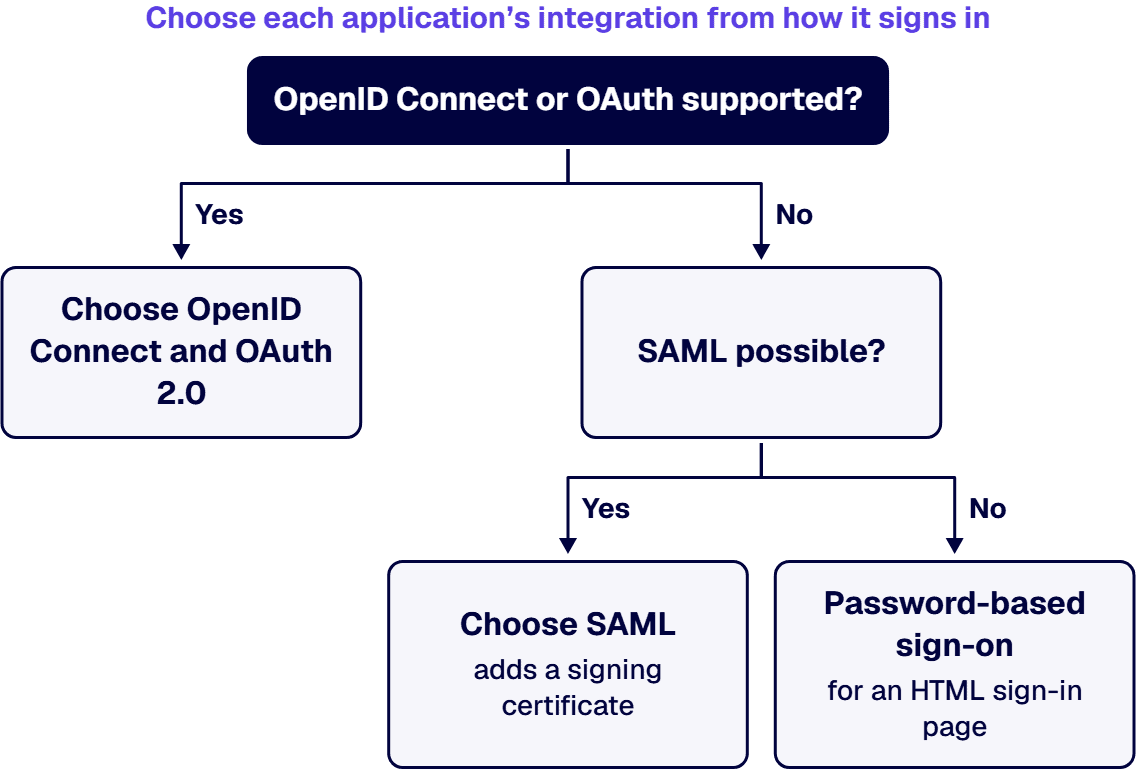
Microsoft’s Plan a single sign-on deployment page gives the options by where the application runs: “Cloud applications can use OpenID Connect, OAuth, SAML, password-based, or linked for SSO. Single sign-on can also be disabled.” The same page gives its rules for choosing: “Choose OpenID Connect and OAuth 2.0 if the application you’re connecting to supports it.” “Choose SAML whenever possible for existing applications that don’t use OpenID Connect or OAuth.” “Choose password-based when the application has an HTML sign-in page. Password-based SSO is also known as password vaulting.”
Where the application came from decides how it is registered. Microsoft’s What is application management in Microsoft Entra ID? page says “The easiest way to start managing an application is to use a preintegrated application from the Microsoft Entra gallery.” and “Each application in the Microsoft Entra gallery has an article available that shows you the steps required to configure the application.” For applications your organization built or bought as a packaged product, Microsoft’s Understand the stages of migrating application authentication from AD FS to Microsoft Entra ID page says “Line-of-business apps that use OAuth 2.0, OpenID Connect, or WS-Federation can be integrated with Microsoft Entra ID as app registrations. Integrate custom apps that use SAML 2.0 or WS-Federation as non-gallery applications on the enterprise applications page in the Microsoft Entra admin center.”
The sorting table i3solutions uses, built from those Microsoft categories, is filled in once per application:
Linked and disabled are states, not integrations. Microsoft’s Plan a single sign-on deployment page says “The Linked option doesn’t provide sign-on functionality through Microsoft Entra credentials.” and “Choose disabled SSO when the application isn’t ready to be configured for SSO.” Its What is single sign-on page adds “Linked SSO keeps a consistent experience while you migrate apps. It adds app links in user portals, but it doesn’t provide true single sign-on.” An application left linked still signs in through its own sign-in or another identity provider, not with Microsoft Entra credentials.
On-premises applications are their own bucket. Microsoft’s Plan a single sign-on deployment page says “On-premises applications can use password-based, Integrated Windows Authentication, header-based, or linked for SSO. The on-premises choices work when applications are configured for Application Proxy.” Choosing how to bridge applications that use Kerberos or header-based sign-in is a separate decision from this sequence, and why the size of that bucket matters to the platform choice is covered in Which IAM Platforms Fit a Complex Hybrid Enterprise: How to Decide.
When every application owner wants to be next, the order needs a rule the IT leader can defend. Microsoft’s Understand the stages of migrating application authentication from AD FS to Microsoft Entra ID page gives the first cut: “When you plan your migration to Microsoft Entra ID, consider migrating the apps that use modern authentication protocols (such as SAML and OpenID Connect) first.” It also says “We recommend that you continue to use existing test environments for migration testing before you move to the production environment.”
Microsoft’s Plan application migration to Microsoft Entra ID page says “The process is broken into four phases.” It names them Discover and Scope, Classify apps and plan pilot, Plan migration and testing, and Manage and gain insights. The same page says “Application migration is a team effort”, and its role table includes a project manager, an identity architect, application technical owners, application business owners and a pilot group of users.
Applications still federated through AD FS can be sorted by Microsoft’s own tooling. Microsoft’s AD FS application migration to move AD FS apps to Microsoft Entra ID page says “The wizard gives you a unified experience to discover, evaluate, and configure new Microsoft Entra application.” It marks each relying-party application with one of three statuses: “Ready to migrate means, the AD FS application configuration is fully supported in Microsoft Entra ID and can be migrated as-is.”, Needs review, where some settings need review but are not blockers, and “Additional steps required means, Microsoft Entra ID doesn’t support some of the application’s settings, so the application can’t be migrated in its current state.” Moving Microsoft 365 sign-in itself off AD FS, and retiring the farm, is a separate decision from moving its applications.
The sequencing rule i3solutions recommends on top of Microsoft’s guidance:
An integration that works on go-live day can fail years later if nobody knows what was created. Microsoft’s Application and service principal objects in Microsoft Entra ID page says “To delegate identity and access management functions to Microsoft Entra ID, an application must be registered with a Microsoft Entra tenant.” It describes the two objects that registration creates: “An application object is used as a template or blueprint to create one or more service principal objects.” and “A service principal is created in every tenant where the application is used.” It adds “The service principal object defines what the app can actually do in the specific tenant, who can access the app, and what resources the app can access.” and “You can use the Enterprise applications page in the Microsoft Entra admin center to list and manage the service principals in a tenant.”
SAML applications add a certificate with an expiry date. Microsoft’s Plan a single sign-on deployment page says “When you enable federation on SAML application, Microsoft Entra ID creates a certificate that is by default valid for three years.” and tells you to have “processes in place to renew certificates before their expiration”. Microsoft’s Enable SAML single sign-on for an enterprise application page walks through the work for one application: entering the application’s Identifier (Entity ID) and Reply URL (Assertion Consumer Service URL) in Entra ID, downloading the SAML signing certificate, and adding those configuration values in the application itself. It says “We recommend that you use a nonproduction environment to test the steps in this article.”
Administrative roles are part of the design. The Plan a single sign-on deployment page says “Always use the role with the fewest permissions available to accomplish the required task within Microsoft Entra ID.” Its persona table lists Cloud Application Administrator as the Microsoft Entra role for the identity admin and for the certificate rollover owner.
The ownership rule i3solutions recommends: every application enters with a named technical owner, a named business owner and a named certificate renewal owner, recorded before go-live. Governing the credentials, secrets and owners of application identities across the whole tenant is a program of its own beyond this onboarding sequence, and Governing Non-Human Identities in Microsoft Entra: Service Principals, App Registrations, Managed Identities, Secrets, and AI Agents With Entra Agent ID sets that program out, including how an app registration differs from a service principal.
If an application gets single sign-on but not provisioning, the leaver still has an account in it until someone removes it by hand. Microsoft’s What is app provisioning in Microsoft Entra ID? page says “Microsoft Entra application provisioning refers to automatically creating user identities and roles in the applications that users need access to. In addition to creating user identities, automatic provisioning includes the maintenance and removal of user identities as status or roles change.”
Whether that is available depends on the application. The same page says “The preintegrated applications listed in the gallery generally use SCIM 2.0-based user management APIs for provisioning.” and “Manual provisioning means there’s no automatic Microsoft Entra provisioning connector for the app yet.” It also says “Microsoft Entra ID also supports provisioning users into applications hosted on-premises or in a virtual machine, without having to open up any firewalls.” For an application still to be bought, Microsoft’s condition for adding an application’s provisioning connector to the gallery is a procurement question: “For a user provisioning request, we require the application to have a SCIM-compliant endpoint.”
Microsoft’s Plan an automatic user provisioning deployment in Microsoft Entra ID page says “We recommend that the initial configuration of automatic user provisioning is in a test environment with a small subset of users before scaling it to all users in production.” and “Use scoping filters to define attribute-based rules that determine which users are provisioned to an application.” Application licenses follow the same accounts; the Plan a single sign-on deployment page says “If Microsoft Entra ID manages the automatic provisioning based on roles, the roles assigned in Microsoft Entra ID must align with the number of licenses owned within the application.”
For each application, record one of two outcomes: a provisioning connector planned, or manual removal accepted as a known gap with a named person who performs it. One application’s sign-in and provisioning worked through end to end is in ServiceNow and Microsoft 365 Integration: Four Paths, and What Each Does to Your Governance Boundary. Once accounts flow, who should hold access is governance, covered in Microsoft Entra ID Governance for Regulated Enterprises: Product Scope, Licensing, and Audit-Defensible Implementation.
When an application is newly integrated, it is protected only by the Conditional Access policies that target it. Microsoft’s Conditional Access: Target resources page says “Conditional Access policies let admins assign controls to specific applications, services, actions, or authentication context.”
Not every application can be picked by name. The same page says “Some applications don’t appear in the picker at all.” For those applications, Microsoft names two routes: include the All resources option in the policy, or add the missing service principal. It also says “Microsoft recommends creating a baseline multifactor authentication policy targeting all users and all resources (without any resource exclusions)”.
The coverage rule i3solutions recommends: a newly integrated application goes under the all-resources baseline policy on its first day, and any policy written for one application is designed and tested before that application’s wave.
When the plan assumes a capability the tenant is not licensed for, the gap shows up mid-wave. Microsoft’s Plan a single sign-on deployment page says “SSO for preintegrated enterprise applications is free. However, the number of objects in your directory and the features you wish to deploy might require more licenses.”
Microsoft’s Microsoft Entra licensing page, as read on September 23, 2026, marks Conditional Access under Microsoft Entra ID P1 and P2, and risk-based Conditional Access under P2 only. In Microsoft’s provisioning rows on that page, automated user provisioning to SaaS apps is marked under Free, Microsoft Entra ID P1, Microsoft Entra ID P2, Microsoft Entra ID Governance and Microsoft Entra Suite, and automated provisioning to on-premises apps under the same columns except Free. The same page says “Microsoft Entra application proxy requires Microsoft Entra ID P1 or P2 licenses.”
Application licenses are a separate line. The Plan a single sign-on deployment page says to “Work with the application owner to determine whether the users assigned to the application have the appropriate licenses for their roles within the application.”
If one of these situations is yours, a different step comes first:
New applications keep arriving, certificates expire and owners leave, so the catalog needs an owner named before the last wave closes. Name who approves new applications; Microsoft’s Overview of user and admin consent page says “The admin consent workflow gives users a way to request admin consent for applications when they aren’t allowed to consent themselves.” The wider consent and permission review is covered in Microsoft 365 Access Governance for AI Readiness. Name who renews certificates and who reviews assignments: the internal identity team, or an outside provider working to your schedule.
An i3solutions engagement does not produce managed-service ownership, a replacement for the internal team, open-ended scope expansion, or vendor lock-in. What i3solutions does in place of running a help desk is set out in We Do Not Run Your Help Desk. Here Is What i3solutions Does Instead.
If the estate needs outside help, the work is a project: the estate sort, the sequence, the per-application integration design and build covering sign-in, provisioning and Conditional Access coverage, and the ownership runbook, handed to the owner you name.
i3solutions is a Microsoft Systems Integrator with experience implementing identity and access management solutions for enterprises in regulated industries. On Entra ID specifically, i3solutions delivered an Entra ID integration engagement for a global consumer goods manufacturer. Beyond that engagement, i3solutions regularly delivers Okta to Microsoft Entra ID migrations for enterprises. i3solutions has done hundreds of Okta to Entra ID conversions. On provisioning, i3solutions unified identity and automated provisioning across systems for 125,000 users by treating the interfaces as owned, governed contracts. Delivery is senior and US-based.
The service line is described in Enterprise Entra ID Configuration & Integration Services for Modern Identity Management, within Establish Identity as a Governed Enterprise Capability.
Use OpenID Connect where the application supports it. Microsoft says “Choose OpenID Connect and OAuth 2.0 if the application you’re connecting to supports it.” and “Choose SAML whenever possible for existing applications that don’t use OpenID Connect or OAuth.”
The app registration creates the application object, and the enterprise application is the service principal in a tenant. Microsoft says “An application object is used as a template or blueprint to create one or more service principal objects.”, “A service principal is created in every tenant where the application is used.” and “You can use the Enterprise applications page in the Microsoft Entra admin center to list and manage the service principals in a tenant.”
Yes, with a caveat. Microsoft says “SSO for preintegrated enterprise applications is free. However, the number of objects in your directory and the features you wish to deploy might require more licenses.”
No, that is provisioning, a separate decision. Microsoft says automatic provisioning “includes the maintenance and removal of user identities as status or roles change.” and “Manual provisioning means there’s no automatic Microsoft Entra provisioning connector for the app yet.”
Start with the applications that already use modern protocols. Microsoft’s guidance is to “consider migrating the apps that use modern authentication protocols (such as SAML and OpenID Connect) first.” Within that group, i3solutions recommends starting with the applications that carry the most audit and business exposure for the least integration effort.
Yes. According to Microsoft’s licensing page, as read on September 23, 2026, Conditional Access is marked under Microsoft Entra ID P1 and P2, and risk-based Conditional Access under P2 only.
By Michael Branson
As of October 2026, choose Entra Cloud Sync unless your estate needs a line that Microsoft Learn gives only to Entra Connect Sync, such as more than 150,000 objects in a domain, groups above 50,000 members, advanced sync rules, full attribute filtering or cross-forest object references. Microsoft calls Cloud Sync “the recommended path forward for most organizations”; its agents fail over automatically where a Connect Sync server stops synchronization while it is down, and its device sync for Microsoft Entra hybrid join was listed as preview until Microsoft’s update of September 29, 2026. According to Microsoft, Connect Sync servers below version 2.5.79.0 stopped synchronizing on September 30, 2026, and each 2.x version retires 12 months after a newer one is released.
When the upgrade notice for an Entra Connect Sync server reaches an IT leader, the next question is whether to upgrade that server or move to Cloud Sync. Both are Microsoft engines that carry on-premises Active Directory identities into Microsoft Entra ID, and the choice changes what happens when sync fails, where the audit record lives, how a second forest is handled and what a government tenant can use. This guide was written from Microsoft’s own pages as they read at the time of writing; each Microsoft fact is cited where it is used, and anything not attributed to Microsoft is i3solutions’ own recommendation. When the identity platform itself is still open, start with Which IAM Platforms Fit a Complex Hybrid Enterprise: How to Decide.
Before anyone argues engines, check the version on every Connect Sync server, because Microsoft set a date on which old versions stopped working. Microsoft’s Microsoft Entra Connect: Version release history stated, when this guide was written: “All synchronization services in Microsoft Entra Connect Sync will stop working on September 30, 2026 if you’re not on at least version 2.5.79.0.” The same page added: “If you’re unable to upgrade before the deadline, all synchronization services will fail until you upgrade to the latest version.”
The deadline is not a one-time event. The Microsoft Entra Connect: Version release history also states that “Versions of Microsoft Entra Connect Sync 2.x retire 12 months from the date that a newer version is released,” that “All Microsoft Entra Connect Sync 1.x versions are unsupported and synchronization doesn’t function,” and that “If you run a retired version of Microsoft Entra Connect, it might unexpectedly stop working.” The newest version on that page when this guide was written was 2.6.91.0, with a release status dated September 16, 2026.
A planning rule from i3solutions: bring every Connect Sync server, staging servers included, onto the newest version before choosing an engine, not only onto the minimum version the deadline names. The Microsoft Entra Connect: Version release history gives version 2.5.79.0 an end of support date of “23 Oct 2026”, so that version’s own retirement clock is already running. A move to Cloud Sync runs through a pilot or coexistence period in which Connect Sync keeps running, so the version rule applies whichever engine you end on. Name one owner for Connect Sync version currency while any Connect Sync server remains.
When the sync server fails, the first question is whether anything else is still synchronizing. Microsoft’s Migrate from Microsoft Entra Connect to Cloud Sync: Decision Guide puts the difference in one sentence each: “Microsoft Entra Connect creates a single point of failure”, then “if the Connect server becomes unavailable, synchronization stops until the server is restored.” and “Cloud Sync supports multiple active provisioning agents deployed across different servers, providing automatic failover capabilities.”
A Connect Sync staging server is a standby, not a second live engine. Microsoft’s Microsoft Entra Connect: Staging server and disaster recovery states: “A server in staging mode isn’t running password sync or password writeback, even if you selected these features during installation.” It takes over only when someone disables staging mode on it.
Both engines can stop a mass delete, and both need a person on the other end. For Connect Sync, according to Microsoft’s Microsoft Entra Connect Sync: Prevent accidental deletes, “the feature to prevent accidental deletes is enabled by default and configured to not allow an export with more than 500 deletes.” For Cloud Sync, Microsoft’s Accidental delete prevention says: “To use this feature, you set the threshold for the number of objects that, if deleted, synchronization should stop.” When that threshold is reached, the same page says synchronization stops and a notification goes to the email address specified.
Cloud Sync also watches its own health. Microsoft’s Cloud sync troubleshooting states: “Cloud sync monitors the health of your configuration, and places unhealthy objects in a quarantine state.” On timing, the Microsoft Entra Cloud Sync FAQ states: “Password hash synchronization is scheduled every 2-5 minutes.” It also states: “Cloud provisioning synchronization for users and groups is scheduled approximately every 10 to 20 minutes.” The same answer on Microsoft Learn qualifies that interval: the actual time depends on the number of changes pending in each sync cycle.
The i3solutions recommendation, as three rules. Name who is alerted when synchronization stops on either engine. Set the delete threshold on each engine as a decision someone signs, not a default nobody read. Place Cloud Sync agents on more than one server, because the failover Microsoft describes runs across agents on different servers.
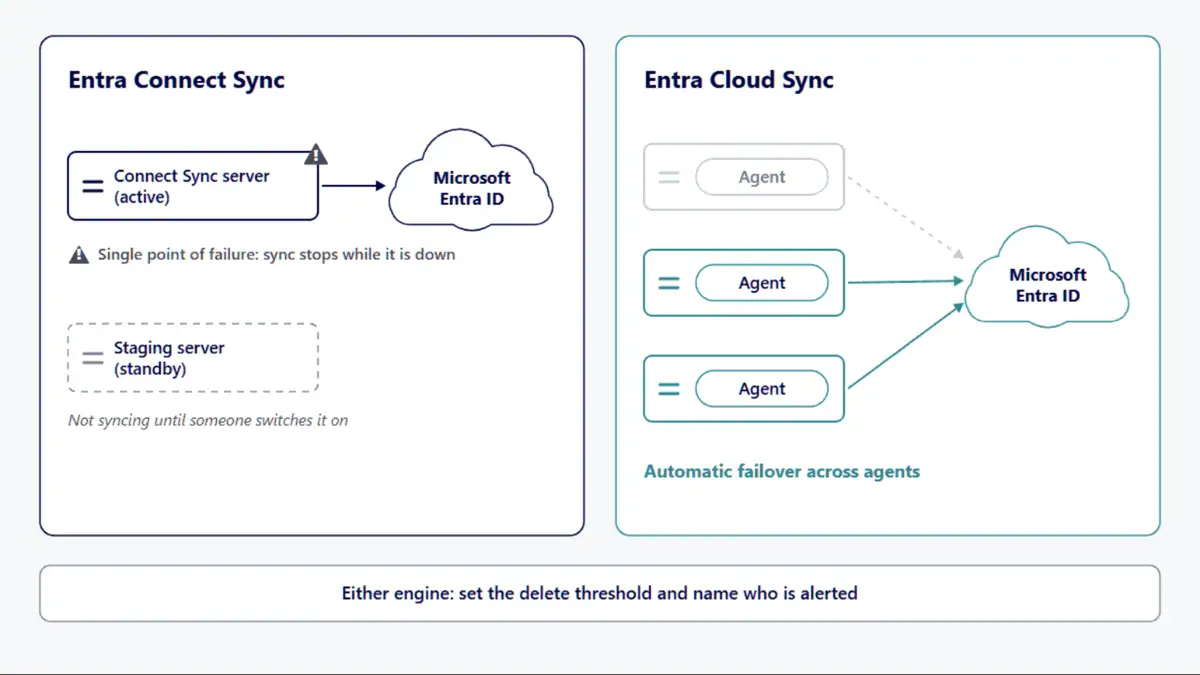
When an auditor asks where the sync record lives and who controls the sync engine, each engine answers from a different place. For Cloud Sync, Microsoft’s Cloud sync troubleshooting states: “Provisioning logs provide a wealth of information on the state of the objects being synchronized between your on-premises Active Directory environment and Azure.”
For Connect Sync, the server itself is the control point. Microsoft’s Prerequisites for Microsoft Entra Connect states: “The Microsoft Entra Connect server must be treated as a Tier 0 component as documented in the Active Directory administrative tier model”. The i3solutions recommendation: put the server’s administrators, its access and its configuration changes in the same review as the domain controllers.
Microsoft has also announced an upcoming change for Connect Sync: enhanced admin authorization for configuration changes. Microsoft’s Microsoft Entra releases and announcements says “an authorized administrator will need to sign in and explicitly approve changes to sync settings”. The page gives it as upcoming; plan for it without assuming a date.
How long Microsoft Entra keeps audit and sign-in logs, and how to export them, is a separate question this guide does not answer. The engine decision only settles where the sync record starts: the provisioning logs and quarantine status for Cloud Sync, and the access and change record of a Tier 0 server for Connect Sync.
Once the deadline is handled, the engine choice comes down to whether your estate uses anything Cloud Sync does not yet do. Microsoft’s Migrate from Microsoft Entra Connect to Cloud Sync: Decision Guide, last updated February 24, 2026 and read on September 24, 2026, compares the two engines line by line. The lines below are the ones that decide a move, each note in Microsoft’s own words from that table; the table has other lines, some that both engines support, such as password writeback and Exchange hybrid attributes, and some that only Connect Sync supports, such as merging attributes from multiple domains.
Microsoft’s device row is older than its device sync page. Microsoft’s Configure device sync with Microsoft Entra Cloud Sync, last updated July 27, 2026, stated: “Device sync with Microsoft Entra Cloud Sync is in preview.” Microsoft’s update of September 29, 2026 no longer marks it as preview, and the page now states: “After synchronization, the devices can become Microsoft Entra hybrid joined.” It also states: “Device sync is disabled by default.” Device sync for hybrid join therefore exists in Cloud Sync and stays off until someone turns it on.
Two lines concern sign-in rather than sync. For pass-through authentication, Microsoft’s note reads: “PTA configuration managed separately from sync in Cloud Sync; PTA and Seamless SSO remain functional after migration”. For federation: “Federation configuration requires separate tools in Cloud Sync”. Which sign-in method to run, password hash synchronization, pass-through authentication or federation, is its own decision, and this guide does not make it.
Some lines run the other way. Microsoft’s Migrate from Microsoft Entra Connect to Cloud Sync: Decision Guide states: “Features like group provisioning to Active Directory, advanced source of authority management, and cloud-native identity scenarios are available exclusively in Cloud Sync.” It adds: “Organizations using Connect sync might miss access to new capabilities or require additional tools to achieve similar functionality.” The guide then sorts estates into three groups: ready for immediate migration, plan for near-term migration as features arrive, and evaluate for future migration.
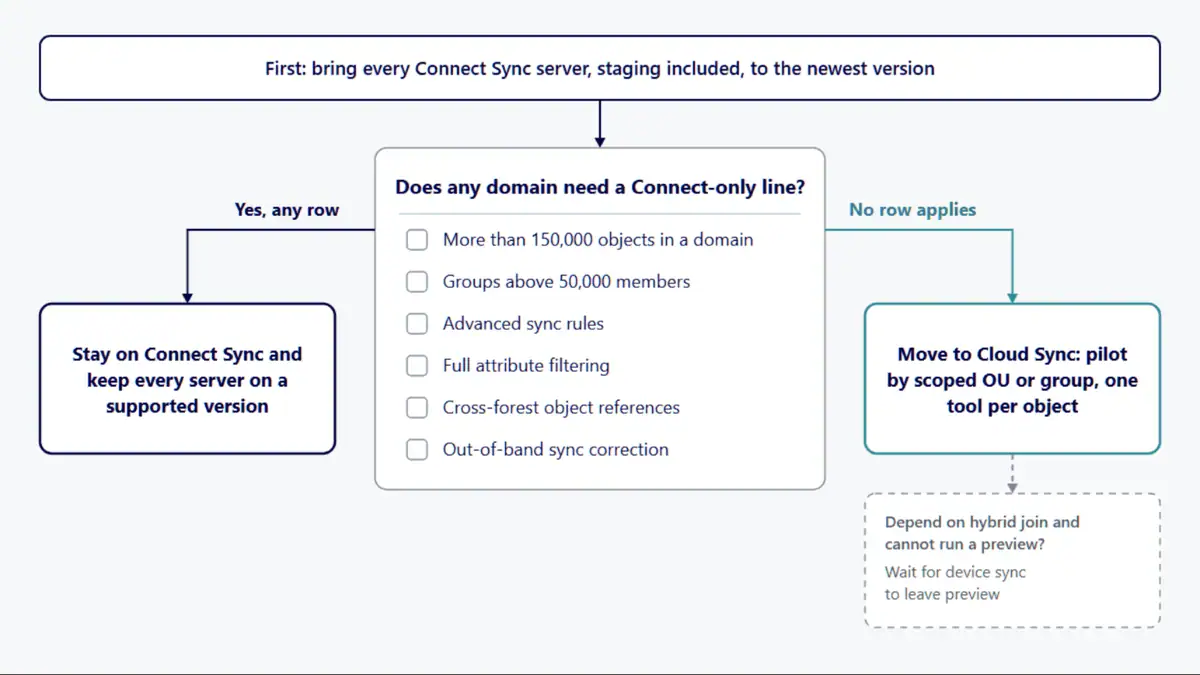
After an acquisition brings in a second Active Directory forest, the forest layout can decide the engine before any other line does. Microsoft’s Migrate from Microsoft Entra Connect to Cloud Sync: Decision Guide marks disconnected forest support as Cloud Sync only, with the note “Cloud Sync enables M&A scenarios without forest consolidation”, and marks cross-forest references as Connect Sync only: “Connect supports forest-to-forest object relationships”. An estate that needs both has to decide which forest relationships it keeps before it decides the engine.
Running both engines at once is supported as a pilot and as a topology. Microsoft’s Microsoft Entra Cloud Sync supported topologies and scenarios describes an existing forest on Entra Connect with a new forest brought on through Cloud Sync, and a pilot in which both tools run in the same forest with users and groups scoped between them. It states: “An object should be in scope in only one of the tools.” Microsoft’s Migrating from Microsoft Entra Connect to Microsoft Entra Cloud Sync adds: “During the pilot or coexistence phase, don’t remove OUs, domains, groups, users, contacts, or other referenced objects from Microsoft Entra Connect Sync scope.”
The same migration page gives the supported coexistence model: “The supported coexistence model is to keep objects in Microsoft Entra Connect Sync scope and use the cloudNoFlow and JoinNoFlow rules to prevent Microsoft Entra Connect Sync from exporting object adds, object deletes, and non-reference attribute updates.” It adds: “Each batch must remain in Microsoft Entra Connect Sync scope with the no-flow rules applied until that batch is fully migrated and ready for cutover.”
The i3solutions recommendation: pilot by scoped OU or group, keep a written list of which tool provisions each OU and group and which batches carry Microsoft’s no-flow rules, and take objects out of Connect Sync scope only at the final cutover Microsoft’s migration page describes.
Before a government tenant plans its move, check which Microsoft statements actually name its cloud. Microsoft’s What is Microsoft Entra Cloud sync? states: “Cloud sync can be used for tenants in the Microsoft Commercial, US Government, and 21Vianet (China) clouds.” Microsoft’s decision guide ticks both engines on its US Government Cloud line with the note “Both support sovereign cloud deployments”. For Connect Sync, Microsoft’s Hybrid identity considerations for the Azure Government cloud states: “To integrate a Microsoft Active Directory environment (either on-premises or hosted in an IaaS that is part of the same cloud instance) with the Azure Government cloud, you need to upgrade to the latest release of Microsoft Entra Connect”.
One tool does not reach government tenants. The Microsoft Entra Connect: Version release history, for version 2.6.91.0, records: “Added a guided migration workflow from Microsoft Entra Connect Sync to Microsoft Entra Cloud Sync.” It states: “This feature is available only in the Azure public cloud.” A tenant in the US Government cloud plans and runs its move without that workflow.
The pages read for this guide say “US Government”; they do not state, feature by feature, what is available in GCC High or DoD tenants. Confirm each feature your estate depends on with Microsoft for your cloud before planning around it. Moving into GCC High is a separate program with its own identity steps; see Microsoft 365 GCC High Migration Checklist: Best Practices for Defense Contractors.
Staying on Connect Sync is the right call when a Cloud Sync move would break something the estate depends on.
Before you sign off on a sync plan, ask for these in writing:
When the engine decision has to hold up in front of an auditor and a change board, i3solutions treats it as a design decision. i3solutions is a Microsoft Systems Integrator with experience implementing identity and access management solutions for enterprises in regulated industries. i3solutions designs and integrates hybrid identity on Microsoft Entra ID, bridging on-premises systems with cloud applications. i3solutions delivered an Entra ID integration engagement for a global consumer goods manufacturer. i3solutions regularly delivers Okta to Microsoft Entra ID migrations for enterprises. If you are also deciding whether on premises directories stay in the CUI boundary, read Active Directory or Entra ID for a CMMC Level 2 boundary.
i3solutions plans and runs governed Azure and Microsoft 365 migrations with senior, U.S.-based engineers. For regulated defense organizations, i3solutions plans and runs GCC High migrations, including the identity architecture; the GCC High tenant itself is provisioned by a certified AOS-G supplier, which i3solutions works alongside. Delivery is senior and US-based. An i3solutions engagement does not produce managed-service ownership, a replacement for the internal team, open-ended scope expansion, or vendor lock-in. The practice is described at Enterprise Entra ID Configuration & Integration Services for Modern Identity Management, within Establish Identity as a Governed Enterprise Capability.
For most estates, yes: Microsoft calls Cloud Sync “the recommended path forward for most organizations.” Stay on Connect Sync if the estate needs a line Microsoft Learn lists as Connect Sync only, such as more than 150,000 objects in a domain (“Cloud Sync currently supports up to 150,000 objects per domain”), groups above 50,000 members, advanced sync rules or cross-forest object references.
Before that date, the version history on Microsoft Learn stated: “All synchronization services in Microsoft Entra Connect Sync will stop working on September 30, 2026 if you’re not on at least version 2.5.79.0.” The same page on Microsoft Learn states that “Versions of Microsoft Entra Connect Sync 2.x retire 12 months from the date that a newer version is released.”
Yes. Microsoft’s July 27, 2026 version stated: “Device sync with Microsoft Entra Cloud Sync is in preview.” Microsoft’s update of September 29, 2026 no longer marks it as preview. It adds: “After synchronization, the devices can become Microsoft Entra hybrid joined.” It also states: “Device sync is disabled by default.”
Yes, with each object provisioned by one tool. Microsoft’s topology guidance states: “An object should be in scope in only one of the tools.” During a move, Microsoft’s migration guidance adds: “During the pilot or coexistence phase, don’t remove OUs, domains, groups, users, contacts, or other referenced objects from Microsoft Entra Connect Sync scope.”
Microsoft Learn states: “Cloud sync can be used for tenants in the Microsoft Commercial, US Government, and 21Vianet (China) clouds.” The guided migration workflow that Microsoft Learn records for Connect Sync version 2.6.91.0 is different: “This feature is available only in the Azure public cloud.”
By Michael Branson, Founder and COO, i3solutions
Yes, and the honest form of that answer is a composition rather than a slogan. CMMC and DFARS are one problem seen twice: DFARS 252.204-7012 imposes the control baseline and DFARS 252.204-7021 verifies it. ITAR is a genuinely separate axis about export-controlled technical data and who may see it. Section 3 sets out what i3solutions has delivered on each axis, and we do not claim a single published engagement named against all three clauses at once.
What follows is the reasoning first and the record second, because a trust question deserves the reasoning even from a firm you do not hire. Section one separates the three names into the two problems they actually are. Section two puts them where they land in an integration design, which is not where most compliance documents put them. Section three is the delivery record, stated regime by regime with the seams visible. Section four is what we do not claim, written out rather than left for you to discover.
The most useful thing an integrator can do on the first call is refuse to treat the three names as three parallel workstreams. They are not parallel and they do not cost the same.
DFARS and CMMC are one axis: a control baseline on covered information. DFARS 252.204-7012, Safeguarding Covered Defense Information and Cyber Incident Reporting (MAY 2024), is the clause that creates the obligation. Its paragraph (b)(2)(ii)(A) requires the contractor to implement NIST SP 800-171. Its paragraph (c) requires the contractor to “rapidly report” cyber incidents, which the clause defines as within 72 hours of discovery, to dibnet.dod.mil. And its paragraph (b)(2)(ii)(D) is the one integrators keep missing: where the contractor uses an external cloud service provider to store, process or transmit covered defense information, that provider must “meet security requirements equivalent to those established by the Government for the Federal Risk and Authorization Management Program (FedRAMP) Moderate baseline” and must comply with the clause’s incident reporting and forensic provisions.
CMMC is the verification layer on that same baseline rather than a second baseline. The program rule was published at 89 FR 83092 on October 15, 2024, effective December 16, 2024, and codified at 32 CFR part 170. The contract clause that puts it into your agreements is DFARS 252.204-7021, Contractor Compliance With the Cybersecurity Maturity Model Certification Level Requirements (NOV 2025), which requires a contractor to have and maintain a current CMMC status at the specified level for all information systems used in performance that process, store, or transmit FCI or CUI. The acquisition rule carrying it was published in the Federal Register on September 10, 2025, with Phase 1 beginning November 10, 2025. Phase 2, scheduled for November 10, 2026, was suspended on July 13, 2026.
One version detail changes integration design and is worth checking rather than assuming. NIST SP 800-171 Revision 3 was published in May 2024, but DoD issued Class Deviation 2024-O0013 on May 2, 2024 directing contractors under DFARS 252.204-7012 to comply with Revision 2, and that deviation stands until it is rescinded. Read the clause in your own contract and confirm the current deviation status before anyone designs an interface to a control number, because the two revisions do not number their controls the same way.
ITAR is the other axis, and it is about people and data rather than controls. The International Traffic in Arms Regulations sit at 22 CFR chapter I, subchapter M, parts 120 to 130 and are administered by the State Department’s Directorate of Defense Trade Controls. Nothing in ITAR tells you to implement a cybersecurity control baseline. It tells you that export-controlled technical data may not be released to a foreign person, in the United States or outside it, without authorization. That is an access question and a data-classification question, and a system can be fully CMMC Level 2 compliant while still being an ITAR violation waiting for an audit.
The practical shape of the work is two boundaries, not three programs. One is the CUI boundary, drawn against a control baseline and evidenced for an assessor. The other is the export boundary, drawn against who may see which artifacts.
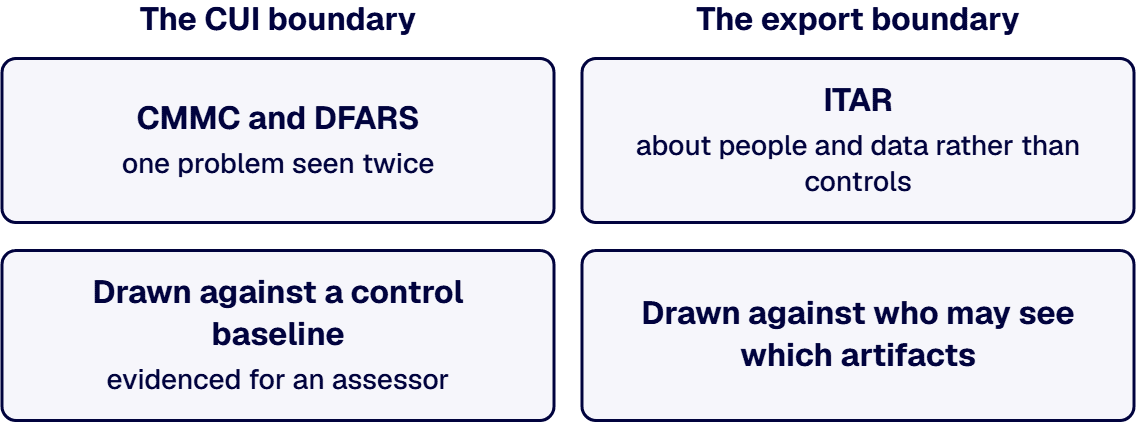
Compliance documentation describes systems. Integration lives in the spaces between systems, and that is where the obligations get lost. Six places in a Microsoft integration estate carry regulated data that the system inventory usually does not list.
None of that is exotic. It is the ordinary content of an integration architecture, read with the two boundaries in hand instead of read afterwards. That is what “handling all three at once” means in practice, and it is why the answer to the buyer’s question should be an architecture conversation rather than a certification badge.
Here is the record with the seams left visible, because a composed answer that pretends to be a single engagement is the thing this page exists to avoid.
Start with the standing, because it is the part you can check without us. i3solutions is an SBA certified small business providing technical and professional services to US Federal Agencies, the DoD and the private sector. The Microsoft relationship is the long part of it: i3solutions has been a Microsoft partner since 1997 and has delivered 1,500+ implementations across aerospace and defense, financial services, and health sciences. On the integration side specifically, i3solutions is a Microsoft Systems Integrator with 30 years of experience implementing identity and access management solutions for enterprises in regulated industries.
The integration work is specific rather than general. i3solutions builds Dynamics 365 integrations using named Microsoft mechanisms including Dataverse, dual write, virtual tables, Azure Logic Apps, Azure Service Bus, and Power Automate connectors. There is a count behind that practice: i3solutions has completed more than 20 Dynamics 365 integration engagements. Beyond Dynamics, i3solutions designs Azure integration architecture and builds and operates Azure Logic Apps workflows for enterprise clients, including running them on an ongoing basis rather than only building them. At estate scale, which is where governance stops being a word and becomes an interface inventory, i3solutions has implemented governance frameworks for organizations managing 200+ integrations across Microsoft ecosystems. On the operations side, i3solutions implements monitoring and observability for Microsoft integration landscapes: Azure Monitor, Application Insights, intelligent alerting, and standardized runbooks that reduce mean time to resolution from hours to minutes. Change control is part of the same shape: i3solutions delivery includes ALM practices with Power Platform pipelines or Azure DevOps integration, environment separation strategies, and change control processes. One identity outcome is worth stating on its own, because it is the pattern the whole approach rests on. i3solutions unified identity and automated provisioning across systems for 125,000 users by treating the interfaces as owned, governed contracts.
i3solutions runs migrations against named control families across CMMC, HIPAA, SOC 2, and NIST 800-171, producing artifacts auditors can review. i3solutions teams maintain dedicated compliance specialists who understand CMMC, HIPAA, SOC 2, and financial services regulations within Microsoft environments, providing audit trail documentation and access control frameworks that reduce audit preparation time by 60%.
The assessment has a named shape rather than a promise. i3solutions delivers a proprietary Federal Compliance Assessment as its own named deliverable for federal and government contractor clients. The i3solutions Federal Compliance Assessment evaluates a client tenant against NIST SP 800-53 and CMMC using automated tenant configuration scripts and a 42-point security checklist. i3solutions engages its Federal Compliance Assessment when the scope spans a FedRAMP Moderate or FedRAMP High boundary, or when the client operates in a GCC High tenant. Expect the assessment to find work. The count that follows is our own, from running these assessments, and not an industry statistic. Organizations facing CMMC Level 2 certification consistently discover 15-25 configuration gaps during Microsoft environment assessment. If your environment question is still open, the analysis of whether CMMC actually requires GCC High is worth reading before anyone tells you it does.
On DFARS specifically, read this sentence carefully. What is attested is a staffing competence rather than a delivery history. Typical engagement ranges land at $28,000 to $48,000 per specialist per month for senior US-based Microsoft specialists with named platform depth (SharePoint, Power Platform, Microsoft 365 compliance, Azure security, Dataverse, .NET enterprise integration) and compliance literacy in CMMC 2.0 Level 2, HIPAA Security Rule, NIST 800-171 Rev 2, SOC 2, or DFARS 252.204-7012. That is a claim about what the named people know. The delivery evidence for the same axis is carried by the CMMC and NIST 800-171 record above, which is the baseline DFARS 252.204-7012 imposes. We are not going to dress that up as a separate DFARS practice.
The export question usually reaches us as one line in a security questionnaire: can your engineers see the drawings? Here is the record behind our answer. i3solutions has successfully delivered software development projects under CMMC, HIPAA, ITAR, and SOC 2 compliance frameworks with audit-ready documentation and governance practices built into our standard delivery methodology. The named artifacts behind that last phrase are not left abstract: they are the Federal Compliance Assessment and the three gate deliverables set out further down this section. In the identity layer, which is where the export boundary is actually enforced, i3solutions has deep experience implementing identity governance for enterprises in aerospace and defense manufacturing, financial services, and healthcare, including environments with CMMC and ITAR obligations. That second sentence is the closest thing in our record to the composite question you asked: a single environment carrying both a CMMC obligation and an ITAR obligation, with i3solutions doing the identity governance in it. The detail of how the export boundary interacts with Microsoft 365 is set out on our ITAR export control compliance in Microsoft 365 page.
i3solutions installs and helps configure applications inside IL4 and IL6 government cloud environments and other government networks. We manage GCC High migrations end-to-end: from eligibility validation and licensing coordination with your AOS-G supplier through identity architecture, data migration, security baseline configuration, and post-migration governance. i3Solutions plans and runs these migrations for regulated defense organizations, structuring each phase around the compliance evidence assessors expect. i3solutions has deployed Power BI inside a GCC High tenant and inside Azure Government for a federal customer.
The gate structure is deliberate rather than decorative. i3solutions produces three named artifacts across an Azure Government or AWS GovCloud engagement: an Architecture Fit Assessment at discovery, a Landing Zone Blueprint and Compliance Matrix at design, and a Migration Risk and Cutover Runbook at execution, each one a mandatory gate check before the engagement moves to the next phase. Before any of that, the environment question gets answered on evidence: i3solutions advises clients on federal compliance posture as its own assessment rather than as a restatement of Microsoft’s documentation, including whether SharePoint Online meets NIST 800-53, whether Azure Government is required under the DoD Cloud Computing SRG, and whether a CMMC gap assessment is needed to bid. The engagement below ran the opposite way to the default, and it is worth stating in full. The assessment recommended partial-variant adoption with email and document storage on GCC High and the remainder of the productivity suite on Commercial; the contractor’s licensing economics improved materially relative to a full GCC High migration.
i3solutions runs a governed Power Platform for a federal defense agency supporting roughly 10,000 personnel across about 180 locations, which works because it is governed, not despite it. More broadly, i3solutions has delivered enterprise SharePoint and Power Platform programs for aerospace and defense manufacturers, major defense organizations, a financial-services firm, a national healthcare system, and military organizations. i3solutions has delivered Dynamics 365 integration engagements for regulated enterprises across healthcare, defense and aerospace manufacturing, and financial services.
The published engagements below show the integration layer as the deliverable rather than as plumbing under something else. On a federal special-operations command program the data layer is the system. MySQL databases serve as the system’s core data management layer by supporting schema design, stored procedures, and efficient API integration for unifying 300TB of structured and unstructured data. Note what that says about the estate: a defense integration program is rarely all Microsoft, and an integrator who can only reason inside the Microsoft stack will hand the non-Microsoft half back to you. The account is in the federal special-operations command case study. The second is narrower, and unlike the special-operations account above it is our own reported figure rather than a published case study. When the case is honest the returns are defensible: for a defense technology contractor, i3 automation reached full ROI inside the first fiscal year and removed about $1.15 million a year from the operation.
One further piece of evidence is unusual enough to name, because it goes directly to whether a vendor can build inside your compliance boundary rather than beside it. i3solutions’ Virtual Proposal Center operates inside the customer’s own compliant Microsoft tenant. i3solutions’ Virtual Proposal Center (i3VPC) implements a requirements and compliance matrix tracked to Section L and Section M and color team (pink, red, gold) review gates for federal proposals. A firm that has shipped a product designed to live inside somebody else’s accredited tenant has met the constraint your integration will meet. The Virtual Proposal Center overview has the detail.
This section exists because the question in the title is a trust question, and a trust page that lists only its strengths has answered a different question.
The sequence below is methodology rather than a claim about a past engagement, and it is stated that way on purpose.
A first conversation on this is worth more than another capability deck. Thirty minutes with a senior i3solutions integration architect produces three things you can take into a committee: a first cut at where your two boundaries sit, which interfaces in your estate are carrying regulated content that nobody has classified, and the sequence the work has to run in.
Three bids are on the desk and they are not comparable, because two of them priced the integration and the third priced the integration plus the compliance evidence work wrapped around it. Separate those two numbers before you compare anything: the integration work itself, and the evidence work wrapped around it.
On the integration side, directional bands. A Stabilization Protocol engagement (Phase 1 dependency mapping plus Phase 2 risk-sequenced triage) typically costs between $85,000 and $175,000 for enterprises running four to six Microsoft platforms with 40 to 120 integration touchpoints. A focused reference architecture engagement (assessment plus reference architecture document plus governance framework, 8-to-12-week duration) typically scopes between $150,000 and $350,000 for mid-sized regulated enterprises. A full architecture and roadmap engagement (assessment plus reference architecture plus governance framework plus target-state design plus prioritized roadmap, 16-to-24-week duration) typically scopes between $400,000 and $850,000 depending on integration estate complexity and the number of compliance frameworks anchoring the audit profile.
On the control side, the CMMC half has its own band. A CMMC Level 2 implementation for a defense contractor with a defined CUI boundary typically ranges from $45,000 to $75,000, covering the Compliance Manager baseline assessment, Conditional Access redesign, DLP policy build and testing, Purview Audit Premium configuration, and post-implementation documentation. The CMMC compliance cost breakdown has the component detail.
The regime adds overhead in two measurable places: unit cost and assessment schedule. Both figures below are ours, observed across our own delivery and assessment work rather than drawn from market research. Regulated-industry SharePoint modernization carries roughly 25 to 35 percent cost overhead versus commercial work for equivalent scope, driven by control mappings, audit-trail discipline, and zero-downtime cutover patterns. The assessment stage stretches too. Defense contractors with CMMC requirements typically require 3 weeks due to additional compliance mapping.
One thing the constraint should not do is create a separate rate card, and it is worth saying because some firms price a government boundary as a premium product. Analytics engagements delivered inside a government cloud boundary are the same type of services work as commercial engagements; the difference is additional compliance steps, not a pricing premium. Where you land inside any of the bands above is decided by the state of the estate rather than by the clause list, which is the practical reason a scoped assessment comes before any committed implementation number.
Every one of these is answerable in a first conversation and none of them requires taking a vendor’s word, including ours.
If a scoped conversation would be more useful than another proposal, a senior i3solutions engineer will walk the boundary question with you and tell you plainly where our record composes and where it does not. You leave with the reasoning whether or not you engage us, which is usually what a buyer needs to build the internal case.
Yes, but the honest version is that they are two problems rather than three. DFARS 252.204-7012 imposes the NIST SP 800-171 control baseline and DFARS 252.204-7021 verifies it through CMMC, so those two clause numbers are one axis. ITAR is a separate axis about export-controlled technical data and foreign-person access. A system can meet the control baseline and still breach the export boundary. What to test in a vendor is whether they draw those as two distinct lines in your estate, because drawing them as one line is the most common design error in a regulated integration.
Not one that is published and named against all three clauses, and we would rather say so than blur it. The strongest attested record naming two regimes in the same environment is that i3solutions has deep experience implementing identity governance for enterprises in aerospace and defense manufacturing, financial services, and healthcare, including environments with CMMC and ITAR obligations. Alongside that, i3solutions has successfully delivered software development projects under CMMC, HIPAA, ITAR, and SOC 2 compliance frameworks with audit-ready documentation and governance practices built into our standard delivery methodology. The DFARS 252.204-7012 element is carried by the same NIST 800-171 and CMMC delivery record, because that clause is what imposes the baseline; the named artifact that carries that evidence is our Federal Compliance Assessment, set out in section 3. If your evaluation needs a single all-three reference, ask for it directly in scoping.
No, and the place this usually goes wrong is an encryption carve-out read as a blanket cloud permission. 22 CFR 120.54(a)(5), effective March 25, 2020, provides that sending, taking or storing technical data is not an export where the data is unclassified, secured using end-to-end encryption, secured using cryptographic modules compliant with FIPS 140-2 or its successors in accordance with current NIST guidance, and not intentionally sent to or stored in a country proscribed in 22 CFR 126.1. The verbs matter: sending, taking, storing. Integration middleware decrypts a payload in order to map a field, and at that point the carve-out is no longer describing what the platform is doing. The design question is where decryption happens and who can reach it, not whether cloud is allowed.
Paragraph (b)(2)(ii)(D) of the clause is the one that reaches your vendor’s stack. Where an external cloud service provider stores, processes or transmits covered defense information, it must meet security requirements equivalent to those established by the Government for the FedRAMP Moderate baseline, and comply with the clause’s cyber incident reporting and forensic provisions. That test applies to monitoring agents, migration utilities and third-party connectors in the integration path, not only to the systems on your architecture diagram. Ask for the equivalency evidence per component.
Check your own clause and the current class deviation rather than assuming. NIST published Revision 3 in May 2024, and DoD issued Class Deviation 2024-O0013 on May 2, 2024 directing contractors under DFARS 252.204-7012 to comply with Revision 2, a deviation that stands until rescinded. The two revisions do not number their controls the same way, so a control mapping built against the wrong revision produces an evidence package an assessor cannot follow. This is a five-minute check that saves a rework cycle.
In the places the system inventory does not list: dead-letter queues and retry stores holding copies of failed messages, diagnostic logs that captured request bodies, non-production environments refreshed from production, service principals with broad read across a CUI-bearing store, and the vendor’s own tooling in the integration path. Every one of those is either a copy of regulated data or a standing path to it, sitting outside the boundary the system inventory describes. i3solutions has implemented governance frameworks for organizations managing 200+ integrations across Microsoft ecosystems, and interface inventory is where that work starts.
Those are two different questions and only the first is answered here. i3solutions plans and runs governed Azure and Microsoft 365 migrations with senior, U.S.-based engineers. i3solutions provides dedicated US-based Microsoft teams for aerospace and defense programs. Both of those are facts about where the people work. US-persons status under the export regulations and personnel security clearances under a contract are separate determinations with their own evidence, and no vendor web page is the right place to establish them. Ask for them specifically and in writing, against what your own contract requires, during scoping rather than at onboarding.
The integration work and the compliance evidence work price separately, and comparing bids without splitting them is how quotes get misread. A focused reference architecture engagement (assessment plus reference architecture document plus governance framework, 8-to-12-week duration) typically scopes between $150,000 and $350,000 for mid-sized regulated enterprises. A CMMC Level 2 implementation for a defense contractor with a defined CUI boundary typically ranges from $45,000 to $75,000, covering the Compliance Manager baseline assessment, Conditional Access redesign, DLP policy build and testing, Purview Audit Premium configuration, and post-implementation documentation. Expect the regime to add overhead: regulated-industry SharePoint modernization carries roughly 25 to 35 percent cost overhead versus commercial work for equivalent scope, driven by control mappings, audit-trail discipline, and zero-downtime cutover patterns.
By Michael Branson
Okta Advanced Server Access alternatives fall into two shapes once your estate already runs Entra ID, and the product itself reached its end-of-sale date on May 1, 2026: Okta’s own documentation states that “Effective May 1, 2026, Okta will no longer sell or renew Advanced Server Access. Existing customers must migrate to Okta Privileged Access within one year of their next scheduled renewal date to maintain service” (Advanced Server Access documentation, according to Okta, as read on 22 September 2026). Okta describes what the product does in one sentence: “Using Okta as its source of truth, Advanced Server Access reconciles accounts to manage SSH and RDP access to Linux and Windows servers” (Get started with Advanced Server Access, as read on 22 September 2026). The two alternative shapes are an Entra-native path, where Microsoft Entra ID issues the login and Azure role assignments govern who may sign in to a machine, and a third-party privileged access management layer that keeps its own session broker and sits on top of Entra for identity. Coverage decides between them. The question is whether your server fleet lives where Microsoft’s own sign-in path reaches, which Microsoft documents as Azure virtual machines and Azure Arc-enabled servers, or spans clouds and platforms it does not reach. If the fleet sits inside that documented reach, the Entra-native path removes a control plane; if it does not, a standalone layer is still doing work Microsoft’s path will not do for you.
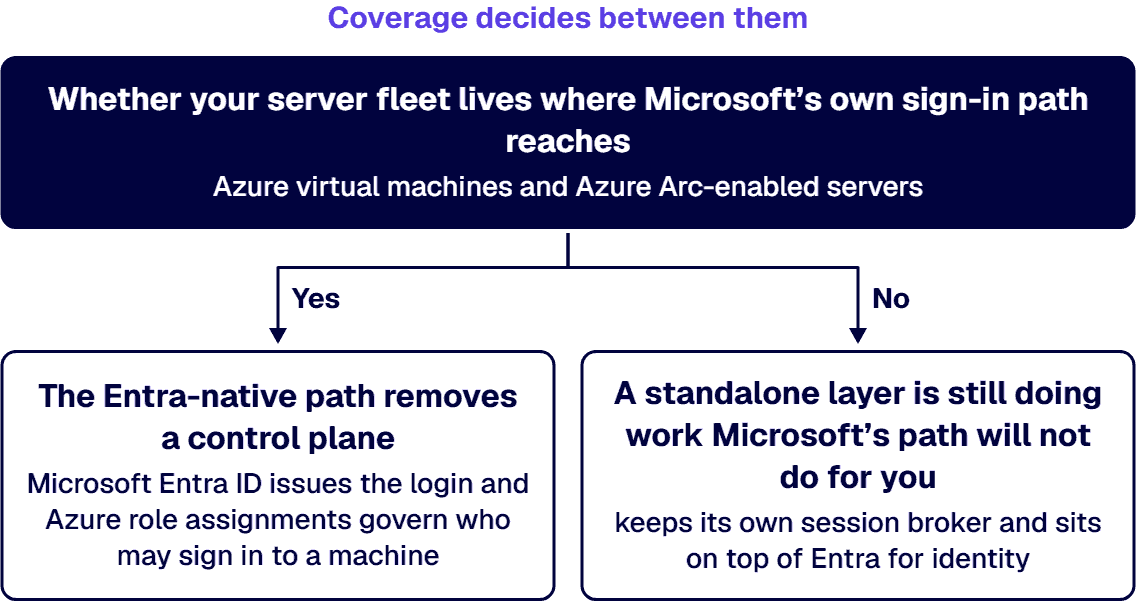
You are most likely reading this because two conversations landed in the same quarter. One is a renewal: a standalone privileged-access contract for your server fleet is coming up, and somebody has to sign it. The other is a question from security or audit, or from finance, asking why a second privileged-access control plane exists at all when the identity platform for everything else is already Entra ID and already paid for.
Both conversations are really the same decision, and it is not a product bake-off. Getting it wrong in one direction strands the organization on tooling nobody can justify at the next audit. Getting it wrong in the other direction removes working controls from the servers an attacker would most want, and replaces them with something that does not yet reach the same machines.
For a Microsoft-centric estate already running Entra ID, the real choice for privileged server access is not which vendor’s marketing is loudest, it is whether you extend the identity platform you already operate or keep a standalone PAM layer running beside it, and that choice turns on four criteria: session brokering without standing credentials, who owns the audit trail, the agent footprint left on the server fleet, and cost against the Microsoft licensing you already carry.
This page evaluates those four criteria. A different question, which platform should own your directory, single sign-on and standing administrative roles at the platform level, is answered on Okta vs Entra ID: What’s the Difference for Enterprise IT?, and this page does not repeat that comparison.
If you inherited this product rather than bought it, the first thing worth establishing is what job it is doing on your servers today, because that job is what any alternative has to keep doing. Okta’s documentation describes the mechanism in its own words: “Using Okta as its source of truth, Advanced Server Access reconciles accounts to manage SSH and RDP access to Linux and Windows servers.” Okta’s product page describes the reader-facing effect as the ability to “seamlessly extend SSO to your Linux and Windows servers via SSH and RDP” (Advanced Server Access, as read on 22 September 2026).
The part that matters to a security committee is how the login is authorized. Okta’s own documentation for automation scenarios describes the approach as one that lets you “eliminate the static credential” and instead “use the security of ephemeral certificates when building automation”, and it names the software that has to be present on each machine: “Install the Advanced Server Access agent” (Services, as read on 22 September 2026). Two facts follow from Okta’s own text and neither is an inference: the credential presented at login is short-lived instead of standing, and there is an agent on every enrolled server.
On the audit side, Okta describes the product as producing “login and session audit logs that you can view via dashboard or API.” That is a real capability, and it also fixes where the evidence lives: the record of who reached which server sits in that vendor’s system, and reaching it means a dashboard or an API call into a platform outside your tenant.
The fact that changes the shape of the decision is the one quoted in the answer block above. Okta’s documentation states that effective 1 May 2026 the product is no longer sold or renewed, and that existing customers must move to Okta Privileged Access within one year of their next scheduled renewal date to keep service. Read that carefully before you frame the choice internally: a renewal of the status quo is not on the table as Okta documents it. The comparison is between moving to a Microsoft-native path and moving to a different standalone product, and both are migrations. One note on where that notice appears, stated because it affects what your team will find: it is published on Okta’s documentation pages, and Okta’s marketing page for the product carried no such notice when this page was written in September 2026, so a colleague who checks only the product page may reasonably report back that nothing has changed.
Once a migration is happening either way, the choice collapses to two shapes, and the useful comparison is by criterion instead of by vendor. No ranking of makers appears below, and none is needed: the criteria decide it.
Shape one is the Entra-native path. Microsoft documents two distinct pieces here, and a proposal that treats them as one piece is describing a capability neither of them has on its own. Microsoft Entra Privileged Identity Management governs privileged ROLES. Microsoft describes it as “a service in Microsoft Entra ID that enables you to manage, control, and monitor access to important resources in your organization”, providing “just-in-time privileged access to Microsoft Entra ID and Azure resources”, “time-bound access to resources using start and end dates”, the ability to “require approval to activate privileged roles”, and the ability to “download audit history for internal or external audit” (What is Privileged Identity Management?, Microsoft-stated date 23 April 2026, as read on 22 September 2026). Microsoft lists what it manages as Microsoft Entra roles, Azure resource roles and PIM for Groups. Microsoft’s page states that using it “requires licenses”. What that Microsoft page does not name anywhere is SSH, RDP or signing in to a virtual machine’s operating system, and that absence is the scope fact the rest of this decision turns on: role activation is not session brokering to a server.
The server-login half is a separate Microsoft capability. Microsoft documents it this way: “To improve the security of Azure Linux virtual machines (VMs) or Azure Arc-enabled Linux servers, you can integrate with Microsoft Entra authentication”, using “Microsoft Entra ID as a core authentication platform and a certificate authority to SSH into a Linux VM by using Microsoft Entra ID and OpenSSH certificate-based authentication” (Sign in to a Linux virtual machine in Azure by using Microsoft Entra ID and OpenSSH, Microsoft-stated date 27 June 2025, as read on 22 September 2026). Microsoft names the two Azure role assignments that decide who may log in, “Virtual Machine Administrator Login” and “Virtual Machine User Login”, and states the separation plainly: “There’s an intentional (and audited) separation between the set of people who control virtual machines and the set of people who can access virtual machines.” Taken together, those two capabilities are what people mean by the Entra-native path, and a proposal that names only one of them is describing half of it.
Shape two is a standalone privileged access management layer on top of Entra. Here a dedicated product keeps its own session broker, its own policy engine and its own recording, and takes identity from Entra ID through federation. The category includes the successor product Okta names in its own migration notice, and it includes other vendors; this page compares the SHAPE, not the makers, and it does not rank them.
Here is how the two shapes read against the four criteria, in the order this page uses everywhere:
When two of these criteria disagree, coverage outranks the other three, and the next section is why.
The criteria above will not all point the same way, and when they conflict the tie-breaker is not cost and it is not audit convenience. It is reach: whether Microsoft’s documented sign-in path actually covers the machines you need to govern. A cheaper, better-audited control that does not reach half your fleet has not solved the problem, it has split it in two.
Microsoft states the reach of the Entra-native server login in its own documentation, and it is wider than “Azure only” but narrower than “everything”. Microsoft names Azure Linux virtual machines and Azure Arc-enabled Linux servers, lists the supported Linux distributions in a published table, and lists the supported Azure regions as Azure Global, Azure Government and Microsoft Azure operated by 21Vianet. Azure Arc is the part people miss: it is how a server outside Azure can be brought inside that documented path.
So the fork is a question you can answer from your own inventory, not from a vendor conversation. Read your server list out of the surface that already holds it, the Azure portal’s virtual machine list plus your Azure Arc-enabled servers inventory, and set it against the machines your current privileged-access tool has enrolled. Where the two lists match, the Entra-native path is governing the same population, and keeping a second control plane means operating two systems to do one job. Where the current tool’s list contains machines that are not in Azure and not Arc-enabled, on a platform or in a cloud Microsoft’s documentation does not name, the standalone layer is still doing work nothing in your Microsoft licensing does for you, and removing it would leave those machines governed by whatever was underneath.
One more input belongs in the same read, and a mixed estate turns on it: the Windows and Linux split. The Microsoft documentation quoted above is specifically the Linux SSH path. Confirm the current documented position for your Windows server population separately before you treat the fleet as one population, because a plan built on a Linux-shaped assumption will surface that gap during migration instead of during planning.
Where the answer comes out mixed, the honest reading is that this is a phased consolidation and not a single cutover: the covered population moves to the Entra-native path, and the uncovered population keeps a standalone layer with a named owner and a dated re-examination, sized to the machines that actually need it.
If your estate matches one of the four situations below, consolidating onto the Microsoft path would be the wrong move, and a page that did not say so would be selling instead of advising.
A genuinely multi-cloud fleet is the first. Where a meaningful share of your privileged targets sit in another public cloud or on platforms Microsoft’s documented path does not name, a standalone broker is covering machines the Entra-native path does not reach; your own target inventory is the evidence for that, read from the current tool’s enrolled-server list, and consolidating would hand those machines back to local accounts and whatever policy already applies to them.
Second is a non-Windows, non-Azure estate at scale. Azure Arc widens Microsoft’s reach beyond Azure, but enrolling a large fleet into Arc is itself a project with its own operational surface, and it has to be planned as one instead of assumed away inside a licensing discussion.
An existing, accepted audit position is the third. If your auditors have already accepted the current tool’s session records for a regime you are assessed against, replacing that evidence chain mid-cycle introduces a new question at exactly the wrong moment. Whether a given arrangement satisfies your obligations under any specific regime is a determination for your own compliance function and your assessor, not one this page can make for your environment; the point here is only that changing the evidence source is itself an event your compliance function should be told about in advance.
Timing is the fourth. Okta’s published end-of-sale notice puts a clock on the current product, and the migration to a Microsoft-native path is a different size of project from the vendor’s own upgrade path. If your renewal date is close and your Azure and Arc coverage is not yet in place, the defensible sequence may be to take the vendor’s migration first and run the consolidation as a planned piece of work afterwards, with the coverage question answered before it starts instead of during it.
None of the four is an argument against consolidating eventually. Each is an argument for deciding on coverage and evidence instead of on the renewal calendar, and for writing down which of the four applies to you so the next person who inherits this decision can see the reasoning.
Where this work lands with us, it lands as identity work and not as a tooling purchase. i3solutions regularly delivers Okta to Microsoft Entra ID migrations for enterprises. On the governance side of the same estate, i3solutions maps governance to named control families, enforces it in the platform through Entra ID, Purview, and Azure Policy, and evidences it continuously rather than reconstructing it at audit. Identity as a governed capability is the frame the whole pillar is built on, set out at Establish Identity as a Governed Enterprise Capability.
The alternatives fall into the two shapes described above, and each maker below is quoted in its own words, in no order of preference. Okta’s own successor is Okta Privileged Access, named in the end-of-sale notice quoted at the top of this page; for it, Okta states: “Reduce the attack surface by eliminating static SSH keys and passwords, and automate access controls to protect your modern server infrastructure.” (Okta) On the Entra-native path, alongside the Linux sign-in covered above, Microsoft states: “You can now use Microsoft Entra ID as a core authentication platform to Remote Desktop Protocol (RDP) into supported versions of Windows Server.” (Microsoft Learn) Microsoft’s page shows it was last updated on 2025-06-27. Among standalone products, for its Privileged Remote Access product BeyondTrust states: “PRA securely manages remote access to sensitive systems, ensuring that only authorized users can access critical resources with the appropriate level of privilege.” (BeyondTrust) For its server privilege controls, Delinea states: “Seamlessly manage just-in-time and just enough privileged access across Windows, Linux, and Unix servers while enforcing Multi-Factor Authentication (MFA) at log-in and privilege elevation for additional identity assurance.” (Delinea) Teleport states: “Teleport protects servers through the Teleport SSH Service, which is a Teleport Agent service.” (Teleport) Whichever you shortlist, test it against the four criteria on this page and against your own server inventory, not against this list.

US-Based Microsoft System Integrator | Est. 1997
© i3solutions. All rights reserved.
US-Based Microsoft System Integrator | Est. 1997
© i3solutions. All rights reserved.


