
Integration questions sit at the intersection of what the Microsoft stack supports natively, what a connector can honestly reach, and where custom development becomes the right answer. These answers address the specific calls IT leaders face when a clean architecture plan meets the constraints of what already exists.
Michael Branson
When the crews still work from spreadsheets, paper forms or an aging dispatch tool and the business wants one system for work orders, scheduling and the record of each job, IT gets three questions before any demo: what technicians see when the signal drops, who controls company data on the phone in their pocket, and which cloud the work must run in. This checklist answers each from Microsoft Learn, so the shortlist decision is one you can defend. Microsoft’s Set up frontline workers in your organization page describes who the app is for: “Frontline workers are people in your organization who are primarily scheduled for onsite jobs and who use the Dynamics 365 Field Service mobile app for their work.” It adds “Each frontline worker must have a Field Service license assigned through the Microsoft 365 admin center.” Which license a technician or a contractor needs, and what it costs, is covered in Dynamics 365 licensing costs.
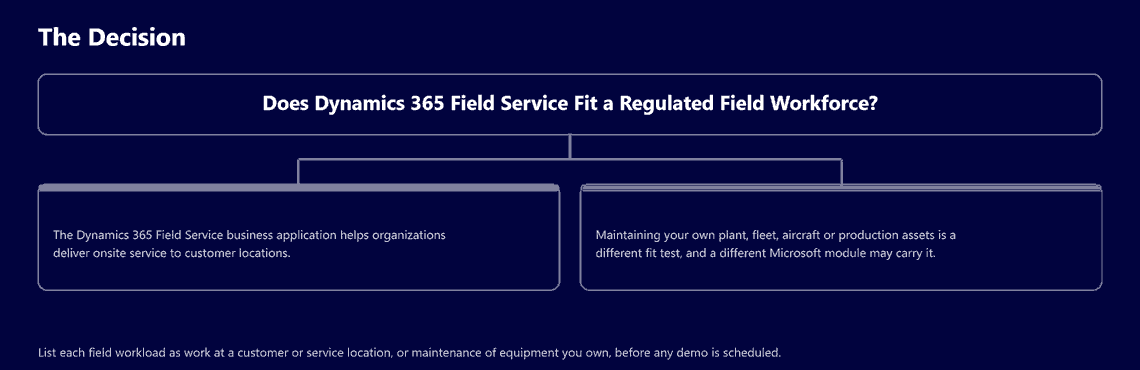
If no one has yet sorted the field workload by whose equipment it is and where the work happens, sort it before the first demo, because Field Service is built for one of those cases. Microsoft’s Overview of Dynamics 365 Field Service says “The Dynamics 365 Field Service business application helps organizations deliver onsite service to customer locations.” Among its capabilities it lists “Work orders to define the service work needed primarily (but not exclusively) at customer locations.”
Microsoft’s own examples on that page include a medical device manufacturer that services the machines it sells to hospitals and clinics, a fiber optic cable utility company that dispatches technicians to outages, an in-home health care provider that schedules and dispatches care workers, and a facilities manager that maintains heating and cooling equipment.
List each field workload as work at a customer or service location, or maintenance of equipment you own, before any demo is scheduled. Maintaining your own plant, fleet, aircraft or production assets is a different fit test, and a different Microsoft module may carry it.
If crews work underground, in rural service areas or inside buildings with no coverage, the offline design decides the fit, and Microsoft documents it as a configuration, not a default. Microsoft’s Dynamics 365 Field Service mobile app overview says “When an administrator configures offline capabilities, technicians can continue to access and update work data without an internet connection.” Its Work offline and update offline data page says “An administrator has to configure the offline profile for the app before technicians can download the data.”
The same two pages set the limit plainly. The mobile app overview says “The refreshed mobile experience doesn’t currently support working offline.” The offline page says “The new mobile experience doesn’t support working offline.” A crew that must keep working without a signal cannot be given the refreshed experience as Microsoft documents it today.
What reaches the device is set by the offline profile. Microsoft’s Set up the mobile offline profile page says “The booking filter downloads active bookings assigned to the current user if the booking starts or ends today or within the next seven days.” It also says “Field Service updates can change the default profile, so review the profile in your environment for the current tables, filters, relationships, and intervals.” Its Best practices and limitations for the offline profile page says “Changes on the device are stored locally, and then uploaded automatically when an Internet connection becomes available.” It says not to use “All records” as a table filter, and to “avoid wide date ranges”. Inspections work offline too: the Inspections overview says “Technicians can view and fill out inspections on their mobile phones or tablets without internet access.”
Pick the mobile experience per crew by where that crew works, and write the offline profile as a requirement before the pilot: which records reach the device, how far ahead, and how often they sync. A profile left to go-live is a profile no one tested underground.
If technicians carry their own phones, or company phones that leave the building every day, decide who controls the company data on them before the pilot starts. Microsoft’s offline best-practices page says “The Field Service mobile app follows the same architecture and security as a Power Apps mobile app.” Its Manage the Field Service mobile app with Intune page says “Intune is a separate Microsoft service that isn’t included with Field Service.” Among what Intune adds, that page lists “Limit sharing of corporate data among apps by restricting data leakage through cut, copy, paste, and save as.” and “Provide encryption at rest.”
Location is the second policy. Microsoft’s Enable location tracking for mobile technicians page says “Location signals are sent to the server at predefined intervals. Schedulers can visualize technicians’ locations on the schedule board and see their location history.”
Decide company-owned versus personal devices, the app protection policy and the location-tracking policy before the pilot, and budget Intune as its own service. This checklist makes no statement about whether those Intune capabilities are available for the app in GCC High or DoD; confirm that with Microsoft for your cloud. Whether a sector rule or a labor rule applies to device control or location history is a determination for your organization with its regulator and counsel.
When an auditor or a customer asks what was done to a piece of equipment, the answer has to come from the work order, not from a technician’s memory, so test the records before you test the screens. Microsoft’s Work with customer assets page says “Field Service asset management includes which equipment is located at a functional location and the service history of all past and present work orders for each asset.” It also says “Field Service supports hierarchical asset structures.”
Recurring work comes from agreements. The Customer agreements overview says “Field Service agreements let organizations automatically generate work orders and invoices with predefined details, frequencies, and date ranges.” It also says “An agreement is intended to be executed at a single location represented by the service account.”
Inspections and job templates carry the structure. The inspections page says “Field Service inspections are digital forms that technicians use to quickly and easily answer a list of questions as part of a work order.” and “Inspection answers are stored in Microsoft Dataverse, making it easy to report on results and fit inspections into your automated business processes.” Microsoft’s Work order incident type overview says “Incident types are service templates that users can use to quickly create work orders for the most common types of jobs that your organization performs.” Its Define service-level agreements (SLAs) for work orders page says “Service-level agreements (SLAs) define service expectations such as arrival and resolution times.”
Device data and scheduling complete the picture. The Connected Field Service overview says “Connect with devices and collect real-time data on their performance and condition to detect potential issues early.” The Universal Resource Scheduling for Dynamics 365 Field Service overview says “In other words, Field Service defines what needs to be done and where, while Universal Resource Scheduling defines who can perform the work and when.”
Name the records an auditor or customer will ask for after a job, and test in the demo that each one is produced by the work order, the inspection or the asset history. This checklist makes no statement that any record satisfies a regulator; that is a determination for your organization with its regulator and counsel.
If your contracts or your data put Field Service in a US government cloud, start from Microsoft’s feature table, not from the commercial feature list. Microsoft’s Dynamics 365 Field Service in US government clouds page, last updated August 28, 2026, says “The following table lists which Field Service services are currently supported in each cloud.” In that table, Dynamics 365 Field Service, Connected Field Service, the Android, iOS and Windows mobile application rows and Universal Resource Scheduling are marked available in GCC, GCC High and DoD. Resource Scheduling Optimization, the Scheduling Operations Agent, Field Service Rentals, the Field Service and Project Operations integration, the Field Service Portal, Field Service Custom Controls and the Universal Scheduling Service are marked not available in all three. The page says “Exceptions exist to the principle of maintaining product functional parity within the U.S. government clouds.” and “Microsoft continues to evaluate these services and capabilities for inclusion and updates in future releases.”
Microsoft’s Dynamics 365 US Government page, last updated October 6, 2026, lists Dynamics 365 Field Service in its GCC, GCC High and DoD columns and says “Check back monthly for important updates.” It also says “Only Microsoft administrators who are U.S. citizens can access Dynamics 365 US Government customer content.” For add-ons it draws a boundary: “These third-party applications and services might involve storing, transmitting, and processing your organization’s customer data on third-party systems that are outside of the Power Platform and Dynamics 365 apps Engagement infrastructure and therefore aren’t covered by the Power Platform and Dynamics 365 apps compliance and data protection commitments.”
Before design, mark every feature the plan relies on against your cloud’s column, and ask of every add-on where it stores data. The Field Service table has no row for Copilot features, so this checklist makes no statement about them in any government cloud; confirm with Microsoft. The full GCC High app list and the defense cost picture are covered in Dynamics 365 implementation costs for defense contractors.
If the field workforce consumes parts, carries truck stock or bills through an ERP, the integration path is part of the fit, and one path has an end date. Microsoft’s Integrate Dynamics 365 Field Service and Supply Chain Management page says “Dynamics 365 Field Service includes basic inventory capabilities to manage technician truck stock, track asset service history, or document returns.” It also says “Field Service is built on Dataverse and uses dual-write to write changes between Dynamics 365 Supply Chain Management and Dataverse.” For complex pricing, multiple currencies or advanced procurement, Microsoft’s Overview of inventory, purchasing, and returns page recommends: “Integrate with an ERP system such as Dynamics 365 Supply Chain Management.”
The dated change sits on Microsoft’s Field Service integration with finance and operations applications page: “The Field Service integration with finance and operations applications won’t be available after February 28, 2027. This capability is transitioning to the Field Service and Project Operations integration.” Microsoft’s Field Service government table lists the Field Service and Project Operations integration as not available in GCC, GCC High and DoD. The 2027 change is covered in depth in Dynamics 365 Field Service integration retirement.
A buyer in a US government cloud that relies on the finance and operations integration names its replacement path before February 28, 2027, and confirms with Microsoft which integration mechanisms are available in its cloud; this checklist makes no statement about dual-write availability in GCC High or DoD.
i3solutions builds Dynamics 365 integrations using named Microsoft mechanisms including Dataverse, dual write, virtual tables, Azure Logic Apps, Azure Service Bus, and Power Automate connectors.
If any of these situations describes the plan, the checklist changes shape:
When the demo is booked, hand the presenter the same checklist and ask for the last column to be filled with evidence from your own work. The second column comes from Microsoft Learn as cited in this checklist; the fourth is the test you run.
A yes in the third column is where the test starts, not where it ends, because Microsoft says exceptions to functional parity exist in the government clouds.
Where a row needs an add-on or a separate system, apply three rules before it is scored:
The spreadsheet history the crews leave behind is its own project; moving business-critical data off spreadsheets is covered in Excel to database migration consulting.
When this checklist has to be run before a demo or a request for proposal, i3solutions runs it with you against your own crews, devices and cloud, and fills the table from your records rather than from a generic list. i3solutions implements and integrates Dynamics 365. i3solutions customizes Dynamics 365 Field Service to align with your own business logic, workflows and user interface requirements.
i3solutions has delivered Dynamics 365 integration engagements for regulated enterprises across healthcare, defense and aerospace manufacturing, and financial services. i3solutions has completed more than 20 Dynamics 365 integration engagements.
Staffing is stated plainly. All i3solutions Dynamics 365 developers and consultants are U.S.-based. Work runs as project delivery, and embedded specialists can join your own team for the design, configuration and testing that follow the checklist. The wider service line is described on Enterprise Dynamics 365 Development Services That Align CRM and ERP to How You Operate.
Yes, once it is configured, but not in the refreshed experience. Microsoft Learn says “When an administrator configures offline capabilities, technicians can continue to access and update work data without an internet connection.” and “An administrator has to configure the offline profile for the app before technicians can download the data.” It also says “The refreshed mobile experience doesn’t currently support working offline.”
Microsoft’s Field Service government table on Microsoft Learn, last updated August 28, 2026, marks Resource Scheduling Optimization, the Scheduling Operations Agent, Field Service Rentals, the Field Service and Project Operations integration, the Field Service Portal, Field Service Custom Controls and the Universal Scheduling Service as not available in GCC, GCC High and DoD. It says “Microsoft continues to evaluate these services and capabilities for inclusion and updates in future releases.”
No. Microsoft Learn says “Intune is a separate Microsoft service that isn’t included with Field Service.”
It ends and moves to another integration. Microsoft Learn says “The Field Service integration with finance and operations applications won’t be available after February 28, 2027. This capability is transitioning to the Field Service and Project Operations integration.” Microsoft’s Field Service government table lists the Field Service and Project Operations integration as not available in GCC, GCC High and DoD.
Michael Branson
If Dynamics 365 Customer Service has been chosen to take over customer case work from your current service or ticketing platform, the move itself is now yours to plan. What comes across as data, what gets rebuilt as configuration, how much closed-case history to keep, and when the service team switches over without losing an open case are separate decisions, and this page takes them in the order a plan needs them.
What the product does, before any move is planned, is covered in Dynamics 365 case management. This page starts after that choice is made.
If your inventory lists everything the current platform holds in one column, split it before anything else. Microsoft’s implementation guide page on configuration and migration data, read on 2026-10-19, defines the first kind: “Migration data is the data that you move from your legacy system to your Dynamics 365 application, such as customers, products, and open transactions.” The same page says a migration strategy covers “mode (full push or incremental), and frequency (one-time or recurring)”.
Microsoft’s Configuration Migration tool page, read the same day, draws the line from the other side: “Configuration data is different from end user data (account, contacts, and so on).” For a service move, cases, the accounts and contacts they belong to, their notes and attachments, and the knowledge articles you keep sit on the data side. Queues, routing rules, SLAs, entitlements, automation, reports, security roles and channel settings sit on the configuration side.
If your cases leave the current platform as exported files, Microsoft documents where they land. Microsoft’s Import data page, read on 2026-10-19, states: “Data import lets you upload data from various customer relationship management systems and data sources into Dataverse.” It adds: “You can also include related data, such as notes and attachments.” The same page names the Import Data Wizard, which imports rows from “comma-separated values (.csv), XML Spreadsheet 2003 (.xml), or text files”.
Microsoft describes the Case table on its Customer Service table reference as a “Service request case associated with a contract.” How each record type in your current platform lines up with Microsoft’s tables is a design decision for your data map, made against your own export, not something Microsoft publishes for another vendor’s objects. Getting the export out of the current platform is work done with that platform’s own tools, by your team or its vendor.
For a load that runs more than once, such as a trial load followed by a final one, Microsoft’s Create and use dataflows in Power Apps page, read on 2026-10-19, states that “By default, dataflows store tables in Dataverse.” It adds that “Dataflows use a data refresh process to keep data up to date”, at “the frequency you select” during setup.
Two limits on the spreadsheet path matter before you choose it. Microsoft’s Import data from Excel and export data to CSV page, read on 2026-10-19, states: “The following fields are system fields and aren’t supported for import and export.” The list that follows includes “Createdon” and “Overriddencreatedon”. For federal tenants, the same page states: “Import from Excel or CSV file using the Import > Import data from Excel command isn’t available in GCC, GCC High, and DoD environments. To work around this limitation, from the Tables area in Power Apps select Import > Import data, and then choose a data source, such as Excel workbook or Text/CSV.” The full route for Excel data in a government tenant is covered in Migrating Access, Excel, and SharePoint Lists to Dataverse.
If an auditor or regulator may ask whether complaint records survived the move, decide the history question before the load design, not after it. Each of these is its own decision: how many years of closed cases come across, whether their original created dates are preserved, who owns each record once it lands, which attachments travel with it, and which records stay behind in an archive you can still produce on request.
On created dates, Microsoft’s Case (Incident) table reference, read on 2026-10-19, lists a column whose display name is “Record Created On”, described as “Date and time that the record was migrated.” Microsoft’s Knowledge Article table reference, read the same day, carries the same column with the same description. Which import path can populate it is part of the load design.
Carried history also uses storage. Microsoft’s Dataverse capacity-based storage details page, read on 2026-10-19, shows storage capacity entitlement and usage “by database, file, and log”. The history decision and the storage decision are made together.
If your knowledge base is moving too, keep two Microsoft mechanisms apart, because they do different jobs. Microsoft’s Configure knowledge management page, read on 2026-10-19, states: “Knowledge management in Dynamics 365 Customer Service helps improve customer satisfaction and agent productivity by providing quick access to relevant knowledge articles.” Microsoft’s Customer Service table reference for knowledge articles describes that table as “Organizational knowledge for internal and external use.”
Bringing articles in as Customer Service knowledge articles. Articles loaded as records in the Knowledge Article table become content your team owns in Customer Service. The work after the load is editorial: review each article, assign an owner, and republish it. Before you design that load, check the table: Microsoft’s Import data page says that “If the table is enabled for import, the definition property IsImportable is set to true.”
Integrated search providers. Microsoft’s Manage integrated search providers page, read on 2026-10-19, states: “With integrated search providers in Dynamics 365 Customer Service, you can configure third-party sources, such as enterprise websites that are based on the site map protocol. Articles are ingested into Dataverse and refreshed on the schedule you specify.” The same page limits the source to “static websites only for data ingestion”. Microsoft’s Configure knowledge article schema mapping page adds: “As part of adding an integrated search provider in Customer Service, you need to tell the service how to ingest the knowledge articles it receives from the provider.” This keeps an external source alive and refreshed. It is not a one-time migration.
If your plan assumes queues, rules and SLAs come across with the data, check what Microsoft’s own migration pages cover. Microsoft’s Overview of data migration for records, read on 2026-10-19, states: “Use the Configuration Migration tool to migrate the configurations from the source organization to the target organization for the records that are based on unified routing.” Microsoft’s Migrate automatic record creation rules and service-level agreements page states that its tool “helps migrate the rules in the web client to Unified Interface”, and the Migrate SLAs page recommends “migrating standard and enhanced SLAs created in web client to Unified Interface.” All three move configuration within Dynamics 365. None of them is a path from another vendor’s platform.
So the configuration side is an inventory you decide on, item by item, and rebuild in Customer Service:
If the same customer exists twice in your current platform, fix it before the load, because detecting a duplicate during import is not the same as merging it. Microsoft’s Detect duplicate records and merge page, read on 2026-10-19, states: “Microsoft Dataverse helps you address potential duplicates by detecting duplicates for active records such as accounts and contacts.” An administrator can set up rules “so duplicates are detected at the time of entering or updating records or importing records.” But Microsoft also states: “The Merge option is available only for Account, Lead, and Contact entities.” And: “The new experience of detecting duplicates and merging them is supported when duplicates are detected while manually entering data in the app and not during import.”
The practical order follows from those sentences: deduplicate accounts and contacts before the load, then attach cases to the surviving records.
If other systems create, read or update cases today, each of those connections has to be re-pointed at Dynamics 365, and that is a workstream of its own with its own owner and test plan. Who owns that work when a CRM move creates it is covered in Microsoft integration during an ERP or CRM migration.
Licensing and storage are questions to answer before cutover, not after: which people need which Customer Service license, and how much database and file capacity the carried history and attachments will consume. Settle both with your Microsoft licensing contact against your own user list and your history decision.
If cases are still open on the old platform when you switch, that is the hardest cutover question, because those customers are still waiting on answers while the move happens. You can drain the old queue and move only closed history, move open cases with their state and set their service targets again in Customer Service, or cut over by team or region in phases. Each choice changes the dress run.
Microsoft’s cutover guidance for Dynamics 365 projects, read on 2026-10-19, lists what a cutover plan includes, among them “A rollback plan in case something goes wrong”. On practicing the plan in a test environment, it says: “This is called a mock cutover or a dress rehearsal.” On deciding whether the solution is ready for production, it says: “This is called the go/no-go decision.” Write the go/no-go criteria before the first rehearsal, so the service leader and IT agree on what ready means before the date is at stake.
If the data map, the history decision, the configuration rebuild and the integration re-pointing sit with different teams and no one owns the whole move, an outside architect can put them in one plan before the first trial load.
The work you can hire for this move is project and advisory work on the Dynamics 365 side: the data map and load design into Dataverse, the case history and storage decisions, the knowledge article load, re-creating queues, routing rules and SLAs in Customer Service, integration re-pointing, and the cutover plan and rehearsals. Exports from your current platform stay with your team or that platform’s vendor, and your own team runs Customer Service once it is live. The connected sales and service model Customer Service sits in is covered in CRM customer experience solutions on Dynamics 365, and the wider practice in Dynamics 365 development services.
i3solutions builds Dynamics 365 integrations using named Microsoft mechanisms including Dataverse, dual write, virtual tables, Azure Logic Apps, Azure Service Bus, and Power Automate connectors. i3solutions has completed more than 20 Dynamics 365 integration engagements.
Delivery is senior and US-based. i3solutions implemented Dynamics 365 for a healthcare services firm and integrated it with telephony and email so that a caller’s profile and current case load surface the moment that person makes contact, built to the firm’s HIPAA and PHI requirements.
Decide that before the load design: the closed cases you choose to keep load into Dataverse along with the accounts and contacts they belong to and their notes and attachments, and the rest stays in an archive you can still produce. Microsoft’s Case table carries a column displayed as Record Created On, which Microsoft describes as the date and time the record was migrated, and carried history uses Dataverse storage.
If you want to own them in Customer Service, load them as records in the Knowledge Article table, then review, re-own and republish them. Microsoft’s integrated search providers are a different mechanism: according to Microsoft, they ingest articles from a static website source into Dataverse and refresh them on a schedule, which keeps that source alive rather than migrating it.
Not through the migration pages Microsoft publishes, if the source is another vendor’s platform: Microsoft’s pages for migrating SLAs, record creation rules and unified routing configuration move configuration within Dynamics 365. Plan to inventory queues, routing rules, SLAs and entitlements and rebuild the ones you keep in Customer Service.
Yes, through a different command, if your environment is in GCC, GCC High or DoD: Microsoft states that the Import data from Excel command is not available there, and documents a workaround from the Tables area in Power Apps using Import data with a data source such as an Excel workbook or Text/CSV.
Not as Microsoft describes it, when the duplicates arrive by import: Microsoft limits the Merge option to Account, Lead and Contact entities, and states that its newer detect-and-merge experience works when data is entered manually in the app, not during import. Clean duplicates before the load.
Moving from Salesforce to Dynamics 365 Sales is a sequencing decision IT owns, and the failure it guards against is a cutover that goes wrong because record history, automation or the security model was not carried; the Configuration Migration tool will not carry them, because it moves configuration data between Dataverse environments and is not a path out of Salesforce. Load the accounts, contacts, leads and opportunities you keep into Microsoft Dataverse through Microsoft’s import paths, rebuild the automation, reports, security model and integrations, decide how much history to carry, and cut over after a dress rehearsal with a rollback plan.
What follows starts after Dynamics 365 Sales has been approved and the move belongs to IT, with a sales leader asking about pipeline and an auditor asking whether record history survived.
If you are planning the load, start from what Microsoft says its import paths accept. Microsoft’s Import Data (Microsoft Dataverse) page, read on 2026-10-19, states that “Data import lets you upload data from various customer relationship management systems and data sources into Dataverse.” The same page says “You can import data into standard and customized columns of most business and custom tables,” and “You can also include related data, such as notes and attachments.”
For a load you expect to repeat, Microsoft’s Create and use dataflows in Power Apps page, read on 2026-10-19, describes dataflows that load a chosen data source into Dataverse and states that “Dataflows use a data refresh process to keep data up to date.” The same Microsoft page documents a Salesforce connector for dataflows, with one testing note: “use a production Salesforce account or a developer account for testing.”
The Excel and CSV import has documented limits. Microsoft’s Import data from Excel and export data to CSV page, read on 2026-10-19, states that “The following fields are system fields and aren’t supported for import and export,” and the fields it lists include the record owner and the created and modified dates. For federal tenants, the same Microsoft page states: “Import from Excel or CSV file using the Import > Import data from Excel command isn’t available in GCC, GCC High, and DoD environments.”
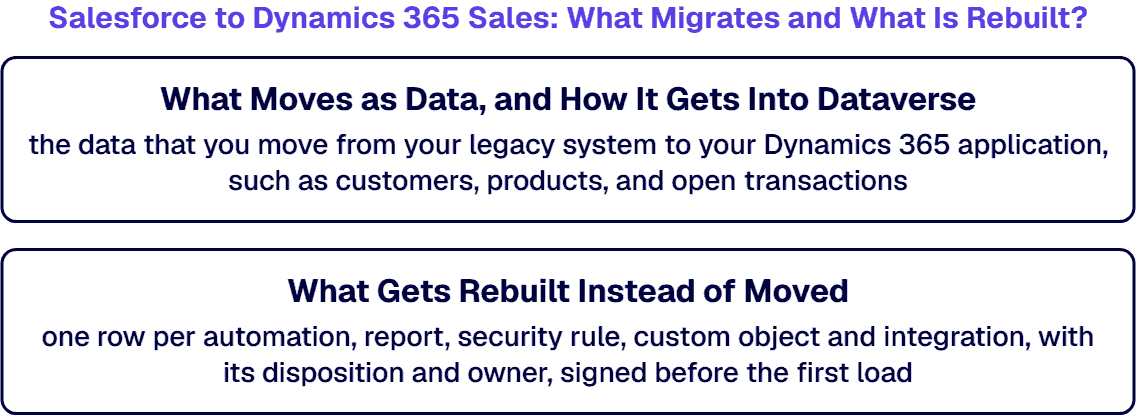
Microsoft separates the data you move from the data that configures the application. Microsoft’s Manage configuration and migration data for Dynamics 365 projects page, read on 2026-10-19, describes migration data as “the data that you move from your legacy system to your Dynamics 365 application, such as customers, products, and open transactions,” and adds: “You need to migrate the data that’s relevant and useful for your Dynamics 365 solution.” The Configuration Migration tool, which Microsoft’s Move configuration data across environments and organizations with the Configuration Migration tool page describes as moving “configuration data across environments and organizations,” carries data between Dataverse environments, for example from test to production. The tool is not a path out of Salesforce.
Pairing each source object with a Dataverse table is a design decision your team documents and signs, object by object, and this page prescribes no pairing.
If your inventory lists only records, it is missing the work that does not travel as data. Every automation, report, security rule, custom object and integration gets a disposition of rebuild, replace or retire, and an owner:
The artifact is the inventory itself: one row per automation, report, security rule, custom object and integration, with its disposition and owner, signed before the first load.
If an auditor will ask whether record history survived, decide it record class by record class before the first load. Original created dates come first. The Excel and CSV path does not support the owner and created-date system fields, according to Microsoft’s Excel and CSV import page, while Microsoft’s Account table/entity reference (Microsoft Dataverse), read on 2026-10-19, lists a column, OverriddenCreatedOn, described as “Date and time that the record was migrated” with the display name “Record Created On”. Dataverse has a place for a migrated record’s original created date; whether your load fills it is a question for whoever builds the load.
The remaining history decisions each need a retention answer an auditor can read:
Carried history also takes storage. Microsoft’s Dataverse capacity-based storage details page, read on 2026-10-19, reports entitlement and usage by “database, file, and log”, so how much history you carry is a storage question to settle with that page open, before cutover.
If the source holds duplicate accounts or contacts, plan to remove them before the load. Microsoft’s Detect duplicate records and merge page, read on 2026-10-19, states that “Microsoft Dataverse helps you address potential duplicates by detecting duplicates for active records such as accounts and contacts,” and then sets the limit that matters for a migration: “The new experience of detecting duplicates and merging them is supported when duplicates are detected while manually entering data in the app and not during import.” The same Microsoft page adds that “Your administrator might also set up duplicate detection rules so duplicates are detected at the time of entering or updating records or importing records.” Detection flags duplicates, and the cleanup is still yours.
After go-live, the same Microsoft page says “The Merge option is available only for Account, Lead, and Contact entities,” and that on a merge “The primary record is kept, and the secondary record is deactivated.” Deduplication is therefore a pre-load cleanup with its own sign-off, and merge is a post-load tool for the record types Microsoft names.
When the source org is switched off, every system that reads from it or writes to it loses its source, so integration re-pointing is its own workstream with its own test plan. Who owns that work, and the choices it forces, is covered in Microsoft integration during an ERP or CRM migration.
Licensing is settled by user. Microsoft’s Dynamics 365 licensing resources page, read on 2026-10-19, states that “The primary licensing method is by named user subscription,” and that “Most Dynamics 365 full user licensing follows the base plus attach model”. The same Microsoft page says “Each Attach license can only be assigned to a user with a qualifying prerequisite Base license.” For a migration plan, those rules become questions: which named users need Dynamics 365 Sales, which already hold a Dynamics 365 base license that a Sales license would attach to, and who signs off the user list before cutover. Microsoft’s Dataverse capacity-based storage page lists user licenses among the sources of storage capacity, with “More capacity added for every user license purchased,” which ties the license decision to the storage question. Product names, prices and entitlements come from Microsoft’s Dynamics 365 Licensing Guide on the day you buy, not from this page.
If the sales team cannot stop selling while the move happens, the first timing decision is a single cutover or a phased move. Microsoft’s data management guidance for Dynamics 365 projects says a migration strategy covers “mode (full push or incremental), and frequency (one-time or recurring)”. For a phased move, Microsoft’s Key considerations for migrating to Dynamics 365 Sales page, read on 2026-10-19, describes “a project where two distinct opportunity management systems migrated to Dynamics 365 Sales” using “a phased approach where they gradually transitioned parts of the organization to the new platform,” and states that “Full synchronization between the legacy and new systems is critical” to keep operations running. Microsoft’s reference architecture does not name its source systems, so read it as Microsoft’s pattern for a phased move to Dynamics 365 Sales.
Whichever timing you choose, Microsoft’s Transition to new solutions successfully with the cutover process page, read on 2026-10-19, lists “A rollback plan in case something goes wrong” as part of the cutover plan and states: “Before you do the real cutover, you should practice your cutover plan in a test environment. This is called a mock cutover or a dress rehearsal.” Microsoft names the final call too: “This is called the go/no-go decision.” Write the go/no-go criteria before the dress rehearsal, so the rehearsal tests them.
If the record map, the rebuild inventory, the history decisions and the integration re-pointing sit with different owners and no one holds the sequence, an outside architect can hold it and keep the plan defensible to the sales leader and the auditor. The broader Dynamics 365 practice is described in Dynamics 365 development services.
i3solutions builds Dynamics 365 integrations using named Microsoft mechanisms including Dataverse, dual write, virtual tables, Azure Logic Apps, Azure Service Bus, and Power Automate connectors. i3solutions has delivered Dynamics 365 integration engagements for regulated enterprises across healthcare, defense and aerospace manufacturing, and financial services. i3solutions has completed more than 20 Dynamics 365 integration engagements. i3solutions implemented Dynamics 365 for a healthcare services firm and integrated it with telephony and email so that a caller’s profile and current case load surface the moment that person makes contact, built to the firm’s HIPAA and PHI requirements. Delivery is senior and US-based.
If the platform decision is still open, the Dynamics 365 vs Salesforce comparison covers that choice.
Two decisions IT owns decide the outcome: which records you carry, such as accounts, contacts, leads and opportunities with their notes and attachments, and which of Microsoft’s documented import paths loads them into Microsoft Dataverse. If the original owner and created-on values matter, decide the load path first, because Microsoft lists those system fields among the ones its Excel and CSV import cannot carry. The automation, reports and integrations around the records are rebuilt in Dynamics 365.
If you need them, settle it before the first load: according to Microsoft, Dataverse has a column for the date and time a record was migrated, displayed as Record Created On, but the Excel and CSV import does not support the owner and created-date system fields. Whether original dates and owners survive depends on the load path your team chooses and tests.
Not with its newer duplicate detection and merge experience: according to Microsoft, that experience works when duplicates are detected during manual data entry and not during import. Clean duplicates in the source before the load, and use merge afterward for accounts, leads and contacts, the record types Microsoft names.
Yes, if you plan a phased move: according to Microsoft, its reference architecture for a phased migration to Dynamics 365 Sales, which does not name its source systems, transitioned parts of the organization gradually and treats full synchronization between the legacy and new systems as critical. Whether the move is phased or a single cutover, Microsoft’s cutover guidance calls for a rollback plan, a rehearsed mock cutover and a go/no-go decision.
Michael Branson
Your SAP ECC finance estate is moving to Dynamics 365 Finance, and before finance and audit accept a go-live they will ask you for a reconciled trial balance for each legal entity, not a report that the load finished. If the platform decision is made and the migration budget is now yours, the questions finance and audit will put to you are narrower than the ones that got the project approved: what each of your SAP structures becomes, which records move, which stay behind, and what evidence shows the new ledger agrees with the old one before go-live. The first design decision is whether to consolidate charts of accounts before designing dimensions and main accounts, and the load itself runs through Microsoft’s data management framework. Whether to choose Dynamics 365 at all is covered on the Dynamics 365 vs SAP page. Whether to modernize a strained estate or replace it is covered on the Dynamics 365 ERP for regulated enterprises page. Budget and timeline are covered on the Dynamics 365 Finance and Dynamics 365 Supply Chain Management implementation cost page.
When you lay your SAP ECC finance structures beside Dynamics 365 Finance, three translations carry the core of the design, and each of them is a decision rather than a copy.
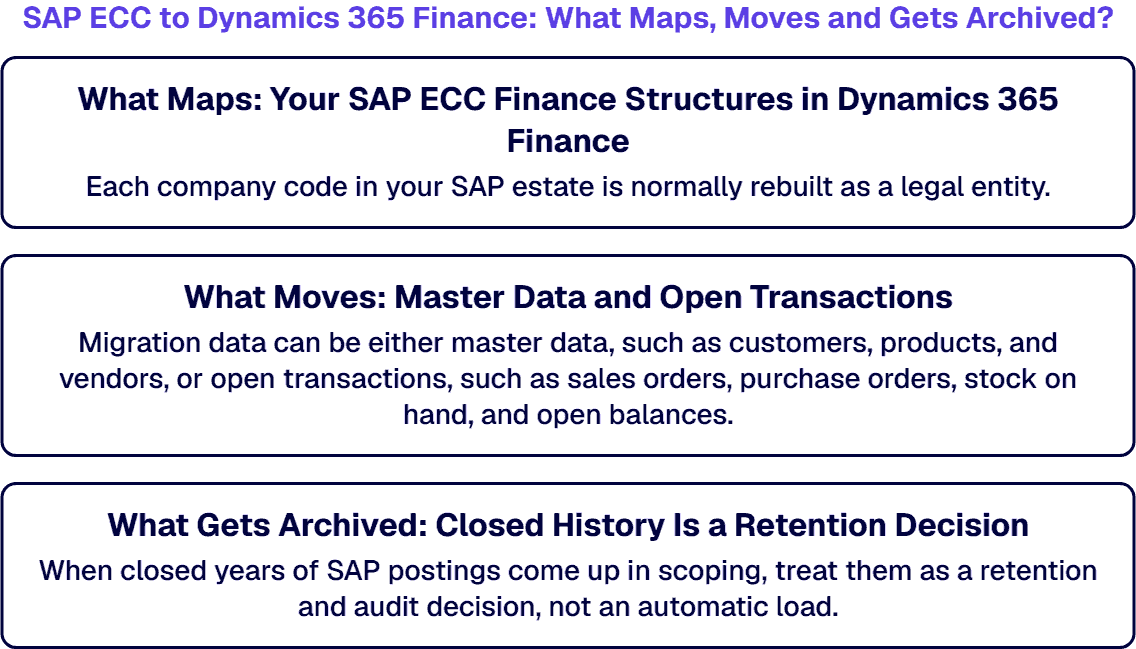
Company code to legal entity. Each company code in your SAP estate is normally rebuilt as a legal entity. Microsoft states that “A legal entity is an organization that has a registered or legislated legal structure,” that “A company is a type of legal entity,” and that “Currently, companies are the only kind of legal entity that you can create, and every legal entity is associated with a company ID.” Source, Microsoft Learn (read date 2026-09-22): Organizations and organizational hierarchies overview.
Controlling area to financial dimensions. The management reporting your controlling area carried is rebuilt as financial dimensions on the ledger. Microsoft states that “Financial dimension values become segments within the ledger account,” and gives the example that “an expense account might include financial dimensions that are named Department, Cost center, and Purpose.” Microsoft states that “In addition, custom dimensions are always shared across legal entities,” so the custom dimension design is an enterprise decision, with per-entity legal entity overrides as the exception. Sources, Microsoft Learn (read date 2026-09-22): Financial dimensions; Plan your chart of accounts.
Chart of accounts. Microsoft describes the chart of accounts as “a structured list of a legal entity’s general ledger accounts” and states that “Any legal entity in an organization can share and use a chart of accounts.” If your SAP estate runs more than one chart, the decision whether to consolidate them before the move takes precedence, because the main account and dimension design downstream depends on it. Source, Microsoft Learn (read date 2026-09-22): Plan your chart of accounts.
If you are scoping the load, Microsoft’s implementation guidance describes migration data this way: “Migration data can be either master data, such as customers, products, and vendors, or open transactions, such as sales orders, purchase orders, stock on hand, and open balances.” The mechanism Microsoft names for the load is the data management framework, which “supports using data entities in the following core data management scenarios,” data migration among them, and which moves records in data packages, each “A single compressed file that contains a data project manifest and data files.” Sources, Microsoft Learn (read date 2026-09-22): Manage configuration and migration data for Dynamics 365 projects; Data management overview.
Field-level mapping belongs in the migration plan, after the legal entities, financial dimensions and chart of accounts are designed, because a field mapping needs a target design to map to. Microsoft’s guidance names that work as “Mapping and transforming the data fields and values between the source and target systems.” Source, Microsoft Learn (read date 2026-09-22): Manage configuration and migration data for Dynamics 365 projects.
When closed years of SAP postings come up in scoping, treat them as a retention and audit decision, not an automatic load. Closed history is not in Microsoft’s description of migration data, so whether any of it loads, for example as summarized period balances for comparative reporting, is your decision, and what must stay reachable is a retention decision. Source, Microsoft Learn (read date 2026-09-22): Manage configuration and migration data for Dynamics 365 projects. The retention test has three questions: what a regulator or auditor must be able to reach, for how long, and from where. The answers come from your own records-retention obligations, and whatever holds the history has to answer those three questions for each legal entity once the SAP system is switched off.
Before you sign off a go-live, Microsoft’s cutover guidance calls for a rehearsal: “Before you do the real cutover, you should practice your cutover plan in a test environment. This is called a mock cutover or a dress rehearsal.” It adds that “You should do the mock cutover several times until you’re confident that everything goes smoothly,” and it names the final call on whether the solution is ready for production: “This is called the go/no-go decision.” Source, Microsoft Learn (read date 2026-09-22): Transition to new solutions successfully with the cutover process.
For a regulated finance estate, the evidence finance and audit will ask for at that decision is a reconciled trial balance for each legal entity, with the open-item subledgers tied back to it: the balances in SAP ECC at the cutover point, the balances loaded into Dynamics 365 Finance, and each difference explained. Run that reconciliation in every mock cutover, so the go/no-go decision rests on a reconciled record and not on a report that the load finished.
A move off SAP ECC also creates integration work, because the systems that fed SAP have to be connected to Dynamics 365 Finance, and that integration seam is covered on the Microsoft integration for ERP and CRM migrations page. i3solutions has delivered Dynamics 365 integration engagements for regulated enterprises across healthcare, defense and aerospace manufacturing, and financial services. Delivery is senior and US-based. i3solutions has completed more than 20 Dynamics 365 integration engagements. The wider practice is set out on the Dynamics 365 development services page.
If you are moving from SAP ECC, the finance estate translates by structure, not field by field: company codes are normally rebuilt as legal entities, and the reporting a controlling area carried is rebuilt as financial dimensions. According to Microsoft, migration data can be master data or open transactions, such as open balances, and the data management framework supports data migration. Closed history is a retention decision, and a mock cutover tests the plan and the ledger load before go-live.
If an auditor or regulator must be able to reach closed SAP history, that is a retention decision, not a load decision. According to Microsoft, migration data can be master data, such as customers, products and vendors, or open transactions, such as open balances. Closed history is not in that list, so whether any of it loads is your decision, and your own records-retention obligations decide how long it is kept and where.
Before go-live, Microsoft’s cutover guidance calls for a mock cutover, or dress rehearsal, in a test environment, repeated until the team is confident, followed by a go/no-go decision on whether the solution is ready for production. For a regulated finance estate, the evidence behind that decision is a trial balance report from each ledger, reconciled for each legal entity, with the open-item subledgers tied back to it and each difference between SAP ECC and Dynamics 365 Finance explained.
Michael Branson
In short, drawn from Microsoft’s Dynamics 365 Guides and Remote Assist reaching end of support on December 31, 2026 announcement and the Microsoft Learn pages cited in this guide:
If you run maintenance or field service on Dynamics 365, this deadline can surface late, and the renewal you expected to negotiate is not on offer: Microsoft’s Dynamics 365 Guides and Remote Assist reaching end of support on December 31, 2026 announcement states, “Please note, subscriptions may be purchased or renewed until November 1, 2025.” Meanwhile technicians still open work orders whose maintenance checklists point to a guide, and experts still take calls from the field. Two things can go wrong from this point. The date passes and the first shift of the new year finds a checklist that still points to a guide the app can no longer open. Or the first replacement product pitched is bought before anyone checks where it keeps maintenance content or which government cloud it runs in. This guide sets out what stops, where the apps are wired in, what to do with authored guides and their data, how remote expert calls continue, and the criteria for choosing what replaces the work instructions.
If your plan reads end of support as the day technical support ends while the apps keep running, it is planning for the wrong day. Microsoft’s Dynamics 365 Guides and Remote Assist reaching end of support on December 31, 2026 announcement states: “Dynamics 365 Guides and Dynamics 365 Remote Assist will reach end of support on December 31, 2026.” It continues: “After December 31, 2026 these products will no longer receive security updates, non-security updates, bug fixes, or technical support.” And then: “The apps will no longer be functional, however, the data will still be retained in their Dataverse environment(s).” For planning, treat November 1, 2025 as already past, with no renewal to negotiate, and December 31, 2026 as the day the apps stop, not only the day support calls end.
Field Service documentation repeats the note. Microsoft’s Collaborate in mixed reality with Field Service and Remote Assist page states: “Dynamics 365 Guides and Remote Assist will no longer be available after December 31, 2026.”
Microsoft’s lifecycle product pages for Dynamics 365 Guides and Dynamics 365 Remote Assist list 12/31/2026 in the Retirement Date column of their support-dates tables, and each page notes that its support dates are shown in the Pacific Time Zone. Take the date from the announcement, December 31, 2026, and plan to finish well before it rather than to an hour on that day.
When you build the inventory from the license list alone, it will miss use, because Field Service users can reach Remote Assist without a Remote Assist purchase. Microsoft’s Dynamics 365 Guides and Remote Assist reaching end of support on December 31, 2026 announcement starts its action list with the inventory: “Identify users and scenarios that rely on Dynamics 365 Guides or Dynamics 365 Remote Assist and prepare to move before December 31, 2026.”
Microsoft’s Collaborate in mixed reality with Field Service and Remote Assist page says of that integration: “Both users need a Field Service license, which gives them access to Remote Assist too.” It adds: “Calls are initiated through Teams.” Remote Assist use can therefore exist where no one bought Remote Assist by name.
Guides can also sit inside Field Service work. Microsoft’s Integrate Guides with Field Service page states: “Integration with Dynamics 365 Guides lets Field Service users attach mixed reality guides to Field Service tasks.”
On the maintenance side, Microsoft’s Integrate Dynamics 365 Supply Chain Management (Asset management) with Dynamics 365 Guides page states: “If a guide is associated with an Asset Management work order, a worker who opens the work order’s maintenance checklist in the Supply Chain Management (Dynamics 365) mobile app sees that a guide is available.” Associations spread: “For example, a guide that is associated with a maintenance job type is automatically associated with all work orders that specify that job type.” The same page lists dual-write as a prerequisite: “Turn on dual-write for Supply Chain Management apps.”
One detail matters for whoever maintains that configuration. As read on October 20, 2026, the Asset management integration page carries no end-of-support note, while the Field Service integration pages, such as Integrate Guides with Field Service, carry Microsoft’s note that Guides and Remote Assist “will no longer be available after December 31, 2026.” Someone reading only the Asset management documentation sees no warning.
Build the inventory from configuration and call use first, then from licenses:
Microsoft’s pages read for this guide do not say what a work order’s guide association shows once the apps stop working. Treat every association as something to remove or repoint before the date, not something to discover afterward.
The harder decision is what happens to the guides your team has already authored, because the export step Microsoft names is not a portable export. Microsoft’s announcement lists “Export data from the Guides PC app” as the export action and points to packaging. Microsoft’s Package a guide in Dynamics 365 Guides page states: “Use a packaged guide to archive versions of a guide, easily migrate guides between environments, or quickly share content with others regardless of permission levels.” It also sets the limits: “The packaged guide can’t be edited and can only be viewed with a HoloLens device in operator mode.” And: “A packaged guide can’t be opened in the PC app.” Its limitations list includes “Maximum of 2 GB for a packaged guide”.
Packaging also changes who can see the content. The same Package a guide in Dynamics 365 Guides page states: “Packaged content is no longer protected by permissions that might be set by your organization.” For a maintenance program, that is the sentence to read twice. If a guide holds restricted technical data, a package moved outside the environment carries that content without the permissions that governed it. Whether a given guide holds such data is a determination for your export-control or trade-compliance function, and it is made before any package leaves the environment.
The data itself stays where it is. Microsoft’s Dynamics 365 Guides and Remote Assist reaching end of support on December 31, 2026 announcement says the data “will still be retained in their Dataverse environment(s)” after the apps stop. That makes the step text and media in Dataverse a starting point for rebuilding instructions elsewhere, but the Microsoft pages read for this guide describe no bulk export or conversion path beyond packaging. Confirm the method with Microsoft, or in the replacement’s own documentation, before you plan on it.
Decide one of these for each guide, and record the decision:
Before any of the three, record who owns the guide and whether it holds restricted technical data.
When a technician on a job needs an expert to see what they see, Microsoft points to a path with conditions worth checking call pattern by call pattern. Microsoft’s Dynamics 365 Guides and Remote Assist reaching end of support on December 31, 2026 announcement says “Certain Remote Assist scenarios may be supported” by the spatial annotation feature in Microsoft Teams Mobile. It says certain scenarios, not all of them.
Microsoft’s Use spatial annotations through Microsoft Teams mobile page sets the prerequisites. The first reads: “At least one person on the call has a Dynamics 365 Field Service, Guides, or Remote Assist license.” The page adds: “The system only requires one licensed user to unlock spatial annotation capabilities to all other mobile and desktop users.” The technician who shares their space needs a phone or tablet with augmented reality support, from the platforms the page lists. For calls with people outside your organization: “Make sure your Teams admin has enabled meetings for external users.” Microsoft describes the purpose this way: “Technicians can share their real-time view with experts in remote locations to get the help they need, reducing travel time and cost.”
Two points are open, and both belong in writing from Microsoft for your tenant before you rely on this path. First, the page states the license rule as it stands today; confirm whether a Field Service license alone still enables spatial annotation once Guides and Remote Assist licenses end. Second, the page does not scope itself by cloud, and Microsoft’s government availability table has no Teams row; if your tenant is in GCC or GCC High, confirm that spatial annotation is available there.
For each call pattern, name the participant who holds the license that enables annotation, and test the pattern end to end with that person on the call before the date.
When you choose what replaces step-by-step work instructions, you face the decision most open to a product pitch, because Microsoft’s announcement names no Microsoft successor for Guides. Microsoft’s Dynamics 365 Guides and Remote Assist reaching end of support on December 31, 2026 announcement says: “A variety of mixed reality solutions are available on the Microsoft Marketplace that may meet your organizational needs.” That sentence names no product and recommends none. The choice is yours, and it is easier to defend when it is made against written criteria.
Ask each candidate to:
This guide names no product and ranks none. The criteria are the comparison.
If your Dynamics 365 environment runs in a US government cloud, the availability table decides which of these apps your environment could run. Microsoft’s Dynamics 365 US Government page publishes an availability table with GCC, GCC High and DoD columns. As read on October 20, 2026, the table shows:
The same Dynamics 365 US Government page states: “Some features aren’t available in all U.S. Government clouds.” It also says: “Check back monthly for important updates.” Check each replacement, and the Teams path in the remote expert calls section, against the column for your cloud rather than against commercial documentation.
That table describes availability. It does not settle whether your contracts require GCC High or whether given work instructions are restricted technical data; those determinations belong to your contracting officer and your export-control or trade-compliance function. If the transition sits inside a GCC or GCC High Dynamics 365 environment, Dynamics 365 implementation hiring for government contractors covers choosing a firm for that environment.
Sequencing matters because one step depends on an app that stops: the content plan runs through the Guides PC app, which stops working at the end of support. Work in this order, and finish before December 31, 2026, the date in Microsoft’s Dynamics 365 Guides and Remote Assist reaching end of support on December 31, 2026 announcement:
If your situation is one of these, start somewhere else, or treat this guide as only part of the answer.
Whether your own team or an outside firm carries out the transition, ask for these in writing, finished before the date in Microsoft’s Dynamics 365 Guides and Remote Assist reaching end of support on December 31, 2026 announcement:
When a maintenance or field organization has to move off Guides and Remote Assist before the end of support, the work i3solutions does is on the Dynamics 365 side: inventorying where guides are associated with job types, maintenance checklists and Field Service tasks, removing or repointing those associations, handling the guide data retained in Dataverse, and configuring Field Service and Teams for the remote-call pattern, as a project with embedded specialists where your team needs them. The choice of work-instruction product stays with your organization, made against the replacement criteria.
i3solutions implements Microsoft Dynamics 365 for regulated enterprises, including customizing Field Service to align with unique business logic, workflows, and UI requirements. i3solutions has delivered Dynamics 365 integration engagements for regulated enterprises across healthcare, defense and aerospace manufacturing, and financial services. i3solutions builds Dynamics 365 integrations using named Microsoft mechanisms including Dataverse, dual write, virtual tables, Azure Logic Apps, Azure Service Bus, and Power Automate connectors. i3solutions has completed more than 20 Dynamics 365 integration engagements. Its Dynamics 365 developers and consultants are all U.S.-based. i3solutions has been a Microsoft Partner with 30 years of enterprise technology delivery experience and has delivered 1,500+ Microsoft engagements across aerospace and defense, financial services, and health sciences.
Ongoing operation after the handover is a separate Application Managed Services engagement with its own scope; the Guides transition itself does not replace the internal team, run open-ended, or create vendor lock-in. The configuration is handed to your team, with support for what was built. This work sits within i3solutions’ Dynamics 365 practice, described in Dynamics 365 development services.
At the end of support. According to Microsoft Learn, Dynamics 365 Guides and Dynamics 365 Remote Assist reach end of support on December 31, 2026, and after that date the apps are no longer functional. They also stop receiving security updates, non-security updates, bug fixes and technical support after December 31, 2026.
No. Microsoft Learn states that subscriptions could be purchased or renewed only until November 1, 2025, so there is no renewal to negotiate. Plan the transition instead.
It stays in Dataverse, but the apps do not. Microsoft Learn says the apps are no longer functional after December 31, 2026, while the data is still retained in their Dataverse environments. The same documentation notes that a packaged guide can only be viewed with a HoloLens device in operator mode and can’t be opened in the PC app, so packaging is an archive rather than a portable export.
Spatial annotation in Microsoft Teams Mobile, the option Microsoft names. Microsoft Learn says certain Remote Assist scenarios may be supported using that feature, and it needs at least one person on the call with a Dynamics 365 Field Service, Guides, or Remote Assist license; one licensed user enables spatial annotation for all other mobile and desktop users on the call. Confirm with Microsoft how the license rule applies after the end of support and whether the feature is available in your cloud.
Today it does. Microsoft Learn states that both users need a Field Service license, which gives them access to Remote Assist too. Microsoft Learn adds that Guides and Remote Assist will no longer be available after December 31, 2026, so that access ends with them.
Remote Assist is listed there; Guides is not. In Microsoft Learn’s Dynamics 365 US Government availability table, Dynamics 365 Guides appears in the GCC column only, and Dynamics 365 Remote Assist on HoloLens or HoloLens 2 appears in the GCC and GCC High columns but not in DoD. Microsoft asks readers to check back monthly for updates. Both still reach end of support on December 31, 2026.
Michael Branson
Quick answer. As of October 2026, Dynamics 365 can carry much of an aerospace and defense company’s maintenance and asset work, because Microsoft Learn documents Asset Management as “an advanced module for managing assets and maintenance jobs in Dynamics 365 Supply Chain Management”, with maintenance plans, work orders and downtime tracking, while Field Service is its separate app for service at customer locations; program work fits where the project accounting you need is available in the cloud your contracts require. In GCC High, the Dynamics 365 US Government page on Microsoft Learn, last updated October 6, 2026, lists Field Service, Finance and Supply Chain Management but not Project Operations or Guides, and it says “Check back monthly for important updates.” Where the design needs an add-on, confirm where it stores data, because Microsoft Learn says third-party applications and services “might involve storing, transmitting, and processing your organization’s customer data on third-party systems” that “aren’t covered by the Power Platform and Dynamics 365 apps compliance and data protection commitments”, and test repair-station records under 14 CFR 145.219 and earned value data under DFARS 252.234-7002 as requirements, not assumptions.
When the steering group asks whether Dynamics 365 can be the one system, the question arrives as a single yes or no, and the honest answer differs for the maintenance floor, the program office and the government cloud. This framework tests each of those scopes against what Microsoft Learn and the eCFR say, read on 2026-09-24, so the shortlist decision you take into the request for proposal is one you can defend. Which Dynamics 365 applications form a regulated ERP core, and how to choose the cloud environment, is covered on the Dynamics 365 ERP for regulated enterprises page; this page tests the operations scope around that core.
If your maintenance workload has never been sorted by whose equipment it is, sort it before the first demo, because Microsoft documents two different apps for the two cases. The Asset management overview says “Asset Management enables you to efficiently manage and service many types of equipment in your company (such as machines, production equipment, and vehicles).” The Assets and work orders page says “An asset is a machine or machine part that requires continuous maintenance and service.” and “Assets can be created in a hierarchical structure, and they can be related to functional locations.” The Overview of Dynamics 365 Field Service says “The Dynamics 365 Field Service business application helps organizations deliver onsite service to customer locations.”
Classify each maintenance workload into one of three classes before any demo is scheduled:
Each class gets its own row in the fit-test table for your request for proposal, and its own demo script.
When the maintenance director asks what the module does, answer from Microsoft’s pages rather than from a demo script someone else wrote. Microsoft Learn’s Preventive maintenance overview says “Maintenance plans are used for preventive maintenance on individual assets. Maintenance rounds are used for preventive maintenance on a group or a set of assets.” Its Introduction to work orders says “Work orders are used to manage maintenance jobs, provide required information for them, and register consumption on them.”
Location and cost history follow the installed position. The Introduction to functional locations page says “Functional locations provide traceability of assets in relation to requests, work orders, fault registrations, condition assessments, production stop registrations, and asset counter registrations.” It also says “asset costs are always related to the functional location that the asset was installed on at a given time.”
Availability and warranty are documented too. The Maintenance downtime for work orders page says of downtime registrations: “By using them, you can measure availability, count stops, and calculate mean time between stops for each asset.” The Warranties on assets and asset types page says “When you create a work order for an asset that is covered by a vendor warranty, if the work order has an expected start date during the warranty period, you receive a notification about the warranty agreement.”
Script one real maintenance event from your own records and run it end to end in the demo: the maintenance plan that triggers it, the work order, the parts consumed, the downtime registered, and the cost that lands against the functional location. Score each step as shown working, shown with configuration, or not shown.
If your organization holds an FAA repair-station certificate, the records rule comes before any feature list. The recordkeeping section, 14 CFR 145.219 as published in the eCFR text for September 1, 2026, includes this requirement: “A certificated repair station must retain records in English that demonstrate compliance with the requirements of part 43. The records must be retained in a format acceptable to the FAA.” As published in the eCFR, the same section also says “A certificated repair station must retain the records required by this section for at least 2 years from the date the article was approved for return to service.”
The fit test asks one question of any design: does it produce and retain those records in a form your repair station can stand behind? This framework makes no statement, either way, about whether a Microsoft app produces them. Whether your organization is a certificated repair station, and what format the FAA accepts from it, is a determination between your organization and the FAA. Put the records requirement in the request for proposal as a test the bidder demonstrates on your own work order, and record who answered it.
If a program contract carries DFARS 252.234-7002, the program office’s question is not whether Dynamics 365 has projects, but which system holds the earned value data. As published in the eCFR text for September 1, 2026, that clause says the Contractor shall use “An Earned Value Management System (EVMS) that complies with the EVMS guidelines in the American National Standards Institute/Electronic Industries Alliance Standard 748, Earned Value Management Systems (ANSI/EIA-748)”. As published in the eCFR, the same clause also says “If this contract has a value of $50 million or more, the Contractor shall use an EVMS that has been determined to be acceptable by the Cognizant Federal Agency (CFA).”
On the Microsoft side, the maintenance module links to project accounting. The Forecasts, work orders, and projects page says “In Asset Management, integration with the Project management and accounting module helps optimize cost control, so that users can track costs on maintenance job type forecasts and work order jobs.” Microsoft Learn’s Dynamics 365 Project Operations page says “Microsoft Dynamics 365 Project Operations connects sales, resourcing, project management, and finance teams in a single application”. Its Project Operations for manufacturing deployment overview lists, among the requirements for choosing that deployment type, “An extensive Project management system that manages inventoried items and job/production order costing for internal and billable projects for schedules and financials.”
The cloud narrows this row. Microsoft Learn’s Dynamics 365 US Government table lists Project Operations in the GCC column only, and lists Project Service Automation in the GCC, GCC High and DoD columns. The table does not say which app carries the project accounting a GCC High program needs, so confirm that with Microsoft before the design is drawn. This framework also makes no statement about whether any Microsoft app produces earned value data that meets ANSI/EIA-748: for a contract at the clause’s own threshold, the clause itself makes the Cognizant Federal Agency the judge of acceptability.
Name the system of record for the earned value data your contract requires, and test it in the request for proposal against a real control account from your own program. Labor and cost accounting for DCAA purposes is a separate decision, covered on the Dynamics 365 consulting for DCAA-compliant deployments page.
If your contracts put Dynamics 365 in GCC High, start the fit test from Microsoft’s availability table, not from the commercial product list. Microsoft Learn’s Dynamics 365 US Government page, last updated October 6, 2026, lists, among other apps, Field Service, Finance and Supply Chain Management in its GCC High column, and lists Project Operations and Guides in its GCC column only. In its DoD column, Finance and Supply Chain Management carry the note “Pending IL5 Approval”. The same page says “Some features aren’t available in all U.S. Government clouds.” and “Check back monthly for important updates.”
The page also describes what the government cloud provides. Microsoft’s Dynamics 365 US Government page says “For our US Department of Defense contractor customer base, Microsoft operates the service in a manner that enables these customers to meet ITAR commitment and DFARS acquisition regulations, as documented and required by their contracts with the US Department of Defense.” It also says “Only Microsoft administrators who are U.S. citizens can access Dynamics 365 US Government customer content.”
Mixed-reality work instructions are the row the table changes most for maintenance. Microsoft Learn’s Integrate Dynamics 365 Supply Chain Management (Asset management) with Dynamics 365 Guides page says “If a guide is associated with an Asset Management work order, a worker who opens the work order’s maintenance checklist in the Supply Chain Management (Dynamics 365) mobile app sees that a guide is available.” Because the table lists Guides for GCC only, a maintenance design in GCC High that relies on Guides needs its substitute planned before the request for proposal. Microsoft’s Dynamics 365 Guides and Remote Assist reaching end of support on December 31, 2026 announcement says “Dynamics 365 Guides and Dynamics 365 Remote Assist will reach end of support on December 31, 2026.” and “The apps will no longer be functional, however, the data will still be retained in their Dataverse environment(s).”, so a Guides design in any cloud that must run past that date needs its substitute planned too. Re-read the table on the day you score bids, because Microsoft says it changes. The full GCC High app list and the defense cost picture are covered on the Dynamics 365 implementation cost for defense contractors page.
When the requirements document puts configuration control and part genealogy on one line, split them, because Microsoft documents them in different places with a different status. The Engineering change management overview says “Through product versions and engineering change management, you can document, assess the impact of, and apply engineering changes throughout the whole lifecycle of a product.”
Serial-level genealogy sits in a preview feature. Microsoft Learn’s Traceability overview (preview) page describes as-built bill of materials registration and chain-of-custody tracking by serial or batch number, and it says “This is a preview feature.” and “Preview features aren’t meant for production use and might have restricted functionality.”
Write engineering change and part-level genealogy as two separate requirements, and do not score a preview feature as production-ready. Re-read the preview status on the day you score bids.
If any of these four situations describes your program, the fit test changes shape:
When the request for proposal goes out, hand each bidder the same table and ask them to fill the last column with evidence. The first two columns come from Microsoft Learn as cited in the sections of this page; the third is the test you run.
| Scope | Microsoft app as documented | Listed for GCC High in Microsoft’s table | Test to run | Needs add-on or separate system? |
|---|---|---|---|---|
| Owned-asset maintenance | Asset Management in Supply Chain Management (Asset management overview) | Supply Chain Management: yes | One real maintenance event, plan to cost, end to end | Bidder answers with evidence |
| Customer-site service | Field Service (Overview of Dynamics 365 Field Service) | Field Service: yes | One onsite visit from request to completion | Bidder answers with evidence |
| Shop repair and repair-station records | No cited Microsoft page describes it by name | Not applicable | Records under 14 CFR 145.219, produced and retained on your own work order | Bidder answers with evidence |
| Engineering change | Engineering change management in Supply Chain Management | Supply Chain Management: yes | One change from request to released product version | Bidder answers with evidence |
| Serial traceability | Traceability, a preview feature | No row in the table | Status re-read on scoring day; not scored as production-ready while in preview | Bidder answers with evidence |
| Program accounting and earned value | Project Operations; the Project management and accounting integration in Asset Management | Project Operations: no | Name the earned value system of record; test it on one control account | Bidder answers with evidence |
| Mixed-reality work instructions | Guides, integrated with Asset Management work orders | Guides: no | Name the substitute; Microsoft says Guides reaches end of support on December 31, 2026 | Bidder answers with evidence |
| Government cloud of record | Dynamics 365 US Government (GCC, GCC High, DoD) | The column your contracts require | Table re-read on scoring day | Bidder answers with evidence |
The table lists apps, not features, and Microsoft says some features aren’t available in all U.S. Government clouds, so a yes in the third column is where the test starts, not where it ends.
Where a row needs an add-on or a separate system, apply three rules before it is scored:
i3solutions builds Dynamics 365 integrations using named Microsoft mechanisms including Dataverse, dual write, virtual tables, Azure Logic Apps, Azure Service Bus, and Power Automate connectors.
Choosing and vetting the firm that implements the result is a separate step, covered on the Dynamics 365 implementation firms for government contractors page.
When the fit test has to be run before the request for proposal goes out, i3solutions runs it with you against your own maintenance, program and cloud scope, and writes the fit-test table from your records rather than from a generic list. i3solutions implements and integrates Dynamics 365.
i3solutions has delivered Dynamics 365 integration engagements for regulated enterprises across healthcare, defense and aerospace manufacturing, and financial services. i3solutions has completed more than 20 Dynamics 365 integration engagements. i3solutions recently stood up two brand-new Dynamics 365 instances.
Staffing is stated plainly. i3solutions provides dedicated US-based Microsoft teams for aerospace and defense programs. All i3solutions Dynamics 365 developers and consultants are U.S.-based. Work runs as project delivery, and embedded specialists can join your own team for the design and testing that follow the fit test. The wider service line is described on the Dynamics 365 development services page.
Yes, as a module. Microsoft Learn says “Asset Management is an advanced module for managing assets and maintenance jobs in Dynamics 365 Supply Chain Management.” It also says “Maintenance plans are used for preventive maintenance on individual assets.” and “Work orders are used to manage maintenance jobs, provide required information for them, and register consumption on them.”
Whose equipment it is and where the work happens. Microsoft Learn says “Asset Management enables you to efficiently manage and service many types of equipment in your company (such as machines, production equipment, and vehicles).” and “The Dynamics 365 Field Service business application helps organizations deliver onsite service to customer locations.”
Not in Microsoft’s current table. The Dynamics 365 US Government page on Microsoft Learn, last updated October 6, 2026, lists Project Operations in the GCC column only, and it says “Check back monthly for important updates.”
Among the apps that matter for this work, the Dynamics 365 US Government page on Microsoft Learn, last updated October 6, 2026, lists Field Service, Finance, Supply Chain Management and Project Service Automation in its GCC High column, and does not list Project Operations or Guides there. It says “Some features aren’t available in all U.S. Government clouds.” and “Check back monthly for important updates.”
Not automatically. Microsoft Learn says “These third-party applications and services might involve storing, transmitting, and processing your organization’s customer data on third-party systems that are outside of the Power Platform and Dynamics 365 apps Engagement infrastructure and therefore aren’t covered by the Power Platform and Dynamics 365 apps compliance and data protection commitments.”
Michael Branson
Your finance operation runs on Oracle E-Business Suite, or an Oracle Fusion Cloud ERP proposal is on the table, while identity and collaboration have moved to Microsoft, sometimes into GCC High. A Microsoft partner is presenting Dynamics 365, and Oracle is offering its own route, which its E-Business Suite page labels “Move from Oracle E-Business Suite to Oracle Fusion Cloud ERP”. Oracle’s March 18, 2026 announcement extends “Premier Support for Oracle E-Business Suite 12.2 through at least 2037”, so for a 12.2 customer the decision has to stand on the regulated workload and the estate around it, not on a support date.
A steering committee asked to fund an ERP change wants the conditions that decide it, not a feature list. Dynamics 365 Finance and Supply Chain Management is the stronger answer when both of these conditions hold for your organization:
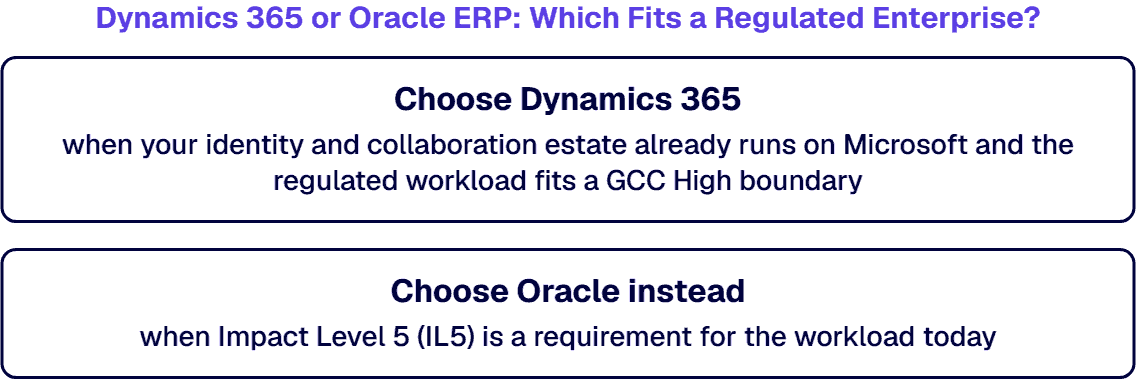
When these conditions pull in different directions, the authorization requirement settles it. A workload that needs Impact Level 5 (IL5) authorization today points to Oracle regardless of how much of the estate runs on Microsoft, because Microsoft’s own availability list reads “Pending IL5 Approval” against Dynamics 365 Finance in the DoD environment. Where IL5 is not required, the estate condition carries the most weight, because it decides how many vendor perimeters your auditors review.
An E-Business Suite team hearing Oracle’s own Fusion proposal is comparing two different things at once, and the answer changes with which one is on the table.
Oracle describes its cloud product this way: “Oracle Fusion Cloud ERP is a complete, modern, cloud ERP suite” with, in the same sentence, “automatic updates to stay current”. Of E-Business Suite, Oracle writes that “Thousands of organizations around the world rely on Oracle E-Business Suite to run their key business operations.”
Against Fusion Cloud ERP, you are comparing two cloud suites whose vendors manage the update cycle, Oracle through automatic updates and Microsoft through continuous updates. Against E-Business Suite 12.2, you are comparing a move with staying on a release Oracle continues to support, and the question becomes whether the move is worth making at all. If you are weighing more than two vendors, the three-way comparison is the Dynamics 365 vs Salesforce vs SAP comparison.
If your case for moving rests on E-Business Suite running out of support, read Oracle’s own dates before you take it to a steering committee.
Oracle’s announcement dated March 18, 2026 extends Premier Support for Oracle E-Business Suite 12.2 to a new support date, and Oracle’s Applications Unlimited page states the same horizon for the wider product family.
That date is a floor in Oracle’s words, “through at least 2037”, not an end date. For a 12.2 customer, the case for leaving has to be made on the regulated workload, the government cloud each vendor offers, and the estate around the ERP.
A defense supplier’s auditor will ask which authorization applies to the ERP, and the two vendors answer that question at different levels. Oracle states authorizations for its government cloud regions. Microsoft states them per product. Read the table with that difference in mind.
The Oracle pages read for this comparison do not name Oracle Fusion Cloud ERP together with a specific Impact Level, so this comparison makes no per-product authorization claim for Oracle. Ask Oracle which services each government region covers before you rely on a region’s authorization for the ERP. Whether a given contract’s data belongs in any of these environments is a determination for your contracting officer and the contract clause, not for either vendor’s web page. For the full mapping of Microsoft’s commercial and government environments to regulatory obligations, see the Dynamics 365 ERP for regulated enterprises guide.
A budget owner asked for a list price on both sides will find one published number and one sales conversation.
Microsoft’s Finance pricing page lists Dynamics 365 Finance at “$210.00 user/month, paid yearly” and Dynamics 365 Finance Premium at “$300.00 user/month, paid yearly”, as read in September 2026. Oracle’s ERP page routes buyers to “Request a demo” and “Contact Sales”, so the Oracle side of a like-for-like comparison starts with a quote from Oracle’s sales team.
A list price per user is the smallest part of the number your committee will see. What that price becomes across your user mix is worked through on the Dynamics 365 licensing cost page, what implementation adds is on the Dynamics 365 Finance and Supply Chain implementation cost page, and the GCC High version of that question is on the Dynamics 365 implementation cost for defense contractors page.
Your release calendar has to absorb whichever update rhythm the vendor sets, so read both vendors’ statements side by side.
Microsoft’s update policy for finance and operations apps states: “Customers who purchase subscriptions of finance and operations apps experience continuous updates that Microsoft manages. Customers can postpone one consecutive service update.” Oracle describes Fusion Cloud ERP as carrying “automatic updates to stay current”, and its Oracle Cloud Applications documentation states: “We use quarterly updates to deliver new features and functionality for your Oracle Cloud Applications.”
Both cloud suites put the update cycle in the vendor’s hands, and each gives your release process a rhythm to plan around. Neither statement makes one platform easier to govern than the other.
Some enterprises reading a Microsoft partner’s comparison should stay on Oracle, and any one of these cases is enough on its own:
A re-platforming justified only by estate alignment has to survive your auditors’ first review. If it cannot, stay.
A group finance function on Oracle with subsidiaries on other systems faces this question before any replacement question.
Two patterns fit. In a two-tier design, Oracle stays the group ledger and Dynamics 365 runs in the subsidiaries, with results consolidated at group level. In an edge design, Dynamics 365 runs the customer-facing layer and Oracle stays the ERP behind it. Either way the integration carries the design, and the mechanisms matter: i3solutions builds Dynamics 365 integrations using named Microsoft mechanisms including Dataverse, dual write, virtual tables, Azure Logic Apps, Azure Service Bus, and Power Automate connectors.
For the two-tier question with SAP at group instead of Oracle, see the Dynamics 365 vs SAP comparison. If the customer-facing layer is the open question, that decision is the Dynamics 365 vs Salesforce comparison.
A partner presenting Dynamics 365 to an Oracle customer has an interest in the answer, so this is what ours rests on. The claims in this list are the ones we can document, quoted at the size we can document them:
The decision work starts from your estate: which systems hold the regulated data, which environment your contracts name, and what the Oracle side runs today. The answer can be to stay on Oracle, to run the two side by side, or to move; the last two both turn on the integration design. Our wider Dynamics 365 practice is on the Dynamics 365 development services page, and capacity for a program already underway is on the hire Dynamics 365 developers page.
Choose Dynamics 365 when your identity and collaboration estate already runs on Microsoft and the regulated workload fits a GCC High boundary. With the estate on Microsoft, finance data can stay in step with Dataverse through dual-write, which Microsoft describes as “tightly coupled, bidirectional integration between finance and operations apps and Dataverse”. Choose Oracle instead when Impact Level 5 (IL5) is a requirement for the workload today, because Dynamics 365 Finance carries the status “Pending IL5 Approval” on Microsoft’s DoD environment availability list.
In GCC High, yes. Microsoft’s deployment FAQ states that “Dynamics 365 Finance and Dynamics 365 Supply Chain Management are supported in both US Government Community Cloud (GCC) and GCC-High environments”. At IL5, the Dynamics 365 US Government article on Microsoft Learn (dated December 9, 2025) lists “Dynamics 365 Finance – Pending IL5 Approval” for the DoD environment. Whether a specific contract’s data belongs in either environment is a determination for the contracting officer and the contract clause.
For release 12.2, an Oracle announcement dated March 18, 2026 extends Premier Support “through at least 2037”. That is a floor in Oracle’s own words, not an end date, so a support date does not force an E-Business Suite 12.2 customer off the platform; a move has to be justified by the estate and the regulated workload instead.
Oracle is the better choice when the ERP sits inside a wider Oracle standard your teams already run, when the workload has to run at Impact Level 5 now, or when a stable E-Business Suite 12.2 meets your compliance obligations. Oracle states that its US Defense Cloud is “fully authorized for DISA Impact Levels (IL) 2, 4, and 5”, while Microsoft’s availability list gives Dynamics 365 Finance the status “Pending IL5 Approval”. Oracle’s statement covers its defense cloud rather than a named ERP product, so confirm with Oracle which services the region includes.
Yes. Two patterns fit: a two-tier design, where Oracle keeps the group ledger while subsidiaries run Dynamics 365, or an edge design, where Dynamics 365 serves the customer-facing layer and Oracle remains the ERP behind it. The integration decides whether either pattern works, and Microsoft documents dual-write as a mechanism for keeping finance and operations data and Dataverse in step in both directions.
Michael Branson
Quick answer. As of October 2026, Microsoft says both the Data Integrator templates for Dynamics 365 Field Service and the Field Service integration with finance and operations applications stop after February 28, 2027, and, according to Microsoft Learn’s Field Service feature deprecations page, the capability “is transitioning to the Field Service and Project Operations integration”, so an estate posting work orders into Finance and Supply Chain Management has to choose a deployment model, license the user who installs the new integration for Project Operations, and cut over before that date. According to Microsoft Learn, the model decides where inventory lives (Field Service keeps it without Finance; Finance owns it in the integrated model, where Field Service inventory management is disabled), and Microsoft’s setup page asks you to uninstall the legacy integration before enabling the new one, so the order is model, then license and prerequisites, then a tested cutover. In GCC, GCC High and DoD, Microsoft’s Field Service government table, dated August 28, 2026, lists the Field Service and Project Operations integration as not available, so a government-cloud estate plans its path from what its cloud lists today and rechecks the table.
At month end, the controller expects the labor and parts your technicians used on work orders to be in the ledger as journals, and no one on the finance side thinks about the integration that puts them there. Then a Microsoft notice says that integration stops on a fixed date, with no extension language, and names a replacement that is not the same shape. This guide sets out which of the two retiring mechanisms your estate runs, what the replacement moves, what it needs before it can be installed, the order of work before February 28, 2027, and what to do if your cloud does not list the replacement.
If you plan for one retirement and your estate runs the other, the inventory is wrong before it starts, because two different mechanisms end on the same day. The first is the older template-based link. Microsoft Learn’s list of removed or deprecated platform features for finance and operations states: “The Data Integrator templates for Dynamics 365 Field Service will no longer be available after February 28, 2027”. The same entry states: “This integration works by synchronizing work orders, agreements, inventory, and projects between Field Service and Supply Chain Management.” Its stated reason: “This functionality is scheduled to be replaced by a simpler, more integrated Field Service experience.”
The second is the newer, dual-write based integration. Microsoft Learn’s Field Service feature deprecations page, in a notice dated December 1, 2025, states: “The Field Service integration with finance and operations applications won’t be available after February 28, 2027. This capability is transitioning to the Field Service and Project Operations integration.” According to Microsoft Learn’s page on the Field Service integration with finance and operations applications, “The integration relies on the enabled dual-write framework and the mappings to ensure that transactions use a common understanding of critical core concepts.” That page also says what it does for the ledger: “Field Service transactions (work order product and work order service records) create parallel transactions on their respective finance and operations project in the form of journals.” The same deprecations page lists a separate Field Service family date, Guides and Remote Assist after December 31, 2026, which is its own retirement and not part of this one.
How the two are built differs, and that matters for the inventory. According to Microsoft Learn’s Data Integrator page, “The Data Integrator (for Admins) is a point-to-point integration service used to integrate data into Dataverse.” Template names are how you find it in an estate; one example, from Microsoft Learn’s page on synchronizing work orders to sales orders, is “The Work orders to Sales orders (Field Service to Supply Chain Management) template is used to run synchronization.”
What keeps working until the date is also stated, with conditions. According to Microsoft Learn’s Field Service feature deprecations page, “Environments that already have the integration enabled retain access and can continue until February 28, 2027.” New installs are already closed: “Starting with the Field Service 8.8.139.398 release, the Install Finance and Operations toggle isn’t available in environments where the finance and operations integration isn’t already installed or configured.” On what deprecation means, the same page states: “The feature or capability continues to work and is fully supported until it’s officially removed.” And after the date: “After removal, the feature or capability no longer works.”
This guide’s own planning rule, not Microsoft’s: find which of the two mechanisms you run (or whether you run both), list every template or map in use, and name the financial and inventory records each one moves, before anyone chooses a replacement model.
If the replacement is treated as a new connector for the same flow, the first surprise is where the money is interpreted. According to Microsoft Learn’s page on deployment models and inventory, when an admin enables the Field Service and Project Operations integration, “Project Operations becomes the system that financially interprets work order activity.” Microsoft Learn’s overview of the Field Service integration with Project Operations describes the aim: “The out-of-the-box integration between Microsoft Dynamics 365 Field Service and Dynamics 365 Project Operations provides a supported mechanism for connecting field execution with project financials.” The same overview states: “The result is a continuous financial pipeline: from work order to project and contract line, to proforma invoice, to posted invoice in Finance.”
For the technicians, Microsoft describes little change. According to Microsoft’s release plan entry, Connect Field Service to finance and operations, “Technicians can continue using Field Service without any changes to their workflows.” According to the companion entry, Link work orders to projects for unified financials, you can “Link work orders and agreements in Field Service directly to projects in Project Operations.” Both entries show general availability on January 30, 2026. Microsoft Learn now states on the first entry: “As of October 2026, this content is archived and no longer maintained.” A later change may therefore appear on Microsoft’s roadmap rather than on these pages.
The overview on Microsoft Learn names three ways an organization can use the integration, and they are three different designs, not three installation options:
Of the last pattern, the overview adds: “This approach can be used for integration to other ERP solutions or for direct execution and management purposes.”
Inventory is where the model choice bites. The page on deployment models and inventory describes two named models. For Project Operations Core (Lite) without Finance, it states: “In this model, Project Operations manages project financials and invoicing. Field Service remains the system of record for inventory.” For Integrated Project Operations with Finance, it states: “In this model, Finance becomes the system of record for inventory and accounting. Field Service inventory management is disabled.” Compare that with the retiring path: according to Microsoft Learn’s page on the finance and operations integration, “When you enable the finance and operations integration from the Field Service Settings, Dynamics 365 Supply Chain Management becomes the system of record for inventory.”
This guide’s own planning rule, not Microsoft’s: choose the model by where inventory and financial posting must live after the move, not by which one installs fastest, and write down which system owns inventory before and after, so no one discovers the change during a close.
A replacement that cannot be installed on the day of cutover is not a plan, and the blocking items for this integration are licensing and versions, not configuration. According to Microsoft Learn’s page on setting up the Field Service integration with Project Operations, “To download and install the Dynamics 365 Field Service and Project Operations integration package, the installing user must have at least one Project Operations license.” The overview repeats the condition in its description of the model without the Project Operations application: “The user who installs the integration must have a Project Operations license.” Both statements name the user who installs the integration; neither says every Field Service user needs one, and this guide does not either.
That setup page also names a second owner to plan for: “The Field Service and Project Operations Integration package includes a flow that runs regularly under the user who installs the package.” That makes the installing account an operational dependency, so review its licensing for that flow and decide who owns the account after go-live.
The setup page lists these prerequisites, among others:
That last condition means dual-write stays in the picture for any model that posts to Finance, which fits Microsoft’s general direction on the older service: according to Microsoft Learn’s Data Integrator page, “We highly recommend customers start using dual-write, which provides tightly coupled, bidirectional integration between finance and operations apps and Dataverse.” What dual-write changes in Dataverse is a broader integration question, covered in Microsoft integration during an ERP or CRM migration.
This guide’s own planning rule, not Microsoft’s: put the Project Operations license for the installing user, the owner of the recurring flow and the two version upgrades into the budget and the change calendar before the design is signed. This guide states no price and no license SKU; confirm both with Microsoft’s licensing guide.
What to plan against is not a late start; it is a cutover that lands inside a close, with the old path already uninstalled and the new one holding transactions it cannot post. Microsoft’s own conditions set the order. The setup page on Microsoft Learn asks you to uninstall the legacy integration before the new one is enabled, so the cutover is a planned switch of paths, not a side-by-side overlap in one environment. And according to Microsoft Learn’s page on company alignment and legal entities, “If the service account and the company don’t match on a work order and the work order transactional records, transactions don’t synchronize until the discrepancy is resolved.”
The following sequence is this guide’s recommended order, not a sequence Microsoft publishes; it is built on the conditions quoted from Microsoft Learn’s Field Service feature deprecations page, the setup page and the deployment models page:
Existing environments keep the old integration until the date, so the window is real, but it closes for everyone at once: after removal, according to Microsoft Learn, the feature no longer works.
If you run Field Service in a US government cloud, read your cloud’s column before you plan the move to the Field Service and Project Operations integration, because Microsoft’s tables do not list the named replacement there. Microsoft Learn’s page on Dynamics 365 Field Service in US government clouds, dated August 28, 2026, states: “The following table lists which Field Service services are currently supported in each cloud.” In that table, the Field Service and Project Operations integration is marked Not Available in the GCC, GCC High and DoD columns, while Dynamics 365 Field Service itself is marked Available in all three. The same page states: “Microsoft continues to evaluate these services and capabilities for inclusion and updates in future releases.”
The broader table points the same way. Microsoft Learn’s Dynamics 365 US Government service description, last updated October 6, 2026, lists Dynamics 365 Project Operations in the GCC column only, with nothing in the GCC High and DoD columns, and tells readers to check back on a monthly basis. For the full app availability table and how to vet an implementer for these clouds, see Dynamics 365 implementation for government contractors.
What those tables do not say matters as much. As of their dates, Microsoft’s tables do not list the Field Service and Project Operations integration for these clouds; this guide does not say whether or when that changes, and the government table has no row for the retiring finance and operations integration, so this guide makes no claim about whether the legacy path runs in your cloud today. If you are still deciding whether Field Service fits a regulated field workforce in a government cloud at all, that is a separate question with its own checklist.
These options are this guide’s framing, not Microsoft’s advice, and none is presented as Microsoft’s recommendation:
This guide’s own planning rule: read your cloud’s column first, and if the replacement is not in it, choose one of the options by name before the date, with an owner and a dated record of what Microsoft’s tables showed when you chose.
Before you start, check whether your estate needs this work at all; some estates need a different piece of work instead:
Whoever does this work with you, inside the organization or outside it, hold it to these criteria, stated as what they should be able to show you:
No firm or product is named or compared in that list.
i3solutions has delivered Dynamics 365 integration engagements for regulated enterprises across healthcare, defense and aerospace manufacturing, and financial services. For this retirement, the work is a project, with embedded specialists where your team needs them, that inventories the current Field Service integration, designs the move to the Field Service and Project Operations integration or, in a government cloud, the integration path your cloud supports, builds and configures it, and reconciles it before cutover. i3solutions builds Dynamics 365 integrations using named Microsoft mechanisms including Dataverse, dual write, virtual tables, Azure Logic Apps, Azure Service Bus, and Power Automate connectors. Delivery is senior and US-based. i3solutions has been a Microsoft Partner with 30 years of enterprise technology delivery experience and has delivered 1,500+ Microsoft engagements across aerospace and defense, financial services, and health sciences. An i3solutions project engagement does not by itself include ongoing support of what it delivers, which i3solutions scopes separately as Application Managed Services, and it is not a replacement for the internal team, open-ended scope expansion, or vendor lock-in.
For how this fits the wider Dynamics 365 estate, see Dynamics 365 development services.
Every takeaway is drawn from Microsoft Learn’s Field Service feature deprecations page, its list of removed or deprecated platform features for finance and operations, and its Project Operations integration and government pages cited in this guide, all re-read on drafting day, except where a line says it is this guide’s own rule:
Yes. According to Microsoft Learn, the Data Integrator templates for Dynamics 365 Field Service will no longer be available after February 28, 2027. Microsoft Learn says that integration works by synchronizing work orders, agreements, inventory, and projects between Field Service and Supply Chain Management.
They are two mechanisms, and both end. According to Microsoft Learn, the Data Integrator is a point-to-point integration service used to integrate data into Dataverse, and the Field Service integration with finance and operations applications relies on the enabled dual-write framework. Microsoft Learn states that the Data Integrator templates for Field Service will no longer be available after February 28, 2027, and that the Field Service integration with finance and operations applications won’t be available after February 28, 2027 and is transitioning to the Field Service and Project Operations integration.
The installing user does. According to Microsoft Learn, to download and install the Dynamics 365 Field Service and Project Operations integration package, the installing user must have at least one Project Operations license, and the package includes a flow that runs regularly under the user who installs it.
It depends on the deployment model. According to Microsoft Learn, in Project Operations Core (Lite) without Finance, Field Service remains the system of record for inventory; in Integrated Project Operations with Finance, Finance becomes the system of record for inventory and accounting, and Field Service inventory management is disabled.
Not according to Microsoft’s table as of its date. According to Microsoft Learn’s page on Field Service in US government clouds, dated August 28, 2026, the Field Service and Project Operations integration is Not Available in GCC, GCC High and DoD, and Microsoft continues to evaluate these services and capabilities for inclusion and updates in future releases.
Michael Branson
As of September 2026, if your plant runs an MES, Dynamics 365 Supply Chain Management connects to it through one business event that releases production orders and one API that takes five shop-floor messages back. Microsoft lists it for GCC and GCC High; DoD reads Pending IL5 Approval.
If production counts are re-keyed from the MES into Dynamics 365 at the end of every shift, or a point-to-point script written years ago breaks each time either system is patched, the plant is running two records of the same floor and trusting neither. The fix does not have to be replacing the MES the floor depends on. It is to decide which system owns each fact, which direction each message travels, and who acts when a message fails. Microsoft’s own MES integration framework is set beside those three decisions. Every Microsoft statement quoted is read from Microsoft Learn as published in September 2026.
When the plant bought its MES before Dynamics 365 arrived, the two systems were never designed to share a production order, and Microsoft describes exactly that split. Its MES integration article states: “Some manufacturing organizations that use Microsoft Dynamics 365 Supply Chain Management use the native functionality in Dynamics 365 to control their manufacturing activities for machines, equipment, and personnel.” It continues: “However, other manufacturing organizations, especially those that have advanced manufacturing requirements, use a third-party manufacturing execution system (MES) instead.” The reason it gives is plain: “Organizations might choose a third-party MES solution because, for example, it’s specifically tailored to their vertical industry.”
The integration exists so the two records stop drifting apart. The same article states: “In the integrated solution, data exchange is fully automated and occurs in near-real time.” Its example is the one a planner feels first: material consumption registered in the MES is registered in Dynamics 365 as well. Without that link, inventory in Dynamics 365 is only as current as the last person who typed it in.
Before anyone writes a line of integration code, list which of Microsoft’s six processes the plant needs, because the framework moves those six and nothing else. Microsoft’s process list states: “You can enable any or all of the following processes for integration.” One travels from Dynamics 365 to the MES: “This process provides a business event that the MES can listen to, to get information about the production orders that should be produced.” The other five travel from the MES back to Dynamics 365 as messages, sent by a POST request to the endpoint /api/services/SysMessageServices/SysMessageService/SendMessage.
One prerequisite decides whether any of this can be switched on. Microsoft states: “To integrate with a third-party manufacturing execution system, the Time and attendance license key must be enabled in Supply Chain Management.” It gives the reason: “This license key is required because it controls the manufacturing execution system’s functionality and data.” Enabling it means putting the system into maintenance mode first, so the change belongs in a planned window, not in the middle of a production week.
If the project plan says the integration will make Dynamics 365 run the floor, the plan has misread the framework. Microsoft describes the messages as shop-floor events, not shop-floor control: “The messages support actions or events that happen on the shop floor.” None of the six processes carries machine-level sequencing, operator instructions or detailed shop-floor scheduling, so those stay on the MES where the floor already runs them. Microsoft’s own failure example assumes the same split, listing a case where “The MES must recalculate the order schedule after it receives a failure message (for example, because a production order failed to start).”
Reference data flows the other way, and it does not travel on the MES messages. Microsoft states: “Reference data that is related to the production order is expected to be shared from Supply Chain Management to the MES through Open Data Protocol (OData) or data entities.” A workable boundary for a plant with a third-party MES therefore reads as three rules:
When a supervisor is told the integration is real time and then finds a consumption missing from inventory, check first for a failed message that no one was watching. Microsoft’s wording is “near-real time”, and the monitoring section explains the ordering: “All messages for a specific production order are processed in the sequence they’re received.” It adds: “However, messages for different production orders might not be processed in the received sequence because batch jobs are processed in parallel.” On failure: “In case of failure, the batch job will attempt to process each message three times before setting it to Failed status.”
A Failed message stays failed until someone acts on it, so the design has to name that someone. Microsoft’s examples of when feedback matters begin with “No person is responsible for constantly supervising the MES integration.” The framework’s answer is the standard alert feature, and Microsoft’s example is a business event set to “Send externally” that is used when a message is Failed. Decide before go-live who receives that alert, the IT admin or the production floor manager, and who clears the queue, because Microsoft also states: “Over time, processed and canceled messages related to third-party MES systems can accumulate in the system, potentially affecting performance and data management.”
If the tenant is moving to GCC High for DoD work, confirm the product listing before the integration design depends on it. Microsoft’s Dynamics 365 US Government service description introduces its table with “The following Dynamics 365 US Government products are available:” and its Supply Chain Management row reads, column by column:
The GCC High cell carries no qualifier; the pending note sits in the DoD column only. The table lists products, not individual features, so it does not by itself confirm each integration mechanism in each cloud. That per-mechanism check belongs with the broader integration-pattern decision. Which other Dynamics 365 apps are and are not offered in GCC High, and what that does to an implementation budget, is set out in How Much Does a Dynamics 365 Implementation Cost for Defense Contractors?
Once the MES exchange is scoped, the plant still has to choose how the reference data and every other interface reach Dynamics 365, and that is a separate decision with its own criteria. Which Microsoft pattern fits each interface, dual-write or data entities, and the audit trail on the data those integrations move are covered in A Guide to Dynamics 365 Finance and Supply Chain Integration Patterns and the Audit Trail on the Data They Move. If the plant has not yet committed to Supply Chain Management at all, the cost of implementing it is set out in How Much Does a Dynamics 365 Finance and Supply Chain Implementation Cost?
If the plant has no third-party MES, or already runs production-floor execution natively in Supply Chain Management, there is no MES integration to design; Microsoft’s first sentence on the topic describes those organizations using “the native functionality in Dynamics 365 to control their manufacturing activities for machines, equipment, and personnel.” If the MES is due to be retired within the year, integrating it first may cost more than it saves. And if the real complaint is that the MES itself schedules badly, an integration will carry the bad schedule into Dynamics 365 faster; fix the MES configuration first, then connect it.
When a plant brings an MES-to-Dynamics 365 question to i3solutions, the work starts with the six processes set beside the re-keying the plant does today, so each message has a named owner, a direction and an alert recipient before any build is scoped. i3solutions has delivered Dynamics 365 integration engagements for regulated enterprises across healthcare, defense and aerospace manufacturing, and financial services. The integration is designed around the MES the floor already trusts, and the decision on what each system owns stays with your operations and IT leads.
If you are scoping the interface, Microsoft’s framework covers six processes: a business event that releases production orders to the MES, and API messages back for production order start, produced or scrapped quantity, material consumption, time consumed for the operation, and production order end.
Before you plan the cutover, check the license key: Microsoft states that “To integrate with a third-party manufacturing execution system, the Time and attendance license key must be enabled in Supply Chain Management.”
If you were promised real time, Microsoft’s word is near-real time: messages for one production order process in the order received, messages for different orders may process in parallel, and a failing message is attempted three times before it is set to Failed.
If your tenant is in GCC High, Microsoft’s US Government service description lists Dynamics 365 Supply Chain Management for GCC and GCC High with no qualifier; its DoD entry carries the note “Pending IL5 Approval”.
When you draw the boundary, keep sequencing, machine assignment and detailed scheduling on the MES; Microsoft describes the messages as supporting “actions or events that happen on the shop floor”, and none of its six processes carries sequencing or scheduling.
By Michael Branson
As of September 2026, integrating a bank’s core banking, loan origination and payment systems with the Microsoft estate is a design decision made before any transport is chosen. Name the book of record for every field two systems could both claim to hold, so that a balance or a status is never written by two systems at once with no rule for which one wins. Choose one integration pattern per flow, scheduled batch, request and response, or event-driven publish and subscribe, and write down why that pattern and not another. Put the flows behind a governed layer in Azure rather than connecting them point to point, so that access, logging and change control exist in one place instead of scattered across every file drop. The FFIEC IT Examination Handbook’s Architecture, Infrastructure, and Operations booklet describes the data flow diagram examiners expect to see, one that shows data sharing between applications and the flow of data between the entity and its third-party service providers, current as of the design in front of you. Dynamics 365 and Microsoft 365 are endpoints in that design, not the integration layer itself. The bank still decides its own record classes, its service-provider contract terms and its own controls, and evidences each one.
Somebody just asked for a current data flow diagram between the core and the Microsoft estate, and nobody in the building can produce one that matches what is actually running. That is not unusual. The connective tissue between a bank’s core, its loan origination system and Dynamics 365, Azure and Microsoft 365 was rarely designed as a system; it accumulated, one overnight file drop and one scheduled job at a time, until a batch window that started as a convenience became something the business depends on without anyone deciding it should. This guide is for the VP of IT or IT Director who has to turn that accumulation into a design a bank examiner can be shown, without either under-building the oversight or buying an integration platform to move four files a night.
The failure that shows up in an exam is rarely the integration that broke; it is the one where two systems both hold a balance and neither is named as the book of record. A core banking platform, a loan origination system bought on its own timeline, and a Microsoft estate that grew underneath both of them arrive at the same moment a batch job somebody wrote years ago is still the only thing moving data between them, and nobody currently at the bank remembers why it runs at 2 a.m. instead of on demand. Each addition solved a problem in the moment: a spreadsheet became a nightly export, the export became a scheduled task, the scheduled task became load-bearing. None of that is a mechanism failure. It is the absence of a mechanism, which is a different problem and needs a different first move.
The first move is documentation the FFIEC IT Examination Handbook’s Architecture, Infrastructure, and Operations booklet already names as an expectation, not an option: “Data flow diagrams show how the entity’s data flows between critical hardware on the network, not just where a piece of hardware resides,” and the diagram may include “Data sharing between applications” and “Data flow within the entity … and between the entity and its third-party service providers.” A diagram drawn after the fact, from what the batch jobs actually do rather than from what someone remembers designing, is the starting artifact for everything that follows in this guide. The general Microsoft integration methodology that diagram work sits inside, sequencing, discovery, the standard architecture process, is covered in full at System Integration Best Practices for Microsoft Enterprises; this guide starts one level down, at the constraint a bank’s examiner adds on top of that general method.
The question that actually matters is not which tool moves the data; it is which system’s answer is the answer when two systems disagree. Before any integration tool, queue or API is chosen, four decisions belong on paper, because a transport decision made ahead of them just moves the same undocumented accretion onto newer infrastructure.
Decide the book of record for every field before you decide the transport, because an integration that moves a balance between two systems without naming which one is authoritative produces a reconciliation nobody can complete, and the reconciliation, not the transport, is what the examiner asks to see. If Dynamics 365 holds the relationship and servicing view of a customer while the core holds the account of record, the design states that plainly for every shared field, not just for the ones that have already caused a discrepancy.
The reconciliation design belongs alongside the book of record: when two systems disagree, which alert fires, who resolves it, and how long a disagreement is allowed to stand before it is itself a finding. A design with no reconciliation rule is a design that discovers its own gaps only when a customer calls.
What happens on failure and replay is decided before the flow goes live. A file that fails halfway through, a message that is delivered twice, or a batch window that overruns into business hours are not edge cases in a design that runs every night; they are the design’s normal operating conditions, and each needs a stated behavior, not a hope.
Decide what “real time” actually has to mean for each flow, because most flows that get built as real time do not need to be. The FFIEC handbook’s design-objectives list names the aspects a bank’s architecture should account for, among them integrity, “validation checks to promote accuracy,” availability and resilience measured against a stated recovery time and recovery point objective, and interoperability, which the handbook defines for supervisory purposes as “the ability of data, systems, or software to work with or on multiple systems or software.” A flow that only needs to be current by the next business day does not need the operational cost of an always-on integration, and calling it real time anyway is how a working batch job becomes a second system to run and be examined on for no reason.
The pattern that fails an exam is not the wrong one chosen; it is the one chosen without a stated reason, because the reviewer’s first question is why this flow uses this pattern and not another. Three integration patterns cover nearly every flow between a bank’s core, its loan origination system and the Microsoft estate, and the honest answer for most banks is that more than one of the three will be running at the same time, for different flows, on purpose.
Scheduled batch is right when the flow does not need to be current faster than the business actually operates, when the source system has no API to call, or when a core vendor’s contract does not permit direct access at all. The cost is latency and the operational load of monitoring a batch window that, if it silently fails, nobody notices until a downstream report is wrong.
Request and response, a direct API call answered synchronously, is right when a user or a process needs an answer before it can proceed, such as a loan origination system checking a customer’s standing before quoting a rate. It requires the source system to expose an API in the first place, which a core platform frequently does not, and it couples the requester to the responder’s availability in a way a batch job does not.
Event-driven publish and subscribe is right when multiple systems need to react to the same change without querying each other directly, and when the bank wants new consumers added later without touching the systems that produce the event. The FFIEC handbook’s own design objective names this pattern’s underlying property, “loose coupling,” as part of what interoperability and integration are meant to achieve. The event-driven mechanics themselves, the event grid, the trigger design, the retry and replay behavior, are covered in full at Event-Driven Integration on Azure for Regulated Enterprises; what a bank adds on top of that general pattern is the book-of-record rule above and the evidence set below.
The honest case for leaving a working batch job alone belongs here too. A nightly file that reconciles cleanly, that the business has never needed sooner, and that nobody has to re-architect to pass an exam is not a defect; replacing it to look modern is a cost with no risk reduction behind it. The decision criterion is not which pattern is newest. It is which pattern matches what the flow actually needs, stated in writing so the next reviewer, internal or external, can see the reasoning rather than infer it.
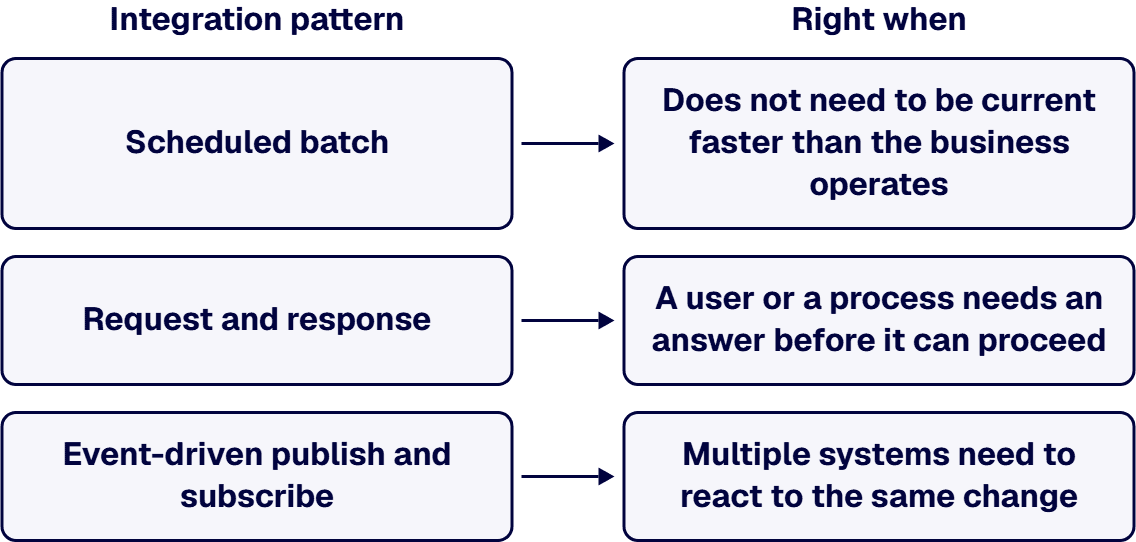
The mistake that reads as sophistication and is actually risk is treating the platform as the integration layer, because the platform was never built to be one. Dynamics 365 is an endpoint in this design, the system where relationship and servicing data lives and where a banker or a servicing team works; Microsoft 365 is an endpoint too, where the people are, where a document is reviewed or a decision is recorded. Azure’s integration services are where the governed layer sits between the endpoints and the core and loan origination systems: the place access, logging and change control belong in one location rather than duplicated inside every point-to-point connection. Putting integration logic inside a Dynamics 365 customization because that is where a developer happened to be working is how a platform quietly becomes the transport, with none of the governance a dedicated integration layer was built to provide.
i3solutions has delivered Dynamics 365 integration engagements for regulated enterprises across healthcare, defense and aerospace manufacturing, and financial services. That is a description of the sectors the work has been delivered in, not a claim about any one bank or any specific integration built for one; it is named here because it is the attested fact this page can state about i3solutions’ own Dynamics 365 integration history, and the honest limits of that fact matter as much as the fact itself, covered fully below.
An examiner does not ask whether the integration works; the request is for the evidence that it was designed on purpose and is still being watched, and a bank that can only answer the first half of that has already produced the finding. Five artifacts make up that evidence set, and each is produced from a named source, not assembled the week before the exam.
A current data flow diagram, matching what is actually running, not what was designed at the last major project, showing data sharing between applications and the flows between the bank and its third-party service providers, as the FFIEC handbook’s data flow diagram section describes.
The book-of-record map, the same document the design decisions above produced, naming which system is authoritative for which field and how a disagreement between systems is resolved.
Change management evidence, showing that a change to an integration flow, a schema, a schedule, a retry policy, went through an approval before it reached production, not after.
Access controls, logging and monitoring for the integration layer itself, not only for the endpoints it connects, so that a question about who could have altered a flow has an answer.
The third-party oversight file, covered in the next section, because most of the estate in a banking integration is a service provider relationship, not a system the bank owns outright.
The rule most often cited in this space is not the one that binds a bank, and getting that backward is its own kind of finding. The FTC’s Safeguards Rule, 16 CFR part 314, defines who it covers in its own scope section: “You includes each ‘financial institution’ (but excludes any ‘other person’) over which the Commission has enforcement jurisdiction pursuant to section 505(a)(7) of the Gramm-Leach-Bliley Act.” That is an FTC enforcement jurisdiction, and it is scoped by exclusion, to entities the Commission, not a bank’s own primary regulator, has authority over.
A bank’s information security standards instead come from its own banking agency’s Interagency Guidelines. For a national bank or federal savings association, that is 12 CFR part 30, appendix B, whose scope section states plainly: “The Guidelines apply to customer information maintained by or on behalf of entities over which the OCC has authority,” naming national banks, federal savings associations, federal branches and agencies of foreign banks, and their subsidiaries. Other federal banking agencies carry their own parallel appendices for the institutions each supervises; which one applies to a given bank is a determination for that bank’s own compliance and legal functions, not a call this page makes for any reader. What this page states is the scoping fact, not the individual determination: a bank does not default to the FTC’s rule because it is the one most often quoted online, and it should confirm with its own compliance and legal functions, against its own primary federal regulator’s guidance, which instrument actually governs its information security program.
The oversight gap that produces a finding is rarely the bank’s own system; it is the vendor nobody assessed, because a core banking platform, a loan origination system and very often the integration platform itself arrive through a contract with somebody else. The Interagency Guidelines are explicit about what that requires: a national bank or federal savings association “shall: 1. Exercise appropriate due diligence in selecting its service providers; 2. Require its service providers by contract to implement appropriate measures designed to meet the objectives of these Guidelines; and 3. Where indicated by the … risk assessment, monitor its service providers to confirm that they have satisfied their obligations,” including a review of “audits, summaries of test results, or other equivalent evaluations of its service providers.” The FFIEC handbook’s third-party oversight section states the same expectation from the operations side: management should “review independent audit or other assurance reports demonstrating the third-party service provider’s ability to meet the entity’s AIO needs and provide services in a safe and sound manner.”
For an integration built by an outside firm rather than assessed after the fact, the vendor selection question is a different one than the pattern question above, covered at How to Choose a Custom App Development Firm for Financial Services. And independent review is itself a form of oversight a bank can commission directly: i3solutions has performed an independent verification and validation code review of a custom application built by a third-party vendor for a bank, confirming the bank’s objectives, milestones and success criteria and reviewing the vendor’s code for security and performance issues rather than building the application itself. The published case study, named here as “Enhancing Quality With an IV&V Code Review,” describes that engagement in full. It is a review and validation engagement, not an integration build, and it is offered here as one concrete example of what third-party oversight can look like in practice, not as a template every bank must follow.
Not every bank in this situation needs a governed integration platform, and saying so here is the same discipline this guide asks of every pattern choice above. A handful of stable nightly files that reconcile cleanly and that the business has never needed faster is not a problem an integration platform solves; it is a second thing to run and be examined on, for a risk that was already being managed. A core vendor whose contract forbids direct API access, or prices it out of reach, can leave scheduled batch as the only realistic option regardless of what this guide’s pattern section prefers. A bank in the middle of an acquisition, where the target’s estate will be absorbed or retired within a defined window, is often better served waiting until the combined estate is known before investing in a governed layer that may not match what remains. And a flow whose owner is a business function rather than IT, a spreadsheet a lending team maintains for its own workflow, for example, may not belong in an integration platform at all until IT and that business owner agree it should. None of these conditions is a reason to skip the documentation and oversight work above; they are reasons the transport, specifically, can stay as it is.
What this page has not claimed matters as much as what it has. The proof i3solutions can point to on this exact subject is a GLBA control-mapping review and a large-scale system that validates data arriving from thousands of external financial institutions, not a core banking system implementation, a payments processor engagement, a trading or order management system build, or a delivered SOC 2 audit or attestation for a bank. Those are not claims this page makes about i3solutions, in the same way they are not claims Workflow Automation Firms for Financial Services: How to Evaluate the Shortlist makes; the two pages say the same thing for the same reason. Nor does this page name any client; the proof below is anonymized because the underlying case studies are anonymized, and they are not being un-anonymized to make this page read better.
On the GLBA side, an i3solutions IV&V engagement validated requirements traceability from the underlying compliance framework controls through the delivered functionality for a vendor-built application, identified control mappings where the vendor’s interpretation of GLBA requirements diverged from the client’s expectation, surfaced test cases the vendor’s plan had not included, and produced the board-defensible attestation the audit committee required. That is the only GLBA-specific engagement in i3solutions’ proof register, and it is a review engagement against a vendor’s build, not an integration i3solutions delivered.
On the scale side, i3solutions implemented automated validation against mortgage-compliance rules for a national network of more than 7,700 financial institutions and 12 district banks, a system that manages over $40 billion in mortgages. The published case study, named here as “Empowering Mortgage Acquisition Through Digital Innovation,” describes it in full. That is data exchange with external parties at scale, under industry rules, which is the closest thing in i3solutions’ proof register to the subject of this page; it is not a core banking integration, and it named no Microsoft product in its own technologies section.
What i3solutions can commit to on a banking integration engagement is the method this guide describes: assess the estate as it actually runs rather than as it was designed, name the book of record before choosing a transport, put the flows behind a governed layer, and build the evidence set an examiner expects, delivered by senior, US-based Microsoft integration engineers from the practice described at Unifying Enterprise Operations Through Microsoft System Integration & Data Management. If your team needs a current data flow diagram, a book-of-record decision, or a design reviewed before the next exam, that conversation starts with a senior architect, not a sales process.

US-Based Microsoft System Integrator | Est. 1997
© i3solutions. All rights reserved.
US-Based Microsoft System Integrator | Est. 1997
© i3solutions. All rights reserved.


