
Workflow automation questions come up the moment a manual process costs more in rework than the automation would cost to build. These answers address when that line has been crossed, what Microsoft-native automation actually covers, and what has to hold up as the business process underneath it keeps changing.
By Michael Branson
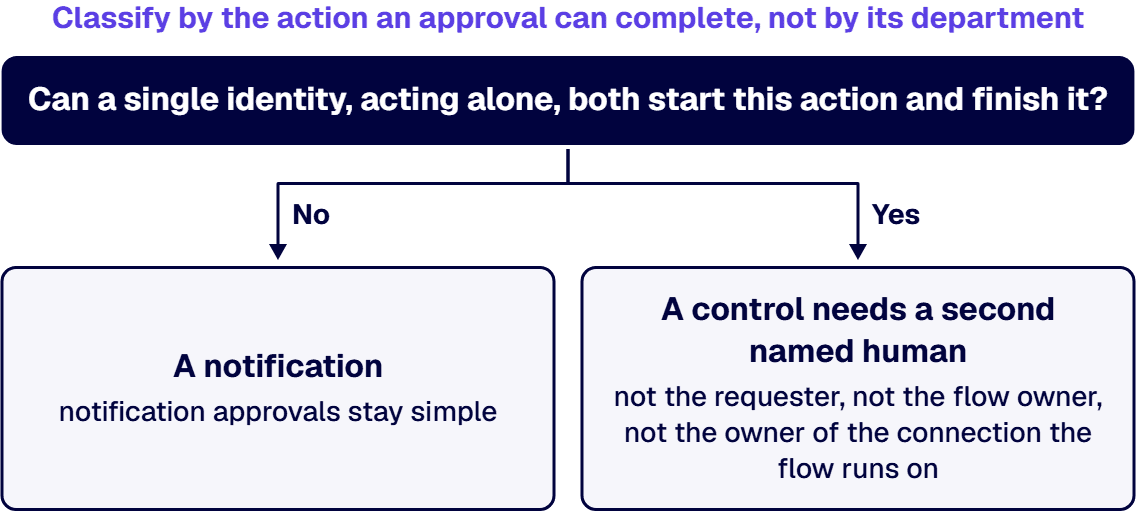
As of September 2026, under NIST SP 800-53 control AC-5, classify each automated approval by the action it can complete, not by the department that owns it. Where a single identity can both initiate and complete that action, the approval is a control and needs a second named human who is not the requester, not the flow owner, and not the owner of the connection the flow runs on; where no single identity can complete it alone, the approval is a notification and should be treated as one. Every approval that is a control records which human decided, when, on what evidence, and whether an override was used and by whom, and the override is designed before the happy path, because an override with no second name and no record is the finding an auditor writes up, not the control that was supposed to prevent one.
When your internal audit function asks, in writing, how you know that the person who raised a purchase requisition, a vendor bank-detail change, a journal entry or a privileged access request was not also the person who approved it, the honest answer at most Microsoft-stack shops is that nobody has checked. The pattern behind that answer is a familiar one: a flow that runs on whichever employee’s credentials happened to own the connection when it was built, an approver group assembled in a hurry years ago and never re-derived since, and a manual override the business insisted on at go-live that carries no second name and no written record of who used it or why. None of that shows up until an examiner or an auditor asks for it by name, and this page is written for the point before that conversation, not after it.
NIST SP 800-53 control AC-5, Separation of Duties, does not hand you a list of approvals to split. Its first clause is an instruction to make one: “Identify and document [Assignment: organization-defined duties of individuals requiring separation].” That is the right starting question for a Microsoft 365 or Power Platform estate, because most tenants never wrote that list down before they started automating approvals, and a flow built to speed up a process is not the same thing as a flow built to control one.
Run every approval in your estate through one test: can a single identity, acting alone, both start this action and finish it? A travel-request approval that only notifies a manager after the fact is not a control; nothing is being separated, and adding a second approver there produces exactly the shadow process automation was supposed to end. A payment-initiation flow where the requester’s own Power Automate connection can also complete the payment step is a control, whether or not anyone designed it as one, because AC-5’s discussion names precisely this risk: “Separation of duties addresses the potential for abuse of authorized privileges and helps to reduce the risk of malevolent activity without collusion.” The classification is mechanical once you ask it this way: notification approvals stay simple, control approvals get the rule below. A gap found this way is a design finding about the approval itself, a different finding from a SOX access-control finding; Your Auditor Flagged Access Controls. Here Is the SOX Remediation Plan. is where an access-review finding gets remediated, and this page does not restate that work.
This is a different question from whether the same access is separated at the identity layer; that boundary is addressed in the counter-case below. This control is one piece of your organization’s broader Workflow Automation Services Built for Enterprise IT Environments program, and a tenant-wide Power Platform governance program is the wider container it sits inside; if you have not yet designed that container, the work here still stands on its own, and Designing a Power Platform Governance Framework That Holds Up in a Regulated Enterprise is where the container itself gets built.
Once an approval is classified as a control, the rule is short: it needs a second named human who is neither the requester, nor the flow’s owner, nor the owner of the connection the flow executes under. The third of those three is the one most Power Automate estates get wrong without noticing, and it is a documented mechanic, not a guess. Microsoft’s guidance on connection references states it plainly: “When a flow is turned on (enabled), the user turning on the flow needs to own or have permission to use all the connections in the flow.” A flow does not act as an abstraction; it acts as somebody, and if that somebody is also the approver, your control is a single identity wearing two hats regardless of how the approval step is drawn on a diagram.
This is the mechanism behind a defect that never shows up in a flow diagram: the approver field can read correctly and the control can still be void, because the identity actually executing the approval action is the connection owner, not the named approver. Who owns a flow’s connections, and what breaks when that owner changes roles or leaves, is a design question with its own answer; Power Automate Connection References and Flow Ownership is where that gets designed, and this page assumes that design exists rather than re-deriving it. A fourth person sometimes belongs on the exclusion list too: where the approval also benefits the approver directly, the beneficiary is excluded on the same logic as the requester, even when the two are formally different fields in the flow.
Some of this rule is a platform behavior you can point to; the rest is a design decision your organization has to make and document, because Microsoft Learn is silent on it. Keeping the two apart matters, because writing a design decision as though it were a guaranteed capability is a common way this control fails once someone actually tests it.
The strongest documented example sits in Microsoft Entra Privileged Identity Management. Microsoft’s own page on approving or denying PIM requests, read live at Microsoft Learn this month, states: “Approvers aren’t able to approve their own role activation requests. Additionally, service principals aren’t allowed to approve requests.” That is a real, product-enforced self-approval bar, and it applies to Entra role activation, not to a Power Automate approval step.
Power Automate does not document the same bar for its own approvals. Microsoft’s top-scenarios guidance for approval flows documents something narrower instead: “if you are the requester, you cannot reassign the approval request.” Reassignment and self-approval are different mechanics, so a Power Automate approval that must never be completed by its own requester is a design your organization builds into the flow and the approver group, not a behavior the platform guarantees on its own. Two more places Microsoft Learn stays quiet are worth naming before someone assumes otherwise: Learn documents the reassignment action in the approvals UI but does not document what record that action leaves behind, so the evidence of a reassignment has to be confirmed against your own tenant’s run history rather than assumed to exist; and Microsoft’s access reviews overview lists Self-review as a supported reviewer option, with no caution attached to it, so a self-reviewed access review is a configuration choice your organization makes and owns, not something Microsoft warns you away from.
None of this holds if the platform underneath the approval is not secured; a Power Automate approval step is only as trustworthy as the connectors, data-loss-prevention policies and service accounts it runs on, and Securing Power Automate in Regulated Enterprises is where that architecture gets designed. Whether a given approver needs a premium Power Automate license is a separate, purely licensing question this page does not answer; Do Power Automate Approvers Need a Premium License? The Licensing Rule, Explained is where that gets resolved.
Every approval you classify as a control eventually needs an exception path, and the override is the part of the design nobody writes down, which is why it is the part an auditor asks about first. The right posture toward an override is not to eliminate it; auditing standards already contemplate that some organizations cannot fully separate duties. PCAOB AS 2201 states it directly: “a smaller, less complex company might have fewer employees in the accounting function, limiting opportunities to segregate duties and leading the company to implement alternative controls to achieve its control objectives.” An override, designed correctly, is that alternative control. An override with no second name and no record attached to it is not; it is the gap the standard is describing, left unaddressed.
PCAOB AS 2201 also names automation itself as a risk factor worth weighing, not a free pass: “Whether the control relies on performance by an individual or is automated (i.e., an automated control would generally be expected to be lower risk if relevant information technology general controls are effective).” That “if” is doing real work. An automated approval is only lower-risk than a manual one when the general controls underneath it, including the override path, actually hold.
Design the override with the same rule as the primary approval: name who may invoke it, in writing, before the first exception happens; require that the person invoking it is not the requester, the flow owner or the connection owner, exactly as the primary rule requires; and require a written reason captured at the moment the override is used, not reconstructed afterward from memory. An override designed after the fact, in response to a specific stuck request, is usually built to solve that one incident and ends up silent on every requirement above.
A control approval that produces no record is indistinguishable, after the fact, from one that never ran. The evidence set below applies to every approval you classified as a control above, and it holds regardless of whether the approval ever hit its override path.
Run retention has a real limit worth planning around, not assuming away: Microsoft’s flow limits and configuration documentation states that “run retention in storage” for Power Automate flows defaults to 30 days, “calculated using a run’s start time,” so a record your auditor wants to see six months from now has to be exported or archived before that window closes, not retrieved from the flow’s own run history after it does. Who builds the flows and the evidence capture this table assumes, at the routing and audit-trail level, is its own body of work; Approval Workflow Automation Services for Enterprise Teams is where that gets built.
An approval that moves nothing does not need a second approver, and adding one anyway is how a control program manufactures the shadow process it was meant to prevent; a notification dressed up as a control wastes an approver’s time on every single request and teaches the business to route around the system the first time it slows down a real deadline.
An organization too small to split a given duty across two people is not a defect this page can design around, and it is the case PCAOB’s own standard already contemplates: the answer there is a documented compensating control, evidenced the same way the primary rule requires, never a second name added to the approval only to satisfy the appearance of a split.
Where the risk is privileged access rather than a business transaction, the identity a person holds, not the approval a flow routes, is what needs the second reviewer; that is an identity control, and it belongs on the Microsoft Entra ID Governance for Regulated Enterprises: Product Scope, Licensing, and Audit-Defensible Implementation page, not inside a Power Automate flow. And none of the four frameworks behind this page orders any of it in these words: NIST SP 800-53 AC-5 is the one that states separation of duties as a control; Sarbanes-Oxley Section 404 does not use the words at all; the one COSO document this page could read in full, Leveraging COSO Across the Three Lines of Defense, does not use them either, though COSO’s own 2013 Framework text is sold rather than published and this page could not check it directly; PCAOB AS 2201 contemplates duties that cannot be segregated and asks what compensates. Treat every sentence above as a description of what these controls constrain and what Microsoft’s platform documents, never as a claim that any configuration, or any framework, has been satisfied. That determination belongs to your own internal audit function and your external auditor, working from your own control narrative.
These controls are rarely designed all at once against a live estate; most organizations introduce them in a sequence, alongside a broader Power Automate rollout, rather than retrofitting every approval on day one. The phased Power Automate rollout guide covers that sequencing question for a mid-sized finance organization; its own SOX section declines to make a SOX-specific claim, in its own words, and leaves the control-design question open for the page a reader lands on next.
This page sets out a framework for making this decision; it does not describe work i3solutions has delivered on this specific question. i3solutions workflow automation builds use standard and premium Power Platform connectors, custom API connectors published through Azure API Management, and hub-and-spoke approval patterns built on Dataverse tables or SharePoint lists. Separately, i3solutions runs comparative platform-selection evaluations for clients, recommending among IAM platforms for hybrid estates and among workflow automation platforms against SOC 2 and HIPAA, rather than only implementing the Microsoft option. Applied to this question, that means starting from the approvals your organization already runs, classifying which are controls, naming the second approver and the override owner in writing, and building the evidence trail into the flow itself rather than assembling it after the fact from scattered exports. This page makes no claim that a resulting design closes an audit finding or discharges any framework’s requirement; that determination stays with your audit function, on your own control narrative.
By Michael Branson, Founder/COO, i3solutions
As of September 2026, before an audit, according to IAQG, AS9100 lists clauses 10.2 “Nonconformity and corrective action” and 8.7 “Control of nonconforming outputs”. Keep nonconformances in Dynamics 365 when they start there, add Power Apps for workflow gaps, and buy an eQMS for multi-site CAPA.
If the surveillance audit notice has just landed and the nonconformance log lives in three spreadsheets, a shared mailbox and a Dynamics 365 Supply Chain Management instance that was never asked to carry it, you are about to be handed a platform decision. Quality wants a dedicated eQMS. Finance does not want a fourth system of record beside the ERP it already licenses. Someone on your own team has offered to build it in Power Apps. Each answer is defensible for some plants and wrong for others, and the difference is not the software brand. It is where your nonconformances originate, how many corrective actions run at once, and how far the process has to reach into suppliers and other sites. This guide puts the three options side by side against those criteria, using Microsoft’s own documentation for the Dynamics 365 option and IAQG’s own published overview for the standard.
Before you compare platforms, fix what the process has to carry, because the auditor samples the process and its records, not the tool. According to IAQG’s 9100:2016 Executive Overview (IAQG 9100 Team, January 2020), the 9100 series is ISO 9001 plus aviation, space and defense additions, among them product safety, configuration management, counterfeit parts and “Expanded requirements for production and external providers”. According to the same overview’s clause map, 8.7 “Control of nonconforming outputs” sits under Operation and 10.2 “Nonconformity and corrective action” under Improvement.
Two notes in the same overview shape the platform choice. The revision records human factors as a consideration in nonconformity and corrective action, so the record needs room for why the error happened as well as which part failed. And under risk-based thinking, IAQG describes the “Concept of preventive action now addressed throughout the standard by risk identification and mitigation”, which means a CAPA module’s preventive half is one place that work can live, not the only one. In general terms, control of nonconforming outputs is about the nonconforming item: identifying it and deciding what happens to it. Nonconformity and corrective action is about the nonconformity itself: its cause, the corrective action taken and whether that action worked. The platform you pick has to answer both on demand, for any record an auditor names.
When three teams each defend a different option, compare them on where the record comes from rather than on feature lists. The table below describes each option structurally; it ranks none of them, and each row is set out in its own section.
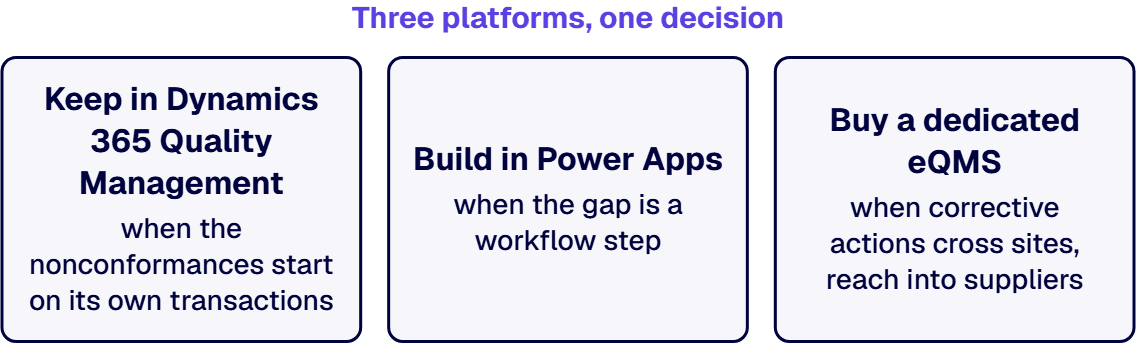
If most of your nonconformances start on a receipt, a production order or a customer return that Dynamics 365 already records, the module you already license is the first option to test. Microsoft’s quality and nonconformance management overview states: “A nonconformance describes an item that has a quality problem.” It continues: “The nonconformance process lets you create a nonconformance order that describes a quantity of nonconforming material, the problem source, the problem type, and explanatory notes.” The same page lists six default nonconformance types (customer, service request, vendor, production, internal and co-product production) and states: “The Corrections page lets you create a list of nonconformances that must be corrected.” It adds: “Each correction item is associated with the diagnostic type that caused the problem to be discovered.”
For the corrective action half, Microsoft’s CAPA management overview states: “Corrective and preventive action (CAPA) management lets you create and maintain records of the actions taken to manage and resolve nonconformities or defects.” Its feature list includes a workflow-driven process in which “The system automatically assigns CAPA work, based on the definition of your CAPA processes and CAPA worker groups.” and trending analysis, where “The CAPA workspace provides analytical tools to help you analyze CAPA trends.” Stay inside Dynamics 365 Supply Chain Management’s Quality Management module when your nonconformances trace directly to purchase, production and sales transactions already recorded in that system and your CAPA volume is light enough for its built-in correction and CAPA case tools. Test that against your own last audit sample before anyone buys anything: pull ten closed nonconformances and walk each one through the module end to end.
When the module covers the records but not the way your quality team works, the gap is usually a workflow, and a workflow is what a Power Apps build is for. Typical gaps are a material review board step with its own sign-off, a human factors worksheet attached to the root cause, or a supplier response form that has to reach people who do not hold a Dynamics 365 license. Build the gap in Power Apps when you need a workflow the module does not offer but want to keep the data and the platform you already govern: the nonconformance can still originate in Dynamics 365, and the build adds the steps around it. The cost of this option is ownership. Every step you add is custom code and configuration your team maintains, documents for the auditor and tests after each platform update. Governance of that build belongs with the rest of your estate, covered on Enterprise Power Platform Development & Implementation Services for Governed Operations.
If corrective actions routinely cross sites, reach into your supply base and stay open across several audit cycles, the question changes from which screen to use to which system enforces the discipline. A dedicated eQMS platform is built around nonconformance and CAPA as its core records: a purpose-built corrective action workflow, supplier corrective action requests with the supplier’s response held on the record, and an audit trail designed for quality review across every site. Move to a dedicated eQMS when multi-site CAPA discipline, supplier-flowdown corrective action and audit-trail depth outgrow what either Microsoft path was built to enforce. Scope the integration before you sign: Dynamics 365 still owns the item, the order and the vendor, so the eQMS needs those records, and someone has to own the connection between two systems of record for as long as both run.
If the platform debate has turned into a debate about the whole Dynamics 365 program, separate the two before the audit forces a rushed answer. The cost and scope of a Dynamics 365 Supply Chain Management implementation is its own decision, covered in How Much Does a Dynamics 365 Finance and Supply Chain Implementation Cost?. If your plant also answers to the FDA, lot and serial traceability in Dynamics 365 Supply Chain Management is a separate decision under a different regulator, and it is not settled on this page.
If your plant also answers to the FDA, see whether Dynamics 365 Supply Chain fits FDA lot and serial traceability.
When a nonconformance platform question reaches i3solutions, the work starts from your last audit sample and your open corrective actions, traced record by record through the systems they touch today, so the gap between the Dynamics 365 module and your quality process is measured rather than argued. i3solutions has replaced Excel-based workflows in aerospace manufacturing, financial services, and healthcare environments, including organizations operating under CMMC obligations and ITAR export control requirements. i3solutions has delivered enterprise SharePoint and Power Platform programs for aerospace and defense manufacturers, major defense organizations, a financial-services firm, a national healthcare system, and military organizations. The certification decision stays with your registrar, and your quality management representative owns the process the platform carries.
If your company is not yet AS9100-certified, the first job is the quality management system itself, and choosing its software before the process is written only moves an undefined process into a new screen. If your nonconformance volume is a handful a quarter and each one closes inside a month, a controlled log with named owners may carry it until volume grows, and a platform decision can wait for that growth. And if the last audit finding was about root cause analysis or verification of effectiveness rather than record-keeping, fix the practice first, because every platform in this guide will record a weak corrective action as faithfully as a strong one.
If you were told the standard demands a particular system, the overview does not say so: according to IAQG’s 9100 overview, clause 10.2 is titled “Nonconformity and corrective action”, and the overview names no platform. The auditor samples your process and its records, wherever they are kept.
When you split the work, according to the clause map in IAQG’s 9100 overview, clause 8.7 is “Control of nonconforming outputs” and clause 10.2 is “Nonconformity and corrective action”; in general terms, the first concerns the nonconforming item and what happens to it, and the second concerns the cause, the corrective action and whether it worked.
If you already run Dynamics 365 Supply Chain Management, Microsoft states: “Corrective and preventive action (CAPA) management lets you create and maintain records of the actions taken to manage and resolve nonconformities or defects.” Its CAPA workspace adds workflow-driven assignment and trending analysis.
When the gap is a workflow step, such as a material review board sign-off or a supplier response form, and the nonconformance still originates on a Dynamics 365 transaction, a Power Apps build keeps one system of record. Your team then owns and maintains every step it adds.
When corrective actions routinely cross sites, reach into suppliers and stay open across audit cycles, a dedicated eQMS carries that discipline as its core record. Budget for the integration with Dynamics 365, which still owns the item, the order and the vendor.
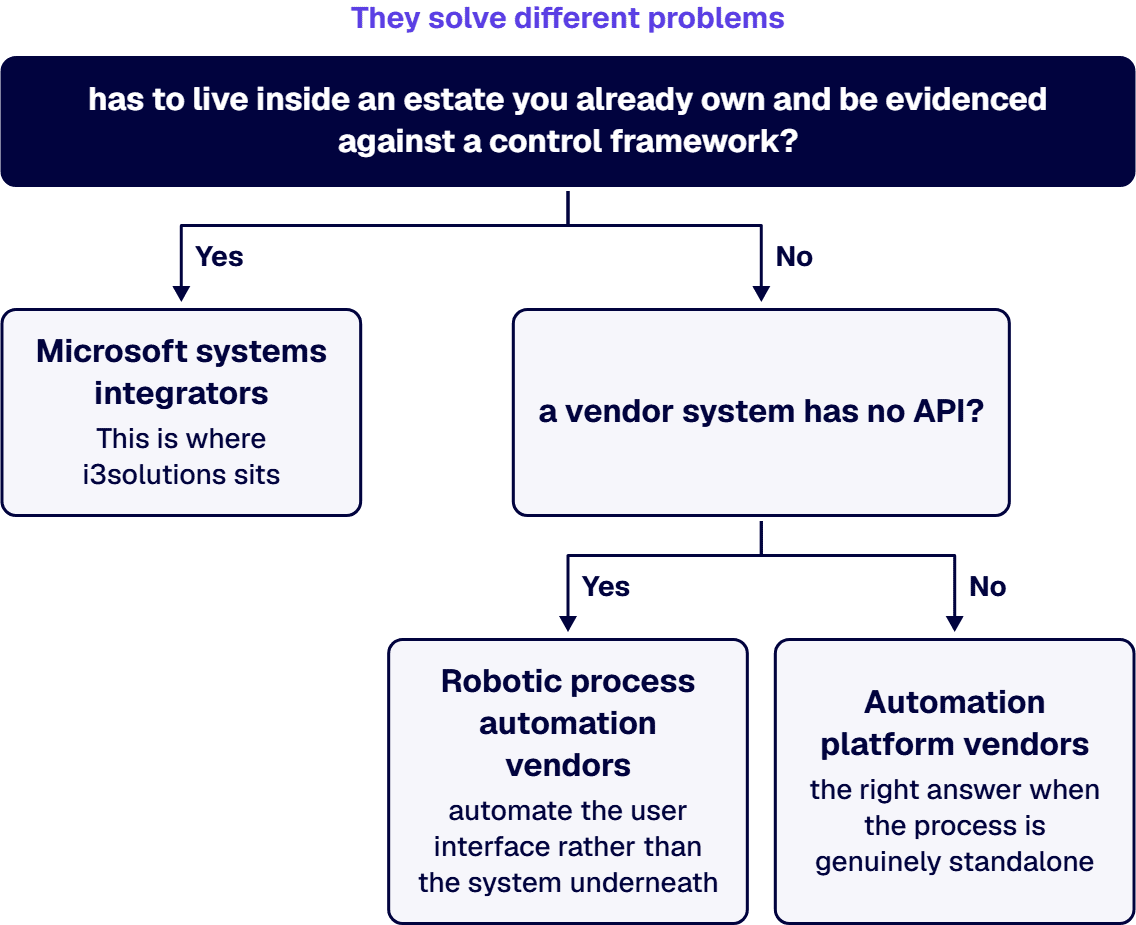
There is no defensible public ranking of workflow automation firms in financial services, and any page that hands you one is ranking on marketing spend. The shortlist splits into four categories that solve different problems: automation platform vendors, robotic process automation vendors, the large advisory firms, and Microsoft systems integrators. Choose by asking which category owns your constraint, then test each firm on one thing: whether it has automated a money-movement or client-reporting process inside a regulated firm and can describe the control evidence it produced. i3solutions built a cash processing system for an independent investment management and strategic advisory firm, integrated to that firm’s portfolio and compliance systems.
This page does not publish a ranked list, and the reason is worth stating plainly. Rankings of automation firms in this sector are either vendor-authored, pay-to-list, or aggregated from review sites with no verification of what was actually delivered. We are not going to reprint one and we are not going to invent one. What we can do is describe the categories of firm you will actually encounter, the criteria that separate them for a financial services buyer, and exactly where i3solutions fits and where it does not. If you want the underlying method rather than the vendor question, the workflow automation services page covers the delivery model.
They are not competitors with each other. They solve different problems and they fail in different ways.
Automation platform vendors. These sell the tool and increasingly sell implementation alongside it. Fast to stand up, and the right answer when the process is genuinely standalone. The failure mode is the integration surface: a platform that does not natively reach your portfolio accounting system, your custody feed, or your compliance archive becomes a second system of record that someone reconciles by hand.
Robotic process automation vendors. These automate the user interface rather than the system underneath. Genuinely useful where a vendor system has no API and no prospect of one. The failure mode is brittleness and audit posture: a bot driving a screen leaves a thinner evidence trail than an API-level integration, and every upstream UI change is an outage.
The large advisory firms. They bring process design, change management, and a brand that survives a board conversation. The failure mode is the delivery gap between the partners who scoped it and the team who build it, and a cost structure that assumes a program rather than a process.
Microsoft systems integrators. The right category when the automation has to live inside an estate you already own and has to be evidenced against a control framework. This is where i3solutions sits, and we would rather say so than pretend to be category-neutral. The failure mode of this category is scope creep into platform work the buyer did not ask for.
Generic automation evaluation criteria miss what this sector is actually buying. These do not.
Automating the process that was easiest to reach. Sequencing by convenience is how a program produces eleven small automations and no measurable change in the operating model. Our guide to prioritizing automation processes works through the sequencing question.
Buying the tool before defining the process. The platform decision is downstream of the process decision, and taking it first constrains every process you subsequently automate to what that platform does well. Choosing automation tools covers the order of operations.
Treating the control evidence as a phase. If the process is in scope for an audit, the evidence model is a design constraint on the first workflow, not a document produced at the end. Retrofitting it costs more than building it in and it usually means rework.
No business case anyone will defend. A number produced to get the project funded, and abandoned once it is. The workflow automation business case page covers what a defensible one contains.
Our case studies describe clients by what they are rather than by name, and we have kept that convention here. The engagements below are genuinely in financial services. We have been careful not to pad the list with work from other sectors.
Cash processing for an investment manager. For an independent investment management and strategic advisory firm specializing in active public equity and fixed income strategies, i3solutions built a Cash Processing System on SharePoint with Nintex workflows that automated four distinct transaction types, each following its own process, and integrated it across the firm’s Galileo, APX, and RedOwl systems. The case study reports streamlined operations, enhanced risk management, and seamless integration across platforms. It reports no percentage or dollar figure, and we are not going to supply one. Read the cash processing system case study
Mortgage acquisition at scale. For a national network of wholesale banks, part of a national network of more than 7,700 financial institutions and 12 District Banks, i3solutions built the Loan Acquisition System, which automates contracting, purchasing, and tracking the delivery of mortgages from member banks, credit unions, and other financial institutions. A complex rules engine validates every uploaded loan against mortgage industry standards and returns instant feedback. The district banks are reaping significant benefits from a sophisticated system that expertly manages over $40 billion in mortgages. Read the mortgage acquisition case study
Mortgage origination productivity. For a premier regional mortgage originator group in the mid-Atlantic region, i3solutions delivered an automated client engagement solution built on Microsoft .NET, SharePoint, and SQL Server. The new solution enhanced customer service and boosted team productivity by 75%, as less time is spent on data entry and more time is devoted to helping clients find mortgages that meet their needs. Read the mortgage origination case study
Where we have measured the pattern across our financial services modernization work, the outcomes anchor to SOC 2 trust services criteria closure and decision-velocity improvement for client reporting, with time recovered in the range of 10 to 18 hours per week per analyst and error reduction of 75 to 90 percent. Those are ranges from our own engagements, not a market benchmark, and the assessment produces the number for your processes rather than borrowing one.
What we are not claiming on this page. We hold no ranking, award, or third-party placement in a financial services automation list, and we have not implied one. We have automation work for a national labor union (check request and accounting workflows) and for a defense organization (performance appraisal and salary review workflows), and neither is financial services, so neither appears above as if it were. We are not claiming a core banking system implementation, a payments processor engagement, a trading or order management system build, or a delivered SOC 2 audit or attestation. We are not claiming any client name, because the case studies are anonymised and we are not going to un-anonymise them to make a page read better.
We run this as a defined sequence rather than an open-ended program: process discovery and prioritization, target design with the control evidence model attached, pilot delivery on one process, parallel-run validation, and governance handoff. The pilot is deliberately a single process with a real exception queue, because a pilot that only exercises the happy path proves nothing about a regulated environment.
Enterprise workflow automation consulting engagements typically range from $75,000 to $350,000 for Phase 1 assessment and pilot delivery, depending on process complexity, integration surface area, and compliance framework requirements. Where the automation has to cross several Microsoft platforms rather than sit inside one, the system integration and data management practice carries that work, and the enterprise workflow automation page carries the phase model in full.
No defensible public ranking exists. The lists that circulate are vendor-authored, pay-to-list, or aggregated from review sites that never verify what was delivered, so reprinting one would mislead you. A more useful frame is category: automation platform vendors, robotic process automation vendors, the large advisory firms, and Microsoft systems integrators each solve a different problem and fail in a different way. Decide which category owns your constraint first, then compare firms inside it on delivered work in regulated money-movement or client-reporting processes.
Three engagements. For an independent investment management and strategic advisory firm, a Cash Processing System on SharePoint with Nintex workflows automating four distinct transaction types and integrated across the firm’s Galileo, APX, and RedOwl systems. For a national network of wholesale banks, the Loan Acquisition System, which automates contracting, purchasing, and tracking of mortgage delivery and manages over $40 billion in mortgages. For a premier regional mortgage originator group in the mid-Atlantic region, an automated client engagement solution that boosted team productivity by 75%. The case studies are anonymised and we do not publish the client names.
It depends on whether the underlying system has an API. Robotic process automation drives the user interface, which makes it the practical answer for vendor systems that expose nothing else, but it leaves a thinner audit trail and it breaks whenever the interface changes. Platform-native automation integrates at the data and service layer, which produces better evidence and survives upstream change, but it requires that the integration point exists. Most estates end up with both, and the decision belongs to each process rather than to the program.
Enterprise workflow automation consulting engagements at i3solutions typically range from $75,000 to $350,000 for Phase 1 assessment and pilot delivery, depending on process complexity, integration surface area, and compliance framework requirements. Financial services scope usually sits in the upper half of that band because the integration surface includes portfolio, custody, or compliance systems and because the control evidence model is a design constraint rather than a closing document.
One with a real exception queue, a named process owner, and a measurable current cost. Sequencing by whatever is easiest to reach is how a program produces a series of small automations and no change in the operating model. The exception queue matters most: in financial services the happy path is the easy path, and both the value and the risk sit in what happens when a transaction does not fit.
Senior U.S.-based delivery teams. i3solutions is a Microsoft Partner with 30 years of delivery experience and has completed more than 600 Microsoft platform implementations. Justin Bowen has spent more than 15 years at i3solutions and more than 25 years leading project, program, and product delivery across complex technology environments.
No workflow automation platform makes you compliant, so the selection is decided by three checkable properties rather than by a vendor’s compliance page. Require a signed business associate agreement that names the workflow service itself, a current SOC 2 Type II report whose scope covers that same service rather than a sibling product, and platform-native controls you can evidence: data residency, connector restriction, immutable run history, and administrative access separation. On those three tests the Microsoft-native options and the enterprise workflow suites clear the bar for regulated estates, general-purpose integration services usually do not, and compliance-automation software is not a workflow platform at all and should not be shortlisted as one.
This question gets answered badly more often than almost any other platform question, and the reason is a category error rather than a lack of research. Asked which workflow platform suits SOC 2 and HIPAA, the market answers with software that manages compliance evidence. That software is real and often useful, but it does not route an approval, move a record between systems, or run a scheduled process. Shortlisting it against a workflow requirement produces a selection that satisfies an auditor’s checklist and automates nothing.
The second failure is subtler and more expensive. Buyers treat SOC 2 and HIPAA as a single hurdle labeled compliance and look for a platform that clears it. The two frameworks are different in kind, they constrain a platform choice along different axes, and a platform can be entirely adequate for one and disqualifying for the other. Reading them separately is what narrows a long list to a short one.
SOC 2 is an attestation about a service organization, and you consume it as evidence. A SOC 2 report is produced by an independent CPA firm under the AICPA attestation standards and evaluates a service organization against the Trust Services Criteria, where security is the common criteria set and availability, confidentiality, processing integrity and privacy are elected. A Type I report addresses the design of controls at a point in time. A Type II report addresses operating effectiveness across a stated period. The definitions live in the AICPA’s Trust Services Criteria and its attestation standards, and those are the documents to read rather than any vendor’s summary of them, including this one.
What that means for a platform selection is narrow and practical. You do not become SOC 2 compliant by choosing a platform. If your own organization is pursuing a SOC 2 report, your workflow platform becomes a subservice organization inside your description of the system, and the report you collect from that vendor is the evidence your auditor will read. So the question is not whether the vendor has SOC 2. It is whether the report covers the specific service you will run workflows on, whether it is Type II rather than Type I, whether the period is current, and whether the complementary user entity controls listed in it are ones you can actually implement.
HIPAA is a regulation about protected health information, and it constrains who may touch it. The Security Rule at 45 CFR Part 164 sets administrative, physical and technical safeguards for electronic protected health information, and the business associate provisions at 45 CFR 160.103 and 164.308(b) require a written agreement with any party that creates, receives, maintains or transmits that information on your behalf. A workflow platform that moves a record containing protected health information is squarely inside that definition. The authoritative text and the current guidance sit on the HHS Office for Civil Rights site, and one point from that guidance matters more than any other for a shortlist: HHS does not recognize any HIPAA certification. A vendor badge asserting HIPAA certified describes a private program, not a government status.
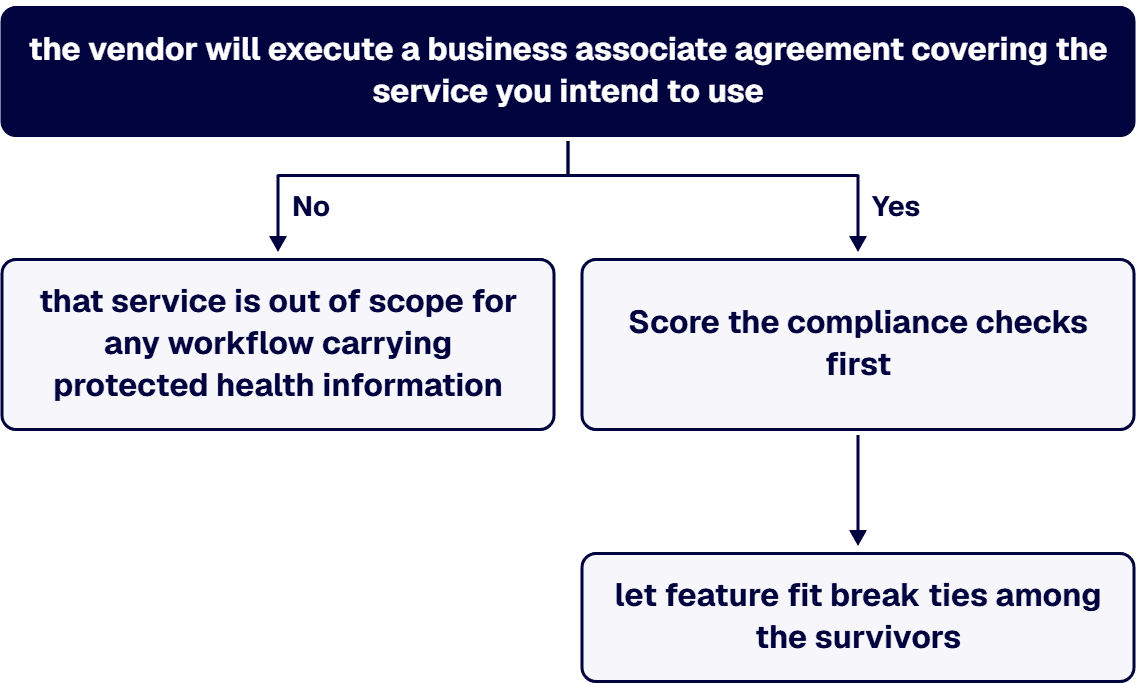
So HIPAA turns into a binary gate before it turns into a technical evaluation. Either the vendor will execute a business associate agreement covering the service you intend to use, or that service is out of scope for any workflow carrying protected health information, regardless of how good the product is.
Once the two frameworks are read separately, the selection collapses to three checks that can be performed before a demo.
Notice what is not on that list. Feature depth, connector count, pricing model and ease of use are real selection criteria and belong in the evaluation, but none of them changes whether the platform can be evidenced. Run the three compliance checks first, because they eliminate candidates that no amount of feature fit will rescue.
Applying those three checks to the categories a regulated enterprise realistically shortlists produces a stable ordering, and the ordering is about evidence rather than about product quality.
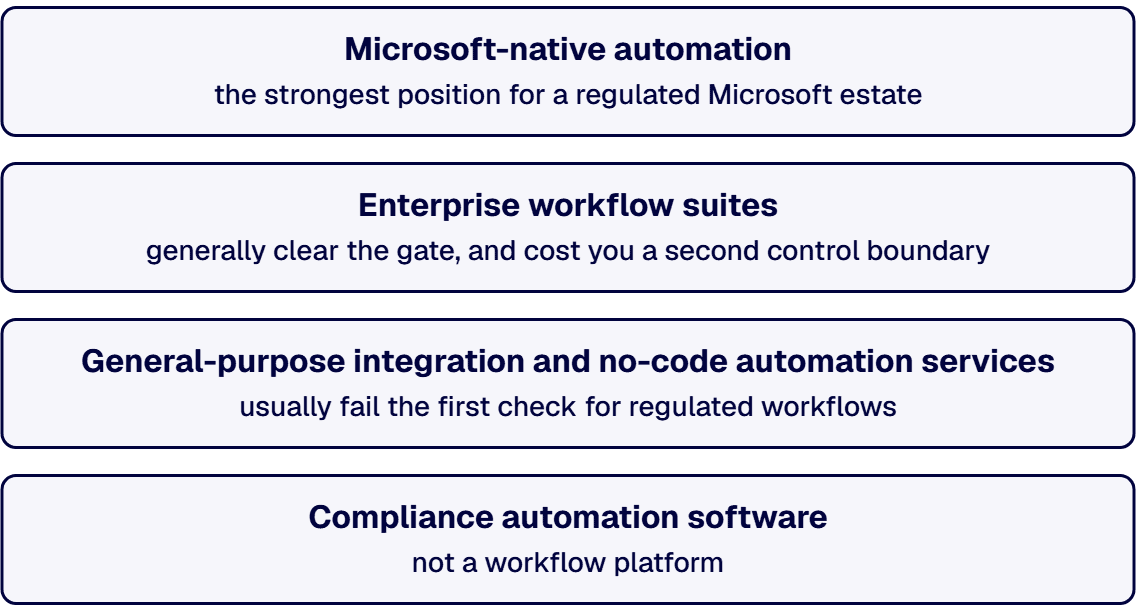
Microsoft-native automation, meaning Power Automate and Azure Logic Apps, is the strongest position for a regulated Microsoft estate. Both run inside a tenant you already govern, both inherit the identity and conditional access design you have already evidenced elsewhere, data location follows the tenant and environment strategy you control, and connector restriction is a first-class policy surface through Power Platform data loss prevention policies. The practical consequence is that most of your control evidence is reusable rather than net new. Verify the current coverage and reports at the Microsoft Trust Center and in the Microsoft licensing terms for your agreement rather than taking that from any partner page.
Enterprise workflow suites sold into regulated verticals generally clear the gate, and cost you a second control boundary. Nintex, FlowForma and AgilePoint are the products most often shortlisted in this class, and they typically execute the agreement and publish a Type II report. What they add is an additional processing environment outside your tenant, with its own identity model, its own retention behavior and its own set of complementary user entity controls to operate. That is a legitimate trade when the product does something your native platform genuinely cannot, and it is a poor trade when it was chosen for convenience, because you have taken on an entire second boundary to evidence for the life of the system.
General-purpose integration and no-code automation services usually fail the first check for regulated workflows. Zapier and Make.com are the usual entrants here, and the category is excellent at what it is for, which is connecting many third-party applications quickly. For protected health information the question is simply whether the specific plan you are buying is covered by an executed agreement, and for a great many of these services on their standard tiers it is not. Where an offering does cover it, the coverage is frequently confined to particular plan levels and particular components, so the answer has to be re-derived for your exact subscription rather than assumed from a marketing page.
Compliance automation software is not a workflow platform and does not belong on this shortlist. It collects evidence, monitors control status and shortens audit preparation. Those are useful jobs. None of them is routing an approval or integrating two systems of record, and a selection process that puts the two categories in the same comparison table has confused the tool that documents the control with the tool that performs the work.
Every platform on that list leaves the same residue, and budgeting for it is the difference between a selection that survives an audit and one that produces a finding twelve months later.
Data classification has to be decided before environment strategy, because the environment boundary is where the classification is enforced. Connector and data loss prevention policy has to be authored against that classification rather than accepted at its default, which permits far more than a regulated estate should allow. Service accounts and connection ownership need named owners and a rotation practice, because an automated workflow running under a departed employee’s connection is both an availability risk and an access control finding. Run history and change history need a retention setting that matches your framework rather than the platform default. And the workflows themselves need a change control path, because an automation that can be edited in production by anyone who can see it will not evidence as a controlled process no matter which platform executes it.
That work is the same in kind across every candidate. What differs is how much of it the platform gives you as configuration and how much becomes custom build, which is precisely what the third check measures.
i3solutions runs comparative platform-selection evaluations for clients, recommending among IAM platforms for hybrid estates and among workflow automation platforms against SOC 2 and HIPAA, rather than only implementing the Microsoft option. That is stated plainly because the incentive runs the other way. i3solutions is a Microsoft Partner. A partner recommending its own stack by default is a conflict a buyer should assume until it is disproved in writing, so treat the sentence above as a claim to test rather than as a reassurance.
The delivery record behind the recommendation is Microsoft-centered, and on this page’s own subject it is direct. i3solutions delivers workflow automation and development inside customers’ SOC 2-audited environments, operating under the customer’s own controls, and knows how to operate in those regulated environments. i3solutions runs migrations against named control families across CMMC, HIPAA, SOC 2, and NIST 800-171, producing artifacts auditors can review. Our teams maintain dedicated compliance specialists who understand CMMC, HIPAA, SOC 2, and financial services regulations within Microsoft environments, providing audit trail documentation and access control frameworks that reduce audit preparation time by 60%. i3solutions designs Azure integration architecture and builds and operates Azure Logic Apps workflows for enterprise clients, including running them on an ongoing basis rather than only building them. In the published record for a state National Guard organization: Thirty-four workflows essential for automating key processes were migrated seamlessly, along with over 336,000 custom list items. The full account is in the InfoPath and SharePoint workflow modernization case study. i3solutions delivers under a partner-led engagement model with named accountability and governance that holds up under a client audit, as distinct from contractor-only staff augmentation.
Sector outcome patterns, stated as ranges rather than as a promise. Financial services outcomes anchor to SOC 2 trust services criteria closure and decision-velocity improvement for client reporting; time-recovered ranges 10 to 18 hours per week per analyst; error reduction 75 to 90 percent. Healthcare outcomes anchor to HIPAA Security Rule provision closure and operational decision velocity; time-recovered ranges 6 to 12 hours per week per affected role; error reduction 65 to 85 percent. On cost, Enterprise workflow automation consulting engagements typically range from $75,000 to $350,000 for Phase 1 assessment and pilot delivery, depending on process complexity, integration surface area, and compliance framework requirements.
Now the boundaries, because a page about attestation should be precise about its own. i3solutions is an implementation partner. It does not perform SOC 2 examinations, does not issue attestation reports, and does not certify any organization or platform against HIPAA, which is consistent with the HHS position that no HIPAA certification is recognized. It does not sign a business associate agreement on a software vendor’s behalf, and it does not substitute for your own counsel or your own auditor in reading one. On i3solutions’ own side of that line there is one thing worth stating and no more than one: i3solutions has executed a Business Associate Agreement for a customer engagement. That is a record of something that has happened, not an offer, and whether such an agreement belongs in your engagement is a contracting conversation rather than a web page. What it does is implement and evidence: environment and classification design, data loss prevention and connector policy, identity and least-privilege service account design, retention and monitoring configuration, and the documentation your assessor will ask for. Ask any implementation partner, this one included, for its own control posture and its own security documentation in writing before you scope, and weigh the precision of the answer more heavily than its length.
This page answers one question: which platform to select when SOC 2 and HIPAA apply together. Three adjacent questions have their own pages, and sending you to the right one is more useful than restating them here.
Shortlist two or three platforms and ask each vendor for the same four artifacts before any demo: the current business associate agreement with its covered services list, the most recent SOC 2 Type II report under non-disclosure with the system description intact, the data residency options for the service in your region, and the connector or integration restriction capability documented rather than demonstrated. Score the three compliance checks first and let feature fit break ties among the survivors, not the other way round.
Then read the complementary user entity controls in each report side by side, because that document tells you what each vendor expects your team to operate, and it is the clearest available preview of what the platform will cost you after the license. Verify every framework claim at its primary source, the AICPA for the Trust Services Criteria and HHS for the Security Rule and business associate provisions, rather than in a vendor deck. When you are ready to test the shortlist against a real estate, i3solutions routes a senior U.S.-based engineer to a client call usually within one to two weeks. You can reach the team by phone at 703.652.8966.
For a Microsoft-centered regulated estate, the Microsoft-native options, Power Automate and Azure Logic Apps, are the strongest position, because they execute inside a tenant whose identity, conditional access and data residency you already govern and evidence, and because connector restriction is a first-class policy surface. Enterprise workflow suites sold into regulated verticals also clear the gate but add a second control boundary outside your tenant to evidence for the life of the system. General-purpose no-code integration services frequently fail the business associate agreement check on their standard tiers. The answer is estate-dependent rather than universal, which is why the three checks matter more than the ranking: a covered business associate agreement naming the service, a current Type II report scoped to that same service, and platform-native controls for residency, connector restriction, tamper-evident run history and administrative access separation.
No. A SOC 2 report is an attestation about a service organization, produced by an independent CPA firm under the AICPA attestation standards against the Trust Services Criteria. Your own report covers your own system, and a platform you use appears inside it as a subservice organization whose report you collect as evidence. Every report also lists complementary user entity controls, which are the controls the service organization expects you to operate for its own controls to be effective. Those are your work, not the vendor’s, and they are the most reliable preview of what a platform will actually cost you to run in scope.
No, and a badge claiming otherwise describes a private program rather than a government status. HHS does not recognize any HIPAA certification. What is real and verifiable is whether the vendor will execute a business associate agreement covering the specific service you intend to use, since the business associate provisions at 45 CFR 160.103 and 164.308(b) require a written agreement with any party that creates, receives, maintains or transmits electronic protected health information on your behalf. Ask for the current covered services list in writing and compare it against your design, because coverage is commonly scoped to particular services and plan tiers rather than to the whole product.
A Type I report addresses whether controls were suitably designed at a point in time. A Type II report addresses whether they operated effectively across a stated period. For a platform that will execute regulated workflows continuously, require Type II and check that the period end date is recent enough for your own audit calendar, because a lapsed period leaves a gap your assessor will ask about. If a vendor offers only a Type I, that is not automatically disqualifying for an early-stage product, but it is a gap you carry and should price rather than one you can inherit.
Yes, and this is where selections usually go wrong. The platform decides how much of the control work is configuration and how much is custom build; it does not remove the work. Data classification has to be settled before environment strategy, data loss prevention and connector policy has to be authored rather than left at its default, service accounts and connection ownership need named owners and rotation, run and change history need retention set to your framework rather than the product default, and the workflows need a change control path so a production automation cannot be edited by anyone who can see it. A platform with strong native controls makes that work configurable and evidenceable. It does not make it optional.
Not for this decision. Compliance automation software collects evidence, monitors control status and shortens audit preparation, which are useful jobs and often worth buying. It does not route an approval, integrate two systems of record or run a scheduled process. Putting it in the same comparison table as a workflow platform confuses the tool that documents a control with the tool that performs the work, and it is the single most common reason a search for this answer returns a list that automates nothing.
No. i3solutions is an implementation partner. It does not perform SOC 2 examinations, does not issue attestation reports, and does not certify any organization or platform against HIPAA. What it does is work inside the boundary rather than around it: i3solutions delivers workflow automation and development inside customers’ SOC 2-audited environments, operating under the customer’s own controls, and knows how to operate in those regulated environments. i3solutions runs comparative platform-selection evaluations for clients, recommending among IAM platforms for hybrid estates and among workflow automation platforms against SOC 2 and HIPAA, rather than only implementing the Microsoft option. It implements the environment, policy, identity, retention and monitoring configuration those frameworks require, and produces artifacts an assessor can review. i3solutions delivers under a partner-led engagement model with named accountability and governance that holds up under a client audit, as distinct from contractor-only staff augmentation.
Power Apps and ServiceNow are not competing for the same job, and an evaluation run as a feature bake-off usually picks the wrong one. ServiceNow is a system of record for service delivery: its own product page describes ITSM as a way to “Unify incident, change, problem, and service request management on one platform” and to “Consolidate incidents, changes, problems, and requests on one CMDB” (servicenow.com). Power Apps is an application layer over data an organization already owns, which Microsoft documents as giving licensed users the ability to “create and run apps, bots, flows, and custom websites across multiple data sources that extend beyond Microsoft 365” (Microsoft Learn). The deciding question is therefore not which product automates a workflow better. It is whether the process needs a service-management data model underneath it, or needs an application on top of a Microsoft 365 estate you already license. One disclosure before any of the detail: i3solutions is a Microsoft firm with no ServiceNow delivery record, so every ServiceNow statement below is a quotation from ServiceNow’s own published pages rather than a report of our experience.
We build on the Microsoft stack. i3solutions has built and supports hundreds of production Power Automate flows across its client base. We have no ServiceNow implementations, no ServiceNow migration record, and no benchmark comparing the two in production. Pretending otherwise would be the easiest way to make this page useless to the person reading it.
So the page is built asymmetrically on purpose. Anything asserted about ServiceNow is quoted from ServiceNow’s published product documentation and linked at the point of use, so you can check it against the vendor rather than against us. Anything asserted about Power Apps is either quoted from Microsoft Learn or drawn from delivery work we can stand behind. Where we have no evidence, the page says so and stops.
Every row above resolves to the same underlying split. ServiceNow arrives with a service-management data model and the processes that run on it, and the automation tooling is how you extend what is already there. Power Apps arrives with no process content at all, and the automation tooling is how you build what does not exist yet. That is why the comparison feels slippery when it is run feature by feature: one product is selling you a finished domain model, the other is selling you the means to express your own.
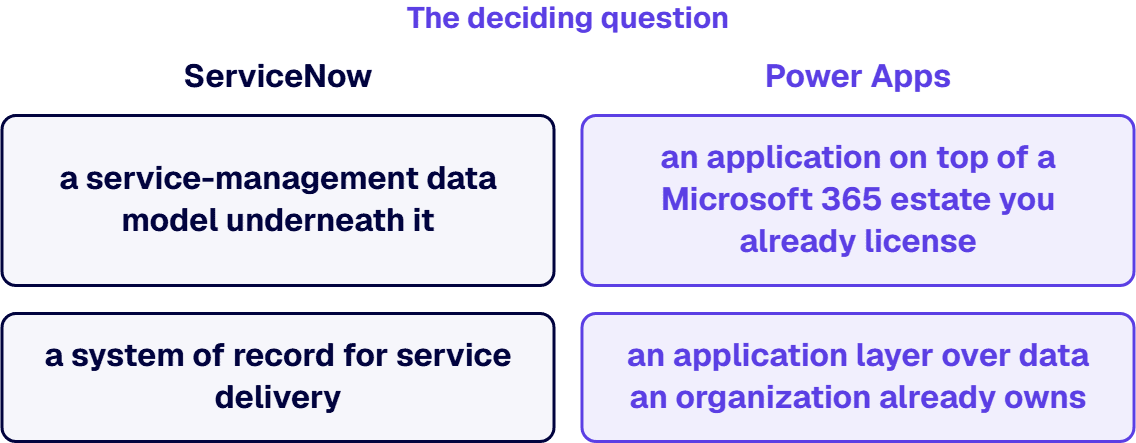
The practical consequence lands on the estate you already run. Microsoft’s position is that Power Apps and Power Automate for Microsoft 365 “enable users to extend and customize the Office experience: with these productivity apps, users can create applications and flows based on Microsoft 365 data” (Microsoft Learn). An organization whose approvals, documents, forms and identity already live in Microsoft 365 has a shorter distance to travel with Power Apps than the raw feature comparison suggests. An organization running a service desk against a CMDB has a much shorter distance with ServiceNow, for the same reason pointed the other way.
On the Microsoft side the primary control is the connector. Policy is written against what a maker is allowed to connect to, and Microsoft documents connectors as “strongly typed representations of RESTful application programming interfaces” that administrators then permit or block (Microsoft Learn). Managed environments layer tenant-scale administration on top of that, and neither control configures itself.
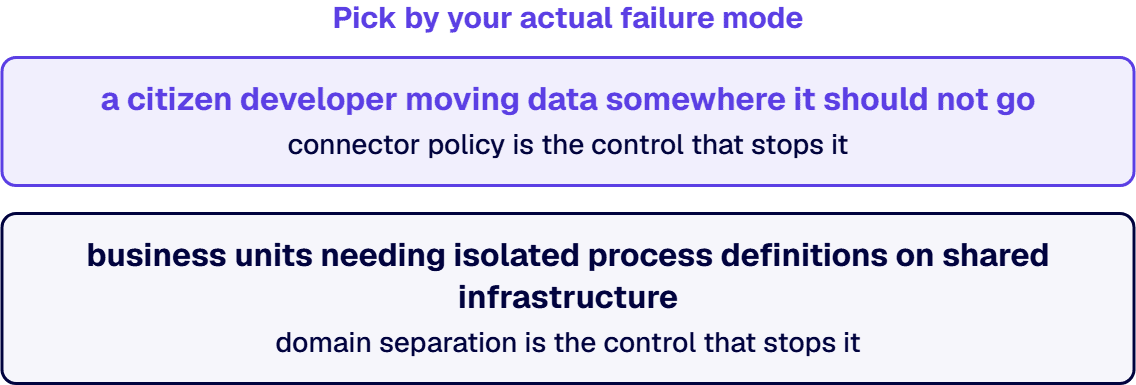
ServiceNow’s published control in the same space is structural rather than connector-based, separating flows and actions by domain for multitenant operation (servicenow.com). Pick by your actual failure mode rather than by the product. If the thing that worries you is a citizen developer moving data somewhere it should not go, connector policy is the control that stops it. If it is two business units needing isolated process definitions on shared infrastructure, domain separation is the control that stops it, and connector policy will not substitute.
Governance features and licence tier are not independent choices on the Microsoft side. The licensing-tier consequences are worked through in our comparison of Power Apps Premium and per-app licensing.
Power Apps development work ranges from $50,000 to $350,000 per project, depending on size, complexity and length. That band is our own attested figure and it is deliberately wide, because those three variables move it. We publish no midpoint and no typical figure, since a single number would mislead anyone whose project sits at either end.
i3solutions implements Power Platform licensing across Power Apps per-app and per-user plans, Power Automate per-flow and per-user plans, and the Microsoft 365 default entitlements where app complexity is low. What we will not do on this page is attach a dollar figure to any of those tiers. Microsoft owns those prices, they change, and a licensing number copied into a comparison page is stale the week after it is published. Read them from Microsoft, or ask Power Apps licensing consultants to model your specific user mix.
We quote no ServiceNow price at all. ServiceNow does not publish per-seat pricing on the product pages cited above, and inventing a figure to fill the other column of a comparison table is exactly the failure this page exists to avoid. Get that number from ServiceNow or from a ServiceNow partner.
One engagement is worth naming because it is the shape of problem this comparison usually starts from: an organization sitting on aging Microsoft forms infrastructure, deciding whether to modernize in place or move the whole process onto a different platform. Replacing 32 outdated InfoPath forms with Power Apps reduced maintenance demands by 40%, saving an estimated $150K-$200K annually in IT labor and support. The full engagement is written up in our Wisconsin National Guard InfoPath modernization case study.
Note what that outcome is and is not. It is evidence that a forms-and-approvals estate can be rebuilt on Power Apps with a measurable drop in maintenance load. It is not a comparison against ServiceNow, because no ServiceNow alternative was evaluated in that engagement and we would have no standing to score it if it had been.
Teams that reach question five and find both answers plausible usually have two separate problems wearing one name. The related decision between workflow-automation tooling specifically, rather than platforms, is worked through in our comparison of Power Automate and Workato, and the wider set of product-versus-product decisions sits in our service comparisons library.
The build side of that decision is what we do. Our Power Platform development services cover architecture, environment strategy, Dataverse design and the governance configuration that keeps a citizen-developer programme from turning into an unmanaged sprawl of apps. For staffing an existing programme rather than starting one, see hire Power Apps developers.
For a line-of-business workflow, frequently. For IT service management, you would be rebuilding process content that ServiceNow ships, since ServiceNow states that its ITSM product “aligns with ITIL standards to manage access and availability of services, fulfill service requests, and streamline services” (servicenow.com). Power Apps has no equivalent out of the box. Where the work is forms, approvals and departmental process rather than service management, replacement is realistic. Replacing 32 outdated InfoPath forms with Power Apps reduced maintenance demands by 40%, saving an estimated $150K-$200K annually in IT labor and support.
The platform that already holds the records your process runs on. ServiceNow positions Flow Designer to “Automate any process, from simple productivity to complex transformation, in a no-code environment” (servicenow.com), and Microsoft documents Power Apps and Power Automate as letting licensed users “create and run apps, bots, flows, and custom websites across multiple data sources that extend beyond Microsoft 365” (Microsoft Learn). Both statements are true and neither settles anything. What settles it is whether your process needs a service-management data model underneath it or an application on top of an estate you already license.
No. i3solutions is a Microsoft firm with no ServiceNow delivery record, no ServiceNow migration experience and no production benchmark comparing the two platforms. Every ServiceNow statement on this page is quoted from ServiceNow’s own published product pages and linked at the point of use so you can verify it against the vendor. If ServiceNow is the right answer for your process, go to a ServiceNow partner.
Power Apps development work ranges from $50,000 to $350,000 per project, depending on size, complexity and length. We publish no typical or midpoint figure, because the three variables in that sentence move a project from one end of the band to the other. Licensing is a separate line: i3solutions implements Power Platform licensing across Power Apps per-app and per-user plans, Power Automate per-flow and per-user plans, and the Microsoft 365 default entitlements where app complexity is low. Current per-seat prices should be read from Microsoft rather than from a comparison page.
They solve different risks. Microsoft’s primary control is the connector, and Microsoft states that “Power Platform admin center data policies allow administrators to control access to these connectors in various ways to help reduce risk in your organization” (Microsoft Learn), with managed environments described as “a suite of premium capabilities that allow admins to manage Power Platform at scale” (Microsoft Learn). ServiceNow’s published control in this area is structural, offering domain-separated flows that “Create flows and actions in multitenant environments, a feature ideal for MSPs and large enterprises” (servicenow.com). Connector policy addresses data leaving where it should not; domain separation addresses business units needing isolated process definitions.
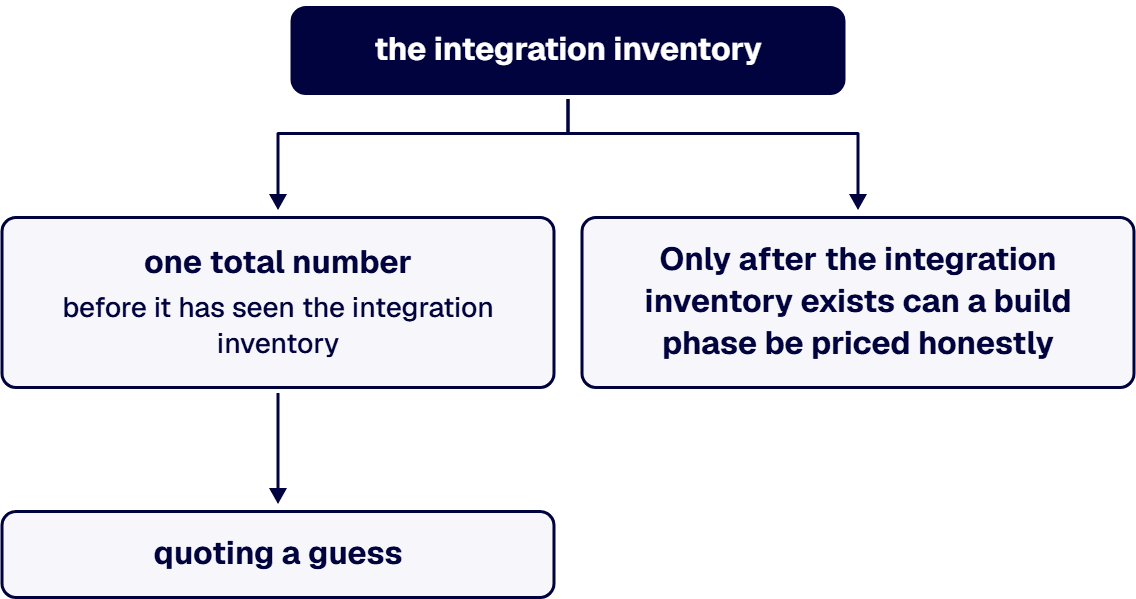
Enterprise workflow automation consulting engagements typically range from $75,000 to $350,000 for Phase 1 assessment and pilot delivery, depending on process complexity, integration surface area, and compliance framework requirements. Read the phase in that sentence carefully. That band is what it costs to find out whether the programme works, not what the finished programme costs. A defensible budget is that band, plus a build phase priced by how many systems the flows have to reach and how hard each one is to reach, plus a run cost that does not stop at go live. Platform licensing sits outside all three, because it is a Microsoft cost rather than a consulting cost. Any firm that hands a large enterprise one total number before it has seen the integration inventory is quoting a guess, and that difference tends to come back later as change orders. So the useful thing to take from a cost page is not a figure to paste into a spreadsheet. It is the short list of variables that decide which end of a band you land on, and which of them you can measure before you commit.
Workflow automation is priced by integration and evidence, not by the number of processes on the list. Two programmes with the same process count can differ by a factor of five, and the difference is almost always in these four places.
The integration surface. This is the largest driver and the one most often missed at estimate time. A flow that lives entirely inside Microsoft 365 is a different build from one that has to reach a line of business system with no supported API, a mainframe behind a middleware layer, or a partner network with its own change control. Count the systems a flow touches, not the steps in the flow.
Branching, not length. A twelve step linear approval is straightforward. A four step approval with conditional routing by dollar threshold, delegation rules, and an exception path that hands off to a human is not. Estimates break on exception paths, because the process as described is always cleaner than the process as it runs.
The evidence obligation. Automation inside a regulated boundary has to produce proof that it behaved. Audit trails, access control documentation, data residency constraints and retention rules are engineering work, and they cost far more retrofitted than designed in. If your contracts already cite a framework, that framework is in scope whether or not it appears in the statement of work.
The condition of the data and permissions underneath. Automating on top of a permission model nobody has audited moves cost out of the flow and into the remediation that has to happen before anyone will trust the flow’s output.
List every system each candidate process touches, and mark each one supported, partly supported, or unsupported. That single list explains more estimate variance than any other artifact, and you can build it internally in a couple of weeks without buying anything. If a firm can price your programme without seeing it, ask what it assumed.
Phase 1 is assessment and pilot delivery: discovery against the real systems rather than a workshop, a documented current state, the integration inventory, a control mapping against the frameworks your contracts already cite, and a small number of automations running in production with real users on them. Price it as a fixed scope you can complete, read, and stop after. A pilot running on real data is the cheapest available test of the business case, and skipping it means buying the whole programme on the strength of a slide.
Only after the integration inventory exists can a build phase be priced honestly. Budget the run cost at the same time. Flows break when the systems beneath them change. Somebody has to own connector credentials, watch for failures, and repair flows when an upstream API version moves. That is a permanent operating line, not a warranty period, and a programme with no named owner for it degrades quietly until people route around it.
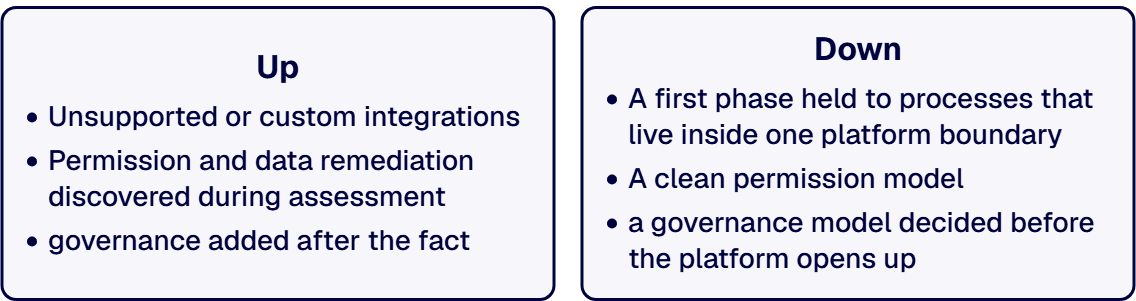
Up. Unsupported or custom integrations, each one priced individually. Multiple compliance frameworks in scope at once, because the control mappings have to be cross walked rather than repeated. Permission and data remediation discovered during assessment. Retiring an existing estate instead of building greenfield, which turns the work into a migration with parallel running and a cutover. An adjacent practice gives a sense of the elapsed time that adds. Enterprise InfoPath migration engagements at i3solutions typically run 13 to 16 weeks elapsed time across four phases. And governance added after the fact, once an open platform has produced hundreds of flows nobody can inventory.
Down. A first phase held to processes that live inside one platform boundary. Reusable patterns, where the second and third automations inherit the connection, error handling and logging design from the first. A clean permission model. Internal subject matter experts who are genuinely available, which is real money even though it never appears on an invoice. And a governance model decided before the platform opens up, which is cheaper by a wide margin than reconstructing one after an audit finding.
Two lines belong in the budget even though they are the first ones cut. Governance, for the reason above. And change management, because an automation nobody adopts costs exactly what it cost to build and returns nothing.
Platform licensing is the one number you should never take from a consulting proposal. It is a Microsoft cost, the rates change, and it should be priced at budget time from Microsoft’s own Power Automate pricing page and the licensing types documentation on Microsoft Learn, which set out what each license actually entitles. Microsoft also publishes its own Power Platform adoption guidance, which treats governance as a standing programme function rather than a project task.
Bring in a senior Microsoft delivery team when the integration surface crosses systems your team does not own, when a compliance framework has to be evidenced rather than asserted, or when an earlier attempt has already stalled.
i3solutions is a Microsoft Partner with 30 years of delivery experience. i3solutions has completed more than 600 Microsoft platform implementations. Scot co-founded i3solutions nearly 30 years ago with a clear focus: US-based expert teams delivering complex solutions and strategic advisory across the full Microsoft stack. Those facts matter to a cost conversation for one narrow reason: most of the variance in a workflow automation estimate is integration and permissions archaeology, and that is a function of how many estates a team has actually opened up. That is what decides the number in those cases: estimating experience rather than a rate card.
On governance at scale, i3solutions runs a governed Power Platform for a federal defense agency supporting roughly 10,000 personnel across about 180 locations, which works because it is governed, not despite it. A stalled programme is often worth recovering rather than restarting. One rescued program for a nuclear operator saved about $293K a year and returned its full cost within three months. The full account of that pattern sits on the workflow automation program rescue page.
The published Phase 1 band above is stated on the enterprise workflow automation page, where the scope behind it is described in full, and the delivery approach it prices is described in the workflow automation solutions overview. i3solutions does not publish a total programme number, for the reason given at the top: the build phase is priced by integration count and depth, and those are not knowable before the assessment. One scope boundary is worth stating plainly because it changes the shape of the cost: an engagement does not produce managed service ownership or a replacement for your internal team. The run cost stays with your organisation by design.
If you are assembling the finance case rather than the technical one, the workflow automation business case covers how to frame the spend and the workflow automation ROI analysis covers what gets measured afterwards.
Enterprise workflow automation consulting engagements typically range from $75,000 to $350,000 for Phase 1 assessment and pilot delivery, depending on process complexity, integration surface area, and compliance framework requirements. That band covers assessment and pilot delivery only. It is not a total programme figure. The full budget is that band plus a build phase priced by the number and depth of system integrations, plus an ongoing run cost, with platform licensing sitting outside all three as a Microsoft cost.
Because the largest cost driver is the integration surface, and it is not knowable from a discovery call. A flow contained inside Microsoft 365 and a flow that has to reach a line of business system with no supported API differ by an order of magnitude in effort, and the count of the second kind is what decides the build cost. A firm that produces a total before the inventory exists has either made assumptions it has not shown you, or expects to recover the difference through change orders.
Treat it as excluded until a proposal states in writing that it is included. Licensing is a Microsoft cost rather than a consulting cost, the rates change, and it should be priced from Microsoft’s current published rates at the time you build the budget. Two other lines get assumed into an implementation number and belong outside it: the internal effort of your own subject matter experts, and the ongoing run cost once flows are live.
It is a permanent operating line rather than a warranty period. Flows break when the systems underneath them change, so somebody has to own connector credentials, monitor failures, and repair flows when an upstream API version moves. A programme with no named owner for that work degrades quietly until users route around it. An i3solutions engagement does not produce managed service ownership, so this cost stays with your organisation by design and should be budgeted from the start.
Four things, in order of impact. The integration surface, meaning how many systems the flows touch and how many of those have no supported API. Branching and exception paths rather than step count. Compliance framework requirements, because audit trails, access control documentation and retention rules are engineering work that has to be designed in. And the condition of the data and permissions underneath, since automating on an unaudited permission model moves cost into remediation before the flow can be trusted.
Build the integration inventory first, then buy Phase 1 as a fixed scope with named deliverables, then price build and run separately once Phase 1 reports. Ask every firm on your shortlist the same three questions and compare the specificity rather than the confidence: which systems do you expect to integrate with and how did you price the ones with no supported API, what are you assuming about the state of our permissions and what happens to the estimate if that assumption is wrong, and what does the run cost look like in year two once you have gone.
By Scot Johnson, Founder / CEO, i3solutions. Scot Johnson co-founded i3solutions 30 years ago with a focus on expert-led delivery, strategic advisory, and complex Microsoft-centered solutions for organizations where technology decisions carry operational, financial, and mission risk.
For an enterprise already standardized on Microsoft 365 and Azure, Power Automate is the default choice, and the burden of proof sits with the alternatives. The licensing math alone is hard to argue with: Microsoft’s published pricing runs $15 per user per month for attended automation and $150 per bot per month for unattended RPA, on identity, data loss prevention, and audit controls the estate already operates. UiPath earns its premium when the processes you are automating live mostly outside Microsoft: legacy ERPs, mainframe screens, Citrix sessions, document-heavy workflows needing industrial-grade orchestration. Blue Prism is justified in one situation: a regulated, high-volume unattended back office where its operating model is already embedded and the cost of moving exceeds the cost of staying.
That is the verdict in three sentences. The rest of this page shows the published numbers behind it, the honest case for each platform, and the governance question that actually decides the outcome in a regulated Microsoft estate.
Two of the three vendors publish list prices; one does not. That asymmetry is itself useful in a procurement conversation.
Confirm the Microsoft and UiPath figures on the vendors’ pricing pages before you build the business case; both adjust plans periodically. But the structural point survives any price refresh: for a Microsoft enterprise, Power Automate’s marginal cost is a line item, UiPath’s is a program budget, and Blue Prism’s is a negotiation. If you hold Microsoft 365 E3 or E5 licensing, a meaningful share of attended automation capability is already paid for. The comparison is never between three platforms at list price; it is between one platform you have partially bought and two you have not.
The case for Power Automate is not that it is cheaper, although it is. It is that in a Microsoft-centric enterprise the platform sits inside the security and identity perimeter you already govern. Flows authenticate through Entra ID, data movement is constrained by the tenant’s data loss prevention policies, and run history lands where your audit tooling already looks. Connectors to SharePoint, Teams, Outlook, Dynamics 365, and Dataverse are native, and the on-premises data gateway reaches back to SQL Server and SAP GUI sessions without a separate integration layer.
There is also a workforce argument that rarely makes the vendor comparison decks. Power Automate skills exist inside your business units today, because the attended tier ships with licenses your users already hold. That is a real advantage and a real risk at once: the accessibility that makes departmental automation fast also produces ungoverned sprawl when nobody owns the guardrails. We build for both sides of that trade in our Power Automate development services practice: production-grade automations engineered by senior developers, inside a governance structure that lets citizen-built flows exist without becoming an audit finding.
If your underlying question is the broader one, whether Power Automate genuinely counts as RPA at all, we answer that separately in our comparison of Power Automate and traditional RPA.
UiPath is the strongest pure-play RPA platform in the market, and pretending otherwise would make this page less useful to you. It earns its cost in recognizable situations. If your target processes are dominated by non-Microsoft systems, an Oracle ERP, mainframe green screens, thick-client applications in Citrix or VDI, UiPath’s computer-vision-driven UI automation is more mature there than Power Automate’s desktop flows. If your portfolio is document-heavy, its Document Understanding tooling for classification and extraction at volume is a genuine differentiator. And if you are orchestrating hundreds of unattended robots with complex queueing and retry logic, UiPath Orchestrator was built for exactly that job.
The honest test: mark which of your automation candidates touch a Microsoft surface. If most of the value sits outside the Microsoft estate, UiPath’s premium buys you something. If most sits inside, you are paying an enterprise platform price to reach systems your licensing already reaches.
Blue Prism built its reputation in regulated back offices, banking, insurance, healthcare administration, on a controlled, centralized operating model: no citizen developers, tightly managed release paths, audit trails designed for regulators. If you already run a Blue Prism estate at volume with an embedded delivery team, the switching cost is real and staying can be the defensible choice.
For a Microsoft enterprise making a fresh decision in 2026, the case is harder to make. The governance capabilities that once separated Blue Prism, role-based access, audit logging, controlled promotion between environments, now have direct equivalents in the Power Platform’s managed environments, DLP policy tiers, and pipeline-based ALM. Notably, Blue Prism’s own published comparison concedes Power Automate’s integration and cost advantages for Microsoft-centric organizations and rests its argument on governance. That argument deserves a serious answer, which brings us to the part of this decision vendor comparisons skip.
The pattern we see across regulated Microsoft estates: the platform decision gets weeks of evaluation, the governance design gets a paragraph. Eighteen months later, the audit does not ask which vendor you chose. It asks who can create automations that move regulated data, which environments they run in, how credentials are stored, what the promotion path to production is, and where the run history lives.
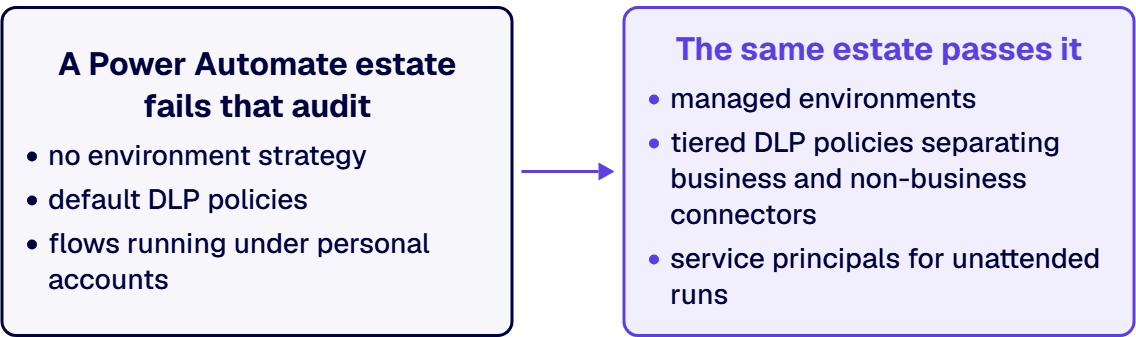
A Power Automate estate with no environment strategy, default DLP policies, and flows running under personal accounts fails that audit regardless of how good the platform is. The same estate with managed environments, tiered DLP policies separating business and non-business connectors, service principals for unattended runs, solution-based ALM with a real promotion pipeline, and Dataverse audit logging feeding your compliance tooling passes it, on licensing you largely already own. That configuration work is the true price of choosing Power Automate in a regulated industry, and it is a fraction of a multi-year Blue Prism commitment. It is the core of what our Power Platform development services team builds for enterprises in aerospace and defense manufacturing, financial services, and healthcare: environments where the automation platform has to survive an audit, not just a demo.
That is the fair reading of the whole comparison: Blue Prism sells governance as a product. In a Microsoft estate, governance is a discipline you configure into a platform you already license. Fund the discipline and you get Blue Prism-grade control at Power Automate prices. Skip it and you get sprawl, then a remediation project.
Designing, engineering and integrating the workflows themselves on Microsoft platforms is the scope of enterprise workflow automation services.
Both, by design. Cloud flows are API-based workflow automation. Desktop flows on the Process plan are genuine unattended RPA: screen-level automation of applications with no API, on your machines or Microsoft-hosted VMs, managed through the Power Platform admin center. The workflow label understates the unattended tier.
Yes, when the estate is configured for it. Managed environments, DLP policy tiers, service principal identity for unattended runs, solution-based ALM, and Dataverse audit logging are the load-bearing controls. The platform provides them; they are not on by default. Budget the governance work as part of the platform decision.
Microsoft’s published price is $150 per bot per month on the Process plan, or $215 for Hosted Process if Microsoft provides the virtual machine. Each plan covers one concurrent unattended run, so five simultaneous bots is five Process licenses. Attended automation is $15 per user per month on Premium.
When a defined slice of the portfolio genuinely needs UiPath’s strengths, typically Citrix or VDI automation, mainframe surfaces, or high-volume document extraction, and the rest is Microsoft-facing. Coexistence works when the boundary is written down: which platform owns which surfaces, one intake process, one governance standard spanning both. It fails when it is two shadow programs discovering each other at budget time.

US-Based Microsoft System Integrator | Est. 1997
© i3solutions. All rights reserved.
US-Based Microsoft System Integrator | Est. 1997
© i3solutions. All rights reserved.


